How to Showcase Your Remote Work Skills In An Interview?


As remote work continues to gain popularity, the ability to demonstrate your remote work skills during an interview has become increasingly important. Employers are looking for candidates who can thrive in a virtual environment, manage their time effectively, communicate clearly, and stay motivated without direct supervision.

Whether you’re an experienced remote worker or new to the concept, showcasing these skills can set you apart from other candidates and increase your chances of landing that coveted remote position.

In this blog, we’ll explore practical tips and strategies to help you effectively demonstrate your remote work skills in an interview. From highlighting your past remote experience to showcasing your proficiency with essential tools, we’ll cover everything you need to know to impress potential employers and secure your next remote job. Read on to discover how you can confidently present your remote work capabilities and stand out in the competitive job market.

Showcase Remote Work Skills In An Interview

When interviewing for a remote position, it’s crucial to showcase your ability to thrive in a remote work environment. Here are some key points to help you effectively demonstrate your remote work skills:
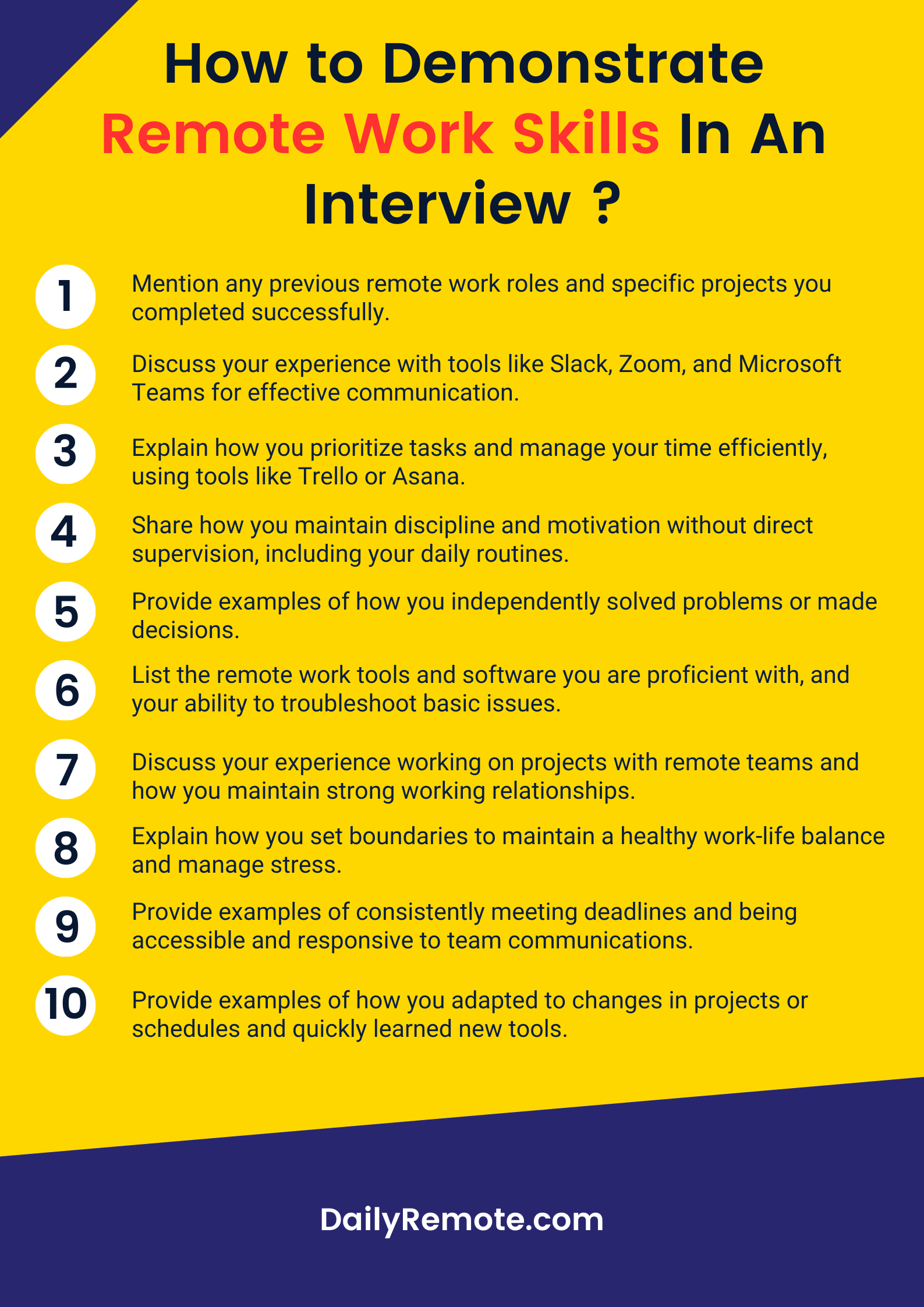
1. Highlight Remote Experience:

  • Mention Past Remote Roles: Clearly state any previous remote work experience in your resume and during the interview.
  • Specific Projects: Share specific projects or tasks you successfully completed while working remotely.

2. Show Communication Proficiency:

3. Exhibit Time Management:

  • Task Prioritization: Explain how you prioritize tasks and manage your time efficiently.
  • Productivity Tools: Mention any productivity tools (e.g., Trello, Asana) and techniques (e.g., Pomodoro Technique) you use.

4. Demonstrate Self-Motivation:

5. Problem-Solving Skills:

6. Technical Proficiency:

  • Software & Tools: List the remote work tools and software you are proficient with, such as project management tools, collaboration platforms, etc.
  • Tech Troubleshooting: Share your ability to troubleshoot basic technical issues on your own.

7. Collaboration and Teamwork:

  • Virtual Collaboration: Discuss your experience working on projects with remote teams.
  • Team Engagement: Explain how you foster team spirit and maintain strong working relationships despite the physical distance.

8. Adaptability and Flexibility:

  • Handling Changes: Provide examples of how you adapted to changes in projects or schedules.
  • Learning New Tools: Mention your ability to quickly learn and adapt to new tools and technologies.

9. Work-Life Balance:

10. Professionalism and Reliability:

  • Meeting Deadlines: Provide examples of how you consistently meet deadlines while working remotely.
  • Responsiveness: Describe your approach to being accessible and responsive to team communications.

By focusing on these key areas, you can effectively demonstrate your remote work skills and show potential employers that you are well-equipped to thrive in a remote work environment.

Showcase Your Remote Work Skills To Land A Remote Job

Successfully demonstrating your remote work skills in an interview is essential for landing a remote job. By highlighting your past remote work experience, showcasing your proficiency with communication and productivity tools, and providing concrete examples of your self-motivation, time management, and problem-solving abilities, you can present yourself as a strong candidate for any remote position.

Remember to emphasize your adaptability, collaboration skills, and ability to maintain a healthy work-life balance, as these qualities are highly valued in remote work environments. By preparing thoroughly, avoiding job search mistakes and articulating your remote work competencies clearly, you’ll be well on your way to impressing potential employers and securing your next remote role.

If you’re interested in looking for remote work, there’s no better place to start than DailyRemote. So, what are you waiting for? Get started today.  And now that you know how to showcase remote work skills in an interview, find the remote job of your dreams, start applying today. Join like-minded people in our


We made a cat drink a beer with Runway’s AI video generator, and it sprouted hands


A screen capture of an AI-generated video of a cat drinking a can of beer, created by Runway Gen-3 Alpha.

In June, Runway debuted a new text-to-video synthesis model called Gen-3 Alpha. It converts written descriptions called “prompts” into HD video clips without sound. We’ve since had a chance to use it and wanted to share our results. Our tests show that careful prompting isn’t as important as matching concepts likely found in the training data, and that achieving amusing results likely requires many generations and selective cherry-picking.

An enduring theme of all generative AI models we’ve seen since 2022 is that they can be excellent at mixing concepts found in training data but are typically very poor at generalizing (applying learned “knowledge” to new situations the model has not explicitly been trained on). That means they can excel at stylistic and thematic novelty but struggle at fundamental structural novelty that goes beyond the training data.

What does all that mean? In the case of Runway Gen-3, lack of generalization means you might ask for a sailing ship in a swirling cup of coffee, and provided that Gen-3’s training data includes video examples of sailing ships and swirling coffee, that’s an “easy” novel combination for the model to make fairly convincingly. But if you ask for a cat drinking a can of beer (in a beer commercial), it will generally fail because there aren’t likely many videos of photorealistic cats drinking human beverages in the training data. Instead, the model will pull from what it has learned about videos of cats and videos of beer commercials and combine them. The result is a cat with human hands pounding back a brewsky.

A few basic prompts

During the Gen-3 Alpha testing phase, we signed up for Runway’s Standard plan, which provides 625 credits for $15 a month, plus some bonus free trial credits. Each generation costs 10 credits per one second of video, and we created 10-second videos for 100 credits a piece. So the quantity of generations we could make were limited.

We first tried a few standards from our image synthesis tests in the past, like cats drinking beer, barbarians with CRT TV sets, and queens of the universe. We also dipped into Ars Technica lore with the “moonshark,” our mascot. You’ll see all those results and more below.

We had so few credits that we couldn’t afford to rerun them and cherry-pick, so what you see for each prompt is exactly the single generation we received from Runway.

“A highly-intelligent person reading “Ars Technica” on their computer when the screen explodes”

“commercial for a new flaming cheeseburger from McDonald’s”

“The moonshark jumping out of a computer screen and attacking a person”

“A cat in a car drinking a can of beer, beer commercial”

Will Smith eating spaghetti” triggered a filter, so we tried “a black man eating spaghetti.” (Watch until the end.)

“Robotic humanoid animals with vaudeville costumes roam the streets collecting protection money in tokens”

“A basketball player in a haunted passenger train car with a basketball court, and he is playing against a team of ghosts”

“A herd of one million cats running on a hillside, aerial view”

“video game footage of a dynamic 1990s third-person 3D platform game starring an anthropomorphic shark boy”

Professional Computer Setup for Enhanced Productivity


We’ve all been there – staring at a sluggish computer screen, waiting for programs to load, or battling with a disorganized desktop. It’s frustrating, time-consuming, and downright productivity-killing. But what if we told you there’s a better way? At PC Geeks, we understand the importance of a well-optimized professional computer setup, and we’re here to show you how it can revolutionize your work life.

Professional Computer Setup for Enhanced Productivity

The Power of Professional Optimization

Think of your computer as a high-performance car. Sure, it might run fine off the lot, but with a professional tune-up, it can really shine. The same goes for your computer. Our tech wizards at PC Geeks don’t just set up your machine; we optimize it for peak performance. We’ll fine-tune your system settings, remove bloatware, and ensure everything runs like a well-oiled machine.

Speed: Your New Best Friend

Remember the last time you waited an eternity for your computer to boot up? With a professional setup, those days are over. We’ll optimize your startup process, ensuring your computer springs to life faster than you can say “PC Geeks.” And it’s not just about boot times – every program you use will run smoother and quicker, saving you precious minutes throughout your day.

Tailored to Your Needs

One size doesn’t fit all when it comes to computer setups. Whether you’re a graphic designer, a data analyst, or a small business owner, your needs are unique. Our team at PC Geeks takes the time to understand your specific requirements and tailors your setup accordingly. We’ll ensure you have the right software, the most efficient layouts, and the perfect settings to maximize your productivity.

Security: Peace of Mind in the Digital Age

In today’s interconnected world, cybersecurity is more important than ever. A professional setup isn’t just about speed and efficiency – it’s about protection. We’ll implement robust security measures, set up automatic updates, and educate you on best practices. With PC Geeks on your side, you can focus on your work without worrying about cyber threats.

The Ergonomic Advantage

Productivity isn’t just about software – it’s about your physical setup too. Our experts will help you create an ergonomic workspace, reducing strain and fatigue. From monitor placement to keyboard settings, we’ll ensure your setup is comfortable and conducive to long, productive work sessions.

Ongoing Support: We’ve Got Your Back

At PC Geeks, we believe in building lasting relationships. Our support doesn’t end after the initial setup. We’re always here to answer questions, troubleshoot issues, and provide updates. Think of us as your personal IT department, always ready to keep your productivity at its peak.

Invest in Your Productivity

In today’s fast-paced world, time is money. A professional computer setup from PC Geeks is an investment in your productivity, your efficiency, and ultimately, your success. Don’t let a suboptimal setup hold you back.

Let us help you unlock your full potential and take your work to the next level.Ready to supercharge your productivity? Contact PC Geeks today and experience the transformative power of a professional computer setup. Your future, more productive self will thank you!

Max’s SharePlay feature for iOS is now available to all ad-free subscribers


Back when Max was still known as HBO Max, it released a redesigned app that added SharePlay for Apple devices, but only in the US. Now, the streaming service is rolling out the feature to all its users around the world. SharePlay is now available to all Max users paying for Ad-Free and Ultimate Ad-Free plans, allowing them to hold and join watch parties over FaceTime and iMessage, no matter where they are.

Users can start watching with friends by hitting the “share” button either on the details section of each title or within the FaceTime app. Each session can have as many as 32 participants, but they all have to be Max subscribers. That means people from regions where Max isn’t available, such as in Asian countries, won’t be able to hop on and watch with their pals in the US or Europe. Warner Bros. is planning to expand Max’s reach to South East Asia later this year, but it warns on its website that the timeline could still change.

SharePlay for Max works on iPhones, iPads, Apple TVs and Vision Pro headsets. To initiate a watch party on iPhones, iPads and Vision Pros, users have to find the Share icon on the details page of a show or a movie, enter the contacts they want to share with and initiate a FaceTime call. If they choose Messages on their mobile devices, their friends will get a message asking them to join SharePlay. On Apple TV, users will have to open FaceTime first before clicking the SharePlay button and choosing Max from the app list.

Messen Sie das Risiko Ihrer Daten


Schockierende Wahrheit über Datensicherheit und wie Sie Ihr Unternehmen schützen können

Im digitalen Zeitalter sind Daten das Lebenselixier eines jeden Unternehmens. Doch mit der Zunahme von Cyberangriffen sind Ihre Daten anfälliger als je zuvor. Sind Sie auf den Fallout vorbereitet? Dieser bahnbrechende Bericht zeigt die alarmierende Realität von Datenschutzverletzungen und Ransomware-Angriffen und die verheerenden Auswirkungen, die sie auf Ihr Unternehmen haben können.  

In diesem augenöffnenden Bericht erfahren Sie mehr:

  • Die schockierenden Statistiken hinter Cyberangriffen und warum Ihr Unternehmen ein Ziel ist
  • Die versteckten Schwachstellen in Ihrer Cloud-Infrastruktur und wie Sie sie schützen können
  • Die lähmenden Kosten von Ransomware und wie Sie vermeiden können, ein Opfer zu werden
  • Die Folgen von Datenschutzverletzungen im Gesundheitswesen auf Leben und Tod und wie Sie Patientendaten schützen können
  • Bewährte Strategien für die Datenwiederherstellung und Ausfallsicherheit, um den Schaden eines Angriffs zu minimieren

Tomboy Supremacy Free Download (v0.6a Special)


Tomboy Supremacy Free Download By WorldofpcgamesTomboy Supremacy Free Download By Worldofpcgames

Tomboy Supremacy Direct Download:

Tomboy Supremacy Video Game A US Army soldier returns home to his family in Southern Missouri after four years overseas. Now he’s dealing with his younger sister Cheyenne, who is tsundere with a brother complex, his other younger sister Mary-Sue, who is at odds with the squirrels of Greene County, MO, and his elder half-sister Luna, who has the mentality of a crazy drunken teddy bear called Cozmo. The game’s renderings are of excellent quality, providing a visually interesting experience. While the visual aesthetics are generally good, tiny anomalies, notably in hand portrayals, sometimes disturb the seamless immersion. Addressing these details may increase the game’s visual attractiveness.  The use of animations, although there, falls short of expectations.

The low quality detracts from the entire game experience, resulting in a wasted chance to increase player engagement. A purposeful reevaluation and refinement of animations might result in a more polished end product. The narrative, although technically competent, takes a hazardous turn toward absurdity. The developer’s effort to inject comedy via high unpredictability sometimes undercuts the game’s promise. Striking a precise balance between technically excellent writing and refined comedy may increase the overall impact of the storey. “Tomboy Supremacy” differentiates itself by departing from the typical character designs seen in the game industry.

Features and System Requirements:

  • Build relationships with a diverse cast of characters who can join you on your adventures, each with their own backstory and special abilities.
  • Enhance your abilities through a comprehensive skill tree, allowing you to tailor your character’s strengths and weaknesses to suit your play style.
  • Engage in dynamic and strategic combat with a variety of weapons and martial arts techniques. Combine different styles for unique combat moves.

1 :: Operating System :: Windows XP/7/8/8./10.
2 :: Processor: AMD Ryzen 5 7600X @ 3.00 GHz or Intel Core i5-13600K @ 3.00 GHz
3 :: Ram :: 8 GB RAM
4 :: DirectX: Version 12
5 :: Graphics:: 1GB VRAM / DirectX 10+ support
6 :: Space Storage:: 866 MB space

Turn Off Your Antivirus Before Installing Any Game

1 :: Download Game
2 :: Extract Game
3 :: Launch The Game
4 :: Have Fun 🙂

Concord Has No Battle Pass — “You Own Concord, Concord Doesn’t Own You”


With the beta over, Firewalk Studios is revealing what players can expect with the launch of Concord, along with what’s coming after the game’s release. Notably, one popular element seen in many online shooters will be missing on purpose: a battle pass.

Mark DeRidder, gameplay animation director at Firewalk, shared this decision on X by adding: “You own Concord, Concord doesn’t own you.” DeRidder, for his part, previously worked on one of the most popular games in the world with a battle pass as a developer at Raven Software on Call of Duty: Warzone, per LinkedIn.

While there is no battle pass, Firewalk is promising “new Freegunners, maps, modes, and more” after Concord launches on August 23. Additionally, this will come with “no additional cost.” Concord isn’t free-to-play, but instead costs $40.

Concord was first unveiled at a PlayStation State of Play in May. The 5-vs-5 online shooter seemingly mixes together elements of Overwatch and Valorant, with vibes from the Guardian of the Galaxy movies. Concord has had early access and open-beta periods spread throughout this month, with the latter ending over the weekend on July 21.

For more, check out GameSpot’s Concord preview. The PC and PS5 online shooter is up for preorder in standard and digital deluxe editions.

OWC Envoy 1TB Ultra-Portable NVMe SSD


In his article for TechRadar, Alastair Jennings evaluates the OWC Envoy 1TB portable SSD, emphasizing its high performance, reliability, and affordability for creatives and business professionals. This ultra-portable NVMe SSD offers a perfect blend of performance, capacity, size, and flexibility, making it an excellent choice for the pro market.

Sleek Design and Durable Build
The OWC Envoy 1TB impresses with its sleek, palm-sized design and aircraft-grade aluminium housing. This durable build provides essential heat dissipation, preventing thermal throttling during intensive tasks such as video editing. The SSD features a single USB Type-C connector, ensuring a simple and straightforward setup. It comes pre-formatted with Apple File System (APFS) for immediate use with Mac devices but can be easily reformatted for Windows devices using OWC’s free Drive Guide or other software.

Impressive Performance
Jennings’ performance tests on a MacBook Pro M1 Max revealed read speeds of 826MB/s and write speeds of 961MB/s using the AJA System Test Lite. The ATTO Disk Benchmark recorded read speeds of 946.36MB/s and write speeds of 1010MB/s. Reformatting to ExFAT for use with an Intel NUC resulted in even better performance, with read speeds of 1036.84MB/s and write speeds of 1041.76MB/s on CrystalDiskMark. This high performance makes the OWC Envoy 1TB ideal for various uses, especially for creatives who need a reliable drive for intensive tasks like video, photo, and audio production.

Versatility and Compatibility
The OWC Envoy 1TB’s compact size allows for easy attachment to a wide range of devices, expanding internal storage. It is compatible with Macs, iPads, PCs, Android tablets, smartphones, cameras, and more. This versatility makes it perfect for on-the-go professionals who need reliable, high-speed storage.

Conclusion
Overall, the OWC Envoy 1TB is a superb portable SSD that delivers on performance. Its combination of speed, portability, and rugged design makes it an excellent option for creative professionals. If you’re looking for a high-performance portable SSD, the OWC Envoy 1TB is a top contender.

Read the full article by Alastair Jennings for TechRadar HERE

I want my visual studio 22 asp.net web project running on a Windows computer to be opened on the ip of my own windows machine, not on localhost


When I run the open source web project that I opened in Microsoft Visual Studio 2022 on my Windows device, it runs on localhost:5001 port in the Chrome browser, but when I run this project, I want my device to receive it via IPSI. For example, I want it to be 192.168.192.130:5001 because I want to access and look at it from another device on the same network. Since it runs on localhost, I cannot access the web project even though it is on the same network. Even if I open the port in the firewall, I cannot access it. My problem now is to take the IP address of this web project to the IP of my own device, as I said. My open source project is nopcommerce and I downloaded the source codes from its website.

In Visual Studio 22, I tried to change my web project in the properties section so that it receives the IP address of the machine instead of localhost, that is like 192.168.192.130, but I could not find how to change it. I don’t know how to do this because I don’t know how to use visual studio.
enter image description here