On Sunday, global temperatures reached their highest levels in recorded history(source may be paywalled; alternative source), with a daily average of 17.09 degrees Celsius (62.76 degrees Fahrenheit). “The historic day comes on the heels of 13 straight months of unprecedented temperatures and the hottest year scientists have ever seen,” adds the Washington Post, citing preliminary data from the Copernicus Climate Change Service. From the report: Though Sunday was only slightly warmer than the world’s previous hottest day, Copernicus researchers noted, it was extraordinarily hotter than anything that came before. Before July 2023, Earth’s daily average temperature record — set in August 2016 — was 16.8 degrees Celsius (62.24 degrees Fahrenheit). But in the past year, the global has exceeded that old record on 57 days.
Scientists have been tracking global temperatures only for the past few centuries. Yet there is good reason to believe that Sunday was the hottest day on Earth since the start of the last Ice Age more than 100,000 years ago. Research from paleoclimate scientists — who use tree rings, ice cores, lake sediments and other ancient material to understand past environments — suggests that recent heat would have been all but impossible over the last stretch of geologic time. “We are in truly uncharted territory,” Copernicus director Carlo Buontempo said in a statement. “And as the climate keeps warming, we are bound to see records being broken in future months and years. What is truly staggering is how large the difference is between the temperature of the last 13 months and the previous temperature records.”
Shadows of the Damned released for PlayStation 3 and Xbox 360 in 2011, and by all accounts it sold terribly. A collaboration between Suda51 and Shinji Mikami, on paper it’s a project that should have sold decently: a surreal third-person shooter inspired by Kafka and straight-to-VHS schlock? No wonder EA published it!
Well actually, the trailer above—which celebrates the imminent release of the game’s PC debut—goes a little way towards explaining why it sold poorly. Console games in 2011 were all about macho grey shooters, not whatever that is. Unsurprisingly, it’s since established a cult following, so hopefully the new edition meets a better reception come October when it’ll release on Steam.
While the trailer is certainly bracing and stylish, it kinda undersells how crude—or let’s just say stupid—Shadows of the Damned can be on a moment-to-moment basis. It straddles the line between deliberately and inadvertently dumb, and while the art style, the mood, and the overall presentation are great-verging-brilliant, it’s definitely not a good shooter if that’s what you’re looking for.
It’s nice to see the game re-emerge, even though it wasn’t quite what Mikami and Suda51 had in mind when setting out. Mikami later bemoaned EA’s negative influence on the development of the game, while also noting that if they had stuck to Suda51’s initial vision it probably would have sold even worse.
The new version of Shadows of the Damned features unspecified “new content”, New Game Plus, some new costumes, and releases October 31. In related news, the Lollipop Chainsaw remaster is still on the way.
Keep up to date with the most important stories and the best deals, as picked by the PC Gamer team.
In the construction sector, it’s paramount for projects to maintain precision, adhere to timelines, and prioritize safety. Although these principles are fundamental across various industries, the construction process is intricate, marked by numerous interdependent components. This complexity is precisely why the advantages of integrating 3D modeling into construction practices are so profound. Cutting-edge technologies, such as 3D modeling derived from drone surveys, are revolutionizing the construction landscape.
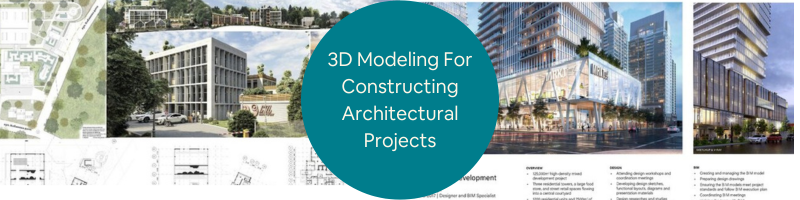
Throughout every project’s life cycle, from initiation to construction and beyond, 3D modeling software proves instrumental in keeping construction endeavors aligned with schedules and budgets. The foundation for reaping these benefits lies in creating accurate 3D models. The good news is that achieving accuracy is not a formidable challenge once you grasp the fundamentals. This article will look into how companies and firms utilize 3D modeling design services in constructing architectural projects.
The history of 3D modeling is a captivating journey that traces its roots to the early 1960s. The pioneering era saw the emergence of computer graphics and the development of wireframe models, laying the foundation for three-dimensional digital representation. The 1970s witnessed significant strides with advancements in rendering techniques, giving rise to the first 3D modeling software. However, it was in the 1980s that the field truly blossomed, marked by the introduction of powerful workstations and the widespread adoption of 3D computer-aided design (CAD) systems in industries like aerospace and automotive.
The 1990s brought democratization with accessible software like Autodesk 3ds Max and Blender, enabling a broader spectrum of users to engage and utilize 3D architectural modeling firms in various aspects, such as architectural projects. The new millennium ushered in photorealistic rendering, intricate simulations, and the integration of 3D modeling across diverse sectors, from entertainment and gaming to architecture and healthcare. Today, 3D modeling is an integral part of digital innovation, continually evolving with cutting-edge technologies like virtual reality and artificial intelligence shaping its ever-expanding landscape.
Understanding various 3d modeling types
Before the advent of 3D modeling, the world of design, architecture, and visualization existed in a fundamentally different landscape. Creativity and planning were guided by traditional methods, offering a glimpse into a simpler yet more challenging era for those involved in various industries.
Within the modern realm of 3D modeling, several types have gained popularity, including simple polygons, 3D primitives (basic polygon-based shapes like spheres, pyramids, cylinders, cones, and cubes), spline curves, and NURBS (non-uniform rational B-spline) – intricate shapes defined by bezier curves. Despite their high computational complexity, these models play a crucial role in constructing a comprehensive 3D representation.
Before construction
In the project’s early stages, 3D modeling empowers teams to simulate potential designs, estimate costs, and identify flaws within architectural models. Accurate 3D models of the surrounding landscape aid in:
Calculating costs related to ground leveling, foundation pouring, and preparation work.
Simulating weather effects, such as the potential for flooding.
Estimating a project’s impact on the surrounding neighborhood and terrain.
Commencing with the terrain, an exemplary 3D model combines real-world images and computerized simulations, evolving into a near-perfect match of the proposed project. This model serves as a collaborative platform for principal stakeholders, facilitating the review of potential changes and ensuring alignment. Unlike conventional methods, 3D modeling permits design engineering professionals, survey managers, and project managers to navigate a virtual project model before physical construction begins.
Aside from visualizing aesthetics, accurate 3D modeling helps forecast project costs and provides precise measurements for materials and labor. The ability to iterate on materials and engineering solutions during the planning phase reduces project costs without compromising safety or stability. Enhanced accuracy in the initial stages minimizes the likelihood of costly rework caused by errors in the initial data. As 3D modeling advances and data collection becomes more extensive, the incidence of construction project rework diminishes significantly.
Throughout the construction phase, 3D models ensure projects remain on track and adhere to timelines. Comparisons between the current worksite state, pre-work surveys, and overlaying linework to verify site surface alignment with projections become seamless processes. Drones, employed for surveying, can complete detailed site scans swiftly using lidar or photogrammetry. These scans, coupled with GPS location data, enable the digital recreation of a site surface with an accuracy of up to 1/10 foot.
The advantages of aerial surveys over on-foot assessments are evident – drones cover expansive construction sites rapidly, report data promptly, and don’t disrupt ongoing work. They are particularly suited for safety checks on active construction sites, providing non-invasive aerial views that ensure worker safety. The accessibility and comprehensibility of 3D architectural site plan rendering services facilitate seamless data sharing. 3D modeling aids in generating reports for external stakeholders, such as clients or subcontractors, demonstrating progress towards deadlines and offering an in-depth view of the worksite without necessitating physical visits.
Possessing a highly accurate 3D simulation of the site enhances the project’s ability to meet deadlines. Early detection and resolution of potential issues contribute to a smoother construction process, minimizing the risk of delays. In essence, 3D modeling, particularly when integrated with drone technology, emerges as a transformative force in the construction industry, offering a multifaceted approach to project management, cost estimation, and safety oversight.
Once a construction project wraps up, the 3D models of the site from 3D modeling experts become valuable assets for future endeavors. These models can be archived and ready for use whenever modifications, retrofits, updates, or extensions are in the cards. Leveraging cloud-based data services ensures this repository remains easily accessible from any corner of the world without cluttering local servers. Inserting new additions directly into the 3D models offers a virtual test run before any physical changes are initiated.
This foresight saves valuable time and translates into substantial cost savings, potentially amounting to thousands of dollars. Accurate 3D modeling preserves data for posterity, allowing architects, engineers, and subcontractors to explore various scenarios related to potential changes in the project. This accessibility extends to information about the surrounding terrain and improvements, fostering informed decision-making even after the project’s completion.
In addition to specific benefits of 3D modeling before, during, and after the construction process, it also offers other advantages that are worth mentioning:
Accelerating innovation
As technology advances, every facet of our lives witnesses improvements, and the construction sector is no exception. Whether through Building Information Modeling services (BIM) or 3D modeling, technology empowers the construction industry to achieve more in less time and at a reduced cost. The evolution of architectural plans, thanks to 3D modeling, encourages architects and designers to unleash their creativity and experiment with novel ideas.
Better understanding
Realistic lighting and the inclusion of suitable furniture and décor options allow for a more vivid depiction of spaces such as kitchens or dining areas. This nuanced approach enhances comprehension and provides a comprehensive view of the envisioned design.
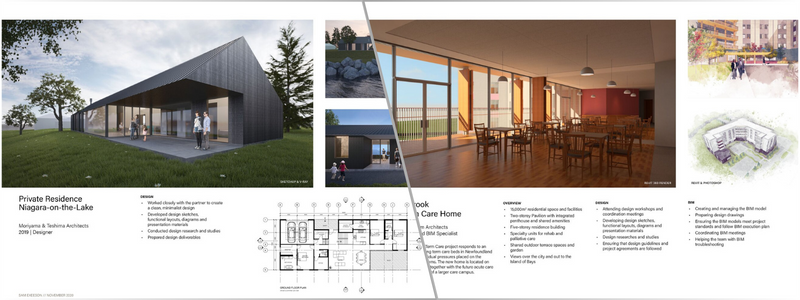
The simplicity offered by 3D modeling in comprehending a structure in its surroundings is unparalleled. Architects and designers can virtually surround a building with a lush landscape, transforming it into a dream house. Compared to conventional 2D photographs, architectural 3D modeling firms introduce a higher level of realism, enabling visualization of textures and details like the tile used for a room’s floor.
Enhanced Collaboration between Teams
Incorporating 3D modeling in construction fosters superior design and material utilization. The ability to rotate 3D models for diverse views and angles promotes meticulous examination, aiding in identifying drawing flaws and understanding surface patterns. Additional perks include virtual walkthroughs with 3D virtual reality rendering services, personalized interior renderings, cost-effectiveness, and improved collaboration among construction teams.
Preventing problems before they arise
Integrating 3D modeling in the building industry offers numerous advantages, including an expedited design process and the ability to identify potential design challenges before they manifest. By assembling all elements cohesively, 3D modeling provides a realistic preview of the completed project, bringing it to life without any physical alterations.
The shift from the physical distribution of building plans to a digital landscape is indicative of the technological strides in the construction industry. The services rendered by 3D construction rendering professionals have become integral, transforming the construction process into a predominantly digital endeavor. Presentations for architecture have transitioned from traditional draft tables to the convenience of PCs and tablets.
Wrapping it up
The widespread adoption of 3D modeling in construction has ushered in transformative benefits. Accurate 3D modeling facilitates a retrospective and prospective view of a project, allowing stakeholders to assess its progress, compare the current state with the plan, and project its completion timeline. The integration of drone technology further enhances these outcomes, contributing to lower costs, improved lead times, and heightened safety and stability throughout the construction process. Drones, with their capability for high-resolution scans, empower ongoing projects, reducing costs and enhancing consistency for construction professionals.
How Cad Crowd can help
Cad Crowd serves as a platform where you can tap into a pool of talents who specialize in 3D modeling. You can search for qualified freelancers who can help you bring your architectural projects to life and ensure a seamless and smooth construction process from start to finish. Contact us at cadcrowd.com to discuss how Cad Crowd can tailor 3D modeling solutions to meet your unique architectural needs.
Being a Deadpool defender can be difficult. In just about any media where he appears, the character is exactly what his strongest critics think he is: an anti-hero with a strong affinity for irreverent violence, and a juvenile, obnoxious vessel for meta asides and a bushel of dick jokes. (“A bushel of dicks” would be a pretty solid Deadpool-ism.) I wouldn’t begrudge anyone for finding all that off-putting, because it is. But there’s also more to the character. Deadpool comes with a deep pathos. When that’s used effectively, it’s resulted in endearingly odd stories about those who are deemed (or feel) unlovable. That’s a potent emotional space for a summer blockbuster to inhabit. Deadpool & Wolverine — the third movie in Ryan Reynolds’ Deadpool trilogy, and the first under the Disney banner — pays lots of lip service to that pathos. Then it punts it out of our multiverse, to Alioth-knows-where.
Look at that, I made a reference! Just like Deadpool! I can swear like him, too.
Deadpool & Wolverinehas been billed as a Marvel Cinematic Universe story, but it isn’t, really. Apart from a brief gag scene early in the film, Deadpool never sets foot in the MCU’s Earth-616 for any Deadpool-y derring-do. Instead, the film is just MCU-aware — the mainline MCU is one more subject for Deadpool to joke about and pine for while he has a characteristically vulgar adventure somewhere else. In some ways, the MCU is more of a villain than the film’s actual villains.
But before all that, the story starts in Deadpool’s pre-existing corner of the multiverse, which is dying. Abducted by the Time Variance Authority from Loki, Wade Wilson/Deadpool (Reynolds) learns his universe is slowly fading away, due to Wolverine’s death at the end of 2017’s Logan. That’s because the former X-Man is an “anchor being” — someone so significant that their timeline falls apart without their presence. But TVA agent Mr. Paradox (Matthew Macfadyen) says his superiors have deemed Deadpool as special, and worth rescuing from his decaying timeline and bringing over to the MCU. Trouble is, the invite doesn’t extend to the found family Wade has built up (and time-traveled to resurrect) across his previous two films.
Photo: Jay Maidment/20th Century Studios/Marvel Studios
This is Deadpool & Wolverine’s first problem: It arrives on screens already extremely pre-complicated and full of narrative baggage. This isn’t necessarily a problem if director/co-writer Shawn Levy and his script team just want to take the piss out of overly complex superhero films. But it is a problem when setting up that pathos that is also key to Deadpool as a character. It doesn’t particularly matter to me that I do not fully understand the mechanics of time and/or multiverse travel in this movie, or the chain of cause-and-effect that drives its plot. Frankly, I’m not sure the film’s five credited writers — Levy, Reynolds, returning Deadpool movie scribes Rhett Reese and Paul Wernick, and comics and TV writer Zeb Wells — care that much about those things either.
I do care, however, when that confusion extends to the film’s emotional stakes. Deadpool & Wolverine spends so little time establishing where Wade is in relation to his friends and relationships (for some barely explained reason, he’s on the outs with ex-girlfriend Vanessa, played by Morena Baccarin) that his driving need to do something that “matters” feels rootless. He’s static, not terribly different at the end of the film’s two hours and seven minutes than he was at the beginning.
Perhaps that’s because the film offloads much of its emotional weight to Wade’s co-star. Logan (Hugh Jackman) enters Deadpool & Wolverine as a part of Wade’s hairbrained scheme to save his universe. If Logan is his timeline’s anchor being, Wade’s logic goes, he’ll just scour other universes until he finds a new one. The Logan he winds up grabbing is even more damaged than the one we’ve seen in the X-movies, and a lot of the film’s non-joke runtime is devoted to unpacking that. This seems like a poor use of Wade’s time, and ours. Logan’s whole deal has gotten plenty of exposure in past X-movies, and while his presence here has lots of fun moments, his contribution to the film’s emotional arc feels a lot like stolen franchise valor à la Spider-Man: No Way Home.
Photo: Jay Maidment/20th Century Studios/Marvel Studios
It’s hard to take any of this seriously though, because Deadpool & Wolverine is much more interested in focusing on Deadpool’s relationship with the MCU. From the very first second of the film, Disney, Marvel, and Kevin Feige are established as the thematic butts of the film’s comedy. There is no need for character work to anchor any of the jokes here, because the MCU is that anchor. All that swearing and violence? It’s in a Disney movie, baby! Remember that time Wade got pegged in the first Deadpool movie? Mickey Mouse paid for a movie about a guy who gets pegged! Oh, and the film’s on-screen bad guys? All a result of Marvel’s corporate dominance.
This last bit is where Deadpool & Wolverine almost gets at something interesting. The bulk of the film takes place in The Void, a Mad-Max-style limbo where the TVA sends troublesome people they can’t really erase. Ruled by the powerful telepath (and evil twin sister of X-Men leader Charles Xavier) Cassandra Nova (Emma Corrin), The Void is an island of misfit toys full of heroes and villains from other movie studios, disposed of by the MCU powers-that-be after Disney bought up 20th Century Fox. If you’ve heard about Deadpool & Wolverine’s many cameos and guest appearances, this is where they come from: corporate consolidation spun as fodder for jokes.
In Logan and Wade’s struggle to defeat Cassandra and escape The Void, the pair are also trying to escape the ruins of, for example, the 20th Century Fox X-Men universe. Unfortunately, this plot, and the gags around it, only undercut Deadpool and the very narrow lane of pathos that makes him tick. Because as much as he constantly makes fun of the MCU, he can’t stop defining himself in relationship to it, calling himself “Marvel Jesus” throughout this movie. Regardless of the fate of his home universe, Wade wants to matter — which is a way of saying he wants to join the mainline MCU universe, and that it is the only thing in this continuum that does matter.
That’s more or less the ball game. It’s hard to buy this movie as a love letter to anything but Marvel Studios’ corporate conquests. That’s one of the fundamental miscalculations behind the film. Wade is worth getting behind because he’s an underdog. But in Deadpool & Wolverine, he isn’t representing the unloved or speaking truth to power: He’s sucking up to the undisputed champ of the box office, even though that champ has earned the potshots Deadpool throws its way. The Void is what Marvel has done to pop culture. It’s the call coming from in the house, the big fucking smoke dragon that assimilates everything into its morass of multiversal bullshit or relegates it to oblivion, stripped for parts. And in this movie, Deadpool doesn’t just love it, he wants with all of his being to be part of it.
Deadpool & Wolverine has made its hero the worst kind of comic-book character: one who doesn’t stand for anything. It’s a terrible irony. Fans worried that Disney’s corporate control and the MCU’s rigid narrative oversight would leech away Deadpool’s edge, the swearing, jocular violence. Turns out that part was fine. Instead, the MCU just took his fuckin’ heart.
I told you I could swear like that cheeky bastard.
Here is one Visual Studio tip from my colleague Gwyn Peña-Siguenza which I didn’t know about! Yes, even after 26 years using this fantastic tool, I am still discovering new features. So thanks to Gwyn for this!! This is all about deleting lines, and using the Windows Clipboard for support.
One of my favorite tools on Windows is the Clipboard History. This feature was introduced in Windows 10 and is seriously adding productivity to my day-to-day. If you haven’t been using it, you need to enable it in the Windows settings. Simply follow the steps:
Go to the Windows Settings
Search for Clipboard settings
Enable “Clipboard History”
Windows Clipboard settings
To test that this works, try the following:
Copy one piece of text using Ctrl-C
Copy another piece of text using Ctrl-C again.
Press the Windows key and the V key together (Win-V)
This brings up a new window where you should be able to see the two entries you just copied at the top.
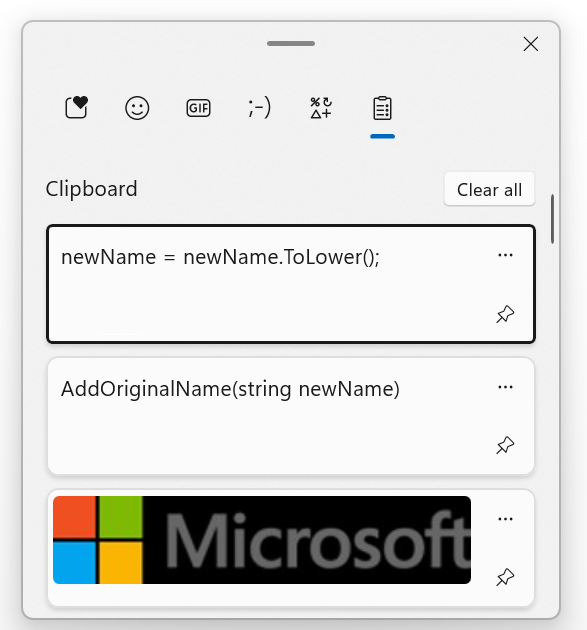
This enables you to copy multiple pieces of content in a document without having to always Ctrl-Tab back and forth between the original document and the target document. And the cool thing is that it even supports images!
Windows Clipboard history with two items of text and one image
Deleting a line with clipboard support
So why am I bringing this up? Well another thing that we do quite often in code is deleting lines. There’s even a joke that the best developers are not the one writing a lot of lines of code, but those who delete a lot of lines of code 🙂
In order to delete a whole line, most people would follow these steps:
Place the cursor on a line of code.
Move the cursor to the top of the line with the Home key.
If the line was indented, press Home once again to ensure that the cursor is really on column 0.
Press the Shift key.
With the Shift key pressed, move the cursor at the end of the line with the End key.
With the whole line selected, press the Delete button.
Probably you will also have to press Delete once more to delete then empty line.
This is a lot of steps for a simple operation that we do a LOT in a developer’s day. Thankfully you can simplify it.
Place the cursor on a line of code.
Press Ctrl-L.
That’s it. The line is deleted and there is no empty line remaining where it was. but the best part is, this line was saved in the Clipboard! To test this, simply press Win-V and you should see the line you just deleted on top of the history. Of course this also works for multiple lines.
Deleting a line without clipboard support
Now, sometimes you don’t want the deleted line(s) to be saved to the Clipboard history. In this case, follow these steps:
Place the cursor on a line of code.
Press Ctrl-Shift-L.
This way you can keep your Clipboard history tidy.
If that sounds like a far-fetched idea, you aren’t completely off base. After all, you’re not going to get paid to write poetry for most magazines, trade pubs, businesses, or blogs.
However, it’s not impossible to land poetry jobs, get paid for your prose, and even get a byline for publishing poetry.
Should you quit your day job solely to pursue poetry jobs? Probably not. But you can consider writing poetry as one way to earn an income as a freelance writer.
But can you actually get paid to write poetry? Yes. I’ve written poetry for a long list of publications, and ultimately published a book of poetry. It’s not the only way I make a living writing, but submitting poems for money is certainly one of my income streams.
How Much Can You Get Paid to Write Poetry?
Are you going to make a ton of money on poetry jobs? No. Only a few people have actually done that. But most poets write poems for other reasons than just hoping for boatloads of money.
If you want to get paid to write poetry, you can reasonably expect between $1.50 to $300 per poem.
While that might not sound like a lot, compared to copywriting or other writing markets, getting your poetry published can be a stepping stone for bigger things. The more you write and publish your poetry, the more you build up a portfolio of work. And consistently submitting poems for money could turn into a book deal, which is what happened to me.
The reality is if you want to make a full-time income writing, you’ll need to do more than just poetry.
No matter what freelance writing market you work in, don’t forget you can access over 300 hours of courses and interact with a community of 1,500+ supportive writers who want to help you make more money by becoming a Den member.
Where to Find Poetry Jobs
If you want to tap into your more creative side, write poetry, and learn how to make money writing, check out these 14 poetry markets to get started.
1 and 2. 50 Haikus and Three Line Poetry
These two journals, 50 Haikus and Three Line Poetry, were run by the same editors, regularly welcome new writers. They look for short lines with meaning. They also reprint your poem in an anthology.
Charge to submit: none
Rates: As of 2021 the rate was $1.50 per poem + a subscription
3. The American Journal of Nursing
A nursing journal that publishes poetry? Yes. The American Journal of Nursing publishes poems about health and health care, but not necessarily nursing. I actually help screen submissions for this publication. And I ask this question of every poem I judge: “Would this poem appeal to nurses?”
Charge to submit: none
Rates: As of 2021 the rate was $150 per poem job
4. The Antigonish Review
This is a lovely literary journal published in Canada. The Antigonish Review doesn’t have an agenda about edgy vs. formal poetry, but the guidelines do say “expect. . .work to be considered within the full context of old and new poetry.” They only accept submissions through the link above, so don’t try to email your poems.
Charge to submit: $3.00
Rates: $5 per page (up to 5 pages) + plus two copies
5. Arts & Letters
This highly-regarded Arts & Letters poetry journal based at Georgia University specifically encourages emerging poets and writers to submit their work for consideration.
Charge to submit: $3
Rates: $10 per printed page (minimum payment: $50), + one contributor copy + a one-year subscription.
6. New Letters
New Letters writers and poets frequently win tons of rewards, and the editors are a pleasure to work with. This publication prefers to work with writers and poets “waiting to be discovered.” Plus, New Letters publishes a range of styles and subject matter.
Charge to submit: $4.95
Rates: As of 2021, the minimum pay for poetry was $12 plus. More for multi-page poems, but pay often exceeds those minimums. Payment to contributors also includes two copies of the issue and 50 percent discounts for additional copies and subscriptions.
7. Poetry Magazine
If you’ve spent any time trying to publish poetry, you’re probably familiar with this publication. Poetry Magazine is the authority mag on poetry that publishes established and new writers.
Study the mag, and pitch your poetry. This is the top journal in the field. Crack this mag, and you’ll both earn top pay and build your credibility as a poet.
Just know that you’ll need to be patient. They say it can take 8 months for them to get back to you after you’ve submitted your poem. So if you’re looking to get paid to write poetry right this instant, look elsewhere.
Charge to submit: none
Rates: $10 per line with a minimum payment of $300
8. Strange Horizons
Strange Horizons calls itself a magazine of speculative fiction, but it also publishes fantasy and science fiction along with slipstream poetry.
Charge to submit: none
Rates: $50 per poem job, regardless of length or complexity.
9-14. Cricket Media’s Various Journals
Cricket Media publishes a series of six journals that feature children’s poetry for different ages. These poetry journals include Ladybug, Cricket, Babybug, Spider, Cricket, and Cicada.
Want to get paid to write poetry (or essays or short stories) for one of these journals? Check the site for the editorial calendar, themes, and submission deadlines.
Charge to submit: none
Rates: As of 2021 the rate was up to $3 per line; $25.00 minimum
Rules for Writing Poetry
If you want to get paid to write poetry, some basic rules apply, just like writing for consumer mags or trade pubs. Here’s what you need to know:
Don’t put your poem on your blog. Journals want to know they are the first place that has published your piece, and they consider blogs and public social media as publications. So, feel free to send your poem to friends for fun and feedback, but don’t go public.
Hone your craft. Many people feel inspired to write poetry in times of great emotion, but don’t just write poetry during those times. Spend time honing your craft and revising and editing your work, just like you would for any other type of professional writing.
Read the journal. Most journals have quite a few sample poems on their website. Read it. Study it. Get a sense of the type of poetry it publishes to make sure your work is a good fit.
Follow directions. Poetry editors can be very picky about their submission guidelines. Do not be the poet that doesn’t follow the guidelines and is disqualified from a technicality.
And finally, write for the love of poetry. I would argue any great writing has to have you in it-your passion, your struggles-but poetry even more so. If you are only writing a poem to get paid, I suspect it won’t be good enough to meet that goal.
Instead, write the poem you must write, and find the right journal for it.
What poetry jobs markets have you written for?
Looking for More Help?
While most people aren’t able to make a living by writing poetry, if you love poetry don’t let that stop you!
If you are looking for more help publishing poetry, check out these expert tips: How to Publish Poetry: A Published Poet’s Methods (article link).
Looking to publish short stories instead? We’ve compiled a list for that too! Where to Submit Short Stories: 30 Magazines and Online Publications
Deborah Bacharach is the author of After I Stop Lying (Cherry Grove Press, 2015). Her poetry has appeared in five of the journals listed above.
Those with real power needs won’t have enough with a simple battery pack. A true adventurer will probably want something like a portable power station. These are bigger, faster, and much more expensive, though. While we can’t do much about the size, we can help you find some great sales when they show up, and today, we have a couple of portable power station deals for you.
Both of these are “limited time deals,” but you’ll have to think faster with the BLUETTI AC180 Portable Power Station, as that deal ends tonight.
EcoFlow RIVER 2 Pro Portable Power Station
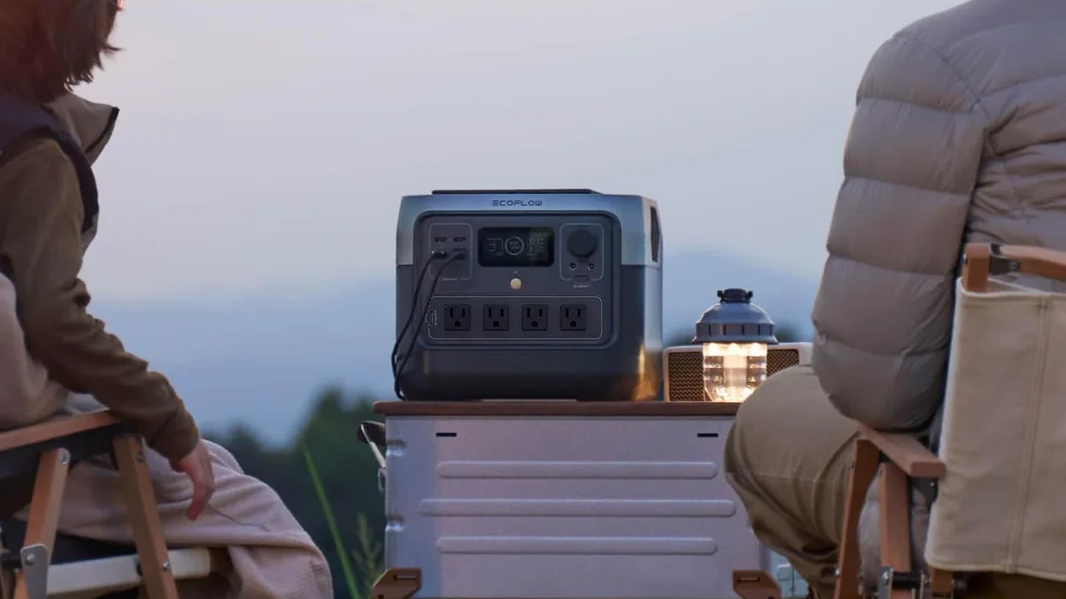
The EcoFlow RIVER 2 Pro Portable Power Station is looking like a real winner for your weekend adventures and camping trips. It comes with a huge 768Wh battery. To put that into perspective, this should charge your average smartphone over 50 times. It can also output a max of 1,600W, enough to power about 80% of all your appliances. To put that into perspective, my high-end gaming desktop peaks at about 1,000W, when running at full power. This battery can run it with power to spare.
You get access to four AC outlets, three USB-A ports, and a single USB-C connection. There’s also a DC output. You can charge the whole battery in just 70 minutes using AC, and there’s also the option to use solar panels. This is really a beast of a battery at this lowered price point.
BLUETTI AC180 Portable Power Station
Now, if you want to upgrade to the next level, maybe the BLUETTI AC180 Portable Power Station is more up your alley. This one comes with a much larger 1,152Wh battery, which is enough to charge an average phone over 100 times! It can also power devices at up to 1,800W, and you can give it a boost to 2,700W when needed.
You’ll get four AC ports, four USB-A ports, a USB-C connection, and DC. It also supports solar panels at up to 500W. Using an AC outlet, you can charge the battery itself at 1,440W, which will take you from zero to 80% in just 45 minutes.
If you’re in need of a breath portable power station, these are both very enticing offers. I am thinking of getting one myself. Just be sure to act quickly, especially if you’re going for the BLUETTI AC180 Portable Power Station. We know for sure that deal ends today, in under five hours.
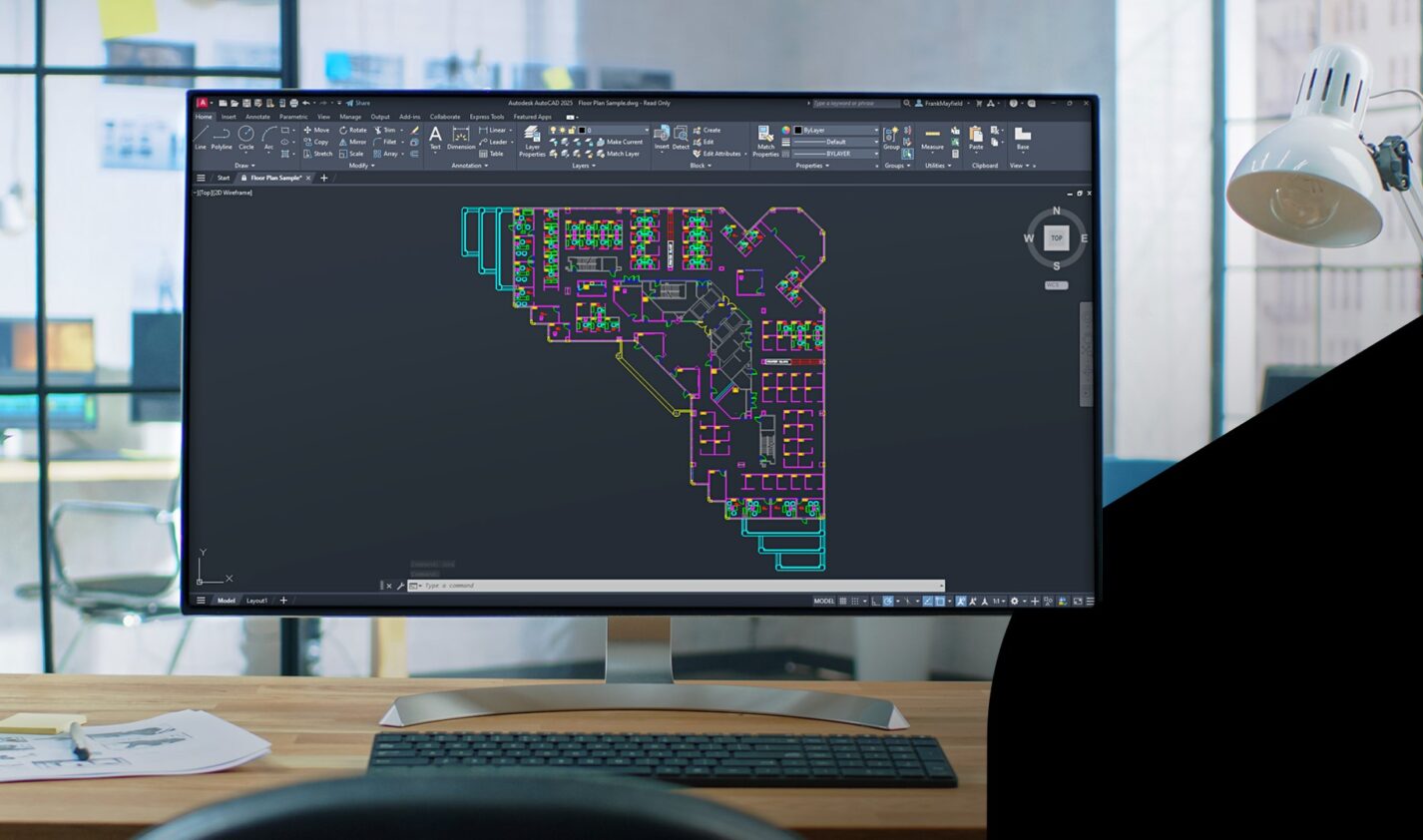
In my last blog, I showed you how to use the various filtering mechanisms to better manage your layer list in AutoCAD. I wrote a lot about “how” to do it. But other than better managing a large layer list, I wrote little about “why” you would do it. Of course, the answer is probably because you need to either change the visibility of a group of layers or alter their properties.
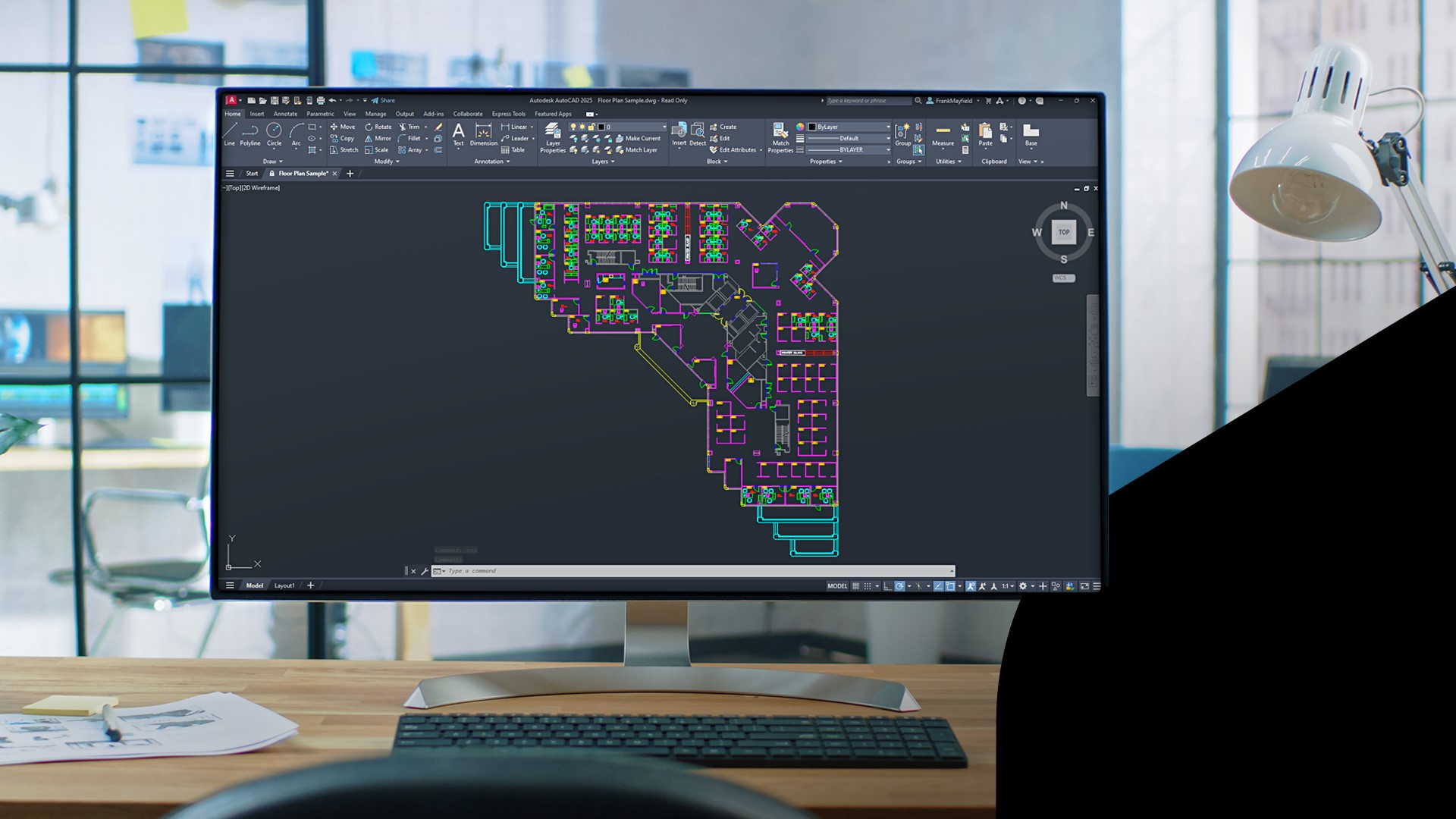
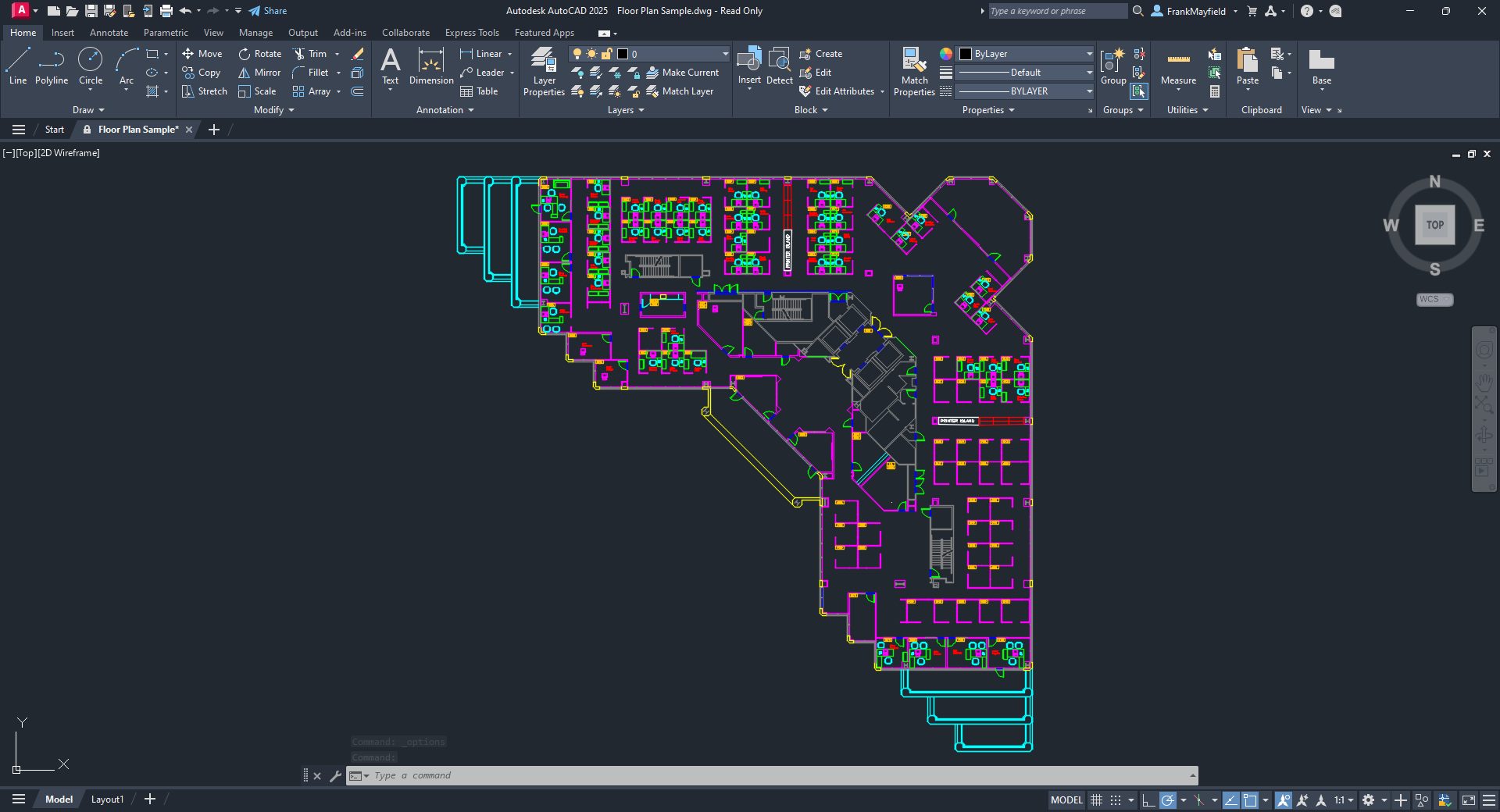
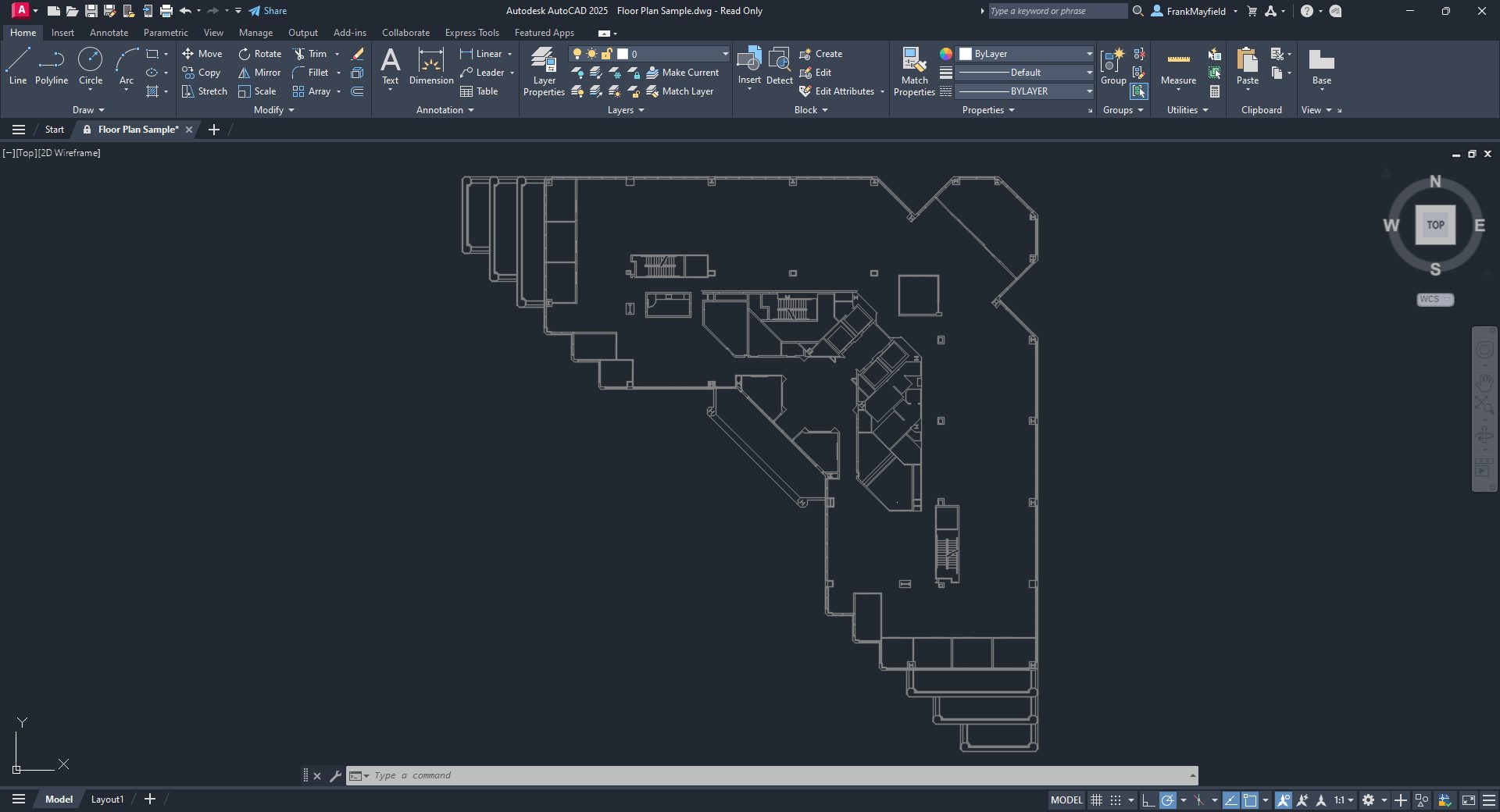
I’ll use the furnished AutoCAD Floor Plan Sample drawing for today’s example. Naturally, everyone’s scenario will be different, but imagine you’re an HVAC designer in an AEC studio. You use the architect’s floor plan as your base file for your HVAC plan. (Granted, you would probably have the structural and reflected ceiling plan, too, but we’re just imagining, remember?)
You don’t want all their furniture, cubicles, etc. and your standards say that the HVAC plans should have the walls to be AutoCAD color 8 – or grayed out.
Using various tools, and hopefully, the filter tools we learned about last time, you go about turning things off and changing the necessary layer colors to 8. Now, you have the architectural base layers set for you to start your design. Since you just spent your time performing this task, chances are you don’t want to do it again. That’s where Layer States comes in handy. You can save the current layer settings to a named list within the drawing so that it’s quickly restored if some well-meaning co-worker changes them for you.
OK, since we’re imagining things, what if this was just the first floor of a multi-story building? You can even import these settings into any subsequent floor to design around. Not only will that remove repetition and potential human error, but it will also increase efficiency. More on that in a minute.
Layer States Manager
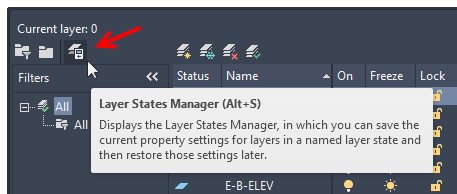
You’ll launch the Layer States Manager dialog from the Layer Properties Manager palette. It’s the third icon in the upper left corner of the palette.
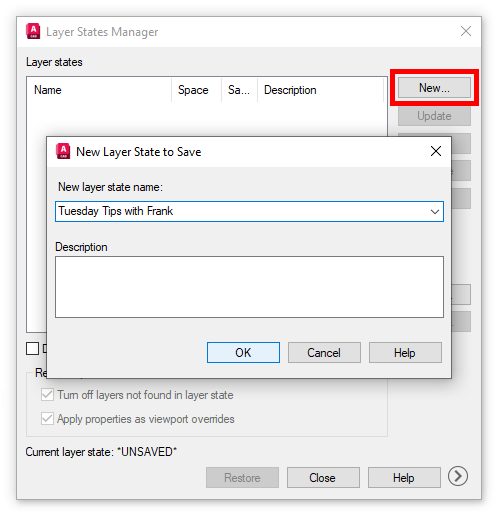
Clicking it will display the Layer States Manager dialog, which is probably empty to begin with. The first thing is to create a new state and give it a name. These steps are probably self-explanatory.
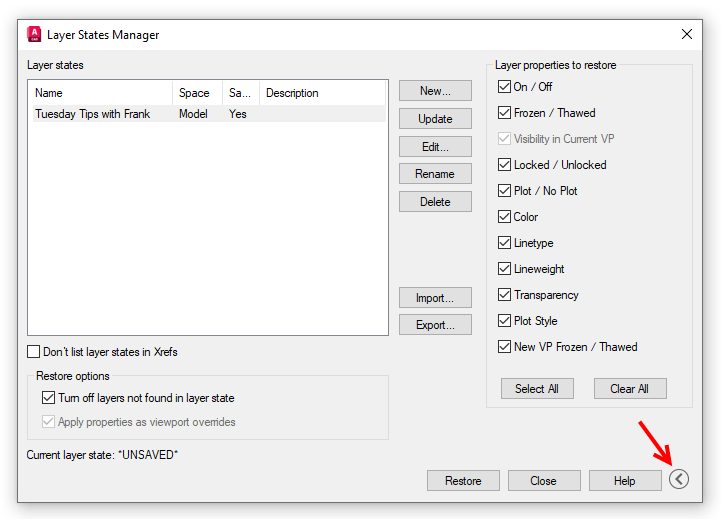
Once you dismiss the New State save box, your state will be listed in the States panel. Think of what you’ve just done as taking a snapshot of your layers’ display and property settings.
You’ll have a lot of control over what layer settings are restored, but you’ll have to expand the dialog. Click on the chevron in a circle next to the Help button. The dialog will expand, and you’ll be able to set up a custom set of visibility or properties to restore. You can leave the side panel expanded or contracted as you wish.
Once you save your drawing file, the layer state will still be there, waiting for you or someone else to restore its settings.
Importing and Exporting Layer States
Remember the multiple-floor scenario we made up? You can easily export a Layer State to an external file for use elsewhere. Just select the desired state from the Layer States list and click on Export. You’ll get a File Explorer window where you can choose the location for the state. The resultant file will have an LAS extension.
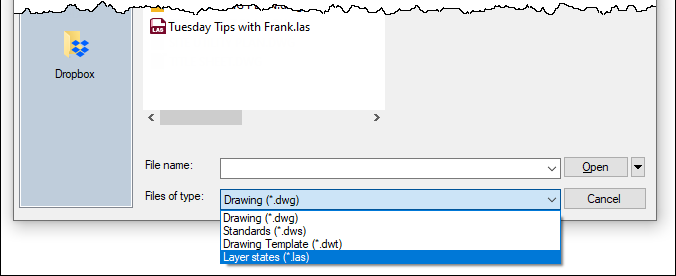
Importing works the same way. You navigate to your file’s location, select it, and click open. However, remember to change your file type pulldown to LAS.
Notice that you have other choices. If you don’t want to go through the overhead of creating an LAS file, you can select a DWG, DWS, or DWT that has at least one state in it. You’ll get a separate dialog allowing you to choose the state you want.
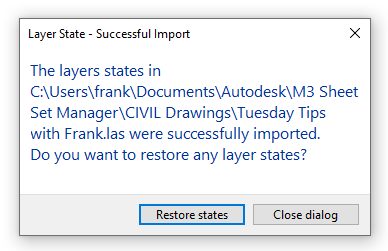
Once the import is successful, you’ll receive a dialog asking if you want to restore the state you just imported. Choose wisely.
Summary
Personally, I like the idea of writing external LAS files. What a tremendous backup opportunity – but that’s the CAD manager in me. In fact, I used to set up Layer States in my project templates so that my users never had to go through the manual process of setting visibility and properties.
Hey, it takes time to set up your layers correctly for your design tasks. But don’t do it more than once if you don’t have to. Save those settings into a layer state and take a moment to write them out to a LAS file. Because if we know anything in our industry, we know that “things” happen.
More Tuesday Tips
Check out our whole Tuesday Tips series for ideas on how to make AutoCAD work for you. Do you have any favorite AutoCAD tips? Tell us in the comments!
In the heyday of Sierra’s adventure game years, there was a series called Space Quest that featured an intergalactic janitor named Roger Wilco. The series was more satirical than King’s Quest, less preachy than Police Quest, and not quite as adult as Leisure Suit Larry. Spearheaded by Scott Murphy and Mark Crowe – a pair of devs who called themselves “Two Guys from Andromeda” – Space Quest was renowned for its humour, and there was a nice sense of progression throughout most of the series, with Roger Wilco leveling up from working class spaceman to the head of his own Star Trek ship.
Tachyon Dreams Anthology, a collection of three short games previously released on Itch.io, is clearly channeling Space Quest. Made by indie dev Cosmic Void, AKA Aviv Salinas, each episode of Tachyon Dreams puts you in the shoes of an intergalactic dishwasher named Dodger, who’s almost like an alternate Roger Wilco if you squint. Dodger’s just chilling on a spaceship clearing plates when all of the staff around him disappear, which is basically what happened to Roger at the start of Space Quest I. Guided by a sentient computer, Dodge has to travel through time and space, and his quest eventually leads him on the trail of the Margdonians, a mysterious race that once cultivated the galaxy.
Here’s Dodger’s pad. The salary for a space dishwasher must be pretty high. | Image credit: Rock Paper Shotgun/Cosmic Void
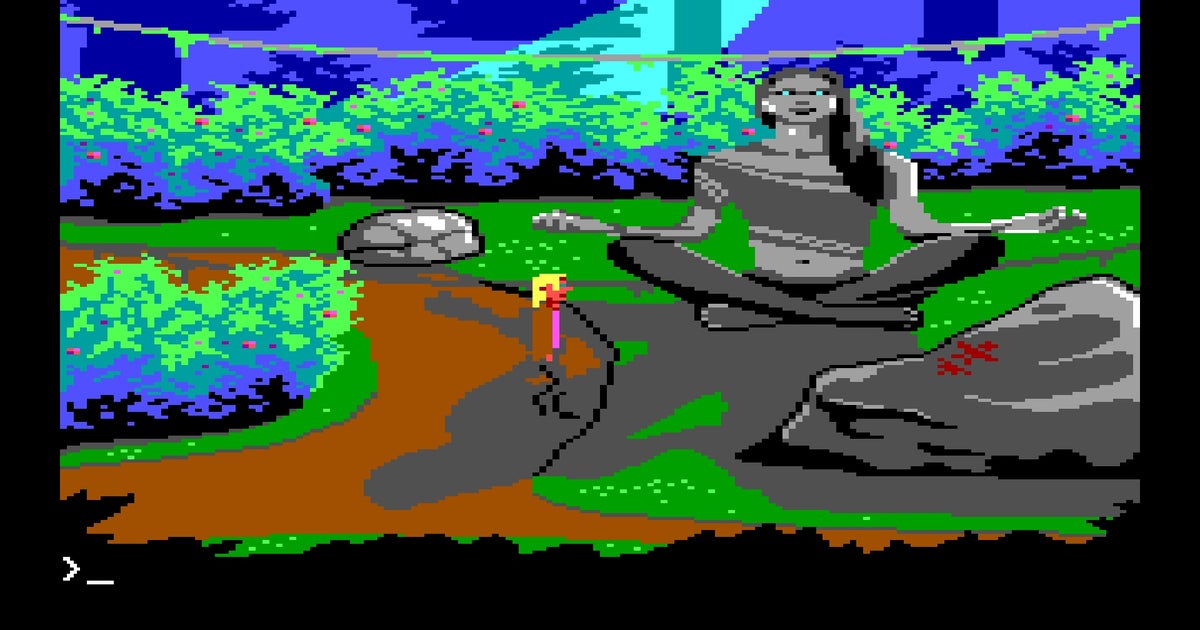
The plot, which starts with time travel and ends with Dodger literally contemplating his past while sitting on the porcelain throne, doesn’t quite hit the mark set by any of the Space Quests. But the game’s visuals are 100% reminiscent of a lost Sierra adventure from 1987 made with the company’s then-famous AGI (Adventure Game Interpreter) engine. Even Dodger’s walk cycle channels Roger Wilco’s, though Dodger is several pixels larger than Roger ever was. I’m not sure if Tachyon Dreams Anthology was made in AGI Studio, gamemaking software that’s been widely used amongst Sierra fans, but it certainly looks it. Cosmic Void’s expert use of AGI’s 16 colours is especially impressive, and I really appreciate the pixelated depictions of the galactic sky, swathed in lovely shades of blue and magenta. (Anyone who wants to see similar visuals in something that resembles a ’90s game rather than an ’80s one should check out Twilight Oracle, one of Cosmic Void’s other projects. Alice B (RPS forever in peace) liked the demo!)
Expect to come across a wide variety of nicely-illustrated AGI-style environments, from space craters to beaches overlooking alien vistas. | Image credit: Rock Paper Shotgun/Cosmic Void
Visuals aside, this is a parser game where you control Dodger with the arrow keys and type in commands to get him to do stuff. It takes a certain type of adventure gamer to appreciate this control scheme, but as someone who spent countless hours as a kid trying to figure out which Sierra games recognised what dirty words, I dig it. “Pick up berries.” “Use computer.” “Take off pants.” (The last one doesn’t work.) Tachyon Dreams Anthology recognises a fair number of verbs, though on some occasions you’ll run into an infernal puzzle that requires a very specific combination of commands. But getting stuck is par the course for a Sierra-inspired adventure game, and on the one occasion when I couldn’t figure out how to progress, Cosmic Void was kind enough to answer my query via Twitter/X.
There are two minigames which break up the exploration and verb-typing. One of them’s a mandatory “move the coloured thingies around until they match” exercise, which I could have done without, because I hate it when an adventure game forces you to sit down and solve a Rubik’s Cube before progressing. At least there’s nothing as annoying as Space Quest III’s mandatory Astro Chicken game to contend with here, thank goodness.
Tachyon Dreams Anthology offers you two time-wasting minigames. Move the balls and break the blocks. | Image credit: Rock Paper Shotgun/Cosmic Void
There’s also no deaths or dead ends in Tachyon Dreams Anthology, which is a page taken from the LucasArts playbook rather than the Sierra one. I’m of two minds when it comes to no deaths in adventure games – I appreciate the lack of danger, but back when I was playing the Space Quests, a perverse part of my soul delighted in seeing Roger Wilco perish in all manner of hilarious ways. I kinda wanted Dodger to suffer ridiculous demises as well, especially when progressing through that aforementioned end-of-game stretch that involves a trip to the loo.
Aside from lacking goofy deaths, Tachyon Dreams Anthology also lacks a truly cohesive story, which I hinted at before. The game’s original episodes – Tachyon Dreams I: The Radiant Fish of the Apocalypse, Tachyon Dreams II: The Bloated Can of Space Root Beer, and Tachyon Dreams III: The Rancid Buttermilk – have been bundled with a smattering of extra screens, puzzles, and text descriptions that attempt to string them together. But the resulting product feels disjointed, like you’re clearly hopping from what was intended to be a standalone bite-sized game to another standalone bite-sized game that misremembered the plot of the first. The snappy computer that Dodger speaks with in Part I sadly disappears in Part II, for instance, and a sudden deep dive into Dodger’s history with his ex in Part III comes out of nowhere. It was probably easier to excuse these holes when the episodes were released separately on Itch, but when melded together, the framework feels flimsy.
Tachyon Dreams Anthology does offer up giggles when it wants to, though a good portion of the humour is of the potty variety. | Image credit: Rock Paper Shotgun/Cosmic Void
Humour is at least interspersed among the flimsy, although it’s not as funny as it initially lets on. Tachyon Dreams Anthology can be very amusing, straddling the line between toilet humor and referring to Canada as a mysterious foreign country that makes arthouse films, but large portions of the game are actually quite somber. In fact, much of Tachyon Dreams has a lonely, introspective feel, with Dodger exploring mostly-empty locales and reflecting on the nature of being a solo person stuck in the void of space, following the faded footsteps of long-departed aliens. The Space Quests also had their surprisingly serious moments, especially in Space Quest IV: The Time Rippers, my personal favourite which saw Roger Wilco travelling through past, present, and future. But Space Quest IV still offered levity through colourful item descriptions and kooky narration courtesy of the late, great Gary Owens. Tachyon Dreams Anthology doesn’t have this, which isn’t a bad thing, but results in a game that is far more philosophical and quieter than its promotional materials – which promise a rollicking ’80s-style comedy – would suggest.
Ultimately, Tachyon Dreams Anthology reminds me of another project I’ve played by Cosmic Void, a first-person adventure game dubbed Blood Nova that was beautiful, but featured a lot of hints at grand space opera concepts that were never explored in a tangible manner. Tachyon Dreams Anthology has a similar quirk, flirting with a consistent story and a sense of humour, but not providing exactly what I’d hoped for in either arena.
Aside from Dodger, there are only a handful of other characters you can interact with. It’s a lonely space quest! | Image credit: Rock Paper Shotgun/Cosmic Void
That said, this game is still worth playing for classic adventure fans, if only to see an indie dev passionately channel the spirit of Sierra’s yesteryear in a way that tips a hat to Space Quest while not quite being a Space Quest fangame. In a world where SpaceVenture, the spiritual successor to Space Quest crafted by the original Two Guys from Andromeda, crashed and burned in truly epic fashion, we could use more games like Tachyon Dreams Anthology. I wouldn’t mind seeing more of Dodger – perhaps in a focused sequel that sees him abandoning his dishwashing roots and embracing his destiny as an unassuming guardian of the galaxy, just like his grandpa Roger Wilco did before him.
This review is based on a review build of the game provided by the developer.
In this article from Matrox, they give an overview about how Fuse Technical Group created a one-of-a-kind experience with Matrox Video Technology for the Lax Vegas Sphere. Las Vegas has unveiled a cutting-edge live entertainment venue with a stunning technological setup. Las Vegas has unveiled a groundbreaking live entertainment venue that redefines the concert experience through cutting-edge technology and immersive design. This state-of-the-art venue boasts a 580,000-square-foot LED exterior and an unparalleled 160,000-square-foot, 16K resolution wraparound LED screen inside. Combined with a spatial audio system and 4D physical effects, it offers showgoers an immersive audio-visual spectacle like no other.
A Legendary Debut
In September 2023, a legendary musical act inaugurated this remarkable venue with a residency, delivering the first-ever show. Behind the scenes, multimedia system designer Fuse Technical Group played a pivotal role in bringing this vision to life. Fuse is renowned for their expertise in creating awe-inspiring video and lighting systems, LED solutions, media servers, control systems, and more for various events worldwide.
Advanced ST 2110 Workflow for 16K Video Outputs
For this groundbreaking residency, Fuse Technical Group developed an advanced video playback system capable of handling 16K resolution, augmenting live input across 16K over a complete SMPTE ST 2110 IP backbone. This system was designed to deliver stunning visual elements throughout the show, setting a new standard for live entertainment.
Overcoming Technical Challenges with Expertise
The development of this system required Fuse to leverage their extensive experience in SDI and event production. The content feeding the screens operated on ST 2110 at 4K (4096 x 2160), necessitating 26 4K outputs to drive the entire system. This setup allowed for dynamic live input placement on the LED canvas, creating an immersive visual experience for the audience.
“Working with ST 2110 is very different from working with SDI,” said Ryan Middlemiss, Fuse Technical Group’s director of media servers. “ST 2110 offers limitless distribution capabilities, but it also presents unique challenges.”
Partnership with Matrox Video
To navigate these challenges, Fuse turned to Matrox Video for their expertise in ST 2110. Matrox provided critical hardware and software solutions, including ConductIP for routing and orchestrating ST 2110 sources, and ConvertIP devices to convert high-resolution SDI into ST 2110. This partnership ensured low latency, 25G network speeds, and 2022-7 redundancy, meeting the high demands of the project.
“The support from Matrox Video was crucial,” Middlemiss noted. “Their responsiveness and engineering support, especially with last-minute changes, were key to our success.”
Efficient Remote Operation with Matrox Extio 3
The live production system included 30 computers, operated remotely by a programmer and two technicians using Matrox Extio 3 IP KVM extenders. This setup allowed them to control multiple monitors and computers efficiently from a single workstation, significantly enhancing operational efficiency during the show.
“Extio 3 empowers the techs and the programmer to be as efficient as possible,” said Middlemiss. “Its efficiency is incredibly valuable, especially when there’s no time to spare.”
Conclusion
Las Vegas’ next-generation entertainment venue sets a new standard for live shows with its advanced technology and immersive design. The collaboration between Fuse Technical Group and Matrox Video demonstrates the power of combining expertise and innovative solutions to create unforgettable experiences. Concertgoers are treated to the audiovisual experience of a lifetime, showcasing the future of live entertainment.





:format(webp):no_upscale()/cdn.vox-cdn.com/uploads/chorus_asset/file/25543085/TDW_12353_R.jpg)
:format(webp):no_upscale()/cdn.vox-cdn.com/uploads/chorus_asset/file/25543087/TDW_20665_R.jpg)