I’ve tried nearly every iOS 27 feature, and these 3 are why I’m still excited about the update


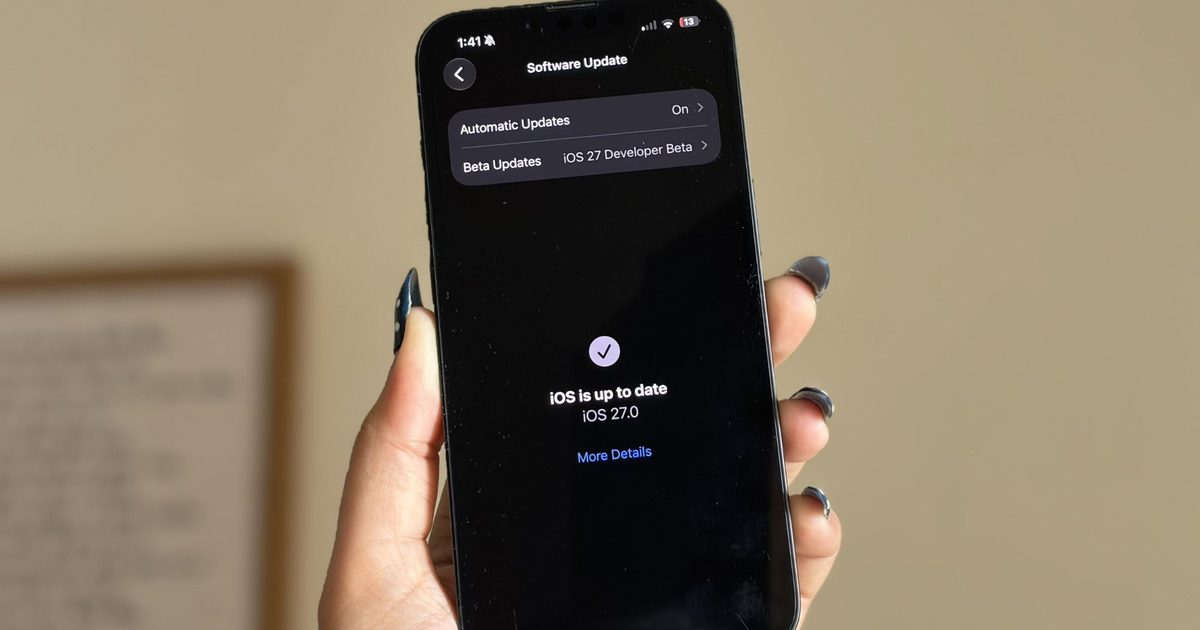
It’s been a little over a week since Apple’s WWDC keynote, and the iOS 27 beta is already out in the wild. While Apple spent plenty of time talking about its Gemini-powered Siri, the thing I was most excited about was getting the update onto my iPhone 16e and seeing what it was actually like to live with.

I’ve been using the beta every day since then, and one thing has become pretty clear: not every new feature lived up to the hype for me. Some felt more interesting during the announcement than they do in everyday use, while others simply haven’t found a place in my routine. But a few features have been the complete opposite. They’re the ones I’ve found myself returning to again and again without even thinking about it. After spending more than a week with iOS 27, these are the three features that have stood out the most — and the biggest reason I’m still excited about this update.

The fitness app finally feels like a fitness app

I’m a bit of a fitness nerd. Whether it’s squeezing in a workout after a long day or making sure I close my Activity rings, I’m always keeping an eye on my progress. That’s why the Fitness app is one of the apps I use the most on my iPhone, and honestly, I’ve felt for a while that it deserved a refresh. The old design wasn’t bad by any means. It was clean, familiar, and easy to navigate. But it also felt a little static, especially compared to modern fitness apps that do a much better job of making your workout data feel engaging and meaningful. There was plenty of information there, but not always in the most exciting way.

The redesigned workout experience in iOS 27 changes that. Everything feels better organized, and the information I care about is much easier to spot at a glance. More importantly, the app finally feels built around the workout itself rather than just a place to store data. For example, I went on a 10km run this morning, and one of the first things I noticed afterward was how prominently my route map was displayed. Instead of digging through menus to find it, the map was right there, front and center. It reminded me of a presentation you’d expect from dedicated fitness apps like Strava. This isn’t the biggest change in iOS 27, but it makes reviewing a workout feel far more rewarding. That’s really what I like about the redesign. The Fitness app finally feels more alive. Rather than simply showing me numbers and charts, it does a better job of highlighting the moments and milestones that make working out feel satisfying.

The cleanup tool finally cleaned up its act

I never thought I’d be talking about photo editing tools as one of my favorite parts of iOS 27, but here we are. The updated Cleanup tool and the new Reframe feature have genuinely made me spend more time editing photos directly on my iPhone 16e. And honestly, that’s saying something. Before this update, Apple’s Cleanup tool was one of those features I wanted to like but rarely used. Compared to the object-removal tools on Pixel and Samsung phones, it often struggled with anything more complex than a simple background distraction. The results were hit-or-miss, and most of the time I’d rather leave the photo alone than risk making it look worse. Thankfully, that has changed.

Over the past week, I’ve used Cleanup on everything from random objects in the background to people accidentally walking into a shot, and the results have been surprisingly good. One example that genuinely impressed me was when I tried removing a book that was partially covering my face in a photo. I expected the tool to either leave behind a blurry mess or distort my face. Instead, it removed the book cleanly and reconstructed the missing area so well that it looked like the book had never been there in the first place.

For the first time, Apple’s Cleanup tool feels reliable enough that I actually want to use it. The new Reframe feature is interesting for a different reason. Using generative AI, it can virtually adjust the framing of a photo after it’s been taken, giving you a little more flexibility if you didn’t quite nail the shot. I don’t see myself reaching for it every day, but that’s okay. It feels more like a feature you’ll appreciate when you need it, rather than one you’ll use constantly. And that’s what I like about both additions. One solves a problem I run into regularly, while the other serves as a safety net for moments when a photo isn’t quite framed the way I want. 

Every “what is that?” now has an answer

Of all the new AI-powered additions in iOS 27, on-screen awareness is probably the one I’ve used the most. And yes, the moment you hear about it, you’ll probably think, “Wait, isn’t this just Circle to Search?” Honestly, that’s not a bad comparison. Circle to Search is easily one of my favorite features on my Google Pixel 10a. I use it all the time. If I’m scrolling through Pinterest and spot a chair I’d love to buy, I can instantly search for it. If I’m watching a YouTube video and notice a pair of sneakers someone is wearing, I can quickly find out what they are. Sometimes I’ll come across a landmark in a travel reel, a gadget in a review video, or even an unfamiliar dish in a food post, and Circle to Search gives me answers in seconds without forcing me to switch apps or start a new search from scratch.

That’s the same reason I’ve grown to like on-screen awareness on the iPhone. Instead of manually copying text, taking screenshots, or opening Safari to search for something, I can simply ask Siri about what’s currently on my screen. For example, while reading an article, I used it to learn more about a company mentioned in the article. When browsing online stores, I used it to identify products and compare them with similar options. I even found myself using it while planning a trip after spotting a location in a social media post and wanting to learn more about it. What makes the feature feel useful is that it understands both the visual and textual information on your screen. Siri can analyze what you’re looking at and use that context to answer questions or help you take action. Apple is also opening this up to developers through dedicated APIs, allowing apps to expose relevant information that Siri can understand and interact with. This feature removes a lot of tiny bits of friction throughout the day. And those are often the features that turn out to be the most valuable.

A week later, these are still my favorites

I’m still spending time with iOS 27 on my iPhone 16e, and if there’s one thing I’ve learned over the past week, it’s that the best features aren’t always the ones that are advertised. Sometimes they’re the smaller additions that become part of your daily routine. For me, that’s exactly what happened with these three features. Whether it’s the refreshed Fitness app making my workout data more enjoyable to revisit, the improved Cleanup tool saving photos I would’ve otherwise ignored, or on-screen awareness helping me find information without jumping between apps, they’ve all earned a place in my everyday use.

There’s still plenty of iOS 27 left for me to explore, and I’m sure I’ll discover more favorites as I continue using the beta. But if you’re wondering which features have stood out after a week of real-world use, these are the ones I’d point to first.


Apple’s Founding Papers Return to Auction, Could Fetch Up to $4 Million


Christie’s is preparing to auction off the original partnership contract that created the Apple Computer Company on April 1, 1976, valuing it in the region of $2-4 million.

apple computer corporate founding documents%402x
The original three-page document served as the contract among Steve Jobs, Steve Wozniak, and Ron Wayne. The agreement established initial shares at 45% for Jobs, 45% for Wozniak, and 10% for Wayne.

Additional papers documenting Wayne’s withdrawal as a partner just 12 days after the company was formed are also included in the auction package. Wayne initially received $800 for his 10% share of the company, and later received an additional $1,500 payment.

Wayne later stated he withdrew because he knew the venture would be a “roller coaster” and that the high-stakes ride was not for him.

If Wayne’s original 10% stake had somehow remained untouched, it would be worth about $409 billion today based on Apple’s $4 trillion valuation. That’s only a playful comparison, mind, since decades of stock splits, new share issuances, and structural changes mean that early 10% slice has no realistic connection to Apple’s modern share count!

Christie’s will offer the founding contract and Wayne’s withdrawal agreement as a single lot on January 23, 2026.

In the early 1990s, Wayne sold the physical copy of the founding contract for $500. Apple’s founding corporate papers were last sold at auction by Sotheby’s in December 2011. That lot also included Wayne’s withdrawal, and it was sold to a private collector for nearly $1.6 million.

(Via Arirang TV.)

This Free App Unlocks AirPods Features on Android Devices


AirPods have always worked with Android phones, but with limited functionality and a less seamless listening experience. A new app called LibrePods is changing that.

librepods android
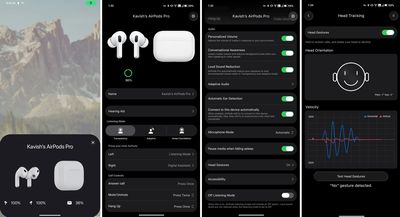
The free app unlocks features on Android that are typically reserved for Apple devices, including ear detection that pauses music when you remove an earbud, Head Gestures for answering calls, and Conversational Awareness that lowers volume while you’re talking. It also enables switching between noise control modes, checking accurate battery levels, and customizing accessibility settings.

To make it all work, developer Kavish Devar reverse-engineered Apple’s proprietary protocols to make AirPods identify a connected Android device as an iPhone or iPad, which tricks them into sharing device status information normally locked to Apple’s ecosystem.

There are some caveats, though. LibrePods currently requires a rooted Android phone with the Xposed framework installed, thanks to what Devar calls “a bug in the Android Bluetooth stack.” OnePlus and Oppo devices running ColorOS or OxygenOS 16 can use the app without rooting, however some features like Transparency mode customization still need root access.

The app supports all AirPods models, including AirPods Max, AirPods Pro 2, and AirPods Pro 3 (excluding heart rate monitoring), though not all features are unlocked on earlier AirPods. Interested Android owners can view more details about the project on its GitHub page or directly download the APK file.

(Via Android Authority.)

Popular Stories

Apple Announces 2025 Black Friday Event, Here’s What You Can Get

Apple’s annual four-day Black Friday through Cyber Monday shopping event is returning on Friday, November 28 through Monday, December 1 in many countries, including the United States, Canada, Australia, New Zealand, France, Germany, Italy, Spain, the United Kingdom, Belgium, the Netherlands, Sweden, Thailand, and others. During the shopping event, customers can get an Apple gift card with…

10 Reasons to Wait for Next Year’s iPhone 18 Pro

Apple’s iPhone development roadmap runs several years into the future and the company is continually working with suppliers on several successive iPhone models at the same time, which is why we often get rumored features months ahead of launch. The iPhone 18 series is no different, and we already have a good idea of what to expect for the iPhone 18 Pro and iPhone 18 Pro Max. One thing worth…

Everything New in iOS 26.2 Beta 3

Apple provided developers with the third beta of an upcoming iOS 26.2 update, and there are still new features that are being added with each beta that we get. We’ve rounded up all of the changes that Apple made in beta 3. AirDrop Apple added new AirDrop functionality, providing a way for two people to share files temporarily without having to add one another as contacts. iOS 26.2…

Apple Brings New AppleCare+ Options to India

Apple today announced an expansion of AppleCare+ coverage in India, with new options for monthly and annual plans, and the addition of Theft and Loss for iPhone for the first time. Options for monthly and annual AppleCare+ plans in India provide more choice and flexibility, allowing users to keep coverage for as long as they require. Apple’s vice president of Worldwide iPhone Product…

iPad Mini 8: Four Major New Features to Expect

Apple’s eighth-generation iPad mini is highly likely to arrive next year, offering a significant refresh of the device with at least four major new features. OLED Display The next-generation version of the iPad mini could feature an OLED display, as part of Apple’s plan to expand the display technology across many more of its devices. Apple’s first OLED device was the Apple Watch in 2015, …

iPhone 17 vs. iPhone 16 Wi-Fi Speeds: New Study Reveals the Winner

A new study has revealed that the iPhone 17, iPhone 17 Pro, iPhone 17 Pro Max, and iPhone Air achieve significantly faster average Wi-Fi speeds compared to the iPhone 16 series, thanks to Apple’s custom-designed N1 chip. The study was conducted by Ookla, the company behind the popular Speedtest website and app. It said the results are based on global, crowdsourced Speedtest user data…

iPhone Driver’s License Feature Launching in Illinois

In select U.S. states, residents can add their driver’s license or state ID to the Wallet app on the iPhone and Apple Watch, providing a convenient and contactless way to display proof of identity or age at select airports and businesses, and in select apps. Starting this Wednesday, November 19, the feature will be available to residents of Illinois. The announcement confirmed that the…

The Best Early Black Friday Mac Deals

We’re getting closer to Black Friday, which lands next week on Friday, November 28. In the lead-up to the shopping holiday, we’re tracking a few lowest-ever prices on Apple’s most popular Macs, including the M4 MacBook Air and brand new M5 MacBook Pro. Note: MacRumors is an affiliate partner with some of these vendors. When you click a link and make a purchase, we may receive a small payment,…

iOS 26.2 Adds These New Features to Your iPhone

iOS 26.2 is currently in beta testing. The upcoming update includes a handful of new features and changes on the iPhone, including a new Liquid Glass slider for the Lock Screen’s clock, offline lyrics for Apple Music, and more. In a recent press release, Apple confirmed that iOS 26.2 will be released to all users in December, but it did not provide a specific release date. Keep reading…

Apple Releases New Firmware for 140W USB-C Power Adapter, Magic Keyboard and Magic Trackpad

Apple today released updated firmware for several accessories, including the 140W USB-C Power Adapter, the Magic Trackpad 2, the Magic Trackpad USB-C, the Magic Keyboard with Touch ID, and the Magic Keyboard with Touch ID and Numeric Keypad. There is no word on what’s included in the updated firmware at this time, but it could offer performance improvements and security updates. Accessory…

iOS 26.1: Bring Back the Tap-to-Stop Alarm Button


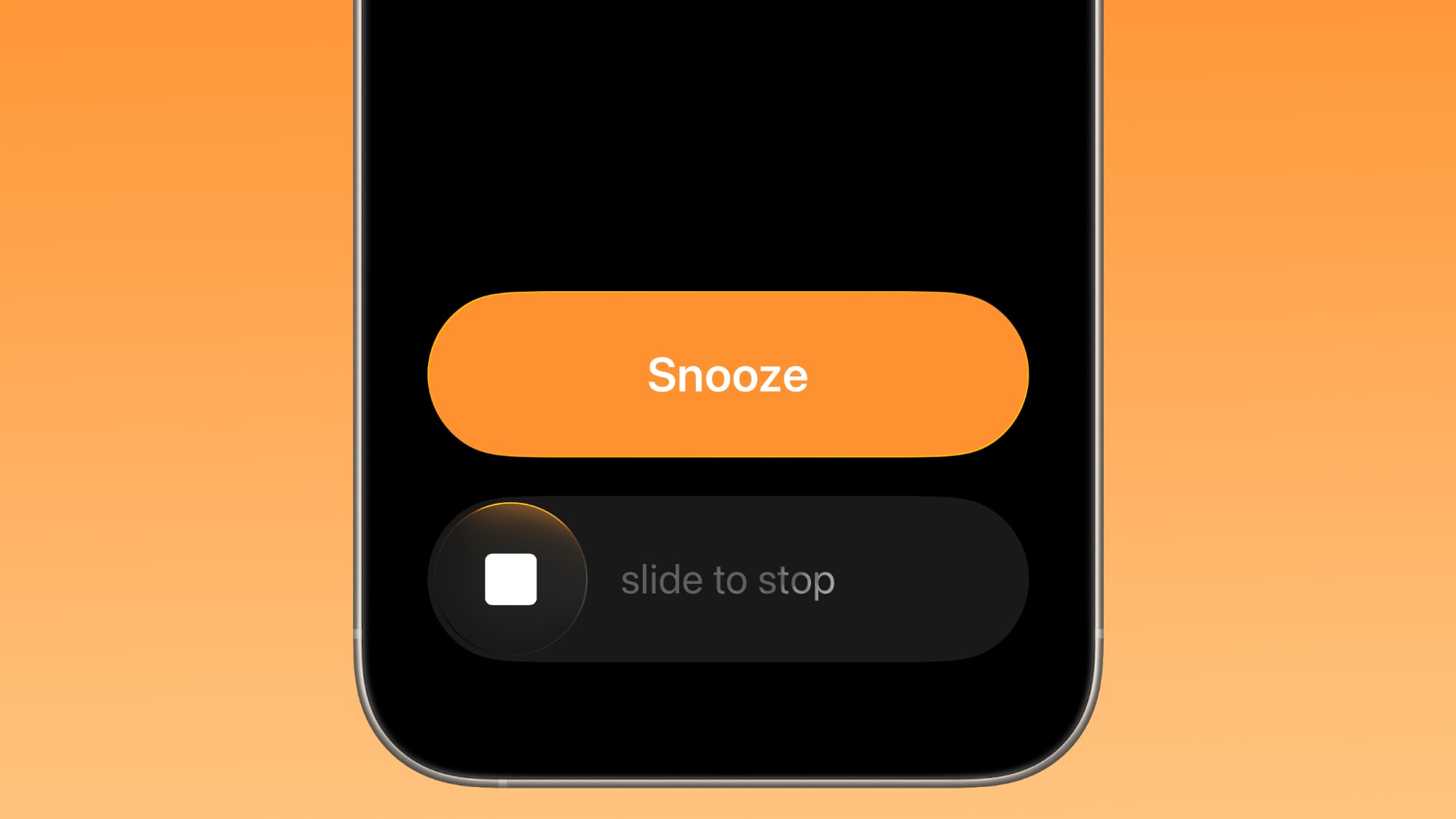
Apple has changed how you dismiss iPhone alarms in iOS 26.1, and your morning muscle memory may have needed tweaking as a result. By default, the Clock app now requires a slide gesture to stop an alarm from the Lock Screen, replacing the previous tap-to-stop button that was redesigned in iOS 26. Snoozing still works with a simple tap, but turning off an alarm entirely demands the extra swipe motion.


The change appears designed to prevent accidental dismissals when you’re reaching for your phone in the morning. By requiring a more deliberate action, you’re less likely to silence your alarm when you meant to hit snooze. If you don’t like the change, you can revert the alarm interface back to the previous Stop button by following these steps.

  1. Open the Settings app on your iPhone.
  2. Tap Accessibility.
  3. Under “Physical and Motor,” tap Touch.
  4. Swipe to the bottom of the menu and toggle on Prefer Single-Touch Actions.

The change will take effect the next time you set an alarm. If you want to revert back to the slider, simply toggle off Prefer Single-Touch Actions.
This article, "iOS 26.1: Bring Back the Tap-to-Stop Alarm Button" first appeared on MacRumors.com

Discuss this article in our forums

HBO Max Password Sharing Crackdown Getting Serious in September


HBO Max is planning to crack down more aggressively on password sharing, according to Warner Bros. Discovery’s streaming CEO JB Perette (via The Verge). Perette shared the info during an earnings call, where he said HBO Max users will be encouraged to pay a $7.99 per month fee to add viewers that are outside of their household.

hbo max
“In September, you’ll actually start to see the messaging — which right now has been a fairly soft, cancelable messaging — start to get more fixed and such that people have to take action,” said Perette.

Warner Bros. began discouraging password sharing earlier this year after introducing the $7.99 per month sharing fee. As of right now, the restrictions on password sharing have not been enforced, and paying the extra fee is voluntary.

HBO Max with ads is priced at $9.99 per month, while the Standard plan with no ads is $16.99 per month. There’s also a Premium plan with 4K streaming that’s priced at $20.99 per month.

HBO Max customers that opt to add an extra member to their plan will need to pay the $7.99 per month fee, which provides the added member with their own account, password, and profile. Only one additional member can be added to an account.

At $7.99 per month, the extra member add-on is only $2 cheaper than the ad-supported plan, but the extra member is able to share the plan of the main subscriber. So if the subscriber has the 4K Premium plan, the extra member can access 4K streaming for the $7.99 per month price.

HBO Max will use account information, IP address, device ID, and user activity to determine if accounts are used by people in more than one household.

Cracking down on password sharing has been successful for Netflix and Disney, so it is no surprise to see other streaming services do the same thing. Netflix experienced strong subscriber growth and an increase in revenue when it stopped allowing customers to share their accounts.

Earlier this year, Warner Bros. Discovery changed the name of the streaming service, abandoning “Max” and going back to HBO Max. The service was branded as Max two years ago, but it turned out that eliminating the well-known and widely recognized HBO name was a mistake.

Is your iPhone compatible? Here’s a list which devices can download it today


All the new features iOS 26 has to offer.

iPhone devotees, listen up: Tons of new updates are coming to Apple’s operating system this fall that you’ll be excited to try out. But instead of being named iOS 19, it’ll be called iOS 26. The biggest change? The new Liquid Glass design (think Windows Vista, but arguably more thoughtful), which looks to be Apple’s largest visual update in years. We spent two weeks test-driving it — you can check out our detailed hands-on iOS 26 preview, or you can try it out yourself by downloading and installing the public beta, available now. Before you dive in, we’ll help you answer this question: Will my iPhone be able to run iOS 26?

Last year, Apple didn’t nix any iPhones from its eligibility list, but that’s not the case for 2025 — a few models are getting cut this time. All iPhone 8 models and the iPhone X were the last to get the boot in 2023, and this year the 2018 models are getting left behind. If you have an ineligible device, you won’t be able to download iOS 26 when it becomes available this fall.

We’ll get to the bottom of which iPhones will support iOS 26 this year. To see what’s coming with the latest OS and more, check out everything announced at Apple’s WWDC June 9 event.

Unlike last year, several iPhone models won’t be eligible to download the newest iOS when it makes its debut this fall. This trio of models first released in 2018 won’t be coming to the iOS 26 party:

  • iPhone XR

  • iPhone XS

  • iPhone XS Max

While we don’t yet know the new iPhones Apple will be dropping this fall — though there are iPhone 17 rumors — we do know, per Apple’s site, that the phones listed below will be compatible with iOS 26. Basically, if you have an iPhone that was announced in 2019 or later, you’re in the clear:

If you want to continue using your older iPhone that isn’t supported by iOS 26, that’s fine. However, you’ll miss out on security updates which could potentially put your phone at risk for malware and other threats. Additionally, some apps may stop working if they require a certain version of iOS or later. And of course, you won’t be able to access the latest features iOS 26 offers.

Apple usually rolls out its latest iOS in mid-September, just a few days before the new iPhones hit store shelves. Last year, it released iOS 18 on Monday, Sept. 16. Expect a confirmation of the release date at the iPhone 17 event, expected in early September.

Liquid Glass design: Your home screen is getting revamped with new app icons, including dark mode and all-clear options. You’ll also notice buttons with a new floating design. Liquid Glass was designed to make all of Apple’s OSes more cohesive.

Phone app redesign: You’ll finally be able to scroll through contacts, recent calls and voicemail messages all on one screen. It also comes with a new feature called Hold Assist that’ll notify you when an agent comes to the phone so you can avoid the elevator music.

Live Translate: iOS 26 is bringing the ability to have a conversation via phone call or text message with someone who speaks another language. Live Translate will translate your conversation in real time.

Polls feature: Coming to group messages in the Messages app, chat members will be able to create polls. This can help prevent the unwanted 30+ messages when it comes to deciding which restaurant you’re meeting at this weekend.

Apple Executives Won’t Be Appearing at This Year’s WWDC Episode of The Talk Show Live


Since 2015, Daring Fireball‘s John Gruber has hosted a special live episode of his The Talk Show podcast from WWDC each year, with senior executives from Apple routinely participating as guests for the episodes. While the executives typically do not break major news during these appearances, the lively conversations have offered some interesting insights and perspectives on various topics surrounding Apple’s WWDC announcements.

The Talk Show Live From WWDC 2024
In announcing ticket sales for this year’s live episode going live today, Gruber has revealed that Apple declined his invitation for executives to appear on this year’s episode, for the first time in the decade of this tradition.

Gruber did not share a reason for Apple declining this year’s invitation, and Apple likely did not provide one to him, but it’s easy to surmise that it was probably due to Gruber’s recent comments sharing his belief that “Something Is Rotten in the State of Cupertino” in the wake of Apple Intelligence Siri delays.

In his March blog post, Gruber faulted himself for not seeing the “red flags” that were appearing as early as last year’s WWDC, with Apple apparently showing off planned ‌Apple Intelligence‌ features that were not actually functional at the time and some of which may not even yet be functional.

He faulted Apple for showing off what amounted to vaporware at last year’s WWDC, a significant departure from Apple’s history over the past several decades of almost always shipping features close to their suggested timelines even when they have been pre-announced before they are fully ready.

Gruber’s comments were notable given his status as one of the most well-known Apple pundits, not to mention the fact that Apple had chosen him to be the one to share the news days earlier that the Apple Intelligence-powered ‌Siri‌ revamp had been delayed.

It’s hard not to view Apple’s move as a form of retribution for Gruber’s criticism, and also potentially an acknowledgement that Gruber would be liable to ask Apple executives some difficult questions about what occurred to force the ‌Siri‌ delay and where things go from here.

Popular Stories

iPhone 17 Pro Launching Later This Year With These 12 New Features

While the iPhone 17 Pro and iPhone 17 Pro Max are not expected to launch until September, there are already plenty of rumors about the devices. Below, we recap key changes rumored for the iPhone 17 Pro models as of May 2025: Aluminum frame: iPhone 17 Pro models are rumored to have an aluminum frame, whereas the iPhone 15 Pro and iPhone 16 Pro models have a titanium frame, and the iPhone X …

No iOS 19: Apple Going Straight to iOS 26

With the design overhaul that’s coming this year, Apple plans to rename all of its operating systems, reports Bloomberg. Going forward, iOS, iPadOS, macOS, tvOS, watchOS, and visionOS will be identified by year, rather than by version number. We’re not going to be getting iOS 19, we’re getting iOS 26. iOS 26 will be accompanied by iPadOS 26, macOS 26, tvOS 26, watchOS 26, and visionOS 26…

Apple Rumored to Redesign the iPhone Every Year Through to 2027

Apple is reportedly preparing to implement significant iPhone hardware redesigns each year for the next three generations. According leaks from the Chinese supply chain disclosed by Weibo user “Digital Chat Station,” Apple plans to carry out a series of phased industrial design changes affecting different parts of the iPhone across three consecutive years: 2025, 2026, and 2027. The changes…

WhatsApp Teases Long-Awaited iPad App

The popular messaging app WhatsApp has teased a long-awaited iPad app, which would be offered alongside its existing iPhone and Mac apps. The official WhatsApp account on X today reacted with an eyes emoji to a post saying that WhatsApp should release an iPad app. This could be a hint that Meta is gearing up to release WhatsApp for iPad, which has already been available for beta testing via…

WWDC is Just Two Weeks Away: Here Are the Biggest iOS 19 Rumors

WWDC 2025 is just two weeks away as of today, with Apple’s opening keynote scheduled for Monday, June 9 at 10 a.m. Pacific Time. During the keynote, Apple is expected to announce iOS 19, iPadOS 19, macOS 16, watchOS 12, tvOS 19, visionOS 3, and other software updates, along with new Apple Intelligence features. In some years, there are also hardware announcements at WWDC, but there are no…

Report: Apple Planned to Offer Starlink-Like Home Internet Service

Apple had plans to offer a Starlink-like satellite home internet service in collaboration with Boeing, The Information reports. Starting in 2015, Apple held discussions with Boeing about “Project Eagle,” a plan to launch a service to provide wireless internet services to iPhones and homes. The companies would have launched thousands of satellites into orbit around the Earth to beam internet…

macOS 26 Rumored to Drop Support for These Five Macs

The next major version of macOS, now dubbed “macOS 26,” is rumored to drop support for several older Intel-based Mac models currently compatible with macOS Sequoia. According to individuals familiar with the matter cited by AppleInsider, the following Macs will not be supported by the next version of macOS: MacBook Pro (2018) iMac (2019) iMac Pro (2017) Mac mini (2018) MacB…

Data Broker Hack Exposes Location Info From Millions of iPhone Users


Data broker Gravy Analytics has been hacked, and location information from millions of iPhone and Android users is at risk, reports TechCrunch. Gravy Analytics’ parent company Unacast disclosed the data breach earlier this month [PDF], and said that its AWS cloud storage environment had been accessed by an unauthorized person using a “misappropriated access key.”

apple security banner
“Some files” were obtained, and preliminary findings suggest those files “could contain personal data” collected from users of third-party services that use Gravy Analytics. According to 404Media, hackers are claiming to have customer lists and location data from smartphones that shows peoples’ precise movements, with millions of users affected. Some of that data, which does indeed include the historical location of smartphones, has been published on private forums.

Gravy Analytics says that it tracks more than a billion devices around the world daily, and security researchers that saw a sample of the data collected by Gravy Analytics confirmed that the information can be used to track a person’s recent locations, with no anonymization.

In December, the United States Federal Trade Commission (FTC) prohibited Gravy Analytics and its subsidiary Venntel from selling, disclosing, or using sensitive location data in any product or service. The FTC warned that the two companies exposed consumers to privacy harms that could include disclosure of health information, political activity, and religious practices, and put people at risk of stigma, discrimination, violence and other harms.

The order required Gravy Analytics to delete all historic location data and any data products developed using data collected from consumers, but it was apparently too late because the company’s systems had likely already been breached at the time.

Gravy Analytics collects location data through a real-time ad bidding process that allows companies competing to buy an ad to see customer IP address and more precise location data if enabled. Gravy Analytics’ database had location data from ‌iPhone‌ apps that include FlightRadar, Grindr, and Tinder, and while the apps did not have a direct relationship with the data broker, user location information was collected through their ads.

Turning off app tracking in the Privacy and Security section of the ‌iPhone‌’s Settings app keeps ads from being able to obtain a unique device identifier to link location data to a specific device, and preventing apps from using precise location data is also a way to preserve more privacy.

Baptiste Robert, CEO of security firm Predicta Lab, told TechCrunch that ‌iPhone‌ users that had app tracking disabled did not have their data shared.

Apple may update Find My to let you share locations of lost items


Apple could soon let users share the location of lost or missing items — such as an iPhone, Macbook, or something with an Airtag attached — via the Find My app with people who are not in their contacts using a link.

Macrumors spotted the updated feature in the iOS 18.2 developer beta, and noted that Apple says it’s intended to help locate your lost items by sharing the location with people such as a cab driver or an airline employee.

The Find My app on the iOS 18.2 developer beta has a new “Share Item Location” option, which gives you a shareable link to the location of the missing item. People can open the link on any device (including non-Apple devices) to try and track it. The link automatically expires after a week or when the item is back with you.

There’s also a “Share Contact Info” option that lets any phone connect with an item and open a website, which will show your phone number and email — if you’ve added those details to the item’s contact page. Seemingly, this is meant to help the person who finds the item contact you.

Find My already lets you share an item’s location with people in your contacts.

The update would also let users look at statistics like how many people visited the link.

Apple’s own research sheds light on Siri’s AI laggardness


With the introduction of the new iPad Mini, Apple made it clear that a software experience brimming with AI is the way forward. And if that meant making the same kind of internal upgrades to a tablet that costs nearly half as much as its flagship phone, the company would still march forward.

However, its ambitions with Apple Intelligence lack competitive vigor, and even by Apple’s own standards, the experience hasn’t managed to wow users. On top of that, the staggered rollout of the most ambitious AI features — many of which are still in the future — has left enthusiasts with a bad taste.

Now, it appears that the reason behind the delays has something to do with quality and performance, as per Apple’s own testing. “The research found that OpenAI’s ChatGPT was 25% more accurate than Apple’s Siri, and able to answer 30% more questions,” says a Bloomberg report.

Updated interface of Siri activation.
Apple

To recall, Apple’s position with Siri is quite unique. For example, Siri is getting enhanced natural language understanding and deeper integration with apps as well as local files. However, there are tasks it can’t quite accomplish, and for such situations, the queries will be seamlessly offloaded to ChatGPT.

That’s part of a deal Apple inked with OpenAI. Now, it would make sense that Siri can’t quite pull the same kind of internet-connected tasks as ChatGPT, primarily because Siri and ChatGPT are two entirely different products. However, Apple is deploying OpenAI’s tech stack in more places than just Siri.

According to OpenAI, the ChatGPT will also lend a hand to users with “image and document understanding.” The Writing Tools – which have already arrived in tools like Notes and Safari — are also tapping into the ChatGPT kitty. Moreover, image generation will also be handled by OpenAI’s tech.

With such deep reliance on ChatGPT, one might think that’s because Apple isn’t quite there on the leaderboard with its own AI tech stack, something that could rival the likes of Google’s Gemini or Meta. That assumption won’t be entirely implausible, and even Apple’s team seems to agree with the status quo.

“In fact, some at Apple believe that its generative AI technology — at least, so far — is more than two years behind the industry leaders,” adds the Bloomberg report. Yet, it’s not merely about advancements, but also the pace of rollout.

Choice between Siri and Apple Intelligence
Siri will offload queries to ChatGPT for chores it can’t handle. Apple

Take a look at Galaxy AI, Samsung’s take on an AI ecosystem that has already appeared on a wide array of its phones and computing machines, with some help from Google’s Gemini stack. Chinese smartphone makers have already been offering generative AI features like image generation and a next-gen assistant for a while now.

At this point in time, it seems almost certain that Apple’s strategy with Apple Intelligence was hurried, apparently in a bid to quell investor concerns that the company was lagging in the AI race. So far, whatever little we have seen from Apple’s “AI revolution” has been far from revolutionary.

The best implementation of Apple Intelligence so far has been notification summaries and prioritization, but those are more utilitarian features than something that would reimagine the software experience for users. It would be interesting to see how Apple injects fresh energy into its AI approach next year.

But so far, the company hasn’t made any such announcements, and even the promises it made at its developers conference earlier this year are yet to materialize.