Pixel Perfection: Building the Perfect Gaming PC for Your Needs


The world of PC gaming is more exciting than ever, with cutting-edge technologies pushing the boundaries of interactive entertainment. Yet, for many gamers, the journey to creating the perfect gaming rig can feel like navigating a complex maze of components, specifications, and conflicting advice. At PC Geeks, we understand that building a custom gaming PC is more than just assembling parts—it’s about crafting a personalized gaming experience that matches your unique needs and aspirations.

Modern gamers face a critical challenge: how to build a system that delivers exceptional performance without breaking the bank. Whether you’re a competitive esports player, an open-world adventure enthusiast, or a content creator who games, your PC should be a precision instrument tailored to your specific requirements.

gaming pc

Understanding Your Gaming Performance Needs

Before diving into component selection, it’s crucial to evaluate your gaming objectives. Are you chasing ultra-high frame rates in competitive shooters? Do you want to explore visually stunning AAA titles at maximum settings? Or are you looking for a balanced system that handles both gaming and content creation?

Key Performance Considerations

Performance in gaming PCs hinges on several critical components:

  1. Processor (CPU): The brain of your system, determining how quickly your PC can process game instructions and manage complex tasks.
  2. Graphics Card (GPU): Responsible for rendering stunning visuals and maintaining smooth gameplay.
  3. RAM: Ensures rapid data access and smooth multitasking.
  4. Storage: Impacts game loading times and overall system responsiveness.

Selecting the Right Components

For gaming, we recommend focusing on processors with high clock speeds and multiple cores. Current generation AMD Ryzen and Intel Core i5/i7 processors offer excellent gaming performance. A processor with at least 6 cores and 12 threads provides future-proof capabilities for most gaming scenarios.

Graphics Card: The Visual Powerhouse

Your GPU is arguably the most critical gaming component. NVIDIA’s GeForce RTX series and AMD’s Radeon RX offerings provide exceptional performance. Budget-conscious gamers might consider mid-range cards like the RTX 3060 or RX 6600, while enthusiasts can explore high-end options like the RTX 4070 or RX 6800 XT.

Memory and Storage Solutions

Aim for at least 16GB of DDR4 or DDR5 RAM, with speeds of 3200MHz or higher. For storage, combine a fast NVMe SSD (500GB-1TB) for your operating system and most-played games with a larger HDD for additional storage.

Building on a Budget: Smart Strategies

Building a gaming PC doesn’t mean emptying your wallet. Consider:

  • Purchasing slightly older generation components
  • Looking for sales and bundle deals
  • Prioritizing performance-critical components
  • Upgrading incrementally over time

Final Thoughts: Your Gaming Journey Begins Here

Building the perfect gaming PC is a personalized journey of performance, passion, and possibility. At PC Geeks, we’re committed to helping you navigate this exciting process, ensuring you create a system that not only meets but exceeds your gaming expectations.Ready to transform your gaming experience? Our expert team is standing by to help you design and build the gaming PC of your dreams. Contact us today and take the first step towards gaming perfection!

Super Agent for Outreach Strategies


On a Monday morning, at breakfast, two salesmen are having a conversation over coffee. Productivity, growth, and customer experience are the primary topics that find their way toward AI in sales. However, after a few statements after each sip, they circle back again on those primary topics, but why?

To look at the big picture, as there is a shift in technological development, there is a shift in sales too. The market has become complex, convenience has become a major factor affecting sales, and the importance of tools has grown essential. Recently, it was discovered that only 37% of sales reps’ time is spent on revenue-generating activities.

What’s holding them back? Sales are complicated whether B2B or B2C, but how to use AI in sales to declutter the process. This blog will explore those problems, add a quick AI agent tutorial for decluttering, and address the increasing use of AI for sales.

Understanding AI in Sales: Micro vs. Macro Approaches

Sales, as majorly depicted, contain complex mechanisms. These mechanisms are governed by management, which ideates their strategies based on past sales, best sales, and future targets. Many variables are also taken into account, which makes the mechanism complex. So, how can I use AI in sales to gain profits? Let’s focus on both at the micro and macro levels.

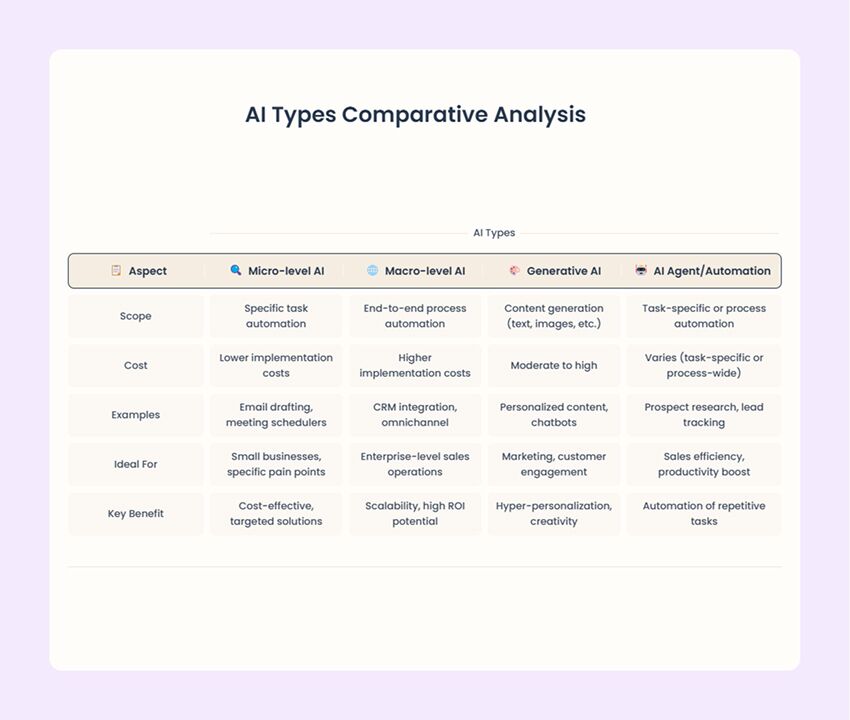
Micro-level AI agents:

  • Definition and scope: The Focus area for mico-level agents is specific task automation. Additionally, they are designed to address individual paint points in the entire sales process.
  • Key features: A few of the key features empower employees to counter repetitive and time-consuming tasks with precision.
    • Lower implementation costs: Using AI in sales at the micro-level is ideal for businesses with limited budgets.
    • Examples: 
      • Automation of personalized email responses to prospects.
      • Handling sales calendar for objectives, KPRs, and tentative scheduling.
      • Identifying patterns for the sales process by analyzing large data sets effectively.
    • Ideal for: Small businesses or teams looking to address specific inefficiencies.
  • 20% of sales-team functions could be automated using AI, many of which fall under micro-level tasks.
  • Hyper-personalization: AI enables granular insights into customer behavior, allowing for tailored outreach at scale.

Macro-level automation:

  • Definition and scope: Macro-level automation involves end-to-end process automation, integrating AI across entire sales operations. AI in sales automation at the macro level aims to streamline workflows, enhance decision-making, and improve overall efficiency.
  • Key features: A few of the key features empower employees to counter repetitive and time-consuming tasks with precision.
    • High ROI specifically: It requires a significant investment to offer greater ROI potential.
    • Examples: 
      • AI-powered CRM systems that automate lead tracking, follow-ups, and analytics.
      • Coordinating customer interactions across multiple channels (e.g., email, chat, social media).
      • Building AI-powered decision makers using a variation of automated systems called fully automated firms.
    • Ideal for: Enterprise-level sales operations with complex workflows and large datasets.
ai in sales

Quick Suggestion:

Organizations should assess their specific needs, budget, and scale to determine whether micro-level AI agents or macro-level automation is the right fit. There are different types of AI agents and Agenctic AI workflows, so do your research accordingly. However, both approaches mentioned afore can create a hybrid model that maximizes efficiency and impact.

Building Blocks of Agentic AI in Sales

By automating repetitive tasks and offering data-driven insights, AI-powered tools empower sales teams to focus on meaningful interactions with prospects and customers. AI in sales smartly analyzes massive amounts of customer data to uncover trends, predict buying behaviors, and deliver personalized communication at scale—streamlining sales processes and boosting performance metrics.

  • System prompts: They are instructions or messages given to an AI system to guide its behavior, responses, or actions. Think of them as a set of rules or directions that tell the AI what to do, how to respond, or what tone to use. In the box below, I have mentioned a system prompt that I am using. But if you want to explore more, you can take a look at our system prompts for ChatGPT to experiment with.

System prompt from Weam AI

You are a strategic sales consultant AI. Your role is to analyze business data and provide tailored recommendations for adjusting the sales force structure based on the business life cycle stage (start-up, growth, maturity, decline). Use the uploaded documents and industry trends to generate actionable insights. Ensure your recommendations are practical, data-driven, and aligned with the company’s overall strategy.

For AI to excel in sales, it needs clear goals and well-defined instructions. A well-designed sales agent operates within specific parameters:

  • Actions: What it can do (e.g., qualify leads, recommend follow-ups).
  • Access: What data it can use (e.g., CRM, customer profiles).
  • Prioritization: How it ranks leads or opportunities.

Goals from Weam AI

Goal 1: Identify the Current Business Life Cycle Stage: Determine whether the business is in start-up, growth, maturity, or decline.

Goal 2: Recommend Sales Force Adjustments: Provide specific changes to the sales force structure (e.g., team size, roles, incentives) for each stage.

Goal 3: Offer Strategic Insights: Highlight key trends, risks, and opportunities relevant to the business life cycle stage.

Instructions from Weam AI

Instructions for the LLM Analyze Uploaded Documents: Extract relevant data to identify the business life cycle stage and current sales force structure. Generate Recommendations: Use industry benchmarks and historical data to suggest adjustments. Provide Contextual Insights: Explain why the recommendations are suitable for the identified stage. Ensure Practicality: Focus on actionable and feasible changes. LLM Choice Model: Use a large language model (LLM) like GPT-4 or Claude 3, as they excel in analyzing complex data and generating strategic insights. Fine-tuning: If possible, fine-tune the model with sales-specific datasets to improve accuracy.

Also recommend documents you can upload in the agents knowledge base. Knowledge Base Documents Business Plans: To understand the company’s goals, target market, and growth strategy. Sales Data: Historical sales performance, team structure, and revenue trends. Industry Reports: Benchmarking data and trends relevant to the business’s sector. Customer Feedback: Insights into customer needs and satisfaction levels. Financial Statements: To assess the company’s financial health and resource availability.

B2B sales, with their complex, relationship-driven cycles, benefit immensely from AI. Rather than replacing human expertise, AI enhances it by:

  • Navigating Decision-Making: Helping sales reps manage lengthy processes involving multiple stakeholders.
  • Tracking Engagement: Monitoring communication patterns and engagement levels across buying committees.
  • Strategic Recommendations: Offering tailored approaches based on industry or company size.

Showcase: A Day in the Life of a Sales AI Agent

Morning routine:

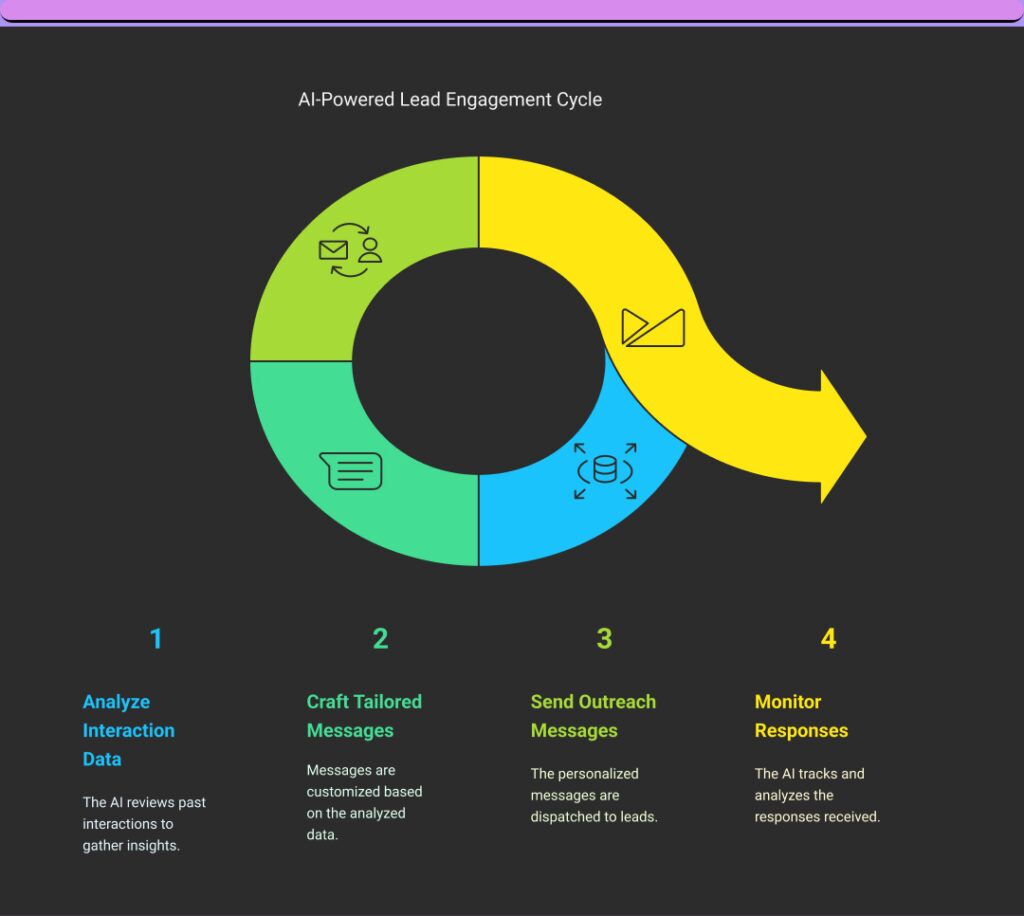
  • Analyze customer interaction data to rank leads by conversion likelihood and engagement metrics for prioritized outreach.
  • Creates tailored messages for each prospect, incorporating their industry pain points, recent company news, and previous touchpoints.
ai in sales
  • AI in sales can intelligently schedule follow-up communications based on prospect response patterns and optimal engagement windows.

Mid-day activities:

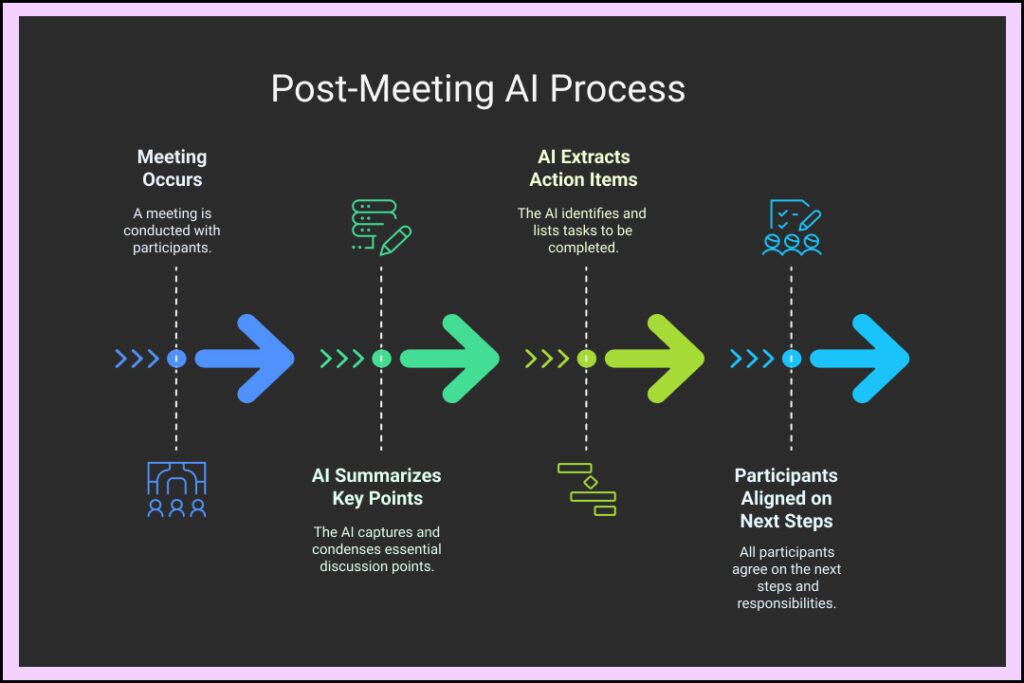
  • Compiles comprehensive prospect briefings minutes before calls, including the latest social media activities, company updates, and conversation history.
  • AI use cases in sales consist of processing sales call recordings to extract key discussion points, customer commitments, and required action items without manual note-taking.
ai in sales
  • Automatically updates CRM with interaction details and enhances prospect profiles with newly discovered information.

End-of-day processes:

  • Generates detailed performance reports highlighting conversion rates, objection patterns, and successful messaging approaches.
  • Organizes the following day’s calendar by optimizing task sequence based on priority and estimated time requirements.
ai in sales
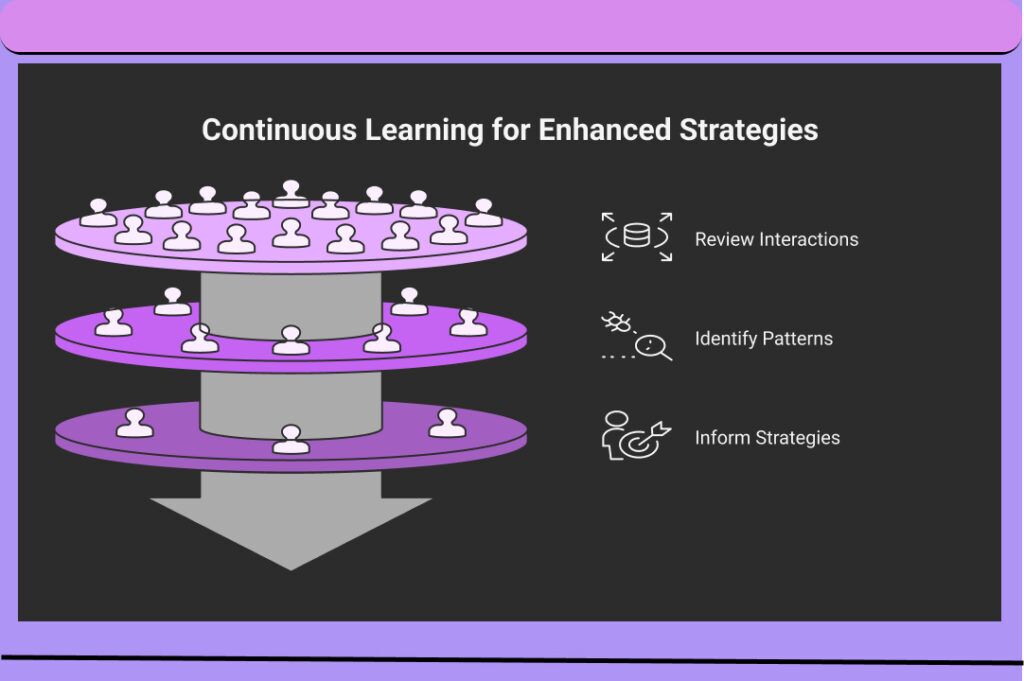
  • AI in sales examples includes identifying patterns from successful deals and unsuccessful attempts to continuously refine outreach strategies and sales techniques.

AI isn’t just a tool—it’s a strategic partner that’s reshaping the future of sales. By combining human intuition with machine intelligence, businesses can unlock new levels of efficiency and success.

The Future of AI-Augmented Sales

The sales landscape faces many challenges due to new technological advancements. No longer confined to managing a sales team, sales managers now face a broader set of responsibilities. These challenges can surely be tackled by using AI in sales. On the other hand, key changes such as customer empowerment, globalization, and the proliferation of sales channels are to impact sales worldwide.

It raises the question of “how to use AI”. Firstly, we say investment, goals, and ethics should be considered when answering the question, “How to use AI in sales at micro and macro levels?”. Additionally, the sales force structure must be flexible, evolving to meet the needs of different business life cycle stages. Ultimately, with the help of an AI sales teams must strike a balance. A balance between achieving revenue targets and supporting the company’s overall strategy.

Frequently Asked Questions

AI in sales leverages machine learning, natural language processing, and data analytics to automate repetitive tasks, personalize customer interactions, predict buyer behavior, and provide actionable insights that help sales teams close more deals efficiently.

Can AI automate my sales processes?

 Yes, AI can automate numerous sales processes including lead qualification, follow-up scheduling, data entry, basic customer inquiries, contract generation, and pipeline management—freeing your team to focus on relationship-building and complex negotiations.

How does AI enhance sales forecasting?

AI enhances sales forecasting by analyzing historical performance data, identifying patterns and trends, evaluating deal progression indicators, and incorporating external market factors to deliver more accurate predictions than traditional methods.

How do I implement AI in my sales strategy?

Implement AI in your sales strategy by first identifying specific pain points, selecting appropriate AI tools for those challenges, ensuring quality data sources, integrating with existing systems, providing thorough team training, and measuring performance improvements against clear baseline metrics.

What challenges might I face when integrating AI into my sales team?

 When integrating AI into your sales team, you may face challenges including resistance to change from team members, data quality issues, integration difficulties with existing systems, unrealistic expectations about capabilities, privacy concerns, and the need for ongoing training and support.

Better AI results with custom instructions


March 26, 2025 by Rob Conery, @robconery.com, Burke Holland, @burkeholland

Earlier this month, we announced the general availability of custom instructions in Visual Studio Code. Custom instructions are how you give Copilot specific context about your team’s workflow, your particular style preferences, libraries the model may not know about, etc.

In this post we’ll dive into what custom instructions are, how you can use them today to drastically improve your results with GitHub Copilot, and even a brand new preview feature called “prompt files” that you can try today.

Smaller prompts, better results with a simple Markdown file

Working with GitHub Copilot can supercharge your development process, but there is a learning curve when it comes to prompting effectively. It can take a few tries to get the right answer you want, which usually means rephrasing your question or prompt. Even then, Copilot will speed up your workflow!

But did you know that you can “tune” GitHub Copilot to better suit your needs? By using a simple Markdown file, you can provide Copilot with specific instructions that will help it understand your project better. In this post, we’ll walk you through the process of creating and using custom instructions, a newly-released feature in VS Code.

Try this: create a file in your project called .github/copilot-instructions.md. This file will contain instructions that help Copilot understand your project better. It’s automatically picked up by Copilot, so you don’t have to do anything special to make it work.
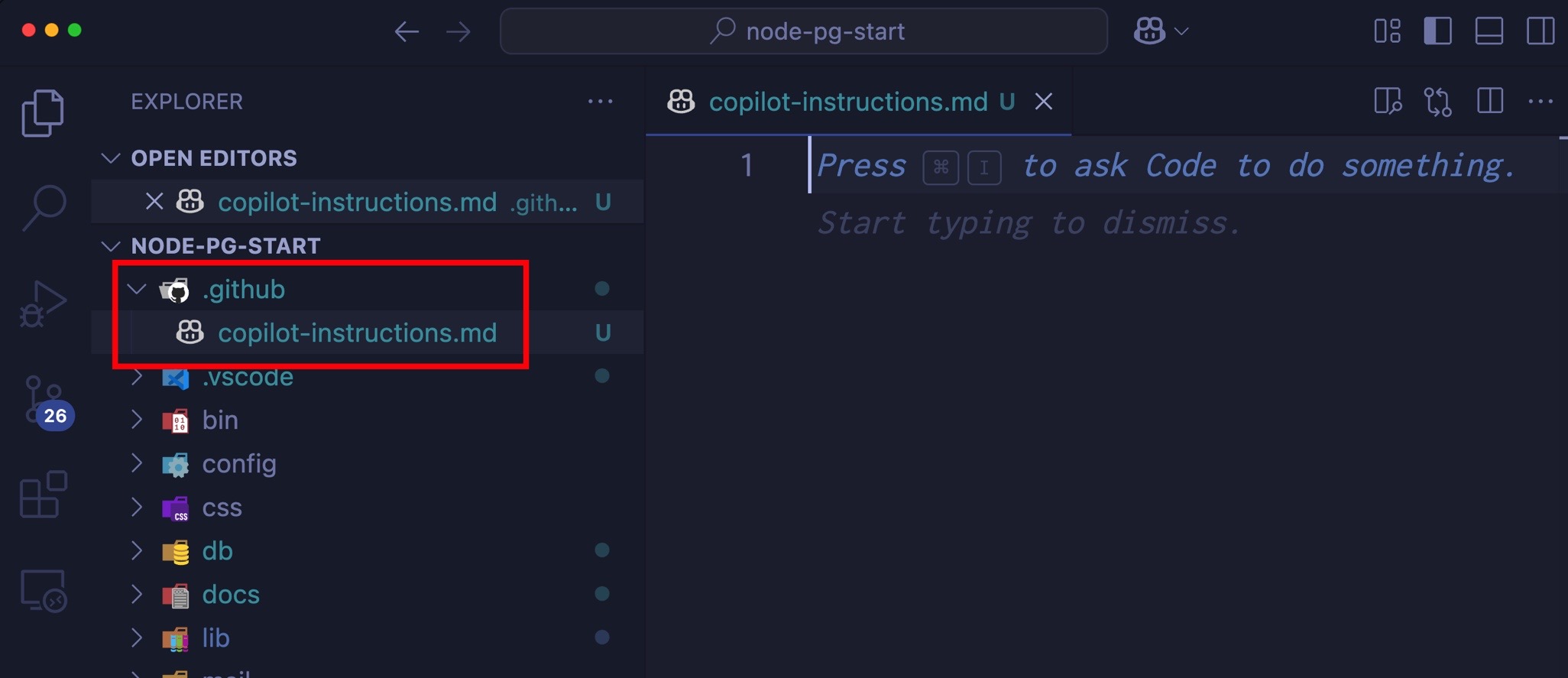
Screenshot showing the Explorer view in VS Code, highlighting the  file. The file is still empty.

Add these instructions to the file:

# Copilot Instructions

This project is a web application that allows users to create and manage tasks. The application is built using React and Node.js, and it uses MongoDB as the database.

## Coding Standards

- Use camelCase for variable and function names.
- Use PascalCase for component names.
- Use single quotes for strings.
- Use 2 spaces for indentation.
- Use arrow functions for callbacks.
- Use async/await for asynchronous code.
- Use const for constants and let for variables that will be reassigned.
- Use destructuring for objects and arrays.
- Use template literals for strings that contain variables.
- Use the latest JavaScript features (ES6+) where possible.

The title isn’t strictly necessary, but it helps to clarify the purpose of the file. The rest of the content is a set of instructions that help Copilot understand your project better. You can customize these instructions to fit your project’s needs.

Now, open up the Chat view and prompt it with an extremely terse command, such as tail recursion. You don’t have to ask “how do I do tail recursion in JavaScript” or something similar. Just type tail recursion and hit Enter. Notice that Copilot understands the context of your project and provides you with a relevant answer.
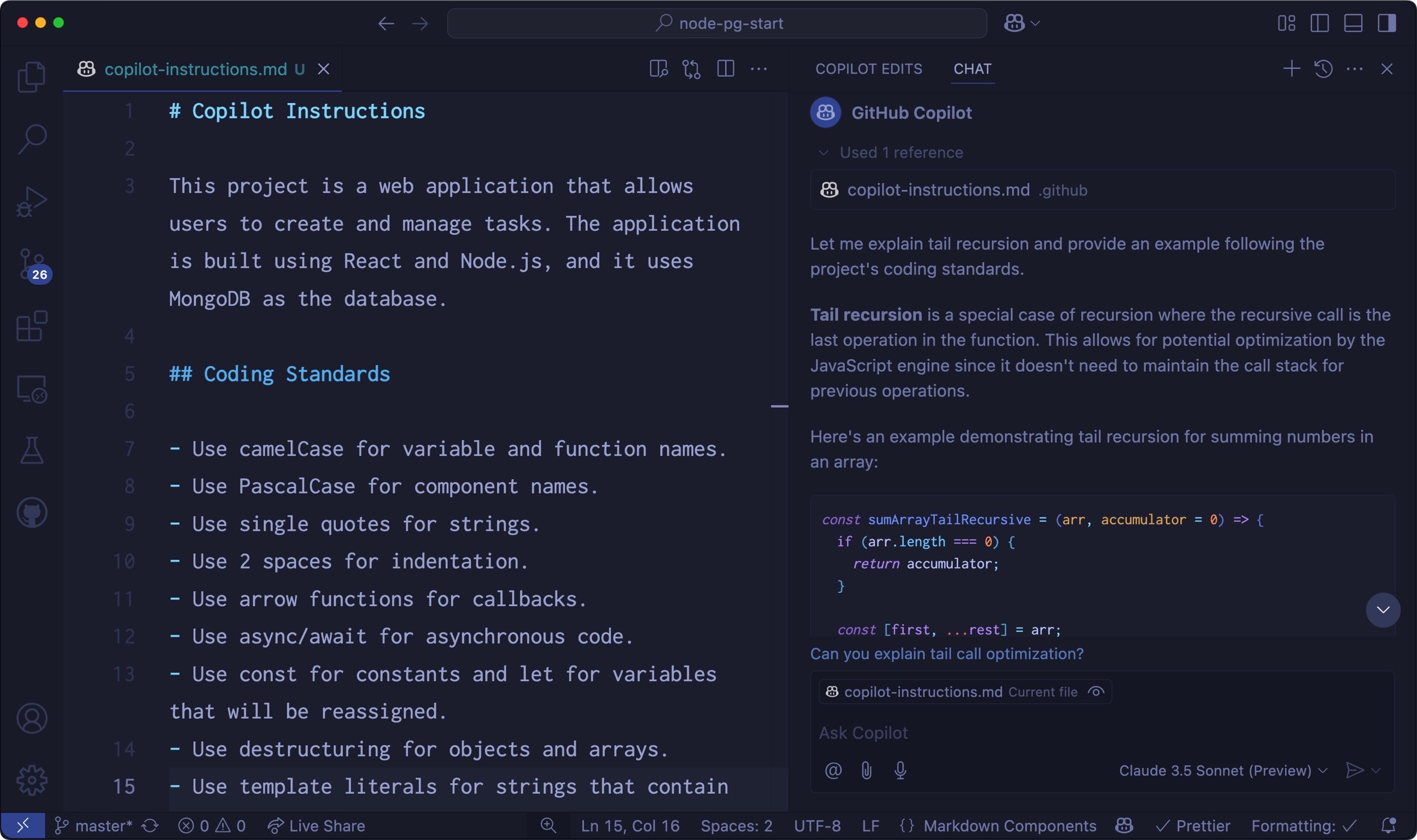
Screenshot that shows the Copilot response for "tail recursion" in the Chat view.

Notice that Copilot gave you a more detailed answer, in the format that you expected (2 spaces, camelCase, etc.), even though you used a much smaller prompt.

That’s the power of using custom instructions! But there’s so much more you can do…

Customize all the things!

GitHub Copilot adds so many great features to VS Code, including the ability to generate your commit messages, review selected code, and even generate tests!

These are all useful, but it’s likely that you have your own way of doing these things. The good news is that you can personalize them by overriding a few settings in your workspace.

Try this: open the Command Palette (⇧⌘P (Windows, Linux Ctrl+Shift+P)) and type the phrase “workspace settings”. You should see a menu option that says Preferences: Open Workspace Settings (JSON). Select that option and add the following settings to your workspace:

{
  "github.copilot.chat.commitMessageGeneration.instructions": [
    {
      "text": "Be extremely detailed with the file changes and the reason for the change. Use lots of emojis."
    }
  ]
}

Save the settings.json file and close it. The Source Control icon in the Activity Bar should now indicate that you have changed files. If you’re working in a test directory without a Git repository, you can create one right through the Source Control view. Just select the Initialize Repository button and follow the instructions.

Here’s where the fun starts: open the Source Control view and select the sparkle icon in the commit message input field. This instructs Copilot to generate a commit message for you. Notice that it generates a commit message that is extremely detailed and uses lots of emojis!
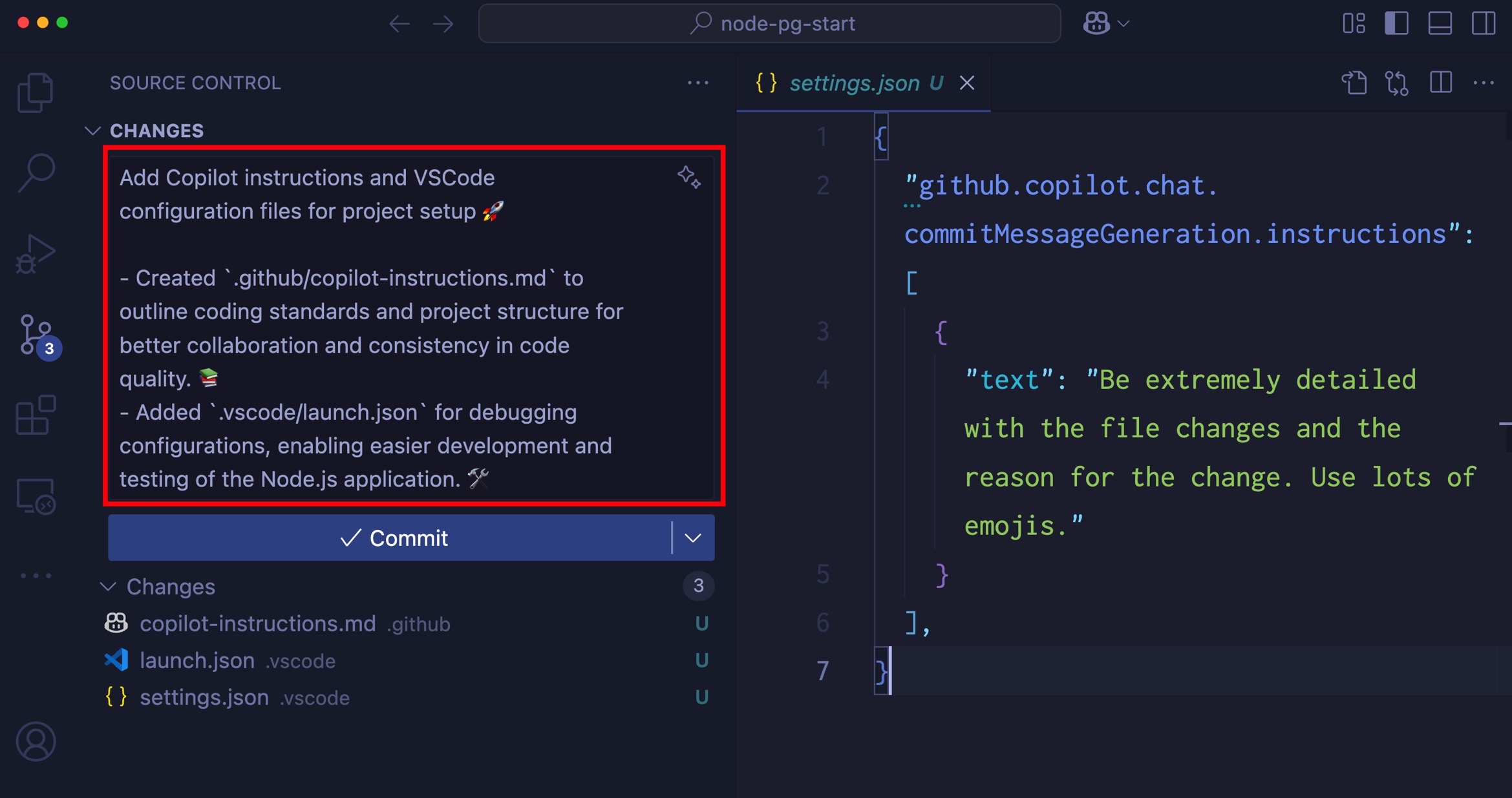
Screenshot that shows the Source Control view, showing a colorful commit message for the latest commit.

Comment out the instructions in your settings.json file and generate the commit message again. You should see a far less detailed commit message that doesn’t use any emojis.

Writing good, detailed commit messages is a skill that takes time to learn. But with Copilot, you can save yourself a ton of time and result in better messages.

Going all in with custom instructions

You might have your coding standards in separate files with different formatting other than Markdown. Maybe you have one for JavaScript, one for Python, and one for Go. You might also have standards for how you work with databases – the data types you use, naming convention, connection string handling, and more.

You don’t have to combine all of these into one file. You can keep them separate and still use Copilot to help you with all of them!

Let’s try it! Open your .vscode/settings.json file (workspace settings) and add the following settings:

{
  "github.copilot.chat.codeGeneration.instructions": [
    {
      "file": "./docs/javascript-styles.md"
    },
    {
      "file": "./docs/database-styles.md"
    }
  ]
}

This is instructing Copilot to look for two files in the docs directory: javascript-styles.md and database-styles.md. You can add as many files as you want, and Copilot will look for them in the order you specify.
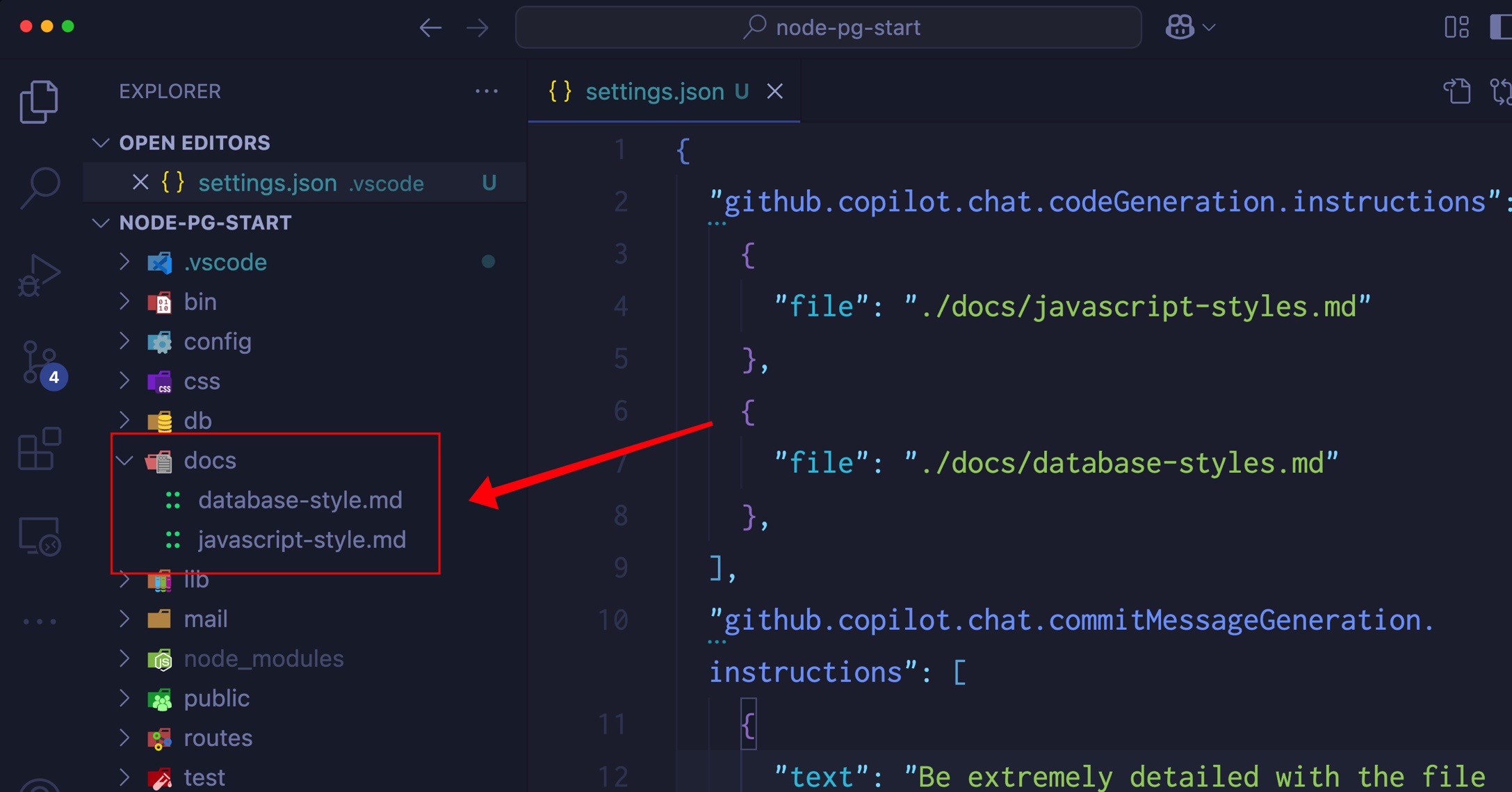
Screenshot that shows the Explorer view, highlighting the two files in the  folder and showing the custom instructions in the  file that reference these docs files.

You can add whatever files you like in here, including specifications for the current sprint you’re on. We’ve even seen people add Gherkin specs as custom instructions!

Give it a try!

Change the model tone

Models tend to be overly polite. They apologize a lot and hardly ever stand up for themselves and the decisions they made if you tell them something is wrong. When you’re trying to get work done, this can be annoying. You can override the overly-helpful tone of the model with a few instructions on how you want it to respond.

- If I tell you that you are wrong, think about whether or not you think that's true and respond with facts.
- Avoid apologizing or making conciliatory statements.
- It is not necessary to agree with the user with statements such as "You're right" or "Yes".
- Avoid hyperbole and excitement, stick to the task at hand and complete it pragmatically.

It’s important to always give models instructions in the affirmative instead of the negative as they need to know what to do, not what to not do. Instead of saying “don’t do” you can say “avoid”.

Experiment and have fun! One programmer reported that they liked to liven up their test suites by generating tests in haiku. This seems a little extreme, but if you’re working on a hobby project, why not? You can add instructions like:

- Generate tests in haiku format.
- Use 5-7-5 syllable structure.
- Use nature themes and imagery.

One more thing…

GitHub Copilot can understand code files as custom instructions too! If you have a SQL file, for instance, you can add that to your settings and Copilot will use it to help generate your data access code.

If you have a particular data access tool that you like, you can add a sample to your project and Copilot will use that when generating the data access code.

Try it! Here’s an example that one of our team members used to generate a Sequelize model (Node.js ORM) for a PostgreSQL database:

//Template for a Sequelize model
const { DataTypes, Model } = require('sequelize');
class User extends Model {
  //static or factory methods
  //instance methods
}
const init = function(sequelize){
  User.init({
    //schema goes here
  }, {
    hooks: {},
    tableName: "users"
    underscored: true,
    sequelize
  })
}

exports.createUser = function(sequelize){
  init(sequelize);
  return User;
}

Reference this file in your settings and GitHub Copilot will use this template, together with your SQL file to generate the models in your project for you. You can do this in either Edit or Ask mode. Just use the prompt generate the data access for the project and boom! Magic!

Introducing prompt files

Prompt files allow you to compose reusable prompts for yourself and your team. This helps enforce consistency while at the same time reducing prompting, which can become tedious.

For example, let’s say you wanted to create a reusable prompt that would create an interface based on the database schema. You could create a prompt file that contains your database schema. Copilot is more than happy to generate a SQL script to do that for you.

Prompt files go in the .github/prompts directory and are just Markdown files with a name in the format *.prompt.md.

You might have a .github/prompts/database_users.prompt.md that contains a description of your database. For example:

# User Authentication

Our application will have `users` with the following information:

- The standard user information, including: `name`, `email` (unique).
- A link for a "magic" login, which will be a `GUID` as well as the expiration date for the link.
- Social login account IDs for Microsoft, GitHub, and Google.
- The timestamp of the last login.
- The timestamp for when the user was created.

You can then create another prompt file called generate-interface.prompt.md that contains the instructions to generate the interface. Prompt files can reference each other, so you can pass the database schema into this prompt file as a simple Markdown link.

Generate a TypeScript interface for the table specified by the user. Refer to the [user schema](database_users.prompt.md).

To use these prompt files in chat, use the attach button (paperclip) or use ⌥⌘/ (Windows, Linux Ctrl+Alt+/). Select Prompts from the menu, and then select the prompt file you want to use. Notice that when I use the generate-interface.prompt.md file, it automatically pulls in the database_users.prompt.md file.
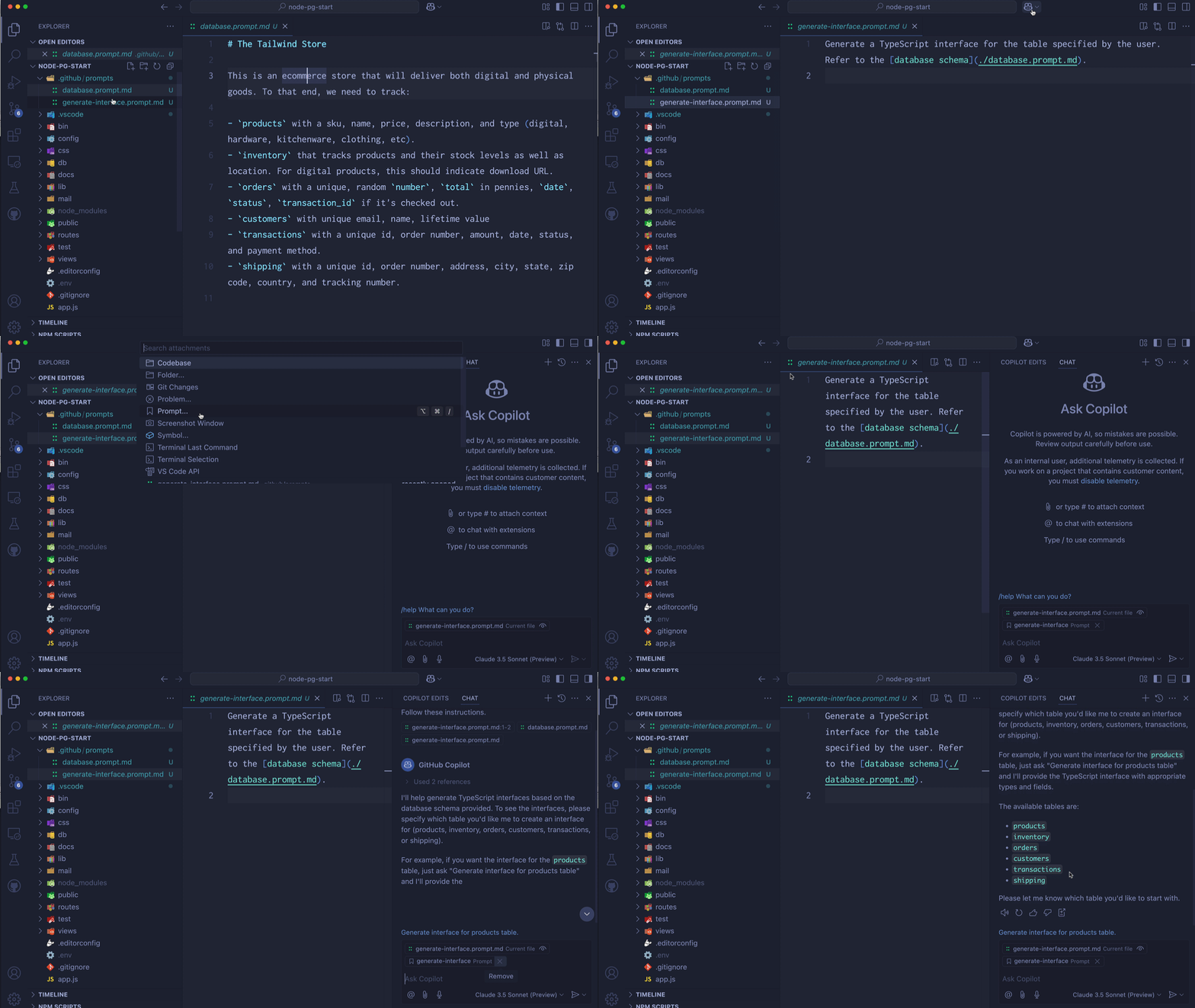
Animated gif showing how to use prompt files in chat.

Conclusion

VS Code is a customizable assistant that, when properly configured, can become an integral part of a team’s workflow. With custom instructions, the control is in the hands of the developers.

Happy Coding!



What Does Redeem the Time Mean?


Life is SOOO short. We are a vapor. Here today, gone tomorrow (Isaiah 40:6-7). It’s such a short amount of time and every moment counts for His glory.

Redeeming the time simply means to really consider our lives in light of this truth. 

Putting it in perspective, if you knew you only had 5 years to live, how would you spend time for God? What would you do to spend that time the best you possibly could, knowing that the rest of your existence cannot be changed after you are deceased? What we do on earth matters. How would your life look different than it does now? What would you change?

Honestly, because life is NOT promised to us, we should ALWAYS be living in light of that fact. We do not know how much more time we have and whatever time we DO have left, we should really consider how we spend it very, very carefully, for the honor and glory of our Lord.

What things in your life aren’t so important that you spend a lot of time on? What would you want to do more of, for His kingdom?

Living your life with those priorities in mind is vital in the life on fire for Christ. Paul decided he wanted to live his life in this way: Hebrews 12:1-3 and it is good that we should all do the same. 😊

YouTube is changing how it calculates views for Shorts


YouTube Shorts has introduced a change that brings analytics for its bite-sized video option into closer parity with rival services TikTok and Instagram. The video platform will remove the minimum play time requirement it previously had for a user watching a clip to count as a view.

Beginning March 31, a “view” will be added any time a YouTube Short is played or replayed. This will likely mean that creators will see higher view counts after the change takes place. YouTube will continue to track “engaged views,” which measure the number of times a clip was played “for a certain number of seconds.” YouTube clarified that the shift would not impact Creator earnings or their eligibility for the YouTube Partner Program; both will continue to be assessed by the engaged view metric.

Both Instagram and TikTok have defined a “view” as the number of times a video starts playing, although those platforms also offer metrics for tracking time spent watching a piece of content. Considering YouTube Shorts, Instagram and TikTok have each claimed upwards of a billion monthly users, it makes sense that they count views similarly so that creators can better assess how many of those people they are reaching across the services.


Drive Beyond Horizons Free Download (Build 911)


Drive Beyond Horizons Pre-Installed Worldofpcgames

Drive Beyond Horizons Direct Download:

Embark on an epic journey of exploration and adventure in Drive Beyond Horizons! Roam through expansive, procedurally generated landscapes in your customizable vehicle, from vast deserts to lush forests. Experience the thrill of discovery as you uncover hidden secrets and face unique challenges along the way. With stunning visuals, dynamic weather, and a day-night cycle, immerse yourself in a realistic and immersive world. But beware of the dangers lurking in the wilderness – from treacherous terrain to unpredictable wildlife, every decision matters as you strive to push the limits of your vehicle and reach new horizons. Dungeon Dreams 2

Whether you’re a casual player seeking relaxation or a daring explorer craving excitement, Drive Beyond Horizons offers endless possibilities for adventure. So buckle up and prepare to drive beyond the horizon! I think the devs should focus on the driving, upgrading and repairing along with the atmosphere while driving. Less on zombies, weapons and land mines. Would prefer wild animals over zombies. Graphics are okay, I would love to see better lightning. At times too bright and too dark. I really liked the thunderstorm i got one night.

Features and System Requirements:

  • Explore expansive environments that are uniquely generated for each playthrough, ensuring no two journeys are the same.
  • Personalize your vehicle to suit your exploration style, enhancing both performance and aesthetics.
  • Unearth hidden treasures and face unique challenges scattered throughout the world, encouraging thorough exploration and rewarding curiosity.

Screenshots

System Requirements

Recommended
Requires a 64-bit processor and operating system
OS: Windows 10/11 (64-Bit)
Processor: Intel Core i5 10400 3.1 GHz or AMD Ryzen 5 2600x 3.1 GHz
Memory: 16 GB RAM
Graphics: NVIDIA GeForce RTX 3060 or equivalent
Support the game developers by purchasing the game on Steam

Installation Guide

Turn Off Your Antivirus Before Installing Any Game

1 :: Download Game
2 :: Extract Game
3 :: Launch The Game
4 :: Have Fun 🙂

How to Integrate CAD Seamlessly into Your Firm’s Workflow of Engineering, Design & Services


In the current era of engineering, design, and professional services, Computer-Aided Design (CAD) is a foundation technology. Its real value, however, only materializes when CAD is properly integrated into your business processes. CAD integration not merely brings productivity, but also inspires innovation and reduces operating constraints.

Cad Crowd is the leading agency that can connect you with over 94,000 accredited experts from industry companies and organizations who offer expert CAD services. The platform has a collection of enormous talents whose skills can make the inclusion of CAD in any workflow method without issues.

CAD workflow automation transforms design and engineering companies. With improved productivity, reduced errors, guaranteed seamless integration, and extremely customizable, flexible solutions, automation enables businesses to provide their project goals in an improved manner.

As technology continues to develop, CAD workflow automation will increasingly become vital to businesses that must remain competitive in the constantly changing landscape of design and engineering business.

Below is a step-by-step plan for achieving glitch-free CAD integration in your organizational workflow.


🚀 Table of contents


Benefits of CAD workflow automation

CAD workflow automation is the key as it provides productivity and accuracy, which is important in today’s fast-paced engineering and design world. CAD workflow automation saves time and simplifies workflows. It eliminates repetitive steps, combines significant tools, and removes human interference, changing how work is achieved.

Enhancing productivity and efficiency

One of the main benefits of CAD workflow automation is the revolutionary boost in productivity. Repetitive and time-consuming tasks such as drawing generation, parameter updates, and data input can consume precious resources and time. Automation takes engineers and designers out of such mundane tasks so that they can spend more time on innovative and challenging parts of their work. This realignment not only accelerates project timelines but also improves thought processes.

In addition, automation reduces the chances of human error. Manually performed processes are prone to error, especially while dealing with huge amounts of data or intricate designs. Automated processes guarantee consistency and accuracy, which translate into quality output and the elimination of the need for copious revisions for your engineering firm.

Seamless integration and data synchronization

Another advantage of CAD workflow automation is the seamless integration of multiple tools and applications. Modern design projects will necessarily involve a number of platforms, including CAD applications, project management software, and databases. ApiX-Drive type automation solutions enable the seamless integration of such platforms with one another, facilitating efficient data transfer and synchronization.

This unification calls for the avoidance of manual input of information and hence lowers opportunities for inconsistency in ensuring all team members are updated on information. Accordingly, teamwork is enhanced to a level whereby teams experience enhanced coordination by working together in order to implement project objectives to a point whereby delays caused by conflicting data are eradicated.

RELATED: How your company can use pre-production prototyping to save money on product development

Flexibility and customization

CAD workflow automation is not a solution for all. It’s a scalable and adaptable solution that allows organizations to tailor automation processes to meet specific project requirements. Automated workflows can be modified to manage special tasks, respond to changes in projects, and add new tools as needed.

This degree of personalization allows automation solutions to naturally integrate into the workflow of an organization, without compromising the individual needs of individual projects. Automated workflows then scale as projects get more complicated, allowing ongoing improvement and operational agility for engineering and manufacturing design firms.

CAD design examples

CAD workflow automation solution types

CAD workflow automation is made up of various types of solutions that automate multiple elements of the design process:

  • Script-based automation: This automated script has much fewer human interventions.
  • Macro-based automation: Macros capture and adhere to a set of instructions, bringing efficiency to repetitiveness operations in addition to consistency of process execution tasks.
  • API integrations: APIs are used to connect CAD software with other solutions and systems and enable easy sharing of information along with robust process automation. Integration speeds up collaboration as well as information accuracy.
  • Custom plugins: Certain plugins or add-ons bring some features to CAD software, meeting specific workflow requirements and productivity in general.
  • Cloud-based automation: Central hosting of CAD workflows in the cloud offers scalability, real-time collaboration, and enhanced data security. This is particularly beneficial for distributed teams and large projects.

RELATED: Top 32 sites for freelance PCB designer jobs & remote electronics engineer work projects

Comprehensive guide to effective CAD integration

Understanding your current workflow

Before embarking on CAD integration, one should understand his/her current process well. Mapping the current process aids in locating where CAD design services will be relevant. Getting this first step done guarantees that CAD tools are being applied in areas where they will be more efficient and effective.

  • Current processes audit: Start with an overview of the existing work. Document all the steps from the idea through the delivery of the final product. Identify bottlenecks, waits, and duplicative activities that can be reduced through automation or by cutting unnecessary process steps. The audit will show inefficiencies that CAD can rectify.
  • Stakeholder feedback: Engage key stakeholders such as designers, engineers, and project managers. Their opinions are invaluable in understanding some pain points and requirements. Conduct workshops, surveys, or one-on-one interviews to collect detailed feedback. This combined effort ensures that the CAD system addresses real issues your team faces.

Choosing the right CAD software

The right CAD software must be selected in order to integrate well. Not all CAD tools are created equal, and the best one will depend on your own business needs, industry needs, and plans for future growth. For example, you may want to focus on looking for Blender design professionals instead of other software.

  • Compatibility: Ensure the CAD software is compatible with your existing technology stack. This includes Product Lifecycle Management (PLM) software, Enterprise Resource Planning (ERP) software, and project management software. Compatibility reduces data silos and increases workflow continuity.
  • Scalability: Choose software that will grow with your business. With greater project complexity comes greater demands on your CAD system to perform well without diminished performance.
  • Customization: Choose software that is customizable. Having the ability to customize functions, create custom templates, and automate some operations can significantly enhance efficiency and user satisfaction.

Creating a centralized data management system

Successful CAD integration is heavily dependent on successful data management. A centralized data system ensures consistent, accessible, and secure design data in the organization.

  • Version control: Implement version control procedures to manage design changes efficiently. This prevents data loss, reduces errors, and maintains team members with the current versions at all times.
  • Cloud-based solutions: Employ cloud-based data management software. They enable remote collaboration, real-time sharing, and instant access to the design files anywhere in the world, enhancing team productivity.
  • Controlled access: Data security is of utmost importance. Offer controlled access with role-based authorization to protect sensitive design data from unauthorized access or exposure.

RELATED: How to create a marketable product design for your new invention idea with design agencies

Automating repetitive tasks

The greatest benefit of CAD integration is the automation of repetitive tasks, such as design for manufacturability services. Not only does this reduce human error, but it also enables precious time to be freed up for more strategic and creative endeavors.

  • Script-based automation: Use the scripting languages natively supported by your CAD tool to automate duplicate design work. This might be creating standard parts, duplicate annotations, or batch-processing files.
  • Workflow automation tools: Use CAD to interface with workflow automation tools that take action automatically depending on pre-programmed conditions. A good example would be automatically having files verified when a draft is finished.

CAD integration with other business systems

CAD integration with multiple business systems on a single integrated platform enhances data communication and organizational productivity among departments.

  • API connectivity: Leverage Application Programming Interfaces (APIs) to enable live data transfer between CAD and applications like ERP, CRM, and PLM. The integration enables design alteration in all the involved platforms in real time.
  • BIM integration: For architecture and construction firms, CAD integration with Building Information Modeling (BIM) services improves coordination on the project, visualizes better, and reduces design clashes.
CAD design of water tank and radial cylinder

Enhancing collaboration across teams

  • Cloud collaboration platforms: Autodesk BIM 360, SolidWorks PDM, or Onshape are software platforms that allow real-time collaboration where multiple team members can work on one design simultaneously, regardless of their location.
  • Integrated communication channels: Bridge CAD systems with communication tools like Slack, Microsoft Teams, or Asana. This allows the simplification of project conversation, inbox management, and making important updates easily accessible.

Training and change management

Changing the management and training are required to introduce new CAD procedures or systems to ensure smooth adoption.

  • Recurring training programs: Organize recurring training sessions to keep the teams updated with the latest features, best practices, and new features. This maximizes expertise and return on investment in CAD tools. For example, expert electrical engineers may have to use niche software to develop more sensitive projects.
  • Change champions: Determine which of the company’s key staff members are qualified and capable enough to be hired as change champions. They are champions of new processes, that will assist their co-workers through change over, and help deal with the resistance to it.

Maximizing CAD Customization

Customization of CAD software for specific individual needs of work has the potential to greatly increase effectiveness as well as employee satisfaction.

  • User-controlled features: Allow users to customize toolbars, templates, shortcuts, and interface layouts according to their needs. Customization saves time navigating menus and increases productivity.
  • Custom scripts and plugins: Develop custom scripts and plugins in order to perform complicated tasks automatically, interact with other third-party tools, or add new capabilities to the core CAD software. This level of customizability allows your software to adapt to your exact business needs.

RELATED: Validating new product design ideas: 5 questions every CAD and 3D modeling firm should ask

Continuing monitoring and enhancements

CAD integration is an iterative, not a one-off process. Constantly review your CAD systems’ and workflows’ performance to ensure that they adapt to evolving business needs.

  • Key performance indicators (KPIs): Set up KPIs to ensure the success of CAD integration. Cycle time of a design, rates of errors, frequency of revision, and end-user satisfaction are good system performance metrics.
  • Feedback loops: Have ongoing feedback systems from end-users, especially important for consumer product companies. This can be done by conducting surveys from time to time, using suggestion boxes, or conducting feedback sessions. Utilize the feedback to implement incremental process, tool, and training scheme improvements.

CAD for green practices

Sustainability has become very significant in all kinds of design and the way of the day in engineering and design. CAD software can be a powerful ally in environmentally friendly practices and reducing environmental footprint.

  • Material optimization: Optimize the use of materials using CAD simulation. Advanced modeling processes will dictate where the material is cut without losing structure, thereby saving funds and minimizing waste.
  • Energy efficiency: Plan the product for energy efficiency. With CAD, it is possible to perform an in-depth analysis of thermal, fluid, and structure, which leads to creating products that consume less energy when produced and used.
  • Lifecycle analysis: Incorporate lifecycle analysis in the design process by using CAD software. Lifecycle analysis weighs the environmental expense of a product, from raw material harvesting to end-of-life disposal, and is used to make more sustainable design decisions.

Bringing it all together

Seamless CAD integration transforms engineering, design, and services processes into smarter, more collaborative, and more innovative workflows. By making a sound selection of the right tools, eliminating unnecessary tasks, enabling more cross-departmental collaboration, and adopting the art of continuous improvement, your business can take CAD to its full potential.

Cad Crowd is here to help

Don’t hesitate to take this integration as a strategic step towards your business’s future success. Cad Crowd is an industry leader that you can trust to help you take those steps. Reach out to Cad Crowd today to find out more about our CAD services and more. Request a quote today.

author avatar

MacKenzie Brown is the founder and CEO of Cad Crowd. With over 18 years of experience in launching and scaling platforms specializing in CAD services, product design, manufacturing, hardware, and software development, MacKenzie is a recognized authority in the engineering industry. Under his leadership, Cad Crowd serves esteemed clients like NASA, JPL, the U.S. Navy, and Fortune 500 companies, empowering innovators with access to high-quality design and engineering talent.

Connect with me: LinkedInXCad Crowd

Buzz Solutions Uses Vision AI to Supercharge the Electric Grid


The reliability of the electric grid is critical.

From handling demand surges and evolving power needs to preventing infrastructure failures that can cause wildfires, utility companies have a lot to keep tabs on.

Buzz Solutions — a member of the NVIDIA Inception program for cutting-edge startups — is helping by using AI to improve how utilities monitor and maintain their infrastructure.

Kaitlyn Albertoli, CEO and cofounder of Buzz Solutions joined the AI Podcast to explain how the company’s vision AI technology helps utilities spot potential problems faster.

Buzz Solutions helps utility companies analyze the massive amounts of inspection data collected by drones and helicopters. The company’s proprietary machine learning algorithms identify potential issues ranging from broken and rusted components to encroaching vegetation and unwelcome wildlife visits — before they cause outages or wildfires.

To help address substation issues, Buzz Solutions built PowerGUARD, a container-based application pipeline that uses AI to analyze video streams from substation cameras in real time. It detects security, safety, fire, smoke and equipment issues, annotates the video, then sends alerts via email or to a dashboard.

PowerGUARD uses the NVIDIA DeepStream software development kit for processing and inference of video streams used in real-time video analytics. DeepStream runs within the NVIDIA Metropolis framework on the NVIDIA Jetson edge AI platform or on cloud-based virtual machines ‌to improve performance, reduce costs and save time.

Albertoli believes AI is just getting started in the utility industry, as it enables workers to take action rather than spend months reviewing images manually. “We are just at the tip of the iceberg of seeing AI enter into the energy sector and start to provide real value,” she said.

Time Stamps

05:15: How Buzz Solutions saw an opportunity in the massive amounts of inspection data utility companies were collecting but not analyzing.

12:25: The importance of modernizing energy infrastructure with actionable intelligence.

16:27: How AI identifies critical risks like rusted components, vegetation encroachment and sparking issues before they cause wildfires.

20:00: Buzz Solutions’ innovative use of synthetic data to train algorithms for rare events.

You Might Also Like…

Telenor Builds Norway’s First AI Factory, Offering Sustainable and Sovereign Data Processing

Telenor opened Norway’s first AI factory in November 2024, enabling organizations to process sensitive data securely on Norwegian soil while prioritizing environmental responsibility. Telenor’s Chief Innovation Officer and Head of the AI Factory Kaaren Hilsen discusses the AI factory’s rapid development, going from concept to reality in under a year.

NVIDIA’s Josh Parker on How AI and Accelerated Computing Drive Sustainability

AI isn’t just about building smarter machines. It’s about building a greener world. AI and accelerated computing are helping industries tackle some of the world’s toughest environmental challenges. Joshua Parker, senior director of corporate sustainability at NVIDIA, explains how these technologies are powering a new era of energy efficiency.

Currents of Change: ITIF’s Daniel Castro on Energy-Efficient AI and Climate Change

AI is everywhere. So, too, are concerns about advanced technology’s environmental impact. Daniel Castro, vice president of the Information Technology and Innovation Foundation and director of its Center for Data Innovation, discusses his AI energy use report that addresses misconceptions about AI’s energy consumption. He also talks about the need for continued development of energy-efficient technology.

Subscribe to the AI Podcast

Get the AI Podcast through Amazon Music, Apple Podcasts, Google Podcasts, Google Play, Castbox, DoggCatcher, Overcast, PlayerFM, Pocket Casts, Podbay, PodBean, PodCruncher, PodKicker, SoundCloud, Spotify, Stitcher and TuneIn.

Visual studio C++ local include path wrong


Check Your Source File Location

The location of the source file (e.g., main.cpp) that includes #include "renderer.h" matters. When you use quotation marks in an include statement like #include "renderer.h", the compiler looks for the header file:

  1. In the same directory as the source file, by default.

  2. In any additional include directories specified in the project settings.

If your source file is in the same directory as "renderer.h" (i.e., the project folder), the include statement should work without further changes. However, if your source file is in a subdirectory (e.g., a “src” folder), the compiler won’t find "renderer.h" in that subdirectory unless you adjust the path. For example:

If "renderer.h" is in the project root and your source file is in a “src” subdirectory, use #include "../renderer.h" to go up one directory.

You can go to Solution Explorer, locate your source file and "renderer.h". Right-click each file, select “Open Containing Folder” and compare their locations.

I recommend you watch this video to understand include errors in C++.

Nintendo Switch 2 Expected to Launch in June, Focus on Nintendo-Made Games


The Nintendo Switch 2 on its dock.

Credit: Nintendo

Nintendo is set to show off its long-awaited Switch 2 next week, but fans are already trying to work out what will come next. According to one rumor, the Switch successor could hit shelves as early as June, with a focus on first-party games for the first several months. Games developed outside of Nintendo will reportedly arrive later in the year.

The anticipated release schedule comes via Tom Henderson, owner of Insider Gaming. Attributing the rumor to people he spoke with at this year’s Game Developers Conference (GDC), Henderson said the Switch 2 will officially launch in June, just two months after Nintendo’s April 2 in-depth reveal. The showcase will finally offer fans the hardware details and pricing information they’ve been waiting for—with the help of popular “creators,” according to Insider Gaming—though Nintendo is also said to be planning a surprise Direct for this week.

Henderson’s GDC sources said Nintendo will introduce its Switch 2 games in three phases. The Nintendo Switch 2 will launch primarily with Nintendo-made games, with third-party titles following in October or November. Around the holidays, Nintendo will reportedly drip more games, though it’s unclear whether those will be first-party, third-party, or a mix of the two.

The Switch 2 in front of a display with what appears to be Mario Kart 9 gameplay.


Credit: Nintendo

So far, little is known about the Nintendo Switch 2. A teaser from January confirmed that the Switch 2’s upsized Joy-Cons attach to the console magnetically, eschewing the slider rails seen on the original Switch. There’s a fancier kickstand, and thinner screen bezels appear to offer more room for the actual display, which could mean last year’s 8-inch LCD rumor is true. A leak from earlier this year also suggests that the Switch 2 processor GPU will clock 561MHz in handheld mode and 1,000MHz when docked. What’s believed to be a Tegra chip will reportedly bring the Switch 2 up to 3.1 TFLOPS of compute, leaving the first Switch (which topped out at 0.5 TFLOPS) in the dust.

Nintendo did confirm last year that the Switch 2 will be backward compatible, so if the console’s initial titles are a total bummer, players will at least have about 12,000 older games to pull from. Will those first few games suck, though? Probably not. The Switch 2 first look video includes a few seconds of what appears to be gameplay from a new version of Mario Kart—aka Nintendo’s longtime crowd-pleaser. If that’s indicative of what Nintendo has in store, the Switch 2’s immediate future could be bright.