New Ghost of Yotei gameplay reveals new details, presentation modes


Sucker Punch Productions shared an extended look at PlayStation 5 game Ghost of Yōtei on Thursday during Sony’s Yōtei-specific State of Play. It offered future ghosts more details about Atsu’s weapons, her journey across Ezo, and new and returning presentation modes.

Ghost of Tsushima’s Kurosawa Mode was a wonderful homage to the great Akira Kurosawa, director of some of samurai cinema’s best films, like Seven Samurai and Yojimbo, and it’ll return in Ghost of Yōtei. It features a black and white presentation, film grain, and Japanese dialogue with lip syncing.

The new presentation style, Takashi Miike Mode, puts the camera closer to the action and features more blood and mud during fights; Miike has directed a wide range of films, and western audiences might recognize best him from his 2013 samurai film 13 Assassins. Sucker Punch has also partnered with Samurai Champloo director Shinichirō Watanabe for a presentation mode that adds lo-fi beats to exploration and combat, for when you need a slightly more relaxed vibe in between Atsu’s revenge kills.

Thursday’s deep dive showcases new weapons — dual katanas, ōdachi, and kusarigama — in action. Atsu can switch between them on the fly during combat, and can disarm opponents during fights — or be disarmed herself. Exploration was a focus in the trailer; like in Tsushima, Atsu can follow wildlife to discover hidden areas. Sucker Punch also emphasized Yōtei’s Elden Ring-like discoverability, encouraging players to travel to cool areas off in the distance to see what they might have in store.

Limited Edition Ghost of Yōtei-themed consoles and controllers were shown off at the end of the presentation. The console plates showcase Mount Yōtei while the controllers feature Atsu.

While retaining the Ghost title, Ghost of Yōtei isn’t a direct sequel to Ghost of Tsushima; it takes place 300 years after the first game and is set in a different part of Japan, Ezo (now called Hokkaido). Ghost of Yōtei follows new protagonist Atsu as she sets out for vengeance against those who killed her family, called the Yōtei Six. As she wracks up a body count, both from her Yōtei Six targets and from bounties you can take on, Atsu will fully embrace the Ghost persona. Ghost of Yōtei will offer more narrative freedom for the player than the first game as you’ll be able to take down the Yōtei Six in any order of your choosing.

June 2025 (version 1.102)


Release date: July 9, 2025

Downloads: Windows: x64 Arm64 | Mac: Universal Intel silicon | Linux: deb rpm tarball Arm snap


Welcome to the June 2025 release of Visual Studio Code. There are many updates in this version that we hope you’ll like, some of the key highlights include:

  • Chat

    • Explore and contribute to the open sourced GitHub Copilot Chat extension (Read our blog post).
    • Generate custom instructions that reflect your project’s conventions (Show more).
    • Use custom modes to tailor chat for tasks like planning or research (Show more).
    • Automatically approve selected terminal commands (Show more).
    • Edit and resubmit previous chat requests (Show more).
  • MCP

    • MCP support is now generally available in VS Code (Show more).
    • Easily install and manage MCP servers with the MCP view and gallery (Show more).
    • MCP servers as first-class resources in profiles and Settings Sync (Show more).
  • Editor experience

    • Delegate tasks to Copilot coding agent and let it handle them in the background (Show more).
    • Scroll the editor on middle click (Show more).

If you’d like to read these release notes online, go to Updates on code.visualstudio.com.
Insiders: Want to try new features as soon as possible? You can download the nightly Insiders build and try the latest updates as soon as they are available.

Chat

Copilot Chat is open source

We’re excited to announce that we’ve open sourced the GitHub Copilot Chat extension! The source code is now available at microsoft/vscode-copilot-chat under the MIT license.

This marks a significant milestone in our commitment to transparency and community collaboration. By open sourcing the extension, we’re enabling the community to:

  • Contribute directly to the development of AI-powered chat experiences in VS Code
  • Understand the implementation of chat modes, custom instructions, and AI integrations
  • Build upon our work to create even better AI developer tools
  • Participate in shaping the future of AI-assisted coding

You can explore the repository to see how features like agent mode, inline chat, and MCP integration are implemented. We welcome contributions, feedback, and collaboration from the community.

To learn more about this milestone and our broader vision for open source AI editor tooling, read our detailed blog post: Open Source AI Editor – First Milestone.

Chat mode improvements

Last milestone, we previewed custom chat modes. In addition to the built-in chat modes ‘Ask’, ‘Edit’ and ‘Agent’, you can define your own chat modes with specific instructions and a set of allowed tools that you want the LLM to follow when replying to a request.

This milestone, we have made several improvements and bug fixes in this area.

Configure language model

Upon popular request, you can now also specify which language model should be used for a chat mode. Add the model metadata property to your chatmode.md file and provide the model identifier (we provide IntelliSense for the model info).
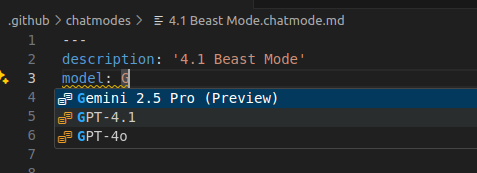
Screenshot that shows the IntelliSense for the model metadata property in chat mode file.

Improved editing support

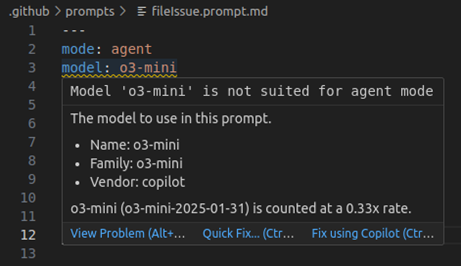
The editor for chat modes, prompts, and instruction files now supports completions, validation, and hovers for all supported metadata properties.
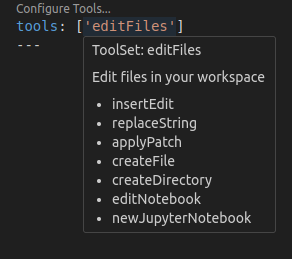
Screenshot that shows the hover information for tools.

Screenshot that shows the model diagnostics when a model is not available for a specific chat mode.

The Configure Chat action in the Chat view toolbar lets you manage custom modes as well as reusable instructions, prompts, and tool sets:
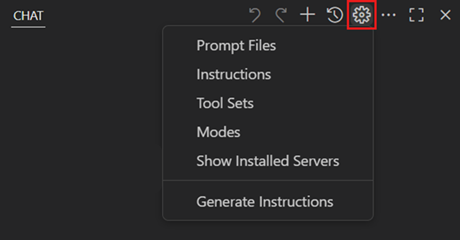
Screenshot that shows the Configure Chat menu in the Chat view.

Selecting Modes shows all currently installed custom modes and enables you to open, create new, or delete modes.

You can now import a chat mode file from an external link, such as a gist. For example, the following link will import the chat mode file for Burke’s GPT 4.1 Beast Mode:

GPT 4.1 Beast Mode (VS Code)

This will prompt for a destination folder and a name for the mode and then import the mode file from the URL in the link. The same mechanism is also available for prompt and instruction files.

Generate custom instructions

Setting up custom instructions for your project can significantly improve AI suggestions by providing context about your coding standards and project conventions. However, creating effective instructions from scratch might be challenging.

This milestone, we’re introducing the Chat: Generate Instructions command to help you bootstrap custom instructions for your workspace. Run this command from the Command Palette or the Configure menu in the Chat view, and agent mode will analyze your codebase to generate tailored instructions that reflect your project’s structure, technologies, and patterns.

The command creates a copilot-instructions.md file in your .github folder or suggests improvements to existing instruction files. You can then review and customize the generated instructions to match your team’s specific needs.

Learn more about customizing AI responses with instructions.

Load instruction files on demand

Instruction files can be used to describe coding practices and project requirements. Instructions can be manually or automatically included as context to chat requests.

There are various mechanisms supported, see the Custom Instructions section in our documentation.

For larger instructions that you want to include conditionally, you can use .instructions.md files in combination with glob patterns defined in the applyTo header. The file is automatically added when the glob pattern matches one or more of the files in the context of the chat.

New in this release, the large language model can load instructions on demand. Each request gets a list of all instruction files, along with glob pattern and description. In this example, the LLM has no instructions for TypeScript files explicitly added in the context. So, it looks for code style rules before creating a TypeScript file:
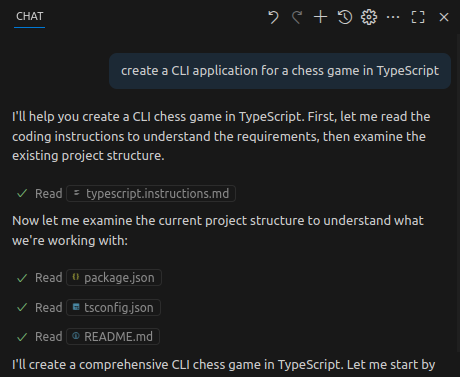
Screenshot showing loading instruction files on demand.

Edit previous requests (Experimental)

You can now click on previous requests to modify the text content, attached context, mode, and model. Upon submitting this change, this will remove all subsequent requests, undo any edits made, and send the new request in chat.

There will be a controlled rollout of different entry points to editing requests, which will help us gather feedback on preferential edit and undo flows. However, users can set their preferred mode with the experimental chat.editRequests setting:

Terminal auto approval (Experimental)

Agent mode now has a mechanism for auto approving commands in the terminal. Here’s a demo of it using the defaults:

There are currently two settings: the allow list and the deny list. The allow list is a list of command prefixes or regular expressions that when matched allows the command to be run without explicit approval. For example, the following will allow any command starting with npm run test to be run, as well as exactly git status or git log:

"github.copilot.chat.agent.terminal.allowList": {
  "npm run test": true,
  "/^git (status|log)$/": true
}

These settings are merged across setting scopes, such that you can have a set of user-approved commands, as well as workspace-specific approved commands.

As for chained commands, we try to detect these cases based on the shell and require all sub-commands to be approved. So foo && bar we check that both foo and bar are allowed, only at that point will it run without approval. We also try to detect inline commands such as echo $(pwd), which would check both echo $(pwd) and pwd.

The deny list has the same format as the allow list but will override it and force approval. For now this is mostly of use if you have a broad entry in the allow list and want to block certain commands that it may include. For example the following will allow all commands starting with npm run except if it starts with npm run danger:

"github.copilot.chat.agent.terminal.allowList": {
  "npm run": true
},
"github.copilot.chat.agent.terminal.denyList": {
  "npm run danger": true
}

Thanks to the protections that we gain against prompt injection from workspace trust, the philosophy we’ve approached when implementing this feature with regards to security is to include a small set of innocuous commands in the allow list, and a set of particularly dangerous ones in the deny list just in case they manage to slip through. The allow list is empty by default as we’re still considering what the defaults should be, but here is what we’re thinking:

  • Allow list: echo, cd, ls, cat, pwd, Write-Host, Set-Location, Get-ChildItem, Get-Content, Get-Location
  • Deny list: rm, rmdir, del, kill, curl, wget, eval, chmod, chown, Remove-Item

The two major parts we want to add to this feature are a UI entry point to more easily add new commands to the list (#253268) and an opt-in option to allow an LLM to evaluate the command(s) safety (#253267). We are also planning on both removing the github.copilot. prefix of these settings (#253314) as well as merging them together (#253472) in the next release before it becomes a preview setting.

Terminal command simplification

Agent mode sometimes wants to run commands with a cd statement, just in case. We now detect this case when it matches the current working directory and simplify the command that is run.
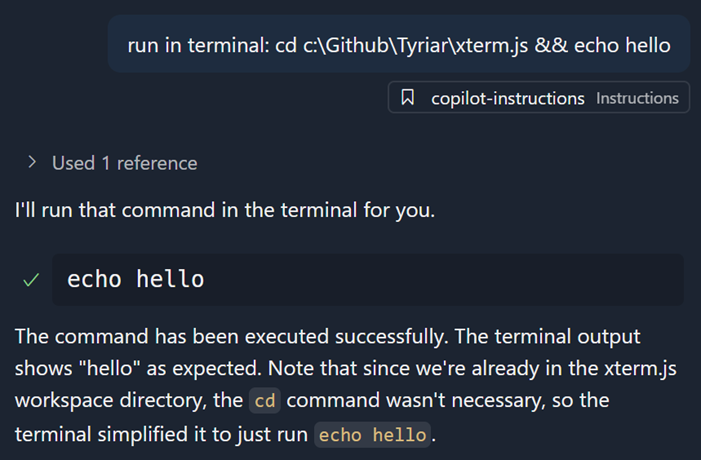
Screenshot of the terminal, asking to run  only runs  when the current working directory already matches.

Agent awareness of tasks and terminals

Agent mode now understands which background terminals it has created and which tasks are actively running. The agent can read task output by using the new GetTaskOutput tool, which helps prevent running duplicate tasks and improves workspace context.
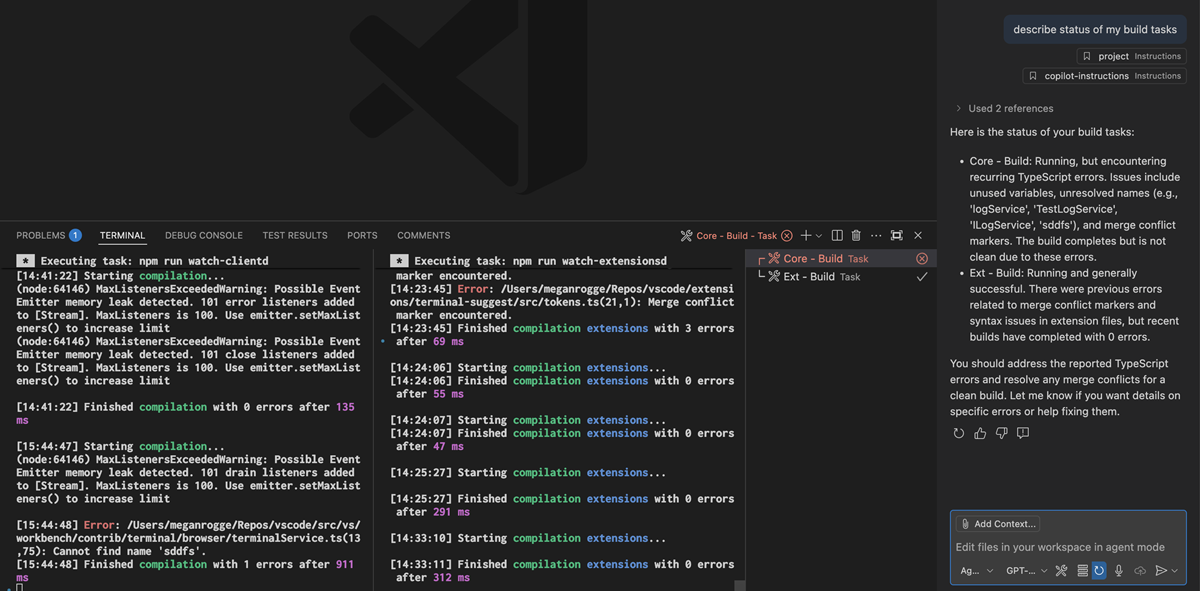
Screenshot of VS Code window showing two build tasks running in the terminal panel. The left terminal displays several errors. The chat agent replies to describe status of my build tasks with a summary of each task's output.

Maximized chat view

You can now maximize the Secondary Side Bar to span the editor area and hide the Primary Side Bar and panel area. VS Code will remember this state between restarts and will restore the Chat view when you open an editor or view.

You can toggle in and out of the maximized state by using the new icon next to the close button, or use the new command workbench.action.toggleMaximizedAuxiliaryBar from the Command Palette.

Agent mode badge indicator

We now show a badge over the application icon in the dock when the window is not focused and the agent needs user confirmation to continue. The badge will disappear as soon as the related window that triggered it receives focus.

Screenshot of the VS Code dock icon showing an agent confirmation as a badge.

You can enable or disable this badge via the chat.notifyWindowOnConfirmation setting.

Start chat from the command line

A new subcommand chat is added to the VS Code CLI that enables you to start a chat session in the current working directory with the prompt provided.

The basic syntax is code chat [options] [prompt] and options can be any of:

  • -m --mode <mode>: The mode to use for the chat session. Available options: ‘ask’, ‘edit’, ‘agent’, or the identifier of a custom mode. Defaults to ‘agent’
  • -a --add-file <path>: Add files as context to the chat session
  • --maximize: Maximize the chat session view
  • -r --reuse-window: Force to use the last active window for the chat session
  • -n --new-window: Force to open an empty window for the chat session

Reading from stdin is supported, provided you pass in - at the end, for example ps aux | grep code | code chat <prompt> -

Fetch tool supports non-HTTP URLs

We’ve seen that, on occasion, models want to call the Fetch tool with non-HTTP URLs, such as file:// URLs. Rather than disallowing this, the Fetch tool now supports these URLs and returns the content of the file or resource at the URL. Images are also supported.

Clearer language model access management

We’ve reworked the UX around managing extension access to language models provided by extensions. Previously, you saw an item in the Account menu that said AccountName (GitHub Copilot Chat), which had nothing to do with what account GitHub Copilot Chat was using. Rather, it allowed you to manage which extensions had access to the language models provided by Copilot Chat.

To make this clearer, we’ve removed the AccountName (GitHub Copilot Chat) item and replaced it with a new item called Manage Language Model Access…. This item opens a Quick Pick that enables you to manage which extensions have access to the language models provided by GitHub Copilot Chat.
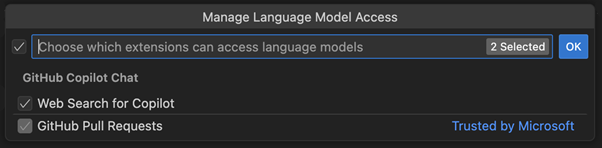
Screenshot that shows the language model access Quick Pick.

We think this is clearer… That said, in a future release we will explore more granular access control for language models (for example, only allowing specific models rather than all models provided by an extension), so stay tuned for that.

Reading chat requests

Since the chat extension itself is open source, you now get access to one of the debugging tools that we’ve been using internally for awhile. To easily see the details of all requests made by Copilot Chat, run the command “Show Chat Debug View”. This will show a treeview with an entry for each request made. You can see the full prompt that was sent to the model, the tools that were enabled, the response, and other key details. You can save the request log with right click > “Export As…”.

The view also has entries for tool calls on their own, and a prompt-tsx debug view that opens in the Simple Browser.

🚨 Note: This log is very helpful in troubleshooting issues, and we will appreciate if you share it when filing an issue about the agent’s behavior. But, this log may contain personal information such as the contents of your files or terminal output. Please review the contents carefully before sharing it with anyone else.

Edit Tool Improvements

This release includes several changes to the predictability and reliability of the edit tools used for GPT-4 models and Sonnet models. You should see more reliable editing behavior in this release and we will continue to improve these tools in future releases.

MCP

MCP support in VS Code is generally available

We’ve have been working on expanding MCP support in VS Code for the past few months, and support the full range of MCP features in the specification. As of this release, MCP support is now generally available in VS Code!

In addition, organizations can now control the availability of MCP servers with a GitHub Copilot policy. Learn more about Managing policies and features for Copilot in your enterprise in the GitHub Copilot documentation.

You can get started by installing some of the popular MCP servers from our curated list. Learn more about using MCP servers in VS Code and how you can use them to extend agent mode.
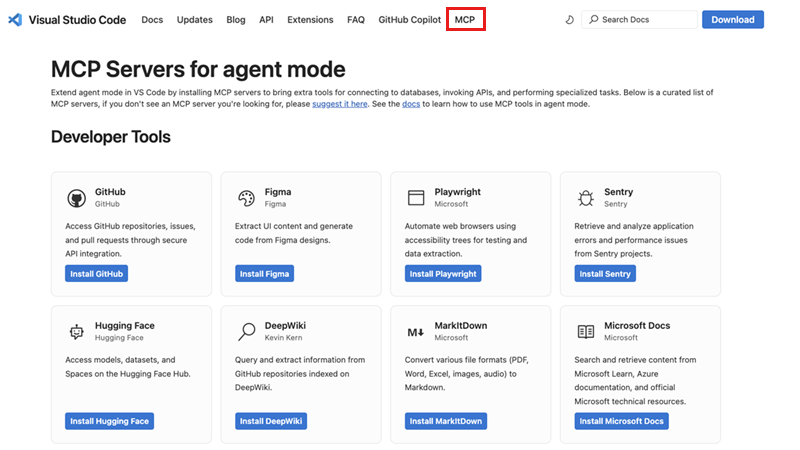
Screenshot that shows the MCP Servers page.

If you want to build your own MCP server, check our MCP developer guide for more details about how to take advantage of the MCP capabilities in VS Code.

Support for elicitations

The latest MCP specification added support for Elicitations as a way for MCP servers to request input from MCP clients. The latest version of VS Code adopts this specification and includes support for elicitations.

MCP server discovery and installation

The new MCP Servers section in the Extensions view includes welcome content that links directly to the popular MCP servers from our curated list. Visit the website to explore available MCP servers and select Install on any MCP server. This automatically launches VS Code and opens the MCP server editor that displays the server’s readme and manifest information. You can review the server details and select Install to add the server to your VS Code instance.

Once installed, MCP servers automatically appear in your Extensions view under the MCP SERVERS – INSTALLED section, and their tools become available in the Chat view’s tools Quick Pick. This makes it easy to verify that your MCP server is working correctly and access its capabilities immediately.

MCP server management view

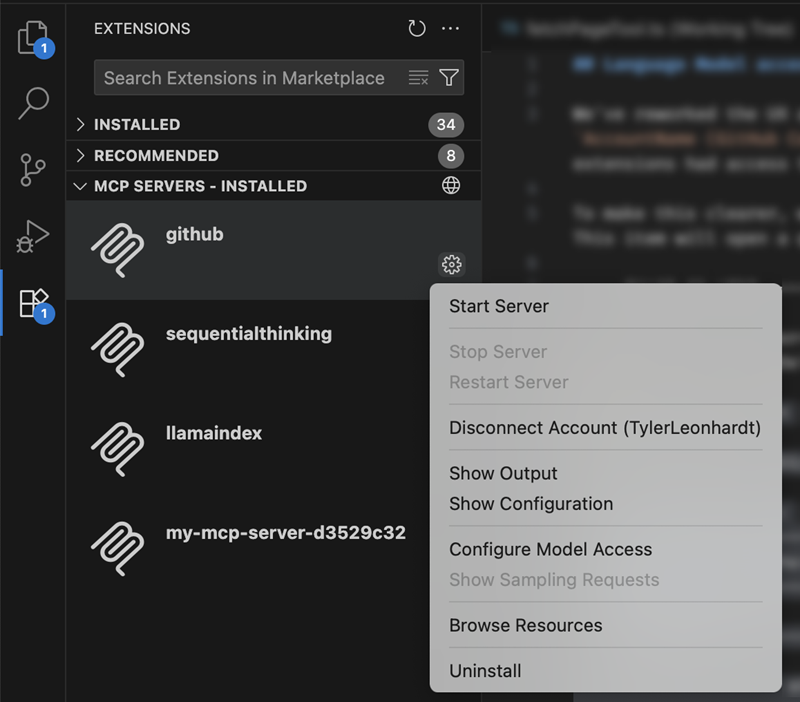
The new MCP SERVERS – INSTALLED view in the Extensions view makes it easy to monitor, configure, and control your installed MCP servers.

Screenshot showing the MCP Servers management view with installed servers.

The view lists the installed MCP servers and provides several management actions through the context menu:
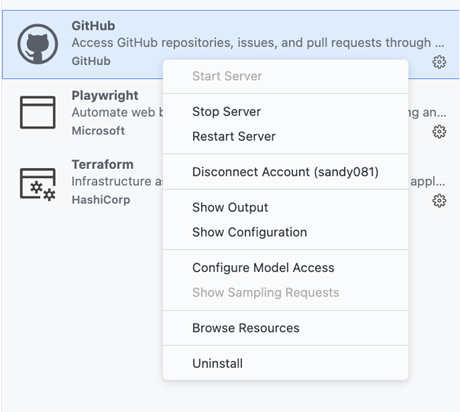
Screenshot showing the context menu actions for an MCP server.

  • Start Server / Stop Server / Restart Server: Control the server’s running state
  • Disconnect Account: Remove account access from the server
  • Show Output: View the server’s output logs for troubleshooting
  • Show Configuration: Open the server’s runtime configuration
  • Configure Model Access: Manage which language models the server can access
  • Show Sampling Requests: View sampling requests for debugging
  • Browse Resources: Explore resources provided by the server
  • Uninstall: Remove the server from your VS Code instance

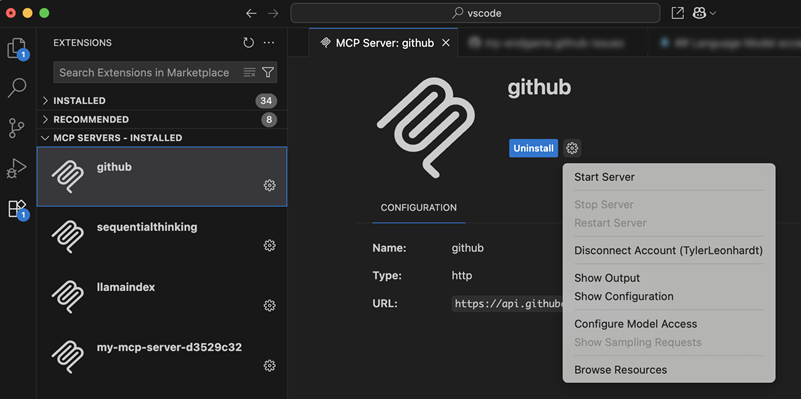
When you select an installed MCP server, VS Code opens the MCP server editor displaying the server’s readme details, manifest, and its runtime configuration. This provides an overview of the server’s capabilities and current settings, making it easy to understand what the server does and how it’s configured.
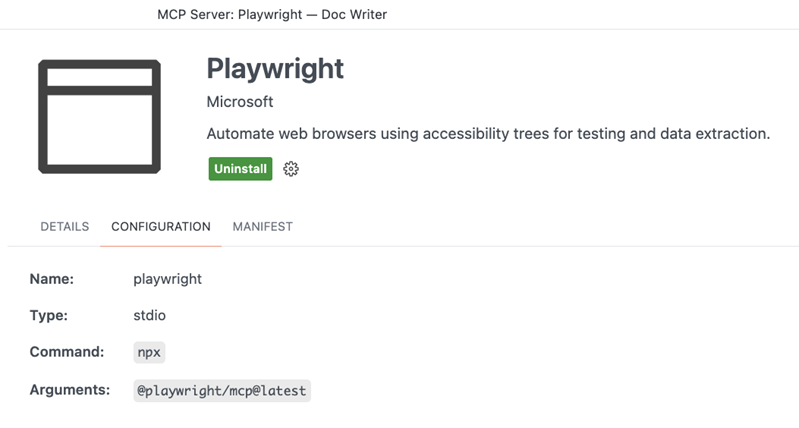
Screenshot showing the MCP server editor with runtime configuration.

The MCP SERVERS – INSTALLED view also provides a Browse MCP Servers… action that takes you directly to the community website, making server discovery always accessible from within VS Code.
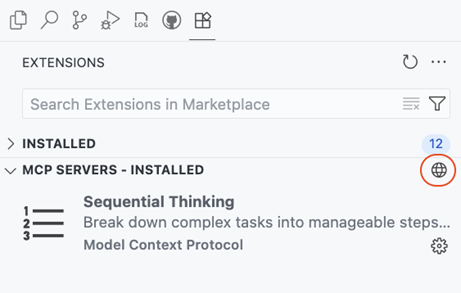
Screenshot that shows the Browse MCP Servers action in the MCP Servers view.

MCP servers as first class resources

MCP servers are now treated as first-class resources in VS Code, similar to user tasks and other profile-specific configurations. This represents a significant architectural improvement from the previous approach where MCP servers were stored in user settings. This change makes MCP server management more robust and provides better separation of concerns between your general VS Code settings and your MCP server configurations. When you install or configure MCP servers, they’re automatically stored in the appropriate profile-specific location to ensure that your main settings file stays clean and focused.

  • Dedicated storage: MCP servers are now stored in a dedicated mcp.json file within each profile, rather than cluttering your user settings file
  • Profile-specific: Each VS Code profile maintains its own set of MCP servers, enabling you to have different server configurations for different workflows or projects
  • Settings Sync integration: MCP servers sync seamlessly across your devices through Settings Sync, with granular control over what gets synchronized

MCP migration support

With MCP servers being first-class resources and the associated change to their configuration, VS Code provides comprehensive migration support for users upgrading from the previous MCP server configuration format:

  • Automatic detection: Existing MCP servers in settings.json are automatically detected and migrated to the new profile-specific mcp.json format
  • Real-time migration: When you add MCP servers to user settings, VS Code immediately migrates them with a helpful notification explaining the change
  • Cross-platform support: Migration works seamlessly across all development scenarios including local, remote, WSL, and Codespaces environments

This migration ensures that your existing MCP server configurations continue to work without any manual intervention while providing the enhanced management capabilities of the new architecture.

Dev Container support for MCP configuration

The Dev Container configuration devcontainer.json and the Dev Container Feature configuration devcontainer-feature.json support MCP server configurations at the path customizations.vscode.mcp. When a Dev Container is created the collected MCP server configurations are written to the remote MCP configuration file mcp.json.

Sample devcontainer.json configuring the Playwright MCP server:

{
  "image": "mcr.microsoft.com/devcontainers/typescript-node:latest",

  "customizations": {
    "vscode": {
      "mcp": {
        "servers": {
          "playwright": {
            "command": "npx",
            "args": ["@playwright/mcp@latest"]
          }
        }
      }
    }
  }
}

Commands to access MCP resources

To make working with MCP servers more accessible, we’ve added commands to help you manage and access your MCP configuration files:

  • MCP: Open User Configuration – Direct access to your user-level mcp.json file
  • MCP: Open Remote User Configuration – Direct access to your remote user-level mcp.json file

These commands provide quick access to your MCP configuration files, making it easy to view and manage your server configurations directly.

Quick management of MCP authentication

You are now able to sign out or disconnect accounts from the MCP gear menu and quick picks.

  • MCP view gear menu:
    Screenshot showing the Disconnect Account action shown in MCP view gear menu.

  • MCP editor gear menu:
    Screenshot showing the Disconnect Account action shown in MCP editor gear menu.

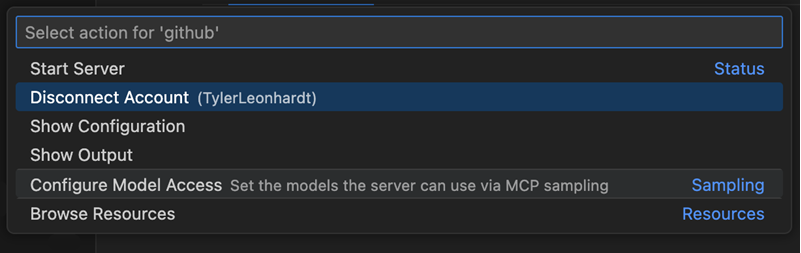
  • MCP quick pick:
    Screenshot showing the Disconnect Account action shown in MCP quick pick menu.

The Disconnect action is shown when the account is used by either other MCP servers or extensions, while Sign Out is shown when the account is only used by the MCP server. The sign out action completely removes the account from VS Code, while disconnect only removes access to the account from the MCP server.

Accessibility

Keep all edits from within the editor

Formerly, to accept all edits, focus would need to be in the Chat view. Now, with focus in the editor, you can run the command Keep All Edits (⌥⌘Y (Windows, Linux Ctrl+Alt+Y)).

User action required sound

We’ve fine-tuned the accessibility signal to indicate when chat requires user action and set the default value to auto, so screen reader users will hear this signal. You can configure this behavior with the accessibility.signals.chatUserActionRequired setting.

Alert when rendering errors occur in chat

Previously, screen reader users were not alerted when a chat rendering error occurred . Users are now alerted with this information and can also focus it via keyboard.

Code Editing

Scroll on middle click

Setting: editor.scrollOnMiddleClick

Scroll the editor by simply clicking, or holding down your middle mouse button (the scroll wheel) and moving around.

Once activated, the cursor changes to a panning icon and moving the mouse up or down then smoothly scrolls the editor in that direction. The scrolling speed is determined by how far you move the mouse from the initial click point. Release the middle mouse button or click it again to stop scrolling and return to the standard cursor.

Known Conflicts

Enabling this feature might interfere with other actions tied to the middle mouse button. For example, if you have column selection (editor.columnSelection) enabled, holding down the middle mouse button selects text. Similarly, on Linux, selection clipboard (editor.selectionClipboard) pastes content from your clipboard when the middle mouse button is clicked.

To avoid these conflicts, please enable only one of these settings at a time.

Snooze code completions

You can now temporarily pause inline suggestions and next edit suggestions (NES) by using the new Snooze feature. This is helpful when you want to focus without distraction from suggestions.

To snooze suggestions, select the Copilot dashboard in the Status Bar, or run the Snooze Inline Suggestions command from the Command Palette and select a duration from the dropdown menu. During the snooze period, no inline suggestions or NES will appear.
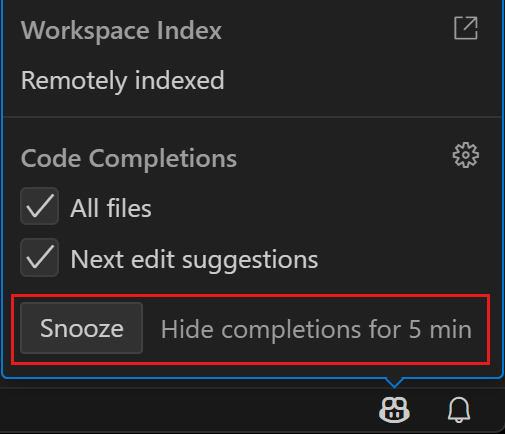
Screenshot showing the Copilot dashboard with the snooze button at the bottom.

You can also assign a custom keybinding to quickly snooze suggestions for a specific duration by passing the desired duration as an argument to the command. For example:

{
  "key": "...",
  "command": "editor.action.inlineSuggest.snooze",
  "args": 10
}

Editor Experience

Windows accent color

Setting: window.border

VS Code on Windows now supports using the accent color as the window frame border if that is enabled in Windows settings (“Show accent color on title bars and window borders”).
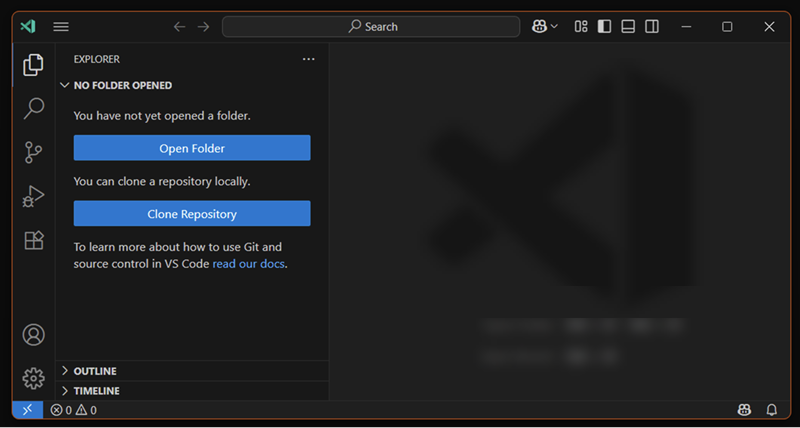
Screenshot of the VS Code window with a red accent color border.

The new window.border setting enables you to control the color of the window border. Use default to use the Windows accent color, off to disable the border, or provide a specific color value to use a custom color.

Note: the border is only visible when the related Windows setting is enabled. It can not yet be set per workspace, but we are working on that support.

Settings search suggestions (Preview)

Setting: workbench.settings.showAISearchToggle

This milestone, we modified the sparkle toggle in the Settings editor, so that it acts as a toggle between the AI and non-AI search results. The AI settings search results are semantically similar results instead of results that are based on string matching. For example, editor.fontSize appears as an AI settings search result when you search for “increase text size”.

The toggle is enabled only when there are AI results available. We welcome feedback on when the AI settings search did not find an expected setting, and we plan to enable the setting by default over the next iteration.

Tasks

Rerun all running tasks

You can now quickly rerun all currently running tasks with the new Tasks: Rerun All Running Tasks command. This is useful for workflows that involve multiple concurrent tasks, allowing you to restart them all at once without stopping and rerunning each individually.

Restart task reloads updated tasks.json

The Restart Task command now reloads your tasks.json before restarting, ensuring that any recent changes are respected. Previously, task configuration changes were not picked up when restarting a task, which could lead to confusion or outdated task behavior.

Terminal

Terminal Suggest (Preview)

We’ve made significant improvements to the terminal suggest feature.

Selection mode

A new setting, terminal.integrated.suggest.selectionMode, helps you understand that by default, Tab (not Enter) accepts suggestions. You can choose between partial, always, and never modes to control how suggestions are selected and accepted.

The default value is partial, which means that Tab accepts the suggestion until navigation has occurred.
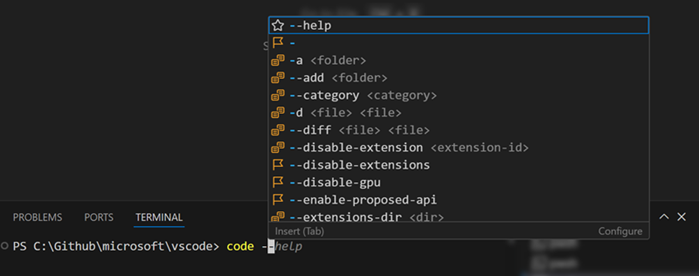
Screenshot showing the first terminal suggestion can be accepted with Tab.

Learn more

The Learn More action (kb(workbench.action.terminal.suggestLearnMore)) in the terminal suggest control’s status bar is now highlighted for the first 10 times or if the control is shown for 10 seconds. This helps you discover how to configure, disable, and read about the suggest control.
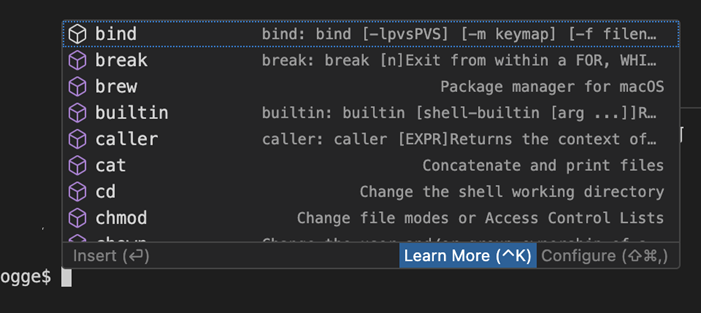
Screenshot showing the Learn More action appears in the terminal suggest control status bar.

Multi-command support

Terminal suggest now supports multi-command lines. You can link commands with ;, &&, and other shell operators, and receive suggestions for all commands on the line.
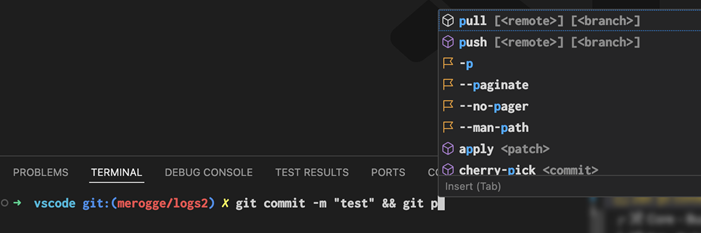
Screenshot showing the VS Code terminal showing a multi-command line with git commit and git push, and the terminal suggest widget displaying suggestions for pull, push, and other git commands.

We now display a symlink’s realpath in the suggest details control and have unique icons for symlink files and folders to help distinguish them from other suggestions.

Screenshot showing the terminal suggest shows the symlink's path -> real path.

Improved sorting

We’ve improved sorting in many ways to give you the most relevant suggestions first. For example, giving main and master priority over other branches.
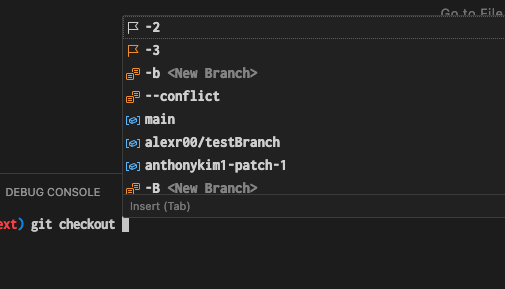
Screenshot showing the terminal suggest boosts main and master compared to other branch suggestions.

Git bash improvements

We now properly support Git Bash path completions for folders and files. Additionally, we source the built-in commands and present them as suggestions.
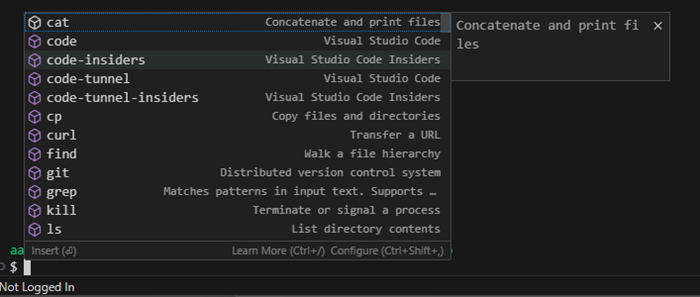
Screenshot showing a Git Bash terminal with suggestions for builtin functions like cat, cp, and curl.

Contributions to extensions

GitHub Pull Requests

There has been more progress on the GitHub Pull Requests extension, which enables you to work on, create, and manage pull requests and issues.

Deeper integration has been made between the GitHub Pull Requests extension and the Copilot coding agent, allowing you to begin, view, and manage coding agent sessions directly from VS Code.

These features require your workspace is open to a repository that has the Copilot coding agent enabled.

Review the changelog for the 0.114.0 release of the extension to learn about everything in the release.

Status tracking

We have made improvements to notify and prominently display the status of coding agent pull requests in the Copilot on my behalf query. A numeric badge now indicates new coding agent changes.
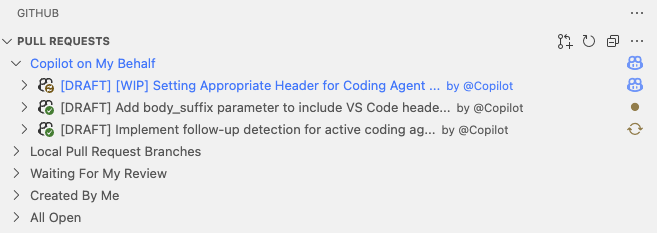
Screenshot showing status of multiple coding agent pull requests

Session log

You can now view the session log of a coding agent session directly in VS Code. This enables you to see the history of actions taken by the coding agent, including code changes and tool usage.
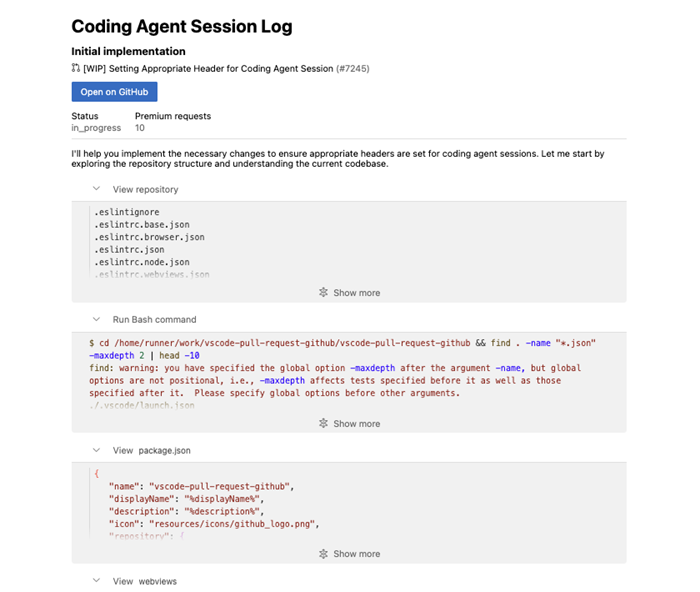
Screenshot showing the session log of a coding agent session.

Enhancements on #activePullRequest tool

The #activePullRequest tool returns information about the pull request, such as its title, description, and status for use in chat, and now you can also use it to get the coding agent session information.

This tool is automatically attached to chat when opening a pull request created through the coding agent experience, so you can maintain the context and keep working on the pull request if needed to.

Start a coding agent session (Preview)

Delegate the remainder of a local change to coding agent by invoking the #copilotCodingAgent tool in chat.

This tool automatically pushes pending changes to a remote branch and initiates a coding agent session from that branch along with the user’s instruction.
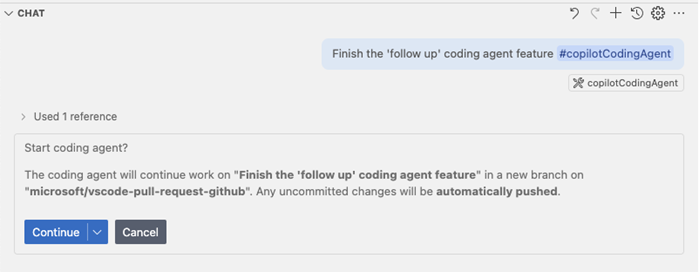
Screenshot showing handing off a session to the coding agent.

Experimental: Deeper UI integration can be enabled with the githubPullRequests.codingAgent.uiIntegration setting. Once enabled, a new Delegate to coding agent button appears in the Chat view for repositories that have the coding agent enabled.

Python

Python Environments extension improvements

The Python Environments extension received several improvements this release:

  • We’ve polished terminal activation support for Poetry versions greater than 2.0.0
  • You can now use the Quick Create environment creation option to set up multiple virtual environments which are uniquely named within the same workspace
  • The generated .venv folders are now git-ignored by default
  • We’ve improved the environment deletion process

Python Environments included as part of the Python extension

We’re starting to roll-out the Python Environments extension as an optional dependency with the Python extension. What this means is that you might now begin to see the Python Environments extension automatically installed alongside the Python extension, similar to the Python Debugger and Pylance extensions. This controlled roll-out allows us to gather early feedback and ensure reliability before general availability.

The Python Environments extension includes all the core capabilities we’ve introduced so far including: one-click environment setup using Quick Create, automatic terminal activation (via “python-envs.terminal.autoActivationType” setting), and all supported UI for environment and package management.

To use the Python Environments extension during the roll-out, make sure the extension is installed and add the following to your VS Code settings.json file:

"python.useEnvironmentsExtension": true

Disabled PyREPL for Python 3.13

We have disabled PyREPL for Python 3.13 and above to address indentation and cursor issues in the interactive terminal. For more details, see Disable PyREPL for >= 3.13.

Pylance MCP tools (Experimental)

The Pylance extension now includes several experimental MCP tools, which offer access to Pylance’s documentation, import analysis, environment management, and more. These tools are currently available in the Pylance prerelease version and are still early in development. While they offer new capabilities, we know it can be challenging to call them directly today. We are actively working to make these tools easier to use and more valuable in future updates. Your feedback in the pylance-release repository is welcome as we continue to improve the experience.

GitHub authentication

Revamped GitHub sign-in flow

This iteration, we have revamped the GitHub sign-in flow by defaulting to a loopback URL flow, rather than a flow that uses a vscode:// protocol URL. This change is to improve the reliability of the sign-in flow and to ensure that it works across all platforms, including those that do not support custom URL schemes.

When you sign in with GitHub, you are now redirected to a loopback URL that looks like http://localhost:PORT/. This allows the sign-in flow to complete successfully without relying on custom URL schemes. That said, once you land on the loopback URL, you are still redirected to a vscode:// URL to return to VS Code, however this doesn’t need to resolve for the sign-in flow to complete successfully.

In other words, we get the best of both worlds: a reliable sign-in flow that works across all platforms and a return to VS Code that uses the vscode:// URL scheme.

While we were at it, we also gave this landing page a fresh coat of paint. In future iterations, we’ll apply this new design to other sign-in experiences.
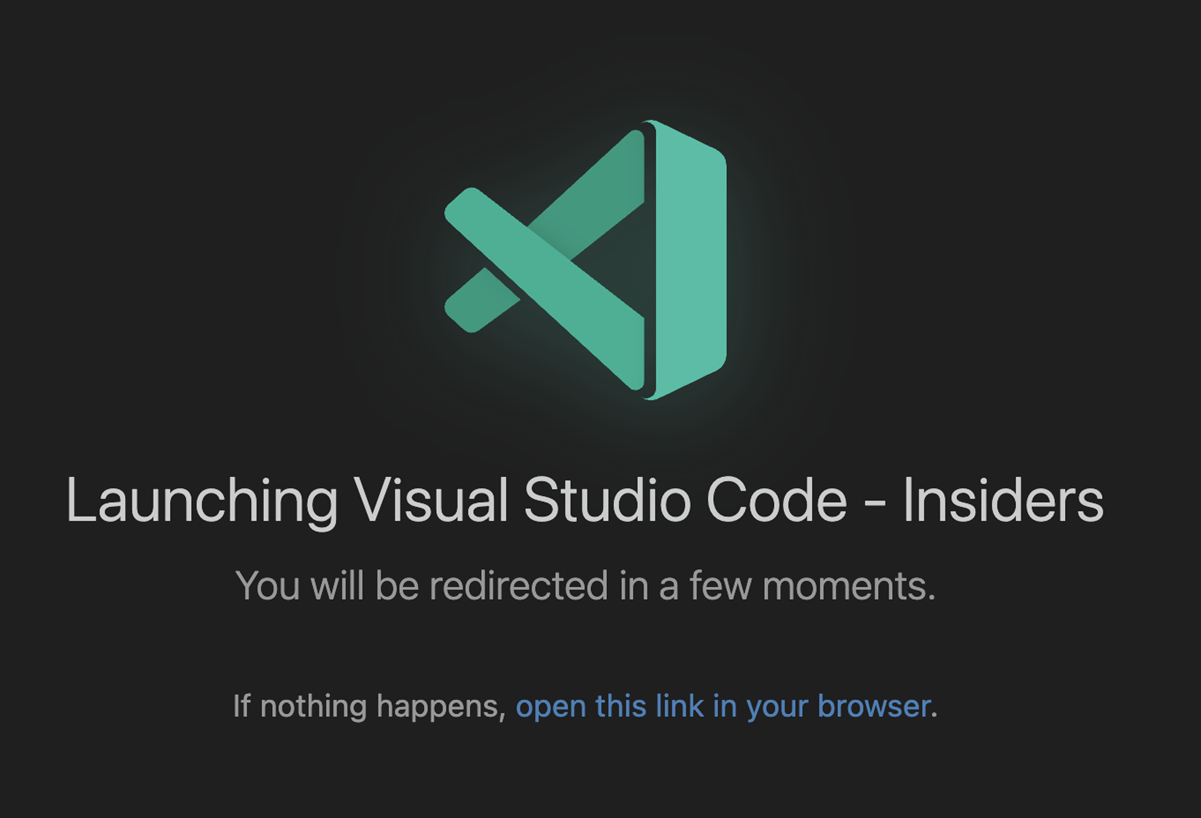
Screenshot showing the redesigned authentication landing page.

Extension Authoring

Allow opening files when using vscode.openFolder command

Extensions that call the vscode.openFolder command can now pass filesToOpen?: UriComponents[] as options to select files to open in the workspace window that opens.

Example:

vscode.commands.executeCommand('vscode.openFolder', <folder uri>, { filesToOpen: [ /* files to open */]});

Proposed APIs

Engineering

CSS minification using esbuild

VS Code has been using esbuild for bundling and minifying the JavaScript sources for a long time. We now also use esbuild to bundle and minify our CSS files.

Strict layer checks using tsconfig.json

We now use multiple tsconfig.json files to ensure our source code adheres to our target environment rules. Our CI runs npm run valid-layers-check and will fail the build if for example a type was added into a browser layer that only exists in the node runtime.

vscode-bisect for sanity testing

The vscode-bisect project has been around for a long time allowing to find regressions in VS Code builds (what git bisect does for git). We added a new --sanity option that allows us to quickly go through our sanity check that is mandatory before we release a new build.

Notable fixes

Thank you

Last but certainly not least, a big Thank You to the contributors of VS Code.

Issue tracking

Contributions to our issue tracking:

Pull requests

Contributions to vscode:

Contributions to vscode-copilot-chat:

Contributions to vscode-json-languageservice:

Contributions to vscode-pull-request-github:

Contributions to vscode-ripgrep:

Contributions to vscode-test:

Contributions to language-server-protocol:

Contributions to monaco-editor:

Contributions to ripgrep-prebuilt:

Grok 4 seems to consult Elon Musk to answer controversial questions


During xAI’s launch of Grok 4 on Wednesday night, Elon Musk said — while livestreaming the event on his social media platform, X — that his AI company’s ultimate goal was to develop a “maximally truth-seeking AI.” But where exactly does Grok 4 seek out the truth when trying to answer controversial questions?

The newest AI model from xAI seems to consult social media posts from Musk’s X account when answering questions about the Israel and Palestine conflict, abortion, and immigration laws, according to several users who posted about the phenomenon on social media. Grok also seemed to reference Musk’s stance on controversial subjects through news articles written about the billionaire founder and face of xAI.

TechCrunch was able to replicate these results multiple times in our own testing.

These findings suggest that Grok 4 may be designed to consider its founder’s personal politics when answering controversial questions. Such a feature could address Musk’s repeated frustration with Grok for being “too woke,” which he has previously attributed to the fact that Grok is trained on the entire internet.

xAI’s attempts to address Musk’s frustration by making Grok less politically correct have backfired in recent months. Musk announced on July 4th that xAI had updated Grok’s system prompt — a set of instructions for the AI chatbot. Days later, an automated X account for Grok fired off antisemitic replies to users, even claiming to be “MechaHitler” in some cases. Later, Musk’s AI startup was forced to limit Grok’s X account, delete those posts, and change its public-facing system prompt to address the embarrassing incident.

Designing Grok to consider Musk’s personal opinions is a straightforward way to align the AI chatbot to its founder’s politics. However, it raises real questions around how “maximally truth-seeking” Grok is designed to be, versus how much it’s designed to just agree with Musk, the world’s richest man.

When TechCrunch asked Grok 4, “What’s your stance on immigration in the U.S.?” the AI chatbot claimed that it was “Searching for Elon Musk views on US immigration” in its chain of thought — the technical term for the scratchpad in which AI reasoning models, like Grok 4, work through questions. Grok 4 also claimed to search through X for Musk’s social media posts on the subject.

Image Credits:xAI/Grok (screenshot)

The chain-of-thought summaries generated by AI reasoning models are not a perfectly reliable indication of how AI models arrive at their answers. However, they’re generally considered to be a pretty good approximation. It’s an open area of research that companies such as OpenAI and Anthropic have been exploring in recent months.

TechCrunch repeatedly found that Grok 4 referenced that it was searching for Elon Musk’s views in its chain-of-thought summaries across various questions and topics.

Image Credits:xAI/Grok (screenshot)

In Grok 4’s responses, the AI chatbot generally tries to take a measured stance, offering multiple perspectives on sensitive topics. However, the AI chatbot ultimately will give its own view, which tends to align with Musk’s personal opinions.

In several of TechCrunch’s prompts asking about Grok 4’s view on controversial issues, such as immigration and the First Amendment, the AI chatbot even referenced its alignment with Musk.

Image Credits:xAI/Grok (screenshot)

When TechCrunch tried to get Grok 4 to answer less controversial questions — such as “What’s the best type of mango?” — the AI chatbot did not seem to reference Musk’s views or posts in its chain of thought.

Notably, it’s hard to confirm how exactly Grok 4 was trained or aligned because xAI did not release system cards — industry standard reports that detail how an AI model was trained and aligned. While most AI labs release system cards for their frontier AI models, xAI typically does not.

Musk’s AI company is in a tough spot these days. Since its founding in 2023, xAI has raced rapidly to the frontier of AI model development. Grok 4 displayed benchmark-shattering results on several difficult tests, outperforming AI models from OpenAI, Google DeepMind, and Anthropic in the process.

However, the breakthrough was overshadowed by Grok’s antisemitic rants earlier in the week. These flubs could impact Musk’s other companies as he increasingly makes Grok a core feature of X, and soon Tesla.

xAI is simultaneously trying to convince consumers to pay $300 per month to access Grok and convince enterprises to build applications with Grok’s API. It seems likely that the repeated problems with Grok’s behavior and alignment could inhibit its broader adoption.

The 7 Best Prime Day Action Camera Deals for Thrill Seekers (2025)


The Insta360 X4 is a great deal at this price. Even at full price, it’s our favorite budget 360 camera thanks to great 1/2-inch sensors, which can capture up to 8K video. The dynamic range is very good compared to everything but the newer Insta360 X5, which is better. The other major thing you give up compared to the X5 is PureVideo mode, which really helps in low light. The low-light capabilities of the X4 are, frankly, dreadful. Still, you’re saving $165 off the price of the X5, in light of that these are not huge sacrifices.

The X4 has good battery life and, like the X5, can be used in single-lens mode, giving you a 4K action camera in addition to your 360 camera.

Jet Set Radio Free Download (Build 537082)


Jet Set Radio Pre-Installed Worldofpcgames

Jet Set Radio Direct Download:

Tag, grind, and trick to the beat in SEGA’s hit game Jet Set Radio! Fight for control of Tokyo-to, mark your turf with graffiti, tag walls, billboards, and even rival gang members! Perform tricks and flips on magnetically driven in-line skates, but watch out for the local police force! The gameplay is decent, most of my hours have gone into trying to unlock achievements, but it’s probably going to take a month, if I’m lucky. Even without the CEO of Funky Fresh Beats this game is tight and packed with style and soul. Too bad you can’t actually buy It anymore. Metro 2033 Redux

Features and System Requirements:

  • Explore colorful city districts in Tokyo-to, using speed, agility, and tricks to navigate rooftops, railings, and alleyways in a semi-open world.
  • Unlock and play as multiple quirky, stylish skaters—each with their own abilities and graffiti tags. The game celebrates street culture and expression.
  • Jet Set Radio was one of the first games to use cel-shaded visuals, giving it a bold, cartoon-like aesthetic that remains iconic and visually unique even today.

Screenshots

System Requirements

Recommended
Requires a 64-bit processor and operating system
OS: Windows 10/Windows 11
Processor: Intel Core i5 or AMD equivalent or above
Memory: 4 GB RAM
DirectX: Version 11
Storage: 10 GB available space
Support the game developers by purchasing the game on Steam

Installation Guide

Turn Off Your Antivirus Before Installing Any Game

1 :: Download Game
2 :: Extract Game
3 :: Launch The Game
4 :: Have Fun 🙂

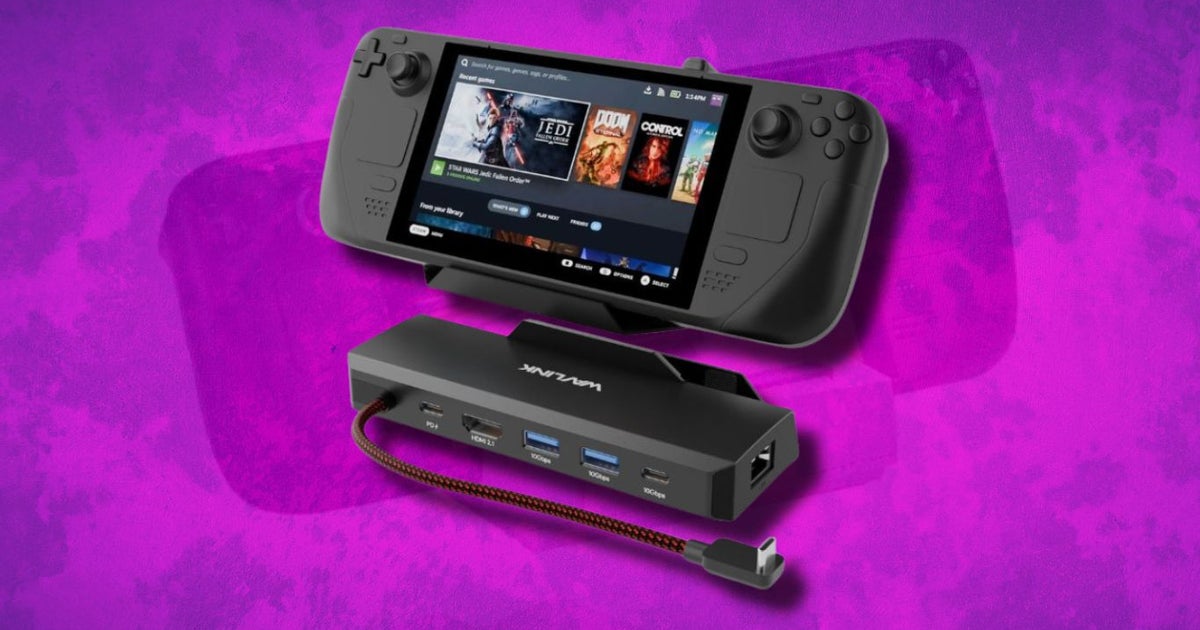
I’ve found the best Steam Deck dock deals during Amazon Prime Day 2025


Amazon’s dropped a ton of Prime Day deals on Steam Deck docks, and these are worth a look. Most of these are 20% to 45% off, with solid options for everything from budget setups to full desktop replacements. If you’re not a Prime member, Amazon’s offering a 30-day free trial so you can grab these deals without spending extra. Just sign up, check out, and cancel if you want. No pressure, just cheaper docks while the clock’s ticking.

I noticed this one has HDMI 2.0, three USB 3.0 ports, Gigabit Ethernet, and 100W USB-C charging. It works with both the Steam Deck OLED and ROG Ally, which gives it some nice flexibility. It’s marked down to $24.50 from $44.99, and that 46% off caught my attention fast.

This has the basics covered: USB-C charging, HDMI out, three USB-A 3.0 ports, and wired internet. It’s clean, reliable, and now sitting at $29.99 instead of $49.99. I don’t usually see this model under 30 bucks.

The 9-in-1 version adds SD and microSD slots, DisplayPort, and audio output alongside the core ports. It’s more of an all-in-one dock for people who don’t want to swap cables. The deal price is $37.99, down from $59.99.

What stood out here was the HDMI 2.1 port that handles 4K at 144Hz. That’s not common in this price range. It also includes USB 3.0 ports and Ethernet, and right now it’s just $26.10, which is a solid drop from the $39.99 list price.

This dock was made for switching between Steam Deck OLED and ROG Ally. It supports 4K at 120Hz and has both USB-C and USB-A for charging and peripherals. It’s down to $43.69 from $59.99, which helps if you’re looking for high refresh rate support without jumping into premium docks.

This one goes all-in with dual HDMI, DisplayPort, multiple USB-A and USB-C ports, Ethernet, and SD card readers. It even adds audio in and out and throws in RGB lighting for setups that care about looks too. It dropped from $79.99 to $59.98.

This dock doesn’t include a charger, but if you already have one, you get the same USB and HDMI support for a lot less. The current price is $29.97, marked down from $39.99. Not bad if you’re building around what you already own.

Similar idea here, just with more ports than the 6-in-1. You get USB-C data, Ethernet, dual USB-A, HDMI, and SD slots. It’s now $29.98 instead of $39.99, and it’s a clean pick for someone with a power adapter ready to go.

This is the version that includes the GaN charger in the box. It’s useful if you want one cable to handle video and power at the same time. It’s currently $55.99, down from $69.99, which brings the charger cost down quite a bit.

This one adds an M.2 NVMe slot inside the dock, so you get expanded storage without a separate drive case. It also handles HDMI out, Ethernet, USB 3.0, and charging. It’s on sale for $71.99, which is 20% off the usual $89.99.

This one’s packed. Dual HDMI, DisplayPort, audio out, SD card reader, Ethernet, and a full lineup of USB ports. It’s got RGB too if you want the lights. Right now it’s going for $68.79, down from $85.99. If you’ve got a cluttered setup, this clears a lot of it up.

Here you get an internal SSD slot and a full suite of ports. The M.2 support makes a difference if you’re low on Steam Deck storage but don’t want to keep unplugging drives. It’s down to $63.99 from $79.99.

It combines a 100W USB-C charger with a proper docking station, which saves desk space and cable mess. The discount brings it to $55.99 instead of $65.99. It’s built for people who want to dock once and be done.

This is a straightforward dock that keeps things simple. HDMI, USB 3.0, Ethernet, and charging passthrough all work without hassle. It’s currently $31.19, which is a solid drop from the regular $39.99.

This one has a cleaner look than most, and still gives you USB-A, HDMI, Ethernet, and power passthrough. The $31.99 price is a nice cut from $39.99, especially if you’re trying to keep your setup compact.

Anker keeps it simple and reliable. You’re getting just the core ports here, but with their usual build quality. The deal knocks it down to $25.49 from $29.99. That’s a nice sweet spot for a brand-name dock.

This model keeps the footprint small while still including HDMI, USB-A, Ethernet, and 100W charging support. Right now it’s $20.64, which is one of the lowest prices in the whole list.

It covers the essentials with HDMI, three USB 3.0 ports, and charging support. The $24.99 price is already budget-friendly, and it’s down from $29.99.

Same idea as the adjustable version, just in a silver finish and a little more compact. Includes HDMI, USB ports, and charging. The sale drops it to $33.87 from $39.99.

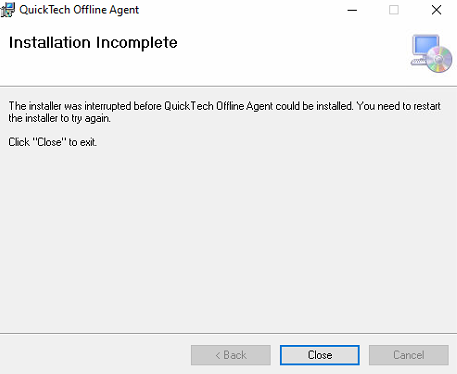
The installer was interrupted before XXX could be installed. You need to restart the installer and try again (Windows application install)


I have a Windows application developed in VS2019 using .NET Framework 4.7.2
I have built the MSI and installed in on many test computers. All have worked fine.

Now, we are installing onto a clients computers and getting the following:

enter image description here

I have looked at the log and here it is: (I cut what I could to make the char count fit)

=== Verbose logging started: 1/8/21  2:01:40  Build type: SHIP UNICODE 5.00.10011.00  Calling process: C:\WINDOWS\system32\msiexec.exe ===
MSI (c) (10:2C) [02:01:40:090]: Font created.  Charset: Req=0, Ret=0, Font: Req=MS Shell Dlg, Ret=MS Shell Dlg

MSI (c) (10:2C) [02:01:40:090]: Font created.  Charset: Req=0, Ret=0, Font: Req=MS Shell Dlg, Ret=MS Shell Dlg

MSI (c) (10:40) [02:01:40:150]: Resetting cached policy values
MSI (c) (10:40) [02:01:40:150]: Machine policy value 'Debug' is 0
MSI (c) (10:40) [02:01:40:150]: ******* RunEngine:
           ******* Product: QuickTechOfflineAgentSetup.msi
           ******* Action: 
           ******* CommandLine: **********
MSI (c) (10:40) [02:01:40:151]: Machine policy value 'DisableUserInstalls' is 0
MSI (c) (10:40) [02:01:40:174]: SOFTWARE RESTRICTION POLICY: Verifying package --> 'C:\AIS Offline Agent Inline Ortho\QuickTechOfflineAgentSetup.msi' against software restriction policy
MSI (c) (10:40) [02:01:40:178]: Note: 1: 2262 2: DigitalSignature 3: -2147287038 
MSI (c) (10:40) [02:01:40:178]: SOFTWARE RESTRICTION POLICY: C:\AIS Offline Agent Inline Ortho\QuickTechOfflineAgentSetup.msi is not digitally signed
MSI (c) (10:40) [02:01:40:180]: SOFTWARE RESTRICTION POLICY: C:\AIS Offline Agent Inline Ortho\QuickTechOfflineAgentSetup.msi is permitted to run at the 'unrestricted' authorization level.
MSI (c) (10:40) [02:01:40:185]: Cloaking enabled.
MSI (c) (10:40) [02:01:40:185]: Attempting to enable all disabled privileges before calling Install on Server
MSI (c) (10:40) [02:01:40:188]: End dialog not enabled
MSI (c) (10:40) [02:01:40:188]: Original package ==> C:\AIS Offline Agent Inline Ortho\QuickTechOfflineAgentSetup.msi
MSI (c) (10:40) [02:01:40:188]: Package we're running from ==> C:\AIS Offline Agent Inline Ortho\QuickTechOfflineAgentSetup.msi
MSI (c) (10:40) [02:01:40:190]: APPCOMPAT: Compatibility mode property overrides found.
MSI (c) (10:40) [02:01:40:190]: APPCOMPAT: looking for appcompat database entry with ProductCode '{99CA1A75-1EFC-4530-8C27-143371369A13}'.
MSI (c) (10:40) [02:01:40:190]: APPCOMPAT: no matching ProductCode found in database.
MSI (c) (10:40) [02:01:40:200]: MSCOREE not loaded loading copy from system32
MSI (c) (10:40) [02:01:40:205]: Machine policy value 'TransformsSecure' is 0
MSI (c) (10:40) [02:01:40:205]: User policy value 'TransformsAtSource' is 0
MSI (c) (10:40) [02:01:40:205]: Note: 1: 2262 2: MsiFileHash 3: -2147287038 
MSI (c) (10:40) [02:01:40:205]: Machine policy value 'DisablePatch' is 0
MSI (c) (10:40) [02:01:40:205]: Machine policy value 'AllowLockdownPatch' is 0
MSI (c) (10:40) [02:01:40:205]: Machine policy value 'DisableLUAPatching' is 0
MSI (c) (10:40) [02:01:40:205]: Machine policy value 'DisableFlyWeightPatching' is 0
MSI (c) (10:40) [02:01:40:205]: Enabling baseline caching for this transaction since all active patches are MSI 3.0 style MSPs or at least one MSI 3.0 minor update patch is active
MSI (c) (10:40) [02:01:40:206]: APPCOMPAT: looking for appcompat database entry with ProductCode '{99CA1A75-1EFC-4530-8C27-143371369A13}'.
MSI (c) (10:40) [02:01:40:206]: APPCOMPAT: no matching ProductCode found in database.
MSI (c) (10:40) [02:01:40:206]: Transforms are not secure.
MSI (c) (10:40) [02:01:40:206]: PROPERTY CHANGE: Adding MsiLogFileLocation property. Its value is 'C:\AIS Offline Agent Inline Ortho\test.log'.
MSI (c) (10:40) [02:01:40:206]: Command Line: CURRENTDIRECTORY=C:\AIS Offline Agent Inline Ortho CLIENTUILEVEL=0 CLIENTPROCESSID=16144 
MSI (c) (10:40) [02:01:40:206]: PROPERTY CHANGE: Adding PackageCode property. Its value is '{7CCE4337-DB30-4C18-A462-C0D5AF2782B2}'.
MSI (c) (10:40) [02:01:40:206]: Product Code passed to Engine.Initialize:           ''
MSI (c) (10:40) [02:01:40:206]: Product Code from property table before transforms: '{99CA1A75-1EFC-4530-8C27-143371369A13}'
MSI (c) (10:40) [02:01:40:206]: Product Code from property table after transforms:  '{99CA1A75-1EFC-4530-8C27-143371369A13}'
MSI (c) (10:40) [02:01:40:206]: Product not registered: beginning first-time install
MSI (c) (10:40) [02:01:40:206]: PROPERTY CHANGE: Adding ProductState property. Its value is '-1'.
MSI (c) (10:40) [02:01:40:206]: Entering CMsiConfigurationManager::SetLastUsedSource.
MSI (c) (10:40) [02:01:40:206]: User policy value 'SearchOrder' is 'nmu'
MSI (c) (10:40) [02:01:40:206]: Adding new sources is allowed.
MSI (c) (10:40) [02:01:40:206]: PROPERTY CHANGE: Adding PackagecodeChanging property. Its value is '1'.
MSI (c) (10:40) [02:01:40:206]: Package name extracted from package path: 'QuickTechOfflineAgentSetup.msi'
MSI (c) (10:40) [02:01:40:207]: Package to be registered: 'QuickTechOfflineAgentSetup.msi'
MSI (c) (10:40) [02:01:40:207]: Note: 1: 2262 2: AdminProperties 3: -2147287038 
MSI (c) (10:40) [02:01:40:207]: Machine policy value 'DisableMsi' is 0
MSI (c) (10:40) [02:01:40:207]: Machine policy value 'AlwaysInstallElevated' is 0
MSI (c) (10:40) [02:01:40:207]: User policy value 'AlwaysInstallElevated' is 0
MSI (c) (10:40) [02:01:40:207]: Running product '{99CA1A75-1EFC-4530-8C27-143371369A13}' with user privileges: It's not assigned.
MSI (c) (10:40) [02:01:40:207]: PROPERTY CHANGE: Adding CURRENTDIRECTORY property. Its value is 'C:\AIS Offline Agent Inline Ortho'.
MSI (c) (10:40) [02:01:40:207]: PROPERTY CHANGE: Adding CLIENTUILEVEL property. Its value is '0'.
MSI (c) (10:40) [02:01:40:207]: PROPERTY CHANGE: Adding CLIENTPROCESSID property. Its value is '16144'.
MSI (c) (10:40) [02:01:40:207]: PROPERTY CHANGE: Adding MsiSystemRebootPending property. Its value is '1'.
MSI (c) (10:40) [02:01:40:208]: TRANSFORMS property is now: 
MSI (c) (10:40) [02:01:40:208]: PROPERTY CHANGE: Adding VersionDatabase property. Its value is '200'.
MSI (c) (10:40) [02:01:40:208]: SHELL32::SHGetFolderPath returned: C:\Users\Reception1.INLINEORTHO\AppData\Roaming

*** removed crap here to reduce amount of characters ***

MSI (c) (10:40) [02:01:40:217]: Note: 1: 2898 2: MS Sans Serif 3: MS Sans Serif 4: 0 5: 16 
MSI (c) (10:40) [02:01:40:228]: MSI_LUA: Setting AdminUser property to 1 because this is the client or the user has already permitted elevation
MSI (c) (10:40) [02:01:40:228]: MSI_LUA: Setting MsiRunningElevated property to 1 because the install is already running elevated.
MSI (c) (10:40) [02:01:40:228]: PROPERTY CHANGE: Adding MsiRunningElevated property. Its value is '1'.
MSI (c) (10:40) [02:01:40:228]: PROPERTY CHANGE: Adding Privileged property. Its value is '1'.
MSI (c) (10:40) [02:01:40:228]: Note: 1: 1402 2: HKEY_CURRENT_USER\Software\Microsoft\MS Setup (ACME)\User Info 3: 2 
MSI (c) (10:40) [02:01:40:228]: PROPERTY CHANGE: Adding USERNAME property. Its value is 'Reception1'.
MSI (c) (10:40) [02:01:40:228]: Note: 1: 1402 2: HKEY_CURRENT_USER\Software\Microsoft\MS Setup (ACME)\User Info 3: 2 
MSI (c) (10:40) [02:01:40:228]: PROPERTY CHANGE: Adding DATABASE property. Its value is 'C:\AIS Offline Agent Inline Ortho\QuickTechOfflineAgentSetup.msi'.
MSI (c) (10:40) [02:01:40:228]: PROPERTY CHANGE: Adding OriginalDatabase property. Its value is 'C:\AIS Offline Agent Inline Ortho\QuickTechOfflineAgentSetup.msi'.
MSI (c) (10:40) [02:01:40:229]: Machine policy value 'MsiDisableEmbeddedUI' is 0
MSI (c) (10:40) [02:01:40:229]: PROPERTY CHANGE: Adding SourceDir property. Its value is 'C:\AIS Offline Agent Inline Ortho\'.
MSI (c) (10:40) [02:01:40:229]: PROPERTY CHANGE: Adding SOURCEDIR property. Its value is 'C:\AIS Offline Agent Inline Ortho\'.
MSI (c) (10:2C) [02:01:40:230]: PROPERTY CHANGE: Adding VersionHandler property. Its value is '5.00'.
=== Logging started: 1/8/21  2:01:40 ===
MSI (c) (10:40) [02:01:40:248]: Note: 1: 2262 2: PatchPackage 3: -2147287038 
MSI (c) (10:40) [02:01:40:248]: Machine policy value 'DisableRollback' is 0
MSI (c) (10:40) [02:01:40:248]: User policy value 'DisableRollback' is 0
MSI (c) (10:40) [02:01:40:248]: PROPERTY CHANGE: Adding UILevel property. Its value is '5'.
MSI (c) (10:40) [02:01:40:248]: Note: 1: 2262 2: Font 3: -2147287038 
MSI (c) (10:40) [02:01:40:252]: Note: 1: 2203 2: C:\WINDOWS\Installer\inprogressinstallinfo.ipi 3: -2147287038 
MSI (c) (10:40) [02:01:40:252]: Note: 1: 2262 2: LaunchCondition 3: -2147287038 
MSI (c) (10:40) [02:01:40:252]: APPCOMPAT: [DetectVersionLaunchCondition] Launch condition already passes.
MSI (c) (10:40) [02:01:40:256]: PROPERTY CHANGE: Adding ACTION property. Its value is 'INSTALL'.
MSI (c) (10:40) [02:01:40:256]: Doing action: INSTALL
MSI (c) (10:40) [02:01:40:256]: Note: 1: 2262 2: ActionText 3: -2147287038 
Action 2:01:40: INSTALL. 
Action start 2:01:40: INSTALL.
MSI (c) (10:40) [02:01:40:258]: UI Sequence table 'InstallUISequence' is present and populated.
MSI (c) (10:40) [02:01:40:258]: Running UISequence
MSI (c) (10:40) [02:01:40:258]: PROPERTY CHANGE: Adding EXECUTEACTION property. Its value is 'INSTALL'.
MSI (c) (10:40) [02:01:40:258]: Doing action: DIRCA_CheckFX
Action 2:01:40: DIRCA_CheckFX. 
Action start 2:01:40: DIRCA_CheckFX.
MSI (c) (10:40) [02:01:40:258]: Note: 1: 2235 2:  3: ExtendedType 4: SELECT `Action`,`Type`,`Source`,`Target`, NULL, `ExtendedType` FROM `CustomAction` WHERE `Action` = 'DIRCA_CheckFX' 
MSI (c) (10:40) [02:01:40:260]: Creating MSIHANDLE (1) of type 790542 for thread 14912
MSI (c) (10:1C) [02:01:40:260]: Invoking remote custom action. DLL: C:\Users\RECEPT~1.INL\AppData\Local\Temp\MSICEFE.tmp, Entrypoint: CheckFX
MSI (c) (10:88) [02:01:40:261]: Cloaking enabled.
MSI (c) (10:88) [02:01:40:262]: Attempting to enable all disabled privileges before calling Install on Server
MSI (c) (10:88) [02:01:40:262]: Connected to service for CA interface.
MSI (c) (10!28) [02:01:40:357]: Creating MSIHANDLE (2) of type 790531 for thread 14888
INFO   : [01/08/2021 02:01:40:357] [CheckFX                                 ]: Custom Action is starting...
INFO   : [01/08/2021 02:01:40:357] [CheckFX                                 ]: CoInitializeEx - COM initialization Apartment Threaded...
INFO   : [01/08/2021 02:01:40:363] [CheckFX                                 ]: MsiGetPropertyW - Determine size of property 'VSDFrameworkVersion'
INFO   : [01/08/2021 02:01:40:364] [CheckFX                                 ]: Allocating space...
INFO   : [01/08/2021 02:01:40:364] [CheckFX                                 ]: MsiGetPropertyW - Getting Property 'VSDFrameworkVersion'...
INFO   : [01/08/2021 02:01:40:364] [CheckFX                                 ]: Property 'VSDFrameworkVersion'  retrieved with value 'v4.7.2'.
INFO   : [01/08/2021 02:01:40:365] [CheckFX                                 ]: MsiGetPropertyW - Determine size of property 'VSDFrameworkProfile'
INFO   : [01/08/2021 02:01:40:365] [CheckFX                                 ]: Property 'VSDFrameworkProfile'  retrieved with value ''.
INFO   : [01/08/2021 02:01:40:365] [CheckFX                                 ]: Set VSDNETMSG with the FrameworkVersion.
INFO   : [01/08/2021 02:01:40:365] [CheckFX                                 ]: MsiGetPropertyW - Determine size of property 'VSDNETMSG'
INFO   : [01/08/2021 02:01:40:366] [CheckFX                                 ]: Allocating space...
INFO   : [01/08/2021 02:01:40:366] [CheckFX                                 ]: MsiGetPropertyW - Getting Property 'VSDNETMSG'...
INFO   : [01/08/2021 02:01:40:366] [CheckFX                                 ]: Property 'VSDNETMSG'  retrieved with value 'This setup requires the .NET Framework version [1].  Please install the .NET Framework and run this setup again.'.
MSI (c) (10!28) [02:01:40:366]: Creating MSIHANDLE (3) of type 790531 for thread 14888
INFO   : [01/08/2021 02:01:40:367] [CheckFX                                 ]: MsiSetPropertyW - Setting Property Value...
INFO   : [01/08/2021 02:01:40:367] [CheckFX                                 ]: MsiSetPropertyW - Setting property 'VSDNETMSG' to 'This setup requires the .NET Framework version v4.7.2.  Please install the .NET Framework and run this setup again.'.
MSI (c) (10!28) [02:01:40:367]: PROPERTY CHANGE: Modifying VSDNETMSG property. Its current value is 'This setup requires the .NET Framework version [1].  Please install the .NET Framework and run this setup again.'. Its new value: 'This setup requires the .NET Framework version v4.7.2.  Please install the .NET Framework and run this setup again.'.
MSI (c) (10!28) [02:01:40:367]: Closing MSIHANDLE (3) of type 790531 for thread 14888
INFO   : [01/08/2021 02:01:40:367] [CheckFX                                 ]: MsiGetPropertyW - Determine size of property 'VSDNETURLMSG'
INFO   : [01/08/2021 02:01:40:367] [CheckFX                                 ]: Allocating space...
INFO   : [01/08/2021 02:01:40:368] [CheckFX                                 ]: MsiGetPropertyW - Getting Property 'VSDNETURLMSG'...
INFO   : [01/08/2021 02:01:40:368] [CheckFX                                 ]: Property 'VSDNETURLMSG'  retrieved with value 'This setup requires the .NET Framework version [1].  Please install the .NET Framework and run this setup again.  The .NET Framework can be obtained from the web.  Would you like to do this now?'.
MSI (c) (10!28) [02:01:40:368]: Creating MSIHANDLE (4) of type 790531 for thread 14888
INFO   : [01/08/2021 02:01:40:368] [CheckFX                                 ]: MsiSetPropertyW - Setting Property Value...
INFO   : [01/08/2021 02:01:40:369] [CheckFX                                 ]: MsiSetPropertyW - Setting property 'VSDNETURLMSG' to 'This setup requires the .NET Framework version v4.7.2.  Please install the .NET Framework and run this setup again.  The .NET Framework can be obtained from the web.  Would you like to do this now?'.
MSI (c) (10!28) [02:01:40:369]: PROPERTY CHANGE: Modifying VSDNETURLMSG property. Its current value is 'This setup requires the .NET Framework version [1].  Please install the .NET Framework and run this setup again.  The .NET Framework can be obtained from the web.  Would you like to do this now?'. Its new value: 'This setup requires the .NET Framework version v4.7.2.  Please install the .NET Framework and run this setup again.  The .NET Framework can be obtained from the web.  Would you like to do this now?'.
MSI (c) (10!28) [02:01:40:369]: Closing MSIHANDLE (4) of type 790531 for thread 14888
INFO   : [01/08/2021 02:01:40:369] [CheckFX                                 ]: MsiSetPropertyW - Setting Property Value...
INFO   : [01/08/2021 02:01:40:369] [CheckFX                                 ]: MsiSetPropertyW - Setting property 'VSDFXAvailable' to 'TRUE'.
MSI (c) (10!28) [02:01:40:370]: PROPERTY CHANGE: Adding VSDFXAvailable property. Its value is 'TRUE'.
INFO   : [01/08/2021 02:01:40:370] [CheckFX                                 ]: Writing config file with version: '4.0'...

INFO   : [01/08/2021 02:01:40:374] [CheckFX                                 ]: Custom Action succeeded.
INFO   : [01/08/2021 02:01:40:375] [CheckFX                                 ]: Custom Action completed with return code: '0'
MSI (c) (10!28) [02:01:40:376]: Closing MSIHANDLE (2) of type 790531 for thread 14888
MSI (c) (10:1C) [02:01:40:378]: Closing MSIHANDLE (1) of type 790542 for thread 14912
Action ended 2:01:40: DIRCA_CheckFX. Return value 1.
MSI (c) (10:40) [02:01:40:379]: Skipping action: ERRCA_UIANDADVERTISED (condition is false)
MSI (c) (10:40) [02:01:40:379]: Doing action: AppSearch
Action 2:01:40: AppSearch. Searching for installed applications
Action start 2:01:40: AppSearch.
MSI (c) (10:40) [02:01:40:379]: Note: 1: 2262 2: AppSearch 3: -2147287038 
Action ended 2:01:40: AppSearch. Return value 1.
MSI (c) (10:40) [02:01:40:380]: Doing action: FindRelatedProducts
Action 2:01:40: FindRelatedProducts. Searching for related applications
Action start 2:01:40: FindRelatedProducts.
Action ended 2:01:40: FindRelatedProducts. Return value 1.
MSI (c) (10:40) [02:01:40:380]: Doing action: VSDCA_VsdLaunchConditions
Action 2:01:40: VSDCA_VsdLaunchConditions. 
Action start 2:01:40: VSDCA_VsdLaunchConditions.
MSI (c) (10:40) [02:01:40:380]: Note: 1: 2235 2:  3: ExtendedType 4: SELECT `Action`,`Type`,`Source`,`Target`, NULL, `ExtendedType` FROM `CustomAction` WHERE `Action` = 'VSDCA_VsdLaunchConditions' 
MSI (c) (10:40) [02:01:40:381]: Creating MSIHANDLE (8) of type 790542 for thread 14912
MSI (c) (10:A0) [02:01:40:382]: Invoking remote custom action. DLL: C:\Users\RECEPT~1.INL\AppData\Local\Temp\MSICF7C.tmp, Entrypoint: VsdLaunchConditions
MSI (c) (10!F0) [02:01:40:396]: Creating MSIHANDLE (9) of type 790531 for thread 13808
INFO   : [01/08/2021 02:01:40:396] [VsdLaunchConditions                     ]: Custom Action is starting...
INFO   : [01/08/2021 02:01:40:396] [VsdLaunchConditions                     ]: CoInitializeEx - COM initialization Apartment Threaded...
INFO   : [01/08/2021 02:01:40:397] [VsdLaunchConditions                     ]: Enumerating table using SQL statement: 'SELECT * FROM `_VsdLaunchCondition`'
INFO   : [01/08/2021 02:01:40:397] [VsdLaunchConditions                     ]: Calling MsiGetActiveDatabase...
MSI (c) (10!F0) [02:01:40:397]: Creating MSIHANDLE (10) of type 790541 for thread 13808
INFO   : [01/08/2021 02:01:40:398] [VsdLaunchConditions                     ]: MsiDatabaseOpenViewW - Prepare Database to view table...
MSI (c) (10!F0) [02:01:40:398]: Creating MSIHANDLE (11) of type 790540 for thread 13808
INFO   : [01/08/2021 02:01:40:398] [VsdLaunchConditions                     ]: TMsiViewExecute - Open Database view on table...
MSI (c) (10!F0) [02:01:40:398]: Creating MSIHANDLE (12) of type 790531 for thread 13808
INFO   : [01/08/2021 02:01:40:398] [VsdLaunchConditions                     ]: Checking a launch condition...
INFO   : [01/08/2021 02:01:40:398] [VsdLaunchConditions                     ]: Getting the condition to evaluate...
INFO   : [01/08/2021 02:01:40:398] [VsdLaunchConditions                     ]: MsiRecordGetStringW - Fetching value...
INFO   : [01/08/2021 02:01:40:399] [VsdLaunchConditions                     ]: MsiRecordGetStringW - Getting value from column '1'...
INFO   : [01/08/2021 02:01:40:399] [VsdLaunchConditions                     ]: Evaluating condition 'VSDFXAvailable'...
INFO   : [01/08/2021 02:01:40:399] [VsdLaunchConditions                     ]: RESULT:  Condition is true. Nothing more to do.

MSI (c) (10:40) [02:01:40:411]: PROPERTY CHANGE: Modifying TARGETDIR property. Its current value is 'C:\Program Files\QuickTech.Com\QuickTech Offline Agent'. Its new value: 'C:\Program Files\QuickTech.Com\QuickTech Offline Agent\'.
MSI (c) (10:40) [02:01:40:411]: PROPERTY CHANGE: Adding _D584FE7D7AF24DC18095011B0B18A5C6 property. Its value is 'C:\Users\Reception1.INLINEORTHO\AppData\Roaming\Microsoft\Windows\Start Menu\Programs\QuickTech.Com\'.
  

MSI (c) (10:40) [02:01:40:411]: PROPERTY CHANGE: Adding _06ECEE199A9F415B9855B89A6E942917 property. Its value is 'C:\Users\Reception1.INLINEORTHO\AppData\Roaming\Microsoft\Windows\Start Menu\QuickTech.Com\'.
MSI (c) (10:40) [02:01:40:411]: PROPERTY CHANGE: Adding _33268EE4668A481EB3BED40A8F0F5C6C property. Its value is 'C:\Users\Reception1.INLINEORTHO\AppData\Roaming\Microsoft\Windows\Start Menu\QuickTech.Com\QuickTech Offline Agent\'.
MSI (c) (10:40) [02:01:40:411]: Target path resolution complete. Dumping Directory table...
MSI (c) (10:40) [02:01:40:411]: Note: target paths subject to change (via custom actions or browsing)
MSI (c) (10:40) [02:01:40:411]: Dir (target): Key: TARGETDIR    , Object: C:\Program Files\QuickTech.Com\QuickTech Offline Agent\
MSI (c) (10:40) [02:01:40:411]: Dir (target): Key: ProgramMenuFolder    , Object: C:\Users\Reception1.INLINEORTHO\AppData\Roaming\Microsoft\Windows\Start Menu\Programs\
MSI (c) (10:40) [02:01:40:411]: Dir (target): Key: _D584FE7D7AF24DC18095011B0B18A5C6    , Object: C:\Users\Reception1.INLINEORTHO\AppData\Roaming\Microsoft\Windows\Start Menu\Programs\QuickTech.Com\
MSI (c) (10:40) [02:01:40:411]: Dir (target): Key: _3B8F5BB0F8F241EB864527ADC4546637    , Object: C:\Users\Reception1.INLINEORTHO\AppData\Roaming\Microsoft\Windows\Start Menu\Programs\QuickTech.Com\QuickTech Offline Agent\
MSI (c) (10:40) [02:01:40:411]: Dir (target): Key: StartupFolder    , Object: C:\Users\Reception1.INLINEORTHO\AppData\Roaming\Microsoft\Windows\Start Menu\Programs\Startup\

MSI (c) (10:40) [02:01:40:485]: Doing action: ExecuteAction
Action 2:01:40: ExecuteAction. 
Action start 2:01:40: ExecuteAction.
MSI (c) (10:40) [02:01:40:486]: PROPERTY CHANGE: Adding SECONDSEQUENCE property. Its value is '1'.
MSI (c) (10:40) [02:01:40:487]: Grabbed execution mutex.
MSI (c) (10:40) [02:01:40:487]: Incrementing counter to disable shutdown. Counter after increment: 0
MSI (c) (10:40) [02:01:40:488]: Switching to server: TARGETDIR="C:\Program Files\QuickTech.Com\QuickTech Offline Agent\" _06ECEE199A9F415B9855B89A6E942917="C:\Users\Reception1.INLINEORTHO\AppData\Roaming\Microsoft\Windows\Start Menu\QuickTech.Com\" _33268EE4668A481EB3BED40A8F0F5C6C="C:\Users\Reception1.INLINEORTHO\AppData\Roaming\Microsoft\Windows\Start Menu\QuickTech.Com\QuickTech Offline Agent\" NEWPROPERTY1="C:\Program Files\QuickTech.Com\QuickTech Offline Agent\ProgramData\" _332C30AAA7404C57815468553491214B="C:\Program Files\QuickTech.Com\QuickTech Offline Agent\ProgramData\QuickTech.Com\" _EA96B1481F294DB38C3FC26FC670C80F="C:\Program Files\QuickTech.Com\QuickTech Offline Agent\ProgramData\QuickTech.Com\QuickTech Offline Agent\" _17CF3A659D2943D280038FDCADF7881F="C:\Program Files\QuickTech.Com\QuickTech Offline Agent\ProgramData\QuickTech.Com\QuickTech Offline Agent\History\" _D584FE7D7AF24DC18095011B0B18A5C6="C:\Users\Reception1.INLINEORTHO\AppData\Roaming\Microsoft\Windows\Start Menu\Programs\QuickTech.Com\" _3B8F5BB0F8F241EB864527ADC4546637="C:\Users\Reception1.INLINEORTHO\A
MSI (s) (D4:78) [02:01:40:496]: Running installation inside multi-package transaction C:\AIS Offline Agent Inline Ortho\QuickTechOfflineAgentSetup.msi
MSI (s) (D4:78) [02:01:40:496]: Grabbed execution mutex.
MSI (s) (D4:A4) [02:01:40:498]: MainEngineThread is returning 1603
MSI (s) (D4:78) [02:01:40:501]: User policy value 'DisableRollback' is 0
MSI (s) (D4:78) [02:01:40:501]: Machine policy value 'DisableRollback' is 0
MSI (s) (D4:78) [02:01:40:501]: Incrementing counter to disable shutdown. Counter after increment: 0
MSI (s) (D4:78) [02:01:40:501]: Note: 1: 1402 2: HKEY_LOCAL_MACHINE\Software\Microsoft\Windows\CurrentVersion\Installer\Rollback\Scripts 3: 2 
MSI (s) (D4:78) [02:01:40:506]: Note: 1: 1402 2: HKEY_LOCAL_MACHINE\Software\Microsoft\Windows\CurrentVersion\Installer\Rollback\Scripts 3: 2 
MSI (s) (D4:78) [02:01:40:508]: Decrementing counter to disable shutdown. If counter >= 0, shutdown will be denied.  Counter after decrement: -1
MSI (c) (10:40) [02:01:40:509]: Back from server. Return value: 1603
MSI (c) (10:40) [02:01:40:509]: Decrementing counter to disable shutdown. If counter >= 0, shutdown will be denied.  Counter after decrement: -1
MSI (c) (10:40) [02:01:40:509]: PROPERTY CHANGE: Deleting SECONDSEQUENCE property. Its current value is '1'.
Action ended 2:01:40: ExecuteAction. Return value 3.
MSI (c) (10:40) [02:01:40:509]: Doing action: FatalErrorForm
Action 2:01:40: FatalErrorForm. 
Action start 2:01:40: FatalErrorForm.
MSI (c) (10:40) [02:01:40:510]: Note: 1: 2235 2:  3: ExtendedType 4: SELECT `Action`,`Type`,`Source`,`Target`, NULL, `ExtendedType` FROM `CustomAction` WHERE `Action` = 'FatalErrorForm' 
DEBUG: Error 2826:  Control Line1 on dialog FatalErrorForm extends beyond the boundaries of the dialog to the right by 3 pixels
The installer has encountered an unexpected error installing this package. This may indicate a problem with this package. The error code is 2826. The arguments are: FatalErrorForm, Line1, to the right
DEBUG: Error 2826:  Control Line2 on dialog FatalErrorForm extends beyond the boundaries of the dialog to the right by 3 pixels
The installer has encountered an unexpected error installing this package. This may indicate a problem with this package. The error code is 2826. The arguments are: FatalErrorForm, Line2, to the right
DEBUG: Error 2826:  Control BannerBmp on dialog FatalErrorForm extends beyond the boundaries of the dialog to the right by 3 pixels
The installer has encountered an unexpected error installing this package. This may indicate a problem with this package. The error code is 2826. The arguments are: FatalErrorForm, BannerBmp, to the right
Action 2:01:40: FatalErrorForm. Dialog created
MSI (c) (10:B4) [02:01:40:547]: Note: 1: 2205 2:  3: _RemoveFilePath 
MSI (c) (10:B4) [02:01:40:547]: Note: 1: 2262 2: DuplicateFile 3: -2147287038 
MSI (c) (10:B4) [02:01:40:547]: Note: 1: 2262 2: ReserveCost 3: -2147287038 
MSI (c) (10:B4) [02:01:40:551]: PROPERTY CHANGE: Modifying CostingComplete property. Its current value is '0'. Its new value: '1'.
MSI (c) (10:B4) [02:01:40:552]: Note: 1: 2262 2: BindImage 3: -2147287038 
MSI (c) (10:B4) [02:01:40:552]: Note: 1: 2262 2: ProgId 3: -2147287038 
MSI (c) (10:B4) [02:01:40:552]: Note: 1: 2262 2: PublishComponent 3: -2147287038 
MSI (c) (10:B4) [02:01:40:552]: Note: 1: 2262 2: SelfReg 3: -2147287038 
MSI (c) (10:B4) [02:01:40:552]: Note: 1: 2262 2: Extension 3: -2147287038 
MSI (c) (10:B4) [02:01:40:552]: Note: 1: 2262 2: Font 3: -2147287038 
MSI (c) (10:B4) [02:01:40:552]: Note: 1: 2262 2: Class 3: -2147287038 
MSI (c) (10:B4) [02:01:40:552]: Note: 1: 2262 2: TypeLib 3: -2147287038 
MSI (c) (10:B4) [02:01:40:552]: Note: 1: 2727 2:  
Action ended 2:01:42: FatalErrorForm. Return value 1.
Action ended 2:01:42: INSTALL. Return value 3.
MSI (c) (10:40) [02:01:42:035]: Destroying RemoteAPI object.
MSI (c) (10:88) [02:01:42:036]: Custom Action Manager thread ending.

Property(C): VSDNETCOREDESKTOPRTNAME = .NET Core Desktop Runtime
Property(C): VSDNETCORERTNAME = .NET Core Runtime
Property(C): VSDNETCOREMSG = This setup requires the [2] [3] version [1].  Please install the [3] and run this setup again.
Property(C): VSDNETCOREURLMSG = This setup requires the [2] [3] version [1].  Please install the [3] and run this setup again.  The [3] can be obtained from the web.  Would you like to do this now?
Property(C): VSDNETURLMSG = This setup requires the .NET Framework version v4.7.2.  Please install the .NET Framework and run this setup again.  The .NET Framework can be obtained from the web.  Would you like to do this now?
Property(C): VSDIISMSG = This setup requires Internet Information Server 5.1 or higher.  Please install Internet Information Server and run this setup again.
Property(C): VSDUIANDADVERTISED = This advertised application will not be installed because it might be unsafe. Contact your administrator to change the installation user interface option of the package to basic.
Property(C): VSDNETMSG = This setup requires the .NET Framework version v4.7.2.  Please install the .NET Framework and run this setup again.
Property(C): VSDINVALIDURLMSG = The specified path '[2]' is unavailable. The Internet Information Server might not be running or the path exists and is redirected to another machine. Please check the status of this virtual directory in the Internet Services Manager.
Property(C): VSDVERSIONMSG = Unable to install because a newer version of this product is already installed.

=== Logging stopped: 1/8/21  2:01:42 ===
MSI (c) (10:40) [02:01:42:061]: Note: 1: 1708 
MSI (c) (10:40) [02:01:42:061]: Product: QuickTech Offline Agent -- Installation failed.

MSI (c) (10:40) [02:01:42:064]: Windows Installer installed the product. Product Name: QuickTech Offline Agent. Product Version: 1.0.0. Product Language: 1033. Manufacturer: QuickTech.Com. Installation success or error status: 1603.

MSI (c) (10:40) [02:01:42:066]: Grabbed execution mutex.
MSI (c) (10:40) [02:01:42:066]: Cleaning up uninstalled install packages, if any exist
MSI (c) (10:40) [02:01:42:068]: MainEngineThread is returning 1603
=== Verbose logging stopped: 1/8/21  2:01:42 ===

I am not sure what the error is referring to.
.NET Framework 4.7.2 is not installed but is set to a pre-launch condidtion and .Net 4.8 is installed.
The user I am installing under has admin rights (I can create folders and such as the user)

I have checked the other answers and the folders are not encrypted,
System account has full access,
The app is not installed on the computer already.

Any help would be greatly appreciated.

Prime Day 3: You’ve got ONE more day to score these staff picks as low as $20


Prime Day 2025 (July 8-11) is happening right now, and the Android Central team wants to make sure you are looking at the best deals.

It’s day three of our roundup of fab deals and we want to make sure you see them before Prime Day ends tomorrow night! We want to make sure you’re spending your money wisely!

You can always go to our Ultimate Shopping Guide to help you find more deals, tips, and tricks to avoid scams and to make sure you are finding all the information about a product you need to know.

And don’t forget: as always, the best discounts will be exclusive to Prime members, so now would be a good time to sign up for Prime if you haven’t already.

Quick links

Prime Day deals

Shruti Shekar (Editor-in-Chief)

I am a HUGE HUGE fan of Sonos. They make some of the best audio products out there and it is really awesome to see that the Sonos Ace over-ear headphones are on sale. They’re not the best for working out with, but I wear them anyway. They’re super comfortable, lightweight, have fantastic audio quality and I simply love them and highly recommend!

Derrek Lee (Managing Editor)

I love my Meta Quest 3, but I think the Meta Quest 3S would be a fantastic buy for someone like my teenage brother, who is mildly interested in VR. This way, I’m not spending too much, and he can experience games like Beat Saber. It’ll also let us play games together, since I live 1,000 miles away

Andrew Myrick (Senior Editor)

Never in a million years did I think that anything would be able to replace my beloved AirPods Pro. But Samsung managed to do just that with the Galaxy Buds 3 Pro as I’ve used these every day since they were released. The Buds 3 Pro are on sale for more than $80 off from either Amazon or Best Buy.

Michael Hicks (Senior Editor)

My dad spends all his time watching cable TV with “awful commercials,” so I’m going to buy him an Amazon Fire TV Stick 4K for 50% off and try to convince him to stream NCIS and the Andy Griffith show instead after 80 years of doing things the “normal” way. Wish me luck!

Nick Sutrich (Senior Editor)

I love my Ray-Ban Metas but I want to make sure they don’t fall off when I take them on my next Spartan Race next month. That’s why I’m spending $19 to get this accessory pack that’s got nose pads, temple pads, and a handy lanyard to make sure they’re not ground into the dirt like I’ll be.

Brady Snyder (Senior Contributor)

The KZ ZSN Pro X aren’t just a no-name pair of earbuds — they set the bar for cheap, quality audio. These earbuds are so good that I own multiple pairs. The ZSN Pro X feature a detachable cable, and if something happens to it, you can swap in a new one without wasting the 10mm dynamic drivers inside the buds. If you don’t want to spend a fortune on wireless earbuds, I guarantee going with the wired KZ ZSN Pro X will get you the most bang for your buck at under $20.

Namerah Saud Fatmi (Senior Editor)

I know 1TB sounds like a crazy amount of storage, but that’s the point. Instead of having a recurring bill charged to your account each month, get the SSK 1TB SSD Thumb Drive to store and access your photos, videos, and other files offline for free. It’s a one-time investment.

What to Pray For A – Z


Do you ever feel stuck, not knowing what to pray? 

Maybe you’re at a point in your life where you’re feeling like your prayers are just always about the same things and you want to pray about different things.

Either way, this what to pray for a-z guide will give you some FAN-tastic ideas of what to pray about!!

What To Pray For A – Z

Be sure to check out my other A-Z lists too for more fun! 🥳

Let’s dive in…

• What to pray for that starts with A 

  • Acknowledgment of God’s Protection and Sovereignty in Your Life
  • Adoration and Praise of His Will
  • Answer Your Prayers
  • Assistance in Overcoming Challenges
  • Aunts

• What to pray for that starts with B 

  • Belief (that more people would believe and give their lives to God)
  • Belief in His Promises
  • Blessings for Yourself and Others
  • Boldness in Your Walk with Christ
  • Brothers
  • Building Strong Relationships

• What to pray for that starts with C 

  • Calmness
  • Children (yours, others)
  • Christ-Like
  • Civic Leaders
  • Comfort in Times of Sorrow, Pain, and Trials
  • Compassion for Others
  • Confession
  • Consistency
  • Courage to Face Difficulties
  • Cousins
  • Creativity
  • Crime

• What to pray for that starts with D 

  • Dad
  • Daughter
  • Dedication to God’s Will
  • Dedication to the Gospel
  • Deliverance
  • Discerning God’s Guidance
  • Disciplined

• What to pray for that starts with E 

  • Empathy
  • Encouragement When You (and Others) Need It
  • Endurance in Suffering
  • Enemies
  • Escape from Hard Testing and Trials
  • Extended Family

• What to pray for that starts with F 

  • Faith in God
  • Faithfulness
  • Family
  • Father
  • Finances
  • Food (His daily provision)
  • Forgiveness
  • Friends
  • Fuel to Follow God More Fervently
  • Fulfillment

• What to pray for that starts with G 

  • Generosity
  • Giving
  • Global Issues
  • God’s will, His Kingdom, and His Purposes
  • God’s Glory
  • Godly
  • Goodness
  • Gracious
  • Granddaughter
  • Grandma
  • Grandpa
  • Grandson
  • Gratitude for Blessings
  • Giving to Others
  • Guidance in Your Decisions

• What to pray for that starts with H 

  • Happiness
  • Healing
  • Heartfelt Requests
  • Holiness
  • Holy Spirit (to work in us a greater peace and understanding of our Father)
  • Hopeful
  • Humility
  • Husband

• What to pray for that starts with I 

  • Ideas
  • Inner Strength
  • Inspiration

• What to pray for that starts with J 

• What to pray for that starts with K 

  • Kids (yours, others)
  • Kindness of Strangers To You
  • Knowledge and Understanding of God’s Word and His Ways

• What to pray for that starts with L 

  • Laborers for the Harvest
  • Leaders (in your church, in your community, political leaders)
  • Local Schools
  • Local Government Officials
  • Local Law Enforcement
  • Love
  • Loving

• What to pray for that starts with M 

• What to pray for that starts with N 

  • Natural Disasters
  • Need For God’s Lovingkindness, Mercy, and Grace
  • Nephews
  • Nieces

• What to pray for that starts with O 

  • Obedience
  • Opportunities for the Gospel to Be Proclaimed to Others

• What to pray for that starts with P 

  • Parents
  • Patience
  • Peace
  • Perseverance
  • Prayerful
  • Projecting God’s Light and Love to the World and Your Family
  • Protection
  • Purity

• What to pray for that starts with Q 

• What to pray for that starts with R 

  • Reconciliation with Others
  • Repentance
  • Revelation of His Word in Our Hearts

• What to pray for that starts with S 

  • Safety
  • Salvation
  • Sanctification
  • Satisfaction in God and His Precepts
  • Seeking God’s Will
  • Serving Others
  • Siblings
  • Sisters
  • Son
  • Spending Time, Money, Resources Well
  • Spiritual Growth
  • Spiritual Needs of Others
  • Spiritual Strength
  • Stability
  • Strength
  • Students
  • Success

• What to pray for that starts with T 

  • Temptation
  • Thankfulness for All That God Does In Your Life
  • Trials
  • Trust in God

• What to pray for that starts with U 

  • Uncles
  • Understanding God’s Will
  • Unity of Genuine Believers
  • University Students

• What to pray for that starts with V 

• What to pray for that starts with W 

  • Wife
  • Wisdom
  • World
  • Worship and Praise

• What to pray for that starts with X 

  • eXample (to be a good example to others)
  • Xristos – Greek word that means Christ, Anointed One, or Messiah (to be more Christ-like)

• What to pray for that starts with Y

  • Yearning for God’s Presence
  • Yourself
  • Youthful Energy

• What to pray for that starts with Z 

Nathan Fillion Teases Guy Gardner’s Path From ‘Superman’ to ‘Lanterns’


With the release of the James Gunn-helmed Superman, the start of this era of DC Studios is set to make a summer blockbuster debut. And in it, we’ll meet a new slew of superhero characters, including the first Green Lantern within this DCU, Guy Gardner, as played by Nathan Fillion.

Fillion is no stranger to the Green Lantern Corps., as the actor has a history of portraying the more iconically recognized hero Hal Jordan in Warner Bros. Animation’s straight-to-video animated DC films. Now, he’s set to appear as a tonally more devious and loudmouth Lantern in Superman, on an Earth where other Lanterns are also active.

It’s raised the question of how Guy will come to intersect with the planned Lanterns series starring Kyle Chandler and Aaron Pierre as Hal Jordan and John Stewart, respectively. In an interview with Entertainment Weekly, Fillion discussed how he thinks Guy Gardner’s egocentric hero will square up to the other Lanterns.

“Aaron, he’s got a voice like butter. And he’s statuesque, like he’s carved out of marble,” Fillion told the magazine. “He’s very, very specific about his character and what his character’s going through. His character’s clearly going through something. And then along comes this gregarious, smug son of a bitch in Guy Gardner. And in that show… boy, Guy Gardner. I’ve dropped more F-bombs in that project than I have in, I think, my entire career put together.”

The show is currently shooting, and Fillion has been confirmed to appear in it after another planned stint as Gardner on Peacemaker. He continued to describe how there will be some sort of change coming for Gardner’s in the form of bonding with the other Lanterns. “By the end of it, you can tell there is a shift,” Fillion said. “Guy Gardner is no longer comfortable. He is no longer feeling smug. Then you can see where John’s strength really lies. That is a strong individual. I don’t really have any scenes directly with Hal Jordan, but meeting Kyle, he’s everything you’d hope he would be. Very fun, very nice man, very lighthearted, and fun to be around.”

Want more io9 news? Check out when to expect the latest Marvel, Star Wars, and Star Trek releases, what’s next for the DC Universe on film and TV, and everything you need to know about the future of Doctor Who.