Enough messing around: The objectively best PC gaming Prime Day deal is this boxed set of all three seasons of Twin Peaks and Fire Walk With Me for $45


Forget the other Prime Day gaming deals: PC gamers yearn for the filmography of David Lynch. Thankfully, Twin Peaks: From Z to A, a boxed set of all three seasons of the show plus the prequel film Fire Walk With Me, is 36% off, bringing it under the crucial “this seems like what a boxed set of something should cost” threshold of 50 bucks.

Beyond film and television, Twin Peaks has had a massive impact on gaming, particularly the works of Remedy, the Silent Hill series, and The Legend of Zelda: Link’s Awakening of all things. At least that’s the logic my colleague, PC Gamer hardware writer Jess Kinghorn, used to add this to our spotlight deals queue. And when fate (or Jess) comes knocking, who is this Lynch-head to say no?

BIM and GIS Integration: Introduction and Importance AEC Services Companies


The architecture, engineering, and construction (AEC) sector is experiencing a technological revolution, and this is quite clearly reflected in the increasing number of AEC service firms on top platforms such as Cad Crowd. With AEC companies struggling to design, plan, and deliver intricate projects, the convergence of building information modeling (BIM) services and Geographic Information Systems (GIS) has become a game-changer.

Blending the benefits of both systems introduces the possibility of more precise, streamlined, and coordinated project delivery. For AEC services firms, knowing how BIM and GIS integration works—and how it affects their business—is fundamental to competitiveness in a progressively data-centric industry.


🚀 Table of contents


BIM and GIS: A quick overview

Before delving into the influence of BIM and GIS integration on the AEC industry, it’s imperative to identify what each system does and how they work as stand-alone entities.

  • Building Information Modeling (BIM): Building information modeling (BIM) is a digital representation of a building’s design, construction, and operational details. This is more than just a 3D model; it includes helpful information about the design’s materials, structural qualities, budget, and schedule. Preliminary design optimization, collaboration, and simulation can take place thanks to this tool, which is useful for architects, engineers, and contractors.
  • Geographic Information Systems (GIS): GIS is an application that captures, stores, manipulates, analyzes, manages, and displays geographic or spatial data. GIS allows experts to map and analyze terrain, land use, zoning regulations, weather, and other location-relevant factors, frequently essential when handling large-scale infrastructure or urban planning projects.

When integrated, GIS and BIM enable AEC firms to control both the micro-level specifics of building construction (via BIM) and the macro-level issues of geography and environmental conditions (via GIS). The combination of these systems provides an extensive toolset for planning and implementing projects in ways otherwise hard or impossible to achieve for architectural design firms.

RELATED: Architects vs. designers: What’s the difference and which should you hire for design services?

3D site plan and topographic site plan through BIM and GIS services

The Role of BIM and GIS Integration in AEC Services

BIM and GIS integration are revolutionizing the way Architecture, Engineering, and Construction (AEC) services plan and execute projects. BIM centers on precise details of a building’s design, construction, and lifecycle, including structural and material information. GIS provides a wider geographic and environmental picture—charting terrain, infrastructure, climate, and so on.

Together, BIM and GIS present a complete picture that improves each phase of a project, from initial planning to upkeep. This combination allows AEC professionals to compare spatial and structural information at the same time, making optimal site selection, sustainability, and urban planning decisions. It leads to better collaboration between stakeholders, faster delivery schedules through data-driven processes, and less risk through early identification of problems.

Finally, BIM-GIS convergence enables companies to design more intelligently, build quicker, and operate more cost-effectively, producing projects that are not just technically excellent but also socially and environmentally responsible.

Here’s a look at how this integration enhances AEC services:

Better planning and site selection

When starting any new building project, location and site conditions take precedence. GIS facilitates AEC companies in determining the readiness of a site by offering information regarding land characteristics, environmental factors, zoning regulations, and existing infrastructure in the area. For instance, GIS may be applied to examine soil quality, flood exposure, traffic flow, or distance from utility networks. This information is critical in the determination of the most suitable location for a building or infrastructure development.

Through the integration of BIM, architects and engineering design firms are able to simulate how a proposed design would interact with the site’s geographic conditions. For example, a BIM model can simulate how a building’s foundation would perform under various soil conditions determined by GIS data. This type of simulation minimizes the chances of expensive surprises during construction and provides a more sustainable, site-suited design.

Better decision-making through visualization

The combination of BIM and GIS provides a versatile decision-making visual tool. GIS provides a topographic, spatially correct map of the project location, with BIM contributing precise 3D models of the building or structure. Merging these models, AEC firms can visualize how the building will interlink with its physical and environmental context.

For instance, architects can apply the combined models to model the effect of natural light on the building façade during the year. They can also model the air circulation or water runoff relative to the local topography. Having both building and geographic data in one place assists teams in making improved design decisions that lower energy usage, enhance user experience, and enhance the building’s resilience to environmental conditions.

RELATED: Do you know the BIM best practices for architectural design firms?

Improved interdisciplinarity collaboration

Collaboration is the lifeblood of the AEC industry. In conventional workflows, architects, engineers, and contractors tend to work in separate silos and use different systems that may or may not speak to each other. This has the potential for misunderstandings, mistakes, and delays. Introducing BIM and GIS eliminates these communication problems.

When GIS data and BIM models are combined, all stakeholders—from construction workers to civil engineers—can view and update the same real-time information. For instance, an engineer can update a BIM model according to new GIS data on local zoning laws, while an architectural design expert can make adjustments to the building design to accommodate the environmental context. The outcome is a more coordinated and integrated workflow that results in fewer changes and delays later on.

Efficient resource management

Successful resource management is key to finishing any project on schedule and within budget. Using BIM’s accurate data and GIS’s spatial context, AEC firms can enhance the management of resources, including materials, labor, and equipment, throughout the project’s life cycle.

With the help of GIS, project managers can analyze the materials’ location compared to the site location, guaranteeing that logistics are optimized. BIM, however, ensures accurate quantities and material specifications, guaranteeing correct material delivery at the correct time. This coordination eliminates waste, reduces transportation expenditure, and guarantees that construction activities operate smoothly.

Increased sustainability and environmental impact analysis

Sustainability is a key focus in contemporary architecture and construction. AEC firms are being called upon more and more to adhere to environmental standards, conserve energy, and reduce their carbon footprint. Combining GIS and BIM enables companies to address sustainability in a more comprehensive manner.

Unlike BIM, which allows for comprehensive energy modeling and simulation, GIS provides a wealth of data pertaining to environmental factors, such as climatic trends, water consumption, and energy consumption. By combining the two programs, architectural planning and design companies can simulate the possible influence of different design elements on sustainability, water usage, and energy efficiency, allowing for more comprehensive evaluations of a building’s carbon footprint. Such research can make a huge difference to the efficiency and sustainability of a building over time.

RELATED: Embracing BIM: The future of building information modeling for construction companies

Real-time monitoring and maintenance

The benefit of combining BIM and GIS doesn’t end when the construction process is finished. Once a building or infrastructure project is completed, these systems are still useful in the operation and maintenance phases. BIM can be utilized to monitor the status of building components over time, while GIS can track the environmental conditions that impact the building.

A facility management team, for instance, can keep track of when critical systems are due for repair or replacement with the help of an integrated GIS/BIM system. Building operations can be tracked in relation to external factors like weather and traffic patterns. By using this data, proactive maintenance can be implemented, resulting in cost savings and an extended building life.

Site plan and construction and BIM clash detection through GIS and BIM services in Cad Crowd

The most common challenges of BIM and GIS integration

Though there are numerous advantages of the integration of BIM modeling services and GIS, there exist some challenges AEC companies need to address. The complexity involved in integrating two dissimilar systems with different data structures and formats is one of the major barriers. BIM and GIS solutions tend to be built by dissimilar software companies, and as such, compatibility issues may occur.

The other challenge is the accuracy and consistency of the data. GIS depends a great deal on geospatial data that is available in real time, which is prone to inaccuracies or obsolescence. Likewise, the BIM models will need to be constantly updated to accurately portray the state of the construction project as it is now. It will take great diligence to have both systems harmonized and updated.

Moreover, there is a need for training and expertise. AEC practitioners must be familiar with both BIM and GIS technologies to be able to take advantage of their full potential. This will involve investment in training courses and perhaps the recruitment of specialists to oversee the integration process.

Conclusion

The convergence of BIM and GIS is transforming the way AEC services firms tackle design, planning, and execution of projects. By merging the precise, model-based methodology of BIM with the spatial, context-aware insights of GIS, companies can make more informed decisions, enhance collaboration, increase sustainability, and streamline resource management. The potential for greater efficiency, cost reduction, and risk mitigation is vast, but achieving these benefits involves surmounting technical and organizational hurdles.

RELATED: Impacts of BIM design on reducing carbon footprint for architectural firms & CAD companies

Cad Crowd is here to help

For AEC companies wanting to remain competitive in today’s cutthroat world, BIM and GIS integration investment is not merely about being up to speed with industry developments; it’s an essential tactic for producing superior projects in fewer resources, achieving client expectations, and helping build a more sustainable built environment. If you think you’re ready to take this trend, Cad Crowd is where you should start looking for specialists in BIM and GIS. Get a free quote today!

author avatar

MacKenzie Brown is the founder and CEO of Cad Crowd. With over 18 years of experience in launching and scaling platforms specializing in CAD services, product design, manufacturing, hardware, and software development, MacKenzie is a recognized authority in the engineering industry. Under his leadership, Cad Crowd serves esteemed clients like NASA, JPL, the U.S. Navy, and Fortune 500 companies, empowering innovators with access to high-quality design and engineering talent.

Connect with me: LinkedInXCad Crowd

How to Spot and Develop World-Changing Innovation Ideas


World-Changing Innovation Ideas
Deposit Photos

The sports world and the business world have a great deal in common. Rarely is this more apparent than in one of the most famous quotes uttered by anyone, athlete or otherwise.

“I skate to where the puck is going to be, not where it has been,” hockey great Wayne Gretzky said.

Gretzky’s quote gets at one of the most fundamental truths of entrepreneurial success: Winners tend to get there — as in, to a potentially world-changing or at least very profitable idea — before everyone else.

There are limits to how far you can take this advice, of course. Sometimes in entrepreneurship, winners aren’t first. They’re second, third or even fifth, benefiting along the way from earlier adopters’ work (and mistakes).

But let’s agree that it’s usually better to be early to adopt and commercialize an idea than late. Wait too long and the opportunity may evaporate, or the world may simply move on.

If that’s the case, how can we ensure we don’t miss our mark? That we stake just far enough past the puck to be ready when it comes, but not so far that someone else intercepts it?

Seasoned entrepreneurs have some things to say about that. Listen up.

Make Something That’s Already Useful Even Better

You don’t have to reinvent the wheel to create something that makes the world a better place.

Some of the most successful “new” products build on existing foundations. When entrepreneurs like EarthLink founder Sky Dayton began commercializing WiFi in the early 2000s, they tapped into an existing (and increasingly popular) platform: the Internet. WiFi was all about making Internet access easier, faster, and just better all around.

Being early still matters for this type of innovation. As marketing expert Dan Oshinsky notes, innovations like WiFi often spur a rush of “fast followers” that can quickly reduce the size of the pie slices available to the next wave of adopters.

Understand What Drives Adoption

As a young computer engineer, Microsoft cofounder and future billionaire Bill Gates had an all-encompassing mission: Build a personal computer software platform that was easy enough for ordinary people to use — not just geeks like him.

“I was willing to focus my life, in my 20s, just on software, just on the one job,” Gates recalled.

Gates understood that it wasn’t enough to have an elegant program with a technically impressive source code. Most people don’t care about that stuff. They just want something that works.

That’s a lesson that applies in pretty much every corner of the tech world.

Be Willing to Iterate Quickly

OpenAI is worth approximately $300 billion today, making it one of the world’s most valuable private companies, according to Bloomberg. Most people only started hearing about it in 2022 or so, after ChatGPT burst onto the scene, but OpenAI had been around for quite a while before then, working on the foundations of its powerful models.

Those foundations changed over time as OpenAI unlocked innovations that improved its large language models (and advanced that technology overall). The “secret sauce” to its success wasn’t magic (despite its models’ output sometimes feeling magical) but a willingness to iterate quickly and fail fast.

Don’t Take “No” For an Answer

Another of the world’s most valuable companies is also quite young by corporate standards. Tesla has been around for 20 years yet has a market capitalization of around $1 trillion. It is also so closely associated with American innovation that most forget it nearly didn’t survive its first decade.

Few people gave Tesla a chance in the late 2000s and early 2010s, as it perfected its electric drivetrain and began scaling up production. Electric cars were seen as a curiosity at best and more likely a distraction from “real” automotive innovation. Incumbent automakers, importantly, dismissed the threat. But Tesla kept pushing, eventually proving the doubters wrong. Its position as the dominant Western EV maker now speaks for itself.

Make It About the Mission

Most companies grow by solving problems better than their competitors. However, unlocking that next level of success may require something more: a mission to change the world.

Tesla rode its own mission — to make mobility and energy production more sustainable — to dizzying heights. OpenAI, too, embraced its mission to build human-capable (and better) AI aligned with human aspiration, rather than oppositional to it. In OpenAI’s case, that mission manifested in a hybrid nonprofit structure that allowed it to enjoy the best aspects of nonprofit and for-profit operation.

“This hybrid structure was ingenious — it allowed OpenAI to attract significant investment while maintaining the appearance of its mission-driven focus,” says AI business expert Takafumi Endo.

Some say OpenAI has outgrown or forgotten its mission, but it probably wouldn’t be here without first taking that approach.

Find the Next Big Thing

These approaches will help you take advantage of the next big thing, whatever it happens to be. They’ll also make you better at sussing out ideas or technologies that really could change the game for your current or future customers — and maybe even change the world.

Of course, reading about what’s worked for entrepreneurs like Sky Dayton, Bill Gates and Elon Musk only gets you so far. Lots of people have ideas and many know what it takes to act on them, but few end up putting all the pieces together. Execution matters, and that’s a (long) story for another time.

Find a Home-Based Business to Start-Up >>> Hundreds of Business Listings.

I’ve Used T-Mobile’s 5G Home Internet for 3 Years: Here’s What I Love and What I Hate


Albuquerque, New Mexico: home of green chiles, 300 days of sunshine, the International Balloon Fiesta… and achingly slow internet. Of the top 100 cities in the US, Albuquerque ranks 85th, according to data from Ookla. (Disclaimer: Ookla is owned by Ziff Davis, the same company that owns CNET.) Home internet was a two-horse race in Albuquerque for years: CenturyLink DSL and Xfinity cable. I spent decades on DSL, watching my internet speed tests march slowly up to a maximum of 20 megabits per second. Friends with faster Xfinity bemoaned the company’s customer service, data caps and prices, so I stubbornly stuck with CenturyLink. One day in late 2022, a T-Mobile 5G Home Internet gateway arrived at my house. After that, I finally called to cancel CenturyLink.

Why I switched to T-Mobile 5G Home Internet

I went with T-Mobile for several reasons, but primarily because my DSL internet was too slow. My next-door neighbor got T-Mobile 5G Home Internet and raved about it. Coincidentally, CenturyLink wanted to charge me $200 to replace my old router with a newer one. I said, “Nope,” and changed to 5G home internet.

My home internet life has vastly improved in my post-DSL world, but it’s not all roses and happy dances. If you’re looking for a TL;DR, here you go: I’m still on T-Mobile 5G Home Internet after three years of using it, and I will probably stick with it until I can give Verizon 5G Home Internet a try or until fiber finally shows up on my block. My experience with 5G home internet is specific to my circumstances, so your journey with the same service may differ. Here are things I like about my 5G home internet and the elements that may drive me to switch to another internet service provider someday.

What I love about T-Mobile 5G Home Internet

I will sing the praises of T-Mobile 5G Home Internet before I air my grievances. The service’s best features are its simplicity and ease of use and it represents a much-needed upgrade over outdated DSL.

t-mobile-home-internet-bss.png

T-Mobile/CNET

The price is right

With CenturyLink, I was paying $45 per month for downloads up to 20Mbps. My monthly internet bill with T-Mobile is a straight $50. That’s a sweet spot for me in home internet pricing. The average cost of home internet is around $63, and my bargain-hunting mindset would balk at anything higher. I would consider Verizon 5G Home Internet for the same price, but the rival service is unavailable at my address. 

I expect fiber to arrive someday, but I’ll scrutinize the pricing before I make a change. The two providers most likely to service my address are Ezee Fiber ($69 per month for a gig) and Vexus Fiber ($40 per month for 500Mbps or $50 per month for a gig). Vexus raises rates after the first year. I’ll weigh my ingrained frugality against fiber performance when the time comes. 

It’s faster than DSL

That might seem like faint praise, but T-Mobile 5G Home Internet provides me with vastly better speeds than I was getting from DSL. My best speed test results net top download speeds of 200Mbps, 10 times what I got on a good day with DSL. Speeds can be variable thanks to network congestion and placement of the gateway device. I have some speed complaints, but we’ll talk about that later.

Terms are simple

I don’t like complexity when it comes to broadband plans. I don’t want to calculate equipment rental fees or figure out overage penalties for exceeding a data cap. I especially don’t want to be tied into a contract. I just want home internet and to be free to try another ISP. T-Mobile 5G Home Internet ticks the simplicity box. There are no gear fees, data caps or contracts. 

It’s mom-approved

My mother lives six blocks away from me. She also had CenturyLink DSL. I ran a speed test on her desktop computer, and the best she could get was about 12Mbps. That’s not a typo. That’s the reality for some DSL customers. She was paying over $60 per month and was frustrated every time she tried to call to discuss her bill. No problem, Mom. We canceled her DSL and got her signed up with T-Mobile 5G Home Internet. She found a nice perch for the gateway in a front window near her computer. With a strong signal, she can regularly pull down speeds from 100-200Mbps, which is plenty good for her low-key browsing and streaming needs. The only downside is that she gets text messages about school closings to her gateway, a leftover from whoever used her gateway’s phone number before her. It’s a minor annoyance, and I don’t have the same problem.

Gateways are easy

T-Mobile 5G Home Internet comes with a free gateway device that melds the features of a modem and a router. I have a silver Nokia gateway that’s semi-affectionately referred to as the “trash can.” The top-mounted display is a mild annoyance due to its awkward location, and it gets hot, but it works. T-Mobile 5G Home Internet now has newer models. My mother has a Sagemcom device with a front-mounted display resembling a more refined trash can. The latest gateway is sleeker and looks like an Apple product. I had no issues setting up my Nokia gateway and my mother’s Sagemcom. We were online within minutes and found the gateways stable, with no crashes or other hiccups to report. The Wi-Fi works well, reaching the corners of our vintage homes with respectable speeds.

The not-so-great stuff with T-Mobile 5G Home Internet

T-Mobile 5G Home Internet has a lot going for it, but it’s not my dream broadband service. Here are a few areas where it stumbles.

It’s not faster than cable or fiber

Xfinity offers cable speeds up to 1,300Mbps in my area. Fiber from Vexus Fiber, Quantum Fiber and Ezee Fiber is slowly spreading across Albuquerque, but it’s not in my historic neighborhood yet. Fiber customers can access symmetrical gig speeds, of which I’m incredibly envious. T-Mobile 5G Home Internet offers typical speeds of 87-415Mbps, vastly below offerings from the local cable and fiber ISPs. The good news is I’m not a gamer (let’s ignore my Nintendo Wii obsession), so I just need enough oomph to surf and stream. I wouldn’t mind zippier downloads and uploads for when I’m moving big music, video and image files around.

Strong signals may be elusive

Top display of the T-Mobile Home Internet gateway

Two lights are better than none, I suppose.

Amanda Kooser

T-Mobile’s 5G internet service is subject to the same pitfalls you encounter with phone service. Sometimes, you’re in a place with a weak signal. Sometimes, that place is your own home. My neighbor, the first person I knew who got on board with 5G home internet, gets a strong signal on the west side of her house. Next door, the best I can get is a fair signal, which works out to two bars out of five on the gateway’s scale. That means I’m missing out on the top speeds the service is capable of.  

Speeds can vary wildly

My T-Mobile 5G Home Internet speed is like the Albuquerque weather. Wait five minutes, and it’ll change. When I started writing, I ran an internet speed test and got 16.7Mbps. That’s slow enough to give me unwelcome flashbacks to my DSL days. A few minutes later, I’m at 94.6Mbps. Sometimes, I get over 100Mbps. Usually, I’m sitting around 80Mbps. My speed tests are all over the map. Some of this may be due to the 1939 construction materials of my home and my inability to dial in a good placement for the gateway to get a better signal. Former CNET colleague Eli Blumenthal also encountered speed issues when testing the service. When CNET’s Joe Supan tried AT&T Internet Air, he also struggled with maintaining decent speeds, so the problem may be more endemic to fixed wireless service than specific to T-Mobile 5G Home Internet.

Window placement is awkward

T-Mobile Home Internet gateway located on a window sill.

Sometimes getting a strong signal requires a balancing act.

Amanda Kooser

T-Mobile recommends placing your gateway “close to a window or high up on an upper floor or bookshelf.” When I had DSL, my router sat on a nifty little custom shelf in my home office. It was unobtrusive and out of the way. My T-Mobile 5G gateway has visited every single window in my house in my search for a strong signal. It’s now in my living room with the silver “trash can” perched on a windowsill. I still get solid Wi-Fi coverage around my home, but a piece of internet equipment sitting in my window isn’t my ideal home decor.

My final thoughts on T-Mobile 5G Home Internet

Are you thinking about trying T-Mobile 5G Home Internet? Consider whether it’s an upgrade over your current service. It could be a smart move if you’re crawling along with DSL. Look to cable or fiber if you need consistent and superfast speeds, especially for gaming. I’m not a T-Mobile phone customer, but mobile subscribers can bundle with eligible phone plans to get extra savings on home internet. That could be enough to tip price-conscious shoppers over to the 5G internet service. 

There’s an element of experimentation with 5G home internet. You don’t know how well it will work for you until you try it, so take advantage of T-Mobile’s 15-day money-back trial. I’m not entirely in love with my home internet, but at least I like it, and that’s a better relationship than I had with DSL. 


Did You Miss the neXt 2025 Event? See the Newest CAD Innovations Now!


In April, CAD software developer Graebert held its annual neXt event, welcoming users of its ARES products and of other CAD software applications, such as AutoCAD. Graebert neXt is an exploration of how the latest technology trends for CAD in DWG — including AI, cloud-based collaboration, online CAD, and Drawings Automation — are transforming workflows across AEC and manufacturing. 

This free, online event is also designed for CAD managers, engineers, developers, and IT executives. All attendees, whether they are CAD fanatics or just CAD-curious, share an interest in the same question: “What’s neXt for 2D/3D CAD in DWG?” 

This year, neXt attendees learned the answer to that question during demonstrations of new product features and workflows; presentations by the founders of aec+tech and Architosh; roundtable discussions among experts in architecture, design, and technology; and analyses by top Graebert executives of new developments in CAD technology. 

If you missed your chance to see neXt 2025 live, don’t worry — you can still take advantage of the replay option to watch the entire three-hour event. 


Short on time? You can make your own selections from our extensive video gallery of individual feature demonstrations, keynote sessions, and more. You can check out videos from last year’s event, too! 


Access Graebert neXt 2025 content in the way that suits you best:

Use the links above to start watching now, or read on for an overview of what you can expect to see.

The neXt 2025 event kicked off with a welcome from CTO Robert Graebert, PhD, and Wilfried Graebert, the CEO and founder of Graebert. They explained that Graebert CAD software supports digital transformation with its cutting-edge technologies, including cloud-based CAD, artificial intelligence (AI), and automation. 

CTO Robert Graebert, PhD (left), and CEO Wilfried Graebert (right) welcomed attendees to the neXt 2025 event.

Top New Features in ARES 2026

The neXt 2025 general session included many demonstrations of new features in Graebert’s ecosystem of CAD products. The ARES Trinity of CAD software includes:

  • ARES Commander, Graebert’s DWG-based CAD application for Windows, Mac, and Linux desktop computers. ARES Commander is the No.1 alternative to AutoCAD.


  • ARES Kudo, the cloud version, which runs in an Internet browser — no software installation or updating necessary. 


  • ARES Touch, the mobile version, which is specifically designed for the smaller screens of Android and iOS smartphones and tablets. 

Cédric Desbordes, Business Development and Marketing Director for Graebert, explained that customers can get up to 9 years of the ARES Trinity of CAD software for the price of just one year of AutoCAD. The company’s real focus, however, is on innovation — in collaboration, online DWG-based CAD, artificial intelligence, BIM drawings automation, and more advancements that improve efficiency and ease of use.

A look inside the day-to-day operations of DPR Revestimentos, a supplier of custom marble and stone surfaces, illustrated some of Graebert’s innovative CAD features, and showed how they can streamline workflows in busy manufacturing environments.

With ARES Commander, DPR Revestimentos employees can insert QR codes directly into DWG drawings. These connect a printed version to its online counterpart, making it easy for clients to see the most up-to-date version of their project.

But before they can realize greater efficiency and improved workflows, users must first become comfortable working with the software. ARES Commander’s many new features include UI updates that help users transitioning from AutoCAD to feel at home quickly.

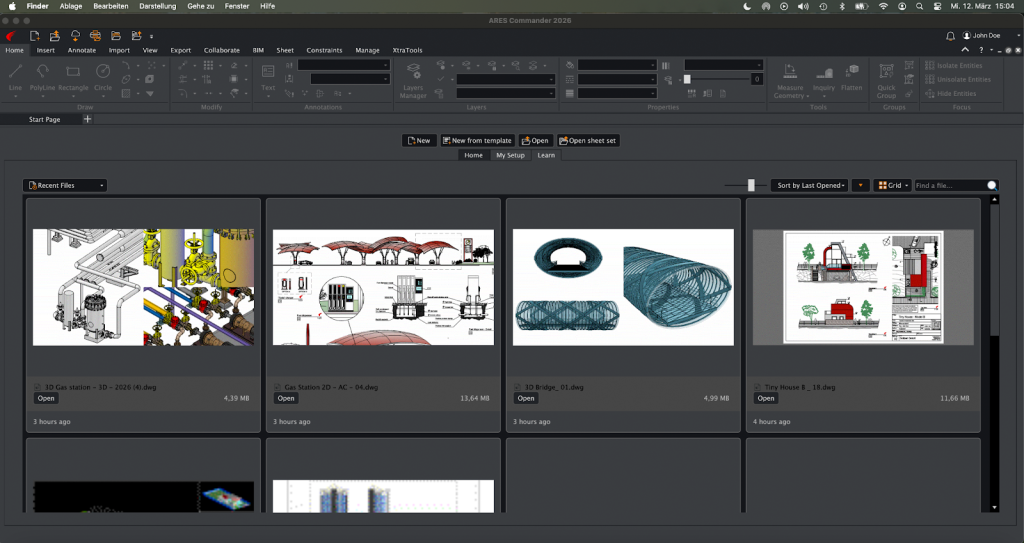
The new Start Page, organized into Home, My Setup, and Learn tabs, greets users transitioning from AutoCAD with a familiar look and feel.

Both new and experienced users benefit from ARES AI Assist (A3) in ARES Commander, which can locate and explain features, perform translations and calculations, provide industry-specific advice, and more. Core Development Supervisor Andre Neumann introduced the powerful new capabilities in A3, which can now select entities and even perform certain modifications according to the user’s requests.

ARES AI Assist (A3) in ARES Commander now has the ability to respond to user requests by selecting entities and carrying out certain CAD functions. Conversations between the user and A3 are conducted in natural language, like speaking with a coworker.

Attendees also learned about recent updates in ARES Kudo, the leading online CAD solution for DWG. Niknaz Aftahi, who is an architect and the CEO and founder of aec+tech, discussed how online CAD and its convergence with automation features are changing the ways AEC professionals work. She noted that the AEC world lags behind manufacturing in adopting cloud-based CAD — and explained why it needs to take advantage of the potential benefits it offers. (For more insights from Aftahi, see the AEC Magazine article “ARES Kudo: DWG Drawings Automation for Developers.”

For example, Graebert’s BIM Drawings Automation technology, first introduced in ARES Commander, is now available in ARES Kudo as well, via the new ARES Online Drawings Automation service. This service, connected to ARES Kudo, can run a variety of CAD-related jobs on a remote server, handling tedious or time-consuming tasks automatically. With ARES Online Drawings Automation, users can batch-process files, schedule jobs in advance, set them to run repeatedly, and even generate 2D drawings in DWG — such as floor plans, sections, and elevations — from Revit and IFC BIM projects automatically, saving significant time and effort. 

Now users can offload many types of CAD-related tasks to the new ARES Online Drawings Automation service, which executes these routine jobs for them.

Guest speaker Anthony Frausto-Robledo, AIA, the founder and Editor in Chief of Architosh.com

addressed the addition of new automation technologies to ARES Kudo, with a focus on how they can reshape AEC workflows. (For more on this subject from Frausto-Robledo, see his Architosh article, “ARES Kudo adds BIM Drawings Automation and AI — Challenges AutoCAD.”)

The neXt 2025 event also featured a Developer Workshop, cohosted by Robert Graebert and Martyn Day, longtime tech and CAD journalist and the cofounder of AEC Magazine. This section of the event kicked off with an exploration the ARES development framework, including case studies from BIM developer Snaptrude and CAFM developer Arlanis Reply. 

Robert Graebert explained that beyond its full complement of standard CAD capabilities, cloud-based, DWG-native ARES Kudo also offers developers advanced features such as Drawing Compare.

The presentation addressed the Trinity C++ application programming interface (API), which enables developers to use the same API across ARES Commander, ARES Touch, and ARES Kudo; documentation for developers; and business models. Robert Graebert also explained how developers can take advantage of the new ARES Online Drawings Automation service to unlock the next generation of BIM / CAD solutions.

After that, Day hosted a panel discussion with industry experts Altaf Ganihar, CEO and Founder of Snaptrude; Greg Schleusner, AIA, Principal and Director of Design Technology at HOK; and Hartmut Friedemann, Manager of Business Development and Facility Cloud at Arlanis Reply.

Visit the New Features page on the Graebert website to learn more about these features, plus many more. To try the new features showcased in neXt 2025 for yourself, simply create your free Graebert account and start your free 30-day trial today.

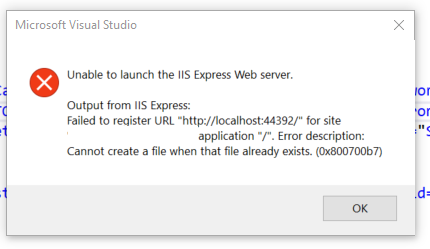
Unable to launch IIS Express Web Server – Failed to Register URL – Cannot create a file when that file already exists | VS Community 2017


In VS Community 2017 (v15.9.26) I am unable to debug as IIS Express Web Server Produces the following error.

Output for IIS Express: Failed to register URL "localhost:xxxxx/" for site. Error description: Cannot create a file when that file already exists. (0x800700b7)

enter image description here

Steps to try to resolve the issue

  1. Clean, Rebuild, Restart VS, Restart Computer
  2. Deleted the IISExpress folder and re-ran VS SA Source
  3. Deleted the .vs folder and re-ran VS
  4. Created a new virtual directory SA Source
  5. Re-cloned repo in a new directory and started from scratch
  6. Running netsh http show urlacl showed no other process using port
  7. Removed the ComponentModelCache from the VS AppData
  8. Re-installed VS Community 2017
  9. Implemented a confirmed working applicationhost.config with updated references to my paths, still same port issue.
  10. Re-installed IIS 10.0 Express
  11. Turned off anti-virus

I should note that I have three startup projects running. Two of the projects (with different ports) run fine so I can rule out firewall or SSL issues. The third startup application only produces this error.

After trying all 7 steps and resting my computer multiple times I am stuck. Any further solutions/fixes to try would be greatly appreciated!

Our Top Deal Picks for Day 2 of Prime Day, Even Though That’s Not How a Day Works


Amazon Prime Day is underway, and although the Gregorian calendar isn’t supposed to work like this, the megaretailer’s massive summer event spans four days this time, through Friday, July 11. And it is (as always) delivering tens of thousands of price drops on the best tech that Amazon sells. Here are dozens of the most enticing tech deals you can get on day 2—and don’t forget to check back often, as new offers are coming in all the time.

Laptops and Chromebooks

Asus ROG Strix G18 Gaming Laptop

Asus ROG Strix G18 Gaming Laptop


Credit: Amazon

Gaming laptops are a product where you can expect to shell out a ton of cash, but that extra expense guarantees you a future-proof piece of kit that will keep you entertained for many years. This potent Asus ROG Strix laptop has a 17% Prime Day price drop, the lowest we’ve seen in 2025. It features a speedy Intel Core Ultra 9 275HX processor and a new Nvidia RTX 5080 GPU for seamless 250Hz output to the crisp, bright 2.5K-resolution display. 64GB of RAM, and a 2TB SSD are also well worth the price. Read PCMag’s positive review for all the details.

Check out more gaming laptop deals for Prime Day.

Apple MacBook Air M3

Apple MacBook Air M3


Credit: Amazon

Apple’s MacBook Air has become the go-to portable for creatives, with impeccable performance thanks to its bespoke processors that are built from the ground up to optimize macOS performance. The 2024 iteration of the Air got an Editors’ Choice award from PCMag in its review, with praise going to the lightweight and stylish all-metal design, all-day battery, a great screen with better compatibility with external displays, and the addition of Thunderbolt 4 USB-C ports for lightning-fast data transfer. It’s one of the best laptops you can buy, and a 26% discount makes it even more appealing.

Lenovo IdeaPad 3i Chromebook

Lenovo IdeaPad 3i Chromebook


Credit: Amazon

Lenovo makes some of the best portable hardware on the market, and that attention to quality extends even to their super-budget Chromebooks. In PCMag’s review of the IdeaPad 3i, the site said that it “feels much more solid than your average $250 laptop,” with a responsive spill-resistant keyboard and lots of ports. This model ups the onboard storage to 64GB, which still isn’t huge, but you’re supposed to keep everything in your Google Drive anyway.

More Laptop and Chromebook Deals

Tablets

Lenovo Tab M9

Lenovo Tab M9


Credit: Amazon

A budget tablet with Lenovo’s trademark ultra-solid build quality? And a 42% discount to boot? The Lenovo Tab M9 is an absolutely solid slate for media watching, web browsing, and casual gaming, with a bright nine-inch screen, solid MTK G80 processor, and a 5,100mAh battery for up to 13 hours of video playback. While it doesn’t have the juice for creative apps like a high-end iPad, it’ll more than do the job for everyday computing, and weighs in at just 0.76 pounds, so it’s easy to carry around all day. This offer even includes a free folio case to keep the screen protected when you’re not using it.

More Tablet Deals

PC Components and Accessories

Samsung 990 EVO Plus 1TB SSD

Samsung 990 EVO Plus 1TB SSD


Credit: Amazon

Samsung is one of the leading names in storage, with both internal and external drives delivering reliable performance at fair prices. If you’re building a new machine and want a budget-minded SSD solution, the 990 Evo Plus is a top choice. PCMag gave it an Editors’ Choice award in its review, saying that the slim M.2 drive boasts “whizzy performance and the class-leading warranty, software, and security that you’d expect from Samsung.” Support for AES 256-bit full-disk hardware encryption lets you keep your private data safe, and Samsung’s Magician device management software keeps its firmware up to date.

Check out more SSD deals for Prime Day.

XFX Speedster MERC310 RX 7900XTX Graphics Card

XFX Speedster MERC310 GPU with triple-fan cooling shown on white background


Credit: Amazon

Specs: 24GB GDDR6 | AMD RDNA 3 | Triple-fan cooling | PCIe 4.0

The XFX Speedster MERC310 RX 7900XTX is a serious piece of hardware for anyone chasing ultra settings and 4K performance. With 24GB of GDDR6 memory and AMD’s RDNA 3 architecture, it chews through modern games with ease and stays cool while doing it thanks to its triple-fan design. You also get support for DisplayPort 2.1, which helps future-proof your setup for next-gen monitors. It’s now 21% off for Prime Day, which is no small drop when you’re building a premium rig.

Check out more GPU deals for Prime Day.

AMD Ryzen 9 9900X Desktop Processor

AMD Ryzen 9 9900X Desktop Processor


Credit: Amazon

AMD’s processors have been steadily catching up to Intel’s benchmarks, and in PCMag’s review, the site said that the Ryzen 9 9900X “matches Intel’s Core i7-14700K on performance while remaining far cooler and drawing less power, making it a compelling option for your desktop.” This 12-core processor runs at a 4.4 GHz base clock speed, with boosts up to
5.6 GHz. A 25% price cut makes it an even more attractive option to build your next gaming desktop around.

Check out more CPU deals for Prime Day.

More PC Component and Accessory Deals

Smart Home and Security

Blink Outdoor 4 Security Camera

Blink Outdoor 4 Security Camera (2-Camera System)


Credit: Amazon

If you’ve got packages coming on Prime Day, pick up one of these compact outdoor security cameras to alert you when they arrive. The Blink Outdoor 4 is on sale at Amazon for a sizzling 61% discount, and in PCMag’s review, the site said that this unit “captures sharp daytime video, with a wider field of view than its predecessor and optional people alerts,” but you’ll need a Blink subscription to enable those. Long battery life and simple integration make it a snap to put just about anywhere, and it plays nice with Amazon Alexa devices and IFTTT smart homes.

More Smart Home Security Deals

Check out more security camera deals for Prime Day.

Router and Mesh Deals

TP-Link Deco AXE5400 Tri-Band WiFi 6E Mesh System

TP-Link Deco AXE5400 Tri-Band WiFi 6E Mesh System


Credit: Amazon

If you’re shopping on Prime Day, you’re going to want to maximize your internet speed no matter where you are in the house. That’s where a mesh network comes in. The TP-Link Deco AXE5400 is one of the most reliable systems on the market, with three nodes that can cover up to 7,200 square feet and 200 simultaneous connected devices. That’s a lot, even for the smartest smart home. With maximum data speeds of 5,400MBps, it’ll handle gaming, streaming, Zoom meetings, and more with ease, and a 29% discount makes it even more attractive.

More Router and Mesh Deals

Check out more router and mesh deals for Prime Day.

Gaming Desktops and Monitors

MSI Aegis Z2 Gaming Desktop

MSI Aegis Z2 Gaming Desktop


Credit: Amazon

Looking to set aside some summer hours for gaming? We’ve got a really nice midrange machine at a $150 discount. A zippy AMD Ryzen R7-7700 processor and a solid last-generation GeForce RTX 4060 graphics card will give you many hours of performance at 1080p and even 1440p (but don’t think that this baby is going to give you 4K fun). The case quality is solid, with tempered glass front and side panels and a ton of customizable RGB-lit fans. This comes bundled with a gratis keyboard and mouse so you can get going right out of the box.

MSI 27″ QHD Gaming Monitor

MSI 27


Credit: Amazon

19% isn’t the biggest discount we’ve ever seen, but the base price of this MSI display is so low already, especially compared with its specs, that it’s our top Prime Day pick. With crystal-clear WQHD resolution on a gently curved VA panel, it delivers crisp contrasts and reliable color with a speedy 170Hz refresh rate. The viewing angle is also especially wide for a curved monitor at 178 degrees, and support for AMD FreeSync lets it lock in with your graphics card for glitchless output.

Check out more gaming desktop deals and more gaming monitor deals for Prime Day.

More Gaming Desktop And Monitor Deals

TVs

Samsung Neo QLED 50″ 4K TV

Samsung Neo QLED 50


Credit: Amazon

This might seem like a lofty price for a 50-inch television, but what you lose in size you get back a hundredfold in image quality. Samsung’s Neo QLED displays use quantum dot LED technology for some of the crispest contrast, deepest blacks, and most realistic colors you’ll ever get, and being able to save 43% off retail price makes it even more attractive. With a speedy 144Hz refresh rate, it’s great for gaming as well. In PCMag’s review, the site said that this screen “is an excellent all-around performer with loads of features.” We’ve rarely seen the price on this one drop as low.

More TV Deals

Check out even more TV deals for Prime Day.

Audio and Wearables

Beats Pill Portable Bluetooth Speaker

Beats Pill Portable Bluetooth Speaker


Credit: Amazon

Here’s a lucky 13% discount on a durable Bluetooth speaker that PCMag said delivered “angled drivers, hearty bass response, a capable speakerphone, and a waterproof build” in its Editors’ Choice-winning review. This is one of the absolute best boomboxes you can pick for a day at the beach, as it’ll make your music sound spectacular, has solid battery life that’ll last until the sun goes down, and is IP67 rated to be dustproof and survive at depths of up to a meter of fresh water for up to 30 minutes. It is a mono speaker, but at this price, you can snag two and pair them for true stereo sound.

Garmin Venu Sq 2

Garmin Venu Sq 2


Credit: Amazon

Garmin’s pivot from GPS devices to wearable electronics has been super-successful, and PCMag gave the Venu Sq 2 an Editors’ Choice award in its review as one of the best fitness-focused budget smartwatches on the market. With a plethora of sensors to help you track health and exercise metrics, as well as a big and bright AMOLED touch screen and week-long battery, it’s a killer option that easily competes with the Apple Watch SE. Of course, you also get built-in GPS from dual antennas so you can navigate through sticky situations. A 40% Prime Day discount is fantastic.

More Audio And Wearable Deals

Gaming Chairs

Respawn Flexx Mesh Gaming Chair

Respawn Flexx Mesh Gaming Chair


Credit: Amazon

The majority of gaming chairs are made with artificial leather upholstery, which is good for stain resistance and durable but doesn’t necessarily make for good airflow. If you’re gaming in a hot zone this summer, you might want to check out the Respawn Flexx instead, especially when it’s on sale at Amazon for a 42% discount. With double-strong performance mesh all over the back, it’ll keep you cool no matter how heated your gaming moments get. Throw in a 115-degree tilt recline and adjustable armrests, headrest, and lumbar support and you’ve got a top pick.

More Gaming Chair Deals

Check out even more gaming chair deals for Prime Day.

The best Prime Day gaming deals from laptops and peripherals to the latest video games


There is nothing more sublime than having a perfectly kitted out gaming station. That said, staying on top of things with the current pace of technology is always tricky. But for anyone hunting for upgrades, Amazon Prime Day is the perfect opportunity to improve your gaming setup on a discount. So regardless of whether you’re looking for some cables, extra storage or a brand new monitor and headphones, we’ve gathered all the best gaming deals in one place for easy reading.

Image for the small product module

Square Enix

DRAGON QUEST III HD-2D Remake (PS5/Nintendo Switch) for $35 ($25 off)

The Dragon Quest III HD-2D Remake is a fantastic update to a truly wonderful JRPG classic. It features an updated HD-2D art style along with some nice quality-of-life changes and UI improvements. But at its core, it has the same great story and turn-based combat that set the world on fire back in 1988. And because the Switch 2 is backwards compatible, this could be a great title to play on Nintendo’s latest handheld, though you can always opt for the PS5 version instead.

$35 at Amazon

The Legend of Zelda: Echoes of Wisdom (Nintendo Switch) for $52 ($8 off)

We rarely see discounts on first-party Nintendo games, especially when it comes to major franchises like The Legend of Zelda. But for Prime Day, Echoes of Wisdom is available for 15 percent off, which is even more impressive when you consider the game the game is less than a year old. Not only is this the first Zelda game to put our beloved princess in the spotlight (instead of Link), it offers a fun twist on the series’ classic top-down action RPG formula thanks to Zelda’s new ability to summon objects and monsters with the Tri-rod.

The Legend of Zelda: Tears of the Kingdom (Nintendo Switch) for $55 ($15 off)

Alternatively, if you are looking for something a bit faster paced, The Legend of Zelda: Tears of the Kingdom may be one of the best sequels in recent video game history. And now for Prime Day, it’s available for $15 off its normal retail price. Not only is this a great pickup for anyone who hasn’t played it yet, it’s also a great showcase of the Switch 2’s capabilities as users can purchase a $10 upgrade pack (or get it for free if you have a subscription to Nintendo Switch Online + Expansion Pack) that adds support for HDR, faster loading times, enhanced textures and smoother framerates.

Star Wars Outlaws – Limited Edition (Amazon Exclusive), PlayStation 5 for $29 ($31 off)

At full price, this game was easy to skip. But now that it’s available for just $29 (half off its normal retail price), Star Wars Outlaws suddenly becomes a lot more interesting for fans of the franchise. You get to live out your dreams of being an intergalactic scoundrel while taking down bounties or battling secret crime syndicates. And because this is the limited edition, the game includes some pre-order rewards like the Kessel Run bonus pack and the Rogue Infiltrator bundle.

Assassin’s Creed Shadows – Limited Edition for PS5/Xbox Series X for $48 ($22 off)

If you missed the latest entry in Ubisoft’s most well-known franchise, this might be the time to jump in because for Prime Day, Assassin’s Creed Shadows is available for $48, more than $20 off its regular retail price. This instalment has you explore feudal Japan as either the shinobi Naoe or the legendary samurai Yasuke while encountering some notable figures from the time period. If all you want is a wonderful world to sneak around in, it’s hard to go wrong with Assassin’s Creed on a discount.

Elden Ring: Shadow of The Erdtree Edition for PS5/Xbox Series X for $60 ($20 off)

Elden Ring is one of the most highly regarded games of this decade so far (and arguably of all time). For Prime Day, you can become a foul tarnished by picking up a version that includes the base game and the Shadow of the Erdtree expansion for $60. Elden Ring typically costs around $50 (though it’s down to $30 on PS4, PS5 and Xbox Series X for Prime Day) and the DLC will usually run you another $40, so that’s a decent discount compared with buying them separately — or even the Shadow of the Erdtree Edition at its regular price.

The Last of Us Part I – PlayStation 5 for $33 ($36 off)

The Last of Us is one of the greatest modern video game franchises, spawning both a critically acclaimed sequel and TV adaptation. For Prime Day, you can now get part one of the remastered version for more than 50 percent off. This latest edition for the PS5 features a brand new game engine, improved loading speeds and haptic feedback support for Sony’s DualSense controller and more, which is enough to make the series feel like an entirely new experience (even if you played the original back in the day). And while it isn’t getting as big of a discount, you can also pick up The Last of Us Part 2 Remastered on Amazon for just $40 (10 off its regular price).

Final Fantasy I-VI Collection Anniversary Edition for PlayStation and Switch for $45 ($30 off, lowest ever price)

This collection of pixel remasters of the first six Final Fantasy games is an absolute steal at $45 during Prime Day. It’s the lowest price we’ve seen to date for this set, which comes with a nice little sticker sheet of character sprites. Several other games in the series are on sale for PS5 as well, such as Final Fantasy VII Remake Intergrade ($30, $10 off), Final Fantasy VII Rebirth ($40, $30 off) and Final Fantasy XVI ($25, $15 off)

Meta Quest 3S 128GB Bundle for $249 ($51 off)

The Quest 3S is one of our picks for best VR headsets for good reason. Meta cut just the right corners from the more full-featured Quest 3, enabling it to drop the list price down lower. It has the same Snapdragon chip and controlers, but cheaps out a bit on the lenses, slightly lowering the graphics fidelity in use. Just like the Quest 3, it works standalone for lighter games and streaming, or in concert with a gaming PC for full-fat AAA VR titles. It’s well worth the $300 Meta usually asks for it, so at $249 with two games included (Cardboard Hero and the excellent social VR hit Gorilla Tag), it’s a steal.

Razer Blade 14 with RTX 4070 for $2,300 ($400 off)

The Blade 14 is one of my favorite laptop lines because it combines a super sleek chassis with solid performance and truly excellent build quality. And now, as a way to get in on the Prime Day festivities, Razer has an exclusive offer on its website that will knock $400 off configs with RTX 4070 GPUs or up to $300 on models with RTX 4060 cards. These kind of savings go a long way towards neutralizing my biggest issue with Razer’s laptops: their price. So if you’re looking for a system that can do some serious gaming but is still easy to carry around, you’re going to want to snap this deal up fast.

ASUS ROG Strix G16 Gaming Laptop with RTX 4060 for $1,360 ($340 off)

While an RTX 4060 isn’t the most powerful GPU on the market, getting a whole new laptop with solid specs for just $1,360 isn’t something you can just ignore, especially if you’re on a budget. This ROG Strix G16 comes with 16GB of RAM and 1TB of storage. And while its Intel Core i9-14900HX CPU is one generation old, it’s still plenty fast enough for gaming, video editing or pretty much anything else you need to do. I also appreciate small features like a MUX switch that lets the laptop connect directly to the GPU for increased performance, though if you want, you can also enable automatic switching for better battery life. And with a 16-inch 240Hz QHD display with 100% DCI-P3 coverage, everything on screen is sure to look great.

Acer Nitro V gaming laptop with NVIDIA RTX 4060 GPU for $1,200 ($150 off, lowest ever price)

Acer’s Nitro gaming laptops are meant to be more affordable alternatives to its flagship Predator systems. But now thanks to Prime Day, this model just got even more budget-friendly while still offering decent specs. You get an Intel Core i9-13900H CPU with 32GB of RAM, 1TB of storage and an RTX 4060 GPU, the latter of which should pair nicely with its 15.6-inch full HD 144Hz display. I also appreciate that unlike some gaming laptops, the Nitro V is stylish without being in your face with too many RGB lights, which makes it feel like an even better deal at $1,200. That’s the lowest price we’ve seen to date for this configuration.

Corsair Vengeance RGB DDR5 RAM 32GB (2x16GB) RAM for $95 ($25 off)

Adding some extra memory to your desktop can help unlock its full potential. So for Prime Day, Corsair is offering two 16GB sticks of its Vengeance DDR5 RAM for just $95. Not only do you get built-in RGB lighting, Corsair’s onboard voltage regulation makes it simpler to overclock your system. And for those who don’t want to mess around in BIOS settings, you can control almost everything from the easy-to-use free iCue app.

Thermaltake GF1 (2024) Fully Modular ATX 850W Power Supply for $80 ($30 off, lowest ever price)

Even though power supplies aren’t the most exciting component you can put in your desktop, the importance of a good one can’t be understated. For just $80, which is the lowest price we’ve seen to date for this product, the Thermaltake GF1 is fully modular (which means you can add or remove power cables as you need them) and has an ample max power of 850 watts along with an 80 Plus Gold rating for efficiency. And thanks to its 140mm fan, it should be pretty quiet, so it won’t cause a ruckus if you decide to play some games at night.

Samsung 990 EVO Plus 2TB PCIe M.2 SSD for $114 ($63 off)

If you’re like me and are constantly running out of storage, this deal for one of Samsung’s 990 EVO Plus 2TB M.2 SSDs is a fantastic way to add extra room on the cheap. With a 36 percent discount for Prime Day — down to $114 — this is the lowest price we’ve ever seen. And it’s not like you’re cutting corners on speed either, as the SSD supports both PCIe 4.0 x4 and PCIe 5.0 x2 and read/write rates of up to 7,250/6,300MB/s.

AMD Ryzen 5 9600X 6-Core, 12-Thread Unlocked Processor for $165 ($110 off)

The Ryzen 5 9600X isn’t super flashy, but it’s a really solid budget CPU. And now, it’s even more affordable during Prime Day where it’s going for just $165, which is $110 off its normal retail price. It features six cores and 12 total threads with a max boost speed of 5.4GHz and support for DDR5 RAM and PCIe Gen 5. It’s also unlocked, so you have the freedom to overlock if you want. That said, you will need to buy a CPU cooler separately, as one doesn’t come in the box.

AMD Ryzen 9 9950X 16-Core, 32-Thread Unlocked Desktop Processor for $434 ($215 off)

The biggest issue with the Ryzen 9 9950X CPU was that at launch, it was a bit overpriced. But during Prime Day, that problem is being addressed thanks to a $215 discount that brings its cost down to under $500. The CPU features 16 cores and 32 threads along with 80MB of cache and support for DDR5 RAM and PCIe Gen 5. However, like some of AMD’s other processors on sale this week, you will need to get a CPU cooler separately.

Razer Enki Gaming Chair for $450 ($50 off)

If you’re going to be spending all day in front of a screen gaming, you better make sure whatever you’re sitting on is super comfy. And as I’ve been using the Razer Enki every day for the last four years, I can attest that this chair is worth the money. It has a ton of adjustability for things like the arm rests, seat height and more. For more flexible folks, it was even designed so people can sit cross-legged. I also appreciate that in homes where neon green might not fit your vibe, there’s an all-black model (plus a pink one too, though that one is currently sold out).

Elgato Stream Deck MK.2 for $110 ($40 off, lowest ever)

If you’ve ever dreamed about becoming a gaming streamer or simply want some extra customizable controls for your PC, Elgato’s Stream Deck MK.2 could make a great addition to your setup. It has 15 programmable macro keys with built-in LCD displays so you can make custom buttons for switching scenes, turning on lights and so much more. Elgato also has plugins for services like YouTube, Twitch, Discord, so it’ll play nicely with all the major streaming platforms. In short, it’s like a command center for all your content creation and livestreaming needs.

Logitech G305 Lightspeed Wireless Gaming Mouse for $29 ($21 off)

The Logitech G305 Lightspeed gaming mouse is just a simple PC peripheral done well. And at just $29, it’s super affordable during Prime Day too. It features six programmable buttons, compatibility with both PCs and Macs and a sensor with sensitivity of up to 12,000 DPI. Meanwhile, thanks to a battery that lasts up to 250 hours between charges, you can go weeks between needing to plug it in. And because it’s wireless, there won’t be any cords or cables to get in your way.

Amazon Luna Controller and one month of Luna+ for $40 ($30 off)

The Luna Controller by itself is down to $40, which matches a record-low price. However, if you’re a newcomer to Luna+, you may as well pick up this bundle (which is also matching a record low) for the same price, as it includes one month of access to the service for new subscribers. This gamepad is a solid option for those who want to check out Luna, Amazon’s cloud gaming service. Prime subscribers get access to a dedicated channel with a rotating selection of games at no extra cost. This month, for instance, you can check out Death Stranding Director’s Cut, Hollow Knight and EA Sports FC 25.

8BitDo Retro Mechanical Keyboard for $80 ($20 off)

With its Retro Mechanical Keyboard, 8BitDo strikes a great balance between a nostalgic design and support for more modern features like wireless connectivity (both BT and 2.4GHz). There are several different versions to choose from, though the one inspired by the classic NES is the model I’d choose. The keyboard features an 87-key layout with PBT keycaps and Kailh Box switches, though because the PCB is hot swappable, you can always change them out for something else.

Sony Inzone H9 Wireless Gaming Headset for $198 ($102 off)

For anyone looking for a new pair of over-the-ear wireless gaming headphones to pair with a PS5, it’s hard to do better than Sony’s Inzone H9 headset. Not only does it have a similar design to the console, they are the only other headphones besides the official Pulse cans that support on-screen status notifications for volume, mic mute, game/chat balance and more. They also share a lot of the underlying tech used in Sony’s iconic WH-1000XM line, so you’ll get fantastic audio quality and active noise cancellation. But the best part is that at $198, you’re looking at a serious discount of 34 percent, which is more than $100 off its regular retail price.

Seagate Storage Expansion Card 2TB Solid State Drive for $209 ($21 off)

Games are getting bigger every day, so if you need some extra storage for your Xbox Series S or X, you’d be silly not to pick up one of Seagate’s 2TB Expansion Cards for just $209. That’s enough room for a dozen or more digital titles (or like three versions of Call of Duty) and it’s the biggest SSD storage module that slots into the back of the console without the need for a separate box.

Amazon Basics UPS Battery Backup & Surge Protector 800VA/450W for $65 ($10 off)

I’m not here to nag, but if you have a desktop PC, you really ought to consider adding a UPS (uninterruptible power supply) to your setup as they prevent power surges or momentary outages from knocking your system offline. Plus, this one has a beefy 450-watt battery backup and 12 outlets so you can connect all of your other PC gadgets to it. So if you’re going to do the smart thing by adding some extra electrical protection to your home during Prime Day, you might as well save some money in the process.

Samsung Galaxy S25 Ultra (512GB) for $1,055 ($365 off)

With Samsung’s next Unpacked event expected to show off new foldables, it looks like some of the existing models are getting some serious discounts for Prime Day, including the Galaxy S25 Ultra. And at $1,055, this is the lowest price we’ve seen for Samsung’s current flagship phone yet. For gamers, thanks to its Snapdragon 8 Elite chip, the S25 Ultra offers some of the best performance you can get in a phone right now, while its built-in vapor chamber should help prevent throttling. Its 6.9-inch AMOLED display is also one of the best mobile screens on the market today.

Razer Kishi Ultra for $100 ($50 off)

Razer doesn’t normally run a ton of deals for Prime Day, but it seems this year the company is making an exception as there are discounts on everything from gamepads to headsets and more. That said, one of the standout deals is for the Kishi Ultra gaming controller. On top of just being a well-built gamepad add-on for phones and tablets, its larger dimension and USB-C port means it works with a huge range of devices — both Android and iOS. This even includes more niche devices like foldables like the Galaxy Z Fold series, which often don’t fit inside other mobile gamepads due to their unique design.

Sony 85-Inch Class 4K Ultra HD Bravia 3 LED TV for $1,098 ($500 off)

There’s no better way to upgrade your living room gaming setup than with a brand-new, big-ass TV. Granted, the Bravia 3 is one of Sony’s entry-level models (fancier sets get higher numbers), but with a discounted price of $1,098 for a massive 85-inch panel, this deal represents one of the biggest screens you can get for the money. It also has Google TV built in, so you’ll get a very simple and straightforward way to stream your favorite shows and movies from services like Netflix, HBO and more. But perhaps most importantly is that for PS5 owners, the Bravia 3 supports exclusive features when connected to a PS5, such as Auto HDR Tone Mapping and Auto Genre Picture mode.

Alienware AW2725DF 26.7-inch OLED gaming monitor for $600 ($300 off)

For anyone who has been waiting for prices of OLED gaming monitors to drop, this may be your chance to pounce on a great deal. That’s because at $600, Alienware’s 26.7-inch OLED display strikes a good balance between price and performance with a 360Hz refresh rate, 2560 x 1440 resolution and support for AMD FreeSync Premium Pro. And of course, you get those lovely pure blacks and vivid colors that OLED panels have become known for.

Samsung Odyssey Neo G9 Series 57-inch 4K 240Hz 4K gaming monitor for $1,600 ($700 off)

This 57-inch monitor isn’t for people with limited space. But if you’ve got the room, at $1,600, this is the lowest we’ve ever seen the Neo G9 as this deal represents a whopping $700 savings compared to its regular list price. This thing features a solid 240Hz refresh rate along with support for AMD FreeSync Premium Pro, a 1000R curve and Quantum mini LED tech with 2,392 local dimming zones. For people who love ultra-wide displays, this should be at the top of your upgrade list during Amazon Prime Day.

Acer Nitro 27-inch WQHD IPS gaming monitor for $170 ($120 off)

Anyone looking for a solid and affordable 1440p gaming monitor during Prime Day should really check out this 27-inch IPS display from Acer. For just $170 (matching a record-low price), it features a relatively speedy 180Hz refresh rate along with support for AMD FreeSync Premium and a good color range that covers 95 percent of DCI-P3. The height-adjustable stand can also swivel and pivot, while thin bezels on top and on the sides will make sure it won’t look dated in a few years. So while this thing isn’t super fancy, it’s simple and competent in the best ways.

UGREEN Magnetic Power Bank 10,000mAh fast charging battery pack for $30 ($3 off)

The Switch 2 is a fantastic handheld, but its longevity could be better. So if you’re planning to take it on a long trip, pick up UGREEN’s 10,000mAH fast charging battery pack to help keep running when you’re away from a plug. This power pack almost has enough juice to fully refill a Switch 2 twice, which can add between five and 12 hours of additional game time (depending on the title). It also has an output of 20 watts, which is as much as the Switch 2 can suck down at once, but it’s still super pocketable measuring just four inches long and 0.7 inches thick. And if you need a convenient way to recharge your phone, the battery pack also comes with Qi wireless support.


Signs Your Computer Screen Needs Replacement


That familiar flicker during your morning coffee routine might seem harmless, but your computer screen could be sending you an urgent message. Modern displays are remarkably resilient, yet they’re not invincible—and recognizing the early warning signs can save you from unexpected failures and costly emergency repairs.

Your screen serves as the gateway to your digital world, making its health crucial for productivity, entertainment, and staying connected. When subtle symptoms begin appearing, many people dismiss them as minor annoyances, but these early indicators often signal deeper issues that require professional attention. At PC Geeks, we’ve helped countless customers identify these warning signs before minor computer screen issues become major problems, saving them both time and money through early intervention.

computer screen

Understanding Screen Degradation Patterns

Computer screens don’t typically fail overnight. Instead, they follow predictable degradation patterns that savvy users can recognize before complete failure occurs. The key lies in understanding what constitutes normal aging versus concerning symptoms that warrant immediate professional evaluation.

Visual Disturbances That Demand Attention

Persistent flickering or intermittent blackouts represent one of the most common early warning signs your computer screen needs professional replacement. This symptom often indicates failing backlighting systems or deteriorating internal connections. While occasional flickers might seem manageable, they typically worsen over time and can strain your eyes significantly.

Dead pixels and growing dark spots create permanent visual obstacles that interfere with your computing experience. A few isolated dead pixels might be tolerable, but clusters or rapidly spreading areas suggest underlying panel damage that professional technicians should evaluate promptly.

Color distortion and uneven brightness across your screen’s surface indicate potential backlight failure or panel degradation. These issues often start subtly in corners or edges before spreading across the entire display, making early detection crucial for cost-effective solutions.

Physical Symptoms and Structural Concerns

Visible cracks, even hairline fractures, compromise your screen’s structural integrity and typically worsen with temperature changes and normal use. What begins as a minor cosmetic issue can quickly evolve into complete display failure, making professional assessment essential.

Unusual heating patterns around your screen’s edges or back panel suggest internal component stress that could lead to permanent damage. Modern displays should operate at consistent, moderate temperatures during normal use.

Performance and Functionality Red Flags

Beyond visual symptoms, functional issues often indicate serious underlying problems. Delayed response times when adjusting brightness, contrast, or other display settings suggest failing control circuits that require professional diagnosis.

Inconsistent startup behavior where your screen takes longer to initialize or displays unusual patterns during boot-up sequences often indicates aging components approaching failure thresholds.

 Frequent connection issues between your computer and display, especially when cables and ports appear undamaged, may signal internal connectivity problems that worsen over time.

The Hidden Costs of Delaying Professional Help

Many people attempt to postpone screen replacement by adjusting brightness settings, using external lighting, or simply tolerating degraded visual quality. However, continued use of failing displays can strain your eyes, reduce productivity, and potentially damage connected computer components.

Professional replacement services offer comprehensive solutions that address both immediate symptoms and underlying causes. Qualified technicians can evaluate whether your specific situation requires complete screen replacement or if targeted repairs might restore optimal functionality.

Making Informed Decisions About Screen Health

Modern replacement screens offer significant improvements in energy efficiency, color accuracy, and visual comfort compared to older models. Professional installation ensures proper calibration and optimal performance while maintaining manufacturer warranties and safety standards.

The investment in professional screen replacement often proves more cost-effective than repeated repair attempts or the hidden costs of reduced productivity and eye strain associated with declining display quality.

Moving Forward with Confidence

Your computer screen’s health directly impacts your daily digital experience, making prompt attention to warning signs a wise investment in your productivity and comfort. Professional evaluation provides clarity about your options and helps you make informed decisions based on your specific needs and budget.

Don’t let progressive screen deterioration disrupt your workflow or strain your vision. The experienced technicians at PC Geeks specialize in comprehensive screen diagnostics and professional replacement services that restore your computer’s visual performance to optimal levels. Contact us today to schedule your screen evaluation and discover how professional replacement can enhance your computing experience while protecting your long-term digital productivity.

RTX AI Accelerates FLUX.1 Kontext


Black Forest Labs, one of the world’s leading AI research labs, just changed the game for image generation.

The lab’s FLUX.1 image models have earned global attention for delivering high-quality visuals with exceptional prompt adherence. Now, with its new FLUX.1 Kontext model, the lab is fundamentally changing how users can guide and refine the image generation process.

To get their desired results, AI artists today often use a combination of models and ControlNets — AI models that help guide the outputs of an image generator. This commonly involves combining multiple ControlNets or using advanced techniques like the one used in the NVIDIA AI Blueprint for 3D-guided image generation, where a draft 3D scene is used to determine the composition of an image.

The new FLUX.1 Kontext model simplifies this by providing a single model that can perform both image generation and editing, using natural language.

NVIDIA has collaborated with Black Forest Labs to optimize FLUX.1 Kontext [dev] for NVIDIA RTX GPUs using the NVIDIA TensorRT software development kit and quantization to deliver faster inference with lower VRAM requirements.

For creators and developers alike, TensorRT optimizations mean faster edits, smoother iteration and more control — right from their RTX-powered machines.

The FLUX.1 Kontext [dev] Flex: In-Context Image Generation

Black Forest Labs in May introduced the FLUX.1 Kontext family of image models which accept both text and image prompts.

These models allow users to start from a reference image and guide edits with simple language, without the need for fine-tuning or complex workflows with multiple ControlNets.

FLUX.1 Kontext is an open-weight generative model built for image editing using a guided, step-by-step generation process that makes it easier to control how an image evolves, whether refining small details or transforming an entire scene. Because the model accepts both text and image inputs, users can easily reference a visual concept and guide how it evolves in a natural and intuitive way. This enables coherent, high-quality image edits that stay true to the original concept.

FLUX.1 Kontext’s key capabilities include:

  • Character Consistency: Preserve unique traits across multiple scenes and angles.
  • Localized Editing: Modify specific elements without altering the rest of the image.
  • Style Transfer: Apply the look and feel of a reference image to new scenes.
  • Real-Time Performance: Low-latency generation supports fast iteration and feedback.

Black Forest Labs last week released FLUX.1 Kontext weights for download in Hugging Face, as well as the corresponding TensorRT-accelerated variants.

Three side-by-side images of the same graphic of coffee and snacks on a table with flowers, showing an example of multi-turn editing possible with the FLUX.1 Kontext [dev] model. The original image (left); the first edit transforms it into a Bauhaus style image (middle) and the second edit changes the color style of the image with a pastel palette (right).

Traditionally, advanced image editing required complex instructions and hard-to-create masks, depth maps or edge maps. FLUX.1 Kontext [dev] introduces a much more intuitive and flexible interface, blending step-by-step edits with cutting-edge optimization for diffusion model inference.

The [dev] model emphasizes flexibility and control. It supports capabilities like character consistency, style preservation and localized image adjustments, with integrated ControlNet functionality for structured visual prompting.

FLUX.1 Kontext [dev] is already available in ComfyUI and the Black Forest Labs Playground, with an NVIDIA NIM microservice version expected to release in August.

Optimized for RTX With TensorRT Acceleration

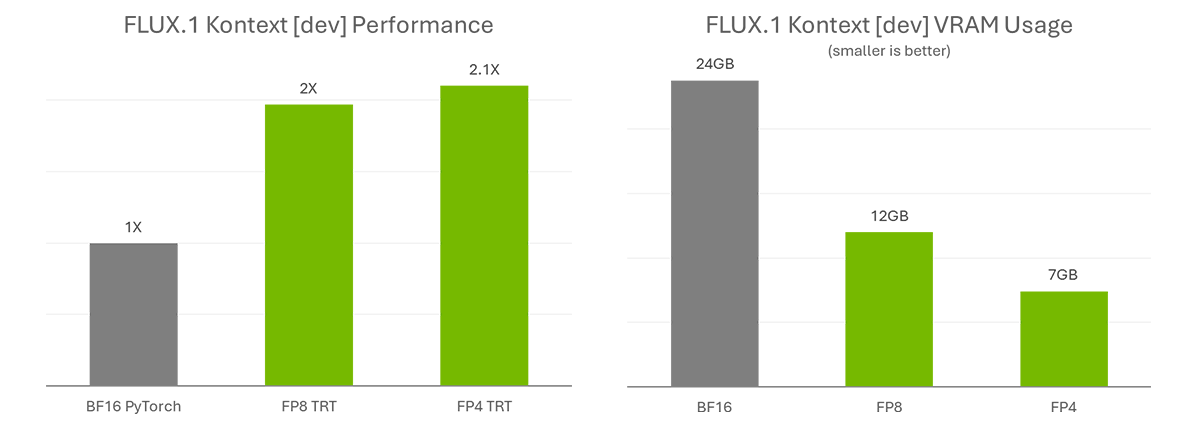
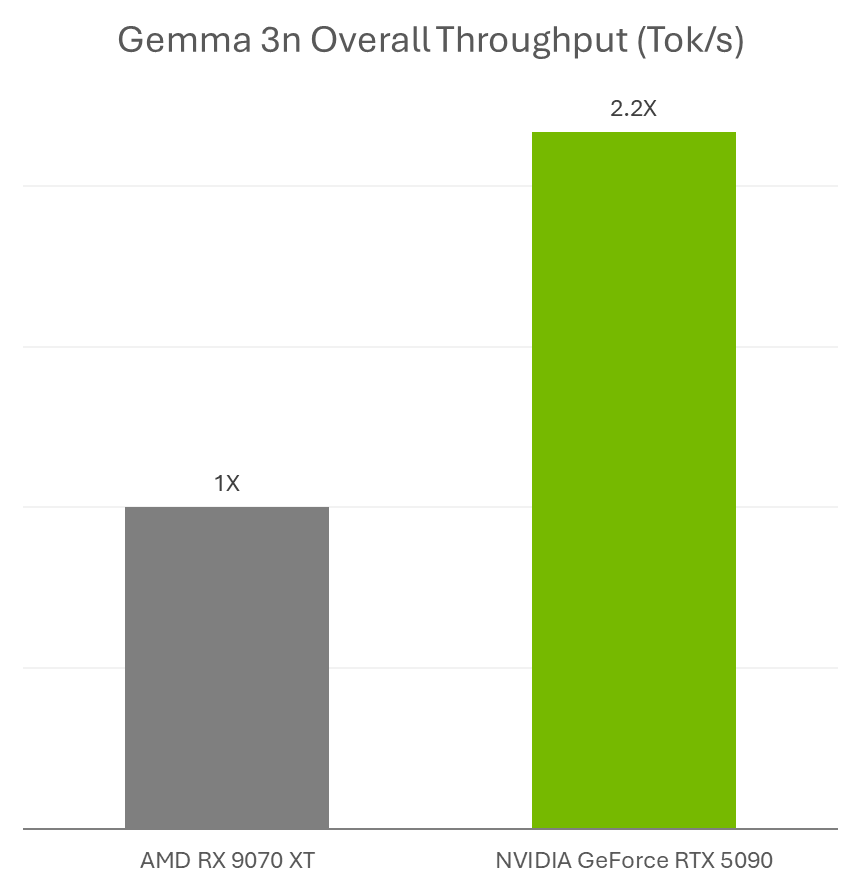
FLUX.1 Kontext [dev] accelerates creativity by simplifying complex workflows. To further streamline the work and broaden accessibility, NVIDIA and Black Forest Labs collaborated to quantize the model — reducing the VRAM requirements so more people can run it locally — and optimized it with TensorRT to double its performance.

The quantization step enables the model size to be reduced from 24GB to 12GB for FP8 (Ada) and 7GB for FP4 (Blackwell). The FP8 checkpoint is optimized for GeForce RTX 40 Series GPUs, which have FP8 accelerators in their Tensor Cores. The FP4 checkpoint is optimized for GeForce RTX 50 Series GPUs for the same reason and uses a new method called SVDQuant, which preserves high image quality while reducing model size.

TensorRT — a framework to access the Tensor Cores in NVIDIA RTX GPUs for maximum performance — provides over 2x acceleration compared with running the original BF16 model with PyTorch.

Speedup compared with BF16 GPU (left, higher is better) and memory usage required to run FLUX.1 Kontext [dev] in different precisions (right, lower is better).

Learn more about NVIDIA optimizations and how to get started with FLUX.1 Kontext [dev] on the NVIDIA Technical Blog.

Get Started With FLUX.1 Kontext

FLUX.1 Kontext [dev] is available on Hugging Face (Torch and TensorRT).

AI enthusiasts interested in testing these models can download the Torch variants and use them in ComfyUI. Black Forest Labs has also made available an online playground for testing the model.

For advanced users and developers, NVIDIA is working on sample code for easy integration of TensorRT pipelines into workflows. Check out the DemoDiffusion repository to come later this month.

But Wait, There’s More

Google last week announced the release of Gemma 3n, a new multimodal small language model ideal for running on NVIDIA GeForce RTX GPUs and the NVIDIA Jetson platform for edge AI and robotics.

AI enthusiasts can use Gemma 3n models with RTX accelerations in Ollama and Llama.cpp with their favorite apps, such as AnythingLLM and LM Studio.

Performance tested in June 2025 with Gemma 3n in Ollama, with 4 billion active parameters, 100 ISL, 200 OSL.

Plus, developers can easily deploy Gemma 3n models using Ollama and benefit from RTX accelerations. Learn more about how to run Gemma 3n on Jetson and RTX.

In addition, NVIDIA’s Plug and Play: Project G-Assist Plug-In Hackathon — running virtually through Wednesday, July 16 — invites developers to explore AI and build custom G-Assist plug-ins for a chance to win prizes. Save the date for the G-Assist Plug-In webinar on Wednesday, July 9, from 10-11 a.m. PT, to learn more about Project G-Assist capabilities and fundamentals, and to participate in a live Q&A session.

Join NVIDIA’s Discord server to connect with community developers and AI enthusiasts for discussions on what’s possible with RTX AI.

Each week, the RTX AI Garage blog series features community-driven AI innovations and content for those looking to learn more about NVIDIA NIM microservices and AI Blueprints, as well as building AI agents, creative workflows, digital humans, productivity apps and more on AI PCs and workstations. 

Plug in to NVIDIA AI PC on Facebook, Instagram, TikTok and X — and stay informed by subscribing to the RTX AI PC newsletter.

Follow NVIDIA Workstation on LinkedIn and X

See notice regarding software product information.