
The Friday Roundup – YouTube Setups and Voice Clones


Retro couple disagreeing on studio expenditure.

$100 Cinematic YouTube Studio Setup (Full Guide)

When I first started shooting footage for my wife for her YouTube channel I really didn’t know too much about shooting in that specific situation.

I was always more an editing guy than a video shooting guy!

So when I began I figured out some of the things I thought I needed and slapped it all together and off we went.

As time passed I learned some hard (and very expensive!) lessons.

Right now I have a great setup PLUS, a whole bunch of stuff I didn’t really need!

I cannot stress the value enough of having a dedicated space already set up for shooting YouTube talking head style videos.

So if you are creating this kind of content then the video below is an excellent walk-through of what you really need and how to do it for very little money.


Create a Talking Avatar That Sounds Just Like You

PowerDirector have recently introduced a new capability into their already impressive A.I. driven tools.

This one is especially good for anyone wanting to make videos that do not include their own face… or any face at all for that matter!

The feature combines the ability of making avatars or still images turn into videos with the ability to clone you own voice.

The result is you can add some text, choose and avatar and then the newly created character will speak for you.


How to Speed Up or Slow Down Video

One of the easier ways to pace your video edits so as to reflect what is happening is by speeding up or slowing down the footage.

In most video editors this is a pretty easy operation and you can see it in action in the Movavi video editor video below.

However as you watch that video it is important to note a few of the pitfalls you can run into when adjusting the speed of any clip.

Like most things in the video editing process, speed adjustments are not a one size fits all proposition.


Dull Spring Footage? Try This Color Grading Technique

First up, let’s be clear about this tutorial from the folks at Filmora.

Sure it says it’s about “Spring Footage” but in reality it is a very good walk-through of how to color correct footage that seems somewhat dull straight out of the camera.

It covers two recent addition or improvements in their color tools which are the HDR color adjustments and using the color curves.

Both of these tools are borderline pro features but like most things, they are totally useless unless you know how to use them! So this is how to use them.


Easy Travel Map Route Effect in Filmora – Pen Tool Animated Path Tutorial

Back in the day when I first started my video editing journey and dinosaurs roamed the earth the prospect of creating a travel map was quite daunting!

I am not going to go into how it was done here, but let me just say it took a few hours and the result were less than impressive!

These days it is a whole different story and if you check out this video from Filmora, the results are pretty amazing.


DaVinci Resolve 21! What’s New?

There has been quite a lot of noise this week about the release of DaVinci Resolve 21 and all the new features.

Just to keep things real here, bear in mind that this is not an actual update yet.

The is the pre-release of version 21 into beta testing to the general public.

This allows both free and studio users of the program to have a play with the new one while Black Magic can gather usage and bug information from a far wider dataset.

If you are running version 20 right now and check for updates through the user interface, you will be told you are on the latest version… and that’s because you are!

So in light of that here’s a taste of some of the features and upgrades that are inside this beta release.

Most interesting for me is the new Photo Page which now provides a dedicated space for dealing with images both individually and in groups.

A lot of people have been using Resolve as a photo editor because of the awesome tools available in the Color Page.

This new dedicated Photo Page I believe, is just the beginning because the folks at Black Magic don’t tend to half-ass stuff like this.

I think over the next few months the capabilities of that new page will start to take shape fully.


How to Stay Organized As A Creator

When the average person starts off with creating videos it is usually common for their projects to be very simple.

Most often it is a single footage file shot pretty much in one session, some music, some still images and a voice track.

However as time passes those simple projects begin to become more and more complex.

They start adding b-roll, footage from different sources, multiple music sources, recorded voice overs and the list goes on.

Once that starts to happen things tend to get very complicated very fast!

It is at that time that they either get frustrated with the process and lose interest or they get organized and keep going.

From my observation there is generally no middle ground there!

Everyone has their own way of getting organized but what I have found is that the best way to do it is to copy someone who has a track record working with complex projects.

Casey is someone like that so here’s how he does it.


Camera Movements for Beginners

Over the past year or so there have been some pretty impressive advancements in the field of footage stabilization.

Many cameras, especially action cam style ones have some very impressive stabilization built in while at the same time, editing software has also been catching up.

The result of this has been a greater ability for the average person to engage in both “run and gun” style shooting as well as adding camera movement without the need for expensive equipment.

So now that we can all move around a bit more, here’s a tutorial on some camera movement basics to get you started!


Why Wide Shots Feel So Cinematic

If you take a look around this website you will probably notice a few articles on the types of shot used in making videos and how they work.

There’s this one here:

and another one here:

Whilst both of those articles are absolute works of genius (by me) they are essentially at an introductory level.

For a deep dive into the Wide Shot, take a look at the video below for a meatier take on it.


Key Takeaways

  • This week a comprehensive guide for creating a $100 cinematic YouTube studio setup for talking head videos.
  • Introducing a new feature in PowerDirector that allows users to create talking avatars that can mimic their voice.
  • Speed up or slow down video footage easily whilst remaining aware of potential pitfalls during adjustments.
  • New features in DaVinci Resolve 21, including a dedicated Photo Page for better image management.
  • Emphasizing the importance of staying organized as a creator, especially as projects become more complex.


Comprehensive analysis of the Japanese automotive market in 2025


JATO is the global leader in automotive data, analysis, and intelligence. With 40 years of experience tracking vehicle registrations, pricing, specifications, and market trends, JATO helps automotive manufacturers, suppliers, financial institutions, and industry stakeholders make informed strategic decisions. Their strategic intent is to help customers create significant competitive advantage by constantly leading in connected data, information, and knowledge provision, ultimately improving customers’ work processes, informed decision making and business results. 

Today’s NYT Connections: Sports Edition Hints, Answers for April 18 #572


Looking for the most recent regular Connections answers? Click here for today’s Connections hints, as well as our daily answers and hints for The New York Times Mini Crossword, Wordle and Strands puzzles.


Hockey fans, today’s Connections: Sports Edition is for you. All four categories are hockey-related. If you’re struggling with today’s puzzle but still want to solve it, read on for hints and the answers.

Connections: Sports Edition is published by The Athletic, the subscription-based sports journalism site owned by The Times. It doesn’t appear in the NYT Games app, but it does in The Athletic’s own app. Or you can play it for free online.

Read more: NYT Connections: Sports Edition Puzzle Comes Out of Beta

Hints for today’s Connections: Sports Edition groups

Here are four hints for the groupings in today’s Connections: Sports Edition puzzle, ranked from the easiest yellow group to the tough (and sometimes bizarre) purple group.

Yellow group hint: Fire it into the net!

Green group hint: Lord Stanley’s hardware.

Blue group hint: Where hockey teams play.

Purple group hint: Put the biscuit in the basket.

Answers for today’s Connections: Sports Edition groups

Yellow group: Types of hockey goals.

Green group: Last four teams to win the Stanley Cup.

Blue group: NHL arena names.

Purple group: Hockey terms that are also food items.

Read more: Wordle Cheat Sheet: Here Are the Most Popular Letters Used in English Words

What are today’s Connections: Sports Edition answers?

completed NYT Connections: Sports Edition puzzle for April 18, 2026

The completed NYT Connections: Sports Edition puzzle for April 18, 2026.

NYT/Screenshot by CNET

The yellow words in today’s Connections

The theme is types of hockey goals. The four answers are empty net, even strength, power play and short-handed.

The green words in today’s Connections

The theme is last four teams to win the Stanley Cup. The four answers are Avalanche, Golden Knights, Lightning and Panthers.

The blue words in today’s Connections

The theme is NHL arena names. The four answers are Ball, Canadian Tire, Capital One and TD.

The purple words in today’s Connections

The theme is hockey terms that are also food items. The four answers are apple, biscuit, grinder and icing.


Marathon players are using new Mercy Kits to murder people twice: It’s already been branded the ‘most troll-friendly item imaginable’


Bungie released Marathon’s big mid-season update just a few days ago, and it’s packed full of heavily-requested changes (plus a bunch of new things we didn’t even know we wanted). There are more unique weapons to find outside of Cryo Archive, the CARRI event designed to incentivise cooperation, an experimental pseudo-battle royale mode that’s a real treat, and a new item: the Mercy Kit.

In Bungie’s own words, “sometimes you shoot first and ask questions later,” so the Mercy Kit is intended to, y’know, let you show your enemies some mercy if there’s a chance you could be buddies after all. All Rooks spawn with a Mercy kit, and there’s a chance to find one while looting in your non-Rook matches.

From AI to .NET: 20 VS Live! Las Vegas Sessions You Can Watch Now


In March 2026, developers came together at VS Live! Las Vegas for a full week of technical learning, hands-on exploration, and a lot of great conversations about where software development is headed next. From AI-assisted development to modern .NET, cloud-native apps, and developer productivity, one thing was clear: the pace of change is not slowing down.

If you were not able to attend, or if you want to revisit some of the strongest content from the event, we are now publishing 20 sessions from VS Live! Las Vegas on the Visual Studio YouTube channel.

We are releasing about two sessions per day, so you can watch them at your own pace and jump into the topics that matter most to you.

What you’ll find in this series

These sessions reflect the topics developers are focused on right now, including:

  • AI and Copilot-powered development
  • Modern .NET and C#
  • Cloud-native apps and Azure
  • Developer productivity and tooling
  • Real-world architecture and engineering

You’ll hear directly from Microsoft engineers helping build these tools, along with industry experts who are using them to solve real problems and ship real applications.

A few sessions to check out

This lineup includes a strong mix of practical guidance, technical depth, and forward-looking keynotes.

Keynotes

  • The Road to Visual Studio 2027: Building a Faster, Smarter IDE – Mads Kristensen
  • Knowledge is the Key: The Path for AI Applications – Jerry Nixon and Drew Skwiers-Koballa

Featured sessions

  • AI’s Not Magic: A Developer’s Guide to Using AI Tools Without the Hype – Brian A. Randell
  • Building an AI Agent to Work with Your Own Data – Jerry Nixon
  • Building Intelligent .NET Applications: From AI to Implementation – Jon Galloway
  • What’s New in C# – Jason Bock
  • Building RESTful Services with ASP.NET Core – Philip Japikse
  • GitHub Actions in Action – Marcel de Vries
  • The Forgotten Features of Visual Studio You NEED In Your Life! – Mads Kristensen
  • Fast Focus: Caching Options in .NET – Jason Bock
  • VS Code and Visual Studio, Better Together – Brian A. Randell
  • Modernizing .NET Applications Faster with Visual Studio – Jon Galloway

What I like about this set of sessions is that it is not just theory. These talks focus on real-world scenarios, whether you are exploring AI in existing apps, modernizing older .NET solutions, improving performance, or just looking for better ways to work day to day.

Start watching

Whether you are catching up on what you missed or diving in for the first time, this is an easy way to experience some of the best content from VS Live! Las Vegas on your own schedule.

We will continue publishing sessions daily, so check back often and subscribe to the Visual Studio YouTube channel to stay up to date.

Want the full VS Live! experience? Attend in person

Watching online is a great way to learn, but there is still nothing like attending a VS Live! event in person. You get the sessions, the hands-on labs, the hallway conversations, and direct access to speakers, product experts, and fellow developers.

If you are a Visual Studio subscriber, you may already have access to exclusive event pricing through my.visualstudio.com. Just sign in, head to the Benefits page, and look for the Visual Studio Live! Events tile to get your priority code. Depending on the event, that can save you up to $900 on registration.

If you are not a subscriber, you can still save. As a Visual Studio Blog reader, use priority code VSLMS at checkout to save up to $600.

Each event includes a full week of expert-led sessions and hands-on labs, plus the chance to connect directly with the people behind Visual Studio, .NET, Azure, and GitHub Copilot.

Upcoming VS Live! events

  • Microsoft HQ (Redmond) | July 27 to 31, 2026
  • San Diego | September 14 to 18, 2026
  • Live! 360 Orlando | November 15 to 20, 2026
  • Las Vegas | March 22 to 26, 2027

Stop using your Casely Power Pods wireless charger immediately


Casely has reannounced a recall of its Power Pods 5,000mAh MagSafe E33A charger after dozens of people were injured and one even killed by the defective devices, the US Consumer Product Safety Commission (USCPSC) announced. It’s recommended that you stop using the devices immediately, dispose of them safely and seek a replacement from the manufacturer.

A year ago, Casely and the USPSC published a recall of 429,000 units of the power bank with the model number E33A. That followed 51 incidents of the devices “overheating, expanding or catching fire” and burning users in multiple cases.

However, many of the devices have remained in use and are even more dangerous than initially thought. “In August 2024, a 75-year-old woman from New Jersey, was charging her cell phone with the power bank on her lap when it caught on fire and exploded,” the USCPSC reported. “The victim suffered second and third degree burns and later passed away from complications from her injuries.” In another incident this year, a 47-year-old woman was charging her phone on a plane when it caught on fire and exploded, giving her first degree burns.

As a result, the recall has been reissued due to “a risk of serious injury or death from fire and burn hazards to consumers,” according to the Commission.

The defective Casely Power Pods 5,000mAh charger is identifiable by the Casely embossed logo on the front and model number E33A on the back. It was sold at various online retailers including getcasely.com and Amazon between 2022 and 2024.

Casely is offering free replacement units as a remedy (it’s not clear if you can get a full refund). Those seeking one should write “recalled” on the battery pack in permanent marker and submit a photo, along with a second photo showing the E33A model number as pictured above. Owners are instructed to dispose of them by contacting a facility that handles lithium-ion batteries. Do NOT throw them away with regular household waste, recycling, or standard battery disposal bins due to the risk of fire and explosion.

Valorborn Free download – WorldofPCGames


Valorborn Preinstalled Worldofpcgames

Valorborn Direct Download

Dive into a living medieval fantasy sandbox RPG where the world moves with or without you and factions rise and fall. Become a thief, hunter, or sellsword, survive alone or with a party, and shape your story in a fully enterable world where every building, cave, and road hides opportunity or danger.

Play solo or build your squad
Create the heroes of your journey. Customize each member of your party’s appearance, hairstyle, physique, and background story to make your mark on the world. Every choice teaches you something. Earn experience through what you do and unlock skills that keep you alive. Go in loud with brutal weapons, or stay unseen, avoid fair fights, and end threats before they notice you.

Survive, Craft & Build
The world won’t keep you safe; you’ll have to prepare. Stock up, craft gear, and choose how you live: settle in town by renting a house, or roam freely with camps you can set up between expeditions. Hunt, gather, and craft your loadout, then do whatever it takes to survive. We Gotta Go

Write Your Own Story
Valorborn is built around player-driven stories, not a single scripted path. Start small and survive however you can. Steal and sell stolen goods. Live off the wilderness and trade pelts for coin. Take contracts and hunt the dangers stalking roads, ruins, and settlements. Tip faction conflicts in your favor, exploit the chaos for profit, or stay out of politics and carve your own path. Your choices shape your identity, your reputation, and your future.

Features and System Requirements:

Understanding Architect Fees and Hiring Options for Your Firm with Cad Crowd


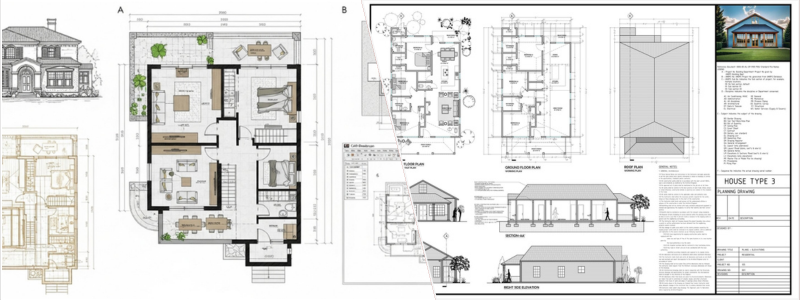
In case you haven’t noticed, an architect is one of the few professions legally qualified to design a built environment. Today’s post helps you understand architect fees and hiring options for your firm at Cad Crowd. Related professions, such as engineers, designers, and contractors, are likely more involved in the construction process, but everything they do must be based on plans prepared and approved by an architect. Producing an architectural plan may seem like a simple, one-phase task, but it entails significant technical and aesthetic challenges.

In addition to structural integrity, an architect must consider safety, environmental impacts, project timeline, and cost efficiency, among other constraints. Not every project requires an architect. That said, hiring one is almost a guarantee of a durable, aesthetically pleasing structure with a highly functional layout. It is certainly possible to undertake an architectural project (whether a new construction or renovation) without involving an architect.

However, this also means that the project is running without their expertise in design, building regulations, construction management, and budget estimation. Hiring an architect doesn’t have to be prohibitively expensive. AEC-specialized freelancing platform Cad Crowd can help you connect with hundreds of licensed architects from all over the world to handle your residential, commercial, industrial, and civil projects at an affordable cost.

RELATED: 3 Steps to Hiring a Reliable Architecture Firm & Freelance Services Architects

Architect fee structures

With most professions, the cost for hiring their services is typically determined by the scope of work, complexity of the tasks, and the time required to do the job. Architects are no different for the most part. Broadly speaking, architects may calculate their fees using any of the following three methods.

Percentage of construction cost

Think of this percentage-based fee as a sliding scale that puts the size and complexity of a project in direct relationship with the estimated total construction (as opposed to project) cost. As the cost slide moves up, the architect’s fee increases accordingly. The most common percentage is anywhere between 8% and 20% of the cost. Say a renovation project has a construction budget of $80,000, and the architect’s fee is set at 15%. Remember that the percentage isn’t subtracted from the construction cost; it’s added to it. This means the actual project cost will be the sum of $80,000 plus $12,000 (15% of the amount) for a total of $92,000.

Architectural designers are more likely to use percentage-based fees when they’re hired to provide full architectural services, which typically entail five phases, including schematic, design development, construction documentation, bidding and negotiation, and contract administration (construction). Keep in mind that the percentage is calculated based on the definitive construction cost instead of the initial estimate. If, at the end of the project, the construction cost exceeded the estimate, the architect’s fee would be the same percentage of the adjusted cost (rather than the initial estimate).

RELATED: Architectural Plans, CAD Drawing Costs & Architect Service Pricing: Full Breakdown

For clients, a percentage-based fee is ideal when the project is reasonably large, but the scope of work isn’t clearly defined. It allows them to secure the architect’s fee early on, yet still leaves room for negotiation later on as the specifics become known. It’s worth noting that a percentage-based method may be used to include or exclude additional project-related services and consultant fees, such as structural and MEP (mechanical, electrical, and plumbing) engineering.

Lump sum

As simple as it can get, a lump sum is a fixed fee. It’s a practical way to compensate an architectural drafting expert for the services provided, as you don’t have to handle percentage calculations, cost adjustments, or additional expenses that may arise during construction. However, you must understand that architects are only willing to use the fee structure if the scope of work is clearly defined. In other words, they will not throw around a fixed fee unless they’ve already calculated the work hours, construction timeline, the design complexity, and other variables with a reasonable degree of accuracy – not to mention the knowledge that major changes are highly unlikely during the project.

In the rare instances of major changes to project parameters beyond the architect’s control, the “fixed” fee must be adjusted to reflect any additional services rendered. Clients like the lump sum method because it’s straightforward. Following a negotiation at the very beginning of a project to determine the architect’s fee, the amount that both parties agree to is (in the vast majority of cases) the money the client ends up paying to the architect when the project concludes. At the same time, the method feels somewhat reassuring because it may incentivize the architect to work as efficiently as possible, since the pay is fixed regardless of the number of hours they spend on the project.

RELATED: How Much Does an Architect or Architectural Firm Cost for Home Design?

Of course, the biggest challenge with a lump sum for a client is that you cannot afford to have any hint of uncertainty about what the project requires. It’s important to know what CAD drafting and design services you need, how long the project should be, all the expenses, and the overall construction budget; otherwise, you might not be able to negotiate the fee effectively. 

architect fees explained

Hourly rate

Among the most common fee structures across professions is the hourly rate. As the name implies, the fee is calculated by multiplying the base “fee per hour rate” by the total number of work hours an architect spent on a project. Bear in mind that the base rate may vary significantly depending on such factors as the architect’s experience, project complexity, and location. In the United States, for example, architects’ rates range from $80 to $250 per hour. It’s admittedly a massive gap, but it’s true nonetheless: high-profile architects in big cities with a higher cost of living may warrant rates at the upper end of the spectrum.

Some people even consider that an hourly rate between $175 and $250 perfectly acceptable. For the client, the biggest advantage of an hourly rate is flexibility. If you have only the slightest idea of what architectural plans design services the project requires, the hourly rate affords you the freedom to adjust or amend the scope of work without fee renegotiation. On the other hand, flexibility comes with uncertainty; the open-ended nature of the fee structure makes it a good practice to ask the architect for an accurate estimate of how much time they need to finish every stage of the project.

RELATED: Hiring an Architect for New Construction & Renovation? Ask These Questions First

In any case, an hourly rate makes sense for architectural services that are not well-specified, conceptual design, small-scale renovation projects, specialist expertise (design consultant, analysis, etc.), or anything else that requires only a little involvement of an architect, such as representation with permit-issuing authorities.

Hybrid structure

It’s not uncommon for architects to use a combination of multiple fee structures rather than a single method of compensation throughout an entire project. This makes sense because different stages of a construction project are best served by different payment models as well; the idea is to offer the utmost cost efficiency to the client without sacrificing a healthy rate for the architectural detailing expert. For instance, during the process of acquiring building permits from the authority, the scope of work might be indeterminate in terms of complexity, but with a pretty clear timeline, which makes an hourly rate a sensible choice. As the project moves along and reaches the documentation stage, a fixed fee is ideal as it comes with a very specific scope of work.

Hiring options from Cad Crowd

Things are very different when you hire an architect through a freelancing marketplace. There are dozens of platforms you can use, but Cad Crowd sets a fine example of how to bridge a collaboration between clients and architectural planning and design professionals in ways that benefit both. Unlike the more generalized platforms, Cad Crowd specializes in the AEC industry with more than 15 years of experience connecting architects, engineers, and construction professionals with clients from all over the world. Cad Crowd offers three primary hiring models as follows:

RELATED: Complete Billable Rates for Architect Design Services, Architectural Costs & Hourly Fees

Direct hire

Presumably, the most straightforward way to hire an architect on the platform, the direct hire model, is the closest you can get to the hourly rate fee structure. You start the process by posting a project, which can be as broad or specific as you want, and get matched with the most qualified architect for the job. For example, the brief may say “create a permit-ready floor plan and convert it into a 3D visualization” or simply “build an architectural plan for a residential home.”

Once Cad Crowd identifies several qualified candidates, you can discuss the project further with the architectural drafting experts regarding the rate. When you’re ready to start the project, you can purchase a block of 10 hours at the agreed-upon hourly rate. While the entire “price negotiation” matter is basically the same everywhere, Cad Crowd plays the role of a hub here to help filter through hundreds of available candidates, making the process much quicker.

Managed services

A small yet notable difference between Direct Hire (Hourly Services) and Managed Services is the scope of work. Cad Crowd makes this distinction that Managed Services are reserved for short-term projects with well-defined scope and budget. Also, any project under this service is completely confidential, meaning only you and the pre-qualified expert get to see the project brief and deliverables. Everything else is pretty much the same between the two hiring options. You can communicate directly with the architect via email, Skype, or TeamViewer.

RELATED: Architectural Detailing Services: Top 31 Sites to Hire Freelance Architects & Drafters

Contest

Built on the idea of crowdsourcing, a design contest is excellent for conceptual, ideation, styling, or visualization phases. It’s also a great idea in case you need to hire a design engineering expert to help solving an engineering problem. As usual, you start by posting a project brief that best describes the services and the deliverables you need. You must set a prize money this time to attract the experts; a bigger prize attracts a bigger crowd. Although the platform offers private and invite-only contests where the project is visible only to select architects, it’s best to have it publicly accessible to try to receive as many submissions as possible. Pick the best design and give the reward to the winner.

How Cad Crowd can help

Cad Crowd gives you the peace of mind that the architect you end up hiring is indeed the best you can get for the project and the money. There might be some additional cost involved, such as the 3% platform fee and the 20% service fee for hourly and fixed-rate projects, but you get a guarantee of quality in addition to the 24/7 support team. Considering that Cad Crowd has some of the world’s most experienced and talented architects in the network, the quality of both the work and the service is worth every penny you spend. Contact us for a quote.

author avatar

MacKenzie Brown is the founder and CEO of Cad Crowd. With over 18 years of experience in launching and scaling platforms specializing in CAD services, product design, manufacturing, hardware, and software development, MacKenzie is a recognized authority in the engineering industry. Under his leadership, Cad Crowd serves esteemed clients like NASA, JPL, the U.S. Navy, and Fortune 500 companies, empowering innovators with access to high-quality design and engineering talent.

Connect with me: LinkedInXCad Crowd

New Avengers: Doomsday trailer sees Thor face off against Robert Downey Jr.’s Doctor Doom and gives us the X-Men action we’ve been waiting for


A brand new trailer for Avengers: Doomsday premiered at CinemaCon… introduced by none other than Robert Downey Jr.

In the two-minute trailer, we once again see the ruins of the X-Mansion. Professor Xavier watches in horror as flames appear in the sky. We hear who we think is Doctor Doom say, “Something’s coming, something we may not be able to deter…” The trailer cuts to the New Avengers tower, in which the Fantastic Four are introduced to Bucky, Ant-Man, and Captain America. Thor tells the group that they must stand together, or everything they sacrificed “will be for nothing.”

Visual Studio Code 1.117


Follow us on LinkedIn, X, Bluesky |


Last updated: April 16, 2026

Welcome to the 1.117 release of Visual Studio Code.

Happy Coding!


April 15, 2026

  • Add support for self-updating the Agents app on macOS. #308646

  • Copilot CLI sessions indicate whether they were created by VS Code or externally. #308543

  • In package.json files, the dependency hover now shows the currently installed version alongside the latest published version of a package. #307648

  • Images in JSDoc comments, including <img> HTML tags, now render correctly in hovers, completion details, and signature help for JavaScript and TypeScript files. #231792

April 14, 2026

  • The Autopilot permission mode now persists across sessions. You can configure the default permission level with the


    chat.permissions.default

    setting. #309562

  • When an agent sends input to a terminal, the terminal output is now automatically included in the result after a brief delay, saving an extra agent turn. #309509

  • Agent Host now supports auto-approve session configuration with three modes: Default Approvals, Bypass Approvals, and Autopilot (Preview). #309337

  • You can now switch back to the main window from auxiliary (floating) windows. #306571

  • Agent Host Protocol now supports subagents and agent teams. #305755

April 13, 2026

  • Agent Host sessions now support worktree and git isolation. #305325

  • Copilot CLI, Claude Code, and Gemini CLI are now recognized as shell types in the terminal. #290830

April 12, 2026

  • Copilot CLI now generates meaningful branch names based on the user’s prompt when creating worktrees for background agent sessions. #306191

We really appreciate people trying our new features as soon as they are ready, so check back here often and learn what’s new.