More than three years after the emergence of generative AI, AI-assisted coding remains by far the most popular and lucrative use case for the technology.
Although multiple companies — including Anthropic, maker of Claude Code, as well as Cursor and Cognition — are already vying for dominance, investors believe there is room for at least one more player.
On Wednesday, Factory, a startup developing AI agents for enterprise engineering teams, announced it had raised $150 million at a $1.5 billion valuation. The round was led by Khosla Ventures, with participation from Sequoia Capital, Insight Partners, and Blackstone. Keith Rabois, a managing director at Khosla Ventures, joined the startup’s board.
Factory founder Matan Grinberg told the Wall Street Journal that the company’s key differentiator is its ability to switch between different foundation models, such as Anthropic’s Claude or Chinese AI startup DeepSeek. However, startups like Cursor also don’t rely on a single model to generate code.
Factory’s customers include engineering teams at Morgan Stanley, Ernst & Young, and Palo Alto Networks.
The startup was founded in 2023 after Grinberg, then a PhD student at UC Berkeley, cold-emailed Sequoia partner Shaun Maguire. The two bonded over mutual academic interest. (Maguire’s PhD from Caltech is in the same area of physics Grinberg was studying.)
Maguire convinced Grinberg to drop out and launch Factory, with Sequoia backing the startup at the seed stage.
Dozens of processes run in the background on your PC, and each takes a bit of memory.
Most are necessary and helpful, but some can be disabled to optimize performance.
Checking to see which ones load automatically is a good place to start.
PC feeling a little sluggish? There are myriad possible reasons, but one of the best places to start is checking what’s tying up your memory.
If you open the task manager (Ctrl + Shift + Esc) and sort the programs by memory usage, you’ll find the usual culprits (your browser, Microsoft Office apps) at the top of the list, and a handful of others you probably can’t identify.
Unfortunately, many of these processes are necessary and/or inconsequential in terms of overall memory usage. But there are certainly some processes that can speed things up when killed — especially if you’re on a slower PC.
I recommend identifying the biggest culprits of memory leakage first: excessive browser tabs, bloatware from your PC’s manufacturer, and applications that start up on their own (whether you use them or not). There’s also a process called SysMain that preloads apps on your PC you may want to disable. Let’s walk through them.
1. Your browser
Elyse Betters Picaro / ZDNET
I’m willing to bet the app at the top of the list is your browser. Google Chrome and Microsoft Edge are notorious memory hogs, especially when you have dozens of tabs open. One thing you may not be aware of: Chrome has its own task manager, so you can see exactly which tabs are costing your PC the most memory.
In the three-dot menu in the top-right corner, go to More Tools > Task Manager. Sort by memory footprint, and you’ll very quickly be able to see if there’s a particular tab that’s chewing through your RAM. Luckily, you can close them right here in the task manager.
Also, instead of making your PC manage dozens of tabs, utilize favorites and the reading list to save pages for later. Click the three-dot menu in the top-right corner of Chrome, go to Bookmarks > List > Reading List > Add to Reading List. Make sure you also click “Show Reading List” on that same menu.
2. SysMain
If you do any Googling of this topic, you’ll see some discussion of this one. SysMain (formerly known as Superfetch) is a Windows process that pre-loads programs it knows you use regularly. This results in tying up some memory, which could negatively impact performance on some PCs.
There is a lot of discussion on both sides. Some Windows users swear that disabling this process improved their PC’s performance, while others cite that it should have no real impact at all. If you’re looking for solutions, however, it’s worth a try. Here’s how.
Press Win + R to open the Run command and type services.msc in the dialog box. This will display all background processes currently running on your PC, complete with descriptions to help identify what they do.
Scroll down to SysMain, and double-click it. It’s currently running by default, so first click the Stop button. Then, locate the dropdown menu next to Startup Type, and select Disabled. Then click Apply, and OK. Windows will no longer preload apps, potentially freeing up some memory in the process.
3. Manage your startup apps
Nearly every app you install wants to launch automatically when you start your PC. While this makes sense for some, there’s no point in devoting system resources to programs you’re not using.
We covered how to check what apps start automatically in Windows 10, and the process is the same with Windows 11. Press Ctrl+Shift+Esc to open the Task Manager, then go to the Startup tab (you may need to click “More Details” to see it). This list shows you all the apps your PC launches automatically when you start your computer.
Right-click the column headings to add details about how much of an impact auto-starting programs have.
Screenshot by Ed Bott/ZDNET
You’ll probably see a few apps that don’t need to be there, and you can disable these simply by right-clicking. Note that this doesn’t uninstall the programs; it simply relegates them to launching on your command.
Processes you disable should remain in this window, should you want to re-enable in the future. If you don’t see it, however, you can re-enable it in a command prompt. From the start menu, type cmd, right-click on Command Prompt, and select Run as administrator. Type the following: sc config “SysMain” start=auto & sc start “SysMain” and then restart your computer.
4. Bloatware
The previous step may have identified a few bloatware programs you’ve never used, but nonetheless have been running on your PC since you bought it. Most laptops come with proprietary apps that are often half-baked or not particularly useful, as manufacturers try to boost brand recognition and inflate the value of their PCs.
Fortunately, they can usually be easily removed, freeing up valuable space and memory. After removing them from the automatic startup menu, you’ll find them in Windows’ Add or Remove Programs menu, where you can uninstall them.
There’s a vision for combat in Ultimate Bug War that you can make out from a distance, but never comes into focus. Spray and pray weapons with what should be a stiflingly small ammunition capacity are often more than a match for Bug War’s generally low enemy density. The iconic warrior bugs don’t swarm with anywhere near the intensity seen in the film, and rarely do the other subspecies of arachnid work in tandem to overwhelm the player. There’s a perfunctory reload mechanic a la Gears of War that allows one to cut down their reload time by half, but rarely did I find myself in a teeth-gritting, life or death situation.
It’s a shame, as the gunplay is generally quite good, with a weighty, gas-fed ratchet to the iconic Morita assault rifle and its variants, each high caliber round impacting with a satisfying orange-blue sploosh when it penetrates bug chitin.
There’s a perfunctory arsenal of airstrikes that rain down with a satisfying swoosh, deployed from a low-poly Federation jets that fly five abreast like the Blue Angels, but this torrent of hellfire never quite gels with the sandbox—there are rarely enough active bugs in combat to justify calling in an airstrike, and the long deployment time and ease with which you can blow yourself up further negate the Fleet’s usefulness.
Article continues below
Of course, that’s if you can find a bug. Ultimate Bug War largely consists of wandering around mostly empty maps devoid of significant enemy encounters and completing tedious scripted mission objectives, often recycled from mission to mission—this war is won by planting satchel charges on flak-bugs, defending besieged outposts, and clearing out the occasional bug nest.
These are occasionally broken up by a fine enough power armor romp or eye roll inducing turret-from-gunship-door section, but by and large, it’s a lot of trundling around through empty maps and squashing the occasional bug. There’s one notable exception to this, however: Klendathu.
Drop Site Massacre
Ultimate Bug War peaks with its first level, a low-poly rendition of the infamous Klendathu Drop—an open ended battlefield with multiple distinct objectives and hordes of bugs swarming from all angles. The dense winding canyons and trails of Klendathu, Warrior bugs surge forward from all angles, are an anomaly in a game that is by and large barren.
(Image credit: Auroch Digital)
Visually, Ultimate Bug War loves to reuse that flat stainless steel look of the 1997 film, though rarely does that translate to a similar vibe despite the attention to detail—remember Outpost 29? Well, you can now visit the dozens of nearly identical outposts across the Federation’s galactic holdings. The music is similarly dull, a banal MIDI-brass ensemble mimicking the soundcard soundfonts of old. There’s very little of note, beyond the baffling absence of the original theme—it’s bizarre hearing royalty free military brass in lieu of an iconic film score in a licensed tie-in game.
Keep up to date with the most important stories and the best deals, as picked by the PC Gamer team.
Ultimate Bug War also lets you play as an “Assassin Bug”, introduced (and almost immediately forgotten) halfway through the Klendathu Massacre. This is billed as an equivalent mode to the Federation campaign, though my time hunting down the Federation’s finest with acid and claw left me borderline catatonic.
The Assassin Bug has three attack modes you can shift between, but in the face of swarms of nearly identical infantry that all go down in one hit, it’s never the case that you have to do anything more than mash left click to cut the Mobile Infantry to ribbons. Mission objectives consist of destroying small tents and generators, which is about as thrilling as it sounds. With no ambient dialogue, radio chatter, or mission-specific context, the Assassin Bug campaign feels decidedly tacked on, and is far and away the weakest element of a game that does little to distinguish itself.
(Image credit: Auroch Digital)
G.I. blues
Similarly off is the game’s commitment to recreating the propaganda lens of the film, with returning characters Johnny Rico and Sammy Dietz (played by their original actors) delivering suitably stilted, wooden dialogue in between-mission interviews, evoking the weirdness of Philips CD-i FMV games. Rarely does this set-dressing land, however. I think it’s supposed to be a riff on America’s Army, a now-ancient shooter series developed and published by the US Army in the early aughts with naked intentions to drive adolescent recruitment ahead of the Iraq War. Even still, the juxtaposition of bombastic patriotism covering for out and out fascism is hardly as biting nearly thirty years on from the original film, and is in fact far tamer than some of the propaganda X The Everything App’s “For You” page will randomly show you over breakfast.
I was under the impression that the Federation lost the bug war seen in the film, and badly…
Moreover, and this is an especially minor point in the very unserious world of “Starship Troopers canon”, but I was under the impression that the Federation lost the bug war seen in the film, and badly—that’s why the final propaganda reel before the credits shows child soldiers fighting alongside nuclear weapon equipped Mobile Infantry. By no means am I asking for playable child soldiers (though the thought of that is significantly funnier than any attempt at humor Ultimate Bug War), but it’s disappointing that we never get to see any indication of the Federation teetering on the verge of total collapse.
(Image credit: Auroch Digital)
Ultimate Bug War doesn’t even really seem to get what is going on in the Verhoeven film, which is riffing on the Heinlein novel’s thesis that the Federation’s soldier class and the Bug warrior caste are ultimately one and the same. What defines the relationship between the film and the book is a feeling of neural whiteout, a descending, brain numbing miasma a la Kafka’s metamorphosis that is completely absent here. With only trace hints of Verhoeven’s sardonic wit and none of Heinlein’s moribund set dressing, Ultimate Bug War’s satirical elements are way off-target, and land well short of screwball contemporaries Helldivers and Earth Defense Force.
Marred by oddball balance decisions, bad pacing, coma-inducing level design, and an eye-rolling adherence to a satirical playbook that would have been played-out in the first term of the Bush presidency, Starship Troopers: Ultimate Bug War doesn’t do proper justice to the Federation’s finest.
The Mid-Market Supply Chain AI Stack: What’s Worth Building vs. Buying?
Most mid-market supply chainleaders have already looked at the big platforms. SAP Integrated Business Planning. Blue Yonder. o9. They have seen the demos. The capabilities look right. The implementation timelines look long, the price tags look like enterprise budget, and the fit to their actual data environment looks questionable.
So the question becomes: what do you actually build, and what do you buy?
USM Business Systems works with mid-market operations teams in manufacturing, distribution, and logistics to answer exactly that question. What follows is the framework we use.
Start With the Data Reality
The first thing that determines your stack is not your budget or your timeline. It is your data environment.
If your ERP is clean, your WMS is current, and your supplier data is structured and reliable, you have more platform options. If you are managing two ERPs from a merger, a WMS that exports to spreadsheets, and supplier lead times that live in email threads, most platforms will underdeliver.
The reason is simple. Enterprise supply chain platforms are calibrated to enterprise data infrastructure. Mid-market infrastructure is almost always messier. That is not a failure of the ops team. It is a function of how mid-market companies grow.
A platform that assumes a clean data model will give you clean outputs on the demo and noisy outputs in production. The question to ask in every vendor evaluation: what does this platform do with dirty data?
What Platforms Are Good At?
Off-the-shelf supply chain AI platforms are strong when:
Your data infrastructure matches their integration assumptions
Your use case is standard enough that their pre-built models apply without heavy customization
You have internal IT capacity to manage ongoing configuration and maintenance
Your budget and timeline can absorb a 6-18 month implementation cycle
For companies where those conditions hold, a platform makes sense. The vendor handles the model maintenance, the infrastructure, and the roadmap.
What Custom AI Agents Are Good At?
A custom supply chain AI agentis the right architecture when:
Your data environment is non-standard and a platform would require significant data cleanup before it could run
Your use case is specific enough that pre-built models would require heavy modification anyway
You want the agent trained on your supplier relationships, your SKU hierarchy, your actual demand patterns
You need deployment in weeks, not quarters
The tradeoff is that custom builds require an engineering partner with supply chain domain understanding. Generic AI development shops can build the software. They often miss the operational logic that determines whether the outputs are actually useful.
A Practical Framework for the Decision
The framework USM uses with every new supply chain engagement is a three-question filter:
First: Is the problem standard or specific? A demand forecasting problem at a food manufacturer with heavy seasonality and short shelf life is not a standard problem. A platform built for median demand forecasting will give median results.
Second: How clean is the underlying data? If significant data cleanup is required before a platform can run, that cleanup cost goes into the build-vs-buy calculation. Custom agents can be built to work with imperfect data.
Third: What is the decision speed requirement? If you need visibility improvements in 8-12 weeks, a platform with a 9-month implementation is not the right answer regardless of long-term fit.
The Hybrid That Works for Most Mid-Market Teams
Most mid-market supply chain teams land in a hybrid. They buy infrastructure at the commodity layer (ERP, WMS, TMS) and build custom at the intelligence layer, the agent that sits on top and synthesizes the signals into decisions.
That is the architecture USM deploys. The agent connects to existing systems via API or data export. It does not require an ERP migration or a WMS upgrade. It meets the data where it is and builds the visibility layer on top.
Deployment timeline: 8-12 weeks from scoping to first output. ROI measurement starts at week one.
USM offers a no-cost architecture consultation for supply chain and logistics leaders evaluating AI options. Book a session at usmsystems.com.
For the last couple of years, the Epic Games Store has given away free games every week through its PC storefront. With the company having launched its own mobile store, it has also started a second free games program on iOS and Android devices, kicking things off with a curated library of titles and weekly freebies. The app also features mobile versions of Fortnite, Fall Guys, and Rocket League Sideswipe.
To access these games you will need to create a free Epic account and install the free Epic Games Store mobile app and log in with your account, but once you do, you can start claiming your free games every Thursday through it. One other thing to note is that Android users can access the app via Android-based emulation devices like Retroid Pocket, as they aren’t limited to just smartphone and tablets.
For now, only iOS users in the European Union can install the app, but the app is available worldwide to Android device users and they have a wider selection of games to choose from in comparison. Like its PC counterpart, you’ll have one week to grab each game that’s offered. Here’s a closer look at what you can grab this week, and what the current mobile games library has to offer. You can also explore what the free PC games are this week on the Epic Games Store.
Our expert reviewers spend hours testing and comparing products and services so you can choose the best for you. Find out more about how we test.
In recent years, Motorola’s Moto G Stylus has blurred the line between mid-range and high-end, offering the best of both worlds at a very attainable price. The Moto G Stylus 2026 attempts to continue this legacy by basically taking a popular Galaxy S26 Ultra feature and sticking it on a phone less than half the price.
That said, times are tough right now for the consumer electronics industry, and the ongoing RAM shortage is forcing companies to make certain concessions with their smartphones. We knew that budget and mid-range smartphones might feel the most pressure, and the Moto G Stylus 2026 feels like a clear example of how no one is immune to the effects of rising RAM costs.
As a result, the Stylus 2026 costs $100 more than its predecessor, and while there are some noteworthy upgrades, it may pale in comparison to some of its now closer rivals.
Swipe to scroll horizontally
Specs
Category
Moto G Stylus 2026
OS
Android 16 (Hello UX)
Updates
2 OS, 3 year of bi-monthly security updates
Display
6.7-inch Super HD (2712 x 1220), OLED, 120Hz, 5,000 nits
Chipset
Snapdragon 6 Gen 3
Memory
8GB LPDDR5X
Storage
128GB/256GB, UFS 3.1, expandable
Rear Camera 1
50MP wide, Sony – LYTIA 700C, f/1.8, OIS, 1μm (2μm with pixel binning)
Rear Camera 2
13MP ultrawide+macro, f/2.2, 120° FOV, 1.12μm
Front-facing Camera
32MP wide, f/2.2, 0.7μm (1.4μm with pixel binning)
Audio
Dual stereo speakers, Dolby Atmos, 2 mics, FM radio
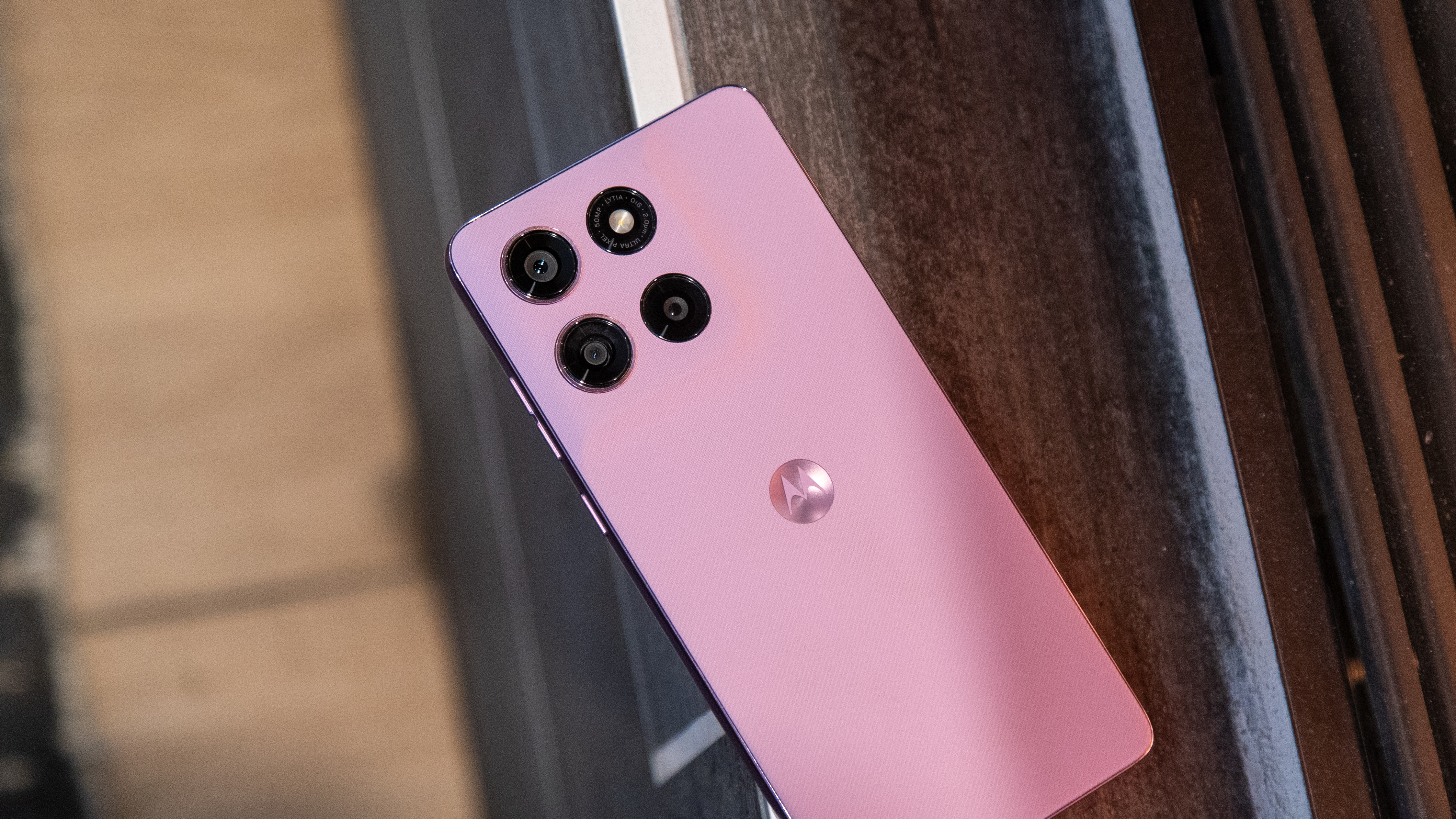
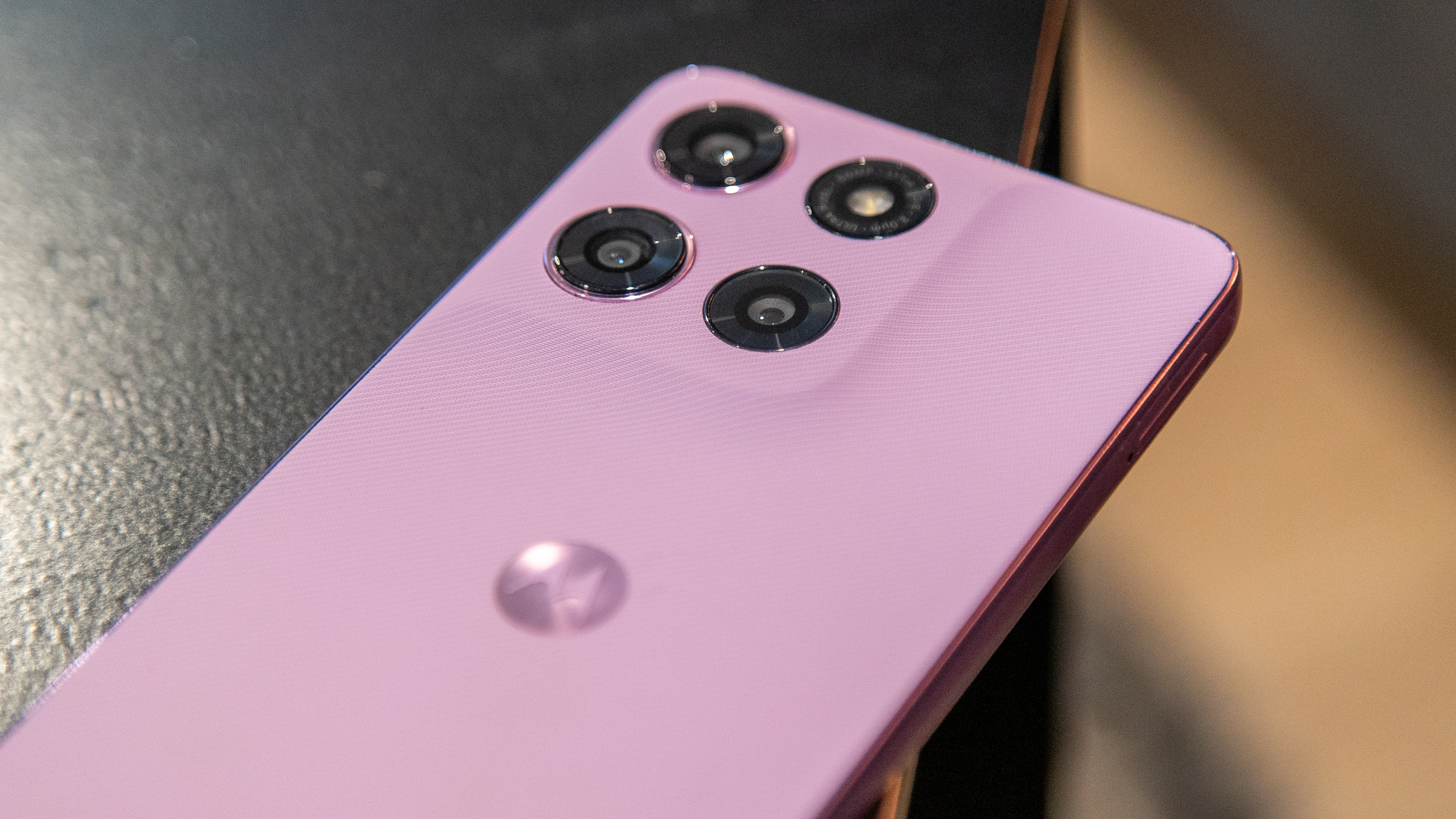
It’s clear Motorola was aiming to save on manufacturing costs as the design of the Stylus 2026 is more or less identical to its predecessor. The size, dimensions, buttons, and even the placements of the bottom speaker and mic are the same. The only difference is the slight change in the camera housing design, but even that is very subtle.
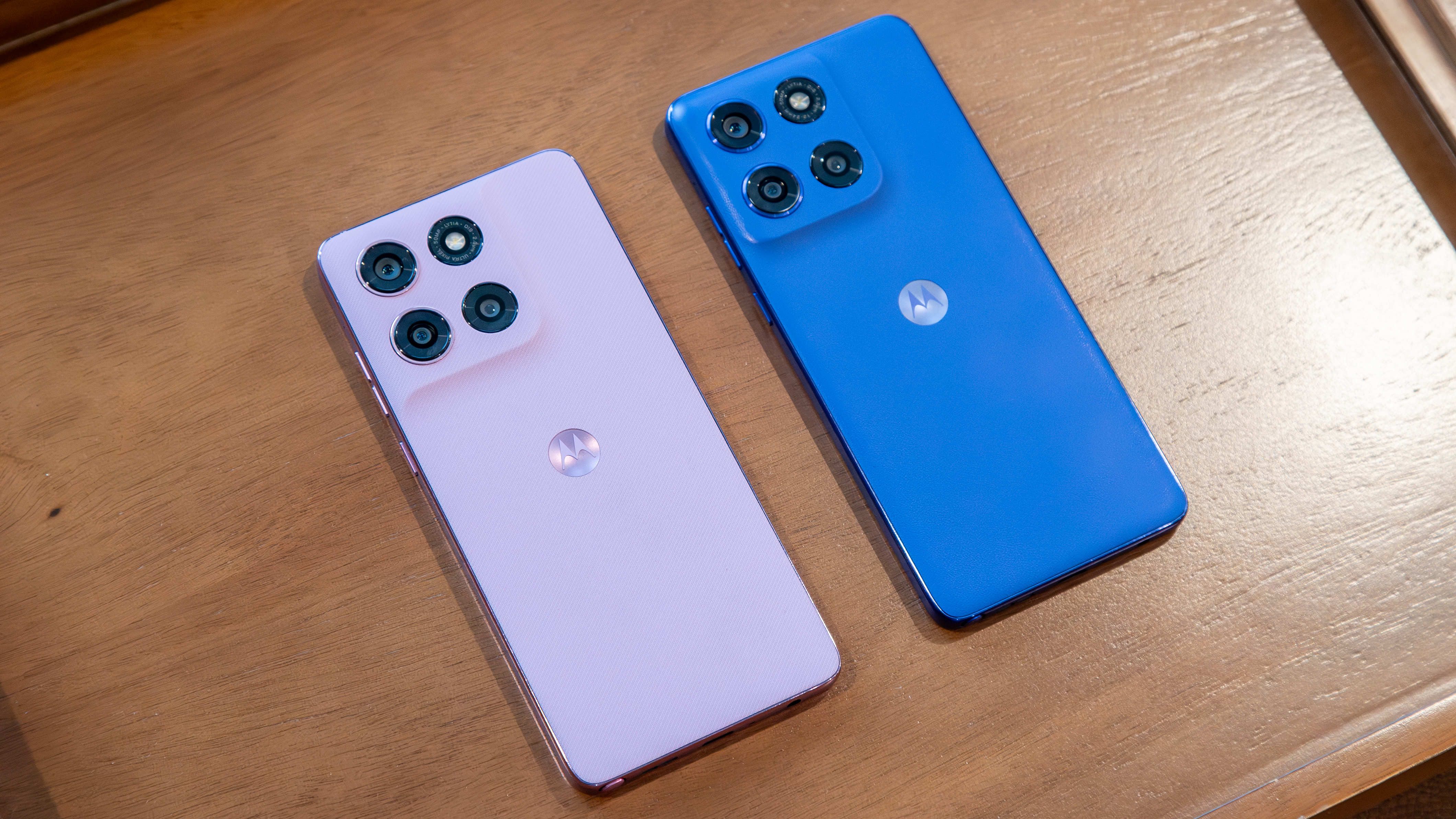
The Stylus 2026 differs from the Stylus 2025 in its rear texture. Motorola continues to use vegan leather on its phones, but the Stylus 2026 goes for a twill-inspired texture that both looks and feels quite nice. My unit is the Pantone Lavender Mist colorway, a pinkish-purple tone that really stands out and is the more interesting of the two color options.
Image 1 of 3
(Image credit: Derrek Lee / Android Central)
(Image credit: Derrek Lee / Android Central)
(Image credit: Derrek Lee / Android Central)
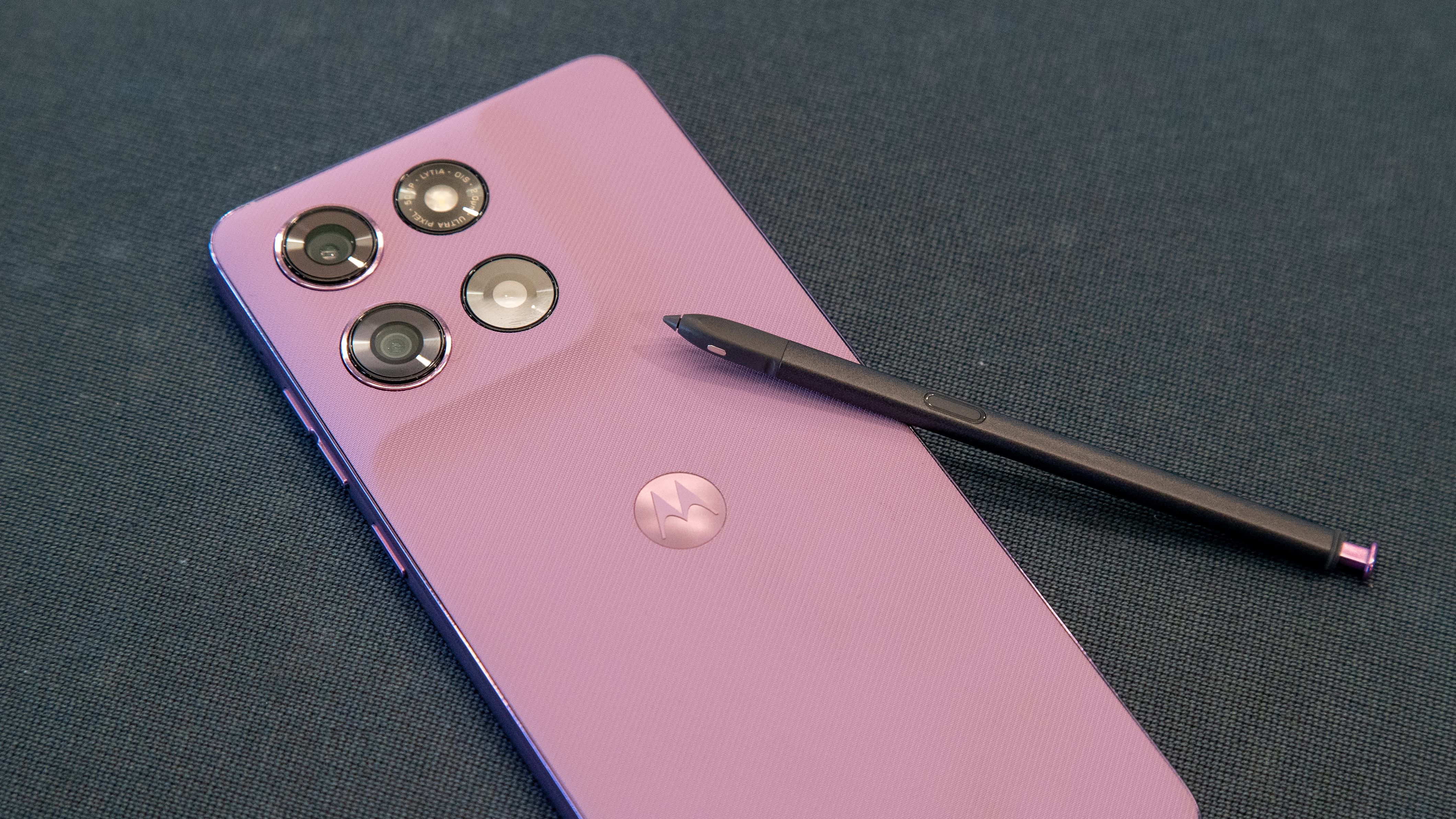
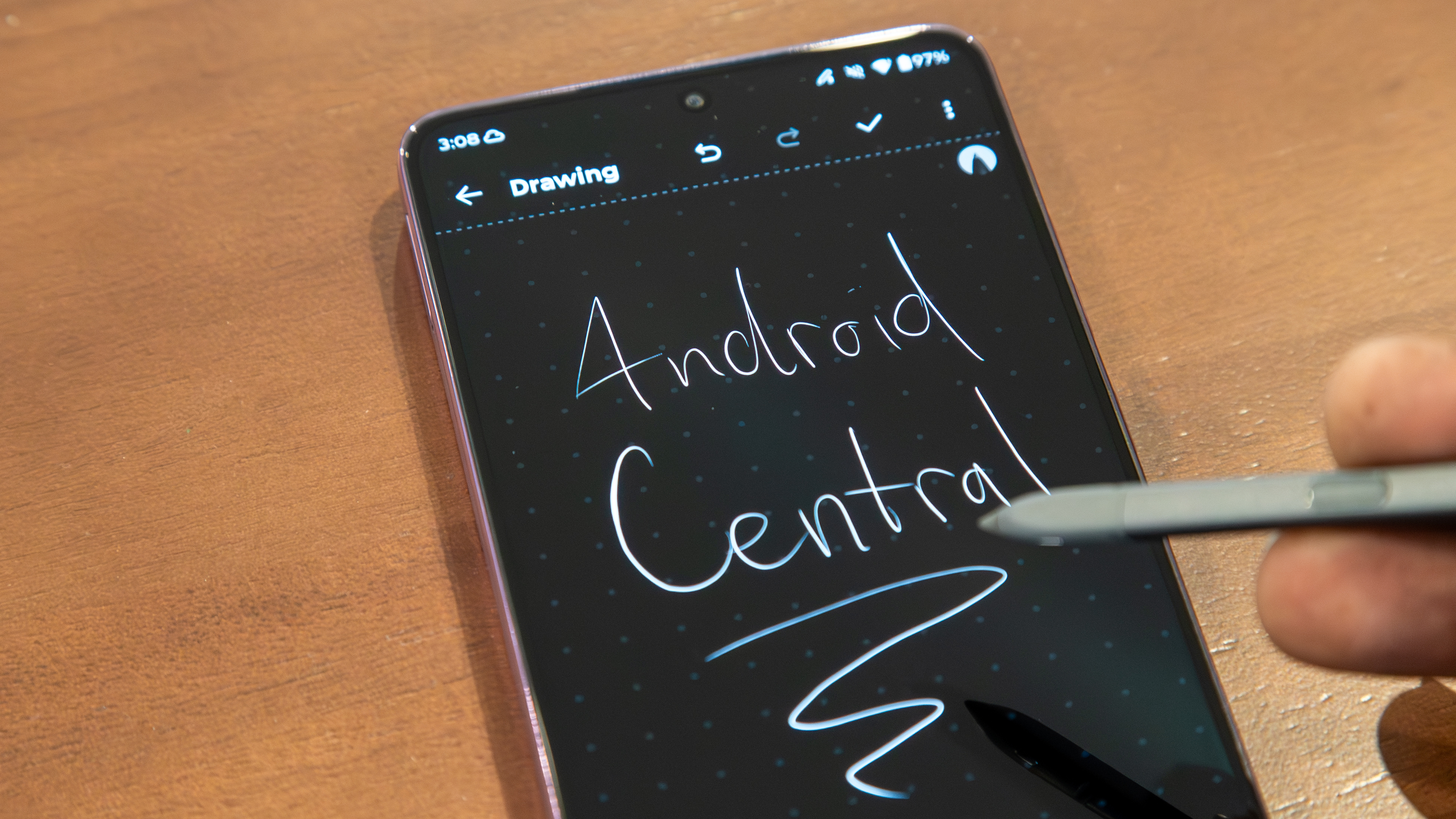
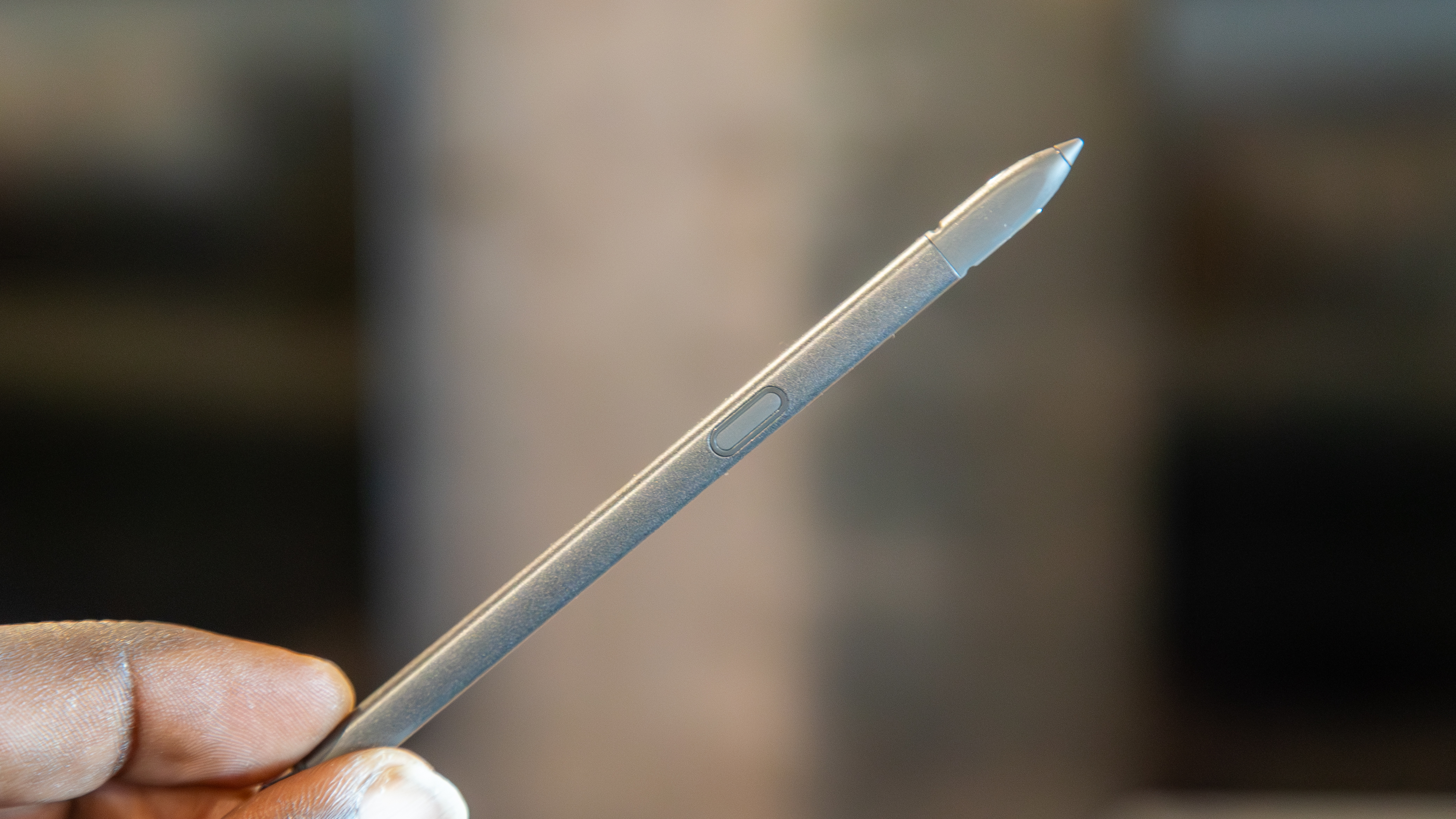
The marquee stylus is another change Motorola made, moving from a passive pen to an S Pen-like active one. That means the built-in stylus supports features like tilt detection and pressure sensitivity. There aren’t many apps that can take advantage of these features, but I found note-taking quite pleasant, and the pen itself is slightly thicker than previous versions, which makes it nice to hold.
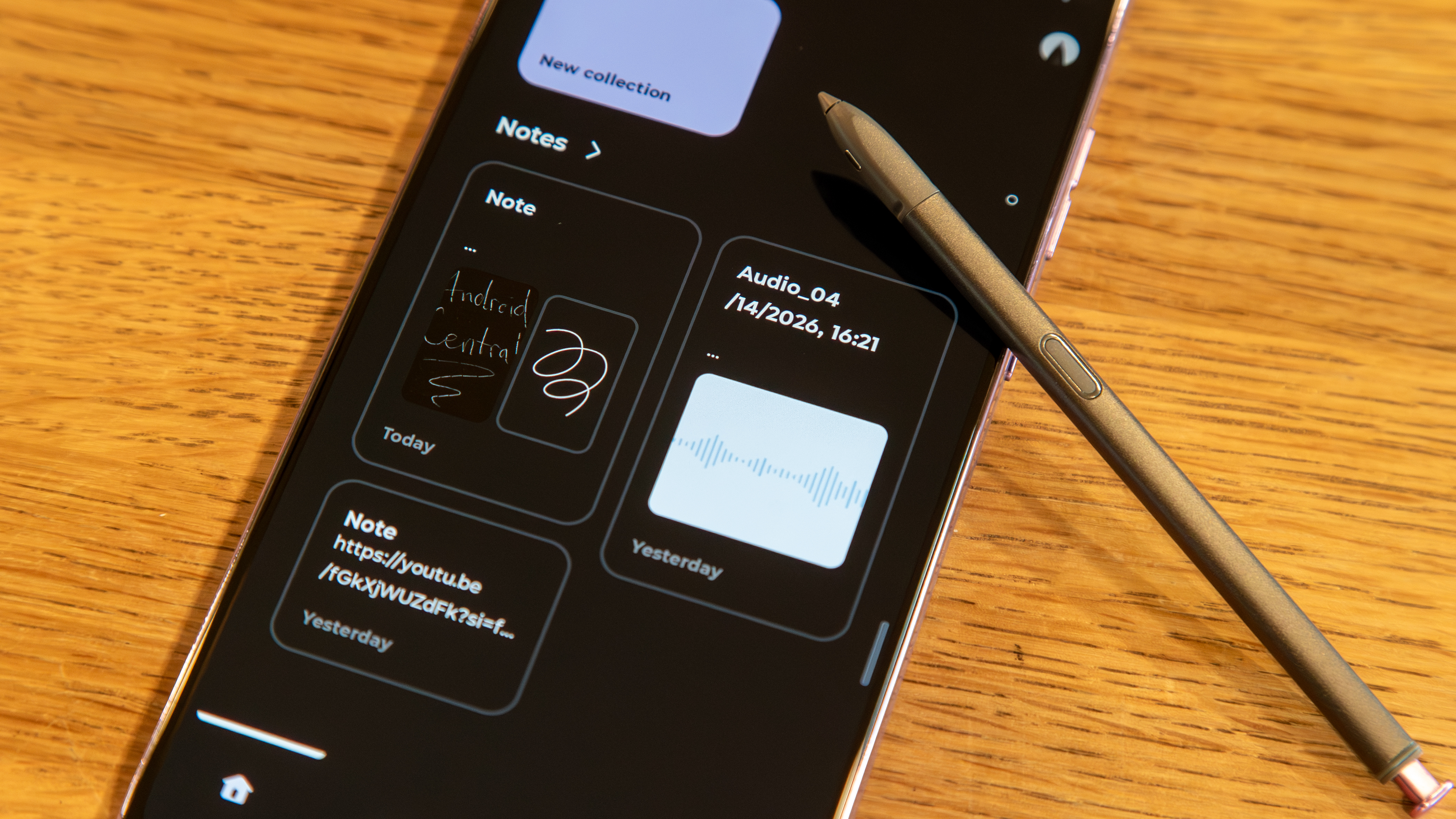
When you take the stylus out of the phone, the screen is off or on the lock screen, it’ll automatically open the Notes app so you can start writing or drawing. Taking it out past the lock screen reveals a floating menu where you can start a new note (or add to one), annotate whatever’s on the display, start a screen recording, open Sketch to Image, or magnify text. Starting a new note opens the built-in Notes app, which is surprisingly capable and lets you combine various types of content, including text, photos, and transcribed recordings, and add notes to collections for easy management.
Get the latest news from Android Central, your trusted companion in the world of Android
Sketch to Image is also supported in the Notes app, which uses AI to convert your drawings into images. You can use it to generate whole pieces of “art,” or you can use it to clean up your own drawings, although the results vary, as it seemed hesitant to correctly generate my badly-drawn R2-D2.
Image 1 of 5
(Image credit: Derrek Lee / Android Central)
(Image credit: Derrek Lee / Android Central)
(Image credit: Derrek Lee / Android Central)
(Image credit: Derrek Lee / Android Central)
(Image credit: Derrek Lee / Android Central)
Hovering the pen over the display shows a pointer so you know exactly where it is interacting with the display. If you press the stylus button while hovering, you can activate Circle to Search, which seems very fitting for a stylus and is one of my favorite uses of the pen. That said, pressing the button when you’re not hovering does nothing, which is kind of an unfortunate limitation.
Like the Galaxy S26 Ultra, the stylus on the Moto G Stylus 2026 doesn’t support Bluetooth controls, so you can’t, for instance, use the Stylus as a remote shutter button for the camera, which feels like a missed opportunity. Still, for the price, I think this is one of the best stylus pens I’ve seen for a mid-range smartphone, and it’s quite a welcome upgrade from previous iterations.
Image 1 of 3
(Image credit: Derrek Lee / Android Central)
(Image credit: Derrek Lee / Android Central)
(Image credit: Derrek Lee / Android Central)
On that note, there are some other noteworthy upgrades worth mentioning. The display is still a Super HD AMOLED panel, which looks great, and with the brightness bumped to 5,000 nits peak, it’s plenty visible outdoors.
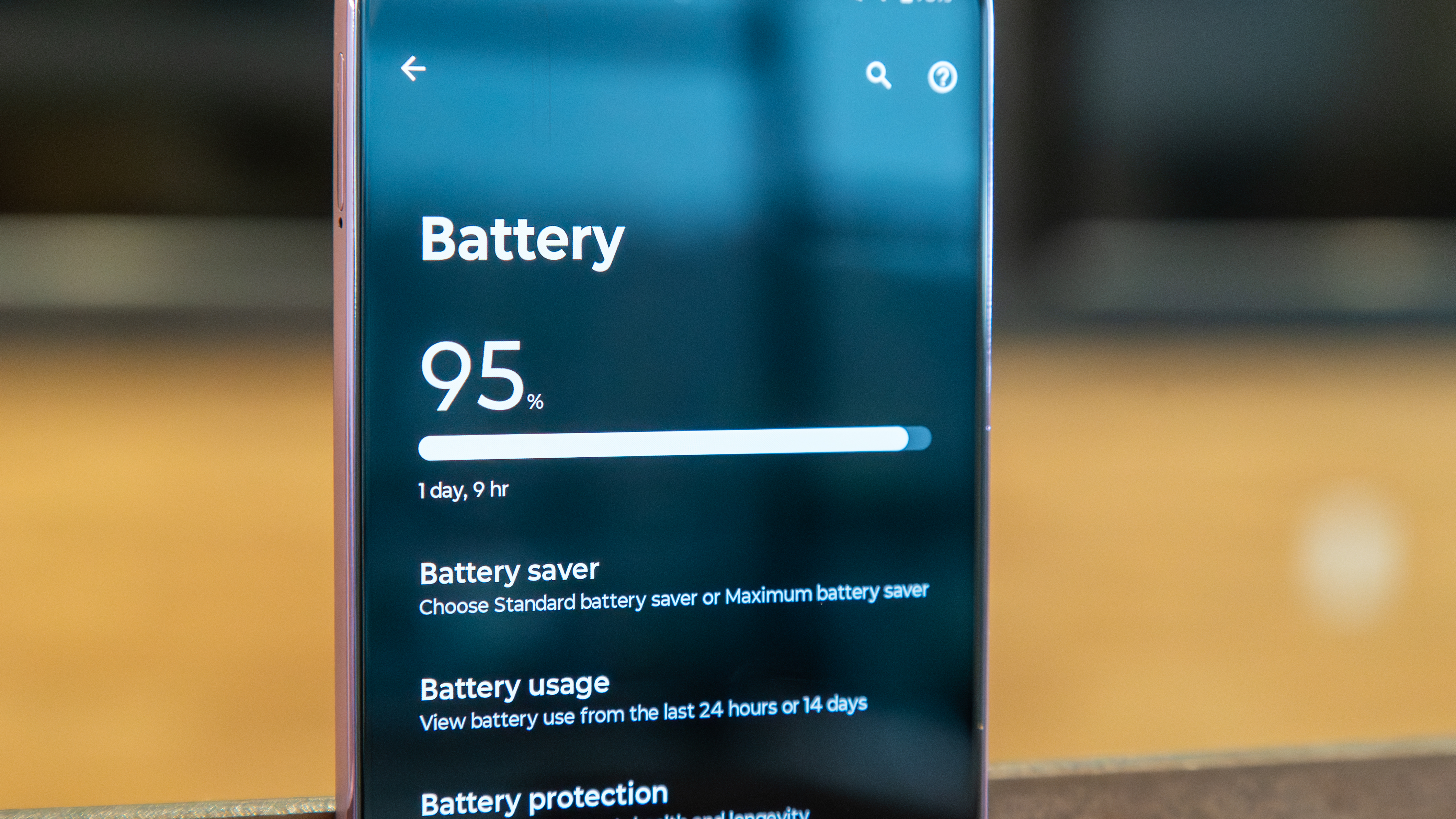
The battery capacity has also been increased, though by only a mere 200mAh. The Stylus 2025 already had an all-day battery and then some, so I’m not quite sure the small bump was worth it. I can get through an entire day without any battery anxiety, going from 7 a.m. to midnight with around 15% of battery, and depending on your use, you can probably achieve Motorola’s estimated 44 hours of battery life. That said, for a phone that’s already quite thick, it would’ve been nice to see Motorola take after the OnePlus Nord 6, which has a 9,000mAh battery.
Charging is still 68W, which is faster than even the Galaxy S26 Ultra, so that’s a major benefit, as is the 15W wireless charging.
Image 1 of 2
(Image credit: Derrek Lee / Android Central)
(Image credit: Derrek Lee / Android Central)
Unfortunately, performance is another area with virtually no change. That’s not to say the Moto G Stylus 2026 doesn’t perform well, but the Snapdragon 6 Gen 3 is the same chip used in last year’s model, and it would have been nice to see Motorola move to something more capable, like the Snapdragon 7 Gen 4.
On the one hand, I don’t have any problems opening or switching between apps, and the overall experience is just fine. However, gaming performance leaves a bit to be desired, and even while playing games like Honkai: Star Rail on medium settings, I noticed quite a few dropped frames. It doesn’t ruin my gaming experience, but if you’re a big mobile gamer, you likely won’t be pleased with the performance.
(Image credit: Derrek Lee / Android Central)
Another reason a chip upgrade would’ve been nice is AI. Motorola puts all of its AI eggs in its flagship baskets, so the Edge or Razr series, but given the growing presence of AI on midrange phones like the Nothing Phone 4a Pro, Motorola’s offerings here feel a bit lacking. Outside of the features found in the Notes app and Google’s Gemini offerings, there’s not much to play with here.
Moto AI isn’t the strongest AI suite, but I would’ve liked to see features like Catch Me Up or Remember This.
(Image credit: Derrek Lee / Android Central)
Fortunately, Motorola brings some of its AI to the camera, such as Action Shot, which adjusts the shutter speed to capture fast-moving objects. The cameras produce pretty good images for the most part; the quality is roughly the same as last year’s model, which isn’t a bad thing (until you zoom beyond 2x).
This year, Motorola introduced its Signature Style mode to the Stylus, which uses a “unique Moto color style” powered by AI. The outcome is generally photos with punched-up contrast and saturation, and it can be hit-or-miss depending on your preference.
Speaking of preference, you can also customize the Signature Style by uploading and adjusting photos of food, landscapes, and portraits so the AI can learn your tastes. That said, I often find it better to just stick with the normal camera mode, as it seems to get the job done just fine.
Image 1 of 14
(Image credit: Derrek)
(Image credit: Derrek)
(Image credit: Derrek)
(Image credit: Derrek)
(Image credit: Derrek)
(Image credit: Derrek)
(Image credit: Derrek)
(Image credit: Derrek)
(Image credit: Derrek)
(Image credit: Derrek)
(Image credit: Derrek)
(Image credit: Derrek)
(Image credit: Derrek)
(Image credit: Derrek)
But “just fine” is largely how I would describe the overall experience with the Moto G Stylus 2026. It keeps all the good things about its predecessor, but makes little effort to really improve on it. The new active S Pen-like stylus is a nice touch, for sure, but a built-in stylus is ultimately a niche, nice-to-have feature, not a reason to buy the phone.
The Moto G Stylus 2026 is a good phone, but at $499, Motorola is charging a $100 premium over its predecessor, and I’m not sure it’s worth it, especially given other phones like the Pixel 10a (or Pixel 9a) and Nothing Phone 4a. For the price, those phones feel more cohesive, with arguably better cameras and more robust AI offerings.
If you have the Moto G Stylus 2025, there’s no need to upgrade. The Stylus 2026 is harder to recommend at $499, but if you’re looking for an affordable alternative to the Galaxy S26 Ultra, this might hit the mark, especially if you can find a good deal.
Affordable S Pen
The Moto G Stylus 2026 is one of the few smartphones with a built-in stylus pen, and if you’re an artist or just prefer to write over typing, this might be the phone for you.
Ask most home-based business owners about seasonal signage, and you’ll get a decorative answer: which colors to use and when to take it all down. That framing is exactly why they get nothing measurable out of the effort.
Seasons aren’t a design question. They’re a revenue question. A rotating signage strategy, built around one or two permanent pieces like custom neon signs that anchor your brand year-round, turns a single annual sales peak into three or four.
Done right, the math is almost embarrassing: a baker I know runs four distinct sales windows a year using the same $200 neon sign and roughly $60 in seasonal add-ons. Q4 isn’t a miracle month anymore. It’s just one of four.
This piece breaks down why seasonal signage actually moves revenue, which signage types earn their keep for a home-based operation, and how to build a rotation schedule that doesn’t eat another weekend you didn’t have.
By the end, you’ll have a checklist you can map to your own sales peaks, plus the mistakes worth skipping on your way there.
Why Seasonal Signage Works (The Psychology Behind the Sales Lift)
Regular customers stop seeing your business within a handful of visits. That’s not a slight against your branding. It’s how human visual attention works. Psychologists call it perceptual adaptation, and it’s the reason people walk past the same storefront daily without registering what’s in the window.
Seasonal signage breaks the adaptation. A visible change pulls the space back into conscious attention. The result isn’t just “oh, cute fall colors.” It’s a cognitive reset that makes regulars curious about what else might be new (the menu? the hours? the prices?) and prompts the kind of second-look visits that drive incremental sales.
Two other psychological levers kick in alongside the novelty reset. Scarcity framing (the fact that a seasonal piece won’t be there next month) creates mild urgency, which is why limited-run signs outperform permanent signage during promotion windows.
Social proof compounds on top of that: photogenic seasonal displays get photographed and shared, which means your customer acquisition cost quietly drops during rotation periods.
The honest caveat: this only works if the rotation is actually visible to the customer. A sign placed where only staff can see it is just expensive wallpaper.
Types of Seasonal Signage Small Businesses Can Use
Search “seasonal signage” on Google, and the top results are fifteen variations of “holiday banner.” That’s not useful. Matching the signage category to the role you need it to play in your rotation actually matters.
Four categories cover the realistic options for a home-based or small shop operation:
Permanent anchor signage. Your always-on brand visual. Custom neon signs, metal logo panels, illuminated channel letters, or large printed wall graphics. You don’t rotate these. You build every seasonal campaign around them. Cost is front-loaded; cost-per-season approaches zero by year two.
Temporary premium signage. Acrylic signs or neon signs, weather-resistant A-frames, quality vinyl decals with a 3–6 month lifespan. Pricier than printables, but they photograph well and can be stored and reused across multiple years (a December 2025 Christmas sign still works in December 2027 if you didn’t date it).
Digital signage. A simple screen displaying seasonal graphics costs less than most people expect now (a basic setup runs $150–$400 in 2026), and it rotates content at zero marginal cost. Best for businesses where customers linger in cafes, salons, or treatment rooms.
Promotional printables. Paper window clings, chalkboards, printed menu inserts. Cheap and fast, designed to be disposable. These are tactical, not strategic. Useful for one-week flash sales, not year-round rotation.
The mistake is thinking you have to pick one. A working seasonal signage system uses three of the four: a permanent anchor, one or two premium pieces per season, and disposable printables for flash promotions. The digital screen is optional unless your space genuinely calls for it.
How to Plan Seasonal Signage Around Your Sales Peaks
The generic retail calendar (Halloween → Black Friday → Christmas → Valentine’s → Easter → Mother’s Day) is a starting point. It’s not your calendar.
Your calendar lives inside your own sales data. Pull the last 18–24 months of revenue and look for the actual weeks where sales spiked or stalled. A florist’s year looks nothing like a home baker’s, and neither looks anything like a print-on-demand Shopify store’s.
One friend who runs a candle brand found her strongest month wasn’t December. It was October, because her wedding-favor wholesale orders landed six weeks before autumn weddings. Her whole signage rotation now pivots around September and October, not Q4.
Once you’ve mapped your peaks, plan signage changes to land 2–3 weeks before each one. The lead time matters for two reasons: customers need repeat exposures before a visual change starts affecting behavior, and your social content needs time to circulate in algorithms before the sales window opens.
The simplest rotation schedule most home-based businesses can actually maintain:
Quarterly: One seasonal premium piece per quarter, with four pieces in rotation and storage for the off-months
Monthly or event-based: Printable promotional signage for flash sales, new launches, or time-sensitive offers
Resist the urge to rotate more often. Over-rotation signals chaos to customers and burns out your own attention. Two to four real rotations a year, done intentionally, beat monthly changes that nobody notices.
Which Signage Types Work Best for Each Season
Different seasons call for different signage formats, mostly because customers actually move through your space (or your feed) differently during each one.
Q1 (January–March) rewards illuminated signage. Shorter days, less foot traffic, more indoor buying. Neon and LED signage photograph exceptionally well in low light, which matters because Q1 is when your Instagram and Google Business Profile images carry the heaviest conversion load. A warm-toned illuminated piece running from 4 pm onward will outperform any printable in this window.
Q2 (April–June) rewards outdoor and window signage. Patio season, farmers’ markets, weekend pop-ups. Weather-resistant A-frames and window decals come back into rotation. If you run a home-based business that sells at markets, this is the quarter when a portable anchor piece (often a branded neon sign that travels with your booth) recovers its entire annual cost.
Q3 (July–September) rewards event-tied signage. Back-to-school, early fall weddings, Q4 launch teasers. Promotional printables and short-lifecycle premium pieces dominate here because the themes change every 4–6 weeks.
Q4 (October–December) rewards layered signage. The season where all four categories earn their keep at once: permanent anchor, premium seasonal pieces (Halloween, Thanksgiving, Christmas in overlapping rotations), digital loops, and disposable flash signage for Black Friday through New Year.
The honest trade-off: this level of rotation takes more planning than most solopreneurs expect. If you can only realistically manage two rotations a year, run Q1 illuminated and Q4 layered. Skip the middle quarters and let your permanent anchor carry the summer months.
7 Seasonal Signage Ideas That Actually Drive Foot Traffic and Online Sales
The “limited run” menu board sign. A chalkboard or custom piece announcing a seasonal product, with a visible start and end date. Urgency plus novelty in one object.
The holiday countdown sign. A reusable sign with a changeable number: “12 days until Christmas,” “3 weekends left to order custom gifts.” The number changes every week; the effort is a five-second update.
The branded seasonal backdrop. Whatever your permanent anchor is (a neon sign, a logo panel, a branded wall), restyle the 3–4 feet around it each season. Customers photograph the backdrop in every rotation, giving you fresh social content without new infrastructure.
The mobile market sign. A portable sign you bring to every pop-up, farmers market, or event booth. Visual consistency across venues is what turns one-time buyers into repeat customers who recognize your booth across different markets.
The seasonal hero piece in product photography. A temporary background element (illuminated or printed) that differentiates your spring collection photos from your fall collection photos on the same Shopify page. Small visual shift; measurable click-through lift.
The “new arrival” window decal. A simple removable decal announcing that something new just landed. Works for physical storefronts, home studios that host clients, and even Zoom backgrounds for consultants running seasonal service launches.
The year-end gratitude sign. A late-December piece thanking customers by name (or thanking “everyone who ordered in 2026”) was displayed in the last week of the year. Almost nobody does this, which is exactly why it drives disproportionate goodwill and repeat purchase rates in January.
Seasonal Signage Mistakes Small Businesses Keep Making
Leaving signage up too long. A January sale sign still hanging in March signals neglect. Customers read it as “this business isn’t paying attention,” which quietly erodes trust. Set an end-date alarm the day you put anything up.
Over-rotating. Changing signage every two weeks trains customers to ignore changes. Three to four meaningful rotations a year outperform twelve shallow ones.
Designing for daytime only. Home-based businesses that host clients (or run storefronts) get their best photos at twilight and after dark. Signage that disappears in low light (anything non-illuminated) is invisible during your highest-engagement hours. A single illuminated piece in the background fixes this.
Ignoring the digital twin. Every seasonal sign needs a matching image treatment on your website, email header, and social profiles. A store decorated for Halloween while the homepage still shows summer product shots creates a jarring experience that breaks trust.
Buying signage that can only be used once. Undated, reusable pieces compound in value each year. Anything printed with “2026” is a one-shot asset. Design for reuse unless you genuinely need the year on the piece.
Spending too much on printables, not enough on the anchor. Plenty of small businesses do this backward: hundreds of dollars a year on disposable signage, nothing on the one permanent piece that would anchor every photo.
Flip the ratio. One $300 permanent sign plus $60 of seasonal printables will outperform $400 of annual printables, every time.
Seasonal Signage Metrics That Matter
“Does it work?” is measurable, even for a solopreneur without a full analytics stack.
Tagged social mentions during rotation windows. Count the customer-generated posts featuring your signage in the two weeks after each rotation, compared with the two weeks before.
A working seasonal sign roughly doubles organic tagged mentions. No lift means the sign isn’t photogenic enough, or it’s positioned where customers can’t photograph it.
Foot traffic or booking shifts in the 14-day window after a rotation. Compare the two weeks after a new sign goes up to the matched two weeks from the prior season. Clean comparisons are hard for small operations (weather, events, and local holidays all interfere), but patterns show up across three or four rotations.
Average order value during campaign windows. Novelty often shifts customers toward premium products. If your AOV rises 8–15% during active rotation periods and returns to baseline between them, the signage is doing real work.
The photo test. The simplest metric, and the one most solopreneurs underuse, is: is anyone photographing the sign? If the answer is no after a full rotation cycle, the visual isn’t doing what signage is supposed to do. Replace it.
None of this requires an analytics tool you don’t already have. A notebook and a willingness to count things over 90 days beats any dashboard.
Putting Seasonal Signage to Work in Your Business
A realistic 30-day starter plan for any home-based business:
Week 1: Pull your last 18 months of sales data. Mark the two biggest sales peaks. These are the rotations worth investing in. Skip the other ten calendar holidays until your first two work.
Week 2: Pick your permanent anchor. If you don’t have one, now’s the time. A durable branded piece (illuminated or not) that shows up in every photo, video, and storefront shot. The budget here matters more than anywhere else in your signage.
Week 3: Design the first rotation around your nearest sales peak. One premium seasonal piece, one printable supporting it. Nothing more. Build a storage plan you can reuse next year.
Week 4: Launch, photograph, and start counting. Social mentions, foot traffic, AOV. Three data points per rotation are plenty for the first year.
The mistake worth avoiding: trying to nail all four quarters in your first year. Get one rotation right, measure it, then add the second one.
Home-based businesses that try to overhaul their entire signage calendar in one quarter usually abandon the system within six months.
Your sales calendar doesn’t need more signs. It needs the right ones, in the right order, anchored by a single piece that carries your brand through every season in between.
If you’ve ever played video games on a laptop that sounded like a small aircraft trying to take off, Intel has heard you (and your laptop). The company’s Chinese division has launched “AI Quiet Plus,” a new certification and optimization program for gaming laptops (via VideoCardz).
As the name suggests, the feature uses artificial intelligence to dramatically reduce fan noise and surface heat while maintaining performance.
It might be a bit confusing at first, since AI Quiet Plus isn’t a chip or a software update that you can download on the go. As mentioned earlier, it’s a certification standard that OEM partners must meet to carry the label.
The program uses the Neural Processing Unit (NPU) built into Intel’s Core Ultra 200HX Plus processors to monitor temperature, workload, power consumption, and fan speed in real-time.
Rather than running the cooling fan at maximum speed a few minutes into a game (when the motherboard starts to heat up a bit), the system claims to intelligently read gaming conditions and adjust cooling only when it is actually required.
OEMs meeting the new standard must meet more stringent targets across acoustics, keyboard and chassis temperatures, and battery efficiency. The technology builds directly on Intel China’s “AI Quiet Gaming Laptop” initiative.
For everyday gamers, the AI Quiet Plus should translate to less disturbance and annoyance from the rocket engines on the laptop, less heat for your wrists, should you hop onto an urgent mail trail in the middle of your gaming session, and a longer battery life between charging sessions.
The first laptops certified under this program are expected to reach the market by the end of 2026. These would include laptops from brands like Asus, MSI, Lenovo, and Acer. For now, the program is tied to the Core Ultra 200HX Plus chips, which came out in March 2026.
If you’re playing Tomodachi Life: Living the Dream, consider yourself blessed to be playing one of the most delightful games on the planet. While you are acting as a god for your Miis and the chaos they unleash upon your island isn’t 100% in your control, there are a few things you can do to make sure your ruling is efficient and fun.
Below, we list nine beginner’s tips for Tomodachi Life: Living the Dream that’ll be useful for players of the 2014 Nintendo 3DS game and new folks looking to rule over the Miis on this lovely island.
Make sure you set up your Miis’ relationships properly
When making your Miis, you can set their sexualities, pronouns, and if they’re related to anyone else on the island. The latter is particularly useful if you’re trying to avoid any Miis getting together romantically. Setting your Miis as relatives will avoid this situation altogether, so make use of this feature to avoid any awkward situations.
Your custom phrases and items will appear everywhere
Your Miis will ask you to make new foods, pets, and conversation topics, but note that once you make something, it’ll start appearing around the island in various forms. The whacky items you designed will show up in quiz games and Miis will use learned phrases as conversation topics, even in ways you don’t expect. For example, the first custom food I made as part of the tutorial was a cake with a lobster and two Mii heads on it, titled “lobsta cake.” I made it pretty thoughtlessly, but now it won’t stop showing up in various situations. Oops.
Image: Nintendo EPD/Nintendo via Polygon
You can always get rid of the stuff you added to the island by deleting it, either in Palette House or the “island lingo” section of the “island info” depending on what you’re trying to delete.
Buy what you want or else it’ll be gone
If you see food or clothes you like, you should buy it before the day changes, as the shop will rotate out daily. Once you get a clothing or food item, you’ll be able to buy it again whenever you want, so make sure to buy at least one of each item every day to unlock it all. (You can do this with clothes too, but this can get expensive, as outfits have color variations and can generally just be pricey.)
Make sure to really look at the food and treasures you get
Your Miis will frequently ask you to play games with them, presenting you with pixel images or silhouettes of food or treasure items you procure as you play. You’ll need to look at these shadows and pixels to guess what the items are, but early on, these quizzes are hard, simply because you have no idea what you could be looking at. Is that… a pixel dinosaur? Or a cabbage? What is that? As you unlock more items, really take a look at them and remember what they look like. These quizzes will get easier as you play the game more, just because you’ll be familiar with what the items in the game look like.
All the practice in the world still makes it hard to figure out what dishes are being shown in “shadow quizzes” since the silhouettes for food are nearly all… round plates.
Image: Nintendo EPD/Nintendo via Polygon
As you level up your fountain with warm fuzzies earned from pleasing your Miis, you’ll unlock more features. Each level up rewards you with one wish, but you don’t have to spend them immediately. You can hold on to wishes to spend them on features you’ll unlock later on, too.
Travel tickets are among the most valuable items, since they can cheer up depressed Miis instantly, and they can be bought repeatedly, so you may want to hold on to a spare wish or two to cheer up your Miis in a pinch.
Give your Miis items beyond their level-up rewards
Fans of the Nintendo 3DS Tomodachi Life game may remember the various gifts you can give your residents as level-up rewards. These varied from pets to sports equipment to technology they can interact with. While there are still gifts like this, you can also give your Miis treasure that you’ve won from mini-games — and they’ll interact with and use that treasure! Video games, movies, CDs, and pets have all been turned into “treasure” items you can also sell, rather than items you have to level-up your Miis to unlock. You can also still give them the other, more bizarre treasures and see them interact with those, too.
Keep an eye on your Miis, even if they don’t need help
You’ll spend a lot of your time tending to your Miis when they have issues. Some may want to play games with you, or others may just be hungry. When you’re not solving these problems, you should keep an eye on your Miis, as some fun interactions will happen randomly as they walk around the island and interact with other Miis.
Image: Nintendo EPD/Nintendo via Polygon
Don’t forget to introduce your new Miis to other Miis
If you’re anything like me and you end up making a ton of new Miis in quick succession, don’t forget to actually introduce these Miis and get them acquainted with each other. After you make your army, you may realize there’s a Mii or two just wandering around the island, wistfully watching everyone else have fun… How sad!
Need inspiration? Take a look at other people’s Miis
If you’re trying to make a character, but they’re not coming out quite right, there’s a solution for this. X user trafficlunar has already made a website for people to share their Miis: TomodachiShare. You can search Miis and take a look at the settings other players used to make their masterpieces. There’s no way to directly import Miis, but you can copy them pretty closely using this website.
Si vous faites partie d’une équipe SOC, CTI, IR, chargée de la gestion des identités ou de la lutte contre la fraude, cela devrait vous sembler familier.
Il y a beaucoup de données, trop d’alertes, et pas assez de temps pour déterminer ce qui compte vraiment. Les journaux de vol de données en sont un excellent exemple. Flare en a analysé plus de 18 millions et a constaté que près d’un sur cinq contenait des identifiants d’entreprise. Les identifiants d’entreprise comprennent les identifiants et les mots de passe qui permettent aux attaquants d’accéder à votre infrastructure. Le problème est non seulement réel, mais aussi difficile à détecter. Il devient alors difficile de déterminer où concentrer ses efforts et quelles mesures prendre avant de signaler un incident.
Ce guide, proposé par Flare, s’adresse aux équipes confrontées à ce genre de situation au quotidien. Il a pour but de vous aider à identifier les risques et à réagir rapidement afin de prendre les devants face aux menaces potentielles.
Dans ce guide, vous apprendrez à :
Identifiez rapidement les identifiants et les sessions à haut risque au lieu de vous perdre dans des volumes colossaux de données de journaux provenant d’infostealers
Donnez la priorité à ce qui compte vraiment afin que votre équipe se concentre sur ce qui a un réel impact, et non sur des détails sans importance
Identifiez plus rapidement les menaces et évitez de perdre du temps avec des signaux qui ne constituent pas réellement des menaces
Mettez en place un programme de surveillance adapté à votre profil de risque réel
Prenez immédiatement des mesures concrètes pour limiter l’accès des pirates avant que cela ne dégénère en incident

































![seasonal signage, Image From Envato Elements By Wanaktek [Image License Code: Q6R5K3PBSY]](https://homebusinessmag.com/wp-content/uploads/2026/04/bright-commercial-neon-signage.jpg "bright-commercial-neon-signage")
![seasonal signage, Image From Envato Elements By Image-Source , [Image License Code: FRAQBKP8ZD]](https://homebusinessmag.com/wp-content/uploads/2026/04/small-shop-with-neon-signage.jpg)
![Sale Sign seasonal, [Image License Code: 2ZJBF56N8E]](https://homebusinessmag.com/wp-content/uploads/2026/04/sale-windows-signage.jpg)
![Sale Sign 30% off, [Image License Code: BDLF2QH7K9]](https://homebusinessmag.com/wp-content/uploads/2026/04/seasonal-sale-sign.jpg)