Perplexity has finally launched its Personal Computer Mac app for everyone, and it could genuinely change how you get things done on your Mac.
Personal Computer is an AI agent system that works directly on your Mac. It can dig through your local files, work inside native Mac apps, browse the web, and connect to over 400 tools, all on its own.
You give it a task, and it gets to work. You step in only when it needs your approval. It’s similar to how Claude Cowork works and can handle tasks on your computer.
What can Personal Computer do for you?
If you have ever lost an hour jumping between apps, hunting for a file, or manually pulling information from different sources, Perplexity’s Personal Computer is built for exactly that frustration. It can work across your local files, native Mac apps, connected tools, and the web, all in one go.
Perplexity
Here is a fun example Perplexity showcased. Open Notes, press both CMD keys, and ask it to do your to-do list. It figures out each task and get them done. You can also ask it to clean up a messy folder and sort everything into properly named project folders.
The best part is that you stay in control. It checks in when a decision matters, and every action it takes is reversible. Think of it as a capable assistant, not an unsupervised one.
What’s the best way to run Perplexity Personal Computer?
According to Perplexity, a desktop Mac is the best way to run it, and since the entry cost of a Mac mini is relatively low, it’s the best option. Running Perplexity’s personal computer on a Mac mini is ideal because it can operate continuously, even when you’re away from your desk.
You can kick off a task from your iPhone, and the agents keep working on your Mac back home. You can also approve requests from any device and let it run overnight for complex projects.
Perplexity
That said, the Mac mini is in short supply, so you might have to wait or grab any available model. The new Perplexity Mac app is available today for all users. Everyone gets everyday features like search, attachments, and dictation.
Note that it is not yet on the App Store, so you will need to download it directly from Perplexity’s website.
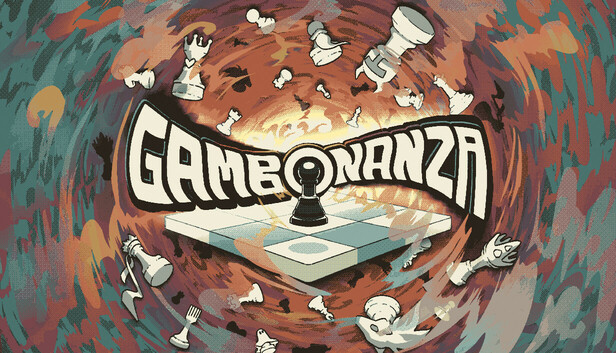
Gambonanza is a turn-based chess roguelike, set on a tiny board with higher stakes. Master tactical twists, invest your winnings and discover new rule-bending Gambits, tile and piece combinations. Face off against challenging bosses and get lost in all the ways you can break traditional chess!
Experience a Chess Revolution Enter the wild world of Gambonanza, where traditional chess has been reimagined into a snackable, strategy-packed roguelike adventure. In this game, victory isn’t about capturing just the king; it’s about capturing every single piece on the board through masterful synergies! But be careful, if you waste too many moves the board will crumble around you…
Assemble your ultimate strategy by:
Unlocking Gambits: Discover over 150+ powerful Gambits that alter the rules and properties of your run. Want a wacky army of supercharged bishops? Or to see how many times you can make your enemy skip a turn? That’s Gambonanza!
Upgrading Any Tile: From trapping your enemies in place to enchanting pieces into money-making gold, add yet another tactical twist with a range of different tile upgrades to choose from. Farever
Experimenting Off Board: Learn and exploit a dynamic reserve system that lets you store extra chess pieces off-board. Deploy them at the perfect moment to catch your adversary off guard.
Mortal Kombat 2 is full of dismemberment, decapitations, and death. It’s also replete with characters from 2021’s Mortal Kombat who’ve been brought back from the dead, like Josh Lawson’s Kano, or newly made undead, like Kung Lao (Max Huang) and Sindel (Ana Thu Nguyen). Their returns happen in ways that are authentic to the fighting game series.
But moviegoers may understandably be confused about what happens to Liu Kang (Ludi Lin) in Mortal Kombat 2. His fate is different from the other competitors who fall in the Mortal Kombat tournament between Earthrealm and Outworld. Liu Kang’s future role in the film series is left unclear, especially when you look at the complicated history of the Mortal Kombat video game franchise timeline.
So what do the climactic events of Mortal Kombat 2 mean for the film franchise, including an all-but-confirmed Mortal Kombat 3 movie? What does it all mean for Liu Kang? Let’s dive in.
[Ed. note: Significant spoilers ahead for several characters’ deaths in Mortal Kombat 2.]
Image: Warner Bros. Pictures
Mortal Kombat 2’s ultimate bad guy, Shao Kahn (Martyn Ford), does his fair share of killing in the film. He turns Cole Young’s head into sauce with his giant war hammer, and stabs poor Jax through the neck with the opposite end of his signature weapon. Shao Kahn also deals a seemingly fatal wound to Liu Kang in the final act of Mortal Kombat 2, though the Earthrealm champion doesn’t appear to die: His body transforms into flame, not a flesh-and-blood corpse. Liu Kang also says that if Shao Kahn strikes him down, he’ll become more powerful than the Kahn can possibly imagine. (I’m paraphrasing.) Like a phoenix rising from Edenia’s town square, Liu Kang pledges to rescue Kung Lao from the afterlife.
Though it’s unclear whether he’s dead-dead after his final encounter with Shao Kahn, Liu Kang has been killed off in Mortal Kombat games before with major repercussions. In 2002’s Mortal Kombat: Deadly Alliance, wizards Shang Tsung and Quan Chi murder Liu, and he’s resurrected as a deadly revenant (Mortal Kombat’s equivalent of a zombie). Liu Kang’s spirit continued to linger as a separate entity, with the goal of reuniting with his physical form. Ultimately, in part due to other character deaths, Liu Kang’s physical and spiritual forms both pass on.
Image: NetherRealm Studios/Warner Bros. Games
In 2011’s soft reboot of the MK game franchise, known confusingly as just Mortal Kombat, Liu Kang is back in human form, serving as one of Raiden’s champions. In that game’s remix of the events of the first three MK games, he is ultimately killed (again), this time accidentally by Raiden. But Liu Kang is once again resurrected in revenant form by Quan Chi in this alternate timeline. In the next game, Mortal Kombat X, revenant versions of Liu Kang and Kitana become the new rulers of Netherrealm, the franchise’s version of Hell, basically.
Finally, after a fresh batch of timeline shenanigans in 2019’s Mortal Kombat 11 and its Aftermath expansion, Raiden, Liu Kang (revenant version), and Liu Kang (zapped in from another timeline version) are fused to become one guy, Fire God Liu Kang. It’s a human-god-zombie throuple become one. This version of Liu Kang then takes control of the entire Mortal Kombat timeline and starts the whole thing over again, remade in his vision. This is the basis of 2023’s Mortal Kombat 1, which, yes, is the sequel to Mortal Kombat 11.
Image: NetherRealm Studios/Warner Bros. Games
While Mortal Kombat 2 (the movie) doesn’t go to these confusing lengths to explain how Liu Kang — a pretty good martial artist with some impressive fire powers — might wind up becoming a god like Raiden, that does seem to be the direction the film franchise is heading in. Liu Kang has ascended as a fire-powered being who has thrown off that ol’ mortal coil, and is now… something else.
Mortal Kombat 2’s ending implies that the surviving kombatants have a plan to bring their friends back from death — either from the Netherrealm, from revenant form, or from the afterlife, depending on the person. While the wizard Quan Chi will probably be responsible for a good portion of that necromancy, Liu Kang also clearly has a new part to play. Since he pledged to set things right with Kung Lao right before he split open his former friend’s torso with Kung Lao’s own sawblade-hat, we might have a rough outline of the plot of Mortal Kombat 3.
Welcome to the 1.120 release of Visual Studio Code.
Happy Coding!
May 7, 2026
Group chat sessions by recency by default in the sessions Quick Pick. #314965
Add a context size picker to the model picker. #314814
May 6, 2026
Hide archived sessions by default in the chat sessions Quick Pick to reduce visual clutter. Searching in the Quick Pick still matches archived sessions, so you can revive one by title. #297421
Surface GitHub metadata, including a pull request button, in the agent host UI for sessions backed by a GitHub repository. #314811
Detect password and passphrase prompts in chat agent terminal commands and show a confirmation dialog that focuses the terminal so you can enter the secret directly. The prompt is announced to screen readers, and secrets are never routed through the model. #314796
Discover Copilot CLI user-installed plugins from ~/.copilot/installed-plugins/. #302152
May 5, 2026
Agent host terminals respect the user’s preferred shell from
terminal.integrated.defaultProfile
instead of hardcoding the platform default. #313160
Add support for custom diff editors with the new customDiffEditorProvider proposed API. Extensions that implement resolveCustomDiffEditor can render a unified diff in a single webview with access to both the original and modified documents, instead of two side-by-side custom editor webviews. #298924
Restore the ability to select and copy code in chat edit suggestions that the agent proposes to remove. #252762
May 4, 2026
Add a custom duration option to the Snooze Inline Suggestions Quick Pick. #288770
Reduce the CSS context attached when adding a DOM element to chat. The attachment only includes modified computed styles and CSS rules and variables that actually affect the element. #314188
We really appreciate people trying our new features as soon as they are ready, so check back here often and learn what’s new.
Perplexity today launched a new Mac app with support for its hybrid local-cloud AI agent Personal Computer, plus it expanded Personal Computer access to Pro and Enterprise users, so it is no longer limited to just Max subscribers. Perplexity describes Personal Computer as a “personal orchestrator” that hybridizes local and server environments for security and productivity.
Personal Computer is available in the new Mac app, which Perplexity says gives users access to queries, conversations, and dictation. While all Mac users can download the new app, access to Personal Computer still requires a paid subscription.
Personal Computer can access the Mac’s file system and native Mac apps to create and execute entire workflows, plus it can access the web. It can see active apps and work across any Mac app, but files are created in a secure sandbox, and its actions are auditable and reversible.
When paired with the Comet browser, Personal Computer can operate web-based tools without the need for direct connectors.
Pressing both Command keys on a Mac activates Personal Computer, and it responds to text or voice commands and displays useful quick actions automatically. Personal Computer can do things like complete each task on a to-do list, sort a messy downloads folder, compare local files against information on the web, and more.
Though it has access to what’s on a user’s Mac natively, Personal Computer processes intense tasks on Perplexity’s servers, so a high-performance Mac isn’t needed to run it. Personal Computer works on any Mac with macOS 14 Sonoma or later, though Perplexity says running Personal Computer on a Mac mini creates the best experience because it allows the agent to run continuously.
Perplexity’s older Mac app will be deprecated in the coming weeks.
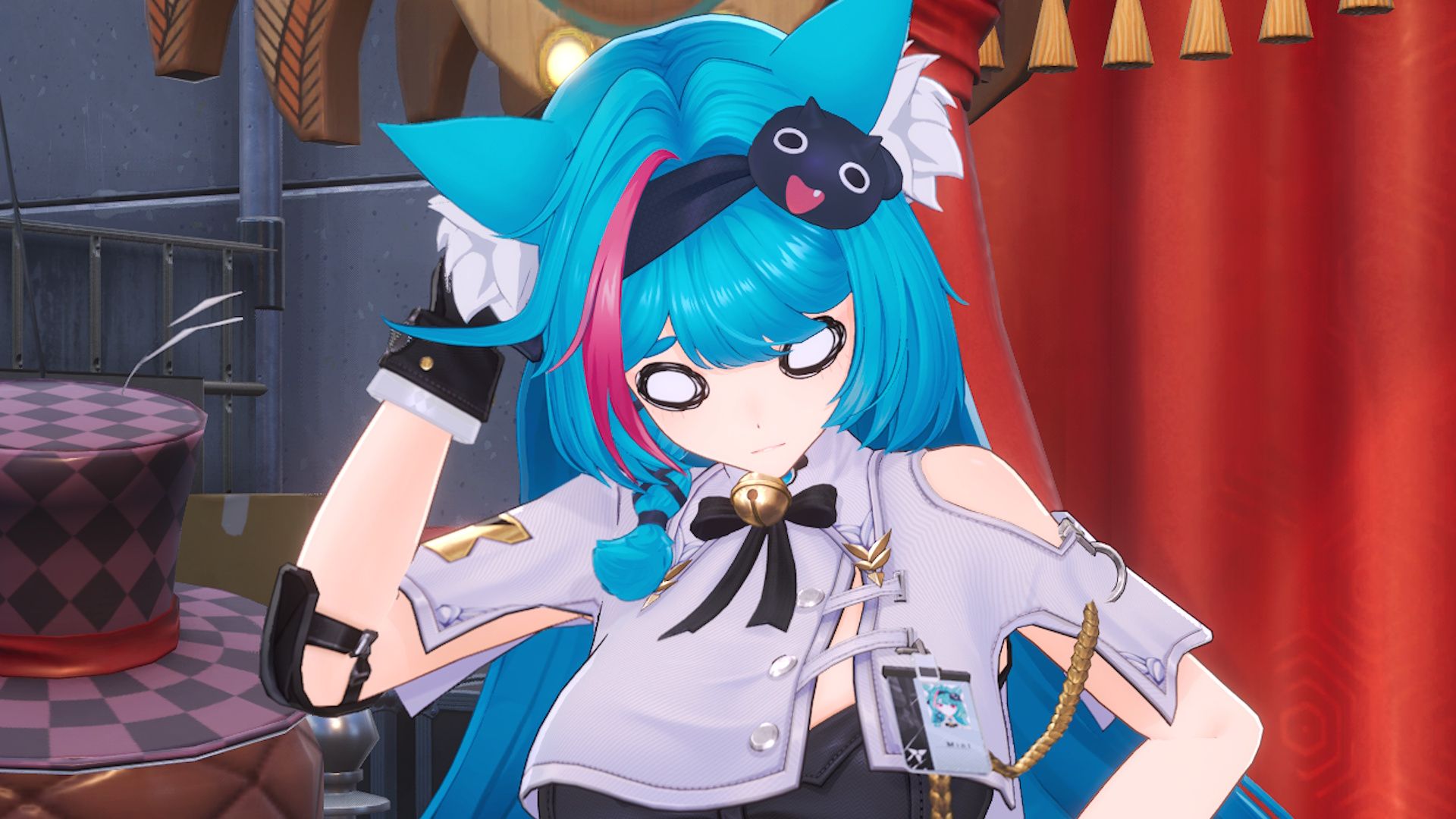
The banners in Neverness to Everness follow most of the usual rules established by its gacha forefathers, but it has major differences in a few important areas and some changes are more welcome than others. To get you up to speed, I’ve explained every gacha system and currency used in NTE below, along with what the next and current banners are.
Jessica Orr
In the vast sea of gacha spending, from free-to-play planktons to indulgent whales, I am but a lowly goldfish feeding upon the occasional monthly battle pass and $4.99 bundle. I’m pretty careful with my spending, so you bet I’m studying the mechanics of every new gacha. Although admittedly, cosmetics have led me to the edge of dolphin territory in the past. Dangerous terrain to be when Neverness to Everness has so many costumes to collect.
How does the gacha work in Neverness to Everness?
(Image credit: Hotta Studio)
Is the gacha in Neverness to Everness fair or not?
Well, it’s complicated. If acquiring just the character and a decent weapon is all you’re after, then yes, NTE is a lot kinder than any gacha I’ve ever played. However, it’s not as fair as it initially seems if you care about cosmetics. 200 pulls to get an exclusive banner outfit? That’s expensive, even accounting for pulls carrying over into a character’s next rerun. It amounts to the exact same as losing your 50/50 every time, plus an extra 20 pulls.
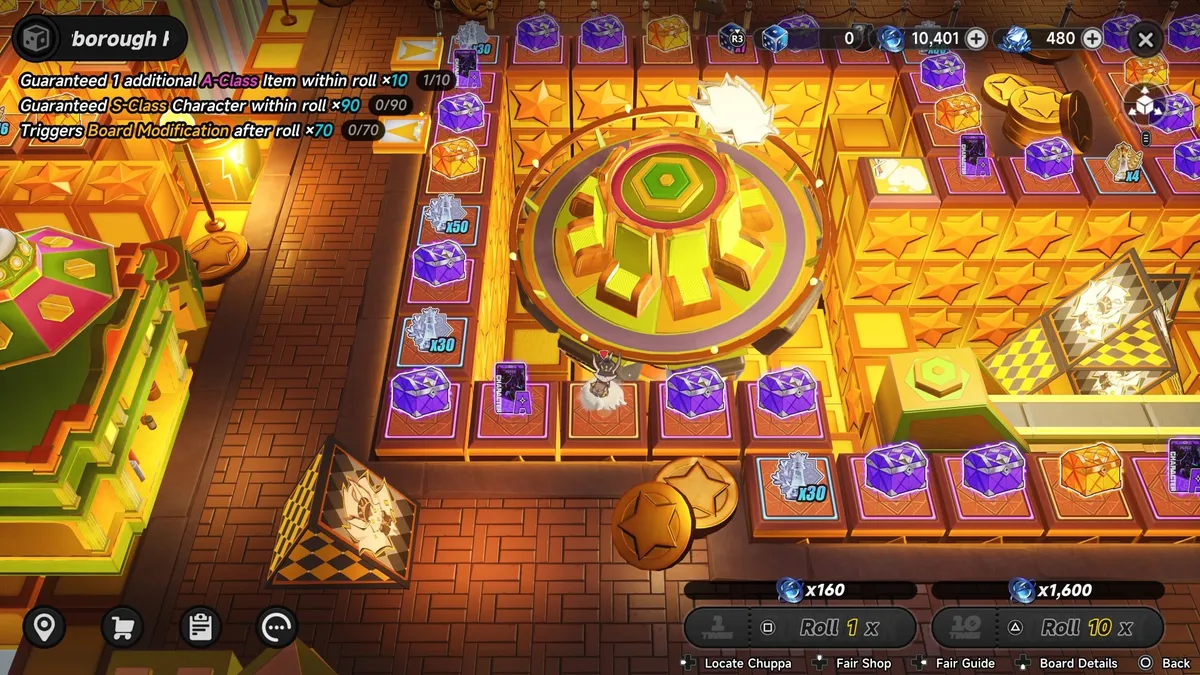
The bigger issue comes from the way gacha math is displayed on a cheery board game. It’s fun to play, but when wallets can top up dice rolls in seconds, that’s exactly the problem. It’s so tempting to continue when I’m a couple lucky pulls away from an S-Class character just a few tiles ahead. Plus, there are additional pulls and currencies rewarded if you land on certain tiles, so it seems like there’s always some benefit to keep going.
Here’s a breakdown of everything you need to know about how gacha works in Neverness to Everness:
Latest Videos From
Swipe to scroll horizontally
Gacha feature
In NTE?
How it works
Character 50/50
❌
You are guaranteed the featured character on their limited-time banner when you pull an S-Class. No dreaded 50% chance, it’s a fixed 100% drop.
Character Pity
✅
Soft pity at 70 pulls (chances of pulling an S-Class character goes from 1.87% to 19.59%). Hard pity at 90 pulls (you are guaranteed to get the featured S-Class character).
Pity carry over
✅
If you pull on one limited-time banner, your pull count carries over into the next one. For example, if Hotori comes after Nanally, your 70 pulls on Nanally’s banner means you’re guaranteed to get Hotori after pulling 20 times for Hotori, as this makes 90 hard pity.
Banner cosmetics
✅
Similar to Infinity Nikki, you get cosmetics exclusive to each limited-time banner for doing 50, 120, and 200 pulls. Pull count for cosmetics carries over to banner reruns. The base chance of acquiring the costume and livery early is 0.33%, and the 50 pull cosmetic base chance is 1.71%.
Character copies
✅
Called “Awakenings” in NTE. Get them from pulling on banners, or buying with in-game currency (Warp Pieces) in the Warp Exchange shop (standard S-Class characters only). Awakenings don’t follow a set path, and you can change them whenever you like. For example, Awakening 6 (A6) can activate before Awakening 1 (A1). However, this means that A6 might not be as powerful as A1.
Beginner’s banner
✅
Is incorporated into the permanent banner (Strange Encounters). 20% discount for pulls until 50. So 10 pulls cost 8 dice. Then at 50, you choose any standard S-Class character for free. You don’t have to do this right away–it sticks around until you claim them.
Weapon banner
✅
Use Tri-Keys in the Arc Research Program shop to pull for Arcs (what NTE calls weapons). A banner system in all but name, but you can only pull using 10 Tri-Keys at a time–no single pulls allowed.
Weapon 50/50
❌
Worse than a 50/50, actually, as there’s only a 25% chance of getting the featured Arc weapon when you pull an S-Class, with a 3% base drop rate.
Weapon pity
✅
Get an S-Class Arc on the 60th pull, get the featured S-Class Arc on the 80th pull.
Weapon pity carry over
✅
Just like the character banner, if you pull on one limited-time weapon banner, your number of pulls carries over into the next one.
Free S-Class weapons
✅
Excluding limited-time characters’ signature Arcs, S-Class weapons are obtainable by just playing the game, but you need to pull with Tri-Keys to get copies of them in the Arc Selection shop. Some are included in banners, others cost a flat 25 Tri-Keys. These flat cost Arcs are limited to one per month, so it takes four months to fully upgrade each one.
Gacha currencies
(Image credit: Hotta Studio)
I’ll stick to explaining the currencies exclusively used on banners, or for acquiring characters and Arc weapons, or else this table might never end. What is it with gachas and their billion currencies?
Swipe to scroll horizontally
Currency
Used on
How to get
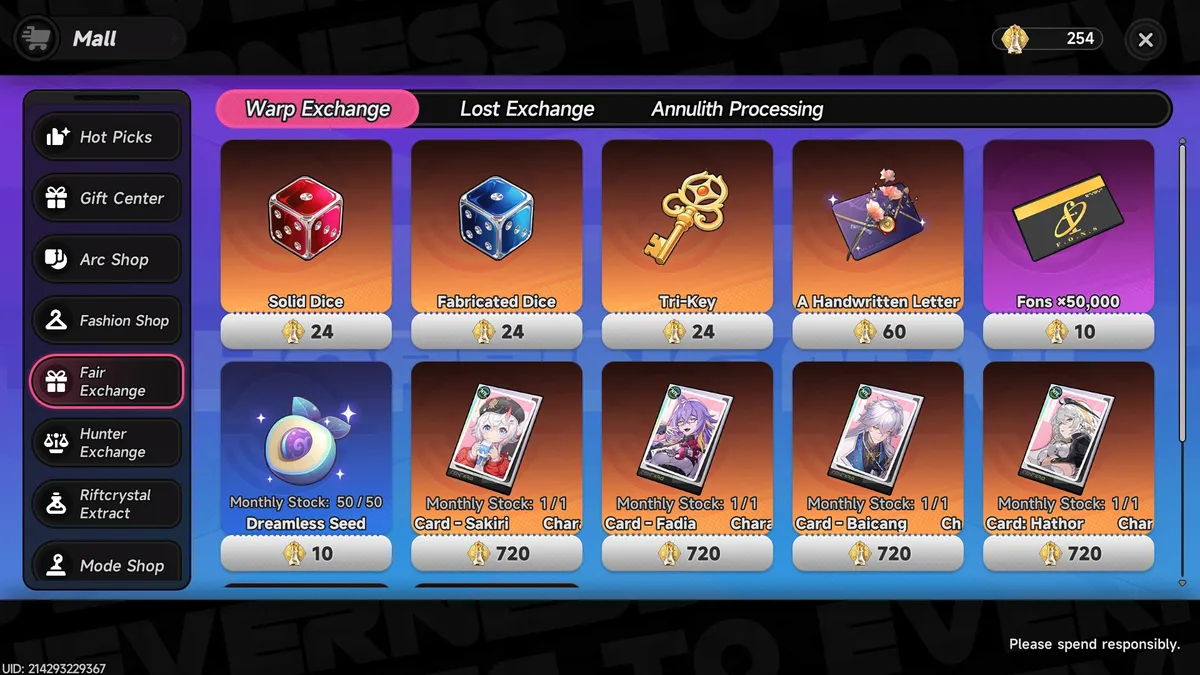
Solid Dice
Limited-time character banners (Limited Board)
Warp Exchange, Lost Exchange, and Annulith Processing tabs in the Fair Exchange shop. Also: login events, limited-time events, and the premium track of the battle pass.
Fabricated Dice
Standard banner (Strange Encounters Board)
Warp Exchange, Lost Exchange, and Annulith Processing tabs in the Fair Exchange shop. Also: completing beginners events, raising Hunter Level, free and premium battle pass tracks, and completing other in-game tasks and milestones.
Tri-Keys
Arc Selection shop
Warp Exchange, Lost Exchange, and Annulith Processing tabs in the Fair Exchange shop. Also obtainable from limited-time events, and the Hunter Exchange shop (unlocked via City Tycoon).
Warp Pieces
Warp Exchange shop
Pull a copy of an S-Class or A-Class character/Arc on any banner, land on a Warp Piece tile on the banner board, or pull a duplicate cosmetic on a character’s limited-time banner.
Lost Pieces
Lost Exchange shop
Pull a B-Class character on any banner, or land on a Lost Piece tile on the banner board.
U00-NE
Arc Exchange shop
Defeat anomaly bosses and mini-bosses. One S-Class Arc is available in the exchange shop, the rest are A-Class.
Annulith
Limited time banners, standard banners, and the Fair Exchange shop to get Dice and Tri-Keys
Mostly by just playing the game and redeeming Neverness to Everness codes. Or you can exchange premium Riftcrystal currency into Annulith. Free methods include: completing main and side missions, doing daily tasks, unlocking achievements, and taking part in mini-games.
Riftcrystal
Exchange into Annulith
Purchase monthly Riftcrystal Permit, or bundles from the Riftcrystal Extract store that costs between $0.99 for 60 Annulith, up to $99.99 for 6480 Annulith. Annulith is doubled if it’s your first time buying a specific pack.
Next banners in Neverness to Everness
Image 1 of 2
(Image credit: Hotta Studio)
(Image credit: Hotta Studio)
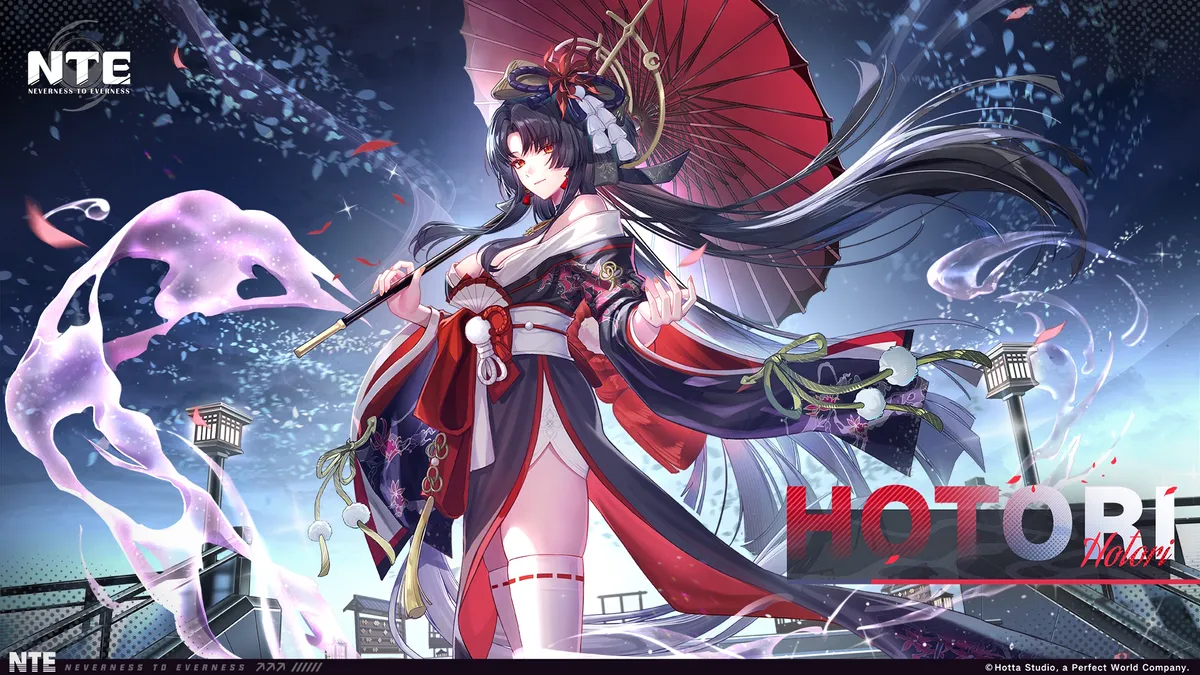
Hotori is the next banner in Neverness to Everness, running during Phase 2 of version 1.0 (May 13 – June 3). She’s an S-Class DPS/buff character with the Cosmos Esper, and uses a Solid-type Arc.
Everybody’s favorite perpetually drunk time-witch has the usual three cosmetics included in her banner: a glider at 50 pulls, car livery at 120 pulls, and character costume at a steep 200 pulls. Hitori’s signature S-Class weapon will also be available in the Arc Research Program shop during Phase 2.
Upcoming characters
Lacrimosa
Chaos
Lacrimosa and Chaos are up next in version 1.1, which is expected to go live on June 4, the day after Hotori’s banner ends. Lacrimosa should debut first in Phase 1, If NTE sticks with the regular gacha formula of running the earliest character revealed via drip marketing first.
Keep up to date with the most important stories and the best deals, as picked by the PC Gamer team.
Current banners in Neverness to Everness
Image 1 of 2
(Image credit: Hotta Studio)
(Image credit: Hotta Studio)
Nanally is the current banner in Neverness to Everness, running until the end of Phase 1 in version 1.0 (April 29 – May 13). She’s an S-Class DPS character with the Anima Esper who uses a Plasma-type Arc. Fun fact: Nanally’s name is censored when you type it anywhere in-game. I’ll let you work out what four letters caused this on your own.
All of the boosted A-Class characters on Nanally’s banner are:
Edgar (Cosmos, Liquid Arc)
Mint (Anima, Liquid Arc)
Adler (Incantation, Synthesis Arc)
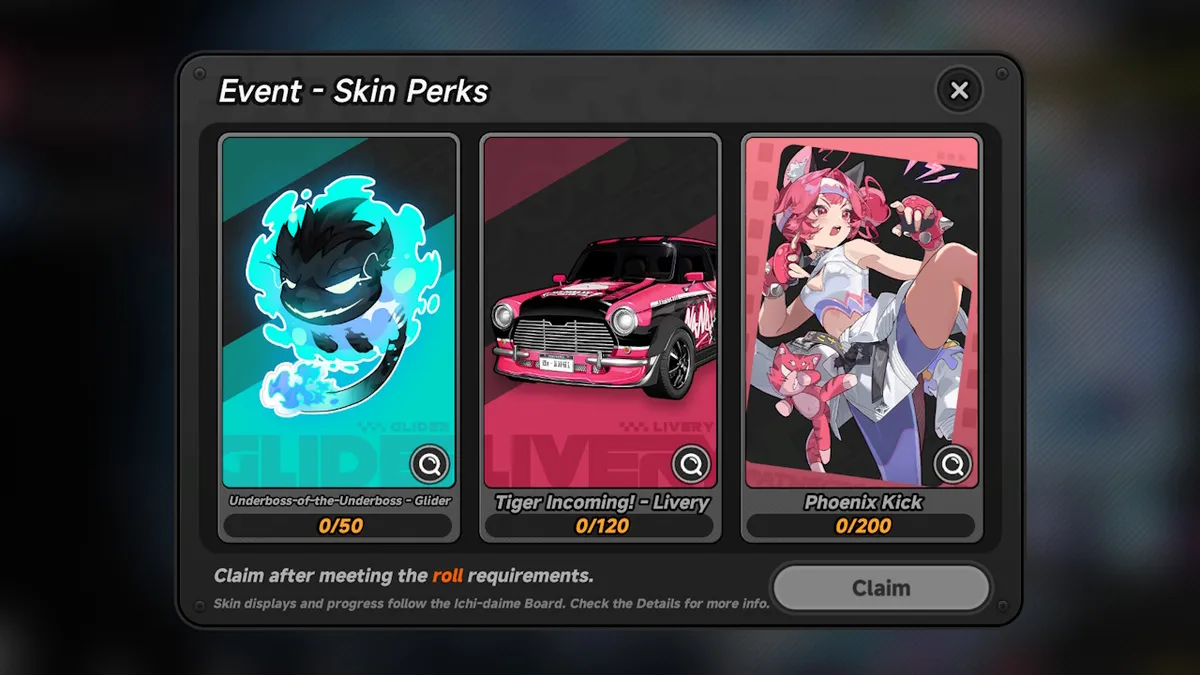
The three cosmetics on Nanally’s banner are:
Underboss-of-the-Underboss glider (50 pulls)
Tiger Incoming car livery (120 pulls)
Phoenix Kick outfit (200 pulls)
Current weapon banner
Nanally’s signature S-Class Plasma Arc, Ready-Ready is the current weapon banner in Neverness to Everness. You can pull for this in the Arc Research Program shop, by selecting the bit labeled “Tiger Special” at the top of the Arc Shop.
The other S-Class Arcs available in Nanally’s weapon banner are:
Reality Refuge (Solid)
Youthful Fantasy (Liquid)
Good Boy’s Grand Adventure (Gas)
Camellia Society (Synthesis)
Raging Flames (Plasma)
There are also five A-Class Arcs on Nanally’s weapon banner:
We all know that traditional design firms and drafting teams use tracing paper, manual tools, and blueprints for any architectural designs. With the expanding technology to make our lives easier, a model CAD software has been created to transform any idea into an actual construction. This shift in the workflow did not just make work faster but has also made collaboration between teams easier, revisions less tedious, and deadlines easier to manage. This article looks at the key CAD tools used by architectural designers that shape today’s architectural processes while still recognizing that design work is primarily creative, human, and occasionally messy.
From drafting tables to digital workstations
Until now, the drafting table has been the center of any architectural firm, but the same work can be done remotely compared to traditional deskwork. Pens and erasers are made obsolete by CAD tools with its many layers, functions, and the essential undo button that allows designers to revise with a click of the mouse. This change not only saves more time but it has completely changed the way architects think of new ideas and concepts, and makes changes together and individually without having to redo everything from scratch. Before, revisions used to take hours with a lot of back and forth, but now, redesigns can be made in minutes. This keeps the project moving forward at all times without the team experiencing any unnecessary stress and burnout.
Creativity with a lot of precision
Architecture is a mix of creative talent and a tendency to stick to accurate measurements. A design can be very unique and creative, but even a small miscalculation in the measurement can result in future issues that cost a lot of money. With the help of modern CAD tools, architectural designers can explore their ideas freely while making sure every technical detail remains precise and exact. Instead of putting limitations on creative concepts, the software supports them. CAD tools can handle all the technical details in the backend while the architects can focus on design that also works well.
Even with all the new 3D and modeling tools available, 2D drafting tools are still useful and relevant. A lot of architectural drafting firms still utilize these 2D tools to create detailed plans, sections, and construction drawings because they’re fast, familiar, and extremely precise. These are the exact documents that contractors will look for when the actual construction starts. When it comes to the teams that do the drafting, strong 2D skills are a main requirement because they present all the technical information clearly and accurately, which in turn allows the contractors to easily understand and interpret them with no problems.
Why old school tools still matter
The reason why 2D tools are still being used is that people are familiar with using them and are used to them. Drafting teams don’t have to relearn how these tools work or what specific command buttons to press. Actually, using the same tools as before is like second nature for most people. Because people are very familiar with these tools, it’s like muscle memory to them, and they can work quickly and efficiently even when deadlines are fast approaching. The old school 2D software is still very reliable, so there are no surprises that can give drafting teams stress. In the end, teams can focus on finishing work instead of struggling with new technology.
How BIM is more than just drawing software
Building Information Modeling (BIM) services has been able to change how buildings can be designed and presented. Instead of technical lines, BIM uses real building components to make a smart and responsive model that is very true to life. This makes coordination easier and reduces errors for architecture firms. When there are changes or revisions, BIM can automatically update it to the model, which can really save a lot of time and stop little mistakes that pile up into a major revision that needs to be redone many times.
Better team collaboration to prevent issues
The best way to maximize BIM is when all teams involved work together, including architects, contractors and even consultants. If they refer to the same model, are able to comment and catch issues ahead, this can result in time-consuming back-and-forth meetings. When possible problems and mistakes are spotted soon, they are easier to fix, which can result in smooth-sailing projects and a strong and healthy working relationship among all teams. For drafting companies that use CAD, it equips them with the capacity and capability to take on bigger projects.
This kind of design tool converts serious design work into a playful one. It gives the 3D modeling designers the decision of which rules to follow and how to test different variations. If, for instance, you change one setting, expect the entire design to adjust and change automatically. Through these tools, you are given the chance to explore and, at the same time, choose what is best for your design without being so cluttered.
Balancing creativity with structure
Freedom is the opportunity to express your style without any condition or consideration, while discipline sets the limitation. Without clear rules, small changes can lead to unexpected results that slow projects down. When teams use these tools, they still need to be disciplined enough not to overdo the design. At the same time, the tools can unlock design options that traditional drafting can’t offer. When used thoughtfully, it leads to a stronger and more cohesive design without having too many unnecessary elements.
3D modeling tools that clients can easily understand
In every business relationship good communication is important between the 3D modeling design firm and the client. Today’s 3D models make it easier for the clients to visualize and understand the space, the measurements, the scale of the project, and the story and intent behind the design without the confusing technical details. The ability to give clients a visual walkthrough and turn a drawing into an actual experience increases the chances of approval.
Reducing the gap between vision and reality
With 3D modeling tools, ideas that were once a vision have now become reality. The drafting team can create drawings that are very true to life. With that, problems are spotted early, which prevents any eventual costly problems during the actual construction stage. The earlier they detect the problem, the better to easily address it, which leads to fewer revisions and a more efficient process.
We all know that the cloud is better than manual filing. File management no longer becomes a headache nowadays. Before, there were many versions, names were too confusing, and some changes were not explained, causing both stress and possible flaws in the filing systems. Now, with cloud-based CAD platforms, CAD design teams can work remotely and be distributed among different sites while having a controlled and centralized filing system without the usual file-related headaches.
Better security and accountability in shared working environments
Collaboration becomes much easier when projects are organized. Everyone is accountable yet protected because changes are being tracked, and generally, access is limited to people within the project teams. For firms that are working on complex projects where information is sensitive, there is less risk when using these platforms and tools.
Rendering tools that explain ideas, not hype them
Sometimes, to get better chances of making a sale, a seller tends to oversell a product. This no longer happens with rendering tools such as 3D product rendering services because visuals are now more realistic and can clearly show actual materials, lighting, and even present the possible atmosphere of the project. There is no need to exaggerate or oversell because it would look ridiculous and impractical. As a result, the clients can better understand the design, have the correct expectations and mindset, and feel confident about the proposal that they are seeing.
Keeping visuals honest and buildable
It’s so easy to get impressed by a flashy rendering, but there’s a massive difference between a “pretty picture” and a design that actually works. High-level 3D rendering teams know how to use renderings to showcase the best parts of a project without disguising any problems and hiding away unresolved issues. At the end of the day, a rendering is only useful if it’s something you can actually build. The modern CAD process can keep the design and construction reality in sync.
Projects only happen successfully when architects, consultants, and contractors are actually on the same page. This is easier said than done when everyone is using different software, and sometimes files are not compatible on different machines. Thankfully, modern CAD tools have gained much better flexibility and compatibility by using open formats that can export correctly regardless of software model or version. When the tools work together, the people usually work better together, with less friction and heated arguments.
Choosing tools that fits the whole team
When you’re picking out CAD software, the fancy features don’t mean much if the tool doesn’t fit into your actual day-to-day process. Even the most powerful program may waste the team’s time and resources if it can’t be integrated into the rest of the workflow and other software being used. Experienced architectural visualization firms know that every project is a team effort, so they always prioritize tools that make collaboration easier, not harder.
Automation as a tool and not a replacement
CAD Automation doesn’t mean handing all the work over to a computer. It’s about offloading all the repetitive tasks that keep team members overly busy, like documentation and basic quality checks. Automated CAD tools are great for catching minor human errors and can help save hours of clicking. However, what they don’t have is human intuition and professional judgement. Decision-making still requires experience, insight, and creativity.
Letting technology handle routine work
By letting modern CAD tools take over the more time-consuming, demotivating parts of a project, the whole design process starts to feel a lot more sustainable. 3D rendering designers end up spending less time troubleshooting minor technical glitches and more time actually refining the design. In the end, you get a better building and, more importantly, a team that isn’t burnt out by the routine work stuff that takes up so much time.
Software that provides everyday training and learning
Modern CAD software understands that although people are committed to lifelong learning, nobody really has time to join a training class or session. That’s why modern CAD tools include built-in tutorials, tips, and community resources in their interface. Teams can pick up new features while they’re actually in the middle of a project, without stopping everything for formal training. Learning becomes part of the workflow, not another item on the to-do list.
Making it easier to master skills
When learning tools are integrated into day-to-day software, people actually use them, and that builds confidence fast. It helps junior staff find their flow sooner and keeps the veterans sharp and up-to-date without formal retraining. For CAD drafting companies, that kind of shared growth makes the whole team more adaptable and a lot more competitive.
Humanizing digital tools
At the end of the day, even the most high-tech CAD software is just a tool in some person’s hand. The real value of these tools is how smoothly and seamlessly they fit into how the team works day to day. Most of the successful firms don’t worry about how software can affect the progress of their tasks but choosing the right tools can also affect the overall vibe of the team. The right technology is able to support the entire team so that everything just flows and work becomes better.
Practical and future-forward approach
CAD is always evolving with more automation integration and real-time collaboration happening every day. Smart 3D visualization firms need to be practical by adopting new features that actually add value without chasing every new trend or catchy feature. Always remember that the goal is to create a design that communicates clearly and builds things that last.
Instead of choosing popular platforms and trendy software, choose specialized CAD tools that focus on specialized tasks and functions like detailing, scheduling, clash detection, and even documentation. These tools don’t usually get special preference or attention, but when they’re working effectively, the entire team benefits from any efficient improvements.
Details that really matter
Good architecture is only as good as its smallest details, which dictate whether a design either succeeds or fails in the real world. Professional tools help drafting teams create buildable solutions with exact and accurate details.
Consistent while also preventing burnout
Instead of redrawing the same section multiple times, detailing software does all the repetitive work, which not only saves time but also prevents constantly correcting mistakes. The software does consistent work, so the team can focus more on the quality of the project.
Catching problems early before they escalate
Detecting clashes early is one of the most important parts of a project. Spotting mistakes on the screen before anyone visits the construction site can really save time, money, and prevent stress later. With clash detection, both architects and drafters can show off their problem-solving skills to the clients and contractors.
Turning conflict into conversation
The best thing about finding a clash early is that it prevents heated arguments at the construction site. When these discussions happen naturally during the design phase, potential disasters turn into simple coordination tasks, and corrections are made early on.
Schedules and quantities that are realistic
For CAD platforms that have built-in scheduling and takeoff tools, drawings from CAD drawing experts are able to give a clear and complete rundown of the quantities of material and the necessary project timelines. This makes budgeting and purchasing easier for the team because now the designs are aligned with real-world costs that come from actual data provided by the software.
CAD tools are able to bridge the gap between a big idea and the physical building of the project. They help architects think about how the actual construction will proceed, while giving drafters a better sense of how their work translates into wood, steel, and concrete.
Visual tools that help teams
Visualizations are not just polished photos used for client presentations. Some of the best visuals from expert 3D visualization designers are the quick diagrams and studies that help the team test an idea internally, whether it works or not, before starting the actual construction process.
Getting clear before locking anything in
Modern CAD allows the team to explore and experiment with visualizations early. This gives the team room to refine and toss out ideas that are not workable in order to avoid numerous reworks and revisions later on.
Working better across disciplines
Collaboration platforms bring together architects, contractors, suppliers, and even clients into one shared digital space where everyone can see updates in real time. Everyone works together, leading to more accurate and useful results.
Working successfully with shared responsibility
Working on the same platform and with the same tools allows for shared responsibility and teamwork, which can lead to better project outcomes and healthier work environments.
Customizing software and tools to work your way
CAD Tools allows customization and scripting so teams can automate tasks, create shortcuts, and adjust the software to fit into their design process and workflow.
Teams refer to past experiences and challenges when they customize tools to fit their needs. With this personalized software, 2D & 3D design teams can build small fixes and create smoother workflows that are faster and more consistent.
Choosing the right hardware
The perfect software works better when used with the right hardware. Architecture firms need more high-tech machines that are fast and advanced enough to match modern CAD tools so that everything works well together.
Better workspace means better productivity
Architectural firms today need to find a digital and physical setup with the right equipment that the entire team can comfortably work with. The right tools can help a team be more efficient and productive in terms of output, plus they can help boost morale and cultivate better attitudes.
CAD tools on-the-go
Now that CAD tools can work on tablets and laptops, CAD drafting teams can bring drawings and models out of the office and straight to the construction site if needed. They can easily take notes, check the measurements, and make any necessary changes on the spot. Feedback becomes faster, and responses are quicker.
Keeping drawings aligned with actual construction
Mobile tools help make sure that the actual building and the drawings are in sync. This updates and corrects any construction issues that may arise. Architects and Contractors are on the same page from the beginning of the project to avoid major problems down the road.
Letting data guide design decisions
3D tools that provide data on energy use, daylight, and building performance help teams make decisions ahead. These insights support the design and build process by keeping models accurate and reliable.
When modern CAD tools are integrated into the design process, teams can make a smart decision early instead of fixing and reworking later.
Managing complexity without confusion
Avoid confusion by sticking to clear, simple standards in software utilization. By using templates and a bit of automation for filing and building design, everyone works with a unified direction, even if projects start to scale up.
Cultivating the right culture
When an effective working environment is focused on teamwork, clear communication, and promoting curiosity, there is a high chance that the architectural design team will be more effective just by adhering to the work culture.
Evaluating tools without chasing the hype
Firms should focus on software that actually helps and improves their work process instead of chasing all the latest, trendy software. Choose tools that give actual solutions and not disruptions to the workflow.
The Right mix beats a single solution
Most firms’ success story comes from being flexible and combining different platforms that add value to the workflow, minimize disruptions, increase efficiency, and play to the different strengths of the team. This allows firms to handle multiple projects at once while also meeting different clients’ needs.
A practical take on what actually works
Seasoned professionals can immediately identify which tool works better and delivers better performance when the immediate deadline is looming. They rely on personal experience and practical choices to make the right software choices instead of relying on a marketing brochure.
Looking at CAD as a living ecosystem
In the future, CAD systems will be more connected, and data will flow more freely. These tools are a helpful assistant rather than a replacement for human talent, making collaboration a lot smoother as long as firms remain smart and approach with caution and common sense.
Despite advancements in technology, the people who still do the actual work. The role of CAD isn’t to take over anyone’s actual job but to support human tasks and help make entire 3D architectural modeling teams work better together by streamlining workflows and creative processes.
Why tools still rely on talent
Software can definitely give you an advantage over the competition, but it cannot be a substitute for an actual person’s experience, sense of judgment, and even eye for detail. A great team comes together based on individual strengths and talents. Their ability to do work is not based on software. At the end of the day, the tools are there to support decision-making and help solve problems.
Finding the right experts for complex projects
As projects get more complicated, the ability to integrate specialized tools becomes a huge advantage for the team. Whether it’s hiring a freelancer with a niche skill or a professional who can come in to help on multiple projects during a very busy period, bringing in outside experts can minimize the team’s workload without having to spend on expensive overhead that hiring a full-time employee entails.
Find out how Cad Crowd can work for you
If you need a professional who knows their way around modern tools and workflows, Cad Crowd can connect you with the right person for your needs. Our roster of seasoned architects and drafting experts can easily integrate into your team and provide real-world results using high-tech tools.
MacKenzie Brown is the founder and CEO of Cad Crowd. With over 18 years of experience in launching and scaling platforms specializing in CAD services, product design, manufacturing, hardware, and software development, MacKenzie is a recognized authority in the engineering industry. Under his leadership, Cad Crowd serves esteemed clients like NASA, JPL, the U.S. Navy, and Fortune 500 companies, empowering innovators with access to high-quality design and engineering talent.
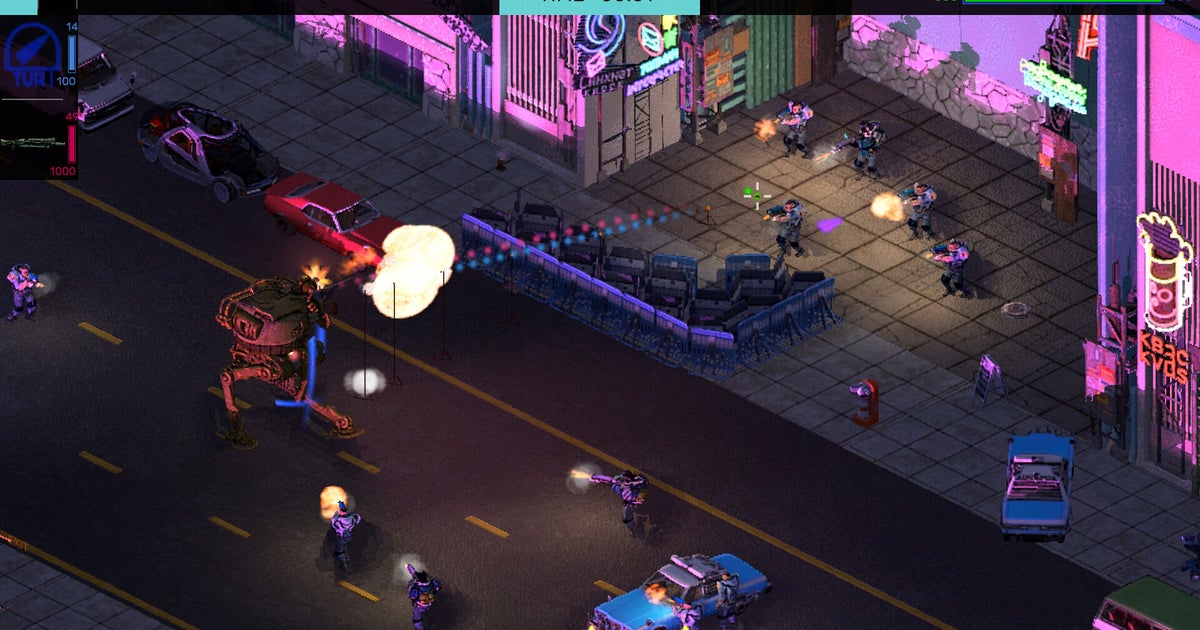
In the original Brigador, you played a mercenary mech pilot dropped onto the corporate autocratic colony world of Novo Solo. In the cockpit of a multi-story death machine, you could carve an easy path through the space colony’s buildings and defenders. If they were to put up any fight against you, it was by amassing in great numbers.
The tables are turned in Brigador Killers; you’re part of the hit team seeking revenge for the massacre on Novo Solo. But, instead of being armed with a two-story mech, I had to make do with a tuk-tuk.
Spotify said on Thursday that its interactive AI DJ feature now supports four additional languages: French, German, Italian, and Brazilian Portuguese. Until now, the feature, which you can interact with to request songs and get AI-powered spoken commentary, was only available in English and Spanish.
The company said the AI DJs have different names and personalities to suit their respective languages: Maia, Ben, Alex, and Dani.
Besides expanding support for new languages, the company is bringing the feature to Austria, Brazil, France, Germany, Italy, Portugal, South Korea and Switzerland. The AI DJ is now available in more than 75 countries.
Spotify’s initial version of the AI DJ used to just provide commentary on songs while playing tracks that users would like. But over the last few years, the company has made attempts to make the feature more interactive. In May 2025, the streaming service updated the feature to let users chat with the AI DJ and make requests to change the mood or genre. The company also added the ability to prompt the AI DJ to play tracks, similar to how ChatGPT, Claude, or Gemini operate.
The company has been adding more AI features to the app, such as the ability to create custom playlists of songs or podcasts by simply describing what they want to listen to.
















![How AI Can Build a Future that Works for Everyone [MAICON 2026]](https://www.fazb.com.sa/wp-content/uploads/2026/05/How-AI-Can-Build-a-Future-that-Works-for-Everyone.png)