
Mobile Privacy and Proxy Services: What Android Users Should Know


Computer security dashboard showing green checkmarks for network safety, virus protection, and updated apps.

Smartphones have become essential tools for browsing the web, managing online accounts, shopping, and working remotely. Android users regularly connect to websites and applications through home Wi-Fi, mobile data, and public networks. While these connections make everyday tasks convenient, they also raise questions about online privacy, network reliability, and how personal information is handled.

Understanding the tools available for managing network connections can help users make more informed decisions. Proxy services are one option worth knowing about, particularly for people who work with online research, regional content, or multiple network environments.

Understanding How a Proxy Works

A proxy server acts as an intermediary between a device or application and a destination server. Instead of connecting directly to a website, a request can pass through the proxy before reaching its destination. Depending on the configuration, the website may see the proxy’s IP address rather than the user’s original public IP address.

Proxies are used for several legitimate purposes, including checking how websites appear in different regions, conducting market research, collecting publicly available information, and testing web applications. However, a proxy is not a complete privacy solution. It does not automatically encrypt all traffic, prevent malicious applications from collecting data, or make every online activity anonymous.

Android users should therefore treat proxy services as one part of a broader approach to online privacy rather than a replacement for other security measures.

Proxy Services and Android Devices

Android supports different network configurations, but the exact setup depends on the device, Android version, application, and proxy protocol. Some applications offer their own proxy settings, while other configurations may require a compatible application or network tool.

Before choosing a proxy service, users should check whether it supports their intended application and connection method. They should also understand the difference between configuring a proxy for a specific application and configuring one for a broader network connection. These approaches do not necessarily affect the same traffic.

It is also important to remember that changing an IP address does not change every identifying detail associated with a device. Websites and applications may still use account information, cookies, browser settings, or other signals to recognize returning users.

Dynamic and Static Residential Proxies

Two common options are dynamic residential proxies and static residential proxies. Each serves different needs.

Dynamic residential proxies allow IP addresses to change according to the service’s session settings. They can be useful for tasks involving public web data collection, regional content checks, and market research across different locations. When evaluating this type of service, users should review the available locations, traffic pricing, session controls, and connection requirements.

Static residential proxies maintain the same assigned IP address for a specified period, depending on the provider’s terms. They may be more suitable for workflows that require a consistent connection identity, such as certain account management tasks or repeated checks of a web service. The appropriate choice depends on the application’s requirements and the provider’s actual features.

Neither option is universally better. Users should begin by identifying the task they need to perform, then compare the relevant technical specifications and costs.

How to Choose a Proxy Provider

Several factors deserve attention when comparing providers.

First, review the pricing model. Some services charge according to traffic consumption, while others charge per IP address or usage period. Estimating expected traffic and connection duration can help prevent unexpected costs.

Second, check location availability and session controls. A large IP pool alone does not guarantee that a service will meet a particular regional or technical requirement.

Third, review compatibility, authentication methods, and supported protocols. Confirm that the service works with the intended application or workflow before committing to a larger plan.

Finally, consider transparency and support. Clear documentation, understandable pricing, and accessible technical assistance can make setup and troubleshooting easier. Be cautious of guarantees that promise complete anonymity or claim that a proxy can bypass every restriction.

Where 711Proxy Fits In

For users exploring residential proxy options, 711Proxy offers dynamic and static residential proxy services for different online workflows.

Its dynamic residential proxy plans start at $0.55 per GB, while static residential proxies start at $3.5 per IP. These pricing models address different usage patterns: traffic-based plans can suit workloads where data consumption is the main cost factor, while per-IP plans may be worth considering when a consistent IP address is needed.

Before selecting a plan, users should review the current product specifications, supported connection methods, location options, and applicable usage terms. A small-scale compatibility test can also help determine whether a service meets the requirements of a particular workflow.

Final Thoughts

Mobile privacy involves more than changing an IP address. Android users should keep their operating systems and applications updated, review app permissions, use trusted networks when possible, and understand how their chosen tools handle traffic and connection data.

Proxy services can be useful for specific research, testing, and network management tasks, but their effectiveness depends on the configuration and intended use. By comparing technical compatibility, pricing, session behavior, and provider documentation, users can make more practical decisions about whether a proxy service belongs in their workflow.

 

Siri Is Getting Ears on the Apple Watch: Here’s What That Means for Your Privacy


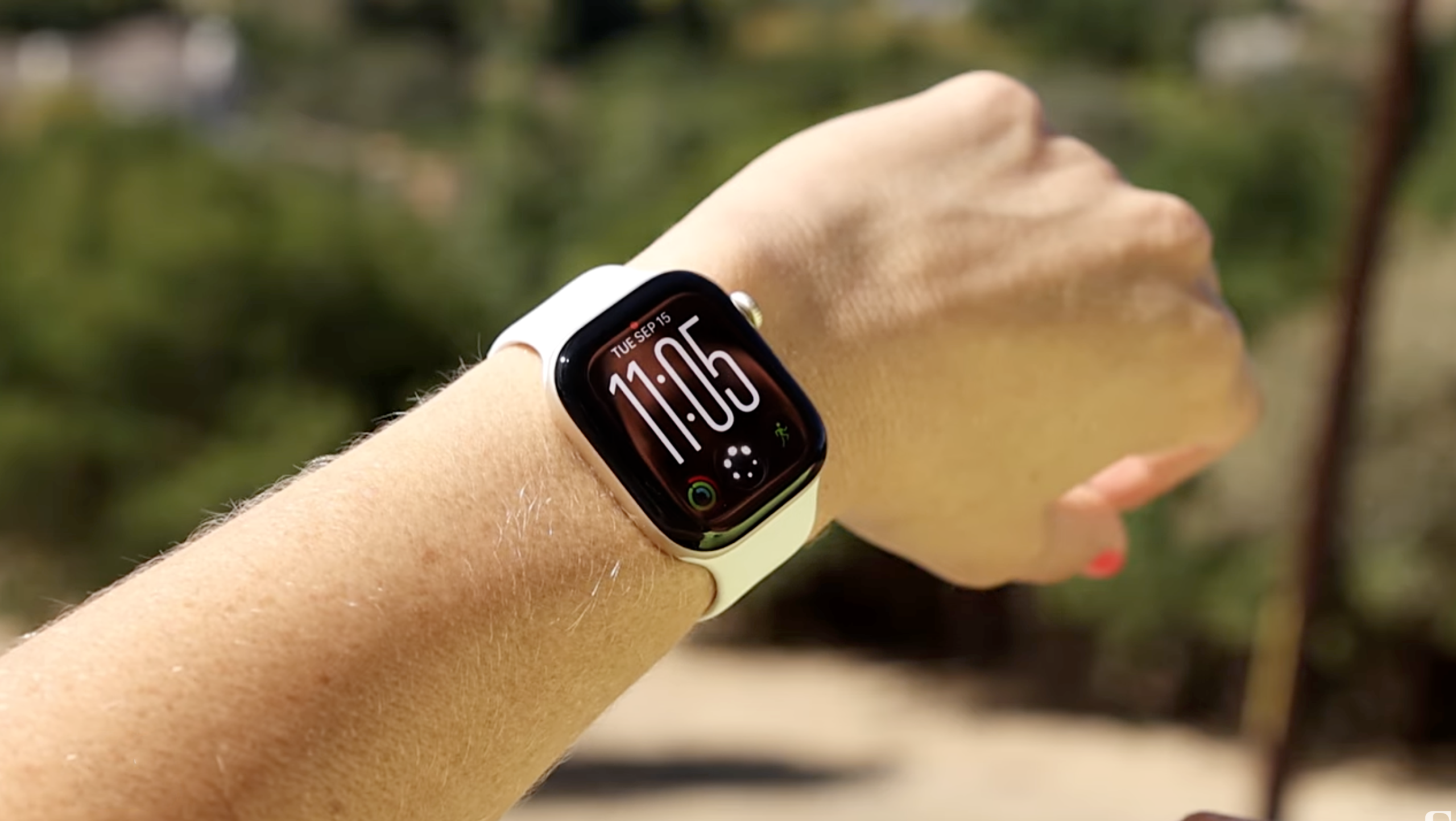
Your Apple Watch is about to start listening a little more closely (if you want it to). A beta rolling out this week gives Siri ears on the Series 12 and Ultra 4, with new features that can recall what was said in the last 15 seconds and summarize conversations throughout your day.

Apple Watch Series 12 Review: It Looks the Same, but This Is a Big Upgrade

Faster Shazam and Sound Recognition for better accessibility

Audio Intelligence, as the new set of perks is called, consists of four audio-related features: music recognition, sound recognition, Siri rewind and Siri recap. The first two, which have been available since launch, include a faster Shazam that can recognize songs without even opening the app.

The new Apple Watches have a faster Shazam that can surface songs without having to open the app. Dillon Lopez/CNET

I’ve been testing it in beta and noticed it responds much faster, especially since I don’t even have to open the app to identify a song. Songs now appear automatically in my watch’s Smart Stack. This even includes the lullabies I sing to my toddler at bedtime, though understandably, it hasn’t been able to identify those.

Sound Recognition

Sound Recognition can alert people who are deaf or hard of hearing to sounds such as a crying baby, barking dog or doorbell.

The Apple Watch Series 12 and Ultra 4 can recognize sounds around you, like a doorbell or a crying baby, and send you an alert.
Dillon Lopez/CNET

How to access: You have to enable the feature on your iPhone, under Settings > Accessibility > Sound and Name Recognition and toggle it on. You can even select which sounds you want it to identify.

In my testing, it successfully identified my fake cough, the doorbell and the car horn. But then it spent the rest of the day gaslighting me, telling me there was a dog barking or a car honking when there clearly wasn’t, which made me question both my own reality and its listening range. But this may require further testing, since I’m still on the beta versions of all these. 

The newest features, which are out now in beta, are the most controversial, and I’ll be testing them more this week.

Siri Rewind: Like Live Photos for audio snippets 

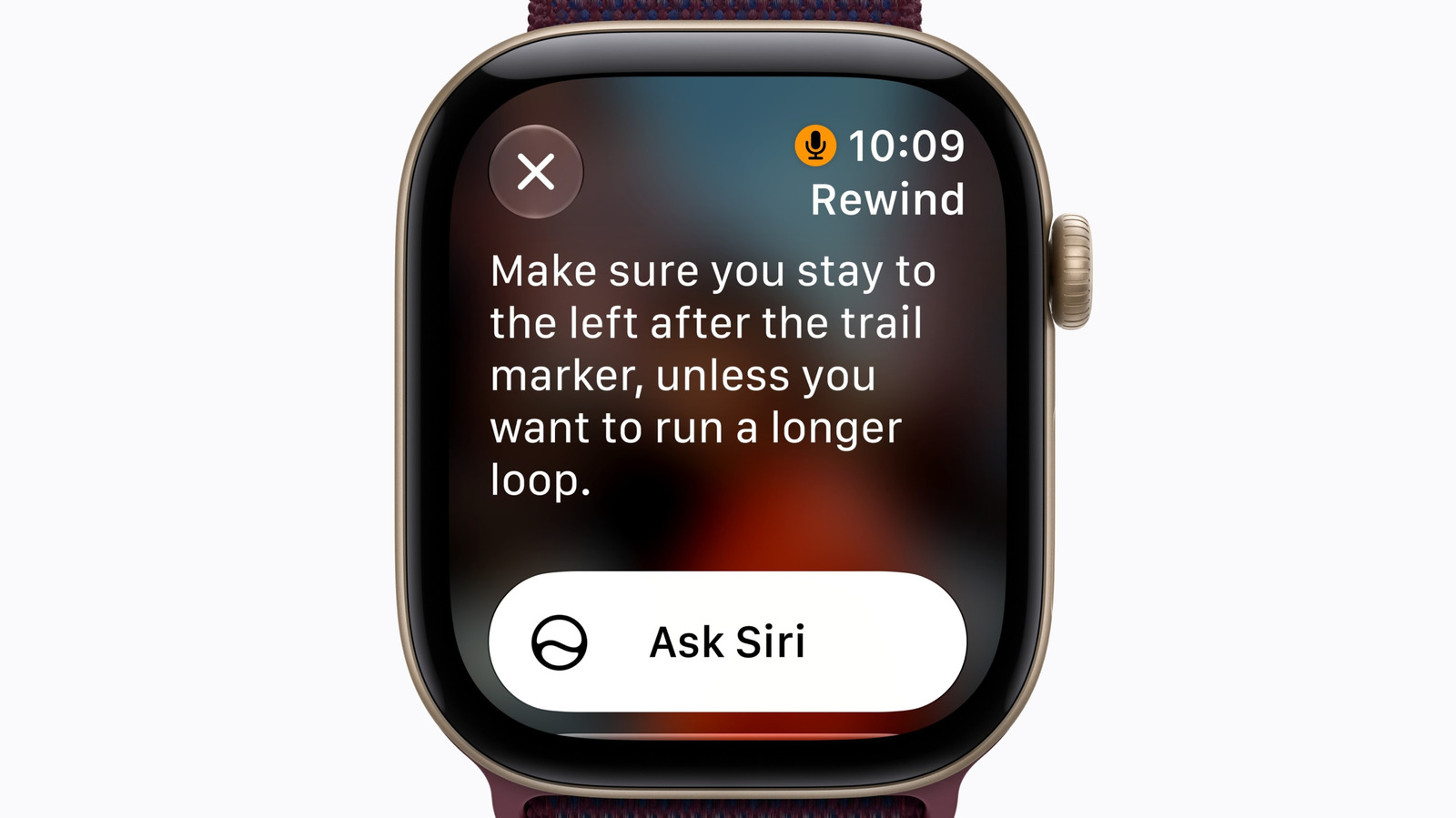
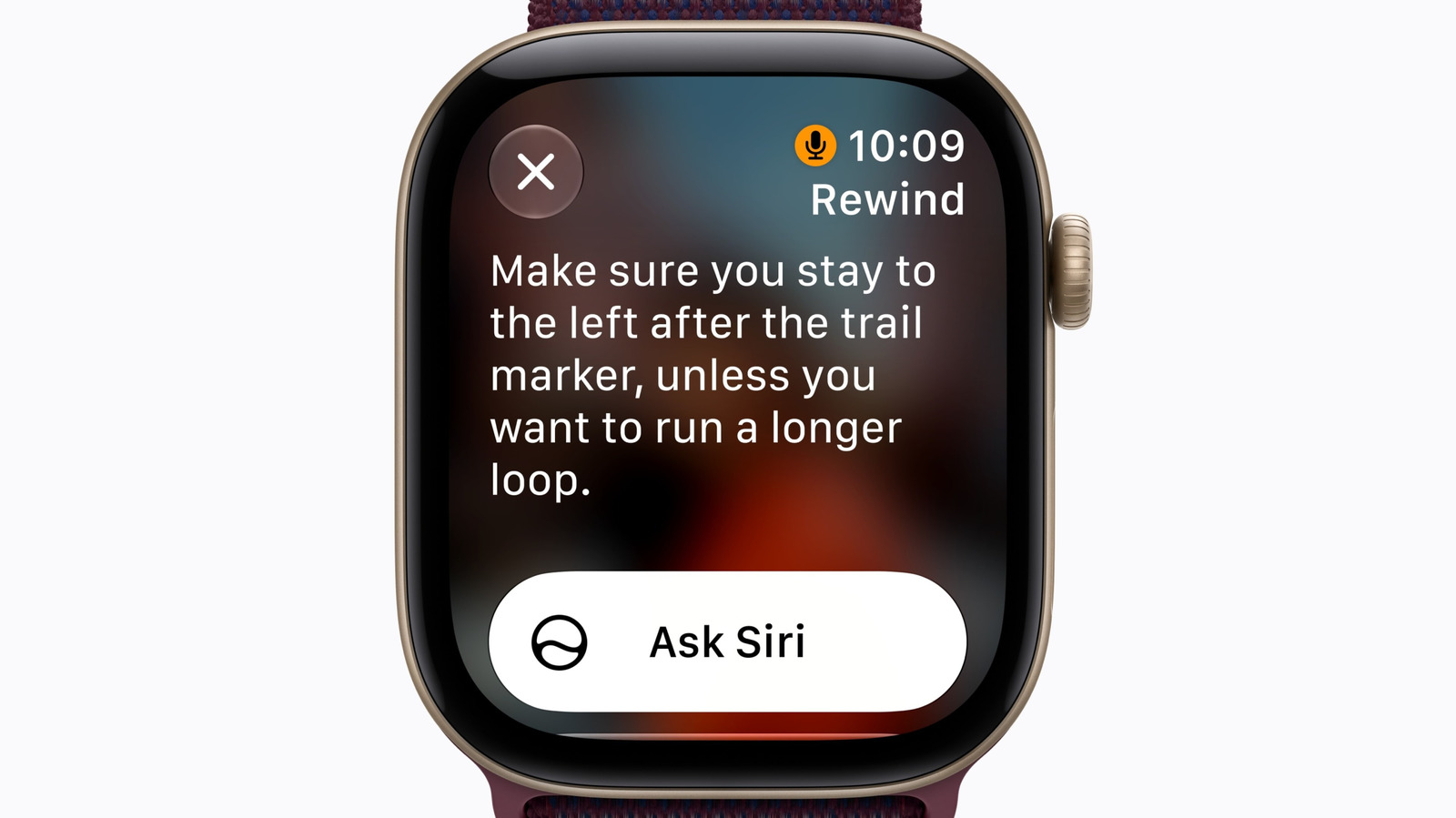
At any point during the day, Siri Rewind lets you double-click the Digital Crown to pull up a text snippet of what was said in the previous 15 seconds, kind of like the audio version of Live Photos (which lets you see a few seconds of video before and after you pressed the shutter).

How to access the transcribed text? If you do nothing after seeing it on screen, it disappears. You can also ask Siri about it, or save it to the Siri app to view later on your phone. Old audio is continuously replaced by new audio and then deleted, so if you don’t trigger the feature to recall the last 15 seconds, it’s gone.

Siri rewind on the Apple Watch lets you review what was said in the last 15 seconds, like a server listing the day’s specials.Apple

This is for unplanned moments where you need to revisit information without having to ask the speaker to repeat themselves. Apple’s keynote example showed someone reviewing the specials menu at a restaurant after the waiter had already walked away from the table. Whether you want to look away from the person speaking down at your watch instead of just asking them to repeat what they said is more of an etiquette question, but it could be helpful during large presentations.

Siri Recap: Automatically summarizes meetings and conversations 

Siri Recap can listen in the background while enabled and generate high-level summaries and key points of conversations throughout your day. This can be anything from a parent-teacher conference or work meeting to spur-of-the-moment conversations or brainstorming sessions with coworkers that you wouldn’t go out of your way to record with Voice Memos.

Summaries from Siri recap can be exported from the Siri app to notes.

How to access it: Similar to Siri Rewind, the notes from these recaps can either be saved in the Siri app and exported to the Notes or Journal app, or deleted. They automatically delete after seven days if you don’t delete manually. 

Who controls when Siri’s listening?

Both features are opt-in, meaning you have to go out of your way to enable them during setup for them to work. 

Once they’re on, Siri Rewind requires you to manually double-tap the digital crown to activate it. Siri Recap is completely customizable.

You can leave it on at all times and let Siri decide what counts as important conversations to recap, set it to on a schedule based on important meetings for the day, or enable it manually via the new Siri Recap icon in the Control Center on your Apple Watch like you would Focus mode or Do Not Disturb.

Siri recap can be toggled on or off manually from the Control Center.Apple

If you forget to turn it off, you’ll get a reminder in the morning telling you it’s on. You’ll also get reminders to check your recaps throughout the day and notifications when schedules start or stop, so you’re aware when it’s active.

And it won’t work for conference calls or FaceTime, if you have your AirPods or headphones in. It only works with audio it can pick up through the speaker.

What about battery impact?

Even if you do decide to leave all four on all day, Apple says they won’t ding your battery. The Apple Watch Series 12 gets around a day and a half of use (in my real-world testing), while the Ultra 4 gets anywhere from two and a half to three days of use.

This is possible because of Apple’s new S11 chip and its dual architecture in which one part handles background tasks without draining the more power-hungry main processor.

The Audio Intelligence features won’t affect battery life.

Vanessa Hand Orellana/CNET

The looming privacy questions 

The watch doesn’t save audio. It processes raw audio inside a hardware-isolated compartment on the S11 chip that Apple says even it can’t access, called the Secure Exclave.

Siri Recap doesn’t send a full transcript to the cloud, either. It condenses the text first, deletes the full transcript and sends only that condensed version to Private Cloud Compute. It omits financial data, authentication details, personal identifiers, language related to self-harm and government secrets. 

The information pipeline for Siri Recap

  • When enabled, the Watch detects when a conversation occurs.
  • Audio enters the S11 Secure Exclave for on-device processing into condensed text, removing filler words for a high-level summary.
  • Condensed text is encrypted and sent to Private Cloud Compute, where Apple says the data remains private.
  • The recap is sent back to your iPhone and immediately deleted from Private Cloud Compute.

Apple makes a convincing case for how it’s protecting privacy, with security and accessibility innovations at its core. 

Still, there’s something about explicitly giving the watch on my wrist the ability to listen to conversations that doesn’t sit right with me and many others. Especially when those conversations involve other people who may have no idea it’s happening.

There’s a chime that alerts people when Rewind is active, but to my knowledge, there’s no other warning when Siri is recapping a conversation. Smart glasses like the Meta Ray-Bans have an indicator light when they record video, though even that isn’t foolproof, since there are ways to get around it.

Maybe I’ll change my mind once I can actually test it. Apple has certainly given me reasons to trust how it protects data. I’m just not convinced yet that this is the intelligence I want my watch to have.

The features are rolling out in beta, with the update to iOS 27.3, initially in English, with additional languages planned later. 

I’ll be testing over the coming weeks, so check back for more.

DC fans think that the recent Batman 2 leak is a red herring, and the proof is in the first movie


Some DC fans think the new Batman 2 leak that might have revealed some major villain details isn’t all that it seems.

The leak comes courtesy of a behind-the-scenes look at Heidi Klum’s Halloween costume, and it seemingly reveals that Sebastian Stan is actually playing Victor Zsasz, and Brian Tyree Henry is playing Two-Face.


Samsung’s ‘Intelligent Eyewear’ is now rumored to launch near Christmas


What you need to know

  • New rumors suggest Samsung could launch Intelligent Eyewear, its Android XR glasses, in December.
  • The latest murmurings add that the company could also launch them in South Korea and the U.S., while also evaluating consumers’ reception.
  • Previous rumors said Intelligent Eyewear would debut in November.

There’s been talk about Samsung’s Android XR glasses for months now. Recently, a report claims to have discovered (once again) when they might launch.

A post by ChosunBiz (Korean) claims that Samsung’s Intelligent Eyewear could launch in two major markets closer to Christmas 2026 (via 9to5Google). According to its sources, Samsung has allegedly “confirmed” that its Intelligent Eyewear will debut in “mid-December” in South Korea and the U.S. Samsung will reportedly view both of these regions critically before bringing the product to more places.

How the Market Prices Both Sides


Founder's name worth and its impact on company market value
Irina Golmgrein is the founder and CEO of ExpertizeMe and the author of “A Million Views” (2022).

The same name can anchor a record IPO and sit in its risk factors. How markets price a founder’s personal brand, and how a company manages the key-person risk that comes with it.

On June 12, 2026, SpaceX opened on Nasdaq at $150 per share, above the $135 offering price, and finished the day at $160.95, up 19%. The company raised roughly $75 billion, the largest initial public offering ever completed, and ended its first session with a market cap of more than $2 trillion. Analysts trying to explain the frenzy kept returning to the same three ingredients: the size of the deal, the hype around it, and the man running the company.

I run ExpertizeMe, an international PR agency, and building founders’ public profiles is our daily work, so that week read to us like something larger than a listing: the market was pricing our asset class in public, and it priced both directions at once.

The other direction had been filed three weeks earlier. The S-1 that SpaceX submitted on May 20 devotes tens of pages to risk factors, the section where a company is legally obliged to argue against itself, and among the material risks sits the founder: the company states that it is “highly dependent on the continued service and performance of Mr. Musk,” that any decline in his engagement would materially hurt the business, and that his attention is divided across his several ventures. Institutions treated the warning as more than boilerplate. A senator asked the SEC to delay the offering over governance concerns, and among the first analyst calls on debut day was a sell rating. The name that filled the order book lies in the risk-factor section of the same prospectus. This demonstrates how a founder’s name worth can influence investor confidence and expose a company to key-person risk.

That double entry is the honest way to read what a founder’s public profile has become. A founder’s personal brand is an intangible company asset: it produces measurable returns in hiring, sales, and fundraising, and it carries its own class of risk. What June 2026 added was the price tag, printed in public and attached to one man; his second ticker had been quoting the other side for two years.

The Key-Person Discount

Tesla’s sales in Europe had been falling for thirteen consecutive months by January 2026, according to the industry body ACEA, and across thirteen European markets tracked by the database EU-EVs, registrations dropped 49.5% between January 2024 and January 2026, while Europe’s electric vehicle market grew by roughly a quarter; the loss belongs to the brand, not to the sector. The founder addressed it himself on an earnings call in April 2025, noting that quarterly net income was down 71% and announcing that his time in government would drop sharply, with the freed hours returning to the company, while rejecting any link between his politics and sales. The analysts drew the line he would not. “Tesla is Musk and Musk is Tesla,” wrote Wedbush’s Dan Ives, a long-standing bull on the stock, estimating that roughly a tenth of future demand was gone for good; by the time European sales grew again in February 2026, the discount had been paid. This illustrates how a founder’s name worth can affect customer demand, brand reputation, and overall company value.

Finance has an old name for this exposure. Key-person risk is the vulnerability a company carries when its value, revenue, or strategy depends materially on one individual; insurers have sold protection against it for decades as key-man insurance, and prospectuses now spell it out for public-market investors in plain language. Understanding a founder’s name worth also involves recognizing how personal reputation can become both a valuable business asset and a potential financial risk.

Nothing in this mechanics needs a trillion dollars, though. The rest of this story leaves the famous man behind: the same ledger runs at every company size, and managing it is ordinary, learnable work.

The Premium

When Weber Shandwick surveyed more than 1,700 senior executives across 19 countries back in 2015, they attributed nearly half of their company’s market value to the reputation of its chief executive, and three in four said a well-regarded CEO is part of why talented people join. Those estimates are self-reported, which is a polite way of saying that executives may enjoy believing it. What makes the numbers hard to dismiss is that the buyers have started building infrastructure as if they were roughly right. This highlights how a founder’s name worth can influence company valuation, employee recruitment, and overall business reputation.

Consider what the market built. On June 10, 2026, two days before the SpaceX debut, LinkedIn opened a Creator Marketplace, a venue where companies browse, vet, and hire individual professional voices much as they once bought media placements; by the platform’s own survey, four B2B marketers in five say creators increase credibility with decision-makers, and a majority of business buyers listen to creator voices at the moment of purchase. A market does not build a trading floor for an asset it considers decorative. Investors were already trading it: Brunswick’s research found nine institutional investors in ten acting partly on what they learn online, half of them specifically following what chief executives say, and by April 2026, one investor in four was already treating generative AI answers as an important research source. The due diligence on a founder increasingly begins with a question typed into a chatbot. This demonstrates how a founder’s name worth can shape investor confidence, business credibility, and company valuation.

A Smaller Stage

July 2025 supplied the rehearsal at a size most founders will recognize. Astronomer, a New York data-operations startup of some three hundred people, watched its chief executive appear on a stadium kiss cam at a Coldplay concert on July 16 and become a worldwide meme by morning. The company did the unglamorous things quickly: leave and a formal investigation within two days, a resignation accepted by the weekend, a cofounder stepping in as interim chief, and a statement drawing the only line that mattered, that “awareness of our company may have changed overnight” while the product and the work had not. Then it did the inspired thing: on July 25, it released a deadpan video starring Gwyneth Paltrow, the singer’s ex-wife, hired as a “very temporary” spokesperson to answer the internet’s questions with product copy. The meme burned out against a company that declined to be named after one man. This shows how a founder’s name worth can affect brand reputation and why businesses must build an identity beyond their leaders.

In our practice at ExpertizeMe, the same ledger arrives without stadiums. A founder of a hundred-person company collects one hostile headline, or simply goes quiet for a year, and the effects surface quietly, in due diligence: a hiring pipeline that cools, and an investor who asks, politely, who else speaks for the company; the AI answer, meanwhile, leads with the one bad story because nothing newer outweighs it. When that founder reaches us, the repair work is just as undramatic: rebuilding the public record piece by piece, until the search result and the machine’s answer have something newer and heavier to lead with. It works for the same reason the damage did: the record is the asset.

The Mechanism

Researchers measured both sides of this ledger in a single experiment, long before any of this. For a study titled “Superstar CEOs,” published in the Quarterly Journal of Economics in 2009, Ulrike Malmendier and Geoffrey Tate followed chief executives at the exact moment their personal brand peaked: the day they won a prestigious national business award, the kind of recognition that turns a manager into a public figure. The award itself is the premium made visible, and nothing in the study argues against collecting it; recognition is how an executive’s name acquires value in the first place. What the study measured is what happens next, once the market’s attention is won.

In companies that treated the new fame as an asset to govern, with strong boards and engaged shareholders, performance held: the visibility stayed, and the discount never arrived. In companies with weak governance the opposite happened: winners drifted into books, outside board seats, and rising pay, their attention wandered from operations, and over the following three years those firms underperformed comparable companies by 15% to 26%. Same trophy, opposite outcomes. Fame did not damage those businesses. Unmanaged fame did. This demonstrates how a founder’s name worth depends on effective reputation management, strong leadership, and responsible corporate governance.

Managing the Asset

That distinction is where communications work turns into asset management, because a founder’s visibility campaign and the company’s insurance policy against that same visibility are, properly done, one engagement. In our experience, the brief usually arrives after the bad week; the economical version starts before it. Four disciplines separate the managed version from the accidental one:

  1.   Separate the portraits. The founder’s search results and the company’s search results should stand on their own, so that a discount on one name does not automatically reprice the other. Astronomer could pivot in nine days because the product had a story of its own.
  2.   Build the second tier. Give the market more public voices than one: technical leads, country heads, a president who speaks, each with their own publication track and speaking record. Concentration is the risk; de-concentration is the hedge.
  3.   Write the bad-day protocol early. The plan for the founder’s worst headline is written before the headline, with owners, sequences, and a designated voice that is not the founder’s. The companies that improvise it in real time are the ones the memes outrun.
  4.   Measure both sides quarterly. Track the founder’s share of voice and the portion of brand demand that survives without him. The second number is the one an acquirer will ask about.

A company may never file an S-1, and its founder may never ring a bell on the Nasdaq, but the due diligence runs anyway, informally and continuously. The next investor, the next senior hire, and the next journalist all price the founder’s name the same way, through a search bar and, increasingly, through the answer an AI assistant assembles from whatever record exists. The asset is already on the books, whether or not anyone deliberately entered it there. The only question a company gets to decide is whether the asset is managed.

Author Bio

Irina Golmgrein is the founder and CEO of ExpertizeMeIrina Golmgrein is the founder and CEO of ExpertizeMe
Author: Irina Golmgrein is the founder and CEO of ExpertizeMe and the author of “A Million Views” (2022).

Irina Golmgrein

Irina Golmgrein is the founder and CEO of ExpertizeMe and the author of “A Million Views” (2022). About ExpertizeMe: ExpertizeMe is an international PR agency headquartered in the United States, with 65 in-house experts and a database of more than 125,000 media outlets. The agency helps companies and founders build recognition in new markets through media placements, industry awards, and speaking engagements.

Find a Home-Based Business to Start-Up >>> Hundreds of Business Listings.

Apple’s Latest watchOS 27 Beta Enables Siri Recap And Live Rewind Audio Features


You can now try out two new Audio Intelligence features for Apple Watch, as long as you have one of the latest Apple wearables and you’re up for installing a beta build of watchOS. The watchOS 27.3 beta includes Siri Recap and Live Rewind, which Apple revealed when it unveiled the Apple Watch Series 12 and Apple Watch Ultra 4 back in September. 

If you enable Siri Recap, you can access high-level summaries of conversations. Apple Intelligence will generate a title and key points for the conversation. The company said you can access these from the Siri app if and when you need to jog your memory.

As for Live Recap, it can convert the last 15 seconds of a conversation to text if you didn’t catch or understand something. You can double-press the Digital Crown to view this snippet, ask Siri about the text or save it to view in the Siri app later. This could come in handy if you’re not sure what was said in an airport announcement or a presentation, for instance.

These features are available on Apple Watch Series 12 and Apple Watch Ultra 4. The microphones on those devices can constantly pick up audio from their surroundings. There are inevitably going to be privacy concerns around an always-on microphone, which supports other Audio Intelligence features like sound recognition for things like alarms and a crying infant, and faster Shazam song detection.

Apple said these features don’t record or store audio. The S11 chip that powers these Apple Watch models can process audio in isolation from the rest of the device, then delete it right away. The company claimed that its operating systems can’t access the raw audio, and nor can apps, users or Apple itself.

Users can opt out of each of these features, some of which have to be manually enabled. Audio Intelligence doesn’t identify or attribute speakers in conversation, Apple says. The company added that, even if an Apple Watch is set to silent, Live Rewind plays a chime when it’s in use and the display shows an animation and microphone indicator. As for Siri Recap, Apple says the summaries won’t show sensitive info, such as financial details.

It’s worth noting that, along with an Apple Watch Series 12 or Apple Watch Ultra 4, you’ll need a compatible iPhone with Apple Intelligence enabled to use Audio Intelligence (i.e., an iPhone 16 or later but not iPhone 16e). Siri Recap and Live Rewind will initially be available only in English and not in the EU. They’re also subject to daily usage limits.

Think Twice Before Putting Your Gaming Console Inside A Cabinet


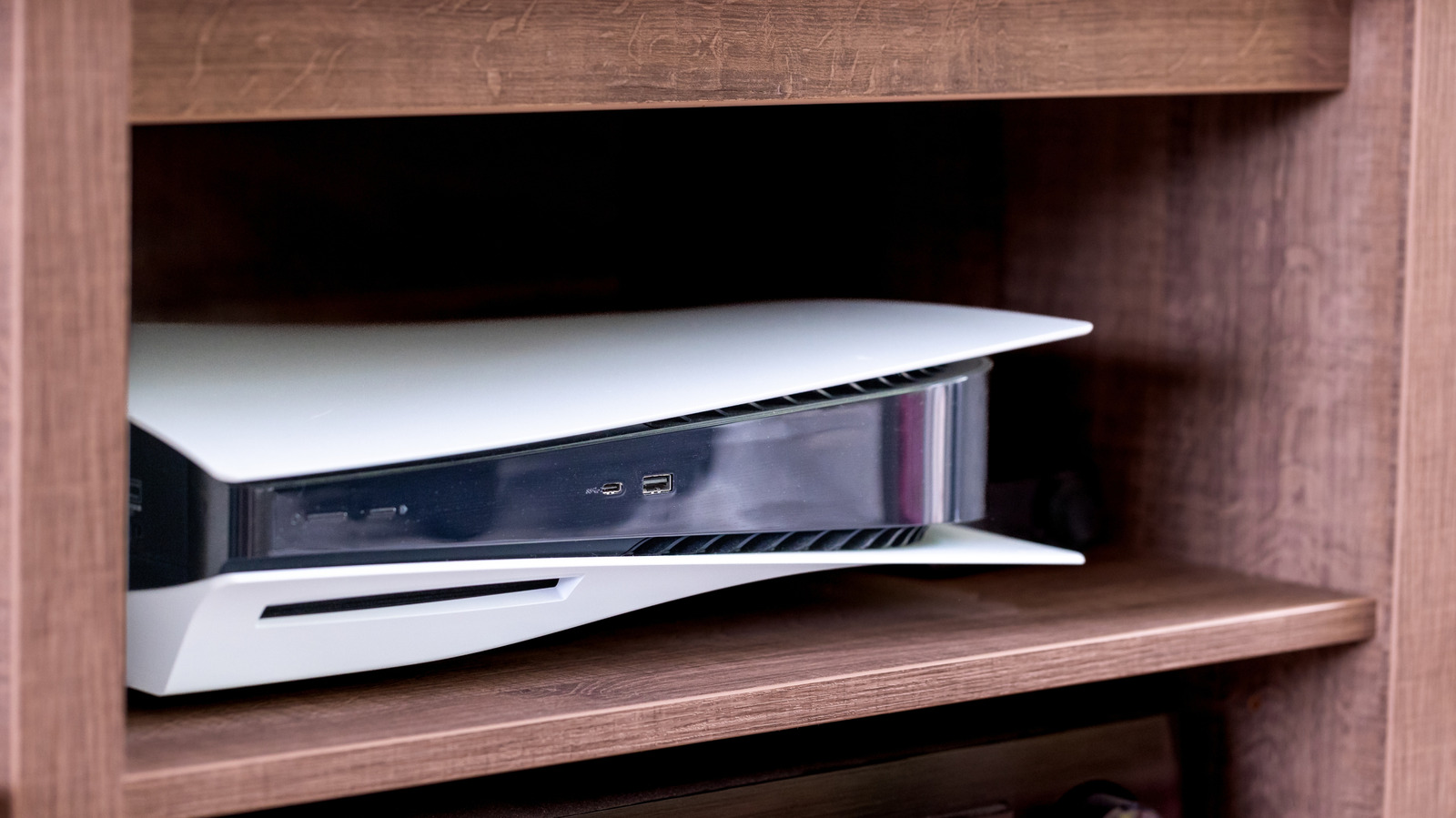
Cabinets are a great way to keep your game console hot, which is terrible for it.

One of the reasons often cited for the failure of the original Xbox in Japan is that the console (and its original bulky controller) was too big for many Japanese homes. Now, there was more to it, such as a lack of the genres and franchises Japanese gamers preferred. But this highlights an important point that space matters; some modern consoles could be an awkward fit if you’re living in a cramped studio apartment.

Even in the West, gamers often need to optimize the space around their TV to make it livable for everyone in the home. Aside from comfort, you might be worried about style, aiming for a sleek, minimalist look. And while it may seem like a great idea on the surface, you certainly shouldn’t jam any of the latest consoles into a cabinet in your entertainment center.

That might seem counterintuitive, since AV gear is often what those cabinets are for. But doing so could hamper your console’s performance or shorten its lifespan. That’s a potentially expensive mistake with memory prices inflating console costs by hundreds of dollars.

The dangers of stuffing your console in a cabinet

The primary concern here is heat. A modern console like the PlayStation 5 is a far more power-hungry device than your Blu-ray player or cable box. It’s rendering real-time 3D graphics and physics, and the hardware necessary to power that consumes a lot of energy. During a game, the standard PS5 can consume up to 220W, a figure roughly matched by the Xbox Series X. Conversely, even Panasonic’s relatively high-end UB820 Blu-ray player isn’t going to hit any more than 32W.

Consoles have fans to expel heat and vents to take in cold air, but this can’t flow well when the system is in a cabinet. The hot air can end up trapped, while it might not have enough room to draw in new air, so it cycles the same hot air. When your console is surrounded by heat like this, it forces the fans to work harder to maintain a safe internal temperature. Your system also might scale back performance to reduce heat production. Under extreme conditions, prolonged heat can trigger visual glitches or force the console to temporarily shut down to avoid damaging its components.

Closely related to this is the issue of dust. Although a cabinet can block some material from getting in, it also make it harder for particles to escape. As with any device, a thick enough layer will trap heat by reducing airflow out of vents or how much air can be taken in. This leads to the same problems and can reduce the lifespan of your console.

What you can do to keep consoles running cool

For proper ventilation, Sony recommends leaving about 4 inches (about 10 centimeters) of clearance around a PlayStation. Microsoft is a little more aggressive with the Xbox, proposing 4 to 6 inches (up to 15 centimeters) on all sides. Nintendo simply advises docking the Switch 2 in an “open, ventilated area.” 

The same principles apply to PC-based systems too, such as the ASUS ROG Ally X or Valve Steam Machine. While every system takes in and expels air at different places, a trapped space is never good. You should also avoid putting controllers, game cases, books or similar items on top of a console, as that will block its vents. Don’t keep your console near a heat source, either.

If space is at a premium, some airflow is better than nothing. Remember that the PS5 and Xbox Series consoles can both be placed vertically or horizontally, so experiment with what fits into your setup. You might even consider aiming a small fan toward the console to help air circulate. It’s also a good idea to periodically dust the outside of your console using a microfiber cloth and can of compressed air. If you use canned air, be sure to hold it level and several inches away from your hardware. Otherwise, you might spray liquids onto circuitry.

None of this is too complicated. Rather, console makers don’t put it front-and-center in their instructions, which they probably should. Gaming hardware has come a long way since people were jamming the 9W NES on a shelf to play Super Mario Bros and Zelda.

Windows 11 upgrades stall amid ‘chipflation’ and ‘RAMageddon’


Microsoft ended mainstream Windows 10 support a year ago, but PC upgrades to Windows 11 have ground to a halt, analysts said.

Relief may not come until 2028 or even 2029, as high CPU prices, which analysts call “chipflation,” and high memory prices, widely known as the “RAMpocalypse” or “RAMageddon,” keep PC prices up.

PC prices were already high, and recent steps like Intel raising CPU prices are increasing the base cost of PCs, said Dean McCarron, principal analyst at Mercury Research.

“When prices are higher, demand goes down. It causes a deferred upgrade cycle,” McCarron said.

Microsoft’s Windows revenue from PC makers fell 27% in its latest quarter, missing expectations, the company’s chief financial officer Amy Hood said on the company’s earnings call last week.

Last year’s rush to upgrade from Windows 10 boosted PC demand, but sales have since slowed, Hood said. PC makers, which pay Microsoft for a Windows license on each PC sold, are also still sitting on unsold stock, Hood said.

StatCounter numbers also show a steady number of PC users hanging on to Windows 10 throughout most of 2026. In September, Windows 10 was still running on 27.7% of Windows PCs worldwide, slightly up from 26.45% in February. That coincided with the PC market crash due to high RAM prices, uncertainty around tariffs, and the Iran war.

Windows 11’s share of Windows PCs jumped from about half in October 2025 to 72.57% in February after mainstream Windows 10 support ended, then dipped to 71.5% in September. (Windows 10 extended security updates are available for both businesses — for a hefty fee — and consumers.)

For enterprises, upgrades are more complicated than making decisions based on price alone, said Neil Shah, vice president of research at Counterpoint Research. Companies in a Windows 10 end-of-support replacement cycle face a conundrum: whether to invest in expensive AI PCs, Shah said.

“All these trends are deflating the demand slowing down the replacement cycle,” Shah said.

Buyers are being prudent about what to buy and when, waiting for better deals and lower prices, which won’t happen anytime soon, Shah said.

A rush to buy PCs ahead of memory-driven price increases boosted PC shipments by 3.2% in the first quarter of 2026, according to Counterpoint. But PC shipments declined 4% in the second quarter and 21% in the third quarter.

Commercial PC replacements and Windows migrations provided some stability to the market, but “was insufficient to offset the broader market contraction,” Shah said. “We…expect a 27% YoY decline in Q4 2026, highlighting the tough market.”

Analysts were split on when PC prices will stabilize, but they agreed it won’t be 2027. Memory prices will remain inflated as long as most of the supply is directed to data centers feeding the AI boom, Mercury’s McCarron said.

Intel in its recent earnings call telegraphed that its PC chip business will remain soft through the rest of 2026 and into 2027. Its lowest-cost PC chip, Wildcat Lake, is sold out.

Supply constraints for memory and PC parts may last through 2029, said Steven Dickens, principal analyst at Hyperframe Research.

“PC vendors are combating this through restricted configurations and bundles,” Dickens said.

AI isn’t yet driving PC upgrades, which are mostly following a typical cycle, Dickens said. But high-end machines capable of running LLMs on-device are starting to shift the market.

“We are seeing power user devices for local LLM deployment becoming a material part of the mix and changing the unit price average as a result,” Dickens said.

At some point, enterprises will have to upgrade PCs, and the market will also turn around, McCarron said. If a soft PC market goes on for too long, “it will turn into a larger boom perhaps a year later,” McCarron said.

“It’ll result in a larger PC upgrade cycle down the road,” McCarron said. “It’s like compressing a spring. The longer you hold it down, the harder it snaps back.”

OpenAI will merge ChatGPT’s chat and work tabs – here’s when, and what to expect


ZDNET’s key takeaways

  • OpenAI will merge Chat and Work tabs in December.
  • The change will be tested among select users before being rolled out.
  • OpenAI anticipates that most users will not be affected.

OpenAI will merge ChatGPT’s chat and work tabs starting in December, according to a post on OpenAI’s website.

Also: This new ChatGPT scam tricks you into installing malware

Currently, ChatGPT’s desktop app features a ChatGPT and Codex section, and within the ChatGPT section, you can find the Chat and Work tabs. It’s not especially easy to navigate, and OpenAI is looking to change that.

(Disclosure: Ziff Davis, ZDNET’s parent company, filed an April 2025 lawsuit against OpenAI, alleging it infringed Ziff Davis copyrights in training and operating its AI systems.)

“Starting in December, Plus, Pro, and Business plans’ usage allowance will be shared across ChatGPT and Codex as we bring the agentic capabilities of Work into the main ChatGPT experience,” OpenAI detailed in its note entitled “Understanding ChatGPT and Codex usage limits.”

An email was also sent to current users, sharing similar information, according to TechCrunch. The email confirmed the merger of the Chat and Work tabs, adding that the integrated experience will be available to select users for feedback before it is made more widely available.

Also: How ChatGPT helped me fix a corrupted gaming PC

“This will enable you to move from exploring an idea to having ChatGPT carry it through, all in one place. You can bring in your files and plugins and ask ChatGPT to build a website, create a presentation, or do things for you on the web, while reviewing and guiding its work. Codex will remain a separate experience in the ChatGPT desktop app,” the email said.

OpenAI said the transition will allow both ChatGPT and Codex to draw tokens from the same allowance pool. While most customers won’t be affected, depending on usage and model, some users may need to wait for resets more than usual.

“Your usage for ChatGPT and Codex will be measured in tokens, the units of information a model processes and generates. How much of your allowance you use will depend on the model you choose and the task you ask it to do. More advanced models and complex tasks generally use more of your allowance. Instant chat will not draw from your usage,” OpenAI said in the online note.

In September, rival Anthropic merged Claude‘s chat and Cowork functions into a single screen. OpenAI said that they don’t expect the upcoming change to disrupt users’ current experience.

Also: These Claude Enterprise features let you track AI ROI

“We’re preparing carefully for this transition to help prevent disruption to your workflows. We expect most users won’t need to wait for their usage to reset more often than they do now,” OpenAI said.

Can Em All Free Download (v0.1)


Can Em All PC Game


Can Em All Direct Download:

Oh look, the truck is here. Kingdom Inc A truck delivers a fresh batch of adorable creatures straight to your factory. Unfortunately for them, they’re also your main source of income.

First, you need them dead.
Grab your weapons and clear out the factory.

Now turn them into something useful.
Grab the bodies and throw them into the crusher.

Get those cans into the tube.
Your freshly processed cans still need to be sold.

Reinvest in the business.
Get stronger weapons. Upgrade your vacuum. Unlock machines. Build conveyors. Increase production. Bring in more creatures. Automate the factory.

Screenshots

System Requirements

Minimum
Requires a 64-bit processor and operating system
OS: Windows 10 (64-bit)
Processor: AMD Ryzen 3 1200 / Intel Core i3-7100
Memory: 8 GB RAM
Graphics: AMD Radeon RX 460 / NVIDIA GTX 950
DirectX: Version 11
Storage: 1 GB available space
Support the game developers by purchasing the game on Steam

Installation Guide

Turn Off Your Antivirus Before Installing Any Game

1 :: Download Game
2 :: Extract Game
3 :: Launch The Game
4 :: Have Fun 🙂