Can the Freezer Trick, Rice, or Other DIY Data Recovery Methods Make a Failed Drive Worse?


Yes. Putting a hard drive in the freezer, placing wet electronics in rice, repeatedly powering up a failing drive, or attempting unproven DIY repairs can make data loss worse and reduce the chances of successful recovery. If important files are at risk, the safest response is usually to stop using the device, power it down, and have it professionally evaluated.

When photos, business documents, tax records, or years of personal files suddenly disappear, it is understandable to search for a quick fix. Unfortunately, the internet is full of data recovery myths that can turn a recoverable problem into permanent data loss. PC Geeks helps Frisco-area customers diagnose computer and hard drive problems without relying on risky shortcuts. As a local, family-owned computer repair company, PC Geeks performs its repair work in-house and provides data recovery for desktop and laptop hard drives. The goal is simple: determine what actually went wrong, protect the data that may still be recoverable, and recommend the safest next step.
data

Common Data Recovery Myths That Can Put Your Files at Risk

The most important rule after suspected drive failure is to avoid making the problem worse. A logical problem, such as deleted files or file-system corruption, is very different from physical damage involving a hard drive’s mechanical components. What seems like a harmless internet trick may create additional problems before a technician ever sees the device.

Does Putting a Hard Drive in the Freezer Really Work?

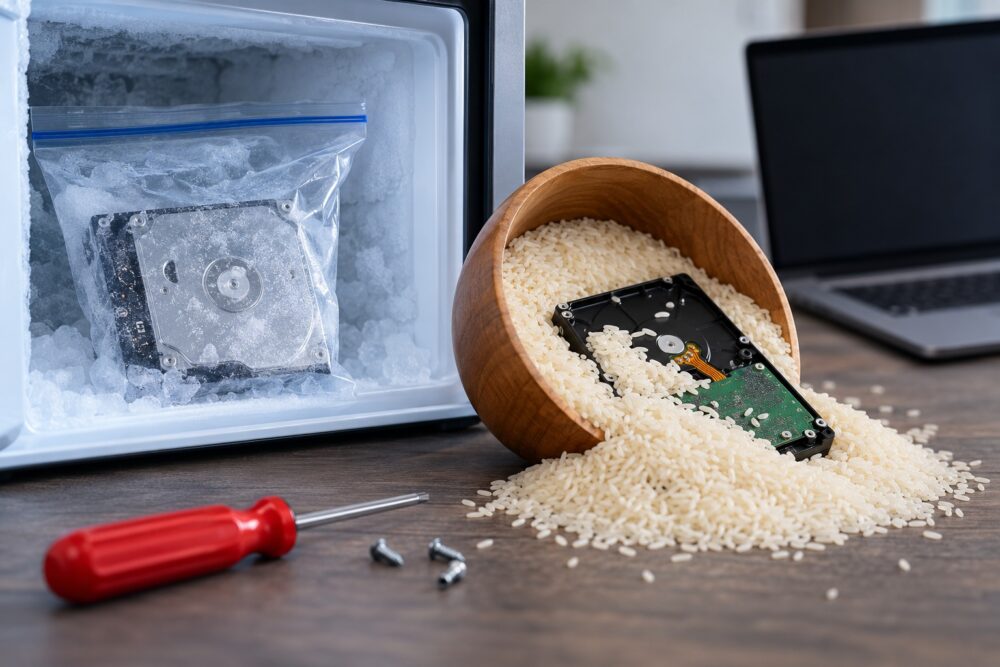
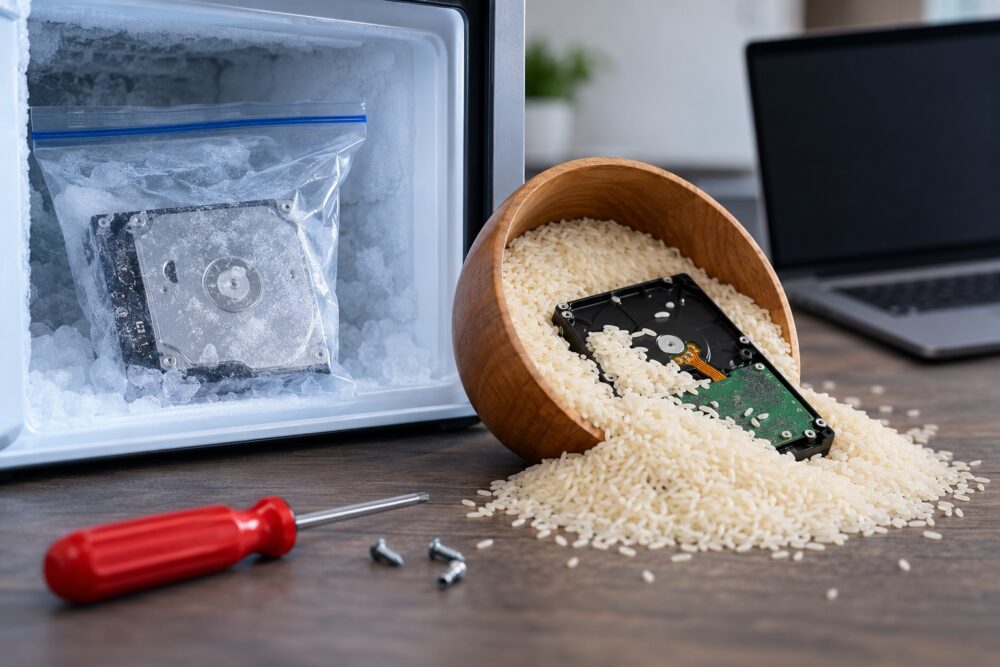
No, putting a failing hard drive in a freezer is not a safe data recovery method. The so-called “freezer trick” comes from anecdotes about older mechanical hard drives temporarily becoming accessible after cooling. Even if a particular drive briefly responds afterward, that does not make freezing a reliable or safe recovery technique.

One major concern is moisture. Moving an extremely cold drive into warmer air can create condensation. Moisture and sensitive electronic or mechanical components are a bad combination.

If a hard drive is clicking, grinding, disappearing from the computer, or failing to spin up normally, avoid experimenting with temperature changes. Power it down and have the problem diagnosed instead.

Professional data recovery guidance follows the same cautious principle. Ontrack advises users not to turn on devices suspected of severe physical damage and to shut them off immediately if they produce ticking sounds.

Does Putting a Wet Laptop or Drive in Rice Help?

Rice is not an effective repair for liquid-damaged electronics. It may absorb some moisture from the surrounding air, but it does not remove liquid contaminants or address corrosion occurring inside a computer, phone, or storage device.

iFixit specifically advises users to skip rice when dealing with liquid-damaged electronics. Its repair guidance notes that rice and similar desiccants do not remove contaminants left behind by a spill and may allow corrosion-related damage to continue.

If a laptop or external drive gets wet:

  1. Disconnect external power when it is safe to do so.
  2. Do not keep turning the device on to “see if it works.”
  3. Do not use a hair dryer, oven, or other high-heat method.
  4. Avoid relying on rice as a repair.
  5. Have the device professionally evaluated, especially when the files are valuable.

This matters in North Texas, where moisture is hardly unusual. National Weather Service climate data for the Dallas-Fort Worth area shows normal annual relative humidity of about 66 percent, while Frisco’s 1991-2020 precipitation normal is 42.08 inches per year.

Can I Keep Restarting My Computer to Get My Files Back?

Repeatedly restarting a computer with a physically failing hard drive can increase the risk of additional damage. If the drive is making unusual mechanical noises, becoming intermittently detectable, or causing the system to freeze, every additional attempt may place more stress on failing components.

One restart after an unexpected software problem is very different from repeatedly forcing a malfunctioning drive to boot. Warning signs that should make you stop include:

  • Clicking, ticking, grinding, or unusual mechanical sounds
  • A drive that repeatedly disappears from the operating system
  • Extremely slow file access combined with errors
  • Frequent freezes while accessing the drive
  • A computer that no longer recognizes the drive
  • Recent impact, liquid exposure, or other physical damage

If the data is irreplaceable, minimizing further use is usually more important than getting the computer to boot one more time.

What DIY Data Recovery Mistakes Should I Avoid?

The biggest mistake is experimenting on the only copy of important data. A recovery attempt that modifies, stresses, or physically alters the original drive can make a professional recovery more difficult.

Avoid these common pieces of bad advice:

  • Opening a hard drive yourself: Mechanical hard drives contain extremely sensitive internal components. Opening the enclosure outside an appropriate environment can introduce contamination.
  • Freezing the drive: Temperature changes and condensation can create additional risks.
  • Hitting, tapping, or shaking it: Physical force is not a repair method and can worsen mechanical damage.
  • Repeatedly reconnecting a clicking drive: More operating time can mean more stress on damaged components.
  • Running random repair utilities immediately: Software tools may be appropriate for certain logical failures, but they are not a universal solution. Writing changes to a damaged or unstable drive can complicate recovery.
  • Formatting when prompted: If a computer says a drive must be formatted before use, do not format it when you need the existing files.

The safest response depends on why the data became inaccessible. Diagnosis should come before recovery attempts.

What Should I Do When a Hard Drive Fails in Frisco, TX?

If the drive contains important data, stop using it and get an evaluation before attempting DIY fixes. That is especially important after physical damage, unusual noises, liquid exposure, or sudden hardware failure.

For Frisco residents and businesses, losing access to a computer can affect far more than convenience. The City of Frisco currently estimates its population at roughly 249,500, and the city’s comprehensive planning materials identify information technology, software, hardware, cybersecurity, artificial intelligence, and analytics among its innovation focus areas. In a growing, technology-dependent community, reliable access to business and personal data matters.

PC Geeks provides data recovery and computer repair from its Frisco location on Main Street, about five minutes from the Dallas North Tollway. The company serves Frisco as well as surrounding communities including Little Elm, Prosper, The Colony, Carrollton, Lewisville, and Plano.

Data Recovery FAQ

Can freezing a hard drive permanently damage it?

It can introduce additional risks, particularly from condensation and temperature changes. The freezer trick is not a recommended substitute for proper diagnosis and professional data recovery.

Should I use rice after spilling water on my laptop?

No. Rice does not remove contaminants left by liquid and does not stop internal corrosion. iFixit specifically recommends skipping rice when dealing with liquid-damaged electronics.

Should I turn on a clicking hard drive to see if it still works?

Avoid repeatedly powering up a drive that is clicking or showing signs of physical failure. Ontrack recommends immediately shutting down a device that produces ticking sounds when physical damage is suspected.

Can deleted files always be recovered?

No. Recovery depends on factors such as the type of storage device, why the files disappeared, whether new data has overwritten them, and whether the device has physical damage. Stopping use quickly can help preserve recovery options.

Protect Your Data Before a Myth Makes the Problem Worse

When important files disappear, doing less can sometimes protect your chances of getting them back. Skip the freezer, forget the bag of rice, and resist repeatedly restarting or experimenting with a failing drive. A proper diagnosis can identify whether the problem is logical, electronic, or mechanical before additional damage occurs.

Ready for professional data recovery in Frisco, TX? Contact PC Geeks today and let an experienced technician evaluate the problem before a DIY fix puts your files at greater risk.
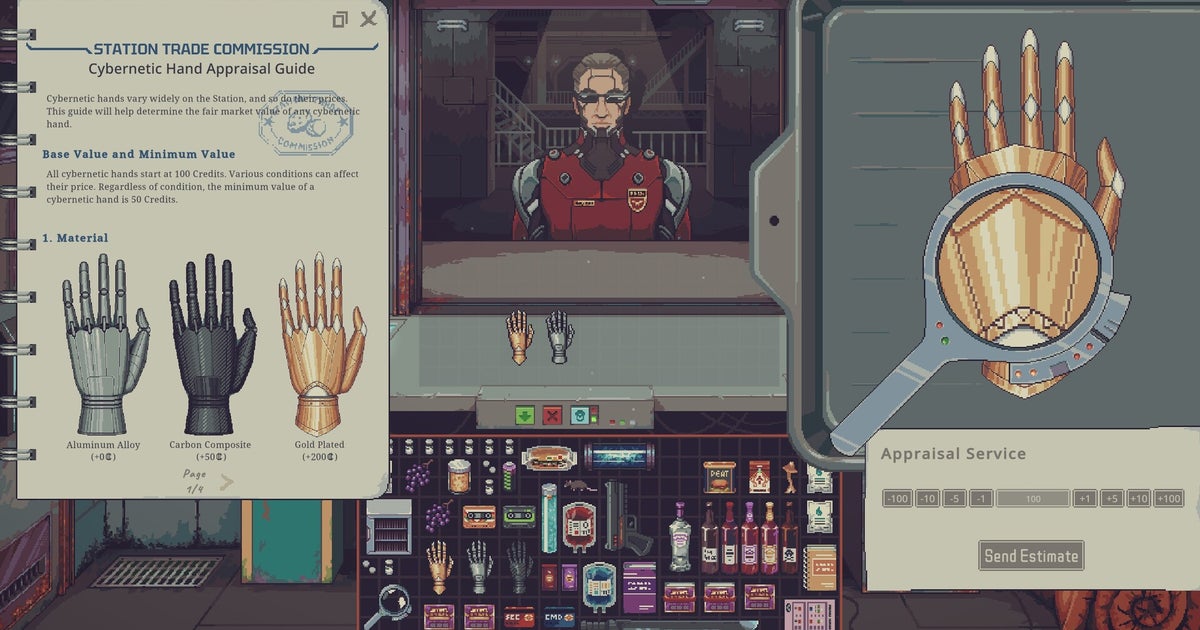
Cyberpunk trading sim Probably Stolen is about running a kiosk in a space station full of gangs, megacorps, and secret rogue cyborgs


I have so far not been shivved, shanked, brain fried, hazed, wasted, ironed, short-circed, flat-lined or even complained at in Probably Stolen – Cyberpunk Shopkeeper Sim, but I’m sure it’s just a matter of time.

In this neuromantic kiosk game from Questing Goose Studio, you’re a new store owner aboard a backwater space station. Each day, you roll up the shutter and do business with a procession of shady types, ranging from janitors with unappetising beards to sexy cowled folk with Main Character tattoos. The basics are simple enough, for all the overwhelmingly menu-led presentation: buy what you can afford, according to your instinct for the wider market, sell what you can fit into the customer’s budget. But things quickly get complicated.

Continue reading “Cyberpunk trading sim Probably Stolen is about running a kiosk in a space station full of gangs, megacorps, and secret rogue cyborgs”

VS Code Wrapped: GitHub Universe 2026


When we gathered at GitHub Universe in October 2025, working with agents in VS Code was still relatively new. A year later, working with agents has become the new normal. A single developer can put several agents to work on different problems, keep coding while those tasks move forward, and check back in to review the results. Work can continue on another machine, in another app, or in the cloud after your laptop closes. The editor that helps you write code is also becoming the place where you coordinate much more of the work it takes to ship software.

Imagine handing off a feature to Copilot, while an agent using the Claude harness investigates a bug, then opening the running app in a browser that both you and the agent can see and control. Project instructions and tools give those agents the context to work, and the Agents window brings their progress and changes together for review.

When you hand a task to an agent, it shouldn’t matter which app you’re using to launch the task. When you switch to another tool, the task should continue running. Over the last releases, we’ve worked to make these connected, continuous experiences across VS Code and other Copilot apps become reality.

In this blog post, we’re zooming into how far VS Code has come since the last Universe, and what you can do with it today.

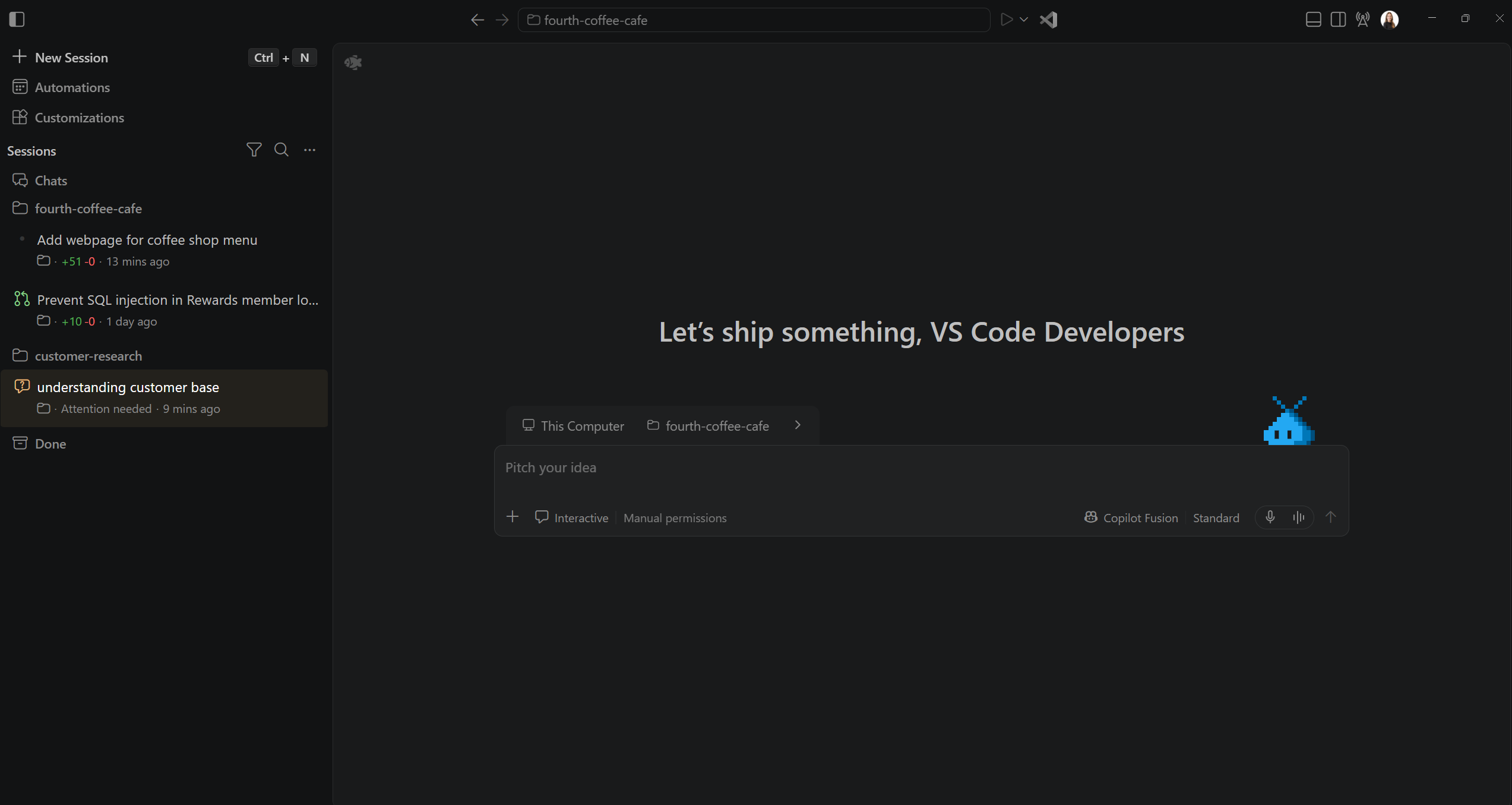
Screenshot of the Agents Window

Agents that keep working

Developers can hand off more of the work without handing over the decisions that matter. We built on our Language Server Protocol and Debug Adapter Protocol experience to create the Agent Host Protocol (AHP), which just went 1.0.

Just as a language server makes code completion and Go to Definition available to different editors, an Agent Host brings agent functionality into an independent process. It manages sessions and provides access to multiple harnesses, models, files, and terminals.

AHP lets clients connect to those sessions and stay in sync. Cloud sessions run on GitHub’s infrastructure, so closing your laptop doesn’t stop them. You can continue the same session in VS Code, the GitHub Copilot app, GitHub Mobile, github.com, or Copilot CLI. And because the protocol is open, anyone can build a client that works with the same live sessions as VS Code.

Choosing your agent

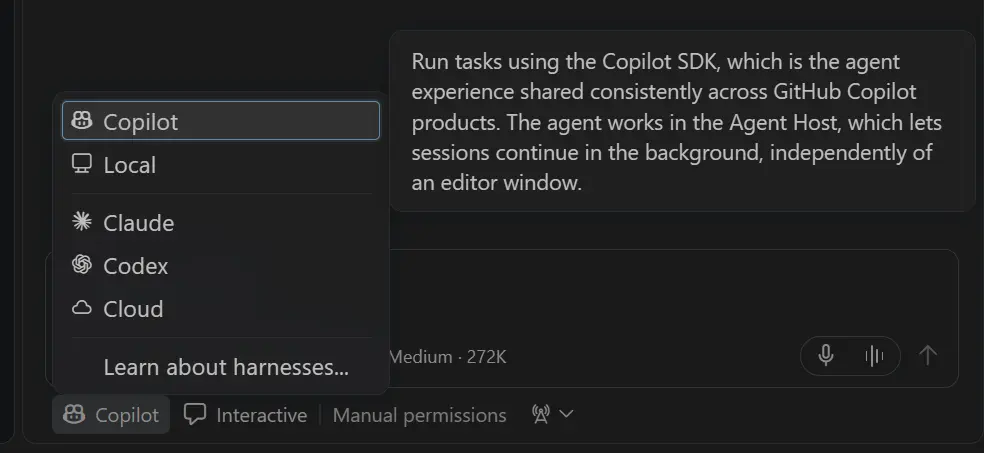
Screenshot of selecting a harness

The agent harness is what coordinates the agent loop and connects the language model to context and tools.
We combined our Local VS Code harness with the Copilot CLI harness to create the new Copilot harness, now the default for new sessions in both the editor and Agents window. Built on the Microsoft Copilot SDK developed by GitHub, it brings more consistent agent behavior across VS Code, Copilot CLI, and the GitHub Copilot app. This also means that you can reuse your agent customizations across different Copilot experiences without modifications.

You can also use the Claude and Codex harnesses in VS Code through the Agent Host. Each runs on its provider’s own agent harness, with its own runtime and capabilities. VS Code brings their sessions together in one place, where you can manage work across agents without requiring every agent to work the same way.

Choosing your model

Access to multiple models remains one of Copilot’s pillars. The model picker lets you select from Copilot and bring your own key models. You can specify options like reasoning effort and context size to optimize the model configuration for the task.

As newer and more capable models become available, choosing the right model for the task is becoming more and more difficult. Maybe one model is not the best for each part of the task.
Copilot Fusion autonomously chooses one model or orchestrates a set of models to solve the task at hand. In the Agents Window, you can also use the Compare Models feature in Preview to run different models and harnesses on the same task, review results side by side, and combine the best ideas. Together, these options help you balance speed, cost, and quality.

Managing parallel work

The work we started with Agent HQ in VS Code has grown into the Agents Window, a dedicated space to manage agents across all your workspaces and environments. Run agent sessions in parallel, follow progress, and review changes from a single interface. Seamlessly switch between the editor and the Agents window without starting over. Both views stay in sync with the same live Copilot session. For recurring tasks, use automations, either locally or in the cloud. To avoid conflicts, worktrees help you keep changes isolated between agents.

And when you need to dive into the code or run a debugging session, you can switch to the editor and back to the Agents window at any time. Your active sessions remain running uninterrupted.

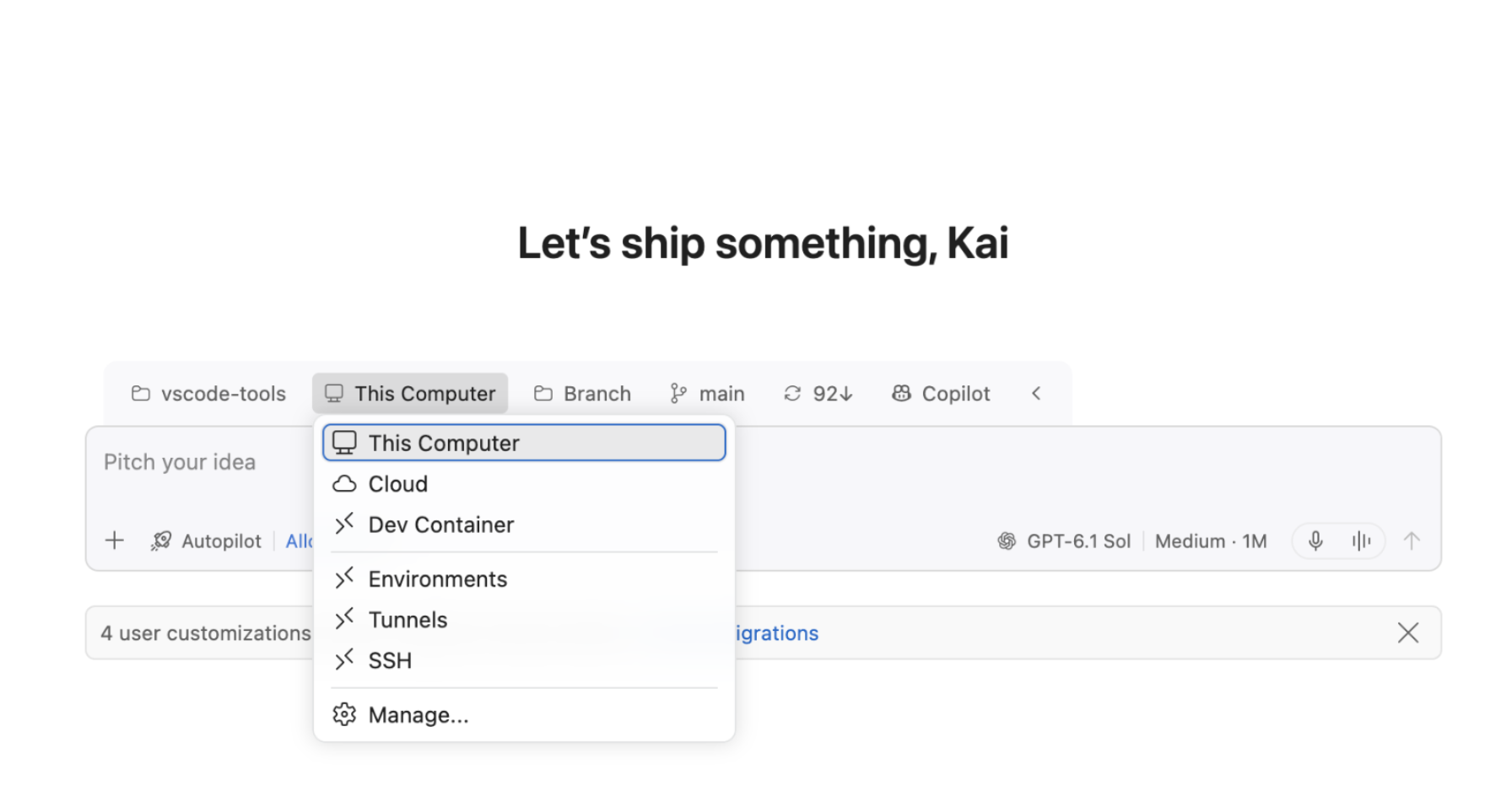
The Agent Host is a separate process that lets the Agents window connect to multiple agent sessions at once, including those on remote machines over SSH or dev tunnels, or sessions running in the cloud. Remote agents use that machine’s code, tools, and dependencies and keep working after you disconnect, as long as the machine and host stay running.

Screenshot of multi host interface

Shaping your agents

Instructions, skills, hooks, custom agents, and plugins help agents understand your project conventions and workflows. Projects already customized for the Claude Code or OpenAI Codex developer tools can use that setup with their respective harnesses, without rebuilding it for VS Code.

Support for the Model Context Protocol, including MCP Apps, connects agents to your tools and services. Extension authors can contribute agent tools and MCP servers through the Marketplace.

Copilot connectors, now in preview, bring context from services such as Slack, Notion, and Microsoft Learn into your agent sessions without requiring you to install or manage an MCP server. Connect once and reuse the connection across supported Copilot clients signed in with the same account. Connectors work with the Copilot harness and are available on all Copilot plans. For Business and Enterprise plans, administrators must allow editor preview features.

For organizations, managed settings apply policies across teams, while sandboxing can restrict agent access to files and network resources.

Beyond the chat

The integrated browser gives you and your agent a shared view of a page, so you can both see and interact with it without leaving VS Code. Your agent can use Playwright to test a workflow, check the results of its changes, and help identify web accessibility issues.

Some workflows are easier to navigate visually than through a conversation. Canvases, now in preview, let you create interactive interfaces for working with your agent and its context, such as a task board for tracking a project. You can also choose from readily available canvases. The Markdown editor lets you edit a rendered plan or document directly and leave comments for your agent to act on, rather than describing every revision in chat.

Completing a task might mean working with a desktop application that doesn’t have an MCP server or another tool integration. Experimental computer use lets your agent interact with those applications on macOS and Windows by clicking controls and editing text. You control application access, and organizations can disable it through policy.

With models that support image generation, you can create visual assets for your project alongside the code, whether you’re exploring a design idea or building a prototype.

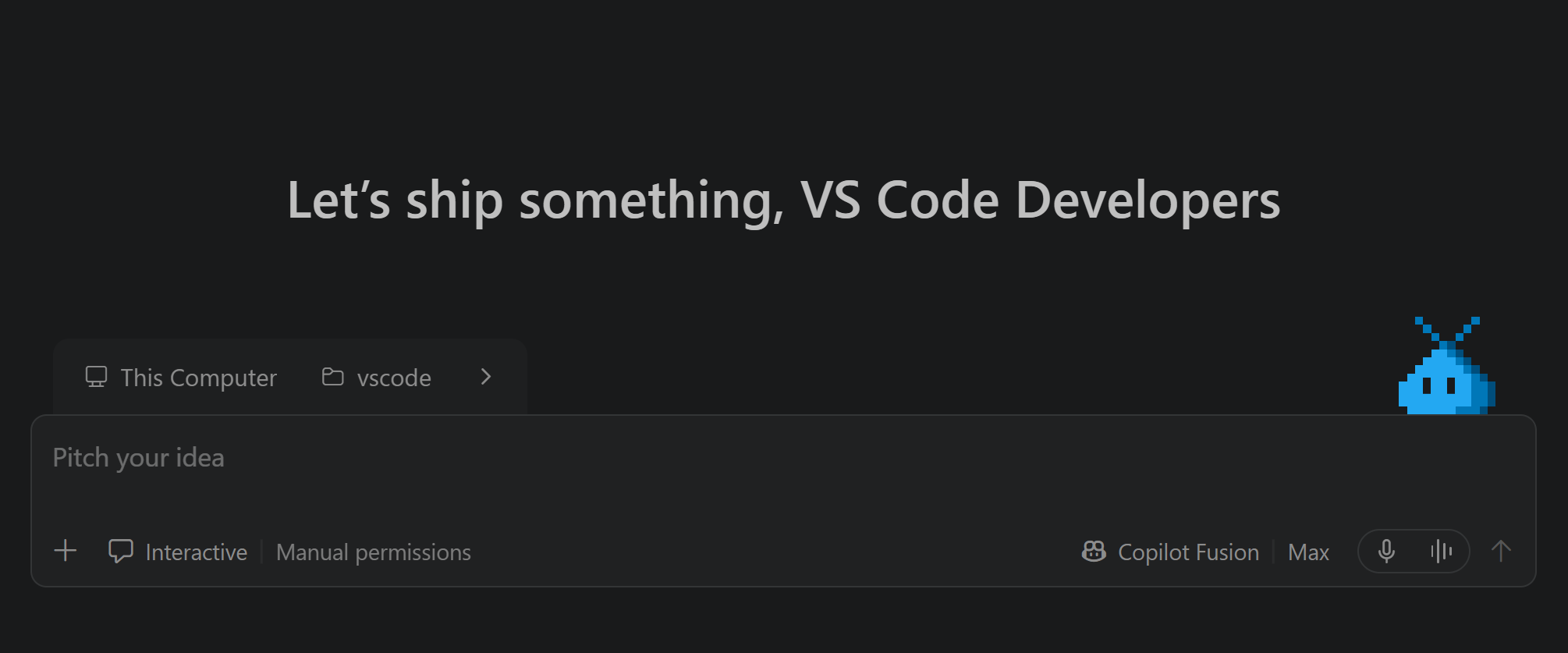
For a little fun, there’s Blobby, the VS Code pet who reacts as you work with agents, with achievements to unlock along the way.

Still your editor

We remain just as committed to the editor you rely on every day. Precision editing, code completion, navigation, refactoring, and debugging remain at the heart of VS Code. Next edit suggestions continue to improve with new models and are available to Copilot Free users.

The extension ecosystem remains central to making VS Code your own, from language support to AI extensions like Claude Code and Codex. And it has never been easier to build your own extension.

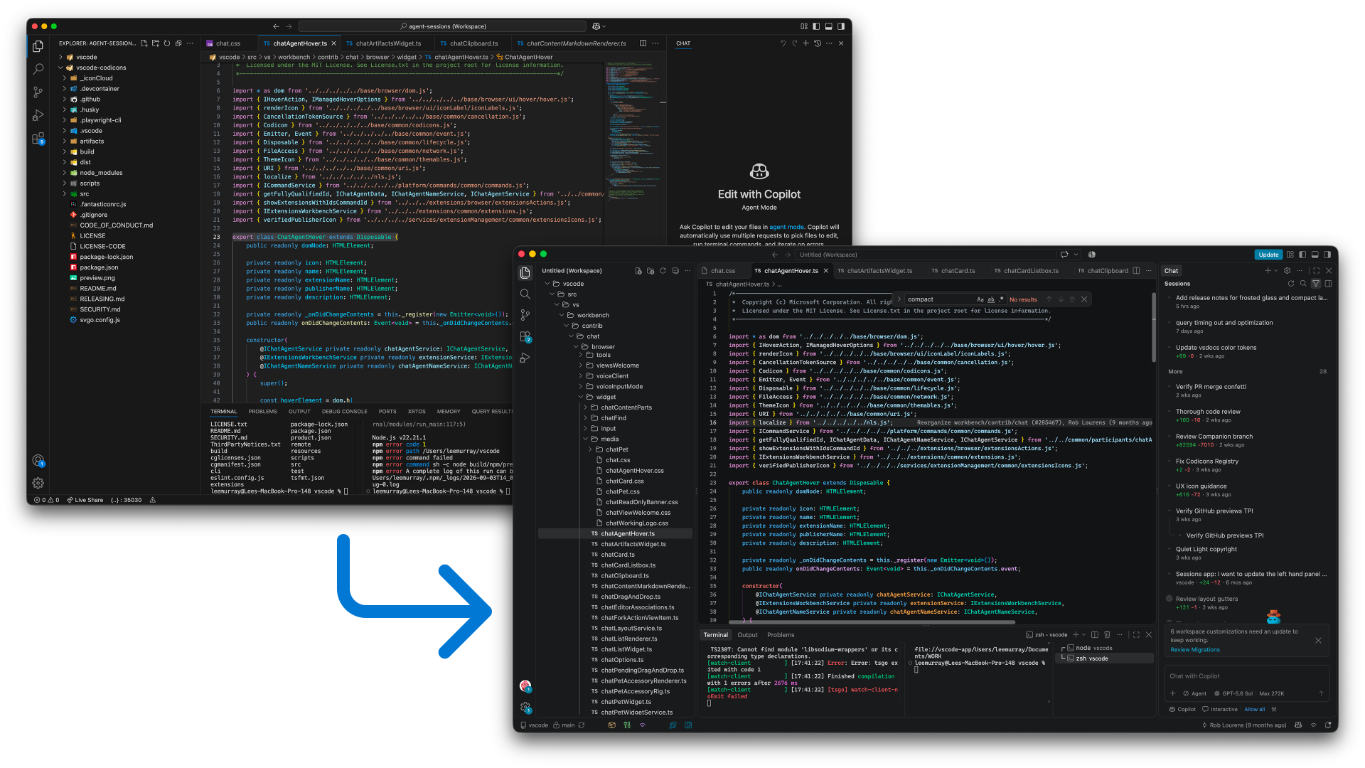
Last, but not least, our UI modernization work brings shared design choices to the editor and Agents window for a clearer, more consistent experience that preserves your customization and familiar workflows.

Screenshot of the modernized VS Code interface.

Feedback and ideas from the VS Code community have shaped how the product has evolved over the past year. Please keep sharing what is working and what could be better in VS Code GitHub issues!

Happy coding! 💙

Upwind raises $400M after walking away from Datadog acquisition offer


Upwind, a San Francisco startup that uses AI to secure cloud infrastructure, has raised a $400 million Series C round at a $3.8 billion valuation led by Bessemer Venture Partners, with participation from existing backers including Greylock Partners and Craft Ventures.

The round comes nine months after Upwind closed its previous $250 million financing at a $1.5 billion valuation.

The fresh funding, which has been in the works for months, nearly fell apart after Datadog attempted to buy the company, according to a person familiar with Upwind. Datadog is a publicly traded company that sells tools for monitoring how software runs, known as observability. It didn’t offer a premium above the $3.8 billion valuation set by venture capital investors, the person said, so Upwind decided to stay independent.

Four-year-old Upwind has grown rapidly amid rising AI-driven cybersecurity threats. The startup has been adding $20 million to $30 million in annualized recurring revenue (ARR) each quarter and is projected to end the year at roughly $90 million, according to a person familiar with Upwind’s financials. That means that VCs and Datadog valued the startup at more than 40 times its forecast ARR, a common yardstick for pricing software companies. The high multiple is also well below the 80x ARR fetched by Cyera, another fast-growing cybersecurity startup, according to TechCrunch reporting from earlier this year.

Cybersecurity is poised to be the third big wave of AI software that companies will pay for after AI coding tools and customer support, Theory Ventures general partner Tomasz Tunguz recently wrote in his widely read blog.

By walking away from an acquisition offer, Upwind clearly believes that the company will ultimately be worth more than the $3.8 billion that Datadog was ready to pay for it. However, given how few cybersecurity companies have gone public in recent years, an eventual sale remains the most likely outcome for the startup.

Upwind continues to draw acquisition interest, according to a person familiar with the company.

The startup was founded by Amiram Shachar, who sold his previous company, the cloud spend management startup Spot.io, to NetApp for $450 million. Upwind calls its approach to thwarting threats “runtime” security, which means it alerts and remedies attacks and vulnerabilities in active services in real time.

TechCrunch has reached out to both Upwind and Datadog for comment.

When you purchase through links in our articles, we may earn a small commission. This doesn’t affect our editorial independence.

FCC Chair Wants To Let Prisons Jam Illegal Cellphones


The agency will vote next month on relaxing its long-standing opposition to jammers.

The US Federal Communications Commission announced today that it will vote on a new rule that would allow state prisons and jails to use cellphone jammers. The goal of the change would be to block use of illegal cellphones by inmates, since having outside contact could allow them to continue engaging in criminal activity.

The planned vote during the agency’s open meeting on November 19 would consider allowing state and local incarceration facilities to opt in to using jammers; use of the tech would not be required. Any tech that interferes with communications signals is illegal for non-federal parties to use. In 2018, the Federal Bureau of Prisons began testing “micro-jamming” in federal prisons as a way to block unauthorized cellphone use by inmates. This move would potentially open up similar tools at the state and local levels, and provide a formal pathway for federal facilities to jam signals as well.

It’s a reversal from previous policies where the FCC has not allowed implementing jammers as a method of reducing illegal cellphone use in prisons. Previous concerns about jammers suggested the tech could interfere with emergency and public safety communications, as well as creating new security risks by putting more jamming tools into the wild where they could be exploited by bad actors. The bulletin today notes that if the new rules are adopted, correctional facilities would need to meet some standards, including proving “that the jamming solution does not cause harmful interference outside of the designated geographic areas.” 

Today’s move isn’t the first time the FCC has changed its approach toward prisons under the current administration. In July 2025, the department said it would delay implementing a cap on the rates charged for prison phone calls.

Task Bar Cube Free Download (Build 26193584 + 3 DLC)


Task Bar Cube PC Game


Task Bar Cube Direct Download:

Task Bar Cube  Idle RPG on Your Taskbar Deep Dish Dungeon

Task Bar Cube is a desktop idle RPG and clicker that lives on your taskbar. Keep it open as a small window while you work, or play it fullscreen. Your heroes fight on their own, even while you’re away. Collect gear in 7 rarities, from Common to Divine, with 7 tiers for every item. Climb the weekly Online Ranking and prove you’re the best. Earn real Steam items just by playing. Every 5 minutes of play gives you a Steam chest, and every item inside can be sold on the Steam Community Market. Chest drop rates: Lv.1 85% · Lv.2 10% · Lv.3 3% · Lv.4 1.5% · Lv.5 0.5%.

Upgrade Your Gear & Grow Your Village

  • Fusion: Fuse items into new gear.
  • Gem Socketing: Add gems for extra stats.
  • Rarity & Tier Upgrade: Push your gear to the top.
  • Hunting, Farming & Mining: Gather resources while you work.
  • Merchant: Trade your ores for rewards.
  • Library & Animal Shelter: Boost your heroes and pets.

Build Your Team for a Battle That Lasts Years

  • Heroes & Pets: Build the team you want, pick your strategy. Five classes, each with its own combat skill.
  • Talent Tree & Hero Skills: Shape every hero your way.
  • Cube Upgrade: Hundreds of upgrades with no cap, plus Prestige.
  • Endless Levels: No level cap, no end.
  • ACT League: Beat rival bosses for bonuses that stay even after Prestige.
  • Story, Quests & Achievements: 8 chapters, daily quests and Steam Achievements.

Screenshots

System Requirements

Minimum
OS: Windows 10
Processor: Intel Core i3
Memory: 1 GB RAM
Graphics: Nvidia GeForce GT 730
Storage: 2 GB available space
Support the game developers by purchasing the game on Steam

Installation Guide

Turn Off Your Antivirus Before Installing Any Game

1 :: Download Game
2 :: Extract Game
3 :: Launch The Game
4 :: Have Fun 🙂


How to Build a Voice-First AI Rehearsal Partner


When preparing for a presentation, most people run through slides at their desk, perhaps talking to their screen and making updates here and there. But what if you could walk and talk to your slides and make changes as you move? Could you find a way to rehearse on the go, one slide at a time, using an AI system capable of actually helping?
Continue reading “How to Build a Voice-First AI Rehearsal Partner”

AI-Generated Engineering Output: Validation & Buildability


An engineering team feeds a brief into an AI tool and gets several design concepts back in minutes. The output may look complete, but an engineering team still has to determine whether it can move forward. Does the geometry satisfy the real design constraints? Are the dimensions right? Does the model preserve design intent? Does it comply with the applicable standards? Can it be manufactured, fabricated, constructed, or coordinated?

With AI in engineering, the question is straightforward: which AI-generated outputs are suitable for further engineering work?

Faster generation has a clear operational benefit. It also changes the amount of engineering review required. A 2026 survey of 350 engineering leaders found that teams using AI design engineering workflows evaluate more than three times as many design variants per program. That makes the validation workflow part of the value equation, rather than a separate downstream task.

From AI-Generated Output to Engineering-Ready Deliverables

A typical engineering workflow moves from design and modeling through analysis, revision, documentation, and review. AI changes the volume of work entering that pipeline by making it easier to generate multiple design options before one is selected for further development.

The challenge is validation capacity. Ten AI-generated options still need to be evaluated against project requirements, design constraints, applicable standards, and downstream requirements before the team can select one for production.

Turning AI output into engineering-ready work requires a defined sequence of interpretation, validation, refinement, checking, approval, and delivery. This is the AI-to-Engineering Readiness Chain:

Generate → Interpret → Validate → Refine → Check → Approve → Deliver

  • Generate: AI produces a design, model, drawing, or dataset.
  • Interpret: Engineers evaluate the output in the context of project requirements and design intent.
  • Validate: The output is tested against engineering constraints, calculations, standards, and acceptance criteria. Simulation offers a useful precedent here. ASME’s verification and validation standards provide a framework for establishing whether a computational model is credible for its intended use. The same validation principle is relevant when evaluating AI-generated engineering content.
  • Refine: CAD and BIM specialists correct geometry, model structure, and data.
  • Check: Automated and manual checks verify compliance with applicable standards, rules, and project requirements.
  • Approve: An accountable engineer reviews and authorizes the deliverable.
  • Deliver: The validated output is released into the downstream workflow in the required format and structure.

What Makes AI-Generated Engineering Outputs Buildable?

AI-generated engineering outputs must meet more than visual or geometric expectations before they can enter production. Each output therefore requires defined validation checks and acceptance criteria.

AI-generated output Validation requirement Production risk if unchecked
Design alternatives Verify design constraints, functional requirements, and project-specific assumptions before selecting an option. Selecting a concept that does not meet the actual engineering requirements.
Generated geometry and models Check dimensions, tolerances, geometric relationships, unintended overlaps, gaps, and component alignment. Invalid geometry, inaccurate models, and downstream correction work.
Drawings and documentation Verify drawing completeness, dimensional accuracy, applicable standards, client requirements, and documentation conventions. Non-compliant deliverables, missing information, and drawing revisions.
Model structure and classification Check component classification, model organization, data integrity, and compatibility with downstream CAD/BIM workflows. Manual reconstruction, coordination issues, and unusable model data.
Design modifications and optimization Confirm that changes preserve engineering intent and account for relevant constraints and trade-offs. Unintended design changes, overlooked constraints, and additional engineering rework.
Data extraction and quantity takeoffs Verify extracted values against source drawings, models, specifications, and project context. Incorrect quantities, unreliable estimates, and downstream decision errors.
Simulation setup and preliminary analysis Review assumptions, input parameters, boundary conditions, and validation criteria before relying on results. Misleading analytical results and decisions based on unverified outputs.
Standards and compliance checks Validate outputs against applicable engineering standards, building codes, client specifications, and internal rules. Non-compliance, failed reviews, and delayed production release.
Constructability and manufacturability Assess whether the design can be fabricated, manufactured, installed, constructed, coordinated, and maintained as required. Designs that are technically plausible but impractical or unsuitable for execution.
Downstream deliverables Confirm that approved outputs retain the required information, formats, versioning, and traceability for downstream use. Handoff failures, duplicated work, and loss of information across workflows.

Three Workflows Where the Chain Shows Up

The engineering review determines whether the generated geometry can proceed to refinement and downstream documentation.

AI-assisted BIM: In AI in civil engineering and AEC projects, the control problem extends beyond geometry to classification, information structure, and coordination across structural, architectural, and MEP workflows.

AI-assisted documentation: The focus shifts to drawing completeness, standards compliance, document consistency, and whether the issued package contains the information downstream teams actually need.

Where AI Automation Ends and Engineering Oversight Begins

The right level of AI involvement depends on task repeatability, the clarity of validation rules, and the consequences of an error.

Automate: Repetitive, Rule-Based Tasks

Tasks with clear rules, measurable outputs, and repeatable validation criteria are stronger candidates for automation.

  • Repetitive documentation and drawing updates
  • Data extraction and format conversion
  • Standardized model modifications
  • Rule-based drawing and compliance checks
  • Routine classification and structured data processing

Augment: AI-Assisted Engineering Work

AI can accelerate tasks that require technical interpretation, provided engineers review the results against project requirements and engineering constraints.

  • Design option generation and preliminary analysis
  • Clash investigation and design optimization
  • Quantity extraction and drawing interpretation
  • Simulation setup and parameter preparation

Keep Human-Controlled: Engineering Judgment and Approval

Tasks involving significant uncertainty, safety implications, or consequential engineering decisions require direct human oversight.

  • Safety-critical engineering decisions
  • Unusual design conditions and ambiguous requirements
  • High-consequence exceptions
  • Final engineering review and approval

Governance Across All Three Categories

Regardless of the automation level, a production-ready workflow needs defined controls at key points:

  • Input validation: Confirm that source drawings, models, specifications, and project requirements are reliable.
  • Exception handling: Specify when automated processing must stop and escalate an issue for engineering review.
  • QA/QC and auditability: Check deliverables against acceptance criteria and maintain a record of significant changes and approvals.
  • Production handoff: Confirm that validated outputs meet the required formats, information structures, and downstream workflow requirements.

How to Measure Whether AI in Engineering Is Actually Improving Outcomes

“Efficiency” needs to be broken into measurable workflow outcomes. Useful measures include:

  • Cycle time: How long from input to validated deliverable?
  • Rework: How many AI-generated outputs need substantial correction?
  • First-pass acceptance: What percentage clears defined checks without major rework?
  • Engineering review time: Has AI reduced or increased the review burden?
  • Throughput: How many deliverables can the team process?
  • Exception rate: How often does the workflow need human intervention?
  • Downstream usability: Can output move into the next system without manual reconstruction?

The useful comparison is end-to-end performance. A workflow can reduce generation time while increasing review effort, rework, or the volume of exceptions. Measure the entire process, from input to validated deliverable, to determine whether the change yields a net improvement.

Conclusion: Build Validation into the Workflow

AI in engineering can shorten the path from engineering brief to initial output. The production workflow still needs defined validation, review, exception handling, and approval before that output becomes usable engineering work.

For engineering teams, the practical starting point is a single repeatable workflow with clear inputs, measurable validation criteria, and an accountable owner. From there, AI can be assigned to the steps where its output can be checked consistently.

Start with one repetitive engineering workflow. Map its inputs, validation criteria, exception points, and approval requirements, then identify where AI can reduce manual effort without removing the engineering controls the workflow requires.

Frequently Asked Questions

Standardize validation rules, automate repeatable checks, route exceptions to specialists, and monitor review time, rework, and first-pass acceptance.

Consider outsourcing when production backlogs, limited CAD/BIM capacity, or increasing validation workloads constrain internal engineering teams.

Evaluate engineering expertise, CAD/BIM capabilities, validation procedures, QA/QC practices, exception handling, data security, and delivery compatibility.

Track cycle time, rework, first-pass acceptance, review time, throughput, exception rates, and downstream usability before and after implementation.

Author Bio

Akhil Krishnan B


Akhil Krishnan B

Akhil Krishnan B focuses on engineering workflows, operational processes, and service delivery models. With over 7 years of experience, he analyzes execution gaps that impact project outcomes and creates content that reflects real workflow structures, documentation standards, and delivery requirements.


Explore the Spookier Side of Space in No Man’s Sky: FORSAKEN!


Summary

  • Meet strange traders, collect haunting mementos, delivery mysterious packages and construct an eerie corvette in the spooky Halloween update, No Man’s Sky FORSAKEN!
  • Summon forsaken traders at the edges of the deep-space outposts, and exchange mementos for a unique collection of corvette modules. Become a space courier and transport important packages with the new corvette haulage missions.
  • Expand your corvette builds and design a spooky biomechanical ship with new habs, cockpits and structural pieces. Warp seamlessly from system to system by flying directly to the stars you see in the sky.

Hello,

Last month’s COSMOS update saw a huge uplift in XBOX and Game Pass Travellers old and new journeying to the No Man’s Sky universe to check out the space overhaul which COSMOS ushered in. A whole host of new discoveries appeared in the space between planets, players had the ability to own and customise their own space stations, and much, much more. Today, with the release of our next update, FORSAKEN, we’re staying in space but things have got a whole lot…darker! 

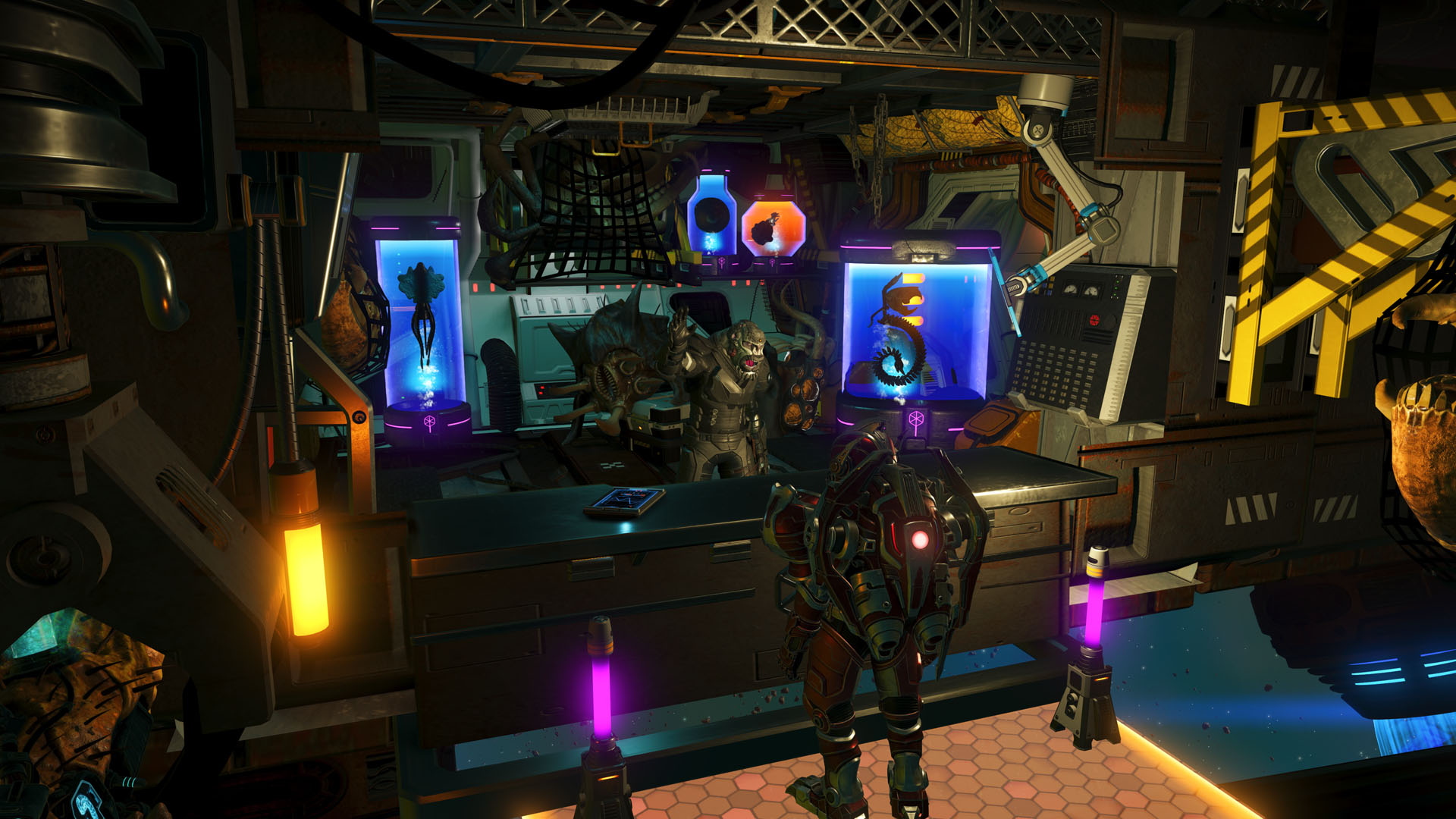
Vessels of preserved organic matter have begun to appear in deep space, concealed within the nooks and shadows of derelict hulks and infested space outposts. These haunted mementos have attracted a number of enigmatic traders from all corners of the universe, all set upon gathering the samples for their collections.

No Man's Sky Forsaken screenshot

Fortunately, these strange opportunists are only too pleased to lean on the expertise of experienced Travellers and whoever has mastered the skills of salvaging such in-demand materials. Any brave courier willing to venture into these ominous treasure troves and salvage their curious bounty can barter with forsaken traders, exchanging mementos for unique, sinisterly biomechanical corvette modules. Spook up your existing corvette exterior, or lean fully into the creepy vibe and build a whole new scarecraft. 

No Man's Sky Forsaken screenshot

And the macabre cosmetics aren’t confined purely to your starship. Determined scavengers will be rewarded with the grotesque new larva tank helmet, and may purchase the wriggling larva cannon multi-tool – for the right quantity of preserved grubs. 

No Man's Sky Forsaken screenshot

As with all our updates, we couldn’t help but squeeze in a few extra features too. With the advent of FORSAKEN, we’ve added a number of lavish new corvette cockpits, seamless warping to the stars you see in the sky, a new minimal HUD mode for advanced players, a radial weapon select, package courier missions, and more! 

It’s been a busy year for the No Man’s Sky team, and FORSAKEN is their fifth major update (after REMNANT, XENO ARENA, THE SWARM, and COSMOS). We’re already deep in planning for what sort of craziness we can get up to in 2027.

Our journey continues.

Sean

No Man's Sky Forsaken screenshot

Xbox Play Anywhere

No Man’s Sky

Hello Games


☆☆☆☆☆
10295


★★★★★


$59.99

$23.99


Xbox One X Enhanced


PC Game Pass


Xbox Game Pass


No Man’s Sky comes complete with all major updates up to and including The Swarm.

Inspired by the adventure and imagination that we love from classic science-fiction, No Man’s Sky presents you with a galaxy to explore, filled with unique planets and lifeforms, and constant danger and action.

In No Man’s Sky, every star is the light of a distant sun, each orbited by planets filled with life, and you can go to any of them you choose. Fly smoothly from deep space to planetary surfaces, with no loading screens, and no limits. In this infinite procedurally generated universe, you’ll discover places and creatures that no other players have seen before – and perhaps never will again.

Embark on an epic voyage
At the centre of the galaxy lies a irresistible pulse which draws you on a journey towards it to learn the true nature of the cosmos. But, facing hostile creatures and fierce pirates, you’ll know that death comes at a cost, and survival will be down to the choices you make over how you upgrade your ship, your weapon and suit.

Find your own destiny
Your voyage through No Man’s Sky is up to you. Will you be a fighter, preying on the weak and taking their riches, or taking out pirates for their bounties? Power is yours if you upgrade your ship for speed and weaponry.
Or a trader? Find rich resources on forgotten worlds and exploit them for the highest prices. Invest in more cargo space and you’ll reap huge rewards.
Or perhaps an explorer? Go beyond the known frontier and discover places and things that no one has ever seen before. Upgrade your engines to jump ever farther, and strengthen your suit for survival in toxic environments that would kill the unwary.

Share your journey
The galaxy is a living, breathing place. Trade convoys travel between stars, factions vie for territory, pirates hunt the unwary, and the police are ever watching. Every other player lives in the same galaxy, and you can choose to share your discoveries with them on a map that spans known space. Perhaps you will see the results of their actions as well as your own…

How to Make Science Writing Work for Mobile Readers


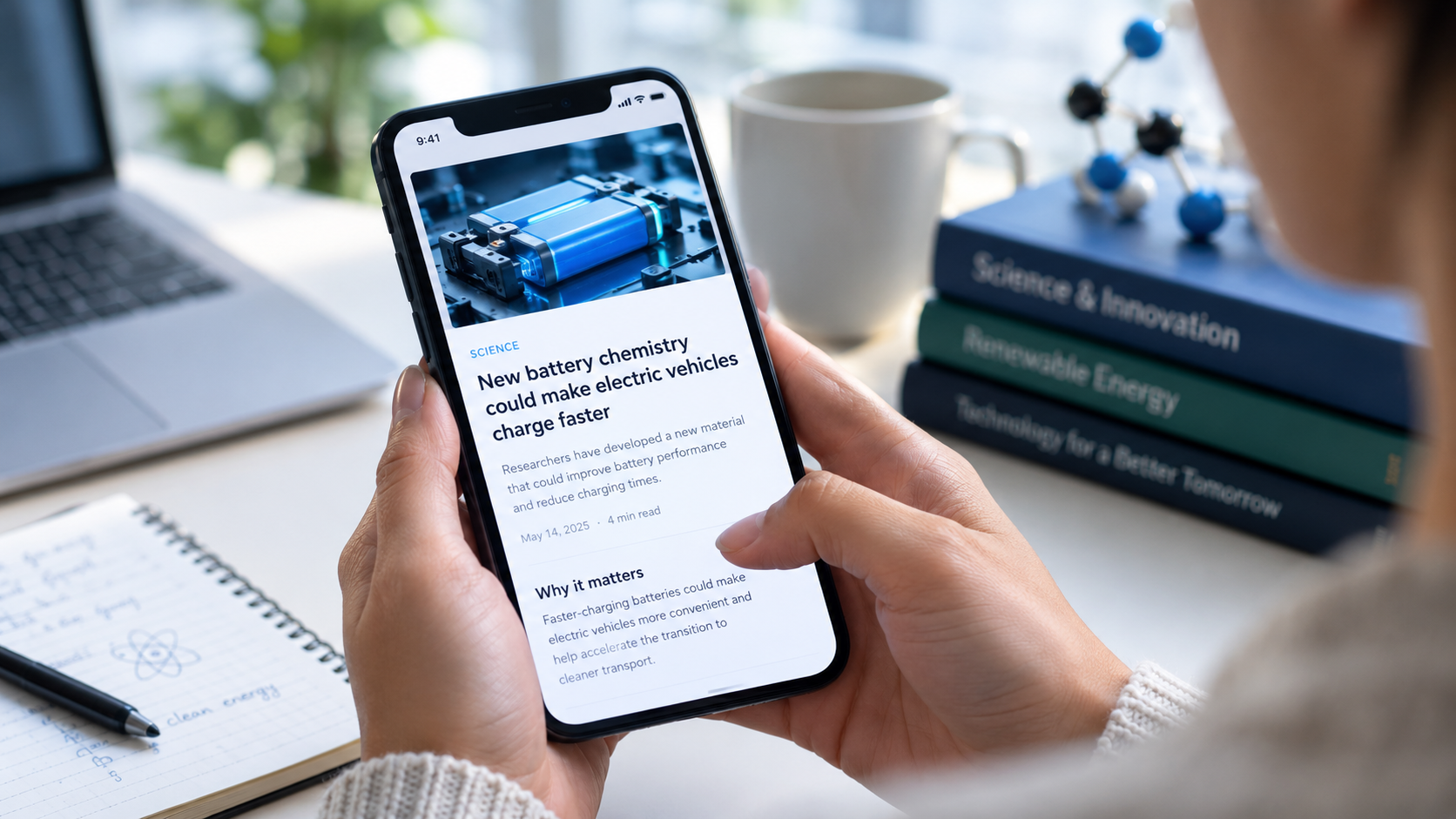
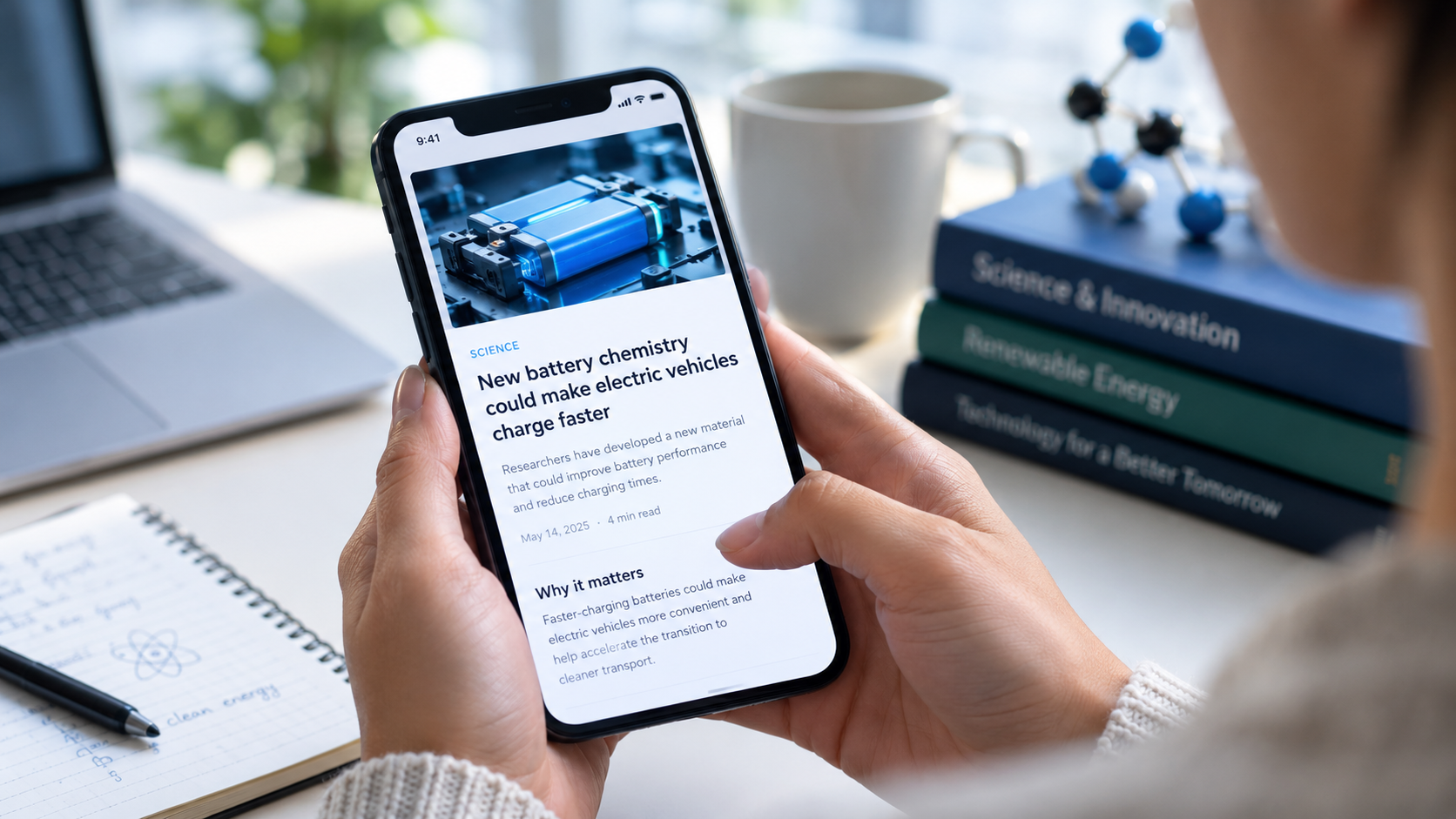
A person reading a science article about faster-charging electric vehicle batteries on a smartphone, with a laptop, notebook, and science books on a desk.

Science news often appears on the same device people use to check messages, watches videos, and troubleshoot technical problems. That’s why mobile presentation is part of the story and not just a publishing feature. A clear article about a new battery chemistry or telecommunications satellite may lose its audience because of excessive jargon, a buried lead, or text that’s difficult to read on a small screen.

This is why writers and editors need to present scientific information accurately without making it sound like a textbook explanation. A few well-chosen techniques (starting with an interesting fact, defining the key ideas in the process, and checking the page on a mobile device) can let the articles appeal to both readers wanting to learn something new.

Begin with the question readers want to answer

A successful science article deserves readers’ interest by providing them with an easy reason for them to care. Instead of beginning the article with a lengthy description of a research methodology, such article should explain what the question of the researchers is and why this question is important. The details should still be present in the article; it is only that they should be simple enough for the audience to understand.

Explain the practical connection without exaggeration

It often happens that the readers encounter science through technology: phones, cameras, health devices, GPS, etc. Linking a research-related result to these devices makes it simpler to understand. One should be careful not to pretend that the research outcome is good enough to be used in the devices.

Translate the complicated terms as early as possible

One needs to define the term as they encounter it. For instance, they explain what a semiconducting material is in the very moment of its introduction into the article.

Make Your Article Easy to Read on a Smartphone

Reading on a small screen requires clear organization.

Short paragraphs, clear headings, and a logical structure make an article easier to understand. This format is especially helpful when an article covers a complex scientific topic that involves explaining key concepts, research findings, limitations, and practical applications.

Headings should have informative content.

They should reflect the main topic rather than being very general. For example, “What the new sensor measures” provides more information than “The technology.” The sections of the text must be organized in the way that an article answers the questions: what it is, how it works, what evidence supports it, and what remains unknown. A person who has only a minute in spare time should be able to get the gist from the headings together with the first sentences since all information will be clear and easy to understand.

Use visual aids in a proper way.

A picture may show how it is built into a phone whereas the comparison picture may help one understand the difference between two types of display or cameras. Add a short caption explaining what the image is about. In particular, avoid using tiny text on the image; it may not be readable on a mobile device and screen readers may have problems interpreting it.

Make sure everything is accurate before publishing.

Good writing does not mean the research is of good quality. Unfortunately, science stories may confuse correlation with causation making it look like a result obtained from a small sample is applicable to everyone. If possible, read the original article, check the sample size and research methodology and look for the limitations. If something is preliminary, make sure to highlight it in the text.

Moreover, it is better to distinguish research findings from conclusions of the scientists. A research paper may contain the results obtained from the experiment but it cannot say how the results obtained may be used in real life.

In case the article is similar to another, get information from an independent source thus avoiding using press releases only.

Finding an Appropriate Venue for a Scientific Article.

Where something is published influences how the article is presented and who reads it. A technical journal, a science website, and a tech platform all target different types of audiences and have different expectations. Before making a pitch, read several articles published recently, and identify the typical article length and level of detail expected by each publication. Directories of science guest-posting sites can be helpful, but it’s important to evaluate each publication individually to determine whether it’s a good fit.

Independent writers should also take into account the practical aspects of finding clients and offering services. Osdire’s article on freelance marketing deliverables provides a broad overview of the freelance digital marketing landscape.

It has a lot of value for scientific authors because one of the most important lessons that can be drawn from it is that every project should be clearly defined. The scope should clearly specify whether the project involves only writing or additional tasks such as research and revisions.

Ensure Quality and Readability in the Process

It has to be mentioned that a successful process doesn’t have to be complicated. Begin by forming your explanation around one key question, check each technical statement made in the text against a reliable source, and review it on a smartphone screen. Remove unnecessary context that does not contribute to answering the question asked but leave disclaimers that reflect the information truthfully. Ask someone outside the field to identify passages that are difficult to understand.

Successful science writing treats readers as curious people instead of ignorant ones. Explain an idea, show its importance, and present gaps in knowledge claimed by researchers. The combination of a clear structure and statements presented above helps create articles that are easy to follow and trustworthy, even on mobile screens.

Frequently Asked Questions

How long should a mobile-friendly science article be?

There is no single ideal length. Use enough space to explain the evidence and its limits, then remove repetition. Clear headings and concise paragraphs matter more than hitting a particular word count.

Should science writers avoid technical terms?

No. Keep terms readers need to understand the subject, but define them when they first appear and use them consistently. Avoid unexplained jargon that does not add useful precision.

How can I tell whether a science claim is overstated?

Compare the claim with the original study’s methods, findings, and limitations. Be especially cautious when a small or early-stage study is described as proof of a broad effect or an imminent consumer technology.

What makes a science publication a good fit?

Look at its recent coverage, intended audience, editorial standards, and whether it publishes the kind of science you are proposing. A relevant subject and a clear match to the publication’s style are better signs than a large list of possible outlets.