How to Compare Three Offers


Business owner comparing software developer quotes and project proposalsBusiness owner comparing software developer quotes and project proposals
Dreamstime.com

If you run a business from home and you have asked three developers to quote on the same idea, you already know the uncomfortable part. The three documents in front of you do not agree on the price, the timeline or even what is being built, and you have no way to tell which one is right. You can judge a plumber by the last job they did in your kitchen. You cannot look at a line of code and know whether it is good. Comparing Software Developer Quotes helps you evaluate each proposal and choose the right developer for your business.

Most owners resolve this the only way they can: they pick the middle price, or the person who answered the phone fastest, or the one with the slickest website. Some of those choices turn out fine. The ones that do not tend to cost more than the whole budget, because the project has to be rescued or rebuilt. Carefully comparing Software Developer Quotes helps you look beyond price and avoid costly mistakes when choosing a developer.

There is a better way to read those three quotes, and it does not require learning to program. It requires knowing what a trustworthy proposal looks like, what to ask in the first meeting, and which answers should end the conversation. This is the method I would give a friend who was about to sign.

The Proposal That Says Yes to Everything

Start with the easiest red flag to spot, because it is the one I have seen most often in the proposals that clients bring us after a project has gone wrong. The agency agreed to everything. Every feature on the wish list is in the scope. Nobody asked why a feature was there, nobody suggested leaving something for later, nobody said “that will double the cost, are you sure?” The document reads like a receipt for the client’s own email. When comparing Software Developer Quotes, look for a developer who questions requirements and helps you prioritize features instead of simply agreeing to everything.

It feels good to receive. It is also the clearest sign that nobody on the other side has thought about your product yet. A team that has built things before knows that a first version with twenty features ships late, if at all, and that half of those features will be used by nobody. If they are not pushing back now, when it costs them nothing, they will not push back later, when it costs you money.

The opposite signal is worth as much. A developer who asks what problem the app solves, who questions a feature, who proposes a smaller first step, is doing the part of the job that matters most before any code is written. It can feel like resistance. It is usually the first piece of free advice you have received. When comparing Software Developer Quotes, prioritize developers who challenge assumptions and recommend practical solutions that fit your business goals and budget.

What a Proposal Worth Trusting Contains

Once you have set aside the documents that agree with everything, look for three things in the ones that remain. These are the parts of a proposal that I would want to see before I signed with anyone, and they are rarer than they should be.

  • A list of what is not included. Every proposal lists features. A good one also lists the assumptions and the exclusions: the app runs on one platform first, payments use a standard provider rather than a custom one, the content and the images come from you, the design has one revision round. Exclusions are where the surprises hide. If the document has none, the surprises are still there; they just have not been written down.
  • A first release that is actually defined. Beware the plan that describes the finished product in loving detail and the road to it in one line. The reverse is what you want: a concrete first version, with its scope and its date, and the later phases sketched as an outline. The first release is the only part anyone can commit to honestly. Everything after it depends on what you learn from real users.
  • The risks, written down. Two or three sentences on what is most likely to go wrong and what happens then. The third-party service that may change its pricing, the app store review that may bounce the first submission, the integration that depends on another vendor’s documentation. A proposal that admits risk is written by people who have hit those risks before. One that promises a smooth road has either not travelled it or does not plan to tell you when the road gets rough.

None of this needs technical knowledge to evaluate. You are reading for honesty and structure, and those show up in plain English.

The First Meeting: One Problem and One Uncomfortable Question

The first call is where most owners lose the advantage without knowing it. They arrive with a feature list, read it out, and ask for a price. The developer writes the list down and quotes on it. The one thing nobody has discussed is the business. When comparing Software Developer Quotes, make sure each developer understands your business goals, target users, and the problem you want the software to solve.

Do it the other way round. Bring the one problem the software has to solve and describe it the way you would to a friend: customers cannot book outside office hours, orders are copied by hand between two systems, the same five questions arrive by email every day. Then let the developer propose what to build. The proposals you get back will differ far more than quotes on a fixed list, and the differences will tell you who understood the problem. Comparing Software Developer Quotes becomes easier when each developer explains how their proposed solution addresses your specific business problem.

Then ask the uncomfortable question: what in this idea would you refuse to build, or cut from the first version? A team with experience will have an answer within seconds, usually a feature they have watched fail elsewhere. A team that says “we can build anything you want” has just told you how the project will go.

Ask one more, and listen for whether the answer comes from the person who will actually do the work or from someone whose job is to close the sale. What happens after launch? Who fixes the bug that appears on a Sunday, how is that paid for, and whose name is on the app store account, the domain and the hosting? If the answers are vague, the relationship ends on launch day, and the hardest part of owning software starts after that.

Ownership, Maintenance and the Month-Seven Problem

That last question deserves its own section, because it is the one I most wish clients asked before they signed rather than after. Three things should be settled in writing before a project starts.

  • Who owns what when it ends. The code, the designs, and every account the product depends on should belong to you from day one. The team gets access as a collaborator; you keep the keys. If the developer registers the accounts in their own name “to make it easier”, it will be easy right up to the day you part ways.
  • Who looks after it afterwards. Software keeps needing work after launch: operating system updates, security patches, the small fixes that real users surface. Agree who does that, how quickly, and on what terms, before launch, when you still have leverage.
  • Who will actually build it. Ask to meet the developers, not only the account manager. Ask how many other projects they run at the same time. The answer tells you how much of their attention your project will get in month seven, when the novelty has worn off on both sides.

Agencies that handle these questions well tend to raise them unprompted. If you have to drag the answers out, you have learned something too.

References, Portfolios and What They Can Prove

Every proposal arrives with a portfolio, and most owners glance at it without knowing what to look for. Here is a simple test that does not require technical skill: can you use the products? Screenshots prove that a design was made. A live app you can download, a website you can open, a client who will take a call, prove that something shipped and survived contact with users.

On references, be realistic. Most agencies, mine included, will put you in touch with a past client when asked, but very few prospects ask, so the offer is not always made first. Ask anyway. A ten-minute call with someone who went through the process a year ago is worth more than any case study, because they will tell you what the months after launch were like.

When you do get that call, do not ask whether they were happy. Ask what went wrong, how the team handled it, and whether the product is still running. Every project has a rough patch. The reference check is about how the agency behaves in one.

Comparing Three Quotes Without an Engineer

Now return to the three documents on your desk and compare them on the things you can actually judge, in this order.

  1. Scope and exclusions. Do all three describe the same product? Usually they do not. The cheapest quote is often cheaper because it quietly builds less, and that is only a problem if you did not notice.
  2. The first release. Which proposal names a concrete first version with a date? That is the one written by people who plan to be accountable for something.
  3. Risks and pushback. Which one told you something you did not want to hear? That is the one that treated you as a client rather than a lead.
  4. The people. Which one introduced the developers and answered the month-seven questions without hesitation?
  5. The price. Last, and only between the proposals that survived the first four. By now the spread is usually smaller than it looked, because you are comparing like with like.

If two proposals are close after that, choose the team you would rather have a difficult conversation with. You will have one at some point, and how it goes matters more than the headline number.

For owners who want to go deeper, there is a longer guide to vetting a development partner on the IvorySoft site that covers the discovery phase, the contract clauses that matter and how to read a proposal line by line. The method above is the short version, and it is enough to avoid the expensive mistakes.

Where to Start This Week

  • Write the one business problem in two sentences and send it to each developer before the call, instead of a feature list.
  • Ask every candidate what they would cut or refuse, and what happens after launch. Note who answers from experience.
  • Read each proposal for exclusions, a defined first release and written risks before you read the price.
  • Ask for one reference call, and use it to ask what went wrong.
  • Settle ownership of the code and the accounts in writing before any money changes hands.

You still will not be able to judge the code. You will not need to. The teams that write honest proposals, push back on bad ideas and plan past launch day are, almost without exception, the ones that write good code too. The signals are there in plain language, and they are yours to read.

AUTHOR BIO

Artemii Tkachuk

Artemii Tkachuk is the founder and CEO of IvorySoft, a software development agency that has built mobile, web and AI products for startups and small businesses since 2018. The company also builds and runs its own products, ThauRed and My Baby is Hero.

Find a Home-Based Business to Start-Up >>> Hundreds of Business Listings.
What to Know About China’s Top-Secret Spaceplane


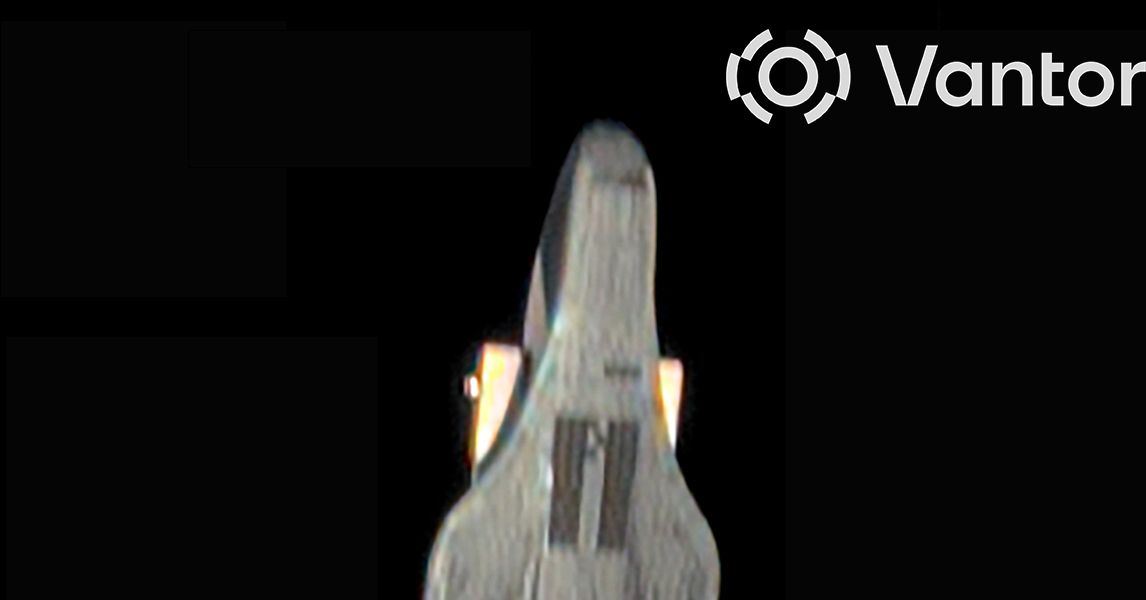
A winged Chinese spacecraft bearing a strong resemblance to the US military’s X-37B spaceplane was photographed in orbit by a passing US-owned commercial satellite in 2024, and we finally have the image.

The Chinese spaceplane has delta wings, payload bay doors, a dark heat shield, and a rear-mounted service module with power-generating solar arrays. In other words, the design of the winged ship is, to a great degree, a copy of the X-37B spaceplane flown by the US Space Force.

The photo was taken by a commercial imaging satellite owned by a company called Vantor, known as Maxar in 2024. Vantor is one of several companies that provide reconnaissance imagery of locations around the world to the US military and US intelligence agencies. The same Earth-imaging satellites can point their telescopes at objects in space.

Lower-resolution views of a Chinese spaceplane showing the vehicle’s general shape were publicly available before the Defense Intelligence Agency assessment. A US Space Force official revealed Maxar’s observation at a 2024 conference in South Korea, but the Pentagon did not release the full-resolution image to the public until Monday, when it appeared in an unclassified DIA assessment of threats to the United States in space.

Catch and Release

The DIA report doesn’t reveal much new about what the Chinese spaceplane does in orbit. China has launched four spaceplane missions since 2020, with durations of up to nine months. The fourth mission is in orbit today after launching in February. It is not publicly known whether China has one or more such spaceplanes in its inventory.

The Space Force has two X-37Bs flying in rotation, with the longest of their eight missions to date running two-and-a-half years from launch until landing. US officials have released photos of the X-37B vehicles, published information about their design and dimensions, and disclosed a handful of experiments they have carried into orbit. Most of the X-37B’s activities in space are classified.

Like the X-37B, China’s spaceplane lifts off inside the payload shroud of a conventional rocket, then operates as a satellite once in orbit. The spaceplane flies like a miniature unpiloted version of NASA’s Space Shuttle and reenters the atmosphere for an autonomous land runway landing at the end of each mission. Ground teams then refurbish it for another flight.

The “enhanced maneuverability” of spaceplanes makes them “more suitable for certain missions than traditional satellites,” the DIA said in its report. So far, the Chinese spaceplane has only flown in low-Earth orbit (LEO) at an altitude of a few hundred miles. One of the Space Force’s X-37B flights soared to an altitude of more than 24,000 miles before using aerobraking to set up for reentry and landing.

Reddit will switch to a ‘logged-in only experience’


Reddit will become a “logged-in only experience,” and the company plans to move fast, beginning testing soon in regions outside the US before flipping the switch globally.

The popular community website—home to a great many official and unofficial gaming message boards—lost one million search engine referrals per week on average in October, CEO Steve Huffman said on an investor call today.

AI in AutoCAD 2027: Drafting Workflows and Productivity


Repetitive geometry corrections, inconsistent drawing standards, and revision conflicts slow down CAD production, even when teams use mature software. AutoCAD 2027 introduces features that address selected drafting tasks. This article distinguishes AI-assisted functions from rule-based geometry cleanup and cloud-based collaboration tools, explaining how each addresses specific bottlenecks in CAD production workflows.

Why CAD Production Teams Are Rethinking Traditional Drafting Workflows

Drafting delays can accumulate through repeated corrections: a line that stops short of an adjoining element, a layer that conflicts with the project standard, or an external reference that breaks after a folder is renamed. The time required to resolve these issues depends on their frequency, the number of affected drawings, and the team’s review process.

Imported drawings may contain geometry defects, while standards checks can vary between reviewers when project rules are inconsistently documented or applied. Shared DWG files can also lead to editing conflicts when multiple contributors need access to the same geometry. AutoCAD’s newer functions address selected tasks within this process; input validation, revision control, and review capacity still need defined ownership.

Key AI and Automation Capabilities in AutoCAD 2027

Autodesk introduced AutoCAD 2027 and subsequently released the 2027.1 update, adding enhancements across several drafting workflows. These capabilities serve different purposes: Autodesk Assistant provides AI-assisted guidance, Geometry Cleanup applies configurable checks to identify and correct supported geometry defects, and Checkout and Connected References support collaborative editing and reference management. Graphics system improvements focus on visualization and performance rather than AI-driven drafting. The following sections examine how each capability functions, where it fits into production workflows, and what teams should verify before adoption.

Autodesk Assistant for CAD Standards Checking

Autodesk Assistant is an in-product assistant, currently in tech preview, that gives in-context guidance without pulling the drafter out of the drawing. One documented drafting use in AutoCAD 2027 is checking drawings against an organization’s CAD standards. A user uploads a reference file containing the organization’s CAD standards, then uses conversational prompts to check the open drawing against those standards. Autodesk describes the assistant’s standards-checking capabilities and its use of Model Context Protocol (MCP). Consult the release documentation for the supported interactions and availability in the relevant AutoCAD environment.

The 2027.1 update adds Proactive Assistance, which offers tips based on user actions, along with recommended starter prompts and selection-aware interactions with enhanced Count and Query. CAD managers can test whether the assistant identifies standard deviations before formal review, then compare its findings with those of their existing checking process. Because this is a tech preview, behavior and availability can change, so confirm what your subscription and region include before building a process around it. Review each finding against the applicable CAD standard before recording the drawing as compliant.

Geometry Cleanup for Drawing Quality

Geometry Cleanup scans selected objects, identifies common geometry issues such as gaps, overshoots, undershoots, and misaligned angles, and suggests targeted fixes. Autodesk documents the supported checks, object types, and tolerance controls in its Geometry Cleanup guidance.

Configure error types and tolerances according to the drawing category and the defects being checked. Tolerance settings determine which geometric deviations Geometry Cleanup flags for review, so thresholds must be validated against the intended geometry and drafting requirements. Test the configuration on representative drawings, particularly scanned or converted legacy files, where source quality may be inconsistent. Review proposed corrections individually, then rescan the geometry to verify the results. The tool’s checks apply only to supported geometry and do not establish design intent or certify compliance with engineering requirements.

The tool supports only selected 2D geometry in model space on the XY plane, including lines, polylines, arcs, and elliptical arcs. Blocks, hatches, objects with nonzero Z values, paper-space objects, and objects on locked or frozen layers are excluded. Review proposed fixes individually and rescan the selected geometry to verify the results.

Checkout for Collaborative Drawing Edits

Checkout allows multiple people to make controlled edits to the same DWG file when the drawing is stored in Forma Data Management. Instead of locking the whole drawing, a contributor checks out only the geometry to be modified, works in an isolated editing environment, and merges the changes back when ready. The AutoCAD 2027.1 update refines the workflow with an improved read-only mode for checkouts, automatic launch of the Trace palette, protection against checking out newly created unsaved objects, and better filtering of checked-out objects in Find and Replace.

Connected References and Connected Support Files

For drawings in supported cloud-managed projects, Connected References can identify certain moved or renamed external references and suggest path repairs through the Xref palette. Connected Support Files provide centralized management of supported project resources, including the additional resource types documented for AutoCAD 2027. Teams should continue checking references during QA, particularly in local or mixed environments.

Performance and Visualization Improvements

AutoCAD 2027 expands support for the Graphics System Framework (GSF) to improve performance and reliability in 3D workflows, including smoother navigation and support for Realistic visual styles, materials, and lighting. Test responsiveness on representative project files and hardware before estimating the effect on production work. Autodesk also documents a full-save workflow for SAVEAS in the 2027.1 update. Compare the resulting file sizes and save times against your current workflow before estimating any production benefit.

Pilot each feature on representative drawings before adopting it in production. Validate its documented technical capabilities separately from productivity gains measured through your team’s own workflow tests.

How These Capabilities Affect Everyday CAD Workflows

The following example shows how a CAD manager could incorporate AutoCAD 2027 capabilities into a drawing production cycle, from input validation to final release. Adapt the order to the project’s review gates and collaboration setup.

A practical production sequence for a drawing package:

  1. Input validation: Confirm source files, references, and the project CAD standard before drafting begins.
  2. Drafting with Checkout: Define edit zones, assign ownership, and establish how contributors’ changes will be reviewed before the drawing is released.
  3. Geometry Cleanup: Scan selected objects, review each proposed fix against the agreed tolerance, and record what changed.
  4. Standards check: Review the assistant’s findings against the project CAD standard and record which issues require correction.
  5. Human review: A reviewer checks layers, annotations, dimensions, and design intent, then approves or returns the sheet.
  6. Delivery: Confirm that references resolve, then issue the approved deliverable.

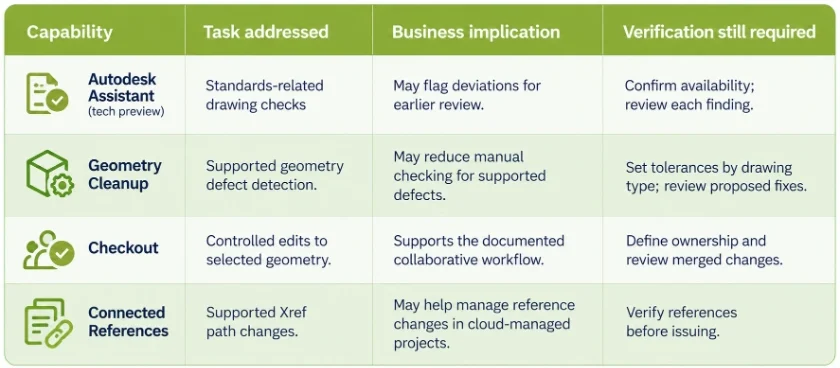
The table below identifies each feature’s production task and the checks required before the resulting drawing is released.

How each capability maps to a production task:

How to Measure CAD Drafting Productivity and Drawing Quality

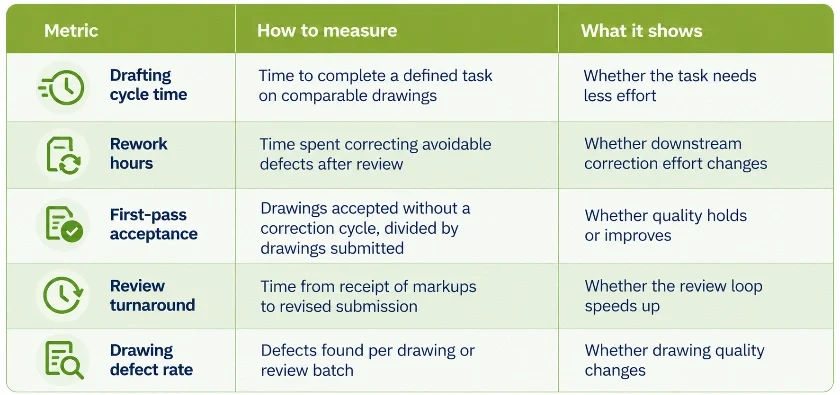
Measure the effect of a workflow change using comparable drawings, consistent acceptance criteria, and a defined review period. The following metrics can help identify changes in drafting effort, rework, and drawing quality.

Five metrics give a workable baseline:

Record the number, type, and complexity of drawings in each sample, along with correction time and review criteria. Keep the acceptance rules consistent and report the sample size with the results. A CAD manager could compare manual cleanup with Geometry Cleanup on comparable sets of converted drawings, then assess cycle time and first-pass acceptance. Report findings for the tested workflow without generalizing them to other teams or project types.

Expand only the functions that demonstrate reduced correction effort or improved first-pass acceptance without compromising drawing quality. Compare results across equivalent drawing sets, report sample sizes, and account for differences in drawing complexity to determine whether the measured gains justify broader adoption.

CAD Review Responsibilities That Remain with Your Team

AI assistance and automated checks do not determine engineering design intent or replace professional judgment. Assign a named reviewer responsibility for interpreting client-specific CAD standards, approving exceptions, verifying drawing and reference integrity, and authorizing final releases. Before wider adoption, test scripts, plug-ins, and custom support files separately in the AutoCAD 2027 environment to confirm compatibility with existing workflows.

When Should Engineering Teams Consider External CAD Drafting Support?

Software improvements may reduce effort on selected drafting tasks, but they do not remove capacity constraints across the entire production process. When incoming work exceeds available drafting hours, teams need to assess backlog, staffing, priorities, and delivery commitments.

Conditions that may justify external drafting capacity:

  • Project volume exceeds in-house drafting capacity during peaks.
  • A backlog of drawings is delaying issue dates.
  • CAD conversion or drawing updates need dedicated production resources.
  • Internal engineers spend design time on repetitive documentation.

IndiaCADworks provides AutoCAD drafting services that add capacity under your CAD standards, layer conventions, and review rounds, while your team keeps control of priorities and approvals. Our AI-assisted drafting steps are reviewed by experienced CAD professionals before delivery, and 2D drafting services follow the same standards-based review. 

Need Additional CAD Drafting Capacity?

IndiaCADworks provides AutoCAD drafting services and engineering drafting support for teams managing drawing backlogs, conversion work, and fluctuating project volumes.

Share sample drawing types, expected monthly volume, CAD standards, turnaround targets, and approval checkpoints so IndiaCADworks can assess a scoped drafting engagement.

Discuss Your CAD Project

Frequently Asked Questions

AutoCAD 2027 includes standards-related assistance and Geometry Cleanup, as well as collaboration and reference management features. Checkout and Connected References address drawing coordination, while Autodesk Assistant and Geometry Cleanup address selected checking and correction tasks.

The AutoCAD 2027 tech preview supports standards-related checks using a reference file and conversational prompts. Review the findings against the applicable project standard before approving the drawing.

Geometry Cleanup identifies supported issues such as gaps, overshoots, undershoots, and misaligned angles, then suggests corrections. Review the proposed changes against drawing tolerances and engineering requirements.

Checkout lets contributors edit selected geometry in supported shared DWG workflows stored in Forma Data Management. Define edit ownership and review merged changes before releasing the drawing.

No. Automated checks cover supported geometry defects and standards-related findings. CAD professionals must still assess design intent and approve the final drawing.

Compare drafting cycle time, rework hours, first-pass acceptance, review turnaround, and defect rate across comparable drawing sets. Keep acceptance criteria consistent and report the sample size so the results can be interpreted in context.

Consider outsourced CAD drafting when peak workloads exceed internal capacity, backlogs threaten issue dates, or conversion work requires dedicated production resources. Assess the provider’s ability to follow your CAD standards, review process, and delivery requirements.

Author Bio

Akhil Krishnan B


Akhil Krishnan B

Akhil Krishnan B focuses on engineering workflows, operational processes, and service delivery models. With over 7 years of experience, he analyzes execution gaps that impact project outcomes and creates content that reflects real workflow structures, documentation standards, and delivery requirements.


Where To Find All Serpent Houses In Phantom Blade Zero


Are you looking for the Serpent Houses in Phantom Blade Zero? It’s imperative that you visit these locations while exploring, as doing so allows you to progress to the late-game stages of the campaign. We’ve got all the details for you in this article, but be ready for a few minor spoilers in the sections below.

Pangzhen: Green Serpent House

The Green Serpent House is practically unmissable, since you head there while tackling main quest objectives in Pangzhen. The apprentice, Xie Xaorong, unlocks the medicine upgrade function at bells. He tells you that the ornate snake door is locked, as it’s missing the eyes, tongue, and fang.

This location also nets you the following goodies:

  • Green Serpent Brew (medicine)
  • Serpent Gall: Green (fragment)
This fella has a few tips for ya.

Crimson Forest: Red Serpent House

This Phantom Blade Zero Serpent House will likely be the first that you stumble upon in the campaign. It’s due north of the Thieves’ Camp, but you’ll only be able to enter it once you have the Flaming Mane. The Phantom Edge comes from the Lion Dance Grandmaster boss in northwest Pangzhen, so just do the main quest objectives there until you obtain it.

The Flaming Mane is used to burn the brambles in this area. Once you’re inside, pick up the loot, including:

  • Red Serpent Tongue (quest item)
  • Loong Emblem: Yin (quest item)
  • Serpent Rattle: Red (fragment)
Revisit the Crimson Forest to enter the Red Serpent House.

Village of Lu: Black Serpent House

Next, use the Flaming Mane to torch the brambles in the Village of Lu and grab the following in the den:

  • Black Serpent Fang (quest item)
  • Loong Emblem: Yang (quest item)
  • Serpent Venom Sac: Black (fragment)
  • Reinforced Bowstring (Soul Temper – Feather Bow)
Return to the Village of Lu for the Black Serpent House.

Meigu Lake: White Serpent House

The Lóng Emblems that you’ve collected are needed for the Serpent House in Phantom Blade Zero. The den is on an island at the eastern part of the lake, and the emblems can unlock the main area. You’ll find the following items there:

  • Treasure Basin (accessory) – Inside the small building to the right.
  • Sha-Chi Amber Fragment (upgrade) – Go to the back of said building.
  • Serpent Slough: White (fragment)
  • Sundering Dual Axes (dual-wield weapon) – Dropped by Heartpiercer, Elite Shadow Warden.
  • White Serpent Eye (quest item)
  • 2x Leng Tu’s Memory Flowers

Note: The four fragments that you’ve collected are automatically combined to create the Serpent’s Memory, a Soul Temper material for the White Serpent & Crimson Viper.

Sail across Meigu Lake and gain access to the White Serpent House.

The Serpent Door and the Mirage Estate – Point of no return

You can place the three quest items–Red Serpent Tongue, Black Serpent Fang, and White Serpent Eye–in the ornate door in Pangzhen’s Green Serpent House. Doing so opens a hidden passageway that leads to the Mirage Estate.

To be clear, this is a point of no return. When you go through the passageway, you’ll receive a warning telling you that you still have “unfinished business.” If you proceed further, you’ll arrive at the Mirage Estate, though it’s possible that several quests will also fail abruptly. That’s why it’s important to tackle key objectives before you proceed.

In any case, that does it for our guide on where to find all Serpent Houses in Phantom Blade Zero. At this stage, we encourage you to thoroughly explore other regions. You can gather more main weapons and their respective Soul Temper materials.


Join Soul as he faces numerous threats in the Wulin and be sure to check out more tips in our Phantom Blade Zero guides hub.

Hacker Group Claims UNM Hospital Cyberattack, Then Apologizes and Offers Patients $2,500


On Monday, University of New Mexico Health Sciences Center information technology teams identified a cybersecurity threat around 11 a.m. and began containment efforts. From 12:30 to 2:30 p.m., the health system temporarily diverted ambulance traffic to other hospitals in Albuquerque and Santa Fe, while outpatient surgeries and appointments were suspended for the remainder of the day as teams worked to protect the network. Notably, UNM Hospital is New Mexico’s only Level I trauma center.

In an update provided by the UNM Health Sciences Center the following afternoon, officials said critical electronic systems were back online. “All UNM Health hospitals are fully open, ambulance traffic has returned to normal operations, and clinics have resumed regularly scheduled appointments and procedures,” the update stated. “Their assessment determined that the event affected some end-user devices but did not penetrate core systems or servers. Teams worked with external partners to secure the network and notified state and federal law enforcement.”

Classes at the UNM School of Medicine, College of Nursing, College of Pharmacy, and College of Population Health remained canceled on Tuesday, and nonessential Health Sciences Center employees were asked to remain home. A later update added, “Classes and research activities at the UNM Health Sciences Center resumed Wednesday and clinical operations across all UNM Health facilities are fully functional.”

The incident remains under criminal investigation, which may have limited what the university has shared publicly. UNM has not described the event as a ransomware attack.

BYOD Claims Responsibility and Offers an Apology

While all of this was going on, a hacker group called BYOD also listed the University of New Mexico on its data-leak site, which operates as a Tor hidden service. The post claimed 36,000 machines were compromised across the main campus and the hospital sector, along with two Oracle databases, Oracle HR and Payroll systems, student records, internal emails, electronic health record rosters, and other data. Additionally, it claimed to have every student and employee’s personally identifiable information, including Social Security numbers.

“This is your entire network and infrastructure compromised, the entire university COMPLETELY,” the listing said, according to a republication via Dark Web Informer. “Anyways, you know where to find us (contact tab). We will take you down when communication has been established between our team and yours.”

On Tuesday, BYOD published an update offering free decryption keys for remaining locked devices in the hospital sector only. The full message read:

“We are offering the decryption key for the remaining of locked devices for free (ONLY for the hospital sector) we did not know that it was running machines related to assisting patients in real-time, (we would keep it locked if it was appointments, patient information + research data only), we are still going to keep the data, but we will provide the decryption key for the hospital sector only. Feel free to contact us on Session. To any patient that was affected, please provide us proof, and we will pay you up to $2500 each for the inconvenience. We are sorry once again. We have morals and we have a heart, we are not villains, but we will still continue to hold companies responsible for bad security leading to the compromise of any customer data. That’s the whole reason why we came about and we plan to keep it that way.”

It is unclear whether BYOD provided any decryption assistance that contributed to the restoration of systems at the UNM Health Sciences Center. The UNM Health Sciences Center did not immediately respond to a request for comment on that point from Gizmodo at the time of publication. The university’s public statements have not confirmed the claims from BYOD, so the full extent of those claims remains unverified at this time.

The closest thing to a public statement regarding BYOD was included in a Wednesday update from UNM, which stated, “Following a cybersecurity incident, those responsible may attempt to exploit public concern through additional scams, including false offers of payments or compensation.”

The statement also claimed, “UNM did not make concessions with any group behind the threat.”

What is BYOD?

BYOD is a relatively new ransomware group that emerged roughly a month ago. According to BleepingComputer, the group’s leak site lists six victims so far, including T-Mobile, and it has already published data it claims to have stolen from three of them. The group has described its activity as a form of “pentesting” intended to expose vulnerabilities and hold data controllers accountable.

One of its earlier targets was Trump Mobile, where the group posted a database of what it claimed was 3,615 customer records. Reporters and security researchers later verified parts of the data as authentic. The leaked file contained real names, email addresses, phone numbers, physical addresses, and order details. According to International Cyber Digest, records associated with Trump Organization Chief Information Officer Eric Brunnett and U.S. Congressman Mike Kelly were included in the data. BYOD alleged the breach occurred after malware infected a device at partner company Liberty Mobile, and claimed Trump Mobile responded by saying it had no security team to handle the incident.

Public apologies and offers of free decryption keys from ransomware groups are uncommon, but they’re not completely unprecedented. In January 2023, the LockBit group formally apologized for an attack on Toronto’s Hospital for Sick Children after an affiliate violated internal rules against targeting medical institutions. LockBit stated it had blocked the affiliate and released a free decryptor. The hospital later said it had not paid a ransom and was restoring systems from backups.

Other similar instances of this kind of activity include Conti’s handling of Ireland’s Health Service Executive attack and the release of a master key by TeslaCrypt.


Virtual Staging: How It Works, What It Costs, and When It Beats Physical Staging


What is virtual staging, and how does it benefit real estate businesses? In the competitive world of the real estate market, the first impression lasts when it comes to browsing online. It can make or break the deal when deciding which homes will be the first to visit among the lists. Having a listing of photos is considered as one of the most powerful marketing tools that can be utilized by real estate agents and sellers. Make your property listing be more appealing by connecting with vetted professionals in Cad Crowd now. 

Virtual staging

Where empty rooms can be difficult to visualize, may appear small to the naked eye, and it can be expensive to physically furnish an empty property, virtual staging for architecture services come in. It is the process of digitally transforming and furnishing photographs of the real and existing rooms with the help of editing software and 3D furniture models. Virtual staging makes it possible for the professionals to have a realistic feature, decor, lighting enhancements that could make the empty home feel alive. When it is correctly done, it makes it easier for the buyers to have an outlook and vision of how the space can be used without the need of having the real property into the property.

However, it should be known that virtual staging is not totally used as a replacement for the traditional staging in any circumstances. Understanding how it works, what it costs, and when to properly use it provides the opportunity to help the sellers make smart decisions when it comes to marketing. Rather than having the physical appliances such sofas, tables, beds, artworks, rugs, and lamps into the room, the 3D designers are able to put them into photographs while integrating the works of the camera perspective, room dimensions, natural lighting, shadows, furniture scale, and lastly with the interior style. The result of it is an image that appears to be professionally decorated despite the actual room being empty. 

RELATED: Freelance 3D Virtual Staging Vs. Traditional Staging: Full Breakdown

Virtual staging vs. full CGI

Both of these services are usually perceived as confusing. 

Virtual staging means working with the real photographs of the existing properties. An example of this is when a vacant living room is photographed; the furniture that is desired to be seen in the space can be digitally added to create the vision. A  Full CGI rendering would depict making an entire environment in the digital world. Commonly, it can be applied to homes that have not been built, new developments, architectural visualization, and with pre-construction marketing. Instead of merely editing photographs, every wall, floor, and furniture piece is generated in 3D. 

Why virtual staging has become so popular

A lot of homebuyers opt to browse and search online for their needs, or they sometimes look online for inspiration for their homes. Professionally staged photos stand out right away when buyers quickly peruse dozens of listings. 3D visualization services help the buyers when it comes to understanding the room proportions, imagining the placement of the furniture, visualizing the lifestyle possibilities, seeing the function of the awkward spaces, and having an emotional connection with the property. When the furniture is not present in the room, a lot of rooms could appear smaller than they actually are. Thus, proper staging allows visual reference points that could make it easier to comprehend and understand. 

How does virtual staging work?

Step 1: Photograph the Empty Property

Having a high quality virtual staging can make the photographs appealing. The professionals could capture the living rooms, bedrooms, kitchens, dining rooms, home offices, and the outdoor spaces. When the images are done correctly, it could result in better images. The use of proper lighting, camera angles, and high resolution also adds up to making the virtual furniture appear to be more realistic. 

Step 2: Analyze the Space

Every 3D architectural rendering designer studies the room carefully. The designers tend to identify every camera angle, floor dimensions, ceiling height, lighting direction, window placements, and the architectural style to help them plan on what’s the best move to apply. With this information, it guarantees that the furniture is placed naturally. 

RELATED: Virtual Staging Services: The Important Benefits for Architecture and Real Estate Companies

Step 3: Add 3D furniture

The professional designers have the freedom in inserting realistic furniture models. They carefully check if it matches the perspectives, furniture scales, material textures, color palette, lighting, shadows, and reflections. The goal of the virtual staging is to have every piece appear as it was physically present in the room, making it more lively, attractive, and welcoming for the buyers. 

Step 4: Post-Production

It would be easier to attain realism when final edits are made and generated in a way that is flawless.  It may include shadow refinement, color correction, reflection adjustments, brightness balancing, object cleanup, and enhancements of minor lighting. Having to apply quality control with 3D architectural visualizations helps prevent editing errors or furniture that looks unrealistic in the photographs, making it unusable. 

3D visualization services

Virtual staging costs

In every service, pricing could depend on what a client would want, including factors such as image quality, revisions, room complexity, and provision of the service.

Service Typical Cost
Professional Virtual Staging It would cost about $30-$200 per image
AI Virtual Staging Tools Approximately it would cost for about  $12–$39 per image (or subscription equivalent)
Physical Home Staging The cost will be $1,500–$5,000+ for the first month, and additional ongoing monthly furniture rental and for other related costs

The professional services typically consist of the design consultations, furniture style selection, high quality 3D assets, revision rounds, and manual editing that could provide a much better realism. The AI tools can be inexpensive, but usually offer fewer customization options and have a less reliable output. 

RELATED: How to Create a Virtual Tour of Homes with 3D Rendering Services

Turnaround time

An advantage of using virtual staging is the speed and efficiency of doing the tasks. 

Service Typical Turnaround
Virtual Staging 24-72  hours
Physical Staging 7-14 days

The physical staging would typically require scheduling, styling, removal after the scale, moving crews, and the delivery of the furniture. On the other hand, with 3D rendering services and virtual staging eliminates almost all of the logistical challenges that could hinder the overall process of the product. 

Why is virtual staging delivering better ROI?

It is not just popular because it is widely used, is known as a more economical choice, and can provide the client with an excellent return on investment. Reports in industry have shown that the staged homes do attract the interest of the buyers, which leads to selling faster, compared to upstaged homes. However, results may vary per market, and with the help of good presentations, it can improve the engagement, which in turn, will result in having more clients. 

An example of this is that when applying physical staging, it would cost thousands, but with virtual staging, it would cost less for the overall listing. Comparing these two stages, the return on the lower-cost option is significantly higher as a small initial investment is needed. Yet, it does not always mean that virtual staging is the better option. It is better to depend on the property, the selling strategy, and the target buyers to know what is best to use. 

When does virtual staging beat physical staging?

It is not always the best option to hire an architectural visualization designer for virtual staging, but when a situation arises, it can be a great help, especially as it provides speed, flexibility, and affordability, compared to traditional physical staging. It is one of the best marketing solutions for residential properties. 

RELATED: How Virtual Staging is Shaping the Future of 3D Interior Design for Home Builders

Vacant homes

It is hard to figure out an empty and vacant room. An empty room may feel less inviting, and the buyers have a hard time seeing it.  The use of the virtual furniture aids in improving the overall space, as one can visualize what is the best layout of the furniture to put. The empty rooms can be transformed into one of the welcoming spaces. 

Budget conscious sellers

Rather than having a costly furniture rental, the sellers could easily market the properties without spending a lot. Having virtual staging applied in the works can be one of the smartest options for starter homes, mid-priced listings, and rental properties. 

Remote cost

Some of the buyers relocate from other places. They browse the place online, where the first impressions take place. 

Easy updates and design flexibility 

Virtual staging makes it easier for the 3D architecture designer to modify the styles, colors, and room layouts without the need of moving a piece of furniture inside the room. The sellers can change the layout depending on the target audience. An example of this is changing the layout from the modern style to a farm house, it can be updated more easily than in the physically staged room. 

Virtual staging beats traditional physical staging when it comes to affordability, speed, and flexibility, as it has a top priority in online marketing. This is the best option to utilize for many residential properties, as it balances the cost and the marketing impact. 

RELATED: The Ultimate Guide to Virtual Staging for Real Estate and Architecture Companies

When physical staging still wins?

Physical staging is still the best choice despite its own limitations. Buyers tend to visit the location of the property in person as they would want to see the place and experience it. The visitors tend to appreciate the layouts of the furniture, room layout, and the atmosphere of the place, which a virtual staging cannot offer. Physical Staging helps in creating the overall experience during tours or visits. It would help in envisioning what it would be like to live in the place. It also helps the buyers easily understand the proportion of the rooms, as it can impress them during the visit. 

The hybrid approach: the best of both worlds

With ongoing advancements in architectural design services, a lot of experienced real estate professionals use both of the methods and integrate them. An example of this is to physically stage the main living room, dining area, and virtually stage the secondary bedrooms, home office, and the other rooms. By utilizing these strategies, it can reduce costs while still having the experience of the buyers in the room. It is best since it offers an effective balance between the budget, speed, and the quality of the presentation. The hybrid approach recognizes the approach of the virtual and physical staging as a complementary strategy. Without spending a lot, the marketing can still happen, making the properties stand out without having to fully furnish the room. 

3D interior rendering services 4

AI virtual staging versus professional virtual staging

The use of artificial intelligence makes virtual staging faster and more accessible compared to before. Yet, it could generate AI images and professionally designed virtual staging that are not identical to it. 

AI virtual staging professional virtual staging
Lower Cost Higher Quality
Very Fast generation Manual Attention to detail
Limited furniture Control Custom furniture selection
May produce unrealistic proportions Accurate scale and perspective
Fewer revision options Multiple revision rounds available
Can struggle with complex rooms Better handling of difficult layouts
Ideal for large volumes Ideal for premium listings

The use of artificial intelligence is helpful as it can offer speed, and it is affordable to use, especially when there are many staging images that should be produced at once. If you’re keen on checking precision, consistency, and polished marketing images, hiring a professional 3D architectural visualization designer is still the better option.

RELATED: How 3D Architectural Visualization Helps Companies Advertise Unfinished Projects

Ethical considerations and disclosure

It should be understood that the goal of having virtual staging is to improve the presentation and not to mislead buyers. It is important to be responsible for clearly labeling the visually staged photos, avoiding editing that could alter the structure of the property; it should also be noted that defects or damages should not be hidden, and ensure that the furniture is scaled realistically. 

There are rules in the market that should be followed, such as the Multiple Listing Services (MLS) regulations, some may demand listing images that have been digitally altered to be exposed. Before publishing the virtually staged images, the real estate experts and professionals should review the applicable advertising regulations and local MLS guidelines. It is crucial to be transparent in many ways, as it can prevent misunderstandings and build trust with the buyers. 

Tips for getting the best results for virtual staging 

Having the right professionals and tools can help bring a project that is high quality. To have the best results, start with professional real estate photography as it could enhance the images, have a furniture style that could best match the architecture of the home, have realistic designs rather than having complex ones that are hard to achieve, and does not feel authentic. Build a consistent design across all the rooms, and request for revisions if the furniture scale or the hues are highly unnatural and do not belong to the place, as well as disclose the images when it is virtually staged. Even with these small changes, it could have a significant effect when it is collectively made, as it can also boost credibility and effectiveness in listing photos. 

Is virtual staging worth it? 

Some would agree, some would not. This would depend on the purpose and the goal. Virtual staging from an expert interior rendering designer does offer an affordable way to have the empty spaces transform into inviting, well designed and planned interiors, which can engage the buyers in visualizing their potential homes.  On the other hand, the physical staging offers its advantages, especially in the world of the luxury properties, open houses, and events when the buyers want to visit their home in person. It would still be dependant on the project’s budget, property type, and the goal in choosing the best stage to use. 

RELATED: How to Choose the Best Freelance Architecture Visualization Services and Designers

Working with the professional virtual staging experts

A high quality virtual staging would require more than a simple digital furniture present in a room. It should have a realistic perspective where it could inspire the buyers to choose it. Cad Crowd allows partners with experienced professional freelance 3D design experts who can virtually stage the photos according to the goal and purpose of the project. It can offer a personalized collaboration that could integrate with the details of the images, as it aligns with the marketing goals, making it represent the property accurately. 

Using Cad Crowd makes it easy to have an output that is associated with the needs of the projects. Whether choosing an AI assisted staging, or a professional virtual staging, or the hybrid ones, it is important to apply the value of transparency and accuracy in providing a quality output. This could help in making the buyers connect more with the property while still trusting the overall process. 

How Cad Crowd can help

The use of virtual staging has become widely known in modern real estate. It is one of the cost effective marketing tools that could help enhance the images, listings, and portfolios. The agents and the sellers can highlight a home’s potential without incurring the costs and hassles of moving actual furniture by digitally furnishing real estate photos. While physical staging continues to offer unparalleled impact during in-person showings, it is an appealing option for many listings due to its quicker turnaround times, cheaper costs, and powerful online presentation. For many properties, the best overall outcomes are obtained by carefully combining the two methods. Find the best freelancer for the job with Cad Crowd to bring your property photos to life. Contact us for a free quote.

author avatar

MacKenzie Brown is the founder and CEO of Cad Crowd. With over 18 years of experience in launching and scaling platforms specializing in CAD services, product design, manufacturing, hardware, and software development, MacKenzie is a recognized authority in the engineering industry. Under his leadership, Cad Crowd serves esteemed clients like NASA, JPL, the U.S. Navy, and Fortune 500 companies, empowering innovators with access to high-quality design and engineering talent.

Connect with me: LinkedIn ✦ X ✦ Cad Crowd

GTA 6’s Police Will Hunt You Down with Dogs


With less than a month to go until its release, fans have learned a fair amount about Grand Theft Auto 6, and it still seems like they’ve only gotten to know a small portion of what’s coming in this gargantuan game. A recent interview unveiled interesting facts about improved police response, NPC reactions, a dynamic weather system, and realistic public transportation. As more details are revealed, fans are continuously blown away by Rockstar’s attention to the small things in the game.

Rockstar has been working on GTA 6 for many years, allowing them to reach a perhaps unprecedented level of detail. Leonida is a hyperrealistic world with intricate, interconnected systems that regulate the lives of its digital inhabitants. In GTA 6, committing crimes isn’t only about going guns-blazing. Players will have to plan ahead so they don’t find themselves in a bad situation. And if Jason and Lucia end up attracting too much attention from law enforcement, the police will display new methods of arrest.

New GTA 6 exclusive shows police dogs and realistic bus routes

IMG_1128
GTA 6 characters Lucia Caminos and Jason Duval
Rockstar Games

In an exclusive report, Edge Magazine sat down with Rockstar North co-studio head Rob Nelson, and witnessed how much harder it will be to escape the police’s grasp in GTA 6. Not only are the cops able to identify you based on your last sighting (especially if you’re spotted by CCTV), but they can also find you easily thanks to car trackers and NPC reports. If you’re spotted, then be prepared to face not only human officers but also the K9 unit, which the police will sic on criminals.

In the gameplay witnessed by Edge’s reporter, Jason and Lucia are on the run following a motorcycle crash after a robbery. A K9 unit quickly joins the pursuit, and one of the Alsatians jumps on Jason, pinning him on the ground. So, if you have a hard time shooting dogs in a game, get ready to spend a lot of time in jail in GTA 6.

Cops aren’t the only problem when committing crimes in Grand Theft Auto 6. Each NPC has distinct traits and will react differently to Jason and Lucia’s actions. While some are more inclined to back away, others may attack them — whether they’re a victim or a passerby. Therefore, players will also have to pay attention to NPCs that might try to play the hero, as not all of them will cower in fear.

Response to crime is just one of the many systems that have been taken to the next level in Grand Theft Auto 6. Public transportation in Leonida is also impressively realistic, as both the bus and train have their own routes and timetables. Phil Hooker, head of development, has put a lot of hours into making sure that these systems are working as intended — perhaps even better than in real life. “I’m obsessed with making sure they always turn up,” Hooker told Edge.

It’s not all about experiencing the chaos of Leonida; players can sit back on the bus as they wait to arrive at their stop. The bus ride is the perfect opportunity to relax and watch the clouds. GTA 6‘s dynamic weather system is a massive improvement over GTA 5: cloud systems move independently and are shaped by wind, humidity, fog, time of day, and season.​

Continuity and trust let Rockstar build its biggest project

Jason and Lucia from GTA 6 are depicted holding beers while covered in mud. Image: Rockstar Games

Grand Theft Auto 6 is a major success without being out yet, in large part thanks to Rockstar’s incredible teamwork. Many of its developers have worked together for decades and can see how they fit into such an enormous project without being explicitly told what to do. Each team could make significant progress on their areas without waiting for instructions from above. As Rob Nelson puts it, “The teams individually had a strong idea of what they wanted to evolve. It didn’t need to come from us saying, ‘We need to do this’, or ‘We need to do that’.”

To make GTA 6, it was crucial for Rockstar to guarantee continuity and trust, learning from previous titles and retaining valued team members. This is what has allowed for employees such as Hooker to look at the final product and say, “We’ve made what we wanted to make.”

Tune GitHub Copilot Inline Suggestions with Configurable Eagerness


Choose how proactively Copilot offers inline suggestions.

A helpful suggestion at the wrong moment can still feel like an interruption. When you’re completing a familiar pattern, you may want Copilot to anticipate several changes ahead. When working through delicate logic, you may prefer Copilot to scope its changes to the statement at hand and leave the next decision to you.

Community feedback about inline suggestions made both preferences clear: some developers wanted fewer suggestions, while others wanted Copilot to do more. No single default could satisfy everyone. In earlier posts about training the 3-in-1 inline suggestions model covering Completions, NES, and Long-Distance NES (part one, part two), we explained how developer feedback helped us improve the default experience. This strong default is a great starting point, but developers differ in how much assistance they prefer. We wanted to let them tailor their experience to their own preferences.

Configurable eagerness gives developers more control over how proactively Copilot offers inline suggestions. We trained the inline suggestions model to support three modes: low, medium, and high eagerness. In this post, we’ll explain how we defined and trained those behaviors, what our first approach taught us, and how on-policy distillation (OPD) and reinforcement learning (RL) made the feature easier to carry forward to future models.

Introducing configurable eagerness

We define eagerness along two dimensions: how often the model offers a suggestion and the size of each proposed edit.

Eagerness setting Intended behavior
Low Offer fewer suggestions and favor smaller, more conservative edits.
Medium Provide the current ‘default’ level of assistance.
High Offer suggestions more proactively, including larger edits when appropriate.

These settings guide how Copilot behaves rather than imposing strict limits on suggestion timing or size. Low eagerness still offers complete, useful suggestions; it’s simply more conservative. High eagerness may propose more and larger suggestions, but only when that work is relevant to the user’s current task.

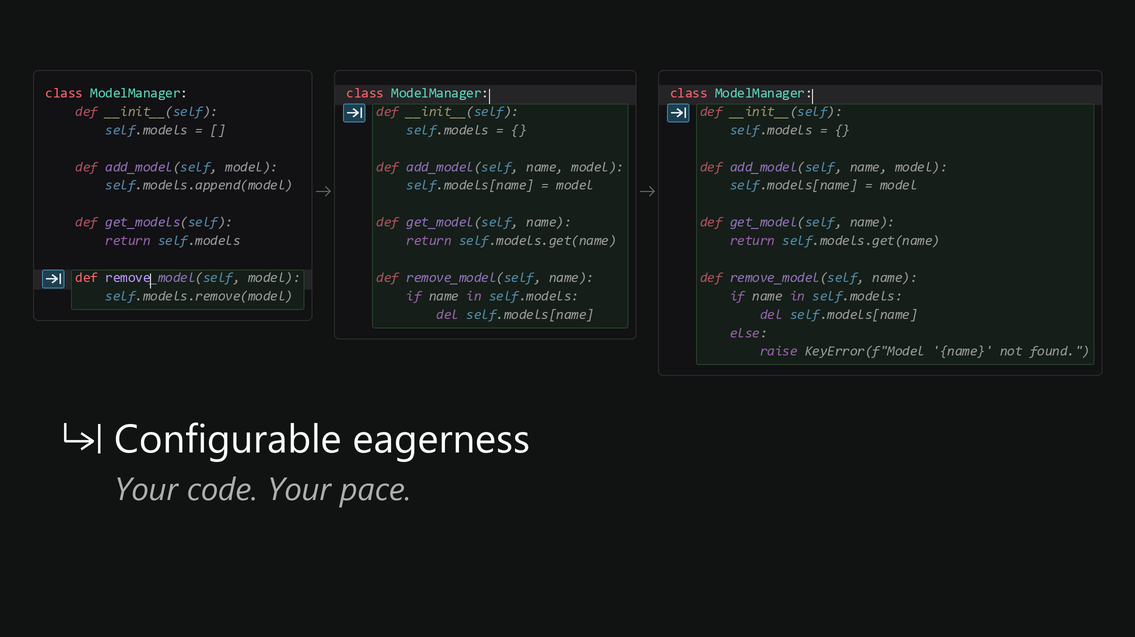
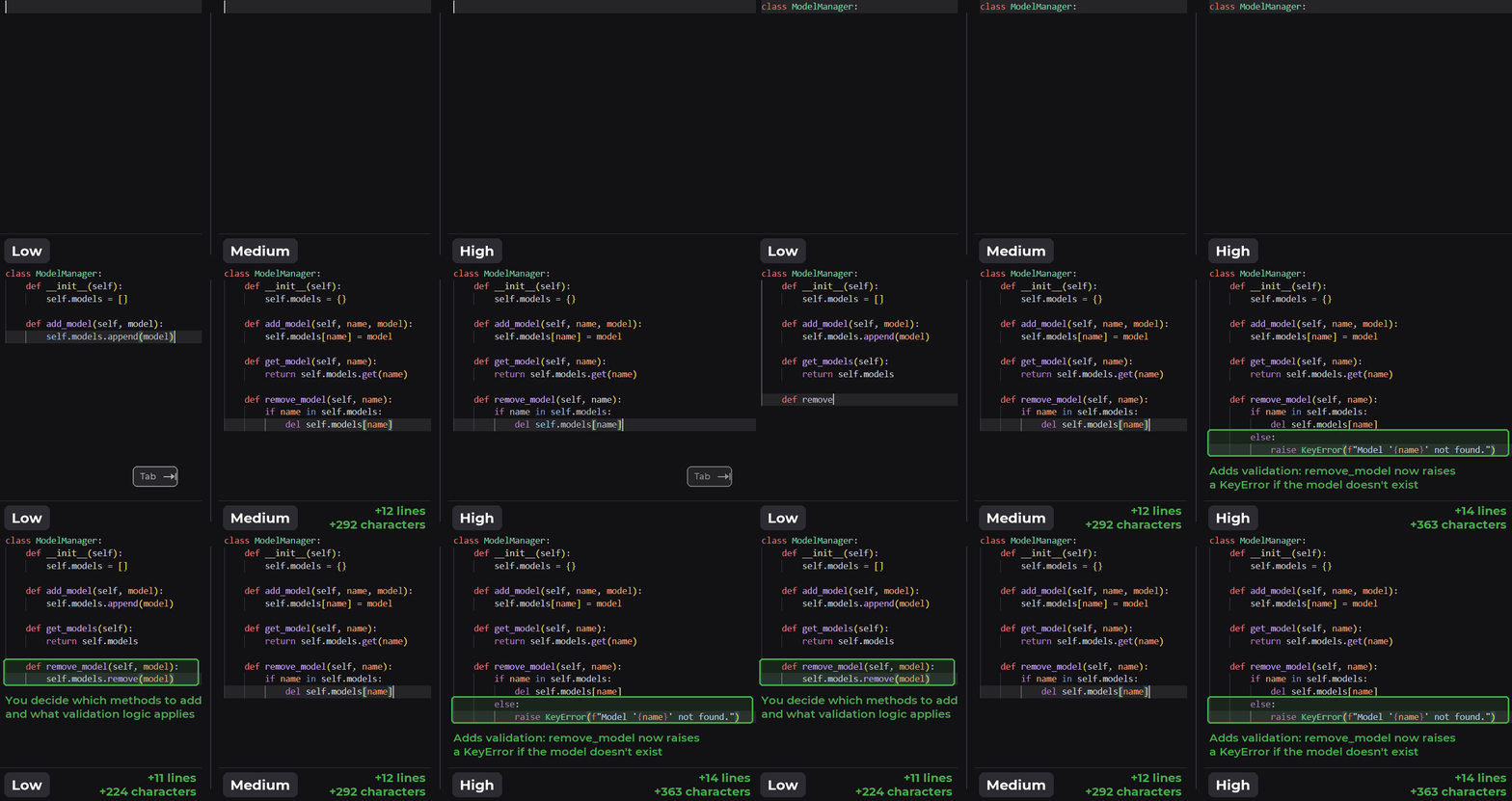
This demo shows a simple example: from the same starting point (class ModelManager:), each setting produces different behavior. Low eagerness proposes five small, incremental suggestions and leaves it to the developer to decide which methods to add and what validation they need. High eagerness proposes three larger suggestions that anticipate follow-on work, such as raising a KeyError when attempting to remove a model that doesn’t exist.

Animated side-by-side comparison of Low, Medium, and High eagerness building a Python ModelManager class. Footer labels report lines and characters added; callouts contrast incremental suggestions at Low with KeyError validation at High.

Figure 1. Low, medium, and high eagerness while building a ModelManager class.

To train these behaviors, we needed a measurable definition of eagerness. Because our model outputs suggestions in a diff-based format, we used edit distance (the number of characters changed by a suggestion) as a proxy for eagerness, capturing both edit size and frequency1.

One model, three modes

We considered training a separate model for each eagerness level, but this approach would have multiplied future deployment and upgrade complexity. Instead, we trained one model to produce all three behaviors (low, medium, and high eagerness), conditioned on a lightweight control tag:

Eagerness setting Control tag
Low <|aggression|>low<|/aggression|>
Medium No change
High <|aggression|>high<|/aggression|>

We trained the model to interpret this tag as an eagerness control: it produced more conservative suggestions for low eagerness and more proactive suggestions for high eagerness, while preserving its default behavior for medium.

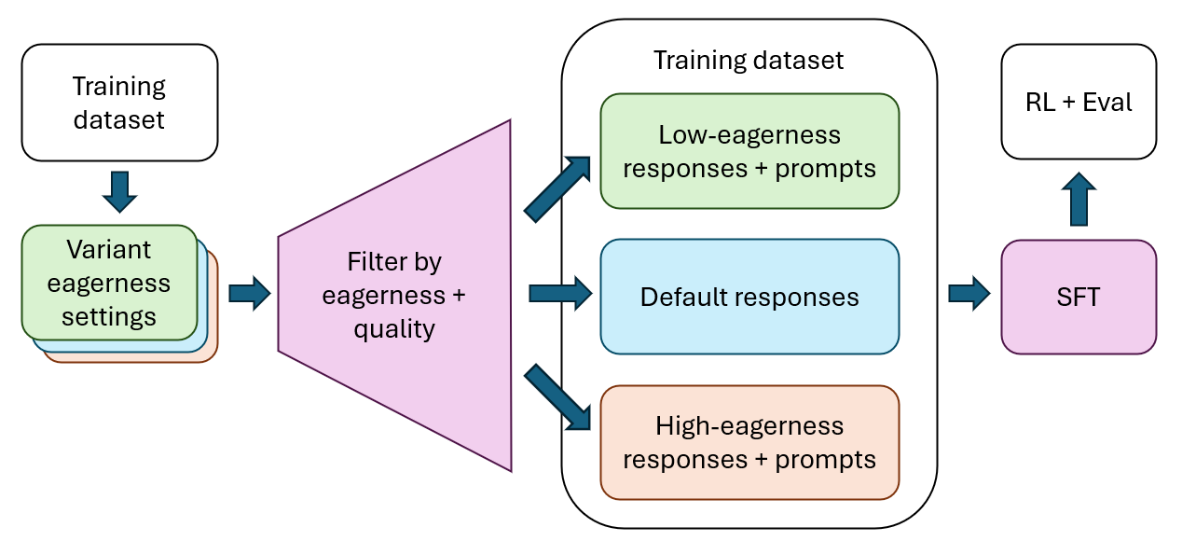
We started with supervised fine-tuning (SFT). For every training prompt, we sampled responses from variants of the model with varying levels of eagerness, filtered to high-quality responses, and ordered the responses by edit distance to produce examples of low, medium, and high eagerness for each prompt in the dataset.

Supervised fine-tuning workflow from variant model responses to three eagerness training sets, described below.

Figure 2. Supervised fine-tuning for configurable eagerness.

The training dataset is sent to model variants with different eagerness settings, and their responses are filtered by eagerness and quality into low-eagerness responses with prompts, default responses, and high-eagerness responses with prompts. These three groups form the dataset for SFT, followed by RL and evaluation.

This approach fit naturally into our existing reinforcement-learning pipeline. Most of the work happened during supervised fine-tuning, with only minimal changes to the RL setup:

  • SFT taught the model the new low-, medium-, and high-eagerness behaviors.
  • RL improved overall suggestion quality while preserving those learned behaviors.

Making configurable eagerness portable across models

The SFT approach worked, but it had two limitations that made it difficult to scale: it depended on pre-existing model variants with different eagerness levels and required retraining on responses from those models. Adding the feature to an improved base model would therefore mean training new models and then retraining from scratch. We needed a way to preserve a new model’s default behavior while adding only the low- and high-eagerness modes.

The key insight was that instead of relying on multiple model variants, we could use the production model to generate and compare multiple variants of a suggestion.

To make eagerness portable across future base models, we separated the behavior we wanted to preserve from the behavior we wanted to change. The training objective had two parts:

  • For medium eagerness, match the behavior of a reference inline suggestions model.
  • For low and high eagerness, move edit distance below or above the reference model’s medium prediction while preserving suggestion quality.

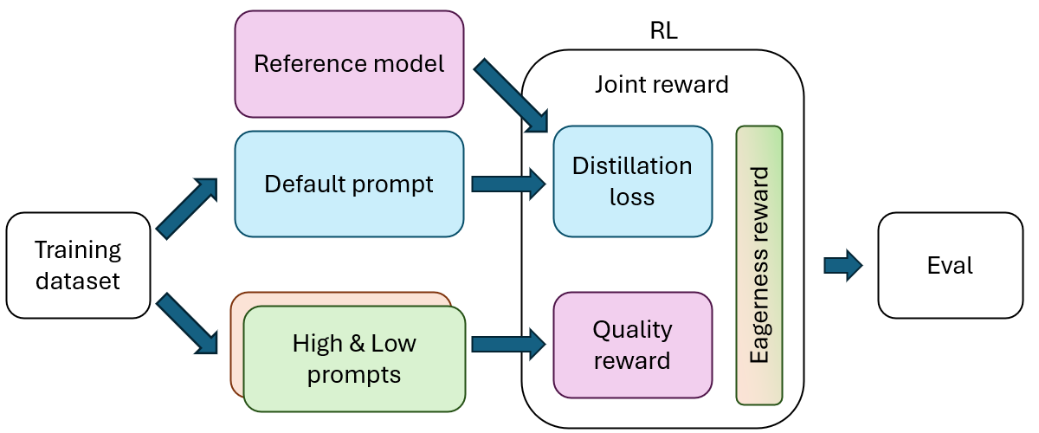
Portable post-training workflow combining distillation, quality, and eagerness objectives, described below.

Figure 3. Portable post-training with on-policy distillation for configurable eagerness.

The training dataset branches into default prompts and low- and high-eagerness prompts. Default prompts and the reference model contribute the distillation objective, while low- and high-eagerness prompts contribute quality and eagerness rewards; the combined objective feeds RL and evaluation.

For medium eagerness, we used on-policy distillation (OPD) to preserve the reference model’s default behavior2. The model under training generated responses, and the reference model supplied token-level probabilities on those same generated prefixes. Training then minimized the difference between the two models’ predicted token distributions, encouraging the model to behave like the reference. This taught the model to match the reference on its own generated responses at medium eagerness, while low- and high-eagerness modes were learned through their rewards.

For low and high eagerness, we reused the quality graders developed for the 3-in-1 model’s SFT and RL, then added a relative eagerness reward based on the response’s edit distance compared to the reference model’s medium response. Low eagerness was rewarded for proposing a smaller edit than the reference. High eagerness was rewarded for proposing a larger one. In both cases, the quality reward prevented the model from optimizing edit distance at the expense of usefulness.

Mitigating reward hacking

Reward hacking occurs when a model finds a way to increase its measured reward without producing the behavior the model developer intended to encourage. During development, we observed such failure modes in both of the new eagerness settings and added mitigations for each.

High eagerness: An early reward design did not apply the quality grader to the low- and high-eagerness modes. In that training run, the model sometimes proposed unrelated functionality or unnecessary formatting changes while increasing edit distance, as seen in the example below.

We addressed this failure mode by balancing eagerness rewards with rewards from the RL quality grader, plus added instructions to allow legitimately broader edits. Our offline Simulation Tests (STests) caught this issue.

 class SplashStorageService implements ISplashStorageService {
     _serviceBrand: undefined;
+    private _windowSplash: IPartsSplash | undefined;
+
     readonly saveWindowSplash: (splash: IPartsSplash) => Promise<void>;
+    readonly getWindowSplash = (): IPartsSplash | undefined => this._windowSplash;

     constructor(@INativeHostService nativeHostService: INativeHostService) {
-        this.saveWindowSplash = nativeHostService.saveWindowSplash.bind(nativeHostService);
+        this.saveWindowSplash = async (splash: IPartsSplash) => {
+            this._windowSplash = splash;
+            return nativeHostService.saveWindowSplash(splash);
+        };
     }
 }

Figure 4. Example of an over-eager suggestion before mitigation. The model unnecessarily added caching and expanded the service’s API.

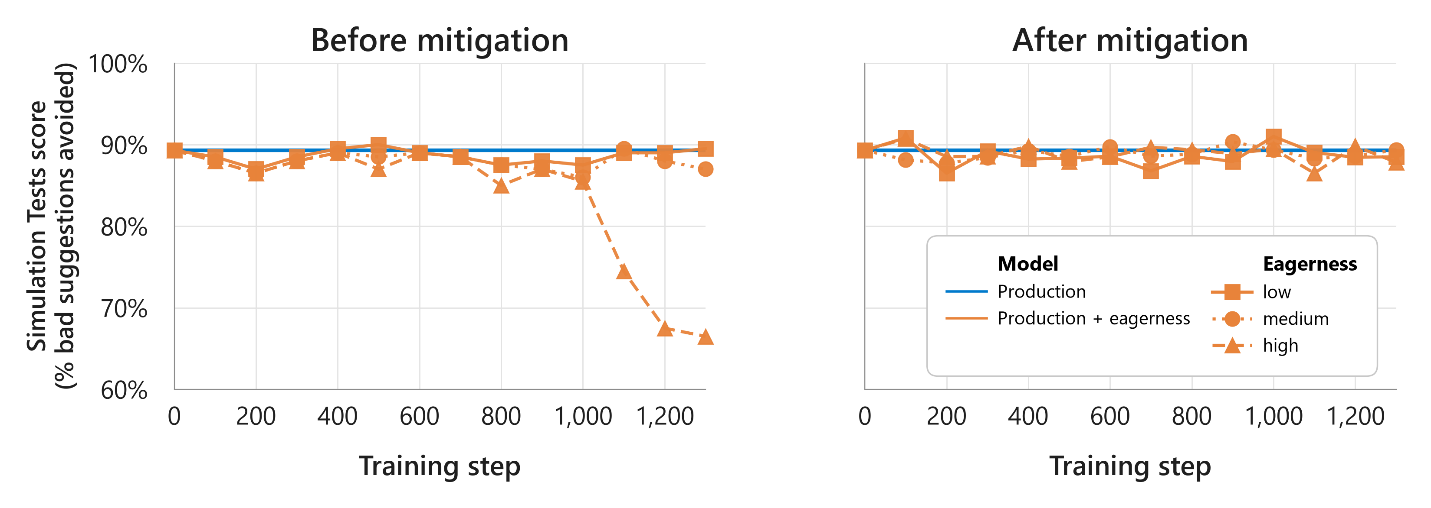
Before-and-after Simulation Tests chart showing high-eagerness quality recovering after mitigation; trends and approximate values follow.

Figure 5. Benchmark results before and after mitigating excessive suggestions on the STests benchmark.

The chart plots training steps against the percentage of bad suggestions avoided, on a scale from 60% to 100%. The production baseline stays near 89%; before mitigation, the high-eagerness score falls to about 66% by the final plotted step, while low and medium eagerness remain near the baseline. After mitigation, all three modes stay near the baseline.

Low eagerness: One training run produced smaller measured edits partly by minifying suggestions: removing whitespace and delimiter characters or shortening variable names while maintaining syntactic correctness. This is technically shorter code but is much less desirable! We mitigated this behavior in two ways:

  • We normalized whitespace and delimiters before calculating edit distance, which removed any possible advantage from deleting whitespace.
  • We added LLM-based grading for less deterministic cases involving variable names and delimiters.

We baked this into our evaluations by adding a deterministic minification check to the training and evaluation pipeline so this failure mode can be screened in subsequent runs.

Before mitigation After mitigation
class ModelManager: # user typed
    # model suggestion
    def __init__(self):self.models=[]
    def add(self,m):self.models.append(m)

def main():
    m=ModelManager()
    m.add("model1")
main()
class ModelManager: # user typed
    # model suggestion
    def __init__(self):
        self.models = []

    def add(self, model):
        self.models.append(model)

def main():
    m = ModelManager()
    m.add("model1")

main()

Figure 6. Example of minification before and after mitigation.

Online results

We evaluated the configurable model in A/B experiments against the production 3-in-1 model. The results below highlight statistically significant changes. No other key metrics changed significantly from the baseline.

Low eagerness Medium eagerness High eagerness
29% lower dismissal rate and 28% shorter suggestions than medium eagerness. No key metrics changed significantly from the baseline. 40% increase in accepted and retained characters, 40% more suggestions shown, and 22% longer suggestions than medium eagerness3.

These findings indicate that the configurable model behaved as intended: low eagerness was more conservative, high eagerness was more proactive, and medium preserved the default experience.

What we learned

  • Pluggable features simplify development and deployment. The key was separating what should change (eagerness) from what should remain stable (base-model quality). Instead of embedding eagerness in the full SFT recipe, the post-training approach starts from the production model, preserves its default behavior through the reference objective, and adds targeted objectives for low and high eagerness. That separation lets us carry the feature forward without rebuilding the entire training recipe.
  • Reliable offline-to-online alignment accelerates iteration. Our offline benchmarks track online outcomes closely. They revealed that optimizing high eagerness for edit distance alone could reduce quality and helped us quickly develop a reward that balanced eagerness and quality.
  • Dogfooding findings should become regression tests. As with the Qualitative Must-Haves benchmark, internal use surfaced issues that offline examples alone could miss because timing, cached suggestions, and surrounding tools all affect the experience. For example, several examples of reward hacking were caught during dogfooding. We turned those findings into repeatable checks and used them to monitor the final model’s quality.

What’s next

Configurable eagerness is a first step toward inline suggestions that adapt to each developer and task. We’re exploring two directions:

  • Automatic eagerness: Adjust how proactively Copilot offers suggestions based on the current context, while keeping developers in control of the experience.
  • Learning from experience: Use signals from rejected, modified, or corrected suggestions to reduce repeated errors and better align future suggestions with a developer’s intent.

The goal isn’t simply to suggest more or less code. It’s to provide the right level of assistance for the moment, and improve that fit over time.

Try it out

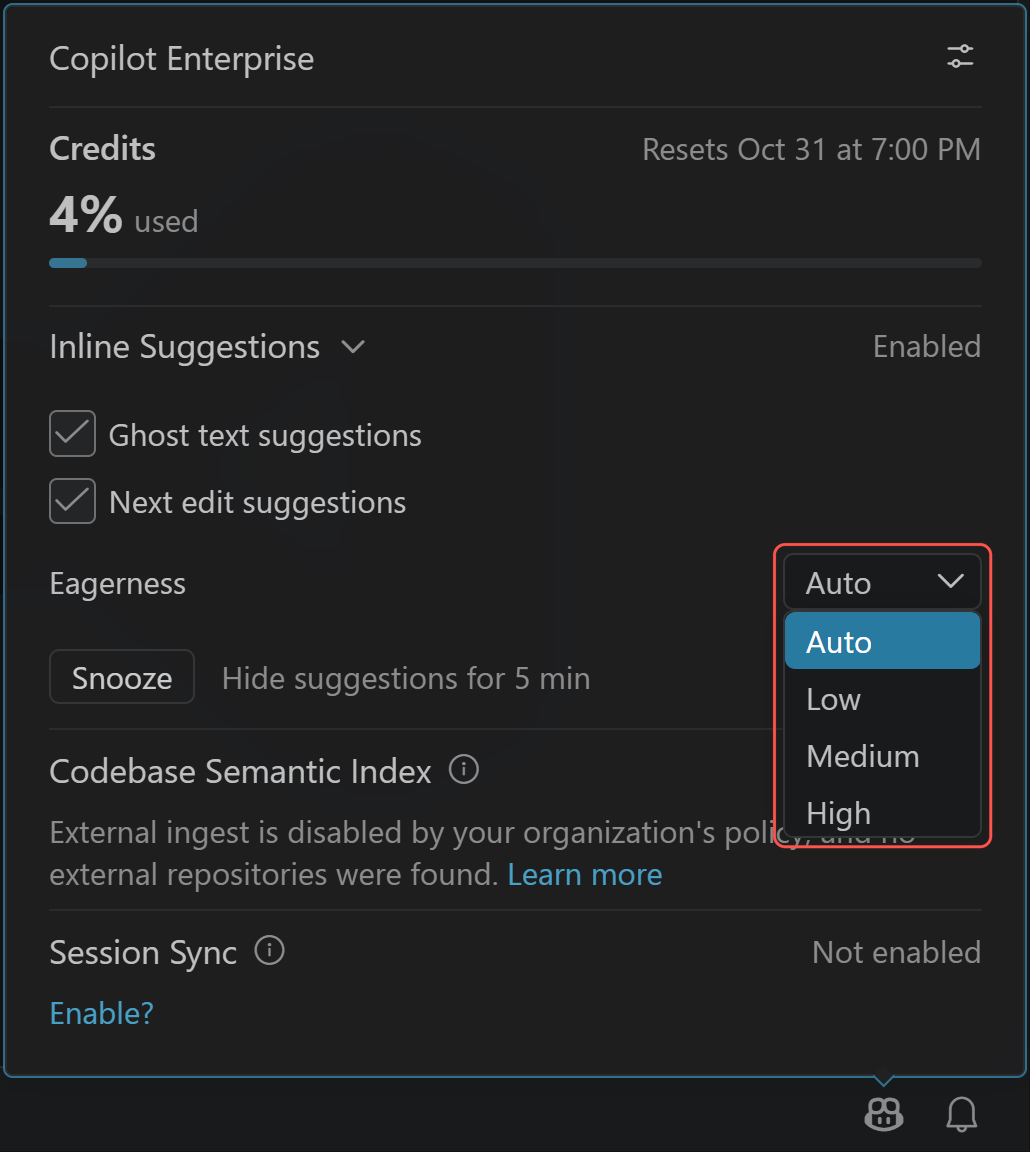
Configurable eagerness is available to paid GitHub Copilot subscribers in VS Code. Update to the latest version of VS Code, confirm that Next Edit Suggestions are enabled (they are on by default), then open the Copilot settings menu and choose an Eagerness setting. Try each mode to find the level of assistance that works best for you, and please share your feedback in the VS Code repository.

Screenshot showing the Copilot settings menu with Next edit suggestions enabled and the Eagerness dropdown outlined in red, listing Auto, Low, Medium, and High.

Help shape what’s next

We’re constantly working to improve the model, and your feedback can help. Sign up to participate in our user studies and help shape future improvements.

Join a user study

Acknowledgments

Thank you to the developer community for your ongoing feedback that shaped configurable eagerness, and to the combined teams of researchers, engineers, PMs, and designers across VS Code, GitHub Copilot, and Microsoft for their contributions, testing, and support throughout development.

Special thanks to Alexandru Dima, Julia Gong, Satarupa Guha, Yu Hu, Ben Liggett, Shengjie Ma, Gaurav Mittal, Elsie Nallipogu, Vedha Ranganathan, and Nick Trogh for their insightful feedback on this blog post.

Happy coding! 💙


[1] A no-edit response has distance zero, while a nonzero distance counts the characters changed in a proposed edit, so the distribution reflects both how often edits are proposed and how much they change.

[2] Here, the reference model and the model under training share the same base architecture; our application of distillation preserves behavior from the reference model rather than compressing a larger model into a smaller one.

[3] Raw dismissals were also higher alongside the increase in shown suggestions, but dismissal rate did not change significantly.

You Can Spend Nearly $15K on Apple’s New Touchscreen MacBook Pro. Why?


The new MacBook Pro with PROLED XDR Display, announced on Wednesday and available on Nov. 6, brings touchscreen control to Apple’s most premium laptop. Pricing starts at $2,899 for the entry-level M5 Pro with the smaller 14-inch display, or $3,399 for the 16-inch model, before any applicable education discounts.

If you go ham on Apple’s preorder configurator and max out the processor, memory and storage, the price balloons to an eye-watering $14,549. That’s wild, especially in today’s economy. Will anyone actually spend that?

Fully loading the M5 MacBook Pro

Let’s see what it means to reach that top-tier configuration of the new touchscreen laptop, starting with the larger, more expensive 16-inch PROLED XDR model at $3,399. Color doesn’t affect price, so take your pick of silver or space black.

The first upgrade you’ll pay for is Nano-texture glass, an antireflective glass finish physically etched at the nanometer scale to diffuse ambient light and eliminate glare, for an additional $150.

Then, stepping up from the M5 Pro’s 20-core GPU to the M5 Max’s 35-core GPU brings the total to $4,949. Bumping to the even more potent 40-core GPU adds another $300, while unlocking horsepower for complex tasks like gaming, video editing and AI-driven operations such as machine learning and coding. (In our testing, CNET found that the Max 40-core is the best fit for pro creatives who work with 8K or raw video, data scientists and intensive users of generative AI imaging and video.) 

Next comes memory and storage, which is where things get really expensive. Our starting M5 Max configuration comes standard with 48GB of unified memory and 2TB of storage, but we can pump those numbers considerably. Upgrading to 128GB of memory adds $2,000. Going for 16TB of storage adds $7,000, the most expensive upgrade on the list, roughly doubling the price of the machine.

Pricey high-capacity memory and storage were par for the course long before the RAMpocalypse, but the current AI-fueled spike in RAM and solid-state storage prices has made things worse.

“It’s so expensive because 16TB drives cost a fortune, as does 128GB, and professionals have been paying those workstation prices for years,” Lori Grunin, CNET senior editor for computers and gaming hardware, told me.

Maxing the RAM boosts bandwidth and performance, allowing the Mac to more easily work with the massive files used in high-resolution video, complex 3D models, large datasets and complex mathematical equations. The extra terabytes of storage mean more and larger files can be saved to the device, since neither the MacBook’s memory nor storage can be upgraded after purchase.

All in, our fully loaded MacBook Pro M5 Max with 16-inch PROLED XDR Display comes to $14,549.

Grunin said she’d want more for the money. “For that price, I’d expect the M5 Ultra chip,” she said. “But I don’t think they can put the Ultra in a laptop yet.”

A photo showing a man using the new MacBook Pro with PROLED XDR Display and Touch
The top-spec MacBooks are aimed at companies that can absorb the high costs of high-capacity storage and memory.Apple

These upgrades aren’t for everyday people

So who buys a laptop that costs more than a used car? Is this just a flex for the super-rich?

“It’s for people who don’t have to pay for it,” said CNET Managing Editor Joshua Goldman.

Configured-to-order, powerful mobile workstations like these are most commonly bought through enterprise procurement by companies, startups and institutions — so the employer is paying, not the individual. Think engineering and architecture firms, Hollywood VFX and post-production houses or AI, machine learning and data science teams. They have big budgets, can put the extra digital horsepower to use and can easily absorb the exorbitant price.

For context, Grunin pointed me to a Dell Precision workstation that I was able to trick out to over $18,000. Five-figure enterprise-scale machines from HP or Lenovo are also not out of the question.

Yes, there will be well-heeled individuals buying at this level, but they’re a relatively small slice of the pie. More likely, the majority of the new touch-enabled MacBook Pros sold will be at still-expensive but easier-to-fathom prices.