As India’s quick-commerce platforms race to deliver everything from groceries to smartphones in minutes, electric mobility startup Yulu has seized the boom, raising $93 million in fresh funding.
The Bengaluru‑based startup offers electric two‑wheelers on weekly subscription plans, so delivery drivers can jump straight into the gig economy without buying their own vehicles. With around 50,000 vehicles in its fleet, Yulu reports that it logs about 1.6 million zero‑emission miles each week and powers more than 750,000 deliveries a day. The new funding will let Yulu grow that fleet to 200,000 bikes over the next two years and launch faster electric two-wheelers aimed at new logistics use cases.
The Series C round comprised $63 million in equity led by GEF Capital Partners and $30 million in debt financing. About $5.5 million of the equity component was used to buy shares from seed investors whose funds were nearing the end of their investment life, co-founder and CEO Amit Gupta said in an interview.
The deal valued Yulu at about $170 million post-money, people familiar with the matter told TechCrunch. Gupta declined to comment when asked about the valuation and did not dispute the figure.
Existing investors Bajaj Auto and Magna International did not participate in the round after waiving their pre-emptive rights, allowing GEF to acquire its target ownership stake, Gupta said. He added that the startup expects this to be its final equity fundraising before an eventual public listing, with future fleet expansion financed primarily through debt and lease financing.
The business moves toward becoming profitable before interest and taxes next year, after achieving positive EBITDA last financial year, Gupta told TechCrunch. The startup also grew its revenue seven-fold between fiscal 2023 and fiscal 2026, he said, without sharing specifics.
The COVID shift
Founded as a bike-sharing startup for urban commuters in 2017, Yulu found its biggest opportunity during the COVID-19 pandemic as demand for food and grocery deliveries accelerated.
Today, Gupta told TechCrunch that about 95% of Yulu’s revenue comes from renting electric bikes to gig workers on weekly subscriptions, while the rest is generated by its station‑based rental service in Bengaluru. The startup has also dropped an earlier plan to sell bikes directly to consumers.
To fuel its next growth phase, Yulu is introducing a full-sized, higher‑speed electric scooter, called Yulu Express. It is designed for longer‑haul e‑commerce deliveries, bike taxis, and express parcel services — areas that its slower fleet could not previously cover.
About a third of the planned 200,000‑vehicle fleet will be made up of this new model, Gupta said.
While Yulu’s current low‑speed fleet is built by Bajaj Auto, the new high‑speed scooter comes from a different Indian manufacturer that Gupta declined to name.
About 500 of the new bikes are already running in Bengaluru and are being trialed in three additional cities, Gupta told TechCrunch.
Currently, Yulu operates in 12 Indian cities, running its own operations in Bengaluru, Mumbai, Delhi‑NCR, and Hyderabad, while partnering with franchisees in eight other markets. The startup, Gupta said, aims to reach roughly 20 cities within the next year, with Chennai and Pune among the key targets for expansion.
Gupta stated that Yulu partners with almost every major quick‑commerce, food‑delivery, and e‑commerce platform — including Amazon and Walmart-owned Flipkart — though its customers are the gig workers who rent the bikes, not the platforms themselves. He compared Yulu’s role to “the AWS of mobility,” supplying the infrastructure that lets delivery workers operate without any third-party logistics providers taking a cut.
When you purchase through links in our articles, we may earn a small commission. This doesn’t affect our editorial independence.
Samsung today said its Galaxy Buds Hearing Aid feature has been cleared by the U.S. FDA, which means hearing aid capabilities will be coming to the Galaxy Buds in the fourth quarter of 2026.
Samsung will join Apple in offering over-the-counter hearing aid functionality. Apple added an FDA-cleared hearing health feature to the AirPods back in 2024, allowing them to be used as a clinical-grade hearing aid.
Like the AirPods, the Galaxy Buds can replace a hearing aid for mild to moderate hearing loss, and Samsung is introducing a Hearing Test option like Apple did. Galaxy Buds users can do a self-administered hearing test in five minutes and the resulting clinical-grade audiogram can be used to adjust the built-in Hearing Aid feature.
The Galaxy Buds will amplify the sounds users have difficulty hearing, like high frequencies or whispers, which is also how the AirPods work. Noise elimination and beamforming also help Galaxy Buds users by focusing on the sounds in front of the user and suppressing background noise.
Samsung says it worked with the National Acoustic Laboratories and Samsung Medical Center to develop the hearing aid feature set. Hearing Aid features will be available on the Galaxy Buds3 Pro and the Galaxy Buds4 Pro. A newer Samsung Galaxy smartphone that supports One UI 8 or later is required.
After introducing hearing aid features in the U.S. in iOS 18.1, Apple has expanded availability to over 150 countries and regions. Apple had a two-year head start, but Samsung is now starting to catch up with a Galaxy Buds hearing health option that matches most of what the AirPods can do.
Samsung today announced the launch of its first credit card in the United States, debuting the Samsung Galaxy Card in partnership with Barclays.
The Samsung Galaxy Card works as a standard Visa card and offers special financing options for Samsung Galaxy devices purchased through Samsung. Apple Card has a similar financing option for Apple devices.
There is no annual fee for the Samsung…
Samsung today debuted its latest foldable devices, including the Galaxy Z Flip8, the Galaxy Z Fold8 Ultra, and the new Galaxy Z Fold8, which has a design similar to what we’re expecting from the foldable iPhone coming this September. We were able to take a look at the new Samsung foldables ahead of launch.
Subscribe to the MacRumors YouTube channel for more videos.
The Galaxy ZFold 8 Ultra…
Apple will exclusively rely on Samsung Display for the production of OLED touch panels for its redesigned upcoming MacBook Pro models, according to a new report from Korea-based The Elec.
Citing industry sources, the publication says that the 14-inch and 16-inch panels will be produced at Samsung’s 8.6-generation OLED line at Asan, in Korea’s South Chungcheong Province. The estimated initial …
How Can I Tell If My Laptop’s Charging Port Is Failing in Frisco, TX?
A laptop charging port may be failing if the charger feels loose, charging starts and stops when the cable moves, the laptop only charges at a certain angle, the port looks damaged, or a known-good compatible charger still does not work reliably. These symptoms can also come from the charger or battery, so professional diagnosis is the safest way to identify the actual problem.
At PC Geeks, we help Frisco-area laptop owners determine why their computers are not charging properly and what repair makes the most sense. Charging problems can be frustrating because several components can produce similar symptoms, including the AC adapter, battery, charging port, USB-C controller, and motherboard. Rather than replacing parts based on guesswork, a proper diagnosis can isolate the source of the failure and help prevent unnecessary repairs. Whether you use your laptop for remote work, school, running a business, gaming, or everyday tasks, addressing an unreliable charging connection early can reduce the chance of the problem becoming more serious.
Laptop Charging Port Problems: Symptoms You Should Not Ignore
A failing charging port usually becomes noticeable through an unreliable physical or electrical connection. The problem may begin intermittently before the laptop eventually stops recognizing the charger altogether.
Dell recommends inspecting charging ports for dust, debris, bent pins, and physical damage when diagnosing a laptop that will not charge. Dell also notes that charging problems can originate from several sources, including the AC adapter, battery hardware, charging port, software, or drivers.
What Are the Most Common Signs of a Bad Laptop Charging Port?
The clearest warning sign is charging behavior that changes when the connector moves. If your laptop starts charging only after you wiggle the plug or position it at a particular angle, the connection between the charger and laptop may be compromised.
Common warning signs include:
The charger feels unusually loose inside the port.
Charging repeatedly connects and disconnects.
You must hold or position the cable at an angle.
The laptop does not consistently recognize a compatible charger.
The charging port has bent components, cracks, or other visible damage.
The connector will not remain securely seated.
A USB-C charging port also has intermittent data or display problems.
Charging stops when the laptop or cable is moved.
For USB-C laptops in particular, movement-related problems deserve attention. Dell identifies intermittent functionality when a USB-C cable moves as a potential sign of cable or connection damage. The company also documents how improper handling can contribute to loose ports, damaged connectors, cracked port housings, and broken internal solder joints.
Do not repeatedly wiggle or force a connector to make the laptop charge. That may place additional stress on an already damaged connection.
How Do I Know If the Problem Is the Charging Port, Charger, or Battery?
Testing with a known-good, correctly rated charger is one of the simplest ways to narrow down a charging problem, but it does not replace a complete diagnosis.
If another compatible charger works normally, your original adapter or cable may be the problem. If multiple compatible chargers produce the same intermittent connection, particularly when movement affects charging, the laptop’s port becomes a stronger suspect.
Battery problems can look different. A laptop that recognizes its charger normally but cannot maintain battery capacity may have an aging or defective battery instead of a damaged port. An adapter with insufficient wattage can also power some laptops without properly charging the battery, according to Dell.
Before assuming the port has failed, check:
The wall outlet: Confirm it works with another device.
The charger: Look for fraying, bent components, overheating, or cable damage.
The connection: See whether the charger sits securely without needing pressure.
The port: Look for lint, debris, cracks, or obvious physical damage.
The laptop’s specifications: Make sure the charger provides the correct wattage and that the USB-C port, if applicable, actually supports charging.
That last point is important because not every USB-C port supports the same functions. Dell notes that some laptop USB-C ports support power delivery, while others may be intended only for data transfer.
Why Do Laptop Charging Ports Become Loose or Damaged?
Physical stress is one of the biggest threats to a laptop charging connection. Pulling on the cord instead of the connector, tripping over a plugged-in charger, or repeatedly placing sideways pressure on the plug can damage the cable, port housing, or internal connection.
USB-C connectors are engineered for extensive everyday use. The USB Implementers Forum specification rates the USB Type-C connector family for a minimum of 10,000 insertion and extraction cycles under its durability testing requirements. That durability does not mean the port is immune to accidental impacts, sharp bending, contamination, or sideways force.
To help protect your charging port:
Unplug the charger by gripping the connector, not pulling the cord.
Insert and remove the connector straight rather than at an angle.
Avoid using the laptop where the charger is stretched tightly across a walkway.
Keep food, liquids, dust, and debris away from the port.
Do not rest objects against a USB-C connector while it is plugged in.
Dell specifically advises avoiding sharp bends and twists near USB-C connectors because excessive stress can damage cables and shorten their working life.
When Should I Have a Laptop Charging Port Professionally Repaired?
Seek professional help when charging becomes consistently intermittent, the port is visibly damaged, or multiple known-good chargers fail to make a reliable connection.
Continuing to use a damaged port can turn an inconvenient charging problem into a more complicated repair. Some ports are separate replaceable components, while others are attached directly to a laptop’s motherboard. Internal damage can also occur even when the outside of the port appears relatively normal.
Dell notes that damaged USB-C connections can include broken solder joints inside the device, which may cause the port to lose functionality despite limited visible external damage.
For laptop owners in Frisco, TX, dependable charging is particularly important for people moving between home, school, offices, and coworking environments. Frisco’s hot North Texas summers are another reason to treat laptops carefully. The City of Frisco describes the area as having hot summers, with an average August maximum temperature of 96.1°F. Avoid leaving laptops and chargers in hot vehicles for extended periods, and give electronics adequate ventilation while charging.
PC Geeks can evaluate the charging system and determine whether the issue comes from the adapter, battery, port, or another internal component before recommending the appropriate repair.
Frequently Asked Questions About Laptop Charging Ports
Can a loose laptop charging port be fixed?
Yes. A loose charging port can often be repaired or replaced, depending on the laptop’s design and the extent of the damage. A technician should inspect the port and its connection to the internal hardware before determining the appropriate repair.
Why does my laptop only charge when I move the charger?
Charging that cuts in and out when the connector moves can indicate a damaged cable, loose connector, worn port, or damaged internal connection. Dell specifically identifies movement-related intermittent functionality as a symptom associated with USB-C connection problems.
Can dirt inside a laptop charging port stop it from charging?
Yes. Dust, lint, and debris can interfere with the connection between the charger and port. Dell recommends inspecting the charging port for debris as part of troubleshooting, but avoid inserting metal tools or forcing objects into the port.
Does a laptop that won’t charge always need a new charging port?
No. A failed charger, damaged cable, worn battery, insufficient adapter wattage, software issue, or USB-C controller problem can also cause charging failures. Proper testing is important before replacing the port.
Get Your Laptop Charging Problem Diagnosed in Frisco, TX
An unreliable charging port rarely becomes more convenient with time. If your laptop only charges at certain angles, repeatedly disconnects from power, or has a visibly loose or damaged port, getting the problem diagnosed early can help prevent further damage and eliminate the guesswork of replacing the wrong component.
Ready to find out why your laptop isn’t charging properly? Contact PC Geeks to schedule laptop repair service in Frisco, TX.
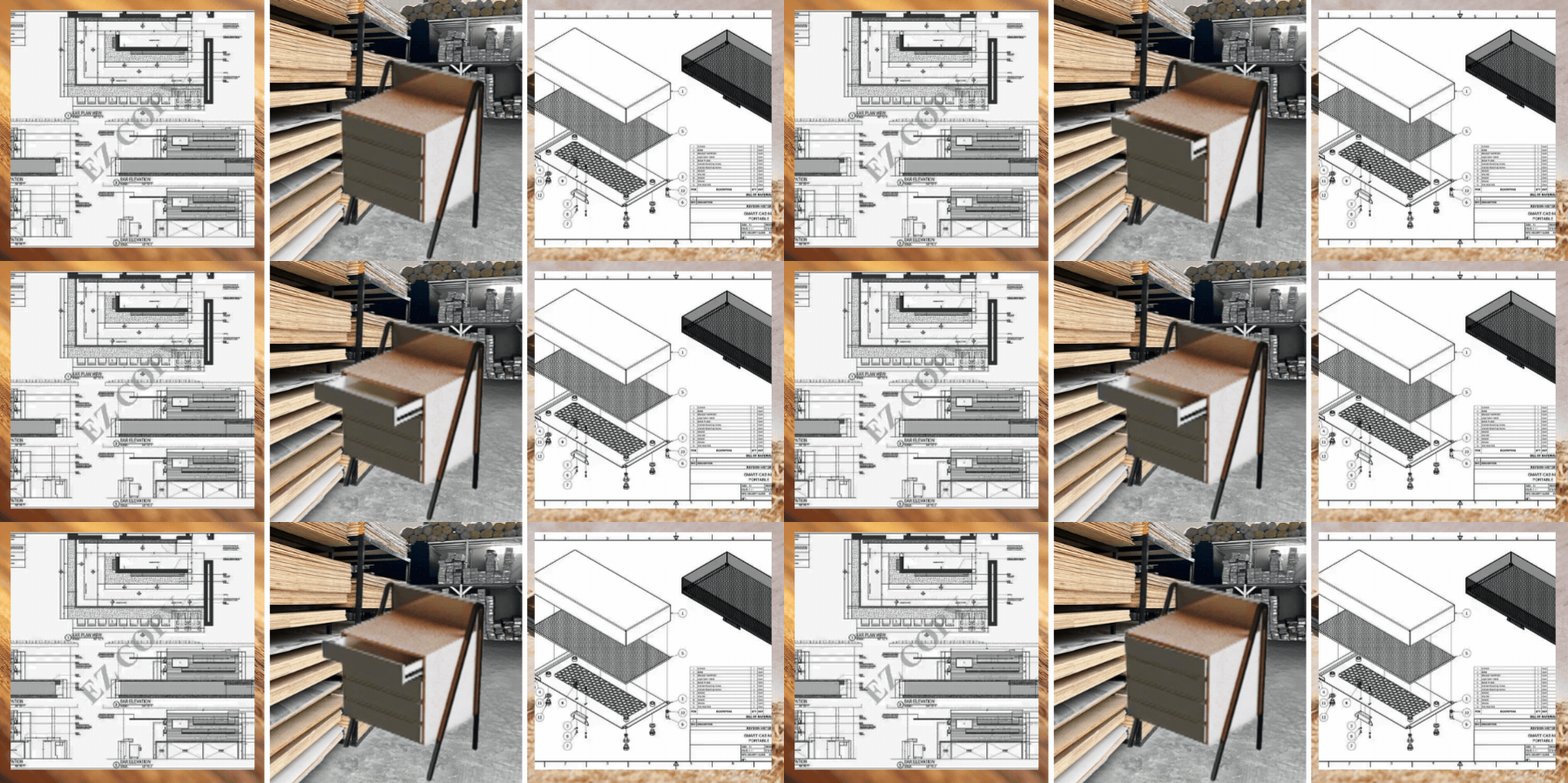
In millwork projects, one of the most important and critical foundations is its shop drawings. Only then will the project be successful if the shop drawings provided can smoothly translate the architect’s design into a technical instruction. This way, the fabricators or manufacturers can easily understand how it’s supposed to be installed or produced.
It is important that the shop drawings are accurate and detailed enough to reduce errors. For this to be ensured, businesses look for drafting services to do the work. Cad Crowd can help in seamlessly connecting firms to skilled drafters, ensuring they are screened and suitable for the work.
🚀 Table of contents
Understanding the purpose of millwork shop drawings
One could mistake shop drawings for architectural blueprints, but these two are entirely different. The difference lies in the purpose of each. Architectural plans show what the project will look like, while shop drawings explain how it will be built.
The shop drawings contain detailed information, including finishes, materials, joints, and every fitting and connection required for its production. This helps fabricators understand the components they need to make it. It is important that everything is clearly stated and detailed before production begins.
The essential components of a shop drawing
Shop drawing comprises several drawings and includes the plans, elevations, sections and spot drawings or callouts. The call-out drawings zoom in on parts or areas to show specific details. Each view is important to present and detail so there’s no room for guesswork.
The drawings do not only show what it looks like but also contain material and finish information. It has the dimensions, sizes, and everything that defines the design. It is important not to leave out any detail. Consistency and accuracy are very critical to ensure the intended quality and outcome of the work.
Dimensions is non-negotiable
Dimensional accuracy is non-negotiable in shop drawings. Fabricators heavily rely on the dimension stated in the shop drawings, so whenever there’s an error, even a small one, can pose massive problems. Any small error can lead to rework, wasted resources and delay in production.
Because of this, shop drawings are prepared to a certain level of detail and accuracy, and fabricators sometimes have to verify and check site and field conditions to ensure the measurements align with realistic conditions.
Software proficiency: AutoCAD vs. Microvellum
Drafting companies take advantage of modernization and use different methods according to its scalability and purpose. AutoCAD is used to allow flexibility and compatibility. It is user-friendly and ideal for creating clear and precise drawings. Since this is commonly used, it is easier to share files among designers and engineers.
Meanwhile, there are other software like Microvellum or Cabinet Vision that are meant for large-scale production. It goes beyond just the drawings and can connect directly to CNC machines. As a result, the components can be conveniently cut and drilled according to the provided design data.
The role of section details in fabrication
Section views are cutaways of the project. It shows what it looks like inside. It shows parts, connections, and supports, fully giving a clear understanding of how the project is built from the inside out.
These views are important to reduce the difficulty of guesswork and interpretation when assembling the parts. It serves as a reference and guide for correctly piecing together the millwork. This maintains the millwork’s overall quality.
Millworks service are not limited to just wood, they go beyond it. There are now designs that are a mix of glass, stone, and metal. It all depends on the intended aesthetics and functionality. All these material elements should be correctly specified in the shop drawings.
Not only that, but even the small elements considered as hardware and fastenings are to be specified. These include hinges, pulls, handles, drawer slides, and sometimes even the cable management is detailed in the drawing. Ensuring all this helps in delivering the production and installation as intended.
Coordination with other trades
In doing shop drawings, it is not limited to one trade. This is collaborative work among other trades as well to ensure that there would be no clashes. The drafter should coordinate with other trades on the project to verify and account for locations for each. This helps the drafter fit in the elements,
It is critical that clashes are completely out of the picture to ensure that there are no possible risks during production or fabrication. Having clear drawings sets how successful the construction would be.
Submitting drawings does not mean it’s all done. It has to follow the submittal and approval workflow. This is where the architects or the project manager in charge checks the drawing and provides feedback.
Not all drawings are approved all at once; they could still have several iterations and revisions. This just means that the quality has to be prioritized before approval. Being meticulous in checking is critical since every detail and dimension has to be accurate. Once the design is approved, it will be ready for production or construction.
Common red flags in drafting services
When exploring and sourcing millwork drafting firms, one of the warning signs is how they approach the task. When they do not ask for a site or field visit, it means they’ll rely solely on architectural plans. Doing this is prone to guesswork and assumptions.
One can also notice the way they collate their drawings in the canvas or paper. It depicts clarity and understanding. If the drawings are too crowded or hard to interpret, then it could cause confusion for the ones reading it. This may cause problems during construction.
Cost considerations for outsourced drafting
The millwork drafting services fee depends on the complexity of the project as well as the level of detail it must be. There are companies or freelancers that charge by drawing sheet or by the hour. The terms have to be discussed and agreed upon in the beginning.
Sometimes it is tempting to opt for a lower cost option, but it has to be carefully assessed if it really is the right decision. There are low-cost work packages that could still incur additional fees due to reworks. It is best to carefully assess and analyze options.
The impact of material selection on drawings
Each material has its own attributes and interaction with a realistic and day-to-day environment. It is important for the millwork designer or drafter to know and understand how the material acts or interacts to know what construction method should be used.
In selecting material properties, technical knowledge is important to know factors to consider to ensure that the material is durable and long-lasting. This makes the project not just functional but structurally sound.
Standards and regulations in millwork
Designing millwork does not just mean aesthetics or functionality. It also has to comply with the established industry standards and regulations. The millwork drafter should be able to understand and account for this.
This ensures consistency in materials and workmanship, setting a certain level of quality. Compliance in this means that the design has complied with expected quality standards and aligned with the industry expectation of the output.
Enhancing communication with 3D renderings
Although 2D shop drawings serve as the instruction manual to help the fabrication process, 3D renders are used to enhance clarity. This is especially useful for clients who are not well-versed in technical documentation and need visual representation.
This is useful for complex design models such as curved surfaces, feature walls, or any other detailed textures. These are the details that are hard to decipher from a 2D drawing. Using 3D models lessens the risk of errors. In it, clash detections can be identified and fixed early on.
The benefits of scalability through outsourcing
Outsourcing millwork drafting services can be seen as a practical and efficient strategy. This is because it allows the firms to focus more on taking more projects without the need to add employees. It also is a sound choice in case there are downtimes in projects and won’t be needing much freelancers.
It saves the company from unnecessary in-house fees. Platforms like Cad Crowd helps businesses to support taking projects without committing to overhead costs. All while ensuring quality is maintained and delivered.
In producing a full set of millwork shop drawings, it definitely will take a certain amount of time depending on the scale and complexity. A timeline should be established during the briefing stage to set expectations.
The millwork drafter should be able to know the realistic timeline of producing the drawings. This allows the client to have an idea and understand how the process can be managed. This way the turnaround time for submittal and review can be adjusted to ensure no delays.
Typical millwork shop drawing costs
The cost of millwork shop drawing services depends on the project’s size, complexity, and level of detail. Below are typical price ranges for common drafting services to help you estimate your budget.
Service
Estimated cost (USD)
Description
Basic shop drawings
$300–$800
Simple millwork drawings
Cabinet shop drawings
$800–$2,000
Detailed custom cabinetry drawings
Millwork shop drawings
$1,500–$5,000+
Complete fabrication drawings
Drawing revisions
$100–$500
Design updates and corrections
3D millwork modeling
$500–$3,000
3D models for coordination
Complete drafting package
$3,000–$10,000+
Full millwork drafting services
Security and data protection
One of the most important things to note is ensuring intellectual property is protected. The shop drawings may contain sensitive information so it’s critical for businesses to know how it should be handled. This could mean using tools or features to secure file-sharing.
One way to also secure protection of data is using Non-disclosure agreements (NDAs). This protects the business from any risks of leaks or misuse of confidential data. This document adds an extra layer of security and protection, making it more private.
Specialized knowledge in commercial millwork
Commercial projects are often known for their strict requirements, all projects should pass the required inspections. When exposed and engaged to commercial type millworks, drafters involved should have technical knowledge of ADA standards and compliance.
Requirements include knowing the proper dimensions and sizing of the parts to accommodate specific conditions. For instance, there’s a specific height and clearance needed for wheelchair access. Compliance with the codes not only secures functionality but also safety.
The importance of finish schedules
Finish schedules are added in the millwork shop drawings to allow verification of its compatibility with the materials used. Finished schedules are not just reflected to show their details, but it also gives the viewers an idea of how durable it is.
This is why it’s important for the drafters to not only focus on the aesthetic build-up of the millwork, but also its integrity. They also have to have technical knowledge of the appropriate materials and finishes to use to ensure it will last long. Not only that, it helps the production team to know what materials to source out to ensure it’s available on site.
Quality control processes in drafting
In every design firm, it is important to have an established quality control system. This means having a senior designer to oversee and review the shop drawings made before it is sent out to the client.
This allows the company to ensure consistency in the quality of work. It also adds an extra layer of assurance that there would be no errors before it’s seen by the client. Senior designers can also ensure that the design is aligned with their branding and image, in case it is the company’s priority.
Designing for modular installation
Currently, modular design has been utilized to improve efficiency in construction. This is especially useful in millwork construction since the parts can be designed to be in sections for easy transport. From then on, the parts would be assembled on the site.
The shop drawings will serve as the reference to clearly show how the parts fit together and how it will be assembled. This construction strategy is practical and convenient since it simplifies logistics. It minimizes the time and effort for assembling the parts.
Now that the world has become more environmentally focused, sustainable materials are often part of the consideration of materials. It is important that the millwork drafters know how to comply with it.
One way to achieve It for instance when it comes to wood, is ensuring that the wood used comes from responsibly managed environments. This is also called FSC-certified woods. There are firms that take this seriously and have a designated system to efficiently cut and organize wood sheets to ensure that there is less wastage of materials.
Addressing complex curves and geometries
Sometimes the millwork design can be tricky, as it includes custom curved designs. This design could be hard to decipher from a 2D drawing. To ensure that the expected outcome is delivered, the millwork drafter makes use of advanced geometry to convert the digital design to buildable templates.
One way to do this is using “flattening” of curved surfaces. This allows cutting and shaping as well as assembling during the fabrication process. In doing this, it is much easier to execute the design accurately and consistently.
In outsourcing, it could sometimes be coined as short-term and temporary collaboration between the client and drafter. However, it is not impossible to think of establishing long-term relationships. This is very beneficial for both in terms of efficiency and consistency.
Over time, the drafter would be a lot more familiar with the company’s standards of work and quality, so it would be easier to deliver it. It also makes the company at ease, knowing they already know what to expect from the drafter based on previous works. On the outside, outsourced drafters look like an extension of the team to support the project goals.
Custom cabinetry vs. production millwork
Generally, custom cabinetry or millwork requires a much more detailed process than mass-produced units. In factory-made units, the cabinet is designed so that it won’t adjust to a space. It is designed in commercial sizing, and clients would only have to choose what fits their space better.
Meanwhile, customized cabinetry means having to fully consider the space and layout. It has to take note of any existing detail on site such as uneven surfaces or obstructions that has to be fixed for the cabinet to fit in. Drafters should be careful in producing drawings and make allowances or tolerances to ensure seamless fit.
Using BIM for millwork projects
The drafting industry is now not limited to the traditional style of technical drawings. Building Information Modeling (BIM) is now used to provide an even more comprehensive approach to understand how all elements fit together even before the construction begins. It is now a much preferable approach in terms of convenience and efficiency.
In BIM process, it shows how the millwork is built. It also helps identify clashes early, making it convenient to fix before construction starts. It also improves coordination since everyone involved in the design can easily see and resolve anything during the design stage. It has dramatically improved accuracy and collaboration in the project team.
Troubleshooting common fabrication issues
Millwork shop drawings do not only serve as reference of how a unit should be built but also helps in preventing possible issues that may arise on field. Experienced drafters can pinpoint just from the drawings if there are any weak connections or that the hardware does not fit together.
An experienced drafter can address this early on the design stage and apply realistic measures to make the designs fabrication ready. It is important that the designs made are not only accurate but also realistic and practical, to ensure that it can be actually produced and constructed.
Integration of stone and quartz surfaces
Some millwork units used stone and quartz material. They are used in countertops and islands. However, using these materials can pose problems since it is heavy and not flexible. To address this, a detailed reinforcement has to be assessed to ensure that it can support the weight.
Moreover, clearances for sink cutouts, faucets, sinks, and other fixtures are to be planned and designed meticulously to avoid reworks. Stone and quartz can be expensive and so careful planning is needed when these materials are used.
Veneer matching and plywood grading
There is a specific level of sophistication when you see how the veneers are evenly matched. This is why in millworks that are considered high ends, drafters prioritize their matching methods. Each method varies by how the visual pattern and its finish look like.
Not only that, but the plywood grading is also equally important since the drafter would have to ensure that the internal layers meet quality standards. It is critical that consistency is shown, and the level of premium appearance is maintained for it to be considered luxurious and high quality.
Lighting integration and wire management
One of the popular features in modern millwork is having a built-in lighting. When the cabinets, shelves or any millwork unit has light features, it should be included in the shop drawings. Details of its layout strips, power drivers and wiring routes should be accurately indicated.
A proper planning of LED wiring routes shows how professional the drafter is. They’re able to detail wiring chases in concealed channels. Not only was it visually pleasing but ensured safety and efficiency in wiring routing.
Handling field revisions and as-builts
Not all times are the original designs becoming the final design. There are instances wherein the design progresses and changes due to site conditions or any other unforeseen adjustments. When this happens, the shop drawings will have to be updated, and these are now called “as-built drawings”.
As-built drawings are the final technical visualization that matches the real-life project. This is to show the progression in design and helps avoid confusion in case there’s a future innovation or renovation of that project.
There are some millwork projects that may require acoustic wall panels, these are walls that help improve sound quality. When the millwork has this feature, the draft should have technical knowledge and approach on how to incorporate this in wall finishes.
When the millwork has acoustic wall panels, the details such as spacing, perforation patterns and air gaps should clearly be indicated to help fabricators. It helps them to ensure that the finished product will perform as intended and matches the project requirements.
The future of millwork drafting: AI and automation
Now that the world has kept on adapting to modern technology, artificial intelligence (AI) is now integrated into the drafting process. The firms have realized how AI modeling can help in speeding up the drafting process by taking change of repetitive tasks. This includes adding dimensions, layout adjustments, material takeoffs as well as clash detection.
While it is efficient and can dramatically shorten turnaround times, it cannot fully replace human judgment. There are complex tasks and decisions that can only be done by humans. It is important that the millwork drafter is capable of making sound decisions in aligning the project to design intent.
Glass and mirror integration
Some millwork projects incorporate materials such as glass and mirrors. These materials require careful planning so that durability and safety is ensured. The shop drawings should clearly indicate the right type of mirror or glass as well as its dimensions.
Not only are the physical attributes to be accounted for, but also how these materials should comply with building and safety standards. It should not just improve the visual attributes but also adds structural integrity and performance. The shop drawings should be able to set out how these materials will be handled on site to prevent accidents or any other issues that may arise.
Shop drawings for laboratory and medical millwork
Millwork projects can also serve medical and laboratory environments. But these field of work would require strict requirements when it comes to hygiene and chemical resistance. The drafter should be knowledgeable enough to know how the materials would act when exposed to the kind of environment.
The shop drawings should include all relevant specifications and materials, especially the specialized ones. An accurate shop drawing not only ensures the functionality of the millwork but also ensures its durability in withstanding the demands of medical usage. It aids the fabricators in handling it safely and professionally.
Retail and hospitality millwork challenges
In retail and hospitality, the millwork design is based on its functionality. In retail, one of the unique requirements and something to be noted is that it should be easy to replicate and built for large quantities. This is to help the retails and shops to not be challenged when it comes to expansion of their space. It helps that the millworks are easy to replicate to ensure consistency in units used.
Meanwhile in the hospitality field, the millwork should feel premium and durable. Often, the requirement is that it should be able to handle heavy usage. The design should be timeless and visually impressive. There should be a fine balance with functionality and luxury, practical for daily use.
A professional drafter knows how efficient it is to use CAD templates for millwork projects. This is to maintain the consistency of the design throughout the project sheets. This includes templated fonts, scaling, title blocks, layer sheets, and any other legends included. It also improves the turnaround time in completing the drawings.
When the drawings are consistent and uniform, it feels easy to read and look at. It reduces confusion for the readers and can easily point out when something feels off or different. It improves productivity and coordination of the project workflow.
Flexibility in design iterations
It is not unusual to have iterations in every drawing process. During the early design stages, the drawings are repetitively submitted, reviewed, and revised numerous times. There are adjustments being made all throughout. A professional should be able to handle the revisions efficiently and maintain accuracy in order to make it work.
Tracking revisions are important as documentation of the design process. When a company wants the design to be patented, this could serve as valid evidence. Also, the drawings should be flexible enough to adjust in times there’s a need to. It helps the firms to easily fix whenever they want further adjustments in the future.
The importance of shop drawing logs
Shop drawings logs are important to ensure that every submittal is documented. This includes adding the drawing numbers, title, dates and status of the design approval. It helps in tracking whether the shop drawing is updated or superseded. It prevents costly rework from following an outdated drawing.
One of the most overlooked mistakes in designing millwork is its site accessibility. This is why it is important for the drafters to conduct site or field visits to ensure that the design can fit in the fabrication environment. It would be hard to deliver large units in narrow paths or access paths. The drafters should be able to understand logistical requirements in order to lessen this kind of risk.
Conclusion
Millwork shop drawings indeed play a critical role in the construction and fabrication process since they serve as the instruction manual. It translates how the project will turn the ideas into reality. It is important that the millwork drafter has the right technical skills and expertise to deliver accurate drawings. To acquire an experienced and trusted millwork drafter, Cad Crowd is a great platform to hire one. In Cad Crowd, design solutions are accessible to deliver your millwork project successfully.
How Cad Crowd can help
Creating precise shop drawings is one of the most important steps in delivering successful millwork projects. Cad Crowd connects businesses, architects, contractors, and manufacturers with experienced millwork drafting professionals who produce accurate, fabrication-ready shop drawings. Whether you need custom cabinetry drawings, interior millwork details, production documentation, or drafting support for commercial or residential projects, our vetted experts can help reduce errors, improve coordination, and keep your project on schedule. Contact Cad Crowd today for a free quote and let us match you with the right millwork drafting expert for your project.
MacKenzie Brown is the founder and CEO of Cad Crowd. With over 18 years of experience in launching and scaling platforms specializing in CAD services, product design, manufacturing, hardware, and software development, MacKenzie is a recognized authority in the engineering industry. Under his leadership, Cad Crowd serves esteemed clients like NASA, JPL, the U.S. Navy, and Fortune 500 companies, empowering innovators with access to high-quality design and engineering talent.
Take the plunge today as Grounded 2’s largest content update yet, Into the Abyss, opens an expansive new underwater adventure, with hidden discoveries, forgotten landmarks and more.
Prepare for what lies beneath with new diving gear, underwater base building, dangerous new creatures, and the amphibious Toe Biter Buggy. Grounded 2 is also coming to PlayStation 5, welcoming a new community of players to join the adventure in Brookhollow Park during our Early Access development period.
There’s more to Brookhollow Park than meets the eye
With the Into the Abyss update, Grounded 2’s biggest content update yet, you’ll discover an entirely new side of the park as you venture beneath the surface of Skunk Pond. What begins as a typical park pond quickly opens into a sprawling underwater world filled with hidden discoveries, new challenges, and new ways to survive.
Whether you’re returning to Brookhollow Park or preparing to experience it for the first time, Into the Abyss expands Grounded 2 with new areas to explore, featuring underwater exploration, new progression systems, creatures, base building, and countless new discoveries waiting above and below the surface. Also for the first time, PlayStation players will be able to join the adventure as Grounded 2 launches on PlayStation 5, growing the community throughout our Early Access development period. With over 30 million players in the Grounded series to date, we look forward to welcoming more friends to join the larger than life survival adventure.
A Whole New Way to Explore
The pond isn’t just another destination—it’s an entirely new layer of Brookhollow.
You’ll swim below the surface to navigate underwater caverns and discover hidden points of interest scattered throughout the pond. Beyond the shoreline, the Bridge, Gnarly Bark, and Pergola expand Brookhollow Park with even more places to explore, while those willing to dive deepest can descend into the mysterious Abyss. Every path rewards curiosity with new resources, collectibles, and surprises tucked throughout this new, explorable area.
Prepare Before You Dive
Exploring below the surface requires more than curiosity.
You’ll craft new diving gear that lets you stay underwater longer and access places previously out of reach. As you progress, you’ll unlock new ways to explore deeper into the pond while adapting to an environment filled with new obstacles, underwater combat, and dangerous creatures.
Joining the adventure is the amphibious Toe Biter Buggy, giving you a new way to traverse both land and water as you continue exploring Brookhollow.
Build, Battle, and Discover
The Into the Abyss update also introduces underwater base building, allowing you to create submerged outposts and expand your home into places that were previously impossible to inhabit.
Of course, no trip beneath the surface would be complete without new encounters. You’ll face both familiar and new creatures, including the amphibious Toe Biter and the mechanical Catch ‘N Kill robots, alongside returning threats like the Diving Bell Spider. Every encounter presents new challenges as you fight to survive and uncover everything the pond has been hiding.
Whether you prefer exploring solo or surviving alongside friends, Into the Abyss offers new reasons to dive back into Grounded 2 and discover just how much bigger Brookhollow Park has become.
We’ll see you in the park.
Grounded 2 is available in Game Preview for XBOX Series X|S, XBOX on PC, in Early Access on Steam, PlayStation 5, and you can play it on Game Pass Ultimate or PC Game Pass. Play it on both XBOX Series X|S and XBOX on PC at no additional cost with XBOX Play Anywhere.
If you’ve worked with Git submodules for any length of time, you probably have a love-hate relationship with them. They’re genuinely useful for pulling a shared library, an SDK, or common build scripts into your project. But actually working with them usually means tabbing over to a terminal and trying to remember whether it’s git submodule update --init or --init --recursive this time all while a perfectly good IDE sits right in front of you, shrugging.
That’s the part we wanted to fix. Starting in Visual Studio 18.9, Git submodules are a first-class part of the IDE no more bouncing out to the command line just to keep your dependencies in order. It’s been one of the most-requested Git features for a long time, and honestly, it’s about time.
They finally feel like part of Git in the IDE
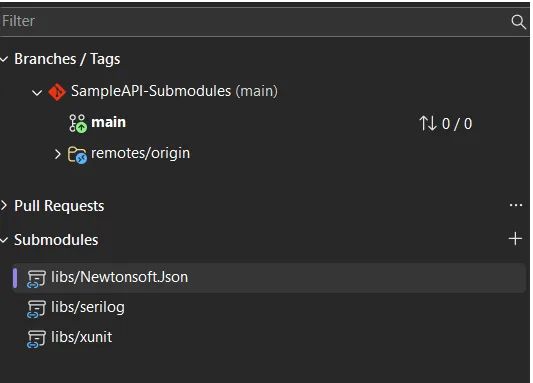
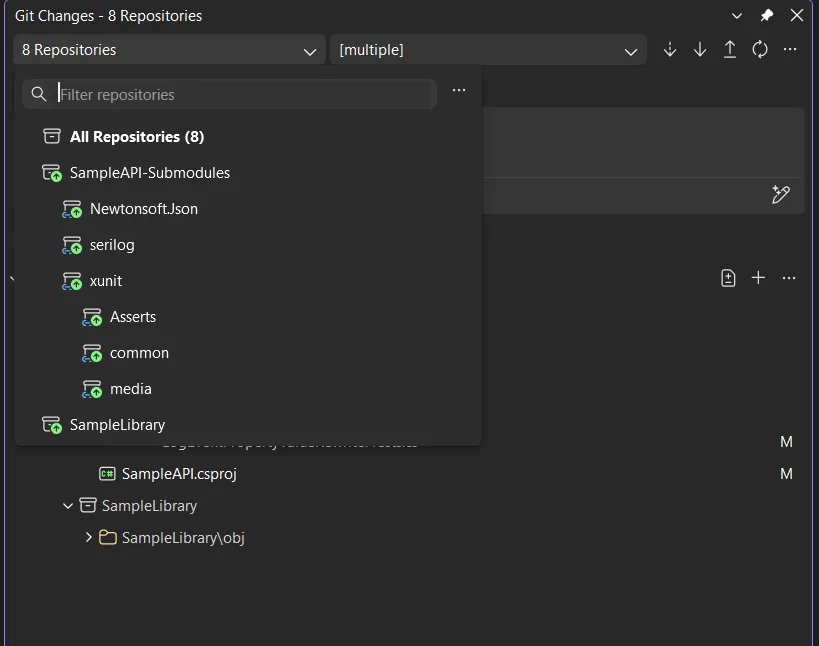
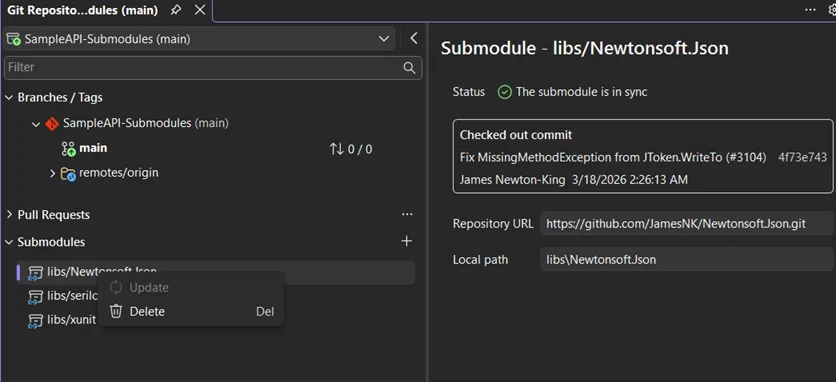
Submodules aren’t a mystery folder anymore. There’s a dedicated Submodules section in the Git Repository window, they show up properly in Git Changes, and the branch and repository pickers actually understand how your parent repo and its submodules relate.
[Image: Submodules section in the Git Repository window)
[Image: Submodules in the Git changes window)
Add, update, and delete without leaving your seat
From that Submodules section, you can add, update, or remove a submodule right there no memorized flags, no terminal detour. Open a solution or folder and Visual Studio discovers and activates your submodules automatically, while keeping them out of the main local repositories list so your repo picker doesn’t turn into a cluttered mess.
[Image: Selecting a submodule repository in Visual Studio]
Read-only by default
Most of the time you’re just *using* a submodule, not editing it, so Visual Studio treats them as read-only by default. That saves you from accidentally committing changes into a dependency you only meant to reference. When you do want to work *inside* one, it’s a single setting: Tools > Options > Source Control > Git, find Automatically activate multiple repositories, and pick Yes, include submodules.
This is just the start
This is the first milestone, not the finish line. It covers the core of what you need day to day, and there’s more coming in future releases depending on what you tell us.
We’d love to hear from you
This feature exists because so many of you kept asking for it, so keep the feedback coming. Drop your thoughts on the Feature Ticket , and if something breaks, please use the Report a Problem tool in Visual Studio is the fastest way to reach us. You can also find the team on Twitter @VisualStudio, YouTube, and LinkedIn.
Meta announces that its neural handwriting is now rolling out in its EAP (Early Access Program) for the Ray-Ban Display.
Users are recommended to write with their index finger on a stable surface, and allow the AI to correct any typos or mistakes.
Meta confirmed this was on the way for the Ray-Ban Display in December.
Meta’s neural band is an important part of its smart glasses experience. It brings convenience, and Meta says it’s offering a new feature in Early Access for silent AI interactions.
If you’ve got a pair of Meta smart glasses, the company has announced a silent handwriting feature in Early Access using the Neural Band. In a press release, Meta says users can write “AI queries with their index finger when their display is on.” It states users can get answers to questions, play a song, pull up directions, and more without much effort—just a finger. Meta went into more detail about this EAP (Early Access Program) feature.
If you’re interested, Meta says users must ensure their Neural Band is paired with their glasses and that everything is updated, as well as enroll in the EAP. To enable neural handwriting, head to Meta AI app > Settings > select your glasses > Early Access > toggle Meta AI with neural handwriting. For the “best results,” Meta recommends users write with their index finger. It states you should “anchor your wrist on a hard surface and use your index finger to write.” What’s more, you should write in print, not cursive.
Latest Videos FromAndroid Central
To ensure the Neural Band and neural handwriting feature captures what you’re writing properly, you should write smoothly and at a consistent pace. Meta says users shouldn’t worry about typos, nor should they wait for their HUD to catch up to what they’ve written. Continue regardless, and Meta AI will automatically fix any errors.
Neural handwriting is headed to the Meta Ray-Ban Display in the EAP.
Writing in the air
(Image credit: Android Central)
It was teased in December 2025, and now it’s finally here. Meta confirmed late last year that it planned to empower its Ray-Ban Display further with “virtual” handwriting. We’ve now seen this arrive as neural handwriting. This EMG handwriting feature was confirmed to leverage the Neural Band with the user’s drawing and gesture inputs. The company also teased Instagram Reel support for its glasses, too.
The neural band was an object of interest for Android Central’s Nicholas Sutrich last year, too. To him, it felt like a true device straight out of a Sci-fi movie. To Meta, the sEMG band (neural band) is a requirement for “true AR smart glasses products.” Users wouldn’t need to rely on a screen to type their commands. The band captures your muscle movements to act out what you’re writing or capture your gestures. It’s silent and completely hands-free (technically).
Get the latest news from Android Central, your trusted companion in the world of Android
Android Central’s Take
The neural band is pretty cool, I have to admit. But bringing this “virtual” or neural handwriting just seems like the next logical step for Meta. It can already capture gesture for scrolling through song lists, why not do more? Why not make it so writing a quick message or asking its AI is effortless with single movements?
DBSCs are an antidote to session cookie theft. Once a website sets a session cookie, the visiting browser must send a form of the cookie that’s signed with the key stored in the silicon. Properties in the TPM or secure enclave isolate the key in a way that prevents it from being extracted. Apple explains the process here.
“The attacker can’t steal the private key from the device because the TPM / Secure Enclave will not release it. That is the core protection here,” Scott Helme, a researcher and founder of Report URI who blogged about the new protections on Tuesday, told Ars. “The attacker can steal the cookie, but they can’t answer a DBSC challenge by signing it with the private key, which is still safe on your device.”
For the moment, DBSCs are supported only in Chrome version 147 for Windows and 150 for macOS. Even then, DBSCs are turned on only for a limited set of users. Presumably, Google is testing the feature before making it generally available. Chrome users on Windows and macOS can check whether it’s running in their browser by opening developer tools, clicking on the application tab across the top, and scrolling down. When a user is logged into a site that supports DBSCs, “device bound sessions” will appear if the protection is turned on.
It’s unclear when, or if, other Chromium-based browsers will implement DBSCs, but it’s likely they will be coming.
DBSCs are the latest form of authentication that eliminates the reliance on a shared secret, which, as the world has known for years, is painfully easy for attackers to steal. Under this new model, web servers store the visitor’s public key. The servers then send an authentication challenge incorporating the session cookie. Unless the resulting answer, known as an authentication assertion, is signed by the private key stored safely in the TPM or secure enclave, the assertion is rejected. Passkeys—which you can read about in this post published earlier on Tuesday—work the same way.
Hole Is Mine is an incremental adventure about purifying a divine Hole. Dive inside and launch your Mini’Ohs to mine for you. Extract impurities, upgrade your power, and find hidden secrets to grow the Village, customizing your Mini’Ohs with incredible powers. The Hole Has Spoken! Silent Hill 4: The Room
Break the Hole to extract its impurities!
Use Shelly to drill your way down while managing and caring for your Mini’Ohs.
Find secrets within the Depths, rebuild the Village and grow the community!
Equip your Mini’Ohsto grant them incredible powers. Experiment and find the best combinations!
Keep going down while numbers go up.
Together, we are stronger!
Features:
Addictive incremental progression.
40~ Depths with dangers and secrets to find.
Customize and build your Mini’Ohs with 500+ different equipment combinations.
Screenshots
SystemRequirements
Minimum
OS: Windwos 10 Build 19043 or later
Processor: 2 GHz
Memory: 4 GB RAM
Graphics: Vulkan 1.0
Storage: 1 GB available space
Support the game developers by purchasing the game on Steam
InstallationGuide
TurnOff Your Antivirus Before Installing Any Game
1 :: Download Game 2 :: Extract Game 3 :: Launch The Game 4 :: Have Fun 🙂
Earlier this year, Google Chrome annoyed a whole lot of adblock users by killing support for Manifest V2 extensions. It’s a Manifest V3 world now, which means the permissions and APIs that thoroughgoing adblockers like uBlock Origin rely on are a thing of the past on Chrome (it’s since been replaced by a pared-down version: uBlock Origin Lite). Now, Microsoft Edge is following suit: “Over the next few months, MV2 extensions will be gradually turned off by default,” says Redmond.
All of which is red meat for the folks over at Mozilla Firefox, the free-and-open-source browser that once reigned supreme on our PCs before Chrome came and ate its lunch. In posts across social media, Firefox kicked Edge (and Chrome) in their self-inflicted bruises, declaring that “Our support for uBlock Origin isn’t going anywhere”, a post that came days after it wrote “Reminder that you can still just… use ad blockers on Firefox. Wild concept, we know.”
Now, like I said, it’s not like Chromium-based browsers are murdering adblockers wholesale. If you wanna block ads, you can still use less-powerful extensions to do so, but it’s a simple fact that if you want a full-fat adblocker in the uBlock Origin mould, the megacorps are rapidly shutting down ways to do that.
Latest Videos FromPC Gamer
It’s also true that Firefox isn’t your only option—there are several other browsers out there still touting full-fat adblocker support—but it’s probably the biggest name out there fighting the good fight.
Our support for uBlock Origin isn’t going anywhere.
Anyway, Firefox’s braggadocio prompted an obvious question: hey gang, when’s this vaunted adblock support gonna make its way to iOS devices? Alas, there’s no hard timeline there, but Mozilla did say that it’s actively working on making adblock work on Firefox on your iThings.
In fairness, Apple’s strict rules mean that Firefox on iOS (along with other browsers) are more like reskins of Safari than they are full implementations of the desktop browser on mobile. But hey, if people are using Firefox in 2026, it’s likely in part down to its robust extension support. Better to be able to offer some form of it than not.
Keep up to date with the most important stories and the best deals, as picked by the PC Gamer team.