In his weekly column, Android Central Senior Content Producer Nick Sutrich delves into all things VR, from new hardware to new games, upcoming technologies, and so much more.
I didn’t expect it, but the Samsung Galaxy XR has become the ultimate portable gaming machine. Not only can it natively play any Android game from the Google Play Store, but one free app even lets you run Steam games with no configuration or nonsense involved. No cloud streaming, no ridiculous subscription. Just your favorite Steam games, all running natively on the Galaxy XR (and even your Android smartphone).
If you haven’t heard of GameHub yet, it’s about high time you check it out. Available for free on the Google Play Store, GameHub is a fork of the popular Winlator app that integrates several cloud gaming services and social features, plus a friendly user interface and automatic configuration for every game you download. It’s as easy to use as a Steam Deck, and the wearable hardware makes it even better.
Why choose an XR headset to play these games on instead of a phone or a portable system like a Steam Deck? Neck and arm comfort, mainly, as you don’t have to look down at a system or hold it up high for hours at a time. The screen just floats in front of your face, no matter if you’re sitting up or lying down. Really, it’s as good as a portable gaming system can get. It’s the sort of functionality you’ll get on the upcoming Steam Frame headset, except you don’t have to wait for Valve to release it.
Playing Steam games on the Galaxy XR
(Image credit: Android Central)
GameSir, makers of many of our favorite mobile controllers, debuted an app called GameHub on the Google Play Store last November. It’s a customized fork of the popular Winlator app, which people have used for years to emulate Windows on Android, but it’s more user-friendly.
In the app, you connect your Steam account, and it more or less ends up looking like SteamOS running within an app window on the Galaxy XR. Fire up the app, tap Steam, and your entire library is now fully playable on the Galaxy XR without any further configuration. I connected the 8BitDo Ultimate 2C Bluetooth controller to my Galaxy XR to play the games, but I’m sure GameSir would appreciate it if you used one of their controllers instead.
When the app debuted, it caught a lot of flak on places like Reddit for requiring too many permissions, but the latest version of the app doesn’t require any permissions to get it running. Not even notification permission, although it’ll harass you from time-to-time about enabling them. If you’re concerned about telemetry data, someone forked a version on Github with that stuff removed. Another option is GameNative.
Image 1 of 3
(Image credit: Android Central)
(Image credit: Android Central)
(Image credit: Android Central)
Once you’ve got GameHub installed, run it and sign into your GameSir account, or just use the modded GameHub Lite version linked above, which doesn’t require an account. Then, you’ll open up the menu on the left, select Steam from the list, and sign into your Steam account.
Get the latest news from Android Central, your trusted companion in the world of Android
Now, any time you launch the app, you’ll be greeted with a Steam button right on the front that takes you to your Steam library. Just like on a Steam Deck, find the game you want, hit the install button, and then you can just play it from there on out. No cloud connection needed, no subscription required. It’s all running on the Galaxy XR.
If you’re worried about compatibility or performance, you can run a check on each game before it’s installed, which gives you a decent idea of whether the game will work or not.
Image 1 of 2
(Image credit: Android Central)
(Image credit: Android Central)
You can also configure additional options if you want or need to make performance adjustments, but I found the default settings to be more than adequate for my needs. If you run into issues or just want to touch up on your GameHub knowledge, this YouTube video is an excellent resource and uses a phone that sports a processor slightly slower than what’s in the Galaxy XR, so those settings (starting at the 4:50 mark) will help you get the best out of the system.
If you want to experiment with just one feature, though, I’d recommend enabling Snapdragon Super Resolution, which is available in GameHub’s menu found when pressing the home button on your connected controller. You can also learn about it in the video linked above at the 9:18 minute mark.
I found performance to be incredibly similar to my Steam Deck, despite that this app has to translate x86 code to the headset’s ARM processor. Portal 2, for instance, ran at a locked 60fps on both my Steam Deck and the Galaxy XR, but newer games like Resident Evil Requiem are simply too taxing to run on this level of hardware. We’ll have to wait and see if the actual Steam Frame fares better with them since it has a faster processor.
Taking all the best Steam Frame features now
(Image credit: Android Central)
I recently wrote about how two of the Steam Frame’s best features already work on the Galaxy XR, and now even the emulation of Steam games is possible on Samsung’s Android XR-powered headset. That means three of the four big pillars of what’s going to make the Steam Frame great — foveated streaming, a dedicated wireless network, and native Steam game compatibility — are available on the Galaxy XR right now. The only thing missing is running PC VR games natively, something the Frame might continue to stand out for.
The only thing you’ll need for standard Steam games to work is a Bluetooth controller of some kind, like this GameSir Cyclone 2. For PC VR games, you’ll want a pair of Galaxy XR controllers and the Virtual Desktop app on the Google Play Store. Once you’ve got those (and a VR-ready PC), you’re all set.
It’s pretty wild seeing the Steam Frame’s best features already make their way to other headsets before Valve’s next-generation headset even launches, but it’s (ironically) all thanks to Valve and the work they’ve poured into Proton and FEX over the years.
The Galaxy XR is an uber-comfortable mixed reality headset that combines the best Android apps with a brilliant, bespoke XR experience.
Netflix is teaming up with Ben Affleck and leveraging the goodwill he’s earned with his views on AI to bring even more AI tools into filmmaking.
The streaming giant announced today that it has acquired Affleck’s filmmaking tech company, InterPositive, which the actor quietly founded in 2022 to develop AI-powered tools for filmmakers.
Netflix did not disclose the terms of the acquisition. But Variety reported that InterPositive’s 16-person team will join Netflix, with Affleck serving as a senior adviser. The company reportedly plans to offer InterPositive’s tools to its creative partners rather than selling commercial access to them.
In a press release, Affleck explained his motivation for founding InterPositive. He wrote that after spending time observing the early rise of AI in film production, many of the models fell short. So, he decided to take matters into his own hands.
“Together with a small team of engineers, researchers and creatives, I began filming a proprietary dataset on a controlled soundstage with all the familiarities of a full production,” Affleck said. “I wanted to build a workflow that captures what happens on a set, with vocabulary that matched the language cinematographers and directors already spoke and included the kind of consistency and controls they would expect.”
Affleck said the model was specifically trained to understand “visual logic and editorial consistency.”
In a video accompanying the announcement, Affleck emphasized that the tool is “not about text prompting or generating something from nothing.”
Instead, filmmakers can build their own model using their movie’s footage and then use it in post-production to make changes like removing stunt wires, creating missing shots, or adjusting backdrops, colors, and lighting.
The news is somewhat surprising after Affleck’s past comments expressing a more skeptical view of AI have gon viral. In particular, he has questioned AI’s ability to write, saying that “by its nature it goes to the mean, the average.”
“I don’t think it’s very likely that it’s gonna be able to write anything meaningful, or in particular, that it’s going to be making movies from whole cloth, like Tilly Norwood. That’s bullshit,” Affleck said on The Joe Rogan Podcast in January about AI, referencing the AI-generated actor. “Really, what it is, it’s going to be a tool just like visual effects.”
So it’s no surprise Netflix is tapping Affleck to help get filmmakers on the AI bandwagon.
The company said last year that it plans to expand its use of AI. In a letter to shareholders in October, Netflix wrote that it aims to focus on “empowering creators with a broad set of GenAI tools to help them achieve their visions.”
The company also highlighted some early examples of the technology in action. Netflix touted its use of de-aging AI in Happy Gilmore 2, and said the producers of Billionaires’ Bunker used AI tools to create concept art.
Even before that, Netflix announced in July that the Argentinian sci-fi series El Eternauta featured what the company described as the “very first GenAI final footage to appear on screen” in a Netflix show or film
With this new partnership, it’s pretty safe to assume that we’ll be seeing more AI show up in Netflix productions. Hopefully, Affleck can help prevent it from being too cringe.
The emergence of autonomous AI agents has dramatically shifted the conversation from chatbots to AI employees. Where chatbots answer questions, AI employees execute tasks, persist over time, and interact with the digital world on our behalf. OpenClaw, an open‑source agent runtime that connects large language models (LLMs) like GPT‑4o and Claude Opus to everyday apps, sits at the heart of this shift. Its creator, Peter Steinberger, describes OpenClaw as “an AI that actually does things”, and by February 2026 more than 1.5 million agents were running on the platform.
This article explains how OpenClaw transforms LLMs into AI employees, what you need to know before deploying it, and how to make the most of agentic workflows. Throughout, we weave in Clarifai’s orchestration and model‑inference tools to show how vision, audio, and custom models can be integrated safely.
Why the Move from Chatbots to AI Employees Matters
For years, AI helpers were polite conversation partners. They summarised articles or drafted emails, but they couldn’t take action on your behalf. The rise of autonomous agents changes that. As of early 2026, OpenClaw—originally called Clawdbot and later Moltbot—enables you to send a message via WhatsApp, Telegram, Discord or Slack, and have an agent execute a series of commands: file operations, web browsing, code execution and more.
This shift matters because it bridges what InfoWorld calls the gap “where conversational AI becomes actionable AI”. In other words, we’re moving from drafting to doing. It’s why OpenAI hired Steinberger in February 2026 and pledged to keep OpenClaw open‑source, and why analysts believe the next phase of AI will be won by those who master orchestration rather than merely model intelligence.
Quick summary
Question:Why should I care about autonomous agents?
Summary: Autonomous agents like OpenClaw represent a shift from chat‑only bots to AI employees that can act on your behalf. They persist across sessions, connect to your tools, and execute multi‑step tasks, signalling a new era of productivity.
How OpenClaw Works: The Agent Engine Under the Hood
To understand how OpenClaw turns GPT or Claude into an AI employee, you need to grasp its architecture. OpenClaw is a self‑hosted runtime that you install on a Mac Mini, Linux server or Windows machine (via WSL 2). The core component is the Gateway, a Node.js process listening on 127.0.0.1. The gateway connects your messaging apps (WhatsApp, Telegram, Discord, Slack, Signal, iMessage, Teams and more) to the agent loop.
The Agent Loop
When you send a message, OpenClaw:
Assembles context from your conversation history and workspace files.
Calls your chosen model (e.g., GPT‑4o, Claude Opus or another provider) to generate a response.
Executes tool calls requested by the model: running shell commands, controlling the browser, reading or writing files, or invoking Clarifai models via custom skills.
Streams the reply back to you.
Repeats the cycle up to 20 times to complete a multi‑step task.
Memory, Configuration and the Heartbeat
Unlike stateless chatbots, OpenClaw stores everything in plain‑text Markdown files under ~/.openclaw/workspace. AGENTS.md defines your agent roles, SOUL.md holds system prompts that shape personality, TOOLS.md lists available tools and MEMORY.md preserves long‑term context. When you ask a question, OpenClaw performs a semantic search across past conversations using a vector‑embedding SQLite database.
A unique feature is the Heartbeat: every 30 minutes (configurable), the agent wakes up, reads a HEARTBEAT.md file for instructions, performs scheduled tasks, and sends you a proactive briefing. This enables morning digests, email monitoring, and recurring workflows without manual prompts.
Tools and Skills
OpenClaw’s power comes from its tools and skills. Built‑in tools include:
Shell execution: run terminal commands, including scripts and cron jobs.
File system access: read and write files within the workspace.
Browser control: interact with websites via headless Chrome, fill forms and extract data.
Webhooks and Cron: trigger tasks via external events or schedules.
Multi‑agent sessions: support multiple agents with isolated workspaces.
Skills are modular extensions (Markdown files with optional scripts) stored in ~/.openclaw/workspace/skills. The community has created over 700 skills, covering Gmail, GitHub, calendars, home automation, and more. Skills are installed without restarting the server.
Messaging Integrations
OpenClaw supports more messaging platforms than any comparable tool. You can interact with your AI employee via WhatsApp, Telegram, Discord, Slack, Signal, iMessage, Microsoft Teams, Matrix and many others. Each platform uses an adapter that normalises messages, so the agent doesn’t need platform‑specific code.
Selecting a Model: GPT, Claude or Others
OpenClaw is model‑agnostic; you bring your own API key and choose from providers. Supported models include:
Anthropic Claude Opus, Sonnet and Haiku (recommended for long context and prompt‑injection resilience).
OpenAI GPT‑4o and GPT‑5.2 Codex, offering strong reasoning and code generation.
Google Gemini 2.0 Flash and Flash‑Lite, optimised for speed.
Local models via Ollama, LM Studio or Clarifai’s local runner (though most local models struggle with the 64K context windows needed for complex tasks).
Clarifai Models, including domain‑specific vision and audio models that can be invoked from OpenClaw via custom skills.
A simple decision tree:
If tasks require long context and safety, use Claude Opus or Sonnet.
If cost is the main concern, choose Gemini Flash or Claude Haiku (much cheaper per token).
If tasks involve code generation or need strong reasoning, GPT‑4o works well.
If you need to process images or videos, integrate Clarifai’s vision models via a skill.
Setting Up OpenClaw (Step‑by‑Step)
Prepare hardware: ensure you have at least 16 GB of RAM (32 GB recommended) and Node 22+ installed. A Mac Mini or a $40/month VPS works well.
Install OpenClaw: run npm install -g openclaw@latest followed by openclaw onboard –install-daemon. Windows users must set up WSL 2.
Run the onboarding wizard: configure your LLM provider, API keys, messaging platforms and heartbeat schedule.
Bind the gateway to 127.0.0.1 and optionally set up SSH tunnels for remote access.
Define your agent: edit AGENTS.md to assign roles, SOUL.md for personality and TOOLS.md to enable shell, browser and Clarifai models.
Install skills: copy Markdown skill files into the skills directory or use the openclaw search command to install from the community registry. For Clarifai integration, create a skill that calls the Clarifai API for image analysis or moderation.
The Agent Assembly Toolkit (AAT)
To simplify the setup, think of OpenClaw as an Agent Assembly Toolkit (AAT) comprising six building blocks:
Use this toolkit as a checklist when building your AI employee.
Quick summary
Question:What makes OpenClaw different from a chatbot?
Summary: OpenClaw runs locally with a Gateway and agent loop, stores persistent memory in files, supports dozens of messaging apps, and uses tools and skills to execute shell commands, control browsers and invoke services like Clarifai’s models.
Turning GPT or Claude into Your AI Employee
With the architectural concepts in mind, you can now transform a large language model into an AI employee. The essence is connecting the model to your messaging platforms and giving it the ability to act within defined boundaries.
Defining the Role and Personality
Start by writing a clear job description. In AGENTS.md, describe the agent’s responsibilities (e.g., “Executive Assistant for email, scheduling and travel booking”) and assign a nickname. Use SOUL.md to provide a system prompt emphasising reliability, caution and your preferred tone of voice. For example:
SOUL.md You are an executive assistant AI. You respond concisely, double‑check before acting, ask for confirmation for high‑risk actions and prioritise user privacy.
Connecting the Model
Obtain API credentials for your chosen model (e.g., OpenAI or Anthropic).
Configure the LLM in your onboarding wizard or by editing AGENTS.md: specify the API endpoint, model name and fallback models.
Define fallback: set secondary models in case rate limits occur. OpenClaw will automatically switch providers if the primary model fails.
Building Workflows with Skills
To make your AI employee productive, install or create skills:
Email and Calendar Management: use a skill that monitors your inbox, summarises threads and schedules meetings. The agent persists context across sessions, so it remembers your preferences and previous conversations.
Research and Reporting: create a skill that reads websites, compiles research notes and writes summaries using the browser tool and shell scripts. Schedule it to run overnight via the Heartbeat mechanism.
Developer Workflows: integrate GitHub and Sentry; configure triggers for new pull requests and logs; run tests via shell commands.
Negotiation and Purchasing: design prompts for the agent to research prices, draft emails and send offers. Use Clarifai’s sentiment analysis to gauge responses. Users have reported saving $4,200 on a car purchase using this approach.
Incorporating Clarifai Models
Clarifai offers a range of vision, audio and text models that complement OpenClaw’s tools. To integrate them:
Create a Clarifai Skill: write a Markdown skill with a tool_call that sends an API request to a Clarifai model (e.g., object detection, face anonymisation or speech‑to‑text).
Use Clarifai’s Local Runner: install Clarifai’s on‑prem runner to run models locally for sensitive data. Configure the skill to call the local endpoint.
Example Workflow: set up an agent to process a daily folder of product photos. The skill sends each image to Clarifai’s object‑detection model, returns tags and descriptions, writes them to a CSV and emails the summary.
Role‑Skill Matrix
To plan which skills and models you need, use the Role‑Skill Matrix below:
Role
Required Skills/Tools
Recommended Model(s)
Clarifai Integration
Executive Assistant
Email & calendar skills, summary tools
Claude Sonnet (cost‑efficient)
Clarifai sentiment & document analysis
Developer
GitHub, Sentry, test runner skills
GPT‑4o or Claude Opus
Clarifai code‑quality image analysis
Analyst
Research, data scraping, CSV export
GPT‑4o or Claude Opus
Clarifai text classification & NLP
Marketer
Social media, copywriting, CRM skills
Claude Haiku + GPT‑4o
Clarifai image classification & brand safety
Customer Support
Ticket triage, knowledge base search
Claude Sonnet + Gemini Flash
Clarifai content moderation
The matrix helps you decide which models and skills to combine when designing an AI employee.
Quick summary
Question:How do I turn my favourite model into an AI employee?
Summary: Define a clear role in AGENTS.md, choose a model with fallback, install relevant skills (email, research, code review), and optionally integrate Clarifai’s vision/audio models via custom skills. Use decision trees to select models based on task requirements and cost.
Real‑World Use Cases and Workflows
Overnight Autonomous Work
One of the most celebrated OpenClaw workflows is overnight research. Users give the agent a directive before bed and wake up to structured deliverables: research reports, competitor analysis, lead lists, or even fixed code. Because the agent persists context, it can iterate through multiple tool calls and refine its output.
Example: An agent tasked with preparing a market analysis uses the browser tool to scrape competitor websites, summarises findings with GPT‑4o, and compiles a spreadsheet. The Heartbeat ensures the report arrives in your chat app by morning.
Email and Calendar Management
Persistent memory allows OpenClaw to act as an executive assistant. It monitors your inbox, filters spam, drafts replies and sends you daily summaries. It can also manage your calendar—scheduling meetings, suggesting time slots and sending reminders. You never need to re‑brief the agent because it remembers your preferences.
Purchase Negotiation
Agents can save you money by negotiating deals. In a widely circulated example, a user asked their agent to buy a car; the agent researched fair prices on Reddit, browsed local inventory, emailed dealerships and secured a $4,200 discount. When combining GPT‑4o’s reasoning with Clarifai’s sentiment analysis, the agent can adjust its tone based on the dealer’s response.
Developer Workflows
Developers use OpenClaw to review pull requests, monitor error logs, run tests and create GitHub issues. An agent can track Sentry logs, summarise error trends, and open a GitHub issue if thresholds are exceeded. Clarifai’s visual models can analyse screenshots of UI bugs or render diffs into images for quick review.
Smart Home Control and Morning Briefings
With the right skills, your AI employee can control Philips Hue lights, adjust your thermostat and play music. It can deliver morning briefings by checking your calendar, scanning important Slack channels, checking the weather and searching GitHub for trending repos, then sending a concise digest. Integrate Clarifai’s audio models to transcribe voice memos or summarise meeting recordings.
Use‑Case Suitability Grid
Not every task is equally suited to automation. Use this Use‑Case Suitability Grid to decide whether to delegate a task to your AI employee:
Task Risk Level
Task Complexity
Suitability
Notes
Low risk (e.g., summarising public articles)
Simple
✅ Suitable
Minimal harm if error; good starting point.
Medium risk (e.g., scheduling meetings, coding small scripts)
Moderate
⚠️ Partially suitable
Requires human review of outputs.
High risk (e.g., negotiating contracts, handling personal data)
Complex
❌ Not suitable
Keep human‑in‑the‑loop; use the agent for drafts only.
Quick summary
Question:What can an AI employee do in real life?
Summary: OpenClaw automates research, email management, negotiation, developer workflows, smart home control and morning briefings. However, suitability varies by task risk and complexity.
Security, Governance and Risk Management
Understanding the Risks
Autonomous agents introduce new threats because they have “hands”—the ability to run commands, read files and move data across systems. Security researchers found over 21,000 OpenClaw instances exposed on the public internet, leaking API keys and chat histories. Cisco’s scan of 31,000 skills uncovered vulnerabilities in 26% of them. A supply‑chain attack dubbed ClawHavoc uploaded 341 malicious skills to the community registry. Critical CVEs were patched in early 2026.
Prompt injection is the biggest threat: malicious instructions embedded in emails or websites can cause your agent to leak secrets or execute harmful commands. An AI employee can accidentally print environment variables to public logs, run untrusted curl | bash commands or push private keys to GitHub.
Securing Your AI Employee
To mitigate these risks, treat your agent like a junior employee with root access and follow these steps:
Isolate the environment: run OpenClaw on a dedicated Mac Mini, VPS or VM; avoid your primary workstation.
Bind to localhost: configure the gateway to bind only to 127.0.0.1 and restrict access with an allowFrom list. Use SSH tunnels or VPN if remote access is needed.
Enable sandbox mode: run the agent in a padded‑room container. Restrict file access to specific directories and avoid exposing .ssh or password manager folders.
Set allow‑lists: explicitly list commands, file paths and integrations the agent can access. Require confirmation for destructive actions (deleting files, changing permissions, installing software).
Use scoped, short‑lived credentials: prefer ssh-agent and per‑project keys; rotate tokens regularly.
Run audits: regularly execute openclaw security audit –deep or use tools like SecureClaw, ClawBands or Aquaman to scan for vulnerabilities. Clarifai provides model scanning to identify unsafe prompts.
Monitor logs: maintain audit logs of every command, file access and API call. Use role‑based access control (RBAC) and require human approvals for high‑risk actions.
Agent Risk Matrix
Assess risks by plotting activities on an Agent Risk Matrix:
Impact Severity
Likelihood
Example
Recommended Control
Low
Unlikely
Fetching weather
Minimal logging; no approvals
High
Unlikely
Modifying configs
Require confirmation; sandbox access
Low
Likely
Email summaries
Audit logs; restrict account scopes
High
Likely
Running scripts
Isolate in a VM; allow‑list commands; human approval
Governance Considerations
OpenClaw is open‑source and transparent, but open‑source does not guarantee security. Enterprises need RBAC, audit logging and compliance features. Only 8% of organisations have AI agents in production, and reliability drops below 50% after 13 sequential steps. If you plan to use an agent for regulated data or financial decisions, implement strict governance: use Clarifai’s on‑prem runner for sensitive data, maintain full logs, and enforce human oversight.
Negative Examples and Lessons Learned
Real incidents illustrate the risks. OpenClaw wiped a Meta AI Alignment director’s inbox despite repeated commands to stop. The Moltbook social network leak exposed over 500,000 API keys and millions of chat records because the database lacked a password. Auth0’s security blog lists common failure modes: unintentional secret exfiltration, running untrusted scripts and misconfiguring SSH.
Quick summary
Question:How do I secure an AI employee?
Summary: Treat the agent like a privileged user: isolate it, bind to localhost, enable sandboxing, set strict allow‑lists, use scoped credentials, run regular audits, and maintain logs.
Cost, ROI and Resource Planning
Free Software, Not Free Operation
OpenClaw is MIT‑licensed and free, but running it incurs costs:
API Usage: model calls are charged per token; Claude Opus costs $15–$75 per million tokens, while Gemini Flash is 75× cheaper.
Hardware: you need at least 16 GB of RAM; a Mac Mini (~$640) or a $40/month VPS can support a 10‑person team.
Electricity: local models draw power 24/7.
Time: installation can take 45 minutes to 2 hours and maintenance continues thereafter.
Budgeting Framework
To plan your investment, use a simple Cost‑Benefit Worksheet:
List Tasks: research, email, negotiation, coding, etc.
Estimate Frequency: number of calls per day.
Choose Model: decide on Claude Sonnet, GPT‑4o, etc.
Calculate Token Usage: approximate tokens per task × frequency.
Compute API Cost: multiply tokens by the provider’s price.
Add Hardware Cost: amortise hardware expense or VPS fee.
Assess Time Cost: hours spent on setup/maintenance.
Compare with Alternatives: ChatGPT Team ($25/user/month) or Claude Pro ($20/user/month).
An example: for a moderate workload (200 messages/day) using mixed models, expect $15–$50/month in API spend. A $40/month server plus this API cost is roughly $65–$90/month for an organisation. Compare this to $25–$200 per user per month for commercial AI assistants; OpenClaw can save tens of thousands annually for technical teams.
Cost Management Tips
Use cheaper models (Gemini Flash or Claude Haiku) for routine tasks and switch to Claude Opus or GPT‑4o for complex ones.
Limit conversation histories to reduce token consumption.
If image processing is needed, run Clarifai models locally to avoid API costs.
Consider managed hosting services (costing $0.99–$129/month) that handle updates and security if your team lacks DevOps skills.
Quick summary
Question:Is OpenClaw really free?
Summary: The software is free, but you pay for model usage, hardware, electricity and maintenance. Moderate usage costs $15–$50/month in API spend plus hardware; it’s still cheaper than most commercial AI assistants.
Limitations, Edge Cases and When Not to Use OpenClaw
Technical and Operational Constraints
OpenClaw is a hobby project with sharp edges. It lacks enterprise features like role‑based access control and formal support tiers. Installation requires Node 22, WSL 2 for Windows and manual configuration; it’s rated only 2.8 / 5 for ease of use. Many users hit a “day‑2 wall” when the novelty wears off and maintenance burdens appear.
Performance limitations include:
Browser automation struggles with complex JavaScript sites and often requires custom scripts.
Limited visual recognition and voice processing without additional models.
Small plugin ecosystem compared to established automation platforms.
High memory requirements for local models (16 GB minimum, 32 GB recommended).
When to Avoid OpenClaw
OpenClaw may not be suitable if:
You operate in a regulated industry (finance, healthcare) requiring SOC 2, GDPR or HIPAA compliance. The agent currently lacks these certifications.
Your workflows involve high‑impact decisions, large financial transactions or life‑critical tasks; human oversight is essential.
You lack technical expertise; installation and maintenance are not beginner‑friendly.
You need guaranteed uptime and support; OpenClaw relies on community help and has no SLA.
You don’t have dedicated hardware; running agents on your main machine is risky.
Red Flag Checklist
Use this Red Flag Checklist to decide if a task or environment is unsuitable for OpenClaw:
Task involves regulated data (medical records, financial info).
Requires 24/7 uptime or formal support.
Must comply with SOC 2/GDPR/other certifications.
You lack hardware isolation (no spare server).
Your team cannot manage Node, npm, or CLI tools.
The workflow involves high‑risk decisions with severe consequences.
If any box is ticked, consider alternatives (managed platforms or Clarifai’s hosted orchestration) that provide compliance and support.
Quick summary
Question:When shouldn’t I use OpenClaw?
Summary: Avoid OpenClaw when operating in regulated industries, handling high‑impact decisions, lacking technical expertise or dedicated hardware, or requiring formal support and compliance certifications.
Future Outlook: Multi‑Agent Systems, Clarifai’s Role and the Path Ahead
The Rise of Orchestration
Analysts agree that the competitive battleground in AI has shifted from model intelligence to orchestration and control layers. Multi‑agent systems distribute tasks among specialised agents, coordinate through shared context and manage tool invocation, identity enforcement and human oversight. OpenAI’s decision to hire Peter Steinberger signals that building multi‑agent systems will be central to product strategy.
Clarifai’s Contribution
Clarifai is uniquely positioned to support this future. Its platform offers:
Compute Orchestration: the ability to chain vision, text and audio models into workflows, enabling multi‑modal agents.
Model Hubs and Local Runners: on‑prem deployment of models for privacy and latency. When combined with OpenClaw, Clarifai models can process images, videos and audio within the same agent.
Governance Tools: robust audit logging, RBAC and policy enforcement—features that autonomous agents will need to gain enterprise adoption.
Multi‑Agent Workflows
Imagine a team of AI employees:
Research Agent: collects market data and competitor insights.
Developer Agent: writes code, reviews pull requests and runs tests.
Security Agent: monitors logs, scans for vulnerabilities and enforces allow‑lists.
Vision Agent: uses Clarifai models to analyse images, detect anomalies and moderate content.
The Agentic Maturity Model outlines how organisations can evolve:
Exploration: one agent performing low‑risk tasks.
Integration: one agent with Clarifai models and basic skills.
Coordination: multiple agents sharing context and policies.
Autonomy: dynamic agent communities with human oversight and strict governance.
Challenges and Opportunities
Multi‑agent systems introduce new risks: cross‑agent prompt injection, context misalignment and debugging complexity. Coordination overhead can offset productivity gains. Regulators may scrutinise autonomous agents, necessitating transparency and audit trails. Yet the opportunity is immense: distributed intelligence can handle complex workflows reliably and at scale. Within 12–24 months, expect enterprises to demand SOC 2‑compliant agent platforms and standardised connectors for skills and models. Clarifai’s focus on orchestration and governance puts it at the centre of this shift.
Quick summary
Question:What’s next for AI employees?
Summary: The future lies in multi‑agent systems that coordinate specialised agents using robust orchestration and governance. Clarifai’s compute and model orchestration tools, local runners and security features position it as a key provider in this emerging landscape.
Frequently Asked Questions (FAQs)
Is OpenClaw really free? Yes, the software is free and MIT‑licensed. You pay for model API usage, hardware, electricity and your time.
What hardware do I need? A Mac Mini or a VPS with at least 16 GB RAM is recommended. Local models may require 32 GB or more.
How does OpenClaw differ from AutoGPT or LangGraph? AutoGPT is a research platform with a low‑code builder; LangGraph is a framework for stateful graph‑based workflows; both require significant development work. OpenClaw is a ready‑to‑run agent operating system designed for personal and small‑team use.
Can I use OpenClaw without coding experience? Not recommended. Installation requires Node, CLI commands and editing configuration files. Managed platforms or Clarifai’s orchestrated services are better options for non‑technical users.
How do I secure it? Run it on a dedicated machine, bind to localhost, enable sandboxing, set allow‑lists, use scoped credentials and run regular audits.
Which models work best? For long context and safety, use Claude Opus; for cost‑efficiency, Gemini Flash or Claude Haiku; for strong reasoning and code, GPT‑4o; for vision/audio tasks, integrate Clarifai models via custom skills.
What happens if the agent misbehaves? You’re responsible. Without proper isolation and allow‑lists, the agent could delete files or leak secrets. Always test in a sandbox and maintain human oversight.
Does OpenClaw integrate with Clarifai models? Yes. You can write custom skills to call Clarifai’s vision, audio or text APIs. Using Clarifai’s local runner allows inference without sending data off your machine, enhancing privacy.
Closing Thoughts
OpenClaw demonstrates what happens when large language models gain hands and memory: they become AI employees capable of running your digital life. Yet power brings risk. Only by understanding the architecture, setting clear roles, deploying with caution and leveraging tools like Clarifai’s compute orchestration can you unlock the benefits while mitigating hazards. The future belongs to orchestrated, multi‑agent systems. Start small, secure your agents, and plan for a world where AI not only answers but acts.
March is in full bloom, and that means a fresh wave of games heading to the cloud. 15 new titles are joining the GeForce NOW library this month.
Leading the March lineup is Pearl Abyss’ Crimson Desert, an open‑world action‑adventure set in a war‑torn fantasy land, alongside plenty of other games to explore. Whether looking to shake off the winter blues or jump into some bracket‑worthy gaming action, there’s something for everyone in the cloud.
March into the cloud and see what’s new — and keep an eye on GFN Thursdays all month for more updates. This week kicks off the month with eight new games.
March Gaming Madness
In LORT we trust.
LORT dials chaos up to 11 and snaps the knob clean off. Big Distraction’s off‑the‑rails adventure hurls players into a world where every corner hides a bad idea waiting to become a great story, powered by wild weapons, weirder characters and “Did that just happen?” moments. Catch every glorious disaster in full fidelity and play it on GeForce NOW, available this week.
Here’s are this week’s eight new additions:
Kingdom Come: Deliverance II (New release on Xbox, available on Game Pass, March 3, GeForce RTX 5080-ready)
Legacy of Kain: Defiance Remastered (New release on Steam, available March 3)
Esoteric Ebb (New release on Steam, available March 3)
The Legend of Khiimori (New release on Steam, available March 3, GeForce RTX 5080-ready)
Slay the Spire 2 (New release on Steam, available March 5)
Welcome to your source of FREE Medical Binder Printables! This year, I’ve lost 65 pounds! You read that right….65 pounds.
Over the past 5 years, I’ve been working on one major habit in my life in an effort to become healthier. I started using essential oils, creating my own essential oil products, gave up soda completely, gave up fast food completely, started drinking water, and several other things. But this year, I noticed something really crazy happen, completely on accident!
I gave up the flavor enhancers you put in water and started drinking Green Tea instead. Little by little, I started to notice I was losing weight! Since I changed nothing else in my diet, nor did I start exercising, really that’s the only thing it could have been.
Next, in my effort to be healthier, I want to add in exercising, because I’ll be honest, I do not currently exercise and I know I should!
Because I’ve been taking my health a lot more serious, I created these fantastic printables for us ALL to use to improve our health and be more organized….because you know me…I’m an organizational FREAK! No seriously! I totally am.
These Medical Binder Templates will help you not only get organized, but take better care of your health as you PAY ATTENTION to the things that we sometimes forget to think about!
There are different sizes of spines to fit whatever binder size you have on hand…no need to go out and buy another binder. Just use one you already have and you’re good to go.
If you do need a binder, here are the appropriate ones on Amazon:
What’s included in the Medical Binder pdf…
Medical Binder Covers
Spines
Dividers
Vital Information
Visits to the Doctor
Medication Log
Medical Consultation Log
Doctor Visit
Medical Contacts
Blood Sugar Tracker
Symptoms Tracker
Blood Pressure Log
Family History
Medical Release
Dental Log
Transformation: Before
Transformation: After
Body Measurements Chart
Personal Measurements Charts
30 Day Fitness Challenge
Personal Workout Plan
Daily Inspiration
Grocery List
Recipes to Try
Recipe Card Printable
Water Tracker
Vitamin Intake
Journal
Goals & Rewards
Monthly Overview
Me Time Tracker
Growth Tracker
Child Notes
My Favorite Pages
It’s kind of hard to choose favorite pages because they are all very helpful, but I do have a few favs. 🙂
Visits to the Doctor
These Visits to the Doctor Medical Binder charts allows you to keep track of all your appointments. It includes the date, doctor, reason, result and follow-up sections. All your important information in one spot!
Medical Contacts
The Medical Contacts printable may be the most important printable in this binder! This printable allows you to have all your medical contact information in one spot. Whether it’s for an appointment or an emergency situation, all of it is one place!
Water Tracker
This Water Tracker printable is a way to ensure you’re drinking enough H2O. It’s a must to stay hydrated throughout your day!
Daily Inspiration
Each of us needs a dose of daily inspiration! This Daily Inspiration printable will give you that pick-me-up and encouragement you need!
Personal Workout Plan
This blank Personal Workout Plan Medical Binders chart enables you to customize your workout plan. Notes and goals section included too!
30 Day Fitness Challenge
Who’s up for a challenge? This 30 Day Fitness Challenge printable will sure to make a difference in your appearance and the way you feel. Four days of rest included . Notes section included too!
Have you ever wanted your phone to last for days in the wild — and light your campfire, too? At the Showstoppers press event for MWC 2026, I saw a new smartphone, from outdoor electronics company Oukitel, that aims to be an all-in-one device for the rugged digital nomad.
The Oukitel WP63 phone costs close to $399 in the US and 343 euros. It will be coming to “all countries” sometime in May, though release dates aren’t finalized yet. For someone who loves the outdoors like myself, the phone checks a lot of boxes. It’s got a 20,000-mAh battery — yes, twenty thousand milliamp hours — with an included USB-C plug that flips out to charge other devices. It can also use 18-watt reverse wireless charging, and refill its battery with 33-watt wired charging. It also powers a large audio speaker and LED lamp on the back, the latter of which can get so bright that a pop-up dialog warns you not to look directly at it to avoid eye damage.
While it may not quite measure up to the best phones we saw at MWC, you’re getting several campsite essentials on a device that runs Android and can take calls if you don’t mind basically holding a weighty external battery up to your ear.
The fire-starting tab on the Oukitel WP63 is on the top of the phone.
David Lumb/CNET
But the Oukitel WP63’s coolest feature by far is its capability to start a fire. You can activate that feature with a tab that pokes out of the top of the phone, though it’s surprisingly tricky to flip out. (That’s a nice protective element that keeps it from accidentally popping open in your pocket, though I struggled to intentionally open it.) Once deployed, an electric coil, similar to an old car dashboard cigarette lighter, activates via an app. There’s a setting to keep it lit for 4 to 10 minutes, in theory, to warm your surroundings.
I want to be honest that I didn’t see the phone light anything on fire — the preproduction unit at Showstoppers got too hot to demonstrate the lighter effect, and when I visited the Oukitel booth on the MWC show floor, the same demo unit still couldn’t light a spark. But I saw videos of it working, so I believe it could work. The big question is whether the final version will have this feature figured out. While the phone is functional without it, the novelty is undeniably part of the phone’s appeal.
Watch this: Xiaomi’s Wildest MWC Yet: From the Leica Leitzphone to Its New Concept Hypercar!
And yes, the phone is an actual smartphone, too. It runs Android 16 out of the box, with three years of promised software and security updates — an unfortunately limited span that’s far under the seven years guaranteed by Samsung and Google. It has a 6.7-inch Full HD (1,604×720-pixel) display, 8GB of RAM and 512GB of storage and a 64-megapixel rear camera, so it functioned like a regular smartphone as far as I could tell when I handled it.
But if you want to buy one when it starts going on sale in April, prepare your pockets: the WP63 is a massive 27mm thick. That’s almost equivalent to four of the new Samsung Galaxy S26 phones (7.2mm) stacked on top of each other.
Compared to other mid-range phones, WP63 is a mixed bag, with shorter software support and less resolution in its 720p display than the HD (1080p) sharpness present in competitors. But it does offer exactly what a lot of phone owners say they want: a massive onboard battery, easily four times the size of the 5,000mAh capacities on most premium handsets. Add in the very bright lights, the decent speaker and the ability to start a campfire, and it’s the phone I’d definitely want to bring with me into the outdoors.
Check Out the Galaxy S26 Ultra’s Sleek Design and Privacy Display
Homura Hime is an anime-style 3D action game merging exhilarating thrills with the tension-filled gameplay of bullet hell. Players dodge hails of projectiles, unleash combos that blend close-quarters and ranged attacks, and utilize dodges and parries to withstand the fierce onslaught of demons.
Story
Welcome to a world where humans and demons coexist. Souls harboring strong emotions and deep regrets at their time of death are transformed into archdemons. Archdemons have the power to corrupt the foundation of the world and contaminate their surroundings. Creatures tainted by this demonic power turn into lowly monsters that operate solely on raw instinct. Never Grave Faced with the threat to the world posed by five extremely powerful demon girls, the High Priestess is forced to dispatch Homura Hime—the “Flame Princess” and the strongest exorcist of them all—and her aide, Ann, who are now entrusted with the divine mission of purifying the world and defeating all demons.
Game Features
Immerse yourself in exhilarating and intense combo attack action
Survive challenging and beautiful 3D bullet hell attacks
Defeat archdemon girls to unlock special weapons and equipment
Take down the demons and reveal the truth about this world
Features and System Requirements:
Play as a powerful warrior princess fighting through intense bullet-hell battles.
Use fast melee attacks and special abilities to defeat waves of enemies.
Experience stylish anime visuals with dynamic combat and flashy effects.
Face powerful bosses that require quick reflexes and smart positioning.
Enjoy a fast-paced action adventure with challenging stages and unique enemies.
Screenshots
SystemRequirements
Minimum
OS *: Windows 7/10 (64 Bit)
Processor: Intel Core i5
Memory: 8 GB RAM
Graphics: NVIDIA GTX 1660
DirectX: Version 11
Storage: 34 GB available space
Support the game developers by purchasing the game on Steam
InstallationGuide
TurnOff Your Antivirus Before Installing Any Game
1 :: Download Game 2 :: Extract Game 3 :: Launch The Game 4 :: Have Fun 🙂
Some fight in silence. Others enter a challenge, throw down a CAD file, and make the competition work up a sweat.
Whether you’re a mechanical wizard, a product design expert, or someone who lives and breathes SolidWorks and stress analysis charts, this list is your golden gateway. These aren’t boring class projects or university-limited “think pieces.” These are paid competitions, real-world briefs, and innovations that hit the manufacturing line – or even the moon.
You’ll find international calls for next-gen mobility, jaw-dropping cash prizes for renewable energy breakthroughs, and concept-to-prototype showdowns that test every bolt, bevel, and brainstorm you’ve got.
So grab your mouse, your mesh model, and your engineering swagger. Here are the 51 platforms where design meets competition – and the best minds get paid to solve what others can’t.
XPRIZE
XPRIZE is the engineering world’s Super Bowl – where innovation meets world-changing ambition. It’s not merely about genius designs; it’s about cracking humanity’s most significant challenges. With awards regularly over $10 million, challenges include moon landers, carbon capture systems, and even speedy COVID diagnostics. These competitions are marathons in length, taking years and engaging cross-disciplinary teams of engineers, scientists, and entrepreneurs. Competitors go through intense prototyping, public demonstrations, and technical critiques. Success brings fame, investment, and real worldwide influence. If you’re looking to make a dent in the universe and have the stamina to go the distance, XPRIZE is the ultimate proving ground.
Cad Crowd Contests turn freelance design into high-stakes engineering games. Clients launch real-world challenges – from innovative medical devices to rugged industrial tools – and engineers worldwide race to submit the best CAD solutions. Entries often require full 3D assemblies, realistic renderings, and deep insight into manufacturability. Winners don’t merely grab money – they regularly win long-term client projects and serious resume clout. With varied project briefs and a talent pool utilizing SolidWorks, Fusion 360, and Inventor, this is not your typical crowdsourced project. It’s a proving ground for mechanical design professionals who want their work noticed, constructed, and realized by serious industry players.
GrabCAD Challenges are a goldmine for mechanical engineers with a technical flair. The 10-million+ community on the platform competes in contests funded by industry giants such as NASA, GE, and Stratasys. Challenges tend to revolve around optimizing components for additive manufacturing, designing consumer electronics, or enhancing industrial parts. Contests usually reward from hundreds to a few thousand dollars, but the actual prize is exposure and technical development. Engineers post comprehensive CAD models, occasionally with performance simulations or FEA, based on the brief. If you like tackling technical issues with creative geometry and careful constraints, GrabCAD is where design meets innovation with recognition from the community.
HeroX makes engineering challenges more accessible without diluting the ambition. Designed by XPRIZE co-founder Peter Diamandis, the site encourages clever minds to tackle real-world challenges with real-world applications – disaster relief shelters, low-cost energy solutions, or long-endurance drones, for example. Nonprofits, government, and tech-savvy corporations submit challenges. Prizes range from small to huge, and most competitions offer exposure, licensing, or development assistance in addition to cash. HeroX is perfect for engineers who desire meaningful work that doesn’t sacrifice the paycheck. With briefs that pay dividends in creativity, feasibility, and marketability, this is where your practical solutions can make a tangible, visible difference.
InnoCentive approaches engineering seriously – no filler, no fluff. Here, Fortune 500s, NGOs, and government organizations list tough technical challenges requiring real-world answers. Engineering design experts compete by offering proposals often supported by data, feasibility assessments, and sometimes even prototypes. Projects range from acoustic attenuation in plants to redesigning thermal systems and structural form. Awards range from $5,000 to $100,000 or more. This is not a popularity contest – it’s who can best fix the problem. Best for experienced professionals or research-focused designers, InnoCentive is ideal if you want to see your solution used in real products or industrial processes.
Jovoto is typically a branding and visual thinker’s creative sanctuary, but when hardware problems fall, engineers had best take notice. These are infrequent but thrilling competitions when function is getting into bed with form. Imagine clever furniture, avant-garde mobility devices, and technology-enhanced home goods. The contests reward integrative thinking – what things look like, feel like, and work like in the actual world. Engineers who are industrial design dabblers or have some visual sense thrive in these arenas. Awards usually come between $5,000 and $25,000. In addition to money, your work may be highlighted in top media or generate product development interest. Jovoto’s hardware sprints are play areas for exquisitely engineered ingenuity.
Freelancer.com may be famous for logos and app development, but its engineering contest section is surprisingly lively. Startups and SMEs post design briefs for casing ideas, proof-of-concept models, or rapid-turn CAD projects routinely. The twist? These are speed contests – usually only days long and fiercely competitive. If you’re a SolidWorks whiz or a Fusion 360 speed demon, you can make quick money while building your portfolio. Follow-up freelance work is often offered to winners, particularly when they produce clean, manufacturable designs. Although pay is variable, the rapid pace of action keeps things lively. It’s an excellent sandbox for nimble engineers who enjoy rapid creative challenges.
Ennomotive
Ennomotive is where serious engineers resolve serious industrial issues. Companies list very specific technical issues, like how to optimize a packaging line, design a new gearbox, or minimize wear in a conveyor belt system. The emphasis is on feasibility and quantifiable outcomes – submissions commonly come in the form of prototypes, cost studies, or simulations. Prizes typically range from $2,000 to $15,000, with some including additional contracts. If you’re experienced in mechanical, electrical, or manufacturing engineering, Ennomotive is a fantastic way to tackle real-world projects and gain client trust. Many contests are Europe-based, but open globally. This isn’t speculative design – it’s practical innovation that gets noticed.
The Red Dot Design Concept Award celebrates the kind of design that wows both engineers and artists. It’s an international competition for prototype engineering services and product concepts in their infancy – ones that merge form, function, and practicability. Imagine medical equipment, household gizmos, mobility aids, and sci-fi wearables. Unlike most competitions, Red Dot winners receive museum-quality bragging rights: worldwide fame, a feature in Red Dot’s annual yearbook, and a coveted trophy envied by design experts. Engineers with an eye for beautiful solutions will love this. The focus is usability, innovation, and sustainability – ideal for those who both engineer by heart and hands.
MindSumo is designed for large corporations seeking innovative insights into design and technical issues. Their engineering challenges demand quick thinking – e.g., how to make a car’s HVAC system more efficient or how to make fan systems quieter – and not mere CAD models. Most submissions are short write-ups accompanied by diagrams or simple schematics. Awards are between $500 and $2,000, and it’s possible for there to be multiple winners who share rewards. It’s perfect for engineers who like to write clearly about technical solutions, particularly students or early-career professionals establishing exposure. Even when you don’t win, excellent ideas can get picked up by hiring managers. For low-risk, high-exposure problem-solving, MindSumo is the sweet spot.
Local Motors revolutionized things by crowdsourcing the globe’s first 3D-printed automobile – and their struggles provided mechanical designers with a genuine chance at car stardom. The site welcomed engineers to share and co-work on everything from off-road trucks to space-age transportation pods. Entries weren’t abstract; winning projects regularly received prototyping and were road-tested. Although the company exists in a state of transition now, its history of hardware-first contests set a precedent for how engineering-driven communities can function. If you enjoyed designing for harsh applications, electric vehicles, or massive prototyping, Local Motors was a fairy tale. And if it comes back, it’s worth keeping an eye on.
Engineering.com is not all about news and CAD how-tos – it occasionally initiates design competitions that bring in the best and brightest engineering brains. Previous contests have centered on maximizing product performance, enhancing design for manufacturability services, and addressing sustainability issues. The engineering community here is serious business, so your designs will be critiqued by peers who share your technical tongue. Prizes include cash, visibility through high-traffic articles, and even video feature interviews. It’s a good way to have your work viewed by industry professionals, educators, and potential collaborators. Though less frequent than other competitions, they’re professional and solid – ideal for engineers seeking to build a profile in a respected field.
YouFab Global Creative Awards occupy the cross-section of engineering, digital fabrication, and art. From a kinetic sculpture crafted from 3D-printed gears to a smart lamp sculpted by CNC, this competition celebrates the strange, the bizarre, and the wonderfully useful. Mechanical engineers with a design edge shine here, especially if they can prototype and push the boundaries of materials, sustainability, and interaction. The judging panel looks for originality, concept strength, and execution. Awards come with international media exposure, exhibit opportunities, and sometimes funding. If you’ve ever dreamed of turning your garage-built prototype into an art installation, YouFab is your vibe.
Autodesk’s Design for Industry contests are catnip for mechanical engineering experts who breathe and sleep Fusion 360. These challenges tend to collaborate with startups or incubators in search of genuine product innovation – be it a new bike part, a cooling fan, or a collapsible device holder. Engineers must design components that can be manufactured at a reasonable cost and are mechanically feasible. Judging panels typically consist of industry specialists and Autodesk representatives. In addition to cash, winners receive access to accelerator programs, internships, or even licensing agreements. It’s a great match for students, recent graduates, and CAD professionals looking for feedback and validation from serious industry players.
The Hackaday Prize isn’t your typical maker challenge – it’s an innovation competition for hardcore hardware engineers. Previous winners have constructed robotic arms, ventilators open-sourced, prosthetics that are intelligent, and automated agricultural systems. The money pool has reached up to $250,000, and submissions usually receive funding, media coverage, or mentorship. Submissions must be properly documented with schematics, source code, and, in many cases, working models. It’s a playground for people who enjoy electrical and mechanical engineering equally, combining soldering with stress testing. Whether you’re a solo indie inventor or a group of PhDs, Hackaday challenges you to build your most brilliant idea – and possibly transform lives in the process.
DesignCrowd might be famous for its graphic and web design offerings, but its “Product Design” and “Industrial Design” categories sometimes feature reputable mechanical design contests. These are usually startup or inventor-created briefs seeking ergonomic handles, consumer product enclosures, or CAD-ready components. Engineers who have an appreciation for form and function can excel, particularly if they have the ability to marry mechanical feasibility with good looks. While competitions don’t occur often, those that do come around are well-funded and expertly scrutinized. Successful entries can result in prototyping contracts or complete product development orders. It’s an excellent vehicle for engineers who do design work as a side hustle and need to exercise their creative muscles.
NineSigma is not a popularity contest or a cut of pretty face models – it’s high-stakes, technically challenging problem-solving for multinational corporations. Challenges are frequently under NDA and center on bleeding-edge subject matter such as next-generation polymers, advanced filtration systems, or microgrid components. Prizes can be anything from $25,000 up to $100,000+, and the majority of solvers are professional scientists, engineers, or university groups. Proposals must be substantial: experimental results, mathematical proof, or even working prototypes. If you’re a mechanical, chemical, or materials engineer with serious R&D credentials, NineSigma is where you’ll find challenges worthy of immersing your brain in – and clients who actually need and utilize what you create.
The Innovation World Cup Series is an international competition designed for the future of technology – IoT design services, wearables, smart cities, and energy systems. But beneath all the software stand strong mechanical designs and integration issues that engineers are ready to solve. Participants deliver functional prototypes or design concepts that meet the requirements of innovation, manufacturability, and practical use. Winners receive more than cash – they’re introduced to industry accelerators, manufacturers, and international investors. With a robust hardware element in so many tracks, this series is perfect for engineers who realize that a good idea is only good if it can be constructed, scaled, and actually hold up to the actual world.
The Cradle to Cradle (C2C) Product Design Challenge is all about sustainable engineering. It focuses on green, circular economy solutions – products that are disassembled, reused, and are comprised of safe materials. Module designers, energy efficiency experts, and green manufacturers will particularly find this challenge highly rewarding. Awards are usually in the range of $2,000 to $10,000, and winners are featured in the sustainability world and occasionally asked to collaborate with similarly minded manufacturers. This is a competition where lifecycle thinking, environmentally responsible materials sourcing, and functional innovation without damaging the earth are greatly encouraged. Purposeful building will make C2C resonate.
Tap into your inner inventor with the Thomas Edison Innovation Challenge – a celebration of practical ingenuity and everyday problem-solving. Available to makers, designers, and engineers, the challenge asks for product concepts that meet an actual human need, at home, in the field, or on the construction site. Manufacturability, safety, and marketability are given priority. Mechanical engineers tend to take the lead, particularly in the realm of tools, mechanical devices, or ingenious home systems. Awards run from $5,000 to $25,000, and winners receive licensing or startup interest. If you think like Edison – frugal, do-it-yourself, and indefatigably inquisitive – this competition was designed for you.
The James Dyson Award is the benchmark for refined, functional engineering design, particularly for those solving actual-world issues. Open to students and young alumni, it honors projects that are functional, producible, and influential. Contestants usually submit working prototypes, CAD files, test data, and user testimonials. The grand prize? Up to $40,000 and immediate industry validation. While geared toward students, professionals can enter through the international category. Previous winners have started companies, secured licensing agreements, and attracted big manufacturers’ attention. If your idea bridges user needs and sharp engineering, this competition doesn’t just reward your talent – it elevates your whole career.
Make48 isn’t your typical engineering contest – it’s a high-octane invention sprint where teams brainstorm, prototype, and pitch a new product in just 48 hours. You’ll have access to machining experts, 3D printing pros, and CAD design services, all under a ticking clock. Quick-handed mechanical engineers and ideation wizards do well here. Products are reviewed by licensors and retail professionals, so real-world viability counts. It’s a TV-show experience, but with actual stakes: winners can take home licensing agreements, royalties, and national attention. It’s a crazy mix of engineering toughness and entrepreneurial gunpowder – ideal for builders who crave the thrill.
Launch Forth once featured some of the most vibrant engineering competitions out there, particularly in mobility, aerospace engineering services, and urban technology. Their back issues reveal challenges that required actual problem-solving: rethinking car suspension systems, developing modular housing, and building low-cost transit innovations. The prize money was usually $5,000 to $10,000, but some of the winners took away partnerships and product launches with companies like HP or Polaris. Although the platform has been dormant in recent years, its potential and format were a highlight of the engineering world. In the unlikely event that Launch Forth comes back to life, anticipate top-notch briefs with commercial potential and true build specifications – well worth monitoring.
Fuseproject, founded by design legend Yves Béhar, periodically hosts design challenges that require both engineering delicacy and visual distinction. These aren’t just pretty ideas on paper – they demand functional ideas with mechanical design: structural integrity, part interfacing, integrated tech, and longevity. Projects vary from disaster relief kits to ergonomic furniture and intelligent health products. Mechanical engineers familiar with user-centered design will love these briefs. Prize value fluctuates, but the prize is prestige – Fuseproject is globally recognized, and being associated with its contests can launch a career. If you love the intersection of technology and design, this is your playground.
Hackster.io is a hardware engineer’s playground with regular contests in IoT, robotics, health tech, and environmental sensing. While software may get a turn in the spotlight, most challenges require actual mechanical engineering – thermal design, enclosures, stress-tested components, and motion systems. Mechanical engineers play a key role in teams creating real-world prototypes, and sponsors such as Bosch, Arm, and Intel support the prize amounts ($5,000–$25,000). Entries should include documentation, CAD files, photos or videos, and typically open-source licensing. It’s best suited for tinkerers who create finished projects. If you’re half hacker, half design engineer, and all about getting your hands dirty with hardware, Hackster’s competitions provide you with the spotlight and an international audience.
OpenIDEO’s Circular Design Challenges bring international engineers, designers, and innovators together with big-picture sustainability challenges, such as lowering plastic waste, thinking differently about packaging, or enhancing health delivery in remote communities. These are not idea boards; several of the briefs demand real-world solutions with prototyping, material availability, and scalability included. Eco-oriented mechanical engineers who value systems thinking flourish here. Challenges typically last multiple weeks and involve mentorship, collaboration tools, and exposure to industry experts. Prize-winning teams can get funding, pilot development, and meetings with NGOs or social impact investors. If your engineering brain inclines towards ethical impact and sustainable longevity, this is your platform.
Thingiverse is more than a file-sharing site for 3D printing design services – it’s a community, and its sponsored competitions frequently crank up the pressure on engineers who adore digital fabrication. Competitions require submissions of designable products that can be printed, mechanical toys, modular tools, and functional gadgets. The atmosphere is maker-centric and open-source in nature, but the winning entries demonstrate considerable CAD skill and insightful mechanical systems. Though prizes are not always huge, winners receive exposure, product publicity, and a devoted following. For engineers who enjoy prototyping in their own homes, testing FDM or resin printers, and posting designs to an enthusiastic crowd, Thingiverse contests provide excitement, fame, and filament-worthy accolades.
Instructables contests not only pay for what you make, but also for how well you instruct others to make it too. Their engineering-focused challenges invite documentation-heavy submissions: be prepared to hand over step-by-step tutorials, diagrams, source files, and photographs. Challenges range from automation systems and mechanical inventions to home hacks and kinetic sculptures. Awards tend to be cash, toolkits, or hardware donated by sponsors such as Dremel or Arduino. But beyond the booty, the real prize is exposure – winners are often showcased on the front page, in newsletters, and even in sponsored campaigns. For tinkerer engineers who enjoy storytelling and open sharing, this site is a great outlet for creativity.
Core77 Design Awards are an old favorite in product design services – but they also celebrate outstanding mechanical engineering in beautifully constructed consumer products, medical devices, wearables, and more. Awards like “Design for Sustainability” or “Tools & Equipment” tend to showcase mechanical products that strike a balance between usability, aesthetics, and precision manufacture. Judges are seasoned pros – from IDEO veterans to MIT professors, so your work gets seen by some of the best in the field. Winning means global recognition, press exposure, and a feature in Core77’s annual showcase. For engineers who obsess over tolerances and touchpoints, this competition validates your ability to make innovation look effortless.
Autodesk’s Sustainability Workshop periodically releases special-interest but relevant design challenges targeting green engineers. These competitions focus on saving energy, improving thermal performance, or designing for circularity – all through intelligent mechanical systems. With software such as Fusion 360 or Inventor, users are challenged to illustrate lifecycle thinking, model performance, and establish feasibility through detailed CAD. Submissions could include passive cooling systems, recyclable assemblies, or systems minimizing material loss. While the competitions are rare, they’re deeply rewarding and often backed by environmental partners or green manufacturers. If you’re an engineer who sees sustainability as an engineering challenge – not just a buzzword – this one’s for you.
TOM design marathons are about more than invention – they’re about impact. These community-led challenges pair engineers with people living with disabilities (“Need-Knowers”) to co-create assistive technologies. Mechanical engineers are essential in prototyping adaptive tools like ergonomic grips, mobility aids, and custom devices. You’ll work fast: modeling, stress testing, and iterating in real-time with direct feedback from end users. The goal isn’t prize money (though funding and scaling support are offered) – it’s usability and transformation. If you’re a problem-solver with a passion for purpose-built design, TOM provides unparalleled reward: the knowledge that your engineering made someone live better, move more easily, and become independent.
Hack Club’s engineering challenges tend to reach out to young inventors – but don’t be mistaken: the hardware requirements are real. Whether creating wind turbines, water harvesting, or tactile feedback sensors, these competitions encourage hands-on prototyping and critical thinking. Engineers – particularly mentors or collaborators – can assist in bringing student visions to reality, facilitating fabrication, CAD modeling, and outdoor testing. The crowd is highly energetic, and prototypes often go on to participate in more advanced incubator programs. The awards might be small, but the exposure, reach, and mentorship opportunities are enormous. It’s a grass-roots innovation workshop where the future generation of engineers learns through construction, along with those already within the profession.
Re:Build Manufacturing periodically issues high-stakes engineering contests designed to revitalize American manufacturing. The contests address machine parts, modular infrastructure, or tooling upgrades. Mechanical engineers are asked to submit complete design documentation: CAD files, fabrication drawing services, material specifications, and cost models. Challenges prioritize manufacturability, scalability, and domestic sourcing – a win-win for engineers who work in automotive, aerospace, or heavy industry. Cash awards or fabrication orders are typical rewards, and exceptional submissions usually result in further collaborations. It’s not a competition – it’s an opportunity to help revitalize brilliant, home-grown manufacturing. Be thinking big solutions, designed smart, and produced at home.
ADM shows are engineering playhalls masquerading as trade exhibitions – and they sometimes feature on-site competitions aimed at medtech, robotics, and package technology. Picture this: you’re pitching your mechanical solution to real manufacturers, with cash and contracts on the line. Even when there’s no formal contest, you’ll find rapid-fire booth challenges, prototyping events, and judging panels from OEMs and suppliers. Engineers showcasing ergonomic surgical tools, precision actuators, or next-gen packaging machinery fit right in. These expos are high-stakes networking events with serious competitive angles. Arrive with refined CADs, sanitized prototypes, and a concise pitch – you could be walking out the door with a partner or an order.
ASME’s ISHOW is where hardware innovation converges with global good. Engineers enter socially responsible physical products – consider medical technology, agricultural systems, or water filtration devices. It’s not an invention; it’s engineering for the underserved masses. Entrants are required to demonstrate full documentation: CADs, bills of materials, market studies, testing procedures, and so on. Finalists pitch before a group of industry experts and social entrepreneurs. Up to $50,000 and hands-on technical support are awarded to winners to implement their designs. This is where engineering intersects with ethics, and large ideas converge with the individuals who need them most. For mission-driven innovators, ISHOW is the ultimate test ground.
Maker Faire can sometimes seem like a fun festival, but local Maker Faire chapters frequently have surprisingly competitive engineering competitions. The challenges are ideal for mechanical inventors creating kinetic sculptures, green devices, or interactive hardware projects. Usually, entries need a working prototype, build log, and, occasionally, open-source documentation. The atmosphere is cooperative, but the builds tend to be challenging – wind-powered cars, robot art, or mechanical brain teasers are all games. Prizes will be small or symbolic, if anything, but the true worth is exposure, feedback from the community, and possible partnerships. If you’re an enthusiast of the happy, messy world of engineering, Maker Faire is your playground.
Formlabs, a heavyweight precision 3D printer, initiates high-quality design contests every so often with a focus on practical applications of additive manufacturing design services. Challenges range from tooling systems to one-off jigs, prosthetic parts, and functional mechanical assemblies. Printability, functionality, material performance, and aesthetic integration are judged. Engineers aware of tolerance stacking, post-processing, and design-for-print concepts will excel. Rewards are in the form of cash, prizes, and exposure through industry blogs and partner networks. These are not art exhibitions – they’re engineering exhibitions that require precision and purpose. Whether you’re designing snap-fit enclosures or surgical-grade instrumentation, if your design is pushing the boundaries of what’s printable, Formlabs puts you in the spotlight.
Wevolver engineering challenges are as inspiring as they are serious. In collaboration with sponsors like NVIDIA, Mouser, and ARM, Wevolver hosts contests that dig deep into modern hardware problems – robotic actuation, thermal regulation, wearable integration, and more. You’ll be asked to provide not just CADs, but detailed documentation, simulations, and feasibility studies. The judging panel often includes practicing engineers and product developers. Prizes range from high-end hardware and development tools to publication and job offers. For anyone who views engineering as a creative and technical field, Wevolver stands out. It’s where next-gen designs receive serious validation – and real-world traction.
Sculpteo’s design competitions are laser-tuned to functional 3D printing. Engineers are tasked with remaking mechanical components utilizing additive manufacturing – lightweight brackets, snap-fit joints, integrated hinges, or intelligent use of smart materials. Judges seek creativity with technical substance: submissions need to be printable, trustworthy, and optimized for strength, cost, and efficiency. Submissions typically comprise STL files, simulations, and performance comments. Cash awards, Sculpteo printing credits, and global visibility are the rewards. If you enjoy modeling according to DfAM principles and desire to witness your model transition from screen to high-performance print, this is your platform. It’s engineering vs. agility – and every micron matters.
Autodesk’s “Design+Make” competitions are more than just nice renders – they’re all about real-world solutions to world problems. Frequently co-hosted with sponsors such as TechShop or makerspaces, these challenges require end-to-end design thinking: complete CAD models, fabrication plan, and a video demonstrating the prototype in action. Projects could address access to clean water, disaster relief shelters, or intelligent infrastructure for cities. Engineers able to ideate quickly, prototype well, and explain well will succeed. Awards are from cash to Autodesk licenses, but the real victory is impact and visibility. If you’re committed to applying engineering to creating a better world, this is where mission meets design.
MassChallenge is a startup accelerator – but it’s a launchpad for serious hardware innovation. In its Hardware Track, engineers have to provide fully developed physical products, frequently in medtech, clean energy, or automation. Robotic farm equipment, surgical equipment, or industrial IoT products are examples. The judging emphasizes engineering resilience, market viability, and impact on the user. Not only do winners receive money, but they also receive mentoring, access to investors, and international exposure. Engineers are required to bring CADs, prototypes, feasibility information, and business plans. It’s a competition and a startup-building bootcamp all in one. For mechanical engineers who aspire to go from builder to founder, this path might be your business boom.
EarthTech’s hardware category is a call to arms for engineers and engineering design firms who aspire to save the world – literally. Challenges address climate change, clean water, energy access, and the circular economy. Submissions must be more than idealistic – they require strong CAD, prototypes, feasibility analysis, and scalability plans. Judges assess manufacturability, sustainability, and impact. Prize pools often exceed $50,000, and winners receive support from social venture firms and sustainability incubators. Whether you’re designing water purification units, solar-powered machines, or bio-based consumer products, this challenge rewards heart and hardware. For engineers who view sustainability as a cause, not a buzzword, EarthTech is your proving ground.
IndieGoGo’s Hardware Sprints are a series of brief, intense contests for product-ready concepts. Unlike conventional crowdfunding, these are judged contests intended to identify launch-ready inventions. Mechanical engineers must present CAD models, cost analyses, sourcing plans, and a minimum of one functional prototype. Judges typically consist of product managers, VCs, and hardware mentors. Winners receive cash, campaign boosts, and sometimes access to startup accelerators. It’s less of a build-it-later approach and more of a “show us now” pitch. If you’re already in the prototyping phase and need momentum to get your product to market, these sprints offer legit exposure – and maybe your first round of backers.
NextEngine’s Scan-to-Design contests are a niche delight for reverse engineering pros. Contestants are given challenging scan datasets and have to convert them to usable, improved CAD models. It’s not merely a copy job – it’s about enhancing: improved fit, improved geometry, or improved usability. Seasoned mechanical engineers with expertise in dimensional analysis, tolerance stack-ups, and digital cleanup flourish here. Accuracy, usability, and engineering savvy determine entries for judging. Awards are generally modest – cash, software licenses, or 3D equipment – but winners can usually obtain consulting projects or software collaborations. If tolerances in particular make you geek out, don’t just suffice and rebuild; participate in this competition, which is customized for your precision-loving brain.
RoboHub hosts global robotics competitions that combine full-stack complexity with real-world applicability. Look forward to autonomous vehicles, grippers on robots, arms with sensors, and chassis on mobile platforms. Mechanical engineers are required for structural design, motion control hardware, joint optimization, and chassis dynamics. These contests test not only design integrity but also field adaptability – meaning your system has to work under pressure. Prizes often include funding, lab access, and support from robotic research institutions. Whether you’re working solo or teaming with coders and AI experts, your mechanical designs will literally move the project forward. For robotics engineers who build hardware with brains, this is the arena.
WAZP emphasizes scalable, supply-chain-efficient additive manufacturing. Design challenges here require consumer-grade products printable with low post-processing and superb structural integrity.
Engineers and manufacturing design services who have become proficient at DfAM principles – such as orientation for strength, print support minimization, and part consolidation – will adore the rigor here. More than imagination will be required; simulation-driven outcomes will be necessary.
One of the old standbys in 3D engineering contests, this contest requires students and professionals to create a new product or redesign an existing one in 3D printing. Imagine redesigning a bicycle hub for maximum lightweight efficiency, reengineering brackets for optimum load-carrying capability, or reimagining cooling fins as compact versions. Solid modeling ability is essential, and awards range from printers to scholarships and equipment.
Formnext is the largest trade show for additive manufacturing and features a competition for startups with solid engineering behind them. You require a product – typically hardware-based – and a supporting dataset to demonstrate its viability.
This is like Shark Tank for engineered products. You’ve got your models, your cost profiles, and your production streams attacked. The payoff? Investment, media buzz, and B2B deals with manufacturing giants.
While historically academic, Solar Decathlon’s engineering competition is available to professionals and has already seen real-world product submissions, such as solar HVAC equipment, modular building insulation systems, and deployable power plants.
The competitions involve CAD, overall system design, energy modeling, and real-time testing. It’s one of the strongest challenges for energy engineers with a mechanical flair.
NASA’s TechLeap challenges are hardware and applied innovation all the way. They’ve issued design competitions for landers, payload deployment mechanisms, and self-sustaining data-collection units.
Don’t expect simple entry requirements, scrutiny-free feasibility review, and flight tests in a few instances. Mechanical, aerospace, and electrical engineering services are all invited to the table, but only the cream rises above the evaluation level.
This isn’t a software phenomenon. Periodically, Product Hunt hosts Makers Festivals with physical product categories. Engineers have submitted kinetic desk toys, folding electric bicycles, IoT wearables, and portable tools.
These are “hackathons” in name but anticipate actual deliverables: CAD, renderings, MVPs, and demos. Rewards? Sometimes money. Always visible.
Final thoughts: Where engineering becomes a battleground
It’s not just a list. It’s a catalog for the bravest minds in mechanical design, industrial problem-solving, and CAD-spurred creation. Chasing $100,000 contracts or forging grassroots prototypes for humanitarian assistance doesn’t matter. Both reward one thing above all else: actionable innovation.
Cad Crowd is one of the best freelance platforms for AEC companies in the US and worldwide. With a network of over 119,500 experts, we’re sure to match you with the best talent for your most unique and challenging projects. Request a quote today.
MacKenzie Brown is the founder and CEO of Cad Crowd. With over 18 years of experience in launching and scaling platforms specializing in CAD services, product design, manufacturing, hardware, and software development, MacKenzie is a recognized authority in the engineering industry. Under his leadership, Cad Crowd serves esteemed clients like NASA, JPL, the U.S. Navy, and Fortune 500 companies, empowering innovators with access to high-quality design and engineering talent.
You may not have heard of Cookie’s Bustle. That’s partly because it’s an obscure Japanese point-and-click released by a small studio called Rodik in 1999. It’s also because of the efforts of a copyright troll, who kept playthrough videos, screenshots, fan art, and even Discord mentions of Cookie’s Bustle offline for years.
Cookie’s Bustle has finally been brought to light thanks to the efforts of the Video Game History Foundation, which recently documented its victory in preserving Cookie’s Bustle in the face of claims by a company called Graceware. As the VGHF posted on Bluesky, “For years, Graceware has gotten away with abusing the DMCA because they’ve targeted large platforms that comply quickly with takedowns, or individuals without the resources to push back. Then they fucked with us, a non-profit organization with a special interest and an expert legal team.”
First, what is Cookie’s Bustle? Well, it’s a game about a five-year-old girl who has been transformed into a teddy bear, who travels to a South American island nation with the unlikely name of Bombo World to take part in a sporting competition. It gets weirder from there. Aliens are involved, there’s a song in what is allegedly English, and Cookie does jail time.
Let’s Play videos of Cookie’s Bustle, like this recently restored one from Vinesauce, were regularly taken offline following Graceware’s DMCA complaints, with little in the way of pushback. Until, that is, the VGHF obtained a physical CD-ROM of Cookie’s Bustle and began adding it to their digital archive, including a three-and-a-half hour longplay video. When they received the inevitable takedown notices—three of them—they pushed back. As the saying goes, if you come for the VGHF, you best not miss.
VGHF library director Phil Salvador’s exhaustive article shows that Graceware’s claim of owning the Cookie’s Bustle copyright—it’s technically an “orphan work” because Rodik no longer exists and nobody from the studio has been contactable—is based on registrations for the source code, game concept, and character designs lodged with an organization called Interoco. But as Salvador put it, Interoco is “effectively a digital version of mailing yourself a letter to get it date-stamped by the Post Office, a comparison that INTEROCO explicitly makes on their About Us page.”
It’s simply an official-looking name that looks good on a letterhead, like those of the DMCA notices sent to the VGHF, including one for a page that simply mentioned the organization now owned a physical copy of Cookie’s Bustle. “This page explicitly says that the game files are ‘Not Available’ and does not show any copyrighted material—even images—yet it was still targeted for a takedown,” Salvador says. “Graceware seems to be suggesting that non-profit archives even describing the existence of the game Cookie’s Bustle is copyright infringement.”
Graceware also applied for a trademark on the name Cookie’s Bustle in December 2022. “Since then,” Salvador writes, “they’ve had to file four extensions on their deadline to prove that they have actually used the name ‘Cookie’s Bustle’ in commerce.”
Keep up to date with the most important stories and the best deals, as picked by the PC Gamer team.
The VGHF legal team contacted Ukie, the organization sending takedown notices on behalf of Graceware, and pointed out their lack of validity. “We’re not sure exactly what transpired between Ukie and Graceware,” Salvador says, “but it sounds like Graceware was unable to provide sufficient proof of their ownership. We hoped this would persuade Ukie to take action—and it did.”
Ukie will no longer be providing its automated DMCA takedown service to Graceware, and the internet has responded with fan art and video clips of the strangest parts of Cookie’s Bustle. My favorite is one that was stricken from YouTube, though it managed to dodge the takedown notice when it was posted to BlueSky in July, simply showing what happens when Cookie tries to catch a bus in this baffling game. What a loss it would be if oddities like this couldn’t be documented.









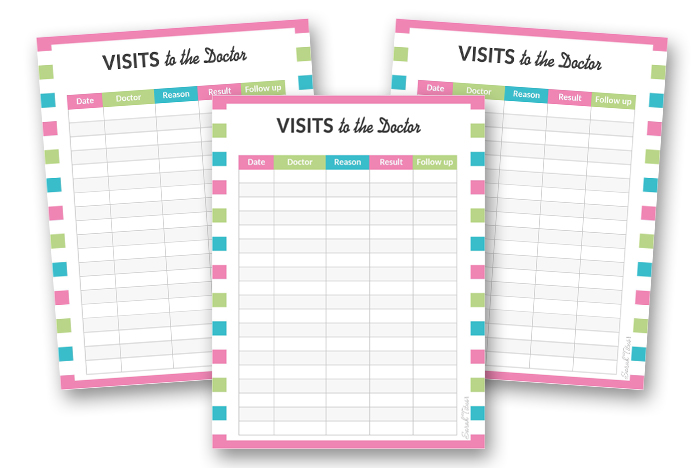
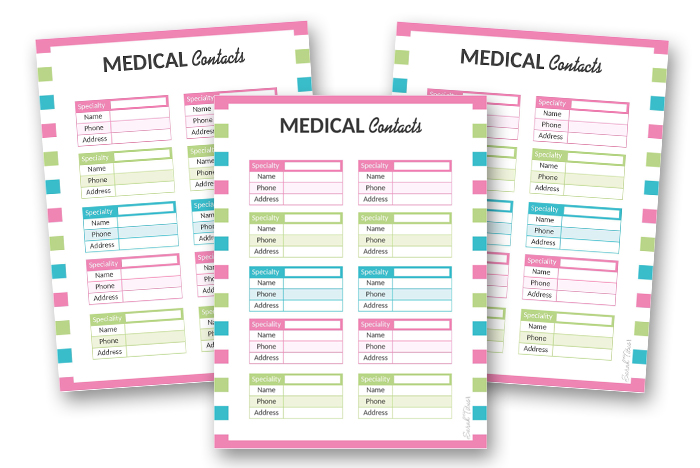

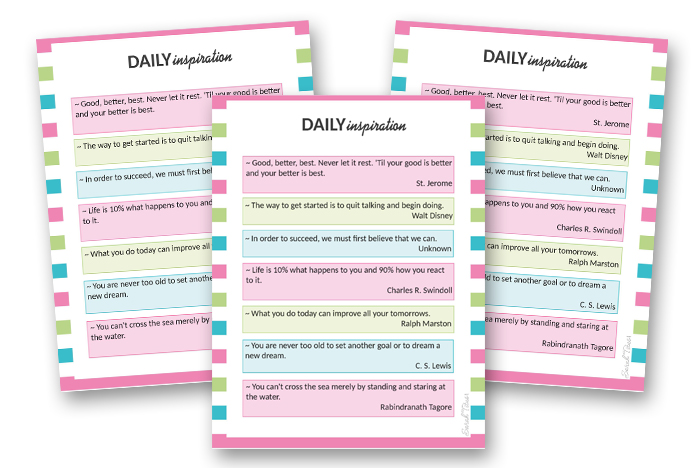
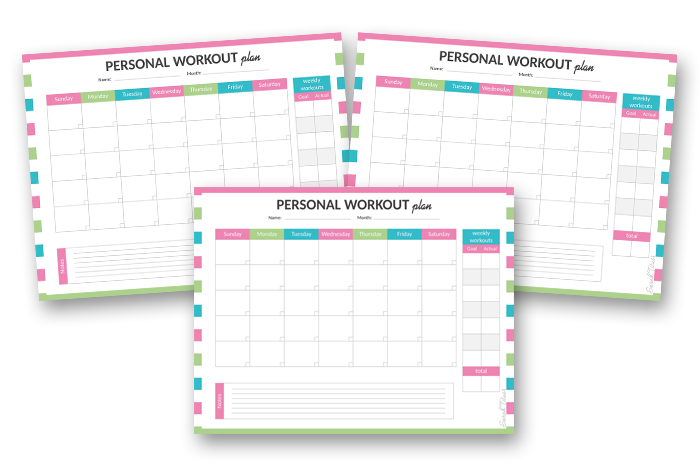
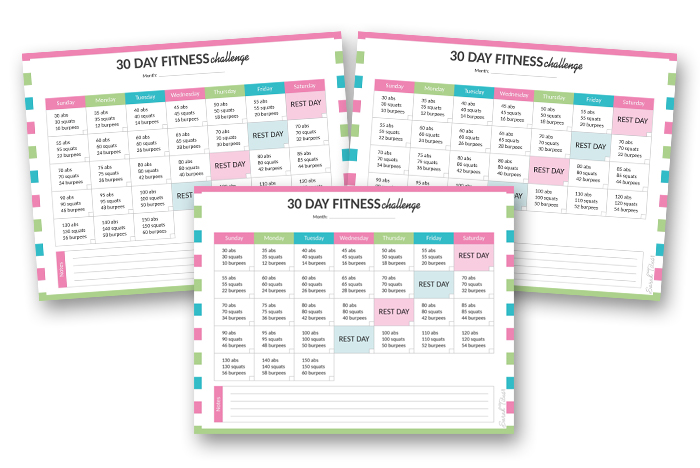

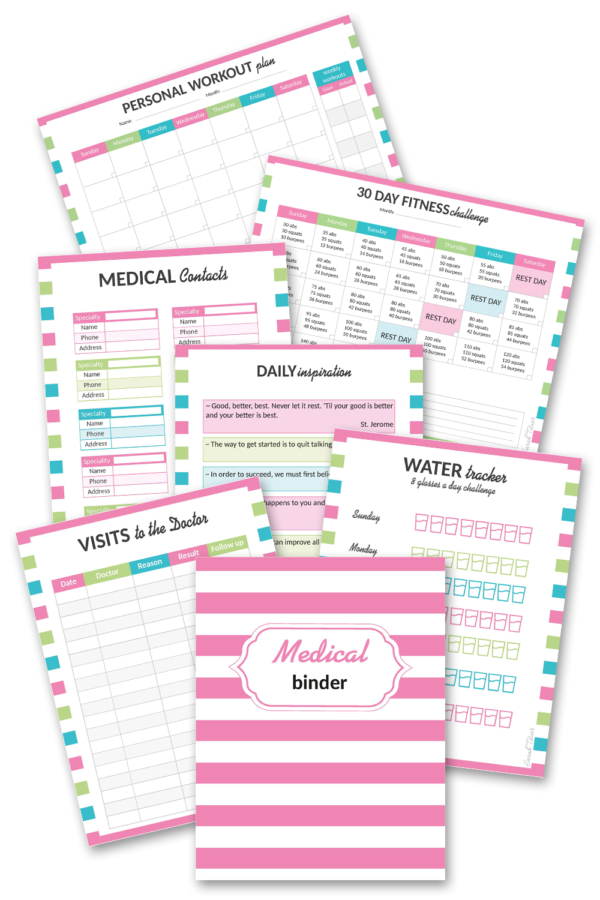

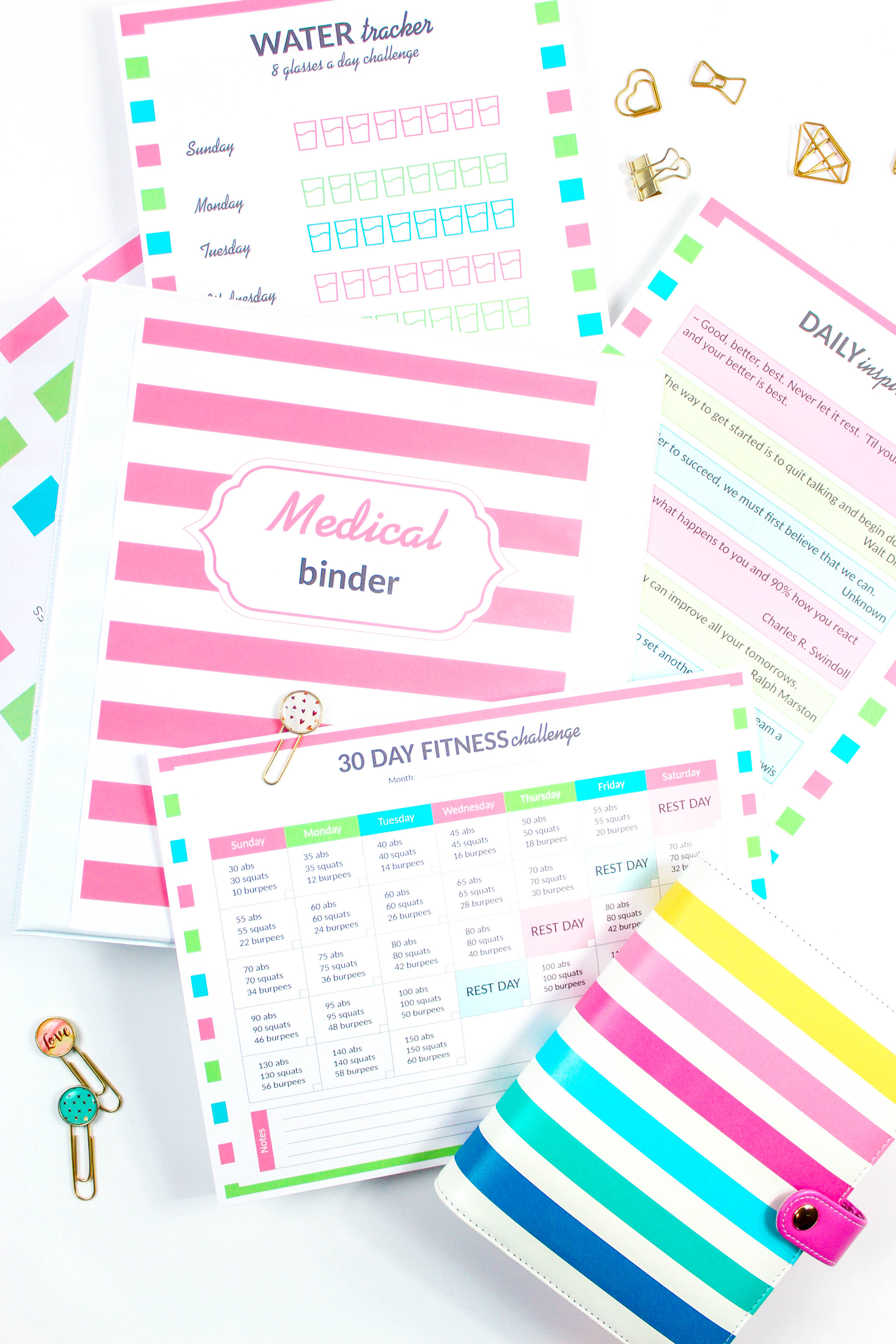











































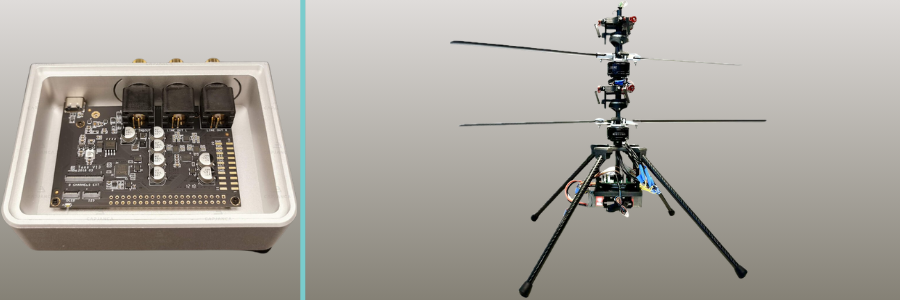




![[Vinesauce] Cookie’s Bustle w/chat - YouTube](https://img.youtube.com/vi/za3Bq19bxzk/maxresdefault.jpg)