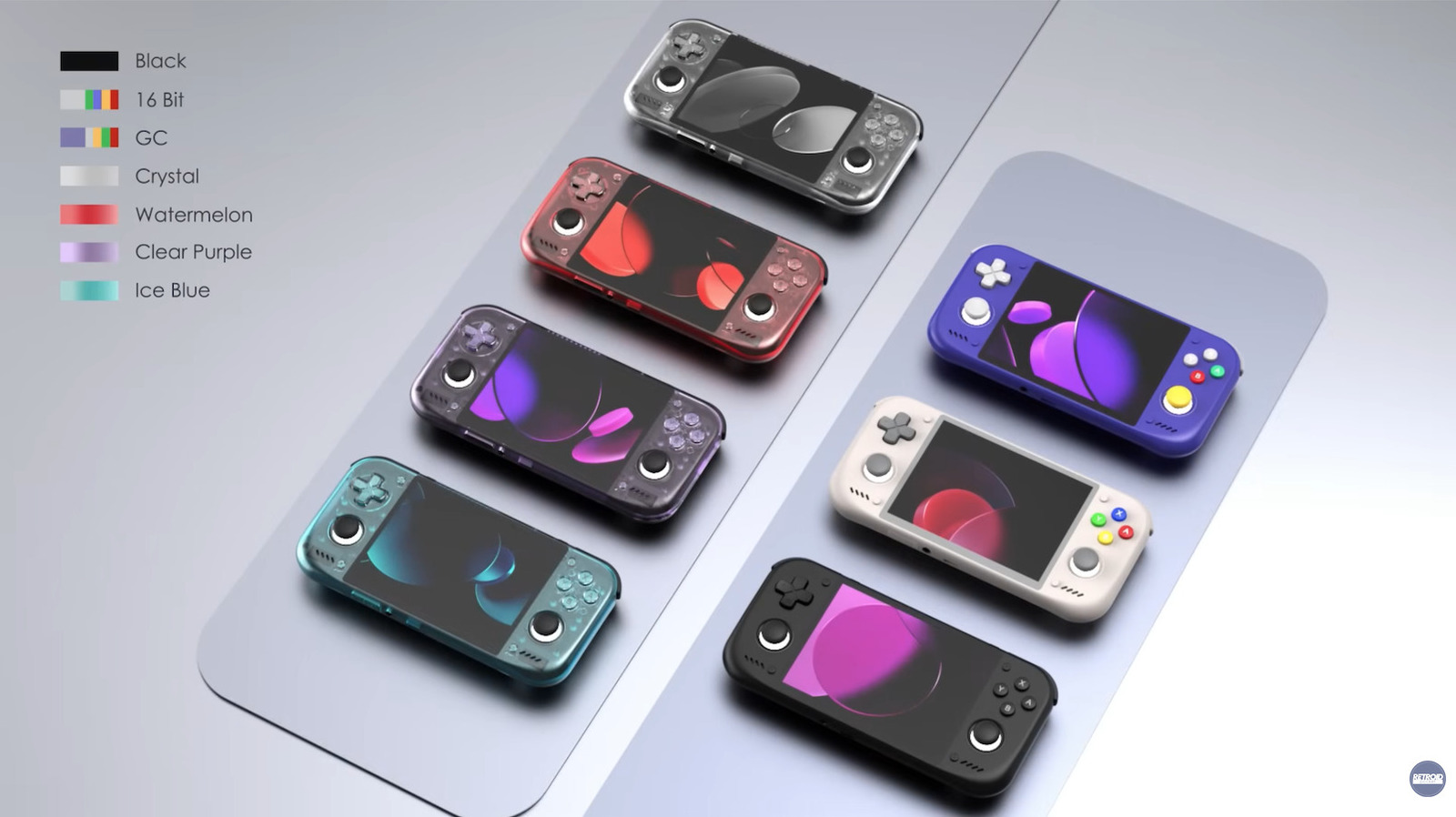
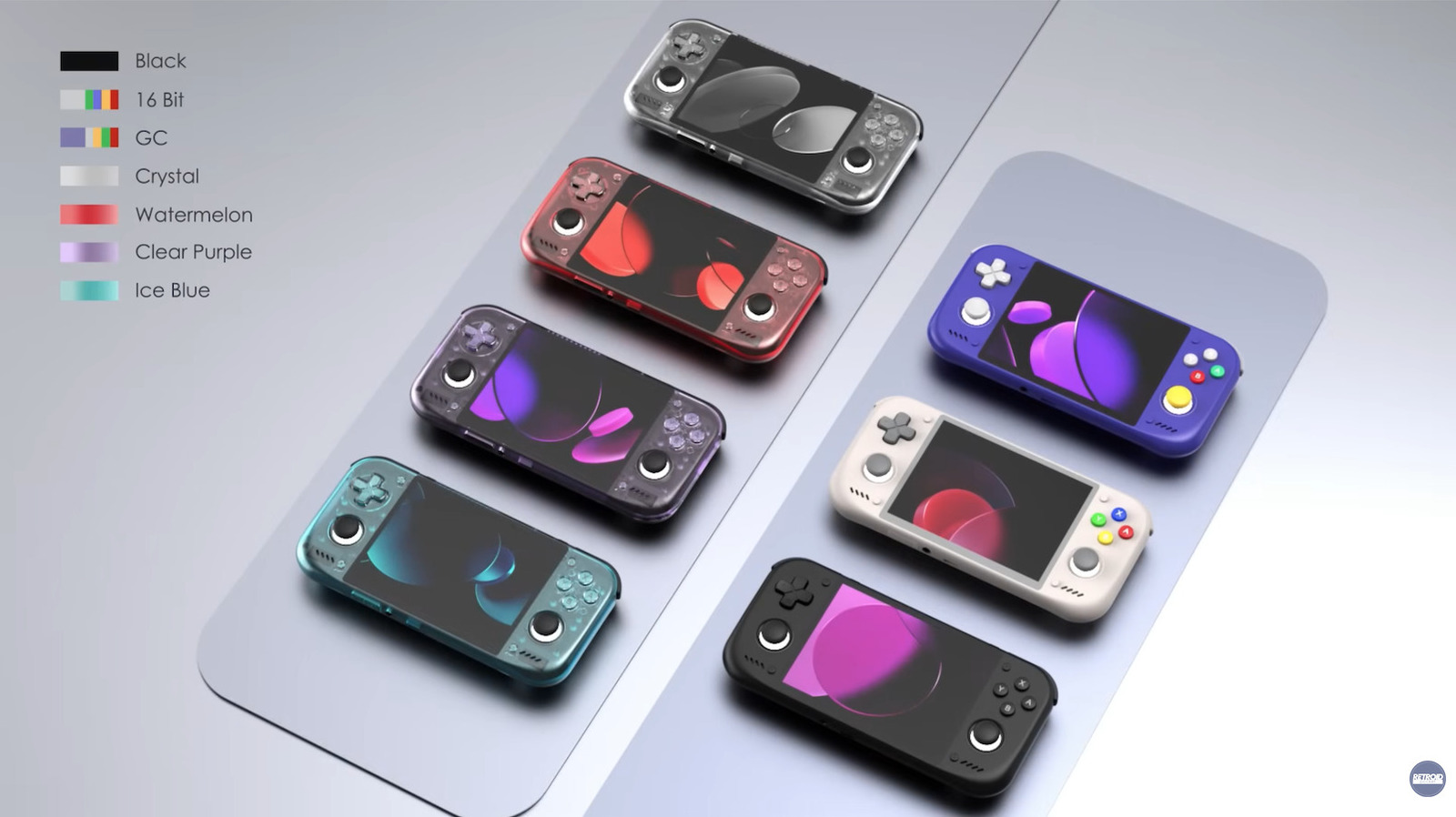
It should be able to handle up to GameCube and PS2 titles, thanks to a powerful chip.
Retroid just released a bunch of information about its upcoming Pocket Nova handheld console, according to a report by Time Extension. It’ll feature a Qualcomm QCS8550 processor, which is extremely similar to the Snapdragon 8 Gen 2. This means that the Pocket Nova will likely be a powerful machine with enough juice to run PS2 and GameCube games.
The 4.5-inch AMOLED display offers a 4:3 screen resolution, which also happens to be a great fit for PS2 and GameCube games. It comes with a 5000mAh battery with USB-C fast-charging and integrates with both Wi-Fi 7 and Bluetooth 5.
It’s fairly light, at under nine ounces, and includes a microSD slot for additional storage. The best part, however, is the price. The Pocket Nova starts at just $229, though that’s the entry-level version with 8GB of RAM and 128GB of storage. A model with 12GB of RAM and 128GB of storage costs $269. It’s available to preorder right now, but there’s no release date just yet.
— Retroid Pocket Official (@Retroid0fficial) June 25, 2026
Retroid has been on our radar for a while and has consistently pumped out high-quality portable consoles. The company’s Pocket 6 featured an actual Snapdragon 8 Gen 2 chip and could also handle games from the PS2/GameCube generation.
5 Easy Editing Tricks for More Powerful Storytelling
Most beginning editors start off learning the basic concept of making cuts in their videos to create a finished project.
Once they have learned to do that, the emphasis tends to go a little off course at that point and they start drifting into that vast wasteland I like to call, transitions!
The problem is that their intended goal is that of keeping the viewer engaged but the whole “transitions” thing leads them off into the undergrowth, possibly never to be seen again.
The real key to all of this is learning why and when to cut rather than how.
If you take a look at the video below on editing techniques to improve storytelling you will notice that in most cases he uses a straight cut.
No fancy swirly, spinny transitions or masking effects, just straight cuts.
The difference is where and why each cut in being made and what purpose it is serving to the story.
How to Design J-Cut and L-Cut Transitions in Powerdirector
One of the absolute basics anyone should be learning as a new video editor is the use of J-Cuts and L-Cuts.
You should learn why they are the most common cuts in pro editing and how to do them.
So for the second part of that equation, the how, check out the video below because although they seem kind of simple, they are pretty easy to mess up!
As far as the why goes, heres the short version.
Both the J-Cut and the L-Cut are cut points where either the video cuts just before the audio or the audio cuts just before the video.
Youll see in the demo below which is which so I am not to ramble on about it here!
The reason it is so powerful and is used like flour in a bakery is that they both mimic real life.
In real life, you are constantly receiving visual and auditory information but you are rarely receiving both visual and auditory information from one source at the one time.
If a dog barks at you when you are on the street you will most likely hear the dog before you see the dog.
If you are in a crowded room at a party you will be seeing then hearing then hearing then seeing and only on a very few occasions will the hearing and seeing happen simultaneously.
J-Cuts and L-Cuts reflect that reality of life and provide a very polished and professional edge to your videos without your audience being aware of why that is.
6 AI Tools That Make Video Editing 10X Faster
These are six tools in PowerDirector that I can totally get onboard with.
Its not because they are A.I and all the cool kids are using them or that they are creating my videos for me!
Its because they do what I want A.I. to do and that is to take boring, repetitive or just plain fiddly tasks off my hands and get them done painlessly.
A.I as a tool for creators and not a replacement of them is where we should be going right now.
How to Improve Audio Quality in Filmora (4 Easy Steps)
This is a run-through of some of the main audio tools you can find in Filmora 15 at the moment.
I say at the moment because Filmora gets updates pretty fast so who know whats coming next.
Anyway I dont think I need to bang on and on about the importance of audio in video creation.
Its one of those invisible factors to the audience that makes them think something is wrong without really identifying what it is thats wrong.
Whether they realize it or not, they quickly switch off.
What’s New in Filmora 15.6 – Teleprompter and Pen Tool Animation
When I added the item above, showing the audio tools of Filmora 15, I mentioned half seriously some thing about them updating frequently.
As so here we are! There is a new update to Filmora 15 which takes it to version 15.6.11.
In this new version there are a couple of very interesting enhancements to at least two of the tools already in the program.
The first is that they have added a teleprompter capability to the screen capture module.
This module is actually a stand alone program that you can, obviously, use to capture whatever it is you are doing on you computer screen.
What they have done is add the capability of having a teleprompter style overlay running while you are doing you screen capture.
This is a great feature for people using the program to do demonstration videos who can now read their script or cue sheet while doing the demo.
The second one is very cool and although is presented as an enhancement to the Pen tool (which it is) it is actually a way to manually draw motion paths.
So rather than try to explain it just watch Jacky’s video showing what it can do.
Fix Wrong Aspect Ratio Color Match Photos with AI! (Easy NoteGPT Tutorial)
Last week I spoke about no longer using A.I. features as part of the selection process for video editing apps.
This week I have another video tutorial showing why I no longer consider A.I. capabilities as being a particularly important part of that process.
These days there are many, many iterations of A.I. models for us to use and each of them have their own specialities, strengths and weaknesses.
Including all of them into an editing program’s interface would just be silly at this point especially given they are all easily accessible online.
So here’s another super quick and effective A.I. workflow from Gripps2211 working inside Corel VideoStudio and using external A.I. to manipulate his assets how he wants.
Learning Resolve? Don’t Make These Beginner Mistakes!
There are two main hurdles you have to get over if and when you start editing videos for whatever reason.
The first is actually learning how to work your way around the editing software you are going to be using so that you can actually edit!
The second and less obvious is that without a workflow, things can go downhill at an alarming rate!
Knowing where to start and why, followed by the next logical step in the sequence and why will get you to where you want to be way faster and without a whole lot of pain and with your sanity and enthusiasm for the activity (relatively!) intact.
Here’s great video from Casey Faris that walks through each step of the correct sequence and why and gives a great foundation to get you started off right.
On top of that he is also offering access to his free course for beginners which I recommend wholeheartedly.
VHS Tape Effect – DaVinci Resolve
Like most effect specific tutorials, I always watch and learn from them on the basis that I probably wont actually use that effect!
I know that seems a bit strange but what I am more interested in with these kinds of tutorials is how the effect is achieved, not the effect itself.
I have found over the years that whilst learning how to pull off an effect, you inevitably go through a bunch of steps involving tools and settings within the software.
The key here is to learn the tools and not so much the effect.
This one for example is how to manually recreate an old VHS tape effect.
Personally? Couldnt care less about an old VHS tape effect!
How Daniel gets there? Very interesting.
Key Takeaways
Beginners should focus on when and why to cut in video editing, rather than just learning transitions.
Mastering J-Cuts and L-Cuts enhances storytelling by mimicking real-life audio-visual experiences.
AI tools in video editing should alleviate mundane tasks instead of replacing creators.
Improving audio quality is vital for audience engagement and spans multiple tools in Filmora.
Updates in Filmora 15.6 include new features like a teleprompter and enhancements to the Pen tool.
A lot of the recent innovations in power banks have been around Qi 2 charging tech. There’s a decent amount of choice if you need a good power bank, and I use the Baseus Picogo, which just got a discount and is down to $28 right now.
The Picogo is a 10,000mAh power bank, and it has a sleek design with powerful magnets that let you attach it to your iPhone and Pixel without any issues. I used this model with my Pixel 10 Pro XL and iPhone 17 Pro, and after a year of use, I didn’t see any issues whatsoever.
✅Recommended if: You want a Qi 2 MagSafe power bank that’s lightweight and reliable in daily use. The Picogo power bank has a 10,000mAh battery, Qi 2 with 15W charging, and a USB-C port that hits 22.5W when you need to plug in.
❌Skip this deal if: You need Qi 2.2 with 25W charging. In that case, get the Baseus Picogo AM52, which is now $52.
There’s a lot to like with the Picogo power bank. The 10,000mAh battery is enough to charge a phone fully, and I really like the design; the metal chassis makes it durable, and the Qi 2 magnets are strong — they attached to my iPhone and Pixel without any problems.
With Qi 2 connectivity, you get 15W charging, and while it’s on the slower side, it is adequate while traveling as the power bank stays connected to the phone. This is a big advantage over regular power banks, and the size and weight of the Picogo gives it an edge over its rivals.
There’s a dedicated USB-C port that goes up to 22.5W, and this is useful if you need to plug in a secondary device to the power bank. Note that while the power bank has a 10,000mAh battery, it doesn’t mean you’ll be able to charge your phone twice over. Because of charging efficiency and the inherent energy that’s lost while charging your phone, you’ll get close to 5,500mAh of actual usage power out of the Picogo, and that is in line with other power banks in the industry.
If you need Qi 2.2 with the full 25W charging, you’ll want to get the Picogo AM52. It has the same design and the same 10,000mAh battery, and the magnets are the same as well. The biggest difference is that it’s able to deliver a 25W charge consistently, and I found that to be a decent enough differentiator when I need to charge my phone. But because of the newer standard, the AM52 costs a lot more — you’ll be shelling out $52 to get your hands on the power bank.
Honestly, the regular Picogo should be more than adequate for most, and the best part is that it is now available for under $30, making it a good overall option.
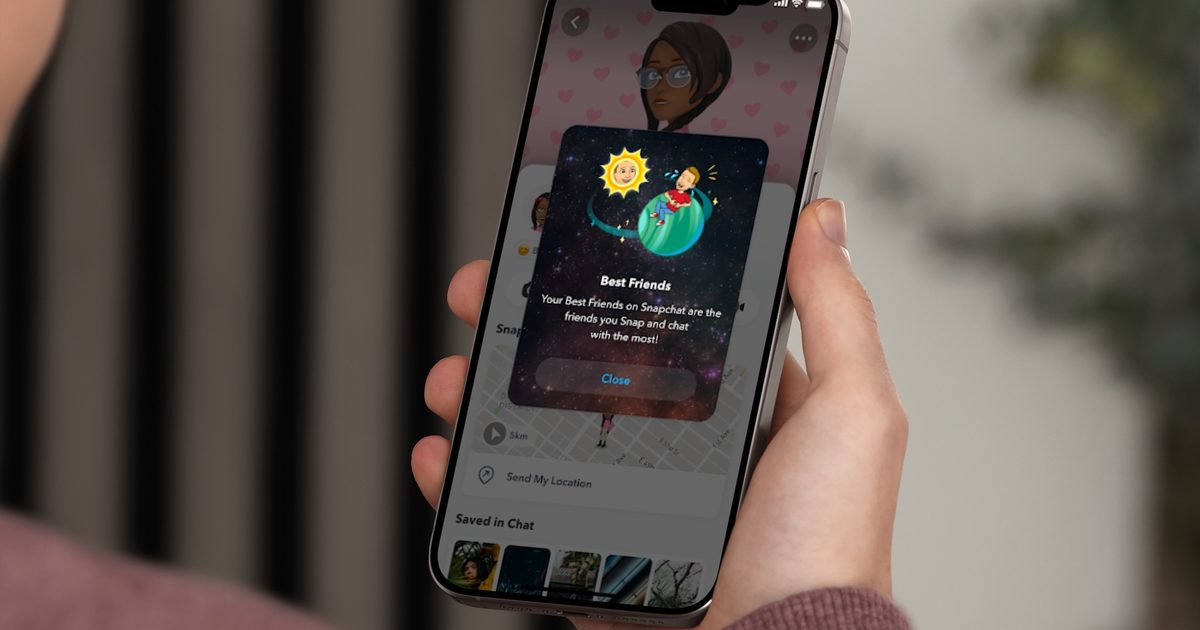
Snapchat+ includes several exclusive features, but few have generated as much curiosity as Snapchat Planets. Part of the app’s Friend Solar System, it transforms your Best Friends list into a planetary ranking, assigning each of your top eight friends a planet based on how often you interact.
From Mercury, which represents your closest friend, to Neptune, which represents your eighth closest, the system offers a quick visual snapshot of your interactions. But what do the different planets actually mean, and how does Snapchat decide who gets which one?
Here’s everything you need to know about Snapchat Planets, including the full order, what each ranking represents, and how to view your own Friend Solar System.
Snap
Snapchat Planets order
Snapchat’s Friend Solar System follows the same order as the real solar system, with each planet representing one of your top eight friends. The closer the planet is to the sun, the higher that person ranks in your Best Friends list based on your interactions.
The Snapchat Planets order is:
Mercury
Venus
Earth
Mars
Jupiter
Saturn
Uranus
Neptune
And yes, Pluto gets left out again.
Snapchat
Each planet represents a specific position in your Best Friends ranking, rather than a different type of friendship. Mercury is assigned to the friend you interact with the most, while Neptune represents your eighth closest friend. The rankings aren’t permanent and can change over time as your activity on Snapchat changes.
Snapchat
Snapchat Planets: What Each Ranking Means
Each Snapchat Planet represents your position in someone’s Best Friends list rather than a different type of friendship. Mercury is assigned to the friend you interact with the most, while Neptune represents your eighth closest friend, with the remaining planets falling in between.
Planet
Best Friends Rank
What it means
Mercury
#1
You’re their closest Snapchat friend based on interactions.
Venus
#2
You’re their second closest Snapchat friend.
Earth
#3
You’re their third closest Snapchat friend.
Mars
#4
You’re their fourth closest Snapchat friend.
Jupiter
#5
You’re their fifth closest Snapchat friend.
Saturn
#6
You’re their sixth closest Snapchat friend.
Uranus
#7
You’re their seventh closest Snapchat friend.
Neptune
#8
You’re their eighth closest Snapchat friend.
The planets are simply a visual representation of your Best Friends ranking and aren’t meant to measure the strength of a friendship. As your interactions on Snapchat change, your ranking can change too, meaning someone who’s Mercury today could move to Venus or Mars over time.
How Snapchat’s Friend Solar System Works
The Friend Solar System is one of Snapchat+’s exclusive features, designed to visualize your Best Friends list using the eight planets in our solar system. Instead of assigning numerical rankings, Snapchat represents each of your top eight friends with a planet, making it easier to see where someone stands based on how you interact on the app.
Your position in the Friend Solar System isn’t permanent. As your activity changes, whether that’s through snaps, chats, or other interactions, the rankings update to reflect those changes. Snapchat hasn’t disclosed the exact criteria behind the system, so there’s no guaranteed way to move someone higher in your rankings beyond interacting with them more frequently.
Best Friends and Friends badges
The Friend Solar System only applies to your Best Friends list, but you may also notice a Friends badge on some profiles. The two aren’t the same.
A Best Friends badge indicates that you and another user are among each other’s closest Snapchat contacts. A Friends badge simply means you have an active friendship on Snapchat, but the ranking isn’t necessarily mutual. In other words, someone can appear as your Mercury without you occupying the same position in their Friend Solar System.
How to see your Snapchat Planet
Once you understand how the Friend Solar System works, finding your Snapchat Planet only takes a few taps. Keep in mind that the feature is exclusive to Snapchat+ subscribers, so you’ll need an active subscription before you can view your rankings.
Snap
Step 1: Open Snapchat.
Step 2: Go to a friend’s Friendship Profile.
Step 3: Look for a Best Friends or Friends badge with a gold ring around it.
Step 4: Tap the badge.
Step 5: Snapchat will show which planet you are in that friend’s Solar System.
If you do not see a badge, it usually means you either do not have Snapchat+, Friend Solar System is not enabled, or you are not in that person’s visible friend ranking.
How to turn on Snapchat Planets
Before you can use Snapchat Planets, you need Snapchat Plus. Pricing can vary by region and plan, so the safest way to check the current cost is inside the Snapchat app or through Snapchat’s subscription page. Snapchat also offers multiple Plus-related plans in some regions, and availability can vary.
Once you have Snapchat Plus, you may still need to turn on Friend Solar System manually.
Step 1: Open Snapchat and go to your profile.
Step 2: Tap your Snapchat Plus membership card or banner.
Step 3: Open the Snapchat Plus feature management page.
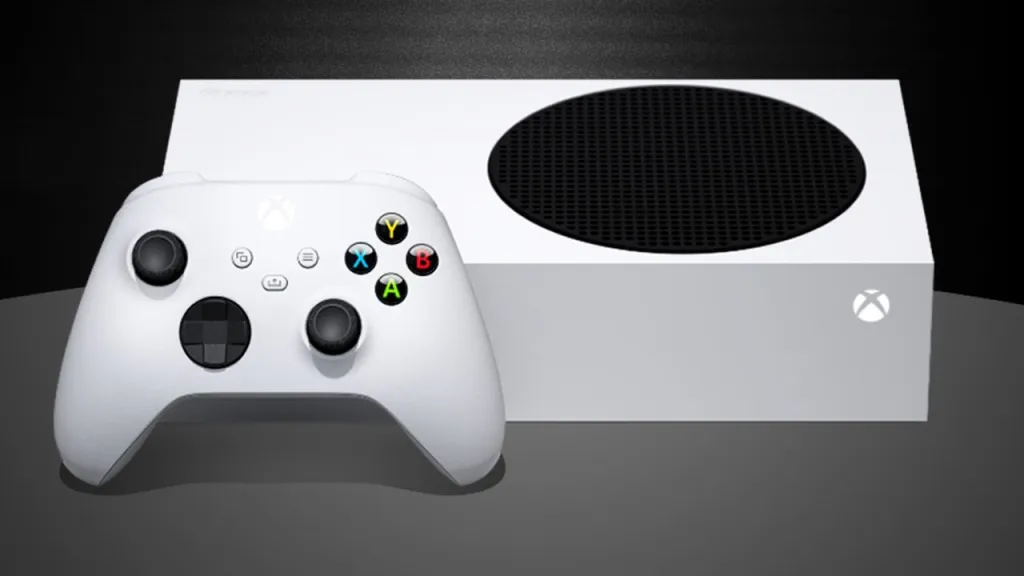
Just a couple of years ago, the Xbox Series S felt like a great holiday gift idea. I was able to pick up a console for $250 during Black Friday and introduce my brother to this generation of console gaming. He just had to buy a Game Pass for Console subscription, and he suddenly had access to a big library of current-gen games and all of Xbox’s first-party titles the day they released. Sure, games didn’t run quite as well on the slightly less powerful console, but it was good enough for a casual gamer like him.
Following the price hikes announced today by Microsoft, the Xbox Series S no longer feels like such a good deal. While it’s still the cheapest way into current-gen gaming, the entire Xbox ecosystem has been price gouged to the point where the Xbox Series S no longer has a clear or appealing platform identity.
When Microsoft first unveiled the Xbox Series S in September 2020, it was positioned as “the smallest, most affordable next-generation console.” But although it was a little weaker than the Xbox Series X and would display games at lower resolutions, it was $200 cheaper. And most importantly, it would play all the same games as Xbox Series X.
It was a Game Pass machine, as buying the console and several months of Game Pass still wasn’t as expensive as buying an Xbox Series X. “If you just want to access what the platform offers now or what’s to come in Xbox’s future, and don’t mind the gap in graphical details and storage space, this is the Xbox for you,” GameSpot stated in its 2020 review.
Over time, though, the cracks in the Xbox Series S’s value proposition started to show. Its lower specs impacted which games were being ported to both Xbox consoles. Most famously, Baldur’s Gate 3 was a PS5 console exclusive at first because Larian Studios couldn’t achieve parity between the Xbox Series X and S versions of the game.
Xbox compromised with the studio and let Larian ship a version of Baldur’s Gate 3 on Series S without local co-op, despite the feature being available on Series X. From that point on, Xbox Series S didn’t feel like a true next-gen console anymore.
An Xbox Series S console and Xbox Controller sit next to each other.
Then the price increases began, starting with Game Pass. In 2024, Game Pass for Console was discontinued, and the cheaper Standard and Core tiers no longer included day-one releases. In 2025, prices skyrocketed even higher. As of May 2026, prices are down slightly, but remain higher than the recent past. Right now, your Game Pass options are $10 a month for the limited Essential library, $15 a month for the Premium catalog that lacks day-one releases, or $23 a month for the Ultimate tier that includes everything.
As if those prices weren’t steep enough, we’re now seeing unprecedented spikes in console pricing. Because of component shortages and price increases driven by the AI boom, in which Microsoft is a major player, the Series S has seen its price rise multiple times over the past year or so.
Its retail price increased to $380 in May 2025, $400 in October 2025, and now $500 in August 2026. While it’s still cheaper than the Xbox Series X, “affordable” doesn’t feel like an accurate way to describe the Xbox Series S anymore.
An Abox Series S and Xbox Controller hovering in a promotional video by Microsoft.
The Xbox Series S felt affordable enough that I bought it as a gift a few years ago. I definitely would not do the same thing for an underpowered $500 console in 2026. I’d just give my brother some cash or a gift card and tell him to pick up a Nintendo Switch 2 or a refurbished PlayStation 5 Digital Edition for his current-gen gaming needs.
While the Xbox Series S was a clever way to give Xbox an enticing advantage over the competition in 2020, it now feels like an albatross dragging this generation down as it nears its end. Microsoft’s own choices to invest in AI and continually modify the price of Xbox Game Pass have completely ruined what was once one of its most appealing Xbox consoles.
If your support team is stuck answering the same questions while complex issues keep stacking up, it’s hard to improve anything because you’re always in reaction mode.
This workbook by Intercom is a practical field manual to help you build a clear business case, choose the right approach, and launch an AI Agent pilot with success metrics tied to customer experience, team efficiency, and operational impact.
In this workbook, you will learn how to:
Build an AI-first business case that goes beyond cost per ticket and reflects real outcomes and true human effort
Pinpoint the work worth automating
Run a focused evaluation: define success, test with real scenarios, and score performance
Track the metrics that matter
Roll out with a phased deployment plan, clear owners, and the right data + knowledge connections
Apple today raised prices on many of its products, including all Macs and iPads, as well as the Apple TV, HomePod, HomePod mini, and Vision Pro. We shared a list of the price increases, which range from $30 for the HomePod mini to up to $1,300 for the Mac Studio. iPhone, Apple Watch, and AirPods prices have not changed, at least for now.
In a statement shared with MacRumors, Apple said it raised prices because of the ongoing memory chip shortage, resulting from companies building out data centers with powerful AI servers. The supply-demand imbalance has led to skyrocketing prices for RAM and SSD storage chips used in a wide range of Apple products.
Apple’s full statement:
The consumer electronics industry is facing an unprecedented challenge. The rapid expansion of AI data centers has created an extraordinary surge in demand for memory and storage. We have never seen a component price increase this much, this quickly. We have shielded our customers from these increases so far, but we have now reached a point where we need to begin raising prices on a number of products, including today’s increases for iPad and Mac. We know this is not welcome news, and we are working tirelessly to find solutions.
Last week, Apple CEO Tim Cook said price increases were “unavoidable.”
Apple indicating that it needs to “begin” raising prices suggests that additional price increases might occur later. On the other hand, Apple noting that it is “working tirelessly to find solutions” suggests that prices might eventually come down again.
Apple is far from the only tech company that has raised prices in response to the memory chip shortage, with others including Microsoft, Samsung, Lenovo, HP, Dell, and more. Memory chip supplier Micron expects the shortage to last through 2027, so elevated prices could be the norm for another year and a half or longer.
Here’s a hard truth: Google doesn’t rank your brand it ranks your locations, one by one, on their own individual merits. A $500,000 website redesign won’t save you if your location pages aren’t built right.
For franchise brands with dozens or hundreds of locations, every under-optimized location page is leaving foot traffic and revenue on the table every single day.
This guide breaks down exactly what every franchise location page needs in 2026 with real-world examples across healthcare, home services, fitness, education, and restaurants.
Why E-E-A-T Matters for Franchise Location Pages
This also connects directly to Google’s guidance on helpful, reliable, people-first content. Google asks publishers to show EEAT : experience, expertise, authoritativeness, and trustworthiness. For franchise location pages, that means proving real local knowledge instead of publishing a thin city-swap template.
At Weam, this is the lens used when reviewing multi-location content systems for franchise and location-based teams: the strongest pages connect website content, Google Business Profile data, reviews, local offers, and reporting into one reliable location-level source of truth.
1. Get the Technical Foundation Right First
URL Structure That Inherits Authority
The best-performing franchise location pages use a clean subdirectory structure:
Real-world example:Mr. Electric of Austin uses the shared Mr. Electric domain while still serving hyper-local content: an Austin address, service-area map, nearby areas served, local phone number, and city-specific copy such as “Keep Austin Wired.” That is the balance franchise pages need – central brand authority plus local proof.
Each location page must include content that is genuinely useful and locally specific, referencing local landmarks, community context, and photos taken at that actual location.
Real-world example: Subway uses store-specific details to avoid thin city-swap templates. Its 250 Tenth Avenue New York page highlights local hours, address, pickup, delivery, catering CTAs, and services like breakfast and mobile ordering. Its 2201 C Street NW Washington, DC page uses a different location name, hours, and service mix for a business-district audience. Same franchise system, but each page gives Google and customers distinct local evidence.
Location-Specific Offers and Seasonal Promotions
Generic calls-to-action don’t convert as well as market-specific offers .Anytime Fitness allows franchisees to run localized promotions at the city level. For example, the Washington, Michigan location runs a “Join & Get the Summer Free” banner to capture warm-weather sign-ups, while the Clayton, North Carolina location uses a “Join For $1” offer to drive immediate conversions in its market. The page structure stays familiar, but the offer adapts to local demand.
Localized FAQs and Customer Reviews
FAQ sections serve two purposes: answering genuine customer questions and targeting long-tail, voice-search keywords. FAQs should cover:
• Local parking and transit options
• Geography-specific service questions (“Do you handle ice dam repairs?” for Minnesota; “Do you offer heat damage treatment?” for Texas)
• Location-specific hours and local holidays
Customer reviews are the #1 trust signal and in 2026, Google pays attention to review keywords as a top-tier ranking signal — the specific words customers use in their reviews directly help that location rank for those phrases. A review mentioning “best physical therapy in Austin” actively helps that Austin location rank for that phrase.
Real-world example: Orangetheory Fitness Chicago-River North shows how a franchise location page can combine precise local context with proof. The page references the studio’s corner of Wells and Ontario, nearby transit access, and neighborhood context, while the Google Business Profile adds reviews that mention coaches, workouts, and the specific studio experience.
3. The Geographic and Seasonal Dimension
This is the section most franchise marketers overlook and arguably the most powerful differentiator available in 2026.
A franchise location page in Phoenix faces a completely different customer reality than one in Portland or Boston. The climate is different. The seasonal rhythm is different. The language customers use to search is different. Publishing identical pages for both markets costs both locations meaningful search rankings since Google is actively looking for location-level signals, not cloned corporate content.
How Seasonal Conditions Shape Content Across Verticals
Home Services
A roof cleaning franchise in Tampa needs to address peak mold and algae season during summer humidity. The same brand’s Denver page needs content about freeze-thaw cycles and ice accumulation. Gulf Coast locations should shift emergency restoration content during hurricane season, because seasonal service needs are one of the clearest ways to prove local relevance.
Healthcare Allergy treatment franchises in high-pollen regions (Southeast, Midwest in spring) should build location pages around seasonal allergy peaks. Physical therapy franchises near ski resorts should optimize for winter injury recovery content during ski season, then pivot to summer sports recovery in the off-season.
Seasonal Content Update Framework Quarterly
Google rewards pages that show regular activity over pages created once and abandoned.
Quarter
Home Services
Fitness
Restaurant
Healthcare
Q1 (Jan–Mar)
Winter storm recovery, pipe thaw
New Year resolutions, winter wellness
Comfort food, hot beverages
Cold/flu season, winter injuries
Q2 (Apr–Jun)
Spring cleaning, AC prep
Spring transformation, outdoor training
Lighter menu, patio seating
Allergy season, spring sports injuries
Q3 (Jul–Sep)
AC maintenance, storm prep
Summer momentum, fall prep
Refreshing drinks, back-to-school
Heat illness, summer sports recovery
Q4 (Oct–Dec)
Heating checks, winterization
Holiday commitment, year-end goals
Holiday specials, gift cards
Flu shots, year-end health checkups
Real-world example: Molly Maid’s Scottsdale, AZ holiday cleaning page leads with party cleanup and holiday hosting needs, while its spring cleaning service page shifts the angle toward refreshing homes after winter. Same brand, different seasonal intent. That is the level of variation franchise pages need when the weather, local routines, and customer urgency change by market.
From Weam’s work with multi-unit businesses and franchise teams, the ranking problem is rarely one missing keyword. It is usually a system problem: the page, Google Business Profile, reviews, photos, offers, and reporting are managed in different places, so each location sends mixed signals. Strong location pages fix that by making the website the source of truth for local operations.
NAP Consistency and Review Velocity
Name, Address, and Phone number consistency across all directories is non-negotiable. Even a suite-number discrepancy between your Google Business Profile and a single directory listing can create “signal pollution” that weakens local trust signals.
• Minimum 50 total reviews before considering the profile optimized
• 3–5 new reviews per month to maintain velocity
• 100–200+ reviews in competitive markets
5. The 2026 Location Page Structure
Every high-performing franchise location page should follow this structure, top to bottom:
1. Location-specific H1 e.g., “Planet Fitness in Austin, TX Open 24 Hours, Judgment-Free Workouts”
2. Hero section actual photo of the physical location, local phone number (click-to-call), address with embedded Google Maps, real-time open/closed indicator
3. Local introductory paragraph (150–200 words) written specifically for this market, referencing the neighborhood and nearby landmarks
4. Location-specific CTA make it local (“Book your Austin appointment today”)
5. Services section only list services available at this location; highlight any location-only specialties
6. Seasonal/local offers current location-specific promotions or time-sensitive deals
7. Local testimonials + Google Reviews widget 3–5 curated reviews that mention the location and local context
9. Staff or owner introduction locations with a named owner or team member see significantly higher conversion rates
10. Community involvement local sponsorships, charity partnerships, or events
11. Internal links to nearby location pages, the corporate homepage, core service/use-case pages, supporting local blog posts, and a related PPC/location-intelligence article when relevant
12. LocalBusiness schema full implementation in page source
13. Footer NAP exact match to Google Business Profile
☐ Mobile-optimized with click-to-call phone number
☐ Embedded Google Map
☐ Page load speed under 2.5 seconds (Core Web Vitals)
✅ Content Requirements
☐ Unique H1 with city name and primary service
☐ Locally-written intro paragraph (no city-swap templates)
☐ Location-specific services list
☐ Seasonal/local promotional offer
☐ 3–5 local customer testimonials + live Google Reviews widget
☐ Location-specific FAQ section (6–10 questions)
☐ Staff or owner introduction
☐ Community involvement content
☐ Actual photos of the physical location (not stock)
✅ Local SEO Signals
☐ Fully optimized, separately managed Google Business Profile
☐ NAP data exactly matches GBP
☐ Minimum 50 Google reviews, 3–5 new per month
☐ Local citations updated and consistent across directories
☐ Internal links to/from the homepage, corporate service/use-case pages, nearby location pages, and supporting articles such as the multi-location PPC workflow
✅ Seasonal and Geographic Customization
☐ Content reflects local climate and seasonal service needs
☐ Offers and promotions updated quarterly
☐ Hero image reflects local environment or season
☐ FAQs include geography-specific questions
Want to apply the same location-level thinking to paid campaigns? Read Weam’s related guide on multi-location PPC workflows, which explains how clean location data can help teams make smarter ad decisions across markets. The same inputs that strengthen franchise location pages, including reviews, missed calls, local offers, booking capacity, market seasonality, and location-level demand, can also help PPC teams decide which locations to promote, which offers to test, and where budget should shift.
For franchise teams, the goal is not more copy. It is a repeatable system that keeps every page accurate, local, approved, and connected to performance. That is where Weam’s multi-unit workflow approach becomes relevant: it connects content, approvals, reporting, and location-level execution instead of treating each page or campaign as a one-off task.
The Location Page Is Your Front Door
In 2026, your franchise location page is not a digital brochure. It is the front door of every individual location the first thing a local customer encounters when they search for what you offer near them.
The franchises winning local search treat each location page as a standalone, genuinely local asset: rich with unique content, optimized for local intent, updated seasonally, and reflective of the geographic community it actually serves.
Whether your location sits in the humid South, the frozen North, the sun-baked Southwest, or the rain-soaked Pacific Northwest the services your customers need and the language they use to search are different. Your location page must be too.
Ready to scale this across hundreds of locations without duplicate content penalties? Review Weam’s approach for multi-unit businesses, start with a cost-saving audit to identify where your franchise team may be losing time or budget, then book a call to discuss how your team could manage location pages, approvals, and updates without turning the process into manual copy-paste work
The fight against anime and manga piracy is at the forefront of the Japanese entertainment industry. While this has become a major source of foreign currency earnings, with overseas sales exceeding 6.13 trillion yen in 2024 (approximately $38 billion), losses incurred due to the piracy of anime and manga rose to 5.7 trillion yen in 2025 from 2 trillion yen in 2022. Now, the Japanese government is stepping in with measures that are bound to become controversial.
According to The Yomiuri Shinbun Japan News, the government led by Prime Minister Sanae Takaichi is planning a massive round of subsidies for 15 companies to expand the overseas market for Japanese entertainment, chiefly anime and manga, with the aim of tripling overseas sales to 20 trillion yen by 2033. The companies eligible are expected to include big publishers such as Shueisha (One Piece), Kodansha Ltd. (Attack on Titan), and Square Enix Co. (The Apothecary Diaries), but also Bandai Namco Holdings Inc., and streaming company Crunchyroll, LLC, a subsidiary of Sony Group Corp, which is also the largest shareholder of Kadokawa.
According to anonymous sources cited by the report, the subsidy, which could provide a total of 11.5 billion yen, would cover half of the investment costs that the recipient companies need to better promote their works overseas. This includes translating their works into foreign languages faster with the help of generative AI. Other aims include increasing advertisement placement, holding events outside of Japan, and boosting the combined number of subscribers to the recipients’ services from 100 million to 300 million.
Last week, the Japanese parliament held a special session to discuss the manga industry. One of the key takeaways was the need to fight piracy more effectively, and it seems that the government is not afraid of stepping into controversial territory to do so. The dangers that generative AI poses for the creative and entertainment industry are well-known. Professional translators would be the first people negatively affected by this initiative, but there’s no telling where this could stop. Back in April, animation studio WIT faced backlash for its use of generative AI in the opening sequence of Ascendance of a Bookworm. In December of last year, Prime Video had to remove its AI-generated subtitles for Banana Fish.
The Economy, Trade and Industry Ministry is set to announce the companies eligible for the subsidies. In its bid to curb piracy, the Japanese government and the entertainment industry risk radicalizing fans (some of whom already justify illegal practices with the steep cost of subscription services) through the specter of AI, pushing them to rely on piracy regardless of how fast the products get translated into other languages. Surely enough, this initiative would mark a massive shift for the industry; it remains to be seen if it will be for the best.
There was a time when revisiting an old hometown carried the emotional logic of a movie ending. Familiar streets were supposed to unlock nostalgia. Former apartments were expected to glow with emotional significance. A favorite café from university years was meant to confirm that some version of the past still existed intact.
Instead, many people now return to visit your old cities and feel strangely disconnected from them. The discomfort rarely comes from architecture or weather. It comes from the disturbing realization that identity is no longer bound by physical locations as it used to be. Cities are emotional archives of a “passed away” self and revisiting these places is not quite like coming home but more like stumbling on a forgotten social account.
The Geography of Former Versions of the Self
The walk through the old neighbourhood produces a peculiar contrast between reality and memory. Once a restaurant that seemed to be in every Instagram story is now vacant. There are only tagged photos from 2018 that remain from years of friendships that were once part of a bar. The apartment building itself becomes unfamiliar, its personality is no longer there even at apartment buildings.
Nostalgia Became Socially Complicated
The emotional tension becomes even more visible because moving has turned into its own kind of internet culture. Entire corners of social media revolve around reinvention content, moving diaries, apartment resets, and starting over in unfamiliar cities. Even moving companies like Elatemoving have become part of that modern cycle of leaving one version of life behind and building another somewhere else.
Why Familiar Places Suddenly Feel Hostile
The emotional discomfort often comes from subtle social rituals that nobody openly discusses:
running into people connected to abandoned versions of identity
realizing favorite locations were emotionally important only within a specific social era
noticing how much personal style, language, humor, or ambition changed over time
understanding that online reputation sometimes outlives real emotional connection
feeling unexpectedly invisible inside spaces that once felt central to daily life
These moments rarely create dramatic breakdowns. The feeling is quieter and more culturally modern than that. It resembles opening an old streaming account and discovering recommendation algorithms still trying to reconstruct a personality that disappeared years ago.
The New Anxiety Around Recognition
There’s something bizarre about going back to an old town, finding out how much people really wanted some control over how they’re recognized. In between lies the discomfort of full anonymity, while the discomfort of full recognition is reconnecting someone to a past identity that they are no longer associated with.
People’s social behaviour is becoming more and more centered on selective visibility. Online culture encourages constant editing of the self, where older versions remain technically accessible but emotionally distant. Returning to visit your old city disrupts that carefully managed separation. Suddenly, old coworkers remember outdated ambitions. Former classmates reference forgotten habits. Even local routines begin exposing how much personality was shaped by the environment itself.
The Emotional Risk of Looking Backward
It is always interesting to see how things have changed when one encounters an old place again, and one gains a larger perspective of what is to be found in modern culture. Emotional affiliation is increasingly being achieved in short term “digital communities” rather than consistent “real-world” communities. Friendships transfer from one platform to another. Personal reinventions are public. There is a split of recognition between the virtual and real spaces.
That’s why it might feel like it’s emotionally wrong to return even when nothing bad actually happens. The city is still there but the emotional network with it is already archived and reformatted, and in some respects replaced by newer versions of the self, seeking survival elsewhere.