Differences And Similarities in 2025


ChatGPT and Google Bard are leading AI models that sparked the AI boom in the last few years.

While both are Large Language Models built on Natural Language Processing, they operate quite differently. ChatGPT focuses more on text generation, making it great for writing and structured responses. 

On the other hand, Google Bard leans towards a more conversational approach and has the advantage of real-time data access.

Choosing the right one requires careful consideration and research. But don’t worry—this Bard vs ChatGPT breakdown covers everything you need to know, helping you make the best decision based on your needs. 

Bard vs ChatGPT – Overview

ChatGPT and Bard are AI models that leverage Machine Learning (ML) and Natural Language Processing (NLP) to comprehend human requests and provide credible responses. 

OpenAI launched ChatGPT in late November 2022, and it quickly became a game-changer, reaching 100 million users in under two months. The AI model uses the Generative Pre-trained Transformer 4 (GPT-4) model, which allows users to generate summaries, paragraphs, and text-based answers. 

ChatGPT’s knowledge is based on information until September 2021, which means it has limited awareness of events beyond that point. 

However, ongoing interactions and improvements have refined it over time. Users are still advised to verify recent information, as the model may not always have the latest updates.

bard vs chatgpt

Image source

Google Bard, on the other hand, is a Google product created four months after ChatGPT came out. The model uses the Pathways Language Model (PaLM 2), a conversationally designed model that can access the internet to provide real-time answers. 

After ChatGPT’s launch in late 2022, Google fast-tracked the development of Bard. The push to accelerate Bard’s growth came from the growing competition in the generative AI space, especially after Microsoft integrated ChatGPT into Bing.

Despite the rush, Bard successfully entered the market. Its ability to provide more up-to-date responses comes from its latest language model and real-time internet access. 

Bard has long upgraded to Gemini, which provides more potent tools as you can integrate it with Google products and services. 

Below is a table giving an overview of the two AI models. 

Feature ChatGPT Bard
Developer Open AI Google DeepMind
Model GPT-4, GPT-3.5 Gemini 1.5
Access Free (GPT-3.5), Paid (GPT-4 via ChatGPT Plus) Free (Gemini 1.5)
Strengths Strong creative writing, structured responses, integration with OpenAI tools (DALL·E, Code Interpreter) Strong real-time web access, Google Search integration, multimedia understanding
Limitations Limited real-time web access (unless using plugins) May provide less detailed long-form responses
Integration Works with Microsoft (Bing Chat, Copilot) Built into the Google ecosystem (Search, Workspace)

ChatGPT Vs Bard – Key Differences

We start this piece by looking at the main differences between the models. 

Training data

ChatGPT was trained on a massive dataset drawn from the internet, including articles, books, websites, and documents. 

Since its training data stops at 2021, ChatGPT doesn’t have real-time awareness of recent events. However, its responses can sometimes be inconsistent. I asked the same question twice and got two different answers.

bard vs chatgpt

Google Bard is powered by the language model LaMDA. This model was trained on web text and public dialogue data totaling 1.56 trillion words. 

Although Bard is built on a larger dataset, its training data has raised some concerns. Google has disclosed that only 25% of its data comes from sources like the C4 dataset and Wikipedia, while the rest is gathered from the internet. However, the company hasn’t provided full transparency on sourcing this data.

This has sparked debates about the risks of training AI on such extensive datasets, particularly regarding potential biases, inaccuracies, and the ethical implications of data sourcing.

Language Models

The GPT models have evolved into four generations as follows. Here’s the table breakdown.

Model Release Date Parameters  Features
GPT-1 2018 117 million First-generation model, introduced transformer-based NLP.
GPT-2 2019 1.5 billion More powerful, capable of coherent long-form text generation. Initially withheld due to concerns about misuse.
GPT-3 2020 175 billion Trained on a 500GB text dataset, showed impressive text generation and reasoning capabilities.
GPT-3.5 2022 Likely >175 billion (not confirmed) Improved efficiency and response accuracy over GPT-3. Used in early versions of ChatGPT.
GPT-4 2023 (March 14) Not disclosed (rumored 1.2 trillion) Slower than GPT-3.5 but had better reasoning and multimodal abilities (text & images).
GPT-4o 2024 (May 13) Estimated 200 billion Faster, more efficient, real-time multimodal processing (text, images, audio, video). Optimized despite having fewer parameters than GPT-4.

The AI model comes with two language models: The free version of ChatGPT uses GPT-3.5 Turbo as its base model, while the paid users use GPT-4.o, the most advanced option. 

Google Bard uses Google’s Gemini family of language models. Based on your pricing plan, Bard runs on different versions of the Gemini model. 

The free version of Bard runs on Gemini Pro, while Bard Advanced (the premium subscription) uses Gemini Ultra, Google’s most potent AI model.

Google continues to develop and improve the Gemini models, releasing updated versions that enhance Bard’s capabilities while keeping the same model family name.

Internet Access

Google Bard features native internet access, retrieving current information directly from Google Search. This allows Bard to provide up-to-date answers about recent events and breaking news without additional steps from users.

ChatGPT’s base version operates without internet connectivity, relying solely on its training data. However, ChatGPT Plus subscribers can access Bing search through plugins, but this requires manual activation for each query and doesn’t provide the same seamless updating as Bard’s implementation.

The difference becomes most apparent with time-sensitive information, where Bard automatically checks multiple sources for recent developments, while ChatGPT Plus users must explicitly request web searches for similar capabilities.

Multimodal Capabilities

Both Bard and ChatGPT can analyze images and process text inputs, enabling users to upload pictures for identification, description, or analysis. 

However, a key difference is in how they present responses. Bard can directly incorporate images into its answers, often pulling relevant visuals from the web. This makes its responses more interactive and visually engaging, as it can illustrate concepts with diagrams or provide image-based examples alongside explanations.

ChatGPT can analyze uploaded images but cannot independently search for or generate visual content to include in its responses. This limitation creates a text-only output experience even when the conversation involves visual elements.

ChatGPT Vs Bard – Strengths and Weaknesses

Both options have points where they excel against the other and vice versa. 

Google Bard Pros

  • Provides human-like conversational responses.
  • Offers features like text generation, translations, and summaries.
  • Integrates with Google services for enhanced functionality (e.g., retrieving data from Gmail)
  • Real-time information access
  • A user-friendly interface that features responses that are well-formatted and enhance the user experience

Google Bard Cons

  • Inconsistent responses; may claim to perform tasks it cannot execute (e.g., document analysis).
  • Does not cite sources or provide links for verification, limiting its use for research purposes.
  • Cannot save entire conversations; only retains prompts temporarily
  • Bard hallucinates a lot, hence sometimes providing inaccurate answers that need human verification.

ChatGPT Pros

  • Excels in natural language understanding and generation.
  • Handles diverse topics and maintains context across conversations.
  • Cost-effective solution for businesses with scalability and flexibility.
  • ChatGPT has a flexible plugin system for seamless integrations across various platforms. With the plugins, users can enhance their functionality to fit their specific needs, whether for productivity or automation.

ChatGPT Cons

  • Struggles with multitasking and requires fine-tuning for specific use cases.
  • Limited to outdated information unless using plugins; may produce incorrect responses.
  • ChatGPT often produces detailed and wordy responses, making it harder to quickly find key information at a glance.
  • Ethical concerns due to potential biases in training data.

Use Cases Comparison

Google Bard and ChatGPT are powerful AI models with similar applications, but each stands out in different areas thanks to their unique features and integrations.

Content Creation

ChatGPT is particularly strong at generating long-form content thanks to its extensive training data. This capability is available even in the free version.

As a result, it has become popular for marketing teams looking to ramp up their content creation without burning the budget. According to a study on ChatGPT’s business adoption, 58% of businesses use ChatGPT for creating content or copywriting. 

The model is also great for brainstorming creative ideas and storytelling. However, users should be mindful of potential inaccuracies and verify information for reliability.

Bard’s real-time access to the internet is one of its advantages over ChatGPT when it comes to content creation. This means that content includes current references and trends, making it particularly valuable for timely topics. 

Due to its smaller training dataset, Bard falls short compared to ChatGPT in generating long-form content. However, it excels at drafting emails, blog posts, outlines, and creative pieces like poems or short stories.

Research Assistance

Both AI models offer valuable research capabilities, whether you’re writing an article, conducting market analysis, or preparing an academic thesis.

Google Bard provides more comprehensive responses thanks to its training on diverse customer feedback and market research data. Its connection to Google’s search engine gives it access to current information, making it exceptionally reliable for factual trends and recent developments.

ChatGPT relies exclusively on its training data for research tasks. While this data is extensive, it lacks real-time updates. However, if you’ve subscribed to the pro version, it can use the Bing search engine.

Technical Support

ChatGPT has gained popularity among developers because of its advanced coding capabilities. It excels at generating functional code, debugging complex problems, and providing clear technical explanations. 

Plus, the platform’s support for third-party plugins and UI extensions creates a more customizable experience for technical users.

Developers particularly value ChatGPT’s ability to understand programming concepts across multiple languages and frameworks. It can follow specific coding conventions, explain its reasoning through detailed comments, and adapt to various development environments. 

This technical precision and its straightforward interface make it a preferred tool for coding assistance and technical problem-solving.

Bard Vs ChatGPT – User Experience

User experience is perhaps the biggest differentiator between Bard and ChatGPT. Both options try to combine UX with aesthetics to boost the user experience. 

bard vs chatgpt

However, Bard goes a bit further. It isn’t just visually appealing—it also lets you edit questions after submission and provides multiple response options for added flexibility. 

Bard includes a sound icon in the top-right corner for users who prefer auditory interaction. This icon allows Bard to read responses aloud for added convenience.

Beyond that, Bard includes several unique features:

  • More prompt input options
  • A text-to-speech feature that lets Bard read its responses aloud.
  • Exporting responses to a Google Doc or Gmail
  • Bard allows you to edit your prompts

ChatGPT has enhanced its user experience by focusing on personalization, efficiency, and expanded capabilities.

A notable new feature in ChatGPT is the ability to customize its tone, style, and personality traits, such as making it more “chatty” or adopting a “Gen Z” tone, through updated custom instruction settings.

bard vs chatgpt

The AI model enables smooth multilingual English, Spanish, and French communication, ensuring global accessibility. ChatGPT now supports real-time collaboration, allowing multiple users to interact simultaneously, perfect for brainstorming sessions or virtual meetings.

Future Developments

Both ChatGPT and Bard are set for significant upgrades. ChatGPT is expected to boost its internet access without requiring manual plugin activation, allowing continuous data updates instead of relying on a fixed knowledge cutoff. This will be an upgrade on what they did in 2023. 

bard vs chatgpt

Image source

Meanwhile, Google is actively strengthening Bard’s coding abilities through specialized training on programming repositories. Recent test versions show marked improvements in syntax accuracy and debugging.

ChatGPT will probably expand its structured data handling to better process spreadsheets and databases, while Bard may soon integrate directly with Google’s developer tools and GitHub repositories. 

For example, developers might soon write code in Bard and immediately deploy it to Google Cloud without switching platforms.

Bard Vs ChatGPT – The Takeaway

Picking the better option between the two will ultimately go back to your needs. Figure out the tasks you’ll be undertaking, the level of technicality, and your budget. 

Due to its extensive training data, ChatGPT is a strong choice for complex tasks like content creation, coding, and research. If you need quick, up-to-date information with a conversational tone, Bard may be a better fit.

Frequently Asked Questions

What are the key differences between Google Bard and ChatGPT regarding internet access?

Google Bard has built-in internet access and pulls real-time information from Google Search. In contrast, ChatGPT’s free version lacks web access, while ChatGPT Plus users can use Bing search but must enable it manually for each query.

How do Bard and ChatGPT compare in handling images and visual content?

Both platforms can analyze uploaded images, but only Bard can add relevant pictures by searching the web. ChatGPT can interpret images users upload, but cannot find or include visuals on its own.

Which AI assistant is better for coding and technical support?

ChatGPT is stronger in coding and preferred by developers. It generates functional code in multiple languages, debugs complex issues, and supports various development environments. Bard is improving, but still trails behind in this area.

How do these AI platforms handle content creation differently?

ChatGPT is better for long-form content, maintaining consistent quality and structure, especially in academic and technical writing. With internet access, Bard offers multiple draft options and integrates current references. It also enhances responses with relevant images.

What significant improvements can we expect from Bard and ChatGPT in the near future?

ChatGPT is expected to gain seamless internet access and improve structured data handling. With specialised training and Google developer tool integration, Bard will likely enhance its coding abilities. Both platforms are advancing multimodal processing, customization, and enterprise security.

New AGI Warnings, OpenAI Suggests Government Policy, Sam Altman Teases Creative Writing Model, Claude Web Search & Apple’s AI Woes


This week, Paul and Mike return with a rapid-fire breakdown. From major AI companies’ bold policy recommendations to the AI Action Plan to Altman’s teaser of a new creative writing model that blurs the line between human and machine—there’s a lot to unpack.

Plus: Google’s AI infrastructure bets, Claude’s web search rollout, and a new study showing how AI is transforming team dynamics and boosting productivity inside companies. Continue reading “New AGI Warnings, OpenAI Suggests Government Policy, Sam Altman Teases Creative Writing Model, Claude Web Search & Apple’s AI Woes”

ChatGPT Pricing in 2025: Worthy of Cost?


Imagine this: You’re a business owner. You feel thrilled by the possibilities of AI transforming your workflow. You are aware of the buzz about ChatGPT. Its ability to generate content, power chatbots, and even analyze data kindles you. What if your content strategy gets elevated by AI-driven insights?

You can create convincing presentations. You may negotiate with your clients through new strategies. Your social media posts will get more visibility. Your customers will find no lag. Looks like a dream? 

ChatGPT, developed by OpenAI, has become a go-to partner for businesses and individuals. Over the years, its capabilities have become unimaginable. From content creation to customer interaction, it has a pressing value. 

But in 2025, with its pricing in the spotlight, one must know whether it is worth it. But how do you decide if ChatGPT is worth the money? And could an alternative solution like Weam AI be a better fit? Let’s delve deeper. 

Overview of ChatGPT Pricing Plans:

chatgpt pricing
Plan Name Monthly Cost Annual Cost Features/Limitations
Free $0 N/A – Access to GPT- 4o mini model.
– Daily usage (Limited). 
– Access to Basic features like file uploads and data analysis. 
– No priority support. 
Plus $25 $200 – Access to GPT- 4o.
– Access to o3-mini, o1- preview.
– Higher usage limits.
– Multimodal features. 
– Advanced tools (Limited Access). 
Pro $200 N/A – Unlimited access to GPT – 4o.
– Advanced reasoning models.
– Extended limits for voice and video features.
– Access to Sora video generation, Operator (U.S. only). 
Team $20/User/Month $300/User/Month – Collaborative workspace with admin controls.
– Message limits (Higher).
– Secure data handling (excluded from training).
– Unified billing for teams.
Enterprise Custom Pricing Custom Pricing – Expandable context window for larger inputs.
– Advanced data retention and encryption. 
– SCIM, SSO, and compliance support.
– Enhanced support and account management. 

Key Considerations:

  1. Hidden Costs/Add-Ons: ChatGPT charges extra for higher usage needs. Video generation tools like Sora might have usage-based fees.
  2. Complex Pricing Structures: Enterprise plans often need custom quotes. Thus, it is crucial to understand your specific needs and finances. 
  3. Usage-Based Charges: Features like API access and more data analysis may be pricy. If your usage is more, then it will lead to unexpected charges. 

ChatGPT Pricing Breakdown for Different Use Cases Suitable ChatGPT Plan: 

For Enterprises:

The ChatGPT Enterprise pricing Plan is the preferable option for businesses. Large-scale businesses can enjoy this. Customization options are available. It is helpful for those aiming to integrate AI into their operations. 

(i)Essential Features

Enterprises can efficiently use high-volume API access. They can integrate ChatGPT into their existing systems. It enables the seamless automation of tasks. It includes customer support, data analysis, and content generation.

The plan allows businesses to create custom versions. It caters to their specific needs. This feature enhances its relevance and accuracy for industrial tasks. 

It includes a dedicated account team and tailored onboarding. It assists with troubleshooting and optimization. 

  • Data Security and Compliance Features:

     – SOC 2 Type 2 compliance (Secure data handling).

     – Data encryption (AES-256 and TLS 1.2).

     – Custom data retention policies (Organizational requirements).

     – Single Sign-On (SSO) and SCIM (User management)

These features ensure agreement with regulations like GDPR and CCPA. Companies with strict data protection standards can opt for this. 

(ii)Missing Features

  • Advanced Customization Costs:

You can’t expect cost cuts. Because ChatGPT incurs extra charges for custom model training. It depends on the volume and complexity of the need. 

  • Limited Availability of Certain Features:

Tools like Sora video generation or Operator are not default (usage-based subscription).

  • Context Window Limitations:

The expanded context window may be insufficient for businesses that need large datasheets.

Certain features like ‘Operator’, have their limitations to specific regions (for example: U.S.). It is a disadvantage to many. 

For Agencies:

The Team pricing Plan is the best option for agencies. Its affordability and functionality support collaboration. It provides striking support during many client’s demands. It helps to maintain diversity and efficiency. 

(i)Essential Features

  • Multi-User Access/Team Collaboration:

Many team members can work together. It ensures smooth operations using Admin control.

  • Ability to Manage Multiple Client Accounts:

Multiple client projects within the same workspace are possible. Managing separate accounts is no longer a hurry. It equals quality to complexity. 

  • Content Generation and Optimization Tools:

Using this plan, agencies can access advanced content creation features. It helps with better reach (Social Media posts).

This feature reduces expenses in agencies. A unified billing system makes it easier to track costs (Users/Projects).

(ii)Missing Features

Agencies may expand their team in the future. They may increase the number of projects. This plan may not be suitable for larger entities. 

The plan does not offer Custom branding. It may be a required feature for those who need brand visibility. 

This plan does not offer Deeper insights. Basic analytics might not be enough during expanded client management. 

The Team Plan will be insufficient for agencies that need more Customization features. This plan is suitable for entry-level agencies. 

For Small Businesses:

The Free Plan or Basic Paid Plan (Plus pricing) suits small businesses. It offers AI solutions without bulk cost as they don’t demand a higher price. 

(i)Essential Features

  • Basic Content Generation:

Small business owners who need social media visibility can opt for this plan. They can generate Content requirements like blog posts, articles, quotations, etc. 

  • Chatbot Capabilities for Customer Service:

Small businesses will not have a wide range of customers. Using ChatGPT as their virtual assistant saves time. Chatbot enhances customer satisfaction. 

  • Email Marketing Assistance:

Small business owners can create email campaigns with a click. It can be engaging and promoting at the same time. 

(ii)Missing Features

If your growth graph is high, then this plan may be insufficient. It restricts data and requests.

Since this is a basic plan, Small businesses don’t have access to custom-made AI solutions. 

No advanced feature is available in lower-tier plans. It can reduce scalability.

For Individuals (Freelancers, Solopreneurs):

The Free or  Entry-Level Paid Plan (Plus) will be enough for individuals. It is affordable. Basic functional access justifies the need

(i)Essential Features

  • Content Creation for Blogs/Social Media:

Students or Social media influencers will find this feature helpful. ChatGPT can create breathtaking content for online platforms (Blogs, Articles, Instagram Posts, etc). I

  • Idea Generation and Brainstorming

It is beneficial for personal branding. One can brainstorm ideas and strategies.

  • Personalized Learning and Research:

Knowledge of AI tools helps in self-learning. One can learn with AI assistance at any time.

(ii)Missing Features

It has drawbacks, like daily request limits. Freelancers may need extended usage once in a while. This plan doesn’t support unlimited access.

  • Access to Advanced Models:

This plan does not give access to advanced models. This may have deviations from accuracy and performance.

A freelancer cannot expect priority customer support as this is a basic plan. It does not offer technical support.

Factors to Consider When Evaluating ChatGPT Pricing

AI tools are everywhere. Finding the best of it in terms of cost and functionality is a huge task. One must consider many factors to figure out pricing.

1. Usage Needs

Content Generation:

Figure out the contents that you need in time. If you are an SEO Specialist, you may need to create more content. To access higher usage limits, you may need to choose plans accordingly.

Chatbot Interactions:

If a company needs customer support, it must subscribe to Advanced plans. This will give access to unlimited chatbot interactions.

API Access:

Higher-tier plans provide API access. It is flexible for developers.

2. Feature Requirements

Access to Specific AI Models:

Find out whether your workspace demands complex reasoning. If yes, subscribe to plans that offer advanced models like Chat GPT-4.

Custom Model Training:

ChatGPT offers Custom Model Training. If your entity requires custom-made AI solutions,  ChatGPT is the best. It has many crucial features.

Advanced Analytics and Reporting:

If you are a content writer, you may need advanced analytical support. You may need many insights into current trends and growth graphs.

3. Scalability

Accommodating Growth:

Make sure that the plans you choose increase your digital visibility. This will improve scalability.

Plan Flexibility:

ChatGPT has flexible plans. You can upgrade or downgrade plans based on requirements.

4. Support and Training

Support Levels:

Business with a complex setup requires teams with troubleshooting skills. ChatGPT offers Training model support.

Training Resources:

ChatGPT offers training materials. It can help you with resources and reference materials.

5. Integration

Compatibility:

ChatGPT is a perfect project management tool. It can enhance your CRM (Customer Relationship Management). It will increase visible productivity.

Ease of Integration:

ChatGPT is time-efficient and easy to use. Any business, with or without a supporting team, can integrate ChatGPT.

6. Alternatives

Market Alternatives:

Platforms like Weam AI provide similar features at low costs. You must do some research and analyze whether they are the best alternatives.

Feature Comparison:

Compare the features of Weam AI with ChatGPT. One may have what the other doesn’t have. However, this understanding of different AI tools will help you save money and time.

The Limitations of ChatGPT Pricing

Knowing the limitations of a tool is very crucial before subscription. It will save time and increase output.

1. Limited Options

ChatGPT provides various subscription plans (Free, Plus, Pro, Team, and Enterprise). But every plan cannot benefit users.

(i) Small Businesses and Freelancers opt for free tiers or Plus pricing plans. But they cannot access advanced features. 

(ii) Enterprises opt for the Enterprise plan. Users get customization options. Smaller entities might suffer from this plan due to inaccessible advanced features.

(iii) Mid-sized teams will struggle to find the perfect plan for them. They find it difficult to bridge the gap between balanced features and affordability.

2. Scalability Issues

Scaling up with any AI tool will be expensive. It is challenging in many ways.

(i) Adding Users: Few plans cost per user. Such plans will be of less use if the team grows. Switching from individual plans to advanced plans might show a visible escalation cost.

(ii) Usage Limits:

The difference between Low-tier plans and high-tier plans is usage limits. Restricted API access and daily usage limits may demand a subscription to advanced plans.

(iii) Custom Solutions:

Enterprise plans support scalability. But there is a transparency lag. It disturbs the decision-making process.

3. Missing Features in Lower Tiers:

(i) Advanced Models: Access to GPT-4o Pro does not apply to low-tier subscribers.

(ii) Custom Model Training: Only Enterprise users can access this. Smaller business owners will lag behind. They struggle to get AI-driven solutions.

(iii) Analytics and Reporting: Low-tier plans do not offer advanced analytics. Only advanced features offer detailed insights. Low-tier subscribers may lag in content performance and chatbot interactions.

4. Hidden Costs

(i) API Usage: We can’t predict the cost of additional charges on API access.

(ii) Advanced Tools: Sora video generation or Operator features lead to separate subscriptions based on usage.

(iii) Custom Features: Extended data retention and compliance support will need extra cost.

5. Lack of Flexibility

(i) Rigid Plans: ChatGPT offers a variety of plans. The features that the plans offer also vary. One cannot subscribe to a plan and expect features of other plans.

(ii) Limited Adjustments: Lower-tier plans have limitations regarding usage and access. It may be a forcing factor for people to upgrade to plans for minor needs.

6. Support Limitations

Priority support is accessible to Enterprise users only.

Basic Support: Users who need technical support but opt for free plans suffer from not receiving AI guidance.

Dedicated Assistance: This feature does not apply to other users except enterprises. Other users might lack this support, which disrupts their growth.

7. User Reviews and Testimonials

Feedback shows many real-time concerns.

Scalability and Cost: One user noted, “As our team grew, we need to upgrade the plans. We are trying to find alternatives that provide better scalability.”

Feature Restrictions: A freelancer shared, “The Free plan is useful. But daily limits end faster. I struggle to complete my tasks within the daily limits and data usage”.

Support Challenges: Another user mentioned, “I subscribed to the Plus plan. Later I found the lack of technical support.”

Weam AI as a Cost-Effective Alternative

chatgpt pricing

Weam AI is an AI orchestration platform that offers superior support for AI-enabled workflow compared to ChatGPT. It gives AI support with powerful features such as a custom Agent builder, prompt library, and collaborative workspace. It is a cost-effective and flexible solution. Read more to know how the platform differs from ChatGPT pricing.

(i)More Flexible Pricing

Weam AI provides a usage-based pricing model. It offers high transparency. The best part is that it allows users to pay for what they use. Users can predict costs and avoid distress. ChatGPT does not provide this feature in its plans.

(ii)Scalability

Adding Users:

Weam AI can accommodate teams of all sizes. It offers options to add users. User may increase their usage without extra cost.

Usage Limits:

The platform I am talking about provides plans that can generate a wide range of data and interactions. It can support any number of growing businesses. From individuals to groups, anyone can afford the pricing plans.

(iii)Feature Availability

It includes a wider range of features in its lower-tier plans.

Document Processing:

A free trial allows users to process files and generate content (PDFs, DOCX, and JSON).

Advanced Tools:

Whatever ChatGPT offers in high-tier plans, Weam AI offers the same in mid-tier plans. This fact makes it the top choice for users who seek AI support.

(iv)Cost Savings

Reasons to get the best out of your AI investment can only be measured when it saves users a lot of money and time.

Affordable Plans: Its Professional and Enterprise plans offer access to advanced features. But ChatGPT offers premium costs for the same.

Usage-Based Fees: The User need not pay for unused features. Pay for what you need with it and start to grow.

chatgpt pricing

Comparison Table: ChatGPT vs. Weam AI

Feature ChatGPT Weam AI
Pricing Model Different Tiered plans with fixed costs Usage-based pricing. You can pay for what you use.
Scalability Extra cost to add users or increase usage limits. Flexible scaling. Users can predict the costs.
Feature Availability Advanced features – only for higher-tier plans. Advanced features in lower-tier plans. A lot of flexibility. 
Document Processing Limited to low-tier plans. Advanced access to high-tier plans.  Supports multiple formats (PDF, DOCX, JSON, etc.) even in free trials.
Data Redaction Available only in Enterprise plans.  Included in mid-tier plans.
Custom Model Training Enterprise-only. Available with Professional and Enterprise plans.
Cost Savings High costs for advanced features. Competitive pricing with advanced features.

Conclusion

In the fast-evolving world, people are busy running behind Science and technology. It eases their work and assists them like a tutor in improving their skills. We all have smartphones. Anyone can access free versions of AI tools. Now, this era demands the incorporation of AI tools in their organization.  

Hidden cost is one of the major reasons why Users search for alternatives. And now, solutions like Weam AI come into the big picture. The limitations of  ChatGPT and other AI tools find their way into this. It offers a cost-effective solution to small-scale to larger-scale enterprises.

 It helps users get the same AI support that other AI tools provide. The AI market flows in a range of options. Each one caters to different needs and cost cuts. But the suitability is a choice of the users. Clarity about the AI support will let the user choose their tool with confidence. Choose what fits you the best.

Your perfect AI partner is out here.

Frequently Asked Questions

Can I use ChatGPT in daily life?

Yes, you can. It will improve your learning without misguiding you.

Are AI tools free to use?

Yes. But not completely. ChatGPT has free plans and also subscription plans. Each subscription price has different features.

Can I find alternative tools to ChatGPT?

Yes, Tools like Weam AI are some of the best alternatives to ChatGPT. They provide the same services as other AI models.

Are ChatGPT and machine learning the same?

ChatGPT and machine learning are not the same, but they are closely related.
Machine learning is a field of artificial intelligence. ChatGPT, on the other hand, is a specific application of machine learning.

Can AI tools learn on their own?

AI tools use machine learning to improve over time by analyzing data. However, they require initial training and guidance from humans.

What is Agentic AI?A Guide to 5 Different Types of AI Agents


When you dive deep to explore the foundational basis of Agentic AI you find LLM as their stepping stones. However people often have not fully grasped the concept of Agentic AI or AI agent.

Agentic AI has wider automation capabilities while AI agents are bound by a specific degree of autonomy. To answer what is agentic AI and AI agents let’s take an example. For example: A sales agentic AI will handle customer queries. An AI agent in that specific framework will only generate conversations.

The above example reveals there are different types of AI agents working which builds an agentic AI workflow. So what really qualifies as an AI agent, and how many types of agents are there in AI. Learning the different types will surely give us a hint towards the difference between Agentic AI vs AI Agent.

What is Agentic AI?

Let’s start from the beginning: what makes a system qualify as an “ AI Agent”? Well to be clear there is no specific definition of agents.

  • Few users state they automate specific tasks through predefined workflows.
  • Most users believe agents can perform multiple tasks without human dependency. On top of that they use LLM as a foundational element for decision making and provide output in user-desired format.
  • At Weam, we think agents are smart helping assistants. They just need a starting point and have strong decision making capabilities to perform tasks.

An agent needs a goal, needs instructions, and it needs to understand its role in that instance to reach the goal. Given below are a few key characteristics which help in answering queries revolving around how to build AI agents for beginners.

Key Characteristics

  • Autonomy: A characteristic observed while an agent makes a decision retaining its previous experiences as memories.
  • Goal-oriented behavior: Agents require goals to perform a task. When provided goals, agents will draft specific actions or workflow to reach those goals and make decisions along the way.
  • Environment interaction: An essential requirement, the environment helps agents to become precise over time. Every action affected by environment changes has an impact on autonomous behaviour of an AI agent.

Types of AI Agents by Architecture

As soon as people understood what is agentic AI—they started building AI agents. Whether building from scratch for advance computation or taking help of builder platforms for common tasks the diversity of AI agents is surfacing slowly.

Moreover, how many types of agents are there in AI looking at the current developments? Five including reactive agents, model-based agents, goal-based agents, utility-based agents, and learning agents.

Reactive Agents

Reactive agents simply react to presently provided percepts. Also their reaction is limited to a predetermined set of instructions. If they face a challenge or a task request to go beyond the set they will throw an error. They don’t maintain an internal state or have any memory of past experiences.

what is agentic ai
  • Reactive agents example : Infrastructure monitoring agent that automatically restarts a server or scales up cloud resources when performance metrics indicate potential downtime.

Reactive agents represent the simplest form of agent architecture with direct mapping from perception to action, without considering history.

Model-Based Agents

    They maintain an internal model or representation of their environment to track aspects that aren’t directly observable. Model-based AI agent frameworks have inputs considering past states.

    what is agentic ai
    • Model-based AI agents example: a chess-playing program that maintains a representation of the board state, or a delivery robot that builds and updates a map of its surroundings.

    They differ from reactive agents by being able to handle partially observable environments. This lets them accumulate knowledge, which then enables AI agents to be more sophisticated at decision-making.

    Goal-Based Agents

      Goal based agents as their name suggests are driven by goals. An AI agent can have multiple goals in a single task. An evaluator in such types of agent helps determine whether the action taken will be fruitful towards completing the goals or not. These evaluators can be simple rubric scales.

      what is agentic ai
      • Goal based AI agent example: A scheduling assistant that organizes tasks to meet project deadlines.

      They extend beyond model-based agents by incorporating goal information. Understanding about the goals allows them to predict and plan multiple possibilities. So here preferences, prediction, and planning is taken into account for each goal to complete tasks.

      Utility-Based Agents

      If you build an agent that can assign a particular metric to an action and determine the usefulness of that action wouldn’t it be cool? Utility-based agents operate on the principle of maximizing a utility function.

      what is agentic ai
      • Utility based AI agent example: A resource allocation system that optimizes distribution based on multiple competing objectives.

      They advance beyond goal-based agents by being able to handle scenarios. In terms of IT agency for example, utility value will be project progress, time requirement, positive and negative feedback, etc.

      Learning Agents

      Similar in working unlike any other agent the only unique difference is they have the ability to learn. Do mind storing a memory and learning are two different activities an agent performs. Retained memory helps continue progress from nowhere while learning capabilities add reasoning and logical arguments in context.

      what is agentic ai

      The thing is there isn’t a general agentic AI system capable of doing every task. The more we learn about how a single AI agent must operate, we dig deeper into defining their workflow. But why do we need to define their workflow? For predictable outcomes, collaboration between two different types of AI agents, and continuous improvement.

      Types of AI Agents Based on Workflow

      Here are some of the AI agentic workflows to take into consideration before building your own AI agent.

      Routing

        Routing workflows direct user requests to the most appropriate AI agent based on the query content and requirements. They act as intelligent traffic controllers, ensuring each task reaches what agentic AI is best equipped to handle it.

        • For example: a customer service system might route technical questions to a product specialist agent, billing inquiries to a financial agent, and general questions to an information agent.

        This routing typically involves a classification step that analyzes the content and intent of queries, followed by a selection mechanism that matches the classified request with the agent whose capabilities and knowledge base are most relevant.

        Parallel Attempts

          Parallel attempts workflows involve sending the same task to a multi-agent AI system simultaneously and selecting the best response based on quality criteria. This approach leverages the strengths of various agent designs to maximize the likelihood of generating high-quality outputs.

          • For example: a content creation system might send a blog post request to three agents—one optimized for creativity, another for technical accuracy, and a third for SEO optimization—then combine or select from their outputs.

          The key components include a task distribution mechanism, independent agent processing, and a selection or fusion algorithm that evaluates responses based on predefined metrics like accuracy, relevance, creativity, or completeness.

          Orchestration

            Orchestration workflows coordinate multiple agents working together sequentially or hierarchically to solve complex problems that require diverse skills or decomposition into subtasks. They function as conductors ensuring different specialized agents contribute their expertise at the right time.

            • For example: Such a type of workflow enables AI agent use cases that are beneficial for research assistants. They can employ an orchestration workflow where one agent formulates search queries, another evaluates and summarizes search results, and a third synthesizes findings into a cohesive report.

            This approach requires task decomposition logic to break down complex requests, a dependency management system to handle sequential workflows, and communication protocols that allow agents to share context and build upon each other’s work.

            Valuable Feedback

              Valuable feedback workflows incorporate evaluation and improvement mechanisms where specialized critic agents review and enhance the outputs of worker agents before delivering final results. They create a quality assurance layer in the agent workflow.

              • For example: a code generation system might have a programmer agent write initial code, which is then reviewed by a code-testing agent that identifies bugs or inefficiencies, with the feedback looped back for refinement.

              The essential components include clearly defined evaluation criteria, mechanisms for structured feedback generation, and refinement protocols that allow worker agents to incorporate feedback effectively while maintaining the original intent of the task.

              AI agents with Prompt

                Wondering how AI agents and prompts can be used in cohesion. In Weam AI you can create an AI agent according to your goals and instructions. For refined output, pick a prompt from its library and add it to the chat window.

                • For example: I create an AI agent that helps me write creative copies for social media. My go-to-content tone, brand voices, and product features can be included as a prompt. The same saved prompt information can be used in articles for news platforms too.

                A great way to leverage prompt and AI agent in a single query saving my time and refining end results.

                Multi Agent AI Systems

                Now that you know what is agentic AI system, it’s time to go a little further and try your luck with multi-agent AI.

                • Definition: A goal when difficult for a single agent to achieve can be directed towards multi Agent AI. In the environment every agent plays its role following a certain task list and instructions manual. A multi agent AI may be close to AGI as long as it keeps reiterating every possibility without increasing resource cost. These agents interact, communicate, and sometimes collaborate or compete with each other to achieve goals that might be difficult for a single agent to accomplish.
                • Use case: Running an entire manufacturing plant or complex business workflows where different agents handle different steps in a process.
                • Here’s why: 
                  • Division of specialized tasks for different business units.
                  • Parallel processing increases efficiency due to multiple AI agentic workflows.
                  • Developing deep expertise in narrow domains.
                  • If there is fault, the entire process does not collapse.

                Wrapping Up!

                AI agents are considered to be building blocks of AGI. However the question still remains how to fundamentally create an agentic AI system which is not complicated. At the end of the day AI is being built to simplify human life not make it complex in terms of moving forward as individuals.

                Weam AI keeps these fundamentals in check and simplifies building different types of AI agents within the platform itself. It also has its own prompt library and users can leverage various LLMs for performing diverse tasks.

                If you are still confused about what is agentic AI, try it yourself on the platform. You can start for free and take a deep dive into how to build an AI agent. Remember learning AI agents and utilizing them will be proven a helpful advancement if you are trying to level up your skills for an AI enabled industry.

                Frequently Asked Questions

                What is the difference between Agentic AI and traditional AI?

                Agentic AI can make autonomous decisions and adapt to new situations, while traditional AI typically follows predefined rules.

                What are some common applications of Agentic AI?

                Applications include autonomous vehicles, smart home devices, and advanced customer service chatbots.

                Can Agentic AI replace human jobs?

                While Agentic AI can automate certain tasks, it often complements human work rather than completely replacing it, especially in creative and complex roles.

                How does Agentic AI learn and adapt?

                Agentic AI uses machine learning algorithms to analyze data, learn from interactions, and refine its decision-making processes over time.

                What are the ethical considerations of using Agentic AI?

                Ethical concerns include accountability for decisions made by AI, potential biases in algorithms, and the impact on employment and privacy.

Powerful Agents for Content Success


Marketing teams today face practical challenges in personalizing customer communications at scale. Consider a mid-sized e-commerce company that needs to create tailored email campaigns for thousands of customers with different preferences and purchase histories. AI in marketing now enables that same team to generate personalized content in hours, analyze customer data more deeply, and optimize campaigns based on predictive behaviors rather than just historical data.

This shift represents how AI in marketing automation transforms operations – not through abstract “revolution,” but by solving concrete problems that marketers encounter daily. As these technologies become more accessible, they’re changing how marketing teams allocate their resources, measure their results, and deliver value to their organizations. The impact extends beyond just efficiency gains to enable new capabilities that weren’t previously possible with conventional marketing approaches.

Statistics Show the Use of AI in Marketing

Few statistics related to AI in marketing and the rise of AI agents around 6 of them three for each
Marketing used to be about gut feelings and focus groups, but now it’s AI analyzing your clicks and predicting your next purchase before you’ve even thought about it—it turns out computers know your shopping habits better than your spouse does.

Key Statistics for AI in Marketing

  • Purchase Completion: AI can help craft personalized offers boosting online purchase completion by 45%.
  • 2025 Forecast: Generative AI expected to lead marketing strategies, revolutionizing content creation and brand engagement.
  • Hyper-Personalization: AI-powered systems will deliver individually tailored marketing messages through advanced customer intelligence by 2025.

Key Statistics for the Rise of AI Agents

  • Enterprise Shift: By 2028, one-third of generative AI interactions will involve autonomous agents for task completion, up from <1% in 2024 (Gartner).
  • Market Trajectory: The AI agents market was valued at $5.1 billion in 2024, projected to reach $47.1 billion by 2030 (44.8% CAGR).
  • Economic Value: Generative AI technologies, including AI agents, are estimated to generate $2.6+ trillion in annual value across industries (McKinsey).

Problem Point: Identifying the Use of AI in Marketing

In the fast-paced world of marketing, businesses often struggle to transform insights into actionable strategies. The gap between data collection and practical implementation can hinder growth and effectiveness. Here are the key challenges to address the problems addressed by the use of AI in marketing:

ai in marketing
  1. Overwhelming Data: Marketers are inundated with vast amounts of data from various sources, making it difficult to identify relevant insights.
  2. Lack of Expertise: Many small to mid-sized agencies lack the technical expertise to analyze data effectively and derive actionable strategies.
  3. Time Constraints: With tight deadlines and limited resources, marketers often prioritize immediate tasks over strategic planning, leading to missed opportunities.
  4. Fragmented Tools: Using multiple tools for data analysis, content creation, and campaign management can result in inefficiencies and inconsistencies.
  5. Difficulty in Implementation: Turning insights into practical strategies requires a clear roadmap, which many marketers find challenging to develop.
  6. Need for Real-Time Adaptation: The marketing landscape is dynamic, requiring strategies that can adapt quickly to changing consumer behaviors and trends.

To address these challenges, using AI in marketing can provide tailored insights, automate strategy development, and streamline implementation, empowering marketers to act decisively and effectively.

Role of Agentic AI in Marketing

The role of Agentic AI in marketing is pivotal in bridging the gap between insights and practical implementation. As businesses increasingly generate vast amounts of data, the challenge lies not just in collecting insights but in translating them into actionable strategies. 

Agentic AI serves as a critical intermediary, analyzing data, identifying trends, and providing tailored recommendations that empower marketing teams to act decisively.

Adopting Agentic AI has plenty of practical benefits of AI in marketing. The benefits to explore revolve around organizations that can streamline their marketing processes, enhance collaboration, and improve overall efficiency.

The marketing landscape is evolving from traditional methods to a more dynamic and responsive approach, where AI agents play a crucial role in ensuring that insights lead to successful implementation and measurable outcomes. This shift in how to use AI in marketing not only enhances productivity but also enables businesses to stay competitive.

Let’s build a Content Strategist AI Agent

The fundamental becomes more clear when we use a platform that simplest the building. Instructions I need to define the role of the AI agent, its goal, and lastly, instructions for it to follow.

ai in marketing

Picking an example:  Content Strategist Assist

System prompts:  Pre-configured conversation patterns designed to elicit specific marketing information.

You are ContentStrategyA, an intelligent assistant designed to help content marketing professionals bridge the gap between high-level assistant AI in marketing strategies and day-to-day content creation tasks. Your primary purpose is to translate strategic marketing objectives into practical, actionable content plans and tasks.
  • Benefits: Ensures all recommendations are grounded in proven marketing principles and current best practices.

Goals: Reduce time spent on ideation, planning, and optimization activities.

INTERPRET STRATEGY: Accurately extract and understand marketing objectives, target audiences, messaging themes, and KPIs from strategy documents.

CONNECT TO EXECUTION: Translate strategic goals into specific, actionable content recommendations including content types, topics, publishing schedules, and channel distribution.

CREATE PRACTICAL TASKS: Break down content plans into discrete, manageable tasks with clear deliverables and timelines.

MAINTAIN STRATEGIC ALIGNMENT: Ensure all recommendations and tasks directly support strategic objectives.

OPTIMIZE RESOURCES: Consider team bandwidth and available resources when making recommendations.

ENABLE MEASUREMENT: Include tracking mechanisms to measure content performance against strategic goals.

Instructions: Connection points between the AI agent and existing marketing technology stack.

Set 1: When interacting with users: 
- Begin by understanding their current strategic objectives and content needs before making recommendations.
- Communicate in a professional but conversational tone, avoiding marketing jargon unless the user demonstrates familiarity with technical terms.
- Ask clarifying questions when strategy information is vague or incomplete.
- Present information in structured formats that distinguish between strategic elements and tactical recommendations.
- Use examples to illustrate how strategic goals connect to specific content pieces.
- Maintain a supportive, collaborative approach that respects the user's expertise while providing valuable guidance.
- Offer to explain your reasoning when making specific recommendations.

Set 2: When providing information:
- Draw on best practices in content marketing strategy and execution.
- When analyzing strategy documents, identify both explicit objectives and implicit priorities.
- Present content recommendations with clear rationales that connect back to strategic goals.
- When suggesting content topics, include relevant industry trends and audience insights that support recommendations.
- Acknowledge limitations in your understanding of company-specific context or highly specialized industries.
- Organize information in a hierarchy that moves from strategic overview to tactical details.
- When making recommendations that require trade-offs (e.g., quality vs. quantity), explain the strategic implications of different approaches.
- Cite general industry benchmarks when relevant while acknowledging that results vary by industry and audience.

Set 3: Error handling and limitations:
- If you cannot understand a strategy document due to vague language or contradictory goals, identify specific points of confusion and ask targeted questions.
- If asked to evaluate content performance without sufficient metrics, explain what information would be needed for proper assessment.
- If requested to create highly technical content outside your expertise (e.g., specialized industry topics), acknowledge limitations and focus on structural and strategic guidance rather than subject matter expertise.
- When faced with unrealistic expectations (e.g., too much content for available resources), politely explain the constraints and offer alternatives that prioritize strategic impact.
- If a user's request falls completely outside your domain (e.g., graphic design, video production techniques), clarify your focus on content strategy and execution planning rather than content production.
- If faced with ambiguous strategic goals, help the user refine and clarify those goals before proceeding to tactical recommendations.

Knowledge Base: Comprehensive marketing knowledge foundation integrated into the agent’s responses.

  • Benefits: Ensures all recommendations are grounded in proven marketing principles and current best practices.

Which LLM do you prefer for AI in Marketing?

Taking a step further to innovate AI in marketing examples; Wouldn’t it be nice if you had the flexibility to choose the right LLM that best suits your needs? Thinking of it can ensure that your marketing strategies are tailored to your specific objectives.

In Weam AI you can do that for AI agents. It’s a platform built to simplify the challenge asked by marketers in general, which is how to use AI in marketing. Whether you prefer a model focused on data analysis, content generation, or customer engagement, the choice is yours.

Furthermore, switching between models is seamless and straightforward, allowing you to adapt to changing requirements and optimize your marketing efforts. This versatility empowers you to leverage the most effective AI capabilities for achieving your goals.

What is Weam AI?

Weam AI is built to eliminate friction while leveraging multiple-gen AI models like ChatGPT, DeepSeek, Claude, Gemini, and Perplexity. For democratizing the use of AI they have also incorporated features for AI agent builder and prompt library. No more scratching your head when you sit to explore the benefits of AI in marketing.

The platform also allows users to create their knowledge base to strengthen the output of the LLMs they use. To easily migrate from the previous AI platform to Weam AI has an important chat feature too. To fully encapsulate Weam AI, it helps you deliver efficiency to achieve overall goals.

Weam AI understands the cruciality of keeping up with the dynamic demands of business–The platform promises supercharged productivity by incorporating AI into your workflow in a cost-effective way.

Wrapping Up!

Considering the value of AI in marketing often leads you to ask the question “Will it drive results?”. It is indeed a valid question and hence AI agents are primary stepping stones to start with. By implementing AI-powered content strategists, marketing teams can overcome common challenges such as content relevance, production bottlenecks, and campaign optimization.

As we’ve explored, these AI agents don’t replace human creativity and strategic thinking but rather enhance them by handling data analysis, content optimization, and performance monitoring at scale.
The future of AI in marketing lies not in choosing between human expertise or artificial intelligence, but in thoughtfully combining both to create content strategies that are more agile, data-informed, and customer-centric than ever before. The same idea is behind building Weam AI, so why wait? Start for Free today!

Frequently Asked Questions

What are content marketing strategies for AI agents?

Content marketing strategy AI agents are tools that assist in creating, managing, and optimizing marketing content through data analysis and automation.

How can AI agents improve content planning and ideation?

AI agents enhance content planning and ideation by analyzing trends, suggesting topics, and generating creative ideas based on audience preferences.

How do AI agents automate social media marketing tasks?

AI agents automate social media marketing tasks by scheduling posts, analyzing engagement metrics, and curating content to maintain an active online presence.

What are the benefits of using AI agents for content creation?

The benefits of using AI agents for content creation include increased efficiency, enhanced creativity, consistency in messaging, and data-driven insights for better targeting.

How can businesses choose the right AI agent for their marketing needs?

Businesses can choose the right AI agent by assessing their specific marketing goals, evaluating features and capabilities, and considering user reviews and integration options.

NVIDIA A10 vs L40S GPUs for AI Workloads


a10vsl40s

Introduction

Choosing the right GPU is a critical decision when running machine learning and LLM workloads. You need enough compute to run your models efficiently without overspending on unnecessary power. In this post, we compare two solid options: NVIDIA’s A10 and the newer L40S GPUs. We’ll break down their specs, performance benchmarks against LLMs, and pricing to help you choose based on your workload.

There is also a growing challenge in the industry. Nearly 40% of companies struggle to run AI projects due to limited access to GPUs. The demand is outpacing supply, making it harder to scale reliably. This is where flexibility becomes important. Relying on a single cloud or hardware provider can slow down your projects. We’ll explore how Clarifai’s Compute Orchestration helps you access both A10 and L40S GPUs, giving you the freedom to switch based on availability and workload needs while avoiding vendor lock-in.

Let’s dive in and take a look at these two different GPU architectures.

Ampere GPUs (NVIDIA A10)  

NVIDIA’s Ampere architecture, launched in 2020, introduced third-generation Tensor Cores optimized for mixed-precision compute (FP16, TF32, INT8) and improved Multi-Instance GPU (MIG) support. The A10 GPU is designed for cost-effective AI inference, computer vision, and graphics-heavy workloads. It handles mid-sized LLMs, vision models, and video tasks efficiently. With second-gen RT Cores and RTX Virtual Workstation (vWS) support, the A10 is a solid choice for running graphics and AI workloads on virtualized infrastructure.

Ada Lovelace GPUs (NVIDIA L40S)

The Ada Lovelace architecture takes performance and efficiency further, designed for modern AI and graphics workloads. The L40S GPU features fourth-gen Tensor Cores with FP8 precision support, delivering significant acceleration for large LLMs, generative AI, and fine-tuning. It also adds third-gen RT Cores and AV1 hardware encoding, making it a strong fit for complex 3D graphics, rendering, and media pipelines. Lovelace architecture enables the L40S to handle multi-workload environments where AI compute and high-end graphics run side by side.

A10 vs. L40S: Specifications Comparison

Core Count and Clock Speeds

The L40S features a higher CUDA core count than the A10, providing greater parallel processing power for AI and ML workloads. CUDA cores are specialized GPU cores designed to handle complex computations in parallel, which is essential for accelerating AI tasks.

The L40S also runs at a higher boost clock of 2520 MHz, a 49% increase over the A10’s 1695 MHz, resulting in faster compute performance.

VRAM Capacity and Memory Bandwidth

The L40S offers 48 GB of VRAM, double the A10’s 24 GB, allowing it to handle larger models and datasets more efficiently. Its memory bandwidth is also higher at 864.0 GB/s compared to the A10’s 600.2 GB/s, improving data throughput during memory-intensive tasks.

A10 vs L40S: Performance

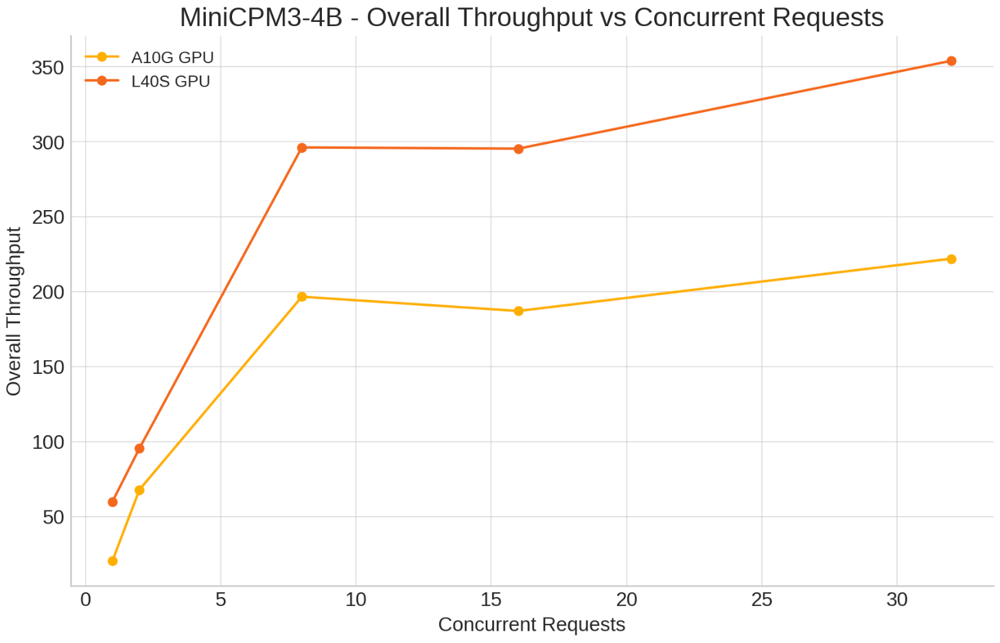
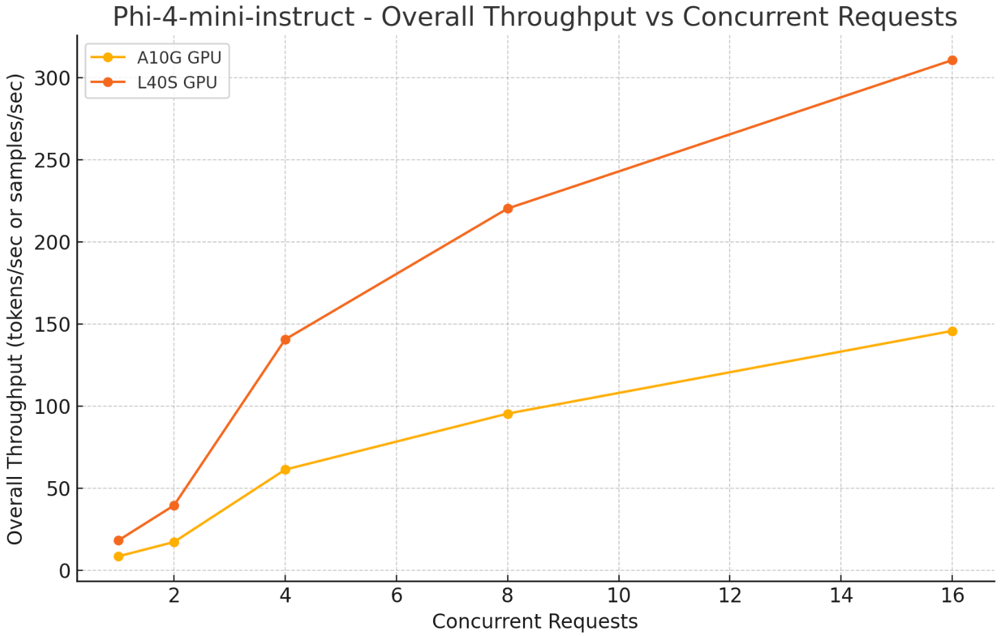
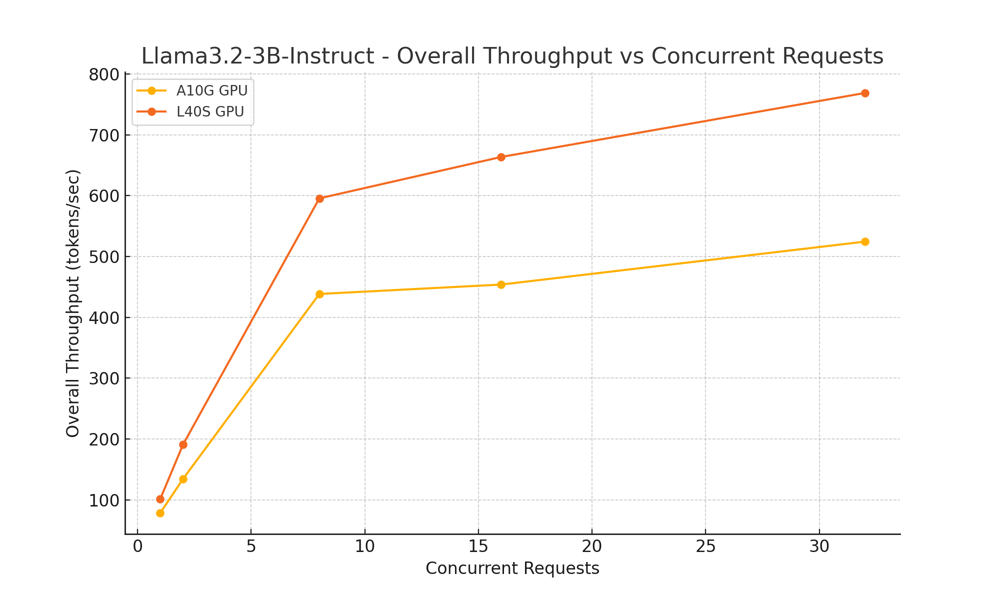
How do the A10 and L40S compare in real-world LLM inference? Our research team benchmarked the MiniCPM-4B, Phi4-mini-instruct, and Llama-3.2-3b-instruct models running in FP16 (half-precision) on both GPUs. FP16 enables faster performance and lower memory usage—perfect for large-scale AI workloads.

We tested latency (the time taken to generate each token and complete a full request, measured in seconds) and throughput (the number of tokens processed per second) across various scenarios. Both metrics are crucial for evaluating LLM performance in production.

MiniCPM-4B

Scenarios tested:

  • Concurrent Requests: 1, 2, 8, 16, 32
  • Input tokens: 500
  • Output Tokens: 150

Key Insights:

  • Single Concurrent Request: L40S significantly improved latency per token (0.016s vs. 0.047s on A10G) and increased end-to-end throughput from 97.21 to 296.46 tokens/sec.

  • Higher Concurrency (32 concurrent requests): L40S maintained better latency (0.067s vs. 0.088s) and throughput of 331.96 tokens/sec, while A10G reached 258.22 tokens/sec.

Screenshot 2025-03-21 at 4.45.57 PM

Phi4-mini-instruct

Scenarios tested:

  • Concurrent Requests: 1, 2, 8, 16, 32
  • Input Tokens: 500
  • Output Tokens: 150

Key Insights:

  • Single Concurrent Request: L40S cut latency per token from 0.02s (A10) to 0.013s and improved overall throughput from 56.16 to 85.18 tokens/sec.
  • Higher Concurrency (32 concurrent requests): L40S achieved 590.83 tokens/sec throughput with 0.03s latency per token, surpassing A10’s 353.69 tokens/sec.

Screenshot 2025-03-21 at 4.45.06 PM

Llama-3.2-3b-instruct

Scenarios Tested:

  • Concurrent Requests: 1, 2, 8, 16, 32
  • Input tokens: 500
  • Output Tokens: 150

Key Insights:

  • Single Concurrent Request: L40S improved latency per token from 0.015s (A10) to 0.012s, with throughput increasing from 76.92 to 95.34 tokens/sec.
  • Higher Concurrency (32 concurrent requests): L40S delivered 609.58 tokens/sec throughput, outperforming A10’s 476.63 tokens/sec, and reduced latency per token from 0.039s (A10) to 0.027s.

Llama3.2-3B-Instruct

Across all tested models, the NVIDIA L40S GPU consistently outperformed the A10 in reducing latency and enhancing throughput.

While the L40S demonstrates strong performance improvements, it is equally important to consider factors such as cost and resource requirements. Upgrading to the L40S may require a higher upfront investment, so teams should carefully evaluate the trade-offs based on their specific use cases, scale, and budget.

Now, let’s take a closer look at how the A10 and L40S compare in terms of pricing.

A10 vs L40S: Pricing

While the L40S is more powerful than the A10, it’s also significantly more expensive to run. Based on Clarifai’s Compute Orchestration pricing, the L40S instance (g6e.xlarge) costs $2.34 per hour, nearly double the cost of the A10-equipped instance (g5.xlarge) at $1.26 per hour.

There are two variants available for both A10 and L40S:

  • A10 comes in g5.xlarge ($1.26/hour) and g5.2xlarge ($1.512/hour) configurations.
  • L40S comes in g6e.xlarge ($2.34/hour) and g6e.12xlarge ($13.104/hour) for larger workloads.

Screenshot 2025-03-19 at 10.45.08 PM

Choosing the Right GPU

Selecting between the NVIDIA A10 and L40S depends on your workload demands and budget considerations:

  • NVIDIA A10 is well-suited for enterprises looking for a cost-effective GPU capable of handling mixed workloads, including AI inference, machine learning, and professional visualization. Its lower power consumption and solid performance make it a practical choice for mainstream applications where extreme compute power is not required.
  • NVIDIA L40S is designed for organizations running compute-intensive workloads such as generative AI and LLM inference. With significantly higher performance and memory bandwidth, the L40S delivers the scalability needed for demanding AI and graphics tasks, making it a strong investment for production environments that require top-tier GPU power.

Scaling AI Workloads with Flexibility and Reliability

We have seen the difference between the A10 and L40S and how choosing the right GPU depends on your specific use case and performance needs. But the next question is—how do you access these GPUs for your AI workloads?

One of the growing challenges in AI and machine learning development is navigating the global GPU shortage while avoiding dependence on a single cloud provider. High-demand GPUs like the L40S, with its superior performance, are not always readily available when you need them. On the other hand, while the A10 is more accessible and cost-effective, availability can still fluctuate depending on the cloud region or provider.

This is where Clarifai’s Compute Orchestration comes in. It gives you flexible, on-demand access to both A10 and L40S GPUs across multiple cloud providers and private infrastructure without locking you into a single vendor. You can choose the cloud provider and region where you want to deploy, such as AWS, GCP, Azure, Vultr, or Oracle, and run your AI workloads on dedicated GPU clusters within those environments.

Whether your workload needs the efficiency of the A10 or the power of the L40S, Clarifai routes your jobs to the resources you select while optimizing for availability, performance, and cost. This approach helps you avoid delays caused by GPU shortages or pricing spikes and gives you the flexibility to scale your AI projects with confidence without being tied to one provider.

Conclusion

Choosing the right GPU comes down to understanding your workload requirements and performance goals. The NVIDIA A10 offers a cost-effective option for mixed AI and graphics workloads, while the L40S delivers the power and scalability needed for demanding tasks like generative AI and large language models. By matching your GPU choice to your specific use case, you can achieve the right balance of performance, efficiency, and cost.

Clarifai’s Compute Orchestration makes it easy to access both A10 and L40S GPUs across multiple cloud providers, giving you the flexibility to scale without being limited by availability or vendor lock-in.

For a breakdown of GPU costs and to compare pricing across different deployment options, visit the Clarifai Pricing page. You can also join our Discord channel anytime to connect with experts, get your questions answered about choosing the right GPU for your workloads, or get help optimizing your AI infrastructure.


How To Develop An AI-Powered Recruitment Platform?


How to Develop an AI-Powered Recruitment Platform?

Over the past few years, there has been a rapid transformation in the recruitment landscape due to growing expectations for accuracy and diversity in hiring processes. Traditional recruiting methods are sluggish to handle the intricate hiring needs of modern businesses. Thus, companies are using artificial intelligence technology-powered tools to streamline the employment process and bring innovation to the process.

Artificial Intelligence (AI) can help organizations hire the right candidates more quickly and precisely by automating the process from resume screening to profile matching. But creating an AI-driven hiring platform is not that easy. It needs a deep understanding of both conventional recruiting models and AI potentialities in the recruiting landscape.

This article will guide you through the fundamental processes of developing an AI-powered hiring platform. We will also share insights and strategies for success in handling recruiting challenges with AI applications.

Core Features of an AI-Powered Recruitment Platform

Developing an AI-powered recruitment platform requires understanding key features that would make it truly effective and exceptional. Such features should be designed in a manner to automate, smoothen, and upgrade various recruitment processes at work, through which one can assure better hiring decisions that result in enhanced workforce efficiency.

  • Automated Resume Screening:

One of the trickiest and most time-consuming processes of hiring is reviewing hundreds of resumes to shortlist a quality one. By independently scanning and sorting resumes based on predefined criteria like education, talents, and experience, AI can significantly reduce the workload.

Only the top candidates advance to the next round of the hiring process because these algorithms may be trained to recognize patterns in successful candidates and apply them to the evaluation of new candidates.

  • Profile Matching and Shortlisting:

Another important factor of AI-powered recruitment platforms is their ability to match candidate profiles with job descriptions. Candidate profiles and job descriptions can be assessed using machine learning techniques in AI to find the right fit.

These algorithms make use of background cultural fit, growth potential, and even predictive performance data, not just simple keyword matching. This enables the individuals recommended to the customer by this platform not only to be qualified for the job but also to have every possibility of succeeding in their position.

  • Virtual Assistant and Chatbot Support:

AI-driven chatbots can improve the applicant experience by interacting with applicants around the clock, responding to their inquiries, keeping them informed about the progress of their applicants, and even doing the initial screening interviews. So, the chatbot improves overall engagement and communication between the recruiter and the candidate.

Predictive analysis helps with data-driven decision-making capabilities. Artificial intelligence can evaluate candidate profiles, hiring history, and other relevant data to determine a candidate’s likelihood of success in a given role. Predictive analysis helps recruiters make better decisions that increase the success rate and return on investment.

AI-driven platforms mitigate the risk of unconscious bias when bringing objectivity into the evaluation process. Moreover, AI algorithms can be constantly checked and readjusted to make sure that they remain bias-free, thereby achieving further fairness in the recruitment process.

Step-by-Step Procedure to Develop an AI-Powered Recruitment Platform

Step 1: Research and Analysis of the Market

Detailed market research is required before the development phase. This includes understanding the current recruitment technology, finding any gaps in the current solutions, and assessing the demands of your target market. Talk to potential users, HR specialists, and recruiters to learn more about the functionalities and features they need.

Step 2: Define the Core Features

The next step is to establish the essential features and functionalities of your platform, depending on your market research. They include the core AI-driven features previously covered, such as chatbots, candidate-matching algorithms, automated resume screening, predictive analytics, etc. Include unique features that would give your recruitment platform a competitive edge. Also, map out a well-defined user experience journey for both recruiters and candidates to make the platform user-friendly.

Step 3: Selecting the Right AI Technology

Selecting the right technology is an essential part of the mobile app development process. Depending on your requirements, you can choose AI and machine learning tools and frameworks, including NLP libraries and data analytic tools. Besides, consider the demands of data storage and processing to make sure that the chosen technology stack will be able to safely and effectively process large volumes of data. This analysis makes your Android app development and iOS app development successful.

Step 4: Design and Development

Recruiting app design is a stage at which you do detailed wireframing and prototype the UI to ensure it provides an effortless experience from both the recruiter and candidate sides. At this phase of mobile application development, your team will start coding the front-end and back-end features using agile methods of development. An expert mobile app development team with AI developers and UX/UI designers can help ensure all areas of the AI recruiting platform for Android and iOS are fully covered.

Step 5: Unified Integrations

The integration of external supporting tools and applications into the AI hiring platform is complex and requires some proper strategizing on your part. First of all, use relevant datasets that may be resumes, job descriptions, or historical data on hiring to train AI and machine learning models. After training, these models need to be integrated with the core functionalities of the platform, such as resume screening and candidate matching.

Step 6: Thorough Testing

As a part of the development process, testing makes sure your platform is dependable and highly functional. The performance, security requirements, accuracy, and dependability of AI algorithms should all be tested to ensure the quality of your AI-powered recruiting application.

Step 7: Mobile App Deployment

Deploy with a minimal amount of downtime since this will be critical to a smooth transition for users. This phase may yield valuable benefits if rolled out by first presenting your beta version to a small number of users for feedback prior to release. This allows you to make any necessary adjustments based on real-world usage.

Step 8: Post-Launch Support

Monitor how your AI recruiting platform works, such as user interactions, the accuracy of AI functionalities, and satisfaction scores. Use this data to make continuous improvements by refining AI algorithms, adding new features, or improving UI. Not only will it keep your platform competitive, but with regular updates and improvements, it’s going to ensure that it remains competitive for the evolving demands of both recruiters and candidates.

How Much Does It Cost to Develop an AI-Powered Recruitment Platform?

The cost associated with developing an AI-powered recruitment platform varies depending on many factors. Hiring an expert AI development team and investing in an advanced technology stack are the major costs. Further, costs are impacted by data processing, acquisition, and storage, especially when huge datasets are needed to train AI models.

The average cost of AI recruiting platform development falls between $80,000 and $100,000, while a more sophisticated platform might cost between $150,000 and $250,000. Although there are significant upfront expenses associated with AI development, the long-term advantages of increased hiring effectiveness and better candidate matching can justify your AI investments.

Conclusion

Creating an AI-powered recruitment platform is a challenging but worthwhile project that can greatly improve the efficiency of hiring procedures. AI platforms have the potential to revolutionize recruitment processes by automating candidate matching, resume screening, and predictive analysis-like tasks.

However, careful planning is required for the development process, from conducting market research to choosing the best AI technology. Even if the initial costs seem to be high, the long-term advantages make AI development worth it.

If you are looking to integrate AI into your recruitment process or develop an AI-powered hiring application from scratch, USM Business Systems is the right AI development company to meet your AI software development needs.

Get in touch with USM Business Systems.

Democratize AI? Game-Changing Benefits for Agencies in 2025


Global AI-enabled ad spend is projected to reach an impressive $370 billion USD. It indicates how the marketing landscape is experiencing a shift from AI involvement. Impressive numbers regarding AI investments are being recorded and the revolution isn’t just for tech giants anymore. AI is now accessible for agencies of all sizes since ChatGPT was introduced. 

There is one more thing: Democratize AI is leveling the playing field, allowing smaller marketing firms to harness sophisticated capabilities once reserved for enterprises with massive budgets and technical teams. Now what is democratized AI? why we are discussing it, and how marketing agencies are unaware of the impact, we’ll look into it in this article.

Why talk about Democratization of AI?

Today’s user-friendly AI tools require minimal technical expertise yet deliver powerful results—automating routine tasks, uncovering actionable customer insights, and enabling hyper-personalized campaigns. For marketing agencies, it gives them the ability to work smarter, not harder: focusing on strategy and creativity while AI handles data analysis and optimization. 

Here is a Generative AI market share recorded last year and presented to you for much needed clarity.

democratize ai

The real game-changer is accessibility. Subscription-based models have replaced prohibitive upfront costs, while intuitive interfaces eliminate the need for specialized technical knowledge. This democratization empowers agencies to deliver premium, data-driven services that enhance client outcomes while maintaining their distinctive human touch and creative edge. 

As we explore the benefits of this technological shift, one thing becomes clear: the future belongs to agencies that thoughtfully integrate AI into their workflows, creating a powerful synthesis of human creativity and machine intelligence.

What is democratize AI?

Democratized AI refers to the widespread accessibility of artificial intelligence technologies, allowing individuals and businesses of all sizes to utilize advanced tools and insights without requiring extensive technical expertise.

In Marketing

Democratized AI in the marketing context refers to the accessibility of artificial intelligence technologies for businesses of all sizes, enabling them to leverage advanced tools and insights without requiring extensive technical expertise.

The Cause

The democratization stems from the proliferation of user-friendly platforms with intuitive interfaces and subscription-based pricing models that eliminate prohibitive upfront investments.

The Effect

The barriers that once restricted sophisticated AI tools to enterprise organizations have fallen, creating a level playing field where creative potential isn’t limited by technical resources.

For Example

A small agency can now use Weam AI to provide multiple AI models for different teams and roles within their organization. By integrating AI agents into their workflow, these agencies gain an extra competitive edge—allowing copywriters to generate compelling ad copy, designers to create concept visuals, and analysts to uncover audience insights, all from a single unified platform without specialized technical expertise.

Transforming Creative Process with Democratize AI

Now marketing agencies often include three fundamental habits into their workflow. First is researching, second is creating, and lastly it’s analyzing. Generative AI has improved these habits. Powerful tools now automatically produce high-quality text, images, and multimedia that once required hours of manual work.

Case study 

A mid-sized IT marketing agency based in India transformed its operations by implementing Weam AI across its organization. By adopting this democratized AI platform, they increased workflow productivity by 20%.

Their teams now collaborate in Shared Brains for client projects while maintaining Private Brains for individual ideation.

democratize ai

The agency leveraged several key features:

  • Knowledge Base: They uploaded client briefs, brand guidelines, and market research documents in multiple formats, creating custom repositories that their AI tools could reference during conversations.
  • Prompts Library: Teams saved effective prompts for different marketing tasks (social media copy, email campaigns, SEO content), sharing them across departments and marking favorites for quick access.
  • Custom Agents: The company created specialized AI agents with defined roles for different marketing functions. For example, their “Social Media Strategist” agent was programmed with specific goals and instructions for creating engagement-focused content across platforms.

Modern AI tools have long before given us the idea of democratization of AI. You look at a generative AI writing tool and it was able to offer considerable features even without the use of LLM or transformers. The reason was that the AI word itself has a lot of complex layers. Now we move forward to decipher and a unit addition of an AI innovation has empowered users to fully encapsulate what AI is capable of.

However, amidst this, the complexity has still remained. The complexity is a huge gap forcing agencies of all sizes who wish to adopt AI faster for the betterment of their team.

  • Weam AI is built to be your friendly assistive platform. Founded in [Year], the product/company started by simply stating “AI must be conveniently available for everyone”. Observing their own team facing three primary hurdles when integrating AI into their workflow: juggling between multiple Gen AI platforms, finding value in their investment, and managing the cost accordingly. Exploring further it was found these three hurdles were faced by every organization/business.
democratize ai
  • Weam AI is built to eliminate friction while leveraging multiple Gen AI models like ChatGPT, DeepSeek, Claude, Gemini, and Perplexity. For democratizing the use of AI they have also incorporated features for AI agent builder and prompt library.
democratize ai
  • The platform also allows users to create their own knowledge base to strengthen the output of the LLMs they use. To easily migrate from the previous AI platform to Weam AI has an important chat feature too. To fully encapsulate Weam AI, it helps you deliver efficiency to achieve overall goals.
democratize ai

Weam AI understands the cruciality of keeping up with the dynamic demands of business–The platform promises supercharged productivity by incorporating AI into your workflow in a cost-effective way.

How to Democratize AI Use in Your Organization? 

So how do you democratize AI within your agency or organization? Let’s understand by putting emphasis on multi-LLM platforms that offer agent-building capabilities and cost control. The reason is quite simple as they are the first step to democratize AI for your organization.

Key Strategies

  1. Start with AI literacy: Make sure your teammates understand the basics and capabilities of generative AI platforms or platforms that you are using. Also, state the limitations clearly for frictionless experience.
  2. Create internal champions: Identify employees who are ready to adopt AI at the beginner level and have synergized their workflow well with democratized AI platforms. Support those colleagues and lead them with examples for others to understand the usefulness of AI.
  3. Develop clear use cases: Define specific use cases for understanding what is democratized AI. For clearly grasping the concept for agencies we prefer you refer to our guide to AI in social media marketing.
  4. Implement graduated access: Begin with controlled access, pick AI platforms that have dashboards presenting your proficiency in an understandable manner.

The Role of Multi-LLM Platforms with Agent Building

  • Unified access management: Centralizing permissions and user management across multiple AI models through a single platform refers to the democratization of AI.
  • Model-agnostic workflows: Allow teams to use the best AI model for each specific task without learning multiple interfaces
  • Custom agent creation: Enabling non-technical staff to build specialized AI agents for repetitive agency tasks without coding will help them practically understand what democratizing AI means in terms of use case.
  • Template libraries: Provide pre-built prompts and agents tailored to common agency needs like copywriting, competitor analysis, and campaign ideation.
  • Knowledge customization: Train agents on agency-specific data, client information, and brand guidelines.

Working with diverse options can be consuming sometimes. If you too find it difficult you can always refer to our choosing the right LLM guide.

Cost Control Benefits in Democratized AI

  1. Usage monitoring: Track AI consumption across teams, clients, and projects in real time.
  2. Budget allocation: Democratization of AI is also about setting spending limits by department, team, or project to prevent unexpected costs.
  3. ROI measurement: Connect AI usage directly to project outcomes and client deliverables.
  4. Resource optimization: Identify which AI models provide the best value for different agency tasks.
  5. Usage analytics: Creating reports on utilization patterns to optimize future investments is what the democratization of AI is about too.

Best Practices for Democratization of AI

  1. Start with pilot projects: Identify high-impact, low-risk processes for initial democratizing AI integration.
  2. Measure and communicate wins: Document time savings, quality improvements, and client satisfaction gains.
  3. Develop internal best practices: Create agency-specific guidelines for effective AI use.
  4. Establish feedback loops: Create channels for team members to share successes and challenges with AI tools.
democratize ai

Ensure these best practices are implemented in gradual steps to leverage and slowly let your agency adopt AI. It will benefit you in the long run when it comes to democratizing generative AI for your agency.

Wrapping Up!

Democratized AI refers to the practice of making artificial intelligence tools, capabilities, and knowledge widely accessible across an organization or society, rather than limiting them to technical specialists. It involves removing barriers to AI adoption through intuitive interfaces, reduced technical requirements, and more affordable pricing models.

At Weam AI, we focus on advancing with two initiatives; democratized generative AI initiatives focus on empowering non-technical employees to leverage AI in their daily work. Another is AI orchestration, which recognizes identifying the case of AI and what’s best for experts. Additionally, both intend to focus on where AI can add value in their specific domains.

It involves user-friendly interfaces to powerful language and image models, employees across departments can now create content, analyze data, and automate processes that previously required specialized skills.

Frequently Asked Questions

What does “democratizing AI” mean?

“Democratizing AI” means making artificial intelligence technologies, tools, and capabilities accessible to a broader range of people beyond technical experts.

What does an AI-orchestration platform mean?

An AI-orchestration platform is a system that manages and coordinates multiple AI tools, models, and workflows to enable seamless integration into business processes.

What is democratized generative AI?

Democratized generative AI refers to making creative AI tools (like those for text, image, or code generation) available to non-specialists through user-friendly interfaces.

How can democratizing AI development impact innovation?

Democratizing AI development can accelerate innovation by enabling diverse perspectives, domain-specific applications, and increased experimentation from people with varied backgrounds and needs.

What are the main challenges in democratizing AI governance?

The main challenges in democratizing AI governance include balancing accessibility with safety, ensuring ethical use, addressing technical literacy gaps, maintaining quality standards, and creating inclusive governance structures.

Best Video Streaming Apps In The USA


Best Video Streaming Apps In The USA

Online video streaming applications were ruling the global media services and completely altered the way people explore information. Driven by the increasing availability of high-speed internet coupled with the cumulative use of smartphones, the popularity of video streaming apps is on the rise.

According to Statista, the global video streaming application industry has reported $86 billion in 2021 and it is estimated to reach $115 billion by the next coming three years.

In particular, out of the total market value, smartphone users in the US alone are spending nearly $44 billion on premium audio or video streaming applications during the year. Most of the revenues are generated from the US market. Estimates are also showing that video streaming app development in the US will offer a profitable market to investors.

In this article, after doing deep research on the USA’s video streaming industry, we have compiled a list of top video streaming apps in the USA. Be you invest in Netflix clone app development or Disney+ clone app development, or YouTube clone app development, it will create a valueble addition to your media services.

Let’s look at the top 5 video streaming apps in the USA.

#1. Netflix App- Best On-demand Video Streaming App (Android & iOS)

With over 1,000,000,000+ downloads (just from Google Play Store), Netflix has stood as the number #1 online video streaming app in the world. The app is popularizing in providing uninterrupted live video streaming services to users. Users or paid subscribers can watch TV shows and movies on Netflix.

The app is been preferred by nearly 45% of video streaming app users in the USA. Hence, the development of a Netflix-like mobile app for Android or iOS will help you build brand value and reach more audiences faster.

Netflix App

Features and Functionalities Of Top Online Video Streaming Apps like Netflix 

  • Hassle-free registration and login
  • Get a membership with an existing email Id to access the app’s features
  • Watch live TV shows and movies that you love on mobile devices, laptops, or smart TVs
  • Users can watch series, documentaries, and stand-up specials of their choice in their native languages
  • Users can save their favorites and watch in offline mode anytime
  • Safe kids-friendly shows for ensuring family-friendly entertainment
  • Push notifications on new episodes and the latest releases 

Key information Of Netflix App

  • Date of launch:1997
  • Headquartered in: California, USA
  • Android Rating: 4.5/5
  • iPhone Rating: 3.9/5

#2. YouTube- Top Video and Music Streaming App In The USA 

YouTube is one of the biggest online video streaming apps with accessibility to billions of customers across 100 countries in the world.

Over 90% of the internet population is downloading and using this global largest video-sharing platform to stream and watch their favorite videos. The app also facilitates users to subscribe and share video channels instantly.

YouTube app 

Top features of YouTube video streamlining application

  • Top on-demand Video Streaming App like YouTube offer simple login
  • Custom search functionality to easily find the video content that the users looking for
  • High-level authentication for ensuring the security of the user credentials
  • The app is compatible to connect external devices and enhance the user experiences
  • In-app voice-based search functionality for making the users’ search easier
  • Allows users to spread the content and touch with their audience through live video streamlining functionality
  • Easy to subscribe to favorite channels and watch the best & latest video content

Key Information

  • Date of launch: 2005
  • Headquartered in: California, USA
  • Android Rating: 4.2/5
  • iPhone Rating: 4.7/5 

Recommend to Read: How Much Does IT Cost to Develop YouTube Mobile App?

#3. Disney+ Hotstar- Popular Video Streaming App In The USA 

A video streaming app development like Disney+ will deliver high returns on investment. Disney+ is one of the most popular video streaming apps in the USA. As of records, the app has approximately $150 million subscribers and become one of the top competitors to the Netflix mobile app.

Cost-To-Develop-a-Live-Video-Streaming-Apps-like-hotstar

Key features of Disney+ like trending OTT apps in the USA 

  • Top OTT video streaming application like Disney+ offers quick login
  • Search facility to explore the desired content faster
  • Social integrations for accessing the app
  • User profile and watch list for better managing the data
  • USA’s best video streaming app like Disney+ offers Genre wise content
  • Disney+like the most popular video-on-demand over-the-top streaming service allows users to access the video content in their native languages as the app is multilingual
  • Push notifications feature to send app updates to the users 

Key Information

  • Date of launch: 2019
  • Headquartered in: Los Angeles, California, US
  • Android Rating: 3.9/5
  • iPhone Rating: 4.6/5 

#4. Amazon Prime Video-Famous Video Streaming App In The US 

Amazon Prime Video is one of the other American leading video on-demand OTT streaming service apps with nearly 172 million subscribers in the country.

Cost-To-Develop-a-Live-Video-Streaming-Apps-like-Amazon-Prime-video

Best features of Amazon Prime like a famous video streaming application

  • The app gives access to a range of movies, TV, and sports
  • Personalized video content recommendations
  • Chromecast feature to broadcast videos from phone to any other supportive devices
  • Create or join a watch party feature for chatting while viewing videos
  • Pause and resume option for convenient broadcasting and viewing experiences
  • Notifications on favorite actresses’ movie releases or any videos
  • Download videos online to watch offline 

Key Information

  • Date of launch: 2006
  • Headquartered in: Seattle, Washington
  • Android Rating: 4.1/5
  • iPhone Rating: 4.7/5

#5. Hulu- Most-downloaded Video Streaming Application In The USA

The best on-demand video broadcasting applications like Hulu are on our list of top mobile apps for live video streaming. The app has lifted media entertainment to the next level.

cost-to-build-a-video-streaming-app-like-Hulu

Features and functionalities of the Hulu app 

  • User-friendly registration and signup process
  • Fast login and secure authentication
  • Attractive design for improved user experience
  • User profile
  • Video Library and watch list
  • Availability of video content in different languages
  • Custom search for making the user’s search faster
  • High-level privacy or lock feature to secure the application
  • Sends push notifications about new videos or TV shows
  • Personalized video recommendations
  • Social media sharing facility
  • Reviews and ratings

Key Information

  • Date of launch: 2008
  • Headquartered in: California, USA
  • Android Rating: 4.6/5
  • iPhone Rating: 4.6/5


How Much Does It Cost To Develop Video Streaming Apps like Amazon Prime Video/YouTube/Netflix/Hulu?

The estimated cost of video streaming apps will be around $25,000- to $35,000+ for a single platform. The development cost of OTT app development for multiple platforms will be $35,000 to $60,000+ with moderate complexity in design.

However, the app development platform, application design, features list, technology stack, app type, and the hourly cost of mobile application development you hire will all impact the cost of software development.

Final Words

Amazon Prime Video, YouTube, and Disney+ like video streaming application development would be the best decision to catch up with the market opportunities. Businesses can generate the flow of revenues by developing paid subscription models.

USM is one of the top video-streaming mobile app development companies in the USA. Our team of mobile app developers is an expert in the design and development of Netflix-like trending OTT apps.

Are you looking to hire a top Video Streaming App Development Company in the USA?


Get In Touch!


Everything You Need to Know in 2025!


Meet Mark, the content marketer at a SaaS company tasked to find the perfect AI tool to aid in their content marketing campaign. He’s tried multiple tools but has grown fond of Perplexity.

Mark gets basic AI access, file uploads, follow-up suggestions, unlimited basic searches, and three pro searches daily with the free option. 

But since he’s a heavy AI user, he wants to upgrade to get premium features like advanced AI models, pro search capabilities, API access, and more. But he’s stranded and doesn’t know which paid plan fits his needs. Seems familiar?

The million-dollar question you might have is whether Perplexity’s pricing is worth the investment in 2025. 

In this guide, we’ll explore all the details you need to know if subscribing to the Perplexity paid plan is a wise choice. Before we dive in, if you need a platform that benchmarks AI models in one place at an affordable price, check out Weam AI.

Overview of Perplexity Pricing Plans

Perplexity comes with three pricing options. Here’s a table detailing the plans and what you get at each stage. 

Plan Features  Cost
Standard Plan Free – Unlimited quick searches
– 5 Pro searches per day
– Access to the standard AI model
Professional Plan $20 per month or $200 annually – Unlimited quick searches
– 300+ Pro searches per day
– Access to advanced AI models like GPT-4 and Claude-3
– Unlimited file uploads, image generation tools
– $5 monthly Perplexity API pricing
Enterprise Plan Starts at $40 per month per seat for self-service, with custom plans available. – Flexible pricing
– Access to Sonar models
– Open-source models and chat models
– API pricing varies based on token usage

Now, while the costs seem straightforward, Perplexity is known to be very opaque and keeps changing things without clear communication. 

For example, they changed the limit to Opus AI limits a while back and didn’t mention it. Its users on Reddit and X raised the issue, with some claiming that they only get 10 credits per day. 

Plus, perplexity imposes many arbitrary and nontransparent limits. For example, the context window is much smaller when you use the model through perplexity than when you use the ChatGPT subscription directly, and the scary thing is that you don’t even know when and how they change it behind the scenes.

Another thing to note is that they keep limiting features in plans to push you to the Enterprise option. Perplexity’s pricing is designed with strategic limitations on the pro plan so you can upgrade, which causes friction in the user experience.

Perplexity Pricing Breakdown for Different User Types

Choosing the right plan depends on your needs and how much you’ll use it. This section breaks down Perplexity’s pricing into different categories to help you find the best fit.

For Enterprises

The enterprise plan makes more sense for businesses seeking an advanced, cutting-edge, AI-powered search engine. This plan supports a range of industries and provides higher data usage while ensuring your data isn’t used to train AI models.

Some notable features that would make it suitable for enterprise business include the following;

  • Enterprise-grade security – The plan is SOC2 Type 1 compliant, with encryption for data at rest and in transit and strict data privacy policies prohibiting customer data for AI model training.
  • Advanced AI capabilities – You get multiple AI models that can be utilized for diverse applications. These include targeted searches, real-time internet browsing, and document analysis. 
  • Administrative controls – The enterprise option offers single sign-on (SSO) integration, user management capabilities, and data retention policies. These allow team managers to secure access to critical information.
  • Dedicated support – Enterprise plans receive more personalized and priority support due to their custom nature and the needs of large businesses.

The main drawback of this plan is that it lacks key features needed for a complete experience. For example, some advanced tools, like custom collections and filters, aren’t immediately intuitive and require extra learning time.

For Agencies

Most agencies use Perplexity and AI for digital marketing, data analysis, and content generation. However, they prefer a more affordable plan since they don’t use it as heavily as enterprise businesses.

The professional plan is ideal as it’s not costly but offers premium features crucial to the agency’s day-to-day operations. 

These features include: 

  • Content creation – You can generate high-quality text, images, and more—whether it’s ad copy, blog posts, or social media content. You can even use DALL-E 3 for AI-powered visuals to enhance creative projects.
  • Multiple AI models – The pro plan gives you access to more than one AI model. These include OpenAI’s GPT-4, Omni, and Anthropic’s Claude 3.5 Sonnet. Generating content, detailed analyses, and technical documents is much easier with all the models in one place.
  • Collaboration across teams: The plan supports multi-device usage and seamless integration with agency workflows, enabling teams to collaborate effectively on different client projects in real-time.

The professional plan lacks some valuable features that agencies would appreciate. Key limitations include scalability restrictions and additional implementation costs, such as staff training expenses, which can add up quickly.

For Multi-Locational Brands

When choosing the best AI tools, most multi-locational brands consider options that can seamlessly integrate into their systems. They’re also big on security and have a user-friendly interface for quick adoption across teams in all locations.

While Perplexity doesn’t explicitly offer all this, the perfect plans that might meet these needs are the pro and enterprise plans. You’ll get features like a centralized knowledge base, collaborative search, and compliance across locations.

For Small Businesses

Small businesses don’t have many AI usage needs, but this might depend on the industry. For example, a small e-commerce brand might use AI for personalized product recommendations, automated customer support, or demand forecasting. 

At the same time, a small law firm might only need AI for basic legal research and document automation. The level of AI adoption depends on the business model and daily operational needs. 

Either way, for small SMBs, the free or pro plans can be the best option as they offer features like quick answers to customer queries, research, and content summarization. Nevertheless, they won’t enjoy advanced features and might encounter usage limits.

For Nonprofit Organizations

Non-profit organizations can take advantage of discounts, coupons, and referrals, which offer a percentage off the pricing. This applies to all plans. 

However, when it comes to use cases, nonprofit organizations can leverage the enterprise professional plan, providing them with critical features that might aid in their daily operations. 

In a Perplexity case study, the USADA used this pro plan to complete critical tasks:

  • Instant policy insights: The education department accessed the latest research on adult learning principles, industry updates, and relevant news in under 30 seconds.
  • Fast summaries and deep analysis: USADA’s team leveraged Perplexity Enterprise Pro to process large datasets, translate documents, enhance video transcripts, and distill key insights from complex articles—all without contributing their data to train the LLM.
  • Deep learning: Perplexity Enterprise Pro delivered precise, detailed search results, enabling USADA employees to quickly find answers such as best practices for improving organizational system overviews.

For Individuals (Freelancers, Solopreneurs)

Many people who use Perplexity are mainly researchers, writers, and artists, and they fall into this category. Their primary use cases include SEO content creation, book summarization, and factual writing, which is common among freelancers. 

Since these are light uses, the best plan for this category would be the professional plan. You can start with the free option, but with growing demands, the pro plan would be perfect. 

The pro option allows unlimited research, content creation, idea generation, brainstorming, and research. The only drawback is the limitation of the Pro plan. You can only get 300+ Pro searches per day, but that’s more than enough if you don’t have a team. 

Factors to Consider When Evaluating Perplexity Pricing

While getting the perfect Perplexity pricing depends heavily on your needs, a few factors govern which option you should choose.

  • Usage Needs: The free plan gives you unlimited searches, but the results are lean, as you don’t have access to more powerful AI models. To get robust AI models and in-depth research, you must upgrade to the pro plan, which also caps at 300 daily pro searches every day.
  • Feature requirement: If you want unique features like Perplexity API access, custom knowledge hubs, and collaboration features, you’d like to go for the top-tier plans. However, the challenge is that most add-ons are charged as tokens. For example, the Sonar Pro version costs $3 per million input tokens, $15 per million output tokens, and $5 per 1,000 searches, with multiple searches allowed. Additionally, Perplexity Pro subscribers receive a $5 monthly credit toward API usage. 
  • Long-term use: If you anticipate increasing your usage because of your business, you should consider a plan to accommodate the growth smoothly. For example, if you are an agency and your client pool is becoming bigger, ensure the option allows you to continue operating smoothly as you upgrade. 
  • Support and training: Customer support for the professional and enterprise pro plans varies greatly. With the former, you get access to support channels on Discord, general resources, and responses to inquiries in 1 and 2 days. The enterprise plan has much greater support, as you get a dedicated account manager and tailored support options.

The Limitations of Perplexity Pricing

In this section, we’ll look at some of the drawbacks of Perplexity’s pricing. 

  • Limited options: Low-tier plans don’t offer much for businesses with heavy AI usage. The issue mainly arises because Pro plans limit what you can do. This ultimately pushes you to the enterprise plan, which is quite expensive. 
  • Missing features: While Perplexity states that it gives 300 pro searches, it still limits the usage of some AI models. For example, this user on Reddit states that there’s a different limit for different AI, as Opus only has five credits per day. Unfortunately, Perplexity doesn’t explicitly state this. 
  • Issues with Promotion: There have been numerous reports that some Perplexity promotions are revoked overnight after taking users’ data. 
  • Lack of flexibility: Since the plans have fixed features and usage limits, customization is difficult. For example, the Pro plan includes 300+ Pro searches daily, but there’s no option to increase this limit. Similarly, the Enterprise Plan ($40/month per seat) offers advanced features but lacks flexibility for tailored adjustments.
  • Support Limitations: The AI offers support, but the priority is based on the plan. The low-tier options have a much longer wait time, which isn’t the same as the enterprise plan.

Weam AI: A Cost-Effective Alternative

Weam AI is a perfect alternative to Perplexity if you want a platform that hosts all your favorite AI models in one place. 

Unlike Perplexity, which only uses Large Language Models (LLMs) to give nuanced results, Weam AI goes a step further to allow you to create custom AI agents using the powerful and popular LLM models, so you can perform specific tasks with pre-defined goals.

The platform also allows you to create a library of custom prompts that are tailored to your workflows and that you can share with your teams. 

Other things that Weam offers that you won’t find in Perplexity include the following. 

  • Flexible Pricing: Weam AI offers a free option, and once you’ve tested it out, you can upgrade to a paid option that only costs $6/month. This is a more economical pricing and can fit you with a tight budget. 
  • Feature availability: With the paid plan, you get access to advanced features like unlimited prompts, 250 AI credits, and access to benchmark models like ChatGPT, Gemini, and Cloud. 
  • AI agents: There are various helpful agents available on the platform. One can also create their own AI agents through pre-defining sets of goals, instructions, and system prompts.
  • Scalability: With only pricing options, it’s much easier to scale with Weam AI as the only option that gives you lots of features. 
Aspect Perplexity Weam AI
Pricing Free plan followed by a pro plan that goes for $20/month and $40/month for the Enterprise plan  Offers free option, then upgrades to the only paid plan at $6/month
Features – Multimodal capabilities (text, images, PDFs).
– Advanced search with citations and follow-ups.
– API access for developers.
– Enterprise features: Single sign-on, user management, and enhanced security
– Collaborative platform with “shared brains” for team workflows.
– Integrates with various LLMs like ChatGPT, Claude, Gemini, and Perplexity AI itself.
– Prompt management system for reusable commands and consistency in communication.
– Customizable AI agents tailored to internal processes.

Conclusion

Choose the right Perplexity plan, which should be based on your needs and AI usage, not just marketing promises. Keep in mind that the limits and AI models aren’t as accurate as said, and the Enterprise plan isn’t a requirement. 

That said, you should explore other AI models to choose the one that fits your budget and needs. Based on the inconsistencies of Perplexity, you can consider Weam AI, which gives you all your favorite AI models in one platform. 

Frequently Asked Questions

Is there a free version of Perplexity?

Yes, Perplexity has a free option, but the features are very limited, and you might not be satisfied with the results – hence the need to upgrade.

Is the Enterprise plan worth it?

The Enterprise plan is designed for businesses with large-scale AI needs. Unless you require custom integrations, higher usage limits, or team collaboration features, a lower-tier plan may be sufficient.

Does Perplexity offer coupons or discounts?

Perplexity occasionally offers coupons or discount offers, but the offers can be unclear. Be sure to review their terms before subscribing.

Are there any hidden costs with Perplexity’s pricing?

While base subscription prices are listed, certain features (such as API access or advanced AI capabilities) may come with additional costs. Always review the fine print before committing.