Anthropic’s New “Economic Index” Reveals Who’s Really Using AI for Work


Anthropic just dropped a thought-provoking new study that reveals a surprising snapshot of how AI is actually being used in the wild—and which jobs and tasks might feel its impact the most. Continue reading “Anthropic’s New “Economic Index” Reveals Who’s Really Using AI for Work”

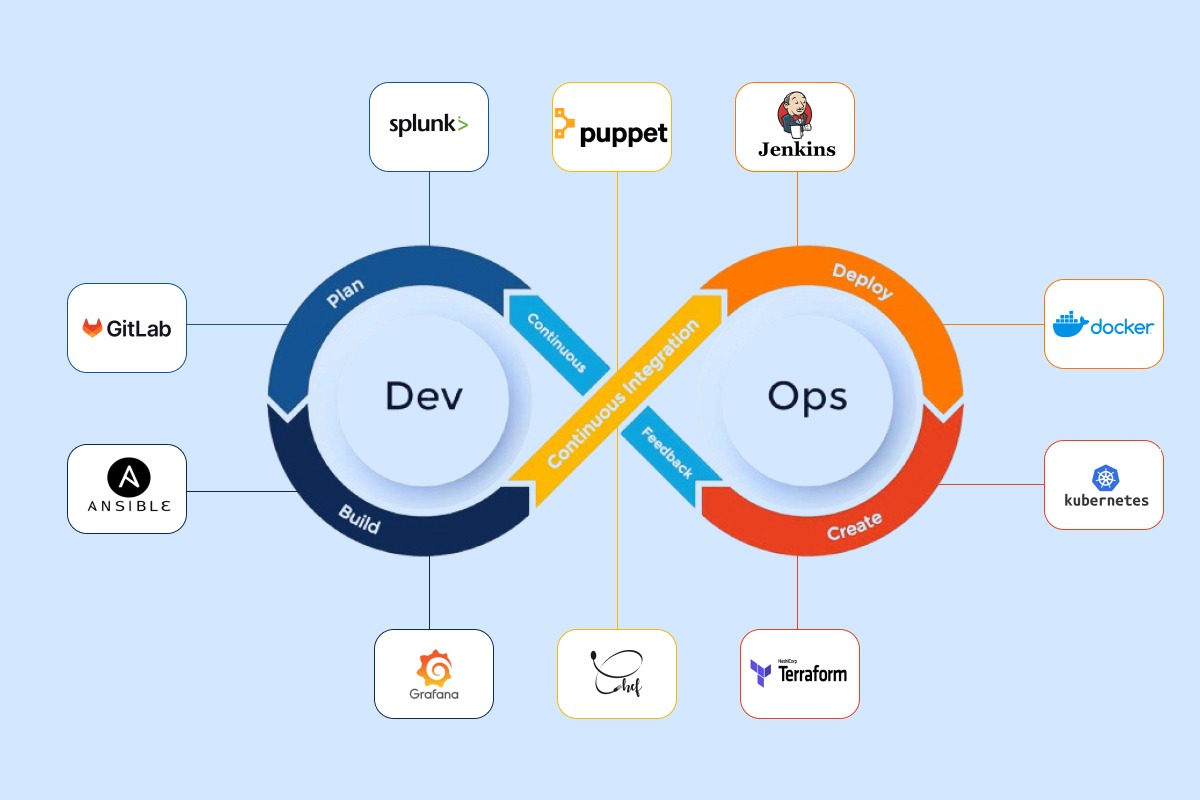
How To Maximize Business Productivity With Top DevOps Automation Tools


How to Maximize Business Productivity with Top DevOps Automation Tools?

In the fast pace of today’s business world, it is no longer about the creative thinking but more on getting the software solutions done effectively, quickly, and in a reliable manner. This is when DevOps principles and automation enter into the game. DevOps ensures seamless communication and continual improvement by connecting development and operations teams.

However, it is not easy to manage the complex processes and ensure successful deployments. So, automation systems specifically designed for DevOps will simplify these processes and increase productivity. These systems allow companies to automate repetitive activities, reduce errors, and focus on innovation.

Now let’s see some of the most impactful DevOps automation technologies available today. By exploring this information, you can identify the ones that align best with your organization’s specific requirements.

What is DevOps Automation

DevOps automation is the use of tools and scripts to automate repetitive and time-consuming processes throughout the DevOps lifecycle. This includes code integration, testing, deployment, monitoring, and infrastructure management. Businesses that automate these processes can lower manual intervention, reduce errors, and fasten delivery pipelines.

At its core, DevOps aims to improve the collaboration between the operation and development teams. Automation will remove the bottlenecks, improve collaboration, and standardize procedures. Thus, resulting in smoother workflows and more predictable outcomes.

DevOps automationBenefits of DevOps Automation Tools

  1. Quick Time-to-Market: Automation fastens development and deployment, which allows companies to provide updates and features quickly
  2. Improved Reliability: Automating the processes provides consistency and decreases the chances of human error.
  3. Improved Scalability: Companies can handle increasing workflows efficiently by automating infrastructure and other processes.
  4. Cost-Effectiveness: Automation systems can lower the demand for manual labor and operational overhead by simplifying operations.

DevOps automation is important for businesses to transform complex and time-consuming processes into manageable workflows. So, teams can focus on innovation and strategy.

Key Areas of DevOps Where Automation Matters

Automation is the foundation of a successful DevOps strategy, supporting all phases of the software development lifecycle. Businesses that automate specific areas can improve collaboration and speed results. Here are the primary areas in which DevOps automation has the most impact:

  1. Continuous Integration and Delivery (CI/CD)

In traditional processes, integrating code from different developers into a shared repository is difficult and error-prone. This procedure is automated using CI/CD tools, so the changes are merged, tested, and delivered easily. Hence, it reduces time spent on manual testing and deployment.

  1. Infrastructure as Code (IaC)

Manual infrastructure management is time-consuming, especially for large applications. IaC enables developers to specify infrastructure configurations in code, making it easier to provision, manage, and replicate environments automatically. Hence. DevOps enhances consistency and avoids setup errors.

  1. Monitoring and Incident Management

Real-time monitoring tools will track performance bottlenecks, irregularities, and system failure. So, automation in this case will ensure the earlier detection and rectification of problems. This will thereby reduce downtime, improve system dependability, and encourage proactive problem solving.

  1. Quality Assurance and Testing

Manual testing is time-consuming and might miss key issues. So, the testing processes have to be automated, and then the updated codes can be tested extensively and efficiently before they hit the market. Therefore, DevOps enhances quality and testing efficiency.

Automating these critical processes will make businesses more productive as the development cycles are reduced, and the teams get more aligned. 

Top DevOps Automation Tools to Increase Productivity

Choosing the proper DevOps automation tools is critical to increasing productivity and maintaining smooth operations. The following are some of the most effective tools used by firms to streamline their DevOps processes.

  1. Jenkins

Jenkins is an open-source continuous integration and delivery (CI/CD) automation tool. It assists developers in automating tedious processes such as the development, testing, and deployment of applications.

Jenkins’ 1,500 plugins are versatile for all sorts of development needs. It automates the development procedures and makes delivery speedier and more reliable by ensuring that firms meet rigid deadlines within quality controls.

  1. Docker

Docker has transformed the way programs are produced and deployed through containerization. Since Docker containers are lightweight and portable, they ensure consistency across multiple settings, from development to production. By eliminating compatibility difficulties, it offers developers a streamlined platform for creating, sharing, and executing apps. Thus, Docker helps businesses improve efficiency and minimize operational overhead.

  1. Kubernetes

Kubernetes is a very essential tool for enterprises that run large-scale or microservice-based applications. It deploys, scales, and manages applications in an automated way. Its features include load balancing, self-healing, and automatic resource allocation, making it ideal for enterprises that wish to scale their operations smoothly.

It also reduces the complexity of maintaining distributed systems, thus resulting in consistent performance even under severe workloads.

  1. Ansible

When it comes to configuration management and infrastructure automation, Ansible is notable for its simplicity and efficacy. Ansible lets enterprises automate processes such as server provisioning, application deployment, and configuration management. It allows enterprises to decrease manual involvement, minimize errors, and assure consistency throughout their infrastructure.

  1. Terraform

Terraform is another platform that focuses on automating infrastructure provisioning. It employs declarative configuration files to manage resources across several cloud providers, including AWS, Azure, and Google Cloud.

Terraform’s flexibility makes it an excellent choice for enterprises that operate in hybrid or multi-cloud environments. Terraform automates infrastructure deployment, saving time and ensuring consistent environments, both of which are essential for high productivity.

  1. Selenium

Selenium is a popular choice for automated testing. With its browser-based testing, teams can use it to recreate user interactions and verify applications across several platforms. Selenium is flexible and adaptive to several development environments as it supports a large number of programming languages.

How to Choose the Right DevOps Automation Tool for Your Business?

Selecting the right DevOps automation tool is a critical step in enhancing your company’s productivity and efficiency. With a variety of tools available, evaluating them against your specific business needs and objectives is essential.

  1. Determining Business Requirements

Identify which specific steps in your DevOps workflow need to be automated. For example, a CI/CD platform like Jenkins can be the best option if deployments are regularly delayed. Terraform and Ansible are two solutions that may efficiently automate time-consuming manual infrastructure management activities.

  1. Flexibility & Scalability

The technology you choose should help your firm expand, manage growing workloads, and change with your demands as your business does. For instance, Kubernetes automates scalability and maintains optimal performance under high demand, making it an excellent choice for businesses anticipating significant expansion.

  1. Integration Capability.

DevOps workflows may need collaboration of several tools, therefore your automation solutions must integrate easily with your existing systems and procedures. For example, Docker and Kubernetes work well together to provide a unified environment for containerized applications.

  1. Cost

Conduct a cost-versus-return-on-investment analysis to assess whether the tool’s advantages outweigh the costs. Some technologies, like Jenkins and Prometheus, are open source and free to use, whilst others may demand license fees or investments in training and installation.

  1. Learning curve

DevOps tools are simple to use and easier to implement even for teams with little expertise in automation.

Assessing these variables, you may select the best DevOps automation technologies for your business needs, allowing you to increase efficiency and productivity.

Best Practices for Using DevOps Automation Tools

To reap the most benefits from DevOps automation solutions, they must be used efficiently.

  1. Begin Small and Grow Gradually

Companies should begin by automating a specific procedure or operation like CI/CD pipelines or infrastructure provisioning. Later, when the team gains confidence and the process stabilize, automation can be expanded to further areas.

  1. Prioritize Team Collaboration

Include the development and operations teams in decision-making and implementation. Their collaboration ensures that the products fulfill both parties’ needs while also improving overall workflows.

  1. Training and Development

Equipping your staff with the relevant knowledge and skills to adequately use the selected tools, with workshops, online courses, or certificates to help enhance their skills.

  1. Monitor and Optimize

Set key performance indicators and track the performance of automated processes. Regular monitoring of these analytics helps you detect bottlenecks, streamline workflows, and confirm that the tools are providing the maximum value.

  1. Security and Compliance

Automation tools should comply with your organization’s security rules and industry standards. Regular updates are important for mitigating potential dangers.

  1. Pre-Built Templates and Modules

Tools like Terraform and Ansible include pre-built settings, making implementation simple and efficient. These tools accelerate the automation process.

  1. Integrate Automation

To avoid confusing employees with several tools, integrate them gradually. This also allows time to adopt the changes and troubleshoot.

  1. Update Tools and Processes Regularly

Automation should adapt according to your organization’s needs. Update tools with the latest versions to have access to new features and top performance.

The effective use of DevOps automation solutions by businesses that follow these best practices leads to efficiency, cooperation, and productivity.

Conclusion

DevOps automation solutions have become important for businesses looking to increase efficiency and production. By automating tedious activities, boosting collaboration, and decreasing errors, these technologies allow teams to focus on creating high-quality software more quickly.

At USM Business Systems, our expertise lies in assisting businesses in identifying the best DevOps tools and methods to meet their specific needs. Whether you’re just getting started with DevOps or want to improve your current procedures, our team can help. Partner with us to update your operations, decrease complexity, and achieve long-term success through effective DevOps automation. Let us work together to create a stronger, more agile company future.

 

Which Is the Best AI Assistant For You?


When ChatGPT beta launched, it took the world by storm, hitting 100 million users in just two months. But recently, Sam Altman said that despite its costly $200/month Pro plan, the model is still losing money. 

While Microsoft Copilot isn’t as popular, it seems to be boosting Microsoft’s revenue by driving more Microsoft 365 subscriptions. But the question is this: Can it stand up against the powerful ChatGPT? 

However, users have defined many distinguishing factors, such as differences in use cases, integration, ecosystem, and pricing. After testing and researching both options, here’s our unbiased guide on Copilot vs ChatGPT.

What Are Copilot and ChatGPT?

In this section, we’ll check both tools, exploring what they do, how they differ, and which one might better fit your needs.

Microsoft Copilot

copilot vs chatgpt

Copilot was introduced in November 2023 to facilitate interactive user conversations while seamlessly integrating with the Microsoft suite of apps, a key selling point.

Although this model competes directly with ChatGPT, it still relies on the Prometheus Large Language Model. Built on OpenAI’s GPT-4 framework, Microsoft has fine-tuned it to enhance specific capabilities and functionalities. 

Copilot has three different AI tools as follows:

  • Copilot – This was formerly Microsoft Bing Chat. It’s an AI chatbot app that offers text generation and web information retrieval. 
  • Copilot Pro – It’s a paid version of Copilot that offers more features, including enhanced capabilities like advanced data analytics and custom instructions. 
  • Copilot for Microsoft 365: This top-tier copilot option combines the power of large language models with your organization’s data. It draws insights from emails, documents, and other data sources and delivers a personalized experience. It offers context-aware suggestions, automated task management, and advanced data analysis.

The infographic below details the general features of Copilot:

copilot vs chatgpt

ChatGPT

copilot vs chatgpt

ChatGPT uses machine learning and advanced algorithms to identify patterns in data, enabling it to understand queries and generate coherent and contextually relevant information. 

As the model that kickstarted the AI trend, ChatGPT has developed cutting-edge features to provide users with the most relevant and helpful answers.

The model has had four phases of upgrade. Since its early days, each version has introduced significant improvements. GPT-3.5, released in late 2022, was built on 175 billion parameters. It offers more coherent responses and a better grasp of context, setting the stage for future advancements. 

Then came GPT-4 in March 2023, a game-changer with multimodal capabilities, allowing it to process text and images. With around 1 trillion parameters, it handled complex instructions more effectively and significantly improved content safety. Alongside it, GPT-4 Turbo was introduced, optimized for speed and efficiency while retaining GPT-4’s advanced abilities. 

With an impressive input capacity of up to 128,000 tokens (roughly 96,000 words), it enables much longer interactions, making it ideal for speed and depth applications. Here’s a breakdown:

Model Release Date Key Features
GPT-3.5 Late 2022 175 billion parameters, improved coherence, better context understanding
GPT-4 March 2023 ~1 trillion parameters, multimodal (text + images), better handling of complex instructions, improved content safety
GPT-4 Turbo March 2023 Optimized for speed and efficiency, retains GPT-4’s advanced abilities
GPT-4 Turbo (Extended) N/A Supports up to 128,000 tokens (~96,000 words), ideal for long-form interactions

Copilot vs ChatGPT: Key Features

It’s okay to say that both tools have a lot in common. They can understand, generate text, and even use OpenAI’s latest models. But some key features set them apart.

Microsoft Copilot

Copilot is a weaker competitor in computing power, knowledge base, and creative content generation. But it stands out thanks to some unique features in its tech stack, including:

  • Integration with the Microsoft ecosystem: Connecting Copilot to most Microsoft 365 apps has been a massive win for the model. You can use it on Bing to refine your search queries, on Edge to get quick answers, and within Microsoft Word, PowerPoint, and Excel to assist with your tasks. 
  • Task Automation: Microsoft Copilot streamlines business workflows by integrating with Teams, Word, Excel, and Outlook. It helps automate tasks like scheduling meetings, summarizing emails, generating reports, and assigning tasks—all within the apps you already use.
  • AI agents: Copilot leverages AI agents that assist with specific tasks like summarizing emails, and generating reports. They also act as computer-using agents. These agents directly interact with Microsoft applications (Word, Excel, Outlook, and Teams) to execute commands, making them highly efficient for automating repetitive processes.
  • Enhance meetings: Copilot in Microsoft Teams allows you to summarize discussions, suggest action items, translate and transcribe conversations in real time, and pull data from other Microsoft tools to support users during meetings.

ChatGPT

With Open AI starting the AI boom, it makes more sense that ChatGPT has more advanced features. We can’t list all of them here, but the following are the most cutting-edge compared to Copilot.

  • Better search functions: ChatGPT is connected to information sources in sports and news, making it the most reliable search engine. 
  • Multimodal capabilities: Thanks to its multimodal capabilities, ChatGPT can now see, hear, and talk, which opens up many new use cases. For example, it can analyze images or videos to provide detailed insights or assist with voice-based interactions.
  • Conversational Adaptability: ChatGPT is designed to understand the context of a conversation, using the information to learn patterns and generate more relevant responses. For instance, if you’re discussing a project and mention deadlines, ChatGPT can tailor its responses to help you stay on track.
  • Thinking Token Inspired by DeepSeek R1: One of ChatGPT’s newest innovations is the “thinking token” approach, which improves long-form reasoning and problem-solving. This concept, inspired by DeepSeek R1, boosts response accuracy by structuring AI-generated thought processes. 

Copilot vs ChatGPT: Use Cases 

Both options can help solve thousands of everyday problems, but the difference lies in task complexity. While they serve the same purpose, they’re designed differently to handle various use cases.

Copilot

Based on its ability to integrate with Microsoft 365, the use cases are more focused on this to help Microsoft users gain more from the ecosystem. 

  • Summarizing lengthy documents: Copilot in Microsoft 365 quickly summarizes documents by extracting key points, highlighting insights, and generating context-aware overviews, making it easier to digest information and take action.
  • Upgrading Excel and PowerPoint experience: The AI model can assist with Excel formulas and formatting. In PowerPoint, it can create professional slide designs, edit content, and even generate presentations from existing Word documents or PDFs.
  • Automate Repetitive Tasks: Whether scheduling meetings and responses in Outlook, generating charts in Excel, or sending email reminders, Copilot can handle them on the fly, saving you from doing it manually each time.

ChatGPT

ChatGPT’s advanced computing power enables a wide range of use cases. The paid version also gives you API access to build custom AI workflows. Here are some of the most popular use cases. 

  • Content creation: This is by far the most used case of ChatGPT. Whether you want blog posts, product descriptions, or social media copy, ChatGPT is ready to generate them in seconds. 
  • Translation: ChatGPT is trained on diverse data, including languages, so the platform can help translate from one language to another. A real-life example of this is Spotify, which uses the tool to provide customer support in over 60 languages.
  • Conversational AI: Companies use ChatGPT to create intelligent chatbots that interact with customers in human-like conversations. These chatbots are helpful for customer service, virtual assistance, and sales.
  • Coding-related tasks: The AI model can write code for simple and repetitive tasks. While it might not be accurate, it can help with other coding tasks like debugging, code completion, code refactoring, and documentation. This has become a massive win for beginner developers who want to brainstorm ideas, write test cases, and optimize code.

Copilot and ChatGPT are potent tools with similar features but slight differences. What you can’t do with one is pretty tiny. So you must be super-precise to get the best option. That said, here’s what you should keep in mind. 

Integration Needs

Copilot is perfect if you use many Microsoft 365 apps, such as Excel and PowerPoint presentations. Since the AI is natively integrated into the system, you don’t have to do manual integrations. You can also integrate it with third-party apps that allow API access.

ChatGPT supports third-party integrations, but it may not be the best option if you primarily use Word, Excel, or Outlook. However, like Copilot, you can connect it to any app supporting API integration.

The advantage of integrating ChatGPT is its robustness, enabling a wide range of well-defined use cases, such as:

  • Batch Content Generation – You can store multiple content prompts in a database like Google Sheets or Airtable, then connect them to the OpenAI API with the right software. This allows ChatGPT to instantly generate responses for tasks like SEO keywords, business glossary definitions, etc.
  • Automating Social Media Promotion – Instead of manually crafting and posting updates, you can use a tool like Make Scenario to monitor new blog posts on platforms like WordPress. ChatGPT will then generate optimized social media content for each platform and automatically publish posts across all your accounts in one go.

Budget Constraints

The AI models offer free plans but with limited access. You have to upgrade to unlock premium features and tools.

ChatGPT offers two pricing options at $20/month, allowing you to increase productivity and creativity with expanded access. The best-paid option is the Pro option, which gives you access to the latest version of GPT. 4.o, but it costs $200/month.

Copilot only has one pricing plan: $20/month, which you can use only on Microsoft apps like Word and Outlook. To access the desktop versions of these apps, you’ll need a different tool called Copilot for Microsoft, which gives you access to all Microsoft apps and more features. This goes for $30/user/month. 

Here’s a table breaking down the prices:

Plan ChatGPT price and key features Copilot pricing and key features
Individual Plan ChatGPT Plus – $20/month:
Access to GPT-4o Faster, response times, advanced tools like DALL·E, browsing, and file analysis.
Copilot Pro – $20/month: 
Turbo Faster performance in Word, Excel, and PowerPoint, 100 daily boosts for image generation, option to switch AI models.
Business/Team ChatGPT Team – $25/user/month (annually) or $30/user/month (monthly):
All Plus features, higher message limits, shared workspace for teams, admin controls & data privacy protections.
ChatGPT Pro – $200/month:
Unlimited* GPT-4o access, extended voice, video, and screen-sharing features, priority access to new OpenAI features, and enhanced AI performance.
Enterprise/Advanced ChatGPT Pro – $200/month:
Unlimited* GPT-4o access, extended voice, video, and screen-sharing features, priority access to new OpenAI features, enhanced AI performance.
Not Available

Specific Tasks

ChatGPT stores your data, which is a key point. You can have it interview you to build knowledge about you. It will then pull this data on any future interactions and tasks you might have. 

For example, I asked it to write me a cover letter based on my past interactions, and it did that perfectly. 

copilot vs chatgpt

This is one area where ChatGPT excels at handling specific tasks. Integrating it with your API can also help streamline workflows that align with your brand. For example, in the SaaS space, you could use it to generate personalized onboarding emails for new users based on their interactions.

Copilot’s strength still lies in its Microsoft 365 integration. Microsoft users gain a significant advantage in smart document assistance and workflow automation. With Power Automate, you can describe your needs in plain language, and the system converts your input into actionable workflows.

Copilot vs ChatGPT – The Takeaway

While your needs will primarily determine your choice between the two, ChatGPT is a far much better option if you’re looking for a robust AI model that will allow you to perform complex tasks and give the most accurate results. Copilot will only come in handy if you’re an avid Microsoft user and want to perform simple tasks. 

Either way, neither can operate independently without curation or editing,  and you’ll need strong prompt-writing skills to get the best results. 
If you want to unlock the full potential of generative AI, you can check out Weam AI which brings all your favorite AI models in one place at a fraction of the cost. Start for free, today!

Frequently Asked Questions

How do ChatGPT and Microsoft Copilot handle real-time web access and updates?

ChatGPT doesn’t always have real-time internet access. GPT-3.5 relies on pre-trained data, while some GPT-4 versions offer browsing in specific plans. On the other hand, Copilot has the edge in real-time access to live data from emails, documents, and the web (via Bing), making it better for up-to-date insights.

Which model is better for business?

Each model has its own capabilities. For example, If you use Microsoft 365 for business, Copilot is ideal, as it offers rich integration workflow automation. However, ChatGPT is better for business integration thanks to its creativity, versatility, and strengths in brainstorming, content creation, and general AI support.

Which AI assistant is better for content creation and productivity?

For writing and creativity, ChatGPT is superior in generating blogs, emails, and marketing copy. Copilot is better for business productivity, summarizing documents, automating tasks, and enhancing Microsoft 365 workflows. Choose ChatGPT for content and Copilot for structured work tasks.

What does customer support look like for the models?

ChatGPT offers 24/7 toll-free support and email assistance. However, the response times and user satisfaction vary. Microsoft Copilot, on the other hand, has a more structured support system with phone, chat, and premium options for business users. Still, only those with specific admin roles can submit support tickets.

Which option is better for content creation?

While Copilot enhances productivity within Microsoft’s ecosystem, ChatGPT takes the trophy here. With ChatGPT, you can quickly generate content like blog posts, emails, and social media posts and tune them to your specific styles and tone.

AI in Social Media Marketing: My Content Generation Workflow


During our weekly brainstorming sessions, our team spend hours on social media looking for new marketing strategies to help my product reach the mass. We’re sure you want it too, right? Rather than reaching out to prospects on LinkedIn, you wish they can reach out to you. 

Sometimes the strategies we discover are great, but sometimes they are missing a bit of actual information. Specifically when it comes to the use of AI in social media marketing.

Don’t believe me? Just try to search on YouTube; “LinkedIn account growth strategies for business”. The results you will find are not up to expectations. Also not sure if following those strategies will lead me to fruitful results. We are not trying to say they don’t work. We’re just so sure there is another way for using AI in social media marketing.

So here we are going to follow those strategies. But we will also formulate my own strategy just to be on the safer side. A strategy that will contain use of AI in social media marketing and generating content for LinkedIn.

Here is what our content generation workflow will include:

  • Strategic Content Foundation
  • Content Strategy Framework
  • Daily Content Workflow
  • Content Creation Schedule
  • Content Calendar
  • Content Distribution Strategy
  • Performance Metrics
  • Tools Integration
  • Best Practices

Now let’s see if we can use AI in our team’s content generation workflow.

Exploring Content Foundation with AI

The core foundation of any social media content contains five primary points to consider. Let’s find a content approach for a product. Also along the way we can explore the basic applications of AI in social media marketing too.

Taking an example product name: “Pre-Mac” (an instant mac & cheese fast food product)

AI in social media marketing

We took help of ChatGPT 4o in Weam AI and here are the results with amazing insights. take a look:

Such information sometimes is tough to discover. However once you do have all the information it makes creating core content themes much easier. If you are wondering what core content themes are, let’s move on to developing one for “Pre-Mac”.

A content strategy framework unveils the type of content you are about to produce. It sticks to an idea. Sure, creating core themes will only give us a slight framework of every content we will be dishing out. We believe the idea can consider your primary pillars mentioned above. And as for how to use AI to create social media content, maybe core themes is the starting line.

  • Out team asked ChatGPT 4o in Weam AI to provide me with core content themes.
  • The condition was we’ll have to use information gathered while exploring the primary pillars.
  • To be specific the reason was we wanted to create an information pit.
  • And play with my LinkedIn account around that information pit.

The results were quite amazing if you ask me:

So as you can see how it provided me with ideas of building narratives around the theme. Focusing on the unique value proposition is important for any digital agency. And that information about USPs can come handy while we are using AI to generate social media content.

The themes were like a guide book for generating content for my product. I mean who would’ve thought application of AI in social media marketing can start with making it an efficient ideating assistance.

Now generating content is really a funneling approach. We start exploring the bigger pool and then funnel down to a specific niche in terms of content.

For example:  Pre-mac’s mac & cheese belongs to food & beverages.

This can be done through by following simple steps such as:

  • Market Research: To be specific about trends. Are my instant mac&cheese a good option for my customers? If yes, why?, If no! Why not?
  • The Why: Analyzing competitor posts, industry reports, and LinkedIn group discussions related to food, nutrition, convenience meals, and lifestyle.
  • Brand Positioning on LinkedIn: Let’s define which group my brand belongs to on LinkedIn. It should answer the “What is my brand?” question
  • The What: For Pre-Mac&Cheese, we will consider quick gourmet style meals which are easily available for busy professionals, like Surreal cereal. Busy professionals often need quick and easy meals. Hence I believe they are spending hours to perfectly resonate with their one group of audience on LinkedIn.
  • Content: So I am going to align my content based on the research. Firstly I will craft content picking just one particular pillar.
  • The Which: Highlighting the convenience feature. How our product aligns with our audience’s fast paced lifestyle.
  • Generating Content: I will take help from Generative AI tools. The reason is I want to produce content efficiently. Don’t misunderstand me, I don’t want to mass produce content, I want to make my work easy. That’s one rule when you practice the use of AI in social media marketing; never mass produce content for the sake of just uploading it.
  • The How: Focusing on various forms of content. For beginning let’s look at four categories of content; Long posts/articles, Visual Content, Engagement Post, Networking & Partnership. From which lets me focus on generating Visual content.

Before diving into generating engaging content I want to prepare a content schedule. Making sure I am on the right path while learning the application of AI in social media marketing for my fictional brand. We can take help of ChatGPT in Weam AI again and the result is presented in the video below.

Content Calendar

The prompt I used was simple:

We’ve picked only one format that is visual content for engaging posts for LinkedIn. Suggest me content schedule for Pre-Mac&Cheese For beginning we want every post to highlighting the convince factor of easy to prepare meal i.e. is our mac&cheese

The Result: My Content Creation Schedule

Week Day Post Type Content
Week 1 Monday Image Eye-catching image of the mac & cheese with a caption “Dinner in Minutes – Taste in Every Bite!”
Wednesday Short Video Quick 15-second video showing the simple steps to prepare the mac & cheese.
Friday Infographic Infographic listing the benefits of easy meal preparation and saving time.
Week 2 Monday Carousel Series of images showing busy individuals preparing mac & cheese in different settings.
Wednesday Customer Testimonial Visual post featuring a quote and photo from a satisfied customer emphasizing convenience.
Friday Interactive Poll Poll asking followers about their go-to quick meal solutions.
Week 3 Monday Image Close-up image of the ingredients with captions like “Quality Ingredients, Quick Preparation.”
Wednesday Animation/GIF Animated visual showing the transformation from ingredients to a ready meal.
Friday Recipe Card Visual card with preparation steps and nutritional benefits.
Week 4 Monday User-Generated Content Share a post from a customer with their story of how mac & cheese saved their day.
Wednesday Behind-the-Scenes Visual post of the mac & cheese production process highlighting quality checks.
Friday Thank You Note Visual thank you note to the community for their support with a call to action to try the product.

A Simple Workflow for Content Generation with AI

Remember using AI in social media marketing to generate content is about:

  1. Solidifying your research area about your brand.
  2. Following specific steps to generate content.
  3. Evaluating your results and working on them again.

Remember not to mass produce and fill your feed with synthetic data.

As a social media manager your content generation workflow will include the following steps:

Step 1.  Research & Ideation

First we are going to generate 10 LinkedIn posts to understand what kind of output we get.

Prompt:

“Generate 10 LinkedIn post concepts highlighting the convenience of Pre-Mac&Cheese for busy professionals”

Just the prompt won’t do the trick, we want to explore the event further. So here is additional information that goes with the prompt.

  • Analyze trending professional hashtags
  • Identify pain points around quick meals

The Results: Content Generation Weam.Bot

Step 2. Content Creation Process

The step indeed will include the content schedule we prepared.

Here’s the catch: this task is repetitive and we don’t want to spend more time on this. Sure we want 10 LinkedIn post ideas based on scheduled content but you do the math 20 posts with 20 content ideas. It’s like 400 concepts we’ve to create and review.

So we will use Weam AI’s custom bot feature to make a bot for repetitive tasks.

Information we defined while making a custom bot:

  • Name
  • System prompt
  • Goal
  • Instructions

The following instructions and much more is available: read out how to build a custom GPT using Weam.

The Result: LinkedIn Posts.mp4

AI recommended guidelines for posting

  • Content Calendar & Scheduling
    • Recommended Posting Frequency: 3-4 times per week
    • Best Posting Times:
    • Tuesday-Thursday, 10-11 AM and 1-2 PM (Professional peak hours)
  • Key Metrics to Monitor:
    • Impressions
    • Engagement Rate
    • Click-Through Rate
    • Comments and Shares
  • Monthly Review Process
    • Analyze performance metrics
    • Refine AI prompts
    • Adjust content strategy
    • Experiment with new content formats

The use of AI in social media marketing has some good landscapes to explore. Capabilities like content generation, audience insights, and personalization are top of the list. Using AI for a few brands is like bringing a disciplined approach for enhancing creativity. Robust strategies that help connect brands with their audiences in more meaningful and impactful ways.

Hope we helped you by providing a base reference for starting to generate content using AI for your social media marketing workflow.  For digital agencies a strategic partnership between AI & Human can open up doors to amazing marketing strategies.

In the near future we will see a new phase of integration of AI as a helpful assistance for social media marketing. Also we do need to focus on using human creativity and technological innovation. A collaboration to create fresh content for your brand. That is what Weam is making efforts towards. We’re helping businesses to adapt AI for their betterment.

FAQs

How can your use AI in social media marketing for content creation?

Generative AI tools like ChatGPT, DeepSeek, Claude, and Gemini streamline social media content creation by automating repetitive tasks and enhancing creative processes. These tools excel at brainstorming, generating hefty amount of post ideas in seconds

What types of content can AI help generate?

Generative AI can produce diverse content formats tailored to social media needs. Text-based outputs include catchy captions, threaded narratives, and data-driven posts. Interactive content such as polls (“Which skincare trend suits you?”) and quizzes are easily generated by Gemini or Claude.

Which AI tools are best for social media content creation?

For text, ChatGPT shines in viral hooks and tweet threads, while Claude produces nuanced long-form captions that align with brand voice. DeepSeek-R1 specializes in data-to-content conversion, ideal for stats-heavy posts. Visual content benefits from DALL·E 3’s ability to generate platform-sized images and Canva Magic Media’s templated designs.

Can AI help with content personalization?

Yes, generative AI enables hyper-personalization by analyzing audience demographics and behavior. Tools segment followers into personas, allowing tailored content—Gen Z audiences might receive meme-style posts with trending audio, while professionals get jargon-rich LinkedIn analyses. Claude adjusts tone dynamically, formalizing language for B2B platforms. It enables you to ensures your content resonates with specific subgroups while maintaining brand consistency.

What are the benefits of using AI for content creation?

AI accelerates content production, reducing a month’s calendar drafting from weeks to hours, and slashes costs by minimizing reliance on agencies. However, human oversight remains vital for cultural nuance and crisis management. Agencies are soon accepting AI elevates creators into strategic roles, focusing on creativity and community interaction rather than manual labor.

DeepSeek Updates, OpenAI’s o3-mini and Deep Research, New AI Copyright Guidelines, OpenAI In Talks to Raise $40 Billion & Your AI Questions Answered


One week after DeepSeek’s disruptive introduction, we are back with more news and insights about the lasting impact of this open AI model.

Join Paul Roetzer and Mike Kaput as they explore the latest advancements in AI, including OpenAI’s mini-o3 and deep research developments, the U.S. Copyright Office’s pivotal report on AI-generated works, Meta’s response to DeepSeek, funding news, and more. Continue reading “DeepSeek Updates, OpenAI’s o3-mini and Deep Research, New AI Copyright Guidelines, OpenAI In Talks to Raise $40 Billion & Your AI Questions Answered”

How AI and Computer Vision are Revolutionizing Defect Detection in Manufacturing


Introduction

Ensuring product quality is crucial within the manufacturing industry, but the effort, speed, and efficiency of quality control have long been limited by human capabilities – until the emergence of computer vision. Defect detection using machine learning has become a game-changer for automating quality inspection, revolutionizing traditional processes. AI-powered defect detection offers manufacturers a scalable solution for inspecting large volumes of products with exceptional accuracy and efficiency.

Manufacturers across diverse sectors, from automotive to textiles, face challenges in identifying defects such as surface scratches, misalignments, and material inconsistencies. Traditionally, manual inspections were the go-to method for quality control, but these processes were often inconsistent and lacked scalability. Today, optical defect detection driven by AI-powered computer vision systems enables rapid analysis of images to identify anomalies, enhancing both speed and precision. Transitioning from traditional inspection methods to AI-driven vision systems not only reduces human error but also accelerates production timelines and improves customer satisfaction. For instance, as reported by Assembly Magazine in the article “Beyond the Human Eye: AI Improves Inspection in Manufacturing” (Berkmanas, 2024), an AI-powered inspection system for a car seat manufacturer cut inspection time from 1 minute per seat to just 2.2 seconds per seat, showing remarkable efficiency gains. This blog delves into key components of defect detection image processing, offering best practices for data collection and preparation, along with a review of various model types for integrating into the defect detection workflow.

Ensuring Data Quality for Defect Detection

The success of defect detection using machine learning hinges on the quality and quantity of the data used to train and evaluate the models. High-quality labeled datasets are essential for achieving accurate and reliable results. It is critical to gather image data that captures various defect types while also providing reference examples of high-quality products. Without a clear benchmark for acceptable products, detecting defects becomes challenging, making it difficult to select the most effective modeling approach.

Data collection faces several challenges, including variability in equipment, camera types, lighting conditions, background elements, and angles. These factors can influence image consistency, which is why standardizing imaging conditions across production lines is essential. However, it’s important that datasets also include sufficient variation and diversity to enhance model generalization and ensure robustness across different production scenarios. Proper data annotation plays a vital role, as correctly labeling the training and test datasets helps the model distinguish between acceptable and defective items. Ensuring that the training data mirrors real-world production conditions is key to optimizing model performance in practical applications.

To streamline the data labeling process, manufacturers can leverage AI-assisted annotation tools, accelerating data preparation without sacrificing accuracy. Synthetic data augmentation techniques, such as adjusting image color, contrast, brightness, and orientation, can supplement limited datasets. However, selecting the right augmentation methods is crucial to avoid biases that could hinder real-world performance. Implementing robust feedback loops ensures continuous model improvement, enabling manufacturers to stay ahead of emerging quality control challenges.

Leveraging Object Detection Models for Defect Detection

One of the most common approaches for defect detection in manufacturing is object detection models. These models identify and localize defects within an image, providing both the defect class and its coordinates within the image. Object detection models are typically trained on images annotated with bounding boxes, rectangular markers that outline defects, allowing the model to focus on the defect while minimizing background distractions.

Object detection models offer flexibility, as they can learn and adapt to new defect patterns over time. They also provide performance metrics such as precision, recall, and mean Average Precision (mAP) to evaluate model performance. These models use deep learning architectures such as YOLO (You Only Look Once), which deliver fast, accurate predictions in real-time production environments. By using object detection, manufacturers can identify defects earlier in the production process, reducing waste and enhancing operational efficiency.

Regular model retraining is essential to address model drift over time, which can occur due to evolving defect types or changes in the manufacturing process. Data sent to the model during production can be stored and later reviewed to verify annotation accuracy. Once validated, this data can be fed back into the model as training data, ensuring it stays up-to-date and continues to perform optimally. Although this process may require some manual effort, it is minimal compared to fully manual quality control processes.

Object detection models are ideal for many manufacturing scenarios. In textile defect detection, production lines often involve consistent, repetitive tasks, with predictable defect types. This makes object detection an efficient solution, as it can rely on specialized, static datasets where defect categories are well-defined. Pharmaceutical manufacturers often have extensive defect data, enabling supervised learning to ensure quality control in highly regulated industries. For smaller businesses, object detection models are a cost-effective alternative to computationally expensive Large Vision Models (LVMs), enabling high accuracy without the need for extensive hardware infrastructure.

Leveraging Large Vision Models [LVMs] for Defect Detection

Traditional object detection models are limited in their ability to generalize beyond their training data. If new or unexpected defect types arise, these models often require extensive retraining with new labeled data, a time-consuming process. As manufacturing environments become increasingly dynamic, Large Vision Models (LVMs), also known as Vision Language Models (VLMs), have gained popularity. LVMs can process vast amounts of visual data and detect complex patterns that traditional models may overlook.

Unlike object detection models, LVMs are pretrained on diverse datasets, enabling them to generalize across a wide array of defect types. Manufacturers can fine-tune LVMs with domain-specific data to improve accuracy and tailor the model to their unique needs.

One key advantage of LVMs is their ability to analyze complex patterns and subtle variations in textures or material properties that traditional models might miss. For example, an automotive manufacturer concerned with paint job inconsistencies can use an LVM to detect variations in application thickness, color tone, texture irregularities, and contaminants like dust or air bubbles. These variations are often too subtle for object detection models that rely on clearly defined defect categories.

Implementing LVMs in defect detection requires careful consideration of budget and hardware requirements, as LVMs demand significant computational resources. The cost of deployment varies based on model complexity, data storage, and real-time processing needs. Additionally, LVMs may not always offer traditional performance metrics like precision and recall, which can pose challenges in interpretability and explainability, requiring extra effort to establish trust and transparency in the system.

Conclusion

Adopting AI-driven defect detection through computer vision in manufacturing offers significant benefits in terms of efficiency, accuracy, and scalability. High-quality data is critical for success, as both object detection models and Large Vision Models (LVMs) rely on well-curated datasets to perform optimally. While object detection models provide a cost-effective and reliable solution for well-defined, static defect types, LVMs offer greater flexibility and adaptability for handling complex and evolving quality control needs.

Clarifai offers robust solutions to help manufacturers implement AI-driven defect detection, providing both pre-trained models such as GPT-4 Vision, Llama 3.2 Vision, Claude 3.5 Sonnet, Gemini models, and other open-source and third-party models tailored to specific use cases. Manufacturers can also easily train their own custom models on the Clarifai platform for a variety of manufacturing applications.

With Clarifai’s Compute Orchestration, you can also seamlessly deploy and scale these models, whether for small-scale deployments or large production environments. This technology automatically handles the complexities of containerization, model packing, and performance optimizations, allowing for a serverless autoscaling experience that dynamically adapts to your workload demands. Compute Orchestration ensures that accessing these advanced models is both efficient and cost-effective, no matter your deployment location or hardware.

Ready to elevate your manufacturing processes with AI-driven defect detection? Learn more about Compute Orchestration or sign up for the public preview today to get started on transforming your quality control workflows.


Comparing vLLM, LMDeploy, and SGLang


Optimizing LLMs_ Comparing vLLM, LMDeploy, and SGLang

Large Language Models (LLMs) are at the forefront of AI innovation, offering remarkable capabilities in natural language processing tasks. However, their impressive performance comes with a significant trade-off: inference efficiency, which impacts both cost and time for model owners and users. To address these challenges, extensive research has focused on optimizing caching techniques, memory allocation, GPU kernel performance, and more. Among open-source solutions, frameworks like vLLM, LMDeploy, and SGLang stand out, delivering exceptional performance compared to others. In this blog, we will explore the foundations of these frameworks, provide sample code, and compare their performance.

Background

The attention algorithm lies at the heart of the remarkable capabilities of LLMs, revolutionizing natural language processing by addressing the limitations of earlier sequential techniques like RNNs and LSTMs. These older methods struggled with handling long contexts, were slow to train, and lacked scalability. Attention effectively overcomes these challenges.

However, as the saying goes, “Life is essentially an endless series of problems. The solution to one problem is merely the creation of another.” quoted from this book . While attention offers significant advantages, it also introduces new considerations, such as increased computational demands. The algorithm requires extensive matrix calculations and caching of processed tensors for the decoding step, which can lead to slower inference times.

Solutions

Common approaches to improve LLM efficiency include running models with lower precision formats, such as FP16 or even more compact formats like INT8 or 4-bit quantization, instead of the standard FP32, and utilizing more powerful hardware. However, these methods do not fundamentally address the inherent inefficiencies of the algorithm itself.

A more effective alternative focuses on optimizing one of the core bottlenecks: the KV cache in LLMs. Key strategies include:

  • Smarter Cache Management: Efficiently manage caching across batched requests to minimize memory waste.

  • Optimized Memory Allocation: Structure memory usage to store more data within limited memory capacity.

  • Enhanced Processing Efficiency: If memory is not the constraint, leverage system resources to accelerate processing.

  • Optimized Kernel Implementations: Replace naive Torch implementations with robust, inference-optimized kernels.

And there’s much more to explore in this domain.

The Frameworks

A key pioneer in addressing LLM inefficiency is vLLM, followed by LMDeploy and SGLang. While these frameworks share common foundational ideas to tackle inefficiencies in LLMs, each employs distinct, customized methods to achieve its goals. 

vLLM

vLLM optimizes LLMs by enhancing memory efficiency and enabling parallel computation. It reduces the overhead associated with large-scale model inference, allowing for faster processing and better resource utilization without compromising accuracy.

LMDeploy

LMDeploy focuses on simplifying the deployment process of LLMs at scale. It integrates model parallelism and fine-tuning techniques, improving the speed and scalability of deploying models for real-world applications, particularly in distributed settings.

SGLang

SGLang leverages structured programming techniques to optimize LLMs by focusing on efficient resource management and computation. It introduces specialized language abstractions and tools for fine-grained control over model execution, leading to enhanced performance in specific tasks or environments.

The table below provides an overview of vLLM, LMDeploy and SGLang, including their specifications, supported architectures and GPU compatibility.

Framework

Specs

Supported architects

Supported GPU

LMDeploy

LMDeploy delivers up to 1.8x higher request throughput than vLLM, by introducing key features like persistent batch(a.k.a. continuous batching), blocked KV cache, dynamic split&fuse, tensor parallelism, high-performance CUDA kernels and so on.

LMDeploy has 2 inference engines: pytorch and turbomind 

Core features:

  • Inference: persistent batch(a.k.a. continuous batching), blocked KV cache, dynamic split&fuse, tensor parallelism, high-performance CUDA kernels and so on.

  • Quantizations: LMDeploy supports weight-only and k/v quantization, and the 4-bit inference performance is 2.4x higher than FP16.

  • Distributed inference

  • Transformers

  • Multimodal LLMs

  • Mixture-of-Expert LLMs

Supported models list

Nvidia

vLLM

vLLM is a fast and easy-to-use library for LLM inference and serving:

  • Cached PagedAttention

  • Continuous batching

  • Distributed inference

  • Fast model execution with CUDA/HIP graph

  • Quantizations: GPTQ, AWQ, INT4, INT8, and FP8.

  • Optimized CUDA kernels, including integration with FlashAttention and FlashInfer.

  • Transformers

  • Multimodal LLMs

  • Mixture-of-Expert LLMs

  • Embedding Models

  • Mamba

Supported Models List

SGLang

SGLang builds upon open-source LLM engines like LightLLM, vLLM, and Guidance, incorporating high-performance CUDA kernels from FlashInfer and torch.compile from gpt-fast.

It introduces innovations like RadixAttention for KV cache reuse and a compressed state machine for fast constrained decoding. Its Python-based batch scheduler is highly efficient, often matching or outperforming C++-based systems


Almost all transformer based models

Supported Models List

Nvidia

AMD (supported recently)


Benchmark

Environment setup

  1. Hardware

    CPU

    RAM (GB)

    GPU

    VRAM (GB)

    AMD EPYC 7J13 64-Core Processor

    216

    A100-SXM4

    40


  2. Metrics: We utilized standard metrics to benchmark these frameworks, including:
    • TTFT (Time to First Token): Measured in seconds, it evaluates the time taken by the model to process input tokens and produce the first output token during streaming (lower is better). 
    • Generated Output Tokens per Second: Assesses the overall speed of token generation by the model with the framework, both in total and per request (higher is better).

      The benchmarking was conducted using the open-source test framework llmperf, with a custom fork llmperf multimodal to enable testing of multimodal models.

      Models were served via Docker Compose services, utilizing the latest Docker images provided by the framework authors.

  3. Test config: We utilized standard metrics to benchmark these frameworks, including:

  4. Models: To ensure that the test candidate models were not overly optimized for a specific framework, we evaluated them using a variety of architectures:

These are all mid size models (or you can call them small in your way).

We also use TGI as baseline for the test.

Results

  1. Single request (c1)

    Screenshot 2025-01-29 at 11.39.18 AM

    With one request at a time, SGLang handles best in term of ttfs, it faster than slowest (lmdeploy-pytorch) 22.3%. On the other hand, lmdeploy-turbomind outperforms the rest with 88.6 tok/s on average and 8.12% better than worst one (vllm).

  2. 100 requests

    Screenshot 2025-01-29 at 11.40.14 AM

    • For TTFS, SGLang performs exceptionally well for 2 out of 3 models but falls significantly short for Mistralv0.3, even after multiple retests yielding consistent results. This suggests the framework is not well-optimized for the Mistral architecture.
    • Throughput per second is led by lmdeploy-turbomind, outperforming the worst-performing framework by over 20%.
    • TGI encountered OOM errors with both Llama and Mistral.

Conclusion

In this blog, we have benchmarked various models using different inference frameworks. SGLang demonstrates strong performance in handling single requests efficiently, excelling in TTFS and showing notable speed advantages over its slowest competitor. However, its optimization appears architecture-specific, as it struggles with the Mistral model under concurrent load. Meanwhile, lmdeploy-turbomind consistently leads in throughput across both single and concurrent request scenarios, proving to be the most robust framework overall. TGI, on the other hand, faces stability issues with Out-Of-Memory (OOM) errors for certain architectures, indicating potential limitations in resource management for high-demand scenarios.

BONUS: Serve a model and test it yourself on Clarifai

Clarifai makes it simple to deploy any model, whether as a serverless function or a dedicated instance, using an intuitive command-line interface (CLI). Whether you’re working on a small project or scaling up for enterprise needs, Clarifai streamlines the process so you can focus on what matters most—building and innovating.

If you’re looking to deploy a LLM, you can leverage our examples repository to get started quickly. For instance, to deploy an LLM using LMDeploy, clone the examples repository and navigate to this folder where we have the ready to use example.

  1. Install Clarifai SDK, skip it if you installed already:

  2. Update config.yaml with your model details, compute settings, and checkpoints:

  3. Deploy the model:


For detailed information, check out the documentation here.

Ready to Take Control of Your AI Infrastructure?

Clarifai’s Compute Orchestration gives you the tools to deploy, manage, and scale models across any compute environment, whether it’s serverless, dedicated, on-premises, or multi-cloud. With full control over performance, cost, and security, you can focus on building AI solutions while we handle the infrastructure complexity. 

Sign up for the public preview to see how we can help transform the way you deploy, manage, and scale your AI models.


OpenAI’s “o3-mini” and “deep research” Could Disrupt Knowledge Work Faster Than We Thought


Just days after Chinese AI lab DeepSeek shook markets, OpenAI has responded—big time. Continue reading “OpenAI’s “o3-mini” and “deep research” Could Disrupt Knowledge Work Faster Than We Thought”

January 2025 Weam Product Updates


The AI industry is turbocharging through crucial phases of innovation and updates, Weam AI is too. We made some meaningful upgrades into our platform.

If you’re new here – Weam is a simple platform to access various AI models, collaborate with teams using prompts and agents.

Let’s check out these updates.

Search the web without leaving Weam

Previously users had to switch between platforms to perform web searches. It disrupts workflow efficiency & reduces productivity of users who interact with the web for gathering information or data accumulation.

Users can now access Perplexity Sonar and Sonar Pro models within the Weam AI platform. It’s super-simple to access real-time web information directly within the Weam AI platform.

Search the web without leaving Weam - Perplexity
Search the web without leaving Weam – Perplexity

Upload up to 10 documents in Chats and Agents

We got the feedback that users want to add more documents in Chats and Agents to make workflows stronger.

Users can now upload up to 10 documents simultaneously, reducing the time and effort required for individual file uploads. Type of file supported: PDFs or DOCX files together.

Image Generation using Weam Agents

Earlier, users could only generate images using chat. This separation interrupted workflows and limited the potential for creative tasks for those who wanted to use AI agents for image generation tasks.

Image Generation using Weam Agents

Well, now it’s possible to generate images using agents. A new “Capabilities” section has been added to Agents, with Image Generation as the initial feature, marking the start of more integrated functionalities.

That’s all for now folks. We will be back with new updates.