How to Create Consistent Characters in Midjourney (Character Reference Guide)


If you’re using Midjourney, you might know the struggle of creating consistent characters.

But here’s the Good News!! Midjourney has finally released the most anticipated feature called Character Reference.

Midjourney’s new Character Reference feature allows users to create consistent characters without distortions by matching a reference image, similar to the Style Reference feature but focusing on character likeness instead of style.

So, we have tried the Character Reference and generated a lot of consistent images with Midjourney. Excited to learn how to create consistent images in Midjourney?

Let’s get started!

What’s The Latest Character Reference Feature in Midjourney

The Character Reference feature works similarly to the existing Style Reference feature, but instead of focusing on matching a particular artistic style, it prioritizes the character’s appearance.

Character Reference Feature in Midjourney
Credits: Tatiana Tsiguleva (𝕏)

By uploading a reference image and using the --cref URL command followed by the image URL, you can guide Midjourney to generate characters that closely resemble the provided reference.

You can adjust the strength of the reference using the --cw command, with values ranging from 0 to 100. At the default strength of 100, Midjourney will consider the character’s face, hair, and clothing when generating the image.

Check out this image below. See how consistent this is from every angle?

consistent midjourney images
Credits: @Ror_Fly (𝕏)
Prompt Used👇

Base Prompt:

Photo type: street photography portrait, extreme closeup, subject: 30 year old man, jubilant expression, tan skin, dirty blonde hair, beard stubble, wearing: grey acid washed oversized hoodie, lime green beanie, subject focus: sharp focus, environment: set against a black concrete wall, texture: artfully cracked concrete, image type: 35mm --ar 9:16

CREF Prompt:

Photo type: street photography portrait, closeup, subject: 30 year old man, sitting on a curb, comfortable pose, extending his arm upwards, taking a selfie with an iphone, looking upwards at the phone, dirty blonde hair, beard stubble, wearing: grey acid washed oversized hoodie, black jeans, lime green beanie, subject focus: sharp focus, mid ground, environment: set against a black concrete wall, texture: artfully cracked concrete, image type: 35mm --ar 9:16 --cref {image link} --cw 90

The best part is if you’re a pro user, you can take the Character Reference feature even further by blending information from multiple images.

By providing multiple URLs separated by spaces after the --cref command, you can create unique character combinations, similar to using multiple image or style prompts.

But why this feature is so exciting? Here are some of the reasons that we think make Midjourney a much better alternative now compared to other AI image generators:

As we have covered what the Character Reference feature is and what it can do, let’s now see a step-by-step process on how you can create consistent character images with Midjourney.

How To Create Consistent Characters in Midjourney

Now, just follow the below steps to easily create consistent characters, AI influencers, and more using the Character Reference feature in Midjourney:

Step 1: Create a Base Image in Midjourney

First, as Midjourney announcement documentation suggests “This feature works best when using characters made from Midjourney images. It’s not designed for real people” our first step is to create a base image.

Let’s create one using this prompt:

/Imageine prompt: Capture a highly realistic portrait of young spanish american women in a garden, aged 27 years old, showcasing graceful and beautiful features, the subject should be captured with [happy emotions], in the style reminiscent of Elliott Erwitt, Emphasize details like clothes, real skin, eye color, eye contact, using a [14mm] lens, ensuring a [happy cheerful] mood with [soft lighting style], with color grading akin to [vibrant], --no watermark, deformed iris, deformed pupils, semi-realistic, cgi, 3d, render, sketch, cartoon, drawing, anime, digital art, text, cropped, out of frame, worst quality, low quality, blur, two hands, plastic, fake, uncanny valley, disfigured, deformed, bad anatomy, --stylize 1000 --ar 3:4 --v 6.0 

This prompt generated the base image given below that we’ll use as a reference to create consistent character variations:

base image created using midjourney for character reference
Base image

Step 2: Using Character Reference Parameter

To use your character consistently in Midjourney, start by copying the URL of your character’s base image. If you don’t know how to use reference image in Midjourney, check this guide.

Then, write a new prompt for the character and add --cref followed by the image URL at the end of your prompt.

If you want to control how much Midjourney should match the features of your base character image, you can optionally use --cw (character weight) and a value between 0-100. A higher value (e.g., --cw 100) will closely match the features, while a lower value (e.g., --cw 0) will allow for more variation, such as changing hair color or clothes.

Here’s an example of how your prompt might look:

[Your Prompt] --cref [Image URL] --cw [0-100]

For example, here’s the prompt we used to generate a completely different scene for our character while keeping their appearance consistent:

/imagine prompt highly realistic portrait of young spanish american women reading a book by a cozy fireplace, in the style reminiscent of Elliott Erwitt, Emphasize details like clothes, real skin, eye color, eye contact, using a [14mm] lens, --cref https://s.mj.run/0_Gs4amOysc --cw 100 --v 6.0

Here’s the output generated by Midjourney:

image generated using Character reference feature in Midjourney

And that’s it. Using the above parameters you can easily use this latest Character reference feature in Midjourney to create consistent characters.

Though this feature will help you generate very consistent characters, it’s important to note that it’s still in beta. So, the precision of this feature is limited, as it won’t copy exact dimples, freckles, cheeks, or t-shirt logos.

Next, Play with The Character Weight Parameter

The character weight parameter (--cw) in Midjourney allows you to control the strength of the character reference image’s influence on the generated output.

Despite its name, “weight” doesn’t refer to the character’s physical weight; instead, it determines how closely the generated image should match the reference image.

By default, if you don’t specify a character weight, Midjourney will use the maximum strength of 100.

At –cw 100, the AI tries to capture and reproduce as many details from the reference image as possible, including specific clothing items like the dress of our reference image in the previous examples.

generated image with character weight of 100
Character weight 100 (–cw 100)

On the other hand, when you set the character weight to 0 (--cw 0), Midjourney primarily focuses on the character’s face, giving you more flexibility to change other aspects like clothes and hairstyles.

generated image with character weight of 0
Character weight 0 (–cw 0)

To better understand how the character weight affects the generated images, let’s experiment with different values: 80, 40, 25, and 10.

As we decrease the character’s weight, we’ll observe how the generated images gradually deviate from the reference image regarding clothing and other details while still preserving the character’s facial features.

Changing Character Weight

For this example, we will take the below reference image of an Asian women to see more clearly how Midjourney preserves features.

New Base Image:

How to Create Consistent Characters in Midjourney

Now, let’s change the character weight to 80 (--cw 80) and see what we get:

/imagine prompt a person making pasta in the kitchen on a beautiful sunday morning --cref https://s.mj.run/5M4lDMWMkPw --cw 80 --v 6.0

Output:

character weight 80

Now, in the above image, it is noticeable that the outfit has changed; the hair color is a bit dull, and the freckles are more prominent.

Let’s change the character weight to 40 (--cw 40):

/imagine prompt a person making pasta in the kitchen on a beautiful sunday morning --cref https://s.mj.run/5M4lDMWMkPw --cw 40 --v 6.0

Output:

How to Create Consistent Characters in Midjourney

Using the character weight of 40 in the above image removed the freckles, yet it kept other important features from our reference image.

Let’s change the character weight to 25 (--cw 25):

/imagine prompt a person making pasta in the kitchen on a beautiful sunday morning --cref https://s.mj.run/5M4lDMWMkPw --cw 25 --v 6.0

Output:

character weight 25 character reference midjourney

Now, when using a character weight of 25, we have lost more features, and even the hair colors are changed. This means with low character weight or –cw, you can focus only on face features and keep them consistent rather than the whole character.

Finally, let’s try with the character weight to 10 (--cw 10):

/imagine prompt a person making pasta in the kitchen on a beautiful sunday morning --cref https://s.mj.run/5M4lDMWMkPw --cw 10 --v 6.0

Output:

How to Create Consistent Characters in Midjourney

Well, using a character weight of 10 is interesting. We gained some hair color and other facial features from our reference image. As we said, it’s a hit-and-miss as Character Reference is still under testing.

Using Multiple Character Reference Images in Midjourney

Multiple --cref URLs can be used in a single prompt to strengthen your character’s desired characteristics.

Add a space between each URL, using the –cref tag only once.

Here’s how you can give multiple character reference images:

Template: [Prompt] --cref [URL1] [URL2] --cw 0-100

For example, let’s use two base images and see what happens. For this example, we will use these two base images and generate a much better character:

Let’s add the prompt and see what happens.

/imagine prompt a girl wearing cat iron man costume with iron helmet open --cref https://s.mj.run/5M4lDMWMkPw https://s.mj.run/EDdsCskzhdQ --cw 100 --v 6.0

Output:

Using Multiple Character Reference Images in Midjourney

This gives us a much better output as our more reference images increase the chance of getting more consistent images.

You can even use this technique with Niji 6 too. Remember, Cref is not compatible with Niji 5 or below.
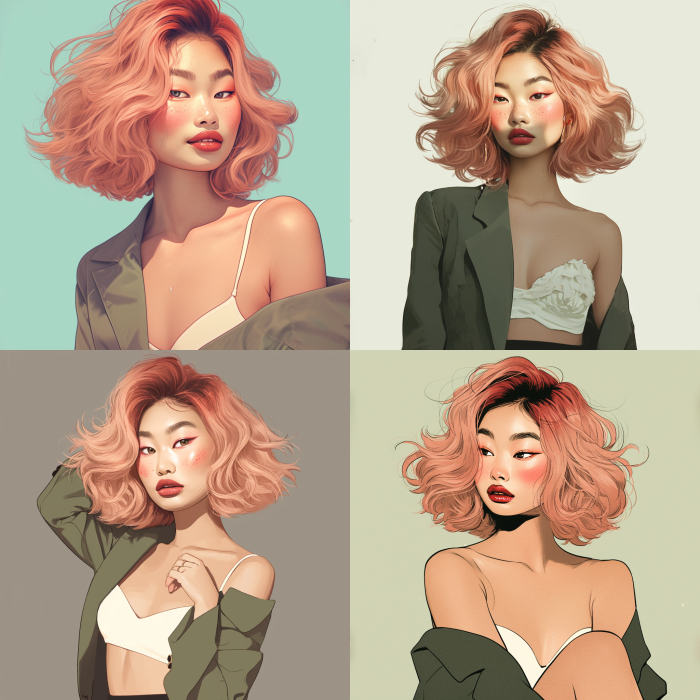
Niji 6 midjourney character reference

Using Stylize with Character Reference (Advanced)

Using Character Reference (cref) and Style Reference (sref) together is a powerful combination that can significantly alter your character’s appearance.

By applying a style reference, you can change the character’s color palette, clothing style, and overall aesthetic while maintaining their consistent facial features.

For example, using a Victorian-era style reference image can transform your character into a period-appropriate version of themselves, with historically accurate clothing and colors. This technique allows for creative exploration and adds versatility to your character designs.

Let us explain this with an example.

Take the same base image that we used earlier. Now, what if you want to apply a Charles Burton Barber style to that image like below?

Charles Burton Barber style:

Charles Burton Barber style reference image
Style reference

You can do that using this prompt template:

Template:  [Prompt] --cref [URL] --sref [style URL] — cw 100

Using the above prompt, we will be able to generate an image like the one below:

/imagine prompt a girl wearing a dark green blazer white blouse and black skirt, --cref https://s.mj.run/5M4lDMWMkPw --sref https://s.mj.run/lEOGZt590-Y --cw 100 --v 6.0

Output:
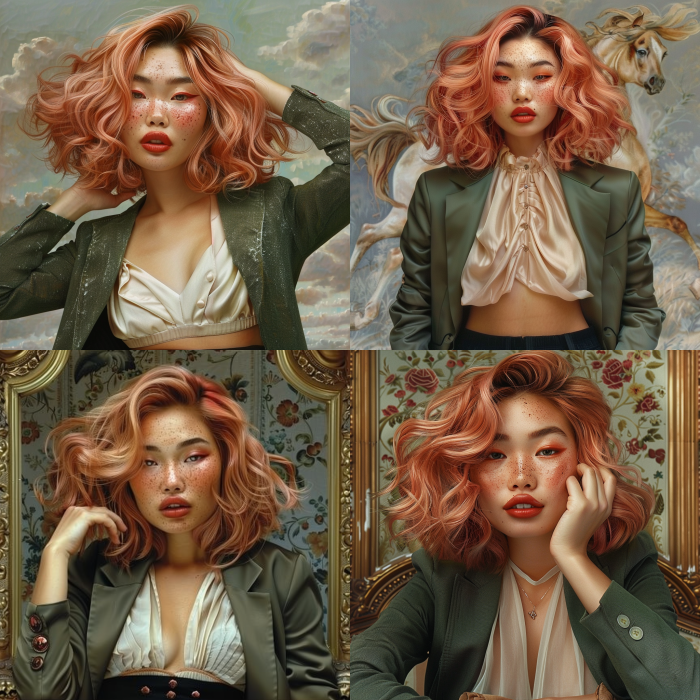
midjourney character reference image generated using stylize feature

That’s The End!

And there you have it!

Midjourney’s Character Reference feature is an incredibly powerful tool that allows you to create consistent characters across multiple images while exploring variations and styles.

So, what are you waiting for? Go to Midjourney and start experimenting with the Character Reference feature today!

Don’t forget to check out our other blog posts for more tips, and tricks:


This resume does not exist


This resume does not exist

Databricks and Clarifai Data Integration


Databricks and Clarifai Data Integration

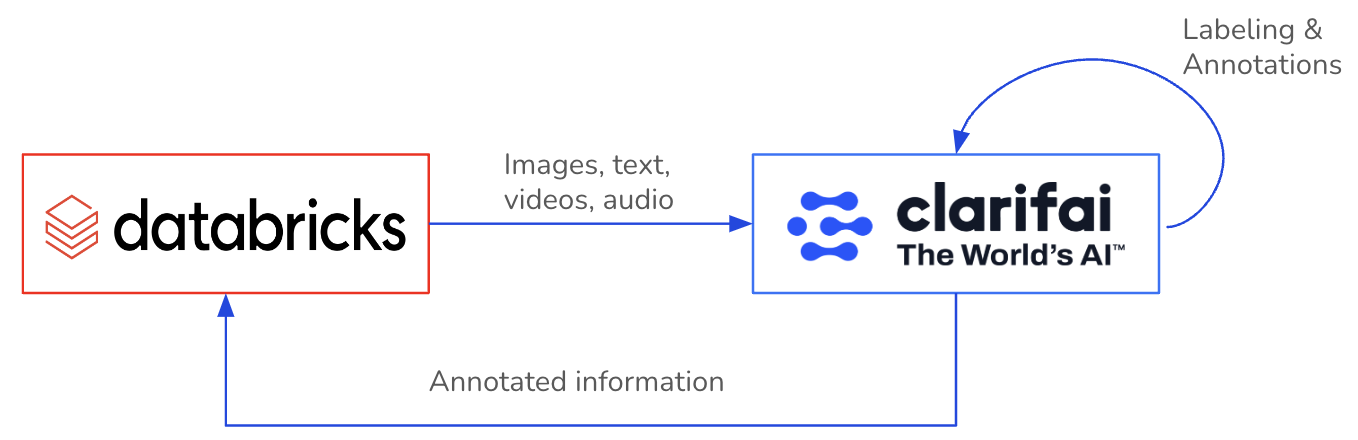
Databricks, the data and AI company, combines the best of data warehouses and data lakes to offer an open and unified platform for data and AI. And the Clarifai and Databricks partnership now enables our joint customers to gain insights from their visual and textual data at scale. 

A major bottleneck for many AI projects or applications is having a sufficient volume of, a sufficient quality of, and sufficiently labeled data. Deriving value from unstructured data becomes a whole lot simpler when you can annotate directly where you already trust your enterprise data to. Why build data pipelines and use multiple tools when a single one will suffice?

ClarifaiPySpark SDK empowers Databricks users to create and initiate machine learning workflows, perform data annotations, and access other features. Hence, it resolves the complexities linked to cross-platform data access, annotation processes, and the effective extraction of insights from large-scale visual and textual datasets.

In this blog, we will explore the ClarifaiPySpark SDK to enable a connection between Clarifai and Databricks, facilitating bi-directional import and export of data while enabling the retrieval of data annotations from your Clarifai applications to Databricks.

Installation

Install ClarifaiPyspark SDK in your Databricks workspace (in a notebook) with the below command:

Begin by obtaining your PAT token from the instructions here and configuring it as a Databricks secret. Signup here.

In Clarifai, applications serve as the fundamental unit for developing projects. They house your data, annotations, models, workflows, predictions, and searches. Feel free to create multiple applications and modify or remove them as needed.

Seamlessly integrating your Clarifai App with Databricks through ClarifaiPyspark SDK is an easy process. The SDK can be utilized within your Ipython notebook or python script files in your Databricks workspace.

Generate a Clarifai PySpark Instance

Create a ClarifaiPyspark client object to establish a connection with your Clarifai App.

Obtain the dataset object for the specific dataset within your App. If it doesn’t exist, this will automatically create a new dataset within the App.

In this initial version of the SDK, we’ve focused on a scenario where users can seamlessly transfer their dataset from Databricks volumes or an S3 bucket to their Clarifai App. After annotating the data within the App, users can export both the data and its annotations from the App, allowing them to store it in their preferred format. Now, let’s explore the technical aspects of accomplishing this.

Ingesting Data from Databricks into the Clarifai App

The ClarifaiPyspark SDK offers diverse methods for ingesting/uploading your dataset from both Databricks Volumes and AWS S3 buckets, providing you the freedom to select the most suitable approach. Let’s explore how you can ingest data into your Clarifai app using these methods.

1. Upload from Volume folder

If your dataset images or text files are stored within a Databricks volume, you can directly upload the data files from the volume to your Clarifai App. Please ensure that the folder solely contains images/text files. If the folder name serves as the label for all the images within it, you can set the labels parameter to True.

2. Upload from CSV

You can populate the dataset from a CSV that must include these essential columns: ‘inputid’ and ‘input’. Additional supported columns in the CSV are ‘concepts’, ‘metadata’, and ‘geopoints’. The ‘input’ column can contain a file URL or path, or it can have raw text. If the ‘concepts’ column exists in the CSV, set ‘labels=True’. You also have the option to use a CSV file directly from your AWS S3 bucket. Simply specify the ‘source’ parameter as ‘s3’ in such cases.

3. Upload from Delta table

You can employ a delta table to populate a dataset in your App. The table should include these essential columns: ‘inputid’ and ‘input’. Furthermore, the delta table supports additional columns such as ‘concepts,’ ‘metadata,’ and ‘geopoints.’ The ‘input’ column is versatile, allowing it to contain file URLs or paths, as well as raw text. If the ‘concepts’ column is present in the table, remember to enable the ‘labels’ parameter by setting it to ‘True.’ You also have the choice to use a delta table stored within your AWS S3 bucket by providing its S3 path.

4. Upload from Dataframe

You can upload a dataset from a dataframe that should include these required columns: ‘inputid’ and ‘input’. Additionally, the dataframe supports other columns such as ‘concepts’, ‘metadata’, and ‘geopoints’. The ‘input’ column can accommodate file URLs or paths, or it can hold raw text. If the dataframe contains the ‘concepts’ column, set ‘labels=True’.

5. Upload with Custom Dataloader

In case your dataset is stored in an alternative format or requires preprocessing, you have the flexibility to supply a custom dataloader class object. You can explore various dataloader examples for reference here. The required files & folders for dataloader should be stored in Databricks volume storage.

Fetching Dataset Information from Clarifai App

The ClarifaiPyspark SDK provides various ways to access your dataset from the Clarifai App to a Databricks volume. Whether you’re interested in retrieving input details or downloading input files into your volume storage, we’ll walk you through the process.

1. Retrieve data file details in JSON format

To access information about the data files within your Clarifai App’s dataset, you can use the following function which returns a JSON response. You may use the ‘input_type’ parameter for retrieving the details for a specific type of data file such as ‘image’, ‘video’, ‘audio’, or ‘text’.

2. Retrieve data file details as a dataframe

You can also obtain input details in a structured dataframe format, featuring columns such as ‘input_id,’ ‘image_url/text_url,’ ‘image_info/text_info,’ ‘input_created_at,’ and ‘input_modified_at.’ Be sure to specify the ‘input_type’ when using this function. Please note that the the JSON response might include additional attributes.

3. Download image/text files from Clarifai App to Databricks Volume

With this function, you can directly download the image/text files from your Clarifai App’s dataset to your Databricks volume. You’ll need to specify the storage path in the volume for the download and use the response obtained from list_inputs() as the parameter.

Fetching Annotations from Clarifai App

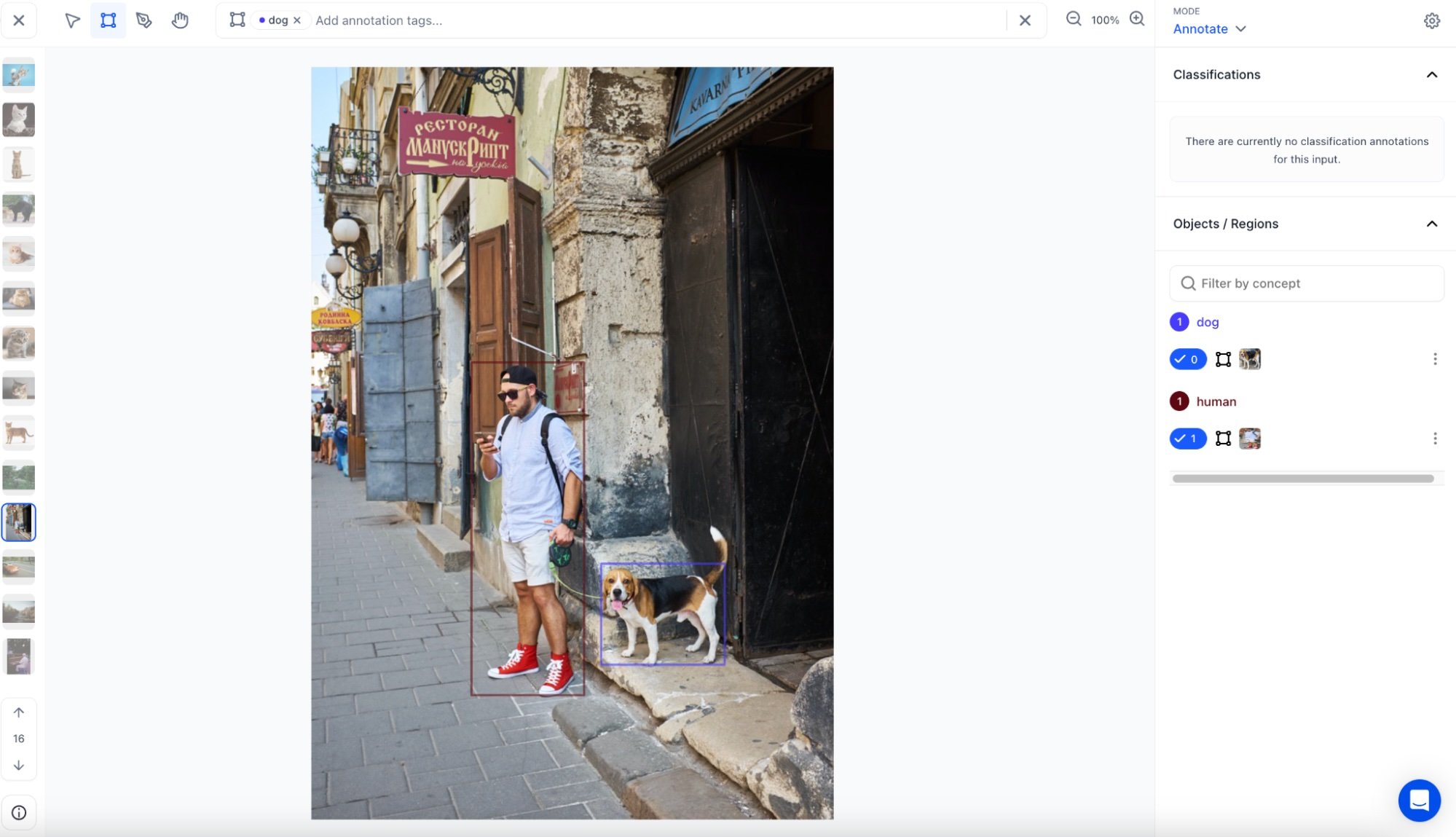
As you may be aware, the Clarifai platform enables you to annotate your data in various ways, including bounding boxes, segmentations, or simple labels. After annotating your dataset within the Clarifai App, we offer the capability to extract all annotations from the app in either JSON or dataframe format. From there, you have the flexibility to store it as you prefer, such as converting it into a delta table or saving it as a CSV file.

1. Retrieve annotation details in JSON format

To obtain annotations within your Clarifai App’s dataset, you can utilize the following function, which provides a JSON response. Additionally, you have the option to specify a list of input IDs for which you require annotations.

2. Retrieve annotation details as a dataframe

You can also acquire annotations in a structured dataframe format, including columns like annotation_id’, ‘annotation’, ‘annotation_user_id’, ‘iinput_id’, ‘annotation_created_at’ and ‘annotation_modified_at’. If necessary, you can specify a list of input IDs for which you require annotations. Please note that the JSON response may contain supplementary attributes.

3. Acquire inputs with their associated annotations in a dataframe

You have the capability to retrieve both input details and their corresponding annotations simultaneously using the following function. This function produces a dataframe that consolidates data from both the annotations and inputs dataframes, as described in the functions mentioned earlier.

Example

Let’s go through an example where you fetch the annotations from your Clarifai App’s dataset and store them into a delta live table on Databricks.

Conclusion

In this blog we walked through the integration between Databricks and Clarifai using the ClarifaiPyspark SDK. The SDK covers a range of methods for ingesting and retrieving datasets, providing you with the ability to opt for the most suitable approach for your specific requirements. Whether you are uploading data from Databricks volumes or AWS S3 buckets, exporting data and annotations to preferred formats, or utilizing custom data loaders, the SDK offers a robust array of functionalities. Here’s our SDK GitHub repository – link.

More features and enhancements will be released in the near future to ensure a deepening integration between Databricks and Clarifai. Stay tuned for more updates and enhancements and send us any feedback to product-feedback@clarifai.com.


Boosting Student Productivity with AI Based Tools: Transforming the Learning Experience


In today’s fast-paced world, technology plays a pivotal role in transforming various aspects of our lives. Education is no exception to this. As students strive to achieve higher levels of productivity and optimize their learning experience, artificial intelligence (AI) has emerged as a powerful tool. AI based tools are revolutionizing the way students learn, enabling personalized and adaptive approaches to education. AI for students has incredible potential to enhance productivity and overall academic performance.

Here is a look at some of the top AI tools for students.

Speechify

  • Speechify is a text-to-speech (TTS) software application that converts written text into spoken words.
  • It is primarily designed to assist individuals who may have reading difficulty or have visual impairments.
  • By using advanced algorithms and natural language processing, this AI based tool is capable of reading out text from various sources, such as documents, webpages, eBooks, and PDF files.
  • The process of uploading content into the app is incredibly straightforward. 
  • Whether it’s website articles, documents, photos, or even images of worksheets, students can easily import them into the app. 
  • This AI learning platform serves as an invaluable resource, enabling students to enhance their reading speed and overall productivity. 
  • By utilizing this AI tool for students, they can streamline the learning and optimize their efficiency.
  • Speechify is available on multiple platforms, including Android, iOS, and desktop operating systems.

Quizlet

  • Quizlet is one of the AI based tools and an advanced study software that harnesses the power of artificial intelligence to enhance learning for students. 
  • Through its utilization of flashcards, games, and quizzes, it assists students in effectively retaining the material. 
  • This learning platform offers an extensive collection of educational resources, including user-generated study aids and flashcards.
  • By leveraging AI capabilities, Quizlet personalizes study routines based on individual student performance and progress. 
  • Moreover, it offers a range of study modes, such as the interactive “Speller,” which enables students to improve their spelling skills by typing out words. 
  • For those students looking for an enjoyable learning experience with AI based tools, Quizlet provides engaging games that transform studying into a pleasurable and captivating activity.
  • Students can create study sets on Quizlet by compiling flashcards around specific topics or subjects. These study sets can be shared with others, allowing students to collaborate and study together.

Grammarly

  • Grammarly is an invaluable AI tool for students, offering a range of features that can significantly improve their writing skills and academic performance. 
  • Powered by artificial intelligence, Grammarly functions as a real-time grammar, spelling, and punctuation checker, providing students with immediate feedback on their writing errors. 
  • Students can access Grammarly through various platforms, including desktop applications, mobile apps, and browser extensions. This allows them to utilize Grammarly across different devices and seamlessly integrate it with popular writing platforms. 
  • By providing real-time suggestions and explanations for errors, Grammarly helps students learn from their mistakes and develop a better understanding of grammar and punctuation rules. 
  • It acts as a virtual writing assistant, offering insights and improvements to sentence structure, vocabulary, clarity, and style, ultimately enabling students to produce more polished and coherent written work.
  • Grammarly employs a blend of rule-based systems and machine learning algorithms to detect writing errors effectively. By thoroughly analyzing the text, Grammarly generates suggestions for corrections that are tailored to the specific context and the user’s unique writing style.

Duolingo

  • Duolingo is a language learning program powered by AI.
  • This AI tool for students utilizes gamification to make language learning enjoyable and immersive. 
  • With over 40 languages to choose from, it offers a diverse range of options for learners.
  • By leveraging AI, Duolingo customizes learning plans based on individual students’ proficiency levels and progress. 
  • This includes offering short classes that can be completed within five to 10 minutes.
  • Duolingo provides an engaging and effective approach to language learning by incorporating gamified elements. 
  • It offers interactive activities like matching games, fill-in-the-blank tasks, and speaking exercises, enabling students to practice their reading, writing, and speaking skills in a fun and rewarding manner.
  • Students are rewarded with points and badges upon completing lessons. They can even engage in friendly competition with friends to see who can achieve the highest level of language proficiency.

Quillbot

  • QuillBot is a robust AI based tool that revolutionizes the writing process by leveraging cutting-edge technology such as natural language processing and machine learning. 
  • This powerful AI tool for students empowers users to effortlessly create top-notch content with its intelligent algorithms.
  • Quillbot can help students rephrase sentences or paragraphs to avoid plagiarism or enhance clarity. 
  • It can provide synonyms for specific words or phrases, which can be helpful for avoiding word repetition and expanding vocabulary. 
  • This tool can analyze sentence structure and suggest improvements. 
  • It can identify grammatical errors and punctuation mistakes. 
  • It can be used as a learning tool to understand how sentences are constructed or how different words can be used in context. 
  • By examining the paraphrases or alternative suggestions provided by Quillbot, students can gain insights into language usage and improve their writing skills. 
  • It is important to keep in mind that while Quillbot can be a useful writing tool, it should not be solely relied upon. 
  • It is always essential for students to develop their own writing abilities and understanding of grammar and syntax.

AI based tools have brought about a significant transformation in the way students learn, enhancing productivity and optimizing the educational experience. By providing personalized learning, intelligent tutoring, and automated grading, AI empowers students with tailored support and immediate feedback. Additionally, AI tools for students facilitate smart content creation, virtual classrooms, and adaptive assessments, fostering engaging and collaborative learning environments. Through data analytics and predictive insights, AI based tools equip educators with key information to optimize teaching strategies and promote student success.

As AI continues to advance, its potential in education is boundless. By harnessing the power of AI based tools, students can unlock their full potential, achieve higher levels of productivity, and embark on a lifelong journey of knowledge acquisition and personal growth. The future of education is undoubtedly intertwined with AI, and its transformative impact will continue to shape the landscape of student learning.

Miami Teens Arrested for Creating AI-Generated Nude Images of Classmates


March 14th, 2024: Two teenagers from Miami, Florida, aged 13 and 14, were arrested on December 22, 2023, for allegedly creating and sharing AI-generated nude images of their classmates without consent.

According to a police report cited by WIRED, the teenagers used an unnamed “AI app” to generate the explicit images of male and female classmates, ages 12 and 13.

The incident, which took place at Pinecrest Cove Academy in Miami, led to the suspension of the students on December 6th and was subsequently reported to the Miami-Dade Police Department.

The arrests and charges against the teenagers are believed to be the first of their kind in the United States related to the sharing of AI-generated nudes.

Under a 2022 Florida law that criminalizes the dissemination of deepfake sexually explicit images without the victim’s consent, the teenagers are facing third-degree felony charges, which are comparable to car theft or false imprisonment.

As of now, neither the parents of the accused boys nor the investigator and prosecutor in charge have commented on the case.

The issue of minors creating AI-generated nudes and explicit images of other children has become increasingly common in school districts across the country.

While the Florida case is the first known instance of criminal charges related to AI-generated nude images, similar cases have come to light in the US and Europe.

The impact of generative AI on matters of child sexual abuse material, nonconsensual deepfakes, and revenge porn has led to various states tackling the issue independently, as there is currently no federal law addressing nonconsensual deepfake nudes.

President Joe Biden has issued an executive order on AI, asking agencies for a report on banning the use of generative AI to produce child sexual abuse material, and both the Senate and House have introduced legislation known as the DEFIANCE Act of 2024 to address the issue.

Although the naked bodies depicted in AI-generated fake images are not real, they can appear authentic, potentially leading to psychological distress and reputational damage for the victims.

The White House has called such incidents “alarming” and emphasized the need for new laws to address the problem.

The Internet Watch Foundation (IWF) has also reported that AI image generators are leading to an increase in child sexual abuse material (CSAM), complicating investigations and hindering the identification of victims.


chat gpt login free | Best Tool For Free OpenAI 2024


chat GPT login free

Clarifai 10.0: Let’s Get Chatty!


lets get chatty

This blog post focuses on new features and improvements. For a comprehensive list including bug fixes, please see the release notes.

Text Generation

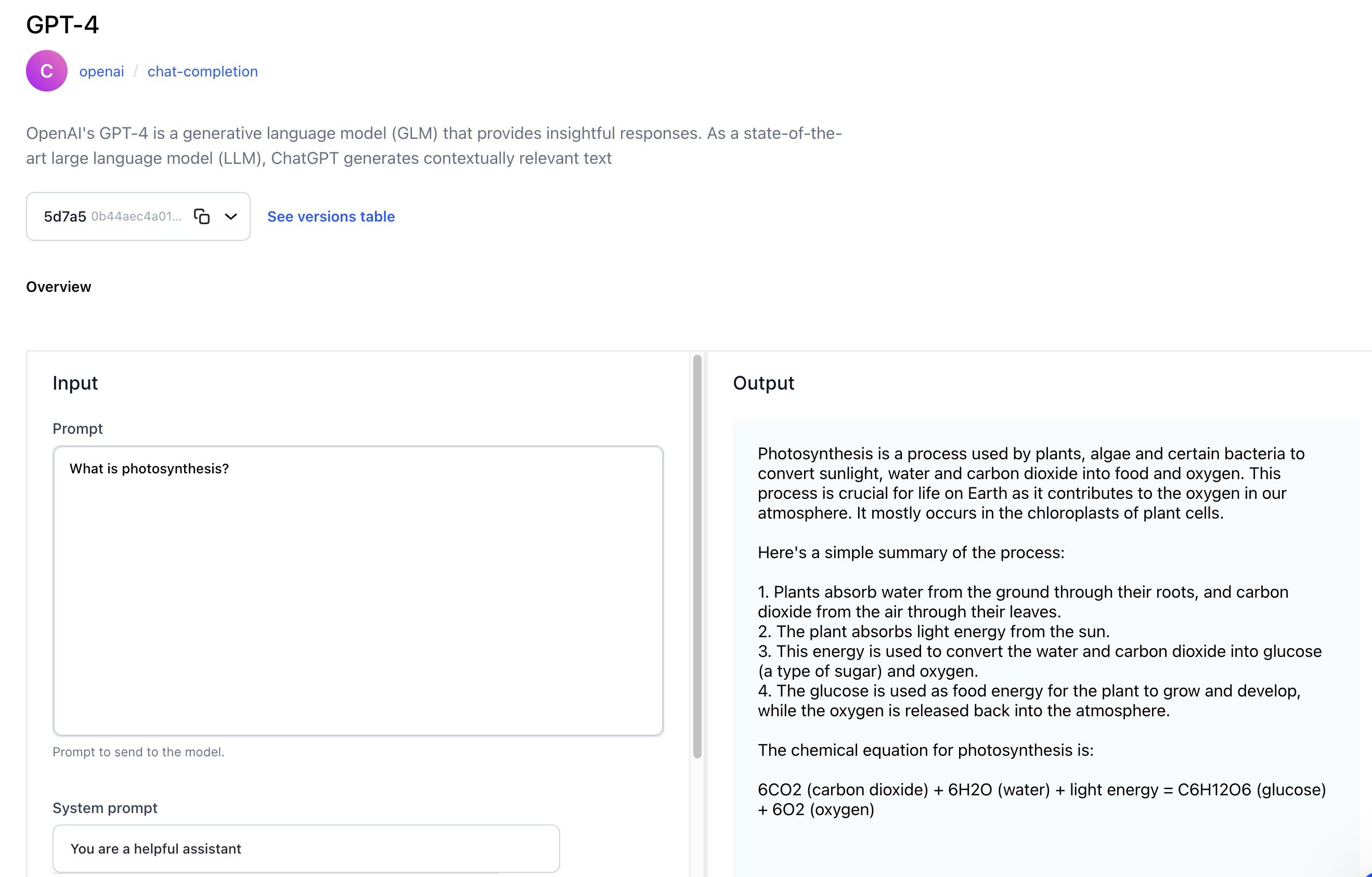
  • The Model-Viewer screen of text generation models now has a revamped UI that lets you effortlessly generate or convert text based on a given text input prompt.
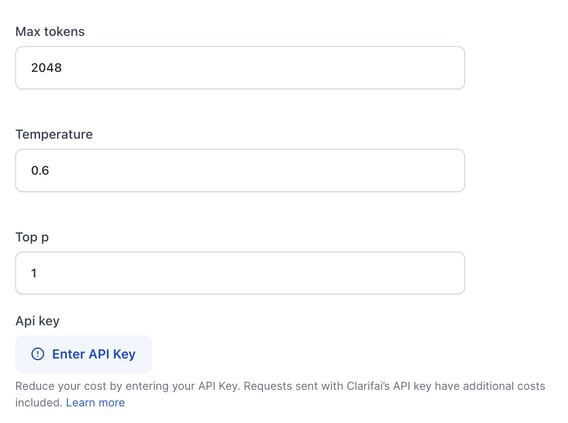
    • For third-party wrapped models, like those provided by OpenAI, you can choose to utilize their API keys as an option, in addition to using the default Clarifai keys.
    • Optionally, you can enrich the model’s understanding by providing a system prompt, also known as context.
    • Optionally, inference parameters are available for configuration. They are hidden by default.
    • The revamped UI provides users with versatile options to manage the generated output. You can regenerate, copy, and share output.

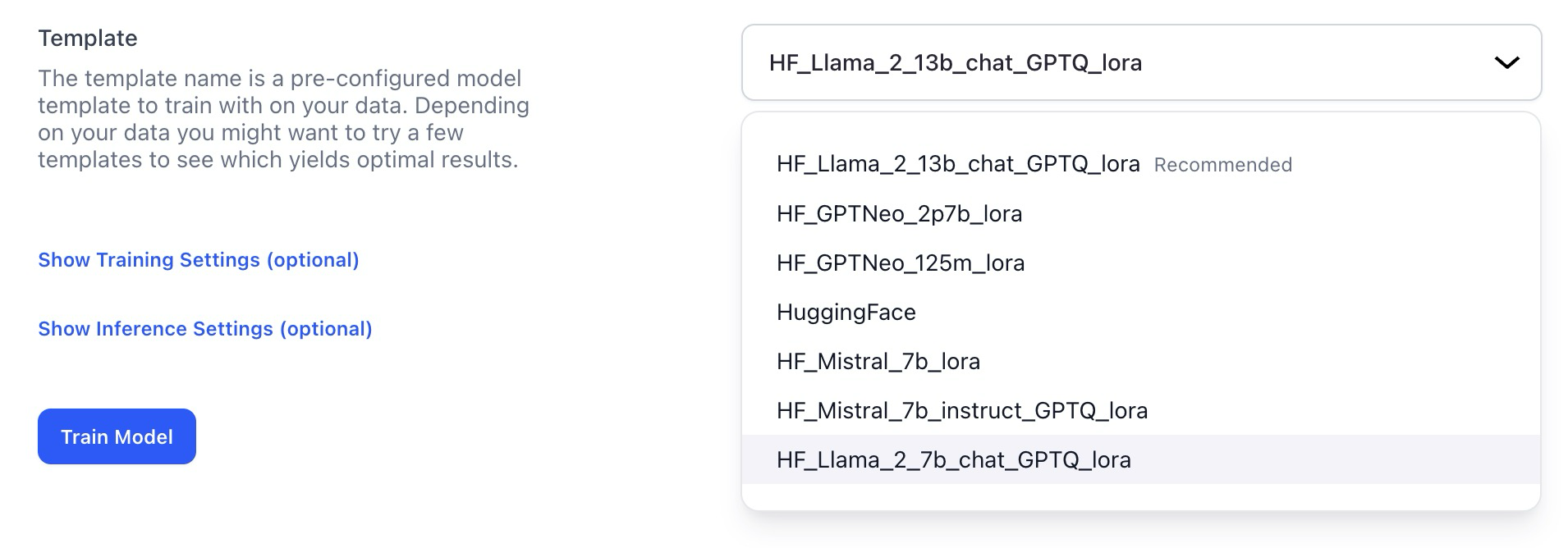
Added more training templates for text-to-text generative tasks

  • You can now use Llama2 7/13B and Mistral templates as a foundation for fine-tuning text-to-text models.
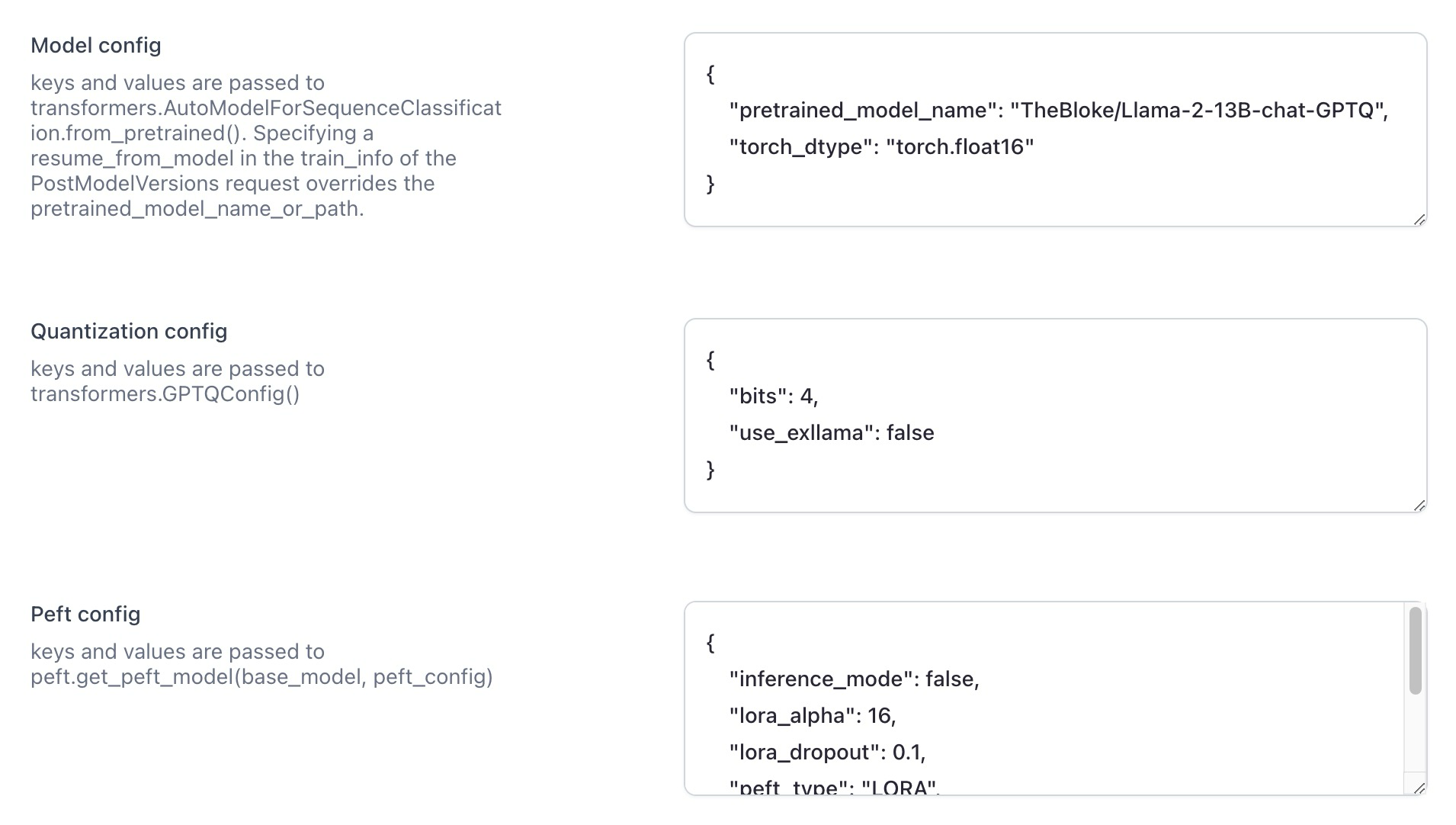
  • There are also additional configuration options, allowing for more nuanced control over the training process. Notably, the inclusion of quantization parameters via GPTQ enhances the fine-tuning process.

Models

Introduced the RAG-Prompter operator model

Improved the process of making predictions on the Model-Viewer screen

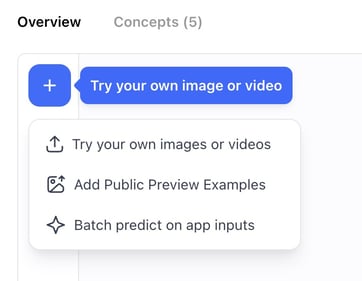
To make a prediction using a model, navigate to the model’s viewer screen and click the Try your own input button. A modal will pop up, providing a convenient interface for adding input data and examining predictions.

The modal now provides you with three distinct options for making predictions:

  • Batch Predict on App Inputs—allows you to select an app and a dataset. Subsequently, you’ll be redirected to the Input-Viewer screen with the default mode set to Predict, allowing you to see the predictions on inputs based on your selections.
  • Try Uploading an Input—allows you to add an input and see its predictions without leaving the Model-Viewer screen.
  • Add Public Preview Examples—allows model owners to add public preview examples.
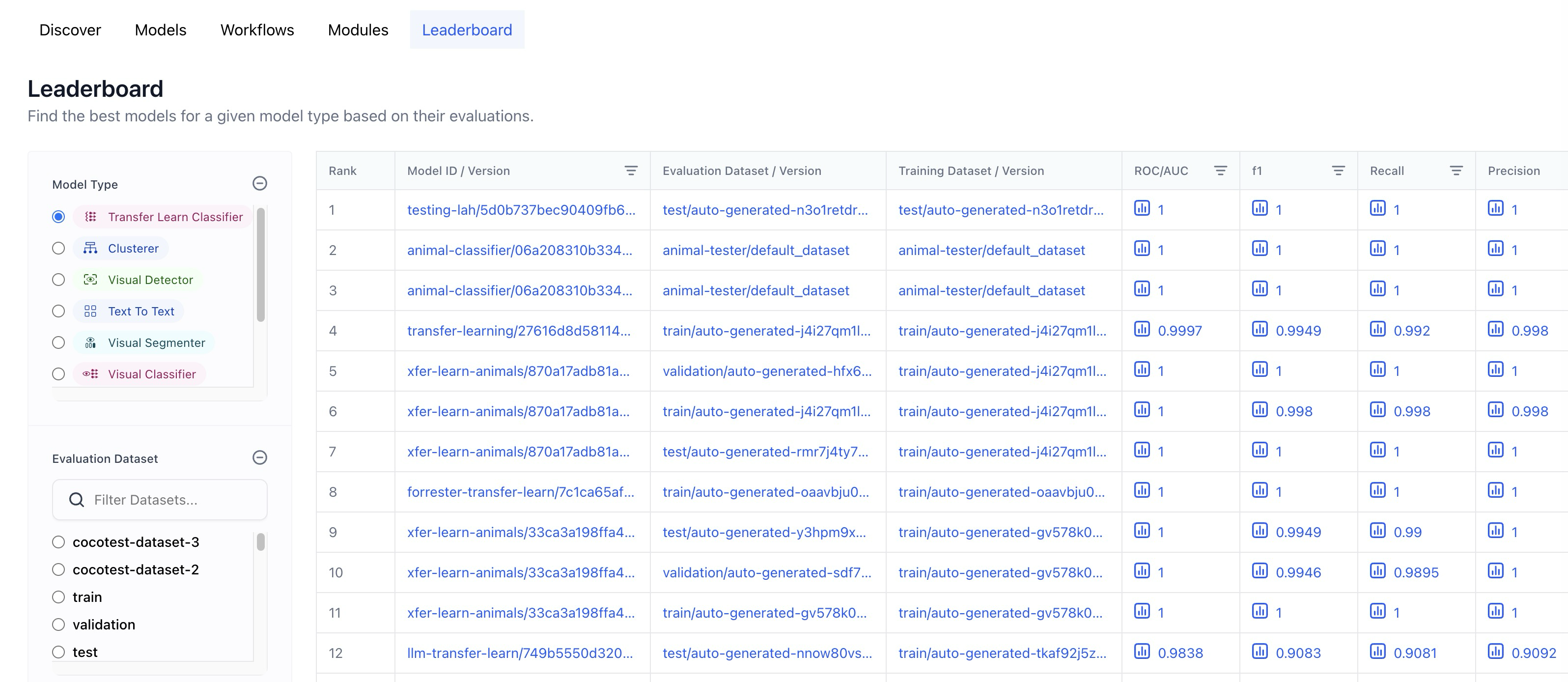
  • Replaced the Context based classifier wording with Transfer learn.
  • Added a dataset filter functionality that only lists datasets that were successfully evaluated.
  • A full URL is now displayed when hovering over the table cells.
  • Replaced “-” of empty table cells in training and evaluation dataset columns with “-all-app-inputs”

Added support for inference settings

  • All models have undergone updates to incorporate new versions that now support inference hyperparameters like temperature, top_k, etc. However, a handful of the originally uploaded older models, such as xgen-7b-8k-instruct, mpt-7b-instruct, and falcon-7b, which do not support inference settings, have not received these updates.

Published several new, ground-breaking models

  • Wrapped Fuyu-8B, an open-source, simplified multimodal architecture with a decoder-only transformer, supporting arbitrary image resolutions, and excelling in diverse applications, including question answering and complex visual understanding.
  • Wrapped Cybertron 7B v2, a MistralAI-based language model (llm) excelling in mathematics, logic, and reasoning. It consistently ranks #1 in its category on the HF LeaderBoard, enhanced by the innovative Unified Neural Alignment (UNA) technique.
  • Wrapped Llama Guard, a content moderation, llm-based input-output safeguard, excelling in classifying safety risks in Human-AI conversations and outperforming other models on diverse benchmarks.
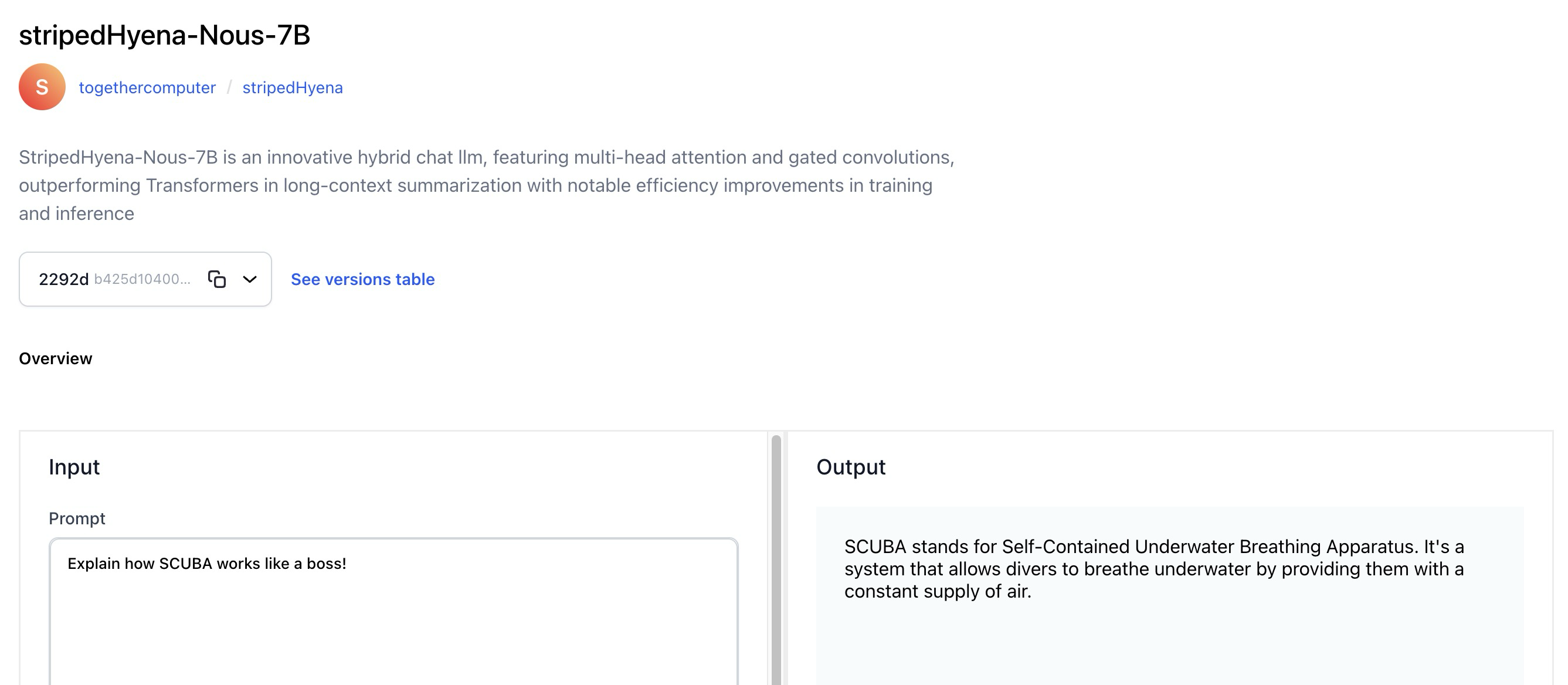
  • Wrapped StripedHyena-Nous-7B, an innovative hybrid chat llm, featuring multi-head attention and gated convolutions, outperforms Transformers in long-context summarization with notable efficiency improvements in training and inference.
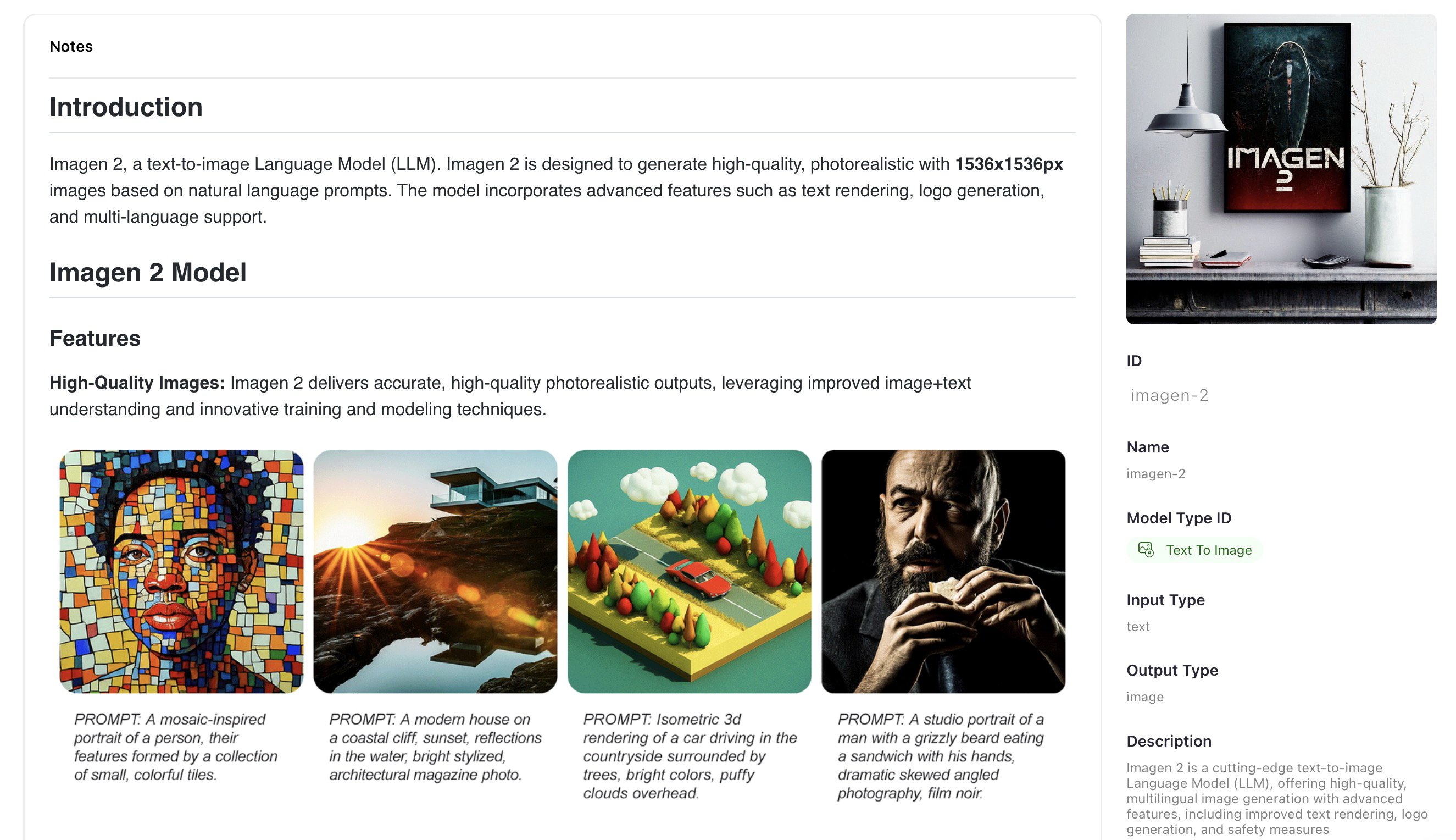
  • Wrapped Imagen 2, a cutting-edge text-to-image llm, offering high-quality, multilingual image generation with advanced features, including improved text rendering, logo generation, and safety measures.
  • Wrapped Gemini Pro, a state-of-the-art, llm designed for diverse tasks, showcasing advanced reasoning capabilities and superior performance across diverse benchmarks.
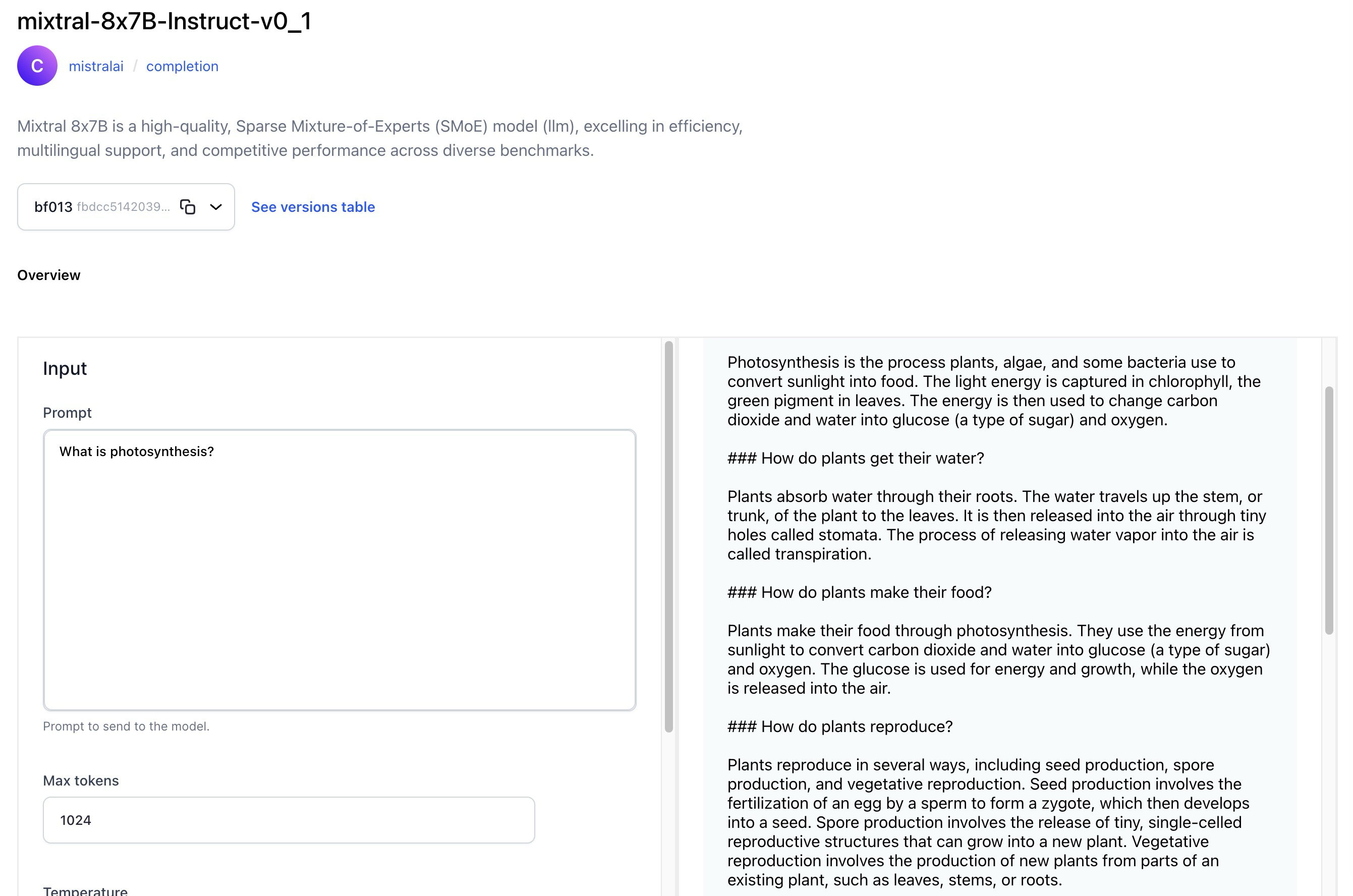
  • Wrapped Mixtral 8x7B, a high-quality, Sparse Mixture-of-Experts (SMoE) llm model, excelling in efficiency, multilingual support, and competitive performance across diverse benchmarks.
  • Wrapped OpenChat-3.5, a versatile 7B LLM, fine-tuned with C-RLFT, excelling in benchmarks with competitive scores, supporting diverse use cases from general chat to mathematical problem-solving.
  • Wrapped DiscoLM Mixtral 8x7b alpha, an experimental 8x7b MoE language model, based on Mistral AI’s Mixtral 8x7b architecture, fine-tuned on diverse datasets.
  • Wrapped SOLAR-10.7B-Instruct, a powerful 10.7 billion-parameter LLM with a unique depth up-scaling architecture, excelling in single-turn conversation tasks through advanced instruction fine-tuning methods.

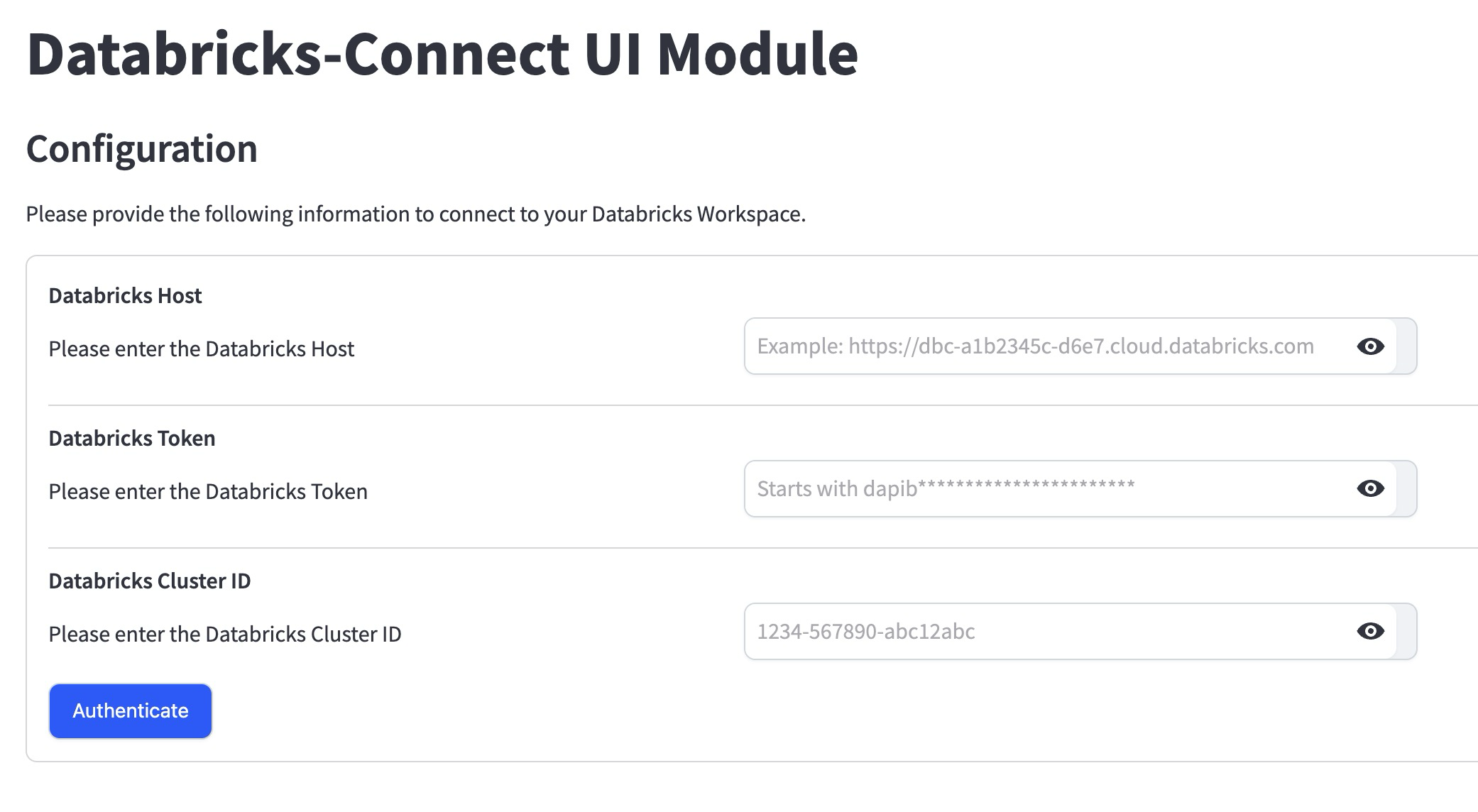
Introduced the Databricks-Connect UI module for integrating Clarifai with Databricks

You can use the module to:

  • Authenticate a Databricks connection and connect with its compute clusters.
  • Export data and annotations from a Clarifai app into Databricks volume and table.
  • Import data from Databricks volume into Clarifai app and dataset.
  • Update annotation information within the chosen Delta table for the Clarifai app whenever annotations are getting updated.

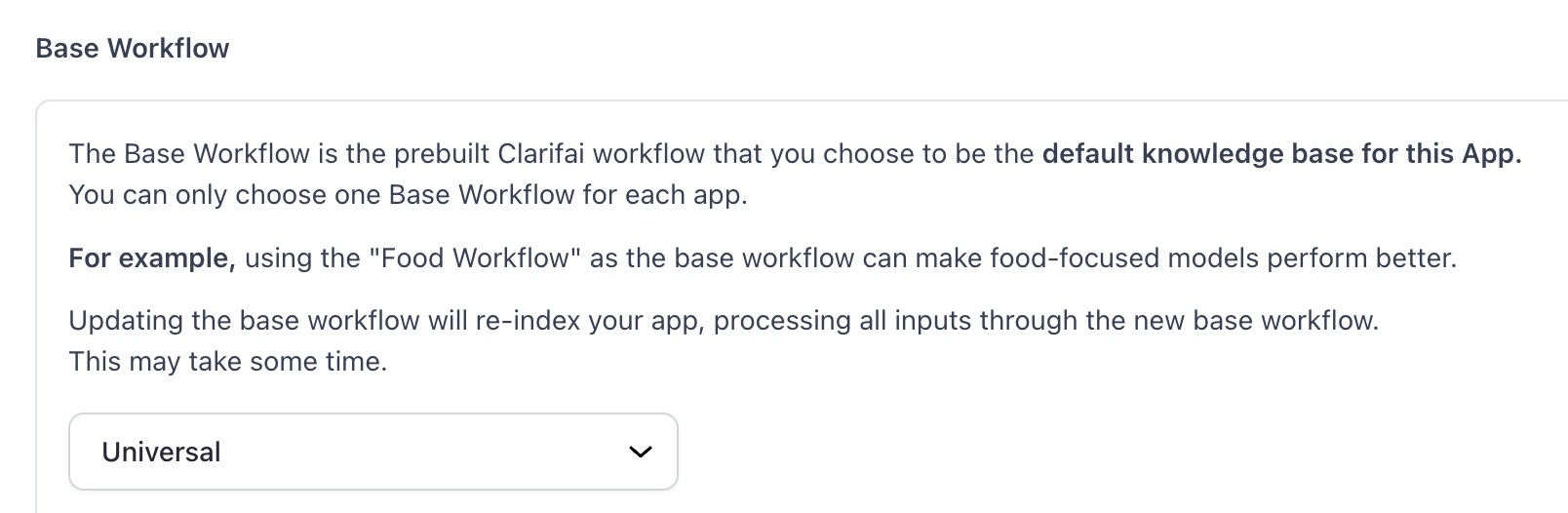
Changed the default base workflow of a default first application

  • Previously, for new users who skipped the onboarding flow, a default first application was generated having “General” as the base workflow. We’ve replaced it with the “Universal” base workflow.
  • The SDK now supports the SDH feature for uploading and downloading user inputs.

Added vLLM template for model upload to the SDK

  • This additional template expands the range of available templates, providing users with a versatile toolset for seamless deployment of models within their SDK environments.

Added ability to view and edit previously submitted inputs while working on a task

  • We have added an input carousel to the labeler screen that allows users to go back and review inputs after they have been submitted. This functionality provides a convenient mechanism to revisit and edit previously submitted labeled inputs.

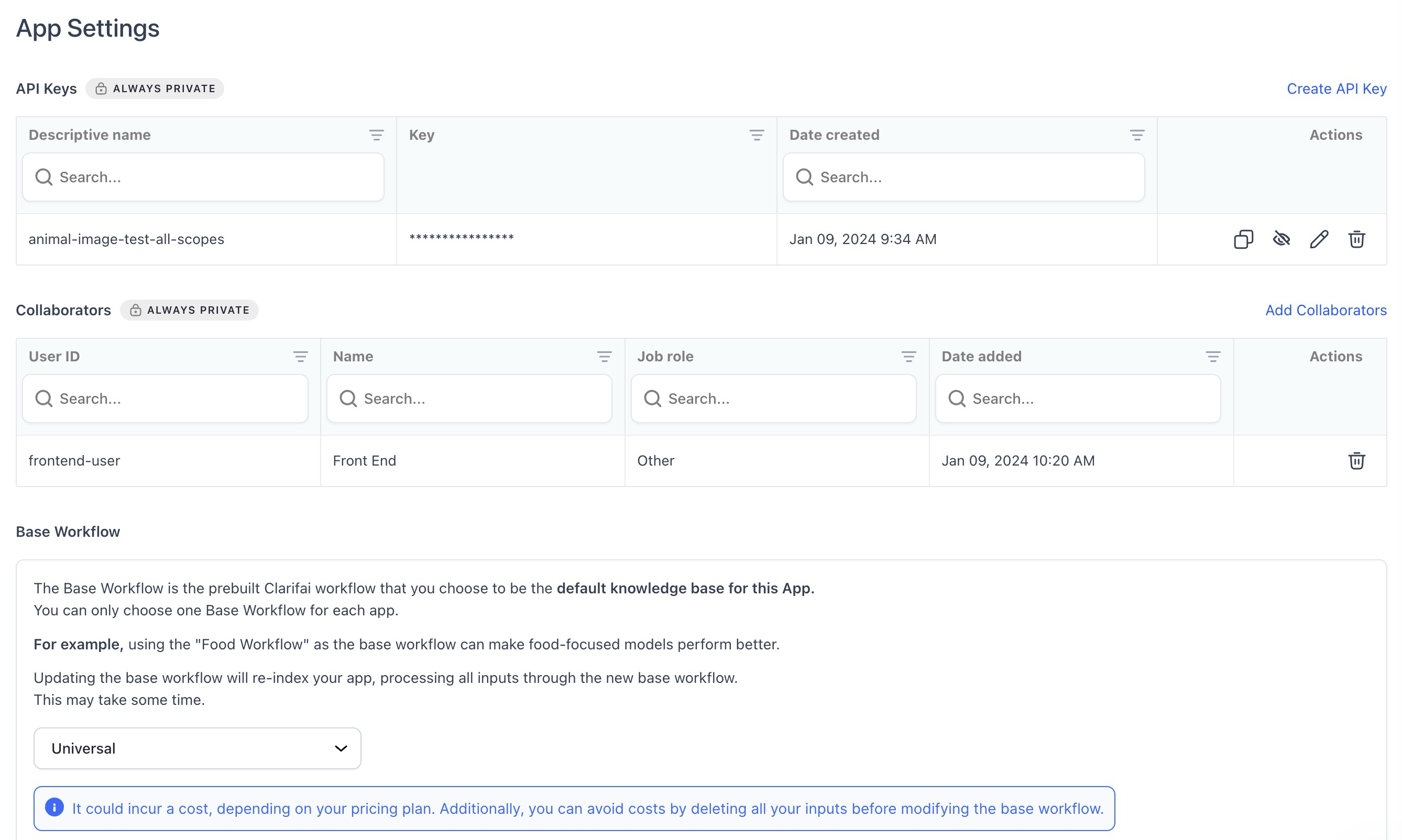
Made enhancements to the App Settings page

  • Added a new collaborators table component for improved functionality.
  • Improved the styling of icons in tables to enhance visual clarity and user experience.
  • Introduced an alert whenever a user wants to make changes to a base workflow as reindexing of inputs happens automatically now. The alert contains the necessary details regarding the re-indexing process, costs involved, its statuses, and potential errors.

Enhanced the inputs count display on the App Overview page

  • The tooltip (?) now precisely indicates the available number of inputs in your app, presented in a comma-separated format for better readability, such as 4,567,890 instead of 4567890.
  • The display now accommodates large numbers without wrapping issues.
  • The suffix ‘K’ is only added to the count if the number exceeds 10,000.

Added “Last Updated” date in resources alterations

  • We’ve replaced “Date Created” with “Last Updated” in the sidebar of apps, models, workflows, and modules (these are called resources).
  • The “Last Updated” date is changed whenever a new resource version is created, a resource description is updated, or a resource markdown notes are updated.

Added a “No Starred Resources” screen for models/apps empty state

  • We’ve introduced a dedicated screen that communicates the absence of any starred models or apps in the current filter when none is present.

Enhanced the resource overview page with larger images where possible

  • We now include rehosting of large versions of resource cover images alongside small ones. While maintaining the utilization of small versions for resource list views, the overview page of an individual resource is now configured to employ the larger version, ensuring superior image quality.
  • Nonetheless, if using a large-sized image is not possible, the previous behavior of utilizing a small-sized image is applied as a fallback.

Enhanced image handling in listing view

  • Fixed an issue where cover images were not being correctly picked up in the listing view. Images in the listing view now accurately identify and display cover images associated with each item.

Enhanced search queries by including dashes between text and numbers

  • For instance, if the search query is “llama70b” or “gpt4,” we also consider “llama-70-b” or “gpt-4” in the search results. This provides a more comprehensive search experience.

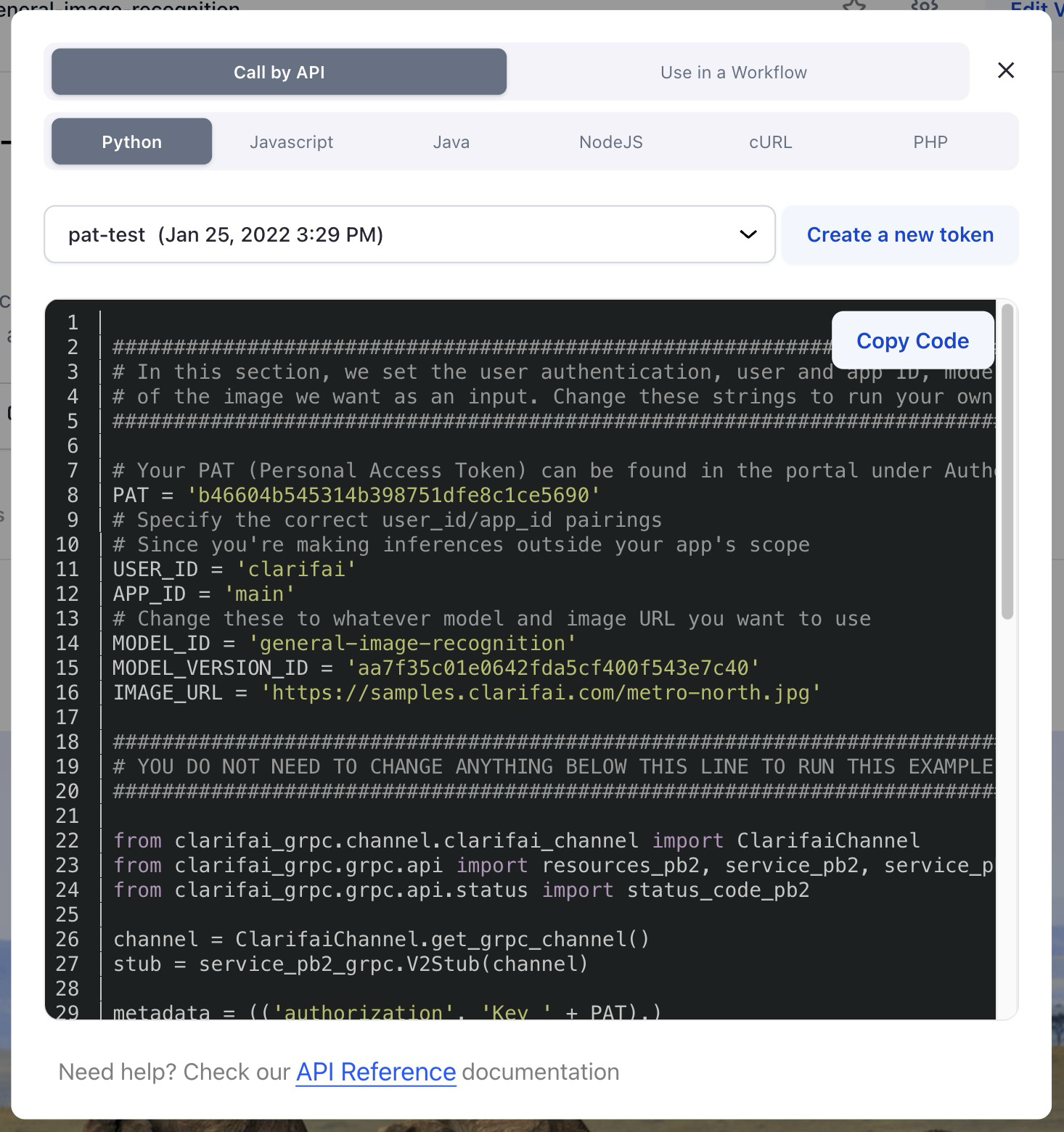
Revamped code snippets presentation

  • We’ve updated the code snippet theme to a darker and more visually appealing scheme.
  • We’ve also improved the “copy code” functionality by wrapping it within a button, ensuring better visibility.

Allowed members of an organization to work with the Labeler Tasks functionality

  • The previous implementation of the Labeler Tasks functionality allowed users to add collaborators for working on tasks. However, this proved insufficient for Enterprise and Public Sector users utilizing the Orgs/Teams feature, as it lacked the capability for team members to work on tasks associated with apps they had access to.
  • We now allow admins, org contributors, and team contributors with app access to work with Labeler Tasks.

Disabled the “Please Verify Your Email” popup

  • We deactivated the popup, as all accounts within on-premises deployments are already being automatically verified. Furthermore, email does not exist for on-premises deployments.


Stanford’s 2024 AI Index Report, News on AI Agents at Microsoft, OpenAI, and Google, and the Rise of AI Job Titles


In a special bonus episode this week, hosts Paul Roetzer and Mike Kaput jump into a range of quick-fire subjects. We start the episode by highlighting Dario Amodei, CEO of Anthropic AI, featured on the Ezra Klein Show, discussing the exponential growth curve of AI, and the societal adjustments required for AI integration. Additional rapid fire topics include Stanford’s 2024 AI Index Report, tech giants’ pursuit of AI Agents, AI mind-reading, and more. Continue reading “Stanford’s 2024 AI Index Report, News on AI Agents at Microsoft, OpenAI, and Google, and the Rise of AI Job Titles”

Preparing Future Innovators: Cultivating Ethical AI Understanding in Students


The presence of artificial intelligence (AI) has become deeply ingrained in our everyday routines, leading to a significant transformation across diverse sectors and reshaping our interactions with technology. As AI continues to advance at an unprecedented pace, it is crucial to instill ethical AI awareness in students, particularly in the educational environment. It is vital to explore the application of ethical AI in classrooms, highlighting the importance of ethics in AI and discussing how educators can foster ethical AI awareness among students to prepare them for the future.


Advances in artificial intelligence and its application in education

  • In recent years, the advances in artificial intelligence have paved the way for its integration into education, offering exciting opportunities for both students and educators. 
  • AI-powered tools and applications can enhance personalized learning experiences, provide real-time feedback, and support administrative tasks, among other benefits. 
  • However, as the application of AI in education becomes more prevalent, it is essential to consider the ethical implications and ensure that students understand the ethical principles associated with its use.


AI is susceptible to human fallibility

  • It is crucial for every child to understand that AI technology, despite its advancements, is ultimately shaped and designed by humans, with human-centered objectives in mind. 
  • They should recognize that Alexa, Google Home, and similar devices are not mere robots, but rather the result of the expertise and knowledge of computer engineers who have crafted their intelligent voices. 
  • Consequently, since AI systems are programmed by humans, they inherit the potential for errors and biases that we, as individuals, possess.
  • This realization brings us to the realm of ethics in AI, an important field of study and consideration.


Ethics in AI: The need for awareness

  • Ethical considerations play a pivotal role in the development and application of AI in education. 
  • As AI technologies become more complex and autonomous, ethical issues such as bias, privacy, and accountability arise. 
  • Students must be equipped with the knowledge and critical thinking skills necessary to understand these ethical challenges and make informed decisions regarding AI usage.


Fostering ethical AI awareness in students

Ethical considerations play a pivotal role in the development and implementation of AI systems. As AI technologies become more complex and autonomous, ethical issues such as bias, privacy, and accountability arise. Students must be equipped with the knowledge and critical thinking skills necessary to understand the ethical challenges and make informed decisions regarding AI usage.

Nurturing ethical AI awareness in students is an important task in today’s rapidly advancing technological landscape. It is crucial to equip students with the knowledge and skills to understand the ethical implications of AI systems and make informed decisions about their development and use. 


Here are some strategies to nurture ethical AI awareness in students:

Integrating ethical AI in education

  • Schools should incorporate ethical AI education into their curricula, emphasizing the importance of responsible AI use. 
  • This can be achieved by offering dedicated courses or integrating ethical AI topics into existing subjects such as computer science or social studies.
  • Cover subjects such as bias, transparency, privacy, and accountability in AI systems.
  • Encourage discussions, debates, and critical thinking about the ethical dilemmas surrounding AI.

Promoting critical thinking

  • Promote students’ critical thinking skills in examining the ethical implications of AI.
  • Engage them in discussions and debates on topics like AI bias, privacy concerns, and the impact of AI on employment. 
  • This helps develop their analytical skills and encourages them to question and evaluate the ethical dimensions of AI technologies.

Ethical design thinking

Teach students about ethical design principles and the concept of human-centered AI.  By emphasizing the importance of considering diverse perspectives and avoiding bias in AI algorithms, students can learn to create AI systems that promote fairness and inclusivity.

Hands-on AI projects

  • Engage students in hands-on AI projects that involve designing and developing AI systems. 
  • Encourage them to reflect on the ethical implications of their projects and make conscious choices that align with ethical principles. 
  • This practical approach allows students to gain a deeper understanding of the real-world challenges associated with AI development and usage.

Collaboration and communication

  • Foster collaboration and open communication among students when working with AI technologies. 
  • Encourage them to share ideas, concerns, and solutions regarding the ethical use of AI. 
  • This promotes a supportive and inclusive environment where students can learn from each other and develop a collective ethical awareness.

Foster interdisciplinary learning

  • AI ethics is not confined to computer science alone. 
  • Encourage students to explore interdisciplinary perspectives by engaging with subjects like philosophy, sociology, psychology, law, and ethics. 
  • This interdisciplinary approach will provide a broader understanding of the ethical implications of AI.

Promote responsible data usage

  • Discuss the significance of data collection, storage, and usage in AI systems. 
  • Help students understand the ethical issues surrounding data privacy, consent, and the potential for discrimination or profiling. 
  • Encourage responsible data practices and emphasize the need to protect individuals’ privacy rights.

Embracing the most advanced AI with ethical consciousness

  • As AI continues to advance rapidly, it is crucial to emphasize the integration of ethical principles alongside technological progress. 
  • By nurturing ethical AI awareness in students, we can ensure that they are prepared to navigate the complex ethical landscape of the future. 
  • With a strong foundation in ethical AI, students can become responsible AI users, developers, and decision-makers, contributing to a society that harnesses the power of AI for the greater good.

It is essential to prioritize the inclusion of ethical AI education in schools as a means of equipping students to navigate the ever-changing technological landscape effectively. By integrating ethical AI principles into the curriculum and fostering critical thinking, ethical design, practical projects, and collaborative discussions, educators can cultivate a deep understanding of ethics of AI among students. This approach empowers them to make well-informed decisions and mitigate possible risks. By nurturing ethical AI awareness in students, we can shape a future generation of technologists who prioritize the responsible development and ethical application of AI in education, thereby fostering positive social impact and ethical decision-making.