How 3D Product Animations Boost Sales When Hiring Design Studios & Freelancers


Why you need 3D animations to market products for your company

Today’s post explores 3D product animations and how they boost sales when hiring design studios and freelancers. Do you know that the IKEA catalog is the most printed publication in the world today, even more than the Bible? Do you also know that most of the images in the catalog (about 75% of them) are 3D renderings instead of photographs? This allows for a major cost-saving because IKEA doesn’t have to ship prototypes all around the world for photo shoots. It’s the same story on the website because otherwise, the company would again spend a fortune getting the right product image every single time.

IKEA’s affairs with computer-generated visualization have always been the go-to reference for making a case for 3D renderings as effective marketing materials. Your company might not be as big as IKEA, perhaps you don’t even sell furniture and homeware, but you can follow their approach to catalog creation and do better using animated–instead of static–product renderings. 

3D product animations are the rage in the marketing business nowadays, especially as more people get their exposure to advertisements through websites and apps rather than print materials. Prices for 3D animated rendering services are getting more competitive as well. You can hire freelance 3D modelers and render artists from Cad Crowd, the leading agency with over thousands of experts you can choose from to create professional-quality product animations at an affordable rate.

RELATED: Top Reasons for Using 3D Rendering in the 3D Animation Process

Animated renderings

3D renderings, both static and animated, are meant to be as photorealistic as possible. Every object starts as a 3D model, arranged to a certain position to resemble a photography composition, fixed with lighting and shadow configuration, and then rendered to generate an image. Post-processing treatment gives subtle refinements of colors and contrast for a photorealism effect. All those works are for one static rendering. Since an animated rendering is basically a series of multiple static ones displayed in rapid succession, it takes a lot more time and effort to produce even a short animation/video.

In the old days, a 12 FPS (frames per second) animation was considered pretty smooth for most purposes. A 12 FPS animation means that for the entire duration of the video, each second contains 12 individual drawings displayed in successive order. It’s quick, but modern screens easily handle higher frame rates to deliver smoother motion up to 30 and 60 FPS. As for the resolution, a Full HD animation is acceptable for modern phones or laptops, but 2K and 4K are preferable for larger screen sizes.

Unlike static images, animated renderings add depth and motion, making them a compelling option for product presentation purposes. If a static rendering of a product might be likened to a movie poster, then an animated visualization of the same product is an extended trailer; the latter offers a better look at the product in question and reveals much more about what the audience can expect. The technology used to create 3D animated renderings has come a long way in sophistication over the years.

We’re now spoiled with a dizzying array of advanced software packages like AutoCAD, CATIA, Cinema 4D, Rhinoceros 3D, SolidWorks, the web-based Clara.io, and the open-source Blender, to name a few. Product animations used to be rudimentary wireframes or pixelated 3D models at best, but in today’s cutting-edge era, product animations are so realistic that they can mimic actual objects with great accuracy.

RELATED: Why You Should Hire a 3D Walkthrough Animation Service for Your Architectural Project

Furthermore, 3D animations can actually deliver a presentation that’s otherwise near impossible to create using conventional photographs and videos. For example, exploded view animations where you see the inner mechanical parts of complex products such as gearboxes and car engines, smartphones, digital cameras, drones, and so forth. Professional filmmakers can probably produce the same things with some video trickery, but it would likely be more laborious and costly. Why would anyone do that if there’s a more affordable option to achieve the same thing?

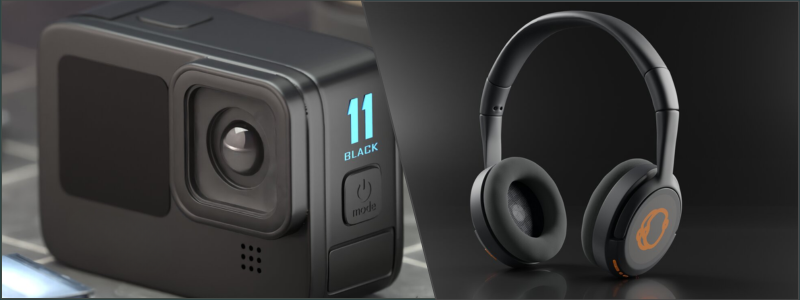
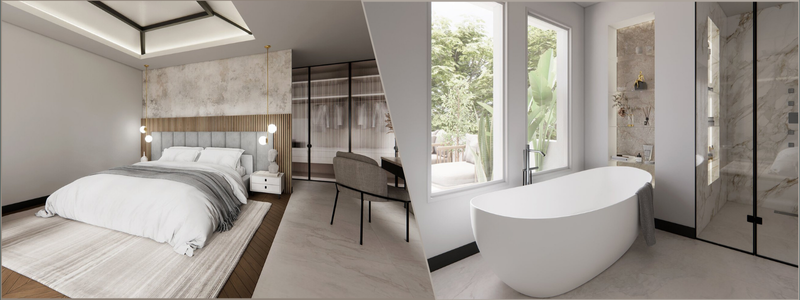
Action camera and headphones by Cad Crowd product design experts

Product animations for marketing

Among the key components in marketing material are visual appeal and storytelling. For the sake of argument, you can simply use photographs printed in magazines, flyers, and newspapers, and attach them with a short text to give the pictures a backstory. This method worked well in the past and is still widely used today. The fact that marketers and companies worldwide keep turning to this old-fashioned idea suggests that it’s effective. Billboards are still everywhere on the roadsides, proving that visual appeal plays a major role in marketing.

But just because marketers use print media doesn’t mean it’s the only thing they have at their disposal. Print media might have been the ultimate choice in the old days, but not anymore. Companies put ads in magazines as a way to supplement their main marketing channels and format: the Internet, with animated renderings. Modern consumers are bombarded with information on a daily basis, making it more challenging for any product or brand to cut through the noise. People have what’s known as “information overload” due to constant exposure to social media and news feeds delivered right to their smartphones. They see plenty of colorful pictures attached with short captions every hour of the day.

Many of them are probably product advertisements of some sort. This is the noise you need to cut through. And what better way of doing it than using the definitely more eye-catching 3D animations?Static renderings are pleasing to the eye–there’s no doubt about that. A lot of ads for products like cars, furniture pieces, homeware, fashion, electronics, and even foods and beverages are static renderings. However, the main idea behind a product advertisement is to immediately catch the audience’s attention, retain the engagement, stimulate the desire to have it, and finally trigger the buying decision.

If static renderings are the current standard, naturally, you want to bring your ads game a notch higher and be the one to stand out from the crowd. As far as storytelling and visual appeal are concerned, no static renderings will ever beat their 3D animated counterparts, and this is where an experienced 3D product rendering design firm can help. Engaging narratives and vivid imagery are delivered simultaneously, luring the audience to (somehow) involuntarily give the attention they deserve. 3D animation conveys a message effectively to let the audience see and understand the product better; they don’t have to guess what the product is or what it can do.

RELATED: FAQs to Ask a 3D Animation Studio Before Hiring 3D Animation Services for Better Projects

All they have to do is watch and enjoy. We say “enjoy” because you have the freedom to make the animation as entertaining and interesting as possible. It might be informative, hilarious, sarcastic, or all of those in one package, depending on the storytelling. This ability to present a product in a dynamic fashion makes it easier for marketers to leave a long-lasting impression on the audience. Memorable ads open the door to creating a strong brand identity.

Applications of 3D animated renderings

A 3D product animation is essentially a video created by a 3D animation expert, either long or short, depending on how detailed you want it to be. No matter the duration, video is a versatile format to deliver information, including for marketing purposes. The most common applications are as follows.

Product demonstration

Say you’re a marketer tasked with creating an advertisement for an espresso machine. Your first idea is to take a photograph of the product or create a static rendering of the object and then print it on a flyer or magazine. It wouldn’t be a farfetched idea to plan for a TV ad featuring a person making a cup of espresso using the machine. Everything is good, except that it’s all been done before. At this point, you’re in need of something unique.

Why not hire a 3D animation company to create a 3D product animation using a cross-section view of the machine in action? This way, you get the chance to showcase the inner mechanism of the product as it works to produce a cup of coffee. Of course, you don’t have to go to great lengths to give information about possible proprietary technologies or make a how-to guide. Only include the highlights, such as new features, ease-of-use, simple maintenance, build quality, and performance. The most important thing is that the audience understands what it is and what sets it apart from similar products in the market.

RELATED: A Guide to 3D Virtual Reality Animation Rendering Services for Companies and Firms

Virtual tours

If you find the need to do virtual tours, where potential clients can see and experience the product without physical visits, chances are you’re talking about a substantially large product. It might be a house, a venue, a museum, a hotel, and so forth. As the name suggests, a virtual tour should allow the audience to experience the product through auditory and visual stimulation. Take, for example, a virtual tour of a museum. For a virtual tour to be comprehensive enough, the 3D architectural animation firm creates an animation that depicts the activities a typical person does in the facility.

Move the camera slowly forward, passing the exhibits, and highlight some of the popular objects on display. Avoid having jump cuts in a virtual tour as they feel forced and unnatural. Don’t forget to use the back sound to amplify the atmosphere. The same thing applies to virtual tours of a house, a hotel, or other properties. Virtual tours are increasingly popular among real estate marketers and agencies. More people today get their latest information on the local real estate market from the Internet.

3d architectural rendering freelancers

They look at the available features and browse through the list of highlights before deciding to set an appointment with the realtor for a visit. Potential buyers rarely do physical visits if they don’t like what they see on the listings to begin with. A 3D animation from a 3D architectural visualization designer, formatted as a virtual house tour, is not cheap, so you might want to reserve it for a high-dollar property as well. 

Brand storytelling

As mentioned earlier, telling a story is important in marketing. Brand storytelling is more than just about advertising a product. It is also about fostering a relationship between your business (the company and the brand) and the clients. Telling dry facts and listing your best-selling products’ features don’t exactly constitute a story, do they? Your clients want a more compelling narrative–a story loaded with messages about the values the brand represents, the purposes it fills, the responsibilities it shares with the clients, and the goals it wants to achieve.

Almost the entire point of brand storytelling, apart from the subtle marketing intent, is to humanize your brand. The storytelling is meant to demonstrate that the business has a human side. A business has to make a profit, but it does that while fostering connections with the clients at large. To build the case for it, the storytelling usually puts forward the idea of empathy. In other words, there needs to be a parallel between the brand’s own identity and the values clients can appreciate. You want to create emotional bonds with the audience, carving the path to building trust, a sense of shared purpose, and eventually brand loyalty.

Anybody can argue that you don’t have to use 3D animation for brand storytelling – a traditional film will do. But then again, it’s like saying static renderings aren’t necessary because photographs will do. We’re not asking you to abandon videography and never look back; videography still has its place in marketing. That said, if there’s a better option, you should be inclined to make the most of it. Animated renderings come with the advantage of near infinite possibilities. So long as you have the budget for it, the sky’s the limit, and if you also have the right 3D design professionals to get the job done, you might even be able to produce an animation of blockbuster material.

RELATED: How 3D Animation Helps Deliver Immersive Marketing Campaigns & Company Services

Suppose your brand focuses on canned beverage products. In your brand storytelling, of course, it is possible to use an actor or someone from the company to talk at length about the idea behind the product, the history, the manufacturing process, quality control, etc. Or, you can take the Coca-Cola ‘Happiness Factory” route and utilize 3D animation to picture the hard work, the fun, the joy, and the dedication put into every bottle of the drink.

Another great inspiration is the Honda “Cog” commercial from the early 2000s, demonstrating the precision, the reliability, and the care to build a car; it became so popular that it got its own Wikipedia page. It’s an “inspiration” rather than an “example” only because the Cog used very little CGI (that’s one of the reasons it cost £1m back then). Today, with heavy CGI utilization from 3D rendering experts, you won’t need even close to that amount to produce great storytelling wrapped in a comparable visual quality.

Social media campaign

In the traditional sense of the term, social media refers to online platforms where users can socialize with each other regardless of distance and location via Internet-based communication methods. The definition has shifted in a big way. While conventional usage as a networking tool remains in place, social media have become a major marketing channel and are multimedia-heavy. Thanks to the user-friendly interface, mobile app versions that basically encourage people to stay connected all the time, and mostly free access, social media are the ideal platforms to launch a full-blown marketing campaign and spread the word about your products and brands.

Even on supposedly text-based platforms like Twitter, pictures and videos are dominating the feed. Now, with Instagram, YouTube, and, more recently, TikTok, where billions of users are exposed to an endless stream of product marketing, you have a much better chance of gaining traction using 3D product animation. Everybody is posting and watching videos on their phones; if they like what they see, they’re more likely to share the content with their friends and followers.

Visual appeal determines shareability, and greater shareability means a higher potential for lead acquisition. In terms of visual appeal, you’ll be hard-pressed to find anything more engaging and eye-catching than a well-made 3D product animation. An exploded view animation of a pair of earbuds attracts more viewers than a static rendering of them; an animated video of a toy car is more exciting than a photograph of it; a stop-motion of espresso workflow has higher shareability than a traditional video of a person making a cup of coffee.

RELATED: How to Use 3D Architectural Design as Visual Storytelling

automotive engineering design services

Main reasons to use 3D product animations

It wouldn’t be entirely correct to say that 3D animated rendering is the be-all and end-all for product marketing. Other formats, such as traditional photography and videography, still have their merits, but there are some very good reasons why 3D animation is the outright better choice.

Easy to showcase details

Every advertisement is meant to be informative and contain enough details to intrigue the audience. Assuming the details have anything to do with a product’s raw materials, manufacturing process, internal mechanism, or other highlights that can’t possibly be shown without taking it apart, 3D animation makes it easier to cover those details and still look playful. If the product has a unique feature that requires some technical knowledge to understand, an animated video can act as an explainer to help your less technical buyers get a grasp of it through a nice graphical presentation. 

Cost-effective

Most product design professionals and small video production companies offer Full HD (1920 x 1080p) resolution in either 24 FPS or 30 FPS as standard. The video is typically priced by duration; a minute of 3D product animation may cost anywhere between $5,000 (from a small studio) and $25,000 (a professional animation company). If done properly, a minute of animated rendering should be enough to cover a lot of details. Even at the higher end of the spectrum, it’s still relatively affordable compared to traditional filming. It’s cost-effective because you don’t have to bother with using a lot of expensive cameras and editing equipment. You don’t even need an entire filing crew; a small team of modelers and render artists will do.

Flexibility

Because 3D animation is CGI, every object you see on the screen can be modified, altered, removed, and replaced using specialized software. When the budget is tight, it’s even possible to repurpose an old animation for a new marketing campaign without spending too much time and resources. Still remember the IKEA example mentioned earlier? Reuse and repurpose are big cost-saving elements.

RELATED: What is the Important Difference Between Motion Graphics Design and 3D Animation Services Design?

Conclusion

3D animated renderings have improved how companies and brands communicate their products to customers. More businesses all around the world are beginning to visualize how 3D animation can be a cost-effective and flexible alternative to traditional videography, paving the way to new exciting innovations in the technology and creating a competitive market on its own. However, this also introduced a concern about the possibility that many untrained render artists will take advantage of the development and trick unsuspecting clients into spending money on poor-quality animations.

How Cad Crowd Can Help?

Here at Cad Crowd, you’ll never worry about receiving a substandard result or a low standard of quality of work. With over 94,000 experts to choose from who have undergone a pre-screening process, you’re ensured that only qualified professionals with proven track records can offer their services. Don’t hesitate to give us a call, now! 

author avatar

MacKenzie Brown is the founder and CEO of Cad Crowd. With over 18 years of experience in launching and scaling platforms specializing in CAD services, product design, manufacturing, hardware, and software development, MacKenzie is a recognized authority in the engineering industry. Under his leadership, Cad Crowd serves esteemed clients like NASA, JPL, the U.S. Navy, and Fortune 500 companies, empowering innovators with access to high-quality design and engineering talent.

Connect with me: LinkedInXCad Crowd
Best 51 Sites for Freelance 3D Artist Jobs in 3D Rendering Projects and Remote Visualization Work


3D rendering has changed the landscape of product development companies, manufacturing, and the architectural industry to a massive degree. The idea behind the technology is to visualize an object in a photorealistic computer-generated imagery, even if the object doesn’t actually exist yet. The object can be anything from consumer goods and complex medical devices to cars and skyscrapers. Such images are typically used for marketing purposes; for example, a company pitches an idea of a new product or construction plan to investors and stakeholders using a 3D rendering of a project.

Although the rendering looks as realistic as a photograph, everything in the image is still pretty much a concept. It’s also possible to use the 3D artist’s rendering as actual marketing content. For instance, about 75% of all the products you see in the IKEA catalog are computer-generated. Doesn’t this mean that three out of four things in IKEA’s offerings are fake? No, it doesn’t. The renderings in the catalog are merely digital twins of physical products. Although the images are computer-generated, they’re accurate representations of the real things, with some digital touches and wizardry to attract buyers.

The same thing applies to other industries. With the increasing demand for 3D rendering services across a myriad of businesses, there’s also a spike in employment opportunities for 3D artists. And a lot of companies these days choose to hire freelancers and independent contractors over full-time employees for efficiency reasons. Hiring freelancers is quick, relatively affordable, and budget-flexible. If you’re a 3D artist specializing in CG visualization, here are some of the best sites where you can find remote rendering jobs.

RELATED: 3D Rendering Freelancers & Visualization Services vs. In-House 3D Artists

cadcrowd-logo

1. Cad Crowd

Arguably the best-known freelancing site that focuses heavily on CAD-related projects, the aptly named Cad Crowd has helped thousands of companies from all around the world with a whole bunch of services in the product development and architectural industries. By placing heavy emphasis on CAD professionals, the platform does an excellent job at categorizing the kind of services it offers, such as drafting, 3D modeling, 3D rendering, product visualizations, architectural walkthroughs, and so forth.

Cad Crowd works by connecting freelancers with the right clients for the right projects. A client posts a 3D rendering job, and Cad Crowd reviews the brief and invites select freelancers to submit proposals on the project. Every freelancer is given 30 new “credits” every month, and each proposal (job application) costs a single credit. The platform says that such a limitation is expected to make the freelancers more cautious about the process, and as a result, the clients should only receive quality proposals from competent freelancers.

There is also a “public design contest” option to help 3D design freelancers improve their ratings on the platform and earn more chances of getting invited to private projects. Winning a design contest gives you 50 additional points to your profile, and ending up in the second place earns you 40 points, whereas the third, fourth, and fifth places will be rewarded with 30 points each. The bigger your points, the higher your rank on the platform. It usually costs no money at all to participate in a public 3D rendering contest. Most contests come with prize money as well.

Website: Cadcrowd.com

peopleperhour-logo

2. Peopleperhour

Freelancers can sign up for PeoplePerHour at zero cost. You can add more details to your profile, like field of expertise, experience, and pricing options (fixed-price per project or hourly rate). PeoplePerHour claims that its artificial intelligence system helps match projects with freelancers based on their profiles. You’ll be notified if a suitable project comes up and prompted by the system to send a quote. You also get the option to search for projects manually.

A “quote” is essentially a proposal or a bid, meaning you might have to compete with other 3D CAD rendering freelancers to get hired for the job. PeoplePerHour allows you to send up to 15 proposals for free every month; in case you need more, you must purchase additional credit. For every completed project, the platform charges a service fee between 3.5% and 20%, depending on the earnings you make.

Website: Peopleperhour.com

the muse logo

3. The Muse

Not every project listed in The Muse is a remote project, so make sure you use the filtering options carefully when browsing for jobs. Other than that, everything is pretty self-explanatory. You can search for projects (or even specific companies) right from the homepage. There are also multiple sorting options, such as job level (entry, senior, internship, mid-level), company size (small, medium, large), location, diversity, benefits, etc. Clicking on a project will reveal detailed requirements and a bit of information about the employer. One of the best things about The Muse is that you can apply directly to the employer’s website. According to The Muse itself, the job listing is checked multiple times a day for validity (to see whether any particular project is active or not) and updated as frequently as possible.

Website: Themuse.com

FlexJobs logo

4. Flexjobs

At least four things make FlexJobs a little bit different from most job boards. First, FlexJobs positions itself as a premium job search, which, of course, means you (as a 3D visualization freelancer) have to pay to use the platform. There is indeed a free trial that lasts for 14 days, but even that comes at a cost of $2.95. Second, the platform claims to be scam-free and promises to include only active, paid projects in the job listing. Third, FlexJobs says that every job you see on the list, regardless of the categories, has been vetted by a real human instead of an algorithm or any AI-based system. Every company in the site’s database is a legitimate employer. Fourth, the site prioritizes flexible jobs, including for freelancers and remote workers. Except for the premium, FlexJobs does seem to tick all the good boxes.

Website: Flexjobs.com

Working Nomads logo

5. Working Nomads

A major advantage of Working Nomads is that you don’t have to spend hours (maybe days) browsing through the Internet searching for freelance or remote jobs; the platform has already done it for you. More specifically, Working Nomads curates remote digital jobs from all across the web to simplify the hunt. Every job is tagged by type and category, and you can search manually by using certain keywords.

In the case of 3D rendering projects, some companies prefer to use alternative terms in their job listing, such as 3D artists, architectural visualization professionals, product designers, 3D animators, CAD generalists, and so on. Furthermore, there’s an option to sort the search results by salary. You can use Working Nomads for free, but you’ll only have limited access to the job listings. If you wish to unlock access to more than 30,000 remote jobs, which basically amounts to the entire database, you need to be a premium member. The subscription fee starts at $15.26, billed monthly.

Website: Workingnomads.com

RELATED: 3D Product Rendering Company or 3D Artist: How to Hire for New Product Designs?

solidgigs logo

6. Solidgigs

It’s impossible to use SolidGigs to look for jobs without being a premium member. Subscription fee is $49 monthly, or $31 per month ($382) if paid annually. There’s a 14-day free trial that you can cancel anytime. Unlike most freelancing platforms, SolidGigs deliberately prevents you from seeing a full description of any job in the listing. Instead, it will send you leads each time there’s a new project that’s relevant to your profile (skill set, experience, location, etc.) to your registered email address. If you decide to send an application to any of the employers, the link will redirect you to the original source. In other words, you’ll apply directly to the employer. SolidGigs is on the expensive side of freelancing platforms for 3D design services, but at least it doesn’t take any percentage from your earnings as a commission fee, should you get hired.

Website: Solidgigs.com

Nexxt

7. Nexxt

With a big promise of listing more than a million jobs sourced from hundreds of websites across the web, Nexxt sounds like the ideal place for freelancers actively hunting for new projects. It has a unique feature called “focus sites” with three options listed: Career, Local, and Diversity–each represents a selection of projects that corresponds to location, flexibility, inclusion, and types of jobs. You must choose a category under any of those three to see the actual job listing. After that, it’s as easy as using a search bar to enter a keyword to hunt for open projects.

Once you select a job, you’ll be provided with a full description of the project and a link to apply for it. Bear in mind that you might not know whether a project is full-time, part-time, freelance, or remote without reading the full description. Nexxt works like a portal because the link will redirect you to the original source of the listing. You can use Nexxt even without registering, but you must sign up in order to receive email notifications. 

Website: Nexxxt.com

Skipthedrive

8. Skipthedrive

A general freelancing platform, SkipTheDrive, comes with a straightforward approach to browsing the available jobs for 3D art design expert designers. You’re provided with a list of job categories to begin the search, although it’s probably easier to use the search bar instead. SkipTheDrive is not your typical job board; you don’t have to register to use the site, build a profile, or submit your resume. Everything is as clear as you want, with zero unnecessary stuff sprinkled all over the page.

When you apply for a job listed in SkipTheDrive, you’ll be redirected to the original source (most likely the employer’s own site). You handle everything on your own, including the resume, application letter, portfolio formats, and everything in between. Because SkipTheDrive has nothing to do with the application and hiring process, it takes zero platform fee and no commission at all.

Website: Skipthedrive.com

Toptal-logo

9. Toptal

There’s practically no limitation to the job categories in Toptal. Everybody is encouraged to register, but then again, Toptal promises to clients that only the most skillful, talented, and experienced freelancers are accepted. The platform likes to boast about how it receives thousands of applications each month and brings in just a meager 3% of them. You can’t help but notice that Toptal is heavily geared toward the clients, which it says include Silicon Valley startups and leading Fortune 500 brands.

3D rendering freelancers have no option to apply for projects directly. You can’t even browse the available jobs, let alone send proposals to any employer. But anyone can register regardless of skill set and fields of expertise. Part of the promise is that when a client comes looking for a talent that matches your description, Toptal lets you know all about it and initiates the potential collaboration. Hired freelancers get to keep 100% of their earnings

Website: Toptal.com

remotive logo

10. Remotive

You won’t find a category that says 3D rendering, CG visualization, photorealistic architectural image, or anything like that in Remotive, but you should be able to find more than a handful of projects in need of CGI professionals like product designers and 3D artists. The problem with Remotive is that you can’t really do an in-depth search of the job listing, filter, and sort the results without being a registered member.

Remotive says it has a collection of more than 35,000 open remote jobs and offers a money-back guarantee if you don’t get at least 50 new job postings in the first month. To unlock all the features and the entire database of available projects listed on the site, you need to pay a $79 premium; this is a one-time payment, which comes with lifetime access and custom email alerts. 

Website: Remotive.com

RELATED: 10 Tips to Improve Photorealistic 3D Renderings for Design Companies & Freelance 3D Artists

twine logo

11. Twine

Everyone is welcome to Twine regardless of their skill sets and levels of experience. Twine focuses on three major job categories, including Creative, Digital, and Marketing industries, so it should be a natural ground for 3D artists and 3D visualization professionals out there. You’ll be glad to know that Twine is a free platform for all freelancers. Signing up also comes at zero cost, but that’s not the full story. A free account has only 15 pitch credits, refilled each month. In case you need to send additional pitches after you run out of those free credits, you need to purchase some extra by joining the Twine Pro.

At a cost of $7.49 monthly (billed annually) or $13.99/month, the platform unlocks additional benefits, such as 35 additional pitches (for a total of 50 per month), getting promoted on Instagram, and the ability to contact potential employers directly. Also, Twine Pro accounts are free from any transaction fees when receiving payments.

Website: Twine.net

LinkedIn logo

12. LinkedIn

To say that LinkedIn is a freelancing platform might be an understatement. The site claims to have become a major center of networking for companies and professionals, powered by around 1 billion members worldwide. It’s like the more serious version of social media, where everyone is trying to increase public reach and promote services. LinkedIn doesn’t specifically cater to freelancers, but the site used to have a section called “Job Seeker,” which has now been renamed to the “Premium Career” feature.

Let’s talk about the basic account first. The free basic membership allows you to create a professional identity, build a network of contacts, search job openings, get recommendations from other members, and receive (but not send) InMail messages. But if you find the basic account lacking in features, you might want to purchase the Premium Career account for $29.99 per month. It unlocks additional features, including direct email access to employers/hiring managers, career related courses from LinkedIn, AI-powered job search, and notifications of resume views. There’s a one-month free trial as well, giving freelance 3D visualization experts the opportunity to decide whether the premium account is worth the expense. 

Website: Linkedin.com

wellfound logo

13. Wellfound

Back to the more conventional freelancing platform, there’s Wellfound (previously known as AngelList Talent). While you can use the site to look for jobs and apply to an employer without registering, it really is much easier if you log in first. Logging in makes the search experience much more enjoyable with the ability to filter the results according to your preferences. Wellfound says it has more than 100,000 jobs available from startups and small companies alike.

When you’re about to apply, a pop-up window appears with an option to add an introduction and note, so it’s not entirely different from a cover letter. Most of the jobs listed in Wellfound have information regarding employers ‘ provided salary ranges. The site mentioned nothing specific about 3D rendering or visualization in the job category, but it has graphic designer and product designer tabs in the “Remote Jobs” section, which most likely have something to do with 3D digital artistry.

Website: Wellfound.com

Virtual Vocations logo

14. Virtual Vocations

As soon as you get to the homepage of Virtual Vocations, you’re presented with a simple interface similar to that of a search engine. Insert a keyword into the search bar, press Enter, and a job listing comes up right away. All (or at least the vast majority) of the jobs listed on the site are remote projects, suitable for freelancers and other work from home 3D modeling professionals. Registering for a free account gives you access to randomly selected jobs, and you can apply directly to any of the employers. A random selection means exactly that; you can’t in any way set a job search preference. If the randomly picked jobs fail to pique your interest, you just have to check back a few hours later for an updated list. For a more specific search and personalized job alerts, you have to register for a premium account, costing $19.99/month.

Website: Virtualvocations.com

guru.com-logo

15. Guru

There really isn’t much of a difference between Upwork and Guru. Both platforms require you to create a profile, browse for jobs relevant to your skill sets, and apply for the jobs. The search feature comes with filtering options to sort the results by skill categories, locations, and payment methods (fixed price or hourly rate). Guru allows you to use the site and send bids at no cost, but a free account can be a bit too restrictive. Registering for a premium membership opens access to more bids per month, the ability to send premium quotes, and a quicker rank improvement. It’s also advised that you should only apply for projects that offer verified payment methods to minimize the chances of getting scammed by fake employers. A premium account costs between $12 and $50 per month. Depending on the type of account, Guru charges between 5% and 9% of commission for every paid invoice.

Website: Guru.com

RELATED: 13 Steps for Outsourcing 3D Architectural Rendering with Companies & 3D Artists

Dice logo

16. Dice

You can say that Dice sits right in the middle between specialty and general freelancing platforms. It’s neither like Cad Crowd that focuses on CAD-related projects, nor Upwork or Guru with their all-in-one approach. Dice specializes in tech jobs, so it has a broader scope of project categories than the former, but not as wide ranging as the latter. The good thing is that within the technical related categories, you should find quite a lot of projects that require 3D expertise, including architectural visualization and product rendering services. In addition to the typical search-and-apply procedure, the Dice Match feature helps you connect with open projects tailored to your field of expertise. You can set up job alerts and save open projects for future reference as well. Every project description comes with a link that leads you to the original recruiter. Dice says that every freelancer application will be reviewed by TopResume.


Website: Dice.com

SimplyHired logo

17. SimplyHired

Probably one of the most straightforward job boards in this list, SimplyHired makes it easy to browse for jobs by entering the skills, job title, or employers into the search bar. The platform includes all employment types from internships and temporary to contract and full-time, but it provides an easy-to-use filtering option to display “remote” jobs only. Even better, you’re able to sort the search results based on the minimum salary, too. Every vacant position comes with a full job description, which includes roles and responsibilities, qualifications, benefits, and short information about the employer. Once you find the job you like, simply click Quick Apply, and you’re basically set. The application uses your SimplyHired profile, so you must register with the site to use the feature. SimplyHired offers a few useful guides, like Salary Estimator, Company Reviews, and a link to the Glassdoor Community.

Website: Simplyhired.com

freelancerarrowcom logo

18. Freelancer

Boasting 1800 categories for job seekers to choose from, Freelancer (the platform) is a widely popular job board. The platform implements a bidding system, meaning you must compete with other CAD rendering freelancers to submit the most attractive proposal to get hired for a project. Every job listed on the board shows the number of people who have placed a bid on it, so you might be able to use that as an indicator of how competitive the project is. It even has a contest section on the website, although most (but not all) of the projects revolve around the graphic design category, such as logo design and illustration. Premium membership is available, in case you need to unlock extra features like having more bids per month, access to highlighted contests, and using custom photos for your profile. For every completed project, Freelancer charges a 10% commission fee.

Website: Freelancer.com

jooble logo

19. Jooble

More like a job board than a freelancing platform, Jooble collects job opportunities from multiple sources all across the web and compiles them into a single page. It claims to scan more than 15,000 sources in real-time, and that 300,000 new jobs are added to the site every day. Mind you that not all of them are remote jobs or even relevant to 3D visualization of any sort. You can filter the search results based on the type of employment, location, and salary. Jooble is completely free; you don’t even have to register for an account to use the site.

Website: Jooble.org

HubstaffTalent logo

20. Hubstaff Talent

A relatively new freelancing platform, Hubstaff Talent is quickly becoming more popular for some very good reasons. It doesn’t require 2D & 3D design freelancers to use a bidding process to apply for a job. Once you find a job that matches your skill, just click apply without having to submit a proposal or quote. Hubstaff Talent also doesn’t operate like a middleman. The platform takes no fee and no commission from the money you make. When you apply for a job here, you’re basically sending your profile to the employer. Take your time to build a professional profile, complete with portfolio and software tools proficiency information, to boost your chances of getting hired.

Website: Hubstafftalent.net

RELATED: How to Hire 3D Designers and Freelance 3D Artists for Your Company Project

workster logo

21. Workster

All the remote jobs listed on Workster are posted by employers based in the United States looking to hire freelancers eligible to work in the country. In other words, you have to be an American citizen or have an existing visa sponsorship to apply for jobs through the site. Workster is a premium service. It’s a subscription based platform, costing $14 monthly or $10 quarterly. It mentions nothing about taking commission fees, payment processing charges, or any other types of cost. There is a 7-day free trial that you can cancel anytime. 

Website: Workster.co

Weworkremotely

22. We Work Remotely

According to We Work Remotely itself, the platform has 1,000 new job vacancies every month on average. It also claims to be the largest community of remote workers in the world. Since it was established in 2011, WWR has posted more than 20,000 jobs and seen visitors from nearly every country on earth. You don’t have to register to use the platform, but it might help to create an account to get a tailored view of the available remote jobs. For example, registered members can set specific job categories, time zones, and regions where they’ll be working.

Website: Weworkremotely.com

Truelancer logo

23. Truelancer

A free account with Truelancer gives you an allotment of 20 free proposals per month. To increase the number of free proposals each month, you should upgrade to premium membership, starting at $10/month. The site says the free allotment limitation is to help ensure that each client only gets quality proposals, as job seekers are expected to be cautious with every proposal they send. Truelancer is a general freelancing platform, so it isn’t really picky about the freelancers’ skill sets. Once you log in, go to the “Find Jobs” tab at the top of the page and enter a keyword. Filtering options are available on the right side of the page to sort the search results.

Website: Truelancer.com

Easyrendercom logo

24. Easy Render

It might not be strictly accurate to say that Easy Render is a freelancing platform. That said, it does allow freelancers to register with the site as long as they have expertise in 3D CAD, especially 3D photorealistic rendering services. You can’t help but notice that Easy Render is built mostly for clients looking for freelancers, instead of the other way around. Freelancers can’t apply for a project directly; they just have to wait until a client comes up with an offer or get connected by the platform with an employer. There’s very little information about how freelancers can earn money or how a project is handled on the site.

Website: Easyrender.com

Behance-logo-small

25. Behance

A digital art marketplace that doubles as a freelancing platform, Behance is a place where 3D artists share their best works and connect with clients from all over the world. Think of your profile on the site as an online resume. Freelancers can find work on Behance for free, but there’s a platform fee (between 15% and 30%) for every transaction/completed project. If you think that’s too much, you can always upgrade to the PRO account–which costs $9.99/month subscription fee – to keep 100% of your earnings. 

Website: Behance.net

DeviantArt-Logo

26. DeviantArt Forum

The main site of DeviantArt is primarily an online community of digital artists. The freelancing feature is organized under the “Forum” portion of it, where you’ll find the “Employment Opportunities” section filled with two categories: Artists for Hire and Hiring an Artist. The former category is the part where you advertise your skills in 3D art and rendering disciplines, whereas the latter is reserved for clients to post their open projects. 

Website: Deviantart.com

RELATED: How to Become a Freelance 3D Modeler or 3D Artist and Find Remote Work

Blender Artist

27. Blender Artist

Once you’re on the Blender Artist homepage, head to the “Jobs” section and choose the Paid Work category to look for 3D arts and rendering projects. It’s pretty much a job board to help members/freelancers on the site find works relevant to their skills. Blender Artist makes sure that every project posted to the Paid Work category is a real job offer rather than voluntary work. 

Website: Blenderartists.org

workingnotworking-logo

28. Working Not Working

Built by creatives for creatives, Working Not Working is a free platform for 3D rendering freelancers. You can search for jobs relevant to your skills and send applications from the site, but you have to register for an account first. WNW doesn’t take commission or charge fees of any kind from your earnings. Some jobs are full-time and internships, so use the filtering option wisely.

Website: Workingnotworking.com

DesignCrowd logo

29. DesignCrowd

There are two ways to earn money in DesignCrowd: win a design contest or get hired to work on a 1-on-1 project. It’s worth mentioning that you can only get invited to work on a project by a client whose contest you’ve won at least once. Every contest comes with prize money, the amount of which is determined by the clients themselves. Most contests and projects revolve around the graphic design discipline.

Website: Designcrowd.com

Artstation

30. ArtStation

Also primarily an online 3D artists’ community, ArtStation is designed to be a sleek, simple, yet effective platform to showcase your best work and build an attractive portfolio. There’s barely any limitation to the type and resolution of artwork you can display: you’re allowed to post 3D scenes, short clips, high-resolution images, and more. When you apply for a job listed on the site, you’re basically sending a link (to your profile) to the client.

Website: Artstation.com

CGtrader

31. CGTrader

Home to more than 40,000 3D artists, CGTrader is mainly a marketplace of 3D assets. That said, it has its own freelancing section where you can browse dozens of active jobs in the 3D artistry industry. You can sort the job listing by skill requirement and software tools. Each job shows the current number of applicants and the estimated budget as well.  Whether you’re a 3D modeling freelancer or 3D commercial rendering expert, the possibilities are endless.

Website: Cgtrader.com

Workana logo

32. Workana

You have to be a registered member to place a bid on a project in Workana. A free member is only allowed to have one ongoing project and two weekly contacts (two proposals per week). You have to upgrade to a premium membership account (available in three tiers) to lift the limitations. With every project, Workana gives an estimated budget range that you can use as a guideline when making a bid. 

Website: Workana.com

RELATED: Top Photorealistic Furniture Rendering Techniques for Interior Design Companies

RemoteOK logo

33. Remote OK

A job board for remote workers and freelancers, Remote OK gives you an extensive list of open projects right off the bat on its homepage. Most of the jobs are related to website and software development, but there are some design-focused projects as well. It comes with a few interesting features, such as current trending jobs and live rankings of companies hiring the most remote workers.

Website: Remoteok.com

Nerdy Hire

34. Nerdy Hire

A rather neat and simple job search engine, Nerdy Hire presents you with an easy-to-use interface to look for jobs and filter the results based on location. There are plenty of 3D-related jobs listed on the site; most (but not all) are full-time on-site positions. Registered members can set up an email alert when new jobs relevant to their preferences are available.

Website: Nerdyhire.com

99designs-logo

35. 99Designs

A lot of things about 99Designs are similar to those of DesignCrowd. The most proactive way to earn money on 99Designs is to participate in a contest. While the vast majority of such contests are in the graphic design services category, you can use the search function and enter the right keyword to find the 3D-focused ones. As you win more contests, you have a higher chance of getting invited by clients to collaborate on private projects.

Website: 99Designs.com

Jobot

36. Jobot

A simple job search engine welcomes you to Jobot. Insert a keyword (job titles or skills) into the search bar, hit Enter, and browse away. Your Jobot profile works as your resume. When you apply for a job via the site, your profile is sent to the employer. Make sure you provide enough details in the profile, such as work experience, skills, contact information (phone number or email address), educational background, etc. 

Website: Jobot.com

jobspresso logo

37. Jobspresso

The big promise in Jobspresso is that every job listed on the site has been reviewed for legitimacy by checking the employer’s website, the company’s reputation in the market, and their social media accounts as well. The entire job listing is also reviewed and added on a daily basis. Jobspresso doesn’t have a “3D” category, but you should find 3D-related jobs under the Design and Product categories

Website: Jobspresso.co

Jobs by Workable

38. Jobs by Workable

Although the main site of Workable is all about talent sourcing, the “Jobs by Workable” section is used as a search engine for freelancers to look for jobs relevant to their skills, i.e., engineering design specialists, 3D design, etc. It also offers rather comprehensive filtering options based on employment type (full time, part time, contract, or temporary), environment (onsite, remote, or hybrid), and level of experience from internships all the way to executive positions. You can use the search feature and apply for jobs without being a member.

Website: JJobs.workable.com

RELATED: Interior 3D Rendering Rates: 21 Most Important Factors for Costs & Budget

Nodesk

39. NoDesk

All the jobs listed on NoDesk are intended for remote workers. You don’t have to register to use the site and apply for jobs. NoDesk says that the job listing is updated on a daily basis, too. The search feature isn’t as intuitive as its competitors; instead of entering some 3D related keywords (job titles, skill set, software, etc.) into the search bar, clicking the design category, for instance, 3D drafting services, will probably give you better search results.

Website: Nodesk.co

Mediabistrocom logo

40. Mediabistro

There are more than a handful of jobs for 3D professionals and digital artists in Mediabistro. And in case you need help writing a professional resume, the job board also provides such a service. However, the platform is not free. Once your 14 days free trial is over, you must upgrade to a premium membership ($14.99 monthly or $119.88 annually) to continue using the platform. 

Website: Mediabistro.com

Lensa

41. Lensa

With a clean interface, the ability to set up job alerts, and an AI-based freelancers-employers matching system, Lensa is an effective job search engine. The job alert service is available free of charge. Other services like ApplyAssist and ResumeRabbit come with a premium. You don’t have to use the additional services, but they’re there in case you need them. Lensa somehow forces you to use the “Location” filter when searching for a job; just enter “Remote” as your location, and you’re good to go.

Website: Lensa.com

Jobleads

42. JobLeads

For some reason, you’re not allowed to use JobLeads as a free member. You can search for jobs, but you won’t be able to read the full job descriptions and apply to the employers without at least paying for the 14-day trial membership, which costs $2.99. The problem is that there’s no information about the actual membership cost. If you have to use JobLeads, it’s advisable to join the trial first and make sure you understand the pricing system well before deciding to upgrade. 

Website: Jobleads.com

ServiceScapecom

43. ServiceScape

There are only four big job categories on ServiceScape: Editing, Translation, Graphic Design, and Writing. This goes without saying that the 3D related jobs should be listed under the Graphic Design category. You can’t apply directly to any of the employers. ServiceScape works by encouraging you to build the perfect profile, and at the same time giving the clients all the features they need to discover their most-wanted freelancer. 

Website: Servicescape.com

just remote logo

44. JustRemote

According to JustRemote, most employers only post about 30% of all the open vacancies in their companies/businesses on job boards. The remaining 70% remain obscure or not listed at all, and that’s where JustRemote comes in. Rather than scouring the web to compile a big list of employment opportunities from other sources, the platform promises to give you the unadvertised job vacancies. Access to the list comes at a cost of $6 for the first month.

Website: Justremote.co

RELATED: 11 Important Factors that Impact 3D Rendering Costs and Services for Companies

Dynamite Jobs

45. Dynamite Jobs

A small internal team at Dynamite Jobs gives a thorough check of each project listed on the site to make sure that every single one of them is real and indeed geared toward remote workers. All you have to do is insert a keyword like “architectural 3D modeling services” into the search bar, press Enter, and filter the results to fit your preferences. You must register with the site to apply for any job. 

Website: Dynamitejobs.com

Remote4me

46. Remote4Me

Again, all the jobs here in Remote4Me are said to be 100% pre-filtered to make sure everything is legit and for remote workers. The platform doesn’t actually have its own job listing. It scans about 40 other job boards and selects only those that accept freelancers from anywhere in the world. The search feature can be a little bit more intuitive, but at least it’s free to use.

Website: Remote4me.com

Himalayas

47. Himalayas

One of the best things about the Himalayas is its pleasingly efficient interface. Freelancers can create their profiles for free and use basic features like the job search engine and other filtering options. You can set the search to give you remote jobs only or projects from companies based in any specific region. Additional features such as an AI-powered resume writing service, a mock interviewer, and a cover letter creator are available to premium members for $9/ 9/month.

Website: Himalayas.app

Remote Jobs Club 2

48. Remote Jobs Club

No one really knows whether Remote Jobs Club is an efficient tool to search for remote jobs. It isn’t even a job board, but a custom alert feature that will send you a weekly email about new job opportunities relevant to your skill sets. All you have to do is register an email account, define your job references, and wait for an incoming email from the site. It costs nothing, and you can unsubscribe anytime. 

Website: Remotejobsclub.com

Upwork-logo

49. Upwork

Formerly known as Elance-oDesk, the freelancing platform now called “Upwork” is one of the most crowded places where clients post short-term projects and connect with remote workers anywhere in the world. It works in more or less the same fashion as PeoplePerHour in the sense that freelancers are required to compete with each other by placing bids on a project.

While it’s true that the lowest bidder usually has a higher chance of getting hired, remember that clients are often picky when it comes to hiring a freelancer. Of course, clients will prefer someone who can work for less, but at the same time, they also take into account the freelancer’s portfolio and reviews. Also like PeoplePerHour, every completed project comes with a service fee. Upwork charges between 5% and 20% depending on the amount of money you make when the project concludes.

Website: Upwork.com

RELATED: Photorealistic Rendering Services: Complete Price, Cost, Rates and Fees for Companies and Firms

fiverr logo

50. Fiverr

The aptly named Fiverr sets you on a journey to the freelancing world by selling your services, no matter what they might be, for a measly $5. It’s a good thing that you’re allowed to reserve that for your most basic offering only, meaning you can put higher prices for other services depending on how complex the tasks are. Fiverr doesn’t allow you to browse and apply for projects, and there’s no bidding. However, you can promote your profiles (for a small fee) to improve your chances of getting discovered by clients.

Website: Fiverr.com

Final thoughts

The images of houses, roads, bridges, sporting equipment, cars, medical devices, and even clothing and processed foods you see online are not always photographs; they might be renderings generated from 3D models. Photorealistic CG visualizations have become huge in recent years, as indicated by the swelling number of companies worldwide looking to hire remote 3D rendering services through online portals.

How Cad Crowd can help

Whether you’re a complete beginner or a seasoned professional, there are dozens of platforms where you can showcase your best work, apply for projects relevant to your skill set, get hired, and make money using your expertise. Some platforms like Cad Crowd can also host rendering contests, which often come with zero participation fees while giving you every chance to win prize money and build your reputation. Contact us for a free quote.

author avatar

MacKenzie Brown is the founder and CEO of Cad Crowd. With over 18 years of experience in launching and scaling platforms specializing in CAD services, product design, manufacturing, hardware, and software development, MacKenzie is a recognized authority in the engineering industry. Under his leadership, Cad Crowd serves esteemed clients like NASA, JPL, the U.S. Navy, and Fortune 500 companies, empowering innovators with access to high-quality design and engineering talent.

Connect with me: LinkedInXCad Crowd

Top 35 Platforms to Hire Freelance 3ds Max Designers for 3D Modeling & Rendering Services


Finding the proper freelance 3ds Max designer can be like looking for a needle in a haystack. This haystack is one made up of wireframes, render engines, and a thousand portfolios that all vow photorealism. It doesn’t matter if you’re a product designer who requires smooth visuals, an architect designing high-end interiors, or a game developer shaping a world out of polygons; one thing is for sure: you need to hire someone who understands. Someone who can turn rough sketches or technical briefs into mind-blowing 3D models and animations—on time, within budget, and without showing you 87 versions of a sofa with the wrong texture.

But where do you find this mythical 3D wizard? That’s where this article comes in. We’ve searched every nook and cranny of the internet—from popular freelancing websites to specialized marketplaces and design communities—to provide you with the ultimate list of the top 35 platforms to hire freelance 3ds Max designers for 3D modeling & rendering services. This isn’t your standard generic overview—it’s your own guided tour of expert talent pools, with a dash of personality and practical advice to assist you in selecting the ideal candidate for your job. Are you ready to discover your next rendering mastermind? Let’s enter the pixel-perfect realm of 3ds Max freelancers.

RELATED: Freelance 3D Modeling Techniques: An Overview

1-5: Specialist & boutique networks

cadcrowd-logo

1. CadCrowd

CadCrowd provides more than mere access to freelancers—it provides a customized experience centered on quality and accuracy. Whether you’re looking for mind-blowing photorealistic renders, clean product visualizations, or professionally polished architectural layouts, CadCrowd brings you in touch with pre-screened experts who are 3ds Max experts.

The platform is not an open marketplace; it’s expertly curated so that each designer meets the mark. That means you won’t spend time going through unqualified candidates. If you want to achieve professional-level results with in-built monitoring and quality control, CadCrowd’s methodology provides you with the reassurance and refined results your project needs.

Website: Cadcrowd.com

contracom logo

2. Contra

Contra is creating ripples as a new, hip platform that’s specifically designed for creative experts and high-end digital experts. It’s not yet another freelancer platform—it’s an exclusive space where only the best professionals are invited to join. If you’re searching for Autodesk 3ds Max specialists, you’ll find a refined pool of talent here, handpicked for quality. The invite-only nature gives it a boutique feel, setting it apart from mass-market sites. Contra leans into the creative world with flair, offering an experience that feels more like networking at an exclusive event than browsing through generic profiles. For high-end results, this is where the pros go.

Website: Contra.com

Workana logo

3. Workana

Workana is unique with its robust network of Latin American talent, but it reaches far beyond Latin America. Whether you are overseeing an international remote team that spans time zones or merely looking for talented freelancers at competitive prices, Workana provides a plug-and-play option.

The platform supports a global community of pros with expertise in everything from 3D modeling services and design to writing and customer service. Its intuitive interface and open review process make it simpler to discover the best fit for your project. For companies in search of international talent with a strong local emphasis, Workana finds an excellent balance of cleverness and savvy.

Website: Workana.com

freelancercom

4. Freelancer.ca

Freelancer.ca is a good idea if you’re looking to get in touch with North America-based 3D modeling experts. Collaborating with similar time zone talent results in faster feedback, efficient teamwork, and less calendar anxiety. It’s particularly useful when your projects require real-time input or live revision.

Aside from convenience, most of these freelancers also have industry experience and a deep understanding of client expectations typical of the U.S. and Canada. Whether you need architectural rendering, animation, or product design, communication just comes more naturally if you’re not struggling to deal with time differences. That closeness makes all the difference in achieving premium results, on time.

Website: Freelancer.ca

Truelancer logo

5. Truelancer USA

Truelancer’s USA version is an intelligent choice for someone looking to work solely with American 3D design freelancers. You’re either a startup or a well-established company, so getting U.S.-based talent on board can save you the hassle of typical time zone issues, taxes, or complicated contract laws. It’s not merely about geography—it’s about simplifying everything from payment processing to communication. This iteration of the platform provides access to people who already know local business culture, legal codes, and even slang, so it’s faster and easier to collaborate. This is a big plus for businesses that care about remaining local while scaling quickly.

Website: Truelancer.com

RELATED: Pros and Cons of Hiring a Freelance 3D Modeler

6-10: Job Boards & Community-Driven

Occasionally, the best talent emerges from close-knit communities:

Autodesk

6. Autodesk’s official forums

Autodesk’s Official Forums are often overlooked, but they’re packed with gold, especially for anyone working with 3ds Max. Whether you’re stuck on a MAXScript issue or trying to level up your rendering game, these forums and even the Autodesk 3ds Max Discord channel are full of seasoned pros who genuinely care. Unlike generic freelance marketplaces, the vibe here is more collaborative. Others jump in with advice, contribute code, or walk you through issues just because they enjoy the art. It’s like having a backstage pass to a group of die-hard 3D enthusiasts who share your vocabulary and want to see you succeed.

Website: Forums.autodesk.com

Reddit

7. Reddit (r/Maxscript, r/3dsmax)

For a more relaxed but surprisingly fruitful location to locate freelance 3ds Max opportunities, Reddit’s r/Maxscript and r/3dsmax forums are worth checking out. These forums live and breathe open discussion, with members who post straight-up job offers, project requests, and useful script advice on a regular basis. It’s not your average groomed freelancing site – imagine instead a bazaar with talented artists, programmers, and clients. The feedback is good and honest, and you can tell a person’s credibility by their history of posts and replies. It’s casual, sure, but it’s also a sincere community where trust energizes collaboration and possibility.

Website: Reddit.com

Behance-logo-small

8. Behance and Dribbble

Behance and Dribble are not mere playgrounds for digital creatives—they’re living hubs of creativity where 3D artists really come alive. From stunning architectural renders to beautifully detailed character models made in 3ds Max, these sites highlight some of the most motivational portfolios on the web.

What makes them different is how clients and artists come together—not via impersonal auctions, but through actual admiration. A client browses, comes across a mind-blowing design, and contacts the artist directly. It’s personal and professional and usually results in fruitful collaboration. These platforms live and breathe visual storytelling, which makes them ideal places to find freelance 3D artists packing real creative punch.

Websites: Behance.net Dribbble.com

LinkedIn logo

9. LinkedIn ProFinder

LinkedIn ProFinder provides a more refined and professional path toward discovering freelance 3D artists. Being an in-house freelancing platform for LinkedIn, it gets the local talent for you and leverages the trust and open-source nature of a professional network. It is not about portfolios alone—it’s also about credibility, endorsements, and shared connections.

This ensures that the preliminary screening is easier, more informative, and less of a shot in the dark. Whether you’re looking for 3D modeling, 3D architectural rendering designers, or animation, ProFinder brings you artists who already have a digital handshake. If companies are looking for skill and professionalism packaged in one, then this platform is certainly worth checking out.

Website :Linkedin.com

solidgigs logo

10. SolidGigs

SolidGigs is perhaps most famous for its curation of high-grade freelance writing and marketing jobs, but it sometimes surprises designers in the 3D universe as well. Hidden away amongst its postings, skilled professionals with a good portfolio in 3D visualization and a good reputation can catch gems—well-paying projects that honor ability. They’re not run-of-the-mill single gigs; they’re high-end projects that reward quality. Though they don’t appear daily, when they do, they’re worth the wait. For talented 3D designers who also have a side gig in content or branding, SolidGigs could be an underappreciated source of high-paying 3D visualization projects.

Website: Solidgigs.com

RELATED: Top 3D Rendering Software Used by 3D Modelers

11–15: Tech & design-centric platforms

We’re now transitioning to design-led networks:

99designs-logo

11. 99designs

99designs is an interesting site where creativity reigns through a little friendly competition. Rather than hiring a single designer, you host a design contest and sit back while talented people from everywhere on the planet send in their best work. It’s an excellent option to try out various styles and artistic paths before selecting the one that best represents your vision. You only pay for the design that you adore, so there’s no obligation to commit until you find something that resonates. It’s an engaging, interactive way of designing that makes variety and optionality the foundation of your project.

Website: 99Designs.com

Aquent

12. Aquent

Aquent is not your typical freelance website – it’s designed for seasoned professionals who are prepared to perform at their best. Whether you’re looking to hire or find new challenges, this site does more than just the basics. It applies a savvy, machine-learning-based matching engine to match companies with best-in-class creative and digital talent. The payoff? No nonsense, only serious hires that are actually right for the job. Aquent is for those who are clear on what they’re after, be it a high-impact project or a trusted veteran to add to the team. For those who take business seriously, this is where serious talent intersects with strategic opportunity.

Website: Aquent.com

FlexJobs logo

13. FlexJobs

FlexJobs is a reliable platform, thanks to its rigorous screening of each job posting. Although it’s not a freelance-only platform, it provides a decently curated environment in which 3D rendering professionals can find actual opportunities, some of which are scarce but precious 3D modeling projects. The site’s commitment to weeding out scams and low-quality posts means users spend less time sorting through noise and more time connecting with real clients. It’s especially useful for designers looking to branch into flexible or remote roles without compromising on job quality. Occasionally, you’ll spot a 3D modeling project that’s genuinely worth your time.

Website: Flexjobs.com

Toptal-logo

14. Toptal

Toptal has built a serious reputation for connecting companies with top-tier talent, and that includes skilled 3D modelers. Known for its incredibly selective screening process, Toptal ensures that only the best professionals make it through. So if you’re looking for a designer who’s been tested for more than just a polished portfolio—someone who’s been vetted for communication, problem-solving, and technical mastery, Toptal delivers. It’s the sort of platform that attracts clients who don’t have time to take a chance on quality. When great expectations go hand in hand with higher stakes, Toptal is one of the best bets around.

Website: Toptal.com

peopleperhour-logo

15. PeoplePerHour

PeoplePerHour stands out as an independent platform designed specifically for freelancers looking for short-term projects, especially in creative industries such as design, writing, and marketing. What distinguishes it is its emphasis on quality—freelancers can gain certifications to demonstrate their abilities, and clients are protected by built-in screening mechanisms.

While the platform has a UK and European client bias, it is accessible to freelancers and employers globally. Whether you’re an architect in Berlin or a copywriter in Manila, you can access PeoplePerHour’s project-based marketplace to secure legitimate work from clients who prize professionalism, imagination, and speedy turnaround.

Website: Peopleperhour.com

RELATED: CAD Design and 3D Modeling Rundown

16–22: Architectural & product visualization experts

Do you need laser-sharp expertise in architecture or product visualization?

Archinect

16. Archinect’s job board

Archinect’s Job Board introduces you to skilled architects and 3D visualization firms who are fully immersed in their trade. Whether you need breathtaking photorealism or crisp conceptual renders, you’ll be able to find specialists here who do magic with software such as 3ds Max, used in conjunction with Corona Renderer or V-Ray. They’re not only tech-savvy creatives—they’re also storytellers who make architectural concepts real with precision and panache. With Archinect, it’s not about completing a position—it’s about discovering outstanding talent that brings your design vision to life. If high-end rendering is your goal, this platform is where serious visualizers and serious projects connect.

Website: Archinect.com

CGArchitect

17. CG Architect

CG Architect is a goldmine for anyone looking to collaborate with top-tier architectural visualization talent. This niche forum and gallery isn’t just about showing off stunning 3D renders—it’s where seasoned architectural design professionals gather, swap ideas, and share cutting-edge techniques. It draws in some of the world’s best talent, with many of them willing to take on freelance work.

Whether you are a developer looking for photorealistic visuals or an architect looking for a good visualizer, browsing through CG Architect’s feed usually results in stunning portfolios and serious talent. It’s an insider community where imagination intersects with opportunity, all specifically designed for the archviz industry.

Website: Cgarchitect.com

Evermotion

18. Evermotion

Evermotion has been a familiar brand for 3D artists seeking to accelerate their workflow without compromising on quality for years. This online marketplace is filled with hyper-realistic 3D models, architecturally complete detailed visualizations, and complete scene environments that can drop into your render pipeline straight away.

As much as an asset platform, it’s also a portal where skilled 3D architectural visualization professionals provide custom commissions—perfect if you’re hoping for that made-to-measure quality. Whether you’re looking for glossy interiors, tough exteriors, or moody lighting configurations, Evermotion provides the creative jumping point. It’s not necessarily about quick prefab fixes, but more about ensuring those underlying assets feel entirely and truly yours.

Website: Evermotion.com

Vizpeople

19. VizPeople

VizPeople is the creative sandbox where photorealism and ease of use meet. Famous for its human cutouts, detailed textures, and rendered-ready scenes, this tool assists visual storytellers in bringing their designs to life, adding life, energy, and sheen. Looking for a fix for an empty lobby or a busy city scene? VizPeople’s got you covered—and then some. You’ll also find artists willing to accept custom commissions, converting run-of-the-mill assets into bespoke masterpieces. It’s the sort of site that honors tight deadlines while still leaving room for artistry. Professionals who require efficiency without sacrificing aesthetic nuance tend to bookmark VizPeople.

Website: Viz-people.com

Turbosquid

20. TurboSquid

TurboSquid is a leading online marketplace for 3D models, particularly for game developers, advertisers, architects, and animators. It’s not an open freelance platform, but it presents an alchemist’s treasure trove of modular assets—characters, environments, vehicles, and the like—that are ready to plug into your project. The magic trick? You’re not limited to using only the pre-made files. You can contact the model makers directly for bespoke modifications or even completely new ones. It’s akin to doing some high-end 3D shopping where the tailor is waiting in the wings. TurboSquid provides freedom without the to-and-fro of recruiting from the ground up.

Website: Turbosquid.com

RELATED: Do You Know The Three Major Types of 3D Models?

CGtrader

21. CGTrader

CGTrader excels as both a lively 3D model marketplace and a creative collaboration hub. While it’s centered around purchasing pre-made 3D assets, its network of expert product designers is available for bespoke work. Want a small texture tweak or a totally original model? Numerous sellers are willing to do direct commissions. This combination of product convenience along with freelance-style personalization makes CGTrader a hybrid site that best suits creators who desire quick turnaround without compromising originality. It’s great for designers, marketers, or developers who require assets with some leeway for customization, and the artist to bring it to life. 

Website: Cgtrader.com

grabcad

22. GrabCAD

GrabCAD isn’t a platform—it’s a humming community where CAD and 3D modeling enthusiasts meet, collaborate, and build. Some of the creative minds within the community are figurative designers with serious 3ds Max capability, for instance, who freelance alongside their regular jobs. It’s an environment where curiosity and craftsmanship intersect, and ideas circulate through shared models, forums, and real-world collaborations. Whether you need to find inspiration or a freelance specialist to make your idea a reality, GrabCAD provides more than files – it provides access to an active community of talented professionals ready to overcome challenging projects outside their typical range. 

Website: Grabcad.com

23–28: The International freelance marketplaces

Freelancer

23. Freelancer.com

Freelancer.com is a force to be reckoned with when it comes to matching clients with talented 3ds Max designers. With more than 12 million projects listed just in the 3ds Max category, it’s safe to say the site is humming along. The moment a project is posted, freelancers begin bidding, frequently within only 60 seconds, making it one of the quickest methods to get a project started. The pricing model is simple, so users don’t get weighed down with convoluted fees or surprise charges. Mix in a worldwide pool of talent and current competition, and it’s no wonder Freelancer.com continues to be a top marketplace for fast, high-quality 3D modeling and rendering services.

Website: Freelancer.com

guru.com-logo

24. Guru

Guru is home to a massive talent pool of around 97,000 specialized 3ds Max designers, making it a go-to platform for anyone diving into 3D modeling and rendering. What sets it apart is its flexibility—clients can choose between hourly, fixed-price, or milestone-based payments, depending on what fits their project best. The built-in workroom features of the platform keep communication and collaboration running smoothly, while the SafePay system keeps each party secure. It’s not about simply finding talent; it’s about handling projects with ease and confidence, and that’s why so many come back to Guru again and again for their 3D design requirements.

Website: Guru.com

Truelancer logo

25. Truelancer

Truelancer stands out as a global marketplace with a carefully curated pool of freelancers, making it a smart option for anyone looking to hire on a budget. With average quality ratings of 4.8 out of 5, the platform highlights its commitment to reliable talent. It’s especially well-suited for smaller projects or if you’re just beginning to work with freelance 3D CAD rendering professionals. Truelancer also emphasizes affordability without compromising quality, which is ideal for startups or individuals testing the freelance waters. Whether you require a speedy task completed or wish to establish relationships with up-and-coming talent, Truelancer provides a useful and affordable solution.

Truelancer.com

RELATED: 3D Modeling vs. 3D Rendering Services

Upwork-logo

26. Upwork

Upwork is a go-to platform for discovering talented freelance 3ds Max designers. From beautiful interior renders to premium product visualizations, the platform has an enormous talent pool waiting to work on your creative project. Professionally browsing profiles is like browsing through an online gallery, with portfolios that tell you everything. Hourly charges usually range from $10 to $50, so you have the flexibility of matching talent against your pocket. Integrated messaging tools, file transfer, and payment security make the whole process easy and hassle-free. For anyone looking for quality, flexibility, and transparency, Upwork continues to be a reliable platform for 3D product modeling services and rendering.

Website: Upwork.com

fiverr logo

27. Fiverr

Fiverr is an ideal place for micro and small-sized 3D projects that do not take weeks’ worth of to-and-fro. Require a rush render, a small asset adjustment, or a simple concept mockup? With Fiverr, you can easily discover skilled freelancers who can do it quickly. In just a few clicks, you can explore vetted sellers, see their ratings and portfolios, and select one who meets your requirements and price point. Whether you’re prototyping a product or polishing a visual, Fiverr offers a streamlined way to get those small jobs done without hassle. It’s fast, flexible, and full of skilled designers ready to jump in.

Website: Fiverr.com

28–30: Regional & emerging markets

Need regional talent abundance?

workanacom logo

28. Workana, Truelancer, and Freelancer.com

Workana, Truelancer, and Freelancer.com have established strong reputations throughout Latin America, South Asia, and Southeast Asia. These sites are goldmines for companies looking for freelance professionals who represent a good balance between affordability and competence.

Whether it’s a Buenos Aires-based designer, a Bangalore-based developer, or a Manila-based content writer, the worldwide reach of these sites allows easy access to professionals who provide good results at an affordable cost. For businesses and startups with their ear to the ground on cost-effectiveness without sacrificing quality, these three websites provide access to a diverse, trustworthy, and affordable talent pool. 

Websites: Workana.com / Truelancer.com / Freelancer.com

Freelancede

29. Freelance.de

If what you are looking for is the best German- or French-speaking 3ds Max designers, Freelance.de is one site that you should definitely give a shot. Specifically designed for the European market for freelancers, it brings together businesses with top-notch professionals with expertise in 3D modeling and rendering.

No matter what field you’re in, whether architecture, product design, or product animation services, you’ll be able to find specialists who are familiar with the technical and cultural specifics of your local market. What is special about Freelance.de is its high priority on language compatibility and local expertise, perfect for smooth communication and cooperation on intricate design works. It’s a rational move for companies that want to achieve precision and professionalism with a local touch. 

Website: Freelance.de

Malt logo

30. Malt

When it comes to hiring freelance 3ds Max designers within Europe, Malt is the way to go, particularly if you require German-speaking or French-speaking professionals. Through this platform, you get matched with established 3D modeling and rendering professionals who not only offer top-quality work but can also speak your language fluently. Whether you need product visualization or architectural renderings, Malt makes hiring easy and convenient. It’s a first-choice destination for businesses in Germany, France, and surrounding areas seeking freelancers well-versed in regional expectations and industry standards, yet still able to deliver innovative results that strike the right chord. 

Website: Malt.com

RELATED: Is 3D Modeling and Rendering the Future for Architectural Design Firms?

31–35: Passion projects & t-shaped specialists

Finally, distinctive talent pools where passion intersects with skill:

MAXScript

31. MAXScript Discord servers, Autodesk-led Slack groups, or GitHub repositories

MAXScript is more than just a tool—it’s a secret advantage for freelancers who work within 3ds Max. Whether they’re plunging into raucous Discord groups, Autodesk-hosted Slack teams, or navigating intelligent GitHub repositories, script-smart professionals have learned how to extract every last drop of automation from their workflow. Whether creating elaborate scenes or accelerating tedious batch rendering, these pros employ MAXScript to get 3ds Max to do their bidding. It’s not so much coding as it is working smart, not hard. Collaboration in these tech environments makes photorealistic rendering freelancers great, with scripts that demystify chaos and unleash serious creative energy. 

32. University & College design showcases

College and university design showcases are gems that hold the secrets of finding new 3D talent. These electronic portfolios, usually maintained by art and design courses, highlight emerging talents willing to make a name for themselves, and several welcome freelance work on the side. Why do they shine? A blend of new creativity, good foundation skills, and eagerness to gain real-world experience. Such students tend to introduce new kinds of ideas to the project, having only covered the newest software and methods in school. For those who want to employ a dedicated, young 3D artist, scouring university showcases can result in unexpectedly professional and encouraging collaborations. 

Instagram

33. Instagram and TikTok

Instagram and TikTok have also proven to be surprise goldmines for 3D artists working in 3ds Max. When artists post sharp, attention-grabbing reels of their latest work, engagement will spike. Nobody doesn’t like seeing designs materialize in brief, scroll-stopping videos – and when a reel goes viral, it’s not a surprise that direct messages will begin pouring in. Those likes, comments, and shares usually translate into commission orders from businesses, brands, or influencers who need custom 3D content of their own kind. It’s evidence that regular posting and aesthetically pleasing work can open actual doors in freelance digital design and animation. 

Websites: Instagram.com / Tiktok.com

Youtube

34. YouTube 3ds Max tutorial makers

Many of those YouTube instructors offering 3ds Max tutorials aren’t only camera pros, they’re also quietly working on freelance or consulting work behind the scenes. Although their tutorials present sleek abilities, what the audience doesn’t always know is how they also address actual client issues, produce custom mockups, or assist design firms with optimizing workflows. These instructors are usually great communicators, too, combining technical knowledge with crisp, intuitive explanations. That combination makes them worth it not just as instructors but as independent design professionals who can bridge vision and production—on YouTube and in commercial 3D rendering projects. 

Website: Youtube.com

Fab Labs

35. Fab labs & local maker spaces

Fab Labs and Local Maker Spaces are 3D artists’ and product designers’ creative playgrounds. These centers aren’t just filled with equipment—they’re full of talent. Step into one, and it is simple to initiate a conversation that becomes a hands-on partnership.

Offline networking here tends to create something greater than mere idea exchange; it ignites actual partnerships. Whether constructing a prototype together or collaborating on a show-stopping exhibition design, these real-world connections give life to ideas in ways online interactions seldom can. For most creatives, these platforms are where innovation comes alive—and into form. 

Conclusion

The freelance 3ds Max talent universe is breathtakingly expansive. You have choices across Boutique communities for architectural accuracy, such as CadCrowd, Contra, and Architect. Mainstream behemoths for versatility and quantity (Upwork, Freelancer, Guru). Creative networks for passion-driven or niche scripting (Discord, Behance, Reddit). Micro jobs for speed tasks and concept work (Fiverr, Truelancer). Top-tier talent networks for high-end professionalism (Toptal, Aquent, 99designs).

How Cad Crowd can help

Cad Crowd can connect you with a network of 3ds Max design specialists. Contact us today for a free quote.

author avatar

MacKenzie Brown is the founder and CEO of Cad Crowd. With over 18 years of experience in launching and scaling platforms specializing in CAD services, product design, manufacturing, hardware, and software development, MacKenzie is a recognized authority in the engineering industry. Under his leadership, Cad Crowd serves esteemed clients like NASA, JPL, the U.S. Navy, and Fortune 500 companies, empowering innovators with access to high-quality design and engineering talent.

Connect with me: LinkedInXCad Crowd


Turning Concepts Into Stunning 3D Renderings with Architectural Visualization at Your Services Firm


3D architectural visualization services have become an essential tool for services firms looking to bridge the gap between concept and execution. It doesn’t just help designers communicate their ideas more effectively—it creates immersive experiences that engage clients, attract investors, and streamline project development. Whether you’re an architectural firm, an interior designer, or a real estate developer, integrating 3D rendering into your workflow is no longer optional; it is a game-changer.

Imagine a client comes to your architecture office with a loose idea of what they need—a contemporary yet classic office building with open areas, plenty of natural light, and a combination of sleek glass and warm wood features. They wave their hands around in the air, fighting to put the vision in their heads into words. Prior to architectural visualization, designers were stuck using sketches and technical drawings and hoping clients could visualize. But now? Now, we create concepts into life with stunning 3D renderings.

If you ever require stunning 3D renderings, Cad Crowd is the industry’s top agency for architectural visualization, with over 94,000 experts you can choose from to help you turn your idea into a tangible one. But what is it all about to begin with?


🚀 Table of contents


The craft of storytelling in 3D visuals

A good 3D rendering service is more than a visually representative illustration of a space—it’s a story made real. All good renderings have a story to tell, reaching out to emotions and influencing the way people see the design. It’s not merely a matter of showing a building’s size or visual details; it’s about crafting an experience that enables people to visualize themselves being inside the space, evoking an experience of place, mood, and use.

To do this, architectural visualization has to exceed simple modeling and texturing. Lighting, composition, material realism, and context are all vital factors in constructing the story of a rendering. Good lighting can establish mood, be it the golden light of sunset casting back off a glass facade or the bright clarity of midday filling an open-plan office. Composition leads the viewer’s eye, quietly steering them through the space in a manner that is both intuitive and natural. Realistic textures—like the gentle grain of old wood or the glossy sheen of polished marble—add to the believability of the scene, drawing the viewer in.

Think about the difference between a typical rendering of an empty office lobby and one filled with elements of storytelling. In the first, the room will feel sterile and unwelcoming, a mere staging of walls, floors, and furniture. In the second, the story unfolds: soft morning light creeps through the large glass façade and streams onto the polished concrete floor, casting long shadows.

A few simply designed lounge chairs are strewn about in a way that invites lounging, and a blurred figure clad in professional attire walks purposefully towards the elevator. The rendering is then translated from a straightforward representation of space to one that is descriptive and evocative, an image that will elicit from the viewer’s mind the life and activity it will contain.

In including the elements of narrative within 3D renderings, expert CAD designers cross over from theory to practice. They design stories to inspire, persuade, and communicate on an inner level, making architectural visualizations not pictures, but experiences.

RELATED: How 3D commercial rendering services help present commercial architectural projects

architectural rendering examples

How 3D renderings transform client interactions

A major challenge in any architectural services firm is ensuring that clients truly understand the design before construction begins. Too often, misinterpretations of blueprints lead to costly revisions and delays. Traditional 2D architectural drawings, while essential for technical detailing, are not always intuitive for clients who lack design experience.

This communication gap often results in extended discussions, modifications, and budgetary concerns. But with 3D renderings, clients don’t have to envision—they can see. This flips the entire design process from one of explanation to one of collaboration, dramatically improving the overall client experience.

Bridging the gap between imagination and reality

One of the largest challenges when it comes to architectural design services is making sure clients are able to properly envision their projects before work is started. Although seasoned architects and designers may view blueprints easily, clients tend to struggle to imagine 2D drawings translating into real spaces. This will create misunderstandings and disappointment once the building is complete.

Using 3D renderings, customers have a realistic view of the intended project. Visual clarity does away with confusion and builds trust in decision-making. Customers have the ability to examine their projects visually, noting features they adore and alterations they desire prior to any physical construction commencing. For example, when a customer desires to envision how a lobby would appear if marble is used instead of wood for flooring, a quick material swap within rendering software can yield an answer within minutes.

In addition, advanced rendering methods make it possible to simulate the environment, for example, to analyze how a building facade responds to sunlight at various times of day. Such visualizations enable clients to make decisions based on knowledge, both about their aesthetic aspirations and functional requirements. By closing the gap between imagination and reality, 3D renderings enable clients to become active participants in the design process, and the final product will be exactly as they envision it.

Accelerating the approvals process

Obtaining approvals from customers, city regulators, or investors can be time-consuming and aggravating. Older 2D drawings need a lot of explanation, causing rounds of discussion that drag on. But with excellent 3D rendering, it speeds up this process by giving a clear, visually engaging argument.

A good rendering doesn’t merely depict a building; it sells the concept behind it. Investors will more easily understand the market appeal of a luxury residential development when they view a realistic rendering of its rooftop pool at sunset. Architectural site planners examining a proposed mixed-use development can more readily gauge its effect on the surrounding area when shown a realistic 3D visualization with existing streetscapes and landscaping.

Furthermore, developers engaged in working on a large-scale project usually encounter zoning and regulatory issues that necessitate them to demonstrate the compatibility of their designs with the surrounding neighborhood. A photorealistic image that displays how a new high-rise relates to the existing skyline can serve as strong visual proof that wins planning applications and approvals.

By minimizing the necessity for multiple revisions and extensive explanations, 3D renderings speed up the approval process, enabling projects to proceed more effectively and with more confidence from stakeholders.

Improving coordination and minimizing expensive errors

Coordination among architects, designers, contractors, and clients is critical to a successful project. Yet, miscommunication frequently results in costly changes and delays in construction. Conventional design practices, which are based on extensive use of 2D drawings and technical details, can complicate the ability of clients to comprehend the subtleties of a design.

3D visualization rendering services make this collaboration easier by providing an accurate and interactive view of the design. Clients are able to visualize how different elements fit together, enabling them to give instant feedback. If a client believes that a window placement is not what they had in mind for their view, it can be changed prior to construction. This clarity at the early stage avoids expensive changes during construction, which saves time and money.

Additionally, contractors benefit from using 3D rendering as they are able to appreciate complex projects by easily comprehending difficult structures, materials, and spatial relationships, lowering their rate of errors in implementation. Such clarity reduces unforeseen construction expenses and makes the overall project more efficient.

The competitive edge: Differentiation in an overcrowded market

In a market where clients have infinite options, architectural services firms must stand out. The capability to create high-quality 3D renderings can be the differentiator that makes a firm stand out. Jaw-dropping visuals not only wow clients but are also the ultimate marketing tools for portfolios, websites, and social media presence.

Consider a potential client searching for architectural firms on the web. One company has static CAD drawings, and another has photorealistic images and interactive 3D walkthroughs. Which company is more likely to capture attention? The answer is obvious.

Also, with the development of technology, companies that utilize virtual reality (VR) and augmented reality (AR) experiences bring client interaction to the next level. Rather than simply seeing pictures, clients can “walk” through a space being considered prior to construction, relishing scale, illumination, and atmosphere in real-time. Such immersion inspires trust in the design as well as greater credibility for the CAD design firm.

Outside of client meetings, 3D renderings prove to be extremely useful in marketing presentations, pitch work, and real estate campaigns. Developers who wish to pre-sell building units prior to construction can employ these images to present the completed property to prospective buyers, allowing them to make decisions with more confidence.

RELATED: Signs you need to outsource 3D rendering services to companies & 3D modeling experts

Emotional connection: Turning ideas into aspirations

An incredible 3D rendering does more than show a design—it triggers a feeling. Customers will be drawn into a project if they see themselves within the environment. A visualization of an intimate, up-to-date kitchen lit with gentle illumination and hip finishes causes an owner to dream about their own holiday gatherings there. A glamorous illustration of the sunset infinity pool at a posh hotel fills investors with visions of its potential to attract business.

This emotional bond is an important element in effective design presentations. By designing renderings that align with the client’s dreams, architects and designers can establish strong relationships and enhance project approval rates. When clients emotionally connect to a space even before it is constructed, they will be more likely to proceed with confidence and passion.

Future-proofing the architectural services team

The construction and architectural sectors keep evolving, and architectural planning and design companies that embrace new technologies set themselves up for long-term success. 3D rendering is no longer in the realm of the luxury—now it is an industry norm. Companies that adopt this technology lead the way, gain more clients, and make their designs easier to produce.

As real-time rendering and artificial intelligence technology advance, architectural visualization’s future will be even more immersive. AI-driven tools are capable of creating realistic materials, lighting, and environmental effects within seconds, so renderings become even more realistic and time-efficient to create.

Additionally, cloud-based rendering services’ integration allows collaboration among teams in remote locations, sharing of updates in real time, and adjustments based on feedback from the clients in real time. All these developments will also make client interaction more intuitive, interactive, and efficient.

3D visualizations have transformed client engagement in architecture by taking intangible concepts and making them real. They close the technical drawing and client comprehension gap, speed up approvals, facilitate collaboration, and eliminate expensive construction errors. They also give a competitive advantage, build emotional connections, and future-proof architecture companies in an ever-changing market.

As technology evolves, 3D renderings will become increasingly significant in the construction and design environment. Architectural design experts who adapt to this change will not only achieve client satisfaction but surpass it, building trust, enthusiasm, and long-term achievement in a saturated market.

The workflow: Concept to high-end renderings

Implementing architectural visualization in a firm’s process is not merely a matter of spending money on top-of-the-line software; it involves a systematic and polished process that guarantees efficiency, precision, and exceptional output. Every step is crucial in converting a rough idea into a breathtaking, photorealistic image that clearly conveys design intent. What follows is an efficient process that experts can use to produce high-quality architectural visualizations.

architectural 3d rendering example and cad design

Concept development & sketching

Prior to the use of any 3D modeling software, concept development is the initial and most important action. This step involves comprehending the client’s idea, project brief, and important objectives. Proper communication between the architect/designer and client helps align expectations at an early stage.

Key actions:

  • Host client meetings to clarify their requirements, likes, and dislikes.
  • Collect inspirations via mood boards, reference images, and precedent studies.
  • Develop initial loose hand sketches or digital drawings to work through different design options.
  • Establish initial rough-out spatial composition, massing ideas, and style directions.

These initial phases establish a good base before transferring to digital modeling so that the designer can fine-tune his or her idea and be assured they are headed in the right direction.

3D modeling

Once the concept is clearly defined, it’s time to build the model through 3D modeling design services. This step requires the use of software like SketchUp, Revit, 3ds Max, Rhino, or Blender to translate 2D sketches into a three-dimensional environment.

Key actions:

  • Start with the basic structural framework, including walls, floors, and roofs.
  • Develop intricate details such as windows, doors, and architectural features.
  • Incorporate furniture, landscaping, and contextual elements to enhance realism.
  • Have a streamlined workflow through organizing components, layering, and efficient file management.

A properly structured 3D model is the foundation of the visualization process that allows for seamless movement into material application and rendering.

RELATED: Optimizing 3D rendering process time to help companies and service firms meet deadline

Material & texture application

Realism in architectural visualization relies significantly on realistic material and texture depiction. Rich materials add depth and realism to the model, making it more visually appealing and lifelike.

Key actions:

  • Choose suitable materials like wood, metal, glass, and fabrics, ensuring that they are suitable for the design intent.
  • Apply realistic textures and manipulate parameters such as reflection, bump mapping, and glossiness.
  • Use high-res PBR (Physically Based Rendering) textures for increased realism.
  • Use seamless UV mapping to prevent stretched or distorted textures.

Here, details like grain patterns in wood, grout lines between tiles, and blemishes in concrete can make a huge difference in making the final rendering more believable.

Lighting & composition

Lighting design services are one of the most important aspects of architectural visualization that determine the mood, emphasize design elements, and create realism. Using correct lighting arrangements can turn an ordinary render into a masterpiece.

Key actions:

  • Utilize both natural and artificial lighting to attain a realistic and balanced scene.
  • Apply HDRI (High Dynamic Range Imaging) environments for simulating natural lighting.
  • The sunlight angles should be manipulated to emphasize architectural structures effectively.
  • Add artificial light sources such as ambient, task, and accent lighting to interior scenes.
  • Try various camera angles and compositions to achieve interesting shots.

Lighting and composition play a crucial role in the perception of a design. An appropriately lit rendering can convey feelings and intentions effectively and invite people into the space.

Rendering & post-processing

After the 3D scene is fully created with materials, textures, and lights, it’s time to create high-quality renderings. This is done using powerful rendering tools like V-Ray, Corona Renderer, Lumion, Unreal Engine, or Enscape.

Key actions:

  • Establish rendering settings like resolution, sample rates, and ray tracing settings for maximum quality.
  • Apply depth of field, ambient occlusion, and global illumination for added realism.
  • Provide adequate rendering time to yield noise-free, high-resolution images.
  • Bring the rendered image into post-processing software such as Photoshop or Lightroom for fine-tuning.
  • Boost colors, contrast, shadows, and highlights to inject more depth and vibrancy into the rendering.

Post-processing is a critical phase that fine-tunes the end product, bestowing visual elegance and professional finesse on the HDR rendering design services.

Client presentation & iteration

The last process in the workflow is to show clients the completed visuals and implement their feedback in revision. An efficient architectural visualization process is also iterative, as clients can make requests for modifications prior to final delivery.

Key actions:

  • Develop several views and outlooks to get across a complete picture of the design.
  • Develop presentations with material callouts, annotations, and conceptual descriptions.
  • Obtain client feedback and adjust lighting, materials, or layout accordingly.
  • Provide the final high-resolution images, 360-degree renders, or animations according to the needs of the project.

Attaining high-quality architectural renderings is a systematic process that integrates creativity, technical skills, and iterative improvement. Through this workflow—from concept creation to final presentation—firms can attain efficiency, precision, and engaging visuals that clearly convey architectural designs. Excelling at each step in the process not only enhances workflow effectiveness but also raises the overall quality of the end renderings, ultimately resulting in greater client satisfaction and successful project delivery.

The future of architectural visualization

Architectural visualization is a field that is changing at lightning speed. AI-driven rendering engines are reducing processing time, and photorealistic images can be generated almost instantaneously. Real-time rendering software enables architects to make changes live during client presentations, providing unparalleled flexibility. With the increasing use of VR and AR, the architectural design and drafting industry is moving from static images to interactive and immersive experiences.

Companies that embrace these technologies will remain at the forefront. By always refining their techniques and adopting new software, they can deliver high-quality service, wow clients, and raise their brand in an industry where there is a lot of competition.

RELATED: Commercial 3D rendering rates for buildings, services costs, and pricing for architectural firms

3d architectural rendering of concept homes

Conclusion

Architectural visualization is not about making things pretty—it’s about communication, productivity, and experience. It turns abstract concepts into concrete visions, assists clients in making intelligent decisions, and speeds up approvals for projects. For architecture and design companies, being proficient in 3D rendering is not only a skill—it’s a competitive edge.

So, the next time a client comes to your office, unable to put into words their vision, you won’t simply listen and nod. You’ll demonstrate precisely what’s achievable—realizing their dream project before a single foundation stone has ever been set.

Cad Crowd is here to help

3D visualizations with architectural visualization aren’t something to be left with just anyone who happens to pop up online. Cad Crowd will help you reach the right individual so your services company can take advantage of its potential. Please submit your inquiry today to learn more about what we have in store. Request a free quote today.

author avatar

MacKenzie Brown is the founder and CEO of Cad Crowd. With over 18 years of experience in launching and scaling platforms specializing in CAD services, product design, manufacturing, hardware, and software development, MacKenzie is a recognized authority in the engineering industry. Under his leadership, Cad Crowd serves esteemed clients like NASA, JPL, the U.S. Navy, and Fortune 500 companies, empowering innovators with access to high-quality design and engineering talent.

Connect with me: LinkedInXCad Crowd