Here’s what to expect from the ‘Let Loose’ event


Apple has scheduled its next product showcase for May 7, a few weeks before the Worldwide Developers Conference gets under way. While the company is, as usual, being a bit coy about what’s on deck, the signs are all there. It had been rumored for months that Apple would refresh its iPad lineup in May. Sure enough, the image on the announcement for this “Let Loose” event includes an illustration of a hand holding an Apple Pencil.

Various reports over recent months have offered some insight as to what Apple has up its sleeves. So, with that in mind, here’s what to expect from the upcoming iPad event:

Apple iPad Pro (2022) Apple iPad Pro (2022)

Nathan Ingraham / Engadget

It’s been about 18 months since Apple updated any of its iPads, so its tablet lineup is due for a refresh. It won’t exactly come as a surprise to see Apple slot M3 chips into the latest iPad Pro models, since the most recent versions run on M2 chipsets.

Otherwise, the biggest update is expected to come in the form of OLED displays, according to Bloomberg’s Mark Gurman. That should bring richer colors and deeper blacks to the iPad Pro.

Since OLED panels are thinner than LCD panels, that should allow Apple to reduce the thickness of the iPad Pro. According to 9to5 Mac, the 11-inch iPad Pro will be 0.8 mm thinner at 5.1 mm, while the 12.9-inch model will be more noticeably slender, as the thickness is expected to drop by 1.5 mm to 5 mm. A leaker has suggested that the bezels could be up to 15 percent thinner than previous models as well.

Rumors have been swirling for a while that Apple may offer a glass-backed iPad Pro this year to enable MagSafe charging. Meanwhile, there have been hints that Apple will solve one of our biggest iPad bugbears and move the front-facing camera to the landscape edge of the Pro, as it did with the entry-level iPad in late 2022. That means the camera will be more optimally placed for those who use a Magic Keyboard or folks who simply prefer a landscape orientation.

Apple iPad Air (2022)Apple iPad Air (2022)

Nathan Ingraham / Engadget

As for the iPad Air, which Apple has left in stasis for over two years, that’s expected to get an upgrade to M2 chips from the M1 that the tablets currently use. There are rumblings that Apple will go with the older chip in the iPad Air to differentiate it from Pro models and ensure that the latter devices clearly remain its highest-end tablets. Reports suggest that the iPad Air’s front-facing camera is also blessedly moving to the landscape edge.

There is one other big change we’re expecting for the iPad Air, and I mean that in the most literal sense. Apple is rumored to be prepping the first 12.9-inch iPad Air. It’s likely to be the least expensive option for a large-screen iPad, even though that would run somewhat against the “Air” part of the name.

Display analyst Ross Young previously suggested that the 12.9-inch iPad Air screen would have a mini-LED display, but that no longer appears to be happening — at least for now. However, Young says that Apple may release an iPad Air with such a display later this year. Meanwhile, the new iPad Air models may have a larger camera bump, perhaps so Apple can add a flash.

The latest Apple Pencil with USB-C charging falls to a new lowThe latest Apple Pencil with USB-C charging falls to a new low

Engadget

Gurman reported last year that Apple was working on a revamped Magic Keyboard, but only for the iPad Pro, not the Air lineup. The updated keyboard is said to make the iPad Pro look more like a laptop, with a larger trackpad. It’s said to be made of aluminum to make it sturdier than previous models, though “the exterior shell of the Magic Keyboard will retain the cover material of the current model,” Gurman says.

In addition, Apple is expected to unveil a new Apple Pencil to replace the second-gen model. Dataminers have suggested that an updated peripheral could include a squeeze gesture to carry out certain actions and have Find My support. Some reports have indicated the next Apple Pencil could work with Vision Pro drawing apps too.

Even though the iPad mini in particular is getting very long in the tooth — the most recent model arrived in September 2021 — you probably shouldn’t expect a new model to show up at the Let Loose event. Not are we expecting to see a new base iPad. Reports suggest an 11th-gen iPad and an updated iPad mini may arrive later this year, but maybe don’t hold your breath for them.

Exclusive Discount on DanteAV PTZ Cameras


Save $500 on PTZOptics Link 4K PTZ Cameras

Your Dante Workflow is About to Get Easier
Ready to add video to your Dante setup? With Dante AV-H™ and the latest in auto-tracking capabilities, the Link 4K fits easily into even the most complex Dante design or workflow. The Link 4K combines broadcast quality with Dante’s simple discovery, set up and management, simplifying and professionalizing any video production installation.

What is Dante AV-H?
Dante AV-H brings device interoperability and the power of Dante to H.26x endpoints. With Dante AV-H, all video and audio routing, configuration, and management of devices is done with one easy to use platform. The Link 4K will automatically sync up with your Dante system clock leader ensuring seamless audio and video synchronization, and is able to output Dante AV-H video on your network natively, along with audio sources connected to the 3.5mm audio input.
Designed with the Future in Mind
Every Link 4K camera features SDI, HDMI, USB, and IP output for unparalleled performance and versatility. The Link 4K features 4K at 60fps over HDMI, USB, and IP. Using technology by Dante, the Link 4K can also provide 4K at 60fps resolution over Dante AV-H. The Link 4K offers built-in auto-tracking capabilities — no need to run software on another computer — freeing teams of the need for a camera operator.

PTZOptics also makes a line of PTZ Cameras with NDI|HX

Now with NDI|HX license included!

PTZ and auto-tracking features, now more accessible. Combining HDMI, SDI, USB, and IP outputs into one camera, with native NDI® support coming soon. Perfect for live streaming and video production, offering high-quality 1080p60fps resolution & excellent low-light performance thanks to SONY CMOS sensors.

starting at $999.00

Featuring auto-tracking for a more intelligent video production workflow. The Move 4K is capable of 4K at 60fps (1080p at 60fps over SDI), future-proofing your technology investment while still accommodating HD and Full HD video resolutions equipment. The Move 4K offers high performance in low-light, PoE+ capabilities, & a built-in tally light.

starting at $1,799.00

How can I use the GitHub login in Visual Studio to access the GitHub APIs through a custom Visual Studio extension?


I am currently using Azure Devops Server (on-prem) with a custom Visual Studio extension that simplifies remote branch management and pull request management via the Azure Devops API and integrated authentication.

We are investigating moving to GitHub Enterprise (cloud) and are having trouble figuring out any way to maintain this functionality without having to manually enter a token in the configuration and then figure out some way to securely store it.

Ideally, we’d like to be able to use the built in keychain functionality that Visual Studio has for holding a GitHub Enterprise login and use that account for requesting remote branch management and pull request creation, but I can’t find anyway to access this information in a usable way from our custom Visual Studio extension.

What is the best way to access the GitHub Enterprise APIs from a custom Visual Studio extension in a secure manner?

How Smart Rings are Shaping the Future of Wearables?


For over a decade now, wearable technology has advanced significantly with fitness trackers, smartwatches, and augmented reality glasses becoming extremely popular. Smart rings are poised to take wearable devices a notch higher. Though much smaller than other wearables, digital rings are increasingly changing the way people interact with technology. They offer advanced solutions for lifestyle enhancement and provide users an unobstructive way to track health metrics and access information without the need to carry bulky devices.

Digital rings come with a stylish appearance that easily makes them the preferred option for tech-savvy consumers. These aspects place wearable technology rings at the top of wearable technology market innovation according to a MarkWide Research Report. In this article, we delve deeper into what digital rings can do and the benefits they offer users.

What are Smart Rings?

Smart rings are wearable electronic devices that are fitted with mobile components such as NFC chips and sensors. These stylish but compact wearables are worn on the finger and are capable of performing electronic tasks like receiving notifications, tracking health metrics, and making contactless financial transactions. The best smart rings feature multiple technologies including:

1. Sensors

This technology enables wearable technology rings to track varying parameters. Some of the sensors that are fitted in digital rings include optical or infrared sensors to monitor pulse or heart beat, gyroscope sensors that detect balance, 3-axis accelerometer sensors to track movement and sleep, and EDA sensors to track cognition, emotions, and feelings. Other sensors that come with smart rings for health include SpO2 which monitors oxygen levels in the blood, NTC thermistor which tracks body temperature, and glucose sensors which monitor blood sugar levels.

2. Near Field Communication (NFC)

NFC refers to wireless connections that utilize magnetic field induction to enable communication between devices that are located in close range. NFC technology works effectively with common applications in laptops, smartphones, access cards, digital wallets, transport cards, point-of-sale terminals, and many others.

3. Bluetooth

This technology syncs the data that’s collected by sensors, allowing smart ring companies to analyze and generate user-friendly reports and personalized recommendations to users.

What Do Smart Rings Do?

Digital rings are used for different applications. Health and fitness are the most common applications in the market with Apple smart rings set to lead in monitoring health metrics while Oura smart rings and Samsung smart rings are perfect for tracking daily activities and nightly rest. Other practical smart ring capabilities include:

1. Contactless Payments

Digital rings like K Ring and McLEAR are already paving the way for contactless payment systems. Rings with these capabilities allow users to tap and make transactions of amounts that don’t exceed MasterCard and Visa global contactless payment terminals. Countries such as the Netherlands, the U.K., France, Japan, Australia, and Russia already have banks that allow smart ring contactless payments for debit and credit payments via activated MasterCard and Visa payment terminals.

2. Smart Key

Digital rings that are fitted with optical sensors can replace conventional keys or access badges or cards by working as smart keys that open homes, offices, and cars. These capabilities improve security systems as taking the ring off the finger halts access and ensures that no one can access your home, office, or the car you connect to the smart ring. Tesla smart rings are great examples of the convergence between smart and digital rings. The rings allow users to lock, start, and unlock a range of Tesla models including Model Y, Model 3, and Model S 2021.

3. Transit Pass

Various NFC smart rings come with tap-to-pay card readers that passengers can use to access transit gates, allowing them to serve as tickets or travel passes in public transportation. The rings work like stored-value cards, holding monetary value and making it readily available during travel without requiring third-parties from network connections or credit/debit accounts. A good example is the K Ring that provides transit passes for most rail services in London as well as Transport for London services.

4. Device Control

Wearable digital rings allow users to control devices like smartphones remotely. Users can improve their productivity and reduce screen time by using them to receive messages, control music, get call notifications, and set alarms remotely.

What are the Benefits of Wearing a Smart Ring?

In addition to their tracking capabilities, wearable technology rings offer users a range of benefits that include:

1. Gesture Control Capabilities

Digital rings come with tiny sensors that support gesture control. This allows users to interact with other devices, including smart home appliances by waving their hands. This feature enhances accessibility to technology and supports home automation.

2. Better Privacy and Safety

Although wearable devices function the same way, digital rings have an edge when it comes to privacy. The absence of screens means that your information remains inaccessible to those around you. Wearable technology rings also come with SOS features or panic buttons that can alert emergency services or predefined contacts when a user is in distress. In critical situations, these features can save lives.

3. Less Cumbersome

Digital rings are more comfortable to wear because of their lightweight and compact design. They provide a seamless and intuitive experience to users who prefer to use them for fitness tracking and contactless payments.

4. Longer Battery Life

Smart wearable rings have no screens. This reduces their power consumption significantly compared to other wearable devices like fitness bands and smartwatches. Majority of digital rings have a battery life of 3 to 7 days compared to fitness bands and smartwatches whose batteries last for 1 to 2 days.

5. Valuable Jewelry Pieces

Smart rings are both technology and jewelry pieces. When you get one, you wear it on your finger everyday. There are varying ring styles to choose from, and you can opt for a minimalist, sleek, or a more noticeable design. Whatever style you go for, the aesthetics that come with wearable rings make them valuable jewelry pieces that enhance your look.

Future Outlook

With the rising demand for discreet and convenient wearables, the future of smart rings looks promising. These innovative wearables blend fashion, technology, health, and finance. There’s no doubt that moving into the future, the powerful features they offer will inevitably shape our interaction with technology.

What Does ChatGPT Mean For The Future of Work?


I was recently in a meeting where someone offhandedly suggested we stop hiring writers and have ChatGPT write all the content for us. I immediately busted out in laughter, thinking, “what an absurd idea,” and looked at the rest of my peers for validation. But my laugh died in my throat when I realized with absolute horror that everyone else around the table was also considering it.

But why would anyone consider replacing an entire content department with a single program? And what kind of program would be powerful enough to make a group of people think it would be a viable option? That program is ChatGTP, and it is not only causing ripples in today’s workplace, but today’s ripples have the potential to become waves or even tsunamis in the future of our work.

What is ChatGPT?

Before we get any deeper, let’s define what ChatGPT is. To do that, I went directly to the source and asked ChatGPT the following prompt: 

Me: How would you describe ChatGPT to someone who has never heard of it?

ChatGPT: ChatGPT is an AI language model that can generate human-like text responses based on the input it receives. It uses advanced deep learning algorithms to analyze and understand the context of a given prompt and generate a response that is relevant, coherent, and often indistinguishable from responses written by a human. It is an exciting development in the field of artificial intelligence and natural language processing.

Okay, so that response was a little complex, so I asked it again with the following prompt:  

Me: Can you please describe ChatGPT so a fifth grader would understand?

ChatGPT: ChatGPT is like a computer helper that can answer questions and have conversations just like a human. When you ask it something, it thinks about it and comes up with a reply that makes sense. It’s like having a really smart friend who knows a lot about many things! In essence, ChatGPT represents a remarkable milestone in the realm of Conversational AI.

Impressed? I am. See how that worked with the prompts? I was able to ask ChatGPT a question, and I received a completely human-like text in response. It was well written, spot-on, and like it so blatantly said, “indistinguishable from responses written by a human.”

But what does this program mean for the future of work, and will it affect more than content writing? Let’s take a look.

Uses of Chat GPT

It’s naive of me to think that ChatGPT will only be useful as an AI writing tool. While it is extremely apt at automating content and conversations, there are a variety of other areas in which it can help streamline processes, increase accuracy, and improve workflow. ChatGPT can be used within the following industries:

  • Finance
  • Healthcare
  • Marketing
  • Automotive
  • Travel and Tourism

Finance

With its ability to dive deep and score across deep data sets, ChatGPT can help the finance industry with portfolio management and asset optimization. It can also be used to generate reports, process transactions, provide customer service, and evaluate customer service. It can also assist financial planning through report generation and providing recommendations based on a customer’s financial information. 

Healthcare

Healthcare is slowly making its way into the digital world, and ChatGPT will change its future. Using this program, the healthcare industry can use its conversational algorithm to interact with patients, provide general health information, assist with appointment scheduling, and answer common health questions. It can also assist with accuracy and updates to medical coding and billing and quickly summarize patient data. ChatGPT also has a big impact on healthcare software development companies, as most of their services can be replaced by those from ChatGPT’s AI.

Marketing

Marketers are known for doing the leg work, digging into the data, and pulling out the commonalities. But with ChatGPT on their side, they can turn that research into more accurate analytics and predictions, helping them to understand their target markets better. It can also be used in project management platforms, automating email responses and content marketing processes, freeing time for marketers to focus less on data collection and more on building out their sales pipeline.

Implementing ChatGPT into your business operations can be a complex task that requires a deep understanding of AI and your specific business needs. Consider specialized ChatGPT consulting services to help businesses effectively leverage ChatGPT in their operations.

Travel and Tourism

While there are still automated chatbots in service today, the use of ChatGPT in the travel and tourism sector shows a lot of promise. It can be used to create customized itineraries for customers, provide personalized recommendations on attractions, recommend restaurants and hotels, and even assist in booking tickets. This technology can help make the customer journey much easier and more enjoyable.

Automotive

ChatGPT is already being used within the automotive industry for things like diagnostics, troubleshooting customer service inquiries, processing sales transactions or parts orders, generating repair reports, and providing real-time assistance during maintenance or repair. Today, your car’s AIs assistant has already been vital in voice-controlled navigation, hands-free messaging, and text messages and will continue to offer more features as the technology progresses.

Is ChatGPT coming for our jobs?

After my coworkers saw the horror on my face after they mentioned replacing my job with AI, I got to thinking. Could I be replaced? Is ChatGPT coming for my job? Is the future of ChatGPT to replace writers completely? Will AI generated scripts replace the need for software developers? Will using ChatGPT for lawyers pick up on all of the subtle details needed to advocate for clients? Are we losing a human touch in customer service or a financial planner to balance the risks and rewards of retirement savings? 

The answer is – it depends. And honestly, I’m still not so sure, so I asked ChatGPT:

Me: Is ChatGPT coming for our jobs?

ChatGPT: ChatGPT and other AI chatbot technologies can automate certain tasks and make processes more efficient, but they are not designed to replace human workers. Instead, they complement human workers and allow them to focus on higher-level tasks that require human skills, such as creativity, empathy, and critical thinking. However, it is important for workers to continuously develop new skills to remain relevant in an ever-evolving technological landscape. Overall, the impact of AI on the job market will depend on how it’s adopted and used in various industries and how workers adapt to the changes it brings.

While I feel better about ChatGPT informing me that it won’t immediately put me out of a job, I am not so sure about the future. Like most tools that have come on the creative scene in a big way – think Canva that made everyone a designer – I am sure that ChatGPT will play out the same way. 

For a minute, everyone will be a writer, or a coder, or a customer service representative – but I sincerely hope that this program continues to be used as the tool it was meant to be, and not as a replacement for human creativity or experience.  

The bottom line is that businesses across various sectors are finding innovative ways to integrate AI, including ChatGPT development services, to enhance their operations and provide better customer experiences. And as AI technology continues to advance, its role in the job market will undoubtedly evolve as well. The key is to harness its potential while ensuring that human creativity and expertise remain at the forefront of any industry.

How to hack in Fallout 4


A hacking tutorial in Fallout 4.
Bethesda

No matter what perks or skills your character has in Fallout 4, hacking will always come down to your ability as a player. There’s no way to cheat the system here, and if you don’t grasp what the game is asking you to do, you’re mostly out of luck. Terminals will hide great loot behind their cryptic puzzles, as well as allow you to take over certain controls to turn your enemy’s security against them. Some have very interesting logs about certain characters or events for all you lore junkies out there. Hacking has tons of uses, so let’s brush up on your computer skills and give you a refresher on how to hack in Fallout 4.

How to hack in Fallout 4

When you first interact with a terminal to hack in Fallout 4, it will be a little overwhelming. As long as you have a high enough hacking skill to attempt a hack, you can go right into the minigame.

The basic idea of hacking is to find words hidden in that jumble of letters and symbols. Your goal is to find the correct word to crack the terminal before you run out of attempts. Once you find any word and select it, the terminal will tell you how close that word is to the correct one based on how many letters it has in the same space as the answer in the form of a likeness rating. The higher the rating, the more letters it has in common. It is somewhat similar to Wordle, only you don’t type in the words yourself.

If you’re running low on attempts, or want to make it easier from the start, you can look for any symbol or character within two of the same type of brackets, such as (,[.{. or <. Hitting these special characters will either return an attempt or remove an incorrect word from the screen.

If you run out of attempts, you will need to wait a short time before you can try again. However, if you get to rank 4 in the Hacking skill, then you can never be locked out and can keep trying right away.

Editors’ Recommendations


Best Mid-Range Gaming PC Build Under $1,000 [February 2015]


corsair-200r-1

$1,000 1080P Gaming Powerhouse

Ever since we started the site several years ago, gaming computer builds have always ranked as one of the most popular article requests we get. While we originally wanted build articles to be a monthly feature on the website, it hasn’t always worked out that way due to more pressing articles taking up most of our time, but we’re definitely aiming to post build articles much more often for the next year so stay tuned.

With that said, let’s talk about the build. As usual, our $1,000 gaming build has always been one that will allow gamers to play the latest games at 1080p using high to ultra settings. However, beyond that, we’re also looking at upgradeability, component pricing, component availability, and reliability as well.

Let’s take a look at what we came up with!


Best Mid-Range Gaming PC Build Component Summary – Budget: $1,000


Core Component Details

CPU – Intel Core i5-4690K

intel-core-i5-4670k-processor

The 4th Generation Intel Core processors have been out on the market for quite a while, but they’re still class leading processors that are easily powerful enough to play the latest games.

Since the primary purpose of this build is for gaming, our choice for this month’s build is the Intel Core i5-4690K. Featuring Intel Haswell architecture, the Intel Core i5-4690K is a quad core processor with base clocks of 3.4GHz and turbo clocks up to 3.8GHz. The processor also features 6MB of Intel Smart Cache, and Intel HD 4600 integrated graphics.

The Intel Core i5-4690K is one of Intel’s newer 4th Generation Haswell processors codenamed Devil’s Canyon. As a K series processor, the Intel Core i5-4690K can be overclocked by as much as 15%-25% depending on the chip and cooling solutions available.

Those looking to do more CPU intensive tasks such as video editing or game streaming might also want to take a look at the Intel Core i7-4790K. With HyperThreading technology doubling the threads from 4 to 8, the Core i7-4790K can gain ~30% or more performance in heavily multi-threaded applications.


Motherboard – ASUS Z97-A

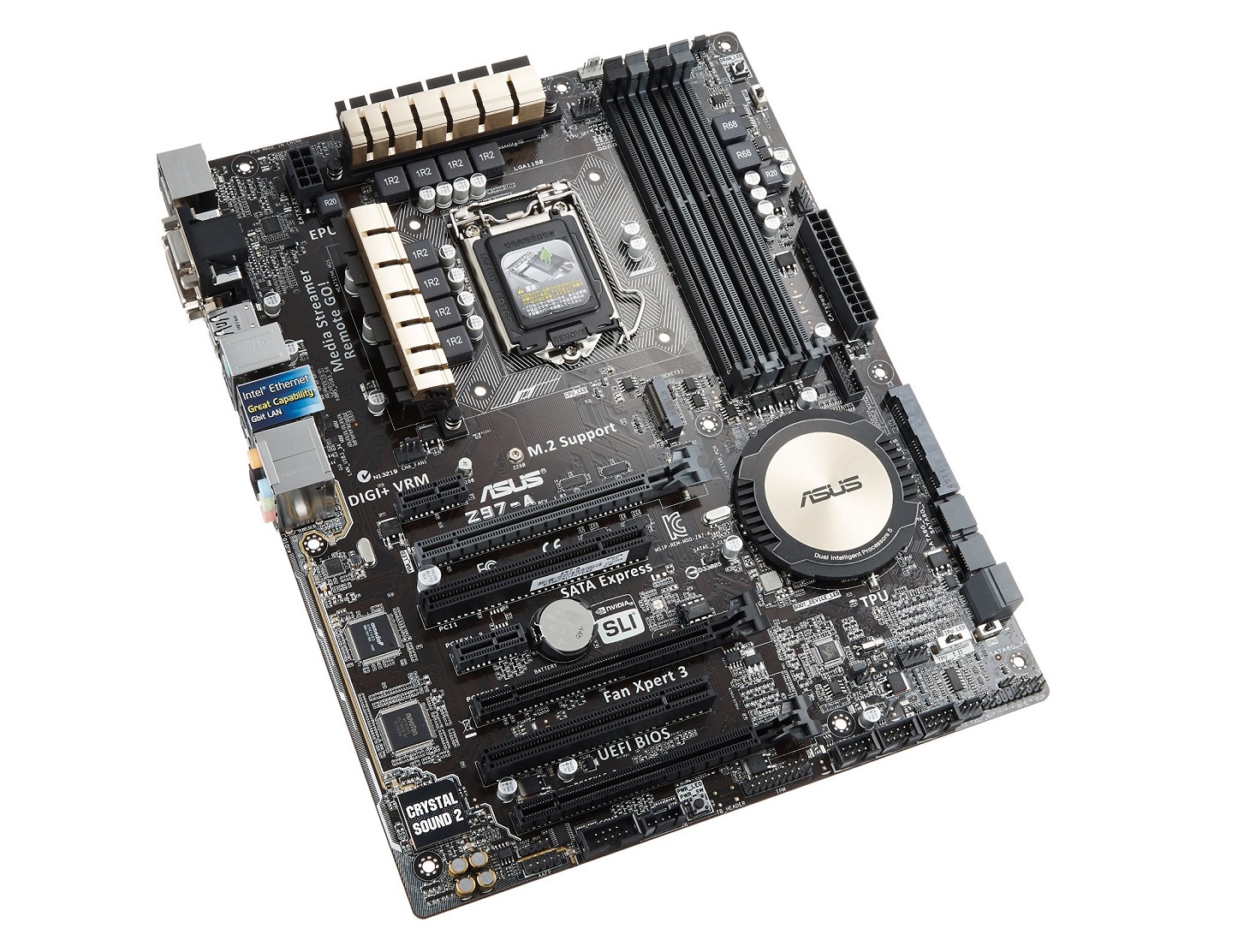
asus-z87-a-product-photoFor the motherboard choice for this month’s gaming PC build, we went with the ASUS’s Z97-A which is one of ASUS’s top selling mainstream motherboards. Although we’ve been mostly recommending both MSI and Gigabyte motherboards in our past few gaming PC builds, ASUS 9 series motherboards are also feature packed, reliable, and cost effective products.

Based on Intel’s latest Z97 chipset, the ASUS Z97-A includes the LGA 1150 socket supporting Intel’s latest 4th generation Core processors. Carried over from ASUS’s 8 Series motherboards, the Z97-A includes ASUS’s 5x protection feature which includes ASUS’s DIGI+ VRM digital power design, onboard fuses to prevent DRAM over-current damage, ESD protected circuits, 5K hour solid state capacitors, and stainless steel rear I/O panel construction.

Additional features include support for SLI/CrossFire X multi-GPU configurations, Intel Gigabit LAN with included cFos Speed traffic shaping software,6x USB 3.0 support (4x rear panel, 2x internal), 8x USB 2.0 support (2x rear panel, 6x internal), 4x SATA 6Gb/s, 1x SATA Express, 1x M.2, 2x PCIe 3.0 x16 slots, 1x PCIe 2.0 x16 slot (x2 mode), 2x PCIe x1 slot, and 2x PCI slots. Furthermore, ASUS also includes Crystal Sound 2 which implements features such as audio shielding, a de-pop circuit, EMI cover, audio amplifier, and premium Japanese capacitors to help significantly improve sound on the Z97-A.


Memory – Kingston HyperX FURY 8GB (2x4GB) DDR3 1600MHz

kingston-hyperx-fury-ddr3-product-photo

Memory for this month’s build will continue to be Kingston’s HyperX FURY DDR3 modules which was first introduced at CES in 2014. Kingston’s HyperX FURY DDR3 was designed as an answer for gamers looking for cost effective, reliable, aesthetically pleasing, low profile memory.

Our choice for the build this month was the 1600MHz variety as this offers best value. In Intel based systems with discrete graphics, even significantly higher clocked memory yields very minimal performance differences in real world applications.


Case – Corsair Carbide Series 200R

corsair-200r-1

For our budget cases, we’ve generally recommended a couple cases that are just so good, they simply can’t be beat at the pricepoint. The first case we generally recommend is the Cooler Master HAF 912. The HAF 912 launched about five years ago and continues to be one of the best leaders in value and features.

The second case which also happens to be the case we picked for this month’s gaming PC build is the Corsair Carbide Series 200R that we’ve become quite fond of over the years. First introduced several years ago, the Corsair Carbide Series 200R is special in that it’s a top notch case that can generally be found online at under $50. Don’t let the low cost fool you however, as the Carbide 200R includes room for up to 7x expansion slots, 4x 3.5″ drive bays, 4x 2.5″ drive mounting points, ability to accommodate up to 8x fan mounts, USB 3.0 support, dust filters behind the front intake and the ability to accommodate coolers up to 160mm in height.


GPU – MSI GTX 960 Gaming 2G

msi-gtx-960-gaming-2g-product-photoNvidia’s GeForce GTX 960 didn’t launch until late last month, but it quickly became one of the most popular graphics cards on the market thanks to the Maxwell architecture’s excellent performance and power efficiency. Additionally, thanks to its ~$200 pricetag the GTX 960 is the perfect card for our $1,000 build.

Our specific choice for the GTX 960 is the MSI GTX 960 Gaming 2G which utilizes MSI’s latest Twin Frozr V cooling technology. MSI’s Twin Frozr V technology includes Military Class components, Torx Fan technology, SuperSU heatpipes, and more. While the GTX 960 isn’t necessarily the hottest GPU in the planet, it’s always a good thing to keep GPUs running cool and quiet.


Storage – Samsung 850 EVO 250GB SSD

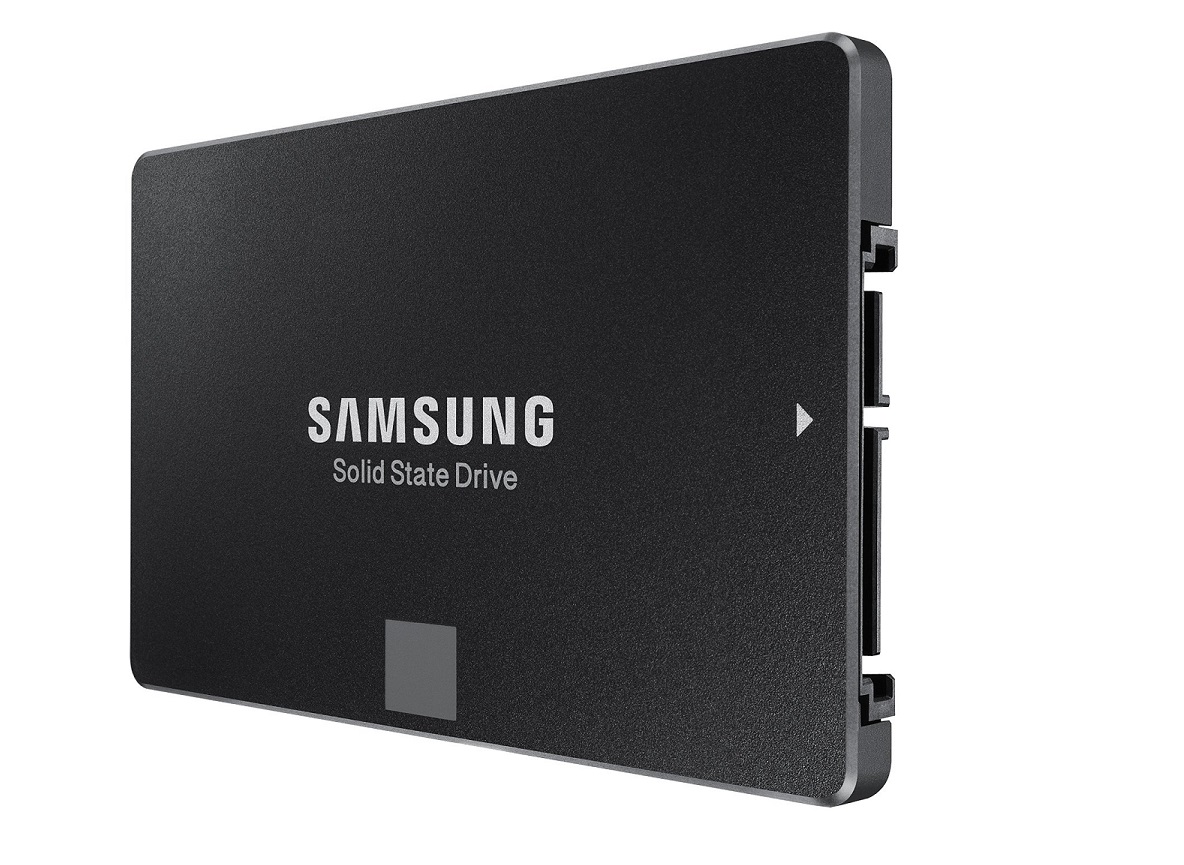
samsung-ssd-850-evo-product-imageLate last year, Samsung introduced the Samsung 850 EVO which is currently the fastest mainstream SSD we’ve tested to date. Based on Samsung’s new 3-bit per cell 3D V-NAND along with either Samsung’s MEX or MGX controller, the Samsung 850 EVO is able to crank out performance up to 540 MB/s sequential reads and 520 MB/s sequential writes. But that’s not all. In addition to the performance, Samsung also offers the 850 EVO a 5 year warranty, the longest warranty of any mainstream SSD on the market.

Those who need additional storage for games, movies, and music can either step up to a higher capacity Samsung 850 EVO, or complement the primary drive with a secondary hard drive. The Western Digital Black hard drives are excellent choices for this purpose offering high performance, up to 4TB of capacity, and a 5 year warranty for peace of mind.


Optional Components

Some readers have expressed interest in monitor, speaker, mice and keyboard suggestions, so we’ve also started including some recommendations for these items as well. I won’t be explaining the choices as these optional components are quite dependent on the purpose of PC (For example, someone serious about audio may end up going with something like an Audioengine 5+ paired with an ASUS Xonar Essence STX), but here are some suggestions that are a good fit for this build based on the system’s budget.


Final Thoughts

Remember, if you have any questions, need some help, or need to fit the build into your budget please feel free to post all questions in the forums! The community will be more than happy to help you out. If this build doesn’t fit your needs, be sure to drop by our Computer Builds section to find more computer builds. If you spot any issues with our build such as GPU/case incompatibilities, cooler/case incompatibilities, etc. please let us know as well so I may update the article.

Also, be sure to join us on Facebook, Twitter, Google Plus, or YouTube to be updated on the latest news, reviews, tutorials, custom computer builds, and more!


Fallout 4 Next-Gen Update Out Now, See The Patch Notes


Fallout 4’s long-awaited free next-gen update is rolling out today, April 25, ushering in performance and quality improvements to help the 2015 RPG look and perform potentially better than ever. Bethesda is calling this a next-gen update, though the PS5 and Xbox Series X|S consoles have been on the market since 2020.

The highlight of the update are performance and quality mode options. When players select “Performance” mode, they’ll run the game at up to 60fps with 4K resolution via dynamic scaling. On “Quality” mode, the game runs at 30fps at 4K (without dynamic scaling).

The next-gen patch for Fallout 4 was announced back in 2022 and was originally set to debut in 2023 before Bethesda delayed it to 2024. It arrives today not long after Prime Video’s Fallout TV show arrived and helped lead to a resurgence in Fallout player numbers. Presumably this next-gen update will draw more players back to Fallout 4 or encourage them to try for the first time.

Fallout 4's next-gen update is out now
Fallout 4’s next-gen update is out now

Gallery

Fallout 4 players on PS4 and Xbox One are getting a free update that includes stability improvements and fixes for quest and login issues. A free update is also available for PC that includes support for widescreen and ultra-widescreen monitors, along with various fixes. Additionally, Fallout 4 is now available to buy in another place: the Epic Games Store. Not only that, but Fallout 4 is now Steam Deck-verified for people playing on Valve’s handheld device.

The new patch for Fallout adds more Creation Club content, and it’s free. This includes “Enclave Remnants” content that players can acquire by completing a new quest, “Echoes of the Past.” For more, check out the full patch notes below.

What effect this new update might have on Fallout 4 user-created mods remains to be seen. The developers of the Fallout London mod delayed their release due to the next-gen update. If you’re looking for mods to play, check out GameSpot’s rundown of 50 of the best Fallout 4 mods in 2024.

also include a mention of how we don’t yet know if this will break compatibility with many Fallout 4 mods, and use that as an excuse to include an in-text link to the best mods gallery

Also note that, as Bethesda rolls out the update across console and PC, the Creation Club and/or Mods Menu will be temporarily down. Another key thing to know is that Fallout 4 is free on Game Pass and via Game Pass Core.

Fallout 4 Patch Notes

New Creation Club Content Free for Everyone

Enclave Remnants brings the Pre-War cabal, The Enclave, into the Fallout 4 storyline. In this new quest, “Echoes of the Past,” can you stop The Enclave from spreading their dangerous ideology and gaining a foothold in the Commonwealth?

Along with workshop items and the Enclave Colonel uniform, we are including the following previously released Creation Club content:

  • Enclave Weapon Skins
  • Enclave Armor Skins
  • Tesla Cannon
  • Hellfire Power Armor
  • X-02 Power Armor
  • Heavy Incinerator

Makeshift Weapon Pack

Whether it be grenades or piggy banks, there’s no shortage of objects you can transform into murderous projectiles with this collection of unique weapons. Included are two grenade launchers, a Nail Gun, Baseball Launcher, Saw Blade launcher, and piggy bank based weaponry.

(Quest “When Pigs Fly” starts at a merchant workshop northwest of Greenetech Genetics.)

Halloween Workshop

On the eve of the end, the New England Technocrat Society has thrown a spooky Halloween gala for anyone with the nerve to attend. Drop in on this fa-boo-lous pumpkin-lit soiree replete with witches, cauldrons, and ghouls, and unlock 38 new spine-tingling Halloween props to decorate your settlement! Includes new wearables, such as the iconic De-Capitalist helmet!

(Quest “All Hallow’s Eve” starts by tuning into the Mysterious Signal on your Pip-Boy.)

Changes and New Features

  • Native PS5 and Xbox Series applications. Includes performance and quality mode options.
  • Performance mode: 60 FPS target, 4k resolution, standard settings, relying on dynamic resolution scaling.
  • Quality mode: 30 FPS*, 4k resolution, ultra settings, should not require dynamic resolution scaling.

*When connected to a 120Hz display, Quality mode will target 40 FPS. When connected to a 1440p display, the title will run at 1440p resolution at 60 FPS w/ ultra settings regardless of rendering mode

Bug Fixes

  • Resolved issues preventing Japanese and Chinese users from connecting to Bethesda.net (this restores access to Mods).
  • Resolved issue preventing save data from properly loading during the prologue.
  • Resolved issue that could prevent the Vault 111 Door from opening on new games.
  • Resolved issue that could prevent the quest “Go Home” from advancing.
  • Resolved issue that could result in Codsworth being broken on the ground after fast traveling.
  • Resolved issue with mipmaps in DLC.
  • Resolved issue that could result in a softlock when in dialogue with Prestson Garvey.
  • Resolved issue preventing autosaves while fast traveling in Power Armor.
  • Fixed issue where text would occasionally disappear in the Creation Club menu.
  • Resolved issues with text formatting in the credits in Japanese and Chinese.
  • Resolved issue causing the camera to fail when leaving furniture after an extended time.
  • Fixed issue that could misplace quest markers while the VR Workshop Creation was installed alongside Automatron.
  • Resolved issue with player movement in some underwater areas at Thicket Excavations.
  • Resolved issue that could cause corruption within the Settlement system resulting in wrong resource counts and/or destroyed settlements.
  • Resolved issue where the “Level Up” notification would display even if there was not a level up available.
  • Fixed some flickering in Vault 111.
  • Stability improvements.

PC Only

  • Resolved issue preventing saves being made under Windows Usernames with Cyrillic, Chinese, or Japanese characters.

PlayStation Only

  • Resolved issue that could keep the Pip-Boy light on when reading holotapes.
  • Resolved issue that could prompt users to free up 0kb worth of space when attempting to save even if space was available.
  • Fixed crash that could occur while loading a save that was made immediately before dying.
  • Resolved issue that would prevent Codsworth from checking on Shaun in the intro.

Xbox Only

  • Resolved issue where users would not always be returned to the main menu after signing out of their profile.
  • Resolved crash that could occur if the player had unlocked all perks.
  • Fixed lighting issue that could occur during Airship Down.
  • Encountering a BNET error will now return you to the main menu instead of asking you to log in again.
  • Resolved issue that could result in significant drop in frame rate when a Gas Canister is ignited by a Molotov Cocktail.
  • Addressed some visual artifacts that could occur when dynamic resolution was triggered.

Creation Kit

  • Removed non-functional “Hot Load” button.
  • Removed non-functional “Material Editor” button.
  • Editor IDs longer than 99 characters will no longer crash the editor.
  • Resolved crash that could occur while viewing a quest’s Objectives tab.
  • Resolved hang that could occur while adding a reference to a layer.


Visual Studio Code March 2023


Update 1.77.1: The update addresses these issues.

Update 1.77.2: The update addresses this security issue.

Update 1.77.3: The update addresses these issues.

Downloads: Windows: x64 Arm64 | Mac: Universal Intel silicon | Linux: deb rpm tarball Arm snap


Welcome to the March 2023 release of Visual Studio Code. There are many updates in this version that we hope you’ll like, some of the key highlights include:

If you’d like to read these release notes online, go to Updates on code.visualstudio.com.

Insiders: Want to try new features as soon as possible? You can download the nightly Insiders build and try the latest updates as soon as they are available.

Accessibility

Terminal accessible buffer improvements

The terminal accessible buffer, which provides screen reader users access to the terminal contents via Terminal: Focus Accessible Buffer (⌥F2 (Windows Alt+F2, Linux Shift+Alt+F2)), now dynamically updates and remains active until Escape or Tab are used to end the session.

When the accessible buffer is focused in a terminal with shell integration, Go to Symbol in Accessible View (⇧⌘O (Windows, Linux Ctrl+Shift+O)) enables navigation between terminal commands similar to how editors can be navigated with Go to Symbol in Editor….

Hover control navigation

It is now possible to focus on the hover control and scroll horizontally and vertically with the up, down, home, end, page up and page down keys. The keyboard shortcut to focus the hover control (⌘K ⌘I (Windows, Linux Ctrl+K Ctrl+I)) is the same as used to show the hover at the primary cursor position.

Accept a notification’s primary action

To accept a notification’s primary action, users have historically needed to navigate to the Notification Center. Notifications: Accept Notification Primary Action (⇧⌘A (Windows, Linux Ctrl+Shift+A)) runs the primary action without leaving the current context.

Sticky Scroll navigation

It is now possible to focus on the Sticky Scroll lines and navigate with the up and down keys. You can use the Enter key to go to a selected line. To focus on the Sticky Scroll, you can run Focus Sticky Scroll from the Command Palette. Enable the Sticky Scroll UI via the View: Toggle Stick Scroll command.

Workbench

You can now copy deep links for an editor line or range from the editor gutter when working in a GitHub repository.

In VS Code Desktop, to be able to create GitHub permalinks and HEAD links from the editor gutter, you need to install the GitHub Pull Requests and Issues extension. In vscode.dev, deep links for GitHub repositories are available out of the box.

These actions have also been added to the Share submenu in the editor tab context menu and Explorer context menu.

Recommend extensions by file content

VS Code can now recommend extensions based on the file content. For example, if you open a Python file that has notebook cells syntax, VS Code recommends the Jupyter extension to render and run these cells appropriately.

Select default provider for Sticky Scroll

Sticky Scroll (View: Toggle Sticky Scroll) uses several different content models to create its headings. It is now possible to choose between the outline provider model, the folding provider model, and the indentation model to determine which lines to display in the Sticky Scroll UI. If a model is not available for the current language, VS Code falls back to the next model in the aforementioned order. The default model initially used can be changed with Editor > Sticky Scroll: Default Model (editor.stickyScroll.defaultModel).

Terminal

Improved tab hover

The terminal tab hover now shows the shell’s process ID, the full command line, and an improved view of extension environment variable contributions.
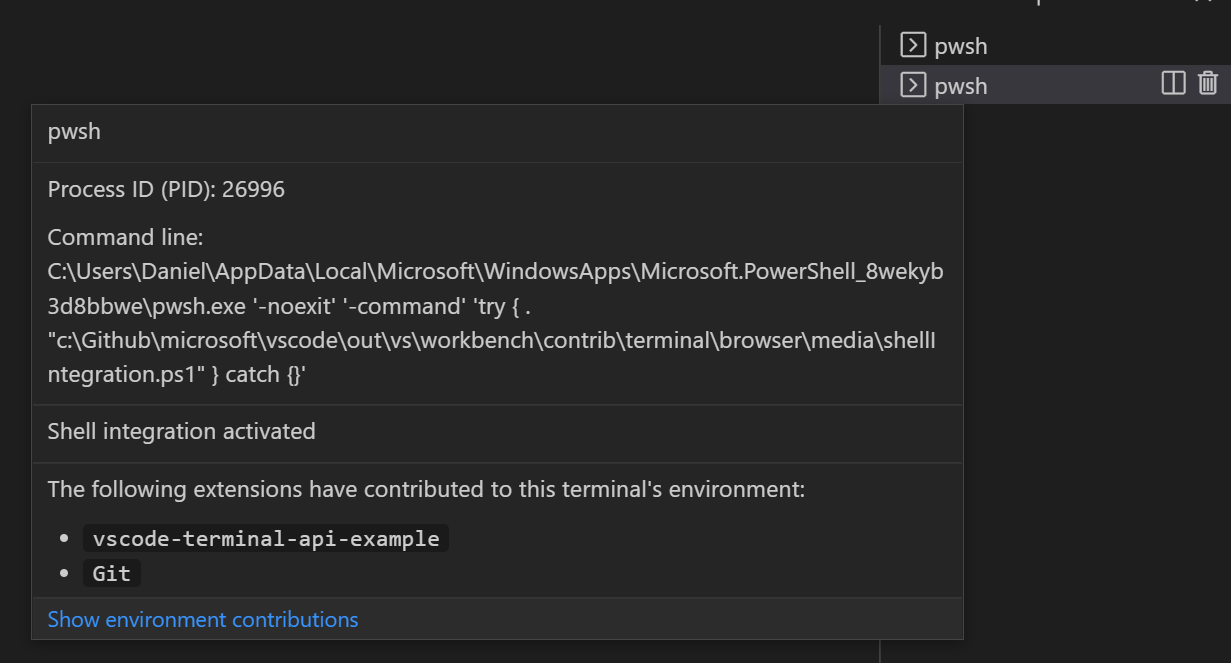
Hovering the terminal tab will reveal details about the terminal, this can be triggered with the keyboard via Ctrl/Cmd+K, Ctrl/Cmd+I

Source Control

Git LFS commit support in Remote Repositories

You can now commit LFS-tracked files without installing Git LFS when editing GitHub and Azure Repos repositories. To get started, install the GitHub Repositories or Azure Repos extensions on VS Code Desktop, run the Open Remote Repository command to open your repository, and commit your changes using the source control view. The extensions parse your .gitattributes configuration to determine whether your changed files should be committed to the repository provider’s Git LFS storage.

To disable this behavior, you can set "githubRepositories.experimental.lfs.write.enabled": false and "azureRepos.experimental.lfs.write.enabled": false.

Note: Support for VS Code for the Web (vscode.dev) is not yet available.

3-way merge editor documentation

If you haven’t already tried using the 3-way merge editor to help you resolve merge conflicts, check out the 3-way merge editor section in the Source Control documentation. The 3-way merge editor lets you simultaneously view and select incoming and current changes, preview the results, and even review the base version of the file before any changes.
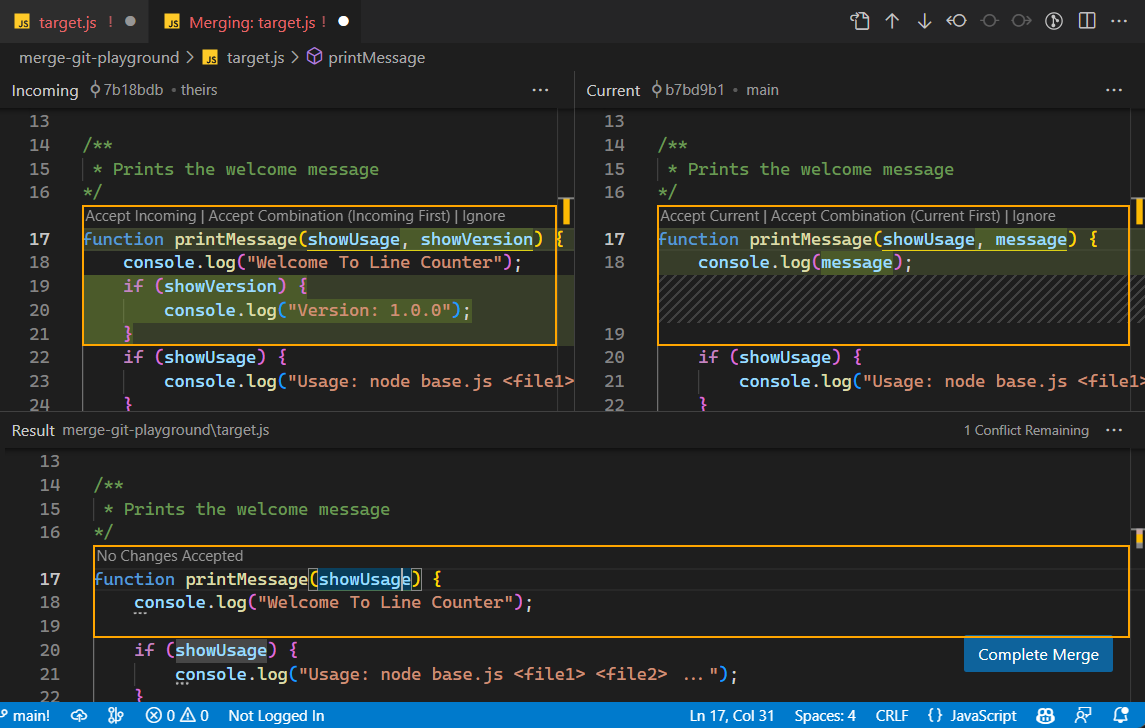
3-way merge editor

And don’t miss The EXTREMELY Helpful Guide to Merge Conflicts YouTube video, which stars the 3-way merge editor.

Notebooks

Format on Save

You can now enable format on save for notebooks. This formats the entire notebook when you save it. You can enable this by setting notebook.formatOnSave.enabled to true.

Notebook Find in output enabled by default

When you open Find control in a notebook, it will now search for text in cell inputs and outputs by default. You can turn this off by changing the options in the filter dropdown.

Scrollable output regions

With notebook.output.scrolling set to true, outputs and errors that exceed the notebook.output.textLineLimit will render within a scrollable region.

Languages

TypeScript 5.0

VS Code now ships with TypeScript 5.0.2. This major update brings new TypeScript language features, improved performance, and many important improvements and bug fixes. You can read about TypeScript 5.0 on the TypeScript blog.

Switch case completions for JavaScript and TypeScript

VS Code can now help scaffold out switch statements over literal types in JavaScript or TypeScript:

Type case inside of the switch statement and accept the suggestion for case .... This will automatically insert cases for all values of this type. Note that this only works when the value being switched over is a union or literal type.

VS Code for the Web

.gitignore support

This milestone we’ve added support for .gitignore files in GitHub and Azure Repos repositories on VS Code for the Web. In the video below, files that are untracked via .gitignore are greyed out in the Explorer view and do not appear in the Source Control view. This also works when using the GitHub Repositories or Azure Repos extensions to remotely browse repositories on VS Code Desktop.

The short video below adds the .pxt folder to .gitignore to hide the contained files from the Source Control view.

Remote Development

The Remote Development extensions, allow you to use a Dev Container, remote machine via SSH or Remote Tunnels, or the Windows Subsystem for Linux (WSL) as a full-featured development environment.

A Dev Container lets you use a container as a full-featured development environment. The Dev Container Specification seeks ways to enrich existing formats with common development settings, tools, and configurations while still providing a simplified, unorchestrated single container option. You can learn more about Dev Containers and the specification in episode #529 of the Changelog podcast.

Other Remote Development highlights include:

  • Remote Tunnels – Better reuse of existing tunnels.
  • Remote Tunnels – Continue Working in VS Code Desktop command to quickly transition to local development.
  • Dev Containers – Easier clean up of unused Dev Containers and volumes.

You can learn about new extension features and bug fixes in the Remote Development release notes.

Extensions

Extension installation not blocked by signature verification failures

Extension signature verification is incorrectly reporting errors for a small number of valid extensions and preventing them from being installed. These failures are caused by bugs in the VS Marketplace and VS Code and we are actively working on fixes. In order to unblock extension use, VS Code will install extensions even if signing verification fails. We will reenable signature verification checking once VS Marketplace issue #619 is fixed, most likely in our next Stable release.

Contributions to extensions

Python

Move symbol refactoring

You can now more conveniently refactor your Python code with Pylance thanks to the new Move symbol to Code Actions!

To try it out, select a symbol on a Python file and click on the light bulb that is presented (⌘. (Windows, Linux Ctrl+.)). You can either move the symbol to an existing file or to a new file. If the location is a new file, a Python file is created with the same name as your symbol. All the applicable import references are automatically updated with the symbol move.

Create environment from dependency files

When you open a requirements.txt or a pyproject.toml file, there’s a new Create Environment… button in the editor that runs the Python: Create Environment command, allowing you to create a new virtual environment and install the listed dependencies.
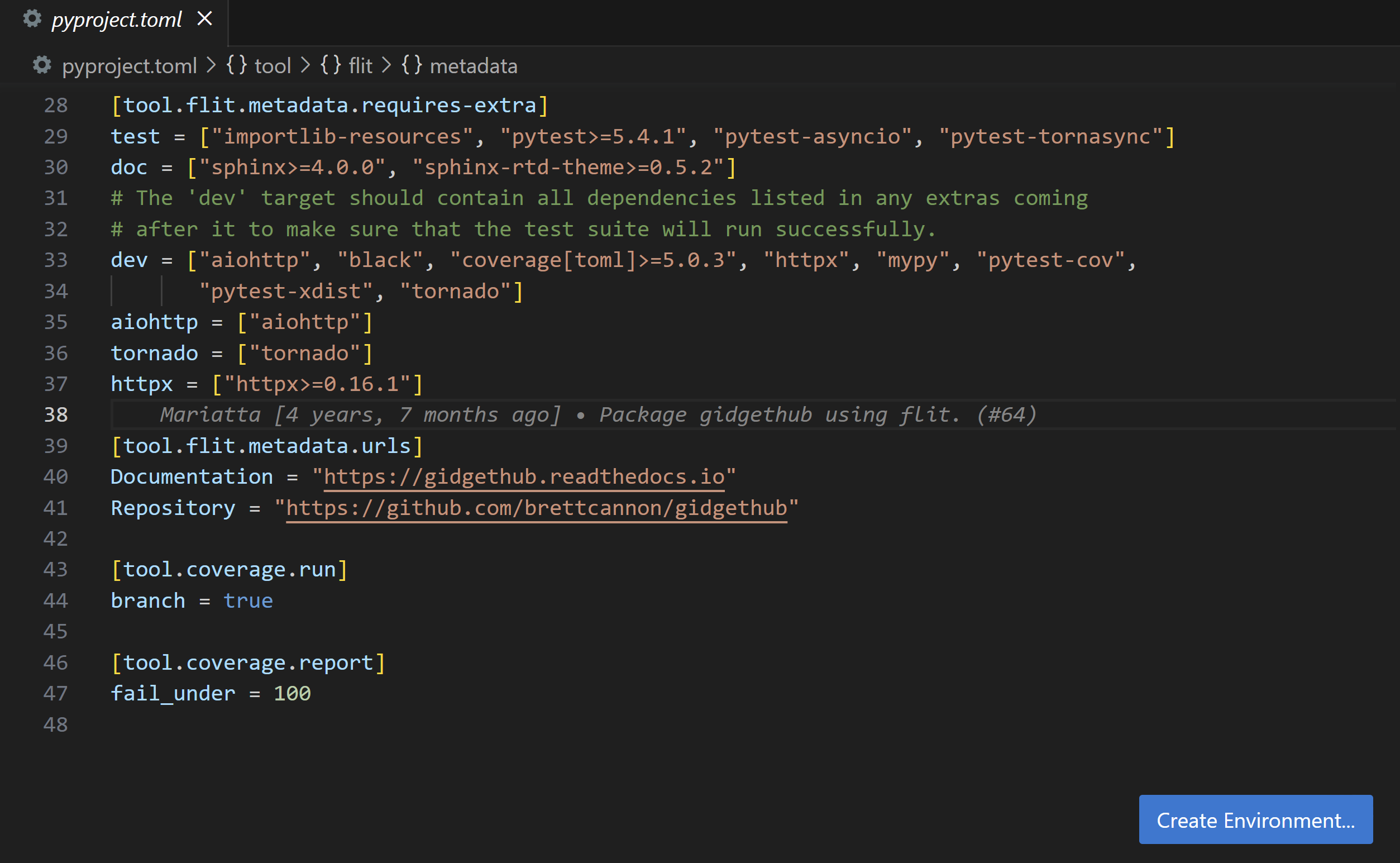
A pyproject.toml file open with dependencies listed, and a Create Environment button displayed on the bottom right corner for the editor

Finalized environments API for extension authors

The Python extension’s API for working with available Python environments on the user’s machine is finalized. Extensions can also use the API to access the selected environment path used by the Python extension to run scripts, or update the path to their preferred one.

Examples of API usage are in the Python Environment APIs wiki page. We are also planning to release an npm types package in the future so it’s easier to keep track of any changes in the Python extension API.

Jupyter

Kernel picker improvements for Python environments

The kernel picker now lists conda environments even if the Python runtime is not installed in them.

For example, if a new conda environment is created using a CLI such as conda create -n envML, this new environment is displayed in the list of Python Environments under a section Conda Env Without Python.

When you select such an environment, the Python runtime and necessary dependencies are automatically installed into the environment.
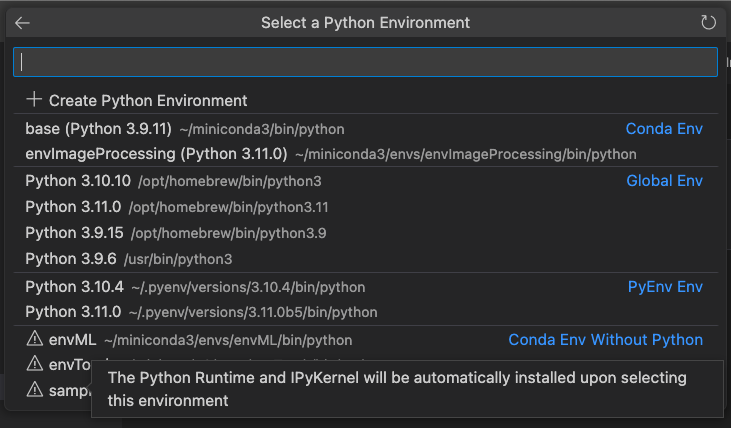
Notebook kernel picker with ability to select empty conda environments

GitHub Pull Requests and Issues

There has been more progress on the GitHub Pull Requests and Issues extension, which allows you to work on, create, and manage pull requests and issues. Highlights include:

  • Pull requests can be opened on vscode.dev from the Pull Requests view.
  • There’s a new setting to check the Auto-merge option in the Create Pull Request view: githubPullRequests.setAutoMerge.

Review the changelog for the 0.62.0 release of the extension to see the other highlights.

GitHub Copilot

GitHub Copilot is an AI pair programmer tool that helps you write code faster and smarter. You can use the Copilot extension in VS Code to generate code, learn from the code it generates, and even configure your editor.

GitHub Copilot extension

We are excited to announce the preview of deeper Copilot integration into VS Code. By using the GitHub Copilot Chat extension, you’ll be able to try out new features such as:

  • Inline suggestions: Copilot suggestions appear inline as you work in your code.
  • Chat view: Ask Copilot for help with any task or question in the GitHub Copilot Chat view.
  • Inline chat: Talk with Copilot while writing code, inline in your files.

You can ask Copilot to look for bugs, explain tricky code, create tests, and even ask questions about VS Code.
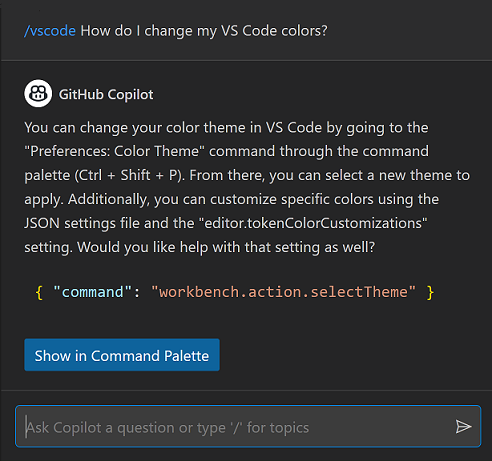
Copilot chat example asking how to change VS Code colors

You can learn more about the VS Code team’s experience and future with Copilot in the VS Code and GitHub Copilot blog post. You can also read the GitHub Copilot in VS Code article for more details about using Copilot in VS Code.

Preview features

Notebook search support for outputs

Last iteration, we introduced global search for formatted notebook content in open notebooks, but only for cell and Markdown inputs. This iteration, we have added support for searching notebook outputs. When you have a notebook open, there is a toggle that allows you to customize where you would like to search in a notebook. Enable search.experimental.notebookSearch to try this out!

Remote connection picker on the Welcome page

The Welcome page now supports an experimental remote connection picker Connect to.. in the start list to help you get started with remote connections (SSH, Remote Tunnels, GitHub Codespaces, etc.). This feature is disabled by default and can be enabled by setting workbench.remote.experimental.showStartListEntry to true.

Extension authoring

Upcoming Electron 22 update may require changes to native modules

We plan to update to Electron 22 in our next Stable release. This comes with implications for extensions that use native modules due to enabling the V8 memory cage: ArrayBuffers that point to external (“off-heap”) memory are no longer allowed.

We plan to provide a custom memory allocator so that native modules that are not updated will still continue to work, but nevertheless, it is recommended to review your usages of allocated external memory. Please follow the advice in the Electron blog post for how to adopt this change.

Finalized support for continuous test runs

Support for continuous test runs has been finalized. This API allows users to indicate to test extensions that they want to “watch” tests and continue to run them as changes are made.

const profile = ctrl.createRunProfile(/* ... */);
+profile.supportsContinuousRun = true;

function runHandler(request: vscode.TestRunRequest, cancellation: vscode.CancellationToken) {
+  if (request.continuous) {
+    startWatchingAndRunningTests(request);
+  }

  // ...
}

New when clause parser

This VS Code release includes a new parser for when clauses offering new features (for example, support for parentheses) and better correctness but also stricter rules. The release also includes a linter for when clauses in extension manifest files (package.json) to make sure they are syntactically correct. We encourage you to check your when clauses for possible breakage with the new parser. Also, if you use parentheses in a when clause, your extension is compatible with VS Code version 1.77 and later. There is more information about the changes in issue #175540.

Inline completions in Source Control input

The Source Control input box now supports inline completions:
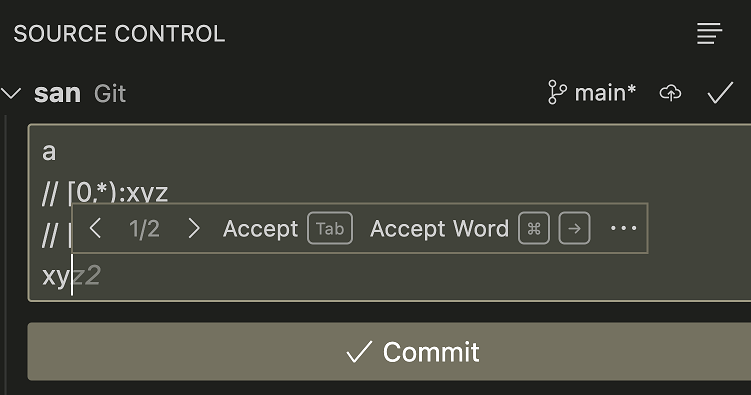
The inline suggestions extension sample running in the Source Control input

The Source Control input box’s document language identifier is scminput.

Proposed APIs

Every milestone comes with new proposed APIs and extension authors can try them out. As always, we want your feedback. Here are the steps to try out a proposed API:

  1. Find a proposal that you want to try and add its name to package.json#enabledApiProposals.
  2. Use the latest vscode-dts and run vscode-dts dev. The command downloads the corresponding d.ts files into your workspace.
  3. You can now program against the proposal.

You cannot publish an extension that uses a proposed API. There may be breaking changes in the next release and we never want to break existing extensions.

The editor/lineNumber/context proposed menu is anchored to the editor gutter and editor line numbers and provides a way to display extension actions that are contextual to a particular line.

To try this out in development, enable the contribEditorLineNumberMenu API proposal. Actions contributed to this menu receive the line number in command arguments and can reference the editorLineNumber context key in their when clauses. You can leave feedback in the API proposal issue #175945.

Notebook lifecycle event: onWillSaveNotebookDocument

The onWillSaveNotebookDocument event is fired before a notebook document is saved. This event is useful for extensions that want to perform some action before a notebook document is saved. For example, an extension that wants to clean up notebook cell outputs before saving it can register a listener for this event and return the cell output edits to be applied.

Here is how an extension can register a listener for this event:

vscode.workspace.onWillSaveNotebookDocument(e => {
    if (event.reason == vscode.NotebookDocumentSaveReason.Manual) {
      event.waitUntil(new Promise((resolve) => {
        const notebookEdit = new vscode.NotebookEdit(...);
        const edit = new vscode.WorkspaceEdit();
        edit.set(event.document.uri, [notebookEdit]);
        resolve([edit]);
      }));
    }
});

Engineering

EOL warning for windows 8 and 8.1

VS Code Desktop will be updating to Electron >=23 in the next couple of milestones. With the Electron 23 update, VS Code desktop will no longer run on Windows 8 / Windows Server 2012 and Windows 8.1 / Windows Server 2012 R2. In this milestone, we have added deprecation notices for users on these affected platforms to prepare them for migration. If you are running one of these Windows versions, take a look at our FAQ for additional information.

Base image updated for Snap package

In this iteration, we have updated our Snap package to use Core20 (built from Ubuntu 20.04) as the base image from our previous Core (built from Ubuntu 16.04). This change addresses missing GLIBC symbols for our CLI and fixes wayland support among other issues. You can find more context in pull request #127320.

Exploring custom memory allocator for the extension host

To adopt Electron 22, which comes with V8 sandbox enabled, and minimize the impact for extensions that rely on native modules that specifically use external array buffers, we have customized the existing memory allocator in the extension host. Specifically, the extension host now accommodates allocations from these native modules to be inside the V8 sandbox as a workaround to avoid fatal crashes. If you are interested in how/why we ended up with this solution, you can review issue #177338 for details.

Documentation

New programming language topics

Notable fixes

  • 174690 Comments API – How can author.iconPath reference a file bundled with the extension?
  • 175805 VS Code does not auto-detect IPv6 Processes for port forwarding

Thank you

Last but certainly not least, a big Thank You to the contributors of VS Code.

Issue tracking

Contributions to our issue tracking:

Pull requests

Contributions to vscode:

Contributions to vscode-languageserver-node:

Contributions to vscode-pull-request-github:

Contributions to vscode-docs:

Contributions to monaco-editor:

Contributions to devcontainers/cli:

Jennifer C. | Arise Work From Home % %


How did you hear about the Arise® Platform? 

I’ve worked in many different fields. I was a nurse for 18 years, and I worked at a factory but was injured at one of my previous jobs. So, I was searching for something I could do from home and started working for a Service Partner at first, but then later started my own business. 

How has the Arise® Platform improved your life? 

I would recommend Arise to anybody.  

It saved my life personally because, in so many ways, I am not able to go out and work, but by using the Arise® Platform, I get to set my own hours, and when I was in the medical transportation class, the instructor was actually impressed with how much knowledge I had because of my nursing background. 

Now I am in the home improvement client certification class, and I feel I am going to be great at servicing this program too. 

Even with my personal troubles, I am still doing the best I can to service. 

I just love everything about the Arise® Platform—I have met some wonderful people virtually [laughs]. 

What does it mean for you to be your own boss and run your own company? 

I am able to create my own schedule and pick programs I want to service. 

It means that I have control of how much money I can earn and how many hours I can service. 

It has boosted my confidence and has given me something to look forward to… 

And I feel I can build my own business on the platform. 

I do thank my previous Service Partner because of one thing: they introduced me to Arise® Platform, and I am now writing my own future!  

Why would you recommend the Arise® Platform to others? 

As far as Arise, it’s wonderful—they have great clients on the platform! 

You can make your own schedule. You can meet wonderful people. And you don’t have to choose one opportunity—You can choose several opportunities. 

You can actually provide customer service for big companies and get that experience while also having the time being with your children from the comfort of your own home. 

Arise respects the people who use the Arise® Platform and what they desire to achieve in life. 

Some people don’t know how to go about working from home, and some people cannot go out to work—like me. 

I don’t know what I would be doing without the Arise® Platform. 

The positive note out of everything that has happened to me is that I have found the Arise® Platform.