Consumer Electronics Show (CES) Recap 2024: Las Vegas Inventors and Design Firms Recap


The Consumer Electronics Show, popularly known as CES, is a much-anticipated yearly event that showcases the newest, hottest, and most exciting inventions and innovations in the world of technology. 2024 is no different, as the CES once again highlighted the zenith of technological innovation to give the public a glimpse of the future. This year, the event held in Las Vegas was a one-of-a-kind display of ingenious creativity where companies from various parts of the world came together to introduce their latest inventions and innovations. 

Here’s a quick recap of some of the most captivating and exciting CES exhibits this year for Las Vegas Inventors and Design Firms:

Consumer Electronics Show (CES) recap 2024: Las Vegas inventors and design firms recap

Innovative In-Car Eye-Tracking Technology by Bosch
bosch-in-car-eye-tracking-system

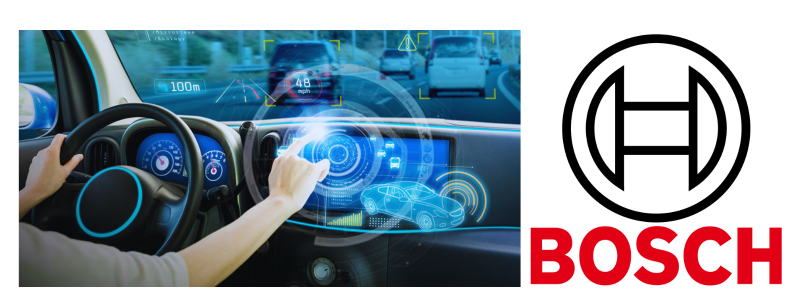
Bosch unveiled an innovative new and exciting use of eye-tracking technology in vehicles that goes beyond safety. Eye-tracking was originally a part of driver assistance systems, but this time, Bosch now sees it as a means to add enjoyment to the driving experience with two notable uses: 

Its first use is simple and has something to do with driver fatigue. Imagine yourself feeling sleepy and tired while driving on your way home, and your car’s eye-tracking notices it, so it offers to prepare an espresso for you once you arrive. This is possible because the vehicle is connected to your home’s automatic espresso machine to ensure that a freshly brewed cup of coffee will welcome you when you enter the door. 

Its second function is more state-of-the-art as it adds context to the drive. The eye-tracking system will notice what you’re looking at outside while driving and give you details about it. For example, the system might inform you of the opening hours of a coffee shop you passed by. It can also give you a quick recap of the history behind an interesting building that caught your eye. This feature transforms your usual drive into something more engaging, informative, and fun. 

Bosch.com

EcoFlow Delta Ultra Invention

Ecoflow-Delta-Ultra

One standout during the CES 2024 is the EcoFlow Delta Ultra, which offers a giant leap forward in how modern homes are powered. It was showcased in a cozy setting that resembles a house to highlight its mix of cutting-edge technology and practicality. At its core, the Delta Ultra invention is an inverter and battery system for the entire house meant to take advantage of the energy of rooftop solar panels. It stores and keeps solar power so homeowners can use it to run their residences. One of its cool features is its ability to pull electricity from the grid when it is more affordable and send back power once prices soar. 

The invention can also work with your home’s existing switches, but it shines out the most if you pair it with Smart Home Panel 2. With more and more houses getting solar panels, EcoFlow Delta Ultra is an all-encompassing, powerful, and stylish way of handling energy use in homes. To make things even better, the product is not a mere concept because you can now buy it and start your way of managing your home’s energy. 

Ecoflow.com

Gyrogear GyroGlove Invention

Gyrogear-Gyroglove

The Gyrogear GyroGlove is hailed as among the top product inventions during CES 2024 for a good reason: it is an innovative breakthrough meant to help people with disabilities. This invention is specifically made for people suffering from hand tremors, such as Parkinson’s patients. An advanced gyroscope is used to steady the hands. 

GyroGlove’s innovative product design makers, Gyrgear, are now in talks with top medical officers at different insurance companies in the US. The GyroGlove invention has also been approved by the US FDA and the Therapeutic Goods Administration of Australia as a medical device. Various global standards groups are certified to prove its effectiveness and safety. It’s a significant invention that will make daily life easier for people with motor challenges. 

Gyrogear.co

Hydrogen Initiative of Hyundai 

Hyundai-Hydrogen-initiative

Hyundai shared its exciting plan during the CES 2024 to manufacture 3 million tons of hydrogen for the company’s steel mills by 2030. Becoming a leader in the ever-growing hydrogen economy is an ambitious move. It’s been a while since the company started to invest in hydrogen fuel cells and successfully introduced electric vehicles or EVs. However, with the tough competition and some challenges in the innovative market of battery EVs, the company decided to focus more on hydrogen to be on top of the game. 

This significant step towards hydrogen is not only about cars alone. It can also change industries, including maritime shipping and steelmaking. Hyundai placed big bets on hydrogen despite the infancy of the technology. It’s a shift in their technology and a strategic move for the future of green technology and the automotive sector. 

Hyundai.com

Gaming, Robotics, and AI Innovations by NVIDIA

Nvidia-AI-innovation

A gaming and AI tech leader, NVIDIA, revealed so many exciting new advancements at CES 2024 that will change the realm of gaming, generative AI, robotics, and content creation. It focused on generative AI’s power, proving NVIDIA’s significant role in this field. Several key things discussed include the launch of the TensorRT-LLM library for Windows. It allows large language models to function better on RTX PCs and the new Chat with the RTX playground. The innovation enables users to enhance the reality and accuracy of generative AI models by combining them with various data sources. 

NVIDIA also showcased its progress in digital avatar technology with the Avatar Cloud Engine or ACE. It uses generative AI to produce realistic digital avatars for PC and online use. The company also partnered up with Getty Images to introduce iStock’s generative AI service run by NVIDIA Picasso for producing 4K images from text. It uses an AI model trained on the massive library of Getty Images. They also introduced the GeForce RTX 40 SUPER Series GPUs aimed to improve generative AI and gaming.

These GPUs, such as the RTX 4070 Ti SUPER and RTX 4080 SUPER, offer faster memory, more [power, and more significant boosts in performance for high-end content creation and gaming. The collaboration of NVIDIA with OBS and Twitched for Enhanced Broadcasting and the RTX Remix’s open beta proves their focus on enhancing gaming. The company is also all in on AI with the RTX laptops and the extensive use of RTX tech in more than 500 apps and games, which include those from Blizzard and Activision. 

They also have a Day Pass membership and the Cloud G-SYNC technology for GeForce NOW. NVIDIA also launched the Isaac platform, which focuses on more innovative robotics and shows its dedication to breakthroughs in various areas. The announcements by NVIDIA at CES 2024 prove that the company leads the way in technology to offer distinct experiences for creators, tech enthusiasts, and gamers worldwide. 

Nvidia.com

GREEN IMPACT Initiative by Panasonic

Panasonic-green-impact-initiative

Panasonic made a ripple at CES 2024 with its focus on innovation and sustainability. They unveiled the Panasonic GREEN IMPACT initiative. It is a notable move towards carbon footprint reduction and support for a circular economy. The initiative covers an extensive array of solutions for a society with zero carbon dioxide, such as using renewable energy, the development of high-performance electrodes for hydrogen, intelligent systems for energy use management, and air-to-water heat pumps. Panasonic also announced its exciting partnerships with other companies, such as Infinity and Fisker, in the mobility and automotive industries.

They unveiled sustainable audio systems and the Neuron platform, a state-of-the-art solution that improves vehicle software and enhances the efficiency of electronic control units. Panasonic also introduced new sustainability technologies and partnerships, such as eco-friendly Kinari material and bio CO2 technology, which are meant to improve the growth of crops and fight climate change.

They also expressed their commitment to STEM education through programs such as the Innovators for Impact initiative. The presence of Panasonic at CES 2024 proved the company’s commitment to improving lifestyles while prioritizing technological advancement and sustainability. 

Panasonic.com

Visionary 0 Series EVS by Honda 

O-Series-EVS-from-Honda

Honda shared some exciting plans during CES 2024 for their electric vehicles, or EVs, with the introduction of its 0 series EVs. The move challenges the existing trend of heavy and bulky electric cars. The brand unveiled a couple of concept vehicles, the Space-Hub and Saloon, marking a significant shift from conventional EV designs. 

They are preparing for the 2026 launch of their first-ever North American commercial model with a focus on producing light and thin EVs, which is a fresh take in the field of EVs. The Saloon, which is meant to be the first model in the 0 series, is the perfect example of the new direction. This sporty, spacious, and sleek EV looks like it came directly from a sci-fi flick. 

Honda.com

How Cad Crowd can help

Cad Crowd offers new invention development, consumer product design, wearables design, engineering design, prototype design, and more that could help you and your design firm become part of the CES soon. 
Supplier Risk Assessment with Data Science


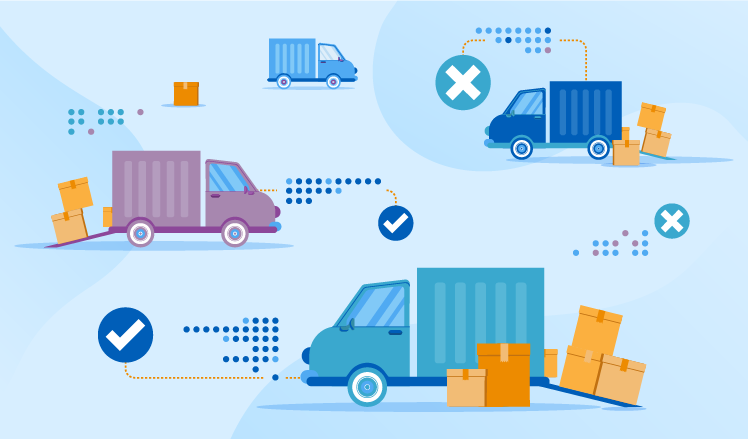
Not once in their practice, our data scientists have heard such complaints from retailers and manufacturers as suppliers missing delivery deadlines, failing to meet quality requirements or bringing incomplete orders. To avoid these problems, businesses strive to optimize their current approaches to assessing supplier risks. As the issue is common and its criticality is in the air, our data science consultants decided to share best practices and describe an alternative approach to assessing supplier risks. This one relies on deep learning – the most advanced data science technique – and allows businesses to build accurate short-term and long-term predictions of a supplier’s failure to meet their expectations.

Here’s the summary of everything that we cover in our blog post:

supplier-risk-assessment

The limitations of the traditional approach to supplier risk assessment

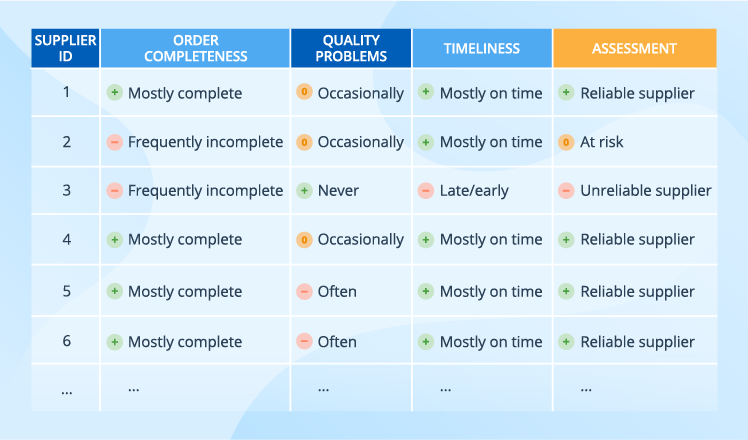
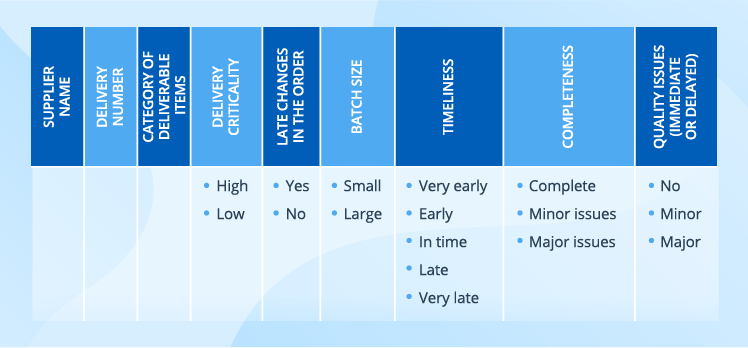
Traditionally, businesses assess supplier risks based on such general data about suppliers as their location, size and financial stability, leaving out suppliers’ daily performance. And even if suppliers’ performance is considered, the traditional approach usually means a simplified classification that can easily result in a table like this:

traditional-approach-to-supplier-risk-assessment

With such an approach, several suppliers are rated the same. But the table doesn’t show a particular pattern, say, a trend in the latest deliveries of a particular category by the given supplier.

The data science-based approach to supplier risk assessment

Our data scientists suggest an alternative to the traditional supplier risk assessment – a data science-based approach. However, to enjoy it, a business must have extensive data sets with supplier profiles and delivery details, which serve as a starter kit. Without this data, a business cannot proceed with designing and developing a solution.

Below, we suggest a possible structure for each of the data sets, but they are neither obligatory nor rigid and only serve as an example. To make the set relevant for their needs, businesses can add specific properties, for example, expand a supplier profile with such criteria as financial situation, market reputation, and production capability.

Supplier data

supplier-data-for-risk-assessment

A supplier can mean either a company with all its manufacturing facilities or a separate manufacturing facility.

Delivery data

delivery-data-for-assessing-supplier-risk

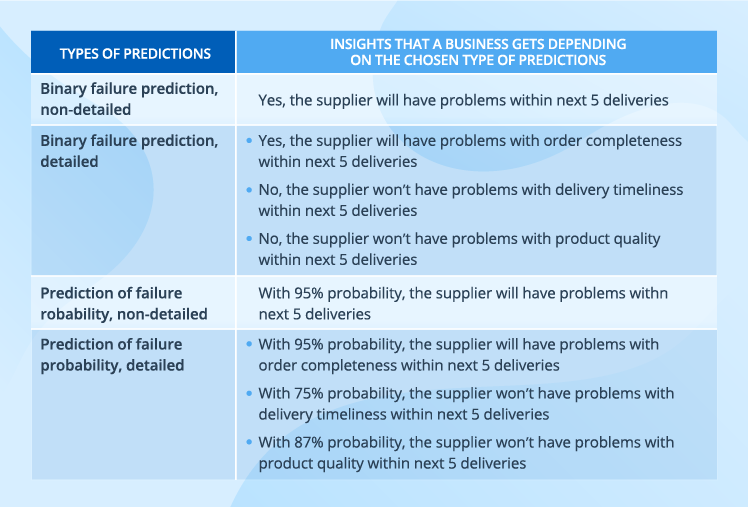
Data science allows analyzing this diverse data and converting it into one of the prediction types like in the table below.

predicting-supplier-failure

The essence of a data science-based solution

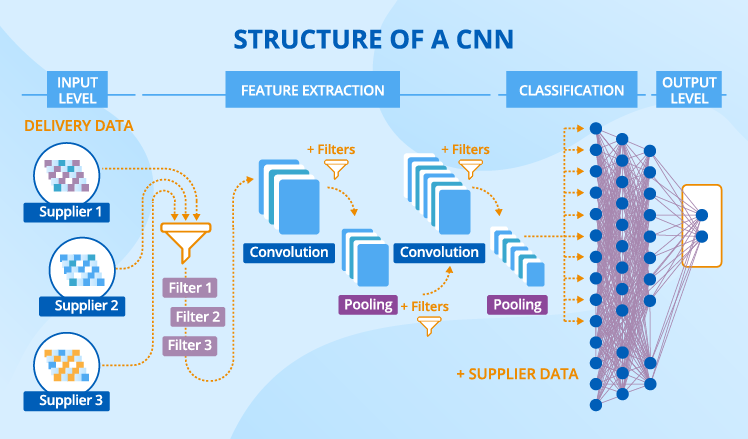
Based on our experience, we suggest using a convolutional neural network (CNN) for the solution. Let’s go through its constituent parts.

cnn-strusture

A CNN has a complex structure consisting of several layers. Their number can vary depending on what criteria a business identifies as meaningful in their specific case, as well as on the output that they expect to receive. We’ll take the data from our example to illustrate how the CNN works. And the expected output is a binary non-detailed prediction of whether a supplier will fail within 3 and within 20 next deliveries.

Ingesting data

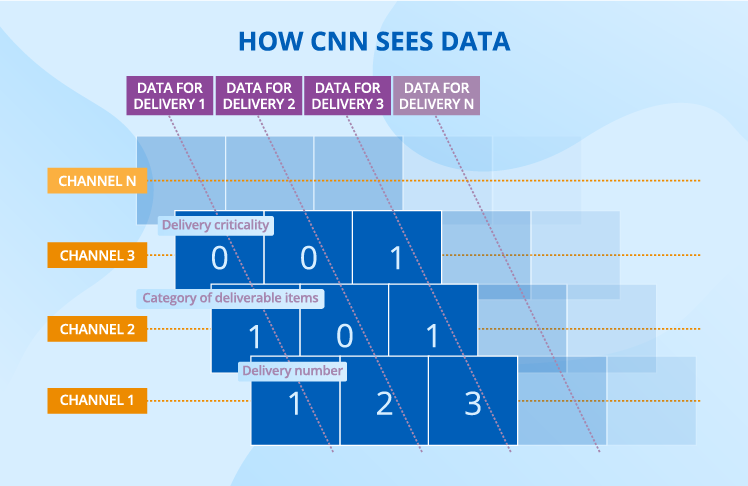
Let’s put supplier data aside for a while – we’ll need it a bit later – and focus on delivery data. For a CNN to consume it, delivery data should be represented as channels, where each channel corresponds to a certain delivery property, for example, delivery criticality.

how-cnn-sees-data

In every channel, each cell (or a ‘neuron’ if we use data science terms) takes a certain value in accordance with the encoding principle chosen. For example, we may choose the following gradation to describe the timeliness property: -1 for ‘very early’, -0.5 for ‘early’, 0 for ‘in time’, 0.5 for ‘late’ and 1 for ‘very late’.

Extracting features

In deep learning, a feature is a repetitive pattern in data that serves as a foundation for predictions. For delivery data, a feature can be a certain combination of values for delivery criticality, batch size and timeliness.

As compared with other machine learning algorithms, a CNN has a strong advantage – it identifies features on its own. Though feature extraction skills are inherent to CNNs, they would come to nothing without special training. When a CNN learns, it examines a plethora of labeled data (the historical data that contains both the details about suppliers and deliveries and the info whether a supplier has failed) and extracts distinctive patterns that influence the output.

When features are known, a CNN performs a number of convolution and pooling operations on the newly incoming data. During convolution, a CNN tries each feature (which serves as a filter) to every possible fragment of the delivery data. Very simple math happens at this stage: each value of the fragment gets multiplied by the corresponding value of the filter, and the sum of these results is divided by their number. After this operation, each initial fragment with delivery data turns into a set of new (filtered) fragments, which are smaller than the initial one, still they preserve all its features. During convolutions, the CNN extracts first low-level features then high-level features, increasing the scale at each new layer. For example, low-level features cover 3 deliveries, while high-level features may cover 100 deliveries.

During pooling, a CNN takes another filter (called ‘a window’). Contrary to feature filters, this one is designed by data scientists. A CNN slides the window filter over a convoluted fragment and chooses the highest value each time. As a result, the number of fragments does not change, but their size decreases dramatically.

Classifying into failure/non-failure

After the last pooling operation, the neurons get flattened to form the first layer of a fully connected neural network where each neuron of one layer is connected with each neuron of the following layer. This is another part of a CNN, which is in charge of making predictions.

It’s time to recall our supplier data, as we add it to the neurons with the results received during feature extraction, to improve the quality of predictions.

At the classification stage, we don’t have filters anymore. Instead, we have weights. To understand the nature of weights, it would be useful to regard them as coefficients that are applied to each neuron’s value to influence the output.

These multiple data transformations end with the output layer, where we have two neurons that say whether the supplier will fail within 5 and within 20 next deliveries. Two neurons are required for our binary non-detailed prediction, while other prediction types may require a different structure of the output layer.

A few extra words about how a CNN learns

When a CNN starts learning, all its filters and weights are random values. Then the labeled data flows through the CNN and all the filters and weights are applied. Finally, the CNN produces a certain output, for example, this supplier will fail both short-term and long-term. Then it compares the predictions with what really happened to calculate the error it made. Say, in reality, the supplier delivered on their commitments, both short- and long-term. After that, the CNN adjusts all the filters and weights to reduce the error and recalculates the prediction with newly set weights. This process is repeated many times until the CNN finds the filters and weights that produce the minimum error.

Why the data science-based approach is good and not so good

Based on the example of the described solution, we can draw a conclusion about some benefits and drawbacks of the data science-based approach.

Advantages

  • An unbiased view of a supplier

A CNN leaves no room for subjective opinions – it sets its filters and weights and no buyer can influence the transformations that happen. Contrary to the traditional approach, a solution based on data science allows for unified assessment of supplier risks as it relies on data, not on personal opinions of category or buyers.

  • Captured everyday performance

Instead of deciding on a supplier’s reliability once and for all, data-driven businesses get regular updates about each of their supplier’s performance. If, say, the supplier is late or the order is incomplete or something else is wrong with the delivery, an entry appears in the ERP system and this information is soon fed into a CNN to influence the predictions.

  • A detailed view of a supplier’s performance

Generalized assessment that a traditional approach offers is insufficient for risk management. We assume that a supplier has occasional problems with product quality. But does this mean that a business will face this problem during the supplier’s next delivery? A data science-based approach has a probabilistic answer to this and other questions as it considers numerous delivery properties and supplier details.

  • Identified non-linear dependencies

Linear dependencies are rare for business environment. For instance, if the number of critical deliveries for a certain supplier increased by 10% and this led to a 15% rise in short-term failures, this wouldn’t mean that the increase of critical deliveries by 10% for another supplier will also lead to 15% more short-term failures. A CNN, like any deep learning algorithm, is built around capturing both linear and non-linear dependencies – the neurons of the classification part have non-linear functions at their core.

Limitations

Though a data science-based approach to measuring supplier risks offers many advantages, it also has some serious limitations.

  • Dependence on data amount and quality

In order to get trained and build predictions that can be trusted, a data science-based solution needs big amount of data. Therefore, the solution is not suitable for companies that have a scarce supplier base and/or a very diverse supplier set that doesn’t contain any stable pattern. Frequency of deliveries is an important limitation, too – the approach won’t work for suppliers who deliver rarely.

  • Need for professional data scientists

The accuracy of predictions is in data scientists’ hands. They make a lot of fundamental decisions, for instance, on the solution’s architecture, the number of convolution layers and neurons, and the size of window filters.

  • Serious efforts required for adoption

It’s insufficient just to design and implement a solution based on data science. A business should always think about measures to take to introduce the change smoothly. Without dedicated training on deep learning basics in general and on the solution in particular, category managers or buyers won’t trust the predictions and will continue with their traditional practices of working with Excel tables.

To keep with the tradition or to advance with data science?

Neither traditional nor data science-based approaches to supplier risk assessment are flawless, but their limitations are of different nature. While the traditional approach is relatively simple in terms of implementation but quite modest in terms of business insights, the data science-based approach is its exact opposite. On the one hand, it’s extremely dependent on the amount and quality of data, it requires the involvement of professional data scientists and serious efforts for adoption. But on the other hand, it can produce different types of accurate predictions that consider each supplier’s daily performance. And this can be an effective prevention of many diseases triggered by unreliable suppliers.


Bringing data science on board is promising, yet difficult. We’ll solve all the challenges and let you enjoy the advantages that data science offers.

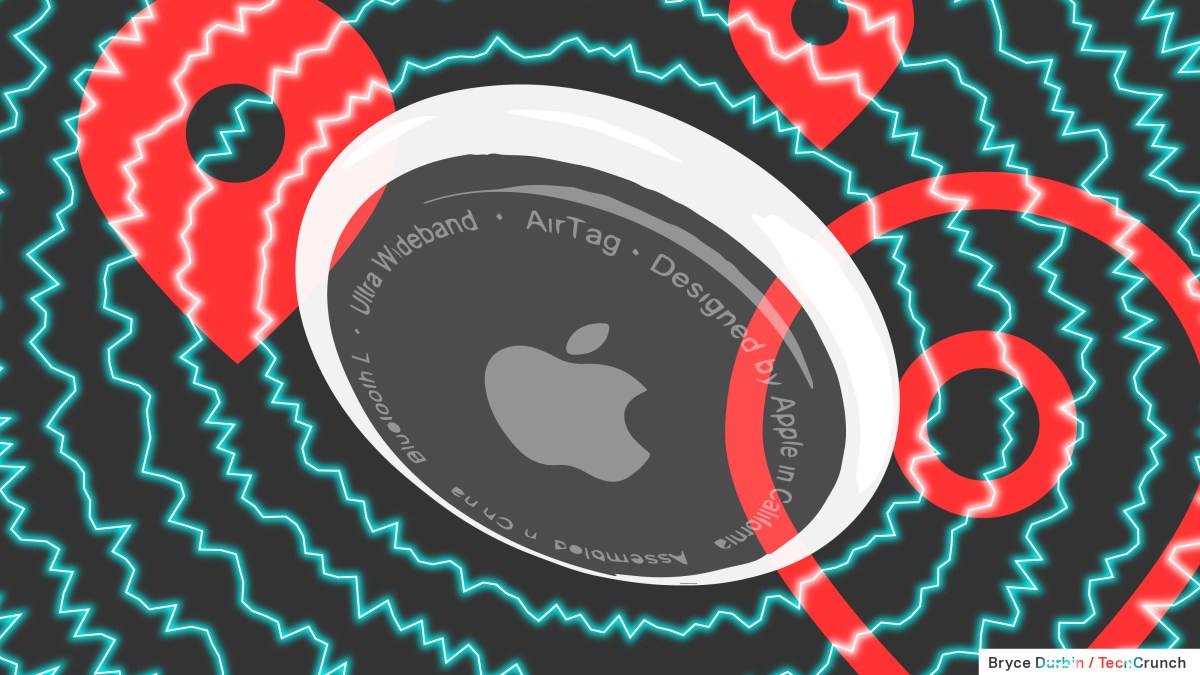
Apple and Google agree on standard to alert people when unknown Bluetooth devices may be tracking them


Apple and Google announced on Monday that iPhone and Android users will start seeing alerts when it’s possible that an unknown Bluetooth device is being used to track them. The two companies have developed an industry standard called “Detecting Unwanted Location Trackers.” Starting Monday, Apple is introducing the capability in iOS 17.5 and Google is launching it on Android 6.0+ devices.

Users will now get an “[Item] Found Moving With You” alert on their device if an unknown Bluetooth tracking device is seen moving with them, regardless of the platform the device is paired with. 

The move follows numerous cases of Bluetooth trackers like Apple’s AirTags being used for stalking. Last May, Apple and Google announced that they would work together to lead an industry-wide initiative to create a way to alert users in the case of unwanted tracking from Bluetooth devices. 

When Apple launched AirTags, they were quickly adopted as a way to track the location of everyday items like keys. However, the trackers also ended up being adopted by bad actors who use them to track people. To address this, Apple released a “Tracker Detect” Android app in 2021 to help people who don’t own Apple products to identify unexpected AirTags near them. The new industry standard announced on Monday takes an OS-level approach to addressing the issue of unwanted Bluetooth trackers. 

Bluetooth tag companies including Chipolo, eufy, Jio, Motorola, and Pebblebee have committed that future tags will be compatible with the new industry standard, Apple says.

Apple and Google say they will continue to work with the Internet Engineering Task Force, a standards organization for the internet, via the Detecting Unwanted Location Trackers working group to develop the official standard for this technology.

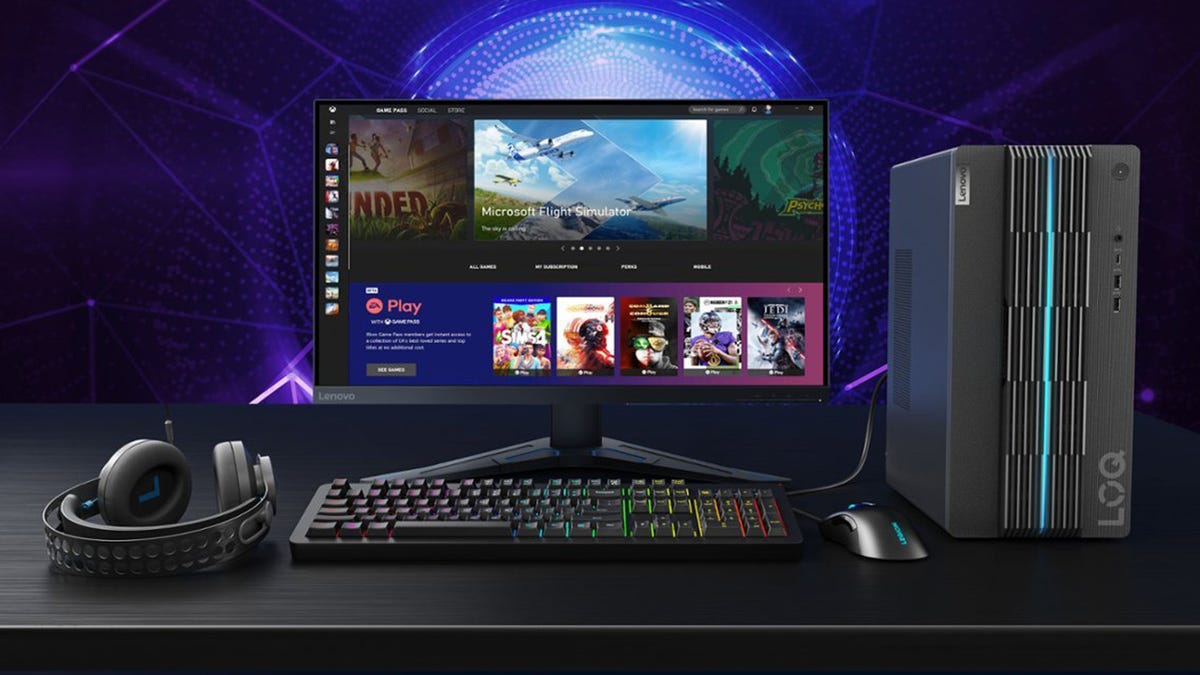
The best cheap gaming PCs of 2024 starting at $500


You may work with a minimal budget when shopping for a new gaming PC. And fortunately, the HP Victus is priced under $1000 while still giving you what you need. It’s built with an AMD Ryzen 5 5600G CPU, 8GB of RAM, a 256GB SSD, and an AMD Radeon RX 6400 graphics card. And just because it has an older GPU, that doesn’t mean you can’t still play all of the latest triple-A and indie games. 

The HP Victus can support up to 32GB of RAM and any storage you want, which means that you can save a good bit of cash by buying the prebuilt configuration and upgrading piecemeal as time goes on. And speaking of upgrades, this model features a second RAM slot and three storage drive bays, making upgrading a relatively fast and easy process. 

One drawback of this PC is the 350-watt power rating, so if you want to add a second storage drive or a more powerful GPU, you’ll need to drop in a more powerful PSU as well. Customers who purchased this gaming PC on HP’s website call out the company’s reliable customer service for troubleshooting any issues you may have during setup or your warranty period, as well as the fact that the Victus 15L is an excellent option for kids and teens looking to buy their first gaming PC.

HP Victus specs: CPU: AMD Ryzen 5 5600G | GPU: AMD Radeon RX 6400 | RAM: 8GB | Storage: 256GB SSD 


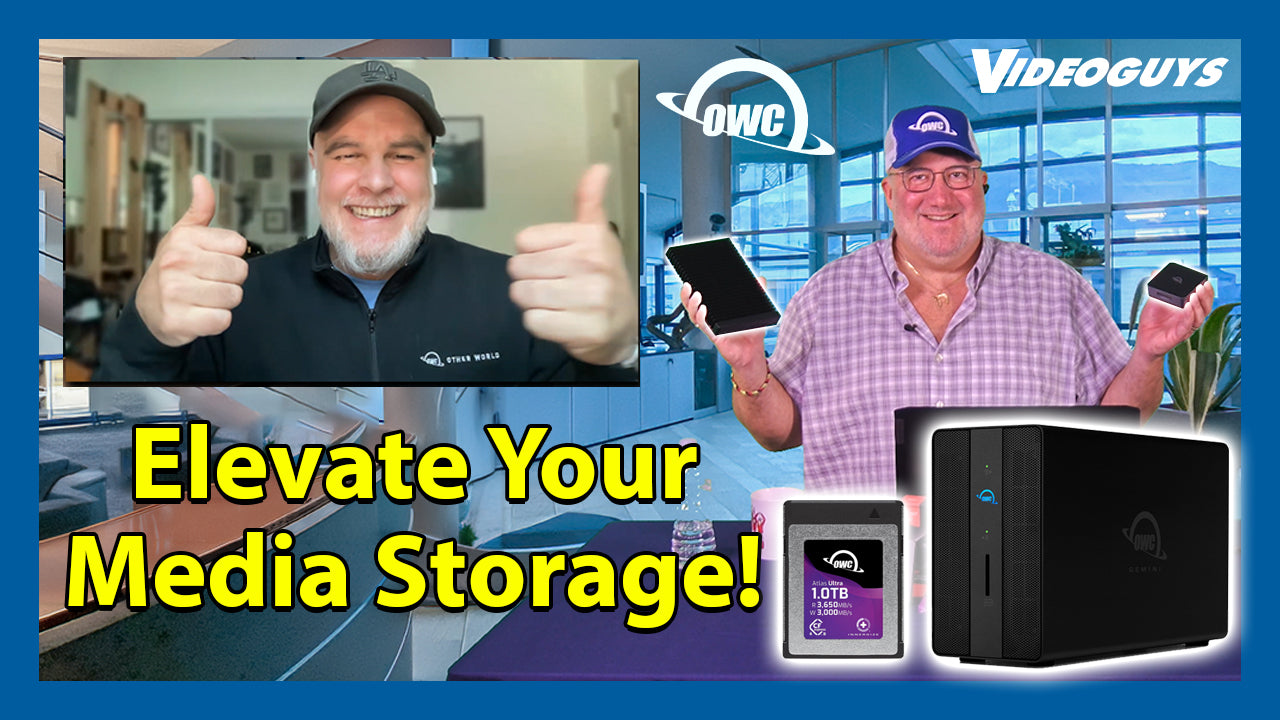
Elevate Your Digital Workflow with OWC Storage


On this Installment of Videoguys Live, Gary is joined by Jon from Other World Computing to dive into the world of OWC storage solutions – your ultimate partner in digital creativity. Whether you’re a professional content creator, a passionate hobbyist, or a tech enthusiast, OWC’s innovative storage technology is designed to help you Capture, Create, and Collaborate.

Watch the full video below:

OWC has created the solutions you need for every part of your workflow to give you the speed and reliability you need to keep on creating new content.

Memory Cards + Readers

High-performance, premium-quality memory cards & memory card readers designed for the most advanced use cases of professional photographers and videographers. 

SDXC Memory Cards

Atlas Pro V60 affordable, high-quality 
cards for photo & video

Atlas Ultra V90 for the most ​
demanding uses at maximum ​
camera settings

CFexpress Memory Cards

  • CFexpress Type-B cards available in Atlas Pro or Atlas Ultra series
  • CFExpress 2.0 and 4.0 specs available
  • NEW! CFExpress Type A Atlas Pro for SONY Alpha & FX cameras (480 & 960GB)

Card Readers

  • Ultra-fast compact USB4 (40Gb/s) CFexpress 4.0 Type B card reader for creative professionals
  • Plug and play with USB4, Thunderbolt 4, and USB-C
  • Ingest at up to 5000MB/s speed. 
  • Worry-free: 2 Year OWC Limited Warranty

Capture – Software

  • The first upgradable memory cards. Ever.
  • Enabled by Innergize Software and OWC Readers​
  • CFexpress 4.0 Firmware Upgrade — 2X Speed​
  • Health Check + Sanitization maintain performance over time​

Portable Storage

IP67, Compact​ USB-C 3.2, 240GB-2TB

IP67, High-speed​ Thunderbolt, 240GB-4TB

Ultra-fast, compatible, and reliable portable USB4 NVMe SSD.​ USB4, 1TB-8TB

Desktop Storage

NVMe Semi-Portable RAID​ Thunderbolt, 4-32TB

4-bay Desktop RAID​ Thunderbolt, 8-80TB

Best Seller, 8-bay RAID Thunderbolt, 16-160TB

Dual-Drive

  • Pro-grade speed: up to 40Gb/s with (2) Thunderbolt 3 ports
  • Flexible storage options: 2 bays for 2.5-inch or 3.5-inch SATA drives
  • Selectable hardware RAID settings: RAID 0 speed, RAID 1 redundancy, span capacity, Independent
  • A hub of options: (2) USB 3.2 (10Gb/s) ports for your essential peripherals
  • Full stream ahead: 2.5GbE for transferring files up to 2.5x faster than standard Ethernet
  • Easy camera uploads: frontside SD 4.0 (UHS-II) card reader
  • See your work: HDMI 2.1 port for connecting up to an 8K display
  • Daisy-chain expansion: add up to five additional Thunderbolt devices
 

Collaborate with Jupiter

Enterprise-grade NAS for high-performance file sharing, ready to grow with teams large and small without sacrificing bulletproof reliability or ease-of-use.

  • Up to 100TB of internal raw storage
  • Up to 50+ connected users
  • Quiet 5-bay desktop design
  • Dual 10GbE + Dual 1GbE built-in

Videoguys is your source for OWC
800-323-2325 | videoguys.com

visual studio – Blazor App not recognizing new folders/components in shared library – IDE compatibility issue?


I am working on a project that consists of multiple independently running Blazor applications. Each of these applications has the same submodule, let’s call it CustomLib, which provides common components. It has its own git repository.
I added a folder with some custom components to this lib, so that each of the applications can use them.
But here is the problem:
One of the applications, let’s call it App X, doesn’t recognize this new folder (or other new folders I create) inside the lib and Visual Studio shows several errors. However, you can compile the program and it runs without any problems. The errors only affect the parts where you are using a CustomLib-component.
The error message says

Found markup element with unexpected name {CustomComponentName}.
If this is intended to be a component, add a @using directive for its namespace.

I added a using directive, but it returns the following error:

The type or namespace does’n exist in the namespace >’CustomLib.Components’ (are you missing an assembly reference?).

However, it does find another folder within CustomLib.Components which was part of CustomLib before App X was created.

@using CustomLib.Components.FolderA; @*<- no problem *@
@using CustomLib.Components.MyNewFolder; @* MyNewFolder is underlined in red, namespace unknown error*@

@* the following is completely red/green underlined, unexpected name error*@
<MyNewComponent>
...
</MyNewComponent>

I have no idea how to fix this. I deleted the bin, .vs and obj folders, cleaned up the application and rebuilt it, but to no avail.
The other applications in this project have no problems using CustomLib. The only difference is that App X was created by my colleague using Rider while the rest of us uses Visual Studio. Is it possible that the use of different IDEs caused this error? If so, where can I fix it? Do any of you have experience with this kind of situation? Or is it something else?
I looked at similar questions (e.g. Blazor Shared Component Library can’t resolve Blazor component), but none of it could fix my problem.
My last resort is to create the application in Visual Studio again and copy paste everything from App X, but I wanted to ask you first. I am not yet completely comfortable with Blazor and Visual Studio and thus fail to find the reason for this error.

Why Are My AirPods So Quiet


Why Are My AirPods So Quiet

Apple’s AirPods along with its Pro and Max versions are excellent for FaceTime, phone calls, and music playback. The seamless transition between devices, like as your iPhone and Mac when you sit down at your work, is one of its best features. However, they do experience issues sometimes. One of the common problems is that the volume on the AirPods gets too low. We will demonstrate how to resolve that in this article.


Why Is The Volume in My AirPods So Low?

Apple AirPods

Depending on the gadget you’re using your AirPods with, there are several reasons why they might not be loud enough. For instance, your Mac or iPhone’s accessibility settings may be restricting the volume, or your battery may be almost dead. Additionally, your AirPods’ performance may be unpredictable if you’re getting close to the boundary of their Bluetooth range. This could result in the volume being too low.

One of the following common issues could be the cause of your AirPods becoming quiet:

  • Accumulation of earwax: It’s unpleasant, but earwax buildup on your AirPods’ mesh might really reduce sound quality.
  • Poor bluetooth: Your AirPods’ sound quality may be impacted by a weak Bluetooth connection or disturbance from other devices.
  • Software problems: If your AirPods haven’t received the most recent software update, you will experience low sound levels.
  • Battery life: Low-level batteries may also have an impact on sound quality.
  • Configurations: It’s possible that the volume or balance of the audio settings on your device are off.


7 Ways To Fix Quiet AirPods

First, determine if the issue affects all of the devices you use or just one of them. Try them on your iPhone or iPad if you see the issue on your Mac, and vice versa. In this manner, you can determine if your Mac, iPhone, or AirPods are the source of the issue.

There are a few options available if your AirPods are the issue. This is how you should proceed.


1. Clean your AirPods

Clean your airpods

AirPods occasionally become a bit dirty because of all the debris that gets accumulated in the speaker mesh. So, wipe them down with a soft, wet cloth that is free of lint as soon as possible. Make sure the cloth is only slightly wet. You do not want to get moisture on your AirPods. Use the same method to clean the charging port and the casing. You can take off the silicone ear tips from your AirPods Pro and give them a quick wash in cold water. Before you reattach them, make sure they have dried.

2. Use The Ear Tip Fit Test

After everything has been cleaned, you can confirm that your AirPods Pro fits comfortably in your ears. For this, Apple offers a helpful fit test that can distinguish between muffled and clear music. This way, you won’t need to increase the AirPods’ volume for louder sound and guarantee a better sound quality.

A proper fit could actually make the difference between your AirPods feeling too quiet and just right.


3. Reset and Recharge Your AirPods

Even though your AirPods seem to have a lot of power left, there can be a problem with the battery life display itself. Recharge them and give them another go to be sure that’s not the case.

If the volume of your AirPods is too low on a particular device but not on another, there may be a problem with Bluetooth or your device itself. You can follow these steps to resolve the issue with system reset:

  • Place your AirPods in their case, then select System Settings>Bluetooth, from the Apple menu on your device.
  • Click on “Remove” and confirm.
  • Open the cover of your AirPods case, then hold the setup button until the light begins to flash.
  • Navigate to System Preferences>Bluetooth, and select “AirPods.”
  • Check to see if the problem is resolved


4. Check the Volume

It may seem silly, but check sure that the affected device’s volume is up before performing any more actions. In case your Mac is not working with your AirPods, select Control Center and move the slider towards the right. Verify that the app you’re using is not on mute and that the volume is also cranked up.

Apple customers also check if they didn’t turn on any odd equalizer settings by double-checking the settings of their programs. Things may sound much quieter than they actually are if you have adjusted the level sliders partially or completely. This user tip is quite helpful in most situations.

Additionally, some websites, such as YouTube, have volume sliders built right into their playback windows. It would be wise to make sure that all of these are adjusted to a high level before using the Mac’s main volume adjustment.


5. Check Your iPhone Settings

Check the Settings on your iPhone if the volume on your AirPods is only too low when you use them with your phone. Select Sound & Haptics > Headphone Safety after opening the Settings app. Verify that the toggle switch for “Reduce Loud Sounds” is turned off.

Additionally, you should look at the accessibility options, since occasionally they can be set up in a way that makes your AirPods too silent. Navigate to Settings, select Accessibility, then Audio/Visual. Verify that the slider is positioned halfway between L and R. Select Headphone Compatibility. Turn them off and back on if the toggle switch is in the “on” position to avoid the potential issue.


6. Run Maintenance Scripts

There are various reasons why your Mac could be the source of the quiet music coming from your AirPods. Using maintenance scripts is the most efficient way to address multiple issues at once. There are several apps made specifically for that purpose. They can perform a wide range of other maintenance tasks, such as reindexing Spotlight, thinning out Time Machine pictures, and freeing up RAM, in addition to executing maintenance scripts.


7. Check if the Volume On Both Earphones is the Same

It’s possible that one earbud might have ended up being quieter than the other. You’ll need your iPhone close at hand to verify if that is the case:

  • Launch the Settings application.
  • Log in to your Apple ID if you’re not logged in.
  • Click or tap “Accessibility.”
  • Select “Audio/Visual” under “Hearing.”
  • Make sure the “Balance” section’s slider is in the middle, then move it back there if necessary.

You may need to get in touch with Apple for support if none of these fixes work to address your loudness problems. Even so, it is worthwhile to experiment with all of the aforementioned settings, in case you happen to miss something simple, like the volume controls. You can also contact community forums to see if you can find any unique information. Your feedback can help others as well so if you want to add your experience to it, that’s helpful as well.


Conclusion

If you’ve performed all the checks above and still don’t see any improvement, it’s time to go to the Apple service store. Just know that you may be saying goodbye to your AirPods if you’ve read this far and you don’t have a fix. You will have to go without them for a short while while they are being fixed or replaced.

Beat the Algorithms by Turning your Online Audiences into Email Subscribers


A group of people leaning against a yellow wall, holding and looking at their cell phones.

7 actions to take today to convert your audience and grow your email list.

Social media and podcasts are incredible platforms for connecting with like-minded people and building a community. A downside of them both, however, is you’re at the whim of each platform’s ever-changing algorithms, rules, and regulations.

Instagram…TikTok…iTunes…no matter the channel, you don’t have much control over who sees, reads, or hears your messages.

When it comes down to it, no matter how large your audience numbers are, you don’t own your audiences on these platforms. If your channel or podcast gets pulled, you’ve lost all means of communication with these communities you’ve put so much effort into building and nurturing.

Unless they’re subscribed to your email list!

You’re in complete control of the contact information with an email list. Subscribers have consented to give their email addresses and have you contact them directly through their inbox — and that’s a really powerful connection.

Besides being in complete control of your audience, here are a few other reasons why converting followers and listeners to email subscribers is extremely important:

  • No algorithms are gatekeeping or controlling who sees your content.
  • You can know your email subscribers much deeper than social media channels or podcasts allow. (i.e., put a name — or at least an email address — to mystery listeners.)
  • You can self-promote to your heart’s content in your emails! No more tip-toeing around the “link in bio” conundrum. Link and promote the day away in your subscriber’s inboxes.
  • And you can send your email subscribers wherever you like without getting stuck in social media platforms’ frustrating, roundabout web browsers.

And that’s only a short list of benefits. Converting your social media followers and podcast listeners into email subscribers can significantly affect your marketing strategy. But how do you go about turning followers and listeners into subscribers? Keep reading for seven action steps you can start taking today.

  1. Link to your signup form on all profiles and show notes.
    Take the guesswork out of this process by adding links to your subscription form on all social media profiles and podcast show notes. The goal is to make it as easy as possible for audience members to sign up and subscribe. The easier you make it for your audience to subscribe, the more likely they are to do so.
  2. Promote the value of subscribing.
    Converting your social media and podcast audiences into subscribers begins with telling them why they should join. What are the pros of being a part of your email list? What are you offering there that’s unavailable on your social media channels or podcast shows? Highlight all the benefits they’ll receive by joining your list, such as:

    – exclusive content
    – valuable insights
    – special promotions
    – early access to new products or services

    Consistency is key, so don’t be shy when regularly reminding your followers of the benefits of becoming a subscriber.

  3. Offer a compelling signup incentive.
    Everyone loves a good incentive, and offering one can be a game-changer when converting your audience. Just as it’s common practice to offer an incentive on your website, the same can be done for your social media and podcast audiences. Ideas for an incentive could be :

    – a downloadable resource
    – an e-book or e-course from the vault
    – a behind-the-scenes interview
    – a bonus discount or promotion

    Just make sure the incentive closely aligns with your audience’s interests and why they’re following you in the first place. This will help make your offering too tempting to resist.

  4. Cross-promote across all platforms.
    Cross-promotion is a powerful strategy for converting followers and listeners into subscribers. Mention your email list in podcast notes, talk about it during your podcasts or lives, and link to your form in your stories.

    A great way to cross-promote your email list is by sharing teaser content or snippets from your newsletters. Offer just enough to pique curiosity and encourage signups.

    If you’re working across multiple mediums, odds are you’re already cross-promoting different channels and avenues to connect with you. Take this same strategy and prioritize your email list in these promotions to increase the chances of converting your audiences and growing your email list.

  5. Offer SMS subscribe by text.
    We’ve already covered how important it is to link subscription forms to your email lists where and when possible. However, subscribing by text is a great option to have available when speaking.

    Whether on a podcast, a live, a video, or an interview, encourage listeners to connect with you for more content by texting a code to a selected phone number. This is a quick, easy way for audience members to be sent a link to your email form and subscribe to your list while it’s top of mind.

    Check with your email service provider about subscriber by text and how to set this up. If you’re a FeedBlitz client, follow the steps outlined here!

  6. Host exclusive contests and giveaways.
    The fear of missing out (FOMO) is real, and running exclusive contests and giveaways is an excellent way to encourage email signups by using FOMO.

    This also creates an opportunity to add this to any potential affiliate or partnership agreement you may have and the chance to promote a local business you’ve been wanting to work with. Be sure everything you offer and promote is relevant and aligned with your audience’s interests to increase the odds of gaining new subscribers.

  7. Leverage guest appearances and collaborations.
    We’ve mentioned cross-promotion earlier in this list, but now is the time to highlight collaborative promotion. If your podcast features guest speakers or collaborators, leverage their networks to increase your email subscriber count.

    Encourage guests and collaborators to promote your email newsletter to their audiences, whether through shout-outs on their social channels, mentions in their newsletters, or during their podcasts and lives. This seemingly simple move can significantly expand your reach and attract new subscribers.

Converting your social media followers and podcast listeners into email subscribers is the best way to protect the work you put into building and maintaining the connection with your audience. No matter what happens with algorithms or new channels coming online, your email list will always be a reliable source of communication.

Focus on highlighting the benefits of subscribing, offering compelling incentives, consistently promoting, and making signing up as easy as possible. You’ll be well on your way to building a loyal, engaged email list.

Ready to send your emails with a platform that supports your growth? Head to this page to start your free trial. Feel free to reach out with any questions through our Support Page. Live support is available Monday to Friday, 9 AM to 5 PM Eastern, and you can always find helpful information 24-7 at the resources linked here.

SpaceX facing FAA review for Starship launches from Kennedy


SpaceX's Starship rocket lifting off in November 2023.
SpaceX

SpaceX currently launches the Starship — the most powerful rocket ever built — from its Starbase facility in Boca Chica, Texas, but it also wants to launch it from the Kennedy Space Center in Florida.

For that to happen, its plans will first have to be cleared by the Federal Aviation Administration (FAA) by way of an environmental review, the agency announced on Friday.

NASA carried out a similar review five years ago and saw no issue with SpaceX launching the Starship from Kennedy, but since then the Elon Musk-led spaceflight company has adjusted its plans for the Starship and its associated infrastructure, prompting the FAA to announce its own review to assess the impact of the launches on the local environment.

Changes to SpaceX’s plan at Kennedy include a greater frequency of launches from 24 per year to as many as 44, and a slightly more powerful rocket design. SpaceX also wants to land the first-stage booster at Launch Complex 39A instead of at Landing Zone 1.

Pumping out a colossal 17 million pounds of thrust at launch — more than double that of the Saturn V rocket that powered the Apollo astronauts toward the moon from the same launch facility five decades ago, and almost twice that of NASA’s next-gen Space Launch System (SLS) rocket, which launched fro the first time in November 2022 — the Starship has a greater chance of disrupting the local environment than any other vehicle that’s launched from Florida’s Space Coast.

The maiden launch of the Starship, which has only flown three times to date, completely destroyed the Starbase launch pad when the force of the engines proved too great as the rocket lifted off. Debris was spread far and wide and into protected wildlife areas, causing consternation among environmentalists. SpaceX responded by building a more robust pad capable of handling subsequent launches.

These days, residents along the Space Coast are used to seeing launches involving SpaceX’s workhorse Falcon 9 rocket, which spits out a mere 1.7 million pounds of thrust at launch, as well as the occasional mission by SpaceX’s Falcon Heavy, which is three times more powerful. Starship launches, however, will be something else altogether.

Editors’ Recommendations


Best gaming PC for Warzone 2 Season 6 2024


Just when the world thought the battle royale format was starting to dwindle, Call Of Duty sprung into action releasing arguably one of the most popular games of all time – Warzone. Warzone quickly became one of the highest played, streamed, and watched shooters to date while simultaneously refreshing the stale BR genre. It no longer became the end if you were to be shot dead, it was more of an inconvenience, with innovative 1v1 Gulag battles and in-game cash for extra lives.

Warzone always had strong player counts, and interest from new players, and surprisingly lots of console players are starting to consider switching to PC too. Warzone 2 provided much more of the same, with an altogether new experience for players. Now that Warzone 1 has had its servers shut down and 2.0 simply rebranded back to ‘Warzone’, we’re ready to check out MW2 & Warzone Season 6, and you can do the same with a fresh PC.

With this in mind, we are going to be putting together the best Warzone 2 gaming PC build, including the best CPU and best GPU for Warzone 2, throwing in a budget option, and a prebuilt PC for good measure.

The application of skill and dedication of time are the two main reasons most become ‘great’ at a game, however, when it comes to PCs you are going to need to ensure you have a smooth experience and leave any notion of lag or poor graphics at the theoretical door.

PC hardware deals

If you are planning on building out your next gaming PC, then finding deals on some components is the best way to get something better for cheaper. In that case, you can find deals on GPUsCPUscoolersmotherboardspower supplies, and cases. There are always some discounts to be found even if it’s not any special sales time so you can save a few bucks here and there.

Warzone 2 PC requirements

You should always take game requirements with a pinch of salt as they often include out-of-date hardware that can be quite tricky to get your hands on. We will take a look at what Activision set out as their recommended Warzone 2 system requirements before discussing what we think you should go for later on in the article.

Recommended:

  • OS: Windows 10 64 Bit (latest update) or Windows 11 64 Bit (latest update)
  • CPU: Intel Core i5-6600K / Core i7-4770 or AMD Ryzen 5 1400
  • RAM: 12 GB
  • Hi-Rez Assets Cache: Up to 32 GB
  • Video Card: NVIDIA GeForce GTX 1060 or AMD Radeon RX 580
  • Video Memory: 4 GB

The game is optimized to the point where the recommended specs from Call Of Duty will serve you well, however, for a smooth experience or if you wish to push frame rates above 144 FPS without compromise, our Warzone 2 build is going to be the better option.

Best PC for Warzone 2

We are going to be putting together the best PC for Warzone 2, which means we want this to be well-priced, performance-focused, and affordable for the masses, so don’t expect this PC to play any game in 4K max settings.

Warzone 2 has a lot of in-game objects and players, so a combination of a strong CPU, GPU, memory, and fast storage should offer the perfect balance to bring flawless results. This guide is to help you build a PC for Warzone 2 but we will also recommend a prebuilt PC for Warzone 2 too, allowing everyone a chance to get stuck into the battle royale shooter, without the need for expertise or time.