Unreal Engine Toolbar in Visual Studio


In Visual Studio 2022 version 17.11, we’ve added a new Unreal Engine toolbar to Visual Studio.

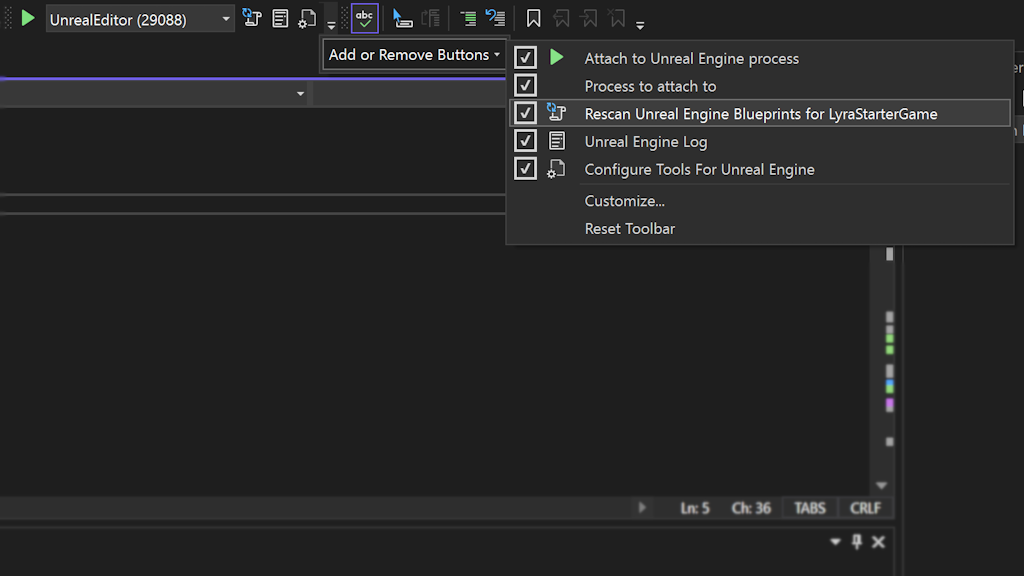
Image showing new tool bar with otpions like attach process, rescan blueprints, UE logs, and configure tools

The Unreal Engine toolbar is a new feature that provides quick access to common Unreal Engine tasks. You can find the toolbar at the top of your code window when you have an Unreal Engine project loaded. The toolbar includes the following actions:

Attach to Unreal Engine process: Lets you easily debug your game or editor by attaching to the running Unreal Engine process. You can choose which process to attach to from a drop-down menu.

Rescan Blueprints Cache: Refreshes the cache of Blueprint symbols in Visual Studio, which can help you resolve errors or warnings related to Blueprints.

Unreal Engine Log: Opens the Unreal Engine log window in Visual Studio, where you can view the output of your game or editor. The window captures log messages from running Unreal processes and makes it possible to see the output live while working on the game. You can also filter the log messages by severity or category using the built-in tools in Visual Studio.

Access Unreal Engine Configuration Page: pens the Unreal Engine configuration page in Visual Studio, where you can customize various settings for your Unreal Engine development. For example, you can enable or disable IntelliSense for Unreal Engine types, change the formatting style of your code, or set up additional paths for your project.

The Unreal Engine toolbar is designed to reduce the need to switch between different applications or windows. You can also customize the toolbar by adding or removing actions or moving it to a different location in Visual Studio.

Try it out

We hope you enjoy using the Unreal Engine toolbar in Visual Studio and we would love to hear your feedback. Please let us know what you think by leaving a comment below, or by using the Report a Problem tool in Visual Studio. Your input helps us make Visual Studio better for you and other Unreal Engine developers.

Exploring LineageOS: Empowering Your Android Experience


Android customization may have a few different aspects depending on the user’s opinion of functionality, security, and freedom. Thus, it is much more difficult to find how each of these plays when it is all included together.

But LineageOS comes with a smart solution supplying its users with a personalized and enriched operating system – AOSP (Android Open Source Project).

Through this comprehensive guide, we will get into the intricacies of LineageOS making you experience the real power of Android that goes beyond the default android setup.. We will also cover the characteristics, advantages, and installation process.


What is LineageOS?

LineageOS is an open-source operating system based on the mobile phones and tablets system. This allows users to fully design their own Android experience that is clean and flexible.

Coming from a community of people who are very passionate about software development and technology, LineageOS was born in the process. It is based on AOSP code, implementing more features, and improving security and optimizations.


Key Features of LineageOS


1. Customization

LineageOS provides a great deal of customization possibilities in various devices such as Oneplus, Samsung, Xiaomi, Motorola, etc. thus, users can change the appearance of their phone the way they would like.

From themes to icon packs and advanced system mods, LineageOS allows users to customize their devices as per their individual preferences.


2. Privacy and Security

By prioritizing user privacy and data protection, LineageOS ensures that user data is secure and transparent. Via Privacy Guard, users can give and retain app permissions as well as limit access to sensitive data. And regular security updates are provided to keep the devices safer from emerging threats.


3. Performance Optimization

The main goal of LineageOS is to boost the device’s performance, delivering a quick and easy user experience. It eliminates the clutter and reduces the number of background processes that aren’t needed. This way LineageOS will improve battery life without reducing performance.


4. OTA Updates

LineeageOS provides OTA updates which enables the delivery of new features, bug fixes, and security patches directly to users’ mobile devices. A PC community adds LineageOS in a regular manner. This is so devices remain up-to-date and protected and users give tranquility.


Installation Process

Lineage OS Installation

It is simple to download Lineage OS on your device although it differs from one manufacturer to the other and from one device model to the other. Here’s a general overview of the installation process:


Step 1: Unlock Bootloader

Before flashing LineageOS on your phone, you need first to unlock its bootloader. This can differ depending on your device. So make sure you have the manual that relates to your device.


Step 2: Install Custom Recovery

Following that, you should install a custom recovery like TWRP (Team Win Recovery Project). You will be able to flash custom ROMs such as Lineage OS and do other advanced operations easily with recovery that is specially tailored for you.


Step 3: Download LineageOS

Browse the official LineageOS website to download the correct ROM for your device. Make sure, that you download the correct version to prevent possible compatibility problems.


Step 4: Flash LineageOS

When you’ve got the LineageOS ROM on your device, move it to the internal storage of your device. Boot into the recovery mode and go to the ‘Install’ section. Choose the LineageOS ROM file and follow the instructions presented on the screen to install it on your phone.


Step 5: GApps (Optional)

To get Google Apps like Google Play Store and others, you have to flash a GApps (Google Apps) package right after installing LineageOS. Make sure to get the GApps package with Google Play services, corresponding to the device and the version of LineageOS you are using.


Step 6: Reboot

Next, after flashing LineageOS and GApps (if required), restart your device. Now you have LineageOS setup, the time for you to explore its features and the wide variety of options for customize has finally come.


Why Choose LineageOS?

LineageOS


Freedom and Flexibility

LineageOS provides users with unrivaled freedom and flexibility. This is because it enables them to customize their devices according to their unique set of tastes.

Whether you are a starter or a habitual user, Lineage OS has the tools that you need to customize your Android experience.


Privacy and Security

LineageOS puts privacy and security first. There are built-in products such as Privacy Guard and timely security updates. This enables your personal data to be protected from unauthorized access against malicious threats.


Q&As

1. Can I use LineageOS on my device’s default apps such as Calculator?

Ans: Yes, LineageOS features a calculator in default applications making an easy migration from common Android apps that come by default.

2. What does the LineageOS user interface look like?

Ans: What puts LineageOS ahead is that its user interface is clean and simple to use. Thus, users can find the apps they need and tweak settings with ease.

3. What role does LineageOS play in integration between cameras with different apertures?

Ans: LineageOS ensures a steady level of camera support with cameras of different apertures. It also allows the users to capture high-quality photos and videos.

4. Does Lineage have anything to do with CyanogenMod?

Ans: Indeed, LineageOS is the successor of CyanogenMod carrying on the tradition of furnishing personalized versions of Android.

5. Is it possible to download and install apps from external sources like F-Droid on LineageOS?

Ans: Absolutely! LineageOS supports various app integrations, including F-Droid, that gives users the opportunity to get over the restriction of using Google Play Store only.
AMD’s next-gen GPUs are set to arrive in early 2025, suggesting a CES reveal


AMD and NVIDIA could be on a collision course for CES. AMD CEO Lisa Su has confirmed for the first time that the company is set to release its next-gen PC GPUs early next year.

“In gaming graphics, revenue declined year-over-year as we prepare for a transition to our next-gen Radeon GPUs based on our RDNA 4 architecture,” Su told investors on AMD’s third-quarter earnings call. “In addition to a strong increase in gaming performance, RDNA 4 delivers significantly higher ray-tracing performance and adds new AI capabilities. We are on track to launch the first RDNA 4 GPUs in early 2025.”

The timing very much suggests that AMD will reveal those RDNA 4-based graphics cards at CES in early January. It’s rare for the company to unveil desktop GPUs at the trade show (laptop cards are generally the order of the day for AMD at that event). However, it’s widely expected that NVIDIA will use its CES keynote to debut its next-gen 50-series GeForce RTX GPUs. We might get a little more clarity on that front when NVIDIA announces its own Q3 earnings results on November 19.

As PCWorld notes, AMD’s first RDNA 4 GPUs are expected to deliver mid-range performance at an equivalent price point in a bid to increase its market share. AMD’s gaming business (which includes the company’s GPU division) saw a 69 percent year-over-year drop in revenue to $462 million in Q3.

Debugging with Docker in Visual Studio 2022 fails when editing Dockerfile


I set up a project that allows debugging in a Linux docker container in Visual Studio 2022. Now, I wanted to add a stage prior to the build stage. For the sake of simplicity I just show a simplified version using some dummy alpine stage.

Extract from Dockerfile

This gives me the following error when trying to debug:

Debugging Error

Docker command failed with exit code 127. docker: Error response from
daemon: failed to create task for container: failed to create shim
task: OCI runtime create failed: runc create failed: unable to start
container process: exec “dotnet”: executable file not found in $PATH:
unknown. If the error persists, try restarting Docker Desktop.

Error message

Note: This works if I switch to ‘Release’ – but I want to make use of the debugging facilities.

What can I do?

New OnePlus 13 details confirm ultrasonic fingerprint sensor and other display specs


What you need to know

  • OnePlus 13 to sport BOE X2 display with 120Hz refresh rate and HDR10+ plus Dolby Vision support.
  • It has also been confirmed to feature an ultrasonic fingerprint sensor for the first time.
  • The device is to launch on October 31 in China and is expected to be powered by Qualcomm’s latest Snapdragon 8 Elite chip.

OnePlus is gearing up for its next anticipated flagship phone, the OnePlus 13, this week. While the launch is very soon, the company has already revealed key features of the upcoming phone, including display specs.

Since the company is gearing up for the China launch, most deets are shared through the OnePlus Weibo account. Some of the teaser images (via GSMArena) reveal the OnePlus 13’s prominent display specs.

Fired Employee Allegedly Hacked Disney World’s Menu System to Alter Peanut Allergy Information


An anonymous reader shares a report: A disgruntled former Disney employee allegedly repeatedly hacked into a third-party menu creation software used by Walt Disney World’s restaurants and changed allergy information on menus to say that foods that had peanuts in them were safe for people with allergies, added profanity to menus, and at one point changed all fonts used on menus to Wingdings, according to a federal criminal complaint.

The suspect in the case, Michael Scheuer, broke into a proprietary menu creation and inventory system that was developed by a third-party company exclusively for Disney and is used to print menus for its restaurants, the complaint alleges. The complaint alleges he did this soon after being fired by Disney using passwords that he still had access to on several different systems. Once inside the systems, he allegedly altered menus and, in once case, broke the software for several weeks.

“The threat actor manipulated the allergen information on menus by adding information to some allergen notifications that indicated certain menu items were safe for individuals with peanut allergies, when in fact they could be deadly to those with peanut allergies,” the criminal complaint states. According to the complaint, the menus were caught by Disney after they were printed but before they were distributed to Disney restaurants. Disney’s menus have extensive “allergy friendly” sections.

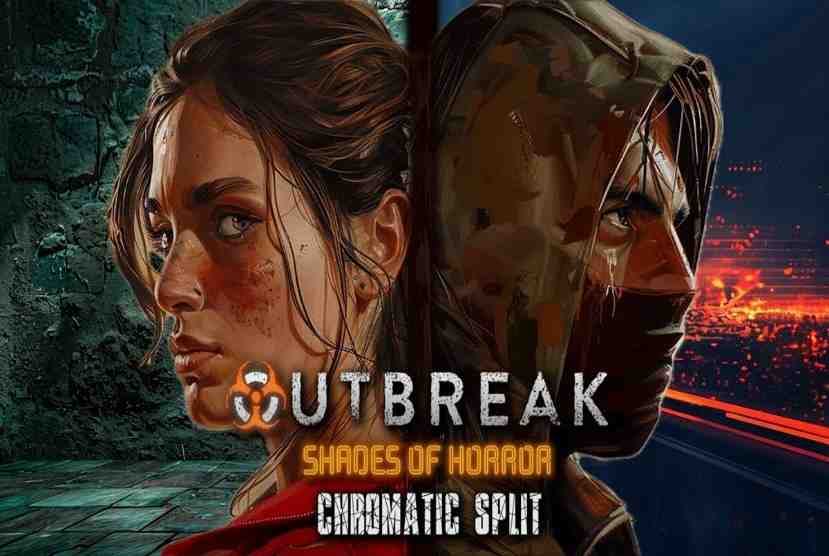
Outbreak Shades of Horror Chromatic Split Free Download –


Outbreak Shades of Horror Chromatic Split Free Download By Worldofpcgames

Outbreak Shades of Horror Chromatic Split Direct Download:

Go back to the beginning of the end in the prologue to Dead Drops’ Studios upcoming Outbreak: Shades of Horror. Experience the undead outbreak as you fight for survival to shine light on the terrible events about to befall Cypress Ridge. As Lydia, a veteran police officer, race against time through the Cypress Ridge sewers to spread the truth of the Outbreak before it’s too late but beware there is more than sludge and rats waiting for her. I backed this game a year or so ago on Kickstarter, and it’s cool to finally see it come out. If you’ve played their previous title, Contagious Memories, this is a pretty big step-up in terms of graphical fidelity and game play. If you’ve played games like Resident Evil or Silent Hill, I’d encourage you to give this game a try. Mouthwashing

Looking forward to getting to know this newest entry into the outbreak series. Dev is very responsive to feedback. The initial setup to the game has given me a few laughs in this love letter to horror games from my younger years. We have Resident Evil at Home! I am amazed how much improved this developer has become since ditching Unity and moving to Unreal Engine. It is light night and day difference. Hank side of campaign isn’t available yet, but will be free update in near future. You will be exploring and backtracking a lot. Also, you get rewards by backtracking especially when you have certain weapons on hand.

Features and System Requirements:

  • This feature introduces a color-based horror system where players encounter creatures and challenges based on distinct chromatic themes. Each color represents unique enemy types, puzzles, and environmental challenges.
  • Each player can use different abilities, items, and strategies to overcome enemies and environmental hazards.
  • The game boasts an upgraded engine with real-time lighting, shadows, and color-driven effects.
  • The gameplay revolves around survival, so resource management and item sharing are crucial.

Screenshots

System Requirements

Requires a 64-bit processor and operating system
OS: Windows 10/11
Processor: Core i7/AMD Equivalent
Memory: 8 GB RAM
Graphics: Nvidia 3000-series or better / AMD equivalent
DirectX: Version 11
Network: Broadband Internet connection
Storage: 50 MB available space
Sound Card: Hardware
Support the game developers by purchasing the game on Steam

Installation Guide

Turn Off Your Antivirus Before Installing Any Game

1 :: Download Game
2 :: Extract Game
3 :: Launch The Game
4 :: Have Fun 🙂

UPLOADING SOON

How to Generate a ChatGPT API Key in 3 Easy Step


Now that you have adopted WeamAI for your digital agencies and unlocked AI’s true efficiency in terms of both creative and technical performance, you must be eager to explore its advanced possibilities. One such amazing functionality is leveraging the ChatGPT’s NLP API.

The NLP API integration capabilities opens doors to a pool of benefits. It helps your workforce to achieve that scalability, versatility, and competitiveness they always wanted in their everyday applications. All you have to do is get your API key from ChatGPT. Don’t feel stuck, use this guide and find out How to Generate a ChatGPT API Key.

A Three Step Guide: How to Generate a ChatGPT API Key

Step 1: Create an Account

  • Creating an account on OpenAI is completely free. Visit the OpenAI platform to create your own account.
  • Already have an account? Great! just log in and move onto the next step.

Step 2: Generate an API Key

  • Once logged in head to the navigation bar, where you will find “API Keys”.
How to Generate a ChatGPT API Key
  • A necessary step is to verify your phone number to create an API Key.
  • Post verification you will find yourself with the interface presented below.
How to Generate a ChatGPT API Key
  • Click on “Create New Secret Key”.
  • Name the New Secret Key. 

(Pro Tip: Name the key after the task or application you are going to use it for, so when there are multiple keys it eliminates the complications.)

  • A box will appear with a string of characters, that’s your API Key.
How to Generate a ChatGPT API Key
  • Copy it and store the key somewhere safe. Once generated the same key cannot be viewed again.

Step 3: Set up Billing

Setting up a billing process is an essential step. Without doing so your newly generated API Key will be inactive as OpenAI comprises a pay-per-use model for its API services.

For setting up the billing method:

  • Go to Settings in the left panel.
  • Select ‘Billing’ and Click on ‘Add Payment Details’
How to Generate a ChatGPT API Key
  • A pop up window will appear for selecting the type of user. Select ‘Company’ if you are using API for an organization and select ‘Individual’, if it’s for your personal use.
  • After selecting the option, you will be directed to the ‘Payment Details’ window. Add the payment information and a new window will appear.
How to Generate a ChatGPT API Key

Setting Automated Payment Configuration:

  • This is the ‘Payment Configuration’ window. This configuration may seem complex but it’s quite easy to make use for your benefit as it is an automated payment configuration.
How to Generate a ChatGPT API Key

Here is a clear breakdown of each box for better understanding.

  • Initial Credit Purchase: An initial amount to begin with, activating your API Key. (Box A)
  • Confirming and selecting the automated payment option. (Point B)
  • Add an amount for determining the lower threshold of your balance. (Box C)
  • Add an amount of the automated recharge you approve or prefer. (Box D)
  • Click on ‘Continue’ once all the preferred amounts are added.

Clarification: If the credits go below the amount you have entered in Box C, It will recharge your credits with Box D amount. A simple automated payment configuration.

How to Generate a ChatGPT API Key
  • After you have completed the setup, a new window will appear. This is your payment summary. Once you make sure everything is correct select “Confirm Payment”.

Vital Step: Set Usage Limits

To manage your monthly spend effectively setting up a usage limit too is a vital step.

  • Click on the “Settings” again from the left menu.
  • Go to “Limits”.
How to Generate a ChatGPT API Key
  • Scroll down to “Usage Limits” and set up a desired limit and then click on save.

There are two types of usage limits which can be applied in terms of monthly usage.

How to Generate a ChatGPT API Key
  1. Soft limit: Sending a warning mail regarding your usage.
  2. Hard limit: Restricting your workforce from further requests.

There you go! All set to start building your integrations.

Tips and Best Practices for Generating ChatGPT API Keys

  1. Security
  • Access: Always store your keys in environment variables and give access to trusted individuals of your organization.
  • Encryption:  Ensure that the data exchanged between your API and applications is encrypted.
  • Regulations: Also the user matters, handing data from a certain individual to specific region will consist of you agreeing to their regulations and compliance.
  1. Cost

You are utilizing a large database here hence managing cost becomes an essential practice. No doing so can either exhaust your token or your credit amount easily. One way is by setting up a usage limit and another way is by smartly exploring the various & best chatGPT prompt styles as well as approaches. 

Also open AI keeps regulating the pricing structure so it is recommended to understand their present pricing structure first for ChatGPT API integration. The pricing table is regularly updated and they have given a clear breakdown of each tier specifically in brief.

  1. Errors

Regularly keep testing your API keys and add a safeguard to ensure smooth operation as well as performance. Keep up with the news related to AI adoption, integration, and advancements to make sure during critical errors you have the understanding to resolve them quickly.

Epilogue

Generating a ChatGPT API Key becomes quite convenient. However people often get confused, hope our three step guide made it easy for you to leverage those NLP’s API capabilities. Once generation of ChatGPT API keys and preferred API integration with WeamAI becomes convenient to use while you can personalize its experience according to your requirements. 

Lego Dungeons & Dragons Minifigure 6-Packs Discounted At Amazon


Lego released a Dungeons & Dragons minifigure collection last month that is, unsurprisingly, quite popular. What is somewhat surprising, though: Amazon is offering a $5 discount on D&D minifigure 6-packs. Normally $30, you can grab a 6-pack of Dungeons & Dragons Lego minifigures on sale for $25 right now. This is essentially like getting one minifigure for free, as the Lego Store sells singles for five bucks each. The D&D Lego minifigures collection features 12 characters in all, though you’d need to get really lucky to get all 12 with only two of the randomized packs from Amazon.

There’s no way to know when Amazon will raise the price back up to $30, but this is one of the best-selling Lego products on Amazon right now, so the retailer could sell out before then. Amazon never seems to have minifigure boxes in stock for very long, as most other series have third-party listings, such as this Marvel minifigure 6-pack for $36, space-themed 6-packs for $30, and mystery blind boxes for $36.


Lego Dungeons & Dragons minifigures

The catch here is that you won’t know which character you’re getting, as these are sold as mystery boxes. Amazon is offering a six-pack of random figures for $30, and it’s very uncommon to get duplicates in Lego’s pre-packaged minifigure boxes. Historically speaking, though, it’s not impossible to get a duplicate, but you’d have to be pretty unlucky.

Here’s the full line of D&D minifigures:

  • Tiefling Sorcerer
  • Elf Bard
  • Halfling Druid
  • Dwarf Barbarian
  • Dragonborn Paladin
  • Aarakocra Ranger
  • Gith Warlock
  • Mind Flayer
  • The Lady of Pain
  • Szass Tam
  • Strahd von Zarich
  • Tasha the Witch Queen

All 12 Dungeons & Dragons minifigures come in a sealed mystery box with at least one accessory per character–don’t start your fantasy adventure without it–and if you’re looking to plug any gaps in your collection, you can roll the dice and get a single random minifigure for $5 at The Lego Store.

Earlier this year, Lego released its first set based on the franchise: a 3,745-piece kit dubbed Red Dragon’s Tale. You can add the minifigures to the scene depicted in Red Dragon’s Tale.

If you want your minifigures to feel the heat from a large dragon, you have to be prepared to part with significantly more cash. Red Dragon’s Tale goes for $360 and has yet to receive a discount from a major retailer. However, My Best Buy Plus/Total members can get the set for $324 when it’s back in stock. This attention-grabbing building kit creates a lovely tavern and tower diorama full of small details that you can admire. The posable Cinderhowl the Red Dragon figure is perched overhead, but the minifigures below don’t seem to be bothered by the dragon’s presence

Lego Dungeons & Dragons: Red Dragon's Tale
Lego Dungeons & Dragons: Red Dragon’s Tale

If you need another excuse to justify purchasing it, think of it as a fun way to spend an evening playing DnD! The set has magic items and traps, several minifigures, and it’ll be great to theme a campaign around it.

Chris Black of Vizrt talks new products, NDI, & ST2110 at NAB NY


In this insightful interview, Larry and Chris Black from Vizrt dive into the company’s latest product innovations and how these tools seamlessly integrate into the entire production workflow. They explore the key differences between NDI and ST2110 protocols, offering valuable insights for media professionals. Additionally, they discuss the growing impact of remote production, highlighting how it’s transforming workflows for both large-scale enterprises and small businesses alike. Discover how Vizrt is helping to shape the future of production with cutting-edge solutions.

Learn more about Vizrt below: