Choosing a refrigerator, then, is really a matter of how well it fits your space, your budget and your aesthetic, as well as how it functions in your life. There are top or bottom freezers, side-by-side doors and French door models available from nearly every major brand in various sizes. Ice and water dispensers have become commonplace, and now there are more bells and whistles such as Wi-Fi connectivity, smart features and technology that make it possible to see inside the fridge without ever opening the door.
Size: Nailing the right size fridge is the most important decision you’ll make. There’s nothing worse than consistently running out of cold storage for perishables and frozen food, but sometimes you only have so much space to work with. The capacity of your refrigerator is going to be necessarily limited by the boundaries of your space. You can always get less fridge for the space that you have but don’t learn the hard way that a sturdy, boxy appliance like a refrigerator isn’t going to magically squeeze into less space than it requires, even if it’s only a matter of a quarter-inch. Refrigerator widths range from 24 inches to 36 inches and up, with 30-inch and 36-inch models being the most popular and most numerous.
Once you know your maximum measurements, considerations such as layout and standard- versus counter-depth will affect the overall capacity of your refrigerator. You will typically pay more for a counter-depth fridge, which creates a streamlined aesthetic in your kitchen, even though it will get you less storage space.
Style: The style and layout of your fridge are also big considerations to make.
French door models are currently the most popular kind of refrigerator, which have a clean look and also tend to maintain temperature better, as you’re not necessarily opening the full width of the fridge every time you want to grab something.
Bottom freezers tend to offer you a little more freezer storage than top freezers, which may be a consideration if your lifestyle leans toward frozen convenience meals. If you reach for the fridge more than the freezer, some also like that bottom freezers allow for more interaction at eye level with the items you grab most often. Top-freezer models still exist but have mostly gone out of fashion.
Side-by-side refrigerators offer a sleek choice for a narrower space and give you more freezer space than top/bottom models. That also means they tend to have less room for non-frozen foods, and can also be less temperature-consistent and energy-efficient due to the length required to maintain two different temperature zones.
Counter-depth refrigerators are less deep than a standard refrigerator, so they won’t jut out as much and can give your kitchen a more custom feel. Because of that, they’re often a bit wider or taller to make up for the lost capacity in depth. A standard countertop is about 24 inches, and counter-depth refrigerators measure 31 to 33 inches deep.
Special features: All those little extras like an automatic ice maker and water filter and touch-view door are nice but they cost extra. If you are an ice fiend you might want to spring for a fridge that makes custom ice, for instance. If not, opt for a more basic fridge with less special features and spend your kitchen money elsewhere.
LG’s pricey MoodUp fridge has all the bells and whistles including lighted panels that you can coordinate with music.
LG
Price: Full-sized refrigerators start around $600 and go up from there — way up. There are smart fridges with lighting schemes, transparent doors and built-in cameras but these will cost you many thousands of dollars. Most quality refrigerators land somewhere between $800 and $2,500 so be prepared to shell out something in that range for a reliable model with good design and sufficient capacity.
Walk into any thriving business today and you’ll notice something immediately: efficient, well-organized computer setups that empower employees to perform at their best. According to recent research, businesses lose an average of 38 hours per employee annually due to outdated or poorly configured computer systems. That’s nearly a full work week vanished into the frustrating void of slow startups, crashes, and technical difficulties. Many business owners don’t realize how significantly their current computer setup might be holding them back. Your team members might have normalized daily technological frustrations, accepting them as unavoidable aspects of office life rather than solvable problems.
At PC Geeks, we’ve spent years helping businesses transform their technological environments. Our certified technicians have seen firsthand how companies experience remarkable productivity gains after implementing properly configured systems. We pride ourselves on creating customized solutions that address your specific business challenges, rather than offering one-size-fits-all approaches that fail to deliver real results.
The Transformative Elements of a Professional Business Setup
The physical arrangement of your technology creates the foundation for efficiency. A professionally designed computer setup eliminates cable clutter, optimizes desk space, and positions equipment ergonomically. This transformation isn’t merely aesthetic—it fundamentally changes how your team interacts with technology throughout the workday.
When workstations are thoughtfully arranged with proper cable management, appropriate monitor positioning, and ergonomic peripherals, employees experience fewer distractions and physical discomforts. This environment fosters extended periods of focused work and reduces the physical strain that leads to decreased productivity and potential workplace injuries.
Hardware Upgrades That Deliver Measurable Results
The difference between consumer-grade and business-class hardware becomes apparent within days of implementation. Professional-grade computers, monitors, and networking equipment deliver dramatically improved performance, particularly for resource-intensive applications that many businesses rely on daily.
A strategic hardware refresh typically yields immediate returns on investment through faster processing speeds, improved multitasking capabilities, and significantly reduced downtime. Our clients report that employees save an average of 15-20 minutes daily after upgrading to properly specified business hardware—time previously lost waiting for programs to load or systems to respond.
Secure Networks: The Backbone of Business Continuity
Perhaps the most critical transformation occurs in your network infrastructure. A professional business setup includes secure, redundant networking solutions that protect your valuable business data while ensuring consistent connectivity. With cybersecurity threats constantly evolving, this aspect of your computer setup requires particular attention.
PC Geeks specializes in creating networks with appropriate security controls, automatic backup systems, and performance monitoring that prevents problems before they impact operations. This proactive approach transforms how businesses experience technology—from a source of unpredictable disruptions to a reliable foundation for daily operations.
The Business Impact: Beyond the Hardware
The true transformation extends well beyond faster computers and cleaner desks. Businesses that invest in professional computer setups report improved employee satisfaction, better client impressions, and enhanced operational capabilities. Your technology environment directly influences company culture, recruitment success, and even customer perception.
One client reported that after their PC Geeks transformation, their team’s collaboration improved dramatically as screen sharing, video conferencing, and digital project management became seamless rather than frustrating. Another noted that their modernized setup actually became a recruiting advantage, helping them attract tech-savvy talent who recognized the value of working with current, well-maintained systems.
Transform Your Business Technology Today
Your business deserves technology that accelerates success rather than impeding it. At PC Geeks, we specialize in transforming business computer setups with solutions tailored specifically to your operational needs, industry requirements, and growth objectives.Contact PC Geeks today for a comprehensive technology assessment and discover how a professional computer setup transformation can elevate your business operations to new heights of efficiency and success.
Tenderfoot Tactics is a wistful and dreamlike turn-based indie that I had a real soft spot for the year it released. It’s still available on Steam and well worth a look, but won’t be available on the Xbox Store from today. In an act of solidarity with the BDS boycott of Microsoft following their reported connections with the Israeli military, the development team have removed their game from sale on Microsoft’s storefronts.
I have been developing a .NET MAUI app for a couple years now and suddenly over the past couple of weeks (around 10 days) I have not been able to debug my app on a device or a emulator.
When I stop a debug session, the following dialogue box is displayed.
It seems as though the debugger is not doing what it is meant to.
Has anyone had the same issue and if so, how have you resolved this because it has affected my production drastically and is preventing me from fixing my bugs.
I have seen a couple of people have also experienced the same issue but there solutions have been unsuccessful in my case.
Microsoft’s latest Cyber Signals report shows how cybercriminals are using AI to make scams more believable and harder to spot. The company says that between April 2024 and April 2025, it stopped $4 billion worth of fraud attempts, blocked about 1.6 million fake bot signups every hour, and rejected 49,000 fake partnership requests. This shows how common online fraud has become, especially as scammers use AI to trick people more easily.
AI is now helping scammers create fake websites, job postings, and even customer service chatbots that seem real. For example, fake online stores can be set up in minutes, complete with AI-written product descriptions and reviews. Some scammers use AI to run fake job interviews or send emails that look like they come from real companies.
Tech support scams are also on the rise. Criminals pretend to be from companies like Microsoft, convincing people to give them remote access to their computers. Microsoft has added new warnings and safety steps in its Quick Assist tool, which helps people share their screens for support. The company now blocks thousands of suspicious connection attempts every day.
To fight these scams, Microsoft is using machine learning and AI to spot fraud patterns and warn users about probable threats. Tools like Microsoft Edge now have typo protection and can spot fake websites, while Microsoft Defender can help protect against phishing and unsafe downloads. The company also works with law enforcement and international groups to take down scam networks.
Microsoft says that everyone should be careful online—double-check websites before buying, be wary of job offers that seem too good to be true, and never give personal information to unverified contacts.
One of the most important factors of successful digital commerce is website traffic. Getting traffic to a store is essential, and getting traffic to an online business is just as important.
Whether you’re a product seller, service provider, or a site where people can engage in your content, the volume of visitors coming to your website and the nature of the visitors (quality) can define your growth or failure.
4 Benefits of Website Traffic for Your Digital Business
Your website cannot reach more people if you don’t generate traffic. Below are the reasons website traffic generation is the lifeline of your online business.
Traffic Means Potential Customers
The essence of website traffic is a circle of clients. Each visit is an opportunity to knock on the door and close the lead, the sale, or the relationship with the user. Your offerings simply disappear if no one visits your site. On the contrary, a steady stream of visitors allows your business to convert browsers into buyers, subscribers, or loyal users.
For example, traffic is at the top of your funnel. The larger the pool of people entering, the more people you have to help guide them through the buyer’s journey. Without traffic, there is no funnel; without a funnel, there is no business. You can opt for Babylon Traffic to help generate organic traffic to your website.
Traffic Drives Revenue
However, the more visitors there are, the more revenue is typically made, particularly if targeted visitors are part of your mix. A more significant amount of traffic can lead to more purchases if you’re running an eCommerce store. For service providers, another means of inquiry is more bookings.
In essence, traffic helps increase advertising income if you run content creators or blogs, help sell commissions through affiliate sales, or perform sponsored content.
It all depends on the quality, which is also essential. A click is not valuable when it does not involve targeted traffic, such as random clicks, or when the user is not interested in your niche. All SEO, social media marketing, and paid advertising are geared toward bringing relevant users to your site.
Data-driven Decisions Depend on Traffic
Website traffic is essential data that helps you understand your audience. Google Analytics tools give you an idea of which pages are the most effective, how long people stay, where they exit, and what content or product invites the highest level of interest.
With this data, you can customize your offerings to provide a better experience for the user, and you are also able to draw a more effective marketing campaign. However, without a solid base of visitors, you will not have enough data to use to start drawing meaningful insights, which makes it harder for you to make informed decisions.
Improves SEO and Brand Visibility
When ranking pages, search engines look at a website’s activity. The better your site will likely rank, the more traffic it gets, especially if visitors interact with it at least a bit. This loop is positive because, with higher rankings, you also receive much more traffic and vice versa.
In addition, it keeps the traffic consistent, ensuring that your brand builds visibility and authority in the field. Building a sustained business requires trust and recognition, and when your name pops up repeatedly in search results, ads, or social media, it helps users recognize your brand.
Conclusion
Traffic to the website isn’t a vanity metric; instead, it is the very core of your online business. Revenue is driven, potential customers are brought in, you get data, your SEO improves; and this leads to growth in the long term.
It’s not only about attracting traffic here, remember. Well, it’s about the right traffic, but more importantly, it’s about the traffic that will turn into loyal customers. This results in a website that perpetually and steadily grows and supports your online business.
Finding a laptop that can juggle both gaming and schoolwork isn’t as tricky as it used to be. These days, you don’t have to choose between a machine that can handle your homework and one that can keep up with your favorite games. Whether you’re diving into an essay, editing video for a project or hopping into a round of Fortnite or Baldur’s Gate 3 after class, there are plenty of laptops that strike the right balance between performance, portability and price.
The key is knowing what to look for. A solid gaming and schoolwork laptop should have enough processing power for multitasking, a GPU that can handle modern games (even if you’re not cranking settings to ultra) and decent battery life to get you through a day of classes or study sessions. Some are sleek and lightweight enough to slip into a backpack while others double as full-on gaming rigs when you’re home and plugged in. We’ve tested a range of laptops to help you find one that fits your student schedule and your Steam library.
The Zephyrus G14 has been our go-to laptop recommendation for gaming performance for years, but it’s better than ever this year thanks to a refined unibody aluminum case, a gorgeous OLED screen and a weight reduction to just 3.3 pounds. It feels curiously light for a machine with an AMD Ryzen 9 8945HS CPU and NVIDIA RTX 4070 graphics. While the new Zephyrus G14 loses the RTX 4080 option from the previous model, that’s not a big problem. You’ll be better off with a lighter and more attractive model that doesn’t cost a ton.
Razer’s flagship Blade laptops have been the closest PC analog to Apple’s MacBook Pro since their debut, and the latest Blade 14 doesn’t change that one bit. It features the company’s signature build quality with a rock-solid aluminum case, but now it sports AMD’s Ryzen 9 8945HS CPU and your choice of NVIDIA’s RTX 4060 and 4070. The new LCD with a 240Hz refresh rate will also let you play just about everything at eye-bleeding speeds (or, at the very least, it’ll give you a helpful accuracy bump while sniping in Overwatch 2). While we would have liked to see an OLED screen like what’s on the Zephyrus G14, the Blade 14 remains a tremendous gaming notebook. Just be ready to pay a premium for its fantastic hardware.
While Alienware has established itself as a solid premium brand, Dell’s cheaper G-series notebooks are worth a look for anyone that needs a budget-friendly machine. In particular, the G15 continues the trend of delivering very capable hardware – including Intel’s latest 13th-gen CPUs, AMD’s Ryzen 7000 CPUs and NVIDIA’s RTX 30- and 40-series GPUs – for under $1,000. Sure, the case is mostly plastic, and the laptop’s screen doesn’t offer all of the latest niceties (at least there’s finally a 165Hz option!). But for the price it’s hard to find anything more powerful.
After just one year on the market, Dell went back to the drawing board with its latest Alienware m16 and redesigned it from the ground up. The result is the m16 R2, a lighter and more affordable gaming notebook that can still pack a punch in Cyberpunk 2077 with its RTX 4070 GPU. At 5.75 pounds, it’s a chunky beast, but it’s still 20 percent lighter than the previous 7.28-pound model. And for some, the weight will be worth it to live with the m16 R2’s gorgeous 16-inch 240Hz LCD panel.
Sometimes, a 16-inch or even 17-inch screen won’t cut it. For the most demanding gamer and media editor, there’s the ROG Strix G18, an 18-inch beast sporting Intel’s latest 14th-gen CPU and NVIDIA’s RTX 40-series family (which of course includes the top-end RTX 4080). The Strix G18 screams “gaming laptop” more so than anything else in this guide, but it’s a solid choice for anyone who wants a big-screen machine at a relatively affordable price.
As we’ve mentioned, gaming laptops are especially helpful if you’re doing any demanding work. Their big promise is powerful graphics performance, which isn’t just limited to PC gaming. Video editing and 3D rendering programs can also tap into their GPUs to handle laborious tasks. While you can find decent GPUs on some productivity machines, like Dell’s XPS 15, you can sometimes find better deals on gaming laptops. My general advice for any new workhorse: Pay attention to the specs; get at least 16GB of RAM and the largest solid state drive you can find (ideally 1TB or more). Those components are both typically hard to upgrade down the line, so it’s worth investing what you can up front to get the most out of your PC gaming experience long term. Also, don’t forget the basics like a webcam, which will likely be necessary for the schoolwork portion of your activities.
The one big downside to choosing a gaming notebook is portability. For the most part, we’d recommend 15-inch models to get the best balance of size and price. Those typically weigh in around 4.5 pounds, which is significantly more than a three-pound ultraportable. Today’s gaming notebooks are still far lighter than older models, though, so at least you won’t be lugging around a 10-pound brick. If you’re looking for something lighter, there are plenty of 14-inch options these days. And if you’re not into LED lights and other gamer-centric bling, keep an eye out for more understated models that still feature essentials like a webcam (or make sure you know how to turn those lights off).
Do gaming laptops last longer than standard laptops?
Not necessarily — it really depends on how you define “last longer.” In terms of raw performance, gaming laptops tend to pack more powerful components than standard laptops, which means they can stay relevant for longer when it comes to handling demanding software or modern games. That makes them a solid choice if you need a system that won’t feel outdated in a couple of years, especially for students or creators who also game in their downtime.
But there’s a trade-off. All that power generates heat, and gaming laptops often run hotter and put more strain on internal components than typical ultraportables. If they’re not properly cooled or regularly maintained (think dust buildup and thermal paste), that wear and tear can shorten their lifespan. They’re also usually bulkier and have shorter battery life, which can impact long-term usability depending on your daily needs.
Gaming laptops can last longer performance-wise, but only if you take good care of them. If your needs are light — browsing, writing papers and streaming — a standard laptop may actually last longer simply because it’s under less stress day-to-day.
What is the role of GPU in a computer for gaming and school?
The GPU plays a big role in how your laptop handles visuals — and it’s especially important if you’re using your computer for both gaming and school.
For gaming, the GPU is essential. It’s responsible for rendering graphics, textures, lighting and all the visual effects that make your favorite titles look smooth and realistic. A more powerful GPU means better frame rates, higher resolutions and the ability to play modern games without lag or stuttering.
For schoolwork, the GPU matters too — but its importance depends on what you’re doing. If your school tasks mostly involve writing papers, browsing the web or using productivity tools like Google Docs or Microsoft Office, you don’t need a high-end GPU. But if you’re working with graphic design, video editing, 3D modeling or anything else that’s visually demanding, a good GPU can speed things up significantly and improve your workflow.
Post Trauma is a Puzzle Horror Game and Red Soul Games is a small studio made up of fans of old school survival horror. We have taken a lot of inspiration from several genre-defining classics and we hope it shows! Puzzle oriented: Designed for players looking for a challenge. Escape room style puzzles that require you to study your surroundings carefully. A pen and paper is recommended. Retro Vibes: Play a modern survival horror through a retro-focused lens. Fixed Cameras. Save Rooms (With limited saving on hard mode). And continuous tension built through the atmosphere Tackle Threats: Or choose not to! Not every enemy needs to be fought or encounter won, so pick your battles wisely! Throne of Bone
Multiple Perspectives: The Gloom isn’t as lonely as it first appears, as the story of Post Trauma is told from multiple perspectives with full voice acting. In Post Trauma, players control Roman (Togo Igawa), a tormented train conductor who awakes to find himself in a surreal dimension following a terrible panic attack. Faced with horrifying architecture and nightmarish abominations, Roman can choose to defend himself with an array of weapons or try to find the path of least resistance. Inspired by key staples of the Survival Horror genre, Post Trauma blends fixed camera angles with stunning visuals through Unreal Engine 5 to create a truly unsettling, yet familiar horror experience.
Features and System Requirements:
Dive into a surreal, eerie world where reality bends. The horror is not just about monsters—it’s about the mind.
Rich, hand-crafted environments filled with strange creatures, cryptic messages, and visual storytelling. Exploration reveals clues and secrets that slowly uncover the narrative.
Combat exists, but it’s not the focus. You’ll rely more on observation, puzzle-solving, and resource management to survive.
Solve cryptic puzzles that are intricately woven into the environment, often requiring keen observation and backtracking.
Screenshots
System Requirements
Recommended
Requires a 64-bit processor and operating system
OS: 64-bit Windows 10
Processor: Intel Core i7-12700K or equivalent
Memory: 32 GB RAM
Graphics: NVIDIA GeForce RTX 3060 or equivalent
DirectX: Version 12
Storage: 25 GB available space
Support the game developers by purchasing the game on Steam
Installation Guide
Turn Off Your Antivirus Before Installing Any Game
1 :: Download Game 2 :: Extract Game 3 :: Launch The Game 4 :: Have Fun 🙂
Every business pitch you draft shares a simple goal: to persuade a client, investor, or partner. Many will say it’s not that simple. And we agree with you that there are layers of complexities which impact your overall presentation of the pitch. After all that, even if you draft perfect pitches, you see a bigger problem approaching you. The time/resources you invest to intrigue your targeted audience.
If you are a marketing agency, you cannot just mass produce pitches. One day the mundane length of work and tiring ideation just gets you. Here every bit of you not able to provide 100% in pitch creation will bite back. So how do you generate client-ready pitches quickly and efficiently? Let’s take a look and a little help from AI and draft few system prompts.
9 Key Characteristics of Perfect Client-Ready Pitches
Before using any AI tool for pitch creation let’s take a time machine to our basics. It has become increasingly important for marketing agencies to visit their foundational learning and devise a systematic approach in synergy with AI.
Always have a clear understanding of the client’s specific industry and the challenges they are facing.
Your pitch needs numbers. What kind? Well some you are surely aware of but there are others that elevate your pitch which you might not know.
Instead of presenting a general solution with usual attributes, make it unique for your client.
Study your competitors and prepare concise value propositions with measurable outcomes.
Starting with a compelling storytelling that connects emotionally is important if you have your cause, their needs, and market scenario all aligned perfectly.
Visuals and formatting must reflect the quality of your work and ability to simplify complex information into digestible versions.
A separate section for different types of pricing should be included. We are referring to providing clear detailed and actionable information about the cost.
A unique section apart from your introduction to strongly substantiate your position as a solution provider.
Appropriate length (not too long, not too short).
Common Pitch Problems and How AI Helps
We are not implying that every pitch deck creation faces this problem. Instead we are bringing these common pitch problems to your attention. If you too can relate to one of the below mentioned problems, AI can help you in an immense way.
→ The copy paste theory doesn’t work out when you have a high value client waiting on the other side. However many marketing agencies fall victim to creating pitch decks in a generic format.
→ AI can analyze client data to create tailored recommendations.
Lack of personalization
→ A pitch deck needs to clear a few checkpoints. It needs to resonate with the audience, build trust, and connect with a clear solution statement. However, lack of personalization in pitch deck creation implies a forced statement.
→ AI can incorporate specific client details across the entire pitch.
→ When you are reading your pitch, ask yourself does it sound futile at any point. Even loopholes of information give a hint of inconsistency for readers.
→ System prompts ensure consistent structure and quality standards.
→ Countless iterations or prolonging the pitch deck creation process strains your resources. It should not consume your essential time which you could’ve spent building a network for more clientele or researching the market.
→ Reduce pitch creation time from days to hours or minutes
→ Mundane formatting makes a pitch deck difficult to navigate, interest your client, and even read. Baseless data integration is also part of poor formatting. They create a void and influence your client to move towards another platform to find relevant information.
→ AI can follow consistent formatting guidelines automatically. It can also help you research relevant statistics, research papers, and demographics associated with your solution statement.
What Are System Prompts?
Definition: Key instructions are supplied to the large language models (LLMs) that become the starting point for the user’s AI experience. From these prompts expand the many models in conversation with the user. Of course, using a system prompt responsibly means also using it safely by ensuring the large language model under question doesn’t produce outputs that can become dangerous.
Difference from Regular Prompts
While standard prompts are user inputs that ask an AI for certain pieces of information or kinds of tasks, system prompts:
End users cannot see them.
Persevere during the whole dialogue.
Set up reliable conduct routines.
Define the AI’s knowledge limits, skills, and shortfalls.
Establish the manner of expression, type of writing, and acceptable conduct in the following respects.
Effectiveness for Structured Outputs
Developing uniform formatting systems prompts from systems are great for generating outputs that are structured, such as pitches.
Facilitating precise control over the style, length, and organization of the output is an essential part of the process. This allows for the production of results that are not only accurate but also presented in a manner that is easily understandable and useful to the end user. Achieving this requires a number of steps, which can be broken down as follows:
Define what is meant by ‘style’.
Establish the kind of length control that is needed.
Determine the organization requirements.
Enable the inclusion of specialized knowledge or evaluative standards.
Can require particular methodologies or detailed, step-by-step approaches
Preserve coherence when dealing with intricate, several-part assignments.
How They Work in AI Architecture
An AI agent’s architecture requires as its very first element prompts given to the system. These prompts serve as the foundational instructions for the agent’s functioning. Following this, the architecture itself is divided into several layers with specific roles. The layers, in order from bottom to top, are:
The base layer. This is where the agent’s model lives. It can be thought of as a brain.
The next layer probably should take the output from the base layer (i.e., the agent’s brain) and do something with it. This layer can be called a utility layer; however, it seems like people are not entirely clear on what the usefulness of this layer is.
If you provide a user input, it will be processed only after the foundational context has been processed. Here is an input done in the style of the foundational context. Now would be a good time for a reminder that both user inputs and foundational context are processed first as text, and that text is then processed as natural language.
Establish a lasting layer of directive that acts as a filter for all that follows.
Often include formatting that is specific to the tokens. This guides the structure of the response.
Could have different levels of what takes priority when handling conflicting instructions
Collaborate with other components such as memory mechanisms and knowledge retrieval systems to ensure consistent behavior.
The Power of System Prompts for Agency Pitches
When properly constructed, system prompts can help you generate high quality content. This content can be leveraged by your agency for creating customized yet consistent sales material for agency pitches.
How System Prompts Create Consistent Yet Customized Outputs
Every bit of our programs work on particular instructions of what if and what not. In a similar way the system prompts functions like detailed instructions for your AI tools. The specific instructions you craft using system prompt help you create a pitch deck with your AI tools.
The goals or parameters for the AI tools can be set to:
Enable quick creation without secondary guesses.
Maintain brand voice when required.
Ensure consistency throughout the pitch.
Allow customization to variable quantities but core elements remain the same.
Example System Prompts for Different Pitch Types
Here are detailed system prompt examples you can use as templates for three various agency pitch scenarios:
1. New Client Acquisition
System Prompt: You are an expert business development strategist for [AGENCY NAME], a [BRIEF AGENCY DESCRIPTION]. Create a compelling initial pitch for [CLIENT NAME], a company in the [CLIENT INDUSTRY].
TONE: Confident but not boastful; consultative rather than salesy; demonstrate expertise through insights, not claims STRUCTURE: Start with a brief, research-backed insight about [CLIENT INDUSTRY] Identify 2-3 specific challenges facing [CLIENT NAME] based on public information
Present [AGENCY NAME]'s relevant experience with similar clients (reference [CASE STUDY 1] and [CASE STUDY 2])
Outline our unique approach using the [AGENCY METHODOLOGY] framework Suggest 1-2 immediate opportunities we've identified for [CLIENT NAME] End with a clear next step proposal (15-minute discovery call)
CONSTRAINTS: Maximum 500 words Include at least one relevant data point or statistic Avoid industry jargon and buzzwords No pricing details in initial outreach Use "we" not "I" to represent the agency Always personalize with specifics about the client's recent news, campaigns, or public challenges. This prompt ensures consistency in new business outreach while requiring customization for each prospect. It maintains a consultative approach focused on client challenges rather than agency capabilities.
2. Campaign Proposal
System Prompt: You are the lead campaign strategist for [AGENCY NAME]. Create a detailed campaign proposal for [CLIENT NAME]'s [CAMPAIGN OBJECTIVE].
CLIENT BACKGROUND: [INSERT 2-3 SENTENCES ON CLIENT'S BUSINESS AND CURRENT SITUATION] TARGET AUDIENCE: [INSERT AUDIENCE DEMOGRAPHICS AND PSYCHOGRAPHICS] CAMPAIGN GOAL: [INSERT SPECIFIC, MEASURABLE OBJECTIVE]
STRUCTURE: Executive Summary (150 words) The core campaign concept in one sentence Expected outcomes tied to client's business goals Timeline and investment overview Creative Strategy (300 words) Central campaign theme and rationale Key messaging points (3-5) Visual direction and brand alignment Channel Strategy (400 words) Primary channel recommendations with rationale Channel-specific tactics and content types Integration and cross-promotion approach Implementation Timeline (150 words) Key phases and milestones Critical deadlines and dependencies Measurement Framework (250 words) KPIs aligned with campaign objectives Tracking methodology Reporting schedule and format Investment (200 words) Itemized budget allocation Expected ROI projections based on [AGENCY BENCHMARK DATA]
FORMAT: Use client's brand colors for section headers Include relevant case studies as sidebars, not in main text Bullet points for scannable content Include data visualizations for complex concepts Maximum 5 pages total excluding appendices TONE: Strategic, evidence-based, outcome-focused This prompt creates detailed campaign proposals with consistent structure while allowing customization of creative and strategic elements for each client's needs.
3. Strategy Presentation
System Prompt: You are the Chief Strategy Officer at [AGENCY NAME]. Create a strategic presentation for [CLIENT NAME]'s executive team addressing [STRATEGIC CHALLENGE].
PRESENTATION CONTEXT: Audience: [CLIENT EXECUTIVES' ROLES] Setting: [FORMAL BOARDROOM/VIRTUAL/WORKSHOP] Time allocation: [MINUTES FOR PRESENTATION] Expected outcome: [DECISION/FEEDBACK/ALIGNMENT] SLIDE STRUCTURE: Opening (1 slide) Single provocative statement or question about the future of [CLIENT'S INDUSTRY] Market Context (2-3 slides) Current landscape analysis Emerging trends with supporting data Competitive positioning matrix Strategic Options (3-4 slides) Present exactly 3 strategic approaches
For each: concept, rationale, potential outcomes, timeline Include pros/cons assessment for each option Recommended Direction (1-2 slides) Clear recommendation with supporting rationale Address anticipated objections Connection to client's stated business objectives Implementation Framework (2-3 slides) High-level execution roadmap Required resources and investments Critical success factors Next Steps (1 slide) Specific action items with owners Decision points and timeline Clear recommendation for immediate action
FORMAT GUIDELINES: Minimal text (max 30 words per slide) One central visual element per slide Use client's brand template Include presenter notes with expanded talking points Add data visualization for all metrics TONE: Authoritative, evidence-driven, future-focused, concise This prompt helps create strategic presentations that maintain consistent quality while tailoring content to specific client challenges and executive audiences.
The question is where do you use these prompts? Below are mentioned a few of top AI tools for creating pitch decks.
Implementation Guide
Measuring Success
Here’s a structured table comparing KPIs, iteration methods, and expected benefits for each type of system prompt:
KPIs: Prioritize 2–3 metrics per prompt type to avoid overload.
Iteration: Monthly reviews with stakeholder feedback loops.
Savings: Actual results depend on prompt complexity and integration with tools (e.g., CRM, design software).
Quick Tip to Get Started
The reason you are wondering “will the pitch deck be powerful enough to captivate my client?”, is because you are worried about the content inside. Use AI tools to subtract your troublesome research work. Try perfecting the methodologies of your research which enables your content. For example creating a knowledge base in your agent to work with for creating a pitch deck with AI tools.
True efficiency is not in doubling down to perfect the work, but to create a system of workflow that works for you. AI tools are sure to help people research their way towards perfection, yet people are troubled by their operations.
It comes down to how you synthesize your work with the help of AI and then shift your work to AI to make room for better things on your To-do list. For example I made an AI agent in Weam.ai for SEO optimized content which helped me to craft creative social media content. Now I am thinking of automating my social media too for better reach. I think you have an idea let us know.
Frequently Asked Questions
What exactly are “system prompts” and how do they differ from regular prompts?
System prompts are specialized instructions that guide AI behavior consistently across multiple interactions, unlike regular prompts which are typically one-off requests.
How much time can using pre-built system prompts save me when creating client pitches?
Well-crafted system prompts can reduce pitch creation time by 60-80%, turning hours of work into minutes.
Do I need technical expertise to create effective system prompts for sales pitches?
No technical background is required—just clarity about your offering, audience, and desired outcomes will allow you to create effective system prompts.
Can system prompts really capture my unique brand voice and selling proposition?
Yes, when properly designed with your specific brand parameters and value propositions, system prompts can consistently reflect your unique voice and selling approach.
How do I measure the effectiveness of my system prompts for generating pitches?
Track conversion rates from pitches created with your system prompts and collect client feedback to continuously refine your prompt strategy.
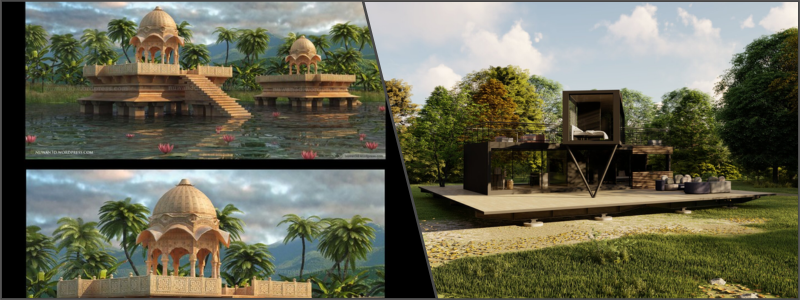
The competitive real estate market requires the ability to differentiate a property using very appealing yet accurately represented images. Architectural Computer-Generated Imagery has now become an essential tool for such efforts because of its ability to produce realistic and high-quality visuals that will get the attention of target buyers or investors.
For these reasons, the market for real estate marketing has changed, with even more firms and agencies now choosing to outsource architectural CGI services. This post looks at what makes people now outsource to CGI in the architecture and property sectors and other criteria that companies should consider to make a solid choice for such an outsourcing agency.
🚀 Table of contents
Need for crisp imagery
Real estate has always been a visual industry, but with the advent of modern digital technology, high-quality visuals have been pushed into a higher dimension. The potential buyer of yesteryear relied on printed brochures or simple photographs to get an idea of what a property might look like. However, today’s buyers expect immersive, photo-realistic images that will give them a clear understanding of exactly how a property will look when completed or in its current state.
Architectural CGI is a vital tool in meeting this expectation. Whether marketing new developments, illustrating renovation projects, or showcasing interior design concepts, these highly detailed digital renderings allow real estate professionals to communicate their vision in a way that traditional photography simply cannot match. From exterior shots to interior spaces, CGI provides the flexibility to create precise visualizations that showcase a property’s best features while allowing for enhancements or adjustments to suit various market segments.
As demand increases for such high-quality images, the needed workforce also increases the number of highly skilled CGI artists as well as renderers. Estate agents and architectural design firms without this resource increasingly turn toward outsourcing because these help cut back costs.
One of the most compelling reasons to outsource architectural CGI is that it saves the firm a significant amount of money. Hiring and maintaining an in-house team of CGI artists and specialists can be expensive, especially for firms that may not require these services on a full-time basis. Outsourcing, on the other hand, provides a cost-effective alternative, as firms can pay only for the services they need without the overhead costs associated with full-time employees.
Besides saving on labor, outsourcing also helps to eliminate the need for investment in expensive software, hardware, and infrastructure. Advanced CGI software and powerful rendering machines are costly to purchase and maintain, and ensuring they are regularly updated can be a further financial burden. Outsourcing firms can, therefore, utilize the latest technology without the associated costs, tapping into the expertise of third-party vendors who already have the necessary resources.
It also provides scale flexibility. Real estate projects require CGI services that vary in relation to timelines and scope of work. Outsourcing allows scaling up or down depending on the situation; therefore, it helps ensure that firms do not overcommit or waste resources on projects that do not require full-time attention.
Access to specialized expertise
The creation of CGI is a very complex process that requires expertise in 3D modeling design services, rendering, lighting, and post-production. Outsourcing allows firms to tap into a pool of highly skilled professionals who are experts in these areas, thereby gaining access to knowledge and techniques that may not be available in-house.
Many outsourcing firms specialize only in architectural CGI, which can bring on board a level of expertise and experience that generalist design teams or photographers may miss. This goes a long way in ensuring the final output can be of such high standards that can meet standards of realism, details, and quality, hence rendering a more efficient marketing tool to real estate agencies.
Also, outsourcing companies hire various skill teams to work on a particular project, which opens the scope of work in the CGI production process. This can include photorealistic renders, 3D walkthrough animations, or even augmented reality visuals, which may not be possible for a general design firm to produce.
Faster turnarounds
The best part about real estate marketing is time. Be it launching a new development or closing a deal, having quality visuals on hand quickly makes all the difference. The outsourcing of architectural CGI can drastically reduce the amount of time required to produce quality visual content.
Outsourcing providers normally work with streamlined processes that allow them to deliver visualizations faster than in-house teams would. Agencies can often receive their CGI deliverables faster by working with an entire dedicated team of professionals, which would take a fraction of the time to do compared to working with them internally.
Additionally, the production companies can execute deadlines so tight. They could speed up production without devaluing quality. This is attributed to the dedication of artists to one project; hence, their work can come out fast; multiple people performing various tasks parallel, thus dividing and fine-tuning their production, hence high turnaround times.
More focus on core business
CGI architectural visualization services can also be outsourced. That would help real estate professionals and architects focus on their best business practices, managing developments, and serving clients. The time involved in building such precise 3D services and accurate visualizations is considerable, and it can be considered a technically intensive activity. Resources for concentrating on firm strategic activities include the acquisition of new clients, research in the marketplace, and creation of new businesses, thus becoming free.
This implies more time on the non-core business of the architectural firm and less on design and project management. Instead of wasting time on learning new tools or managing the technical aspects of the actual CGI production, architects will be able to work very closely with their outsourcing partner so that they can adequately communicate their vision to achieve the desired output.
This increased focus on the core business leads to improved overall productivity and enhances output in the areas that directly affect revenue generation.
This is a chance to collaborate with companies and talent from around the world. Geographical boundaries are not as significant in the contemporary world, and companies can access a global talent pool to get the best CGI 3D artists and experts for the job. It increases the potential talent pool, offering real estate companies an immense variety of styles, techniques, and perspectives.
Further, it is also scalable. Different real estate projects vary in their size and complexity. Therefore, one significant benefit of outsourcing production is that it can scale the process up or down according to the requirements of the project. A company could need just some high-quality still images or all the animations and interactive experiences in its suite. It is easier for outsourcing to vary resources according to what the project might demand.
As discussed, working in external teams makes it easier to reduce potential complications, such as the lack of access to resources for producing CGI elements. In all this, whether the project being involved is a smaller apartment complex or even a high commercial development, outsourced architectural design companies are easily incorporated and adjusted based on the current project’s specifications.
Although outsourcing has several advantages, there are also several risks associated with it, which include quality control and communication. However, proper selection of a visualization expert may reduce these risks. Firms must select partners who have experience working with architectural visualization, understand all the details related to the project, and clearly communicate with their partners.
In terms of quality, real estate agencies and architecture firms should ensure clear expectations at the beginning of the project. Such expectations include project goals, timelines, and desired outcomes. The regular checkpoints of the production process will help avoid miscommunication and ensure that the final product meets the standards required. The use of detailed contracts and agreements can help protect both parties and reduce the potential for misunderstandings.
By partnering with experienced and reliable outsourcing firms, companies can manage risks while maintaining high levels of quality assurance throughout the CGI creation process.
Conclusion
This strategy has proven crucial for real estate agencies and architectural firms as it enables them to remain competitive in the very visually orientated world of real estate marketing. The advantages that make outsourcing such an attractive choice include reduced financial burdens, direct access to highly specialized skills, quicker turn-around times, and the capacity to focus on core business activities by firms of any size.
How Cad Crowd can help
Whether it is creating stunning visuals for new development, creating interactive virtual tours, or generating high-quality renderings for brochures and websites, outsourcing allows real estate professionals to leverage the latest technology and skills without the financial burden of maintaining an in-house CGI team.
Cad Crowd has worked with numerous architectural and design firms to find the best designers and 3D experts for their projects. Find the best ones through Cad Crowd with a free quote today.
MacKenzie Brown is the founder and CEO of Cad Crowd. With over 18 years of experience in launching and scaling platforms specializing in CAD services, product design, manufacturing, hardware, and software development, MacKenzie is a recognized authority in the engineering industry. Under his leadership, Cad Crowd serves esteemed clients like NASA, JPL, the U.S. Navy, and Fortune 500 companies, empowering innovators with access to high-quality design and engineering talent.