How to Choose the Right BIM Services Provider For Your Architectural Firm


Let’s be real—when you’re knee-deep in the design stage of a project, managing client needs, zoning issues, and impending deadlines, the last thing you want is a BIM partner who won’t get it done. Hiring the right Building Information Modeling (BIM) services firm from the industry giant, Cad Crowd, has the potential to eliminate the madness or contribute to it. That choice? That’s not something to be taken lightly.

BIM is no longer a buzzword; it’s baked into every stage of architectural practice, ranging from initial conceptualization to facility management. Whether you’re a small firm new to 3D modeling or a large practice looking to expand cost-effectively, securing a BIM partner who shares your ethos, workflow, and ambitions is paramount.

What are BIM services?
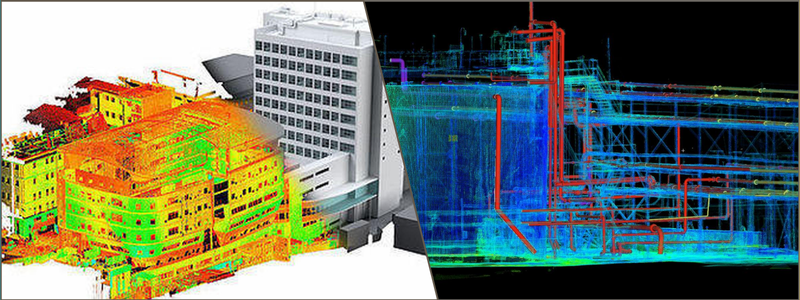
BIM modeling conversion and scan examples

RELATED: Why architects outsource 3D modeling services and the benefits for your design company

BIM (Building Information Modeling) services consist of the creation and maintenance of digital models representing physical and functional building characteristics. BIM services facilitate the planning, design, construction, and operation of buildings in 3D models with embedded data.

BIM allows architects, engineers, contractors, and stakeholders to coordinate better, eliminate errors, and enhance efficiency in the project’s life cycle. Services can encompass 3D modeling design services, clash detection, quantity takeoffs, cost estimation, and facility management.

By offering a common knowledge base, BIM services simplify workflows, improve visualization, and enable improved decision-making in construction and infrastructure development on residential, commercial, and industrial projects.

Now, you’ve learn what BIM services are all about. So, how do you actually go about selecting the right one, then?

This manual takes you through the actual questions to ask, red flags to look out for, and clever methods to make your architecture firm receive the BIM services it actually requires.

Define your requirements before you begin searching

Even before you call on prospective BIM providers, you have some research to conduct.

  • What stage of your project(s) will require BIM integration?
  • Do you need full BIM coordination or merely model development?
  • Do you require clash detection, quantity take-offs, 4D scheduling, or 5D cost estimation?
  • What software do you presently use—Revit, ArchiCAD, Navisworks—and will the vendor have to integrate into your environment?

Getting these questions in sequence is like drafting a good project brief. It provides direction, clarity, and expectations for architectural design firms. Having a clearly defined scope also keeps you from paying too much for services you don’t require—or worse, being stuck with a provider who can’t provide what you do.

Here’s the way to think about it: you wouldn’t start building without blueprints. The same rule applies here.

Review their portfolio, but read between the lines

A glitzy portfolio is good. It demonstrates capability, scope, and design potential. But don’t get impressed by nice renderings and shiny case studies alone.

Here’s what to look for instead:

  • Project similarity: Have they done buildings similar to yours—educational campuses, hospitals, commercial towers, or heritage projects?
  • Complexity level: Can they deal with irregular geometries, sustainability modeling, or high-end parametric elements?
  • Team integration: Did they work as silent team players or take charge of BIM coordination among various disciplines?

Request to view the real BIM outputs, not glossy renders. Ask about the model LOD (Level of Development), documentation quality, and if they used open standards such as IFC (Industry Foundation Classes).

🚀 Pro tip: If they’ve worked with MEP services or structural consultants you know and trust, that’s a good indicator of collaborative compatibility.

Verify technical competency, not software know-how

Anyone can say they “use Revit.” That’s not sufficient. You must know how well they do it—and if they do it smartly.

Some questions to consider:

  • What BIM standards or naming conventions do they use?
  • Are they able to design custom parametric families for specialty items?
  • Do they provide Revit API scripting or Dynamo automations for efficiencies?
  • How do they handle version control and data interoperability with other tools?

Dig into their workflow. A good BIM provider will be eager—even proud—to share their process and how they approach data-rich modeling. Look for evidence that they don’t just draw in BIM—they think in BIM.

RELATED: How structural engineers improve custom home design when you hire architects & design firms
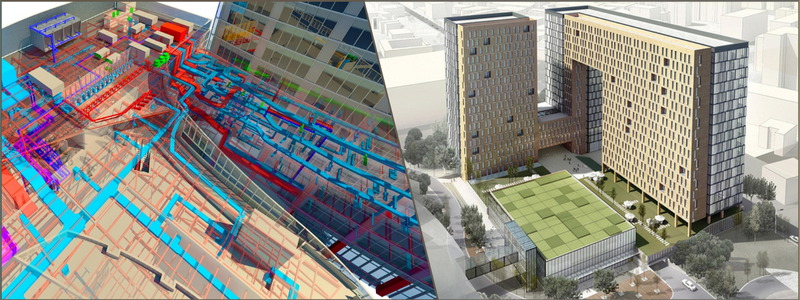
BIM modeling with an MEP and conversion

Ask about communication and coordination skills

Here’s a universal truth: technical brilliance means nothing if it doesn’t come with communication.

Your architectural BIM partner will become an extension of your team, so whether or not they can handle expectations, report back to you, and communicate in your language is important—a big deal.

Assess the following:

  • How do they process feedback loops?
  • Will they attend coordination meetings with contractors and consultants?
  • Do they offer model sharing through cloud platforms such as BIM 360 or Trimble Connect?
  • What’s their response time when it’s the critical design phases?

Certain companies even appoint a BIM Manager who speaks directly to your team. That single point of contact can be worth its weight in gold when working through model conflicts or reconciling new scope demands.

A willing partner who knows architectural schedules (and the actual pressures behind them) can make all the difference.

Check references—then dig a bit deeper

Don’t miss this step.

A call to a previous client will show you something that no portfolio or presentation ever will. Were deadlines met? Were revisions executed smoothly? Did the models perform in clash detection meetings?

Some questions to ask references wisely:

  • What was the most difficult aspect of the project, and how did the BIM provider react?
  • Would you hire them again?
  • How did they manage change requests?
  • Were their deliverables consistent with your BIM execution plan?

If possible, connect with others who aren’t on the reference sheet—like someone you happen to know at LinkedIn who’s worked with them in the past. That uncensored feedback might be pure gold for any architectural planning and design firm.
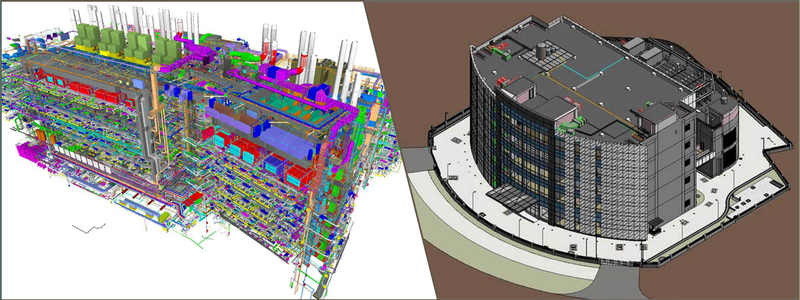
BIM modeling service examples including for an MEP plan

RELATED: How 3D rendering helps collaboration between clients and design services companies

Evaluate scalability and long-term fit

Suppose your company is expanding, or expanding to tackle bigger, more challenging projects next year. Will this BIM supplier scale with your business?

Investigate the following:

  • Number of people in their team, as well as their capacity
  • The capacity to integrate rapidly for dynamic projects
  • BIM Level 2 or Level 3 maturity model support
  • ISO 19650 certification or knowledge

Also, ask if they can provide assistance throughout a project’s lifecycle—through design development, construction administration, and even into facilities management.

A partner that grows with you saves you the inconvenience of re-hiring or retraining in the future.

Know their pricing model

No one likes budget surprises.

Get straight about how they bill:

  • Is it by the hour, per model, or per square foot of project area?
  • Are revisions, coordination meetings, or rendering extras included in the separate costs?
  • Do they have fixed-price packages for schematic, design development, and construction documentation stages?

Clear-cut pricing is a mark of professionalism. It also allows you to judge cost-to-value for 3D modeling experts accurately.

Bonus tip: Don’t always go for the lowest bid. You’re not just paying for models—you’re investing in accuracy, collaboration, and project flow.

Ensure data security and legal clarity

As BIM becomes more integrated with cloud platforms and IoT devices, data privacy and IP ownership can get murky.

Make sure you:

  • Sign NDAs and IP agreements
  • Clarify who owns the model and data at project completion
  • Understand where your files will reside—on local servers, private cloud, or third-party sites
  • Define data backup and versioning policies

You don’t want your models (or client information) to be appearing in another project. A reputable BIM provider will have security and IP rights in mind.

Pilot project testing

Not convinced yet? Run a low-risk pilot. For example, through a simple 3D visualization service, you can help yourself get ahead of any issues that you may face with the project.

Assign them a small part of your next project—a lobby model, a bathroom block, or a parking garage layout. See how they deliver under your timeline, feedback structure, and coordination expectations.

This trial-by-fire can reveal a lot:

  • Are they proactive or reactive?
  • Do they anticipate issues or just follow instructions?
  • Can they troubleshoot missing or unclear design intents?

It’s like dating before marriage—better to find out early if the fit isn’t there.

Trust your instincts and culture fit

This may sound fluffy, but it’s essential.

Your perfect BIM partner won’t merely check the boxes on tech and cost. They must resonate with your firm’s design ethos, culture, and workflow approach.

  • Do they prioritize design integrity over speed?
  • Are they adaptable enough to work with changing sketches and ideas?
  • Do they honor the role of architecture, or are they all about the tech?

When a BIM provider is not only aware of your files but also of your why, they can become a long-term creative partner—not merely a subcontractor.

RELATED: Benefits of outsourcing architectural CGI services for real estate marketing agencies

Final thoughts: Opting for impact, not only output

Your ideal BIM services provider is not a vendor—they’re an ally in your architectural journey. They can assist you in solving constructability challenges before they come up, impress stakeholders with pristine visuals, and maintain your project documentation bulletproof.

Yes, the process of selection may be time-consuming. It should be. But the reward? It’s smoother workflows, reduced errors, improved collaboration, and ultimately—better architecture.

So the next time you’re up to your neck in a concept sketch, just keep this in mind: your BIM partner at Cad Crowd should make your vision easier to build—not harder to describe. Get a quote today and get it for free!

author avatar

MacKenzie Brown is the founder and CEO of Cad Crowd. With over 18 years of experience in launching and scaling platforms specializing in CAD services, product design, manufacturing, hardware, and software development, MacKenzie is a recognized authority in the engineering industry. Under his leadership, Cad Crowd serves esteemed clients like NASA, JPL, the U.S. Navy, and Fortune 500 companies, empowering innovators with access to high-quality design and engineering talent.

Connect with me: LinkedInXCad Crowd

Convert Postman code to regular C# code


postman screen shot

var client = new RestClient("https://seller.digikala.com/Account/Login");
var request = new RestRequest(Method.POST);
request.AddHeader("postman-token", "0e4d8dba-29da-0b26-1b43-1bf974e9b5de");
request.AddHeader("cache-control", "no-cache");
request.AddHeader("content-type", "application/x-www-form-urlencoded");
IRestResponse response = client.Execute(request);

I can send request successfully and login to site in postman, but I can’t do it in VS. This is my code in VS:

var client = new RestClient("https://seller.digikala.com/Account/Login");

var request = new RestRequest(Method.POST);
request.AddParameter("IsPersistent", true, ParameterType.GetOrPost);
request.AddParameter("Password", "myPass", ParameterType.GetOrPost);
request.AddParameter("UserName", "myUsername", ParameterType.GetOrPost);
request.AddParameter("returnUrl", "/Account/Login", ParameterType.GetOrPost);
request.AddHeader("cache-control", "no-cache");
request.AddHeader("content-type", "application/x-www-form-urlencoded");

IRestResponse response = client.Execute(request);

but I get “unauthorized” message (401) in VS

Insta360 X5 Review: The Best 360 Camera You Can Buy


Insta360’s X-series 360-degree cameras have long dominated the market. They have great video quality, an easy-to-use interface, and simple editing software, which makes these the most beginner-friendly 360 cameras around. The latest version, the Insta360 X5, continues that tradition while bringing larger sensors with even better-looking video.

The X5 is a worthy upgrade; video quality is better, battery life is improved, and new features like the PureVideo lowlight mode and replaceable lenses make the X5 the most compelling 360 camera on the market.

What’s New

Image may contain Electronics Camera and Video Camera

Photograph: Scott Gilbertson

The big news in the X5, and the reason to consider upgrading even if you already have the X4, are the new twin 1/1.28-inch sensors. They’re a considerable step up from the 1/2-inch sensors in the X4. At the same time, the video specs have not changed much at all, with 8K 30 fps and 5.7K 60 fps at the high end. A larger sensor with the same resolution means more detail in that footage, which is exactly what you get here. This is without a doubt the best-looking footage I’ve seen from a 360 camera.

Keep in mind that the 8K refers to the overall 360-degree shot. When you actually frame that footage in the app, the highest resolution you’ll be able to export is 4K. But the 4K footage you’ll get is markedly better than what the X4 delivers.

The footage coming out of the X5 is great for a 360 camera. Bear in mind, though, that almost any other newer action camera is going to have somewhat better video quality. The appeal of the 360 camera is that it can capture what’s behind you, whereas Insta360’s traditional action cam, the Ace Pro 2 (8/10, WIRED Recommends), cannot. This makes 360 cameras perfect for filming when you don’t know exactly how you want to frame your shot, for example while riding a bike, skiing, skateboarding, and so on. In the past, to get this kind of shoot-everything, frame-later flexibility, you had to give up some video quality. While that’s still true to an extent, with the X5 you’re giving up very little in terms of video quality.

Image may contain Photography Electronics Mobile Phone Phone Baby Person Camera and Video Camera

Photograph: Scott Gilbertson

Wildfire Prevention: AI Startups Support Prescribed Burns, Early Alerts


Artificial intelligence is helping identify and treat diseases faster with better results for humankind. Natural disasters like wildfires are next.

Fires in the Los Angeles area have claimed more than 16,000 homes and other structures so far this year. Damages in January were estimated as high as $164 billion, making it potentially the worst natural disaster financially in U.S. history, according to Bloomberg.

The U.S. Department of Agriculture and the U.S. Forest Service have reportedly been redirecting resources in recent months toward beneficial fires to reduce overgrowth.

AI enables fire departments to keep more eyes on controlled burns, making them safer and more accepted in communities, say industry experts.

“This is just like cancer treatment,” said Sonia Kastner, CEO and founder of Pano AI, based in San Francisco. “You can do early screening, catch it when it’s in phase one, and hit it with really aggressive treatment so it doesn’t progress — what we’ve seen this fire season is proof that our customers across the country use our solution in this way.”

San Ramon, California-based Green Grid, which specializes in AI for utility companies, in September alerted its customer at a Big Bear resort that a fire started in the San Bernardino National Forest was near, said Chinmoy Saha, the company’s CEO. By acting early, the resort customer was able to prepare for the needed suppression measures for the fire before it reached and became uncontrollable, he said. Due to the favorable weather conditions, the fire did not reach the customer territory.

In the recent Los Angeles area fires, Saha said he had been in discussion with a customer seeking to bring AI to cameras located at the site of the now-devasted Eaton fire that has claimed 17 lives and more than 9,000 buildings.

“If we had our system there, this fire could have been mitigated,” said Saha. “Early detection is the key, so the fire is contained and it doesn’t become a catastrophic wildfire.”

Aiding First Responders With Accelerated Computing

Pano’s service provides human-in-the-loop AI-driven fire detection and alerts that have enabled fire departments to act faster than from 911 calls, accelerating containment efforts, said Kastner.

The company’s Pano Station uses two ultra-high-definition cameras mounted on top of mountains like a cell tower, rotating 360 degrees every minute to capture views 10 miles in all directions. Those images are transmitted to the cloud every minute, where AI models running on GPUs do inference for smoke detection.

Pano AI’s Pano Station in Rancho Palos Verdes

Pano has a daytime smoke detection model and a nighttime near infrared model looking for smoke, as well as a nighttime geostationary satellite model. It has a human in the loop for verifying the detections, and it can be confirmed using digital zoom and time-lapse imagery.

It trains on NVIDIA GPUs locally and runs inference on NVIDIA GPUs in the cloud.

Harnessing AI for Controlled Burns

California Department of Forestry and Fire Protection (CAL FIRE) is carrying out prescribed fires, or controlled burns, to reduce dry vegetation that creates fuel for wildfires.

“Controlled burns are necessary, and we didn’t do a good job in California for the past 30 or 40 years,” said Saha. Green Grid has deployed its trailer mounted AI camera sensors for monitoring fires and control burns before they go out of control.

Pano can be used by fire departments to monitor controlled burn zones with its AI-driven cameras to make sure that plumes of smoke don’t appear outside of the permitted zone, maintaining safety.

The company has its cameras stationed at Rancho Palos Verdes, south of the recent Los Angeles area fires.

“The area around the palisades fire was a very overgrown forest, and with a lot of dead fuels, so our hope is that there is going to be more focus on prescribed fires,” said Kastner.

Embracing AI at Fire Departments for Faster Mitigation

CAL FIRE is partnered with Alert California and UC San Diego for a network of cameras owned by investor-owned utilities, CAL FIRE, U.S. Forest Service and other U.S. Department of the Interior agencies.

Through that network, they’ve implemented an AI program that looks for new fire starts. It pans every two minutes and continuously updates, and Alert California has the most up-to-date information from this network.

If AI can enable fire departments to get to the scene of a fire when it’s just a few acres, it’s a lot easier to control than if it’s 50 or more acres, said David Acuna, battalion chief at CAL FIRE, Clovis, California. This is particularly important in remote areas where it might take hours before a human sees and reports a fire, he added.

“They use AI to determine if this looks like a new start,” said Acuna. “Now the key here is the program will then send an email to the relevant emergency command center, saying ‘Hey, I think we spotted a new start, what do you think?’ And it has to be verified by a human.”

Nintendo Will Now Brick Your Switch If It Detects Piracy


Nintendo has one message for everyone complaining about its newest games’ $80 price tag: Piracy isn’t an option. While the brand certainly never encouraged the unlawful making or distribution of game copies, a quick change to its Nintendo Account User Agreement introduces a new consequence for creating, using, or sharing “derivative works” instead of its original IPs: Break the rules, and Nintendo will brick your Switch.

The Nintendo Account User Agreement covers any web-connected Nintendo service, including eShop, digital games, and the Nintendo Switch Online subscription service. Until this week, the agreement had stayed the same for more than four years and had merely advised that users were “not allowed to lease, rent, sublicense, publish, copy, modify, adapt, translate, reverse engineer, decompile or disassemble all or any portion of the Nintendo Account Services without Nintendo’s written consent, or unless otherwise expressly permitted by applicable law.”

Nintendo’s changes to the agreement, which were first spotted by Game File’s Stephen Totilo, expand on what isn’t tolerated. The contract now explicitly warns users not to “distribute, offer for sale, or create derivative works” of covered services; “bypass, modify, decrypt, defeat, tamper with, or otherwise circumvent any of the functions or protections” of the services; “obtain, install, or use any unauthorized copies” of digital games; or “exploit the Nintendo Account Services in any manner other than to use them in accordance with the applicable documentation and intended use.” 

Super Mario Bros gameplay screenshot.


Credit: Nintendo

Nintendo’s decision to update its user agreement now isn’t surprising: The Switch 2 will hit shelves in less than a month, and the console’s new online features, GameShare and GameChat, demand a refresh. Nintendo has also always had a zero-tolerance policy for anything that even remotely smells like IP theft, from actually emulating its games to merely talking about emulation

But now, Nintendo isn’t just threatening to get its lawyers involved—it’s also putting gameplay on the line. Per another update to its online user agreement, violations of the above terms might lead Nintendo to “render the Nintendo Account Services and/or the applicable Nintendo device permanently unusable in whole or in part.” Translation: Running stolen games on your Switch could bring about the end of said Switch.

The threat could make the Switch 2 less attractive to emulation enthusiasts, whether they’re actually peeved about the new game price increase or simply enjoy revisiting old classics. And that’s not something Nintendo can afford, based on president Shuntaro Furukawa’s comments during Thursday’s FY2025 earnings conference. President Trump’s tariffs will already cost Nintendo “tens of billions of yen,” according to Furukawa, and recouping that loss isn’t as easy as simply upping the price of the new console.

“If prices of daily necessities like food increase, then people will have less money to spend on game consoles,” Furukawa said. “If we were to adjust the price of the Switch 2, this could decrease demand.”

Rogue Pulsar Snaps Galactic Bone in Milky Way’s Spine


A galactic filament that stretches across 230 light-years in the Milky Way has suffered from a strange kink that has distorted its magnetic field, appearing as a fracture in a massive bone. New X-ray images captured by the Chandra Observatory may have finally helped astronomers diagnose its ailment, naming a fast-spinning neutron star as the culprit.

The center of the galaxy is marked by enormous, bone-like structures threaded with parallel magnetic fields and swirling, high-energy particles. Located roughly 26,000 light-years from Earth, G359.13—also known as The Snake—is the longest and brightest of these structures. Despite its size, the bone-like structure appears to have been struck by a fast-moving, rapidly spinning neutron star, or pulsar, causing a break in the otherwise continuous length of G359.13, according to a new paper published in the May 2024 issue of the Monthly Notices of the Royal Astronomical Society.

Bone
X-ray: NASA/CXC/Northwestern Univ./F. Yusef-Zadeh et al; Radio: NRF/SARAO/MeerKat; Image Processing: NASA/CXC/SAO/N. Wolk

Using images of the galactic bone captured by NASA’s Chandra X-ray Observatory and radio data from the MeerKAT radio array in South Africa, the team behind the paper was able to examine the fracture up close to identify the culprit. The particles that make up the Snake, and other galactic filaments, emit radio waves, which can be detected by arrays such as MeerKAT.

The images fittingly resemble medical X-rays of a long, thin bone with a fracture in the center. By examining the images, the astronomers discovered an X-ray and radio source at the location of the fracture, which may come from electrons and positrons (the antimatter counterparts to electrons) that have been accelerated to high energies due to a pulsar smashing into them. The pulsar can be seen in the image thanks to its X-ray emissions, which caused it to get caught red-handed in its hit and run.

Pulsars are the chaotic remains of stars, forming in the aftermath of the collapse and supernova explosion of a massive star. These explosions often send the pulsar flying at high speeds while rapidly rotating and beaming electromagnetic radiation. There’s a lot going on here, and the pulsar isn’t exactly watching where it’s going.

The researchers believe a speedy pulsar may have caused the fracture by smashing into G359.13 at speeds between one million and two million miles per hour. The likely collision distorted the magnetic field in the bone, which caused the radio signal to also become warped.

The Milky Way is full of violent encounters like this, and the busted filament is just the latest sign of the galaxy’s ongoing chaos. With tools like Chandra and MeerKAT, astronomers are continuing to catch these cosmic troublemakers in the act.

Megaton Rainfall Free Download (Build 4125944)


Megaton Rainfall Pre-Installed Worldofpcgames

Megaton Rainfall Direct Download:

‘Megaton Rainfall’ is a first-person superhero game. A global alien invasion is taking place and you must face it – alone. Chase massive destruction devices at supersonic speeds around an Earth that’s as large as the real thing and populated with semi-procedurally generated cities. Then finish off the alien devices with your lethal energy blasts. Just be careful to avoid human casualties! You are so powerful, you’ll leave a trail of collapsed buildings if you miss your targets! Feel unprecedented freedom of movement as you fly through buildings, break the sound barrier, and accelerate to extraordinary speeds. Then rise above the atmosphere, circumnavigate the Earth in seconds, and get ready for your next battle. ‘Megaton Rainfall’ is the ultimate superhero experience! Megaton Rainfall 2 would probably be one of the most sold VR games of all time if they renamed it and upgraded it to modern standards. Darfall

Features and System Requirements:

  • Combat alien invaders while trying to avoid collateral damage.
  • Destroying cities accidentally with your immense power adds a layer of challenge and responsibility.
  • The game combines striking, surreal visuals with an ambient, orchestral soundtrack that enhances the scale and emotion of its apocalyptic setting.

Screenshots

System Requirements

Recommended
OS *: Windows 7+
Processor: Intel i5-4590 / AMD FX 8350 (or better)
Memory: 4 GB RAM
Graphics: Nvidia GTX 750 2GB / Radeon HD 7770 2GB / Intel HD 630 (or better)
DirectX: Version 11
Storage: 1536 MB available space
VR Support: SteamVR or Oculus PC
Support the game developers by purchasing the game on Steam

Installation Guide

Turn Off Your Antivirus Before Installing Any Game

1 :: Download Game
2 :: Extract Game
3 :: Launch The Game
4 :: Have Fun 🙂

What Are GPU Clusters and How They Accelerate AI Workloads


What Are GPU Clusters and How They Accelerate AI Workloads_blog_hero

Introduction

AI is growing rapidly, driven by advancements in generative and agentic AI. This growth has created a significant demand for computational power that traditional infrastructure cannot meet. GPUs, originally designed for graphics rendering, are now essential for training and deploying modern AI models.

To keep up with large datasets and complex computations, organizations are turning to GPU clusters. These clusters use parallel processing to handle workloads more efficiently, reducing the time and resources needed for training and inference. Single GPUs are often not enough for the scale required today.

Agentic AI also increases the need for high-performance, low-latency computing. These systems require real-time, context-aware processing, which GPU clusters can support effectively. Businesses that adopt GPU clusters early can accelerate their AI development and deliver new solutions to the market faster than those using less capable infrastructure.

In this blog, we will explore what GPU clusters are, the key components that make them up, how to create your own cluster for your AI workloads, and how to choose the right GPUs for your specific requirements.

What is a GPU Cluster?

A GPU cluster is an interconnected network of computing nodes, each equipped with one or more GPUs, along with traditional CPUs, memory, and storage components. These nodes work together to handle complex computational tasks at speeds far surpassing those achievable by CPU-based clusters. The ability to distribute workloads across multiple GPUs enables large-scale parallel processing, which is critical for AI workloads.

GPUs achieve parallel execution through their architecture, with thousands of smaller cores capable of working on different parts of a computational problem simultaneously. This is a stark contrast to CPUs, which handle tasks sequentially, processing one instruction at a time.

Efficient operation of a GPU cluster depends on high-speed networking interconnects, such as NVLink, InfiniBand, or Ethernet. These high-speed channels are essential for rapid data exchange between GPUs and nodes, reducing latency and performance bottlenecks, particularly when dealing with massive datasets.

GPU clusters play a vital role across various stages of the AI lifecycle:

  • Model Training: GPU clusters are the primary infrastructure for training complex AI models, especially large language models, by processing massive datasets efficiently.

  • Inference: Once AI models are deployed, GPU clusters provide high-throughput and low-latency inference, critical for real-time applications requiring quick responses.

  • Fine-tuning: GPU clusters enable the efficient fine-tuning of pre-trained models to adapt them to specific tasks or datasets.

The Significance of GPU Fractioning

A common challenge in managing GPU clusters is addressing the varying resource demands of different AI workloads. Some tasks require the full computational power of a single GPU, while others can operate efficiently on a fraction of that capacity. Without proper resource management, GPUs can often be underutilized, leading to wasted computational resources, higher operational costs, and excessive power consumption.

GPU fractioning addresses this by allowing multiple smaller workloads to run concurrently on the same physical GPU. In the context of GPU clusters, this technique is key to improving utilization across the infrastructure. It enables fine-grained allocation of GPU resources so that each task gets just what it needs.

This approach is especially useful in shared clusters or environments where workloads vary in size. For example, while training large language models may still require dedicated GPUs, serving multiple inference jobs or tuning smaller models benefits significantly from fractioning. It allows organizations to maximize throughput and reduce idle time across the cluster.

Clarifai’s Compute Orchestration simplifies the process of scheduling and resource allocation, making GPU fractioning easier for users. For more details, check out the detailed blog on GPU fractioning.

Key Components of a GPU Cluster

A GPU cluster brings together hardware and software to deliver the compute power needed for large-scale AI. Understanding its components helps in building, operating, and optimizing such systems effectively.

Head Node

The head node is the control center of the cluster. It manages resource allocation, schedules jobs across the cluster, and monitors system health. It typically runs orchestration software like Kubernetes, Slurm, or Ray to handle distributed workloads.

Worker Nodes

Worker nodes are where AI workloads run. Each node includes one or more GPUs for acceleration, CPUs for coordination, RAM for fast memory access, and local storage for operating systems and temporary data.

Hardware

  • GPUs are the core computational units, responsible for heavy parallel processing tasks.

  • CPUs handle system orchestration, data pre-processing, and communication with GPUs.

  • RAM supports both CPUs and GPUs with high-speed access to data, reducing bottlenecks.

  • Storage provides data access during training or inference. Parallel file systems are often used to meet the high I/O demands of AI workloads.

Software Stack

  • Operating Systems (commonly Linux) manage hardware resources.

  • Orchestrators like Kubernetes, Slurm, and Ray handle job scheduling, container management, and resource scaling.

  • GPU Drivers & Libraries (e.g., NVIDIA CUDA, cuDNN) enable AI frameworks like PyTorch and TensorFlow to access GPU acceleration.

Networking

Fast networking is critical for distributed training. Technologies like InfiniBand, NVLink, and high-speed Ethernet ensure low-latency communication between nodes. Network Interface Card (NICs) with Remote Direct Memory Access (RDMA) support help reduce CPU overhead and accelerate data movement.

Storage Layer

Efficient storage plays a critical role in high-performance model training and inference, especially within GPU clusters used for large-scale GenAI workloads. Rather than relying on memory, which is both limited and expensive at scale, high-throughput distributed storage allows for seamless streaming of model weights, training data, and checkpoint files across multiple nodes in parallel.

This is essential for restoring model states quickly after failures, resuming long-running training jobs without restarting, and enabling robust experimentation through frequent checkpointing.

Creating GPU Clusters with Clarifai

Clarifai’s Compute Orchestration simplifies the complex task of provisioning, scaling, and managing GPU infrastructure across multiple cloud providers. Instead of manually configuring virtual machines, networks, and scaling policies, users get a unified interface that automates the heavy lifting—freeing them to focus on building and deploying AI models. The platform supports major providers like AWS, GCP, Oracle, and Vultr, giving flexibility to optimize for cost, performance, or location without vendor lock-in.

Here’s how to create a GPU cluster using Clarifai’s Compute Orchestration:

Step 1: Create a New Cluster

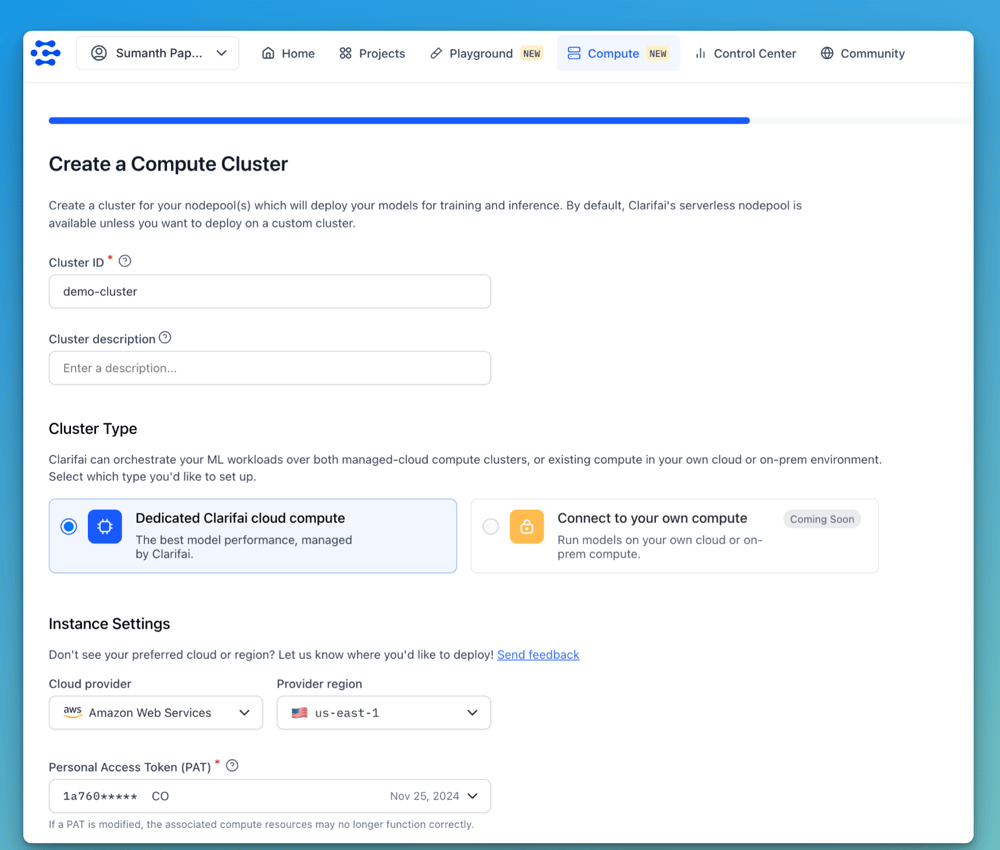
Within the Clarifai UI, go to the Compute section and click New Cluster.

You can deploy using either Dedicated Clarifai Cloud Compute for managed GPU instances, or Dedicated Self-Managed Compute to use your own infrastructure, which is currently in development and will be available soon.

Next, select your preferred cloud provider and deployment region. We support AWS, GCP, Vultr, and Oracle, with more providers being added soon.

Also select a Personal Access Token, which is required to authenticate when connecting to the cluster.

Screenshot 2025-05-07 at 6.10.31 PM

Step 2: Define Node Pools and Configure Auto-Scaling

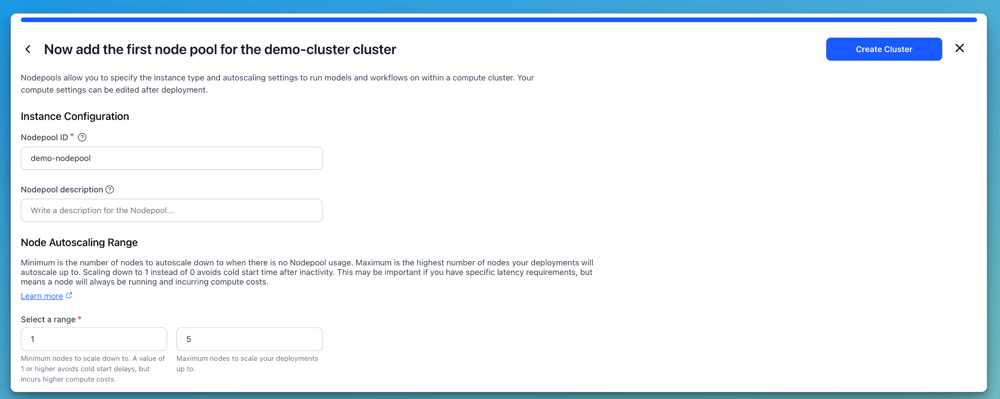
Next, define a Nodepool, which is a set of compute nodes with the same configuration. Specify a Nodepool ID and set the Node Auto-Scaling Range, which defines the minimum and maximum number of nodes that can scale automatically based on workload demands.

For example, you can set the range between 1 and 5 nodes. Setting the minimum to 1 ensures at least one node is always running, while setting it to 0 eliminates idle costs but may introduce cold start delays.

Screenshot 2025-05-07 at 6.16.07 PM

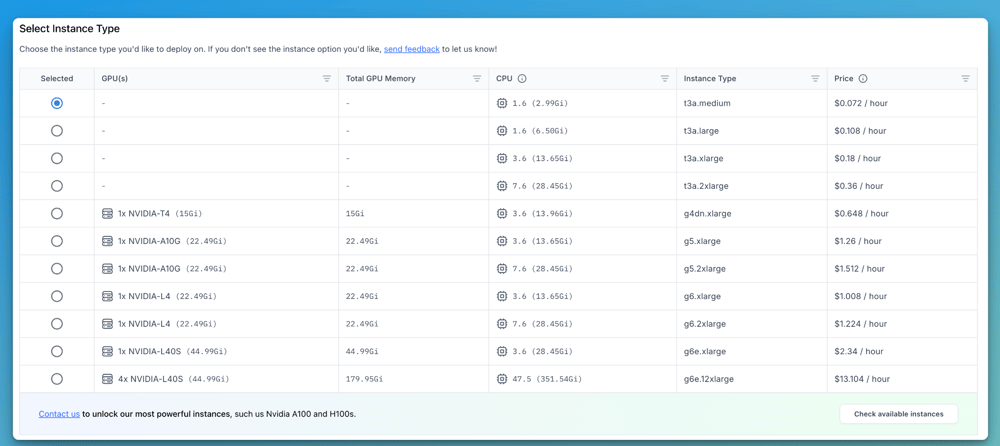
Then, select the instance type for deployment. You can choose from various options based on the GPU they offer, such as NVIDIA T4, A10G, L4, and L40S, each with corresponding CPU and GPU memory configurations. Choose the instance that best fits your model’s compute and memory requirements.

Screenshot 2025-05-07 at 6.18.13 PM

For more detailed information on the available GPU instances and their configurations, check out the documentation here.

Step 3: Deploy

Finally, deploy your model to the dedicated cluster you’ve created. You can choose a model from the Clarifai Community or select a custom model you’ve uploaded to the platform. Then, pick the cluster and nodepool you’ve set up and configure parameters like scale-up and scale-down delays. Once everything is configured, click “Deploy Model.”

Clarifai will provision the required infrastructure on your selected cloud and handle all orchestration behind the scenes, so you can immediately begin running your inference jobs.

If you’d like a quick tutorial on how to create your own clusters and deploy models, check this out!

Choosing the Right GPUs for your Needs

Clarifai currently supports GPU instances for inference workloads, optimized for serving models at scale with low latency and high throughput. Selecting the right GPU depends on your model size, latency requirements, and traffic scale. Here’s a guide to help you choose:

  • For tiny models (e.g., <2B LLMs like Qwen3-0.6B or typical computer vision tasks), consider using T4 or A10G GPUs.

  • For medium-sized models (e.g., 7B to 14B LLMs), L40S or higher-tier GPUs are more suitable.

  • For large models, use multiple L40S, A100, or H100 instances to meet compute and memory demands.

Support for training and fine-tuning models will be available soon, allowing you to leverage GPU instances for those workloads as well.

Conclusion

GPU clusters are essential for meeting the computational demands of modern AI, including generative and agentic applications. They enable efficient model training, high-throughput inference, and fast fine-tuning, which are key to accelerating AI development.

Clarifai’s Compute Orchestration simplifies the deployment and management of GPU clusters across major cloud providers. With features like GPU fractioning and auto-scaling, it helps optimize resource usage and control costs while allowing teams to focus on building AI solutions instead of managing infrastructure.

If you are looking to run models on dedicated compute without vendor lock-in, Clarifai offers a flexible and scalable option. To request support for specific GPU instances not yet available, please contact us.


Wordle today: Answer and hint #1421 for May 10


It’s the weekend, and you deserve a Wordle win. Which is why we’ve prepared all the help you could possibly need so you can breeze through Saturday’s game at whatever pace suits you best. Spend a while with today’s hint if you like the sound of taking it slow and steady, or mull over our tips for a while instead. The May 10 (1421) answer will always be ready to turn things around in a snap, whenever you want it to.

A win in two? For me, on a Saturday? What a treat. The only way my opening guess could have been better was if it was today’s winning word. Now then, what’s next now I have all this free time? Don’t worry if your game isn’t going as well as mine did—that’s what our help’s for.

Today’s Wordle hint

(Image credit: Josh Wardle)

Wordle today: A hint for Saturday, May 10

How to install the Visual Studio 2022 behind the proxy?


I am trying to install the visual studio behind a corporate environment but no luck
I have tried changing the machine.config as below at both the below places :
C:\Windows\Microsoft.NET\Framework64\v4.0.30319\Config and C:\Windows\Microsoft.NET\Framework\v4.0.30319\Config

as below at the end just before the </configuration> TAG

<configuration>
..
..
..

    <system.net>
      <defaultProxy useDefaultCredentials="true" />
</system.net>
</configuration>

But on launching the VisualStudioSetup or the vs_proffessional I always get the below screen which never moves forward.

Window Stuck

There was a release note in the Visual Studio which states that it uses the default proxy but seems like it is not taking?
Is there any way to install the Visual Studio behind the proxy?
Where to state the proxy address?
I seem to stuck in this for a week but no resolutions so far !