How to reduce your Madness in Wuchang Fallen Feathers


As it is in many Soulslikes, Wuchang: Fallen Feathers expects you to die multiple times, but it brings the Madness system to make all the effort pay off in one way or another.

Madness can make you stronger, but at the expense of raising the difficulty bar of already hard encounters. That’s why learning how Madness affects the game and how to respond to it is fundamental to enjoying and progressing in Wuchang: Fallen Feathers. There might be moments where you want to take advantage of the power you gain, or situations you’d rather play safe.

In this Wuchang: Fallen Feathers guide, we explain how the Madness system works and how to reduce your Madness level so you can learn how to prepare and customize your character for each encounter in the game.

How the Madness system works in Wuchang: Fallen Feathers

A Wuchang: Fallen Feathers screenshot showing the main character, Wuchang, facing the camera with red glowing eyes. She is beside a shrine.

Image: Leenzee/505 Games via Polygon

In Wuchang: Fallen Feathers, the main character has an inner demon that grows stronger depending on how much Madness you have. In practical terms, Madness is a gauge that fills in a bit when you die or kill non-Feathered humanoids, and it gives buffs and debuffs to your character.

After a couple of tests, we learned that, regardless of how you died — maybe you were fatally hit by an enemy’s powerful attack or you fell from a bridge into a creek — you gain 15 Madness points.

A Wuchang: Fallen Feathers screenshot showing the screen that appears when you die in the game. Message in Chinesse appears in the middle of the screen and below it’s written “You Have Fallen”. The scene becomes black and white.

Image: Leenzee/505 Games via Polygon

Dying is not the only method to gain Madness and fill in the gauge. Some consumable items can increase your Madness level, like Maddening Incense which also prevents the loss of Madness temporarily. Your level of Madness may also increase if you use the Invoke menu when worshipping shrines to buy items.

Some effects activate depending on the percentage of the gauge you’ve currently filled in. Above 90%, you start dealing more damage and earning more red mercury when defeating enemies, but you take more damage as well.

At the same time, being between 50% and 90% makes you lose most of your red mercury when you die. As an example, we had 140 when testing this and were left with only 42 after dying. Although the game says that you lose all your red mercury when above 90% of the gauge is filled in, in our tests, we still had some after dying.

A Wuchang: Fallen Feathers screenshot showing the character menu. In it, you can see the silhouette  of Wuchang in red, representing the level of Madness she is. There are some stats described in other sections of the screen, like Attack, Defense, Resistance, and other stats.

Image: Leenzee/505 Games via Polygon

You can keep track of your Madness level by using the small portrait on the bottom left side of the screen. By accessing the character menu, you can see the exact number of Madness points you already have alongside a visual representation of it. Wuchang’s appearance changes depending on the character’s Madness level, starting with red-glowing eyes and ending with demonic red marks appearing on her body in later stages.

How to reduce Madness in Wuchang: Fallen Feathers

A Wuchang: Fallen Feathers screenshot showing the message “Madness Retreats” which appears when you kill your Inner Demon and cleanses all the Madness you had.

Image: Leenzee/505 Games via Polygon

A high level of Madness might give your attacks in Wuchang: Fallen Feathers an extra kicker, but it also makes every enemy more difficult to face. If you don’t want to make this game harder to finish, don’t fret. There are some methods to reduce your Madness in Wuchang: Fallen Feathers.

The simplest method to get your Madness gauge back to zero is by killing or dying to your Inner Demon. When you reach max Madness level, your Inner Demon will materialize from the red mercury you dropped on the ground and attack you, if you go to the last place you died.

A Wuchang: Fallen Feathers screenshot showing the main character facing a humanoid figure wearing some white clothes.

Image: Leenzee/505 Games via Polygon

You can either kill them or be killed. In both cases, your Madness gauge gets cleansed. While the former is better since you recover the red mercury you’ve lost, the latter also works if all you want is to remove the debuff you receive from Madness.

A Wuchang: Fallen Feathers screenshot showing the main character interacting with a statue. You can see a menu giving the player the option to offer the Divine Gift to the statue. There’s a old lady beside the main character.

Image: Leenzee/505 Games via Polygon

If you haven’t reached max Madness level, there are other solutions. Killing Feathered enemies will reduce some Madness. For example, defeating a regular zombie-like enemy removes one Madness point. If you want to cleanse more Madness, you can also use a fragment of Divine Gift or Divine Gift by interacting with the statue you find in Shu Sanctum.

git – Revert master branch to previous merge in Visual Studio


First, let’s clarify that your title use of the word “Revert” does not necessarily mean the same thing as the Git command revert, which creates a new commit that undoes the changes in a previous commit. I believe your goal is to “Undo” the most recent PR to master, and there are 2 ways to do that, one of which is using the revert Git command.

Option #1: Reset master

This option will remove PR 12943 from master and make it look like it never happened. Since you are resetting and rewriting master, you cannot use your PR functionality to do this, and instead must force push. If you decide to force push master, which is a shared branch, you will need to effectively communicate with all developers of your repo, to explain that you are doing this. You may also need to provide guidance to developers how to rebase their branches in case they have in progress branches already started from the latest master.

Command Line:

git switch master
git reset --hard <commit-id-of-Merged-PR-12923>
# Update permissions on master
git push --force-with-lease # if this fails, fetch and inspect `master` again

Or Visual Studio:

To mimic the above functionality in Visual Studio, with master checked out right click on the commit “Merged PR 12923”, and select the option to do a hard reset. Then push. You may need to configure VS to enable force pushing.

Option #2: Revert PR 12943 from master

This option will create a revert commit which undoes all the changes brought in with PR 12943. This new commit can then be PR’d into master as usual. The history will remain intact. Although Azure DevOps (which it looks like you’re using) offers the ability to revert a PR using the web UI, I find it a cleaner to do it from the command line:

git fetch
# create a new branch starting from master
git switch -c revert-PR-12943 origin/master --no-track
git revert HEAD -m 1 # this will revert the merge commit at your current HEAD
# consider editing the commit message with why you are doing this
git push --set-upstream origin revert-PR-12943
# Now PR revert-PR-12943 into master

Samsung might switch things up with its Galaxy S26 lineup


What you need to know

  • Samsung may be ditching the standard Galaxy S26 model for a new “Pro” variant this time around.
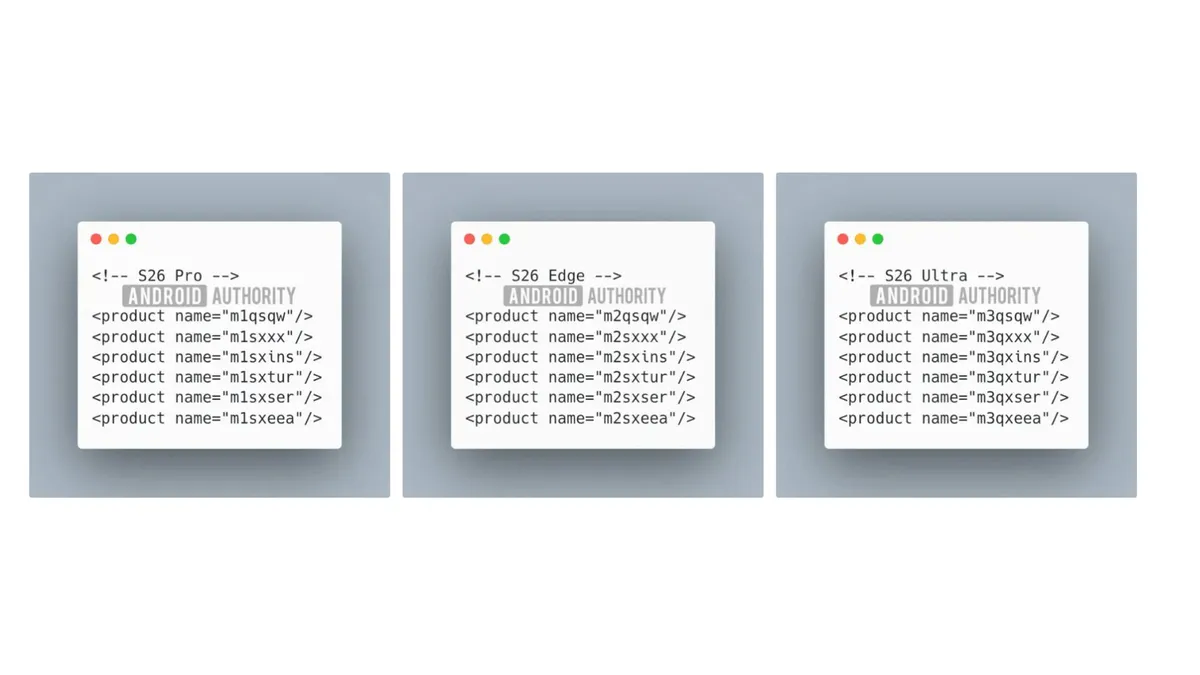
  • A recent deep dive into an internal One UI 8 build shows evidence of the new lineup consisting of three phones: Galaxy S26 Pro, Galaxy S26 Edge, and Galaxy S26 Ultra.
  • Samsung could also be ditching its Plus model for the “Edge” in its next series.

Samsung might make several heads turn with its next flagship series. A new deep dive into One UI 8’s build suggests that it could be giving up on the standard Galaxy S26 for a new Galaxy S26 Pro (as first spotted by Android Authority).

This comes after rumors that Samsung could also replace the Plus variant with the all-new Edge, with some tweaks, hinting that the Korean OEM might be switching things up in a huge way. The website seems to have stumbled upon evidence for this line-up rebranding in the One UI 8 build, and the product codenames seemed to have indicated that there may not be a base or, as they say, vanilla variant for the Galaxy S26 series next year.

“Instead, Samsung’s upcoming flagship series appears to consist of three models: Galaxy S26 Pro, Galaxy S26 Edge, and Galaxy S26 Ultra,” the website stated.

Galaxy S26 series shuffle

(Image credit: Android Authority)

Sharing screenshots of the product names, the website stated that their findings in the firmware contradict previous leaks where the series’ codename started with NP (New Paradigm). Instead, the build labels the three alleged devices of the Galaxy S26 series as M1, M2, and M3, which could match up to be the Galaxy S26 Pro, S26 Edge, and S26 Ultra (without the standard and plus models).

Opera takes its browser beef with Microsoft to Brazil in antitrust complaint


Opera is filing an antitrust complaint against Microsoft in Brazil, alleging it creates an unfair environment for alternate browsers to compete with Edge. The Norway-based company claims Microsoft’s deals to make Edge the exclusive pre-installed browser on Windows machines creates an unfair environment for alternate browsers to compete. Opera also argued that Microsoft uses design tactics and dark patterns to further discourage people from downloading and using rival products. It is asking Brazil’s Administrative Council for Economic Defense (CADE) to pursue remedies against Microsoft.

“Microsoft thwarts browser competition on Windows at every turn. First, browsers like Opera are locked out of important pre-installation opportunities,” Aaron McParlan, general counsel for Opera, said in a statement. “And then Microsoft frustrates users’ ability to download and use alternative browsers.”

This isn’t the first time these two companies have clashed. Opera sued Microsoft in the EU with a similar argument that bundling Internet Explorer was anticompetitive. , it also argued (albeit unsuccessfully) that Microsoft should have gatekeeper designation for the Edge browser under the EU’s Digital Markets Act.

Eve Free Download (v1.01 & Uncensored) –


Alien Quest Eve Pre-Installed Worldofpcgames

Alien Quest: Eve Direct Download:

Alien Quest: EVE is a side-scrolling platform game. It’s inspired by Super Metroid and Metroid Fusion but also has RPG status system. When your character levels up, you get the Stat Points that be used to power up your character like Diablo.​ Best smutty metroidvania at this moment. Pretty difficult but rewarding as well. Good hero, beautiful animations, cool enemies and animations with them. Even after beathing you game it’s worth to keep it on your PC just to rewatch animations from time to time.Definetly worths the time it takes. Date Banger

Features and System Requirements:

  • Use melee attacks and sci-fi weaponry to defeat monsters while exploring a labyrinthine alien world.
  • Unlock new skills and power-ups that help Eve access previously unreachable areas, similar to classic exploration-based platformers.
  • Stylized, high-quality pixel graphics with detailed animations and environments that evoke a dark alien atmosphere.
  • Face a variety of enemy types and intense boss battles that test both reflexes and strategy.

Screenshots

System Requirements


OS: Windows XP/Vista/7/8/8.1/10
Processor: INTEL 20. GHz Dual Core
Memory: 1 GB RAM
Graphics: Video card with at least 256 MB or more
DirectX: Version 9.0c
Storage: 300 MB available space

Installation Guide

Turn Off Your Antivirus Before Installing Any Game

1 :: Download Game
2 :: Extract Game
3 :: Launch The Game
4 :: Have Fun 🙂

Parrying has never seemed more whimsical than in dollhouse soulslike Memoria Wake


There are at least two ways to write about parrying mechanics. On the one hand, you have people like me who compose farking ridiculous intros such as “a good parry mechanic is a kind of redemption”, then spend hundreds of words overegging the pudding. On the other, you have Nic, who sums parrying up far more elegantly as “a pleasingly low-effort method to make your opponent look very silly”. I hope that both Nic and I will be at home in Memoria Wake, a new isometric action-RPG in which you can parry giant black cats with an umbrella. There’s now a demo on Steam.

Continue reading “Parrying has never seemed more whimsical than in dollhouse soulslike Memoria Wake”

Watch Live: Visual Studio Toolbox at VS LIVE! Redmond 2025


Join Robert Green and Leslie Richardson for a full day of live sessions, demos, and interviews.

Live from Microsoft HQ – Stream Tuesday’s Sessions with Visual Studio Toolbox!

On Tuesday, August 5, join us for a special edition of Visual Studio Toolbox Live—broadcast from VS LIVE! Redmond and hosted by Leslie Richardson and Robert Green. You’ll get a full day of Microsoft-led sessions, live studio commentary, behind-the-scenes interviews, and exclusive insights straight from campus.

👉 Click here to set a YouTube reminder so you don’t miss a moment.

🎤 What You’ll See on Tuesday

We’re streaming five sessions led by Microsoft product teams across Visual Studio, Azure, GitHub Copilot, and .NET. Whether you’re looking to boost your daily productivity or build your next-gen AI app, this day is packed with learning.

🎥 Hosted Live from the Studio

Between each session, we’ll cut to the Visual Studio Toolbox studio with Robert and Leslie, featuring:

  • Live Q&A from the YouTube chat
  • Guest drop-ins from our Microsoft speakers
  • Commentary and context to help you apply what you just saw
  • And maybe a few surprises…

👉 Have a question during the stream? Drop it in the chat—Robert and Leslie might feature it live!

📺 How to Watch

🔴 Watch the Full Livestream on YouTube
Catch all five Microsoft-led sessions, plus live studio hosting from Robert Green and Leslie Richardson.

👉 Watch Live on YouTube
(Streaming begins Tuesday, August 5 at 8:00 AM PT)

🎥 Get the Backstage Pass with Krezzia & Lydia

Want to see what it’s like behind the scenes at VS LIVE! Redmond?
Follow Krezzia Basilio and Lydia Yong, Microsoft FTEs from the Aspire Undergrad Program, as they bring you backstage interviews, speaker walk-and-talks, reaction clips, and stories from the event floor.

This is your unofficial, unscripted, attendee-level view of the action—from greenroom to keynote to closing time.

👉 Follow on TikTok
👉 Follow on LinkedIn

📼 Catch the Sessions On-Demand (After August 11)

Can’t join live? No problem—on-demand recordings of many Microsoft-led sessions will be available a few days after the event.

🔧 Want More Toolbox?

Visual Studio Toolbox is your go-to show for weekly tips, tools, and demos straight from the product team and engineering experts. From debugging hacks to Copilot walkthroughs, it’s where devs stay current without falling behind.

👉 Explore Visual Studio Toolbox Episodes

We’ll See You on August 5

This is more than just a livestream—it’s a chance to learn directly from the people who build the tools you use every day. We hope you’ll tune in, join the chat, and spend a day with us at Microsoft HQ.

—Jim


Use public charging stations? How to secure your phone from choicejacking – before it’s too late


What is choicejacking?

Amethyststudio / Elyse Betters Picaro / ZDNET

Giving your phone some extra juice via a public charging station is always a handy option, but it may not be a safe one. As described in a new report from NordVPN, cybercriminals can now turn to a trick called choicejacking, in which they’re able to transfer data from your phone to a device disguised as a charger.

What is choicejacking?

With this new method, a malicious device that looks like an innocent charging station or port manipulates different functions on your phone. In doing so, your phone is tricked into connecting to the device via data transfer mode without your input or permission. Once that connection is made, the criminal’s device can access and steal your photos, documents, contacts, and other personal files.

Also: 7 ways to lock down your phone’s security – before it’s too late

“Choicejacking is particularly dangerous because it manipulates a device into making decisions users never intended — all without them realizing it,” Adrianus Warmenhoven, a cybersecurity advisor at NordVPN, said in the report. “Whether it’s granting access to data or downloading malware, these attacks exploit the trust we place in everyday interactions with our smartphones.”

Advanced upgrade to juicejacking

Choicejacking is actually a more advanced upgrade to the older practice of juicejacking. With juicejacking, hackers install software on charging stations at airports and other public spots that can then automatically scoop up data from your connected phone. In certain cases, your phone may lock down, preventing you from stopping the transfer before it’s too late.

Also: Traveling this summer? Consider this before using airport Wi-Fi and charging ports

Juicejacking first popped up way back in 2011. But in a win for the good guys, mobile OS developers cooked up a way to stop this threat. Let’s say a smartphone connects to a charging station. If the station indicates that it supports Media Transfer Protocol (MTP) or Picture Transfer Protocol (PTP) for data transfers, that means it’s likely a hacker’s device impersonating a charging station. In that case, the user is asked whether they want to allow a data transfer or just charge the phone.

But in the latest twist, researchers from Graz University of Technology in Austria found a way to bypass the OS-level protections against juicejacking. Malicious devices can now impersonate USB or Bluetooth input devices to enable a data transfer mode. Affecting Android and sometimes iOS devices, this tactic can use such technical methods as keystroke injection, input buffer overflows, and protocol abuse to complete a data transfer in as few as 133 milliseconds.

Also: The best power banks you can buy in 2025: Expert tested and reviewed

“Choicejacking represents a dangerous evolution in public charging threats,” Warmenhoven added. “With a single deceptive prompt, attackers can trick people into enabling data transfer, potentially exposing personal files and other sensitive data. Public USB ports should never be treated as safe, and awareness is the first line of defense.”

How to prevent your phone from being choicejacked

NordVPN offers the following tips:

  1. Make sure your phone is updated with the latest OS version and security patches.
  2. Prevent your phone’s battery charge from falling below 10% to avoid having to recharge it in a public place.
  3. Instead of using a public charging port, carry a portable power bank or external battery to juice up your phone.
  4. Rather than use USB ports on public charging stations in hotels and airports, carry your own USB adapter and cable and use a standard AC outlet.
  5. If possible, keep your phone in “charge only” mode to avoid any unwanted data transfers.

Also: Every iPhone owner should use MagSafe – I can’t live without these 7 favorite accessories

Get the morning’s top stories in your inbox each day with our Tech Today newsletter.


One of Tales of the Shire’s biggest disappointments is its characters, which seems pretty significant for a life simulator


Having played a demo of Tales of the Shire in September last year, I knew what I was getting into. I’ve already shared my take on how I thought it was a great example of wasting a perfect opportunity, but even then I still remained hopeful that something would change before launch. Especially since the game has faced a few delays, too. But stepping back into Bywater now that Tales of the Shire has fully released reveals it to be the same clunky, boring experience that it was the first time I played, and I think most of that is down to the character interactions. Or should I say the lack of them.

The characters you meet within any life simulator play a pretty big role in your overall experience. Although it doesn’t feel that way when you start out, since a lot of your time is spent exploring the map and being introduced to things like cooking, farming or gardening. But it’s inevitable that these characters will form a sort of backbone for the game eventually. They’ll give you tasks and challenges, send you letters and gifts, and just bring a world more to life. However, in Tales of the Shire, the lack of depth in its characters is one of the reasons the game feels so tedious and empty.

OpenAI’s GPT-5 Is Nearly Here. And It Might Be the Moment AGI Arrives


OpenAI is expected to release GPT-5 as early as August, according to The Verge. And based on everything we know, it could be a game-changer not just for AI, but for how we think about intelligence itself. Continue reading “OpenAI’s GPT-5 Is Nearly Here. And It Might Be the Moment AGI Arrives”