The New ‘Toxic Avenger’ Promises Heart Along With All That Goopy Gore


Troma Entertainment… in Hall H at San Diego Comic-Con… in the year of our Lloyd Kaufman 2025? You better believe it. The cult hero rises again in The Toxic Avenger, a title that’s still popular enough 40-plus years after the release of the original Toxic Avenger to command the convention’s largest meeting room.

With that panel came an in-room-only sneak peek at the unrated horror comedy; as the marketing for Macon Blair’s long-awaited reboot has teased (it premiered back in 2023 at Fantastic Fest and finally hits theaters next month), it was as gruesome and goofy as you’d expect. Fans not in Hall H will have to wait to see the scene—showing just how Peter Dinklage’s Winston Gooze transforms from struggling janitor to irradiated superhero—at their local theaters. But we’re here to tell you what the panel had to say about their new film.

The Toxie panel featured writer-director Blair as well as Troma co-founder Kaufman (surely the only person to have cameos in both The Toxic Avenger and Superman this year) and the stars of the movie: Peter Dinklage, Elijah Wood, Taylour Paige, and Jacob Tremblay. (Kevin Bacon also appeared in a video message apologizing for his absence, but sounding very jazzed that the movie is finally coming out soon.)

From the stage, Blair explained how he approached recapturing the spirit of the Troma classic while also updating it for the 21st century. “It was more like the vibe of the originals that we wanted to carry into this movie. I didn’t feel like we wanted it to be the exact same story beat for beat because the first one is so singular and it’s done so perfectly,” he said. “It’s like, why follow in those exact footsteps? But I felt like if we could get the spirit and the heart of the original with a new character, with a [new] journey, then that would be the best way into it. So I wanted it to feel like the original as much as possible.”

Asked if he had any “non-negotiables,” Blair pointed out the obvious. “Well, I mean, you knew that [Toxie] had to have a tutu, you knew he had a mop, and I was pretty insistent that it was going to be a performer in a suit … we didn’t want to do a CGI version. I felt like that’s what people would expect, a performer in a suit,” Blair said. “I wanted it to be rated R, just so that it could have the goopy goodness that people would expect. And I also feel like those [original Toxic Avenger movies] are actually, [despite] the kid getting run over by a car and all this going on, very sweet, you know? There’s a real sweetness to them. And I wanted to carry that over as well, too, and have it be in spite of all the blood and guts, or in addition to the blood and guts.”

Dinklage, who voices Winston throughout the movie but shares the on-screen performance with stunt double Luisa Guerriero, spoke about what it was like collaborating on the role.

“Over 70% of my performance is not me. It’s Luisa, our incredible stunt body double who [was] in the Toxie prosthetic suit in 100-degree weather for three months in Bulgaria,” the Game of Thrones star recalled. “I shot for about four weeks at the beginning of the movie, and then Luisa took over, and she did everything that you see as the toxic creature. For me that was a real exercise in trust in relinquishing something that was really important to me, but we knew going in that was the deal. [It was] part of the agreement, and it turned out to be the best decision … because you put me in that in 100-degree weather, and you’re going to hear the inner diva in me.”

All joking aside, “It was sort of perfect because then we laid down all my voice on top of it in [post-production]. Luisa and I rehearsed—she studied all my movements like a hawk and does a better me than I do me. So that was sort of a leap of faith and trust that I had to overcome, which turned out to be absolutely exhilarating for me.”

Another big transformation in the movie: Wood’s creepy character, Fritz. No stunt double necessary, but as you can see from The Toxic Avenger trailers, the Lord of the Rings actor has never quite looked like this before.

“The moment I got in the script, making sense of the conceptual drawing of what Fritz was going to look like, I was so thrilled,” Wood recalled. “Greasy, stringy hair, mostly bald … hunched over with a cane, sickly. [Then I] read the character, and [he] was unlike anything I’d ever played. The opportunity to transform is really fun. It’s so fun to get to play in that sandbox, and what Macon did with this film was create a really fucking cool sandbox for all of us to mess around and play around in. It was a total blast.”

Blair was asked to name the most challenging stunt in the movie, and he was careful not to give too much away. “There was one where, just to skirt around a spoiler, somebody ends up, say, hypothetically, head-first in the engine block of a car. It gets turned on, and they get kind of ground up, sort of Cuisinart style. That was just a lot of moving parts and pumping fluids that we had to coordinate. It took a lot of trial and error, but we finally got it right. But that was probably the steepest hill of the climb.”

As for Toxie’s original creator and biggest champion—legendary Troma Entertainment boss Kaufman, who co-founded Troma in 1974 and directed the original Toxic Avenger film in 1984—he’s just thrilled the people who made his company what it is are getting such a fun new chapter.

“Troma is a fan-run, fan-fueled company. Everybody who’s ever worked or been in our movies—they’re all fans. It’s all our employees. I mean, James Gunn was a fan who worked for us, and so were many others. Fan-fueled, we’ve been so lucky,” he said, adding to his earlier remark that “It’s thanks to the fans that Troma is here.”

The new era of Troma begins soon: The Toxic Avenger opens August 29.

Want more io9 news? Check out when to expect the latest Marvel, Star Wars, and Star Trek releases, what’s next for the DC Universe on film and TV, and everything you need to know about the future of Doctor Who.
Google is testing a vibe-coding app called Opal


AI-powered coding tools have become so popular over the past few months that almost every major tech company is either using one or making its own. Makers of these so-called “vibe-coding” tools are a hot commodity at the moment, with startups like Lovable and Cursor fending off buyers and investors keen to tap a hot trend.

Google’s now become the latest to hop on this bandwagon: the company is testing a vibe-coding tool called Opal, available to users in the U.S. through Google Labs, which the company uses as a base to experiment with new tech.

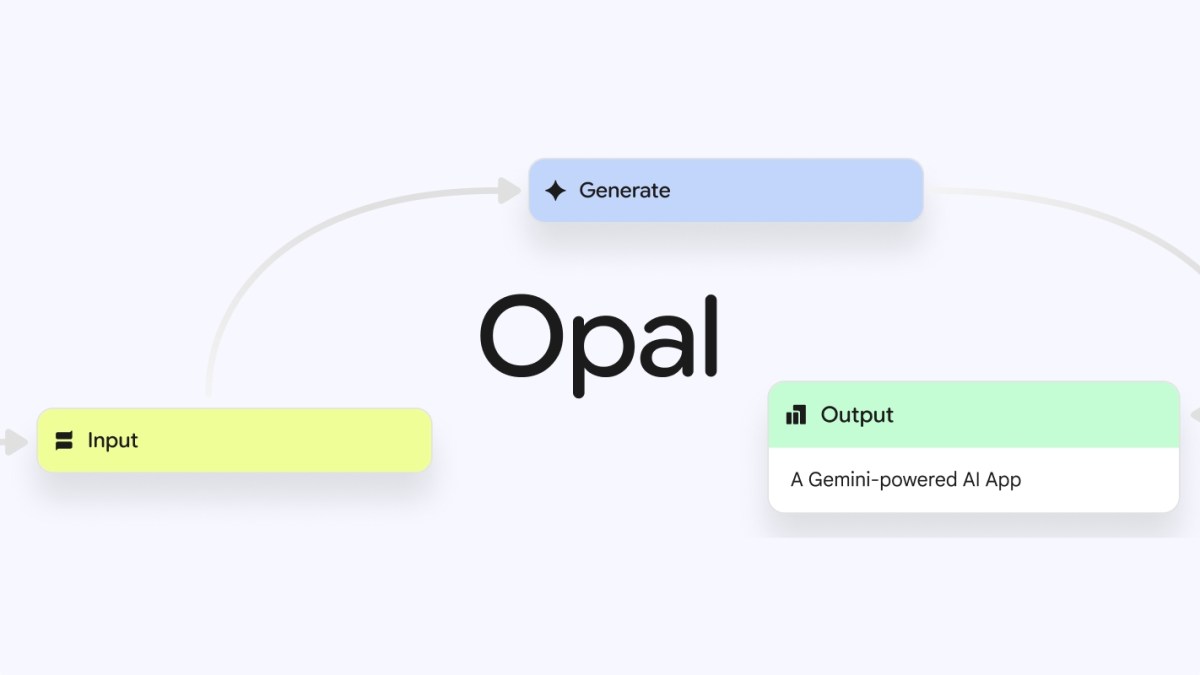
Opal lets you create mini web apps using text prompts, or you can remix existing apps available in a gallery. All users have to do is in a description of the app they want to make, and the tool will then use different Google models to do so.

Once the app is ready, you can navigate into an editor panel to see the visual workflow of input, output, and generation steps. You can click on each workflow step to look at the prompt that dictates the process, and edit it if you need to. You can also manually add steps from Opal’s toolbar.

Opal also lets users publish their new app on the web and share the link with others to test out using their own Google accounts.

Google’s AI studio already lets developers build apps using prompts, but Opal’s visual workflow indicates the company likely wants to target a wider audience.

The company joins a long list of competitors, including Canva, Figma, and Replit, that are making tools to encourage non-technical people to create prototypes of apps without having to do any coding.

Techcrunch event

San Francisco
|
October 27-29, 2025

iOS 26 Public Beta 1 Brings AI Summaries Back to News Apps With a Warning


If you have an Apple Intelligence-enabled iPhone, the first public beta of iOS 26 is bringing AI notification summaries back to news and entertainment apps after being partly removed earlier this year.

Tech Tips

Apple disabled AI notification summaries for news and entertainment apps in January. That came a few weeks after the BBC pointed out in December that the feature twisted the media organization’s notifications and displayed inaccurate information. 

The latest beta brings those AI summaries back with a new warning.

Before you download the beta and check out these summaries, just know this beta is not the final version of iOS 26. That means, the update might be buggy for you, and your device’s battery life may be affected, so it’s best to keep those troubles off your primary device. If you want to try out the beta, I recommend downloading it on a secondary device.

It’s also possible that Apple could remove or further alter this feature before the final version of iOS 26 is released this fall.

iOS 26 beta warns about summary inaccuracies

When I updated to the latest iOS 26 beta, I was greeted by some splash screens which asked for various permissions. One splash screen was for the AI notification summaries. When you see this screen, you have two options: Choose Notifications to Summarize or Not Now. If you tap Not Now, the splash screen goes away. 

The AI notification summary menu in iOS 26 public beta 1.

Apple/Screenshot by CNET

If you tap Choose Notifications to Summarize, you are taken to a new page where you’ll see three categories: News & Entertainment, Communication & Social and All Other Apps. Tapping one of these categories allows notification summaries for apps in that category. Beneath the News & Entertainment category, there’s a warning that gets outlined in red if you tap it.

“Summarization may change the meaning of the original headline,” the warning reads, adding, “Verify information.”

In the beta, there’s also a warning across the bottom of the screen that reads, “This is a beta feature. Summaries may contain errors.”

After tapping the categories you want, tap Summarize Selected Notifications across the bottom of your screen. If you selected all the categories, this button will read Summarize All Notifications.

And if you don’t want these summaries, you can tap Do Not Summarize Notifications. If you allow these summaries and don’t like them, you can easily turn them off. Here’s how.

How to turn off AI notification summaries

1. Tap Settings
2. Tap Notifications.
3. Tap Summarize Notifications.
4. Tap the Summarize Notifications toggle in the new menu.

You can also follow the above steps to turn AI notification summaries back on. You’ll have to select which categories you want these summaries for again, too. 

Don’t forget, this feature is still in beta so it could be buggy, and Apple could alter or remove it when iOS 26 is released to the general public this fall. There’s no definitive date for when Apple will release iOS 26. 

For more on Apple, here’s how to download the first public beta of iOS 26, my first impressions of the beta and everything the company announced at WWDC 2025

Watch this: Apple’s New Protection Plan, AI-Generated Music on Spotify, and More | Tech Today


Run Ollama Models Locally and make them Accessible via Public API


Blog thumbnail - Expose Local Ollama Models with a Public API

Introduction

Running Large Language Models (LLMs) and other open-source models locally offers significant advantages for developers. This is where Ollama shines. Ollama simplifies the process of downloading, setting up, and running these powerful models on your local machine, giving you greater control, enhanced privacy, and reduced costs compared to cloud-based solutions.

While running models locally offers immense benefits, integrating them with cloud-based projects or sharing them for broader access can be a challenge. This is precisely where Clarifai Local Runners come in. Local Runners enable you to expose your locally running Ollama models via a public API endpoint, allowing seamless integration with any project, anywhere, effectively bridging the gap between your local environment and the cloud.

In this post, we’ll walk through how to run open-source models using Ollama and expose them with a public API using Clarifai Local Runners. This makes your local models accessible globally while still running entirely on your machine.

Local Runners Explained

Local Runners let you run models on your own machine, whether it’s your laptop, workstation, or on-prem server, while exposing them through a secure, public API endpoint. You don’t need to upload the model to the cloud. The model stays local but behaves like it’s hosted on Clarifai.

Once initialized, the Local Runner opens a secure tunnel to Clarifai’s control plane. Any requests to your model’s Clarifai API endpoint are routed to your machine, processed locally, and returned to the caller. From the outside, it functions like any other hosted model. Internally, everything runs on your hardware.

Local Runners are especially useful for:

  • Fast local development: Build, test, and iterate on models in your own environment without deployment delays. Inspect traffic, test outputs, and debug in real time.
  • Using your own hardware: Take advantage of local GPUs or custom hardware setups. Let your machine handle inference while Clarifai manages routing and API access.
  • Private and offline data: Run models that rely on local files, internal databases, or private APIs. Keep everything on-prem while still exposing a usable endpoint.

Local Runners gives you the flexibility of local execution along with the reach of a managed API, all without giving up control over your data or environment.

Expose Local Ollama Models via Public API

This section will walk you through the steps to get your Ollama model running locally and accessible via a Clarifai public endpoint.

Prerequisites

Before we begin, ensure you have:

Step 1: Install Clarifai and Login

First, install the Clarifai Python SDK:

Next, log in to Clarifai to configure your context. This links your local environment to your Clarifai account, allowing you to manage and expose your models.

Follow the prompts to enter your User ID and Personal Access Token (PAT). If you need help obtaining these, refer to the documentation here.

Step 2: Set Up Your Local Ollama Model for Clarifai

Next, you’ll prepare your local Ollama model so it can be accessed by Clarifai’s Local Runners. This step sets up the necessary files and configuration to expose your model through a public API endpoint using Clarifai’s platform.

Use the following command to initialize the setup:

This generates three key files within your project directory:

  • model.py

  • config.yaml

  • requirements.txt

These define how Clarifai will communicate with your locally running Ollama model.

You can also customize the command with the following options:

  • --model-name: Name of the Ollama model you want to serve. This pulls from the Ollama model library (defaults to llama3:8b).

  • --port: The port where your Ollama model is running (defaults to 23333).

  • --context-length: Sets the model’s context length (defaults to 8192).

For example, to use the gemma:2b model with a 16K context length on port 8008, run:

After this step, your local model is ready to be exposed using Clarifai Local Runners.

Step 3: Start the Clarifai Local Runner

Once your local Ollama model is configured, the next step is to run Clarifai’s Local Runner. This exposes your local model to the internet through a secure Clarifai endpoint.

Navigate into the model directory and run:

Once the runner starts, you will receive a public Clarifai URL. This URL is your gateway to accessing your locally running Ollama model from anywhere. Requests made to this Clarifai endpoint will be securely routed to your local machine, allowing your Ollama model to process them.

Running Inference on Your Exposed Model

With your Ollama model running locally and exposed via Clarifai Local Runner, you can now send inference requests to it from anywhere using the Clarifai SDK or an OpenAI-compatible endpoint.

Inference using OpenAI compatible method

Set your Clarifai PAT as an environment variable:

Then, you can use the OpenAI client to send requests:

For multimodal inference, you can include image data:

Inference with Clarifai SDK

You can also use the Clarifai Python SDK for inference. The model URL can be obtained from your Clarifai account.

Customizing Ollama Model Configuration

The clarifai model init --toolkit ollama command generates a model file structure:

ollama-model-upload/
├── 1/
│ └── model.py

├── config.yaml
└── requirements.txt

You can customize the generated files to control how your model works:

  • 1/model.py – Customize to tailor your model’s behavior, implement custom logic, or optimize performance.

  • config.yaml – Define settings such as compute requirements, especially useful when deploying to dedicated compute using Compute Orchestration.

  • requirements.txt – List any required Python packages for your model.

This setup gives you full control over how your Ollama model is exposed and used via API. Refer to the documentation here.

Conclusion

Running open-source models locally with Ollama gives you full control over privacy, latency, and customization. With Clarifai Local Runners, you can expose these models via a public API without relying on centralized infrastructure. This setup makes it easy to plug local models into larger workflows or agentic systems, while keeping compute and data fully in your control. If you want to scale beyond your machine, check out Compute Orchestration to deploy models on dedicated GPU nodes.


Low Volume, Cost-Effective Alternatives to Injection Molding with Manufacturing Firms & Product Designers


There’s a reason product developers, startups, and designers raise their eyebrows when they hear “injection molding.” It’s not just the cost of the mold that costs from $5,000 to $100,000, but it also means you need to commit to it. Injection molding is the long game. If you’re producing hundreds of thousands of parts, it’s the perfect choice. But what if you’re still validating your idea? What if your production runs are in the hundreds or low thousands? What if you’re bootstrapped?

That’s where low-volume, cost-effective alternatives come in because they’re more flexible, accessible, and design-friendly than ever. Let’s explore the practical choices of smart product teams at Cad Crowd, where advanced injection molding is favored over traditional methods, and how manufacturing firms alongside freelance product design experts confidently support this journey. Cad Crowd has over 94,000 experts ready to turn your ideas into a tangible one.


🚀 Table of contents


Why go low volume?

Before exploring manufacturing options, you should think about low-volume production. Because not all projects require, or can afford, the grand scale and expense of conventional injection molding. For startups, entrepreneurs, or even established businesses experimenting with new concepts, taking it low volume provides a more versatile, affordable route in making a realistic physical product.

Think of starting a crowdfunding campaign, and you only require 200 beta units to send out to early supporters. Or you’re about to pitch a fresh idea to investors and would like to present them with a finished, physical prototype. Perhaps you’re launching a custom product line for a specialized niche, or publishing annual model updates and need the capability to make adjustments on a regular basis. In each of these situations, going into high-volume production is risky, costly, and inflexible.

Injection molding and casting design services, though perfect for bulk production, have draconian up-front tooling expenses. One mold might eat your entire development budget before a single component comes off the line. Worse, once such a mold is created, your design is fixed. Revisions become costly and slow, if not downright impossible.

Low-volume production, by contrast, enables you to remain nimble. With CNC machining, 3D printing, or urethane casting, the focus is on responsiveness, speed, and flexibility in the face of change. You can iterate on your design over multiple batches, gather user input, and course-correct as necessary—all without wasting capital.

At best, low-volume manufacturing is just a backup alternative—it’s the intelligent, well-thought-out strategy for innovative product development if speed, versatility, and controlling costs are primary concerns.

RELATED: The simple secret to unlocking new product innovation at design services companies

urethane casting design product example of a gel blaster and plastic enclosure

Urethane casting: The unsung hero of prototypes

Consider urethane casting molding design services (also referred to as RTV or silicone molding) to be the door to high-quality professional parts at a fraction of the tooling expense. Here’s the process: A master part—usually 3D printed or CNC machined—is utilized as a template to make a silicone mold. Liquid polyurethane resin is then filled into the mold to duplicate the part.

Why does it work?

  • Low initial investment: No steel or aluminum tooling necessary.
  • Low lead times: Molds are made in days, not weeks.
  • Ideal for design verification: You can make 10, 20, even 100+ parts that look and feel nearly final.
  • Material versatility: Select rigid, rubber-like, clear, or colored resins.

When to use it?

Urethane casting is ideal for marketing samples, investor demos, or low-volume production runs where appearance is important.

3D printing: Fast, intelligent, and versatile

We’ve come a long way from the clunky, brittle prototypes of early 3D printers. Today, additive manufacturing services aren’t just for early-stage concepts—it’s a serious option for low-volume production.

Here are some popular technologies:

  • FDM (Fused Deposition Modeling): Great for functional parts and cost-effective prototyping.
  • SLA (Stereolithography): Delivers high-resolution, smooth finishes ideal for cosmetic models.
  • SLS (Selective Laser Sintering) and MJF (Multi Jet Fusion): Use durable nylon parts that rival molded plastics.

Listed below are the pros and cons of 3D printing:

Pros Cons
• No tools needed -Ideal for one-offs and high-speed iteration.
• Design flexibility –  Design geometries that are not possible with molding.
• Zero minimums – Technically, a single part suffices.
• Part toughness
• Surface quality depends on the process
• Post-processing is labor-intensive. 
• 3D printing is difficult to top for special-purpose enclosures, internal mechanics, and test cases.

RELATED: Cost-effective methods for new product design & development services for your company

CNC machining: Accuracy at low volumes

When tolerances are close and strength is an issue, CNC machining takes its rightful place. It’s not the most cost-effective per part, but for functional prototypes or low-run production of metal or hard plastic parts, it’s a worthwhile investment for manufacturing design firms.

Advantages:

  • Material flexibility – Aluminum, stainless steel, PEEK, ABS, you name it.
  • High precision – Best for mechanical or load-bearing parts.
  • No molds needed – Every part is machined from a solid block or rod.
  • Less expensive – Flat or prismatic parts, limited undercuts, and intelligent fixturing can maintain cost.

Sheet metal fabrication: The enclosure go-to

If your product contains housing, brackets, or structural panels, sheet metal fabrication could be a pleasant surprise. Laser cutting, bending, and welding allow you to create highly functional and professional-grade enclosures without mold expense.

Recommended application of sheet metal fabrication design services.

  • Electrical enclosures
  • Mechanical housings
  • Industrial control panels

Bonus: Many sheet metal components are powder-coated or silk-screened for labeling at low cost, providing a high-end look without overspending.

Hybrid manufacturing methods

This is where clever manufacturing companies and industrial designers excel. Rather than using a single technique, they mix them.

  • 3D printed components + CNC machined inserts
  • Urethane cast with sheet metal reinforcement
  • CNC aluminum enclosure with 3D printed cosmetic covers

This versatility permits you to balance function, cost, and aesthetics—each step playing to its advantage. Seasoned design companies or independent engineers tend to offer such hybrid approaches at the outset of the development cycle, providing startups a higher ROI.

How product designers approach low-volume strategies?

Much of making low-volume manufacturing work hinges on your working relationship with your product designer or industrial design service provider. Here are some reasons that set a good collaborator apart from an average one:

  • They design across the process: An injection-molded part isn’t necessarily optimal for 3D printing or CNC machining. Cross-process-experienced designers scale wall thickness, draft angles, fillets, and part splits accordingly.
  • They know cost drivers: A 3D printed component can be less expensive per piece, but extensive post-processing can accrue. A clever designer knows when it is wise to opt for CNC or even soft tooling.
  • They plan ahead: If the intention is to manufacture in volume later on, they will ensure your urethane cast components have design intent that can seamlessly move to injection molding without a complete overhaul.

This level of strategic thinking tends to result from designers who have worked in startups and with major manufacturers. They don’t make a part; they make a blueprint.

product design of a refrigerator and machine assembly part by Cad Crowd design experts

RELATED: Speeding up product development with new product design services companies

Collaborating with the appropriate manufacturing company

Not every manufacturing company is alike. Like selecting an architectural design expert, collaboration with your manufacturer can make or destroy a project, especially if you don’t know what you’re looking for.

Here are some points you need to know when seeking out companies.

  • Has good communication skills: Responsive, willing to iterate, and won’t brush off your small-volume requirements.
  • Provide design-for-manufacture (DFM) input: By being able to provide DFM, you can avoid costly errors before they occur.
  • Provides clear contract and expectations: You need to understand where things may stall and what influences the price.
  • Include post-processing services: Painting, finishing, even assembly—some companies can take a product all the way to delivery.

Additionally, inquire about past projects like yours before agreeing to collaborate. If they can produce a portfolio of short-run success stories, that’s your green light.

Designing for flexibility and future tooling

Even if you’re bypassing injection molding for the time being, it’s wise to design with future plans and processes in mind for product engineering companies. Here are some things you need to keep in mind.

  • Steer clear of extreme undercuts that create complex mold actions.
  • Keep the wall thickness as uniform as possible.
  • Produce clean parting lines and reduce side actions.

Your chosen product designer needs to understand how to balance quick decisions on cost savings with long-term objectives, so your next move isn’t a redesign from scratch.

When (and how) to transition to injection molding

Once your product gains engagement, say, post-crowdfunding or after a few hundred sales, scaling becomes the next hurdle. If your design is proven, customer feedback is positive, and you’re confident in demand, then transitioning to injection molding makes sense.

How to prepare:

  • Use data from your low-volume runs to inform changes.
  • Work with tooling engineers early to understand feasibility.
  • Factor in tooling time, which can be 6–12 weeks or more.
  • Budget for iterations even at the mold stage—first-shot molds often need tweaking.

By then, your revenue (or investment) should help justify the mold cost, and you’ll already have a tested, reliable product in hand.

RELATED: Key factors to consider when vetting engineering firms for design & consulting services

Conclusion

Low-volume manufacturing isn’t just a stopgap; it’s a strategic approach that unlocks speed, affordability, and design flexibility. It can mean the difference between launching and stalling out for startups, creators, and even corporate innovation teams.

How Cad Crowd can help?

The essential factor is collaborating with the right professionals—designers and experts from Cad Crowd who possess insights beyond just CAD, as well as companies that perceive your low-volume run as a valuable partnership rather than a hassle. With the appropriate approach and manufacturing strategy, you’ll advance effectively from prototype to product, taking each intelligent step forward. Request your free quote today!

author avatar

MacKenzie Brown is the founder and CEO of Cad Crowd. With over 18 years of experience in launching and scaling platforms specializing in CAD services, product design, manufacturing, hardware, and software development, MacKenzie is a recognized authority in the engineering industry. Under his leadership, Cad Crowd serves esteemed clients like NASA, JPL, the U.S. Navy, and Fortune 500 companies, empowering innovators with access to high-quality design and engineering talent.

Connect with me: LinkedInXCad Crowd

Why is my LINQ-to-SQL Tools tool not showing up in Visual Studio 7.14?


I installed LINQ-to-SQL in version 7.9, then noticed it didn’t show up when I tried to use it. After doing some research, someone said to update visual studio to the latest, so I did that. I confirmed that the tool is still installed, but when I try to go to my project > add new item, I can’t find the tool when searching for “linq”. I also tried searching for “dbml”, but that didn’t work.

The overall goal is to create a database diagram of my SQL Server 2019 database and I heard LINQ-to-SQL can generate dbml. Once I have that, I plan on pasting it into www.dbdiagram.io. If anyone has better ideas, I’m all ears.

Meta’s breakthrough wants to let you control AR glasses just by moving your fingers


What you need to know

  • Meta is experimenting with a wristband that reads your muscle signals, so you can type or control stuff just by thinking about moving your fingers.
  • The tech pairs with Meta’s Orion AR glasses, which look like regular specs but overlay digital stuff in your real-world view.
  • It’s still a prototype (and pricey), but Meta says a more practical version is in the works.

Imagine scrolling through your social media feed, sending a message, or skipping a song without tapping a button or resorting to voice commands, just a subtle twitch of your hand. That’s the wild promise of Meta’s latest research, and it’s not some distant sci-fi dream.

Thanks to a new study published in Nature, we’re getting a sneak peek at how augmented reality (AR) glasses could soon read your intentions before you even fully act on them.

Service returns after over two hours down


SpaceX’s Starlink satellite internet service experienced a global outage on Thursday that lasted for over two hours. Reports of connectivity issues started around 3:20PM ET, based on DownDetector. SpaceX didn’t acknowledged the outage until 4:05PM ET, via a post on the Starlink X account. Service began to come back for some at around 5:30PM ET, and Michael Nicolls, Starlink’s VP of engineering, said the provider had “mostly recovered” at 6:23PM ET.

Users across the US, Europe, the UK and Asia reported issues on r/starlink, the service’s Reddit page, and SpaceX even acknowledged the outage on Starlink’s website. The company hasn’t shared the number of people who were actually impacted, but it could be in the millions — as of the last Starlink network update, the service has over six million active customers globally.

The initial announcement that SpaceX was working on a fix didn’t explain what cause the outage or what was being done to restore service. “Starlink is currently in a network outage and we are actively implementing a solution,” the company’s X post said. “We appreciate your patience, we’ll share an update once this issue is resolved.”

In announcing the service’s recovery, Nicolls explained that the outage was due to a “failure of key internal software services that operate the core network,” rather than any issue with SpaceX’s satellite constellation or other hardware problems. Nicolls added that Starlink will “fully root cause this issue and ensure it does not occur again.

Starlink is designed to be accessible where traditional service providers can’t reach, making it a common option for van lifers and anyone living without traditional internet infrastructure. SpaceX has also partnered with companies like T-Mobile to use Starlink to extend smartphone connectivity outside the bounds of traditional cell networks. It’s not clear how T-Mobile’s Starlink service was impacted as by the outage.

Update, July 24, 6:30PM ET: Article has been updated to reflect that Starlink service is restored.

Rugby League 26 Free Download (v1.0.1444)


Rugby League 26 Pre-Installed Worldofpcgames

Rugby League 26 Direct Download:

Step onto the pitch in the most authentic Rugby League experience ever! Whether you’re chasing club glory, building a custom ‘Pro Team’, or rising through the ranks with a self-made superstar, Rugby League 26 puts YOU at the heart of the action. Career Mode – Lead your team from local battlers to league legends. Pro Team – Assemble your dream squad and compete online or offline. Be a Pro – Create, train, and evolve your own player across seasons. Immersive Gameplay – Real physics, true-to-life animations, and deep strategy. Licensed Clubs and Players – Featuring teams from the Rugby League world! Begin your journey as a rising talent and work your way to the top. Develop your skills, secure high-stakes contracts, and make defining choices that shape your legacy—on and off the field. PGA TOUR 2K23

Will you lead your team to glory and become a legend? Bring your vision to life with a deep and intuitive Player Creator. Customize every detail of your athlete’s appearance, and fine-tune their attributes to match your playstyle. Your legend starts here. Dive into the action with Pro Team, the ultimate mode where fantasy meets reality! Collect player cards featuring current stars and legendary icons of Rugby League. Strategically build your dream squad, fine-tune your tactics, and dominate the competition in online and offline challenges. Experience the bone-jarring tackles, the breathtaking tries, and the electric atmosphere of Rugby League like never before.

Features and System Requirements:

  • Create and customize your own team with unique kits, logos, players, and stadium designs.
  • Control formations, set plays, and real-time tactical adjustments with a new strategy system.
  • Refined tackling system, smarter AI decision-making, and fluid ball-handling for more strategic play.

Screenshots

System Requirements

Recommended
OS: Windows 10 or Windows 11
Processor: Intel® Core™ i7-11700K / AMD Ryzen™ 7 3700X
Memory: 16 GB RAM
Graphics: NVIDIA GeForce RTX 3070 (8 GB) / AMD RX 6800 XT (8 GB)
DirectX: Version 12
Storage: 85 GB available space
Support the game developers by purchasing the game on Steam

Installation Guide

Turn Off Your Antivirus Before Installing Any Game

1 :: Download Game
2 :: Extract Game
3 :: Launch The Game
4 :: Have Fun 🙂

How to Spark AI Adoption in Your Organization with Janette Roush [MAICON 2025 Speaker Series]


MAICON brings together top visionaries and experts in the field of AI during a three-day conference packed with actionable sessions and networking events—all to position you as the change agent your organization (and career) needs. In this ongoing speaker series, we’re featuring these extraordinary leaders, with forward-looking predictions, actionable tips you can use today, and a preview of their MAICON 2025 sessions. Continue reading “How to Spark AI Adoption in Your Organization with Janette Roush [MAICON 2025 Speaker Series]”