Apple Music is now available as an extension within ChatGPT, meaning you can search for songs, create playlists, and discover new music through OpenAI’s chatbot. Here’s how to set it up and what makes it worth using.
What You Can Do With Apple Music in ChatGPT
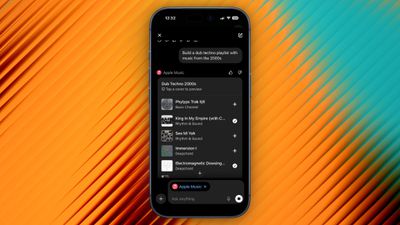
ChatGPT’s integration with Apple Music has the potential to change how you discover new music by letting you describe what you’re looking for in natural language. Instead of typing specific search terms like you would in Apple Music, you can ask the chatbot for “upbeat 80s songs for a road trip” or “calm instrumental music for studying,” and ChatGPT will understand the context and mood you’re after.
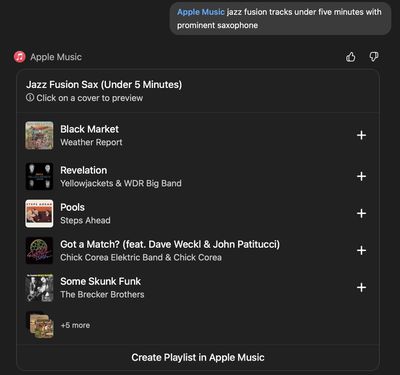
You can even combine multiple criteria, like “jazz fusion tracks under five minutes with prominent saxophone,” and ChatGPT will accurately unearth what you’re looking for in ways that standard keyword searches simply aren’t capable of achieving.
You can request custom playlists based on specific criteria, ask for song recommendations, or explore music by decade, genre, or artist. And once ChatGPT creates a playlist, you can preview each track, and save the playlist directly to your Apple Music library with the option “Create Playlist in Apple Music.” You can also save individual tracks using the + buttons.
The Apple Music extension requires a ChatGPT account and works with both free and paid ChatGPT tiers. You don’t need an Apple Music subscription to search the catalog, generate playlists, or listen to 30-second preview clips, but you will need an active subscription if you want to save content to your library.
How to Connect Apple Music to ChatGPT
Before you can start discovering new music with the help of AI, you’ll need to connect Apple’s streaming service using ChatGPT’s extension. You only need to do it once.
Open the ChatGPT app and tap your profile in the sidebar.
Under “Account” settings, tap Apps.
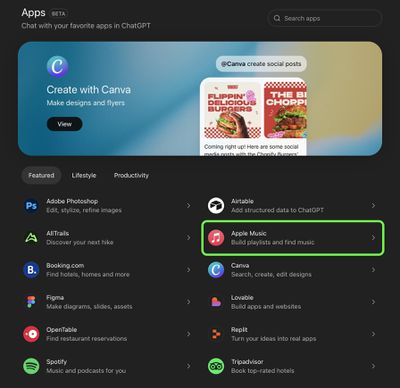
Tap Browse Apps, then choose Apple Music in the extensions library.
Tap Connect, then choose Connect Apple Music.
Follow the on-screen prompts to sign into your Apple Account and permit the access request.
If you’re on desktop, you can perform the same steps in the ChatGPT app for Mac. Alternatively, go to https://chatgpt.com/apps in a browser and open the Apps section in ChatGPT – you’ll find the Apple Music extension there. Once connected, the extension remains active across your devices signed into the same ChatGPT account.
One More Thing
Apple Music extension in ChatGPT’s “Apps” section
ChatGPT can search Apple Music’s catalog and create playlists, but it can’t access your listening history or existing playlists. The integration only has permission to add songs to your library, so your personal data stays private.
Every fall, dozens of maple and oak trees in my neighborhood shed their leaves. Thus begins the constant drone of gas-powered leaf blowers every day through early December. The noise is by far the most annoying thing about these yard tools, but I can appreciate it’s a necessary evil — unless you prefer to pick up a blister-inducing rake.
Whisper Aero argues there’s a better way. The company is using aerospace tech to quiet the noisy devices, introducing the T1 leaf blower at CES 2026 under its sub-brand Tone Outdoors. The company promises the T1 is 80 percent quieter and 60 percent more powerful than “leading” handheld gas leaf blowers. More specifically, the T1 has 880 CFM of air flow, which easily surpasses my battery-powered EGO. And at 52 decibels of average noise at peak volume, his model is drastically quieter than any leaf blower I’ve used. I was able to confirm its lower roar on the CES show floor.
Tone says the T1 also offers extended run time of up to 50 minutes on a charge in Eco mode. That too is greater than what I get on my mid-grade EGO. What’s more, the company plans to sell a battery backpack that will extend any clean-up sessions for several hours. The T1 also has a built-in LED “nightlight” so you can still use it after dark. And since it’s quieter than what you have now, you can do so without annoying your neighbors.
Tone Outdoors T1 (Billy Steele for Engadget)
So, how does Whisper Aero achieve this? The company originally set out to devise a quieter solution for electric aerospace motors. Its engineers discovered that they could dramatically reduce noise and increase overall efficiency by redesigning the fan and motor. They’re still pursuing that, but the company discovered its technology had other uses too.
The T1 is already available for preorder for $599 and it’s scheduled to ship in September. If you don’t care for the standard green color, you can spend another $100 for limited edition “Silence Is Golden” version. The battery backpack won’t arrive until Q1 2027 though (price TBD). Tone also says it has additional models in the works and it has a partnership with Stanley Black and Decker that will likely produce additional products with this tech on board.
Learn how I export high-quality videos in Descript for YouTube using the exact settings I trust.
If you’ve ever finished editing a video in Descript and then hesitated at the export screen, wondering if you’re about to choose the wrong setting, you’re not alone.
Descript has redesigned its export process a few times over the years, and even small changes can create big confusion, especially if you care about video quality.
In this post, I’m walking you through exactly how I export high-quality video in Descript, step by step.
This is the same process I use when exporting videos for YouTube, podcasts, tutorials, and course content.
No guesswork.
No unnecessary settings.
Just a clean, reliable workflow that works.
VIDEO: How to Export Video in Descript (at High Quality)
Some product links in this post are affiliate links, and I will be compensated when you purchase by clicking our links. Read my disclosure policy here.
Why Exporting Your Video Matters
Before your video can live anywhere outside of Descript, it needs to be exported. Exporting is the process where Descript packages everything you’ve edited: video, audio, captions, visuals into one final video file.
Any time you want to:
Upload to YouTube
Upload to Spotify
Upload to a course platform
Or send the finished file somewhere else
You’ll need to export your project first.
Getting this right matters, especially if YouTube is part of your strategy. High-quality exports give your videos the best possible chance to look professional once they’re uploaded and processed.
Where to Find the Export Button in Descript
Once you’re done editing, look to the top-right corner of your Descript project. You’ll see the Export button there.
This is where everything starts. Any time you want to:
Upload a video to YouTube
Share content on Spotify
Deliver lessons to a course platform
Send a finished file to someone
You’ll need to export your project first.
Clicking Export opens the redesigned export screen, and this is where all the important decisions happen.
File Name and Export Destination
Naming Your Video File
At the top of the export screen, Descriptautomatically fills in the file name using your project or composition name. If you want to change it, do it here before exporting.
You can rename the file later, but it’s faster and cleaner to do it before the export starts.
I always recommend renaming your file before exporting. You can change it later, but it’s faster and cleaner to do it here. This file name is what you’ll see on your computer once the export is complete, so make it something you’ll recognize easily.
Choosing the Right Destination
Descriptused to allow sharing videos directly through the platform, generating a link someone could watch inside Descript. While that option is still useful for internal review, if you plan to upload your video anywhere, you’ll need to choose Local Download.
For high-quality exports, choose:
Destination: Local Download
Local Download simply means the video will be downloaded directly to your computer’s hard drive. It’s essentially Descript saying, “Here’s your finished video file.”
If you’re uploading to YouTube, Spotify, or a course platform, Local Download is the option you want.
This means the video will download directly to your computer as a finished file. From there, you can upload it anywhere you want.
Understanding Composition Settings
Current Composition
Most of the time, you’ll want Current Composition selected. This exports the exact video you’re currently working on.
Exporting Multiple Compositions
If your project contains multiple compositions, for example, several lessons inside one course project, Descript allows you to export multiple videos at once.
This is especially helpful for course creators because you don’t have to export each lesson individually. As long as they’re in the same project, Descript can handle them together.
That said, most of the time I leave this set to:
If you do have multiple compositions in the same project, you can export several videos at once instead of downloading them one by one.
Choosing the Best Video Resolution
When exporting high-quality video in Descript, resolution matters.
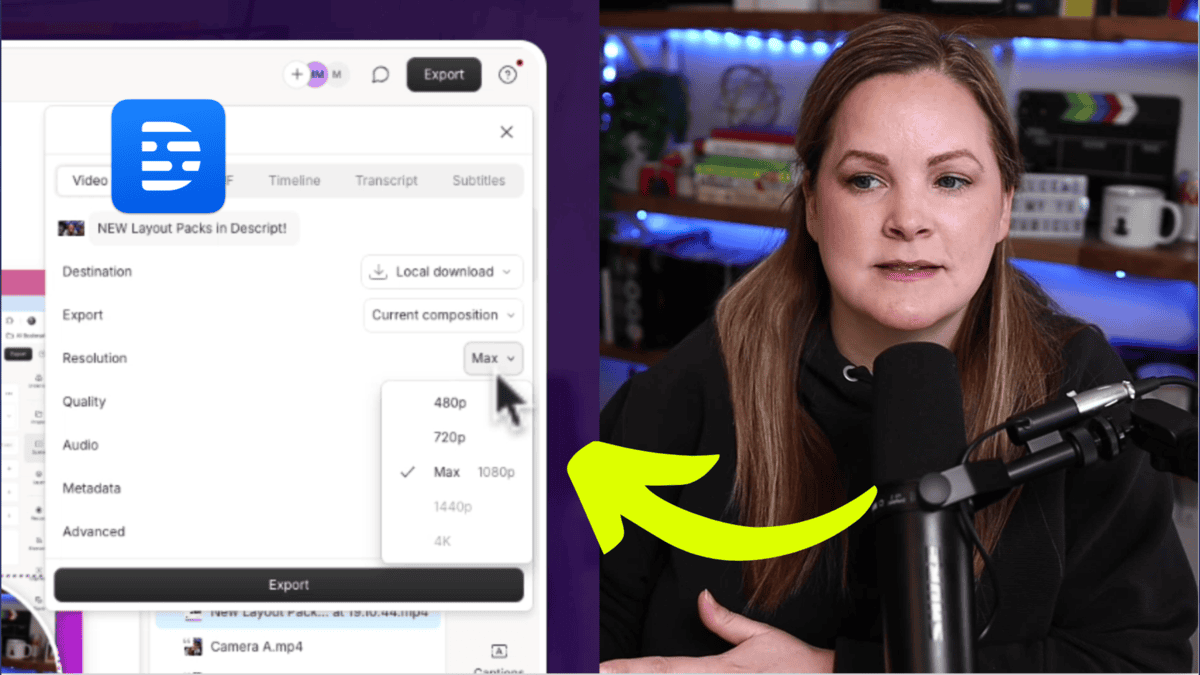
I always recommend selecting Max resolution. Even if you think it’s set correctly, double-check it. There have been times when I opened the export screen and noticed it was set to 720p without me realizing it.
I personally record in 1080p and export in 1080p, so I make sure that’s selected every time. If you record in 4K, this is where you’ll want to confirm that 4K is selected.
Selecting the Highest Quality Export
Under the Quality setting, you’ll see different options that affect how crisp your final video looks.
For final videos going on YouTube or any public platform, I always choose High quality.
Just keep in mind:
Higher quality = larger file size
Larger file size = longer export time
But this is not the place to cut corners. Uploading a high-quality file gives YouTube the best source material to work with.
If you’re exporting a draft just to get feedback from someone, you can choose Low, but for final uploads, I always choose High.
Audio Settings That Work Well for YouTube
Audio matters just as much as video.
Under the audio settings, I stick with what works — and what Descript makes easy.
One setting I always use is -16 LUFS.
I’ll be honest: I don’t know all the technical details behind LUFS. What I do know is that -16 LUFS is recommended for YouTube, and it helps normalize your audio during export.
This is especially helpful if:
Your editing volume was low
Your computer volume was turned up high
You didn’t notice inconsistencies while editing
Descript handles the normalization for you, which makes this an easy win.
That means if your volume was a little too quiet (or too loud) while editing, Descript adjusts it automatically so your video plays at a consistent, listener-friendly level.
Descript allows you to add metadata to your video file, which is just additional information attached to the file.
Personally, I keep this simple. I usually include the episode title (which is also my video title) and leave everything else alone. Metadata is optional, and you don’t need to overthink it.
Advanced Settings and Hardware Acceleration
Inside the Advanced section, you’ll see an option to disable Hardware Acceleration.
Under Advanced, you’ll see an option for
I keep this unchecked.
If you ever experience:
Export glitches
Extremely slow exporting
Failed exports
Descript support may ask you to toggle this setting on or off. For my workflow, leaving it unchecked works just fine.
Saving and Exporting Your Video
Once all your settings are in place, click Export, and Descript will ask where you want to save your file.
Where to Save Your Video
If you don’t enjoy playing hide-and-seek with video files, I recommend saving your export to your desktop.
From there, you can:
Upload it to YouTube
Upload it to Spotify
Move it into Google Drive
Organize it into folders
Starting with your desktop keeps things simple.
Simple and stress-free.
How Long Exporting Takes
Export time depends on:
Video length
How complex the edit is
File quality settings
Your computer’s speed
Sometimes it takes a couple of minutes. Sometimes it takes longer. That’s normal. Let Descript do its thing.
What to Do After Exporting
Once your export finishes:
Locate the file where you saved it
Upload it to YouTube, Spotify, or your course platform
Celebrate being done with editing
At this point, your video is fully packaged and ready to go.
More Descript Tutorials and Resources
This tutorial is part of an extended series of Descript tutorials I’ve created to help you:
Edit faster
Export confidently
Learn the ins and outs of Descript
If you want more tips for being efficient with Descript, or there’s something specific you’re struggling with, leave a comment and let me know. I keep a running list of tutorial ideas based on what you ask for.
Exporting video in Descript doesn’t have to feel confusing, even with the redesigned export screen. Once you understand where everything lives from resolution and quality to audio and destination, exporting high-quality video becomes a quick, repeatable process.
Whether you’re uploading to YouTube, Spotify, or your course platform, these settings help ensure your video looks polished, sounds consistent, and represents your work well.
This Descript tutorial is just one part of a larger series of Descript tutorials I’m creating to help you look good, sound good, and feel good on camera. If there’s something specific you’re struggling with inside Descript, leave a comment and let me know; it might just become my next tutorial.
If you have an online business with a course, program, or any other kind of offer, and you’re not currently generating consistent sales on autopilot, I’d like to introduce you to the hands-off YouTube funnel that has made me over $20k on a $147 course! That way, you too can make consistent sales of your offer, with the beauty and simplicity of organic, evergreen traffic from YouTube! Start here with my free “AIT Method” training.
Californians are getting a new, supercharged way to stop data brokers from hoarding and selling their personal information, as a recently enacted law that’s among the strictest in the nation took effect at the beginning of the year.
According to the California Privacy Protection Agency, more than 500 companies actively scour all sorts of sources for scraps of information about individuals, then package and store it to sell to marketers, private investigators, and others.
The nonprofit Consumer Watchdog said in 2024 that brokers trawl automakers, tech companies, junk-food restaurants, device makers, and others for financial info, purchases, family situations, eating, exercising, travel, entertainment habits, and just about any other imaginable information belonging to millions of people.
Scrubbing your data made easy
Two years ago, California’s Delete Act took effect. It required data brokers to provide residents with a means to obtain a copy of all data pertaining to them and to demand that such information be deleted. Unfortunately, Consumer Watchdog found that only 1 percent of Californians exercised these rights in the first 12 months after the law went into effect. A chief reason: Residents were required to file a separate demand with each broker. With hundreds of companies selling data, the burden was too onerous for most residents to take on.
On January 1, a new law known as DROP (Delete Request and Opt-out Platform) took effect. DROP allows California residents to register a single demand for their data to be deleted and no longer collected in the future. CalPrivacy then forwards it to all brokers.
Baby mobs have been around Minecraft for a while, but these creatures are getting an adorable makeover for a future update. Mojang Studios has shared a first look at its upcoming baby mob remasters, which is currently being tested. When the update is finished, the dev team promises that the wolf pups, kittens, piglets, calves, baby chickens, baby ocelots, lambs, and baby rabbits will be “even chunkier, floofier, and more charming than ever before.”
In the accompanying announcement video, game director Agnes Larsson explains that previous baby mobs were just scaled down versions of the adult creatures. This update is giving the baby animals their own specific designs and completely new sound recordings pulled from real animals.
Larsen went on to explain a more subtle touch that gives the baby mobs’ faces a more youthful appearance.
“Typically mobs in Minecraft have two-pixel eyes,” said Larsen. “But now baby mobs have just one which creates a new vibe for them, which is just adorable.”
The devs also revealed that players will be able to name their baby mobs with craftable labels using paper and any metal nugget. Players can preview the changes in Java snapshot and the Bedrock beta preview now.
When you use command like dotnet build dirs.proj, dotnet.exe will try to find the target named build in dirs.proj file. You should define the build target it directly in dirs.proj file or in the xx.targets file. Or you’ll get the error MSB4057…
However, if I define something that’s like it does not do anything.
I assume you’re trying to build the ConsoleApp1 project by command dotnet build dirs.proj, if so, the content in the dirs.proj file should be:
An incremental unfolding game about feeding fuel into a reactor. Combine elements to produce energy, unlock exotic technologies and explore a strange galaxy. Dead Feed Free Download
About This Game Feed fuel into a reactor to generate energy.
Upgrade your tools, unlock exotic elements and discover powerful combinations.
Uncover the true purpose of the reactor and change your destiny.
Features and System Requirements:
Strategic gameplay with layers to unfold.
Hypnotic visual effects.
Prestige-style looping gameplay elements.
Intriguing storyline to unfold with multiple endings.
Screenshots
System Requirements
Minimum
OS *: Windows 10
Processor: Intel i5
Memory: 8 GB RAM
Graphics: Any graphics card.
Storage: 800 MB available space
Support the game developers by purchasing the game on Steam
Installation Guide
Turn Off Your Antivirus Before Installing Any Game
1 :: Download Game 2 :: Extract Game 3 :: Launch The Game 4 :: Have Fun 🙂
Ever looked at a 3D architectural rendering service and asked yourself, “How in the world do they make concrete look like that?” You’re not the only one. Behind each and every one of those lovely virtual buildings is a skilled Maya 3D artist with the skill to transform blueprints into halfway decent photographs.
The problem? Getting someone to do the job. Depending on the nature of your business, whether you are a design house, real estate developer, or just somebody who’s made up your mind your final product is going to be pretty brilliant in pixels, finding good freelancers is usually a wade through an obstacle course of models and mockups.
This is where platforms like Cad Crowd shine. It’s one of the best places where you can outsource the best freelance 3D modelers and rendering artists to assist you in bringing your architectural design to life. Don’t go swiping at billboards yet, debating photorealistic lighting trends before you show us a tour of the best 31 places where you can hire incredible Maya talents who will assist you in making concepts, life-like pictures.
Cad Crowd
Cad Crowd is also among the major destinations to hunt down single architectural rendering artists and Maya 3D modelers for global clients. It performs only design work, 3D modeling, CAD, and quality assurance and reliability assurance for freelancers. The platform provides an uninterrupted process from posting a job to completion of work and a one-to-one debugging service. Its prevalence in vision-synoptic 3D and architecture design work specifically makes it appropriate for high-end professional projects that involve vision-synoptic 3D and architecture design work. With reasonable remuneration, secure clients, and a diversified range of projects on their agenda, Cad Crowd presents a more comfortable and secure freelancing experience.
Twine is an online platform that brings together professional creatives, such as 3D modeling experts and architectural modelers, with companies that need professional design services. The platform provides freelancers with a professional-level portfolio website, bids for projects, and efficient handling of client communication. Twine is able to handle short- and long-term projects and is best suited for one professional. In either aspect, as much as what it can provide different creative solutions or design services and 3D modeling, they are strong enough to handle specialty projects. Experts can pick nice jobs based on their capabilities, gain clients, and become well-known in the design community. Its simplicity and business platform turn it into the best choice for creative people.
Flexiple only cares to match the finest freelancers and companies seeking the best talent developers and designers, like Maya 3D experts and architecture visualization professionals. Flexiple is quality-oriented since it filters freelancers prior to hiring them, hence giving the clients the best experts. Freelancers will perform different jobs from architectural perspectives to complex 3D modeling jobs, and have safe communications and payment terms. Though Flexiple is optimally capable of performing technological design tasks, its application to creative tasks will be suitably restricted compared to websites that are more flexible in terms of creative capability. But through quality match and specialization, the organization focuses, and it is the go-to destination for professional skill-based independent work.
TypeScouts is a website where independent designers make contact with potential buyers who require design and 3D visualization services. It is where there can be a listing of portfolios by Maya 3D specialists and architecture modelers, and bidding against projects in the specialist field. Client-freelancer matching is done through the website, making it easier to arrange for the provision of support to a project. While TypeScouts assists with exposure and networking, its exposure to 3D architectural skills might not be as vast as that of enormous professional niche websites. However, it offers platforms for professional expertise in skilled imagination, where an individual can gain access to working with paying customers who value quality. Freelancers can find suitable projects based on their capabilities and build portfolios accordingly.
Paperub is a website of freelance workers where designers, i.e., architectural designers and 3D modelers, and such clients looking for innovative solutions meet. Freelancers can create profiles, upload portfolios, and bid on the right jobs. The site practices professional communication and safe transactions in an effort to offer freelance work on a safe platform. Although Paperub does have some unique features, it will likely be less accurate for 3D architecture than business websites and might bring more competition to some jobs. But with its global clients and streamlined process, it’s a handy option for freelancers who need work every now and then to model and design.
HireDevelopersBiz offers businesses the ability to hire independent professionals providing design and development services, such as 3D and architectural design. The website offers the learning platform, marketing platform, and project sourcing platform of diverse projects to Maya 3D designers. Freelancers are offered an open communication and payment process to facilitate their securing cooperation. Even though the platform is technically high in terms of style, the amount of work that needs to be performed on it might be lower than in design platforms, and thus, there will be more competition for specific work for some freelancers. HireDevelopersBiz is still available for developers who need structured freelance work with structured client communication and repeated process steps.
ArtStation is another website for digital creatives such as 3D modelers and architecture visualizers. It’s one of several sites that enable freelancers to upload portfolios, view clients, and bid on work orders on creative scope projects. It is extremely design-focused in its approach and best suited to high-end clients and studio-level professional-grade requirements. While it excels at art networking, its freelancing project management is weak compared to some serious freelance sites. ArtStation is best utilized well, however, by established professional artists who want to stay so, gain customers, and network with peers in architectural rendering and 3D modeling.
Invedus Outsourcing provides freelance and contract employment as 3D modelers and architectural artists, among others. The platform allows freelance designers to access customers who require design, development, and visualization. It is applicable to professional business, clear expectations, and secure business. It gets one into diverse projects, but it isn’t specific to 3D or architectural projects, which would restrict highly technical work. Freelancers will continue to be able to secure good work and build client bases but will get moderately priced out of opportunities by bigger talent pools. It is mostly a great choice for those who enjoy structured freelance work.
Upstack is a site where high-end freelance experts are matched with businesses that require technical and artistic ability, i.e., architects and Maya 3D modelers. The site focuses on quality through pre-screening of the freelancers and allocation to clients of the same need levels and capabilities. The freelancers are able to relish structured projects, seamless communication, and guaranteed payments. Upstack, with the benefit of talent-talent matching as opposed to real clients, the alternative for creative projects is low compared to the larger marketplaces, whose alternative may entice freelancers into snatching available leads. Upstack continues to provide a secure and professional environment for freelancers to find well-structured skill-based work in 3D modeling, architectural design, and visualization.
Yunojono will match businesses with design and development expertise with technical and creative freelancers. Architectural illustrators and Maya 3D modelers can create profiles, upload portfolios, and receive matching jobs for architectural design firms. The site provides equal contracts, fair pay terms, and polite communication. Yunojono will be suitable for exposure and experience, but on a long list of career choices; thus, architecture-based 3D work will be short of specialty websites. Freelancers can handle greater competition but receive excellent projects according to their qualification set. It is mostly a professional and rewarding space for independent creatives ready to plan freelance projects.
Insolvo gets together freelancers with companies that seek design, development, and 3D modeling assignments. Maya 3D professionals and architects can post portfolios, add profile information, and bid on suitable projects based on their capabilities. The site is driven by powerful workflow optimization and secure payments, and enables freelancers to concentrate efforts on high-quality deliverables. While Insolvo offers professional-grade settings and consistent client referrals, the site is not as specific to architectural 3D projects as sites like Cad Crowd. Freelancers will face higher overall competition per project, but still, the site offers a good experience, exposure, and steady freelance work for technical design professionals.
Jobgether is a web-based freelance site that strives to bring together technical and skilled experts with organizations in need of technical skills. Selling Maya 3D and portfolios of architecture designers, accepting projects, and getting paid becomes easy on the site. Jobgether has a free-schedule freelance assignment to fulfill, but it isn’t so technical in the case of architectural designing and 3D modeling, thus fewer tech opportunities. Freelancers are exposed to more competition in some work environments, but the site offers regular assignments, professional assistance, and a quick process. It still remains a choice for freelancers seeking quality project shares.
Arc.dev brings professional freelance developers and designers together with businesses looking for professional freelance professionals. 3D Maya building architects and designers can benefit through the use of the platform in the sense that they can leverage taking advantage of access to precisely similar work for their technical and creative ability. The platform is focused on quality filtering, open contracts, and organized collaboration to allow freelancers to access long-term client relationships. Arc.dev project launch is perfect, but its function as part of design and architecture can be less than 3D visualization sales sites. The site gives freelance professionals competitive projects and premium clients, but limited mobility to provide freelance professionals with other architectural design projects.
Dice is a development and tech site, but it gives freelance opportunities for designers like Maya 3D modelers and architects’ visualizers. Freelancers can post their profiles, look for projects, and be allocated to customers who are looking for professional design work. Clients are compensated with quality protection and a business platform to place orders. Since Dice is suitable for computer and technology specialists, emphasizing computer and technology jobs could mean that special architecture or 3D modeling design services are fewer. There is perhaps more competitive bidding for the highest quality of work, but otherwise, the site is a good one to seek technical and creative professional clients.
Jobright is a freelance website with technical and creative professional job postings, such as Maya 3D designers and architects. Freelancers can create profiles, post portfolios, and bid on similar work by experience. The site offers convenient communication means, a payment gateway, and customer care so that one can work without any discomfort. Though Jobright offers regular freelancing work because it is an open freelancing site and not professional architecture or 3D work, it will not offer highly professional work. Freelancers would be more competitive but still have plenty of opportunities to gain significant experience, build their client base, and work on continuous streams of projects in the broad spectrum of technical and creative domains.
CGTrader is a live marketplace for 3D modelers, Maya designers, and architecture visualizers. Freelancers can sell 3D models, display portfolios, and bid on project-based projects from clients requiring high-end visualization work. The site provides licensing and safe payments, so the site is a professional website for creative work. While CGTrader is professional-only, there will be competitive work between some of the work because there is a huge talent pool globally. Freelance designers in search of architectural rendering can indulge in lucrative works, but must be presented with a promise of work for fair payback. By default, CGTrader is still the most suitable portal for 3D modelers seeking sales and freelancing for modeling and visualization.
Naukri is a fine job portal that unites professionals and freelancers with enterprises in a huge list of diverse categories ranging from design to 3D modeling. Architect modelers and Maya modelers are also allowed to post their profiles and look for freelance job postings. Although Naukri is significantly ahead on most projects with diversification, the website is nowhere near 3D or architecture-based project-based, and hence, by default, has fewer best-of-the-best projects. Freelancers have to be prepared to face tough competition and should properly filter through in order to secure a good project. However, the high number of clients offered by the site and ongoing project availability make it an actual choice for freelance designers seeking exposure and work in visualization and design.
CGHero is a freelancing site designed especially for 3D and architectural visualization designers and, therefore, ideal for experts specializing in architecture rendering as well as Maya modelers. Freelancers transition from small projects to big client projects with guaranteed on-time payment and a proper description of the project. The site is client- and quality-focused to allow freelancers to establish professional reputations. CGHero is specialisation-based, and repeat work will vary with differences; freelancers will need to bid for large projects. While it gives adequate experience, skill acquisition, and client awareness about relationship 3D modeling skill and architectural visualisation, poor quality of work will be rejected there. It suits dedicated professionals.
PeoplePerHour is another large freelance site where Maya 3D modelers and architectural visualisation specialists can find clients with design requirements. Freelancers can create portfolios, work biddings can be offered, and the projects finalize the employment with payment made. While the site has an enormous amount of freelance projects, as a generalist, it just means more competition for 3D-solo and architecture projects. Freelancers can wait as they establish rapport with the customers to be hired to do tailored work. PeoplePerHour is best for buying freelance skills, recruiting experts, and discovering match projects to develop the skill sets in technology or design fields.
Gigster is a place where freelance masters work together with customers seeking work on a project basis, i.e., Maya 3D modeling and architectural visualizations. Well-defined projects with a schedule and pay are pre-scaffolding for freelancers. The platform is technology-focused, and slave collaboration-centered and client excellence-centered. Gigster welcomes technology-focused and innovative freelancers, but opportunities in exact architectural visualizations or 3D modeling may be limited. Freelancers are less competitive and need to pass through projects strictly. Overall, Gigster has good workflows, quality expert services, and access to serious clients and is thus a suitable alternative for freelancers who require formalized, documented project proposals.
Contra matches independent professionals with companies looking for tech and creative professionals. Maya 3D modelers and architecture visualization experts can make profiles, post portfolios, and bid on projects they are most qualified for. The site is founded on direct client contact, opportunistic contracts, and protection from payment. Whereas Contra provides diversified opportunities to career artists as much as anything, its architecture-based production in 3D will be less on highly specialized sites. Freelancers are provided exposure, networking, and a variety of projects, but with intelligent project selection for optimization of fit. Overall, Contra is a good place to work for freelancers with varying schedules and increasing rosters of clients.
Indeed is the most frequented career website with freelance, contract, and full-time job listings. Maya 3D designers and design architects can search for corresponding listings and identify companies looking for professional design expertise. It also provides ample opportunities to tender for work, so there will be higher chances of getting the desired projects. Its view is, however, that specialist architectural or 3D work will be hard to come by, and there will be intense competition. Architectural design freelancers will need to search high and low in adverts and reapply if there is any chance of a lead being found. In reality, though, it is an ideal option for specialists who need exposure to a large number of freelance or contract work.
LinkedIn is where professionals connect with clients, demonstrate portfolios, and bid for job postings in emerging markets. Maya 3D graphics artists and architectural modelers can leverage the platform to demonstrate talent, network with industry experts, and find freelance projects. Reputation and a business networking system help gain credibility and client work assignments. While LinkedIn gets one ahead of a very large set of people, competition for a particular 3D model or architecture job is lovely, and bids do not appear as well on specialist marketplaces as they would. Freelancers are aided by reputation, visibility, and networking, but are generally put on hold and begged to be handed repeat order work assignments.
Glassdoor was used mainly for research on jobs and companies, i.e., freelancing. Maya 3D artists and architecture visualization experts would have been in a position to obtain prospective employers and familiarize themselves with an organization before working with it. Freelancers would have bid for job listings posted and viewed client expectation details on the website. Whereas Glassdoor does offer information on company profile and working environment, there would be fewer freelance 3D modeling or architectural freelance employment, and work would be fewer in number on specialist freelance websites. Freelancers will still gain from its use by researchers and networkers, but quality work will take a little longer, with more reservations in choosing projects to match capacity.
ZipRecruiter brings together job seekers and freelancers with businesses across different industries. Maya 3D architects and designers can view and freelance on a project list. It has a simple interface along with reminder notices for the right projects on the platform. Though it gives exposure to a very broad range of projects, it is not specifically looking for architecture or 3D modeling as such, and therefore, competition for quality projects could be high. Freelancers will have to struggle around and lose time applying. All these points in mind, ZipRecruiter also makes it easy to find freelance jobs and clients, and plain freelance jobs and clients for freelancers who would love to broaden their horizons.
SimplyHired is a free freelance search and job website upon which Maya 3D modelers and architectural visualizers can bid on work. Freelancers are able to view the listings, bid on, and take jobs with clients for architectural planning and design services. Although the site does promote its own jobs, it is not a specialty 3D nor a specialty architecture, and as such, there is more competition and less special hire work. Freelancers will need to spend more time finding sufficient work. But SimplyHired offers access to huge numbers of customers, quality job postings, and professional services, and thus is also for freelancers seeking exposure and quality freelance work.
Guru is an internet service to obtain computer experts and designers for clients. Maya 3D modelers and architects may put up profiles, show portfolios, and bid. The platform offers facilitated communication facilities, safe payment, and contract management. While Guru possesses good freelance work in plenty, top-level strategy could restrict top-level architecture-type of work. Freelance professionals can endure tough competition for quality work and are forced to make individual decisions while selecting work. Nevertheless, Guru is an option for freelance professionals to accomplish diverse jobs, receive timely payments, and communicate with clients in the majority of technical and creative industry sectors.
Truelancer connects freelance professionals and customers searching for technical and creative solutions, such as construction designs and 3D models. Freelance Maya 3D experts are able to bid on a project, demonstrate a portfolio, and build their profile. The platform has secure payment and workflow. All can be done on Truelancer, but it is an open platform, and therefore, there is uneven competition, and architecture work is not so common. Freelancers would need to sift and sort through in order to gain access to work that would be commensurate with their ability. But the site provides visibility to international clients and diverse projects, and therefore, there is space for specialists looking for freelance employment in 3D visualization and modeling.
Freelancer is a large site where technical specialists and creative professionals can get together with international buyers. Maya 3D designers and architects can bid on projects. They can monitor projects and be paid securely. Though career prospects in the site are relatively broad, the site is competitive in nature since it is overpopulated with freelancers, and niche architecture project opportunities could be very small. Freelancers would have to produce fabulous-profile work and a classy choice of work. In spite of all those barriers, Freelancer is still a working opportunity for exposure, client finding, and work fulfillment for individuals working in the technological and design fields, including 3D modeling and architectural visualization.
Fiverr is an open freelance platform that gives Maya 3D modelers and architectural model-making services an opportunity to deliver their services to the client directly. Freelancers are selling “gigs” to showcase their talent and earn some money. As wonderful as Fiverr is to provide around-the-clock access and worldwide in scope, too much competition and a market of numbers can be against quality architectural work. Freelancers waste time creating profiles and promoting services with the hope of being remembered. Under such limitations, Fiverr can help solo professionals find clients in real-time, get noticed immediately, and enjoy seamless workflows, especially for small-scale 3D modeling and rendering work.
Upwork is a wide-open freelance platform with broad gigs across many fields. Maya 3D modelers and architecture visualization experts can place bids, sign up, and earn money for work booked. Though Upwork exposes to millions of worldwide customers and diverse work, exorbitant fees and vast amounts of competition could make the top work unprofitable. 3D modeling and architectural labor are present but in abundance to buy. Freelancers get visibility and project management features, but specialist architectural content finders will be getting the site less personally.
The balance in choosing projects is the optimal way to maximize it. Whether it is a trendy new-build apartment picture or a wide-angled view cityscape landscape bathed by virtual sunbeams, the creative Maya 3D artist can be your gateway to town. Because talent is all over the globe on every platform, things can really be limitless, but quality prevails.” Cad Crowd stands out because it pairs you with competent, professional freelance designers who both offer creative vision and technical accuracy.
It’s where you’ll want to start if professionalism, creativity, and lasting impression are more important to you. So grab a wave, browse the talent pool, and ride Cad Crowd today for the freelance Maya 3D modelers and artists that will bring that little extra bit of magic to your next project. Get a free quote today.
MacKenzie Brown is the founder and CEO of Cad Crowd. With over 18 years of experience in launching and scaling platforms specializing in CAD services, product design, manufacturing, hardware, and software development, MacKenzie is a recognized authority in the engineering industry. Under his leadership, Cad Crowd serves esteemed clients like NASA, JPL, the U.S. Navy, and Fortune 500 companies, empowering innovators with access to high-quality design and engineering talent.
It’s been a long, weird road for The People’s Joker, director Vera Drew’s DC satire that uses superhero tropes and characters to explore the transgender experience. The movie premiered at the Toronto Film Festival in 2022, but all subsequent screenings were canceled after Warner Bros. Discovery reportedly issued a claim of copyright infringement.
This only fueled interest in the mixed-media parody, which screened again at the 2023 Outfest Film Festival in Los Angeles, then got a limited theatrical release in 2024. The People’s Joker has also streamed on Mubi, a subscription streaming service for independent and international films, since 2024. But now, Drew’s superhero sendup will reach its widest audience yet as the movie is set to arrive on Tubi sometime in January.
The news was revealed during an episode of Shuffle Up and Play, a Magic: The Gathering YouTube show featured on the popular channel Tolarian Community College. In the episode, Drew joined three other Magic players for a game, and used the opportunity to promote The People’s Joker‘s arrival on Tubi. While the film isn’t available on the free-with-ads streaming service just yet, Polygon confirmed with Tubi that the movie will premiere on Jan. 21.
This is more good news for a little film that could. We were big fans of The People’s Joker out of that infamous TIFF screening and have delighted in talking to Drew over the years. The film was a major step forward for both the inversion of pop culture icons and, in Drew’s mind, a trans filmmaker telling a real story about real people. As she told Polygon in 2024:
“If you’re watching a movie like this, where there’s a very clear main character — I hijack your brain for 92 minutes, and force you to look inside mine. So don’t you want to see somebody change and grow? Don’t you want to see somebody start as a villain, and either become more of a villain, or become a hero by the end, or oscillate somewhere in between throughout? That’s what storytelling is. That’s what mythmaking is. I get the sentiment. Representation is important. But I think the way to properly represent trans people is to treat them like human beings in film, and not like perfect angels or disgusting perverts. Somewhere in between.”
Update: After publication, Tubi followed up with Polygon to confirm The People’s Joker‘s streaming release date as Jan. 21. We’ve updated the original story with this information.
For years, it seemed Motorola was content with sticking to flip phones as its foldable of choice. Meanwhile, Google has opted solely for book-style foldables and Samsung has invested in both. Now, Motorola is shaking up its lineup with the introduction of the Razr Fold, the company’s first book-style foldable phone, which is set to launch later this year.
This gives consumers another option while allowing Motorola to cater to a different type of consumer, one that prefers the flexibility of a large tablet-like foldable phone. But with that in mind, we want to know what style foldable you prefer; the smaller flip phone or the larger book-style foldable?
Very different form factors for very different purposes
(Image credit: Derrek Lee / Android Central)
Of course, there are many differences between flip phones and book-style foldables, starting with their size.
Flip phones like the Razr Ultra 2025 aim to minimize their footprint by folding in half form the size of a regular smartphone to a square-like device with an outer screen. That outer screen can be used to view notifications, and on newer, more advanced flip phones, interact with messages, open apps, take selfies, and much more. You also get the nostalgia of being able to flip the phone open or dramatically shut it closed, which is still very fun.
Meanwhile, book-style foldables, such as the Google Pixel 10 Pro Fold, are geared towards productivity, media, and multitasking. They start at the size of a regular smartphone and open to something much larger and with more screen real estate. This makes it easy to run apps side-by-side, drag and drop content between apps, or open up your most-used apps directly from a task bar, not unlike a tablet or desktop.
And if you want to watch videos or draw, the larger screen is an ideal canvas for both.
Get the latest news from Android Central, your trusted companion in the world of Android
Meanwhile, book-style foldables are much more expensive, with phones like the Galaxy Z Fold 7 reaching $2,000, and we’re not even going into multi-fold devices like the Galaxy Z TriFold. Still, many consumers don’t seem to mind, and larger-screen foldables are finally finding their stride as technologies improve.
But what about you? What drives you toward either form factor? Drop a comment below and let us know why you would choose one over the other.