Common Texture Mapping Mistakes that Ruin 3D Renders for Architectural Design Companies


Texture mapping is one of the critical touches to produce realistic renders in an architectural project. It adds realistic characteristics to materials like glass, wood, stone, concrete, and metals. It makes it look alive and adds accuracy to what it looks like in real life. Doing this helps stakeholders visualize how the building’s finishes. This can be pulled off, though, with the right resources and skills, especially by architectural design experts

There are some renders that don’t look real because the surfaces are not properly matched with textures. The surfaces may look flat and pixelated, and this can feel unrealistic. This can affect how stakeholders see the representation and may mislead them into thinking that the materials portrayed are inaccurate. To avoid this kind of mishap, architectural firms tend to rely on specialists who can do accurate texture mapping. In Cad Crowd, firms connect with professionals who can correct texture mapping, making sure it looks realistic and visually consistent across all models. 


🚀 Table of contents


Overlapping UVs

UVs act like a wrapper for a 3D object, except it is textured. When it is applied to a model space, it is called UV mapping. Now, when multiple parts of the model have used the same part of the texture image, it will look weirdly mirrored or duplicated. This is called overlapping UVs. When this was overlooked, the project may look unrealistic and inaccurate. To prevent this from happening, digital platforms use features to separate UV shells before rendering. Freelancers can identify this early on and can take corrective measures to ensure that each texture has uniqueness.

texturized 3d Rendering by Cad Crowd architectural and interior design experts

RELATED: Understanding architect fees and hiring options for your firm with Cad Crowd

Stretching and distorted textures

Improper scaling and texture placement may look weird, as it can look distorted. This can either be stretched, squeezed, or warped, making it look unrealistic. This mistake usually happens when the shape doesn’t align with the texture image or the size of the 3d. It’s best to position it in a way that it looks scaled and realistic. For instance, tiles should appear realistically square instead of rectangular, or the fabric textures may look uneven. This can be fixed by making use of vertices and adjusting them in UV maps. There is also an unwrapping feature that can help reduce this mistake in the future for architectural design services.

Incorrect texture resolution

When the texture is made of a low-quality photo, it looks blurry and a lot more pixelated. It looks fuzzy and disrupts the idea of it being realistic. While some use low-quality photos so as not to slow down while rendering, there should be a balance in usage. A high-resolution image texture can be used for near camera surfaces, while low-quality ones can be used for distant objects. In that way, it wouldn’t feel unreal but intentional.  Choosing the correct type of resolutions makes it better and more realistic rather than settling for what’s available. 

Repetitive patterns

A certain pattern may look good in small areas but may look unreal if repeated multiple times in a larger space. Once visualized in a large space, the pattern will become too obvious and may look fake or computer-generated. In real life, if tiles are laid, it does not look perfect. It has some slight differences, be it in color or some cracks. Not being perfectly patterned makes the texture look real and not fake. 

Misaligned textures

There would be a misalignment observed when the patterns of material do not line up properly across a surface or an edge, making it look messy and chaotic. When looking at real tile panels, the edges are seamless and do not look sloppy. Proper alignment can be done by using UV tools and snapping features. Architectural firms that take the importance of projects such as hotels, offices, and luxury spaces could benefit from precise alignment since it looks pristine and luxe. 

Ignoring normal and bump maps

There are maps that simulate bumps and add geometry without adding 3D shapes anymore, which is good for photorealistic rendering services. These are called normal and bump maps. Instead of adding bump shapes to make it seem real, a normal and bump map can be incorporated to make it look real and add depth to the surface. This is mostly used in areas that use high-detail architectural projects, an example is a museum or textured walls. 

Improper material settings

There are certain factors that still affect how surfaces are perceived in real life. There are reflection, glossiness, transparency, and other things. These influence how a material looks behaving in real life, and incorrect material settings can dull it. There are different adjustments for every material type. Sometimes these are adjusted during lighting scenarios to make the model more appealing. 

Inconsistent scale across materials

Inconsistent scaling could sometimes be seen by the way it just feels off. The same type of material can appear in different sizes, and this causes unrealistic visuals because the proportions just don’t match. This can be adjusted through texture scale on various objects. Making use of UV mapping and texture settings will make the render look more realistic. 

RELATED: The power of 3D visualizations in improving construction safety and project efficiency

Using non-seamless textures

When a texture does not appear seamless, the edges and terminations of the images become a lot more obvious and look fake. In real life, the surfaces do not look like they have an end; they feel continuous. In order to fix this, designers use seamless fixtures to match it perfectly with the adjacent patterns, so it won’t have obvious lines and borders. 

Ignoring texture orientation

Texture direction is important in achieving realism because if the applied texture is in the wrong direction, the design could look fake. It is crucial for designers to check all orientations if there’s inconsistency. 3D rendering design experts should be attentive to details and enhance surface texture by correcting misaligned directions, if any. 

Overlooking UV packing efficiency

How UV packing is utilized matters in texture mapping. It could leave a space underutilized, reducing details intended for more important areas. Knowing how to optimize UV layouts ensures that areas of high priority will receive the highest texture resolution.  There is an automation to do this to make it more efficient, and BIM and CAD can be used for this. 

Incorrect use of procedural textures

Although helpful and powerful at times, procedural textures can also be tricky when applied poorly. Procedural textures are patterns that are created mathematically. An example is the patterns of marble and wood grain. It adds variation without the need to use large files, yes, but it can also look unnatural if it’s misused. The key to making it look real is blending it with regular image textures. This way, it adds naturalness to the surface. 

Neglecting lighting influence on textures

Textures dance with light; some artists overlook this and adjust only the texture. They tend to forget that lighting also influences it, like shadow, highlights, and reflections. Without lighting influence, the texture would appear unnatural and dull. Lighting adds depth perception and enhances material authenticity. 
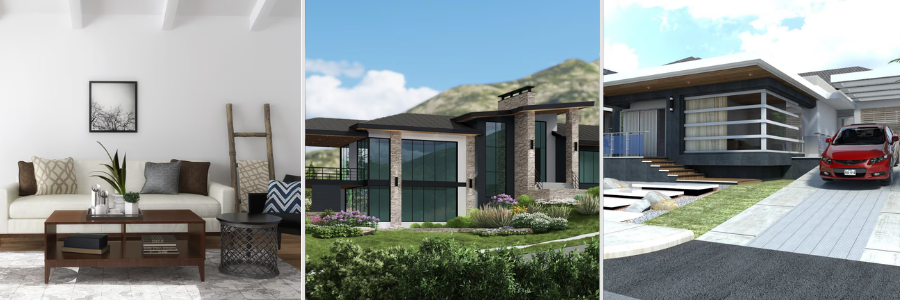
3D rendering design examples by Cad Crowd architectural and interior design freelancers

RELATED: Overcoming errors in architectural drafting with outsourcing design services

Failing to test renders at multiple angles

Architectural models often have more complex shapes, and sometimes it needs not only one camera angle view but more of them. Doing so can expose errors. Having only one angle can be prone to blind spots, and errors will be overlooked. Ensuring that the issues are caught early on makes it easier to fix or make an adjustment for 3D architectural rendering services. Checking multiple angles could also ensure consistency across all surfaces, making sure that no mistake was missed. 

Proper UV unwrapping

To ensure that UV unwrapping is properly done, it has to be envisioned that it looks like flattening a 3D object onto a 2D surface so that all textures wrap it correctly. In UV, textures can overlap, misalign, and stretch on the model, making it look off. Textures should stay in the right place, and that can be fixed with the utilization of UV islands to adjust positions and check the spacing and stretching. 

Maintaining texture resolution balance

To maintain texture resolution balance, select the right detail for each surface. High-resolution photos are mostly used on close-up surfaces, so the details appear crisp and clear. But in distant objects, low-resolution textures can be used since small details won’t be noticed, since they’re distant. 

Seamless textures and pattern variation. Seamless textures do make surfaces look continuous and natural, but such repetitive patterns make it perfect, so it feels artificial. To ensure that this is avoided, designers fix it by layering multiple textures and adding some hues or colors to pattern variations. This can be used for long hallways or large walls where a repeated pattern can easily be spotted. 

Consistent material scaling

There are different material surfaces and patterns that can be seen on the render model, and it’s important to have a consistent scaling throughout the model. From bricks, floor tiles, or wood planks. Every pattern and texture should be proportionate to the objects or other elements; it will look mismatched and awkward. 

Ignoring ambient occlusion

This is about forgetting subtle shadows that should appear on areas or where surfaces meet. Shadows in surfaces influence depth and realism, and not having it make it look unnatural. Without it, there would only be smooth pictures or detailed patterns. It will look flat. Architectural and interior design experts can fix it by utilizing maps and applying shadows in corners and crevices to make surfaces look three-dimensional. 

Applying textures to the wrong material channels

Every material has multiple channels that control how it looks. It has color, roughness, metalness, and normal/bump. When color texture was put on a different roughness slot, it may not look good. It can look patchy or may appear fake. The textures wouldn’t feel like they’re real. Textures need to be corrected and put in their rightful slots. Color textures are meant to color, roughness makes the surface shine, and normal maps can add in bumps. Mixed-ups can make it look way off. 

Ignoring real-world material references

All textures have to be aligned with what the real-life one looks like. Having a reference makes it easier to correct anything that feels fake or off. When the textures do not match the real material, the render wouldn’t feel real or convincing, no matter how high the quality of the render is. It is important to take note of how the real-life material looks so that the textures in the render would feel believable.  

Using stretched UV shells

Stretched UV Shells usually happen when an unwrapped version of the three-dimensional surfaces is squashed or stretched. The texture wouldn’t feel like it fits. It could elongate, bend, and squash on some materials. To fix this, UV islands have to be checked to make sure that they are properly and consistently scaled. Also, relax or unwrap UVs to evenly distribute them. Fixing this layout ensures that the texture wraps naturally. 

Regular software updates and plugins

Constant checks on software updates and plug-ins ensure that the program is running on new tool engines and consistently improves. The updates could help improve bugs, fixes, and other optimizations to make the textures more reliable and realistic. There are plug-ins that could help in detecting overlapping UVs so they can be resolved early on. Updating could also improve speed in HDR rendering services, as well as their compatibility with files. 

Collaboration and freelance support

Having a freelancer help with unloading tasks and works and could improve the render quality. This way, the team can focus on other decision-making agendas or do quality control on design planning. There are several platforms that connect businesses to professionals, but in Cad Crowd, you are assured that the freelancers are pre-vetted and ready to help without guesswork. They can deliver the tasks tailored to the project’s needs. 

texturized 3D renders including landscape and interior by Cad Crowd architectural designers and freelancers

RELATED: Understanding real-time rendering, how it works, and benefits for architectural companies

Workflow documentation and templates

Having a standardized workflow and documentation helps keep track across the projects. It sets rules and conditioning for UV wrap, texture naming conventions, resolutions, and material settings. This ensures consistency and makes it an easier streamline workflow for the team members to follow. This is essential, especially when handling multiple large-scale projects. 

Final render checks

Before submitting final renders, it is only right to do a quality check and inspection of all surface textures to detect errors, if any, and whether everything is correctly aligned and consistent. Use multiple camera angles to check other areas, as there may be hidden issues. High-resolution views can detect subtle clashes that could not be seen on drafts. Doing a final check gives confidence in the final output, strengthening trust and enhancing client satisfaction. 

How Cad Crowd can help

Texture mapping isn’t just about finding the right textures to match the surfaces; it must look real and natural. An effective texture mapping produces high-quality renders, which makes stakeholders visualized realism of the structure, adding confidence to it.  Addressing common mistakes in texture mapping and taking corrective measures improves the outcomes and aligns the renders with realism. To ensure quality, architectural firms connect to platforms like Cad Crowd to help in finding the right experts to work with. Check Cad Crowd today and hire your 3D artist and achieve that realistic render with accuracy and visual impact. Request a quote today.

author avatar

MacKenzie Brown is the founder and CEO of Cad Crowd. With over 18 years of experience in launching and scaling platforms specializing in CAD services, product design, manufacturing, hardware, and software development, MacKenzie is a recognized authority in the engineering industry. Under his leadership, Cad Crowd serves esteemed clients like NASA, JPL, the U.S. Navy, and Fortune 500 companies, empowering innovators with access to high-quality design and engineering talent.

Connect with me: LinkedInXCad Crowd

The latest Crimson Desert patch lets you ride a special lion to a claw machine which spits out chairs and special hats


Crimson Desert continues to morph into newer and more unknowable forms with each patch developers Pearl Abyss put out. For example, the latest one turns it into a game in which you can ride one of many special animals to a claw machine that stocks some nice decor and accessories, then get a handy partial refund when upgrading your gear. Also, passengers will no longer enable your road rage by getting out and trying to duff up whichever unlucky person you’ve crashed your wagon into.

Continue reading “The latest Crimson Desert patch lets you ride a special lion to a claw machine which spits out chairs and special hats”

Get ready for the whisper-filled office of the future


How will work setups change if we spend more and more time talking to our computers? A recent feature in the Wall Street Journal looks at the rising popularity of dictation apps like Wispr, especially now that they can be connected to vibe coding tools, and what that might mean for office etiquette.

One VC said that visiting startup offices now feels like stepping into a high-end call center. And Gusto co-founder Edward Kim is apparently telling his team that in the future, offices will sound “more like a sales floor.” (As someone still scarred from the time his desk was briefly relocated to a sales floor, let me say: Oh no.)

Kim claimed that he only types now when he absolutely has to. But he admitted that constantly dictating in the office can be “just a little awkward.”

Similarly, AI entrepreneur Mollie Amkraut Mueller said her husband became annoyed with her new habit of whispering to her computer, so their late-night work sessions now involve sitting apart, or “one of us will stay in our office.”

But Wispr founder Tanay Kothari insisted that this will all seem “normal” one day, just as it’s become normal to spend hours staring at your phone.

If you’ve ever had your shoes stolen in Kingdom Come Deliverance 2, that was apparently PC Gamer’s fault, sorry


Prokop Jirsa is the lead designer of Kingdom Come Deliverance 2, and now one of Warhorse Studios’ two creative directors. Our Joshua Wolens recently spoke to him about their games’ love of making things difficult for players, but another topic that came up was their systems-driven nature and the role a PC Gamer article played in that.

Discussing the reaction to the first Kingdom Come Deliverance, Jirsa said, “We knew that our systems-driven world works because one of you guys thought that somebody has stolen Henry’s shoes while he was in Talmberg. And we had no system like that in there. The boots just despawned. But he was really searching around the castle, ‘Who actually stole the boots?’ And he was looking at the clothing of the NPCs.”

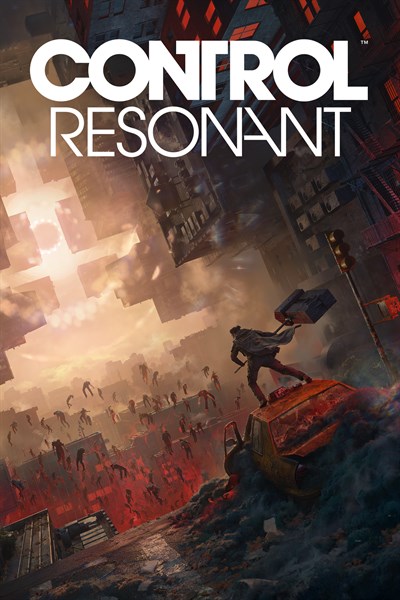
Control Resonant: Remedy on the Exciting Sequel, Xbox Play Anywhere, and Self-Publishing


Summary

  • We talk with Remedy’s Miika Huttunen, Mikael Kasurinen, and Anne-Marie Grönroos about the game’s diverse gameplay, support for XPA, and working with ID@Xbox.
  • Control Resonant takes the series in a new direction, from evolving combat to a new playable character, with support for a variety of platforms and devices.
  • Control Resonant launches in 2026 for Xbox Series X|S and Xbox on PC with support for Xbox Play Anywhere.

A highlight for independent developers is having the creative control in the direction of the experience they want to bring to the player. It’s what makes indies such a unique facet of game development today.

Over the years, Remedy Entertainment has staked their claim as one of the most innovative game developers, delivering numerous high-quality games from the likes of Alan Wake, Control, and soon with Control Resonant. It’s here where things get exciting — Remedy will be publishing Control Resonant themselves and the ID@Xbox team has been helping support and guide them through this journey as they bring this game to the Xbox community. Part of that support has been to make sure that the game will support Xbox Play Anywhere at launch for Control Resonant.

Xbox Play Anywhere titles can be played across Xbox console, PC, and supported gaming handhelds at no additional cost, allowing you to pick up where you left off on your preferred device, bringing all your saves, game add-ons, and achievements with you.

To learn more about this journey, ID@Xbox’s Guy Richards spoke with Remedy’s Miika Huttunen, Mikael Kasurinen, and Anne-Marie Grönroos about the game’s diverse gameplay, support for XPA, and more.


You’re bringing Xbox Play Anywhere support to Control Resonant at launch. What does that unlock for players, and how has it shaped your approach to development?

Miika Huttunen, Senior Communications Manager: We want players to feel at home with Control Resonant wherever they choose to play. Our focus has been on making sure the experience feels great across platforms.

You’re self-publishing Control Resonant and working with ID@Xbox on this project. How does that partnership support the way you want to bring the game to players?

Huttunen: Yes, Remedy Entertainment is publishing Control Resonant ourselves, which is incredibly exciting.  It’s been amazing to see our company grow over the years and we appreciate all of the support from our fans and partners. Of course, the ID@Xbox team has been a tremendous group to work with as we get closer to the launch of Control Resonant. Their support and guidance has been such a positive aspect of the journey to bring this game to the incredible Xbox community.

We of course have many partners we work with, such as ID@xbox to try to make sure we land well on all platforms. Remedy has a long history with Xbox, so that always helps!

With more players spending time on handheld devices, you’ve worked to make Resonant Handheld Optimized. How have you approached making Control Resonant feel great in that format?

Huttunen: We want to ensure the game is great on all platforms and the best possible experience for players. Many of the moments in AAA games tend to really shine on big displays, but we of course realize that there are players on handheld devices. We take that into account from a performance and controls standpoint to ensure that those players get the best possible experience.

Is this the kind of game that could benefit from playing side-quests on handheld, and switching to the TV for major moments?

Huttunen: That’s an interesting question. I think it’s up to players to decide on what type of device they want to play, but it’s definitely great that you can play on one device and then continue on another.

Control Resonant takes the series in a new direction, from evolving combat to a new playable character. What drove those decisions, and how did you balance these new ideas with what fans loved about the original?

Mikael Kasurinen, Creative Director: I look at these two games as siblings, each standing on their own feet, with their own attitude and approach to the world. But it’s still the same shared world, in the middle of a new crisis. The stories in both games have the Faden siblings at the center; we just shift the perspective depending on which game you play. So, players shouldn’t worry about losing a connection to these characters and who they are. But to truly get to know them, you need to see their respective journeys through their own eyes.

This also lets us bring a fresh take on the world through quests, gameplay, weapons, and abilities. And it’s easier for new players to jump in: there’s no pressure to play the first Control before Resonant. They both work as their own experiences, each with a protagonist who’s a blank slate, ready to discover their fate. And if you want to expand the picture, nothing stops you from seeing the other side of the coin.​​​​​​​​​​​​​​​​

The first game effectively took place in a single (albeit very changeable) location – how has creating an entire city changed how you design exploration, combat, and more?

Anne-Marie Grönroos, Lead Level Designer: We have a bigger, more interconnected world. The open areas are bigger and more frequent than in the first game, which means we can show landmarks from further away, creating anticipation between seeing them for the first time and finally reaching them: many of our landmarks are created by paranatural situations that the player needs to deal with, so just seeing them in the distance already starts building up a mystery. Compared to being constrained inside the Oldest House, we can show several interesting things to pursue at once, giving the player more options for where to go and what to focus on next.

There’s a greater variety of environments and a mix of both indoor and outdoor locations, creating a bigger contrast between the two (versus going from a small office space into a bigger office space). We also get the contrast of regular New York against the paranatural. The paranatural feels stranger when it’s grounded by something familiar. The scale of the big events is and feels bigger when you see the city as a point of comparison.

We can show and tell stories of the FBC interacting with the civilian world and see the impact of the paranatural on the lives of the regular people. You can see how FBC operations work outside the Oldest House, before and during the current situation. We also have stories with no FBC connections at all.

The city environments provide a lot of opportunities for vertical gameplay. We had significant verticality in the first game, too, but now you are constantly switching between the rooftops and street level and below, feeling even more like a superhero than in the first game.

Between Control, FBC, and Resonant – and the major ways they all differ – it feels like this setting can support whatever kind of game you want to make. Do you see Control as a place for Remedy to experiment in ways it would feel less appropriate to do with other projects?

Kasurinen: Control is a versatile franchise. It can support a wide variety of experiences, but of course they need to feel like they belong and have a meaningful role to play in the larger scheme of things.

Each entry in the franchise has to push the world’s story forward. For instance, even though FBC: Firebreak was a departure in many ways, it conveyed events that happened during the lockdown of the Oldest House after the events in Control and, in its own way, set the stage for Control Resonant.

So yes, it can and should also be a place for experimentation, as long as we keep our eye on the ball and it has something meaningful to say.​​​​​​​​​​​​​​​​


CONTROL Resonant

Remedy Entertainment


After years in confinement at the hands of the Federal Bureau of Control (FBC), Dylan Faden’s former captors are deploying him at the peak of a supernatural crisis.

Charged with combating a mysterious cosmic entity as it alters fundamental aspects of our reality, Dylan must harness his new-found powers to take the fight to the myriad threats overwhelming Manhattan.

Join Dylan in this sequel to the multi-award-winning CONTROL to explore the expansive zones of a city overrun by the corrupting influences of the chaotic Hiss and invasive micro-organism, the Mold, and other twisted paranatural threats.

On the path to unlocking the full potential of his supernatural abilities Dylan will also seek out his sister, FBC Director Jesse Faden, as he bids to comprehend and contain the dangers that have spilled beyond the confines of the Oldest House to tear our world apart.


Kiloview NDI Workflows for Education


In this eduStreamTV 2026 session, James F. speaks with Judy Zuo from Kiloview about how NDI-powered AV over IP workflows are transforming educational video production, lecture capture, sports streaming, and campus-wide media distribution. The discussion highlights how schools and universities are using Kiloview solutions to create scalable, flexible, and low-latency production environments built around IP-based workflows.

Judy walks through Kiloview’s complete AV-over-IP ecosystem, including NDI encoders, decoders, media gateways, centralized network management tools, and scalable infrastructure solutions designed specifically for educational applications. These technologies allow schools to simplify deployment, improve workflow flexibility, and reduce the complexity often associated with traditional broadcast and AV systems.

The session also explores Kiloview’s cellular bonding technology, including the P3 and P3 Mini wireless bonding encoders. These portable solutions help schools and production teams maintain reliable live streams from remote locations, athletic fields, auditoriums, and campus events by combining multiple network connections for more stable video transmission.

Judy shares real-world education case studies featuring campus studios, auditoriums, and live sports production environments that demonstrate how educational institutions are using Kiloview technology to modernize media workflows while reducing infrastructure costs. By leveraging NDI and IP-based production systems, schools can support a wide range of live production and streaming applications with greater scalability and operational efficiency.

Watch this eduStreamTV 2026 session to learn how Kiloview is helping schools and universities build modern AV-over-IP production environments with NDI workflows, centralized video management, and cellular bonding technology for reliable live streaming and campus media production.

Uber has always wanted to be more than a ride; now it has reason to hurry


For years, Uber talked about becoming a super app. Then Waymo started picking up passengers in San Francisco, and the conversation grew more urgent. The company has been trying to embed itself inside the AV industry — as a data provider, an investor, and a distribution platform — but the consumer-facing bet may be just as important.

Two weeks ago, Uber held its annual GO-GET product event in New York and announced something its executives had been circling for a long time: users in the U.S. can now book hotels inside the Uber app, through a partnership with Expedia Group, with access to more than 700,000 properties worldwide. Uber One members — the company’s subscription tier at $9.99 a month — get 20% off a rotating list of 10,000 hotels and 10% back in credits. Vacation rentals through Vrbo will follow later this year, along with restaurant reservations via OpenTable. In the meantime, a “Shop for Me” feature lets users order from stores that aren’t even on the platform.

The announcements, taken together, were the most concrete picture yet of something Uber has been trying to conjure since at least 2019: that an app with 199 million monthly active users could become the app they use for nearly everything.

Praveen Neppalli Naga, Uber’s CTO, offered the clearest explanation of the company’s thinking at TechCrunch’s StrictlyVC event late last month in San Francisco. The super app concept has existed for years in India and Southeast Asia, he noted, but U.S. versions have mostly flopped by bolting services onto traffic rather than building toward a reason to stay.

His answer to what fits? Membership. Every new category — food, groceries, now hotels — gives someone another reason to pay for Uber One. “I take Uber, go to the airport, take a flight, take another Uber, go to a hotel, go to a restaurant,” he said. “There is a flow you can actually build into it.”

Flights are not available yet, though Naga didn’t rule them out. Uber tried flight booking in Europe years ago without success. “First let’s get the hotel things done,” he said. Financial services sound like a possibility too — Uber already offers a debit card to drivers in Mexico — though how far that goes, or when, remains unclear. Said Naga: “Never say never.”

Uber isn’t alone in this race. Airbnb, arguably the company most directly threatened by Uber’s hotel push, announced its own transportation ambitions in late March — a partnership with Welcome Pickups to offer airport transfers in 125 cities across Asia, Europe, and Latin America, structured to keep users inside the Airbnb app rather than sending them to Uber. Meanwhile, Elon Musk has spent three years promising to turn X into an “everything app” in the WeChat mold, and is now nearing what he describes as a long-stated goal: X Money, a banking and payments platform built inside the social network, is expected to launch publicly soon. X claims 500 million monthly active users.

Techcrunch event

San Francisco, CA
|
October 13-15, 2026

The big question is how many super apps the American market will actually support. WeChat works in China partly because the alternative was a patchwork of inferior options. In the U.S., people already have apps they like for most of what Uber wants to do. Getting them to consolidate inside a single platform requires either a compelling reason — Uber One’s discounts, say — or a seamless enough experience that switching feels worth it.

Uber’s bet is that its installed base is the moat. Its users have already handed over a credit card. Convincing them to book a hotel, or order from a store they’d never find on Uber Eats, is an easy lift compared with convincing them to download something new. Its most recent earnings, reported a few days ago, suggest Uber Eats may be the strongest argument for that thesis: delivery revenue grew 34% year over year in the first quarter, to $5.07 billion, making it easily the fastest-growing part of the business and pulling almost even with mobility in gross bookings.

Uber’s stock is still down about 8% from a year ago — suggesting that Wall Street isn’t fully convinced. But the company says that 50 million people are now paying for Uber One, and together they account for roughly half the company’s total bookings.

When you purchase through links in our articles, we may earn a small commission. This doesn’t affect our editorial independence.

General Motors settles lawsuit over selling customer driving data


A two-year legal battle between General Motors and California prosecutors, led by Attorney General Rob Bonta, over the alleged misuse of customer driving data has concluded, with GM agreeing to pay $12.75 million in penalties. 

Mashable 101 Fan Fave: Vote for your favorite creator today!

In a press release announcing the settlement, the AG alleges that GM sold “the names, contact information, geolocation data, and driving behavior data of hundreds of thousands of Californians” to data brokers, including Verisk Analytics and LexisNexis Risk Solutions. And, as the statement points out, “If you know the precise location of a person’s car, then you know an enormous amount of personal, sensitive information about that person — their home, work, children’s school, place of worship.”

The original facts of the case were uncovered by The New York Times back in 2024, where the focus was on whether insurance companies were using this driving data to charge some customers higher insurance rates. But the attorney general’s investigation concluded that “California drivers were not directly impacted by GM’s sales of data,” because under California’s strict insurance laws, “insurers are prohibited from using driving data to set insurance rates.” 

In addition to the $12.75 million settlement, GM has agreed to stop selling driving data to any consumer reporting agencies for five years, delete any current driving data within 180 days (unless expressly permitted to keep the data by the driver), and develop and maintain its own privacy program to assess its data collection practices and mitigate the risks of a data breach.

While the settlement is definitely a win for consumer privacy, you shouldn’t feel too bad for GM just yet. According to the attorney general’s own calculations, GM earned roughly $20 million for the sale of its OnStar data, so even with the hefty settlement, they’re still turning a nice profit. 

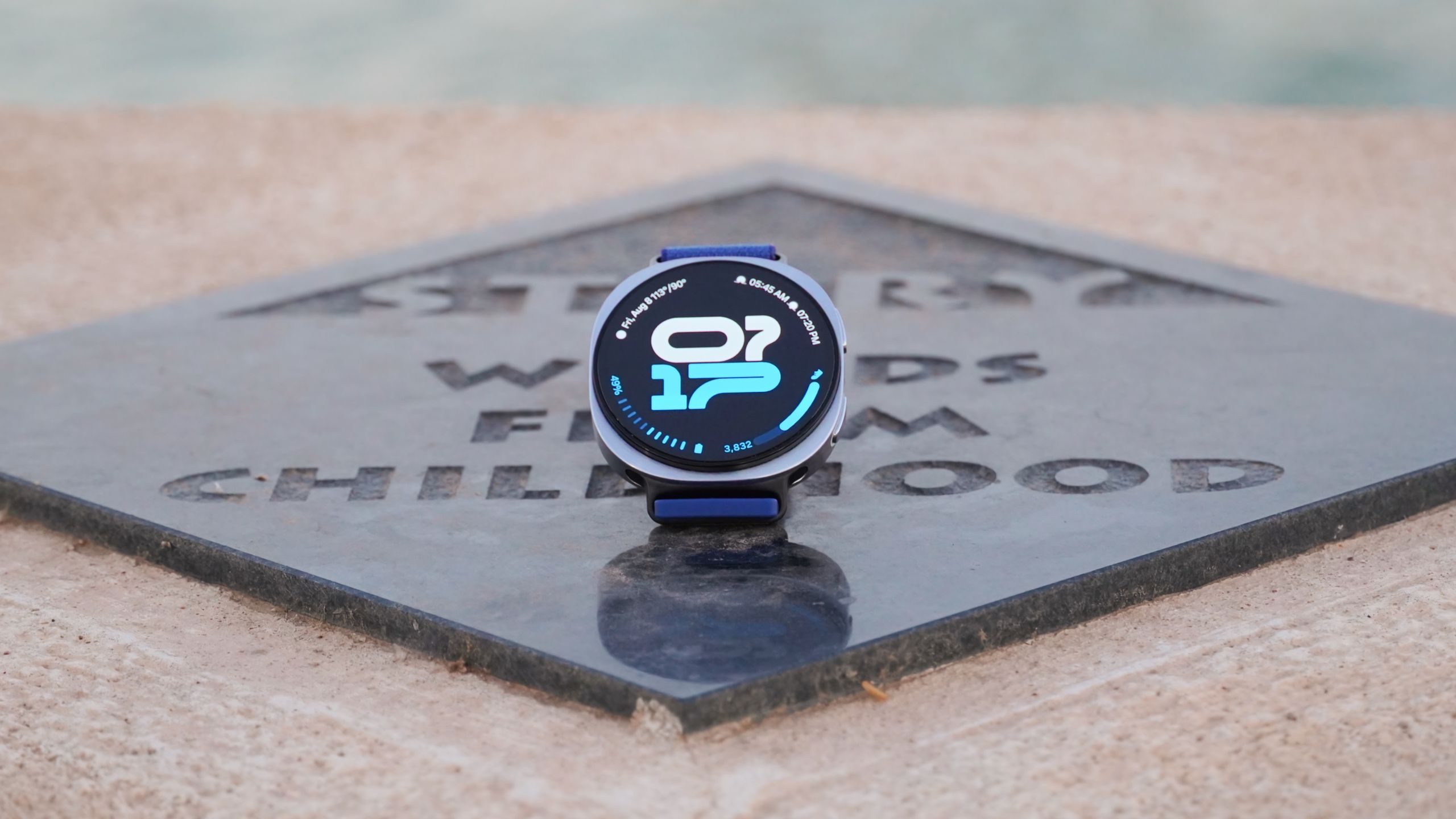
These are the 5 features that make the Samsung Galaxy Watch 8 worth it


Among the compelling options from Samsung, Google, and OnePlus, I went with the Galaxy Watch 8 as my Wear OS smartwatch of choice. The price was a big reason, since the Samsung Galaxy Watch 8 starts at $350, and discounts and trade-ins further lower the cost. Another factor was the watch’s design, which is much thinner and lower-profile than a Pixel Watch or OnePlus Watch. More than anything else, the Samsung Health suite won me over.

There are a handful of Samsung Health features that genuinely provide insight into your fitness and long-term health using the Galaxy Watch 8’s sensors. I can glance at my watch a few times daily and get instant snapshots of how I’m feeling using underlying sensor data. You can too, using these five Galaxy Watch 8 features. They’re also available on the Galaxy Watch 8 Classic and the Galaxy Watch Ultra.

How Handheld Translators Work and Why They’re Handy for Travel


Earbud-based translators are the next game changer. These are over-ear devices that come in a pair—one for you, one for your conversation partner. Each of you wears one earbud, and the software on your phone handles the translation, both ways, behind the scenes. The best earbud translators make for the most natural way to communicate with someone in a foreign language that I’ve found to date, though handhelds tend to have more capabilities. (Earbud-based designs seem to be the direction the industry is heading.)

When shopping for a handheld translator, watch out for expensive subscription plans. Many devices come with free service, but only for a time, and re-upping after the trial period ends can be pricey. Check the fine print before you buy. Also, make sure the translator you’re considering covers all the languages you need. Note that while some translators support hundreds of languages, they may be limited in the language pairs they can translate between.

Who Really Needs a Handheld Language Translator?

Again, if you only need casual translation for occasional or emergency use, you can definitely get by with a free translation app on your phone. Translation devices are best for frequent users who expect to carry on multiple sustained conversations with speakers of other languages over time.

Those scenarios could include attending a reunion with your Swedish wife’s extended family or a lengthy workshop series with colleagues from other parts of the world. These tools are also often marketed to first responders who need to quickly assess a situation when human translation services aren’t available.

In situations where you may need to communicate with several speakers, each speaking a different language, a portable translator can make even more sense. If you expect your journeys to take you to far-flung areas or off the grid entirely, where internet service may be poor or nonexistent, a translator can be a helpful tool in your travel bag, even if you only expect to use it for emergencies.

Which Handheld Language Translators Are Best?

After testing numerous handheld translators, I recommend this trio. Which one you pick will depend on how you expect to use it—and your budget.

Best Stand-Alone Translator

Timekettle

T1 Handheld Translator Device

The Timekettle T1 is a reasonably affordable and very pocketable device that makes for an easy addition to your travel kit. Built for two users to communicate, each with access to half the screen, the T1 translates each side of a conversation—written or spoken—into that user’s own language. Using it can be a little tricky: a color-coded button on the side of the device or a virtual one on the 4-inch touchscreen must be held down to tell the T1 which language to listen for. But once you get the hang of it, the system works pretty well.

Accuracy is solid, and translations are fast, popping up in well under a second. One challenge I had with the device relates to its small screen. Like most translators, the T1 supports photo-based translations via its 8-megapixel camera, but the 540 x 1080-pixel screen is too small to display much text at once. Also, while the unit includes a global eSIM with two years of free service included ($50/year after that), I encountered plenty of signal gaps, even in my own home. The good news is that if Wi-Fi’s available, that works too. The unit also supports 31 offline language pairs (10 in combination with English), so if you plan ahead, service woes may not be an issue at all.

Best Translator Earbuds

Black and grey earbuds hovering over a closed case

iFLYTEK

iFLYTEK AI Translation Earbuds

If you want to upgrade your translation experience and make it more immersive, you’ll want to invest in a pair of earbuds, which give you a more personal and natural way to communicate. As described above, the iconic way to use these is to pop one on yourself and give the other to your friend. An app on your phone handles two-way translation, back and forth.

These 12-gram on-ear earbuds are the best I’ve tested, primarily because once they’re configured, they work completely hands-free. No clicking buttons or tapping the side of your head every time you’re ready to speak: The earbuds understand who’s talking and when, and they work with remarkable speed, almost like a professional interpreter whispering in your ear.