While Slack already integrates with several coding agents, developers have to interact with them independently to get work done. The aim of Slack Code is to make agents available to multiple coworkers in shared, project-based “code channels.”
“We built code channels to be this multi-player AI experience and bring more development into Slack,” said Sateja Parulekar, vice president of product marketing at Slack. “It’s not just engineers and product managers who are working with the coding agents; it’s the marketers, the product designers who are now able to interact with a coding agent in a safe, governed environment.”
Slack code channels are intended for one-off coding sessions and projects — building a new application feature, updating a web page, or fixing a bug, for example.
When the coding agent is tagged in a Slack channel or DM with a request, it automatically creates a new code channel, adds links to required documents, and invites relevant participants.
The code channel functions just like a normal Slack channel, with participants able to send messages and files as usual, while also letting them interact with a coding agent and track outputs via the channel’s “session artifacts.” These artifacts include “code diffs” that highlight changes to code made by the agent, as well as Slack “canvas” documents and live HTML that displays prototypes and previews created by the agent.
All participants can use natural language to direct the agent, making suggestions and signing-off on outputs, for instance. Any updates are then highlighted in the original Slack channel. And when a task or project is complete, the code channel is automatically archived.
Slack Code channels can also be customized — Slack admins can create guardrails to prevent non-technical workers from shipping code without engineering review, for example.
Code channels adhere to Slack’s existing security and permissions model, the company said, with agents able to access conversations and data based on controls set for a Slack workspace.
At launch, four agents integrate with Slack Code — Claude Code, Devin, GitHub Copilot, and Vercel — though Slack intends to expand the list of options over time. Slack Code is available at no extra cost on all Slack subscriptions.
“Slack Code closes the gap between where work gets done and where code gets written with dedicated spaces built for output along project-based channels right in Slack,” said Wayne Kurtzman, research vice president at IDC. “This furthers the Salesforce goal of making work more seamless and multi-player within the Slack environment, regardless of the other applications the business is using.
“While Slack Code may seem early to market for some companies, others are leveraging the first-mover advantage.”
While software development and coordination work “has happened in Slack forever,” according to Will McKeon-White, senior analyst at Forrester, the new features make it “easier to just stay in Slack only and [open] up who is involved with the actual code creation.”
For IT staffers who enable Slack Code, the immediate consideration involves permissions, he said — “a persistent challenge for anything multiplayer.” McKeon-White cites various approaches: “…Some inherit user permissions based on task, some have persistent permissions with different ‘invoking’ permissions for users, some inherit the permissions of the room. Each has flaws.”
The longer-term challenge, he said, is around multi-agent collaboration.
“Multi-agent collab today in successful environments isn’t very dynamic,” said McKeon-White. “Having true dynamic agents cooperating can create extremely interesting emergent behavior,” he said, pointing to recent Anthropic research on the topic.
While Slack Code is aimed at software development-related tasks, Slack also envisages a similar cross-functional, collaborative approach to AI agent interactions applied to a wider variety of purposes: marketing campaigns, for instance, or legal document reviews.
“That might not involve code per se, but it does involve a very detailed review of a document and tracking changes and a preview of what’s going to be sent out to the customer,” said Parulekar. “In the future, we see this extending to a lot of different teams and use cases for technical and non-technical users.”
Other features announced Thursday include “agent DMs” that allow for individual interactions with an agent and a new “agents tab” where users can view existing agent conversations.
Parulekar said Slack Code feeds into a wider Slack strategy centered on a “multi-player experience” for human workers and AI agents. This includes the recent announcement of Claude Tag, which makes Anthropic’s agent available to teams.
“Whether it’s the user experience that we’re evolving — like the agent tab, or coding channels where you can plan, code, test, and ship inside of Slack — it’s all part of that bigger vision of making Slack a great home for agents and furthering that vision of multiplayer AI,” she said.
Computer monitors can come with some pretty steep price tags, especially if you’re in the market for a specialized screen for PC gaming or creative work like animation or video editing. This is doubly true if you want a high-end OLED display, a 4K monitor, or a super-sized screen.
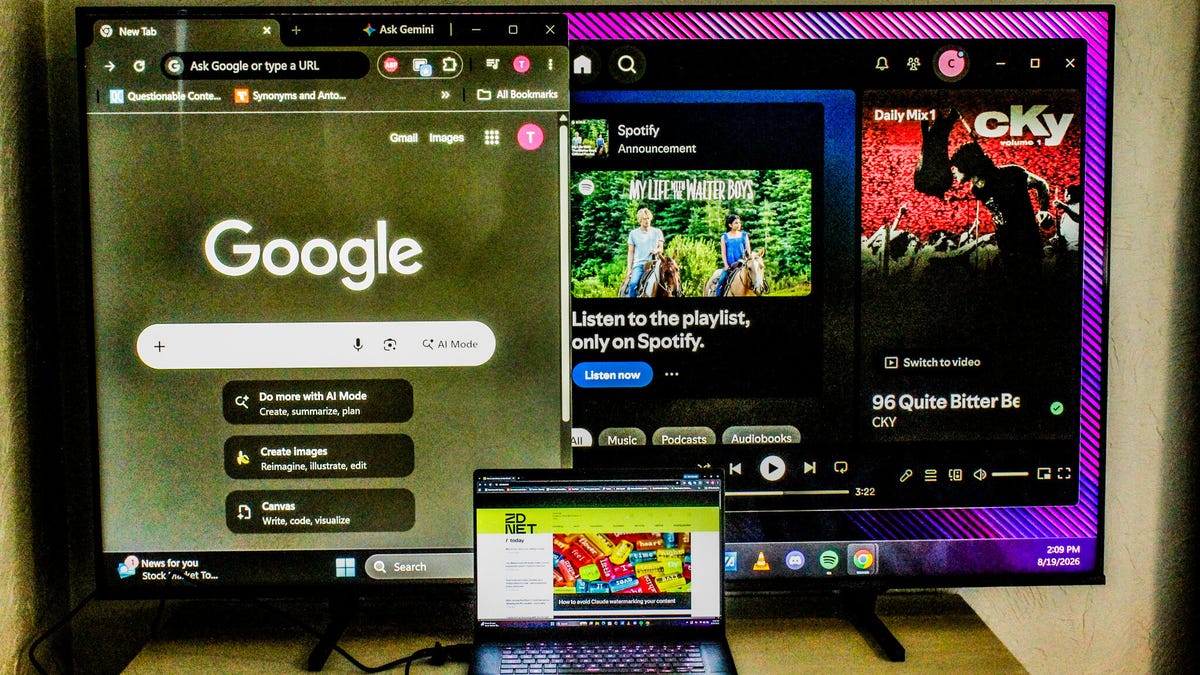
There’s a way around this, however. If you’re looking for a cheap solution, you can easily connect your TV to a laptop or PC to use as your main screen, a part of your current multi-monitor setup, or as an emergency backup monitor. Depending on how you want to connect your TV to your computer, you might not have to spend any money at all.
I’ve put together a short walkthrough for setting up your TV as a monitor on Windows, Mac, ChromeOS, or Linux as either a temporary solution or a more permanent addition to your setup.
Sony/Taylor Clemons/ZDNet
How to use your TV as a monitor
The quickest and simplest way to connect your PC to your TV is by connecting them with a regular HDMI cable and selecting the correct input in your menu settings. Once everything is set up and powered on, you’ll have an almost perfect mirror of your desktop on your TV.
If your PC or laptop uses Thunderbolt or DisplayPort for connecting external displays, you’ll have to pick up a USB-C-to-HDMI or a DisplayPort-to-HDMI adapter. They’re around $10-15, but keep in mind that since the TV still relies on HDMI, you won’t get the same high-speed data transfers as you would with a monitor that has a DisplayPort or Thunderbolt connection.
You can also go wireless. Almost all new smart TVs also support either Apple’s AirPlay or Googlecast screen mirroring for wireless casting from your devices to your screen. If you use this option, however, you might experience significant input lag or resolution issues as both your TV and computer compress, transmit, and then display information. If you have a newer Samsung or LG TV, you can set up remote PC access by toggling on the setting on your laptop or desktop, and setting up the dedicated remote access app with your device’s IP address.
Here’s how to find your IP address:
Windows
Windows key > Type cmd > Open Command Prompt > Type ipconfig and press Enter > Locate IPv4 address
OR
Start > Settings > Network & Internet > Wi-Fi/Ethernet > Select network > Scroll to see IP address
Mac
Apple menu > System settings > Network > Wi-Fi/Ethernet > Details > Locate IP address
ChromeOS
Clock > Wi-Fi/Ethernet > Information > Locate IP address
Linux
GUI option
Settings > Wi-Fi OR Network > Click gear icon > view IP address
Terminal option
Run hostname -I > Print internal IP address
OR
Run ip addr > Locate active network (eth0 for hardwired or wlan0 for Wi-Fi) > Locate inet
FOR LEGACY DISTROS
Run iconfig to view network details
Display settings
If you want to use your TV as a second (or third, or fourth) screen for your PC setup, you’ll have to locate your display settings and reconfigure your monitor arrangement.
Type xrandr > Confirm –output <display_name> > Confirm –mode <resolution> (e.g. 1920 x 1080 or 3840 x 2160) > Confirm –rate <hz> > Arrange monitors –output <secondary_display) –<direction> of <primary_display>
Getting the best picture
Kerry Wan/ZDNET
The most important factor is to match the resolution output between the computer and TV. If you’re lucky enough to own a computer capable of native 4K resolution, you can skip this step and move on to the next process. But if your laptop or desktop is only capable of 1080p or lower, you’ll have to change your TV’s output to match to avoid blurry text or pixelated images. You can do this by navigating to:
Settings > Display OR Picture > Device preferences > Resolution OR Output Resolution > Select 1080p or Auto
If your TV has a PC picture mode, it will be your best option for reducing input lag and getting a consistent refresh rate, whether you’re using a hardwired HDMI connection, screen mirroring, or using remote access.
But if it doesn’t, you can use the dedicated Game Mode, which often have specialized features like automatic low latency, very low response times, boosted refresh rates, and even VRR support via AMD FreeSync or Nvidia G-Sync. Though you’ll have to keep in mind that it won’t be a perfect solution, and you may see a few hiccups now and again as both your computer and TV process data signals sent between them.
With a little patience (and some grace), your smart TV can be a great temporary solution for certain projects or even as a permanent addition to your multi-monitor setup as a dedicated gaming or streaming screen.
The bottom line
Kayla Solino/ZDNET
Two of the biggest reasons to use a TV rather than a purpose-made PC monitor is that you can get a lot more screen real estate for a lot cheaper. If you want an ultra-widescreen monitor with 4K resolution, a high refresh rate, and maybe even an OLED or QLED panel, you’re looking at the possibility of spending a decent chunk of change.
The Alienware 34-inch QD-OLED gaming monitor will cost you around $750, and, granted, that gets you a 240Hz refresh rate, a 0.03ms response time, and multiple connection options, but it falls a bit short with resolution, topping out at just 1440p. And it doesn’t have built-in speakers, or even a 3.5mm connection for headphones.
Compare that to the 32-inch Hisense A4 which costs around $110, gives you 4K resolution, and DTS Virtual:X audio via the dual integrated speakers. But you’ll have to sacrifice refresh rate, since it tops out at 60Hz. Which is fine for streaming, but may cause frame rate issues in demanding games.
Yoku has arrived on Mokumana and he’s ready for the easy life, soaking up the sun and delivering parcels on a tropical paradise!How to Fish
However, an ancient Island deity is trapped in a restless sleep – and it’s all down to Yoku to traverse the island using a unique blend of pinball mechanics, platforming and open world exploration, in an amazing adventure to help those in need! Flip and bump our pint-sized protagonist around the stunning hand-painted island on your quest to rebuild the post-office, and wake an old god from its deep slumber.
Key Features:
OPEN-WORLD PINBALL ADVENTURE: Coupled with its unique pinball platforming play style, Yoku’s Island Express offers non-linear gameplay that gives you the freedom to choose your own path across multiple questlines.
WELCOME TO MOKUMANA ISLAND: Seamlessly Explore multiple regions of the island, including tropical beaches, lush jungles, snowy mountains, mysterious caves, and steamy hot springs!
UNLOCK THE AMAZING NEW ABILITIES: Help the friendly locals and earn a range of fantastic new power-ups! Vacuum explosive slugs and wake up sleepy villagers with the Noisemaker!
CAPTIVATING STORY: Meet a cast of unforgettable characters across multiple storylines – whilst uncovering the islands deepest secrets. And maybe rebuild the post office too!
EPIC BOSS BATTLES: Get ready to take on giant bosses using Yoku’s trusty ball to ‘deliver’ the final blow.
BEAUTIFUL ARTWORK: Feast your eyes on the breathtaking, hand-painted artwork created by games industry veteran artists.
Screenshots
SystemRequirements
Minimum Requires a 64-bit processor and operating system
OS *: Windows 7
Processor: Intel i3-2100 @ 3GHz / AMD A8-5500 @ 3.2GHz
Memory: 4 GB RAM
Graphics: Nvidia GeForce GT 630 1GB / AMD Radeon 7770 1GB / Intel HD 530
DirectX: Version 10
Storage: 3 GB available space
Support the game developers by purchasing the game on Steam
InstallationGuide
TurnOff Your Antivirus Before Installing Any Game
1 :: Download Game 2 :: Extract Game 3 :: Launch The Game 4 :: Have Fun 🙂
Gamescom, formerly known as the Games Convention, has existed as Europe’s primary video gaming trade show since 2002. It spent six years in Leipzig, Germany, before moving west to the Koelnmesse in Cologne in 2009, where it has occurred annually ever since. Since E3 closed its doors following the COVID-19 pandemic, Gamescom has become the largest industry event in the world.
As a result, more eyes than ever have been on the event, especially since Opening Night Live (which features game reveals, trailers, and announcements) also draws the attention of a global audience. However, that hasn’t changed the plan for the event over the last seven years, and the team behind it isn’t feeling any additional pressure to deliver.
“Gamescom has grown continuously over recent years, in scale, international relevance and digital reach, and that is the result of long-term development,” Tim Endres, the director of Gamescom at Koelnmesse, told Polygon via email. “We continued to take place every year, expanded our hybrid model and built formats such as Gamescom Opening Night Live, the Gamescom Awesome Indies Show as well as global editions, namely Gamescom Asia x Thailand Game Show and Gamescom LATAM. With E3 no longer taking place, Gamescom has naturally taken on a larger share of the global spotlight. But we don’t feel any pressure. It’s quite the opposite: We are happy and excited to see more people from around the world looking at Gamescom.”
Meanwhile, Stefan Heikhaus, the director of Gamescom at the German Games Industry Association, explained that they “feel a strong responsibility to deliver for the community and the industry every year,” but it’s “more a level of excitement, not pressure.” Part of that is “listening closely to feedback from visitors, exhibitors, and partners,” and for the 2026 iteration, that includes “closer integration of the developer conference, further development of the indie showcase, the addition of Games Done Quick, and an even stronger focus on community formats such as the social stage.”
Image: Gamescom/Koelnmesse Image Database
Games Done Quick appearing at Gamescom 2026 is a huge moment for the number one speedrunning event in the world, because it marks the first in-person GDQ event outside of North America. And it is a fully-fledged GDQ event as we know and love: three days straight of speedrunning, from Aug. 28-30, live at Gamescom and streamed on both Twitch and YouTube, not to mention a charity initiative supporting Gaming for Democracy.
With the context of GDQ expanding overseas, I asked whether we could see Gamescom do the same in the future. Endres explained that “the ideal future is hard to describe,” because his 2009 vision for the event is vastly different to what it has become in 2026. He confirmed plans are being made for the next few years, but according to Heikhaus, they don’t include a North American expansion. “Our focus is on Cologne as the central meeting point for the global industry and community, supported by our digital formats and our existing international events in Latin America and Asia.”
Dozens, if not hundreds, of games are confirmed to be appearing at Gamescom 2026, including but not limited to The Witcher 3: Wild Hunt – Songs of the Past, Dragon’s Dogma 2: Dark Arisen, The Blood of Dawnwalker, Alien: Isolation 2, Fable, Star Wars: Galactic Racer, and Metro 2039. Keep your eyes peeled on Polygon for reporting from the show, including news, previews, interviews, and more.
Your first 90 days as a finance leader will likely be a whirlwind. Taking time to create a plan and map the steps to achieve it can help you stay on track and measure your progress during this busy time.
To get started, here’s a new finance leader checklist to structure your plan in more detail. The checklist will help you plot your steps to success over the coming months.
Beginning with information gathering and learning in month one, you’ll get tips on who to meet with, how often, and where to focus your conversations.
As you enter your second month, you’re probably establishing informed opinions on what you’ve been learning about the company, its people, and your role. You’ll start to identify opportunities for improvement that can maximize your impact and make a lasting difference for the business.
In your third month, you should be starting to hit your stride in your daily work and establish a certain level of trust with your colleagues. This is a great month to focus on finding solutions to challenges. It’s also time to finalize your ideas on the business and develop an initial plan of actions you want to take.
Best AI Voice Agents for Small Business, Ranked 2026: 1. CloudTalk, 2. Rosie, 3. Goodcall, 4. Smith.ai & more. Compares price & included call volume.
Small businesses lose more revenue to unanswered phones than to almost any other operational gap, and the best AI voice agent for small business teams is now the cheapest way to close it. What changed in 2026 is not that the technology got smarter, but that it got buyable: a two-person clinic can put a working agent on its main line in an afternoon, for less than the cost of a part-time receptionist.
The catch is that “AI voice agent” now describes two very different kinds of product. Some are complete calling platforms with AI built into the phone line, usually sold as an AI receptionist. Others are developer toolkits that expect you to assemble the telephony, the routing, and the CRM sync yourself. The two terms get used interchangeably in the market, but the buying decision is not the same one. The ranking below separates them, prices them on the same basis, and matches each to the size and shape of business it actually serves.
Best AI Voice Agents for Small Businesses at a Glance
CloudTalk: best for small businesses that want an AI voice agent inside a full business phone system
Rosie: best for solo owners who just need every call answered
Goodcall: best for local service businesses with unpredictable call volume
Smith.ai: best for firms that want AI backed by human receptionists
My AI Front Desk: best for agencies reselling receptionists to clients
Retell AI: best for teams with a developer building a custom agent
Vapi: best for engineering teams that want low-level API control
Bland AI: best for high-volume outbound calling programs
Synthflow: best for scaled no-code deployments with vendor support
Dialpad: best for teams standardizing on one AI communications suite
AI Voice Agent Comparison for Small Businesses
Platform
Best for
Entry price
Included volume
Free option
Key strength
CloudTalk
AI inside a phone system
$99/mo AI Receptionist
200 min
Yes, 50 min
AI and humans on one call flow
Rosie
Solo owners
$49/mo
250 min
7-day trial
Fastest path to answered calls
Goodcall
Local service businesses
$79/mo
Unlimited min, 100 callers
14-day trial
Minute costs cannot spike
Smith.ai
AI plus human backup
$150/mo Pro
75 calls
Yes, 25 calls
Live humans catch what AI cannot
My AI Front Desk
Agencies and resellers
$99/mo
200 min
No
Partner tier for client accounts
Retell AI
Developer-built agents
$0.07 to $0.31/min
Usage-based
$10 credits
Transparent per-component pricing
Vapi
Engineering teams
$0.05/min plus models
Usage-based
$10 credits
Deepest low-level control
Bland AI
Outbound at volume
$0.14/min
Usage-based
2 credits
One flat per-minute rate
Synthflow
Scaled no-code builds
~$0.13/min effective
Usage-based
Trial minutes
Mature drag-and-drop builder
Dialpad
One AI comms suite
$15/user/mo Connect
Per-seat calling
14-day trial
AI across calls, chat, meetings
1. CloudTalk: Best AI Voice Agent for Small Businesses That Want It Inside Their Phone System
Overview
CloudTalk is the best AI voice agent for small businesses that want conversational call automation built into a complete business phone system, rather than a standalone bot bolted on later. The distinction matters more than it sounds. Most small teams do not need an AI that answers calls in isolation; they need one that answers, understands why the caller rang, and then hands the call to the right person on the same line, with the same numbers, the same routing rules, and the same reporting the team already uses.
That comes from building order. CloudTalk built the telephony layer first, with local numbers across 160+ countries and a visual Call Flow Designer, then embedded AI directly inside it. Oxford Royale Academy runs the agent as its primary response layer across five languages, replacing four seasonal staff during peak enrolment season. Setup does not require a developer: upload a knowledge base document, define the agent’s skills, and test it before it goes near a real caller.
Key Features
AI Receptionist that answers every inbound call, captures intent, and routes by what the caller actually said rather than a menu tree
AI Specialist that owns a defined workflow end to end, for inbound resolution or outbound campaigns triggered from your CRM
Configurable agent skills including Extract Information, Answer Questions, Transfer to Human, and Send Webhook
Understands and replies in 60+ languages and accents, detected automatically mid-call
Warm transfer to a human with the full conversation context attached, so callers never repeat themselves
Shared analytics covering AI and human calls in one dashboard, with transcription, sentiment, and call scoring
Integrations
HubSpot, with a certified two-way integration
Salesforce and Microsoft Dynamics
Pipedrive and Zoho CRM
Zendesk and Intercom
Google Calendar for live availability checks and in-call booking
Zapier, Make, and open API plus webhooks for everything else
Use Cases
24/7 reception for teams that cannot staff evenings and weekends
Instant lead response and qualification before a competitor calls back
Appointment booking, rescheduling, and no-show reactivation
Tier 1 support deflection for repeat questions about hours, status, and policy
Outbound reminder, renewal, and payment-chase campaigns fired from CRM triggers
Industries
Healthcare practices and clinics
Law firms and professional services
Real estate and property management
Fitness, education, and appointment-led B2C
Finance and insurance
Pricing
AI Receptionist: free tier with 50 minutes per month, then $99/mo for 200 minutes, $199/mo for 500, $299/mo for 1,000, $699/mo for 2,500
AI Specialist: from $349/mo for 1,000 minutes, with sales-led setup and a solutions consultant
Business phone system seats: Starter from 25/user/mobilledannually(34 monthly), Essential $29, Expert $49
Custom volume pricing available above 10,000 minutes per month
2. Rosie: Best AI Voice Agent for Solo Owners and Micro-Businesses
Overview
Rosie is built for the business where the owner is also the receptionist, the estimator, and the person on the roof. It does one job, answering the phone when nobody can, and it does not ask the buyer to think about call flows, telephony, or agent design to get there.
The product reflects that focus. Rosie trains itself on your business from your website, ships with mobile apps so call summaries land on your phone, and keeps the configuration surface deliberately small. There is no builder canvas to learn, which is the point: the tradeoff is less control over complex routing in exchange for being live the same day.
Key Features
Automatically trained on your business from your existing website content
Custom message-taking scenarios, expanding from two on entry plans to unlimited
Direct calendar booking plus appointment-link texting to callers
Warm and live call transfers with a spoken briefing before the handoff
Bilingual English and Spanish answering with 10+ selectable agent voices
Native iOS and Android apps with call summaries, transcripts, and recordings
Integrations
Zapier, connecting 1,000+ downstream apps
Calendar integrations for direct in-call booking
CRM connectivity routed through Zapier rather than native connectors
Website chat widget included at no extra cost
Website texting available as a paid add-on
SMS follow-up to callers after the conversation
Use Cases
After-hours and overflow answering for one-person operations
Message taking with structured details pushed to a phone
Booking consultations and estimates straight into a calendar
Screening and filtering spam and robocalls before they interrupt
Texting quote links or booking links during the call
Industries
Home services and trades
Independent salons, studios, and clinics
Solo legal and accounting practices
Small retail and local services
Freelancers and consultancies
Pricing
Professional: $49/mo for 250 minutes
Scale: $149/mo for 1,000 minutes, adding direct booking and live transfers
Growth: $299/mo for 2,000 minutes, adding document-based training and onboarding support
7-day free trial, cancel anytime, with website texting at $50/mo extra
3. Goodcall: Best AI Voice Agent for Local Service Businesses
Overview
Goodcall solves a problem specific to businesses whose call volume swings without warning: a burst week should not produce a surprise invoice. Instead of billing minutes, it charges by unique caller, which means a busy Monday costs the same as a quiet one as long as the same people are ringing.
For a shop, clinic, or dispatch desk, that pricing model is the differentiator more than any single feature. The agent handles the front-desk basics competently, forwards to the right person from a small internal directory, and stays inside a predictable monthly line item even when demand spikes.
Key Features
Unlimited call minutes and AI tokens on every paid plan
Logic flows for conditional handling, scaling from one flow to 25
Internal directory for routing callers to named team members
Conditional call forwarding that layers onto an existing business number
Call and customer detail retention, from 7 days up to unlimited
Unlimited agents per account with no per-seat charge
Integrations
Zapier for CRM and workflow connections
Google Voice compatibility for existing numbers
Conditional call forwarding from any current carrier
Calendar and booking tools via Zapier
Custom API integrations on the Enterprise tier
Webhook delivery of call and customer records
Use Cases
Front-desk answering for shops and service counters
Overflow handling during unpredictable seasonal peaks
Routing callers to the correct technician or department
Capturing new customer details outside opening hours
Multi-location answering under one account
Industries
Home services, HVAC, and contractors
Automotive and repair shops
Restaurants and hospitality
Local retail and franchises
Small medical and dental practices
Pricing
Starter: $79/mo, or $66/mo annually, covering 100 unique customers
Growth: $129/mo, or $108/mo annually, covering 250 unique customers
Scale: $249/mo, or $208/mo annually, covering 500 unique customers
Overage at $0.50 per additional unique customer, a 14-day free trial, and custom Enterprise pricing above that
4. Smith.ai: Best AI Voice Agent Backed by Human Receptionists
Overview
Smith.ai takes the position that some calls should never reach an AI at all. Its service pairs an AI answering layer with a US-based human receptionist team, so a caller who gets frustrated, asks something unusual, or clearly represents a high-value matter can be moved to a person mid-conversation.
That hybrid model costs meaningfully more per interaction than pure software, and it is aimed squarely at businesses where a single missed inquiry is worth hundreds or thousands. Law firms are the clearest example, which is why the intake tooling and legal integrations are the deepest part of the product.
Key Features
AI receptionist with escalation to live human receptionists
Lead screening and qualification against criteria you define
New client intake with structured question sets
AI scheduling plus appointment booking as a per-call add-on
Spam filtering against a 20M+ number database, excluded from your quota
Call recording, transcription, and analytics across every interaction
Integrations
Clio and legal practice management systems
HubSpot and Salesforce
Calendly, Acuity, and other scheduling tools
Zapier for everything without a native connector
Payment processors including Square, PayPal, and LawPay
SMS and Slack notification delivery
Use Cases
New client intake for firms billing by the matter
Qualifying inbound leads before they reach a partner
After-hours coverage with a human safety net
Booking consultations and taking payment on the call
Bilingual Spanish answering as a paid line option
Industries
Law firms and legal services
Home services and contractors
Accounting and financial advisory
Medical and dental practices
Marketing and lead-generation businesses
Pricing
Free: $0/mo for 25 calls, then $3.00 per additional call
Pro: from $150/mo for 75 calls at $2.00 per call, scaling to $500/mo for 300 calls
Enterprise: from $500/mo for 300 calls at $1.67 per call, with custom pricing above 1,000
Add-ons priced per call, including $1.50 appointment booking and $1.00 bilingual line
5. My AI Front Desk: Best AI Voice Agent for Agencies and Resellers
Overview
My AI Front Desk is built as much for the agency selling receptionists as for the business using one. Its Partner tier exists to let a marketing agency or IT consultancy stand up branded agents for a roster of client accounts, with per-minute rates low enough to leave margin.
For a small business buying direct, it is a credible if unremarkable receptionist with a five-minute setup and broad language coverage. The reason to choose it over a simpler tool is almost always the partner economics or the need for multi-tenant management rather than any single capability.
Key Features
Voice, chatbot, and SMS handling bundled into one plan
Knowledge base pages that expand with plan tier, from 2 to 20 and up
Verified outbound calling number on Business plans and above
Overage credits with auto-reload so calls do not fail mid-month
20+ supported languages on the voice agent
Editor and viewer seats for delegating agent management
Integrations
Zapier from the Business tier upward
Custom API access on Partner and Enterprise plans
Industry tools including Yardi and SimplePractice
Shopify for retail and e-commerce workflows
Webhook delivery of call transcripts and form submissions
Native CRM connectors that reviewers report as inconsistent
Use Cases
White-label receptionists resold under an agency’s brand
Multi-tenant management across many client accounts
Basic inbound answering and message capture
SMS follow-up after a missed or completed call
Lead capture forms tied to the same knowledge base
Industries
Marketing and IT agencies
Property management and real estate
Therapy and small healthcare practices
Retail and e-commerce
Professional services
Pricing
Basic: $20/mo, or $16/mo annually, with no voice minutes included
Business-in-a-Box: $99/mo, or $79/mo annually, with 200 voice minutes
Partner and Enterprise: custom, with voice from roughly 7 credits per minute
Overage at 25¢ per voice minute on self-serve plans, no contract required
6. Retell AI: Best AI Voice Agent Platform for Developer-Built Agents
Overview
Retell AI is aimed at the small business that has an engineer, or an agency working on its behalf, and wants an agent shaped precisely around its own process rather than a template. It exposes the pieces of the voice stack individually and prices them the same way, which makes it unusually easy to model what a given call configuration will cost.
The tradeoff is scope. Retell hands you the agent layer, not the phone system around it, so telephony, routing, and CRM sync are decisions you make and maintain. For teams comfortable with that, the per-minute economics are among the most transparent in the category.
Key Features
Component-level pricing for voice infrastructure, speech, LLM, and telephony
Prebuilt agent templates as a starting point for common flows
Knowledge base attachment, with 10 bases included before per-base charges
Advanced denoising, safety guardrails, and PII removal as opt-in features
Chat agents alongside voice, billed per AI message
20 free concurrent calls before any enterprise negotiation
Integrations
HubSpot for CRM sync
Twilio and Vonage for telephony
Make and n8n for workflow automation
Go High Level for agency stacks
Webhooks and full API access on every plan
Branded call ID as a per-call add-on
Use Cases
Custom inbound support agents shaped to an internal process
Outbound qualification runs with bespoke logic
Appointment scheduling wired directly into a proprietary system
Agencies building agents on behalf of client businesses
Prototyping a voice workflow before committing to a platform
Industries
Software and technology companies
Healthcare, with HIPAA and a BAA available
Financial services
Agencies and systems integrators
E-commerce and marketplaces
Pricing
Pay-as-you-go: $0.07 to $0.31 per minute all in, depending on model and voice choices
Add-ons from $0.005/min each for denoising, guardrails, and knowledge base
$10 in free credits to start, with Enterprise pricing for SSO, RBAC, and 24/7 support
7. Vapi: Best AI Voice Agent Infrastructure for Engineering Teams
Overview
Vapi sits one layer lower than most tools on this list. It is voice infrastructure, giving an engineering team direct control over the speech, language model, and telephony components, including the option to bring its own provider keys and pay those vendors directly.
Very few small businesses should buy Vapi as their first AI voice agent. It earns a place here because a growing number of SMB agents are built on it by contractors and internal developers, and because for a technical founder who wants no abstraction between their code and the call, nothing else in this category goes as deep.
Key Features
Bring-your-own API keys for speech, language model, and voice providers
Configurable call concurrency, priced per additional line
Voice, SMS, and chat handled through the same platform
Call history retention of 14 days on Build, custom on Scale
Priority model and provider access on committed-volume contracts
Data residency options for regulated deployments
Integrations
Direct integration with third-party STT, LLM, and TTS providers
Twilio and SIP trunking for telephony
Webhooks and REST API as the primary integration surface
Custom tool calling into internal systems
SSO and RBAC on the Scale tier
Community-built connectors for common CRMs
Use Cases
Custom voice products built by an in-house engineering team
Agents embedded inside a proprietary application
High-concurrency call handling with tuned latency
Regulated deployments needing data residency control
Technical prototypes that later graduate to production
Industries
Software and SaaS companies
Healthcare, via the paid HIPAA add-on
Fintech and payments
Technical agencies and consultancies
Logistics and marketplaces
Pricing
Build: pay-as-you-go with $0.05/min Vapi hosting, plus model provider costs paid directly, and $10 in free credits to start
Concurrency at $10 per line per month, SMS and chat at $0.005 per message
Scale: fixed platform fee plus committed volume, with custom per-minute rates
Compliance add-ons at $2,000/mo for HIPAA and $1,000/mo for zero data retention
8. Bland AI: Best AI Voice Agent for High-Volume Outbound Calling
Overview
Bland AI is built around outbound scale and prices accordingly. One flat per-minute rate covers the language model, speech recognition, and voice synthesis together, so a campaign’s cost can be forecast from call minutes alone without modelling token consumption.
For a small business, that clarity matters most when calls run into the thousands: reminder campaigns, lead follow-up sequences, collections. Below that volume the platform fees on its paid tiers are hard to justify, and the free Start tier’s daily call cap keeps it firmly in pilot territory.
Key Features
Single blended per-minute rate covering LLM, speech-to-text, and text-to-speech
Conversational pathways for branching multi-step call logic
Daily call caps and concurrency scaling by tier, up to 5,000 calls per day
Bring your own Twilio account, SIP trunk, or use built-in telephony
Warm and live transfers on Enterprise contracts
Custom voice actors and guardrails for regulated campaigns
Integrations
Twilio and SIP trunk connections
Native telephony at pass-through rates
Webhook and API automations
CRM connections through the automation layer
On-premise and VPC deployment on Enterprise
Custom tool calls into internal systems
Use Cases
Outbound lead qualification at campaign scale
Payment and appointment reminder programs
Reactivation calls across a dormant database
Survey and feedback collection runs
Inbound overflow when outbound capacity is idle
Industries
Lending and financial services
Insurance and claims
Healthcare operations
Logistics and delivery
Large-volume sales organizations
Pricing
Start: $0.14/min talk time with no platform fee, capped at 100 calls per day
Build: $299/mo platform fee at $0.12/min, 2,000 daily calls and 50 concurrent
Scale: $499/mo platform fee at $0.11/min, 5,000 daily calls and 100 concurrent
Enterprise: negotiated rates with unlimited daily calls, plus 2 free credits to start
9. Synthflow: Best No-Code AI Voice Agent for Scaled Deployments
Overview
Synthflow made its name as the friendliest no-code builder in voice AI, and the drag-and-drop canvas is still among the most capable ways to design a branching call flow without writing code. What changed is who it is sold to.
After retiring its Starter, Pro, and Growth subscriptions, Synthflow now offers pay-as-you-go usage or an Enterprise contract that starts at $30,000 per year. Small businesses can still use it, but the self-serve path has no permanent free tier and the supported path is priced for organizations several sizes up.
Key Features
Drag-and-drop no-code agent builder with branching logic
Inbound and outbound calling with campaign management
ElevenLabs-powered voice synthesis
White-label tooling and subaccount rebilling for agencies
Optional low-latency edge routing and concurrency add-ons
SOC 2 and GDPR compliance, with HIPAA on Enterprise only
Integrations
HubSpot and Salesforce
Zapier for general workflow automation
Go High Level for agency stacks
Calendly and calendar booking tools
Webhooks and knowledge-source connections
SIP trunking and bring-your-own-Twilio on higher tiers
Use Cases
No-code agent design for teams without engineers
Outbound campaigns managed from a visual builder
Agency subaccounts rebilled to end clients
Inbound qualification and routing flows
Multi-step workflows spanning several systems
Industries
Agencies and resellers
Real estate and property
Healthcare, on Enterprise contracts only
Automotive and dealerships
Recruitment and staffing
Pricing
Pay-as-you-go, assembled from $0.09/min voice engine plus $0.02 to $0.04/min LLM
Effective rate around $0.13/min for a standard setup, rising past $0.21/min with quality add-ons
Enterprise: from $30,000 per year, with volume rates reported near $0.07/min at scale
No permanent free tier; a limited trial provides test minutes only
10. Dialpad: Best AI Voice Agent Inside a Single Communications Suite
Overview
Dialpad appeals to the small business that wants one vendor for calling, messaging, meetings, and AI rather than a phone system plus a separate agent product. Its AI transcription and summaries are included from the entry Connect tier, which puts baseline conversation intelligence in reach at a low per-seat price.
The autonomous AI Agent is a different purchase. It is sold separately on a conversation-credit model with no published rate, so a small business evaluating Dialpad specifically for voice agents has to go through sales before it can compare the cost against anything else on this list.
Key Features
Real-time call and voicemail transcription on every Connect tier
Automatic AI call summaries and action items
Autonomous voice and chat agents sold as a separate product
Handoffs between AI agents and human reps inside the same system
Conversational AI analytics for live coaching and reporting
Contact center and outbound sales tiers for teams that outgrow Connect
Integrations
Salesforce and HubSpot
Zendesk and support desk tools
Google Workspace and Microsoft 365
Slack and Microsoft Teams
Zapier and open API access
Native connector ecosystem across the AI Agent product
Use Cases
Replacing a phone system and adding AI in one move
Call transcription and summaries for small sales teams
Coaching reps with real-time conversation analytics
Autonomous voice and chat deflection on the AI Agent product
Unified calling, messaging, and meetings for distributed teams
Industries
Professional services
Technology and SaaS
Retail and e-commerce
Education
Healthcare administration
Pricing
Connect Standard: $15/user/mo annually, or $27/user/mo monthly
Connect Pro: $25/user/mo annually, or $35/user/mo monthly, adding CRM integrations
Connect Enterprise: custom quote with a 100-user minimum
AI Agent: conversation-credit pricing, quote only; Support from $80/user/mo and Sell from $39/user/mo
How Do AI Voice Agents for Small Businesses Differ from IVR and Answering Services?
An AI voice agent understands what a caller says and acts on it, while an IVR only recognizes menu selections and an answering service routes the work to a person. The practical difference shows up in what the caller has to do to get helped.
Criteria
AI voice agent
IVR menu
Human answering service
Caller input
Natural speech
Keypad or fixed phrases
Natural speech
Availability
24/7, unlimited concurrent
24/7, unlimited concurrent
Staffed hours or premium 24/7
Typical cost
Per minute or per month
Bundled with phone system
Per call or per minute, highest
Resolves the query
Often, from a knowledge base
No, routes only
Often, for simple requests
Books appointments
Yes, into a live calendar
No
Usually, as a paid add-on
Setup effort
Minutes to a few days
Hours of menu design
Onboarding call plus scripting
For most small businesses the honest answer is that these coexist. A well-designed IVR is still the fastest route for a caller who knows exactly which of three departments they want. The AI voice agent earns its place on everything else: the caller who does not know which department they need, the after-hours inquiry, the third person this week asking about opening times. Once inbound volume outgrows what one person can pick up, these layers usually converge into inbound call center software that supplies the queues, routing rules, and reporting the agent hands into.
How Much Does an AI Voice Agent Cost for a Small Business?
A small business should expect to pay between $49 and $300 per month for an AI voice agent handling normal call volume, or roughly $0.07 to $0.31 per minute on usage-based platforms. Four pricing models dominate the market, and they are not equally safe for a small operation.
Per included minute, the most common model. CloudTalk’s AI Receptionist at $99/mo for 200 minutes and Rosie at $49/mo for 250 minutes both work this way. Predictable until you exceed the bundle, at which point overage rates matter as much as the headline price.
Pure per minute, used by Retell AI, Vapi, Bland AI, and Synthflow’s self-serve tier. Cheapest at low volume and honest at high volume, but a busy month produces a bill nobody forecast.
Per call or per customer, used by Smith.ai and Goodcall. Smith.ai charges $1.67 to $3.00 per call; Goodcall charges by unique caller and leaves minutes unlimited, which insulates a small business from volume spikes.
Per seat, used by Dialpad and by business phone systems generally, with the AI agent either bundled or sold separately on top.
Two costs are easy to miss. Outbound minutes are frequently billed separately from inbound on platforms that quote a single rate, and developer-first tools quote only their own layer, leaving telephony, model, and voice provider costs to be added on. When comparing quotes, insist on an all-in per-minute figure for a realistic month.
What Should a Small Business Look for in an AI Voice Agent or AI Receptionist?
The right AI voice agent for a small business is the one that matches your call pattern, not the one with the longest feature list. Seven criteria separate the tools that survive contact with real callers.
Clean human handoff. The agent should transfer to a person with the conversation context attached. A transfer that makes the caller start over is worse than no agent at all.
Real calendar writes. Booking means writing to a live calendar and checking availability during the call, not texting a link and hoping.
CRM sync that already exists. A native HubSpot or Salesforce connector beats a Zapier chain you have to maintain. Check whether it writes call outcomes back, or only reads.
Setup without a developer. Small businesses that need engineering time to launch usually do not launch. Look for knowledge-base upload and a test-call feature before go-live.
Language coverage that matches your callers. Bilingual English and Spanish is a very different product from automatic detection across dozens of languages.
Predictable cost at your worst month. Model the bill for your busiest week, not your average one, and read the overage rate before the headline price.
Compliance that matches your data. Healthcare practices need HIPAA and a signed BAA, EU callers need GDPR handling, and card payments over the phone need PCI. Check which plan tier the certification actually applies to, because several vendors restrict it to Enterprise.
How to Choose the Right AI Voice Agent for Your Small Business
Match the tool to the problem you actually have. These five scenarios cover most small business buyers.
You are missing calls and already pay for a phone system. Replace both with one platform rather than bolting an agent onto a system you are about to outgrow. CloudTalk fits here because the AI and the human agents share the same call flows and reporting.
You are a one-person business and just need the phone answered. Rosie or Goodcall will be live faster and cost less than anything with a builder canvas.
A single missed inquiry costs you thousands. Pay for the human safety net. Smith.ai’s per-call pricing is expensive per interaction and cheap relative to one lost matter.
You have a developer and an unusual process. Retell AI or Vapi will bend to your workflow in ways a packaged product will not, provided you accept ownership of the telephony around it.
You are running outbound at real volume. Bland AI’s flat per-minute rate makes campaign economics forecastable in a way blended platform pricing does not.
Whichever way you lean, run a pilot on one call type before committing. Point the agent at after-hours calls only, listen to a week of recordings, and check the handoff quality yourself. Every platform sounds capable in a demo, and the gap between demo and live traffic is where the real differences appear.
Which AI Voice Agent Is Best for Your Small Business?
The best AI voice agent for a small business in 2026 depends less on model quality, which has largely converged, and more on how much of the surrounding calling system you want to own. Buy a receptionist tool and you get answered calls quickly with a low ceiling. Buy a developer platform and you get a ceiling with real assembly work underneath it.
CloudTalk sits in the middle of that tradeoff, which is why it leads this ranking for small businesses: the AI runs inside a full business phone system, so the same numbers, routing, and analytics carry both the agent and the humans it hands off to. Start with the smallest paid tier that covers your call volume, run it on one call type, and expand only once you have listened to real recordings.
FAQs
How Long Does It Take to Set Up an AI Voice Agent for a Small Business?
Most small businesses can set up an AI voice agent in under an hour. Receptionist-style tools like CloudTalk, Rosie, and My AI Front Desk configure from a website or an uploaded document in minutes, while developer platforms like Retell AI and Vapi typically take days to weeks because telephony and CRM connections are built by hand. Workflow agents that touch internal systems, such as CloudTalk’s AI Specialist, generally take one to two weeks of flow design.
Is There a Free AI Voice Agent or AI Receptionist for Small Businesses?
Yes, several platforms offer a genuine free tier rather than just a trial. CloudTalk includes 50 free AI Receptionist minutes per month, Smith.ai’s free plan covers 25 calls, Bland AI’s Start tier has no platform fee, and Retell AI and Vapi each give $10 in credits. Free tiers are sized for testing rather than production, so expect to move to a paid plan once real traffic arrives.
Is an AI Receptionist Worth It for a Small Business?
An AI receptionist pays for itself for most small businesses that miss more than a handful of calls a week. At $49 to $150 per month it costs a fraction of a part-time receptionist, and the return comes from calls that would otherwise have gone to voicemail: Circle Gym moved from 4 trial bookings a day to 10 by answering every lead instantly, and Oxford Royale Academy replaced four seasonal staff with a single agent. It is worth less to businesses whose callers mostly need judgment rather than information, where the agent becomes a routing layer rather than a resolution one.
Can an AI Voice Agent Replace a Human Receptionist at a Small Business?
An AI voice agent can replace a human receptionist for routine inbound calls, but not for judgment calls. It reliably handles hours, directions, status questions, message taking, qualification, and booking, which is the majority of a typical front desk’s volume. Businesses where an unusual or emotionally charged call is common tend to run a hybrid, either with a live transfer path or a service like Smith.ai that escalates to human receptionists.
Is It Legal to Use an AI Voice Agent, and Do Callers Have to Be Told?
Using an AI voice agent is legal, but disclosure and consent rules vary by jurisdiction and are tightening. In the US, several states now require that callers be told they are speaking with an AI, and outbound calls remain subject to TCPA consent and calling-window rules regardless of whether a human or an agent places them. In the EU, the AI Act’s transparency obligations point the same way. The practical answer is to disclose in the greeting: it costs nothing, most callers do not object, and it removes the question entirely. Confirm the specific rules for the states or countries you call into, since this is not legal advice.
Do AI Voice Agents for Small Businesses Integrate with CRMs like HubSpot and Salesforce?
Most do, but the depth varies significantly. CloudTalk and Dialpad ship native two-way connectors that write call outcomes back automatically, Retell AI and Synthflow offer direct HubSpot and Salesforce connections, while Rosie, Goodcall, and My AI Front Desk route CRM data through Zapier. Ask specifically whether the integration writes data back or only reads, since one-way sync means manual logging continues.
Joel Edgerton and Jennifer Connelly return for season 2 of Blake Crouch’s hit sci-fi series, Dark Matter. Following the events of season 1, Dark Matter follows physicist Jason (Edgerton), his wife Daniela (Connelly), and their son Charlie (Oakes Fegley) as they travel the Multiverse in search of a new world to live in.
In an interview with Digital Trends, Edgerton and Connelly discussed working together again on Dark Matter. They also broke down what fans can expect for the show’s second season and what new challenges their characters will face.
This transcript has been edited for length and clarity.
Digital Trends: What was it like returning to the series for season 2 and working together again?
Connelly: Fantastic. It was great. I was very happy to come back and work with Joel and have more time actually with the couple. The original version of the couple who, in season one, you meet them, and they have a couple scenes together, and then they’re apart until the very end, where they have this very fraught reunion. So it was really fun to have time with that couple of them [and to] get to know who they were and who they’d become.
Digital Trends: Yeah, they go through a lot together, and there’s a new season, and it looks like that their relationship has a lot of challenges. They’re traveling the multiverse together, and they’re trying to hide from all these different forces closing in on them. Do you ever expect Jason and Daniela to find happiness somewhere in some other universe?
Apple TV / Apple TV
Edgerton: You know, it’s funny, I look at them and go, “I think you guys just get to Chicago, try and get on an airplane. Go to Tahiti. Greece. So I would like to shoot that episode. Look, I think they’re going to find a place.
What’s great about the challenge for Blake of writing the episodes is every time they go to a new world, there’s like a checklist for things [they] are going to do.
It’s like: Find out not only is there’s another version of Jason, [if] there’s another version of Daniela there or Charlie. Can they avoid that? How do they get into that world with identification, and how do they find money? All these complications. How do they find work? How [do] they find a house?
So there’s sort of these hoops [that] they got to jump through. And all the while they’re going to be kind to each other. I feel like Jason is constantly dealing with his guilt. He’s like, “I got us into this mess, sort of.” So I have hope that they’ll find that.
There’s a place we find in season 2 that’s kind of cool, and I don’t give spoilers away that there’s a couple of worlds they find. Some are not good, but one of them particularly seems to be okay. I’m not going to spoil it.
Digital Trends: All right. So what was the most exciting part about filming this season? Was there anything particularly challenging about it as well?
Connelly: There are things that are more challenging, practically, or more uncomfortable, like that tornado world we went to. Rain machines and wind machines. And then there are things like, I had the experience of the season of working with myself, which is super peculiar. That’s something I’d never done before. Nothing unexpected happens. It’s so weird.
Digital Trends: Overall, what can fans of this show expect from season 2? And in your opinion, how is it compared to season 1?
Apple TV / Apple TV
Edgerton: There’s a sort of a beautiful chaos to season 2. Sort of this world and endless possibilities, with a number of characters, and kind of following these journeys of different characters, and literally this multitude of possibilities for each of them.
So there’s a certain chaos that is harnessed in season 2 that makes sense of the technology. And in a way, the whole purpose of season 2 is to also underline that, on one hand, the new technology creates a sense of chaos and demands that human beings really intentionally choose how they will use something.
And in the case of us, as a family…do we use it to escape? Do we use it to find it a home and then shut it down? So, I think fans can hope for a real deeper explanation, exploration, rather, of the characters that they met in season 1. The same wild spectacle, but a pinch of extra madness and chaos.
Connelly: Yeah, I always said the same. I think things are just amplified. All the elements that were in the show in season 1 are amplified here. So I think that the world exploration is even more spectacular.
I think that the show always had really entertaining, playful elements, and I think there’s even more playfulness in those aspects. And then there was also always this sort of domestic drama. I think that aspect goes even deeper here in season 2. So, yeah, I think everything’s just a little extra.
Digital Trends: Yeah, I’ll say. So do you see yourself working together on a third season of this series?
Apple TV / Apple TV
Edgerton: No, not there anymore, man.
Digital Trends: Really?
Edgerton: Well, look, you know, the thing about television is…the fans love it, then there’ll be more, and it means that we feel appreciated. We certainly all enjoy working with each other. It’s a really great atmosphere, and…I don’t feel like there’s squeaky wheels on Dark Matter too.
Everybody rolls this, leaves up, and pitches in and works really hard and appreciates and looks after each other. So the feeling amongst the group is that we’re a big family and we enjoy that work experience. Then it’s over to you guys. It’s over to the fans, and if the fans love it and they call for more, then we’ll probably deliver it.
Digital Trends: Amazing. So is there anything else that you’d like to say to the fans?
Connelly: I hope that fans enjoy it and have a great time. Yeah, we love making the show, and I had a great time working on it and collaborating with everyone, and we hope that the fans enjoy it. It’s always good to know. I think some of the feedback from fans in season 1 was really special, and I know Blake is very smart to be receptive to the response.
Edgerton: And sometimes that means fans…they’ll let you know what they expect of certain characters. And I think it’s Blake’s job to kind of help deliver the expectations, but also surprise an audience. So these prize fans can often help activate the shaping of a show themselves with their own feedback.
Dark Matter season 2 premieres on Apple TV on August 28.
Honestly, I’m surprised nobody thought of this sooner. Via Kotaku, Stray Dog: Nobody Cares is a soulslike directly inspired by Dark Souls, which asks: “What if you played as Great Grey Wolf Sif?” It’s an idea that seems painfully obvious in hindsight, and I can only credit developer Parry Frames Studio for doing the hard work of making it a reality.
Obviously, you don’t actually play as Sif in Stray Dog: Nobody Cares. But Knight Artorius’ lupine companion is clearly the archetype behind Parry Frames’ four-legged protagonist. Even the backstory is similar, with you playing the faithful friend of a knight-errant in a dark fantasy kingdom. When its master is captured, the hound takes it upon itself to track him down and release him.
In its basic structure, Stray Dog appears to be a straightforward dark-fantasy soulslike—offering a world of crumbling ruins, undead enemies, bonfires and boss fights. Much like Sif, your hound fights with a sword in its mouth, and its acrobatic combat style strongly recalls Sif’s own balletic sweeps and pirouettes.
Latest Videos FromPC Gamer
Developer Parry Frames says there will be “multiple” combat styles that players can learn, and they’ll be able to parry, backstab, and perform deathblows on enemies in the classic Dark Souls style. Stealth will play a role too, though Parry Frames doesn’t provide much detail on this front.
Stray Dog: nobody cares – Official Announcement Trailer – YouTube
Indeed, the announcement of Stray Dog appears to have caught Parry Frames off guard. In a Steam post, the developers explain that the game “suddenly became popular on X”, after the studio posted some early test footage of the game to its account. Parry Frames released its debut game— the soulslike Crimson Oath—earlier this year, which it has been making over the course of eight years and was partly funded by an Epic Megagrant.
Crimson Oath has a ‘very positive’ rating on Steam, with some players praising how it harks back to FromSoft’s earlier titles, while others compare it to Sekiro and even Piranha Bytes’ Gothic. At the very least, it demonstrates that Parry Frames understand the fundamentals of the genre, which is a good foundation upon which to build something more distinct.
Given that it’s only been four months since Crimson Oath released, it’s unlikely that we’ll see Stray Dog any time soon. But Parry Frames says it has “completed the development of the game’s combat framework” and that element certainly looks robust in the available footage. In any case, it’s a splendid premise to build a soulslike around, and let’s hope Parry Frames can bring the concept home.
Keep up to date with the most important stories and the best deals, as picked by the PC Gamer team.
This week, Best Buy kicked off its big 60th anniversary sale that includes great deals on AirPods, TVs, computers, and much more. Alongside this event, we’re tracking solid markdowns on portable power stations from Anker and Jackery, plus the best prices of the summer on M4 iPad Air.
Note: MacRumors is an affiliate partner with some of these vendors. When you click a link and make a purchase, we may receive a small payment, which helps us keep the site running.
Best Buy Anniversary
What’s the deal? Save sitewide during Best Buy’s 60th Anniversary Sale
Best Buy is hosting its big 60th Anniversary sale this week, with notable markdowns on Apple devices, TVs, headphones, monitors, and much more. This event is set to last for the rest of this week, and you don’t need to be a My Best Buy Plus or Total member to see most of the deals.
Portable Power Stations
What’s the deal? Take up to $1,500 off Anker and Jackery portable power stations
Anker and Jackery have introduced big discounts across their most popular portable power stations this week, including up to $1,500 off select models from each company. We’re tracking Anker’s best deals over at Amazon, while Jackery’s discounts can be found on the retailer’s own website.
AirPods
What’s the deal? Take $120 off AirPods Max 2, $59 off AirPods Pro 3, and more
Amazon this week had a big collection of discounts across the AirPods lineup, highlighted by the AirPods Max 2 for $429.00, down from $549.00. This is now the best price we’ve seen on the AirPods Max 2 since Prime Day, and one of the overall best prices we’ve tracked so far in 2026, and it’s accompanied by a solid deal on the AirPods Pro 3.
Amazon and Best Buy this week have multiple discounts on the M4 iPad Air, providing $100 off these 2026 models. These are the best prices we’ve seen in the wake of Apple’s summer price hikes.
Apple’s AirTag 2 is on sale for $89.00 this week on Amazon, down from $99.00. This deal is on the 4-Pack of the AirTag 2, and it’s a match of the record low price first seen during Prime Day.
If you’re on the hunt for more discounts, be sure to visit our Apple Deals roundup where we recap the best Apple-related bargains of the past week.
Deals Newsletter
Interested in hearing more about the best deals you can find in 2026? Sign up for our Deals Newsletter and we’ll keep you updated so you don’t miss the biggest deals of the season!
Inherent, a London AI lab founded by Google DeepMind alumni, says its AI agent just outperformed much larger models from Anthropic and OpenAI using a fraction of the size.
Of all the startups launched by Google DeepMind alumni, Inherent has gotten relatively little attention. But while better-funded rivals have yet to show the world anything concrete, the London-based team is starting to share what it’s been building.
Just weeks after emerging from stealth with a $50 million seed round, the British startup says its newly released AI agent, Faraday, has outperformed larger, better-known models at a specific task: independently reproducing the findings of published scientific papers without being told the answer in advance.
That may sound like a mere party trick given Inherent’s much loftier goal — building AI that can discover new scientific knowledge and not just verify old results. But paper replication is a standard training exercise for human scientists, too, cofounder and chief scientist Edward Hughes said. “Many PhD students actually start by doing this.”
Beating other AI systems at the task wasn’t the point, Hughes told TechCrunch; how they got there was. “What was most interesting to us about this was not so much the result of beating those frontier agents — which of course we liked — but was actually the way we went about building this.”
Here’s the part that should catch an investor’s eye: measured against Anthropic’s Claude Opus 4.8 and OpenAI’s GPT-5.5 — both much larger, frontier-scale systems — Faraday runs on a comparatively tiny model called Qwen 3.6 that has just 27 billion parameters. (Roughly speaking, “parameters” is a proxy for a model’s size and, typically, its training costs, as well.) Inherent’s bar for success was also higher than simply accuracy. Beyond replicating results, it wanted Faraday to demonstrate “research taste” — an instinct for what experiments are worth running and how to design them well.
Teaching something as intangible as taste is hard, which is where reinforcement learning comes in. It’s a training method that rewards an AI system for good outcomes rather than spelling out rules for it to follow. Rather than training its agents primarily on the study of how science itself is conducted, Inherent leans on this reward-based approach, betting it will generalize better to its longer-term goal of agents capable of contributing across many scientific fields.
“We’re always guided by that north star of building an AI scientist agent and imbuing our agents with taste,” Hughes said. That focus has also shaped what Inherent chooses not to build. Rather than developing its own coding tool, it had Faraday use OpenAI’s GPT-5.5 Codex instead, much the way human scientists lean on existing software rather than building everything themselves, according to the company.
Inherent is also trying to avoid building agents that simply tell users what they want to hear. Instead, Hughes said, the goal is modeled on his favorite kind of teammate — the kind who comes back and says: “I got curious about this, and I went off and I did these experiments. What do you think of these results?”
That collaborative instinct extends to how Inherent operates as a company. Its dozen employees all work in person out of an office in King’s Cross — the once-rundown London neighborhood that Google DeepMind’s presence helped turn into one of the world’s top AI hubs. “We believe that London is the place to be,” Hughes said.
Hughes is bullish on London’s density of AI talent, but he has also added his voice to calls to end “garden leave” — the practice, common in the U.K., of barring departing employees from joining or starting a rival company for months after they resign. It’s a restriction American researchers generally don’t face, giving U.S. startups a head start on hiring talent who’ve left a prior role. “This is a personal view rather than a company view, but I was affected by the garden leave problem,” he told TechCrunch.
Hughes eventually got around that constraint and started Inherent alongside two other DeepMind alumni and a fourth cofounder. The startup isn’t slowing down either. It plans to grow its headcount to “about 20 to 25” by the end of the year. Given its ambitions in world models as well, and with Demis Hassabis’s new role leaving some DeepMind staff unsettled, Inherent’s hiring push could make it an appealing landing spot for DeepMind employees weighing a move.
Pictured from left to right: Inherent co-founders Louis Kirsch, Kaloyan Aleksiev, Tantum Collins and Edward Hughes.
When you purchase through links in our articles, we may earn a small commission. This doesn’t affect our editorial independence.

















 Note: MacRumors is an affiliate partner with some of these vendors. When you click a link and make a purchase, we may receive a small payment, which helps us keep the site running.