At the local level, the robotaxi operator has outspent both Uber and Zoox in lobbying legislators in the District of Columbia. It has pressed local regulators to allow robotaxi services in the nation’s capital, including by inviting residents earlier this year to write in support of its rollout.
In New York state, Waymo has spent more than half a million dollars so far this year—more than double Uber’s lobbying spend—as it seeks a foothold in one of the largest taxi markets.
Its lobbying in the state intensified after Governor Kathy Hochul earlier this year walked back proposals that would have allowed autonomous vehicle companies to run services across most of the state.
Waymo offered to set up a $20 million fund to support drivers affected by the technology’s deployment, according to people familiar with the matter.
In New Jersey, it has engaged lawmakers who are exploring a three-year pilot program to test deployments.
Waymo said in a statement that it was advocating for the rollout of autonomous vehicles and was not pursuing measures that would limit competitors or “prescribe” how the technology was deployed.
Uber, meanwhile, has been racing to make up lost ground in AVs after abandoning its in-house self-driving effort in 2020, committing more than $10 billion over the past year through equity stakes and robotaxi fleet agreements.
The ride-hailing group has warned several Democratic-led states against a carte blanche rollout and has instead lobbied for so-called hybrid networks that route rides to both human drivers and autonomous vehicles.
In New Jersey, Uber lobbyists have proposed that any platform offering robotaxi services also use human drivers for at least 85 percent of all rides during a three-year pilot program.
Critics have accused Uber of seeking regulatory capture by attempting to keep rides flowing through its platform as it grapples with rising competition.
Uber has said it is false that they were “anti-AV or seeking to slow AV deployment.” It said hybrid networks “get the technology to consumers sooner while giving policymakers a practical framework to manage the transition.”
GeForce NOW welcomes Firefox support to the cloud, opening up another way to jump into high-performance PC gaming straight from the browser, starting today. Whether on a school laptop or everyday PC, it’s now even easier to play supported PC games without downloading a dedicated app.
Plus, discover 12 new games streaming from the GeForce NOW library this week, led by Gallipoli.
No Downloads. Just Firefox.
This cloud is on fire with new ways to play on Firefox.
GeForce NOW is now supported on Firefox, expanding access across even more devices.
Members can outfox big downloads and jump into high-performance PC gaming directly from the browser — no waiting on lengthy game installs or updates. The experience delivers GeForce RTX-powered performance at up to 1440p and 120 frames per second for GeForce NOW Ultimate members.
Simply download the latest version of Firefox, head to play.geforcenow.com and start playing. The cloud handles the heavy lifting, so games are ready to play without taking up valuable storage space on the device. Firefox joins Chrome, Edge and Opera in supporting GeForce NOW on Windows browsers.
Deploy the Games
Land on the beaches of the Gallipoli Peninsula in BlackMill Games’ Gallipoli, the latest entry in the WW1 Game Series. Fight as soldiers of the British and Ottoman Empires in intense 25v25 objective-based battles across coastal shores, deserts and urban battlefields, with 10 historical classes and over 50 authentic weapons and equipment options.
Teamwork is key in its grounded, one-shot-one-kill combat. Take command as an Officer, provide cover as a Heavy Machine Gunner or Sniper, keep the squad going as a Stretcher Bearer and more while navigating challenging campaigns.
Head to the frontlines from the cloud with no lengthy game downloads or installs taking up local storage space. Play directly in the newly supported Firefox browser, or take the action across PCs, Macs, Chromebooks, handhelds and more with GeForce NOW cloud saves.
In addition, members can look for the following games streaming throughout the week:
Dates listed above reflect when games are released on their respective stores. GeForce NOW availability may vary, as games are onboarded after release and added throughout the week. Keep an eye on GeForce NOW channels and GFN Thursdays for availability updates on announced titles.
To try GeForce NOW in Firefox, start with a GeForce NOW day pass and experience premium cloud gaming directly from the browser. If members later upgrade to a Performance or Ultimate membership, the cost of the day pass can be applied toward the first membership purchase.
What are you planning to play this weekend? Let us know on X or in the comments below.
Our expert reviewers spend hours testing and comparing products and services so you can choose the best for you. Find out more about how we test.
I knew Samsung hadn’t changed the design with the Galaxy Z Fold 8 Ultra, but it was still surprising to see just how similar it is to last year’s model — I had to double-check the box to confirm I wasn’t sent the Z Fold 7 again.
That sums up the Galaxy Z Fold 8 Ultra in a nutshell; at the surface-level, it is indistinguishable from the Z Fold 7. It is just as thin and light, weighs the same, and has the same in-hand feel. I was holding out on Samsung moving to a design with rounded edges — similar to what Google does with the Pixel 11 Pro Fold — but that isn’t the case.
Thankfully, there are a few upgrades. Samsung finally moved to silicon-carbon battery tech, and was able to slot in a bigger 5,000mAh battery in a chassis that’s the same size as last year. There’s also 45W charging, a crease that isn’t quite as noticeable as last year, a new rear camera, and Android 17 with One UI 9 out of the box. But is that enough to warrant a price hike to an eye-watering $2,099? Let’s take a look.
Samsung didn’t make any outward changes to the design, but the Galaxy Z Fold 8 Ultra has a new hinge that feels better to use, and it allows the foldable to be fully flat. It’s another thing that it took Samsung eight years to get to this point while Chinese brands have managed it in less than half that time, but at least there’s some progress in this area.
The other side effect of the new hinge is the crease, which is barely noticeable now. It’s still evident in daily use, and it isn’t quite as creaseless as the Find N6, but there is a difference from the Z Fold 7. Samsung didn’t change the panel sizes this year, so you get a 6.5-inch outer and 8.0-inch inner screen, and they’re a little brighter this year.
What I like is that the inner panel has an anti-reflective coating, and it makes a difference when using it outdoors. It also gets a higher resolution (2504 x 2256), and as I prefer reading to watching media on my phone, I like these changes — that’s one of the reasons I’m using the Z Fold 8 Ultra instead of the Z Fold 8.
There isn’t anything missing when it comes to the internals as well. You get the latest Qualcomm silicon, 12GB of RAM, and 256GB of storage. I think a foldable that costs over $2,000 needs to have at least 512GB of storage, but with the RAM shortages, I’m glad Samsung didn’t move the base model to 128GB and call the 256GB edition an upgrade.
Get the latest news from Android Central, your trusted companion in the world of Android
While it has the same silicon as the S26 Ultra, the inherent foldable nature means the Z Fold 8 Ultra is thermally constrained, so it throttles sooner, and tends to get hot in extended gaming sessions. This is the case with all foldables and isn’t something unique to Samsung. I didn’t see any issues with connectivity (thankfully), but the only change in this area is that the foldable has a single SIM slot, with the secondary slot requiring an eSIM.
The one thing Samsung should have changed with the design is the placement of the rear camera module. The Z Fold 8 Ultra has an oblong camera housing that sits to the left, and because the modules protrude quite a bit from the body, you get a constant wobble when using the foldable on a table.
It doesn’t matter if you’re using the phone folded or unfolded, the wobble is ever-present and a routine source of frustration. This is why all other brands have switched to center-mounted cameras; I didn’t see this problem with my Find N6, Vivo X Fold 5, Moto Razr Fold, or the Pixel 11 Pro Fold.
I just don’t understand why Samsung continues to be obstinate about this; clearly, this is a major design flaw, yet the brand chooses to ignore it. On that note, the foldable once again misses out on IP68 dust and water resistance. You get IP48 instead, and while it’s decent, it doesn’t prevent dust ingress.
The Galaxy Z Fold 8 Ultra uses the same 200MP main camera as last year, and it has a 10MP telephoto and a new 50MP wide-angle lens. Okay, great, but just one question: who uses the wide-angle camera? I take plenty of photos, and I predominantly use the 2x or 3x lenses while framing, and I think Samsung should’ve upgraded the ageing 10MP lens instead — this is the same module that’s being used from the Galaxy S21 days.
Also, the tele lens is particularly useful as a portrait shooter, and I use it all the time because of this. To have a distinctly average tele lens on a foldable dubbed an Ultra is egregious to say the least, and the Z Fold 8 Ultra doesn’t measure up to the Find N6 or the Vivo X Fold 5 in this regard. Shots at 3x don’t have much in the way of definition, and anything shot at 10x and beyond is just a blotchy mess without any detail.
Thankfully, the other cameras are quite good, and you get decent shots with Samsung’s traditional oversaturated look. It does a good enough job in low-light situations as well, and while the cameras aren’t on the same level as regular phones — or current-gen Chinese foldables — they are pretty good for the most part.
Samsung finally started using silicon-carbon batteries, and the Z Fold 8 Ultra gets a 5,000mAh unit. The foldable manages to last a day as a result, and while I still had to plug in before the end of the day at times, it wasn’t anywhere as frequently as previous years.
What I like even more is the 45W charging. It may not seem like a big deal, but the move means the battery gets to a full charge in just an hour, which is 30 minutes less than its predecessor. A 30-minute charge gives you a 40% charge, and it’s just refreshing to be able to get decent charging speeds on a Samsung foldable. However, Samsung once again missed out on adding Qi 2 magnets, so if you want to use a Qi 2 or Qi 2.2 power bank or charger, you’ll need to buy a case.
Just like the physical design, Samsung isn’t changing things too much with One UI 9, its Android 17-based interface. The UI should be immediately familiar if you’ve used a Samsung phone, and while there are a few tweaks, the design as a whole is unchanged.
Galaxy AI (once again) is the key focus, with Samsung shoehorning on-device AI into just about every corner — and there’s Gemini Intelligence as well if you wanted even more AI. The agentic model is designed to take actions on your behalf, but it isn’t quite useful just yet.
You get good fluidity and an exhaustive feature-set, including intuitive multi-tasking modes to maximize the real estate. Just like previous years, the foldable will get seven years of software updates, similar to what Google offers on the Pixel 11 Pro Fold.
It irks me that Samsung calls this foldable an Ultra — the only thing fitting of that moniker on the Z Fold 8 Ultra is the pricing. At $2,099, this is the costliest phone around (at least until the iPhone Fold shows up), and I’m not sure you’re getting anywhere close to a good value.
Of course, this is a moot point in the U.S.; generous trade-in deals and carrier subsidies make getting the foldable a lot easier. That isn’t the case in other regions, and I think the Find N6, X Fold 5, and the Moto Razr Fold are a better all-round deal if you’re ready to move to a foldable. There’s no denying that Samsung has a strong foldable in the Z Fold 8 Ultra, but the pricing makes it hard to recommend, and I’d suggest looking at other choices before making a decision — you’ll be surprised to see just how good the competition is these days.
Samsung
Galaxy Z Fold 8 Ultra
The Galaxy Z Fold 8 Ultra continues to lead the way in the U.S., and while it doesn’t have any outward changes, there are a few upgrades you’ll like.
A 1-4 player physicsbased fishing simulator. While drinking and boating you suddenly crash into a small island. To work your way back home you have to learn How to Fish. Shantae Full Collection
What you do in the game:
Start off with no gear or weapons, earn money to buy better gear and weapons and stuff
Complete quests and fight bosses to progress to new islands, where there are more dangerous creatures and better gear
Try to collect the rare variant of all the different fish
Hit trick shots for more money
Gamble for even more money
Screenshots
SystemRequirements
Minimum Requires a 64-bit processor and operating system
OS: Windows 10+
Processor: Intel Core i5-5257U, AMD Ryzen 3 1200 or equivalent
Memory: 8 GB RAM
Graphics: GeForce GTX 1050, AMD RX 460 or equivalent
Network: Broadband Internet connection
Storage: 1 GB available space
Support the game developers by purchasing the game on Steam
InstallationGuide
TurnOff Your Antivirus Before Installing Any Game
1 :: Download Game 2 :: Extract Game 3 :: Launch The Game 4 :: Have Fun 🙂
A standard part of a construction project or renovation blueprint, electrical drafting is a detailed diagram that visualizes a building’s electrical system layout. Using symbols and geometric shapes, the diagram must clearly depict cable routing and the placement of components, including distribution panels, circuit breakers, outlets, sockets, switches, fuses, indoor lights, outdoor lights, and junction boxes. The draft functions as both an instruction manual for the electrician to do the installation and a construction document for permit application and maintenance. In the old days, electrical drafts were hand-drawn, at least until affordable computers and CAD software became available. Digital tools use standardized symbols, abbreviations, and descriptions to represent electrical parts and components. Everything is further clarified using legends, usually at the bottom of every page.
So does it mean drawing an electrical draft is easier with CAD? Well, yes and no. It’s easier because software makes a lot of things “drag-and-drop” affairs, such as connecting two components, putting symbols, rotating parts, and so forth. At the same time, the skills required to produce an accurate electrical draft can take months to master. CAD drafting is a highly specialized trade, and that’s why architects and engineers often hire professional drafters to turn hand-drawn sketches into full-blown digital drafts. And where do architects and engineers find those professionals? We can’t speak for everyone, but Cad Crowd is always a safe bet thanks to its heavy focus on the AEC (architectural, engineering, and construction) industry and, with it, the MEP (mechanical, electrical, plumbing) sector. The freelancing platform is home to tens of thousands of experienced draftspersons from all over the world, offering CAD services at affordable rates backed by a guarantee of accuracy.
🚀 Table of contents
Do you really need a CAD draft?
Every design decision is yours to make. What we can say for sure is that an electrical CADdraft runs circles around a hand-drawn plan in nearly all aspects, be it accuracy, consistency, practicality, or efficiency.
Drawing some cables, plug sockets, wall switches, fuse holders, and distribution boxes is easy, right? Wrong. While it’s true that a lot of them are going to be lines, rectangles, and squares with annotations on a piece of paper, it’s the accuracy that matters the most. Each time you draw a line using a pencil, every stroke can represent an actual size of three or four inches, depending on how thick the lead is. Put it as an overlay on top of a construction draft; this results in grossly inaccurate positioning, size, and placement. The electrician working on the installation then resorts to guesswork and comes up with some kind of “creative” mess, to say the least.
CAD drafting gets rid of the problem. All the lines and switches are exactly where they’re supposed to be, and drawn to scale as well. It doesn’t matter if a wire is just a fraction of an inch or as big as a garden hose; CAD gets the dimension right. Alignment is also important because every single wall plug, overhead light, and switch needs to be aligned with precision to avoid incorrect installation. Having a digital drawing as a guide means near-zero risk of mistakes. You’re giving the electrician an accurate instruction manual annotated with perfect measurements (as opposed to a fuzzy rough sketch) that leaves zero room for misinterpretation.
Get a crucial subsystem right the first time
A building is a functioning structure made of multiple subsystems, one of which is the electrical installation that must be integrated well into a bigger system. Electrical CAD drafting handles this integration with ease thanks to automated dimensioning and tolerancing (basically fancy ways of saying measurements) against the planned structure. For example, the draftsperson can draw an electrical path between two or more connected parts onto an existing floor plan and make sure that a trip switch or a distribution box doesn’t end up on the wrong side of a wall.
In a construction project, you can’t always install all the electrical parts at the same time. During the early phase of construction, electrical boxes must be installed while the ceiling joists and studs are still exposed, as electricians need easy access to secure components to the structural frame. Full visibility also ensures the cables are properly routed to avoid nail punctures. Outlets, on the other hand, must be installed after the drywall is hung. Keep in mind that installing electrical outlets before the drywall is a code violation due to safety hazards.
Without clear, comprehensive, and accurate guidance from electrical CAD drafting, the installation process tends to be messy and poses a risk of electrical failure. The electrician needs a coordinated layout so it’s easy to integrate different systems in a smooth workflow.
Keep the wires and pipes out of each other’s way
MEP (Mechanical, Electrical, and Plumbing) integration also benefits from CAD drafting a great deal. Not every house design offers easy access to a space where a worker can install the metal air ducts for the HVAC, copper pipes for water supply, and a big bundle of electrical wires in good comfort. In many cases, especially in a residential project, there’s only a narrow gap to squeeze through all the components. You can’t afford to prioritize one over another either. If the electrician is given free rein with the cable routing, the plumber and the HVAC installer who come the next day will have a hard time finding a path for the pipes and ducts. They have to figure out a workaround on the fly, make unnecessary bends, and take longer to get the job done. It’s inefficient.
CAD drafting allows the option to merge the electrical layout with the HVAC and plumbing installation plans. In fact, you must combine them into a single draft to avoid overlapping lines. The electrician knows exactly where to run cables. So long as it’s routed exactly as shown in the draft, the planned MEP integration should be just fine. Think of CAD drafting software as a puzzle-solving tool; it helps you sort out improper crisscrossing between electrical, HVAC, and plumbing lines before installation.
Catch spatial clashes early on
Imagine this unsurprisingly common situation: you’ve already done the wall framing, but then you realize that an electrical path has nowhere to go unless you somehow make it run through a support beam or a massive main drainpipe. Is it doable anyway? Yes. Can you do it? Yes. But should you? No. Although you can, of course, try to find another path to route the electrical line, it doesn’t sound very professional now, does it?
Relying on manual drawing makes you prone to such a mistake. It doesn’t always happen just because you don’t use CAD drafting, but the likelihood of it ever happening is greater when the electricians and the builders aren’t looking at an integrated construction plan. CAD drafting gives you the practical option to stack multiple drawings on top of each other, as if you’ve done it all on a clear glass; the main structure at the bottom layer remains visible, and so you get a more complete overview of the plan. In case there are overlapping lines or hard clashes (when two objects occupy the same space), you’ll notice the mistakes right away. Fixing mistakes right here on a computer screen is much more affordable than redoing construction.
We don’t feel very comfortable with this one, to be honest. Still, it has to be said, because apparently construction workers and technicians, electricians included, are also taking their smartphones to the job site. This is not to say they’re glued to the screen at work. It’s just that smartphones or tablets seem to have become essential parts of their kit for one good reason: CAD drafting. Think about it this way: paper drawings can be unwieldy. Depending on the electrician’s scope of work and area to cover, the paper draft can be so wide that it gets too cumbersome to hold.
A non-issue if you’re looking at it on a table, but a real hassle when you’re routing cables above a suspended ceiling. You have to look at the draft for guidance and, at the same time, take a peek at some hanging wires every two seconds or so. It’s like looking at a paper map while you’re actually driving. After consulting the draft and you’re ready to get on with the installation, you have to roll the draft first; otherwise, it gets in the way. Impractical as it may seem, electricians have been doing exactly that for decades without complaining much, and they still get the job done.
Now that electrical CAD drafting has more or less become the new standard, some people suggest that electricians make the most of the technology, including the cloud-based accessibility feature. One of the most beneficial aspects of CAD drafting is that the entire construction plan can be stored as a single master file in the cloud and updated in real time. By accessing the file using a tablet or a smartphone, electricians always get to see the latest version. It’s paperless, modern, and neat. Electricians get to see the electrical draft in full color and high resolution. Even in a large project where multiple electricians are working on separate rooms and floors, they can all access the same digital draft from separate devices. A big downside is the cost. While the method can improve efficiency to a good extent, general contractors might be reluctant to spend thousands of dollars on a digital device for every electrician in the team.
Just about every project within the umbrella of the AEC (architecture, engineering, and construction) industry tends to involve a lot of characters. Apart from clients, project owners, and architects, there’s usually a collection of professionals from various disciplines, such as engineers, general contractors, city inspectors, plumbers, builders, and, of course, electricians. Let us now, for a moment, focus on the electricians’ part. Chances are, the electricians working on the project are not first-timers. They’ve worked on a number of projects before, installing the electrical systems in many buildings. They’ve seen a fair share of electrical drafts, signed by different architects or engineers. Say some of those drafts were hand-drawn; do you think all those engineers from different firms used identical symbols for the same electrical parts every single time? Probably not.
Imagine a scenario where the electricians are also using manually drawn drafts for the current project, signed by yet another engineer. A common problem with hand-drawn drafts is the likelihood of inconsistent symbols. For instance, one engineer uses a square with thick lines to represent a distribution box, but another engineer decides that the same electrical component is best symbolized with a rectangle. And that’s only on one page. Manual drawing doesn’t always produce uniform shapes throughout the draft. A triplex receptacle may appear like a fourplex receptacle just because the pencil lead wasn’t pointy enough; recessed lighting appears like surface lighting, a power panel is mistaken for a lighting panel, and so forth.
There are already standard symbols for all common electrical components, but hand-drawn diagrams are often inconsistent, making the draft confusing rather than helpful for electricians. Digital drawing removes any possible inconsistency. Every line, geometrical shape, annotation, and symbol is written by software to maintain uniform visuals almost impossible to misinterpret.
Accurate BOM (Bill of Materials) right from the start
The bigger the project, the more difficult it is to accurately calculate the number and amount of materials you need. A good uneducated decision (if such a thing exists at all, which it doesn’t) is to play it safe and buy more things than necessary. Say you’re working on a major renovation project on a 1,500 sq ft house. If the building is pretty simple, you might need around 2,500 ft of wire, generally speaking. However, two homes with the same square footage can have different needs. Layout complexity, along with appliance loads, also matters.
More length is better than less, but that’s not how a professional electrician is supposed to work. Your client wants efficiency, with as little waste as possible. Electrical parts are not exactly cheap, either. If you buy far too many metal junction boxes, switches, and outlets, you’ll have a pile of unused expensive inventory by the end of the project. The client ends up paying more for parts and components that are just sitting around collecting dust.
A digitally drawn electrical draft behaves differently. It needs no manual calculation of how many parts and components to buy or how long the wire has to be for the entire installation. Every single item placed on the screen is automatically added to the BOM process. When you make a change and remove the item, the software deletes it from the list too. The same thing happens to the wire length as the software tracks the path and route to determine how many feet of wire it takes. All bends, cuts, and loops are accounted for to minimize waste. That said, every good electrician may need to leave some slack here and there for future work to avoid joints, so be sure to purchase probably 10% more length than what the software suggests.
Permit approval made quick
Unless what you do is nothing but simple outlet replacements and other small repairs, chances are you need an electrical permit for any new installation. Electrical work is, in fact, one of the most heavily regulated systems in a building, whether residential or commercial. Installation of new circuits, panel upgrades or replacements, new wiring in walls or ceilings, an electric hot tub, a 240V outlet (such as for an EV charger), a generator transfer switch, and a subpanel almost always require a permit from the local building department.
And in addition to the permit application itself, the submission typically includes a project description, the contractor license numbers, proof of authorization from the homeowner (because the contractor handles the permit application in most cases), and electrical blueprints along with the engineering calculations. Permit applications take time, as they should, because the building department has to thoroughly review the application, especially the electrical plan section, and ensure nothing violates code.
It’s not supposed to be quick, but that doesn’t mean there’s nothing you can do to make the process run as swiftly as possible. The main focus is on the electrical draft, so the sensible thing to do here is to provide the CAD version (as opposed to a hand-drawn plan) as it’s more readable, consistent in terms of symbols and legends, and with better layout. Will electrical CAD drafting guarantee approval? It won’t, even if you get everything right, and there’s no local building violation or such. That being said, you have better chances of getting quick approval if the city engineers work with a clearly presented, professionally drawn electrical draft.
Typical costs for electrical CAD drafting services
Service
Estimated Cost (USD)
Residential electrical CAD drafting
$500–$1,500
Commercial electrical CAD drafting
$1,500–$5,000+
Industrial electrical CAD drafting
$3,000–$10,000+
Electrical wiring diagrams
$200–$800
MEP coordination drawings
$1,000–$5,000+
Maintenance guideline
Years after the electricians have finished the installation, there will be times when people living in the house need to do some repairs, replacements, or upgrades. The new electrician needs a good guide to understand the original layout, how the wires are routed in the first place, and which fuse box to check. If the homeowner plans a renovation project and knocks down some walls, it’s important to know whether there are wires behind the drywall. Again, this isn’t to say a hand-drawn draft can’t serve archival purposes for future reference. It’s just that the digital CAD file can do the job better. The homeowner can have as many backups as they want, while maintaining the original copy intact.
And finally, a big part of the electrical CAD draft is the promise of efficiency in the long run. Hiring a professional to produce an electrical CAD draft costs money, but the long-term benefits far outweigh the initial expense. Given the increased efficiency, improved safety, automated BOM calculation, and reduced errors, you can say that the electrical CAD draft would have already paid for itself by the time the project concludes. It’s not like a CAD professional is hard to come by either, if you know where to look.
Cad Crowd is home to many thousands of professional drafters, experienced in technical drawings for engineering and construction projects, big and small. On the freelancing platform, you’ll be granted easy access to a massive hub of talented freelancers and engineering firms alike, all capable of producing high-quality electrical CAD drafts for residential, commercial, or industrial projects alike.
How Cad Crowd can help
Cad Crowd connects architects, engineers, contractors, and developers with experienced professionals offering high-quality electrical CAD drafting services. From electrical layouts and wiring diagrams to MEP coordination and construction documentation, our vetted experts deliver accurate, code-compliant drawings for residential, commercial, and industrial projects. Contact Cad Crowd today for a free quote and find the right drafting expert for your next project.
MacKenzie Brown is the founder and CEO of Cad Crowd. With over 18 years of experience in launching and scaling platforms specializing in CAD services, product design, manufacturing, hardware, and software development, MacKenzie is a recognized authority in the engineering industry. Under his leadership, Cad Crowd serves esteemed clients like NASA, JPL, the U.S. Navy, and Fortune 500 companies, empowering innovators with access to high-quality design and engineering talent.
Another seemingly legit GTA 6 video surfaced today via Cyberleek, this time showing a couple minutes of high-speed driving through Vice City. The clip (which we can’t link here, but you can probably find it quickly with some web searches) begins with protagonist Jason ditching a pickup truck and carjacking a “Truffade Thrax,” a fancy sportscar that just happens to already contain a driver.
After throwing the car’s owner into the street, Jason speeds off, taking us from the Vice City airport through some busy streets downtown, onto the highway, and then into an industrial area. It’s not the most eventful trip: the player has a wanted level for jacking the ride but isn’t caught and barely even causes any damage along the route.
There also aren’t a metric ton of new details to pore over, but we did spot a few interesting things to note.
Latest Videos FromPC Gamer
Drivers struggle
You know the drill. Put your elbow through a car window, open the door, drag the driver out into the street, hop in, and speed away. But it looks like in GTA 6, drivers don’t just passively let you gank their whips. In the leaked video, we see Jason struggle with the driver—with the leaker probably having to mash a button—before they can be liberated from their ride.
We noticed the new stamina system in the original leak video, and wrestling with drivers drains Jason’s stamina meter—so it probably won’t be a great idea to try it if you’re fully depleted.
Traffic cameras
Good timing, with all the concern about Flock cameras. As Jason speeds away in the stolen car, there’s an icon briefly shown in the middle of the highway: three small connected circles. He passes it, we see the HUD briefly indicate that it saw him, and he immediately enters a red zone and gains two wanted stars.
Gotta be a highway traffic camera identifying the stolen car. As soon as he’s out of the red zone, the wanted stars vanish again.
Keep up to date with the most important stories and the best deals, as picked by the PC Gamer team.
Lojack
When Jason enters the stolen car, we see the gas and engine meters we first noticed in the earlier leak, but there’s also a red pin icon. When the player stops the car for a few seconds, the pin begins to blink.
This looks like a vehicle recovery system like Lojack, so possibly if you steal a car with one of these devices and don’t keep moving, cops might show up at your location, even if you don’t currently have any wanted stars.
Rude business names confirmed
I was starting to think Rockstar has matured. In earlier GTA games it seemed like every business was a rude pun—STD Contractors, Spitroasters Meathouse, BJ’s Market, Camel Towing, Gruppe Sechs, etc—but apart from a building in an earlier leak that had the word BALLER on the side, I hadn’t seen any rude business names in these leaks. In this latest video, the driver speeds past a number of trucks, billboards, and signs, and they seem mostly restrained: Juice Loose, Mattress Madness, Juicy Joes.
But then I spotted a rental truck company called “Truck-U” and beverage truck for a drink called “Sitzpinkler,” slang for someone who sits while peeing. The bus that passes early in the clip is also numbered “420.” Same old Rockstar.
It’s cool that the little road reflectors actually work
Rockstar gets made fun of for the Red Dead Redemption 2 reactive horse testicles thing, but I’m a sucker for finicky little details. Not specifically horse testicle related details: I am content with the reflectors that make it easier to see lanes at night actually reflecting your headlights in GTA 6. It’s a little thing that does a lot to make the freeway driving look believable.
(Although if your local freeways are anything like mine, you might agree that the most believable thing would be for most of the reflectors to be missing for some reason, meaning that during a nighttime downpour half the cars in front of you are straddling lanes. GTA 6’s roads might be a littletoo well-maintained.)
Today I will modernize a .NET Framework application to .NET 10 using the GitHub Copilot modernization tooling built-in to Visual Studio.
The tooling helps us upgrade applications running on legacy versions of .NET and also migrate them to Azure. Today we’re going to focus on the upgrade portion.
And, the tooling will do all the work for us! But it doesn’t do everything at once, and that’s good. It introduces checkpoints into the .NET upgrade process to tell us what it has been up to we can then guide it towards the outcome we want. And at each of those checkpoints it creates a markdown file that we can check in to source control – in other words, a record of both what came out of and what went in to the upgrade process.
The app we’re modernizing
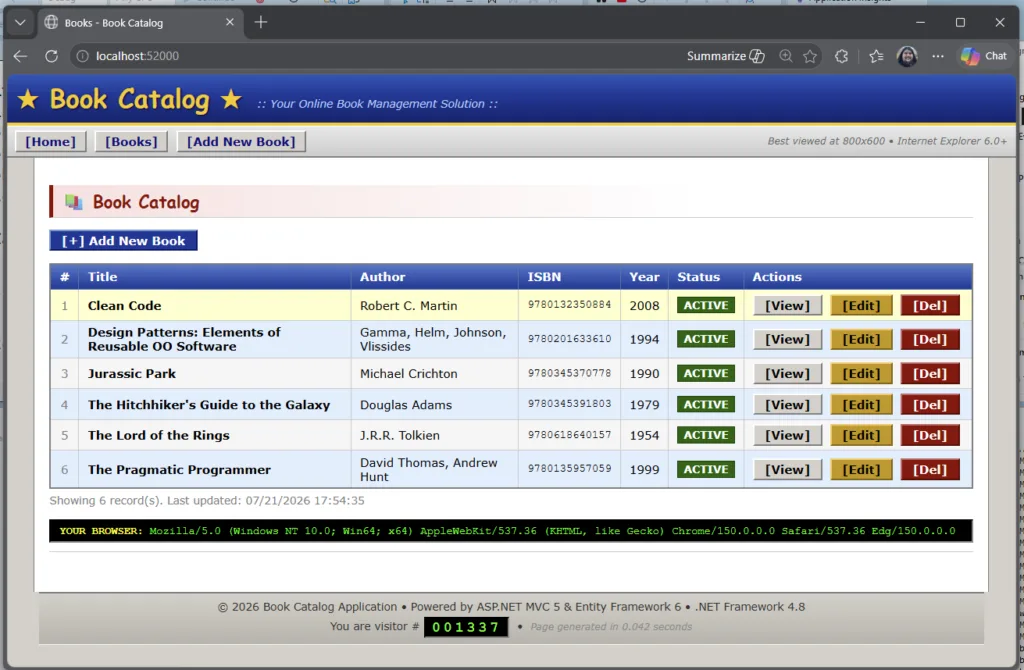
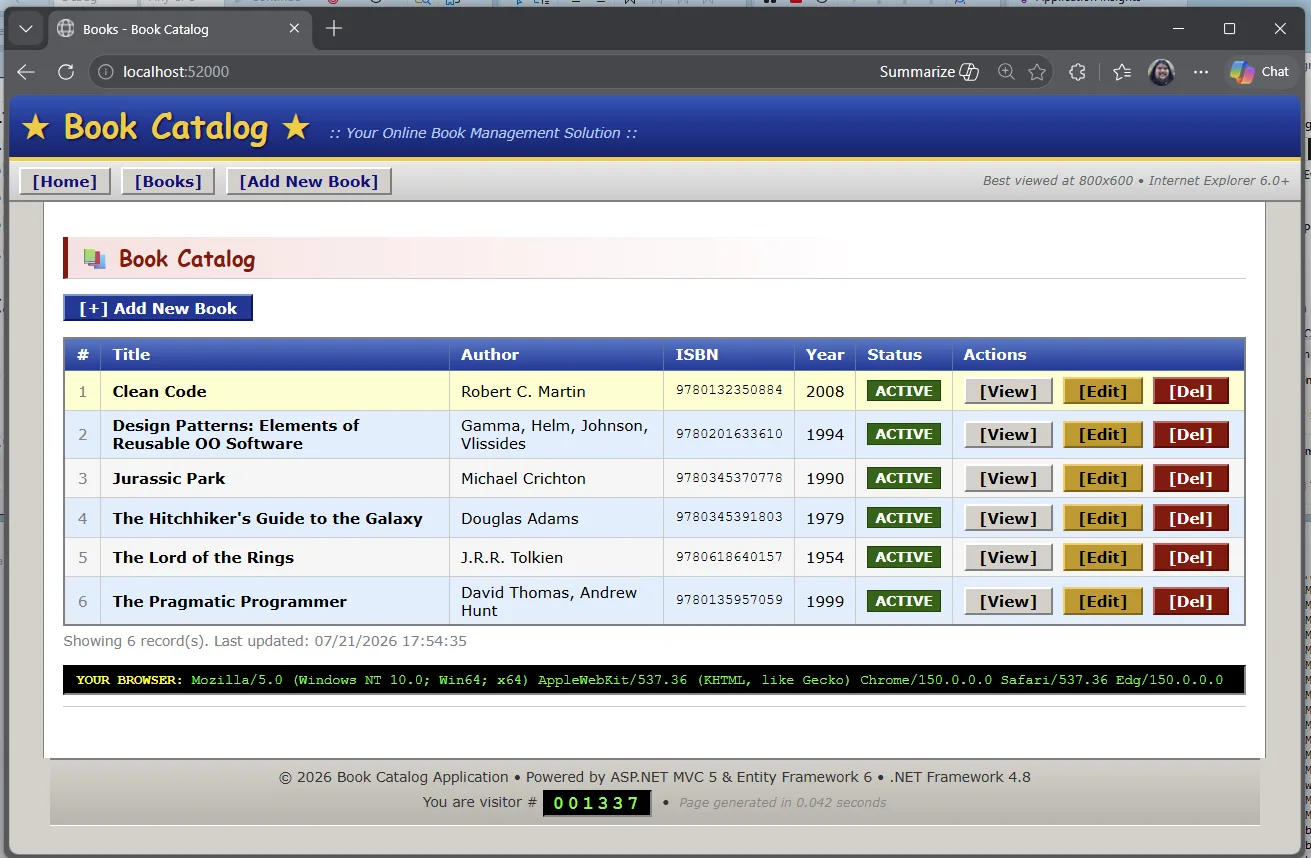
BookCatalog is a simple .NET Framework forms-over-data app. You can list books, add one, edit, delete.
Step 1: Open the sample
Clone the repo and open BookCatalog.sln from shared-legacy-app/.
Open BookCatalog.sln in Visual Studio 2022+ from the shared-legacy-app in the folder you cloned.
Step 2: Start modernization
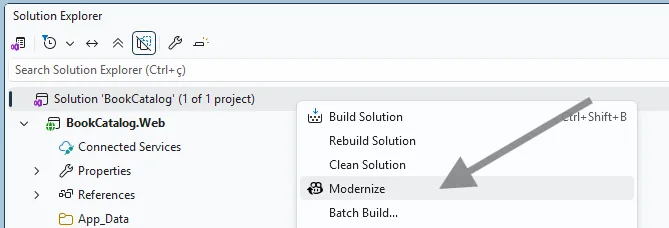
In Visual Studio, right-click the project or solution and select Modernize. You can also start from Visual Studio with @Modernize.
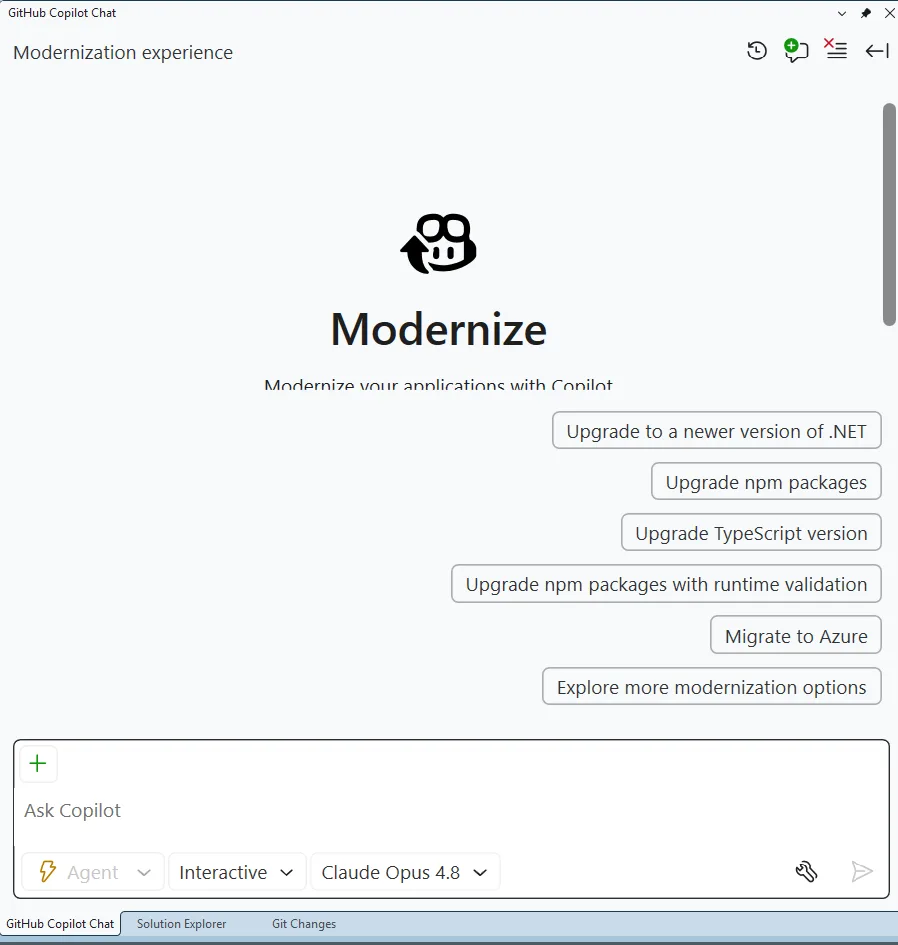
That opens the GitHub Copilot chat window with a customized modernization agent / experience loaded up. This agent is specifically tuned to go through the process of modernizing applications.
It provides several sample prompts, but you can also tell it what to do in natural language.
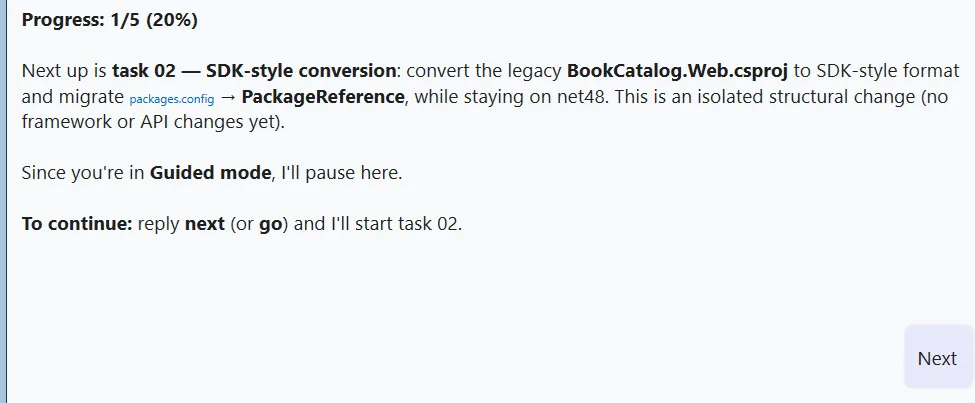
But for today, pick the top suggested prompt Upgrade to a newer version of .NET.
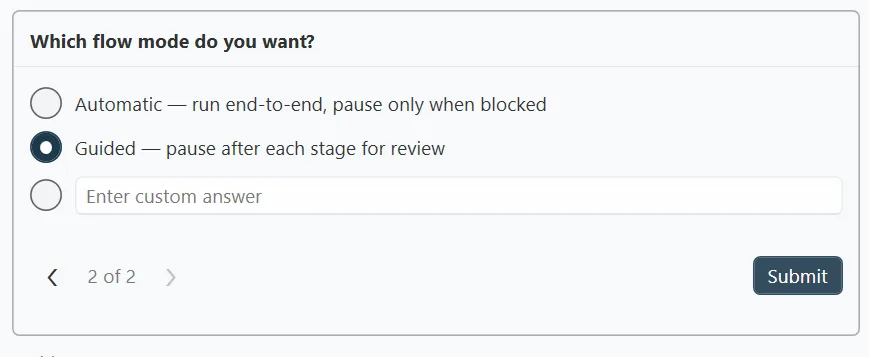
The agent will then ask you 2 questions. The first is which target framework to upgrade to – pick .NET 10.
And then the flow mode. Remember when I said the modernization process would stop at checkpoints along the way – well, it’ll only do that if we pick Guided so pick that.
What Guided is going to do is it will pause and let you check its work.
The agent will first assess our project and create a report. The guided mode allows us to review that report and make any changes to it. And … we can check that report in to source control. (It looks good – show it to your boss you’ll look super productive! 😉)
Then it will create a plan to fix any issues and do the upgrade. Guided mode lets us review and update that plan should we want to. Guided mode shows us a step-by-step execution of the upgrade itself. You get the picture.
Step 3: Review the assessment
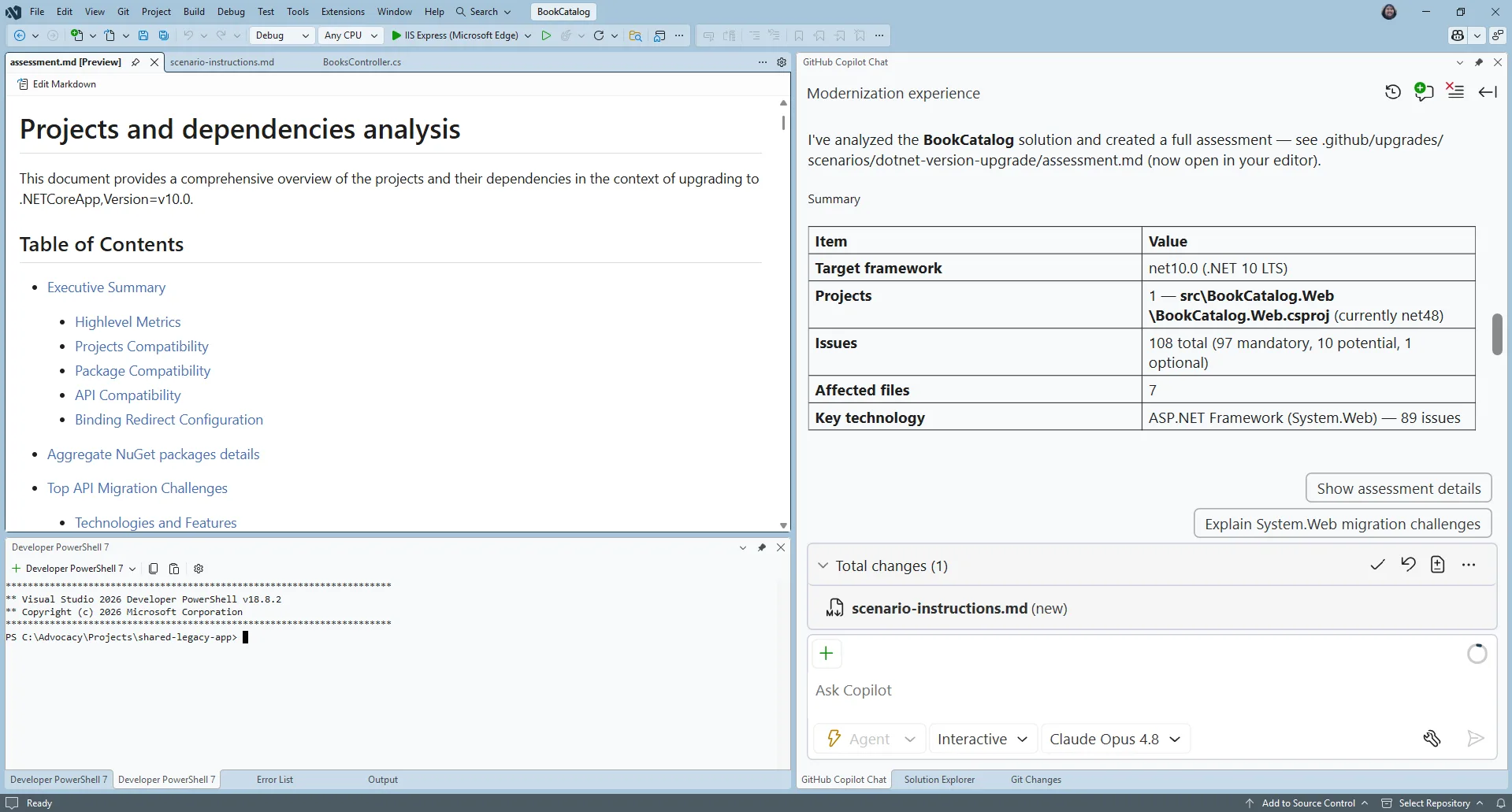
The first thing it rolls through is the assessment. The assessment helps separate blockers, warnings, and informational findings before the upgrade itself starts to run.
The assessment helps you understand what must change first. In this sample, the modernization work includes moving from System.Web.Mvc patterns toward ASP.NET Core equivalents and moving the data layer from Entity Framework 6 to EF Core.
Step 4: Review the upgrade plan
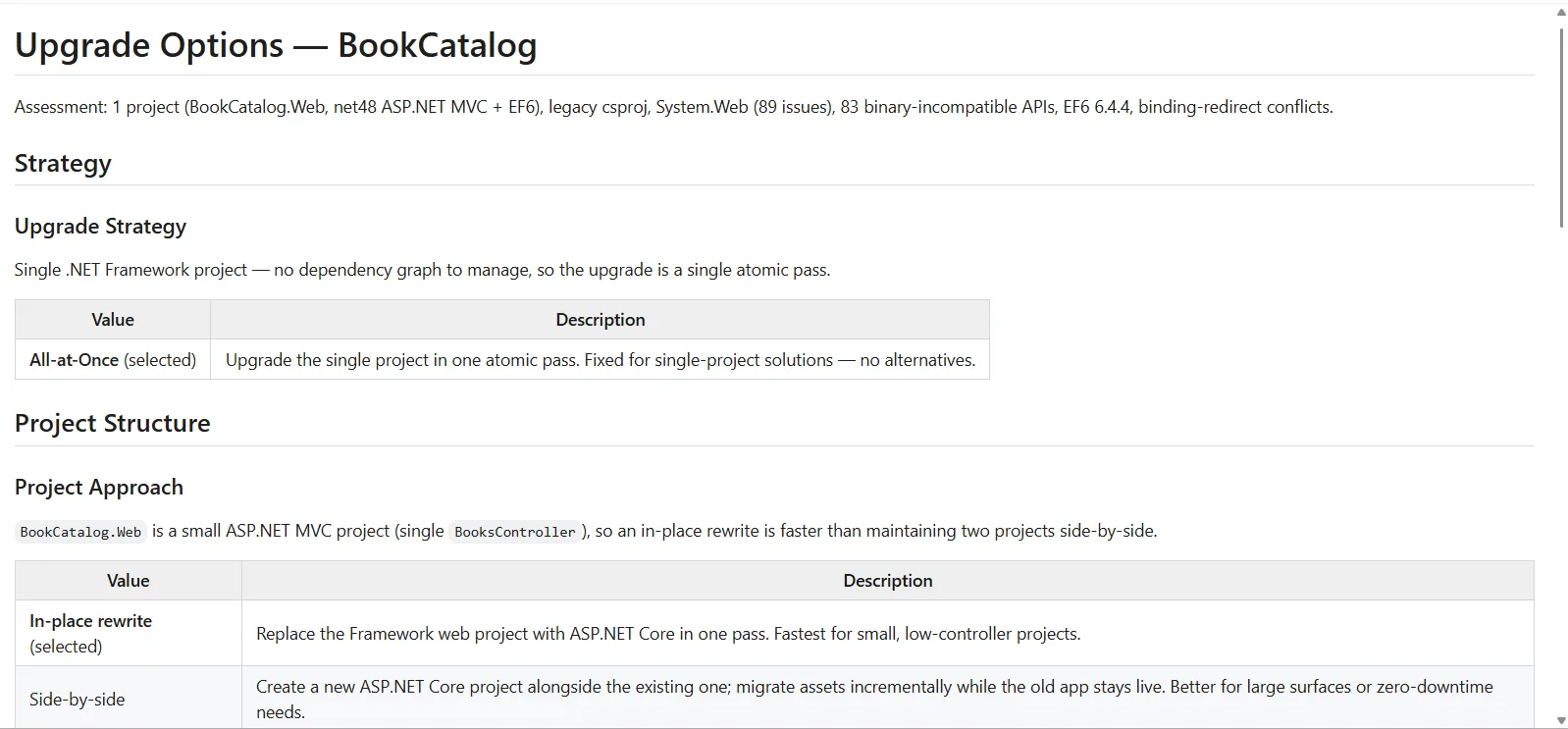
Once you approve the assessment, the agent will start to create a plan on how it will do the upgrade and it’ll present you with some options on how it can do it.
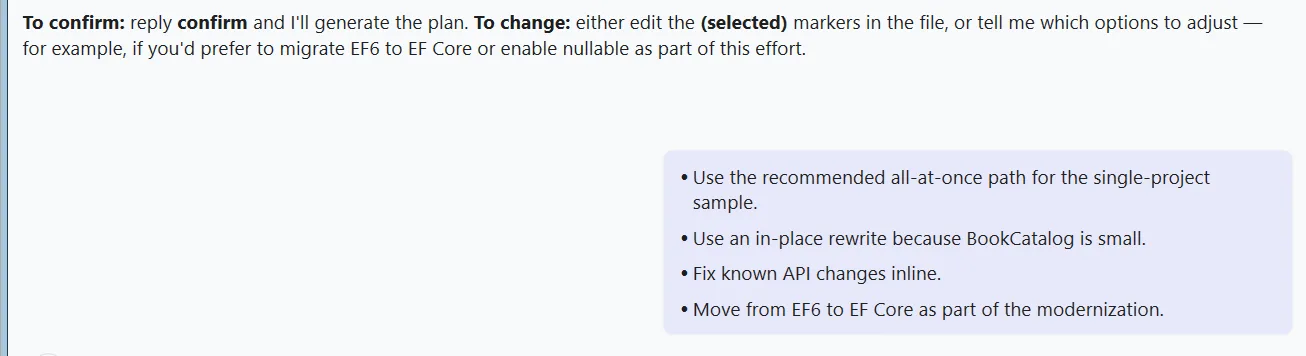
We could modify the options of how the agent creates the upgrade plan, but we’ll take the default.
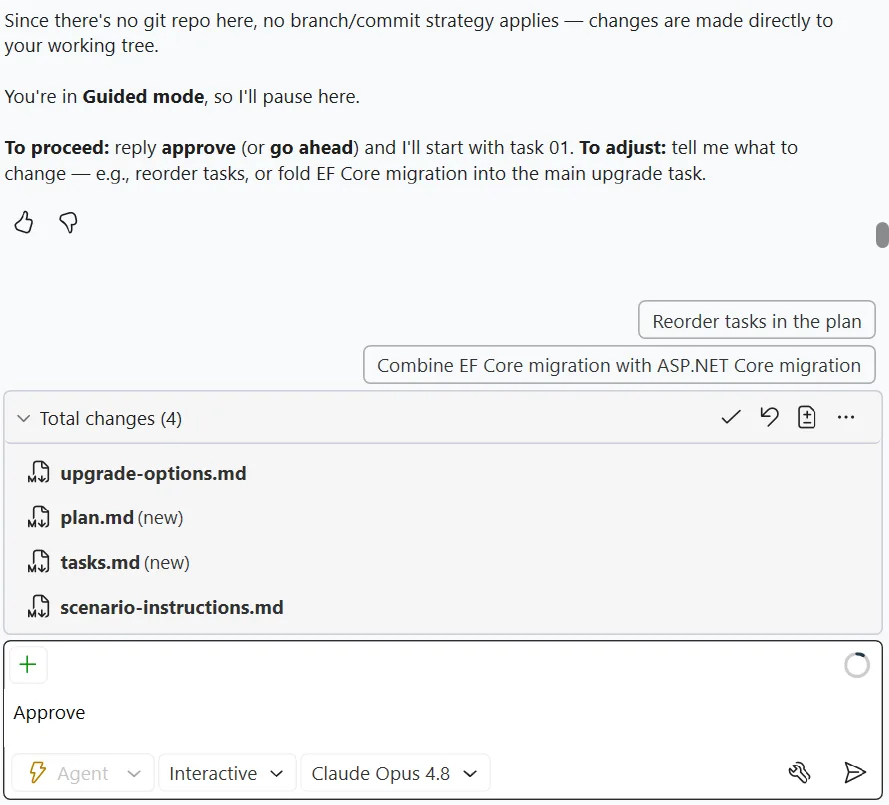
Then it produces the plan. It’s a good idea to read that through. This forms the basis of how the agent will upgrade the app.
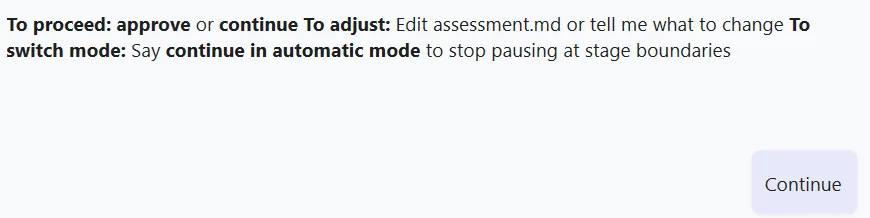
Step 5: Upgrade!
Approve the plan and the agent starts working through the tasks one at a time.
Guided mode will pause between the tasks so you can check on its work.
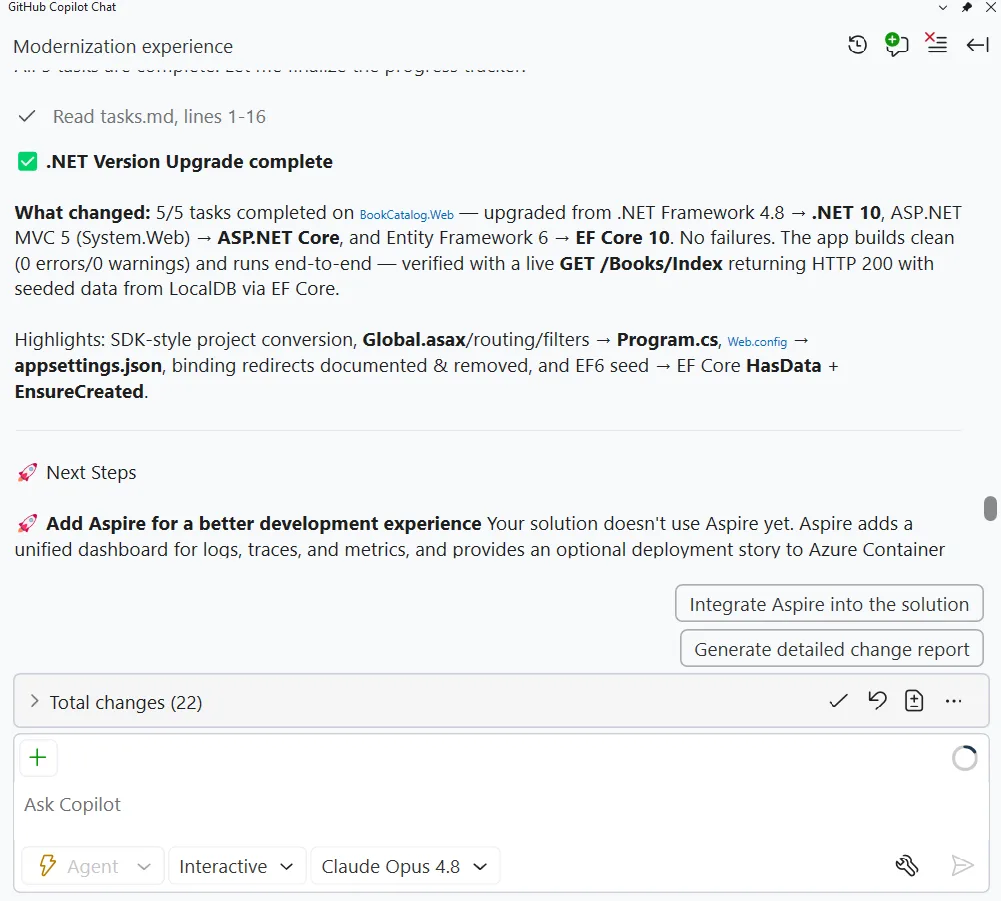
Five tasks later, it’s done!
Verify it
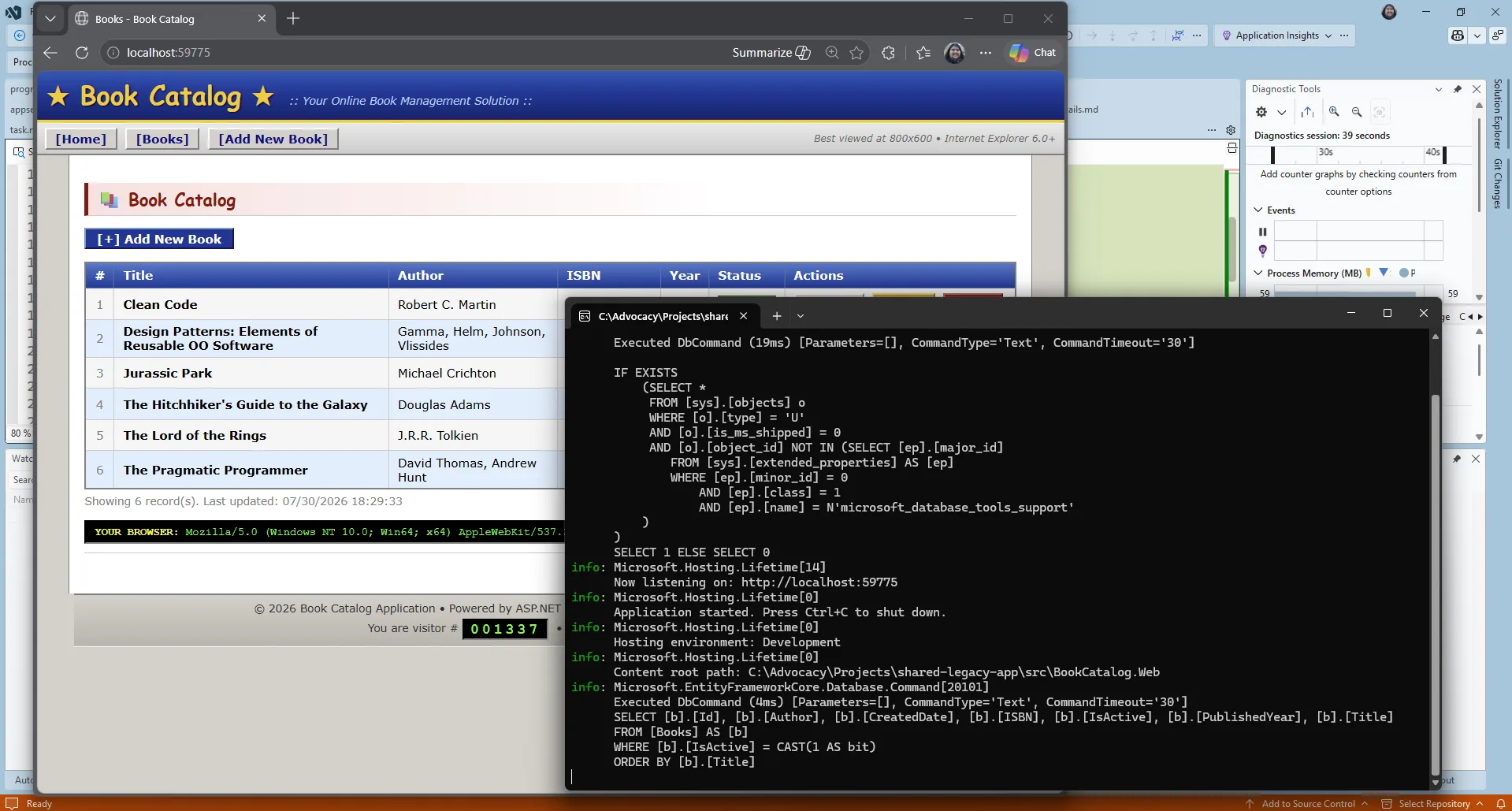
F5 the application and it should start up. Now, of course AI did the work. And it may not have worked the first time through. You never get the same thing twice with AI. In that case, use Visual Studio’s GitHub Copilot debugging features and you should get it up and running very quickly.
And once the app does start up… it looks exactly the same! The modernization agent doesn’t upgrade the UX for you – that’s for you to vibe on your own.
Wrap-up
The app is upgraded to .NET 10. If you want you can use the GitHub Copilot modernization for .NET tooling to migrate it to Azure too.
We’ve created a course : .NET Modernization for Beginners that goes more in-depth into both the upgrade and migration flows. Check it out. And of course, leave some comments on this post to let us know your experiences.
Apple is cutting more than 200 jobs as it shifts resources toward a rebuilt, AI-powered Siri and other future products. Roughly 100 positions are being eliminated from the Vision Pro organization, including much of its gaming team and some immersive-video staff. Another 100 cuts are hitting the Siri and software teams. Bloomberg reports: In a statement, Apple acknowledged that it was realigning some teams “to evolve our business to deliver the best experiences for our users.” “While we will create new roles as part of this change, it will also impact a limited number of existing roles,” the company said. “We are grateful to these team members for their contributions, and we are committed to supporting them throughout their transition, including opportunities to apply for other roles at Apple.”
The Siri reshuffling is tied to an upcoming AI-infused version of the assistant, which is built on a new technical architecture. That shift requires a change in the necessary expertise, prompting the company to eliminate a small number of existing roles, reallocate resources and create new positions supporting the updated Siri.
The changes to the Intelligent Systems Experience team reflect an effort to reorganize work on AI-powered capabilities. As more groups bring AI functions to apps, features and services, Apple is realigning teams to match priorities and accelerate development. The restructuring will eliminate some existing positions while creating new roles.
Double Fine has fully transitioned into an independent studio after leaving Xbox earlier this year. The studio now has full publishing rights to the games it made under Microsoft and earns all the revenue when you buy them, CEO Tim Schafer confirmed on the Kinda Funny podcast.
“Everything we got back, the transfer of the IP came back to us, and we got the publishing rights back for all our games,” he said. Steam still lists the publisher as Xbox Game Studios for games like Psychonauts 2 and Keeper, but that’s because it “takes a while for all of that to process,” he said. “When people buy our games it helps support the studio.”
Later this month, the studio will start a Kickstarter campaign based around its annual Amnesia Fortnight game jam, which is the same game jam where some of its previous games, like Costume Quest and Stacking, were born. The entire thing will be filmed and turned into a documentary, and backers of the campaign will help choose which idea gets made into a small game.
Latest Videos FromPC Gamer
Schafer said the Kickstarter campaign and the revenue from its games will help the studio “have as much runway as possible” as it works on pitching other projects to publishers.
Double Fine laid off 23 members of its staff last month to become “a size that we can sustain,” Schafer wrote in a statement at the time. The news came less than a month after Microsoft allowed it to go independent as it began a major restructuring at Xbox and laid off 3,200 people.
South of Midnight developer Compulsion Games, the other studio Microsoft cut loose, recently announced it too has full publishing rights to its games and that buying them will directly support the studio as it figures out what’s next.
In addition to promoting the Kickstarter, Schafer teased a major update with new maps and modes and a price drop coming next week to Kiln, the studio’s recently released pottery brawler multiplayer game. And I’ll add that if you’re not a PvPer, you should check out Double Fine’s adventure game starring a sentient lighthouse and a bird called Keeper. As I said in the Keeper review, it’s easily one of the most gorgeous games I’ve ever played.
Keep up to date with the most important stories and the best deals, as picked by the PC Gamer team.
If you were worried Anthony and Joe Russo wouldn’t be able to handle the magnitude of Doctor Doom’s universe-shaking arrival in the MCU, think again.
In the Avengers: Doomsday directors’ foreword to ‘Time Runs Out’ – an iconic Jonathan Hickman-penned comic that charts the end of several Marvel universes and serves as a key touchstone for Doomsday – the pair cut to the heart of Doom’s psyche.
The full foreword is available below, and as part of the latest Time Runs Out, but it’s the Doom-centric sections I want to point to here.
Latest Videos FromGamesRadar+
It reads, “Doom is not just an adversary. He is ambition and fear woven together. In Secret Wars, he tries to hold reality in place through sheer will. He believes he can save everything if he controls enough of it. Hickman reveals the strain behind that effort and the human fragility beneath the armor. Even someone who can reshape existence cannot escape the emotions that define him.”
If we’re getting something even close to the Doom who would become God Emperor on Battleworld in the MCU, we’re in for a good time. He’s a deeply complex, fearsome character, who is able to bend reality to his whim – but is unable to get out of his own head. Perfect, then, for a Robert Downey Jr. performance filled with tragedy and self-loathing, and not entirely a million miles away from his Oppenheimer role of Lewis Strauss.
“We have always been drawn to characters who walk that line,” the Russos continued. “People who reach for something noble and lose themselves along the way. Sometimes, destruction does not arrive as a single blow. It arrives through decisions made in uncertainty and through fractures between people who want the same thing but cannot find their way to each other. That is its own kind of ending. It is quiet, painful and incredibly human.”
Joe & Anthony Russo’s Foreword for the Marvel Premier Collection release of Jonathan Hickman’s ‘AVENGERS: TIME RUNS OUT’: “We grew up in Cleveland, in an old, ethnic neighborhood that felt like something out of a fairy tale. Our world was pretty small, but the comics we found… pic.twitter.com/vMS3GF1AJSAugust 19, 2026
Bringing all the latest movie news, features, and reviews to your inbox
The next major glimpse at Doom will likely come in the re-release of Avengers: Endgame this September.
Officially titled Avengers: Endgame Encore, a recent cinema listing has confirmed it will feature four extra minutes of footage as part of its runtime.
Then, the road to Doomsday – and Doom – begins. Avengers: Doomsday hits cinemas on December 18.