Verizon plans to charge customers $10 per month for the iPhone Handoff feature that Apple added in iOS 27. iPhone Handoff allows one phone number to be shared across two separate iPhones.
Verizon will support iPhone Handoff, giving customers the flexibility to use a single Verizon phone number seamlessly across two compatible iPhone models. Whether using the pocketable iPhone Duo on the go or iPhone 18 Pro for work, customers can switch active status between devices at any time while keeping full access to Verizon’s 5G network. iPhone Handoff will be available from Verizon for $10/month on compatible iPhones models running iOS 27.
With iPhone Handoff, users can switch between a main iPhone and a companion iPhone at will, though a phone number can only be active on one iPhone at a time. Verizon says support is “coming soon,” and Apple previously said Verizon would adopt the feature before the end of the year.
U.S. carrier T-Mobile already supports iPhone Handoff, but charges just $5 per month for the feature. AT&T, the third major U.S. carrier, recently suggested it has no imminent plans to support iPhone Handoff.
U.K. carrier EE also said this week that it will soon support iPhone Handoff. Customers who have EE’s Full Works Plus plan will get iPhone Handoff free, while other EE users can get it for £5 per month.
Deutsche Telekom in Germany is the only other carrier that’s added iPhone Handoff support so far. It costs €6.95 per month, but the carrier includes it for free in the MagentaMobil L and XL plans.
Apple has begun inviting selected members of the media to a product launch experience in Los Angeles on Wednesday, October 28, according to Bloomberg’s Mark Gurman.
In a post on X, Gurman described the gathering as an “all-day product launch experience” for touchscreen MacBooks, a new iPad mini, and Macs equipped with M6 chips.
Gurman previously reported that Apple would introduce the…
Apple has an unreleased iPad mini Smart Folio listed on its French regulatory website, hinting that a new iPad mini is coming. The case’s A3632 model number doesn’t match current or past iPad mini cases.
Apple appears to have added the case to its website recently, and it’s listed alongside iPhone 18 Pro accessories added in September.
The listing doesn’t include any iPad mini specs, but…
Apple’s $1,999 iPhone Duo asks buyers to pay more for a folding screen while accepting almost 40 compromises compared with the iPhone 18 Pro and iPhone 18 Pro Max, spanning camera capabilities, everyday usability, and ownership costs.
At equivalent storage capacities, the iPhone Duo costs $800 more than the iPhone 18 Pro and $700 more than the Pro Max. Its main attraction is a radically…
Dupery is a solo deduction game set in a noir city infiltrated by a powerful criminal syndicate. Take on the role of a detective, hunt down the syndicate criminals and uncover the head of the network. Explore individual cases, investigate roles – many of whom will be lying – and weed out the evil. There are 4 categories of roles – Innocent, Meddler, Underling and Traitor – with 175+ individual roles you will come across in your cases. Use your detective skills and a healthy amount of distrust for everyone to arrest the syndicate members as you traverse regions, all while maintaining your reputation and evading their attempts to deceive you. Avoid wrongful arrests, or you could lose your job. Chained Beasts
Interrogate, Review, Arrest Cases are procedurally generated on a grid containing a mix of good and evil roles. To solve a case, use clues provided by the characters and deduce whose stories are not quite checking out. Underlings lie, Traitors are worse, and even the well-meaning may be tainted. Cross reference what you hear, compile imperfect information using strings, pins and pen on your detective board and make your arrests. From the Mathematician who will announce the sum of all evil role addresses, to the critic who causes your reputation loss to be doubled, it’s up to you to investigate them and make the right decisions.
Your Reputation Is on the Line Progress through areas by completing cases, building your way towards the final boss confrontation. Arresting good-aligned roles will reduce your reputation – letting it fall too low will get you fired. Arresting all evil roles counts as solving the case and will increase your reputation, allowing you to pick the next case to solve. Choose which roles to add to your cases in between missions, along with acquiring quirks and modifiers that will shape your runs.
Different Campaigns. One Syndicate. Work your way through three campaigns set in distinct regions, each with its own unique mechanics and roles that alter your gameplay. Each region progresses you towards a final confrontation with the region’s syndicate general, where you will gain clues. Winning a region also unlocks new tiers of roles and quirks. Once you have unlocked all 9 tiers across every region, it’s time to enter the Syndicate’s region and face the boss – a brutal final run drawing from everything you encountered on your way. It’s up to you to bring down the syndicate mastermind.
Key Features:
Solo deduction roguelite with 175+ handcrafted roles
A reputation meter for you to protect as you make your arrests
3 regions with their own unique mechanics and roles
Procedurally generated cases so no two runs play the same
Different roles, quirks and modifiers to choose from between missions
Notation toolkit to build your own in-gamecrime board
Screenshots
SystemRequirements
Minimum
OS: Windows 10 or later
Processor: Dual Core 2.5GHz
Memory: 2 GB RAM
Storage: 1 GB available space
Support the game developers by purchasing the game on Steam
InstallationGuide
TurnOff Your Antivirus Before Installing Any Game
1 :: Download Game 2 :: Extract Game 3 :: Launch The Game 4 :: Have Fun 🙂
The Eden Project in Cornwall, UK, is taking its educational livestreams to the next level with LiveU technology, allowing students around the world to explore nature through interactive live video.
After reaching more than 75,000 young viewers in 2025 using a mobile phone and WiFi, Eden Project upgraded to the LiveU LU900Q, LiveU Studio, and LiveU Audio Connect. The new setup provides more dependable connectivity, cloud-based production, and communication between presenters working across the site.
Through its free, twice-monthly Eden Project Live Learning sessions, students can explore the site’s rainforest biome and other environments while asking questions and participating in live polls. The project highlights how LiveU’s remote production and cloud streaming tools can help small teams create engaging, professional-quality educational content without requiring a large broadcast crew.
Among the major vendors that listed Discover-Tech as a “certified” or “verified” vendor were Google and the advertising industry association IAB Europe. The Israeli firm also used European General Data Protection Regulation (GDPR) consent frameworks to target users within the European Union. Discover-Tech has served ads through major networks such as Google, Yandex, and Beeswax.
Google and IAB Europe have since removed Discover-Tech from their ad vendor registries, and Google further terminated Discover-Tech’s access to its ad exchange platforms. Beeswax has removed Discover-Tech from its ad buying platform. Fellow ad platform Vungle (Liftoff) paused Discover-Tech’s access while conducting a review, and Eskimi blocked Discover-Tech’s accounts and domains.
Thursday’s report said that Discover-Tech ad impressions have appeared on government and national-security-linked networks throughout the world: NATO, United Nations networks, European lawmaking bodies, critical infrastructure providers in Australia, and armed forces and government agencies in Norway and Sweden.
“Discover-Tech’s mass abuse, privacy invasion, and facilitation for mercenary spyware attacks illustrates structural flaws with the online advertising system, which failed to detect or prevent the abuse documented in this report,” Citizen Lab said.
The research lab said that the mercenary malware installed through AdFection was developed and distributed by Candiru (rebranded as “Integrity Labs”). Under the arrangement with Discover-Tech, targets with specific profiles of interest to the Candiru customers received ads that carried JavaScript or other code that connected to Candiru’s control servers. In response, those servers delivered an exploit that served the zero-click payload when the ad appeared on an individual’s device.
The research doesn’t describe the vulnerabilities exploited in the zero-click attacks or the final malware that was installed in them. It’s likely they were zero-days that have been fixed after Citizen Lab discovered the campaign. Citizen Lab didn’t immediately respond to questions.
Messages sent to Discover-Tech and Candiru went unanswered.
Citizen Lab called on advertisers and government officials to take concrete action to proactively prevent campaigns like AdFection. Beyond that, the researchers said users can reduce the risk of being infected by installing ad blockers, resetting mobile advertising ID in iOS and Android settings (it’s unclear why the researchers didn’t advise turning off personalized ads altogether), and installing ad-blocking software on home or office networks. As always, installing updates in a timely manner is also a must.
One day into Wardogs Season 2, Bulkhead Interactive has decided to scrap the bribery plan it announced last week as a way to help convince players to join the Blue team. The problem isn’t that the plan didn’t work—it actually worked far too well.
THE PLAN:
“Lonestar cash and XP bonus. Season 2 only. New Bakurani spawn.”
“We’re looking at how we can help the win rate of a certain team.” -Bulkhead CEO Joe Brammer (via “Road to Season 2” devlog)
THE REALITY:
“We were wrong. We fucked up,” Brammer admitted in a new video (via RPS).
Blue team is now winning “by far, the most,” Brammer said, even though the actual boosts are not terribly substantial: 5% Lonestar cash and 2.5% XP.
“Median” players didn’t get much from those percentages, but Bulkhead found that “top tier” players were seeing significant boosts
Bottom line: it’s gone.
“We’re removing the Blue XP bonus, the cash bonus. We were wrong,” Brammer said. Bulkhead co-founder Howard Philpott added that the studio thought Blue team bonus might work out this way, but said “I don’t think we expected it to be this much of a swing.”
I can’t say I’m terribly surprised by the outcome. I’m not a Wardogs player, but I have been around long enough to know how these things go: If you dangle a competitive edge in front of gamers, they’re going to jump for it. Percentage boosts are especially risky because they’re performance-based and so much more likely to go spinning out of control, especially in the hands of, as Brammer put it, “tryhards.”
Latest Videos FromPC Gamer
And it’s not just the extra XP and cash being earned that’s a problem: Philpott said the bonus is also “impacting people joining games and starting games,” presumably because if they can’t be a Blue, they’ll leave and try their luck with another game.
(Quick side note: I’m not a fan of the term ‘tryhard.’ Of course I’m trying hard! Why wouldn’t I be? My nephew called me a tryhard once and I told him that maybe if he tried harder he wouldn’t get his ass kicked so hard. He was 12 and I got some disapproving looks from other people at the Christmas party, but I stand by it.)
We’re holding our hands up and we got a few things wrong.
We are pushing a backend update:
▫️Removing Blue Cash & XP Bonus
▫️Driver Progression Fixes
▫️Fixing Driver Exploit Preventing lots of players from accessing tanks too early
▫️Coming Soon: Limited Mode Servers (No Power Weapons & Vehicles)
Full details in the video here:October 15, 2026
PC Gamer’s Morgan Park, who is a Wardogs guy, also made the call when this plan was unveiled last week: “XP and cash bribes are a drastic move, but should have a real impact. It’s unclear how big these boosts will be, but I expect Blue will instantly become the most popular team by a wide margin in Season 2.”
Predictable as this outcome was, I don’t see it as a particularly egregious misstep. Brammer called it an “experiment,” and sometimes that’s what you have to do—and the early stages of a massively popular videogame with teething issues can definitely be one of those times. Brammer also noted that other changes aimed at rebalancing things, including new spawns on the Bakurani map, have proven effective and will remain.
Keep up to date with the most important stories and the best deals, as picked by the PC Gamer team.
Alongside the removal of the Blue team bribery, Bulkhead is also fixing issues with driver progression, and is fixing a driver exploit that’s letting players access tanks too quickly: Players who are “very clearly” taking advantage of the exploit (less than 1,000 in total, according to Brammer) will be given a 24-hour ban from the game and have their cash and XP wiped.
I’m particularly excited for this weekend, it’s my Wife and I’s 14th anniversary and we’re going away for a couple days sans kids! Time to relax, go for a nice dinner, and have an adventure together at a spa resort.
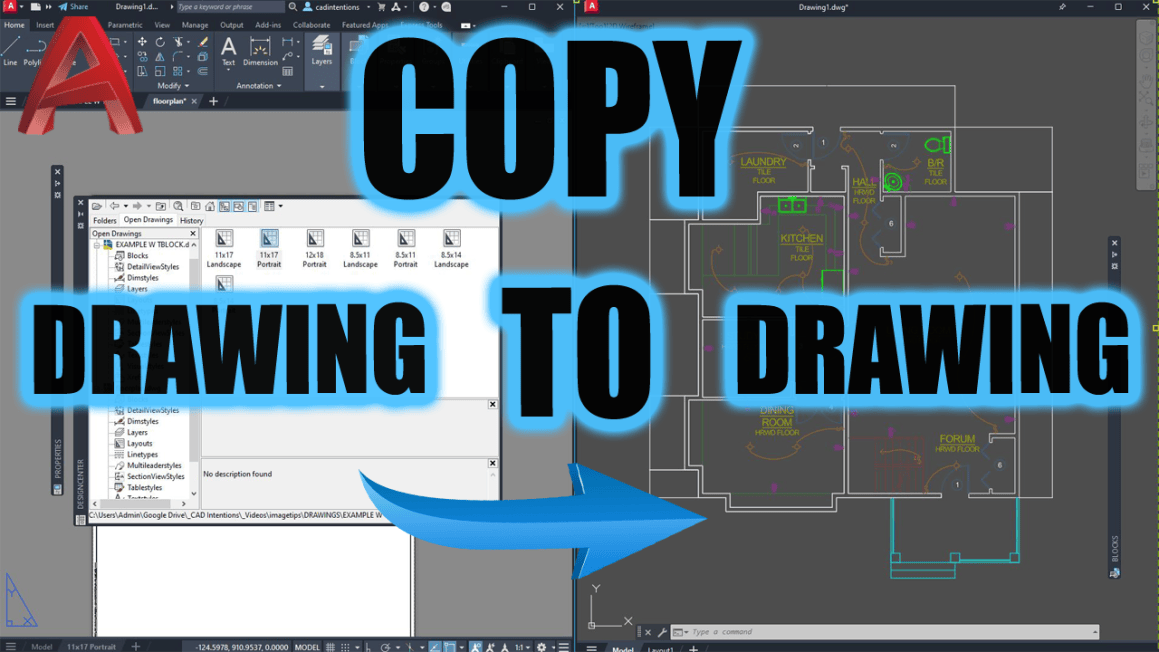
Thinking back recently to when we were first married reminded me of a common issue for designers when pulling from legacy/dated files, especially those new to the industry or working alone/in small teams. If you’ve ever gotten a new project and thought “I’ll just copy/saveas this old detail or entire drawing to start my new drawing…”
10 minutes later, my “New” clean project has 25 outdated layers, two old plot styles, a bunch of exploded blocks and even a viewport I didn’t need 🤦♂️.
That’s when we need to remind ourselfs, there’s a right way to do this. And if you’re like me, juggling multiple clients, standards, and legacy files, this week’s tips are going to save your sanity (and your layer manager).
💡 Quick Tip: Transform and Standardize Layers instantly!
When working with old legacy drawings or client-provided files, it can be a pain to combine their layers into our nicely organized standards.
Thats where the LAYTRANS (Layer Translator) command comes in. In just a few minutes, you can use LAYTRANS to map old layer names to your current standards, instantly moving all of the old objects, linework and text onto new designated layers and properties in one easy to use dialog box.
In today’s new video, I show you how to stop using messy workarounds and start using real productivity tools built right into AutoCAD when you need to copy or start from an old project drawing or simply want to save time by copying layouts, layers or blocks from another file.
You’ll learn:
The right way to reuse title blocks, details, and layouts
How to avoid importing messy layers and styles
Secret pro commands like LAYTRANS and ADC that I use daily
Click here to watch now This is a must-watch if you’re tired of cleaning up your drawings every time you re-use something.
Tool of the Week: Blackshark.ai
High-resolution 3D environments, from the creators of Microsoft Flight Simulator.
If you’re in civil, infrastructure, or site planning, this one’s wild.
Blackshark.ai lets you import accurate 3D context (roads, terrain, buildings) into your design environment using satellite and map data. It’s great for:
Conceptual renderings
Client presentations
Real-world design reviews
You’ll look like you spent weeks building a model—when you actually just imported it.
Check out: https://blackshark.ai
If you haven’t yet, check out my full AutoCAD Fundamentals & Workflows Course — it’s helped thousands of drafters and engineers level up their career and speed up their drafting by hours every week.
That’s it for this week! Let me know how you re-use old drawings, blocks and templates to save yourself time!
Cheers and happy drafting, Brandon
P.S. If you’ve got a colleague you know is going to SaveAs an old drawing and completely mess up a standard, forward this email or send them a link!
They’ll thank you later.
The following two tabs change content below.
Brandon is a Civil Designer, Aspiring Blogger/Creator, Husband, Father to two Amazing Kids and Tech Aficionado from a small town in Canada. He has been obsessed with design and technology since he can remember and working as a Civil Designer for nearly as long. Brandon’s blog and Youtube channel, CADIntentions.com has been his outlet and excuse for keeping up with new tech and trends in the CAD design world for the last 10 years growing to more than 60,000 subscribers and over 15,000,000 views, while also being the source of many great friendships and unique opportunities.
If you would like to Sponsor CAD Intentions or Work together in some way, Please visit my About Page and send me an email: http://cadintentions.com/about-me/
A new beginning for Windows PCs starts tomorrow with the launch of NVIDIA RTX Spark — one PC built for creators, gamers and AI agents. All are invited to celebrate with NVIDIA and partners at launch events around the world.
Share Your Spark
Every PC has a story. What was your first Windows PC, and what did it spark a love for? Join the celebration online by sharing responses with #ShareYourSpark for a chance to win an ASUS ProArt P14 RTX Spark laptop signed by NVIDIA founder and CEO Jensen Huang. See the campaign and official rules.
See What Reviewers Are Saying
From local AI workflows to creative apps and gaming, see what reviewers are saying about RTX Spark — then experience it at a launch celebration.
“The fact that NVIDIA, Microsoft and their partners have delivered such a capable, compatible and polished platform even in its first at-bat should put the rest of the PC industry on notice.” — Tom’s Hardware
“I tested NVIDIA’s RTX Spark for gaming and local AI – the performance absolutely stunned me.” — TrustedReviews, UK
“I’m very happy to report that performance is actually looking really good when it comes to AI, gaming and creative workflows.” — Microcenter
“[RTX Spark] is a different species of computer that has arrived early. It is a statement of intent from NVIDIA about where computing is going — trading raw benchmarking crowns for the ability to carry a self-rewriting, fully autonomous, CUDA-accelerated digital brain in your backpack.” — Tom’s Guide
“One of the most impressive parts of the launch is how many apps NVIDIA has worked with to ensure optimisation with the Spark technology.” —Creative Bloq
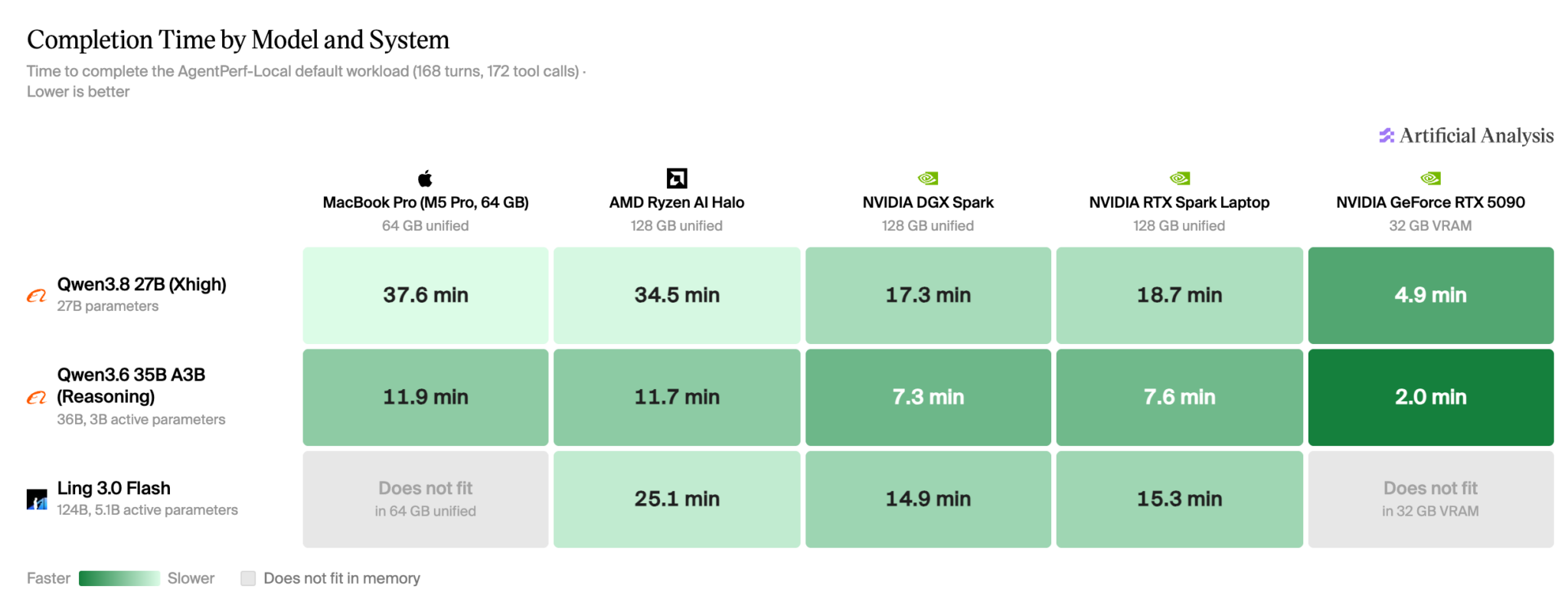
Independent testing from Artificial Analysis offers an early look at the powerful local AI performance RTX Spark brings to a laptop.
Join the Launch Celebrations
On Friday, Oct. 16, get hands on with RTX Spark at launch events around the world. Explore demos for creating, developing and gaming, connect with fellow enthusiasts and discover what local AI can do.
Times below are local. Follow each event’s entry instructions. Space is limited.
San Francisco — Best Buy, 1717 Harrison Street, 10 a.m.-12 p.m. Try hands-on demos, meet iJustine and hear fireside conversations with local tech founders. Free, first-come, first-served entry; no ticket required. Event details.
Berlin — Xperion at Saturn, Alexanderplatz 3, 7-10:30 p.m. Explore hands-on demos and stage programming with creators and developers. Registration required. RSVP.
Taipei — Muse Garden, No. 88 Yanchang Road. Join an evening of demos, music and AI community discussions, with shopping and networking continuing until 10:15 p.m. Registration required.
Beijing — JD MALL Beijing Shuangjing Store, No. 31 Guangqu Road. Check in begins at 7 p.m. Launch celebration starts at 8 p.m., followed by hands-on demos. Event concludes at 9:30 p.m. Register through WeChat.
Istanbul — Vatan Bilgisayar Topkapı, Mevlana Caddesi No. 138. Explore hands-on demos and local creator programming. Walk-in entry; no advance registration required.
Seoul — COEX East Lobby, 513 Yeongdong-daero. Hands-on demos begin at 7 p.m., with gaming and AI creator programming from 8 p.m. Event concludes at 9:30 p.m. No advance registration required.
You’re Using Music Wrong in your Videos (here’s how to fix it)
Selecting the right music to fill the background of your videos, or to add moments that enhance the emotion you are trying to evoke, can be a tricky process.
On top of this, music selection is probably one of the more tedious tasks any video editor has to endure!
Choosing b-roll footage is far more straightforward because you can tell at a glance as to whether the footage is suitable, or not.
Not so with music because of two factors that drag out the process.
The first of these is that the search functions on most music download sites are absolutely terrible, with all sorts of music categorized and indexed very, very badly.
The second is that once you get to what you believe to be the right genre or style, you have to wade through mountains of music to find what you are looking for.
Doing that involves waiting for the track to load, listening to enough of the track to get an idea of how the piece is going to play out, and then decided if you want it or not.
Lather, rinse and repeat over and over until you get to the right one.
There is no way I know of to lessen this pain, but what I do know is that the best way to approach it is have a very clear picture in your mind as to what you are really looking for, and stick to that plan.
These Simple Changes Will Make You Look PRO on Video
At a surface level, the average talking head video looks to be a pretty simple style to pull off effectively.
However, if you have watched any amount of videos produced in this style you may have noticed that some tend to seem more engaging than others.
This video covers some of those reasons, and the simplicity of the actions you need to take to get it right will surprise you.
None of these tips are in any way extreme or dramatic in their implementation.
They are just a collections of little tweaks that can make all the difference between holding an audience or having them drift off and click away.
Overview of PowerDirector Screen Recorder
Back in the bad old days in order to record your computer screen to video, you had to fork out some serious money for specific software to do that!
From memory I think the really good ones used to run at around 200 US dollars or more!
At some point many of the popular video editing programs began to include a free screen recorder, and although they were pretty basic, they got the job done.
Recently a few of the bigger video editing programs have updated their screen recorders mainly due to the demand for more flexibility in what you can do with them.
PowerDirector did this quietly a while back but at the time no-one really paid particular attention to it.
This week Sharper Turtle has taken up the challenge in response to a viewer question, and it’s well worth taking a look.
These days the PowerDirector screen recorder is definitely not your grandpa’s screen recorder!
Basic Training with Adobe Premiere Elements 2027, Part 2 of 8
This week we move on to Part Two of the Adobe Premiere Elements 2027 basic training from Steve Grisetti.
Now that the new generative AI features and basic user interface layout have been covered, we move on to starting an actual project!
Importantly Steve demonstrates how to correctly set up your new project so that everything that follows, goes smoothly.
How to Make a Paper Rip Transition – Movavi Ideas
Last week I posted an update on the recent release of Movavi 2027 and their new feature using Templates and Blocks.
In a nutshell, templates are presets that have all the component necessary for a complete project you can use for your own.
All you have to do is add your footage or any other assets and you are done.
Blocks are preset sections that can be added to any template or project and again, they are fully formed and all you do is add your own footage etc.
In this demo from the folks at Movavi you can get a real feel for how easy it is to create completed sequences using Blocks as part of a project.
Filmora 16 Review: Hand-on All New Features of Wondershare Filmora 16
Over the past few weeks a few of the major video editing app have updated to the versions they will be carrying through to the end of the next upgrade cycle in late 2027.
The latest one is Filmora from Wondershare moving from the version 15 series up to Filmora 16.
As is usually the case, Wondershare themselves have created a bunch of videos highlighting the new or improved features in this new version.
The problem here is that those videos do not really show in any real sense, exactly how and why these features exist.
They are strictly exercises in marketing, showing off lots of bright shiny things designed to make us all want to go out and upgrade immediately.
I tend to keep away from all of that and go for something a little more realistic.
So with that in mind, here’s a video from Jacky covering all that’s new and improved from a far more realistic perspective.
6 CapCut Text Tricks That Make You Look Like a Pro Editor
Another text tutorial for this week from Dina and Agnes, only this time a slightly different take on it.
In this weeks video they go quite deeply into the subject of positioning and animating text graphics on the screen.
They cover techniques like placing the text behind the subject, angling the text to match the lines in the image, 3D text and much more.
Just bear in mind the old rule for when it comes to advanced effects in any video editor which is: Just because you can, doesn’t mean you should!
How to Film Yourself When There’s No One to Help You
I see a lot of online videos, especially of the short form variety where someone just grabs their phone and starts talking.
As a result they end up creating a video that is just a bunch of jump cuts stitched together, and often you can see them thinking about what they are going to say next.
This is an instant retention killer because the key element of communication with the audience has been lost.
This video seeks to eliminate that by covering camera position, how to check your own frame without a crew, B-roll that works all from the perspective of working alone.
It shows what doesn’t work and why, and a beginner version you can do today with a phone and a tripod.
Fix Bad Audio in Fairlight – DaVinci Resolve 21
In this next video Jason Yadlovski gives a very comprehensive walkthrough of correcting various types of audio problems in DaVinci Resolve.
The strategies he covers do not necessarily require that you have the Studio version of Resolve so anyone can follow along using the free version.
As a side note here: Even of you are not using DaVinci Resolve as your video editing app, this tutorial provides the fundamental knowledge you need to correct and improve any of your own audio tracks.
Master Cinematic Lighting In 20 Minutes
OK! So let’s not get too fooled by the clickbaity title of this entry on cinematic lighting!
The idea that you are going to be producing Hollywood standard footage by applying the techniques in a twenty minute tutorial on lighting is a bit unrealistic.
However what I do know is that one of the key elements in getting your footage to look as good as it can, is by understanding how to use light to your advantage.
So after watching this tutorial, will you be able to walk on to a Hollywood set and get the lighting right?
Absolutely not!
Will you improve your shots as a result of using this information?
Probably.
How to Make Clean & Professional Motion GFX for Your YouTube Videos – DaVinci Resolve Tutorial
I see a lot of videos these days that display quite a professional standard of both shooting and basic editing skills.
I think that’s because of the availability of recording devices like smartphones, and the fact that storage media lets you just delete mistakes and shoot again.
Similarly, access to reasonably well equipped editing software for post production has also become way easier than in the past.
So if there is one thing I see more often than not that drags the quality of a video down, it has to be graphics.
The problem with video graphics is that it requires two distinct skill sets to pull off successfully.
The first is an understanding of how to design graphic elements in a way that communicates effectively to an audience without being a visual distraction.
The second skill is understanding how to physically create those graphics inside the video editing software you happen to be using.
What I most often see is graphics design and implementation that is way too complicated than necessary.
The result of this are graphics that either fail to communicate or are so distracting that they interfere with the viewing experience.
In the linked video Casey Faris takes us through some simple graphics design and creation that keep things uncomplicated and to the point.
Key Takeaways
Selecting the right music for videos is challenging due to poor search functions and lengthy decision-making processes.
Making simple changes can significantly enhance the engagement of talking head videos.
PowerDirector has updated its screen recorder, making it more flexible and user-friendly than before.
The article covers various video editing tutorials, including training for Adobe Premiere Elements 2027 and creating motion graphics in DaVinci Resolve.
Overall, the article highlights easy fixes and tools to improve video quality and editing skills.
For decades, the unwritten rule of venture capital was that a firm doesn’t back two companies that compete head-on. But speaking at TechCrunch Disrupt earlier this week, the partners of Benchmark readily acknowledged that the AI boom is straining that rule.
It’s been on the verge of snapping for some time. The towering AI labs OpenAI and Anthropic share dozens of the same investors at this point. Then, at the end of September, Factory, a startup that builds an AI agent to write software, said it was firing board observer and adviser Chris Degnan for “unethical conduct involving Cognition,” its direct rival and the maker of the Devin coding agent. Factory’s CEO alleged Degnan had discussed a job at Cognition while privy to Factory’s board-level discussions. Degnan said he had already resigned and denied sharing anything confidential. Soon after, he announced he was joining Cognition as chief revenue officer. Powerhouse investor Vinod Khosla sided with Degnan on X, blasting Factory’s CEO and calling the company “a struggling second tier competitor.” Khosla Ventures backs both companies.
Even Benchmark, a firm whose reputation rests on 10-to-15-year partnerships with founders at the earliest stage, said the old rule can no longer be counted on. Asked at Disrupt whether the pact against backing rivals still holds as portfolio companies expand into each other’s territory, its partners described the conflicts as a matter of necessity, not preference.
“The harsh reality of this world is every company is evolving very quickly,” said Eric Vishria. Companies pivot and change, he said, and “you are going to get conflicts, and that’s just the reality of the current dynamic.”
Vishria said Benchmark stays committed to each founder and keeps what it learns confidential, and he downplayed how much a VC could pass along anyway: “We are not product or technology experts.” Seemingly referring to the Factory-Cognition dispute, he said Benchmark has been fortunate not to land in “that type of insane direct conflict.” Exclusivity, he said, remains “really important” at the very early stage Benchmark favors. “But things are evolving. There’s no doubt about that.”
Chetan Puttagunta said AI is accelerating the problem. As the cost of building software “effectively goes to zero,” he said, founders are “incredibly ambitious.” Because they now see a “surface area” and want to claim all of it, he continued, “[i]t’s probably going to happen more, where you start to run into each other.”
He drew a line between a direct competitor at the outset, which he called “an easy answer,” and a portfolio company that expands into another’s turf over time. “That happens,” he said.
Peter Fenton called the issue “kryptonite” and the firm’s toughest problem. He described a spectrum of how investors relate to their companies. At one end is the co-founder, who would never work on a competing company. At the other is the public-market stock picker, who can own several rivals because he is merely allocating capital, not shaping any of them. Benchmark sits nearer the co-founder end, Fenton said, and treats transparency as a golden rule. “There shouldn’t be the surprise after the fact.” If a conflict does emerge, a founder should never feel shortchanged, he added.
Benchmark isn’t declaring the pact dead. At the same time, when a firm that built its name on loyalty says conflicts are coming, founders might rightly wonder who else will be this candid.
When you purchase through links in our articles, we may earn a small commission. This doesn’t affect our editorial independence.
Offers checked October 14, 2026, Pacific Time. Prices and configurations can change during the sale.
Take an additional 5% off at checkout
Enter code GAMER2026 at checkout to apply an additional 5% discount to eligible orders of $999 or more.
Make your savings go further: this checkout offer is additional to eligible system and component discounts. Enter the code and confirm that it is accepted in your order summary. The sale prices below are shown before this additional coupon discount.
Your next gaming PC is calling. The CyberPowerPC Fall Gaming Sale brings big savings on desktops and custom-build upgrades—including $400 off an RTX 5070 Ti prebuilt and an RTX 5060 desktop for $1,565. Explore four standout picks below, find your upgrade, and take advantage of the current offers while they’re available.
Start with the sale prices below, then enter GAMER2026 at checkout for the additional discount on eligible orders. Instant rebates may already be included in the listed prices.
Savings compare the listed sale price with CyberPowerPC’s displayed previous price, not a market average or a verified price from the preceding sale. Prices are a snapshot at the time checked, exclude tax and optional changes, and can change. Images illustrate the systems; configured components may vary.
AMD power. $300 in savings.
The GML 99691 brings together a Ryzen 7 9800X3D, Radeon RX 9070 XT, 32GB of DDR5 memory and a 2TB SSD for $2,339. The product page also lists a 360mm liquid cooler and a 1,000W 80 Plus Gold power supply. Save $300 versus our displayed previous price of $2,639 and get this AMD combination in a prebuilt system—without choosing every part yourself.
The value gets even better when you compare. We checked three competing desktops with the same CPU, GPU, memory capacity and SSD capacity. Their advertised prices, including one public coupon, averaged $2,663.66. At $2,339, the GML 99691 comes in $324.66 below that average—about 12.2% less—before any separately applied CyberPowerPC checkout coupon.
This is a small comparison sample, not a market-wide average. The lowest competing offer in that sample was $2,399 with its advertised coupon, a $60 difference. Motherboards, memory speeds, cases, power supplies and warranties vary; the comparison is about price for matching core specifications.
Save $400 on your RTX 5070 Ti upgrade
Grab the biggest savings among our four picks: the GML 99694 is $2,799—save $400 versus our displayed previous price of $3,199. Get a Ryzen 9 9900X3D, RTX 5070 Ti 16GB, 32GB DDR5 and a 2TB SSD, plus a 360mm liquid cooler and 1,000W 80 Plus Gold power supply. If an RTX 5070 Ti build is on your wish list, put this deal at the top of it.
Prefer to tailor the build? The Fall Gaming 5070 Ti starts at $3,009 with a Ryzen 7 9800X3D, dual-channel DDR5-6000 memory and a Phanteks EX5s MAX case with integrated liquid cooling. Save $370 on the featured configuration versus our displayed previous price of $3,379, then make it your own with the available configuration options. Changes can alter the price.
Want the lowest price among these four picks? The Fall Gaming RTX 5060 is $1,565—save $187 versus our displayed previous price of $1,752. It pairs RTX 5060 graphics with a Core Ultra 5 225F, 16GB DDR5 and a 1TB SSD. Start here for an RTX desktop at a smaller budget; optional upgrades change the price.
Build it your way—and save on the parts
Building your next setup? Put these Fall Gaming Sale discounts and free upgrades to work in your custom PC. They apply to eligible custom system purchases and exclude prebuilts. Check the selected parts and final configuration price; these are not standalone component-store offers.
Save $100 on selected AMD and Intel processors
The largest listed CPU rebate covers AMD Ryzen 9 9900X3D and 9900X, Ryzen 7 9850X3D, 9800X3D and 7800X3D, plus Intel Core Ultra 9 285K, Ultra 7 270K Plus and Ultra 5 250KF Plus. Choose a qualifying processor and put $100 in instant savings toward your next setup. The Fall Gaming 5070 Ti configurator is a starting point for the 9800X3D build.
Save $50 on RTX 5070 Ti and RTX 5080 graphics
Have your eye on RTX 5070 Ti or RTX 5080 graphics? Get a $50 instant rebate with an eligible custom build. That discount may already be included in the displayed system price. Compare the eligible graphics offers.
Free ASUS graphics-card upgrades
Selected major-brand RTX 5060 Ti 8GB, RTX 5060 Ti 16GB, RTX 5070 and RTX 5080 configurations qualify for an ASUS premium card upgrade. Choose an eligible ASUS model and enjoy the advertised upgrade at no extra charge. It is a board-model upgrade within the listed GPU tier, not a promise of a faster GPU class or extra VRAM.
Free KLEVV BOLT V DDR5-6000 upgrade
Eligible major-brand DDR5-6000 configurations can upgrade to KLEVV BOLT V: 32GB (2×16GB) or 16GB (1×16GB), matching the qualifying configuration. This is a memory-brand upgrade at the stated capacity and speed; it does not turn a 16GB build into 32GB. Look for the free option when configuring your system.
$40 off selected 850W and 1000W power supplies
The High Power HP1-S2850GD-F12S 850W and fully modular HP1-O21000GD-F14C 1000W models each carry a $40 instant-off offer. Both are listed as ATX 3.1 / PCIe 5.1. Save on the power supply that fits your build: choose the eligible model suited to your components and power requirements.
Also check the free 1TB Kingston SNV3S/1000G substitution for the qualifying 1TB WD Green SN3000 SSD. Capacity stays at 1TB. For a full setup, the sale also lists $100 off the CyberPowerPC CK60 keyboard and a $70 rebate on the black Corsair M75 AIR wireless mouse with eligible system purchases. Complete your setup with the gear you want and take advantage of the eligible accessory savings.
Open All Deals on the sale page for the exact eligible options and terms. Availability varies by configuration, and free upgrades may require selection. Component rebates may already be included in system prices; do not add them to the card savings above.
Your next setup starts here
Found your favorite? Follow its Learn more button to explore the system, or browse the full Fall Gaming Sale for more PC deals and custom-build offers. Shop the current savings while they’re available—and remember to enter GAMER2026 at checkout for an additional 5% off eligible orders of $999 or more.