If you lead a development team, you already know the pattern. You approve the travel, your developers attend a great conference, they come back energized, and then the work resumes exactly as it was. The ideas don’t survive contact with the backlog.
We’re adding the VSLive! Microsoft AI Hackathon 2026, a focused, hands-on build event that runs alongside the conference. Your developers learn during the day, then build at night, on the Microsoft campus, with Microsoft engineers and MVPs in the room. They leave with working code, not just notes.
Why this matters for dev leads
Most of your team is being asked to ship AI features into production right now. Most of them have not had uninterrupted time to actually build with Microsoft Foundry, Azure OpenAI, GitHub Copilot, or agent-based patterns under realistic constraints. Sprint work doesn’t allow it. Brown-bag sessions don’t go deep enough. Internal POCs get deprioritized.
This is structured time, with expert mentors, focused on the exact stack your team already runs on.
If you send two or three developers together, you get a small working group that returns with shared context, a real artifact, and the start of a pattern your team can extend. That’s a much better outcome than three separate sets of session notes.
Learn during the day. Build at night.
VSLive! @ Microsoft HQ runs on the Microsoft campus, which means your team is spending the week alongside the engineers, product managers, and MVPs who build and ship these tools.
Days cover Visual Studio, C#, .NET, Azure, Microsoft Foundry, Azure OpenAI, GitHub Copilot, agent-based development, and modern application patterns.
Evenings shift to the VSLive! Microsoft AI Hackathon, where the focus is building. Your developers take what they saw in sessions and apply it the same day, while it’s still fresh, with mentors on hand to unblock them.
They’ll work through the decisions that matter in production: architecture, security, user experience, and whether a pattern is actually viable for the kind of software your team supports.
The judging criteria reflect real engineering
Projects are evaluated on:
Architecture and design
Security and safety
Relevance to real business problems
User experience and execution
Practical use of Microsoft AI technologies
This is the right bar. AI is moving fast, but enterprise teams still have to ship software that is secure, maintainable, and defensible in a code review. The criteria reward the kind of thinking you want your developers practicing.
What your team can build
The goal is something a developer can demo, explain, defend, and improve. Not the flashiest demo, the most useful one.
That could be a C# application, a .NET service, an internal developer tool, an agent-based workflow, a line-of-business app, or a creative project applying AI to content or interactive scenarios.
Participants declare a primary category, with the option to add a secondary:
Microsoft .NET Powered Business Applications
Best AI Agent or Workflow Automation
Best Azure OpenAI / LLM-Powered App
Best GitHub Copilot Integration
Creative Applications
Participants retain full ownership and rights to their project IP. What your team builds belongs to them, and to you.
Who this fits
This is a fit for C# and .NET developers building business apps, web apps, desktop apps, cloud services, backend systems, and internal tools. It’s also a fit for developers exploring how AI fits inside the software they already build, whether that’s adding intelligence to an existing application, building an agent workflow, or improving a developer tool.
It’s approachable for developers new to hackathons and substantive enough for senior developers, architects, and dev leads who want practical patterns to bring back.
Your team can compete solo or as a team of up to four. Developers attending alone can form teams onsite.
Event details
Location:
Microsoft Commons Mixer, Building 98
Microsoft Headquarters, Redmond, WA
Schedule:
Tuesday, July 28, 2026, 6:00 PM to 10:00 PM
Kickoff, team formation, idea pitches, planning, first coding sprint.
Wednesday, July 29, 2026, 5:00 PM to 9:00 PM
Build time, mentor check-ins, final submissions, demo video submissions.
Thursday, July 30, 2026, 11:00 AM to 11:30 AM
Awards and select demos before the Thursday keynote.
Confirmed judges and proctors include Brian Randell, Phil Japikse, Eric Boyd, Allen Conway, and Microsoft representatives.
Prizes
Awards total up to $25,000, with a $6,000 Hackathon Grand Champion prize and additional team, solo, and category awards. Each project or team may win one monetary prize. Additional sponsored awards may be announced closer to the event.
A few logistics worth knowing
This is in-person only. There is no virtual option. Participation is capped, and once it’s full, it’s full.
If your developers are attending VSLive! @ Microsoft HQ, they can add hackathon participation during registration. There’s also a hackathon-only option for community attendees who aren’t doing the full conference.
If you’re local to Redmond, come spend an evening with us
If you’re in the Puget Sound area and the full conference isn’t in the cards, the hackathon-only pass exists for exactly this reason.
You don’t need a travel budget. You don’t need a hotel. You need an evening or two, a laptop, and an interest in building something real with the people who build the tools.
Being on the Microsoft campus after hours, working through a build with engineers, MVPs, and other developers in the room, is a different kind of experience than reading docs at your desk. The conversations are better. The unblocks are faster. The work sticks.
If you’ve been meaning to get more hands-on with Microsoft Foundry, GitHub Copilot, or agent-based development, this is a low-friction way to do it. Grab the hackathon-only pass, show up Tuesday night, and see where the build takes you.
The case for sending more than one
The single best decision a dev lead can make about this event is to send people in pairs or small groups. Two developers from the same team, in the same sessions, building together at night, will return with a shared frame of reference and the start of something your org can actually use. One developer returning alone has to re-explain everything to skeptical teammates, and most of what they learned will quietly evaporate.
If you’ve been waiting for the right reason to get a few of your developers to Redmond, this is it. They’ll learn from the people building the tools, build alongside the community, and come back with working code your team can keep improving.
And…. if you have an active Visual Studio Pro or Enterprise Subscription, don’t forget to login to my.visualstudio.com for your exclusive conference discount code.
In a Wednesday blog post, Microsoft said it’s continuing to expand the ways that Copilot, the AI technology in which Microsoft has invested billions, works with its web browser. The company was already doing this for the desktop browser, and those capabilities now extend to the mobile version of Edge as well.
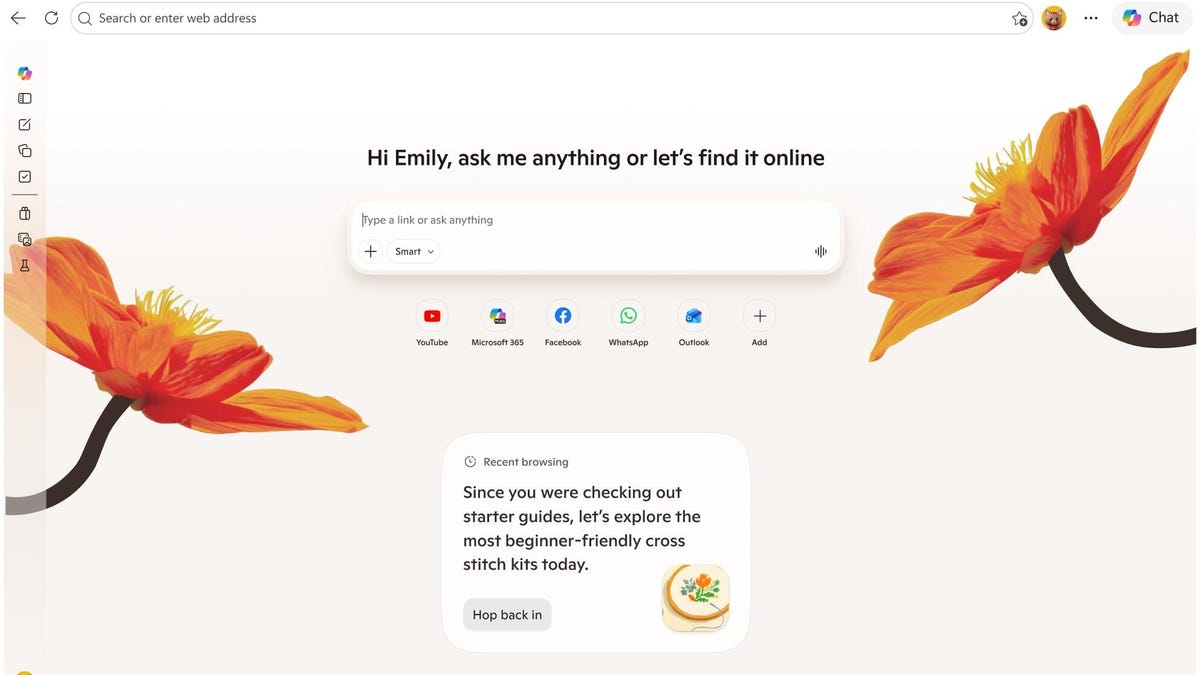
Copilot is using your browsing history to provide contextual suggestions, tips and guidance. On its Copilot in Edge page, Microsoft says it can scan your open tabs to compare options, highlight key details and deliver clear answers without requiring you to switch between tools.
In screenshots and videos posted on Microsoft’s blog, examples include chat dialogue boxes that pop up with reminders of past shopping activity and even the option to turn all the activity in your browser tabs into an audio podcast.
Microsoft says that Edge Copilot accesses user data only upon activation and that it “only collects what’s needed to improve your experience — or what you choose to provide via Personalization settings.” Yet skepticism persists about its privacy practices. While opting out of AI features is an option, some users remain distrustful of the company’s data-handling policies.
Microsoft specifically warns on its support page: “When getting started with agentic browsing, be careful to avoid using sensitive or personal information,” including financial or banking activity, Social Security identification or medical records.
What’s changing in web browsing with Copilot
These changes center on Copilot recording and building on interactions, acting as a constant, active presence during web-browsing activity, versus a pop-up you open on demand, like the company’s much-mocked old mascot Clippy.
As Microsoft puts it, “Copilot remembers what you’ve worked on, so you don’t start over. The more you use it, the more helpful and personalized it becomes.”
Apart from interactions that occur without prompting, people using Edge can access Copilot as a chatbot via a button at the top-right of the browser window. Microsoft is retiring Copilot Mode, which could perform actions in-browser. Copilot Mode was also accessible with a Copilot button, but now it’s called Browse With Copilot.
Browse With Copilot could also create quizzes and study guides from the material you’re viewing and organize your recent browsing into categories to explore. There’s also a new landing page for the tab that more clearly integrates Copilot chat.
Is this what people want? Copilot so far has not been met with the kind of enthusiasm that greets, say, new versions of ChatGPT or Anthropic’s AI models. And as online privacy and data collection practices are paramount concerns in the era of AI, it’s unclear how popular it will be to opt into another tool that has access to browsing data.
On the other hand, people who are already using Microsoft Edge may be more likely to be peacefully coexisting with Copilot by this point and to find useful features in the AI service.
A brutal bodycam revenge FPS set in Hong Kong. Slide into bullet time, fight up close, take down your kidnappers, and record every second of your revenge.
A brutal FPS. One girl. One gun. One recording. They broke into her life. They filmed her. They destroyed her. Now she’s back – and she’s filming them. Black Jacket
Better Than Dead is a brutal first-person shooter set in the depths of photorealistic Hong Kong. You play as a survivor who’s done running. She’s got a pistol, a bodycam, and a kill list.
Every level is a raid. Every fight is personal. Saving the other girls isn’t enough – you have to find the ones who broke you and show the world as you take them down.
Ticket to Ride: Poland Expansion is available on May 13 for Xbox Series X|S and Xbox One.
We go behind the scenes of Ticket to Ride’s ten expansions.
Exclusive to Xbox Wire readers, Marmalade Game Studio confirms a fan-favourite map is in the works.
Three years, ten expansions – and the Ticket to Ride train isn’t slowing down!
But we’re getting ahead of ourselves. Before we start gazing upon the horizon, we have our next stop to consider: Ticket to Ride’s tenth expansion, Poland. This marks the fifth digital debut for the game, following the well-received Heart of Africa, Japan, San Francisco, and Passenger-including Germany expansions!
Available on Xbox from May 13, the Ticket to Ride: Poland Expansion brings a new gameplay mechanic for you to master. It also includes two more locomotives, two additional carriages, and two original characters to play as.
From cards to coins
In the physical version of Ticket to Ride: Poland, you earn additional points by connecting neighbouring countries and picking up Country Cards. For the digital version, we’ve streamlined this mechanic by using Country Coins instead!
The game will take care of everything, setting up the Country Coins at the start of the match. Each country node gets a small pile of coins with different values shown on the top. When you connect one country to another, you get a coin from each node you built between – assuming there are any left in the pile, of course!
Then, at the end of the game, your Country Coins are added to your score. The trick is whether to focus on building out your railway network and completing tickets, or whether you rush to gather up as many Country Coins as you can before they all get swiped up by the other players!
Dance across Poland’s railway tracks and pick up those valuable Country Coins while riding the Polonaise train, or set off in the iconic Copernicus. Add the comfy Kujawiak carriage, or trust your cargo to the Orbiting Greatness carriage. You can also play as talented makeup artist Regina Kamińska or energetic drummer and student Kacper Pawlak.
Designed by history
As with all our Ticket to Ride expansions, history heavily influenced the design of the Ticket to Ride: Poland Expansion.
Filipa Semedo, Concept and 2D Artist at Marmalade Game Studio, explained: “I spent a lot of time researching 1950s Poland. The Polish government, highly influenced by the Soviet Union at the time, advised people to act and dress modestly. But American influence directly contradicted that. Since many Polish people had family in the US who sent them clothes, designs such as the American ‘A’ silhouette dress grew in popularity in Poland.
“Alongside fashion, jazz music became really popular with Polish youth too. We added a lot of that new subculture to Kacper Pawlak’s design.”
Going around the world
It’s not just historic research that drives Ticket to Ride‘s additional content. It’s been a long road to turn the maps you love into digital masterpieces!
Mike Rosser, Creative Director at Marmalade Game Studio, explained how the team selected ten expansions from the physical game’s library of maps.
“We aimed to have a good mix of expansions in the Round the World Ticket so that there are maps in there that appeal to all players. Some are more competitive, such as the India Expansion. Some are much more relaxed, like the co-operative vibes of the Japan Expansion.
“We also wanted a balance of complex maps that can take a while to play, and simpler, faster maps. By doing this, players always have a great choice available, regardless of how much time they have to play.”
“It was also important that we offered a mix of classic fan favourites like the Switzerland and Nordic Expansions along with more niche maps like Poland. We’re proud to have released some digital debuts too, like a full rendition of the Germany Expansion complete with its iconic Passenger mechanic.”
When you pick up the Round the World Ticket for Ticket to Ride, you’ll receive all ten currently released expansions to play with right away. That’s a lot of content to keep you going, but we’ve had a lot of questions about whether there’ll be more expansions beyond the ten that make up the Round the World Ticket.
What’s on the horizon for Ticket to Ride?
Well, we’re happy to confirm that there will be further content for Ticket to Ride. Plus, as an exclusive reveal for Xbox Wire readers, we can confirm that the highly requested Ticket to Ride: Pennsylvania Expansion is in the works! It’s still early days on that front, but you’ll be able to play this amazing map on Xbox in the future.
Full steam ahead, everyone!
Ticket to Ride and its current expansions are available now on the Xbox Marketplace.
Ticket to Ride: Poland Expansion is available from the May 13.
Ticket to Ride®: Deluxe Edition
Marmalade Game Studio Ltd.
☆☆☆☆☆ 23
★★★★★
$39.99
$19.99
Prepare for an adventure on a global scale! The Ticket to Ride Deluxe Bundle has everything you need to kickstart your railway empire.
With the base game, you’ll be able to explore North America with six characters, seven trains and six carriages to choose from. When you’re ready to chase new horizons, the Round the World Ticket included in this bundle will open up a total of ten expansions – all currently released expansions will be playable immediately, then the remaining expansions as they release. Plus, enjoy two Ticket Packs – Europa 1912 and USA 1910, adding more tickets and game modes!
Europe Expansion:
Play as Erika Ford and Bertie Hawkes, and power your enterprise with the Rocket and Dolomyte Dynamite locomotives! Bonus content includes the Europa 1912 Ticket Pack, which adds three new game modes and new tickets to the Europe Expansion map.
Nordic Expansion:
Build routes between colourful Nordic cities, claim the sprawling Murmansk route and earn the Globetrotter Bonus in the world’s favourite train-adventure game!
India Expansion:
Set off on an adventure in India! New characters, locomotives and carriages await in this vibrant map. Rethink your strategies and ponder beyond single routes as you chase the elusive Mandala Bonus, awarded for completing tickets in multiple different ways!
Legendary Asia Expansion:
Journey along the Silk Road and take on the mighty Himalayas in Legendary Asia! Make new friends in Wang Ling and Lê Chinh, add new locomotives and carriages to your fleet and aim for the Asian Explorer Bonus!
San Francisco City Expansion:
Cruise through San Francisco in the Sixties as this fan-favourite map goes digital for the first time! Jump aboard a tram or get a lift from fashion designer Summer Ashbury or silver-screen icon Felix Woods as you take in the city sights and seek out Souvenirs.
Switzerland Expansion:
Take in the stunning sights of nature’s very own masterpiece as you strategise your way across Ticket to Ride’s most competitive map yet – the Switzerland Expansion! Connect Switzerland’s neighbouring countries as you travel along with two brand-new characters.
Japan Expansion:
For the first time ever, play Ticket to Ride: Japan Expansion in digital form! Work together with other players to build the Bullet Train network with travel blogger Nakanishi Kimiko and Gyōji Moriyama Isamu.
Heart of Africa Expansion:
Build your railway network across incredible new landscapes with festival organiser Blessing Kipruto and griot Nnamdi Okpara.
Germany Expansion:
Pick up Passengers when you join atelier owner Franziska Braun and scholar Reinhard Hofmann on a trip across Germany!
INCLUDES:
– Ticket to Ride Base Game
– Round the World Ticket
– Europe Expansion
– Nordic Expansion
– India Expansion
– Legendary Asia Expansion
– San Francisco City Expansion
– Switzerland Expansion
– Japan Expansion
– Heart of Africa Expansion
– Germany Expansion
– Europa 1912 Ticket Pack
– USA 1910 Ticket Pack
Ticket to Ride®
Marmalade Game Studio Ltd.
☆☆☆☆☆ 19
★★★★★
$24.99
$9.99
Ticket to Ride has arrived at Platform Xbox!
Discover a fresh adaptation of the iconic, multi-award-winning board game. Play against fellow fans around the world, or take on state-of-the-art AI opponents. Build a railway empire, claim routes and dominate your competitors on the leaderboards in this fan-favourite modern classic!
FEATURES
– A TRULY SOCIAL TAKE ON MULTIPLAYER – Play online with friends or enjoy a seamless matchmaking experience when you challenge players from around the world. Alternatively, take on your friend sitting right next to you in couch play – use the free Ticket to Ride Companion App to really boost your couch gaming session!
– PLAY AROUND YOUR BUSY DAY – Set up a game in async mode and play a game across multiple days.
– SINGLE-PLAYER MODE DRIVEN BY EXPERT AIs – Powered by an innovative adaptive AI system, single-player mode offers a challenge for new and experienced players alike.
– AN IMMERSIVE EXPERIENCE – Every moment has been brought to life with beautiful graphics that will immerse you in the adventure.
– STRATEGIC GAMEPLAY – Every game presents fresh challenges, and it’s your mission to work out the most efficient solutions. Collect points by completing tickets, linking destinations and building the longest route.
Join the Marmalade Game Studio Discord server to connect with players, organise matches, see the latest news and updates, and take part in events!
Contains:
– Ticket to Ride base game – the fan-favourite train-adventure game that started it all!
– Europe Expansion – includes the Europe map, two additional characters, two additional locomotives and two additional carriages
If you’ve been pouring hours into Instagram reels, stories, and short-form content and still ending the week wondering where the actual clients are, you are not alone.
So many business owners are caught in the same exhausting loop.
Content creation starts consuming your life, but the results never quite connect back to your business.
The likes are there.
The views are there.
Maybe the follower count is even creeping up.
But real conversations? Qualified leads? Paying clients?
Still cricketsville.
Here’s what most people don’t realize: it’s not a you problem.
It’s a platform problem.
That’s exactly where Coach Tony found himself before making the shift from Instagram to YouTube.
He was showing up consistently, posting reels, staying visible.
But something felt hollow.
Interactions stayed surface-level.
People were consuming his content without ever truly connecting with him.
And the business?
Barely moving.
So he started wondering if long-form content could create something completely different.
Spoiler: it absolutely did.
What started as a workout video filmed in his garage gym became a turning point for his audience, his authority, and his business.
And he was a total beginner when he started.
In this episode, I’m sitting down with Tony Omogrosso to break down how he turned YouTube into a real client-generating machine, why long-form content builds trust that actually converts, and the simple strategies he used to hit 500 subscribers fast.
If you’re ready to stop performing for the algorithm and start attracting the right people, this one’s for you.
VIDEO: Is YouTube Too Saturated for Your Business?
Some product links in this post are affiliate links, and I will be compensated when you purchase by clicking our links. Read my disclosure policy here.
The Problem With Short-Form Content That Nobody Talks About
Short-form content can absolutely help you get visibility online. It can help people discover you. It can even help you build momentum quickly.
But visibility alone is not always enough to grow a business.
Tony explained that while Instagram was getting him engagement, it wasn’t creating meaningful interaction with potential clients. The comments were surface-level. The conversations rarely went deeper. And despite all the effort going into content creation, it was not leading to the kind of trust needed for someone to hire a coach.
That distinction matters so much.
Because business owners do not just need attention. They need connection.
They need content that allows people to understand their philosophy, personality, communication style, and expertise. Especially in industries like health, wellness, coaching, or consulting where trust plays such a huge role in the buying decision.
That’s why the transition from Instagram to YouTube for business can feel so powerful.
YouTube gives people time to actually get to know you.
The Garage Workout Video That Changed Everything
One of the best parts of Tony’s story is how uncomplicated his breakthrough really was.
He did not wait for the perfect setup.
He did not overthink the editing.
He did not spend weeks scripting every word.
He simply decided to record a workout video inside his garage gym, figured out a solid hook, pressed record, and naturally talked through the exercises as he demonstrated them.
Then he uploaded the video and completely forgot about it for a few weeks while focusing on other parts of his business.
When he finally came back to check the analytics, the video had already reached thousands of views.
But what impacted him even more than the views were the comments.
Real people were sharing real experiences.
One viewer commented that they were in their seventies and had completed the workout successfully. Others shared how much they appreciated the approachable style and practical format.
That level of engagement felt completely different from what he had experienced on Instagram.
People were not just scrolling past his content.
They were watching.
Listening.
Participating.
Connecting.
That was the moment Tony realized YouTube could become a central part of his business strategy instead of just another social media platform.
Why Long-Form Content Builds Trust Faster
This is one of the biggest reasons YouTube works so well for business owners.
Long-form content creates space for trust.
When someone spends 10, 15, or even 20 minutes watching your videos regularly, they start feeling familiar with you in a way that short-form content rarely creates.
They begin understanding how you think.
They hear your tone of voice.
They notice your teaching style.
They start deciding whether your personality and philosophy align with what they need.
That trust-building process is incredibly important when you sell services, coaching, memberships, or programs.
Tony explained that by the time someone reaches out to work with him, they already feel like they know him. They already understand his approach to fitness and health. They already know he is not the type of coach screaming aggressively into the camera.
His audience understands his calm, philosophical, low-key style before ever booking a call.
That changes everything about the sales process.
Is YouTube Too Saturated? Not If You Understand What Makes You Different
The fitness industry is one of the most crowded spaces online, which made Tony’s success even more interesting.
So what helped him stand out?
His differentiation came from experience and perspective.
Tony is over 40 and specifically helps people over 40. That immediately changes the relationship he has with his audience because he genuinely understands the lifestyle, limitations, and priorities of the people he serves.
He is not trying to teach from a completely different stage of life.
He also brings a background in Muay Thai and combat sports, which shapes his philosophy around fitness. His approach focuses on realistic home training, minimal equipment, and sustainable workouts that fit into everyday life.
That combination made his content feel specific and relatable.
And honestly, this is such an important reminder for business owners who worry their niche is already crowded.
Two people can teach the exact same topic and still create completely different experiences for viewers because personality, life experience, and communication style matter.
Tony realized that once he stopped trying to compete with everyone else and focused on showing up authentically, the right people naturally gravitated toward him.
That’s the real advantage when transitioning from Instagram to YouTube for business.
You stop trying to appeal to everyone and start attracting the people who genuinely connect with you.
Tony openly admitted that being on camera felt awkward at first.
He had never created social media videos before this journey, and perfectionism made the process even harder.
At one point, he would spend an entire hour walking through a park just trying to record two minutes of footage because he kept overthinking everything.
And honestly, so many business owners can relate to that.
The fear of judgment is real.
Interestingly, Tony said the people he worried most about were people he already knew in real life. But instead of criticism, he received encouragement and support from old friends and acquaintances who were excited to see what he was building.
Over time, the repetition itself helped.
Creating short-form content gave him practice speaking on camera, and eventually recording videos started feeling natural instead of intimidating.
Now he actually enjoys it because he gets to talk about topics he genuinely cares about.
That transformation only happened because he kept showing up before he felt fully comfortable.
His Content Strategy Is Surprisingly Simple
A lot of creators assume successful YouTube channels require complicated planning systems and endless brainstorming sessions.
Tony’s strategy is refreshingly practical.
Most of his content ideas come directly from conversations with clients.
He listens carefully to their struggles, frustrations, questions, and goals because those conversations reveal exactly what people want help with.
That becomes his research process.
Instead of chasing random trending topics, he creates videos around the real pain points his audience is already experiencing.
He also gives himself intentional space to think creatively.
He mentioned going for walks in nature to quiet his mind and allow ideas to surface naturally. Whenever inspiration hits, he records audio notes or saves screenshots so he can revisit the ideas later.
His production process is intentionally simple too.
He records on weekends or quieter afternoons when the house is calm, and he stopped trying to overproduce his videos with excessive intros, B-roll, or complicated editing.
In fact, many of his best-performing videos are simply him talking directly to the camera in his garage gym while demonstrating exercises naturally.
That human element is a huge part of why the content works.
Especially now, audiences are craving creators who feel real and conversational instead of overly polished and robotic.
Tony said he wants viewers to feel like they are interacting with the same person they would meet in real life. That mindset helps remove the “digital barrier” between creator and audience.
And honestly, that authenticity is becoming one of the biggest advantages on YouTube right now.
Tony’s thumbnails looked incredibly strong for a newer YouTube creator, but his approach was actually very simple.
Instead of constantly reinventing his designs, he focused on consistency.
He usually keeps his photo positioned on one side of the thumbnail and text on the other. He also sticks with recognizable branding colors, including darker backgrounds and a signature shade of green.
That consistency helps viewers recognize his content immediately while scrolling.
And importantly, he emphasized that you do not need advanced graphic design skills to make this work.
He specifically mentioned using Canva as an accessible option for creators who are not designers.
The goal is not perfection.
The goal is recognizability.
The Gear He Uses for YouTube
Another encouraging part of Tony’s story is that he did not start with expensive equipment.
Like many creators, he started with his phone and upgraded gradually over time.
As his channel grew, he gradually upgraded his setup to include:
Riverside for recording videos
A Sony ZV-E10 camera
A Rode PodMic connected through his laptop
A Godox softbox for lighting
He also mentioned that he moved away from lapel microphones because they picked up too much background noise, while the Rode PodMic gave him cleaner and more professional audio.
But the most important takeaway here is that the equipment came later.
The momentum came first.
Too many business owners delay YouTube because they think they need a perfect setup before publishing content. Tony’s experience proves that consistency and authenticity matter far more than having the fanciest gear on day one.
How YouTube Actually Turns Viewers Into Clients
This is the part most business owners really care about.
How does YouTube actually create revenue?
For Tony, YouTube acts like pre-coaching before someone ever hires him.
Because health and fitness are personal topics, people want to feel comfortable with the coach they choose. Watching long-form content allows viewers to spend hours learning from him before they ever reach out.
They already understand his teaching style.
They already know his personality.
They already know whether his philosophy fits what they need.
That trust dramatically shortens the gap between viewer and client.
Tony even mentioned making sales simply by including links to low-ticket products in his video descriptions without heavily promoting them.
The videos themselves were doing most of the trust-building work.
That is one of the biggest reasons long-form YouTube content works so well for service-based businesses.
The relationship starts long before the sales conversation ever happens.
Conclusion
If you’ve been wondering whether the move from Instagram to YouTube for business is worth it, Coach Tony’s story is such a powerful reminder that there is still plenty of room for business owners on YouTube.
Even in competitive industries.
Even if you are introverted.
Even if you are starting with basic equipment.
What matters most is not trying to become the loudest creator online. It is learning how to become the most authentic version of yourself consistently enough for the right audience to find you.
Tony did not build momentum by chasing trends or creating flashy content.
He built it by sharing practical advice, showing up consistently, and allowing viewers to genuinely get to know him through long-form video.
And honestly, that is what makes YouTube such a valuable platform for business owners right now.
You are not just creating content.
You are building trust at scale.
So if you’ve been sitting on the sidelines wondering whether your niche is “too saturated,” maybe this is your reminder to stop overthinking it and finally hit record.
Your audience might be looking for someone exactly like you.
If you have an online business with a course, program, or any other kind of offer, and you’re not currently generating consistent sales on autopilot, I’d like to introduce you to the hands-off YouTube funnel that has made me over $20k on a $147 course! That way, you too can make consistent sales of your offer, with the beauty and simplicity of organic, evergreen traffic from YouTube! Start here with my free “AIT Method” training.
Welcome to the 1.121 release of Visual Studio Code.
Happy Coding!
May 13, 2026
Add support for pinning favorite models in the language model picker. #299776
Set a VSCODE_AGENT environment variable when Copilot Chat runs commands in the terminal. #311734
Add an “Add to Chat” option to the right-click context menu in integrated browser. #305718
Automatically dispose background terminals created by the chat agent once their command finishes. #287177
Allow extensions contributing markdown.previewScripts to declare their scripts as ES modules by using the { "path": "...", "type": "module" } object syntax. #316328
Expand terminal tool output compression to cover more commands, including test runners (pytest, jest, cargo test), build tools (tsc, cargo build, make), linters, Docker, and package managers. #315881
May 12, 2026
Add an idle-silence timer to the run_in_terminal tool that automatically promotes a sync command to background execution when it produces no output for a configurable period. #315884
Fix multi-line shell commands in the Agent Host terminal tool. #312922
Bundle a newer version of ConPTY (conpty.dll) directly with VS Code on Windows. #224488
May 11, 2026
Add keyboard-interactive authentication support for Agent Host SSH connections. #315588
We really appreciate people trying our new features as soon as they are ready, so check back here often and learn what’s new.
Ultrahuman’s Ring Pro is a smart fitness tracking ring weighing between 3.3 and 4.8 grams (approx 0.1 oz) (available in sizes 5 to 14. It’s the company’s first major hardware update since 2023’s Ring Air, and has been redesigned from the ground up. Two things prompted the change: First, Ring Air fell foul of an Oura-owned patent which saw it contentiously blocked from sale in the US. Second, the company realized it had done all it could with the Air and needed to radically increase the ring’s processing power. The Pro has upgraded silicon to hopefully offer plenty of new insights further down the line.
Consequently, the new model comes with a dual-core chip with onboard machine learning and 250 days of internal storage. That’s a big leap from the Air’s single-core unit which had just four days of memory to keep track of your vitals. Ultrahuman hopes Jade, the company’s new AI, will be able to delve deep and pluck out plenty of conclusions based on these long historical trends. Plus, the company expects to be able to launch a wider variety of Power Plugs — paid-for add-ons tailored to monitoring specific stats — as the ecosystem matures.
It’s instantly obvious the Pro is a different beast to the Air, which was made with a titanium outer ring and an epoxy resin interior. When you looked down your finger at the side of the ring you could see the two materials side by side. The Pro is clad in titanium inside and out, except for the resin section housing the PPG sensors. If you’re the sort to get your calipers out, you’ll find the Pro is just 0.25mm thicker than its predecessor. But the all-titanium body makes it feel a lot chunkier. I didn’t notice any meaningful difference while wearing it, but folks with daintier digits than mine may.
As for tracking, you’ll get temperature, movement and a PPG sensor the company says is redesigned for better accuracy. Given that’s pretty much all the laws of physics will allow you to include in a smart ring these days, there’s not much more to say about them. After all, it’s not the data you collect but the insights you’re able to generate from it that’s important. Battery life is rated for 12 days in “Turbo Mode,” but you can extend that to 15 days or so with “Chill Mode,” which reduces the amount of tracking to prolong longevity.
The Ring Pro doesn’t charge wirelessly. Instead, it uses a physical pin connection on the charging case to reduce thermal issues caused by wireless charging. The ring itself has also been designed to be easily cut open to free your finger in a hurry should the battery start to swell. Naturally, it’s rare for a wearables company to talk about these things, so Ultrahuman deserves props for foregrounding it.
I suspect people will be looking for direct comparisons between the Ring Pro and the Oura 4. Depending on your finger size, they’re both a shade under 3mm (0.1 inch) thick and virtually indistinguishable. Up close, the Oura’s silver coated titanium is a tad shinier than the raw titanium found on the Pro, but that’s about it. The only real differences are in the Pro’s slightly more visible sensor zone or the Oura’s orientation notch.
3D printing is a fascinating hobby and one that has real-life applications. The idea of being able to build something and print it in your home is a DIYer’s dream. And that’s where the user-friendly 3D printing company Bambu Lab comes in. However, when an update made them less user-friendly, a controversy began brewing, which has only hit its peak now.
To start from the top, last year, YouTuber Louis Rossmann reported a new update to Bambu Lab printers that limited 3rd party software and uses for the printer. It required going through Bambu Lab’s own software, and the company at the time claimed this was to protect its devices. It’s important to note that this change happened after users had already bought and used its devices.
One workaround that people found was an open-source slicing program called OrcaSlicer that allowed users to use their 3D printers as they had prior. However, Bambu Lab reportedly sent a cease and desist letter to the developer behind the project, and they promptly took it down.
Latest Videos From
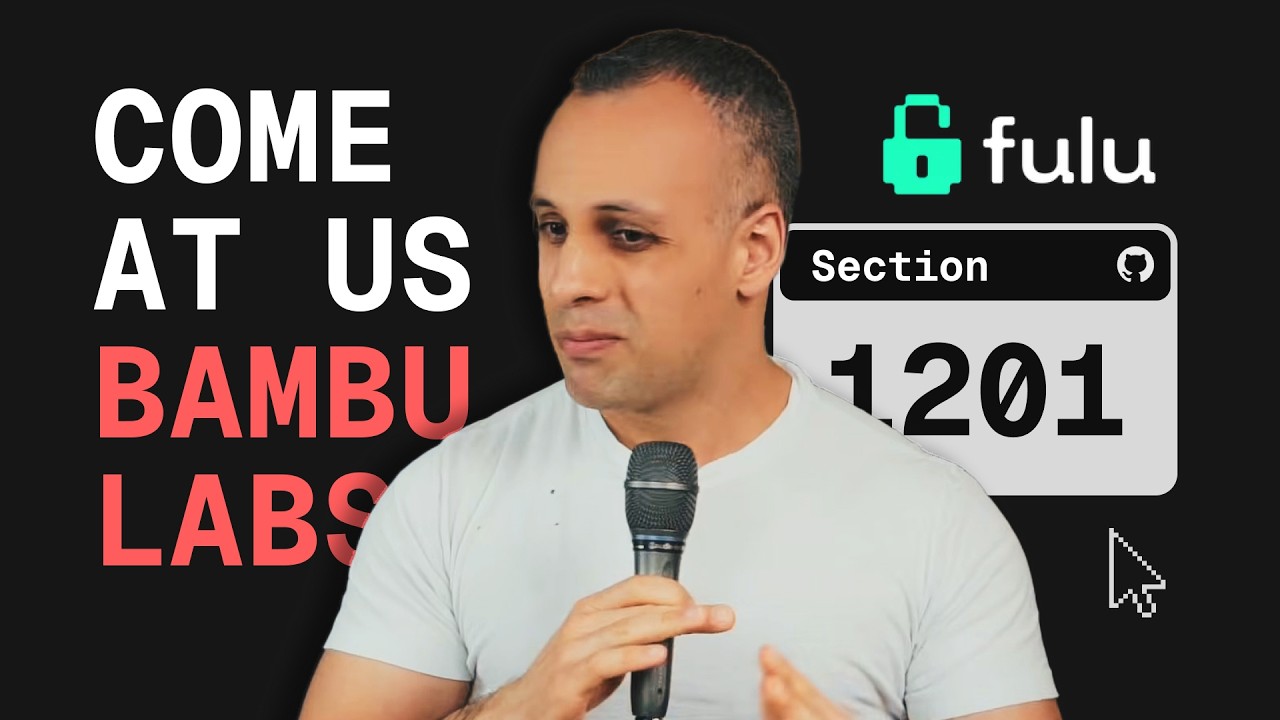
Bambu Lab cites section 1201 of the Digital Copyright Act, which argues “No person shall circumvent a technological measure that effectively controls access to a work protected under this title.”
Rossmann points out that this is often cited by standard printer companies when users circumvent locks to use their own ink. Being able to buy ink virtually anywhere makes maintaining printers cheaper, so it has become a pro-consumer standpoint to remove as many barriers to entry as possible on this front. Rossmann’s company, FULU, has been campaigning against laws like it for some time now.
Get fucked, @BambulabGlobal. With permission of the developer to rehost, grab OrcaSlicer-BambuLab here: https://t.co/2V2YZHy2FlMay 12, 2026
The YouTuber notes that AGPL, which is the license Bambu’s software uses, is structured such that anyone who uses the software is permitted to do as they like with it. Effectively, Rossman is arguing that Bambu’s cease and desist could not feasibly win in court.
Bambu Lab’s software (Bambu Studio) is open source and a fork of PrusaSlicer, which itself is a fork of Slic3r. Bambu Lab explained a few days ago that it supports forks of its software, but not OrcaSlicer specifically, due to its nature. Bambu argues that it communicates with its own cloud infrastructure by “impersonating another entity”.
Keep up to date with the most important stories and the best deals, as picked by the PC Gamer team.
Rossman argues that the OrcaSlicer fork is using Bambu Lab’s own source code, and “this is interesting to me for a number of reasons, because he [the developer of OrcaSlicer] never actually modified the code. He’s literally using Bambu Lab’s own open-source AGPL code without modifying it.”
The developer declined Rossman’s offer, as they didn’t want a long legal battle, so Rossman uploaded it themselves via GitHub. And that act has become somewhat of a digital rights war cry. Gamers Nexus recently took to its own website to say, “F*** you, Bambu Lab”, as it also posted the OrcaSlicer for anyone to download.
Now, Bambu Lab is in a standoff against opponents with more social media attention, and presumably more cash for legal fees, than before. How it will go is anyone’s guess, but with the backing of YouTubers with over 6 million subscribers total, it’s sure to get eyes on it either way.
Rossmann thanked Gamers Nexus and Geerling for joining the cause and urged even more social media figures to join in. They said:
“Bambu, you can’t sue us all. Or maybe you will. You can sue us all. Maybe you can try to get us all put in federal prison. But maybe you should spend that money making your software a little better or making your users happier. But what do I know?”
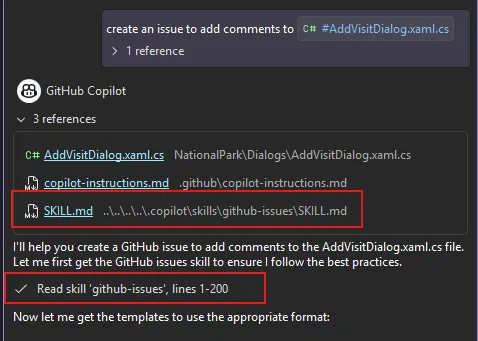
Visual Studio now supports Agent Skills, which are reusable instruction sets that teach Copilot agents how to handle specific tasks like running a build pipeline, generating boilerplate, or following your team’s coding standards. Define a skill once, and the agent applies it automatically whenever it’s relevant.
Creating a skill
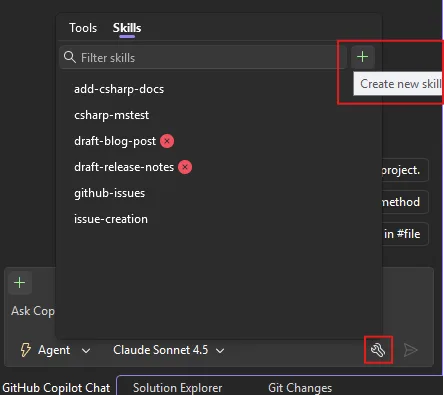
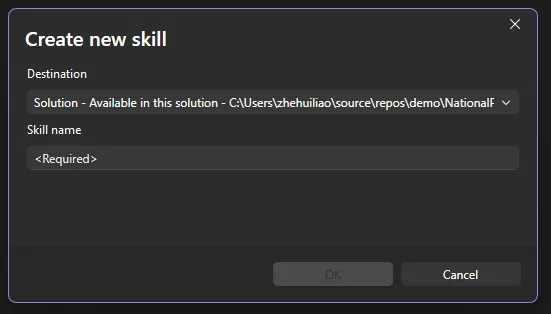
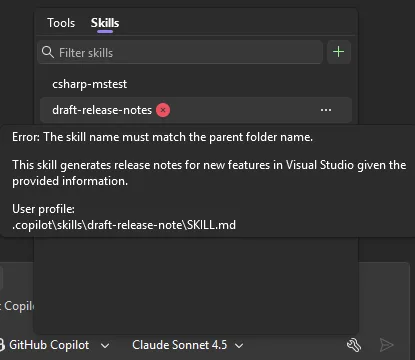
You can create a skill directly from within Visual Studio. Click the tools icon in the bottom-right corner of Copilot Chat to open the skills panel, a dedicated view of every discovered skill. Click the + button in the top-right corner of the panel and follow the guided flow: choose a destination (global or solution-level skill), pick a name, and Visual Studio generates a skill template for you to fill in. Copilot Agent mode can then assist you in filling in the template. Currently this flow is only available in the Insiders channel and will be in Release soon.
You can also create a skill manually:
Create a skill directory in your repository (.github/skills/my-skill/) or user profile (~/.copilot/skills/my-skill/).
Solution skills (shared via your solution): .github/skills/, .claude/skills/, .agents/skills/
Global/Personal skills (shared via your user profile and available across solutions): ~/.copilot/skills/, ~/.claude/skills/, ~/.agents/skills/
When a skill activates, it appears in the chat window so you always know what’s being applied.
If you are not sure where to start or what skills to create, please check out awesome-copilot for many great community examples!
Managing skills from the skills panel
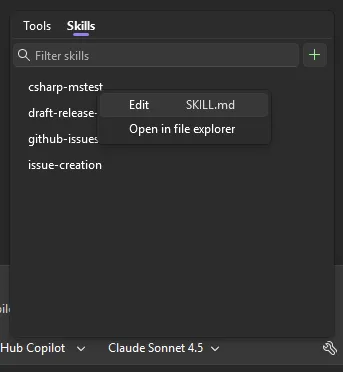
In addition to creating new skills, you can also manage your skills easily from the skills panel.
From the panel you can:
Edit — Open any skill’s SKILL.md directly in the editor via the ⋯ menu.
Open file location — Jump to the skill directory on disk.
Search — Filter skills by name or keyword.
The panel also surfaces diagnostics for any skill configuration errors, so you can quickly spot and fix issues.
Skills vs. Custom Instructions: when to use what
You may already be using custom instructions (.github/copilot-instructions.md) to guide your Copilot’s behavior. Custom instructions are great for broad, always-on guidance, such as things like “use tabs, not spaces” or “prefer async/await over callbacks.” They are automatically applied to every interaction you have with Copilot.
Agent Skills are different. Skills are task-specific and dynamically loaded. The model decides when a skill is relevant and applies it only in matching contexts.
Custom Instructions
Agent Skills
Scope
Always active
Activated per-task
Best for
Coding style, conventions, general preferences
Workflows, templates, multi-step procedures
Structure
Single markdown file
Directory with SKILL.md + supporting files
Examples
“Use PascalCase for public methods”
“When creating a GitHub issue, use this template and include severity, repro steps, and environment info”
Use custom instructions for rules that should always apply. Use skills for specialized workflows that only matter in certain contexts. Another way to extend your agent’s capabilities is through MCP tools, which let the agent interact with external services and APIs. Skills and MCP tools complement each other well — a skill can describe how to handle a task while an MCP tool provides the capability to execute it.
Please give Agent Skills a try and share your feedback in the comments or on Developer Community.
Productivity software maker Notion is stepping into the agentic era.
In a livestreamed product announcement on Wednesday, the company, known best for its collaborative note-taking app, introduced a new developer platform that extends the capabilities of its custom AI agents, connects with external agents, and allows teams to build automated multistep workflows that can pull in data from any database.
By building an orchestration layer — a system that coordinates AI work across multiple tools and data sources — Notion is positioning itself as more than a note-taker with AI features and instead as a hub where people and agents can collaborate across tools and databases.
In February, Notion first launched its Custom Agents — AI teammates that handle repetitive tasks like answering frequently asked questions, compiling status updates, and automating workflows. Since then, Notion customers have built over 1 million agents, the company says.
However, these agents had limitations. They couldn’t connect with external data or use custom logic. External agents that companies used also didn’t have a way to connect with the Notion workspace. Teams had to work around these problems by using third-party automation platforms or writing their own scripts that run on their own infrastructure.
“It’s true that, historically, Notion hasn’t been the most developer-focused platform,” said Ivan Zhao, Notion co-founder and CEO, during the livestream. “But things are changing.”
Image Credits:Notion
Now, Notion will allow teams to deploy their own custom code. With its new Workers, Notion’s cloud-based environment for running custom code, customers can write their logic and deploy it to a secure sandbox (an isolated environment that keeps the code from interfering with other systems). This allows teams to do things like sync their data into Notion, build custom tools, and trigger work with webhooks — which are automated signals that kick off actions when something happens in another app — without needing to rely on external infrastructure.
You don’t even have to write the code. The company points out that your preferred AI coding agent can do it for you.
The Workers will use the same credit system as Custom Agents, but Notion is making this free through August, so developers can experiment.
Syncing external data sources is also a part of the Notion Developer Platform. Powered by Workers, the database sync feature can pull in data from any database with an API. That means you could access data from places like Salesforce, Zendesk, Postgres, and others within your own Notion databases — and keep the data current.
Zhao noted that this means that Notion’s users can now “use your Notion database as a sheer canvas to power both your workflows and your agents.”
Image Credits:Notion
Workers can also build agent tools with custom logic, for those times when connecting with a third-party via MCP — short for Model Context Protocol, an emerging standard that lets AI tools connect to external data and services — isn’t enough.
Another addition allows Notion’s users to chat directly with external AI agents they use, assign them work, and track their progress, as if they were one of Notion’s own custom agents. At launch, Notion says that Claude Code, Cursor, Codex, and Decagon are supported partner agents, but it plans to add more.
There’s an External Agent API, too, if teams want to connect their own internal agents with Notion, like those they’ve built specifically for their company’s needs.
Image Credits:Notion
Developers and agents interact with Notion’s new Developer Platform via the Notion CLI, a command-line tool for developers, available on the company’s Business and Enterprise Plans.
The Developer Platform represents a shift in strategy for Notion as it becomes more of a programmable platform than just an application, setting it up to compete with other workflow automation platforms. As businesses increasingly look to automate knowledge work and build internal AI systems, a platform that ties together agents, custom code, and live data in one place starts to look less like a productivity app and more like core infrastructure.
It also follows the broader trend among AI companies, which have been moving beyond the AI chatbot to offer agentic tools that can take actions across different software platforms.
“Any data, any tool, any agent — that’s the big picture for the Notion Developer Platform,” Zhao said.
When you purchase through links in our articles, we may earn a small commission. This doesn’t affect our editorial independence.