
11 Simple Tech Hacks for People Who Work From Home


Underrated simple tech Hacks for WFH people
ID 72543779 | Smiling Entrepreneur ©
Stefan Dahl | Dreamstime.com

If you work from home, you’re not alone: 35% of employed Americans work from home at least part of the time. Remote workers develop strategies and tech hacks to maximize productivity and eliminate inefficiencies that might otherwise prompt employers to insist on a return to the office. These tech hacks are often small but easily overlooked adjustments that improve daily workflow, from researching the most reliable rural internet options that best suit your needs to establishing a consistent workday routine. Here are a few simple tech hacks to make your work-from-home routine more productive and enjoyable.

Optimize Your Environment, Not Just Your Desk

A clean, organized desk helps keep you focused when you work at home, but that’s just the beginning. Ideally, your entire work environment should positively impact your energy and productivity while maintaining a boundary between your working hours and off-the-clock life. Consider the following tech hacks as you optimize your workspace:

1.      Natural Lighting and Smart Lights

Position your workspace near a window whenever possible. Natural light helps reduce eye strain, improve alertness, and support healthy sleep cycles. Exposure to daylight throughout the workday can make it easier to fall asleep at night and feel more energized the next morning.

If natural light is limited, use adjustable LED lighting that mimics daylight. Look for lights that offer color temperature control and dimming options so you can adapt brightness based on the time of day and your task. Consistent, balanced lighting reduces fatigue and supports sustained focus.

2.      Ergonomics

Comfort directly affects productivity. Choose a chair with proper lumbar support and adjust it so your feet rest flat on the floor. Keep your knees at roughly a 90-degree angle and ensure you can move freely beneath your desk.

Position monitors at eye level to prevent neck strain, and keep screens about an arm’s length away. If you spend long hours typing, consider ergonomic keyboards and mice designed to reduce wrist tension. Standing desks or adjustable desk converters can also help vary posture throughout the day.

Small adjustments compound over time. Proper ergonomics reduce physical strain and make it easier to maintain focus during long work sessions.

3.      Add Some Nature

While it’s not really a tech hack, adding plants to your workspace helps reduce stress and improve air quality. If you prefer, a small water feature or aquarium also gives your workspace a natural, relaxing vibe.

4.      Separate Your Workstation from Leisure Areas

A dedicated home office is the pinnacle of work-from-home spaces, but not everyone has the space for one. If not, find ways to separate your workspace from the rest of the house. Room dividers, bookcases, and curtains can all serve as boundaries between work and leisure areas. You can turn a closet into an office space if it offers enough room, or choose a wall-mounted folding laptop writing station. Both close up after work, signalling the shift from work to home life.

Only use your workstation for work, if at all possible, and keep clutter and desk distractions to a minimum.

Quiet Tech Habits That Improve Productivity

Practicing proper digital hygiene can significantly improve your productivity. Try incorporating these simple tech hacks into your workday to help keep you on task:

1.      Silence Notifications

Notifications, texts, and other digital “white noise” interrupt workflow, significantly impacting your concentration. According to UC Berkeley, it takes anywhere from 8 to 25 minutes to recover from an interruption and get back on task—the more complex the task, the longer the recovery time.

Considering notification pings are a near-constant source of annoyance, controlling them is one of the best tech hacks you’ve got. Remove apps sending notifications you don’t need, and silence notifications from apps you do use. Instead of checking every email notification you receive, silence notifications and schedule set times to check your mail, such as the middle and end of the workday.

2.      Enable Do Not Disturb Mode

Set your devices to Do Not Disturb mode to improve focus by silencing text notifications during work hours. You can customize DND mode, so you still get notifications from specific contacts.

3.      Curate Your Workspace

In addition to keeping your physical desktop clean, curate your digital workspace by closing all unnecessary tabs. While some people thrive with dual monitors, others find the extra digital space fills up with distractions. If this describes you, consider switching back to a single monitor.

4.      Prioritize Your Peak Work Time

We all have periods where we get the most done in a day. For some, it’s the first thing in the morning. For others, it’s early afternoon, or the last two hours before the end of the workday. Identify your most productive time and capitalize on it. During this time, avoid emails, SMS, and social media and focus entirely on work.

5.      Set App Limits

If the siren call of social media proves too alluring, set screen time limits on your devices to restrict passive scrolling. If you can’t access it, you can’t lose time to it!

6.      Batch Tasks

Instead of constantly switching between tasks, dedicate blocks of time to making calls, uploading files, and so on. Batching tasks lets you handle mundane tasks quickly and dedicate your remaining time to mission-critical work.

7.      Automate When You Can

Artificial intelligence assistants like Zapier and IFTTT can perform a wide range of repetitive tasks, including managing schedules, analyzing data, sending automated email and text responses, taking meeting notes, and tracking time.

Why Internet Performance Still Matters

While these tech hacks certainly help people work from home, they all rely on a solid foundation: a reliable, high-speed local network and internet service. It is crucial to choose a high-speed internet provider for dependable rural internet infrastructure. In more populated areas, several ISPs are also offering fiber internet as a more convenient and effective option. Fiber networks communicate information at faster speeds and are considered the most reliable option for remote workers.

Don’t assume your internet provider will set you up automatically with the plan and speed you need. Discuss your options and run a routine internet speed test to ensure you’re getting the speed and reliability you need to run your devices and perform critical work.

Design Sustainable Routines

Difficulty separating work from home life often impacts remote workers, who may feel “always on” and obligated to work long hours. Do this for long enough, and burnout becomes a very real possibility. At the other end of the scale, remote workers may struggle to complete tasks due to distractions from home life (there’s always some chore that needs doing instead of work…). Guard against both extremes by establishing clear start and stop times for work. During those times, you’re at work, not home. Outside of those times, you don’t touch work.

During work, take short breaks to get up, stretch, and move. Taking a moment to move can help improve your focus. It takes time to adjust to working from home, but once you get the hang of it, you may never see work the same way again!

Find a Home-Based Business to Start-Up >>> Hundreds of Business Listings.

Artemis II Is Shooting for the Moon Today: All the Details About NASA’s Historic Mission


Are you ready for a bona fide moon shot? The upcoming Artemis II mission is one of the most exciting space excursions in recent memory. It’ll be the first time humans have flown to the moon since December 1972, when the landmark Apollo program wrapped up, and NASA began shifting focus toward the space shuttles that would stay closer to home in Earth orbit. 

Artemis II is a chance for NASA to gather valuable new data from a spaceflight of this magnitude and to continue testing its new Space Launch System rocket and the Orion spacecraft that will carry the astronauts. The 10-day mission will be a flyby for those four humans — an actual moon landing is planned for the Artemis IV mission — but there will be plenty of drama nonetheless.

The launch is now scheduled for April 1 after NASA scrapped plans for launch dates in February and March. NASA has the rocket in place and has been rigorously testing it to ensure that it’s ready for the journey. Everything is ready to go. 

The two-hour launch window is targeted to begin at 6:24 p.m. ET on Wednesday, with additional opportunities running through Monday, April 6.

The mission is crewed by commander Reid Wiseman, pilot Victor Glover, and mission specialists Christina Koch and Jeremy Hansen. Wiseman, Glover and Koch are American. Hansen is Canadian and will be the first from his country to travel to the moon. 

After liftoff, the Orion spacecraft will maneuver into orbit, head to the moon, slingshot around it and return home as Earth’s gravity pulls it back. This launch is now over eight years in the making, and the big moment is finally at hand. 

The Orion's heat shield after the Artemis I mission

The Orion spacecraft needed some heat shield improvements, given the damage sustained during Artemis I. 

NASA

The Artemis II launch in April

The original launch window (PDF) for Artemis II had been Feb. 8 to 13, but NASA crossed that out following a fueling test of the rocket known as a wet dress rehearsal. It subsequently scratched fallback launch dates in March. Now the Artemis II launch window is April 1 to 6 and April 30. The time of day varies, but NASA is aiming for an evening liftoff, so prepare to watch either during or after dinner. 

On the launch date, Artemis II will lift off from Launch Complex 39B at the Kennedy Space Center in Florida. The Space Launch System, NASA’s super heavy-lift rocket and the primary launch vehicle for the Artemis program, will produce more than 8.8 million pounds of thrust to launch Orion and the crew into space. 

In the initial minutes, the spacecraft will shed components such as rocket boosters and hardware used specifically for the launch phase. 

The flight path of Artemis II is a big loop around the moon. Artemis I took a similar route. 

NASA

How to stream the launch

NASA is streaming the launch on its usual platforms. They include its YouTube channel, its free on-demand streaming app NASA Plus, and the agency’s social media pages on Facebook and X. It also should be livestreamed on Twitch, and with the partnership NASA signed with Netflix in 2025, it’ll likely be livestreamed on Netflix as well. 

What will happen first

Approximately eight minutes after launch, the spacecraft will separate from the lower stage, leaving only the Orion capsule and the upper-stage rocket, while the expendable lower stage will splash down into the Atlantic Ocean and sink to the bottom. 

Over the next few hours, the spacecraft will reach its orbit around Earth, in an orbital pattern that makes it easier for the astronauts to return home if something goes wrong. (The Artemis I mission flew successfully in 2022, but was uncrewed.) It will remain there until the second day of the mission. 

Days 1 and 2: Testing systems

Once in high orbit, the crew will engage the manual controls and begin testing the systems on board, including life support and communications. Once everything is deemed OK, the upper-stage rocket will perform what’s known as a translunar injection burn before detaching, sending Orion streaking toward the moon. 

Day 3 to 5: Travel time

The crew will have a couple days’ travel time to get all the way out to the moon, a distance of over 225,000 miles. (It’s about the same amount of time as driving nonstop from New York to Los Angeles, a trip of less than 3,000 miles.) By comparison, the International Space Station is only about 250 miles away from Earth. During this time, the crew will be busy performing tests, practicing procedures, and trying out the mission technology. 

Day 6: The dark side of the moon

The Artemis II crew reaches lunar orbit on Day 6, flying around the far side of the moon and preparing for their return journey. It will be a rare in-person look at the dark side of the moon, and, depending on which day the mission launches, the Artemis II crew may also break the record for the longest journey made by humans away from the Earth when they hit the far point of their loop around the moon. That record — 248,655 miles — was set during the Apollo 13 mission

The crew is expected to lose communication with Earth during this time. They’ll photograph the far side of the moon before reestablishing communications and heading home. 

Day 7 to 9: Homeward bound

The Orion will drift around the moon and begin its homeward trajectory under the influence of Earth’s and the moon’s gravity. 

Day 10: Splashdown

The final day of the mission will see Orion and its crew return to Earth. Orion will enter orbit at high speed, generating heat up to 3,000 degrees Fahrenheit. This will thoroughly test those improvements that NASA made to Orion’s heat shields. Once reentry into the atmosphere is complete, the crew will deploy Orion’s parachutes and drop into the Pacific Ocean. The US Navy will pick them up roughly 2 hours later. 

Artemis III will send humans to the moon’s surface. 

NASA

Artemis III in orbit and Artemis IV lunar landing

The Artemis II mission is a vital building block in the long sequence of events that will put humans back on the surface of the moon. Data collected and tests conducted on the mission will be used to prepare the Artemis III and Artemis IV missions, now planned for 2027 and early 2028, respectively. Artemis III will perform tests, including docking with the lunar lander, in Earth’s orbit; Artemis IV will be the first crewed lunar landing since Apollo 17 in 1972.

SpaceX is building the system the crew will use to land on the moon, and Houston-based company Axiom Space is developing the space suits they will wear. 


Battle, Explore, and Survive with the Team17 Collection Bundle


Blog | Store

Fight, explore and survive across a world of unforgettable adventures with the Team17 Collection Bundle. This collection of eight standout games challenges you to battle through dark fantasy realms, master co-op missions, uncover strange new worlds and more. From intense strategy to creative exploration, every title offers something distinct – making this a bundle packed with variety and discovery.

Even better, every purchase helps support Save the Children, contributing to the vital work they do for young people around the world. By diving into these incredible experiences, you’re also helping make a real-world difference.

Eight Standout Adventures. One Great Cause.

The Team17 Collection brings together a diverse lineup of experiences, each offering its own unique challenge:

  • Sworn: Brave a corrupted Camelot in this dark fantasy action experience where danger lurks around every corner.
  • Heroes of Hammerwatch II: Descend into perilous dungeons, battle fearsome enemies, and grow stronger with every run.
  • Amber Isle: Restore a charming community as you rebuild shops, befriend locals, and bring life back to a vibrant world.
  • Operation: Tango: Team up in a two-player co-op spy adventure where communication and coordination are key to success.
  • Heavenly Bodies: Take on zero-gravity challenges in a physics-based experience that’s as rewarding as it is unpredictable.
  • CONSCRIPT – Director’s Cut: Endure the brutal realities of war in this atmospheric survival horror set during World War I.
  • Warcana: Command armies and outthink your opponents using strategic, card-driven gameplay.
  • Scarlet Tower: Survive relentless gothic hordes in a dark, fast-paced action experience filled with upgrades and chaos.

Gaming That Gives Back

Every purchase of the Team17 Collection supports Save the Children, helping fund essential work across more than 100 countries. The organisation focuses on ensuring children stay safe, healthy, and able to learn—whether that’s through emergency aid in crisis zones, access to education, or protecting children from harm and exploitation. By picking up this bundle, you’re not just expanding your library – you’re helping give children the chance of a better future.

Instant Access. Endless Adventure.

As with all Green Man Gaming bundles, your keys are delivered instantly so you can jump straight into the action. You’ll also receive an extra 3% off voucher for your next PC game purchase, keeping the adventure going. Be quick, though, the Team17 Collection is only available for a limited time. Don’t miss your chance to experience this diverse collection of standout indie games while supporting a great cause.


Green Man Gaming

The Green Man Gaming Staff account represents the voices of the team behind Green Man Gaming, bringing you the latest in store news, industry insights, and curated gaming recommendations.

How Far Can AI Go in Creating CAD Drawings?


A Look at ARES Commander’s AI Capabilities

Can artificial intelligence (AI) create CAD drawings? With the rapid evolution of AI services — reportedly appearing by the hundreds each month in 2025 — there’s growing interest in how AI can be applied to CAD drawing creation. 

This article explores ideas for applying AI in CAD drawing creation and provides an overview of ARES AI Assist (A3), the user assistant built into ARES Commander, the world’s leading DWG-compatible CAD software. (A3 is now also available in the online version, ARES Kudo, which runs directly in the user’s Internet browser.)

Can AI Create CAD Drawings?

Unfortunately, AI cannot yet fully automate CAD drawing creation. At the time of this article, the automatic generation of CAD drawings with generative AI tools like ChatGPT, Gemini, or Claude has not yet been realized.  

However, services that use AI to assist CAD users with drawing creation have already arrived. AI excels at automating simple, repetitive tasks, reducing the burden on CAD users and improving efficiency.

Other uses include:

  • Generating ideas during early design phases (brainstorming with AI for multiple suggestions)
  • Optimizing existing drawings by suggesting corrections and proposing efficient modifications based on past design data

By understanding AI’s strengths and applying them effectively, CAD users can focus their energy on creative, high-value tasks.

What Kind of AI Does ARES Software Provide?

Beginning with version 2025, ARES Commander integrates the ARES AI Assist feature, known as A3. Powered by OpenAI technology, A3 is easy to use, and responds to requests in natural language. Unlike general-purpose AI tools such as ChatGPT, A3 is:

  • Tailored for CAD users
  • Specially trained on the functions, commands, and use of ARES CAD software
  • Accessible directly within ARES (no need to switch to a separate browser), so users can manage both AI interaction and drawing creation within the same interface.

How ARES’s AI Supports Drawing Creation

1. Learn Operations and Functions

A3 explains commands step by step to help users efficiently navigate ARES Commander. For example, users might ask it:

  • “How do I undo my last action?”
  • “How do I import a Revit file?”
  • “How do I create an online block library?”
  • “How do I set up annotative dimensions?”
  • “How do I connect to cloud storage?”

2. Streamline Workflows

A3 boosts productivity by assisting with unit conversions, calculations, and translations such as:

  • “What are the dimensions of a 7.3-tatami room in meters?”
  • “How many 60×90 cm tiles are needed for a 12m x 7m floor?”
  • “How many 2m³ boxes fit in a 5.5m container?”
  • “What is ‘curtain wall’ in Spanish?”
  • “Translate ‘Please refer to the specifications’ into English.”

3. Get Industry-Specific Advice

Beyond general answers, A3 can respond to domain-specific prompts like these examples:

  • “Suggest layer names for architectural drawings.”
  • “Give technical advice on blending sheet metal.”
  • “What’s the standard thickness of interior walls in the U.S.?”
  • “How do I calculate wire gauge for electrical loads?”
  • “How can I reinforce a load-bearing wall in tight spaces?”
  • “What is DIN 933?”

Use Cases for A3

A3 supports both beginners and experienced CAD users:

  • Beginners can learn basic operations step by step, making self-study easier.
  • Experienced users benefit from help with complex calculations, technical problem-solving, and industry-specific advice.
  • Multilingual translation features make it valuable for global projects.

Even free-trial users can try A3, though the number of daily conversation threads is limited depending on the license type. 

For more details, see the related article: “Introducing ARES AI Assist (A3): Your Personal CAD Assistant.”

Try A3 for Yourself

In summary, although full automation of the CAD drawing process is not possible yet, AI can assist users in ways that make CAD work more efficient. A3, the CAD-specialized AI assistant developed for users of ARES Commander and ARES Kudo, is one example; it helps users to learn the software quickly, streamline their workflows, and get industry-specific answers without leaving their CAD workspace.

Graebert offers a 30-day free trial of its ARES CAD software.

Bungie have killed off a speedy movement exploit in Marathon’s latest update, and they’ll do it again if they have to


There is always a risk with a live service game, or any game with only competitive elements, that it enters the Cool For Some Zone. This is a space that exists within a given game and also around it, a place where you can pull off Sick Tricks as a result of movement tech not purposefully included in the game, but born as an incidental result of mashing buttons in just the right way. And until today, Marathon found itself in said zone, but Bungie have made the call to patch out the offending issue.


The issue in question is one that would essentially allow someone to propel themself forwards by quickly performing and then animation cancelling the Thief runner shell’s grappling device. In motion, it does seem like a neat thing to be able to do. In practice, it is only Cool For Some: those who can do it, and those who like to watch clip compilations of those same people. To be on the receiving end is less than ideal.


Bungie explain their decision to patch out this tech thusly: “One of our core philosophies for Marathon is that rapid repositioning and aggression must always have a meaningful cost. That cost can be an ability charge, heat buildup, or increased risk but it must exist and be understandable to an observer. Unbounded movement, while expressive and clip-worthy, is ultimately unhealthy for the pace of play we want to maintain for Marathon. To set expectations early, we will be looking at any future movement exploits through the same lens.”


Perhaps the key line is the last one, about how they’ll be keeping an eye out for similar exploits. It reads almost like a threat; Bungie have killed before, and they’ll kill again. Murder metaphor aside, it’s understandable. I’d hate to be on the receiving end of something I don’t have nearly enough time to practice to accomplish myself.


Outside of this bigger tweak, there are a range of other fixes, all of which you can read about in the patch notes. But Bungie have also shared an update on their current duos experiment. From tomorrow, April 1st, they’ll be disabling duo queues on Dire Marsh, and enabling them for Outpost, which will run for a week. Just don’t forget that these things take time. It’s a Marathon, not a sprint (don’t boo me, I need this).

Dinosaur Polo Club has released a new co-op game and it’s free


Two pieces of good gaming news today. First: Dinosaur Polo Club has shadow dropped a brand new game today. Second, it’s available for free on both PC and Mac from Itch.io. The project is called Read the F*cking Manual, or RTFM, and it is a co-op game based on working in tech support.

Dinosaur Polo Club is known for previous games Mini Metro and Mini Motorways. Both are stellar examples of simple, elegant game design, and a small group within the company took this game jam concept from passion project to a fully fledged release.

Per the description, “Players must work together — or not — in this atmospheric game of trust and communication.” The premise is that one player, the Troubleshooter, has the manual for the console, while the other player, the Terminal Operator, has to describe what’s on their screen, which stays out of the Troubleshooter’s sight. The workplace setting seems particularly apropos, because this is the sort of team-building activity you might do on the job that could be really fun or downright torturous depending on how much you like your colleagues. And the whole experience seems to dance around the horror genre, because there seem to be different endings depending on how much each person stretches the truth about what’s really happening.

Wargaming Console and PC Titles to Get In-Game Benefits with Xbox Game Pass


Summary

  • Five of Wargaming’s current and upcoming free-to-play titles on Xbox Series X|S, Xbox One and Xbox on PC, will begin to offer in-game benefits to Xbox Game Pass subscribers this year.
  • World of Warships, World of Warships: Legends, World of Tanks Modern Armor, World of Tanks Blitz and World of Tanks: Heat will all offer benefits.
  • Check out the benefits coming to World of Warships from April 9.

If you’re an Xbox Game Pass subscriber on any tier, Wargaming’s free-to play titles across Xbox Series X|S, Xbox One, and Xbox on PC will soon begin to offer you new benefits.

Over the next 12 months, Wargaming will add exclusive in-game benefits for Game Pass subscribers to World of Warships, World of Warships: Legends, World of Tanks Modern Armor, World of Tanks Blitz and even the upcoming World of Tanks: Heat.  

Today, we can reveal the benefits coming to World of Warships for Xbox on PC on April 9:

Welcome Pack for all players:

  • 7x WoWS Premium Account Days
  • 1x Xbox Tileflage (ship camouflage)

Weekly Missions and weekly reward

  • 7x “Credits +40% Expendible bonuses
  • 7x “Ship XP +200%” Expendable bonuses
  • 7x “Commander XP +200%” Expendable bonuses
  • 7x “Free XP +600%” Expendable bonuses

One-off Welcome Pack for New Players

  • 1 battle = 100,000 Credits
  • 3 battles = 1x Xbox Container  
  • 3 battles = 1x Xbox Tileflage (ship camouflage) + 3-day Avrora ship rental 
  • 3 battles = 1x Japanese Commander (6 Skill Points) & 1x USA Commander (6 Skill Points)
  • 3 battles = 2x Italian Destroyers Container & 2x Always Courageous Container
  • 5 battles = 12,000 Free XP
  • 5 battles = 1x Xbox Tileflage (ship camouflage) + 3-day Agincourt ship rental
  • 5 battles = 1x Italian Destroyers Container & 1x Always Courageous Container
  • 5 battles = 2x Xbox Container  
  • 5 battles = 15,000 coal
  • 5 battles = 1 day of WOWS Premium Account
  • 10 battles + 3 days of WOWS Premium Account
  • 10 battles = 1x Supercontainer
  • 15 battles = 1x Xbox Tileflage (ship camouflage)
  • Final Reward = 1,000 Doubloons

Here’s a brief overview of all the Wargaming titles you can expect benefits from in the months ahead:

World of Warships (Xbox on PC)

Immerse yourself in thrilling naval battles and assemble an armada of over 600 ships from the first half of the 20th century — from stealthy destroyers to gigantic battleships. Change the look of your ship, choose upgrades to suit your play style, and go into battle with other players!

World of Warships: Legends (Xbox Series X|S, Xbox One, Xbox on PC)

World of Warships: Legends is a free-to-play online naval shooter with fast-paced combat, easy-to-learn gameplay, and cross-progression between consoles, mobile, and PC. Victory is earned through strategic play, smart positioning, and coordinated teamwork. As a Captain, you can choose from more than 600 historically inspired warships, including legendary vessels from WWII such as Yamato, USS Iowa, Bismarck, and many more.

World of Tanks Modern Armor (Xbox Series X|S, Xbox One)

World of Tanks Modern Armor puts you in command of over 1,000 modern and legendary tanks. Challenge yourself in 15v15 tactical team battles. Choose to fight in Cold War or World War II settings – each offering its own roster of vehicles and historical themes for you to experience. Explore detailed maps, PvE and PvP events and challenges, inspired by real-world theaters of war.

World of Tanks Blitz (Xbox on PC)

World of Tanks Blitz is a free-to-play online 7v7 tank shooter built around fast-paced battles that usually last 5 to 7 minutes. Play solo or team up with a friend, choose from hundreds of vehicles inspired by both historic designs and more unusual experimental machines, and enjoy smooth performance even on modest hardware.

World of Tanks: Heat (Xbox Series X|S, Xbox on PC)

The upcoming brand new Wargaming title, World of Tanks: Heat, launching later this year, pits you as an Agent, specially trained and uniquely equipped to pilot mighty war machines tailored to your playstyle. Your mission? Dominate fast-paced battles in objective-based modes that reward coordination, timing, and mechanical skill across immersive arenas crafted for high-stakes strategy and tactics.


Stay tuned to Wargaming’s social channels and Xbox Wire for more information on the many in-game benefits coming to subscribers this year.

Visual Studio March Update – Build Your Own Custom Agents


This month’s Visual Studio update gives you new ways to customize GitHub Copilot. Custom agents allow you to build specialized Copilot agents tailored to your team’s workflow, backed by the tools and knowledge sources that matter to your project. Alongside that, agent skills bring reusable instruction sets, and a new find_symbol tool gives agents language-aware navigation across your codebase.

Beyond agents, we’re continuing to invest in the diagnostics experience with Copilot-powered profiling directly from Test Explorer and real-time perf tips during debugging. Security gets a boost too, with Copilot now helping you fix NuGet vulnerabilities right from Solution Explorer.

Download Visual Studio 2026 Insiders to try these features today.

Build your own custom agents

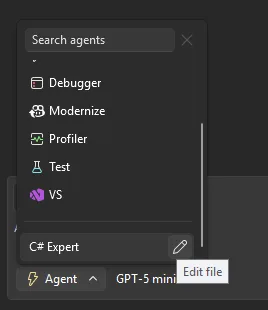
Want Copilot to follow your team’s coding standards, run your build pipeline, or query your internal docs? Custom agents make that possible. They’re specialized Copilot agents defined as .agent.md files in your repository, with full access to workspace awareness, code understanding, tools, your preferred model, and MCP connections to external knowledge sources.

Drop an .agent.md file into .github/agents/ in your repo, and it shows up in the agent picker ready to use.

vs18 4 custom agents image

A few things to keep in mind: if you don’t specify a model, the agent uses whatever you’ve selected in the model picker. Tool names can vary across GitHub Copilot platforms, so check the tools available in Visual Studio to make sure your agent works as expected. The awesome-copilot repo has community-contributed agent configurations you can use as starting points.

Use agent skills

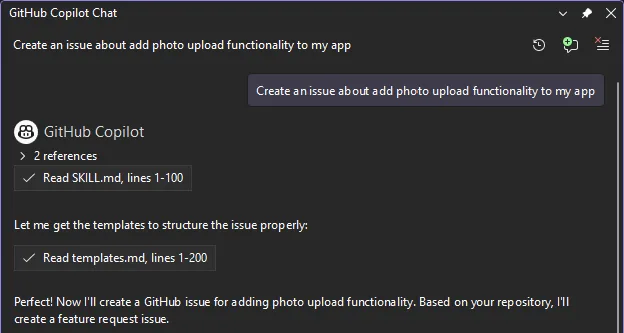
Skills are picked up automatically from several locations in your repository (such as .github/skills/) or your user profile (such as ~/.copilot/skills/). Each skill lives in its own directory with a `SKILL.md` file that follows the Agent Skills specification. When a skill is activated, it appears in the chat so you know it’s being applied.

vs18 4 agent skills image

Check out the awesome-copilot repo for community-shared skills, and look for more user-friendly flows for browsing and creating skills inside Visual Studio in upcoming releases.

Find_symbol tool for agent mode

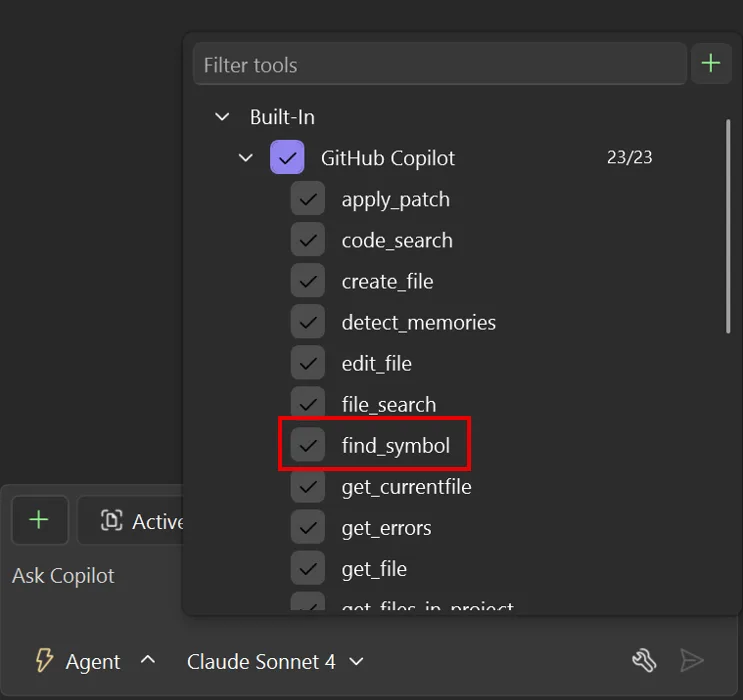
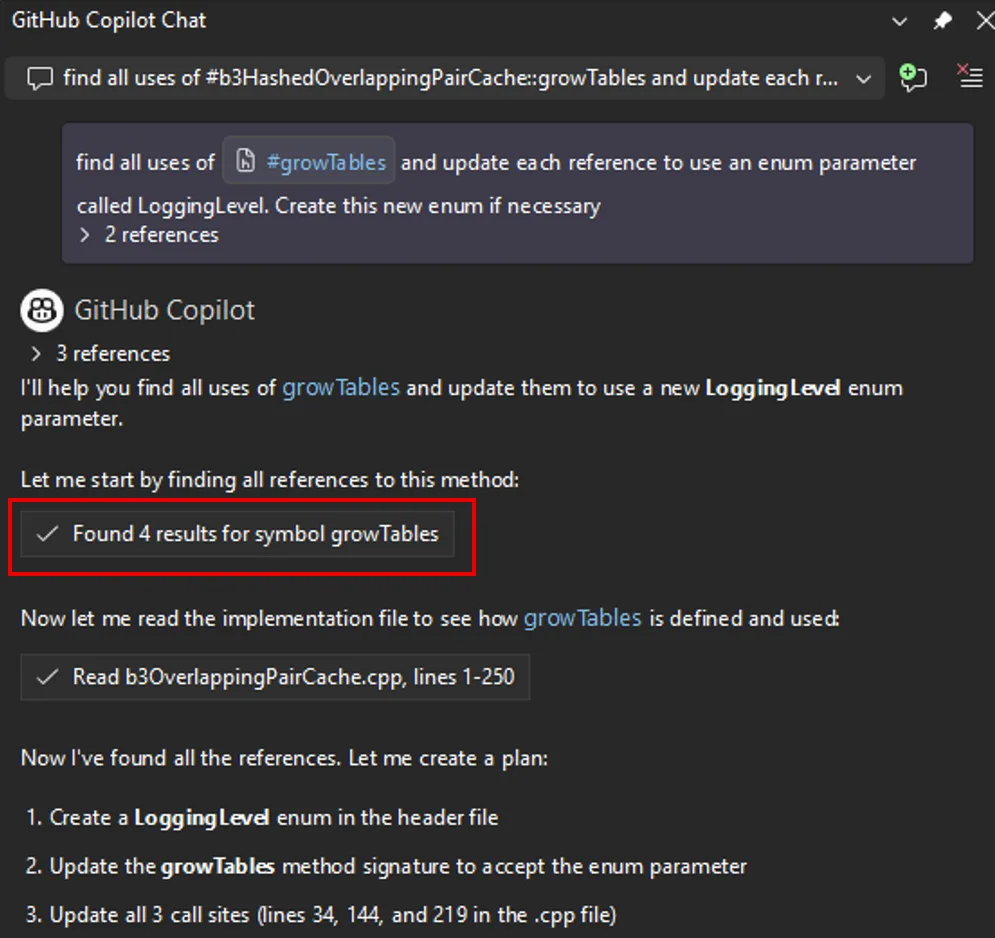
Copilot’s agent mode now has language-aware symbol navigation. The new find_symbol tool lets the agent find all references to symbols across your project and access metadata like type information, declarations, and scope. This means when you ask Copilot to refactor a method or update a parameter across call sites, it can actually see your code’s structure rather than guessing from text.

vs18 4 find symbol image

Enable the tool, and Copilot uses it automatically when answering questions or suggesting code changes. The difference is noticeable: instead of searching for text patterns, the agent navigates your code using language services.

vs18 4 find symbol example image

Supported languages include C++, C#, Razor, and TypeScript, plus any language with a supported LSP extension installed. For best results, use AI models that support tool-calling. Learn more at AI model comparison.

Enterprise MCP governance

MCP server usage in Visual Studio now respects allowlist policies set through GitHub. Admins can specify which MCP servers are allowed within their organizations. When an allowlist is configured, only approved servers can be connected. If you try to use an unauthorized server, you’ll see an error explaining the restriction. This helps organizations control which MCP servers process sensitive data and maintain compliance with security policies.

Profile Tests with Copilot

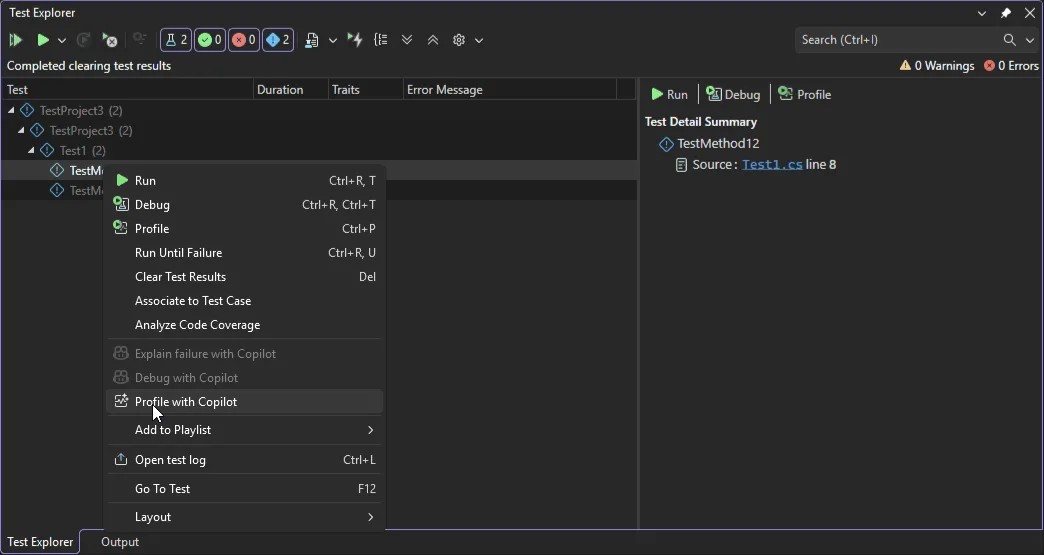
Ever wanted to profile a specific test without wrestling with profiler configuration? There’s now a Profile with Copilot command right in the Test Explorer context menu.

vs18 4 profile test with copilot image

When selected, the Profiling Agent automatically runs the chosen test and analyzes its performance, combining CPU usage and instrumentation data to deliver actionable insights. By default, it uses Instrumentation profiling and is currently supported in .NET. If you need deeper analysis, you can launch the selected test directly from the Copilot chat window and choose additional profiling tools.

Perf tips powered by live profiling

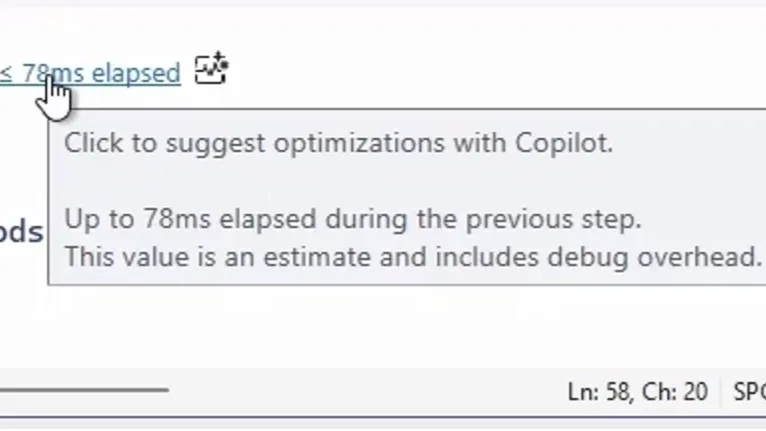
Performance optimization now happens while you debug, not after. As you step through code, Visual Studio shows execution time and performance signals inline for each step. When you spot a slow line, just click the Perf Tip and ask Copilot for optimization suggestions on the spot.

vs18 4 profiler agent perf tip image

The Profiler Agent captures runtime data during debugging automatically: elapsed time, CPU usage, and memory behavior. Copilot uses this data to pinpoint performance hot spots and suggest targeted fixes. This keeps optimization part of your regular debugging workflow instead of something you tackle later.

Fix vulnerabilities with Copilot

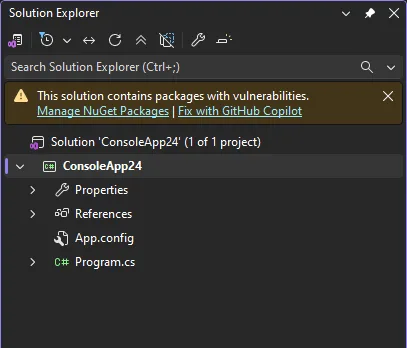
Spotted a NuGet package vulnerability? Copilot can now help you fix it directly from Solution Explorer. When a vulnerability is detected, you’ll see a notification with a Fix with GitHub Copilot link. Click through, and Copilot analyzes the vulnerability, recommends and implements targeted dependency updates that keep your packages secure without disrupting your workflow.

vs18 4 fix with copilot link image

No more manual vulnerability research or hunting down correct package versions. You address security issues right when they’re discovered.

HTML rich copy/cut

Need to paste code into a presentation, an Azure DevOps work item, or a web-based document? Visual Studio now supports HTML clipboard format when cutting or copying code from the editor. Syntax highlighting and formatting carry over when you paste into HTML-based applications. It’s turned on by default. To customize, go to Tools > Options > Text Editor > Advanced where you can toggle Copy rich text on copy/cut and set the max length.

From our entire team, thank you for choosing Visual Studio! For the latest updates, resources, and news, check out the Visual Studio Hub and stay in touch.

Happy coding!

The Visual Studio team

Amazon Spring Sale live blog 2026: Last day to score top Amazon deals


Follow ZDNET: Add us as a preferred source on Google


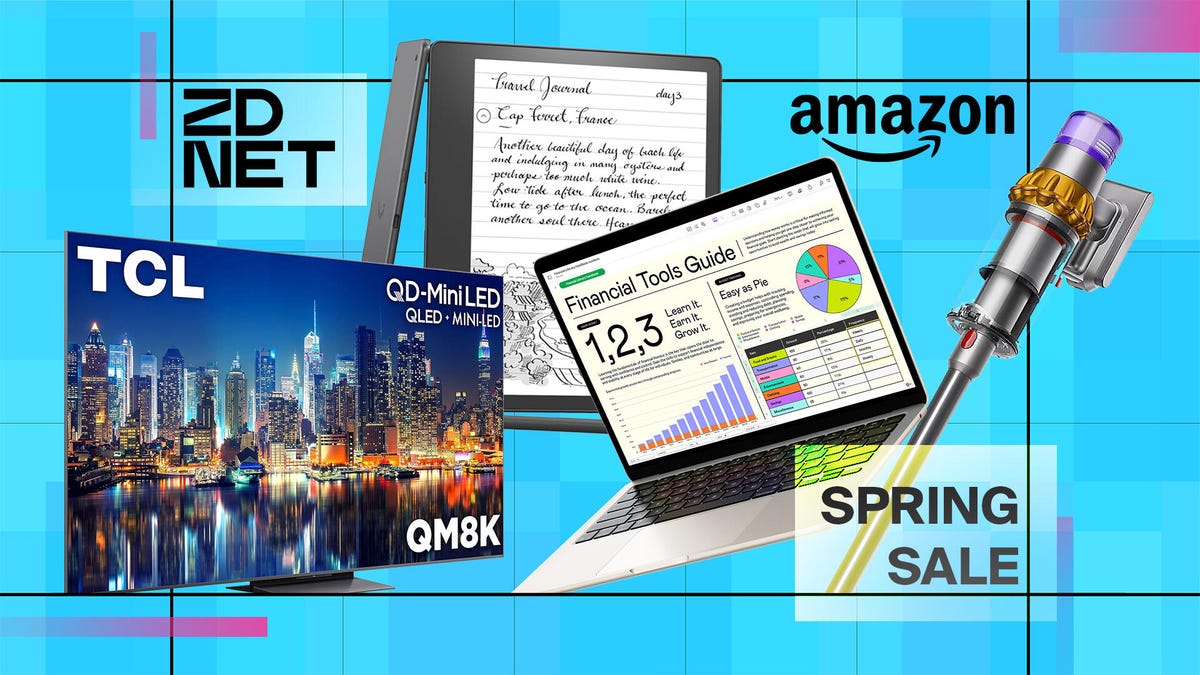
Spring is here, and it’s the last day of Amazon’s Big Spring Sale. We’re still seeing discounts of over 60% off across dozens of categories, including outdoor, home, beauty, tech, and more, and competing discounts from other retailers like Walmart, Best Buy, Target, and Costco. ZDNET reviews the best gear year-round, and we’re here to help you cut through the noise and quickly find the best deals during the spring sale period before it ends.

Also: The most popular Amazon Spring Sale deals, according to thousands of readers

As ZDNET’s deals and shopping editor, I am always scouring the web for the best offers on our team’s favorite products. Our team of experts is tracking the best offers as they arise in real time. Here are the best Amazon Spring Sale deals we’ve found live now. The sale ends tonight, so snatch these while you can. 

The best Amazon Spring Sale deals 2026 still live

  • Current price: $16
  • Original price: $25

This handy car charger is our readers second most clicked on deal during Amazon’s Spring Sale so far, and for good reason. It plugs into your car’s cigarette lighter socket and includes a built-in USB-C cable, a Lightning cable, a USB-C port, and a USB-A port. The two cables extend up to 31.5 inches, making it easy for back-seat passengers to charge their devices. 

Also: This car charger is a must for long road trips – and it’s cheap


Show more

  • Current price: $36 
  • Original price: $80

The HiRise 2 Deluxe wireless charger lets you charge your iPhone, AirPods, and/or Apple Watch or other compatible devices in one compact space without a ton of cords. “This 2-in-1 Qi2 wireless charger is the simplest, best-designed desk chargers I’ve found,” wrote ZDNET reviewer Kyle Kucharski. It comes in three colors, and all are discounted now.

Also: This 2-in-1 wireless charger simplified my workspace (and freed me from the cables)


Show more

  • Current price: $28
  • Original price: $35

This teeny gadget turns your wireless earbuds into in-flight companions. While our expert Jada Jones reviewed the more advanced Pro 2 model, this cheaper AirFly SE is a great alternative. 

“If you’ll likely use this product often, I recommend spending the $60 for a reliable and high-quality product. However, if you want a cheaper option, Twelve South offers the AirFly SE, but it doesn’t have aux-in compatibility or dual headphone connectivity,” Jones says. 

Also: This viral wireless dongle lets you share your audio on a flight – how it works


Show more

  • Current price: $2.99/month for 2 months
  • Original price: Up to $13.99/month

Now until March 31, new and former Paramount+ subscribers can get any monthly plan for $2.99/month for your first two months. After two months, your plan will auto-renew at then-current full price of your plan. This is one of the best streaming offers we’ve seen since Black Friday, and they don’t come around often. 


Show more

  • Current price: $21
  • Original price: $40

While not a tech product, this is my most frequently used item of all time. Sure, it’s not practical for outings in my opinion, but Stanley cups are dishwasher safe and easy to clean, and they keep drinks cold. Plus, at a 30-ounce capacity, it’s an excellent way to keep yourself hydrated throughout the day and to encourage drinking more water. 

I also enjoy buying these on sale to use for gifts, they’re perfect for stashing a few goodies inside and adding a bow or tag on! 


Show more

  • Current price: $40
  • Original price: $70

We’ve been impressed by the quality of Soundcore by Anker headphones, and this is a great deal on a highly-rated pair, with 4.6 stars and over 58,000 reviews on Amazon at the time of this writing.


Show more

  • Current price: $498
  • Original price: $798

Samsung’s best projector also doubles as a gaming hub where you can play your favorite games anywhere—including outside. Auto Focus will adjust the picture for the best view possible, no matter if it’s on your ceiling or the side of a building. 


Show more

  • Current price: $599
  • Original price: $850

The popular Dyson cordless stick vacuum is on sale for 29% off. 


Show more

  • Current price: $56 
  • Original price: $80

Tax season is upon us, and you can save 30% on TurboTax’s desktop edition for federal and state tax returns.


Show more

  • Current price: $250 
  • Original price: $300 

Smart home expert Maria Diaz says this Wi-Fi 7 router solved her big internet headache, and it’s accessibly priced (especially on sale). 

Review: eero Pro 7


Show more

  • Current price: $25 
  • Original price: $50

Amazon’s Fire TV Stick 4K Plus can turn any TV smart. You’ll get access to the entire Prime library of shows, movies, and music as well as support for hundreds of other popular apps so you can stream your favorite media right out of the box.

Also: Roku vs. Fire Stick


Show more

Best Amazon Spring Sale TV deals

  • Current price: $180 
  • Original price: $350

The Insignia F50 is a great budget-friendly smart TV that offers 4K resolution, a 60Hz refresh rate, and support for DTS Virtual: X audio for an elevated experience while streaming movies, shows, or music. And with robust parental controls, you can block little ones from accessing inappropriate apps and media.


Show more

  • Current price: $999
  • Original price: $1,398

Samsung’s flagship QLED TV offers premium-grade features like object-tracking sound for spatial surround sound, Dolby Atmos support, a glare-free display, and a dedicated gaming hub. It also has a maximum refresh rate of 165Hz for buttery-smooth motion while watching live sports, action movies and shows, and fast-paced games. 

Review: Samsung QN90F


Show more

  • Current price: $2,200 
  • Original price: $3,000

Samsung’s flagship OLED TV got a refresh with an updated panel, support for both Dolby Atmos and object-tracking sound, and an adaptive sound processor to tailor audio to your space for a more personalized experience. You’ll also get cleaner upscaling of non-4K content so even classic TV shows and older movies look their best.

Review: Samsung S95F OLED


Show more

  • Current price: $1,300
  • Original price: $1,700

This big-screen TV from Hisense offers a great balance between performance and price. With a peak brightness of 5,000 nits, you’ll get great visibility in harsh overhead lighting and sunlight while Dolby Vision IQ boosts contrast and detailing. The 165Hz refresh rate provides smooth motion for sports, movies, and video games while the dedicated IMAX Enhanced picture mode boosts color accuracy for movie buffs. 

Review: Hisense U8QG


Show more

  • Current price: $897
  • Original price: $1,600

This premium soundbar supports both Dolby Atmos and DTS:X for 3D spatial sound that follows the on-screen action. It also uses an integrated sensor that automatically monitors the room’s ambient sound and adjusts volume and other settings for a custom experience.


Show more

  • Current price: $1,698
  • Original price: $2,498

This cinema-sized TV from Samsung offer object tracking sound for spatial 3D audio as well as a Supersize Picture Enhancer mode to help provide the cleanest picture possible on such a large display. The 120Hz refresh rate smooths motion for live sports as well as console gaming and streaming movies while built-in voice controls give you hands-free use of your new TV.


Show more

  • Current price: $75 
  • Original price: $130

If you’re looking to pick up a second screen, the Insignia F20 is a great choice. With 720p resolution and a 60Hz refresh rate, it’s perfect for catching up on your favorite shows without any extra bells or whistles. 


Show more

Best Amazon Spring Sale tablet deals

  • Current price: $650
  • Original price: $699

The new iPad Air hasn’t even been out for a week, and it’s already discounted on Amazon. The upgraded iPad Air features the M4 chip, support for Wi-Fi 7, upgraded processing power, larger memory bandwidth, and an improved Center Stage camera. 

Review: iPad Air M4


Show more

  • Current price: $499
  • Original price: $569

If you’re in the market for a note-taking tablet that’s neither an iPad or a Kindle Scribe, the ReMarkable is another great option with a paper-like feel. 


Show more

  • Current price: $850
  • Original price: $900

With the Surface Pro, you get a tablet that runs Windows 11 out of the box instead of a mobile operating system like Android or iPadOS. That means you won’t have to worry about finding apps or workarounds for your workflows. 

Review: Microsoft Surface Pro


Show more

  • Current price: $240
  • Original price: $280

This new Samsung tablet is best suited for gaming, streaming, or multitasking, and comes with a super-fast charging battery. Samsung said the Galaxy Tab A11+ is “built for every member of the family, whether that’s helping a parent check off their to-do list, unlocking a student’s creativity, or enjoying some fun on the go.”

Also: The best Samsung tablets


Show more

  • Current price: $299
  • Original price: $349

Apple’s base-model iPad is our pick for the best tablet for most people, thanks to its versatility. When it comes to features, you essentially get the same suite as the more expensive iPad Pro and iPad Air models, but in a lighter form factor and an 11-inch Liquid Retina True Tone display.   

Review: iPad 2025 (11th-Gen)


Show more

Best Amazon Spring Sale phone deals

  • Current price: $949 
  • Original price: $1,199

ZDNET’s editor-in-chief, Kerry Wan, says the Google Pixel 10 Pro XL offers a versatile camera system with impeccable zoom capabilities. The phone is powered by Google’s Tensor G5 chip, enabling deep Gemini AI integration across the device’s features. Plus, it ensures speedy performance, thanks in no small part to the 16GB of RAM. It boasts a large 6.8-inch Super Actua display that peaks at 3,300 nits of brightness, allowing the phone to look vibrant even under direct sunlight.


Show more

  • Current price: $1,499
  • Original price: $1,799

Google’s Pixel 10 Pro Fold is a unique foldable. Our reviewer Cesar Cadenas says he “likes to think of it as a cross between an iPhone and the Galaxy Z Fold7, since it shares certain characteristics with both.” The Pro Fold supports Google’s Pixelsnap accessories, which provide fast wireless charging via the Qi2 standard, similar to MagSafe accessories for iPhone.

The Pixel 10 Pro Fold is a premium foldable with great performance thanks to the Tensor G5 chip. Both the Moonstone (silver) and Jade green options are on sale.


Show more

  • Current price: $800
  • Original price: $1,300

Motorola’s Razr Ultra is an aesthetically striking foldable, sporting Pantone-validated finishes. Beyond its looks, the model offers plenty of functionality, with a four-inch outer display that lets you read messages, use widgets, and control media. Inside is a seven-inch AMOLED inner screen that’s bright and features a less noticeable crease. Every single color option is currently on sale.

Review: Motorola Razr Ultra


Show more

Best Amazon Spring Sale laptop deals

  • Current price: $828
  • Original price: $999

The Zenbook A14 is one of the lightest laptops our reviewer Kyle Kucharski has ever tested. “Despite its featherweight status, however, it has a solid build and some respectable hardware. You get 16GB of RAM, a brilliant OLED display, and a Snapdragon X Plus processor for responsive performance (and fantastic battery life),” he says.

Review: Asus Zenbook A14

The Zenbook A14 earned our Editors’ Choice award last year for combining all of these things into an enjoyable package. The 2025 model is absolutely still competitive for everyday tasks, office workflows, and all-day usage.


Show more

  • Current price: $1,799 
  • Original price: $1,899

The MacBook Pro with the base M5 chip is a fantastic option if you’d rather spend a little less. The difference in processing speed compared to the Pro chips is most noticeable during the most demanding workflows, so unless you really need top-tier performance, we recommend considering the base model Pro — especially while it’s $100 off. 

Also: I compared the M5 MacBook Pro to older Mac models – here’s my buying advice


Show more

  • Current price: $720
  • Original price: $799

Acer’s Aspire 16 is a reliable everyday workhorse with a very efficient battery and slim form factor. If you’re looking for an easy-to-carry laptop that will last you all day, laptop expert Kyle Kucharski says the Aspire 16 fits the ticket (especially at this price). 

Review: Acer Aspire 16 AI


Show more

  • Current price: $999
  • Original price: $1,199

ZDNET editors are big fans of the 15-inch MacBook Air. With Apple’s latest upgrades to the Air series (more starting RAM for the same price, support for two external monitors with the lid open), the MacBook Air M4 feels a lot like a MacBook Pro. 

With the thin and light build, gorgeous Liquid Retina display, and all-day battery with the power-efficient M4 processor, the MacBook Air is still the best Mac for most folks.

Review: Apple MacBook Air M4


Show more

  • Current price: $1,799 
  • Original price: $1,999

The MacBook Pro M4 has only been out for a year, but it’s already discounted to make room for the new M5 series Macs. The M4 is one of the best laptops on the consumer market right now, featuring a brilliant Liquid Retina XDR display, 24GB of unified memory, and all-day battery life. With the Pro, you’re equipped to handle basically any kind of task, from high-end creative workflows to 3D animation, coding, and gaming.

Also: Apple’s boringly awesome reason to buy the M4 MacBook Pro


Show more

  • Current price: $799
  • Original price: $899

Looking for a gaming laptop that won’t break the bank? Acer’s Nitro series features some laptops with heavy-hitting hardware but still in accessible price points. The Nitro 5 features an Intel Core i5-12500H processor and Nvidia GeForce RTX 3050 GPU, paired with 16GB of RAM and 512GB of storage. It’s also got a backlit keyboard with customizable lighting, support for Killer Wi-Fi 6 and a wide range of I/O.


Show more

  • Current price: $830 
  • Original price: $1,200 

This laptop is chock full of ports, with 16GB RAM, and a 16-inch anti-glare display. 


Show more

Best Amazon Spring Sale headphones deals

  • Current price: $90 
  • Original price: $130 

The Anker Soundcore Liberty 7 earbuds received an Editors’ Choice award in May 2025. Sound and audio expert Jack Wallen says they produce loud, dynamic, and refined sound for a far lower price than others on the market. 

Review: Anker Soundcore Liberty 7 


Show more

  • Current price: $398
  • Original price: $460

These may be the most comfortable and best-sounding headphones on the market. They have that superior Sony sound, a long battery life, a balanced sound, and a comfortable fit. Sony markets the XM6 headphones as the best noise-canceling headphones it’s made — and when I’m listening to my music on a crowded, loud subway with these on, I just so happen to agree. 

Also: Sony WH-1000XM6 review: Still the king of ANC headphones? My verdict after months of testing


Show more

Best Amazon Spring Sale kitchen and household deals

  • Current price: $70
  • Original price: $110

This highly-rated single-cup Keurig machine comes in several fun colors, and can brew multiple cup sizes (and accommodate a travel mug). 


Show more

  • Current price: $460
  • Original price: $750

This Dyson fan is also a heater and an air purifier, perhaps justifying it’s large price tag — which is discounted for one of the best prices we’ve ever seen. 


Show more

  • Current price: $35
  • Original price: $50 

Right now, you can save up to 45% off Amazon devices, including several Ring camera models, like the popular indoor cam for under $50. 


Show more

  • Current price: $199
  • Original price: $350

I recommend this air purifier to all pet parents since it removes 99.97% of airborne particles, including viruses and bacteria, dust, pollen, pet dander, and mold. The real-time LED indicator also provides constant reassurance about the air quality.


Show more

  • Current price: $170
  • Original price: $220 

If you’re eyeing a smart home hub that’s smaller and cheaper than the Echo Show 21, the Echo Show 11 may fit the bill. Expert Maria Diaz says it features some nicer upgrades that make it well-received this year. 

Also: I’m a fan of the Echo Show 11, even if it’s not perfect


Show more

  • Current price: $14
  • Original price: $17

Automate your home routines with this smart plug. If you haven’t used a smart plug before, you may be surprised by just how handy they can be for turning the regular tasks of your home into automated chores you no longer have to handle. For you, that could mean connecting the holiday lights to the plug and creating a schedule for turning them on and off. The smart plug could also connect to your coffee pot and brew you a pot right as you wake up. 

Also: Why this $7 smart plug beats any other that I’ve tested in my home


Show more

  • Current price: $75
  • Original price: $100

This Bissell mini-vacuum is popular for a reason: You can use it to tackle spills and pet stains, allowing you to spray, scrub, and suction to get embedded dirt and stains out of your furniture, car interiors, pet beds, and more.


Show more

Best Amazon Spring Sale health and wellness deals 

  • Current price: $500
  • Original price: $650

The lowest we’ve seen the latest Airwrap i.d. styler sell for is around $480 during the holiday season, so this $500 offer is about $20 more. It’s still a decent chunk of savings, and the most we’ve seen in a few weeks. This Airwrap i.d. bundle comes with multiple attachments and is design for straight or wavy hair. 


Show more

  • Current price: $99
  • Original price: $129

Monitor yours or a loved one’s heart health at home with this personal EKG monitor that’s FDA certified. It’s also HSA/FSA eligible, and I think it’s a great addition to a home first-aid kit. 


Show more

  • Current price: $70
  • Original price: $100

This tiny, unobtrusive tracker supports an expansive Fitbit ecosystem for capturing and monitoring key health and wellness data, such as wellness tracking, daily Stress Management Score, mindfulness sessions, relax breathing sessions, and irregular heart rhythm notifications. 


Show more

  • Current price: $300
  • Original price: $400

If you want all-day battery life, Apple’s latest health features (including a Hypertension Detection feature), sleep tracking, workout monitoring, and phone-free communication, the Apple Watch Series 11 is health and wearable expert Nina Raemont’s best recommendation. In the three-product watch lineup, the Series 11 is in between the affordable SE 3 and the Ultra 4 in both features and price.

Review: Apple Watch Series 11


Show more

  • Current price: $63
  • Original price: $100

The Renpho Eye Massager uses compression, heat, and vibration to massage your eyes and temples, effectively giving your head and eyes a break. Especially if you stare at a screen all day, using this eye massager at the end of a workday is a game-changer.


Show more

Best Amazon Spring Sale outdoor deals

  • Current price: $150 
  • Original price: $200 

The warmer weather is here and this outdoor cam doubles as a spotlight. Expert Maria Diaz was impressed with this one from Ring. It has a wide field of view, HDR video support, and an extra impressive feature.

Also: This is my favorite backyard spotlight camera


Show more

  • Current price: $599
  • Original price: $899

If you want a fast-charging, easy-to-move, yet power-packed and port-packed power station, this is the unit for you. When charged from a standard wall outlet, you’ll get it from 0% to 80% in just 40 minutes and to a full charge in 56 minutes.

Also: The best portable power stations you can buy


Show more

  • Current price: $600 
  • Original price: $900

Warmer times are on the way, and a smart cooler may be just the upgrade you need. Expert Maria Diaz likes Anker’s EverFrost cooler for keeping snacks and drinks crisp, and this model is great for camping, fishing, road trips, and more. 

Also: The smart cooler that stopped me from toting ice again


Show more

  • Current price: $66
  • Original price: $79

This smart sprinkler allows you to tailor your watering routine with five frequency options—every day, odd days, even days, interval (every 2-30 days), and custom (every Monday, etc) —to perfectly suit your gardening needs. The watering schedule can also be set based on local weather data, including weather, soil moisture, and temperature, via the app. 


Show more

  • Current price: $428
  • Regular price: $799

A mid-range battery backup generator with a peak output of 3,000W and a running output of 2,000W for keeping devices charged and medical equipment running during a power outage. It can be charged via wall outlet or with available solar panels for true off-grid energy.


Show more

When is Amazon’s Spring Sale? 

Amazon’s Big Spring Sale 2026 will run from March 25-31, 2026.

When does the Amazon Spring Sale end?

The last day of Amazon’s Big Spring Sale is Tuesday, March 31, at 11:59 p.m. PDT. The sale started on March 25 at 12:01 a.m. PDT. 

How did we choose these Amazon Spring Sale deals?

Here at ZDNET, we focus only on smartphone deals we think are truly worth paying for. These are products we would actually want for ourselves, our friends, and family. Our experts typically look for deals of 20% or more, or for products that rarely go on sale. However, if there are exceptions to the rule, we believe the phone in question is a top-tier device. 

We take customer feedback into account, analyzing user reviews to see what people really liked about their purchase. The goal here is to provide reliable guidance so you can shop smarter and avoid wasting money on smartphones that are lackluster and just not worth buying.

What are the top deals during Amazon’s Spring Sale? 

This year, Amazon has a slated category of focus for each day of the Big Spring Sale. This is when you can expect to see the most offers on these particular categories, but many deals will likely run the entirety of the event. They are: 

  • March 25: Big Spring Deals
  • March 26: Easter Essentials
  • March 27: Home Refresh
  • March 28: Spring Beauty
  • March 29: Spring Cleaning
  • March 30: Spring Fashion
  • March 31: Travel Must-Haves

What are the best Amazon Spring Sale deals?

ZDNET’s staff of reviewers has been digging through the deals at Amazon and also competitors like Walmart and Costco to help you find the best prices across categories:

More questions? Read our Big Spring Sale shopping guide to discover everything you need to know about Amazon’s seasonal spring sale.


Cinderia Free Download (v0.6.1) – WorldofPCGames


Cinderia Direct Download

Cinderia is a fast-paced rogue-lite action game of pure exhilaration. Freely combine everything you can see—skills, combos, passives, and equipment—to create your own distinct fighting style. Darkness has swallowed the land, yet a faint glimmer still flickers among the ruins.

A roguelite action tale born of dark fairytales and smoldering ruin.

On the night the witch set the world ablaze, the ancient order fell with it. Kingdoms crumbled into charred wasteland, and only drifting ash remained to whisper among the ruins.

Across a land where embers entwine with shadow, a small few still resist the spreading corruption — souls capable of swallowing the remnants of black magic without surrendering their will.With this perilous power stirring within you, you will carve through the wreckage, grow amidst desolation, and draw ever closer to the truth buried beneath the world’s end.

Fates Cross in Ash

Short blades cut the dark, cannons tear the corrupted apart, frost brings death itself to stillness. X-Plane 12

Every adventurer bears a different fate and fights with a style that belongs to no one else.

Forge Your Own Way

The embers of black magic corrupt all they touch, yet she never foresaw that you would seize this power and bend it into a weapon of your own.

Different fusions of embers and spellcards reshape your skills and your rhythm, recasting every run into a new and unrepeatable path.

The Flame Endures

Fight, recover, and rise again. In the broken corners of this world, a warm flame still waits for you.

Falling, bleeding, failing — all of it is simply part of the road you walk.

Endless Paths Await

  • 4 playable characters, each with a unique pool of 180+ skills.
  • 130+ pieces of equipment with countless combinations.
  • Dozens of random events and room types shaping a new route every run.
  • Continuous updates, ever expanding the world and the ways you can master it.

Features and System Requirements:

  • Journey through a magical world filled with fantasy landscapes, towns, and hidden secrets.
  • Use a mix of weapons and magic to fight enemies in action-based combat.
  • Complete quests and challenges while interacting with characters and story events.
  • Upgrade abilities and gear to grow stronger and unlock new skills.
  • Experience an adventure-driven gameplay style with exploration, combat, and progression.

Screenshots

System Requirements

Minimum
OS: Windows 10
Processor: Intel I5-12600KF
Memory: 16,384 MB RAM
Graphics: NVIDIA GTX 1066
DirectX: Version 11
Storage: 4096 MB available space
Support the game developers by purchasing the game on Steam

Installation Guide

Turn Off Your Antivirus Before Installing Any Game

1 :: Download Game
2 :: Extract Game
3 :: Launch The Game
4 :: Have Fun 🙂