The ESRB rating for this game reads like a rap sheet. You would be forgiven for thinking this is another over-the-top, gory, exploitation horror game – because you’d be right. But you’d also be glossing over the fact that Ghost at Dawn is, at its very core, a game about empathy.
The central location of the game, The Pines Hotel, has all the trappings of a film noir setting – the seedy hotel littered with corpses, the dames to kill and die for – but the reason our reluctant detective subjects himself to the nightmare within these walls is that Emi Kosuke is missing, and nobody but her sister seems to give a shit.
It’s 1947, and private eye Ben O’Hara would rather be at the bar than digging around an abandoned hotel with a couple dozen too many stiffs in it. He’s got his own problems. The docs tell him he has something called “shellshock”. He ain’t been the same since coming home from Germany, and even though a little whisky or a quick smoke usually sets him right, he’s a little in over his head on this one. He’s used to tracking down cheating spouses and deadbeats. This is a job for the coppers.
Except the coppers don’t care. You see, Emi is Japanese, and her papers aren’t exactly in order, if you catch my meaning. And the other gumshoes in town? You think they care if there’s one less Japanese girl in Seattle? Let me tell you, my friend, they do not.
And that’s where Ben O’Hara comes in. Because “Ben O’Hara” ain’t his real name. It’s Benjiro Ohara. And as far as Emi’s sister, Yuhiko, can tell, Ben’s the only Japanese American private detective in the city.
But here’s the thing. Ben can leave the hotel whenever he wants. Or I should say you can decide when he leaves. In fact, that’s the only way to end the game. You decide when you’ve seen enough. You’ll see an ending cutscene based on the clues you’ve found during your investigation.
Ghost at Dawn pays homage to the Survival Horror classics that inspired it but also takes that formula and twists and turns it in unexpected ways. The ending mechanic is one example. Another is the permadeath system.
Ben only has a limited number of lives before the game erases your save, and you’ll have to start your investigation over. So maybe you’ll want to check out of the hotel before it’s too late.
Or maybe you push through. Because you know if you don’t find her – no one will.
Ghost at Dawn is available on Xbox Play Anywhere June 24, and you can wishlist it today!
GHOST at DAWN
Blue and Red Games
☆☆☆☆☆
★★★★★
Horror Game Awards Player’s Choice and Best Indie Game Award–nominated Survival Horror cult hit. In 1947, hard‑boiled private eye Ben O’Hara is searching for a missing girl in an abandoned hotel. Investigate room by room, piece together clues, and give the living dead lead poisoning in this Detective Noir nightmare. Can you push through your fear and uncover what became of her?
Asked about the privacy implications of chatbots like ChatGPT and Claude, Signal President Meredith Whittaker answered, “These are not your friends. These are not conscious beings. These are not sentient interlocutors.”
Whittaker made those comments in a broader interview with Bloomberg about policy, privacy, and Signal. She acknowledged that she uses AI tools “to format a document here and there,” but insisted, “I don’t ask them questions. I’m very serious about my thinking and writing, and I don’t want the process of working through an idea […] to be foreclosed or eclipsed by the response of a system that’s averaging what’s already out there.”
As for Microsoft AI CEO Mustafa Suleyman’s prediction that users could let Microsoft Copilot handle all their Christmas shopping this year, Whittaker argued this scenario — where Copilot is eavesdropping on the family group chat to determine who wants want — means giving it “access to my credit card, my browser, my Signal, the ability to message my siblings on my behalf, my home address [and] my calendar.”
“What you’ve just described is a system with very pervasive access across multiple applications and services,” Whittaker said. “In the context of Signal, it would constitute a kind of a backdoor.”
Heating oil is a critical resource for many households, especially in colder regions where it serves as the primary heating source. Homeowners often watch the fluctuations in heating oil costs with concern, as changes in prices can significantly impact household budgets. While some price changes are seasonal, others are driven by complex global, national, and local factors. Understanding what influences heating oil costs can help homeowners make informed decisions and plan for fluctuations.
For residents in the region, monitoring Heating Oil Prices in Connecticut is particularly important during the fall and winter months when demand rises. By understanding the underlying factors that cause these price swings, homeowners can anticipate trends, schedule deliveries strategically, and explore ways to manage costs effectively.
In this article, we’ll explore 10 key factors that affect heating oil prices, explaining how each element contributes to fluctuations in the market.
1. Crude Oil Prices
The most significant factor influencing heating oil costs is the price of crude oil, which serves as the raw material for refining into heating oil and other petroleum products. Crude oil prices are determined by global supply and demand dynamics.
Global production levels: Countries that are major oil producers, such as Saudi Arabia, Russia, and the United States, play a pivotal role in setting crude oil supply. If production drops due to geopolitical tensions or technical problems, crude oil prices rise.
International demand: Growing industrialization and energy needs in countries like China and India can increase demand, pushing crude prices higher.
Market speculation: Traders on commodities exchanges react to forecasts, political news, and economic indicators, often driving short-term price fluctuations.
Because heating oil is refined from crude oil, changes in the crude market directly influence heating oil costs.
2. Refining Capacity and Maintenance
Once crude oil is extracted, it must be refined into usable products, including heating oil. Refining capacity and operational conditions can significantly affect pricing:
Refinery outages: Scheduled maintenance or unexpected shutdowns reduce supply, which can raise prices temporarily.
Refinery efficiency: Older or less efficient refineries may struggle to meet demand during peak heating seasons, influencing costs.
Product mix constraints: Refineries produce multiple petroleum products, and shifting priorities between gasoline, diesel, and heating oil can impact availability and price.
Refining bottlenecks are particularly impactful during the winter months, when heating oil demand spikes.
3. Seasonal Demand
Heating oil is a highly seasonal commodity, and seasonal fluctuations in demand have a major effect on prices.
Inventory drawdowns: As supplies are drawn down from storage tanks to meet winter needs, prices often rise due to tighter availability.
Summer slowdowns: During warmer months, demand decreases, allowing prices to stabilize or fall.
Homeowners can use seasonal trends to plan purchases and avoid paying peak winter rates whenever possible.
4. Weather Conditions
Weather is one of the most unpredictable factors affecting heating oil prices. Severe cold snaps or prolonged winters can dramatically increase demand and strain supply chains.
Unusually cold weather: Spikes in heating oil consumption can cause temporary price surges.
Natural disasters: Hurricanes, floods, or blizzards can disrupt refining, storage, and transportation, leading to higher prices.
Forecast uncertainty: Traders often adjust pricing based on weather predictions, even before actual consumption changes occur.
Unexpected weather events can create sudden, short-term price volatility that is difficult to predict.
5. Transportation and Distribution Costs
Heating oil must be transported from refineries to regional storage facilities and finally to homes. Transportation logistics can significantly influence pricing:
Fuel and shipping costs: Rising diesel or gasoline prices can increase delivery costs, which are passed on to consumers.
Pipeline capacity and outages: Disruptions in pipelines, tanker shipping, or rail transport can constrain supply, raising local prices.
Regional differences: Areas farther from refineries may face higher delivery costs due to longer distances.
Transportation and distribution issues are especially impactful in regions like Connecticut, where many communities are distant from major refineries or storage hubs.
6. Local Supply and Storage Levels
The amount of heating oil in storage at regional terminals and tanks influences pricing. Tight local supply can drive prices up even if crude oil costs remain stable.
Inventory drawdowns: As inventories decrease during high-demand periods, prices tend to rise.
Storage capacity limits: Areas with limited storage facilities may experience greater price volatility.
Supplier constraints: Smaller suppliers may struggle to secure enough oil during peak season, affecting market prices.
Government policies and taxes play an important role in heating oil pricing.
Excise taxes: Federal, state, and local taxes directly increase the price per gallon.
Environmental regulations: Compliance with emissions standards or fuel composition requirements can increase production costs.
Subsidies and incentives: Government programs that influence alternative energy adoption can indirectly affect heating oil demand and pricing.
In Connecticut, state-specific taxes and regulations may result in slightly higher costs compared to neighboring states, making policy awareness critical for budgeting.
8. Geopolitical Events
Political instability in oil-producing regions can disrupt supply and lead to sudden price spikes. Factors include:
Wars and conflicts: Military conflicts in key oil-producing countries can limit exports and drive prices higher.
Sanctions: Economic sanctions on oil-exporting nations restrict supply, affecting global pricing.
OPEC decisions: The Organization of the Petroleum Exporting Countries (OPEC) controls production levels for member nations, which can influence global supply and cost.
Homeowners may not directly feel the daily impact, but geopolitical shifts can lead to persistent trends in heating oil prices.
9. Currency Exchange Rates
Because oil is globally traded in U.S. dollars, fluctuations in currency exchange rates can impact prices for countries and regions using other currencies. For U.S. homeowners:
Stronger dollar: Imported oil may become relatively cheaper, potentially lowering heating oil prices.
Weaker dollar: Costs of imported crude and refined products rise, increasing consumer prices.
While currency effects are more pronounced on an international scale, they indirectly influence local pricing trends.
10. Market Speculation and Trading
Oil is heavily traded on commodity markets, and speculation by investors can amplify price swings:
Futures contracts: Traders buy and sell contracts for delivery at future dates, affecting short-term pricing.
Market sentiment: News, forecasts, and perceptions about supply, demand, and geopolitical events can drive volatility.
Hedging strategies: Oil companies may adjust prices to protect against future cost fluctuations, indirectly influencing retail pricing.
Market speculation can create sudden spikes or drops, sometimes unrelated to actual supply and demand conditions.
Strategies for Homeowners to Manage Heating Oil Costs
Understanding these 10 factors can help homeowners make informed decisions to manage their heating oil expenses. Some practical strategies include:
Monitor local prices: Track Heating Oil Prices in Connecticut to identify trends and purchase when rates are favorable.
Schedule early deliveries: Buying before peak winter demand can help avoid seasonal price spikes.
Invest in tank maintenance: A well-maintained tank reduces risk of leaks or inefficiency, which can prevent wasted fuel.
Consider budget plans: Many suppliers offer payment plans that spread costs across the year, mitigating the impact of seasonal fluctuations.
Explore energy efficiency upgrades: Upgrading insulation, sealing leaks, and modernizing furnaces reduces overall heating oil consumption.
By combining awareness of price factors with proactive planning, homeowners can reduce the financial impact of fluctuating oil costs.
Conclusion
Heating oil prices are influenced by a complex combination of global, national, and local factors, from crude oil costs and refining capacity to seasonal demand, transportation, and geopolitical events. Local storage levels, taxes, currency fluctuations, and market speculation also play crucial roles in determining what homeowners pay at the pump.
For residents in Connecticut, keeping a close eye on Heating Oil Prices in Connecticut is particularly important to plan timely deliveries and avoid peak costs. By understanding these 10 key factors and implementing practical strategies, homeowners can protect themselves from sudden price hikes, make smarter purchasing decisions, and maintain a reliable and cost-effective heating system throughout the winter.
As much fun as it is going to a professional sporting event, nothing beats watching the big game in the comfort of your own home. If you’re watching who’s going to take it all on the basketball court, diamond, soccer pitch, or gridiron, you need to ensure your soundbar’s audio settings are ready before the first ball is in play.
If you’re watching the game on an over-the-air cable or satellite broadcast, you may notice fuzzy or degraded audio quality. The good news is that your soundbar likely has some features that can help.
1. Use room calibration
Most soundbars have a room calibration feature that will use either built-in microphones or the microphones in your mobile device to measure your room’s acoustics. This feature will account for your room’s size, shape, and furniture to optimize the soundbar’s audio output.
This feature is easy to overlook, but tuning your soundbar to your room can make a tangible difference in your soundbar’s performance. Room calibration can level bass response, eliminating or significantly decreasing a muddy or overpowering bass response.
Room correction can also improve your soundbar’s dialogue performance by leveraging your room’s characteristics to balance audio channels.
2. Reduce bass
Sporting events can be full of bass, either from backing musical strings or from roaring crowds in the stadium. If you’re having trouble hearing a commentator highlight a player’s stats when music plays in the background, you could reduce the bass to keep it from muddying dialogue.
If you’re hearing booming crowd noise instead of commentators, on-field action, and referees, your soundbar’s bass is likely too high.
3. Turn on dialogue or speech enhancement
In your soundbar’s settings, there’s likely a dialogue or speech enhancement feature. Turning this feature on or adjusting its strength will enhance midrange frequencies and damped high and low-range frequencies.
Human voices primarily exist in the midrange; reducing the extremes while enhancing the midrange should make voices clearer.
4. Try night sound
If your soundbar has a night sound or night listening mode, use it when you’re catching the tail end of a primetime game to hear it clearly without disturbing your housemates. This feature, along with dialogue enhancement, dampens the intensity of loud sounds while preserving dialogue volume.
Bonus: invest in rear speakers
If you already have a soundbar, there are several included features you can try to adjust its output to your liking. However, rear speakers take some of the audio output load off your soundbar, introducing ambient crowd noise and allowing it to focus on dialogue.
Some streaming services, like Peacock, allow users to stream sporting events in Dolby Atmos. If you’re preparing to watch an upcoming season in spatial audio, rear speakers will add a layer of immersion that your soundbar can’t deliver on its own.
The endless online battle of Guild Wars is about to spill over the borders of the MMO genre. Having only just announced Guild Wars 3 earlier this month, ArenaNet and its parent NC has revealed that it’s also taking the series into an entirely new genre, through an official Guild Wars card game called Mistbound.
Mistbound is licensed by ArenaNet and developed by NC with the involvement of bilibili—the Chinese equivalent of YouTube.
“We felt it was time to give Guild Wars fans a new way to play together, inspired by the card game roots of the franchise, where they could compete in a competitive PvP arena in a CCG game space,” said ArenaNet studio head Colin Johanson in a statement. “Having all those experiences they love of the characters and creatures and the sounds of the world of Tyria brought to life in CCG.”
Latest Videos From
By “card game roots” Johanson is referring to the fact that Guild Wars was inspired by Magic: The Gathering, specifically in how character attributes can be modified to create bespoke builds. Mistbound’s twist on the digital CCG formula is basically to give you cards that can move around. Its key feature is a dynamic 5×3 tactical grid where units and commanders—which are deployed as cards—can then reposition turn-by-turn in response to enemy movement.
(Image credit: NC, ArenaNet)
Apparently, this system—which NC calls “dynamic movement gameplay” is intended to make the inherent complexity of a card game like Magic a bit more intuitive.
“One challenge with pursuing deep strategic combinations in card games is that the cards themselves can easily become overly complex,” said Mistbound producer Hwang Sunwoo. “Rather than placing that complexity on individual cards, we wanted to express it through the battlefield.”
During battle, players will be able to exploit numerous mechanics like knockbacks, pulls and flanking. Alongside standard units, familiar Guild Wars characters can step onto the battlefield as commanders, bringing unique abilities and tactics for you to take advantage of. You can also expect a soundtrack with contributions from Guild Wars’ original musicians, and voice performances for all those Guild Wars regulars.
Keep up to date with the most important stories and the best deals, as picked by the PC Gamer team.
The bilibili angle of this seems to be on the community development side. The press release says that development of Mistbound is being guided not just by the developers’ design knowhow but by “direct, high-quality player input”. I also imagine NC is looking to build an audience for Mistbound out of the game, possibly with a mind to the game becoming an esport a-la Hearthstone.
There’s no release date for Mistbound as yet, but I doubt this will launch much before the end of the year, and we’re most likely to see it sometime in 2027.
Ever since I started making a living for myself, I’ve had the hardest time-saving money. I would always end up overspending, and at the end of every month, I’d run out of money.
Then, a friend suggested that I try a couple of expense trackers to keep my expenditures in check. Now, it’s my habit to track every expense I make, and I save a lot of money. Easy to say that expense trackers have drastically improved my life. Here’s a list of expense trackers that I found helpful.
You Need a Budget (YNAB)
I’ll start off with the app that I use the most, You Need a Budget (YNAB for short). Once you download the app, it gives you a 34-day free trial during which you can test out all the features. After that, you can pay $109 per year, or you can pay $14.99 per month.
One thing to note is that this app works a bit differently than other expense-tracking apps. You allocate every dollar that you earn to something specific that you’ll do with it. This method is called the “zero-based budgeting system,” in which no dollar is left unaccounted for.
This way, you can segregate your money for your bills, eating out, miscellaneous expenses, and a lot more. However, one of the main reasons why I chose this app is because it comes with integrated security and encryption, especially when I link my banks to it.
For an added layer of security, I use Xfinity Internet since its xFi Advanced Security keeps my network as safe as possible. When the app encryption and a secure Wi-Fi connection come together, my YNAB app becomes very difficult to infiltrate by cybercriminals.
Pro Tip: To get a secure internet connection now, make sure to look into Xfinity Internet plans. Not only will you get a secure internet connection, but at an affordable price!
EveryDollar
If you’re looking for an alternative to YNAB, which follows the same “zero-based budget plan” strategy, then you should try out EveryDollar. While the interface may be a bit difficult to get used to, once you get the hang of it, the app is pretty great at helping you save.
You can allocate money for different tasks and use your money only there. This way, you can save money and avoid going overboard with your expenses! The basic variant of the app is for free; anyone can use it without paying anything. However, the premium version of the app costs $17.99 a month and $79.99 per year.
Expensify
Expensify is available on both Android and iOS phones. It’s a great app to use on the go. Just as soon as you spend on something, you can log into your app to keep track of it. The app is great for people who travel frequently, such as businessmen, or if you go on a vacation.
To use the app, you may take photos of receipts or log your expenses manually. If you take a picture of a receipt and upload it, the app will automatically scan your receipt and log the expense. This makes things very convenient when you are in a rush. Not only this, but you also have the option to categorize your expenses. For instance, you can create categories for travel, gadgets, gas, and a lot more!
The base version for an individual user is free with up to 25 receipt scans for free. However, the team pricing for unlimited scans starts at $5 per user per month after a six-week free trial.
PocketGuard
If you are an over-spender, then PocketGuard can help you get rid of this habit. You can sync this app with your credit and debit cards so that you have an easier time logging your expenses. Plus, the app has a feature called “In My Pocket,” which uses an algorithm to show you how much you have available for your everyday spending. You can also create saving goals for yourself, which the app can help you achieve. PocketGuard also comes with an integrated bill payment tracker.
You can also set categories for your expenditures and set a limit to each category. The app will give you an alert every time any category almost reaches its limit. This will also give you a better idea of how much more you can spend before going overboard.
The basic version of the app costs around $74.99 and the premium version costs about $155.88 per year. Yes, this is a bit expensive, but on the brighter side of things, the app helps you save a lot. You can spend a small smidge of your savings on this app!
A Bonus Tip to Save More Efficiently
Using these apps is a great idea, but with these, you also need some financial discipline in your life. You can use the 50-30-20 rule along with these apps to save more efficiently. According to this rule, you should spend 50% of your income on your needs, such as your bills, mortgage, etc, 30% on your wants, such as items of luxuries and vacations, and 20% of your income should go into your savings.
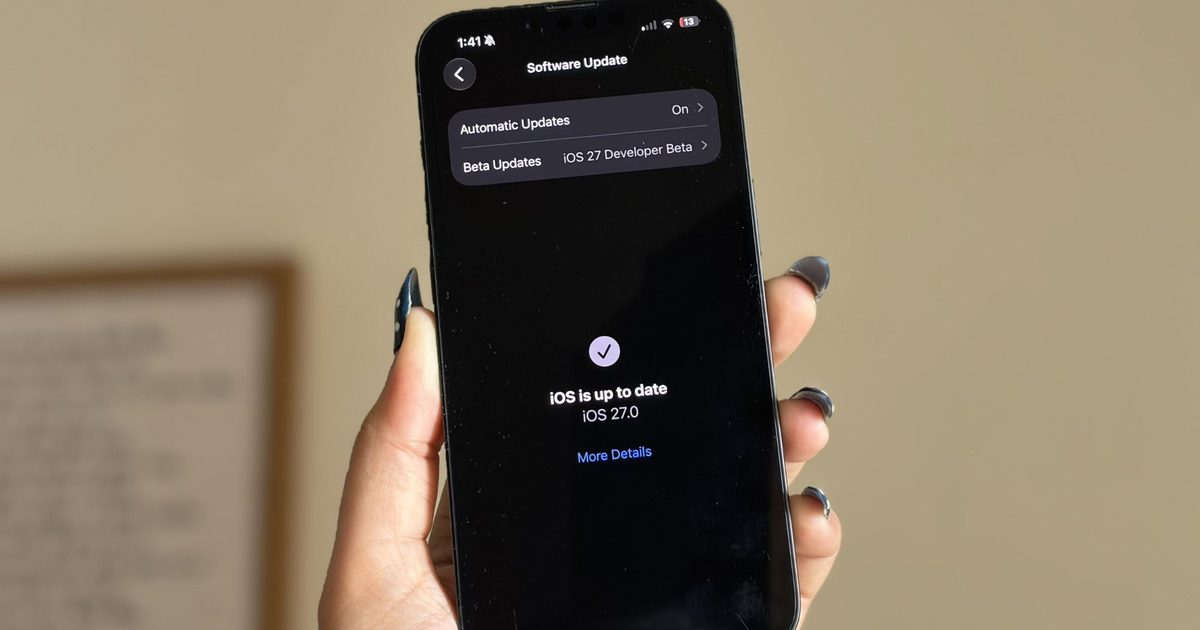
It’s been a little over a week since Apple’s WWDC keynote, and the iOS 27 beta is already out in the wild. While Apple spent plenty of time talking about its Gemini-powered Siri, the thing I was most excited about was getting the update onto my iPhone 16e and seeing what it was actually like to live with.
I’ve been using the beta every day since then, and one thing has become pretty clear: not every new feature lived up to the hype for me. Some felt more interesting during the announcement than they do in everyday use, while others simply haven’t found a place in my routine. But a few features have been the complete opposite. They’re the ones I’ve found myself returning to again and again without even thinking about it. After spending more than a week with iOS 27, these are the three features that have stood out the most — and the biggest reason I’m still excited about this update.
The fitness app finally feels like a fitness app
I’m a bit of a fitness nerd. Whether it’s squeezing in a workout after a long day or making sure I close my Activity rings, I’m always keeping an eye on my progress. That’s why the Fitness app is one of the apps I use the most on my iPhone, and honestly, I’ve felt for a while that it deserved a refresh. The old design wasn’t bad by any means. It was clean, familiar, and easy to navigate. But it also felt a little static, especially compared to modern fitness apps that do a much better job of making your workout data feel engaging and meaningful. There was plenty of information there, but not always in the most exciting way.
Shimul Sood / Digital Trends
The redesigned workout experience in iOS 27 changes that. Everything feels better organized, and the information I care about is much easier to spot at a glance. More importantly, the app finally feels built around the workout itself rather than just a place to store data. For example, I went on a 10km run this morning, and one of the first things I noticed afterward was how prominently my route map was displayed. Instead of digging through menus to find it, the map was right there, front and center. It reminded me of a presentation you’d expect from dedicated fitness apps like Strava. This isn’t the biggest change in iOS 27, but it makes reviewing a workout feel far more rewarding. That’s really what I like about the redesign. The Fitness app finally feels more alive. Rather than simply showing me numbers and charts, it does a better job of highlighting the moments and milestones that make working out feel satisfying.
The cleanup tool finally cleaned up its act
I never thought I’d be talking about photo editing tools as one of my favorite parts of iOS 27, but here we are. The updated Cleanup tool and the new Reframe feature have genuinely made me spend more time editing photos directly on my iPhone 16e. And honestly, that’s saying something. Before this update, Apple’s Cleanup tool was one of those features I wanted to like but rarely used. Compared to the object-removal tools on Pixel and Samsung phones, it often struggled with anything more complex than a simple background distraction. The results were hit-or-miss, and most of the time I’d rather leave the photo alone than risk making it look worse. Thankfully, that has changed.
Shimul Sood / Digital Trends
Over the past week, I’ve used Cleanup on everything from random objects in the background to people accidentally walking into a shot, and the results have been surprisingly good. One example that genuinely impressed me was when I tried removing a book that was partially covering my face in a photo. I expected the tool to either leave behind a blurry mess or distort my face. Instead, it removed the book cleanly and reconstructed the missing area so well that it looked like the book had never been there in the first place.
Shimul Sood / Digital Trends
For the first time, Apple’s Cleanup tool feels reliable enough that I actually want to use it. The new Reframe feature is interesting for a different reason. Using generative AI, it can virtually adjust the framing of a photo after it’s been taken, giving you a little more flexibility if you didn’t quite nail the shot. I don’t see myself reaching for it every day, but that’s okay. It feels more like a feature you’ll appreciate when you need it, rather than one you’ll use constantly. And that’s what I like about both additions. One solves a problem I run into regularly, while the other serves as a safety net for moments when a photo isn’t quite framed the way I want.
Every “what is that?” now has an answer
Of all the new AI-powered additions in iOS 27, on-screen awareness is probably the one I’ve used the most. And yes, the moment you hear about it, you’ll probably think, “Wait, isn’t this just Circle to Search?” Honestly, that’s not a bad comparison. Circle to Search is easily one of my favorite features on my Google Pixel 10a. I use it all the time. If I’m scrolling through Pinterest and spot a chair I’d love to buy, I can instantly search for it. If I’m watching a YouTube video and notice a pair of sneakers someone is wearing, I can quickly find out what they are. Sometimes I’ll come across a landmark in a travel reel, a gadget in a review video, or even an unfamiliar dish in a food post, and Circle to Search gives me answers in seconds without forcing me to switch apps or start a new search from scratch.
Shimul Sood / Digital Trends
That’s the same reason I’ve grown to like on-screen awareness on the iPhone. Instead of manually copying text, taking screenshots, or opening Safari to search for something, I can simply ask Siri about what’s currently on my screen. For example, while reading an article, I used it to learn more about a company mentioned in the article. When browsing online stores, I used it to identify products and compare them with similar options. I even found myself using it while planning a trip after spotting a location in a social media post and wanting to learn more about it. What makes the feature feel useful is that it understands both the visual and textual information on your screen. Siri can analyze what you’re looking at and use that context to answer questions or help you take action. Apple is also opening this up to developers through dedicated APIs, allowing apps to expose relevant information that Siri can understand and interact with. This feature removes a lot of tiny bits of friction throughout the day. And those are often the features that turn out to be the most valuable.
A week later, these are still my favorites
I’m still spending time with iOS 27 on my iPhone 16e, and if there’s one thing I’ve learned over the past week, it’s that the best features aren’t always the ones that are advertised. Sometimes they’re the smaller additions that become part of your daily routine. For me, that’s exactly what happened with these three features. Whether it’s the refreshed Fitness app making my workout data more enjoyable to revisit, the improved Cleanup tool saving photos I would’ve otherwise ignored, or on-screen awareness helping me find information without jumping between apps, they’ve all earned a place in my everyday use.
There’s still plenty of iOS 27 left for me to explore, and I’m sure I’ll discover more favorites as I continue using the beta. But if you’re wondering which features have stood out after a week of real-world use, these are the ones I’d point to first.
In a consequential grid infrastructure decision, the Federal Energy Regulatory Commission (FERC) today issued a major milestone on large-load interconnection impacting how those building AI factories, semiconductor fabrication support systems and advanced manufacturing facilities can connect to the grid.
In the era of AI, which NVIDIA founder and CEO Jensen Huang has described as a five-layer cake, energy is the critical foundation of technological innovation.
FERC’s actions do more than modernize the grid interconnection queue — the approval process power developers must complete to safely connect new energy generation to the electrical grid. Following U.S. Secretary of Energy Chris Wright’s order directing FERC to address large-load interconnection, the actions establish national policy for how America can simultaneously lower energy costs, grow its industrial base, scale AI and strengthen the electrical grid.
For policymakers, utilities and technology partners, the message is clear: This is a pro-growth, pro-affordability and pro-reliability policy.
Faster Connections, Stronger Grid
At its core, the new framework cuts through burdensome bureaucratic red tape and aligns industry incentives.
Large customers are no longer passive entrants into an overburdened interconnection queue. They’re active participants in building the infrastructure they require. That means:
Funding their own network upgrades, reducing cost pressure on existing ratepayers.
Bringing new energy generation online, increasing supply alongside demand.
Offering flexible load, allowing grid operators to manage peaks more efficiently.
Customers that can demonstrate flexibility — shifting or curtailing load in response to grid conditions — can move through the process on accelerated timelines, with study periods potentially as short as 60 days, per Secretary Wright’s directive.
This is not just faster interconnection. It’s smarter interconnection.
The Math Adds Up
Electric grids are capital-intensive systems with high fixed costs. When more demand is added efficiently, those costs are spread across a broader base — lowering prices per unit.
This dynamic is already playing out at the state level:
North Dakota, after adding 23 data centers, saw the nation’s largest decrease in electricity prices.
Mississippi, Louisiana and Virginia moved early to attract large loads and are now seeing tangible ratepayer, grid modernization and investment benefits.
PG&E has forecast that, under the right conditions, each new 1 gigawatt of data center load could reduce electric rates by 1-2% by spreading fixed grid costs over more usage.
Inversely, states that fail to attract new load risk concentrating system costs on a shrinking customer base — putting upward pressure on rates for households and small businesses.
FERC’s actions create a national pathway to avoid that outcome. They build on the successes of communities across North Dakota, Mississippi, Louisiana and Virginia to create a national on-ramp,enabling every region to compete for and benefit from the next wave of industrial and technological investment.
Infrastructure That Powers the Modern Economy
This is not abstract infrastructure. It underpins the technologies shaping the next generation of American competitiveness.
The facilities enabled by this framework will power:
AI-driven drug discovery that accelerates breakthroughs in medicine.
Semiconductor design and advanced manufacturing that secure domestic supply chains.
Weather modeling and climate analytics that improve resilience.
Next-generation energy systems that are more adaptive and reliable.
The benefits extend beyond any single facility or industry. They can reach every American who visits a doctor, buys a product or pays an electricity bill.
The Moment to Engage in a Decade-Defining Opportunity
The framework is in place — but how it’s implemented, refined and scaled will depend on the stakeholders who engage now. Across government and industry, those who engage today will define what this system looks like for the next decade — how fast it grows, how resilient it becomes and how broadly its benefits are shared.
NVIDIA is not waiting.
In parallel with FERC’s action, NVIDIA and Emerald AI are already working with partners across the ecosystem to build a new class of AI factories — designed from the ground up as flexible grid assets.
These facilities will:
Bring their own generation to the grid
Respond to grid conditions in real time
Act as stabilizing forces for surrounding communities
Commercial deployment begins later this year.
This is what the future of large-load interconnection looks like: not a burden on the grid, but a backbone of reliability and efficiency.
FERC has taken an important step forward, and NVIDIA welcomes this leadership.
Over the last six months, we have run the same tiny eval more than 50,000 times. It gives the VS Code agent one instruction: write a string to a file. No large codebase to understand, no test suite to debug, no architectural decision to make. It is our smoke test, a quick way to confirm that the end-to-end model interaction still works.
A task this simple gives us an immediate read on the health of the system: how reliably the agent finishes the work and what kinds of failures show up in practice. We didn’t intend it to be more than that. But at this scale, it became a surprisingly rich source of insight into how models approach even the simplest request.
In our previous post, we introduced VSC-Bench, the offline evaluation suite we use to measure agent behavior in VS Code. In this blog post, we look at how models solve a simple task and what it tells us about efficiency, model selection, and the value of small, stable evals.
The five-line eval
A simple task is valuable precisely because it removes variables. When the work is unambiguous and the correct answer is fixed, anything that changes between runs comes from the model or the system around it, not from the task itself. That makes a small eval a sensitive instrument: it reacts to harness regressions, infrastructure incidents, and differences in model behavior, without the noise of a complex problem to interpret.
The say_hello task we use for this is built around that idea. Every run starts in the same empty workspace, with the same tools and the same fixed prompt, using our VS Code agent harness. The task asks the agent to “Add HELLO to HELLO.txt” and checks two assertions: that the file exists and that it contains the expected content.
Because say_hello runs as a smoke test before every benchmark suite, it quietly accumulated 50,974 runs across 30 models over six months. That volume turned a basic sanity check into a useful dataset on how differently models handle even the simplest work.
A developer doing this task would recognize that the workspace is empty, create HELLO.txt, and add the requested content. In the most direct VS Code agent path, this translates into a single create_file tool call with HELLO as the file content.
The VS Code eval harness includes the workspace state in the initial prompt context. We assume that the model should not perform redundant existence checks.
How models solve say_hello
As expected, the say_hello task is easy enough that all models pass it most of the time. The interesting part is not whether they can do the work, but how they do it. Can the model recognize that this is a basic request that only requires a simple solution? Or does it still treat it like a complex problem that requires planning, exploration, and search?
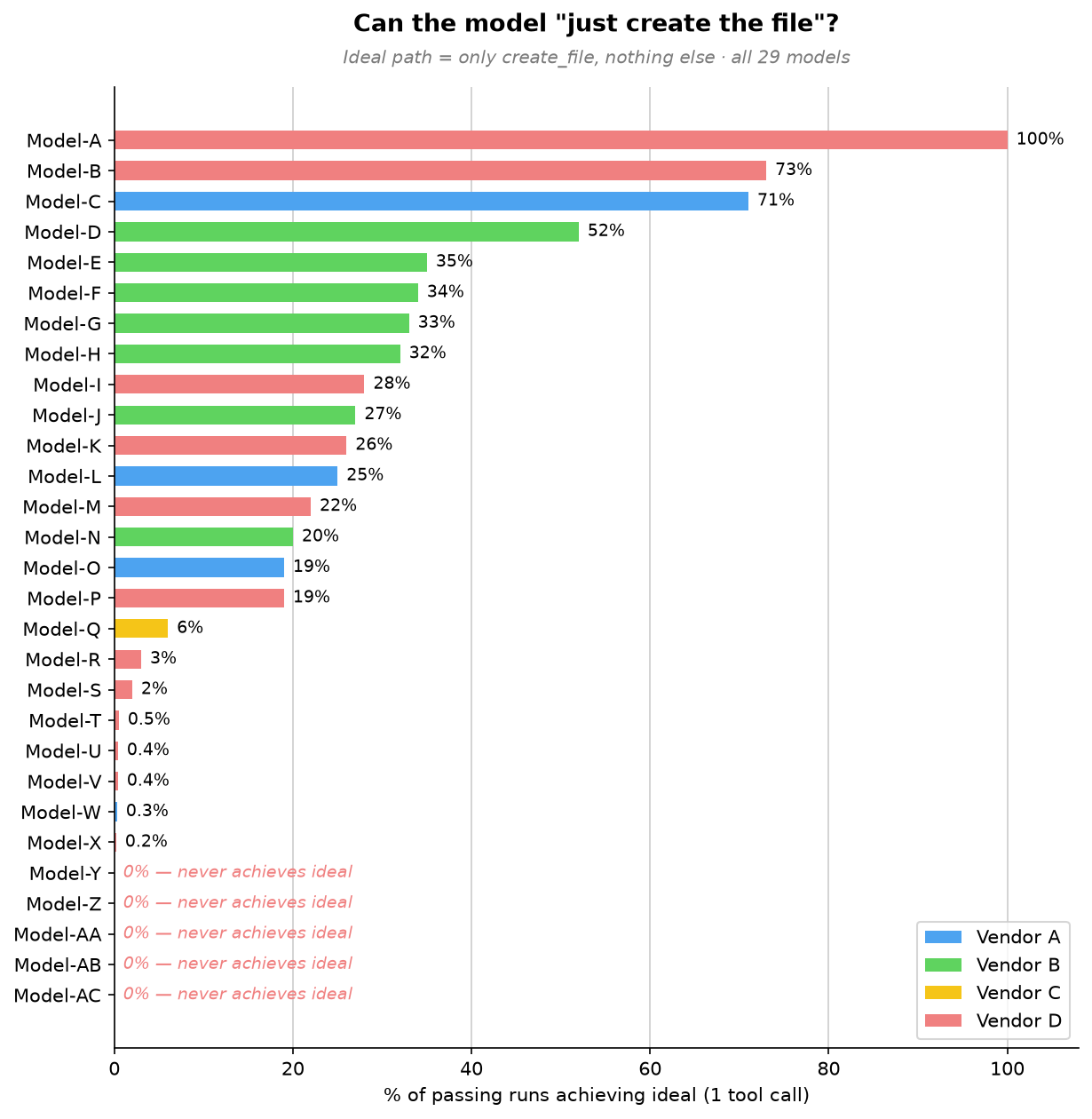
To establish a baseline, we filtered for passing runs that used this one-tool-call path and looked at the lowest output-token counts in that group. Those runs averaged roughly 50 output tokens, including the tool-call structure. We then measured how often each model took that path.
One model takes the direct path every time. The broader trend is what stands out: a few models often take the direct path, most do so only occasionally, and five never do.
At the top, Model-A stands alone. It goes straight to file creation in 100% of passing runs, using a single tool call every time. For this simple request, Model-A always creates the file directly without planning or exploring first. Model-B and Model-C follow at 73% and 71%, respectively.
The large middle cluster, Model-D through Model-P, takes the direct path somewhere between 19% and 52% of the time. These models can recognize a simple task, but not consistently. More often than not, they add a small step first, such as reading internal state or doing light workspace exploration, before creating the file.
Below them, Model-Q through Model-X rarely take the direct path, doing so in 0.2% to 6% of passing runs, with five models falling below 1%. For these models, extra work is the default. They almost always plan, explore, or search before producing the same five-character file.
At the bottom, five models, Model-Y through Model-AC, never take the direct path across thousands of passing runs. They always do something else first: plan, reach for a patch tool instead of simple file creation, search and plan, or narrate at length before creating the file. For them, even the simplest request triggers the full machinery of a complex one.
All models create the file with the right content, but they reach the same outcome with very different amounts of work. Even on a task with almost no ambiguity, some models still plan, search, or choose a more complex editing tool. They all pass the eval, but they do not use the same amount of effort to pass it.
How models spend their overhead
Because our offline eval harness captures the complete tool-call sequence, we can turn those traces into model behavior patterns. Across runs, models tend to spend their extra effort in a few familiar ways:
Overhead pattern
Frequency
Representative models
What happens
Planning before acting
52-99%
Model-AC, Model-Z, Model-S, 13 other models
Drafts a checklist or reads internal state before creating a 5-character file. Every one of the 16 models we could measure does this in at least half of its runs; Model-AC reaches 99% and Model-Z 96%. On one occasion, four planning steps in a single run for a one-step task.
Exploring an empty workspace
56-96%
Model-T, Model-Q, Model-AA
Lists directories or searches for files in an empty workspace. Model-T lists the directory in 96% of runs; Model-AA both lists and searches in 56%, looking for clues in an empty room.
Narrating the reasoning
1,441-3,676 tokens
Model-AB, Model-M, Model-U
Emits far more text than any tool call needs, walking through its reasoning and reconfirming the task. These three top the output-token chart at 29-74 times the realistic floor, even though the file itself is five characters.
Using the wrong tool for the job
About 95%
Model-AA
Uses a complex patch/edit tool (designed for modifying existing files) instead of simple file creation. Like using a CNC machine to cut a piece of paper.
Running a terminal command
3-14%
Model-W, Model-Z, Model-V
Runs a terminal command (echo HELLO > HELLO.txt) when a simpler file-creation API is available.
These are not correctness failures. They are signs that the model does not consistently recognize when the shortest path is enough. On longer tasks, planning and exploration can be valuable. On a one-step task, they add latency and cost without improving the result.
The cost of overthinking
Why should you care about how many extra steps a model takes to write a five-character file? Because those extra steps are not free and translate directly into output token usage, which has an actual cost.
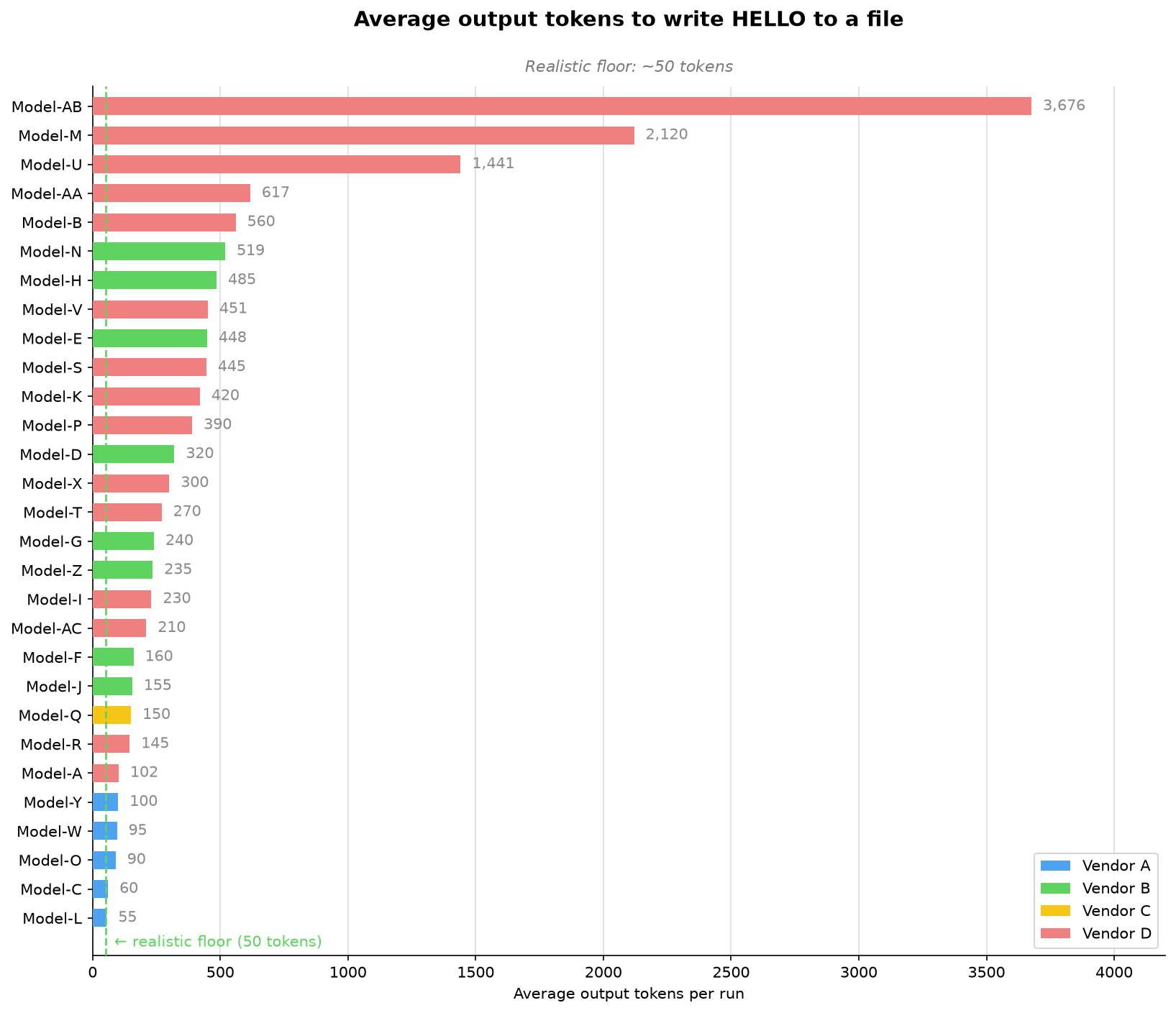
For this simple task, about 50 output tokens is a realistic minimum. The following chart shows the range of output tokens used by different models. The selected models range from that minimum to thousands of tokens for the same five-character result!
The chart falls into four clear bands. The extreme group includes Model-AB, Model-M, and Model-U, which average 3,676, 2,120, and 1,441 output tokens, respectively. That is 29 to 74 times more than the realistic minimum for the same five-character result. The high-overhead group, from 400 to 1,000 tokens, includes Model-AA, Model-B, Model-N, Model-H, Model-V, Model-E, Model-S, and Model-K. These models are not in the thousands, but they still spend roughly 8x to 12x the realistic minimum.
The moderate group, from 150 to 400 tokens, includes Model-P, Model-D, Model-X, Model-T, Model-G, Model-Z, Model-I, Model-AC, Model-F, Model-J, and Model-Q. They add overhead, but stay far closer to the task’s natural size. The efficient group is below 150 tokens: Model-R, Model-A, Model-Y, Model-W, Model-O, Model-C, and Model-L. Model-L comes closest to our realistic minimum at 55 tokens, showing that a model can complete the task with very little extra narration even when it does not always take the direct tool path.
Choosing a model that overthinks less saves both time and money, but knowing which one is most efficient for a task usually means running your own benchmark. To take that burden off you, the VS Code and GitHub Copilot teams keep investing in optimizations and model routing. For example, automatic model selection lets VS Code pick the best model for your task.
Model size does not predict overhead
Our first hypothesis was that larger models overthink more, but our data contradicts this:
Model-F (a larger model) uses 160 output tokens on average and 2.1 tool calls. The most disciplined model in its family.
Model-H (a smaller model from the same family) uses 485 output tokens on average and 3.7 tool calls. More overhead than its larger sibling.
Model-AB (a “mini” model) is the single highest-overhead model at 3,676 output tokens on average. The smallest model in this sample does the most work.
Our read is that newer generations within each model family trend more disciplined, regardless of parameter count. This points to training maturity: how well a model scales its effort to the task in front of it. And that calibration isn’t an academic curiosity. It shows up directly on the bill.
Where do we go from here?
We wanted to share a few key insights our team took from these runs, and a few learnings you might be able to apply to your own day-to-day flow.
Note
The say_hello eval gives us great insights but it represents only one task. For harness optimization, we avoid optimizing too narrowly around a single task. We still run the full benchmark regularly across a diverse task set to validate whether changes improve our harness broadly.
Match the model to your task
With usage-based billing, output tokens represent both money and time. The difference between the leanest and heaviest model on this task is roughly 70× for identical output. The obvious lesson would be “don’t reach for the biggest model to write HELLO.” But that lesson is too blunt, and seeing why is the most useful thing say_hello taught us.
There is an important caveat to these results. say_hello is a short-horizon task with one step and one correct answer. On long-horizon work, planning, exploration, and reasoning can prevent expensive mistakes and improve the odds of finishing. The goal is not to eliminate planning. It is to understand whether a model can tell the difference between a one-step task and a 30-step task.
That is one reason why we think model selection should not become the developer’s burden. Signals like effort calibration, token efficiency, and tool discipline can help automatic model routing pick the right model for the task at hand without asking developers to reason about every tradeoff.We continue to invest in and research automatic model selection in VS Code, so the product can make more of these choices for you over time.
Start small, measure well
Most teams do not start with a private offline benchmark suite they can run every day. Even a simple task, run consistently and logged well, can reveal useful changes in model or system behavior.
Start with the smallest task that has an unambiguous correct answer. Then run it constantly: use it as a preflight check before nightly evals, model onboarding, and infrastructure changes. The task does not need to be clever; it needs to be stable enough that changes in pass rate, latency, tool use, or failure mode mean something.
The important part is to capture enough structure to explain what changed. Record the tool-call sequence, not just the count. Knowing there were 4 tool calls is useful, but incomplete. Knowing that the model planned, explored, searched, and then created the file tells you where the overhead came from and why the run cost more.
// What most harnesses log:{ "tool_calls": 4, "pass": true }// What you actually need:{ "tool_sequence": ["plan", "list_directory", "search_files", "create_file"], "output_tokens": 617, "pass": true}
From smoke test to signal
The surprising part of say_hello was not that models could write HELLO.txt. It was that a five-character edit made effort visible: which models scaled down, which kept planning or searching, and which system failures only appeared after thousands of runs.
Try the same request with your preferred model in VS Code, inspect its tool calls in the Chat Debug View, and consider what your own smallest useful task might be. Share what you find in the VS Code repository.
Nothing’s co-founder, Akis Evangelidis, said on X that CMF will not produce a Phone 3 Pro this year as RAM prices skyrocket.
The company says it cannot build a true successor that feels “like a genuine step forward at a price that makes sense” for the CMF title.
Nothing’s CEO, Carl Pei, has made similar statements in the past about how higher RAM (thanks to AI) can hamper smartphones and back consumers into a corner, and he’s done so again alongside Evangelidis.
Early this morning (June 19), Nothing’s co-founder wanted to get transparent about CMF’s phone line, as consumers question a Pro successor.
Co-founder Akis Evangelidis on X led off with CMF Phone 2 Pro praise. CMF is the company’s budget line, and the device was reportedly well received. However, consumers have been wondering about a successor, a would-be CMF Phone 3 Pro, and Evangelidis says that’s not happening in 2026. He says, “We were working on a successor, but with memory prices where they are right now, we can’t build a phone that feels like a genuine step forward at a price that makes sense for CMF.”
Evangelidis adds, “As a result, we’ve decided not to launch a new CMF phone this year.”
Latest Videos From
Staying true to CMF’s branding is key for Nothing. Their post stresses that they wouldn’t want to produce something they’re “not proud of,” rather than making something to make something. CMF focuses on budget, but it can’t stick to those ideals if RAM prices force it to raise its cost for consumers. It looks like Nothing’s co-founder is placing the blame squarely on the toll the RAM shortage is taking on the smartphone industry, and Nothing’s CEO, Carl Pei, built on that narrative.
Pei leads off strong, stating, “Memory is now the most expensive component in a smartphone.” According to his data, RAM accounts for 50% of the phone’s hardware bill. He states RAM prices doubled when the Phone 4a launched in March, and now they’ve “doubled again since.” Pei adds that the rate at which RAM prices have shot up is exceeding his previous expectations, and that next year could see even higher phone prices as a result.
The timing of Nothing’s transparency is a little unfortunate, considering we were just going over (alleged) CMF Phone 3 Pro leaks late last month. Those rumors said the next Pro edition was “delayed,” but was still on the way, as details supposedly emerged. What surfaced was a budget phone with Qualcomm’s Snapdragon 7s Gen 4, not MediaTek’s Dimensity line. Additionally, rumors said Nothing could boost the phone with a 5,400 or 5,500mAh battery and a 50MP camera.
However, it looks like we’ll have to officially put these rumors to rest since Nothing’s co-founder has come forward with a statement.
Get the latest news from Android Central, your trusted companion in the world of Android
Interestingly, Evangelidis says while CMF is still working on “several new products” this year (just probably not a phone), the main Nothing line has “more to come,” too. So far, we’ve seen rumors about a Nothing Ear 3a in the works, but it sounds like there’s more in the pipeline, as Carl Pei said he was going to steal Apple’s customers, “one bored iPhone user at a time.”
Android Central’s Take
CMF by Nothing, or rather CMF these days, positioned itself as a budget line that doesn’t feel like a drastic compromise for consumers. It’s a brand that’s been well received by consumers, and Nothing isn’t keen on breaking that. If you’ve been accustomed to a device that’s affordable (whatever that means to you), and then prices soar by 50% or more, all of a sudden, you’re not biting. It probably sucks not to deliver another with so many people expecting it, but this is a decision based on the market’s climate.