A new leak claims Samsung is skipping the Classic model and shifting focus to the Galaxy Watch Ultra 2.
The Galaxy Ultra 2 is rumored to feature a boxier body, slimmer display bezels, and a numbered outer ring.
Leaked renders also point to a revamped Samsung Health app, a new watch face picker, and a dedicated compass interface.
If you were expecting a brand-new Samsung smartwatch with a clicky, physical rotating bezel this year, you’re out of luck. A new leak suggests Samsung is scrapping the rumored Galaxy Watch 9 Classic and is instead focusing its efforts on a revamped Galaxy Watch Ultra 2.
The latest rumor from tipster GalaxyTechie on X suggests your dreams of a 2026 Classic model with a mechanical ring are officially on ice, but you might get a more premium Ultra model with thinner bezels to make up for it (via 9to5Google). That’s a setback for early regulatory chatter and FCC docs that had fans hoping for a big dual-release this year.
‼️Watch 9 & Ultra 2 comes with new band designs + colours, watchfaces and features as part of One UI 9 Watch. The ultra variant is slightly more boxier with Classic-like numbering (1-12), thinner bezels, better side buttons area, quick button colour reduced to an orange outline.June 19, 2026
Additionally, the rumor claims the Watch Ultra 2 will combine rugged durability with a much “boxier” chassis than its predecessor.
Latest Videos From
No rotating bezel comeback yet
Image 1 of 3
(Image credit: @GalaxyTechie / X)
(Image credit: @GalaxyTechie / X)
(Image credit: @GalaxyTechie / X)
The screen is also said to have thinner bezels, and the outer ring will reportedly have the numbers 1 to 12 stamped onto the surface. But don’t get your hopes up for a mechanical dial just yet — the leak hasn’t confirmed if this ring actually turns.
Samsung also appears to be fixing one of the most divisive design choices from last generation: buttons. The middle “Quick button” is said to lose its solid, toy-like orange coat. Otherwise, the rumor suggests you could get a wider, more flush button with a subtle orange outline accent.
The hardware itself is apparently getting a glow-up, too. The leaked renders give a good look at what is coming inside One UI 9 Watch. Samsung’s existing tracking menus aren’t the most organized, but an enormous overhaul could be coming to Samsung Health to help tidy up your daily metrics. The leak also reveals a brand new watch face picker and a dedicated compass interface, specifically designed to work with the new side button.
Android Central’s Take
Samsung’s flip-flopping between the Classic and Ultra lines is getting exhausting. The constant shift between the highly functional mechanical bezel and the top-notch internal hardware every other year gives the impression that the company is experimenting with design.
For those of you who like to personalize their tech, the colors are looking pretty sharp this year. Both the standard Galaxy Watch 9 and the Ultra 2 will apparently be available in a clean beige option. You could also grab a black version that comes with a deep bluish strap or a silver one that goes well with a green band.
Get the latest news from Android Central, your trusted companion in the world of Android
We won’t have to wait long to see if these leaks prove true. At the next Galaxy Unpacked event, which could happen sometime in late July, Samsung will probably unveil the whole 2026 mobile ecosystem.
Sometimes you read an allegation of a deed so harsh, but simultaneously so low-reward, that it’s almost impossible to take it at face value. That’s the situation with a lawsuit filed in the Northern District of California last month. If you take the law firm Brithem LLP at its word, a nonprofit established by Toyota called the Toyota Mobility Foundation (TMF), which is run by Toyota’s executives, allegedly stole secrets from a Mauritius-based, Zimbabwe-operated electric trike company, and handed them over to a company elsewhere on the continent of Africa so that company could turn a profit while Toyota (allegedly) burnished its do-gooder image.
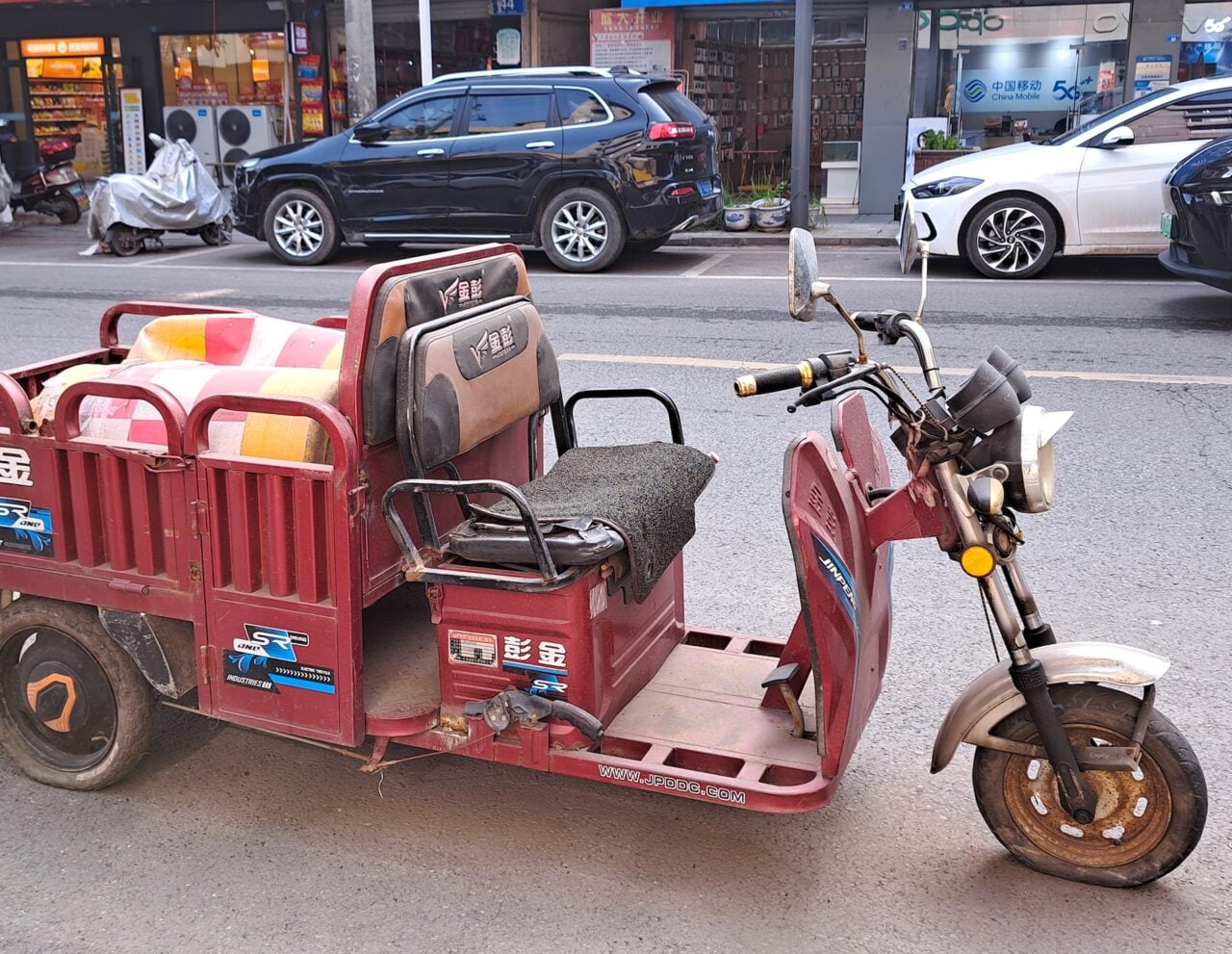
According to the New York Times, the plaintiff, Mobility for Africa, is the creator of an e-trike called a Hamba, a slow-moving, three-wheeled trike with a 60-mile range, ideal for transporting agricultural goods along dirt roads from homes to marketplaces. The company is led by South Africa-based Shantha Bloemen.
Bloeman told the Times her company has a mere 300 Hambas. Mobility for Africa provides charging infrastructure, and leases out the trikes—ideally to women, apparently. A Hamba has a pickup truck-style bed “that can carry 400 kilograms (about 880 pounds) of cargo and a bench seat designed for women wearing skirts.”
The TMF took an interest, according to the Times, and “created a pilot program in Kenya that used Mobility for Africa’s model and described the program as a partnership with Ms. Bloemen’s organization, according to the suit.”
But Bloeman now claims that the TMF also secretly provided Los Angeles-based Exa Innovation Studio with the intellectual property behind Hambas, allegedly allowing it to form another company in Kenya: Songa Mobility, which, sure enough, makes e-trikes with bench seats and pickup truck-style beds.
The Times quotes the suit as saying, “The commercialized Songa Mobility solution is virtually identical to the program [Mobility for Africa] developed and shared [with Exa].”
The Times says according to the text of the suit, Mobility for Africa had a contract with TMF specifically holding onto its intellectual property, and disallowing Toyota from sharing it with other entities. It also says the TMF’s actions have allegedly made it hard for Mobility for Africa to fundraise and make good on its plans to expand beyond Zimbabwe.
In case you missed it, Mixtape and Subnautica 2 are picking up strong momentum, each capturing attention for different reasons and contributing to a broader wave of conversation across the gaming landscape. Both are available on XBOX Game Pass Ultimate, with Subnautica 2 currently in Game Preview.
Mixtape has emerged as one of the standout indie releases of the moment. From Beethoven & Dinosaur, the studio behind The Artful Escape, it follows three friends on their final night together through a sequence of playable memories.
The game moves between narrative vignettes built around defining moments of adolescence — late-night skate sessions, first kisses and final goodbyes — all tied together by a soundtrack featuring DEVO, Joy Division, The Smashing Pumpkins and more. Each segment introduces a new gameplay idea while maintaining a consistent tone.
Critical response has been strong, with praise focused on its writing and direction. That reception has carried into player conversation, with specific moments and sequences gaining traction across the community.
At the same time, Subnautica 2 is generating significant interest in Game Preview. Developed by Unknown Worlds, the sequel expands on the original’s survival formula with a new alien ocean, a new story and deeper systems built around exploration and adaptation.
Players take on the role of a pioneer sent to a distant world, where survival depends on crafting tools, building custom bases and adapting to increasingly hostile conditions. Progression is tied closely to exploration, with new resources, technologies and challenges introduced as players push further into the depths.
The world spans a wide range of underwater biomes, from vibrant shallows to darker, more dangerous environments populated by unfamiliar lifeforms. Each layer introduces new risks and discoveries, with tension building as players descend.
For the first time in the series, Subnautica 2 supports up to four-player online co-op. Players can explore, build and survive together, adding a collaborative layer that is already driving strong community engagement during the Game Preview period.
Together, Mixtape and Subnautica 2 highlight how varied the current gaming conversation has become. One is a tightly focused narrative experience built around music and memory, the other an evolving survival game shaped by exploration and player feedback during Game Preview.
It’s a snapshot of where gaming is right now — diverse, experimental and driven by both critical reception and community response.
Play Mixtape and dive into Subnautica 2 in Game Preview with XBOX Game Pass Ultimate, available across XBOX Series X|S, PC and cloud gaming.
Every quarter your data architecture stays fragmented, your AI programs fall further behind. Your data teams spend the majority of their time finding and preparing data, not analyzing it. Governance is applied inconsistently, audits require manual effort and each new initiative requires rebuilding integrations that should already exist.
This is not merely a technical problem. CDOs who have consolidated onto a unified data management platform report up to 47% lower total cost of ownership and development cycles five times faster.
This roadmap details the architecture and diagnostic steps you’ll need to replicate those results as well as:
Where fragmentation is generating your highest cost and risk
A 30-60-90-day plan for retiring redundant tools without disruption
How your current state compares to a unified platform in measurable ROI
Looking for the most recent Strands answer? Click here for our daily Strands hints, as well as our daily answers and hints for The New York Times Mini Crossword, Wordle, Connections and Connections: Sports Edition puzzles.
Today’s NYT Strands puzzle has a fun topic, though it might be better suited for October. Some of the answers are difficult to unscramble, so if you need hints and answers, read on.
Your goal is to find hidden words that fit the puzzle’s theme. If you’re stuck, find any words you can. Every time you find three words of four letters or more, Strands will reveal one of the theme words. These are the words I used to get those hints but any words of four or more letters that you find will work:
These are the answers that tie into the theme. The goal of the puzzle is to find them all, including the spangram, a theme word that reaches from one side of the puzzle to the other. When you have all of them (I originally thought there were always eight but learned that the number can vary), every letter on the board will be used. Here are the nonspangram answers:
CREEPS, SHIVERS, JITTERS, WILLIES, BUTTERFLIES
Today’s Strands spangram
The completed NYT Strands puzzle for June 22, 2026.
NYT/Screenshot by CNET
Today’s Strands spangram is GOOSEBUMPS. To find it, start with the G that’s five letters down on the far-left row, and wind up and around.
NASA’s Mars rovers have accomplished a whole lot since the first one landed on the red planet in the late ’90s, but even the latest members of the fleet still have plenty of limitations. For one, they’re very slow; Perseverance, which NASA considers a “standout,” achieves a top speed of just under .1 mph on flat ground. On top of that, the rough terrain is hard on the rovers’ wheels, and steep slopes with hazards like rocks and sand pose a real challenge, sometimes requiring long detours to reach certain targets. But this week, NASA showed off its progress on a prototype that boasts more advanced capabilities: the Exploration Rover for Navigating Extreme Sloped Terrain, or Ernest.
The space agency has been testing Ernest in the Colorado Desert, exploring new approaches that could be used for future missions on Mars and the moon. Ernest has four wheels, in contrast to the current Mars’ rovers’ six, and is four feet long, though a version that would be used for an actual mission would be double the size. And, it can individually lift its wheels to step on or over obstacles. In the recent tests in the desert, the prototype drove for a total of over 37 hours across seven days, covering roughly 16 miles, according to NASA. It hit a top speed of about .6 mph.
“You could do a science road trip across the Moon — or Mars — with this vehicle,” said James Keane, a JPL planetary scientist working on lunar missions. Going back to NASA’s Sojourner rover, the Mars rovers have relied on a passive suspension system, the rocker-bogie system, to keep the weight constant across their wheels. Now, though, engineers are trying out active suspension with Ernest to achieve greater mobility. “Two powered joints in front articulate a gimbal that allows the rover to drive using different gaits like squirming, wheel-walking, and obstacle-climbing,” NASA says.
It can switch between active and passive suspension depending on the task and energy needs, and thanks to its four steerable wheels, it can drive in any direction. There have already been multiple iterations of the Ernest prototype since the program began in 2022, and the team has tested nearly a dozen active suspension configurations. The latest version also has “enhanced independent decision-making capabilities.” The goal with Ernest is to develop the technology for rovers that can cover more ground than those that came before them, and faster, with less reliance on human controllers back on Earth.
Thank You for Your Application is a work simulation game themed around job interviews. Players take on the role of an interviewer at the largest company in Aeropolis City, reviewing applicants’ resumes and documents according to strict and constantly changing hiring requirements, before making decisions that may alter the course of other people’s lives. Football Manager 26
Throughout the game, players will encounter a wide range of applicants, absurd corporate systems, ever-changing policy demands, and the company’s dark secrets gradually coming to light. Against a backdrop of dark humour and corporate drudgery, players must make choice after choice in their everyday working life.
Decide the fate of job applicants: As an interviewer, will you side with capital and the rules, or give workers the green light?
Exercise your tiny slice of corporate power: Check application documents, raise questions, make judgements — and even shock applicants with electricity.
A bleak apartment life after work: Pay your bills, browse forums, buy daily necessities, and try to keep your mental state intact.
Multiple-ending narrative: Exploring themes such as workplace discipline, the shame of unemployment, efficiency-first thinking and discrimination against outsiders, your choices will shape the direction of the story.
Screen candidates’ resumes and documents according to the company’s daily hiring requirements, then decide whether to accept or eliminate them.
Screenshots
SystemRequirements
Minimum
OS: Windows 10 or Higher (64bit)
Processor: Intel Core i3, 2.5GHz or AMD Athlon equivalent
Memory: 4 GB RAM
Graphics: NVIDIA® GeForce® 700 series or AMD Radeon™ equivalent
DirectX: Version 11
Storage: 2 GB available space
Support the game developers by purchasing the game on Steam
InstallationGuide
TurnOff Your Antivirus Before Installing Any Game
1 :: Download Game 2 :: Extract Game 3 :: Launch The Game 4 :: Have Fun 🙂
How do you take a hardware product from concept to commercialization? In making plans and visions turn into reality, it can be a challenging process, yet fulfilling once done. Turning the hardware plans into making it in the market and being ready for the competitive environment meant that it is a success. When comparing software and hardware, a lot of things should be considered when this is the path that a client or a company wants. It boils down to analyzing every possible physical material, to what manufacturing companies are suited for, which also includes the testing of production and logistics. It is a rigorous path to take that can be a lot for any company, and as such, there are a lot of things that should be taken care of.
The time, cost, planning, and decision making are some that need to be focused on. If a company or the client is leaning towards making any hardware products turn into something useful and functional, it is very important to understand and comprehend the process to increase the possibility of success. In Cad Crowd, you can hire an experienced freelance CAD professional to deliver quality designs that satisfy project demands with flexibility and affordability.
🚀 Table of contents
The following are the guides that can be used throughout every stage that can be learned.
1. Begin with clear idea and vision
Think of any problem that you would want to solve, or such by bringing a product into life can make the problem be solved in an attainable manner. It also must be taken into consideration that when a problem is being thought of, make sure to include who has this kind of problem. Are there any solutions present solution that could solve the issue, or are your solutions much better and efficient than what is already existing?
It is crucial that when having the idea and vision, make sure that it is attainable despite the problems. Having a simple yet clear idea guarantees a successful product that can be really reliable and functional in the market. Targeting a goal which is going to be the best hardware product available can solve many problems – the result can also be trusted by potential buyers, where it can avoid difficulties in the development process. Setting a clear idea can reduce the possibility that the product will not be effective.
Before the manufacturing and production process, where a lot of investment takes place, it is important to make sure and validate that the product is aligning to what the goal and objective is. Guarantee first that the product is what the clients and customers would like to buy and use it for a specific problem. Through the validation of ideas, it can lead you to creating a better plan that could improve the hardware product.
Some ways to validate:
Have a talk to potential buyers and users
In order to achieve this, it is a must to identify the target users for the product, may it be a student, a parent, a gamer, or someone who is working in various fields. To gain some of their knowledge or problems that you would want to solve, ask open-ended questions about the frustrations that they are experiencing towards the problem. It’s a clear indication that your concept has potential if a lot of people are complaining about the same problem.
Create simple sketches
Make a sketch about the plan that you would like to see. Having this visual can make it easier to understand the idea that you are pitching, may it be a simple sketch or a 3D model. When someone can see something rather than merely imagining it, people respond more effectively. Have a habit of checking if these people really understand the idea, you can make it more functional and useful.
Conduct surveys and polls
Following interviews and the collection of data and information from the individuals you wanted intakes. Create a survey to quickly get input from a larger number of people. By doing this, you may reduce all of the possibilities and answers to specific decisions that will support the present ideas you have.
There are a lot of outlets to be able to conduct the surveys and polls, such as google forms, facebook groups, and servers. Through the numbers being gathered, this can be used as data to ensure that it supports the idea that you have in hardware product that is efficient and practical in use.
By doing the above actions, you can increase the likelihood that consumers will trust the product you are developing, which could result in a successful product.
Aside from the sketches made, a prototype design is one thing that could show you that a product will work in real life. It gives you the view as to how ideas are brought to life, you can also be able to see things that are not inclined to what you are designing and making for. By having a prototype guarantees that even before the production starts and the releasing of hardware products into the market, it is already been improved and better.
There are different types of prototypes that you can make use of. It can be a low-fidelity prototype that only focuses on simple sketches, models that are in cardboard, they can be created in a short period of time, also there is a mid-fidelity prototype that leans on 3D prints where it can be more detailed than the low prototype. On the other side, there is what they called high-fidelity prototype that is more centered on making it into the final phase of the drafting, this is much more detailed and usually looks like the final product.
Moreover, a hardware prototype serves as a bridge between all of the ideas and conceptualization and reality. Doing so ensures that the designs and the product itself can be ready for the manufacturing stage.
4. Design for manufacturing (DFM)
In this phase, it is more on improving the designs for it to be passed on to the manufacturing stage process. The selection of the materials to be used in the product must be finalized already, whether it is plastic or metal, and what methods of manufacturing should be used to make the product. It is also important to see the cost per unit as it will help you stick on the budget and resources you have. One thing that should not be forgotten is how a product can be assembled, because if it is hard and difficult to do so, it may cause delays which you would not want.
Having a design that is leaning on the resources you have, and sticking on the goals and objectives you have can make your product succeed in the market. Whereas having a product or materials used that are expensive does not guarantee that it may work properly, it also does not make a product succeed if it is expensive.
Making and building a product is not easy, and it cannot be done on first try. It might be working yet it may also be imperfect and might have flaws. By doing this stage, you can be able to improve the designs and can focus on the durability of the product. Not only that but by repeating this cycle of testing can make it possible to look out for the safety and performance of the hardware product that will be utilized by the buyers and users.
It is a must to have testing when building a product because it makes it more effective that the product is usable. It also keeps on making the ideas and concepts be able to succeed. Testing catches problems as early as possible because if these flaws and problems are seen at a later time, it can be more expensive to solve.
6. Coordinate compliance and certifications
Protocols need to be followed. It allows that safety is being safeguarded not just by the one who is making it, but also with the potential users. It is necessary that certain certifications are being followed such as electrical safety and regulations process because it ensures that credibility is at stake, and also the customer trust is being accessed. In addition, legal risks are being reduced which is crucial because it guarantees safety. Compliances and certifications do vary per location and country, yet it must be observed.
7. Make sure to plan the supply chain
Supply chain is how the product is being able to be manufactured and produced. It is important to seek and invest in the services that would not waste all of your efforts and resources on the product you are making. Having suitable suppliers, packaging providers of the product as well as the logistics and shipping partners makes it possible that the products are being delivered and given to you safely without compromising the quality of the products.
If you and these people who give services have a miscommunication it makes it difficult to attain an efficient product, such it will just give you a hard time. It is important that partnerships are built before, during, and after the product is being made as you will gain a provider that can really help you achieve your plans on the product.
8.Calculate prices and expenses
Before releasing a product, it is important to price it at the most suitable price, it should not make you lose your profits but rather you should be able to gain from it. In making sure that prices are put in the right place, think of all of the expenses such as the materials used, the manufacturing process and services, the logistics and shipping, the packaging and designs, the marketing used, as well as the taxes and fees that need to be complied with. Make your pricing that customers and users will be able to fully buy your product without compromising your costs and resources. One tip is to make use of the surveys you have already done to identify the price range for customers who are willing to buy a product.
The basic formula to determine a company’s total manufacturing cost is to add up the expenses for direct materials, labor, and overhead incurred during a given production run.
Direct materials
The volume of raw materials required to manufacture the desired products is known as direct material.
The formula is as follows:
Direct material cost=existing direct materials + purchased direct materials – remaining direct materials
Direct material cost fluctuates not only with the volume of production, but also the volume of purchases. Buying raw materials in bulk often means lower prices overall. All things equal, higher manufacturing output increases direct material cost, and lower output decreases it.
Direct labor
Depending on company size, there can be a lot of other employees hired in positions not directly related to the manufacturing services, such as those in legal and marketing departments. They must be excluded in the direct labor cost calculations. The only company expenditure that contributes to direct labor cost is the salary and wage along with incentives as well as benefits for employees who work in the manufacturing department.
Direct labor cost is typically calculated by the unit of product. But first, you need to know how much the company pays for the direct labor hourly rate and direct labor hours.
Direct labor hourly rate = (hourly pay rate + payroll taxes + fringe benefit costs) ÷ number of hours worked in the pay period
Direct labor hours = units produced ÷ labor hours
Now that you have the results for direct labor hourly rate and direct labor hours, determine the overall direct labor cost using the following formula:
Direct labor cost per unit = direct labor hourly rate x direct labor hours
Similar to raw materials, direct labor cost per unit can also change depending on the number of workers and production volume.
After laying out the pricing, it is important to have the final designs and make sure that all of the agreements and contracts are already done. By doing this step, it will help you catch factors that can be solved at an earlier stage. It is also crucial to have a pilot run, as it will help you save money, and identify risks that could happen. Taking this one ensures that all are prepared for the production of the product.
10. Develop your marketing plan and brand
Even if the product is functional, at the right price and is visually pleasing without advertisement design, it will just make your product go to waste. You will not sell if the target markets are not being reached. For efficient target marketing, you have to craft your own identity on the market, logo, and the brand. Make use of the advancing technology, like the presence of social media, which makes it easier to advertise without cost, you just have to make the right and suitable content that people would like. In addition, try platforms that can help your product boost, create a story behind it, and thus, you can be able to sell a lot of your product.
11. Product launching
Since you have already finalized the brand, product launching process is the way to go. To not be overwhelmed, you can post and have a pre-order or soft launch the product first. Promote through ads, build partnerships, as well as, engage with the customers. Doing this makes it easier to reach the goal and the target. Accept criticisms because it will lead you to a successful product, even if the reviews are bad. If these reviews are not being taken care of, potential buyers will not be able to buy your products.
12. Scale and improve
After launching, make sure to focus on it. Build a partnership with the customers, as they are the ones who will make your product reach the goal. If these buyers are seeing errors and risks, make sure to fix and improve it quickly knowing that word of the mouth spreads quickly. When a customer that already bought your product and is not satisfied with it can just easily tell others to not buy your product as it is not functional and just a waste of money.
Constructive criticisms must be taken lightly because the improvements start here. When taken into consideration, target sales are achieved and so people will continue to purchase and they can refer your product to others who can also buy your product. When a customer is heard, probably they will be satisfied with the way you handle the problem, and so they will keep on buying and trusting your product.
Making a product is a process and a journey that one should embrace, may it be from small problems up to the big ones. When taken into the positive side, it will be manageable as well as the help of the aforementioned steps can make it really easy for you to create your plans to turn into reality. Give your product every opportunity to succeed, from the initial spark of a concept to full-scale production.
How can Cad Crowd be useful in taking a hardware product from concept to commercialization?
Cad Crowd is a big help that takes a role that can really ease you up when making a hardware product turn it into reality. Cad Crowd is a place where you can seek help from the massive pool of experts even if you do not have the internal team to do so. Cad Crowd can connect businesses with the specialized talents to make it easier to find the right freelancer to create a hardware product that is launchable in the market successfully. Top-tier experts at Cad Crowd are certain to be well-screened and prepared to take on and complete your projects.
There are steps on how Cad Crowd can be a help, and these are the following:
It can make your idea into a real life design – Sometimes we may think of our idea impossible to happen, but with the right experts and professionals all of the worries are taken care of. Cad Crowd allows you to have the connection with the different experts, they are specialized at their own field may it be from sketches design to 3D models. Having these experts makes it easier to comprehend the designs as we all know that a design is the foundation of every plan because once this is finalized all follows.
Makes prototyping fast – Delays can happen even if designs are being finalized already. Through Cad Crowd, you can just hire professionals that can make your prototype fast with improvements. By having professionals that are already knowledgeable minimizes errors and risks to happen. It can also smoothen the development process. Prototypes make it easier to see if there is still anything that needs to be improved, and so having a prototype makes the process of development fast.
Engineering and technical expertise – Hardware products frequently call for specific expertise. With Cad Crowd you can have the freedom to choose what experts you need, whether it is in the field of product design, mechanical engineering services, or those who are experts in simulation and testing. Rather than hiring a full time team or staff into your company, you can just hire them whenever you need them, and by that you can build a partnership with them.
Iteration and continuous improvement – As what have stated before, first try does not mean it is already perfect. With the use of Cad Crowd it allows one to revise and make changes on the product based on the feedback given by those who already bought the product. In addition, everything makes it simple because collaboration takes place with various experts who can solve every problem or errors found. With the help of taking feedback positively, it improves performance throughout the products durability and functionality.
Cost efficiency – When choosing a staff that works for a firm for an extended period of time might be costly, but choosing experts based solely on needs, can save you money and resources. Since you can only pay for each task, you can decide on a budget depending on what you have already discussed with the expert. Cad Crowdcan be a help to those who are still starting in the field as they may have limited funds as well as Cad Crowd offers flexibility.
Access to global talents – As a massive pool of talents can be found from all over the world, you are not just limited to local experts and talents. Cad Crowd have different specialists that have different specializations in various fields. Having experts and professionals that can help offers diverse ideas and perspectives that could enhance the product’s overall performance. The utilization of global talents that are found in Cad Crowd improves the quality of the products, which could lead to a success.
Bringing a hardware product to market requires planning for scale from the beginning and creating clever, intentional iterations. You have to make sure your idea is viable and easy to attain, so that all the effort put into it does not go to waste.
Cad Crowd is a lifesaver, and one must be thankful for it because this platform exists. One can use Cad Crowd in their development processes, as it has a team that can work remotely and virtually without the need to hire someone who must be in the company for a long period of time, even without involvement. Having someone who has the knowledge of doing their work in a specific field can reduce a lot of errors, risks, and costs. For example, if the professional you hired is not passionate, does not really know the way, and does not understand your plan, errors might occur. These errors can be costly and difficult to resolve once they are not identified earlier.
Conclusion
A journey of trying to be involved into the competitive market. It can be a lot to take, it can be overwhelming at first but with the right ones who will make the ideas, visions, and dreams into reality it can be bearable. The hardware product development process is not just a one phase, it is not a straight line that once you started it, it follows the ending.
Cad Crowd is the answer to all of the problems being faced during the development process and even before starting. Cad Crowd helps close the division between vision and reality by giving you access to skilled professionals who can turn ideas into practical designs, enhance prototypes, and ensure your product is ready for the real world.
How Cad Crowd can help
Working with the right experts makes the dream work. Having clear communication and collaboration is a step toward making a product successful. With suitable and right deliberation, communication, and support, any simple idea can be turned into a fully made product that customers will trust and be happy to buy. Contact Cad Crowd today and start bringing your ideas to life with a free quote.
MacKenzie Brown is the founder and CEO of Cad Crowd. With over 18 years of experience in launching and scaling platforms specializing in CAD services, product design, manufacturing, hardware, and software development, MacKenzie is a recognized authority in the engineering industry. Under his leadership, Cad Crowd serves esteemed clients like NASA, JPL, the U.S. Navy, and Fortune 500 companies, empowering innovators with access to high-quality design and engineering talent.
The ESRB rating for this game reads like a rap sheet. You would be forgiven for thinking this is another over-the-top, gory, exploitation horror game – because you’d be right. But you’d also be glossing over the fact that Ghost at Dawn is, at its very core, a game about empathy.
The central location of the game, The Pines Hotel, has all the trappings of a film noir setting – the seedy hotel littered with corpses, the dames to kill and die for – but the reason our reluctant detective subjects himself to the nightmare within these walls is that Emi Kosuke is missing, and nobody but her sister seems to give a shit.
It’s 1947, and private eye Ben O’Hara would rather be at the bar than digging around an abandoned hotel with a couple dozen too many stiffs in it. He’s got his own problems. The docs tell him he has something called “shellshock”. He ain’t been the same since coming home from Germany, and even though a little whisky or a quick smoke usually sets him right, he’s a little in over his head on this one. He’s used to tracking down cheating spouses and deadbeats. This is a job for the coppers.
Except the coppers don’t care. You see, Emi is Japanese, and her papers aren’t exactly in order, if you catch my meaning. And the other gumshoes in town? You think they care if there’s one less Japanese girl in Seattle? Let me tell you, my friend, they do not.
And that’s where Ben O’Hara comes in. Because “Ben O’Hara” ain’t his real name. It’s Benjiro Ohara. And as far as Emi’s sister, Yuhiko, can tell, Ben’s the only Japanese American private detective in the city.
But here’s the thing. Ben can leave the hotel whenever he wants. Or I should say you can decide when he leaves. In fact, that’s the only way to end the game. You decide when you’ve seen enough. You’ll see an ending cutscene based on the clues you’ve found during your investigation.
Ghost at Dawn pays homage to the Survival Horror classics that inspired it but also takes that formula and twists and turns it in unexpected ways. The ending mechanic is one example. Another is the permadeath system.
Ben only has a limited number of lives before the game erases your save, and you’ll have to start your investigation over. So maybe you’ll want to check out of the hotel before it’s too late.
Or maybe you push through. Because you know if you don’t find her – no one will.
Ghost at Dawn is available on Xbox Play Anywhere June 24, and you can wishlist it today!
GHOST at DAWN
Blue and Red Games
☆☆☆☆☆
★★★★★
Horror Game Awards Player’s Choice and Best Indie Game Award–nominated Survival Horror cult hit. In 1947, hard‑boiled private eye Ben O’Hara is searching for a missing girl in an abandoned hotel. Investigate room by room, piece together clues, and give the living dead lead poisoning in this Detective Noir nightmare. Can you push through your fear and uncover what became of her?
Asked about the privacy implications of chatbots like ChatGPT and Claude, Signal President Meredith Whittaker answered, “These are not your friends. These are not conscious beings. These are not sentient interlocutors.”
Whittaker made those comments in a broader interview with Bloomberg about policy, privacy, and Signal. She acknowledged that she uses AI tools “to format a document here and there,” but insisted, “I don’t ask them questions. I’m very serious about my thinking and writing, and I don’t want the process of working through an idea […] to be foreclosed or eclipsed by the response of a system that’s averaging what’s already out there.”
As for Microsoft AI CEO Mustafa Suleyman’s prediction that users could let Microsoft Copilot handle all their Christmas shopping this year, Whittaker argued this scenario — where Copilot is eavesdropping on the family group chat to determine who wants want — means giving it “access to my credit card, my browser, my Signal, the ability to message my siblings on my behalf, my home address [and] my calendar.”
“What you’ve just described is a system with very pervasive access across multiple applications and services,” Whittaker said. “In the context of Signal, it would constitute a kind of a backdoor.”