

The Friday Roundup – Shooting Exercises and Audio Tips


Videographer with sore knees shooting video.Videographer with sore knees shooting video.

Shoot This for Practice

I stumbled upon this great video for this week’s Friday Roundup that I thought might be of interest.

For many of us, we are mainly involved in documenting things with our videos or perhaps just presenting information and that’s fine.

However some of us may be thinking of taking things a bit more towards the creative side of video as well.

In doing so it is very easy to get caught up in the technicalities of shooting video that is more creative.

The key word here is creative, not technical.

So in the video below there are some exercises you can do as a video maker that are designed to strip out the technical and just concentrate on the creative.


Video Edit by Chat

As I was watching this video showing the new Video Edit by Chat feature in CyberLink PowerDirector, it got me thinking about a few things.

First up, OK, you can manipulate some video to an extreme degree using A.I. these days and we all know that, so thats nice.

But the real light bulb moment for me was when I actually watched this in progress where clearly the video was being uploaded to the A.I. server to be processed.

That made me wonder exactly how much time or effort would I be saving by doing this from inside the video editing app I am using?

Wouldnt it be just as easy to deal directly with the A.I. website myself?

I think these are important points to consider when you are making a choice as to which video editing app you may want to work with.

They are all banging on about A.I. at the moment but really, would you actually use it and if you did, is there really any advantage to having it accessible from inside an editing app you own?

Personally I think its kind of irrelevant and any choice for a video editor should be made on the basis of its ability to just edit the damn video!

Edit video by chat in PowerDirectorEdit video by chat in PowerDirector
Click Here to See the Video

How to Use a Mask to Change the Texture or Color of a Video Element in PowerDirector

This is a fairly complete demonstration of the masking capabilities available in CyberLink PowerDirector.

More importantly it gives a clear understanding as to why certain masking operations are effective in any video editing app and why sometimes, they are not!

Masking still images is easy but when those pesky things keep moving around like in video, things can take an awkward turn.


Audio Editing Tips to Improve Your Videos (Filmora Tutorial)

This is a video from the folks at Filmora covering some of the audio tools available now in Filmora 15.

They make a very important point here about getting the audio right in any video you make.

Less than ideal video will always be forgiven if there is interest in the subject and the audio is good.

Conversely, if the video is of high quality with interest in the subject but the audio is bad, just say goodbye to that viewer!

Nine time out of ten the person watching a video with poor audio will not really pinpoint what it is about the video they dont like.

They just get a sense of something being off and they stop watching.

So it really helps to get that audio as good as you can.


Stop Buying Random Gear for Your YouTube Studio Setup

When most people start out on their video creation journey, they are usually aware that at some point there will have to be a step up in the equipment department!

In fact if you take a quick look around whatever platform you are working on, there will be a ton of things that people promote as being necessary for that quality jump they may be looking for.

Unfortunately, a lot of the time that advice is pretty much random and not really aimed at a sensible progression towards a more professional look.

I know this because I was one of those that was flappin about trying to get my videos looking better.

So in the video below Gabriel covers this subject but more importantly gives a sequence of upgrading that absolutely makes sense.


How To Film Cinematic Videos on the Samsung s26 Ultra (Ultimate Guide)

For about a year or two now there have been quite a few mobile phones capable of shooting in more advanced modes.

By that I mean shooting with total control over the camera settings and more importantly, shooting in LOG format.

If you are not familiar, LOG files end up being just like the MP4 files you are used to but the method of capturing the information from the camera sensor is very different.

Instead of wasting effort trying to make it all look pretty for you as you shoot, a video file shot in LOG is devoted to capturing the most amount of information possible.

After that, when you import into your editing software, you can then manipulate them to your desire.

The beauty of LOG files is that you can engage in very extreme color corrections, color grading and other adjustments and they take it just fine.

Of course all of this technical stuff tends to make people avoid this type of video file capturing but in reality it is not that complicated.

Check the video below for a run-though which, although dedicated to the Samsung s26 Ultra, covers all the bases when shooting in LOG.


If I Had a Dime for Every Time a Director Used This Composition

One of the rules of both photographic and video shooting is the the Rule of Thirds.

Simply put it means that you place your subject or the main focus of the frame at a point to the left or right third of that frame leaving the other two thirds more open.

You can read more about following and breaking that rule here: Breaking Composition Rules in Video but there is one particular breaking of that rule discussed below.

That is to have the subject constantly centered in the frame and by doing so a slightly surreal aspect is introduced.

Then, when you use that center shot in conjunction with motion, either by tracking the camera or the subject moving, along a space shaped like a long hallway you have just created a classic shot.

One of the best proponents of this is Wes Anderson who just loves him some center framing although it is used all over the place and for some very good reasons.

Heres why.


DaVinci Resolve 21 FREE – New Features Effects you dont want to miss

All the talk over the past few weeks about DaVinci Resolve moving up to version 21 has actually been about the paid Studio version of the software.

In fact that version is now at 21.1 I believe having had an update since being released into the wild.

In the meantime the free version has remained at version 20 until… well it appears, until now!

In this video you can get to see what is new and what has been updated in the free version of Resolve 21.


Key Takeaways

  • This article explores creative video-making techniques and encourages focusing on creativity over technicalities.
  • It discusses the new Video Edit by Chat feature in CyberLink PowerDirector, questioning its advantages compared to using A.I. directly.
  • Masking techniques in CyberLink PowerDirector are highlighted for enhancing video editing skills.
  • Audio quality is crucial; good audio can salvage lower-quality video, while bad audio can drive viewers away.
  • The guide also emphasizes understanding advanced shooting techniques, like using LOG format for better video quality.
Improving token efficiency for GitHub Copilot in VS Code


June 17, 2026 by Ryan Caldwell and Bhavya U

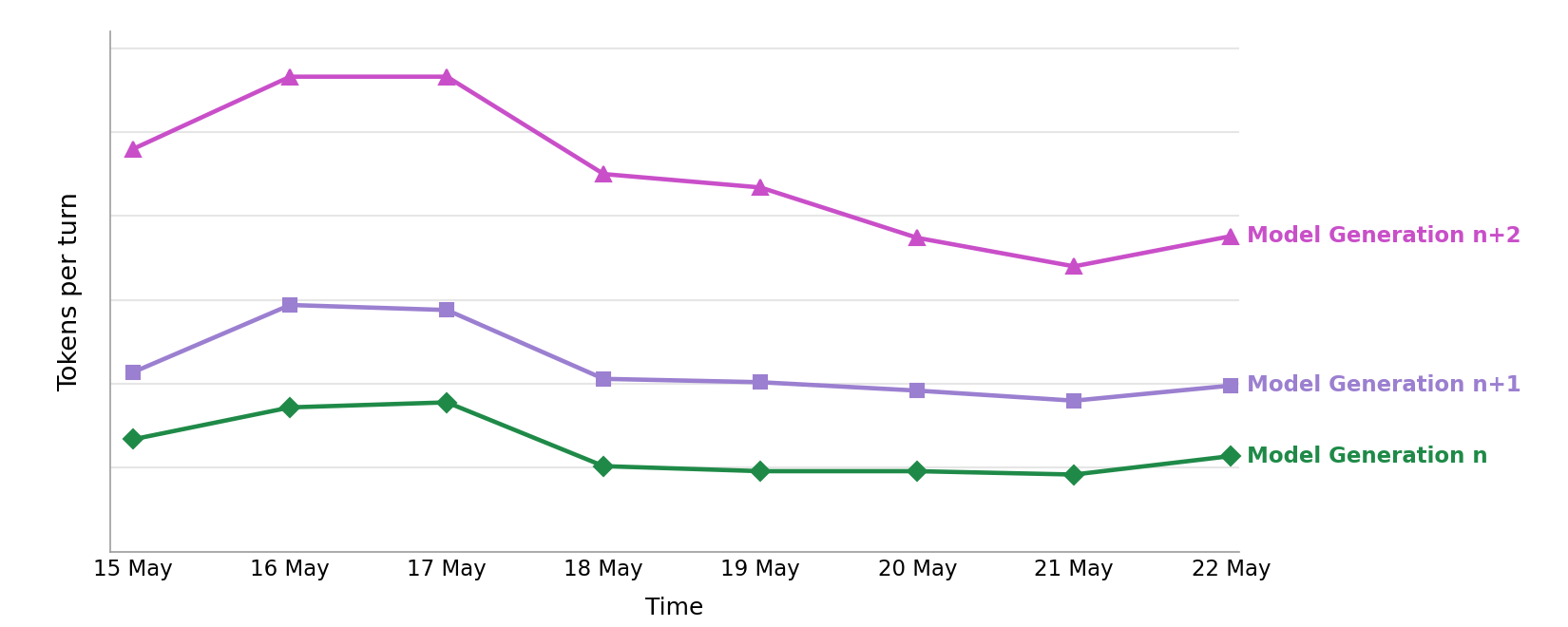
With the recent move to usage-based billing for GitHub Copilot, every token in an agentic session matters. They affect your credits, latency, and the context window an agent has left to finish the task. Each new model generation tends to consume more tokens per task than the last, as we’ve witnessed in our own data. This means that harness-level efficiencies are increasingly important to counter this trend. As agents take on longer, more autonomous work, an inefficient harness adds up fast.

Chart showing tokens per turn increasing across successive model generations

Making the GitHub Copilot agentic harness in VS Code more token-efficient is continuous work, and it’s the best way to counter this trend. For most changes, we run A/B experiments in production and offline evaluations against task suites, confirming that task success rate holds or improves while token usage drops. It’s rarely one big win, usually a steady stream of small ones. Below, we walk through recent gains, first for OpenAI models and then for Anthropic models.

How agentic requests spend tokens

Two costs sit at the heart of every agentic request, and two ideas help us reduce them. Both apply across OpenAI and Anthropic models, even though each provider exposes them differently.

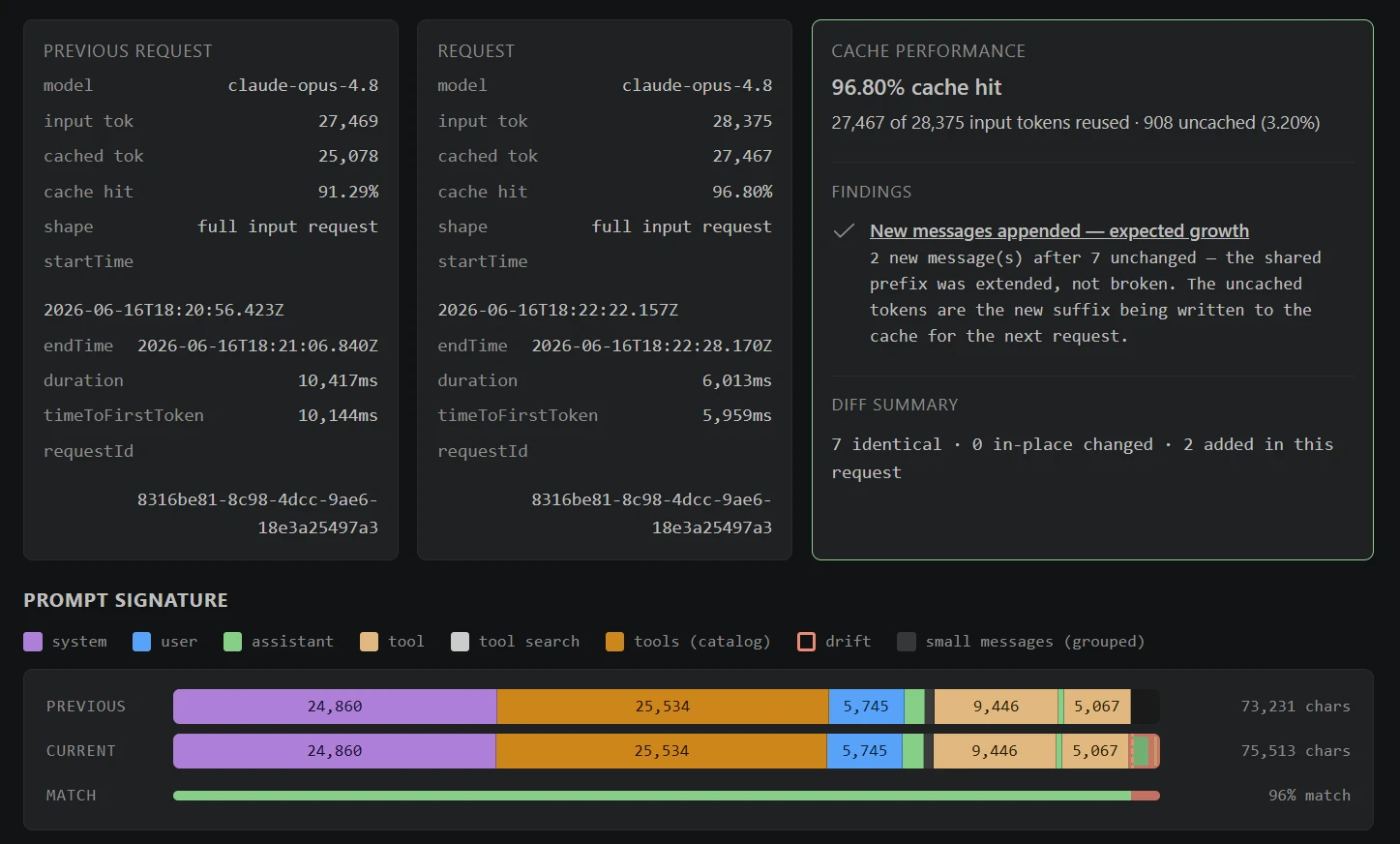
Screenshot of the Cache Explorer showing parts of the prompt in a horizontal stacked bar chart.
Graphical overview of the prompt signature highlighting the different parts of the prompt.

The prompt prefix and caching. In an agentic coding session, a large share of every request repeats across turns: system instructions, tool definitions, repository context, and conversation history. This repeated beginning is the prompt prefix. When requests share the exact same prefix, the inference provider can reuse cached model state instead of recomputing it from scratch on each request. Despite the name, the cached artifact is not a human-readable copy of the prompt. It is the model state computed while processing that prefix, represented internally as key/value tensors. Reusing the prefix cuts both cost (cached tokens can be up to 10 times cheaper) and latency, which is why we work to keep the prompt cache hit-rate high.

Tool-definition overhead. Agents can pull in a large number of tools: those exposed by MCP servers, built-in tools, or extension-provided tools. Each tool is sent to the model with a full definition (a name, a description, and a complete JSON parameter schema), and historically every one was loaded into context on every request. Even when that data is cached, the context window overhead is fixed on each turn and grows as the toolset does.

Tool search. Tool search reduces that overhead by letting the model load tool definitions on demand instead of all at once. Upfront, the model sees only lightweight metadata, the name and description of each deferred tool, and the heavier parameter schemas stay out of context until the model searches for a tool and loads it. Because deferred tools are added at the end of the context window rather than the prefix, the cached prompt prefix stays reusable and the caching gains keep working across turns. The payoff is a leaner context window: the model spends fewer tokens on tools it never uses, leaving more room and budget for the actual task.

Efficiency wins for OpenAI models

For OpenAI models, our recent work focused on reducing usage costs and latency for Copilot users through improved token efficiency. We pursued that through three changes: retaining cached model state for longer, reducing tool-definition overhead, and replacing repeated HTTP requests with persistent WebSocket connections.

Extended prompt caching

OpenAI models cache the prompt prefix automatically: the provider infers the reusable prefix and reuses its model state across requests. That reuse has a direct cost benefit. For most OpenAI models that support cached input pricing, uncached input tokens cost 10 times as much as cached input tokens.

Caching the prefix happens on its own, but how long that cache survives is something we can configure. After careful evaluation, we enabled extended prompt caching for supported models through the prompt_cache_retention body parameter. By default, the cache lives in fast GPU memory, where it is dropped after about 5 to 10 minutes of inactivity (up to an hour in some cases) to make room for other work. Setting "prompt_cache_retention": "24h" moves the cache to slower but roomier GPU-local storage and keeps it for up to 24 hours.

The benefit is simple. With the default cache, a pause of more than a few minutes throws the cache away, so your next request has to reprocess the whole prefix at the full, uncached price. Extended retention keeps the cache warm, so picking up where you left off is still fast and cheap, even after a long break.

After enabling extended prompt caching for supported OpenAI models in VS Code, we measured the following relative increases in cache hit rate. These are relative changes, not percentage-point increases: a 919% increase means the cache hit rate was 10.19 times higher than its previous value.

Time between requests GPT-5.2 GPT-5.3-Codex GPT-5.4
10-20 min +13% +32% +10%
20-30 min +135% +142% +137%
30-40 min +301% +203% +679%
40-60 min +338% +279% +919%

The increase was largest after longer gaps between requests, when cached model state that would otherwise have expired remained available for reuse. In practice, this increase means more of your prompt is processed at the lower cached-input rate, reducing the cost of requests even after longer pauses.

To avoid sending all tool definitions on every request, tool search makes this on-demand. Available to models GPT-5.4 and newer, OpenAI’s native tool search implements this deferral with a defer_loading flag.

Upfront, the model only sees lightweight metadata: the name and description of each deferred function or, when deferred functions are grouped into a namespace, only the namespace’s name and description.

During a four-day VS Code experiment with GPT-5.4 and GPT-5.5, tool search reduced per-turn token utilization, time to first token, and time to complete:

Metric Model Delta
P50 Total tokens used per turn GPT-5.4 -9.81%
P50 Total tokens used per turn GPT-5.5 -8.61%
P50 Time to first token (TTFT) GPT-5.4 -6.88%
P50 Time to first token (TTFT) GPT-5.5 -7.34%
P50 Time to complete (TTC) GPT-5.4 -5.31%
P50 Time to complete (TTC) GPT-5.5 -5.42%

Aggregated across an entire session, total token usage for the median Copilot user decreased by 8.97% with GPT-5.4 and 10.92% with GPT-5.5.

WebSockets

An agentic coding turn can involve many sequential requests to the inference provider; one for each step the model takes as it calls tools and works toward a solution. Even when the underlying HTTP connection is reused, each step remains a separate API request.

Responses API WebSocket mode keeps a persistent connection open and provides a lower-latency continuation path for those sequential requests. On an active connection, OpenAI can also reuse the most recent response state from a connection-local in-memory cache, reducing continuation overhead across long chains of tool calling.

A few months ago, OpenAI announced WebSocket support in the Responses API. Initial documentation showed large latency improvements, so we experimented with it early and saw consistent latency reductions in our own A/B test. This was one of those ideas that feels obvious in retrospect. Agentic coding sessions make repeated requests over a long-lived interaction, which is exactly what WebSockets are designed to handle.

During the initial rollout of WebSockets to VS Code Stable, the latency gains from the A/B experiment held in production. The table below shows the latency gains from WebSockets relative to HTTP during that rollout. Since then, improvements elsewhere in the stack, including improved prompt caching, have further reduced latency and usage costs. For each metric, lower is better:

Tracking metric Percentile GPT-5.3-Codex GPT-5.4
Time to first token (TTFT) p50 -19.46% -16.37%
Time to first token (TTFT) p95 -12.92% -15.78%
Time to complete (by turn) p50 -13.55% -11.74%
Time to complete (by turn) p95 -7.86% -6.26%

We also observed statistically significant relative increases in user engagement. For GPT-5.3-Codex and GPT-5.4, respectively, active users increased by 1.27% and 2.17%, while two-day engagement increased by 1.90% and 3.14%.

These gains led us to make WebSockets the default transport for OpenAI models GPT-5.2 and newer across Copilot products including VS Code, Copilot CLI, the GitHub app, and more.

Efficiency wins for Anthropic models

For Anthropic models, our recent work targeted the same two repeating costs: the prompt prefix we keep warm in cache, and the tool payload we send on every turn. We pursued that through two changes: spending our prompt-cache breakpoints more deliberately, and deferring tool definitions through tool search.

Smarter prompt caching

Anthropic’s prompt caching works differently from the automatic prefix caching that OpenAI models use. Rather than the provider inferring the reusable prefix, the caller places explicit cache_control breakpoints, and the API caches everything up to each marker.

The budget of breakpoints per request is small and fixed, so where you place them matters as much as whether you use them. We reworked our Messages API caching to spend up to four breakpoints deliberately, anchored at the prompt’s most stable boundaries:

  • The end of the tool definitions and the end of the system prompt, the parts that change least between turns.
  • A pair of rolling anchors on the two most recent cacheable messages.

That second, older anchor is a safety net. If the freshest anchor misses (a slow tool call lets its cache lapse, or content drifts slightly), the older anchor still serves a hit covering everything up to it. We typically give up a single exchange instead of cold-starting the whole conversation cache.

These changes produced a steady few-percentage-point increase in cache hit rate. For agentic workloads, where the prefix is long and turns come in quick succession, it now sits at around 94%, which means that only a small fraction of each request’s input has to be recomputed instead of served from cache. This reduces both usage cost and time to first token.

Anthropic’s tool search tool applies the same deferral idea. Tools are marked with defer_loading: true, and alongside the deferred catalog we keep a small, curated set of core tools loaded (reading and editing files, running terminal commands, searching the workspace) so the most common actions never require an extra step.

We first rolled this out using Anthropic’s server-side tool search, where the model searches the deferred catalog on Anthropic’s side and the API expands matches into tool_reference blocks inline. In a seven-day VS Code experiment, deferring tool definitions reduced both prompt-token and total-token usage and trimmed time to first chunk:

Metric Percentile / scope Delta
Time to first chunk p50 (by turn) -2.45%
Total prompt tokens p50 (by turn) -11.30%
Total prompt tokens p95 (by turn) -8.85%
Total prompt tokens p50 (by user) -18.32%
Total tokens p50 (by turn) -11.09%
Total tokens p95 (by turn) -8.74%
Total tokens p50 (by user) -18.03%

For the median Copilot user, overall prompt-token and total-token usage each fell by roughly 18% across a full session.

With the approach proven, we moved the search itself client-side, backing it with the same tools-grouping system we built for VS Code’s reduced toolset. The model still calls a tool_search tool, but instead of Anthropic matching against the deferred catalog, we run the search locally and return tool_reference blocks for the best matches.

The local search is also smarter. Rather than lexical matching over tool names and descriptions, we use our internal Copilot embedding model, the same model that powers our embedding-guided tool routing, to compare the query against vector representations of every available tool. Because it matches intent rather than literal keywords, a request like “find all references to this symbol” surfaces the right tool even when its name and description share no words with the query.

For a deeper look at the grouping and embedding-guided routing behind this, see How we’re making GitHub Copilot smarter with fewer tools.

Moving the search client-side gave us some extra benefits beyond the original token savings:

  • Responsiveness: the search runs locally against cached embeddings, so discovering a tool no longer depends on a server-side search round trip.

  • Dynamic MCP tool discovery: because we own the candidate set, tools that connected MCP servers add or remove mid-session are reflected immediately, without waiting on a fixed server-side catalog.

  • Better quality: the embedding-guided search is more likely to surface the right tool for a given query, which reduces user error and improves task success, as shown in the metrics below.

That responsiveness showed up directly in the numbers. In a two-week VS Code Stable rollout, the client-side tool search reduced latency on top of the token savings already gained from deferral.

Metric Model Delta
Time to first token (p50) Claude Opus 4.6 -1.91%
Time to complete (p50) Claude Opus 4.6 -1.97%
Time to complete (p95) Claude Opus 4.6 -2.57%
Time to complete (p50) Claude Sonnet 4.6 -1.30%
Time to complete (p95) Claude Sonnet 4.6 -3.35%
User error rate Claude Sonnet 4.6 -4.01%

In both variants, deferred tools sit outside the cached prompt prefix, so the prefix is never rewritten and the caching gains above keep working across turns. And once a tool has been discovered, it stays available for the rest of the conversation, so the model does not pay to search for it again.

What’s next

The work above makes our agentic harness leaner: a higher cache hit rate, fewer tool definitions per request, and less transport overhead. The next step is to move whole classes of work off the main agent entirely. We’re building specialized subagents, and exploring custom-trained ones, for narrow tasks like searching the workspace, running commands, and summarizing results. Each runs on the smallest, cheapest model that can do the job, instead of the main model paying for that work in its own context. The result is a lower overall cost per task.

In addition, we’re working to improve transparency around token usage and cache state in the product. This includes flagging actions that quietly drive up cost, such as resuming a session after a long pause with its cache expired, or changing the reasoning effort in the middle of a session. That way, you can make an informed choice before paying for a cache cold start.

Making the agentic harness more token-efficient is ongoing work, and we’ll keep investing, one small win at a time.

Happy coding! 💙

Enchanted by Nature cheats list for The Sims 4


The Sims 4 painted the town green with its outdoorsy, fairy-themed expansion, but if you don’t want to work your way up the faefolk rankings to get to the good stuff, you can use Enchanted by Nature cheats for an easy shortcut. Some fairy features don’t have their own code, but here you’ll find cheats for most Sims 4 careers, skills, and traits that were added with the expansion.

If you need extra guidance, check out our main list of The Sims 4 cheats for a refresher on the basics. And if you’re looking for other expansion commands, we’ve got lists for Businesses & Hobbies cheats and Life & Death cheats.

Enchanted by Nature career cheats

Two fairies talking to each other in The Sims 4: Enchanted by Nature.

(Image credit: Electronic Arts)

Enchanted by Nature added one new career to The Sims 4 with the Naturopath. It’s a handy career for curing ailments, and you can even take things a step further with branching career paths as a Lifestyle Coach or Apothe-curist.

Latest Videos From
Swipe to scroll horizontally

Career

Cheat code

Naturopath

careers.add_career Naturopath

careers.retire Naturopath

careers.promote Naturopath

careers.demote Naturopath

Enchanted by Nature skill cheats

GTA 6 Pre-Orders Open On June 25


It seems like Rockstar is actually sticking to the the November 19 release date.

Rockstar Games parent Take-Two has been pledging for a while that it would kickstart the hype for Grand Theft Auto VI this summer ahead of the November 19 release date. We got our first indication of that marketing machine getting into gear on Thursday, with the news that the publisher will open pre-orders for the massively anticipated game on June 25.

There’s no new trailer as yet — at this point, I would be surprised if Rockstar didn’t release one right just as pre-orders start. Still, it revealed the game’s cover art. It looks just like any other GTA cover, really, with a series of stylized images showing several characters, weapons, vehicles and animals that will populate the new version of Vice City.

The pre-order announcement is a further indication that Rockstar is actually sticking to the November 19 release date following previous delays. The publisher announced those around six months out from the previously planned release dates, and we’re within that window now. So all indications point toward GTA VI actually landing on PlayStation 5 and Xbox Series X/S five months from now.

G-RAID Shuttle with FREE Pelican Case


Get a FREE Pelican Case with Any G-RAID Shuttle – Limited-Time Storage Protection Offer

Need reliable, high-capacity storage for your video production workflow? For a limited time, when you purchase any G-RAID Shuttle, you’ll receive a FREE Pelican case at no additional cost. Designed for filmmakers, video editors, broadcasters, and content creators, G-RAID Shuttle systems deliver the performance and capacity needed for demanding 4K, 8K, and multi-camera productions. Pair that powerful storage with the rugged protection of a Pelican case, and you have a complete solution for transporting and safeguarding your valuable media. Don’t miss this special offer—available while supplies last.

  • Consolidated Backup, Super-fast Access and Real-time Video Editing
  • Transportable, hardware RAID powerhouse
  • Optimized for multi-stream workflows
  • 24TB – 104TB of high performance storage

starting at $4,104.99

w/ FREE Case for a limited time

  • Chase Your Vision from Location to Studio
  • 48TB – 208TB capacities in a transportable design
  • Daisy-chaining for up to 5 additional devices
  • 5-year limited warranty

starting at $6,644.99

w/ FREE Case for a limited time


FUELING CREATIVE AND PROFESSIONAL JOURNEYS

The G-DRIVE range of products delivers premium storage solutions designed for performance and growth. Contact Videoguys at 800-323-235 for free tech advice to find out which G-DRIVE is right for your workflow!

  • Rugged durability
  • Rugged portable backup with an IP54 rain/dust rating and crush resistant up to 1000 lbs
  • USB-C for quick file backups and ready to go with Mac
  • 1TB to 6TB capacity

starting at $194.99

  • Reliable, Premium Storage in a Durable Design
  • Fast, simple backups
  • Mac-ready, Time Machine compatible
  • Pairs with iPad USB Type-C models
  • 6TB – 26TB capacities

starting at $449.99

  • High-performance, 2-bay enterprise-class storage system
  • Pre-configured in RAID 0 & Thunderbolt 3 connectivity
  • Manage your 4K, 8K, and VR video workflows with ease and reliability
  • 6TB – 26TB capacities

starting at $644.99

  • Studio-grade Storage Performance
  • 7200RPM Ultrastar Enterprise-clase hard drives inside
  • RAID 0 out-of-the-box for maximizing efficiency
  • High-performance Thunderbolt 3 interface
  • 16TB – 52TB capacities

starting at $1,469.99


Telegram ban in India sparks a rush to VPNs, rival apps


As India cut off access to messaging app Telegram for a week over concerns about exam-related fraud, users turned to virtual private networks (VPNs) and alternative messaging apps in unusually large numbers.

App intelligence firm Appfigures told TechCrunch that Tuesday, the day India announced the Telegram restriction, marked the biggest day for VPN app downloads in the country since at least the start of 2025. Downloads of major VPN apps rose 49% from a recent daily average of 139,000 to 208,000, the firm said.

Proton VPN and Turbo VPN recorded some of the largest increases. Downloads of Proton VPN on Apple’s App Store in India jumped 113%, while Turbo VPN downloads rose 85%. On Google Play, downloads of Proton VPN climbed 64% and Turbo VPN downloads increased 35%. NordVPN’s App Store downloads increased 41%, while ExpressVPN downloads on Google Play rose 31%.

The surge also pushed several VPN services up India’s app-store charts. Proton VPN climbed from 18th to 5th in Apple’s Utilities rankings between June 16 and June 18, while its Google Play ranking rose from 8th to 2nd in the Tools category, according to Appfigures.

The spike in VPN demand followed India’s decision to temporarily restrict Telegram until June 22 over concerns that fraudsters were using the platform to target candidates ahead of a re-test for the National Eligibility cum Entrance Test (Undergraduate), the country’s largest entrance examination by applicant volume. The Indian government said the measure was needed to prevent the spread of fake exam papers and related scams. Telegram has challenged the order in the Delhi High Court, arguing that authorities should target specific content rather than block the entire platform.

The response extended beyond app-store download data. Proton said daily registrations from India rose 120% above baseline levels on Wednesday, after hourly registrations had already spiked 150% on Tuesday evening following the Telegram restriction. The company described the increase as “extremely noteworthy” given its existing scale in the country.

Canadian VPN service provider Windscribe reported a similar trend. The company told TechCrunch that signups from India peaked roughly 100% above baseline levels, while first-time downloads of its iOS app in the country rose about 89%.

“The spike in India follows the same general trend we see in areas that ban specific apps, introduce age bans or verification requirements, or otherwise restrict internet access,” Rebecca Rosenberg, growth operations manager at Windscribe, said.

Image Credits:Windscribe

The trend was not limited to a handful of VPN providers. Sensor Tower told TechCrunch that downloads across the VPN app category in India rose 10% day-over-day on June 17, reversing a decline seen over the previous two weeks.

Users also appeared to be exploring alternatives to Telegram. Appfigures said downloads of Signal in India rose 72% on Apple’s App Store and 322% on Google Play following the restriction, while Viber’s App Store downloads increased 216%.

Telegram-linked messaging app iMe recorded one of the sharpest jumps. Its Google Play downloads rose from a recent daily average of about 827 to 50,900 on June 16, Appfigures said.

Yet the restriction did not immediately translate into lower Telegram usage. Sensor Tower said Telegram’s daily active users in India rose 17% on the day the measure was announced — the app’s largest day-over-day increase in the country since a widespread outage of Meta’s services in 2021.

Other data points also suggest heightened efforts to access Telegram following the restriction.

Cloudflare Radar Lead Lai Yi Ohlsen told TechCrunch that DNS requests for Telegram domains in India increased sharply over the two days after the measure was announced. The company cautioned that higher DNS traffic does not necessarily indicate successful access to the platform, and could reflect users repeatedly attempting to reach Telegram after it was blocked.

Image Credits:Cloudflare

Telegram pointed to its efforts to cooperate with authorities during hearings in the Delhi High Court this week. Its lawyers said the company had removed channels identified by authorities and questioned the need for a platform-wide restriction affecting what Telegram says are over 150 million users in India.

Government lawyers defended the measure as a temporary, event-linked response tied to the NEET re-test. Solicitor General Tushar Mehta told the court that a permanent ban could raise proportionality concerns but argued the current restriction had a “logical nexus” to the objective being pursued.

After hearing arguments from Telegram and the government on Thursday, the Delhi High Court reserved its order and is expected to deliver its verdict on Friday.

The debate echoes questions raised elsewhere when governments restrict access to major online platforms. Sensor Tower said VPN downloads in the U.S. rose more than 40% week-over-week when TikTok was briefly removed from U.S. app stores in 2025, while Windscribe said it has observed similar patterns following restrictions in countries including Iran and Russia.

When you purchase through links in our articles, we may earn a small commission. This doesn’t affect our editorial independence.

Immigration Services and Relocation Guide


Immigration Services in Slovenia
Photo by Vladimir Srajber

Moving to a new country is complex. You’re navigating visa requirements, housing markets, banking systems, and bureaucratic processes in a language you might not speak.

Slovenia is more approachable than most countries. But without guidance, you’ll waste time and make mistakes.

That’s where professional immigration services come in.

What Immigration Services Actually Do

Professional immigration services in Slovenia help with moving services:

Visa and Residence Permit Applications

  • Advise on appropriate visa type for your situation
  • Prepare documentation
  • Submit applications
  • Handle communication with authorities
  • Manage renewals

Accommodation

  • Find rentals aligned with residence permit requirements
  • Verify landlord legitimacy
  • Ensure proper contracts
  • Handle deposit issues

Banking and Finance

  • Open bank accounts for foreigners
  • Explain Slovenian financial system
  • Help with tax identification

Company Registration

  • If establishing Slovenian company
  • Handle registration process
  • Prepare Articles of Association
  • Manage tax registration

Employment

  • Work permit applications
  • Employment contract preparation
  • Tax and social security guidance

Family and Dependents

  • Spouse/partner residence permits
  • Children education and visas
  • Family reunification

Ongoing Compliance

  • Renewal reminders
  • Address registration updates
  • Tax filing assistance

When You Need Immigration Services

You should consider professional services if:

Uncertain about visa type: Different visas for employees, entrepreneurs, students, digital nomads. Professional guidance ensures right choice.

Non-EU citizen: More complex documentation requirements. Worth professional help.

Bringing family: Multiple applications needed. Professional coordination helps.

Establishing business: Company registration + residence permit together is complex. Services help.

Limited Slovenian language: Services navigate bureaucracy in English.

Time constrained: Services handle paperwork, saving weeks of your time.

You probably don’t need services if:

EU citizen: Residence is relatively straightforward. You might handle alone.

Simple situation: Single person, staying temporarily, clear purpose.

Language comfortable: You speak Slovenian or very comfortable with forms.

Types of Immigration Services Available

Government Services:

  • Administrative Units (upravne enote) handle applications
  • Police handles residence registration
  • Free but slower, require Slovenian language

Private Law Firms:

  • Full immigration law expertise
  • Handle complex cases
  • Cost: €500-2,000 depending on complexity
  • Timeline: Fast, professional

Relocation Agencies:

  • Handle accommodation, banking, bureaucracy
  • Wider services beyond just visa
  • Cost: €300-1,500 for comprehensive package
  • Timeline: Efficient end-to-end process

Online Services:

  • Document preparation templates
  • Guidance for self-service
  • Cost: €50-200
  • Timeline: Self-directed (slower)

Combination Approach:

  • Many people use relocation agency for accommodation/setup
  • Use law firm for visa/residence permit application
  • Total cost: €800-2,500
  • Timeline: Coordinated, professional

The Service Package: What Comprehensive Immigration Service Includes

A good comprehensive service includes:

Pre-arrival consultation (free):

  • Assess your situation
  • Recommend visa type
  • Timeline estimate
  • Cost estimate

Documentation preparation (included):

  • Advise what documents needed
  • Guide on obtaining them
  • Review for completeness
  • Translate (if necessary)

Application submission (included):

  • Submit to appropriate authorities
  • Track application status
  • Communicate with officials on your behalf
  • Receive approval and follow up

Accommodation support (sometimes extra fee):

  • Connect with vetted landlords
  • Review rental agreements
  • Ensure compliance with visa requirements
  • Assist with lease signing

Banking setup (sometimes included):

  • Introduce to banks accepting foreigners
  • Assist with account opening
  • Ensure proper documentation

Post-arrival support (sometimes included):

  • Address registration assistance
  • Help with initial bureaucracy
  • Ongoing check-ins

Cost: Typically €1,000-2,500 for complete package

Red Flags: Avoiding Scams

When choosing immigration services:

Avoid if:

  • They guarantee visa approval (no one can do this)
  • They ask for large upfront payment (€5,000+)
  • They lack official credentials or office address
  • They don’t provide written contract
  • They pressure you to decide immediately
  • They offer “special connections” to authorities

Verify:

  • Check if licensed by Chamber of Attorneys
  • Read customer reviews
  • Ask for references
  • Confirm fixed pricing in writing
  • Ensure they have physical office in Slovenia

The Timeline: How Long Everything Takes

With professional services:

  • Consultation and planning: 1 week
  • Documentation gathering: 1-2 weeks
  • Application submission: 1 week
  • Official processing: 2-4 weeks
  • Residence card issuance: 1 week
  • Total: 4-9 weeks

Without professional services:

  • Same timeline but with potential delays
  • More back-and-forth with authorities
  • Language barriers slow everything
  • Could take 3-6 months

The professional service isn’t just convenience. It accelerates the process significantly.

The Cost Breakdown: What You’re Paying For

Government fees:

  • Application processing: €20-100
  • Residence registration: Free
  • ID card (if needed): €50
  • Total government: €70-150

Professional service fees:

  • Immigration consultation and application handling: €500-1,000
  • Company registration (if needed): €300-500
  • Accommodation assistance: €200-400
  • Banking assistance: €100-200
  • Post-arrival support: €200-300
  • Total professional: €800-2,400

Your personal costs:

  • Accommodation deposits: €500-1,500
  • Travel to Slovenia: €200-1,000
  • Initial living costs: €1,500-2,500
  • Total personal: €2,200-5,000

Total relocation cost: €3,200-7,500

This is reasonable for moving to a new country.

After You Arrive: Ongoing Support

Most reputable services offer ongoing support:

First month:

  • Daily check-ins if needed
  • Help with unexpected issues
  • Advice on local systems

Ongoing:

  • Renewal reminders
  • Tax filing guidance
  • Address updates
  • Permit extensions

Cost: Usually included in initial fee or small monthly fee (€30-50)

Choosing the Right Service

Process:

  1. Identify 2-3 services
  2. Request free consultation
  3. Ask specific questions about your situation
  4. Get written proposal
  5. Compare terms and pricing
  6. Check references
  7. Sign contract
  8. Begin process

Timeline for choosing: 1-2 weeks

The Reality: Is Professional Service Worth It?

For most people moving to Slovenia: Yes.

Reasons:

  • Saves significant time (weeks or months)
  • Reduces errors and rejections
  • Handles complex bureaucracy
  • Provides peace of mind
  • Actual cost is reasonable (€1,000-2,500)

Exceptions:

  • EU citizen, simple situation, comfortable with forms
  • Previous experience with similar countries
  • Language ability and patience for bureaucracy

When Seeking Immigration Services

If you’re planning to move to Slovenia and want professional guidance, immigration services in Slovenia handle the complexity.

The investment in professional help pays for itself through time saved and errors prevented.

For most people relocating to a new country, it’s money well spent.

Start with consultation. Understand your situation. Make the choice.

Moving to Slovenia is achievable. With right support, it’s smooth and straightforward.

Find a Home-Based Business to Start-Up >>> Hundreds of Business Listings.

Adobe Adds Its AI Assistant To Premiere, Illustrator and InDesign


Adobe is expanding its Firefly AI assistant into Premiere, Illustrator, InDesign, and Frame.io, where it can automate all sorts of tasks such as organizing clips, renaming assets, adding interview markers, rearranging layers, and finding missing fonts. It’s available starting today as part of a public beta. TechCrunch reports: Adobe is slowly transforming Firefly to increasingly resemble Canva, at least when it comes to AI features, loading up the app with AI tools that can generate images, videos and storyboards. The company is now adding a new feature called Elements that can save AI-generated characters, objects and locations for later use.

Firefly is also getting a Projects feature that can store existing assets in one place, and share context. This could be useful for teams creating a video series or brand campaigns. Both of these features are currently available in a private beta.

The company said users can now describe a brand and its style, or upload existing collateral, in Firefly to have it generate a brand kit, complete with logos, brand identity and color palettes, or even generate product videos from photos. Users can also create storyboards to create videos.

Before You Use AI, Run This Cost-Saving Audit For Your Franchise


There is a lot of talk right now about AI.

Every franchisor, multi-location brand, and business owner is hearing some version of the same thing:

“You should be using AI.”

But that is not the real question.

The real question is:

Where should AI start?

Because AI can help in a lot of places. It can help with reporting, marketing, customer support, operations, finance, admin work, and many other parts of the business.

But if you start in the wrong place, it becomes just another tool, another experiment, or another project that does not really move the business forward.

That is why I like starting with a simple audit.

Not a technical audit.

Not a complicated AI strategy session.

Just a practical business audit that helps you see where manual work, slow reporting, repeated tasks, and inconsistent execution are costing you time and money.

I call this the AI Cost-Saving Audit.

It is built for franchisors, multi-location brands, and location-based businesses.

The goal is simple:

Find the first few areas where AI can actually help reduce cost, save time, and improve execution across locations.

How the Audit Works

The audit looks at five business areas:

  1. Reporting & Visibility
  2. Marketing & Local Execution
  3. Operations & Admin
  4. Finance & Control
  5. Cross-Location Consistency

Each area has five questions.

how it works

For each question, you score your business from 0 to 2.

0 means this is not an issue.

1 means this is sometimes an issue.

2 means this is a clear issue.

Each section gives you a score out of 10.

The scoring guide is simple:

0 to 3 means it is probably not urgent.

4 to 6 means it is worth reviewing.

7 to 10 means there may be a strong AI opportunity.

The important part is to answer honestly.

Do not answer based on how you want your business to work.

Answer based on how your business works today.

If reporting is still manual, mark it.

If your team is chasing locations for updates, mark it.

If your marketing team is still manually adapting everything for each location, mark it.

This audit only works if you are honest about where the friction is.

Area 1: Reporting & Visibility

The first area is reporting and visibility.

For many franchise and multi-location businesses, this is one of the biggest hidden problems.

On paper, the business may have systems.

There may be a POS system, CRM, marketing tools, spreadsheets, review platforms, finance reports, and dashboards.

But when HQ needs a clear view across all locations, someone still has to pull data from different places and stitch it together.

Reporting & Visibility

So ask yourself:

Are managers or HQ still pulling reports manually from multiple systems?

Does it take more than one day to get a usable roll-up view across locations?

Are location issues usually spotted only after the damage is already visible in the results?

Do different teams use different versions of the same numbers?

Is benchmarking locations still more manual than it should be?

This is where AI can be very useful.

For example, if your team is spending hours every week pulling reports, cleaning spreadsheets, and summarizing what happened across locations, there may be an AI opportunity.

AI could help create reporting summaries, flag exceptions, show which locations need attention, or help leadership get a faster view of what is happening.

The goal is not always to replace your dashboard.

Sometimes the opportunity is simply helping your team understand the dashboard faster.

Area 2: Marketing & Local Execution

The second area is marketing and local execution.

This is a big one for franchise and multi-location brands because marketing is not just one campaign.

You may have a national campaign, but every location has its own local market, local reviews, local SEO, local offers, local events, and local customer behavior.

Marketing & Local Execution

So ask yourself:

Is local marketing inconsistent across locations?

Does your team spend too much time adapting content for each location?

Is marketing spend hard to connect to location-level outcomes?

Are reviews, local SEO, or local campaign responses too slow or too manual?

Does the brand team become a bottleneck when supporting many locations?

A simple example:

Your brand team creates one campaign.

Now that campaign needs to be adapted for 20, 50, or 100 locations.

The copy may need to change.

The offer may need to change.

The city name may need to change.

The local angle may need to change.

That type of work can become very manual very quickly.

AI can help here if the process is repeated and the brand guidelines are clear.

It can help create first drafts, local variations, review responses, campaign summaries, or local SEO updates.

The key is that a human still reviews and approves. AI does the first pass. Your team keeps control.

Area 3: Operations & Admin

The third area is operations and admin.

This is where a lot of hidden cost sits.

Most businesses do not lose time only on big strategic work.

They lose time on repeated small things.

The same questions.

The same follow-ups.

The same checklists.

The same weekly admin tasks.

The same “where do I find this?” messages from locations.

Operations & Admin

So ask yourself:

Do store or location teams repeat the same admin tasks every week?

Do support questions from locations consume too much HQ time?

Are SOPs, checklists, or internal answers hard to find quickly?

Do routine workflows depend too much on one experienced person?

Are delays caused more by follow-up and coordination than by the actual work?

This is one of the most practical areas for AI.

For example, maybe your location teams keep asking HQ the same questions:

Where is the SOP for this?

How do we handle this customer issue?

What is the process for this request?

Which checklist do we follow?

Who approves this?

If the answers already exist somewhere, AI can help make those answers easier to find.

That could become an internal support assistant trained on your SOPs, checklists, policies, and internal documents.

Again, the point is not to remove people from the process.

The point is to reduce repeated manual support so your HQ team can focus on higher-value work.

Area 4: Finance & Control

The fourth area is finance and control.

In a franchise or multi-location business, small finance issues can add up quickly.

One missed item may not seem like a big deal.

But if similar issues happen across many locations, it becomes real money.

Finance & Control

So ask yourself:

Are finance follow-ups, audits, or checks still heavily manual?

Is it difficult to compare profitability cleanly across locations?

Do leaders find out about margin issues too late?

Are exceptions, anomalies, or missed items hard to catch early?

Do recurring finance tasks require too much spreadsheet work?

This is not about handing your finance function over to AI.

That is not the point.

The better starting point is exception spotting.

For example:

Which location has unusual numbers?

Which report is missing something?

Which cost looks higher than expected?

Which sales number does not match the usual pattern?

Which item needs a human to review?

AI can help with the first pass.

It can summarize, compare, flag, and prepare.

Then the finance team reviews what matters.

That can save time and help the business catch issues earlier.

Area 5: Cross-Location Consistency

The fifth area is cross-location consistency.

This is one of the core challenges in franchise and multi-location businesses.

You may have the same brand, same playbook, same SOPs, and same process.

But in reality, locations may execute things differently.

Some locations follow the process well.

Some locations do their own thing.

Some are strong.

Some need help.

Some communicate clearly.

Some need repeated follow-up.

Cross-Location Consistency

So ask yourself:

Do locations execute the same process in different ways?

Is brand consistency difficult to maintain across the network?

Does HQ struggle to know which locations need attention first?

Do strong and weak locations look too different operationally?

Is communication from HQ to locations slower or less clear than it should be?

This is where AI can help HQ see patterns faster.

For example, AI could help compare location performance, summarize issues, identify which locations need support, or help monitor whether the same process is being followed across the network.

The value here is not just automation.

The value is visibility.

HQ cannot manually inspect everything across every location all the time.

AI can help bring the right things to the surface.

total score audit

Turning Scores Into Action

Once you score all five areas, you will have a score out of 10 for each one.

Now look at the highest scores.

Those are probably the areas where the pain is highest.

But this is important:

A high score does not automatically mean it should be your first AI project.

A high score only tells you there is business pain.

The next step is to turn that pain into a specific opportunity.

Pick your top three areas.

For each one, write down:

The priority area.

The business pain.

The possible cost saving or impact.

Turning Scores Into Action

For example:

Priority area: Operations & Admin

Business pain: Location teams keep asking the same questions, and HQ spends too much time answering them manually.

Cost saving: Reduce repeated HQ support time and give locations faster answers.

Or:

Priority area: Marketing & Local Execution

Business pain: The brand team spends too much time adapting campaigns for each location.

Cost saving: Reduce manual content work and help the team support more locations.

Or:

Priority area: Reporting & Visibility

Business pain: HQ spends too much time pulling weekly reports from multiple systems.

Cost saving: Reduce manual reporting time and catch location issues faster.

This step matters because “use AI for marketing” is too broad.

“Use AI to create first drafts of location-specific campaign content” is much better.

That is a real workflow.

And real workflows are where AI starts becoming useful.

Can AI Solve This Now?

After you identify your top three opportunity areas, the next question is:

Can AI actually solve this now?

Because not every painful problem is a good AI problem.

Some problems are painful, but the process is messy.

Some problems are painful, but the data is not available.

Some problems are painful, but every output is fully custom.

Can AI Solve This Now?

So for each of your top three areas, ask five questions:

Does the process repeat often?

Does the input already exist somewhere?

Is the output predictable enough to standardize?

Would faster response or better visibility create real business value?

Can a human review exceptions instead of doing everything manually?

If an area gets three or more Yes answers, it is usually a good candidate for an AI pilot.

Let’s say Operations & Admin gets four Yes answers.

The process repeats often.

The questions already exist.

The SOPs already exist.

The output is predictable.

And a human can review anything that needs judgment.

That could be a strong first AI pilot.

Now compare that with a problem where everything is custom, no data exists, no one owns the process, and the output is different every time.

That may still be an important problem.

But it may not be the first AI project.

And that is okay.

The point of this audit is not to force AI into every area.

The point is to find the first area where AI can realistically help.

What Makes a Good First AI Pilot?

A good first AI pilot is usually not the biggest idea.

It is usually the clearest repeated workflow.

Good first pilots usually look like:

Repeated weekly or daily work.

Slow roll-up reporting.

Repeated admin or support questions.

Location-by-location content adaptation.

Review responses.

Exception spotting.

Summaries and follow-up workflows.

The areas that are usually not the best first pilots are:

One-off strategic work.

Messy processes with no clear owner.

Tasks with no usable data source.

Work where every output is fully custom.

High-risk work with no human review step.

The best first AI pilot should be practical.

It should be narrow.

It should have clear inputs.

It should have a clear output.

And it should keep a human in control.

That is how AI becomes useful inside the business.

Not as a random tool.

Not as a chatbot experiment.

But as a way to reduce manual work, improve visibility, and help HQ support locations better.

Final Thought

The question should not be:

“How can we use AI?”

That question is too broad.

A better question is:

“Which repeated workflow is costing us time or margin, and is that workflow ready for AI?”

That is what this audit helps you answer.

good first ai pilots

By the end, you should know three things:

Your highest pain areas.

Your top three cost-saving opportunities.

Your best first AI pilot candidate.

That gives you a much better starting point.

And once you have that, AI becomes much more practical.

It is not about chasing the newest tool.

It is about finding the places where manual work is adding up across locations, and then building AI into those workflows in a way that actually helps the business.

CNC Machining vs. 3D Printing Costs for Precision Prototype Development Insights


You’ve got the breakthrough product that could change everything. Maybe it’s a revolutionary gear housing that solves an industry-wide problem. Maybe it’s a sleek, modern bottle opener that reinvents a timeless tool. Whatever your innovation, you’re ready to move from concept to prototype, and you need it done right, done fast, and done within budget.

Now comes the critical decision that could make or break your project’s success. CNC machining and 3D printing both promise to transform your digital design into a physical reality, but they couldn’t be more different in their approach, costs, and capabilities. One offers unmatched precision and durability, while the other delivers speed and design flexibility. The choice you make here will determine not just your prototype quality and timeline, but your entire project’s trajectory. Because getting it wrong doesn’t just drain your budget, but it kills momentum, erodes stakeholder confidence, and can derail even the most promising innovations before they ever reach the market.

If you want to know more, for your project or firm, the leading agency Cad Crowd, is the best choice for you. They have 94,000 experts and professionals you can choose from at a very reasonable price with excellent service.


🚀 Table of contents


Difference between CNC vs. 3D printing

Let’s count costs, but before that, let’s make one thing clear: CNC machining design and 3D printing design aren’t two iterations of the same animal. They’re two distinct monsters in the realm of manufacturing, each with their own flair, positives, and attitude.

CNC machining? That’s the classic heavyweight titleholder. It’s a subtractive process, which means you start with a solid block of material, generally metal or plastic, then scrape away everything else that doesn’t fit. As a mission-focused sculptor, CNC machines are experts at precision cutting. Got something that requires heat, stress, or merely the tough demands of being out in industry? CNC’s your guy. And when tolerances must be tighter than last December’s holiday tight jeans, CNC is where it’s at.

3D printing is an additive manufacturing process, where rather than cutting things out, it adds your part piece by piece from the ground up, layer by layer. Whether spooled filament, liquid resin, or microscopic metal powder, 3D printers are masters of complexity. Want a prototype quickly? Need crazy-curved shapes and internal voids? 3D printing has that for breakfast. It’s perfect for rapid iterations, innovative designs, and tasks where speed and flexibility are more valuable than raw power.

RELATED: How 3D Printing for Rapid Manufacturing Is Pushing Boundaries at Product Design Services Firms 

Both CNC and 3D printing are revolutionary. CNC provides muscle and accuracy; 3D printing provides imagination and quickness. Which one is correct? That’s entirely dependent on what you’re producing, how quickly you need it, and how much abuse your part will endure. Understand the difference, and you’re already halfway to making the intelligent (and budget-friendly) decision.

The cost breakdown: it’s not always what you think

Let’s speak in numbers, because when you’re dealing with prototyping or small-batch production, what you believe an item will cost and what it really costs can be two completely disparate tales. CNC machining, for example, will make your wallet quiver at first sight. That is because CNC takes a lot of setup before the first part itself is cut. You have CAM (Computer-Aided Manufacturing) programming, tooling, and fixturing services to keep you awake. It’s an entire production just to clamp down on your raw material. So, if you are placing a single aluminum prototype order, don’t be surprised to pay anywhere between $75 and $300. Ouch, isn’t it?

RELATED: Benefits of Outsourcing CNC Machining Services for Your Company’s Prototype Design

Enter 3D printing as a cost-effective hero now. There’s almost no setup fee. You’ve got your electronic file, you choose your material, and you’re racing off. Need simple thermoplastic component services? You could have it done for as little as $20 to $60, and less if it’s a small or hollow design.

But here’s the twist: CNC machining begins to excel with volume. The more you increase the products from 50 or 100 pieces, the setup fees are amortized. That $300 in tooling is now just a few dollars per piece, and CNC’s unit cost falls dramatically. With 3D printing, however, how many pieces you’re printing is irrelevant. The unit cost remains roughly the same, so it’s not very good for scaling.

So what’s the real takeaway? If you’re prototyping or making just a few units, 3D printing often wins on price. But for higher-volume production runs, CNC can sneak up and steal the cost-efficiency crown. It all depends on your goals and your quantities.

Manufacturing Service Hourly Rate Per Project
3D Printing $2–$15 $20–$150 per item
CNC Machining $40–$150 $75–$500 per item

RELATED: The Advantages and Disadvantages of CNC Machining for Prototype Design

Speed and flexibility: the hidden costs

In the early stages, your concept is rarely perfect right out of the gate. You’ll tweak it. Then tweak it again and again. This is where 3D printing services become the MVP of prototyping without fanfare. Why? Because altering a design is as easy as revising a digital file. No production overhaul required. You send it to “print” before you head out for the day, and by the time you return to the office with your coffee cup in hand, the new prototype is ready to test. You can make another alteration before lunch and keep that creative momentum going.

Now compare that to CNC machining. Each design tweak usually means retooling, literally. You’ll have to reprogram the toolpaths, adjust the fixtures, and sometimes even swap out materials or cutting tools. It’s precise, yes, but every change adds time. And in this game, time is money.

But here’s the thing: whereas 3D printing excels at speed and adaptability, it may not always take home the endurance competition. If your working prototype has to endure high stress, support heavy loads, or survive heat, those plastic prints may not cut it. That’s when CNC machining takes the lead. It might take longer to change direction, but when performance is paramount, CNC still reigns supreme.

RELATED: How to Design 3D Models for 3D Printing & New Prototypes

So what’s the lesson? In today’s world of prototyping, 3D printing allows you to go fast and repeat frequently. But when the piece has to be as durable as possible, CNC’s your ticket. Finding the right time to use each is the key to staying within budget and on deadline.

From CAD file to physical prototype overnight

Product development services follow a strategic prototyping journey that matches the right technology to each stage. In early development, when you need quick visual prototypes for investor presentations or stakeholder buy-in, 3D printing delivers overnight results from your CAD files. It handles complex geometries effortlessly and provides affordable proof-of-concept models that demonstrate form and fit without significant upfront investment.

CNC-machining-prototype-precision-workshop-manufacturingpng

As your design matures and performance testing becomes critical, CNC machining takes over the prototyping process. Working with actual production materials like aluminum, stainless steel, or engineered plastics, CNC creates prototypes that can withstand real-world stress testing, temperature variations, and mechanical loads. This stage validates not just appearance but actual functionality, providing the performance data needed before moving to production. For small batch manufacturing and beta testing, CNC offers excellent per-unit economics with professional finish quality and tight tolerances.

The key to successful prototyping lies in understanding when each technology excels. When designs feature complex internal channels, organic shapes, or intricate geometries that challenge traditional machining, 3D printing returns as the optimal solution. It builds the most complex forms layer by layer without special tooling, setup costs, or geometry limitations. Rather than competing technologies, 3D printing and CNC machining work as complementary partners throughout the product lifecycle, ensuring faster time to market, reduced development costs, and more robust final products.

RELATED: 3D Printing Technologies for Modeling and Prototyping

The materials game

Let’s discuss materials, because when it comes to prototyping or production, your project’s success can depend on what it’s made of. Selecting the proper material isn’t just a checkbox, it can make or break your entire design.

CNC machining is the clear winner in terms of diversity. Imagine a buffet of metal and plastic: aluminum, brass, stainless steel, titanium; name it. You can even opt for carbon fiber-reinforced nylon if you want to get fancy. And the best part? You’re working with real-world materials, so you can test your design in the real world. Will it bend? Will it break? CNC provides you with real answers, not approximations.

On the other side of the ring, we’ve got 3D printing. And yes, it’s come a long way. Entry-level FDM printers work with familiar thermoplastics like PLA, ABS, PETG, and nylon. SLA printers offer amazing surface finishes, though their resins tend to be more fragile. Step up to industrial 3D printing like SLS (Selective Laser Sintering) or MJF (Multi Jet Fusion), and you’ll get stronger, more usable parts. Metal 3D printing design is also a thing, and it’s jaw-droppingly cool but be warned: it’ll burn through your budget fast.

3d-printing-rapid-prototype-additive-manufacturing processpng

Here’s the bottom line: if you’re building a complex internal structure that would make a machinist cry, metal 3D printing might be worth it. But if your goal is to create a strong, functional metal bracket or housing? CNC is still the smarter, faster, and more cost-effective option.

In the game of materials, it’s not only what you can do, it’s also about what you can afford. Pick wisely.

Post-processing and finishing

Now let’s discuss a cost that enjoys catching you off guard: post-processing and finishing. It’s not the most glamorous aspect of production, but if you neglect it, it will creepily eat into your wallet. Let’s say you’ve just 3D printed a prototype. Awesome, right? Wait, before you can put it to any kind of useful work, you’re not really finished. That raw part could require support structure removal, sanding, curing, or coating for strength or cosmetic purposes. And if you’re getting ready to shoot some product photos or make an investor presentation, you’ll likely want it to be showroom material. That kind of polish isn’t quick work, nor easy work, and often requires other materials or tools. Translation: more money.

And what about CNC-machined parts services? They tend to look much cleaner coming off the machine than their 3D-printed equivalents. But even so, there are usually deburred edges, surface finish, or anodizing to factor in, if the part is going to be handled by a client, at least. That smooth, professional finish you’re expecting? It doesn’t magically occur. Incorporate it into your budget upfront, even if you’re only prototyping. The time you invest in polishing and refining could very well be the difference between something that “works” and something that really blows away. Precision Matters- So Does Purpose!

Let’s cut to the chase, if your design depends on sheer precision, CNC machining remains the champion. This is no marketing rhetoric. We’re speaking of tolerances as tight as ±0.001 inches or tighter. That’s the accuracy you require when parts need to fit each other exactly, as in mechanical assemblies, sliding parts, or press-fit components that cannot risk shifting.

Yes, 3D printing is catching up and some high-end printers are surprisingly precise, but your typical print will fall somewhere in the range of ±0.005 to 0.01 inches. That’s fine for a rapid concept model or a snap-fit plastic enclosure. But if you’re making a part for a jet engine or a medical device, “good enough” won’t do.

RELATED: 3D Printing Technologies for Modeling and Prototyping

So, how do you decide? It all depends on your purpose. If you are at the early stage of prototyping design and only require something tangible to hold in your hand or present to the team, 3D printing is quick, adaptable, and affordable. You can experiment rapidly and check form and fit without burning through your budget.

But when you’re beyond the napkin sketch and require actual, testable, engineering-grade parts? CNC is your best bet. You’ll have the accuracy, ruggedness, and material selection that high-performance components require. Long story short, each tool has its application. The key is recognizing which phase you’re at and what your design really requires. Because in product development, precision is important. But so is purpose.

The freelancer factor: getting help on Cad Crowd

Now here’s the good news, you don’t have to do it all alone. If you’re not sure whether your prototype would be better suited to be 3D printed or CNC machined, Cad Crowd’s got you covered. Seriously. You’ve got choices, and more importantly, you’ve got specialists who know just how to assist.

RELATED: How to Improve Product Development For Your Company with Engineering Firms & Design Consultants

Need CAD files design perfectly optimized for CNC machining? No sweat. Need a designer familiar with the nitty-gritty of SLS printing and how to modify your model in response? No big deal. Need someone to do the actual printing or machining so you can work on the grand scheme? Done and done.

Cad Crowd makes it ridiculously simple to reach out to seasoned designers and engineers who’ve done it all and who can assist you with striking the right balance of quality, budget, and tight deadlines without sweating a drop. If you’re still brainstorming or you already have a prototype that only requires a little tweaking, Cad Crowd has someone who can take your concept and get it moving in the right direction. It’s like having your own dream product development team, waiting to pounce when you need them most. So smart build, don’t hard build.

Final takeaway: use the right tool for the right job

The choice between CNC machining and 3D printing isn’t about finding a winner, it’s about selecting the right tool for your specific stage of development. 3D printing excels in early prototyping with its speed, flexibility, and low setup costs, making it perfect for rapid iterations and complex geometries. CNC machining dominates when precision, durability, and real-world materials are critical for functional testing and production-ready parts. Smart product developers leverage both technologies strategically throughout their development cycle, using 3D printing for concept validation and CNC for performance testing. The true cost of precision lies not just in dollars, but in making informed decisions that accelerate your path to market success.

RELATED: How CAD Modernizes Product Concept Design at Industrial Design Services Companies

Ready to build your perfect prototype: Cad Crowd can help

Stop second-guessing your manufacturing choices and start building with confidence. Whether you need rapid 3D printing for early concepts or precision CNC machining for functional testing, expert help is just a click away. Connect with experienced professionals who understand exactly when and how to use each technology for maximum impact. Contact Cad Crowd today for your free quote and transform your ideas into reality; smartly and efficiently.

author avatar

MacKenzie Brown is the founder and CEO of Cad Crowd. With over 18 years of experience in launching and scaling platforms specializing in CAD services, product design, manufacturing, hardware, and software development, MacKenzie is a recognized authority in the engineering industry. Under his leadership, Cad Crowd serves esteemed clients like NASA, JPL, the U.S. Navy, and Fortune 500 companies, empowering innovators with access to high-quality design and engineering talent.

Connect with me: LinkedInXCad Crowd