OpenAI’s Landmark Study Reveals How We Really Use ChatGPT


OpenAI, in partnership with the National Bureau of Economic Research, just released the largest study to date on how people are using ChatGPT, analyzing user messages from May 2024 to June 2025. Continue reading “OpenAI’s Landmark Study Reveals How We Really Use ChatGPT”

Clarifai Ranks at the Top for Performance and Cost-Efficiency


Artificial Analysis, an independent benchmarking platform, evaluated providers serving GPT-OSS-120B across latency, throughput, and price. In these tests, Clarifai’s Compute Orchestration delivered 0.27 s Time to First Token (TTFT) and 313 tokens per second at a blended price near $0.16 per 1M tokens. These results place Clarifai in the benchmark’s “most attractive” zone for high speed and low price.

Inside the Benchmarks: How Clarifai Stacks Up

Artificial Analysis benchmarks focus on three core metrics that map directly to production workloads:

  • Time to First Token (TTFT): the delay from request to the first streamed token. Lower TTFT improves responsiveness in chatbots, copilots, and agent loops.

  • Tokens per second (throughput): the average streaming rate, a strong indicator of completion speed and efficiency.

  • Blended price per million tokens: a normalized cost metric that accounts for both input and output tokens, allowing apples-to-apples comparisons across providers.

On GPT-OSS-120B, Clarifai achieved:

  • TTFT: 0.27 s 

  • Throughput: 313 tokens/sec

  • Blended price: $0.16 per 1M tokens

  • Overall: Ranked in the benchmark’s “most attractive” quadrant for speed and cost efficiency

These numbers validate Clarifai’s ability to balance low latency, high throughput, and cost optimization—key factors for scaling large models like GPT-OSS-120B.

Below is a comparison of output speed versus price across major providers for GPT-OSS-120B. Clarifai stands out in the “most attractive quadrant,” combining high throughput with competitive pricing.

Output Speed vs Price (10 Sep 25)  (2)

Output Speed vs. Price

Below chart compares latency (time to first token) against output speed. Clarifai demonstrates one of the lowest latencies while maintaining top-tier throughput—placing it among the best-in-class providers.

Latency vs Output Speed (10 Sep 25)  (1)

Latency vs. Output Speed


GPU and Hardware-Agnostic Inference at Scale with Clarifai

Clarifai’s Compute Orchestration is designed to maximize performance and efficiency regardless of the underlying hardware.

Key elements include:

  • Vendor-agnostic deployment: Seamlessly deploy models on any CPU, GPU, or accelerator in our SaaS, your own cloud or on-premises infrastructure, or in air-gapped environments without lock-in.
  • Autoscaling and right-sizing: Dynamic scaling ensures resources adapt to workload spikes while minimizing idle costs.

  • GPU fractioning and efficiency: Techniques that maximize utilization by running multiple models or tenants on the same GPU fleet.

  • Runtime flexibility: Support for frameworks such as TensorRT-LLM, vLLM, and SGLang across GPU generations like H100 and B200, giving teams the flexibility to optimize for either latency or throughput.

This orchestration-first approach matters for GPT-OSS-120B, a compute-intensive Mixture-of-Experts model, where careful tuning of schedulers, batching strategies, and runtime choices can drastically affect performance and cost.

What these results mean for engineering teams

For developers and platform teams, Clarifai’s benchmark performance translates into clear benefits when deploying GPT-OSS-120B in production:

  1. Faster, smoother user experiences
    With a median TTFT of ~0.27 s, applications deliver instant feedback. In multi-step agent workflows, lower TTFT compounds to significantly reduce response times.

  2. Improved cost efficiency
    High throughput (~313 tokens/sec) combined with ~$0.16 per 1M tokens allows teams to serve more requests per GPU hour while keeping budgets predictable.

  3. Operational flexibility
    Teams can choose between latency-optimized or throughput-optimized runtimes and scale seamlessly across infrastructures, avoiding vendor lock-in.

  4. Applicable to diverse use cases

    • Enterprise copilots: faster draft generation and real-time assistance

    • RAG and analytics pipelines: efficient summarization of long documents with lower costs

    • Agentic workflows: repeated tool calls with minimal latency overhead

Try out GPT-OSS-120B

Benchmarks are useful, but the best way to evaluate performance is to try the model yourself. Clarifai makes it simple to experiment and integrate GPT-OSS-120B into real workflows.

1. Test in the Playground

You can directly explore GPT-OSS-120B in Clarifai’s Playground with an interactive UI—perfect for rapid experimentation, prompt design, and side-by-side model comparisons.

Try GPT-OSS-120B in the Playground

2. Access via the API

For production use, GPT-OSS-120B is fully accessible through Clarifai’s OpenAI-compatible API. This means you can integrate the model with the same tooling and workflows you already use for OpenAI models—while benefiting from Clarifai’s orchestration efficiency and cost-performance advantages.

Broad SDK and runtime support

Developers can call GPT-OSS-120B across a wide range of environments, including:

  • Python (Clarifai Python SDK, OpenAI-compatible API, gRPC)

  • Node.js (Clarifai SDK, OpenAI-compatible clients, Vercel AI SDK)

  • JavaScript, PHP, Java, cURL and more

This flexibility allows you to integrate GPT-OSS-120B directly into your existing pipelines with minimal code changes.

Python example (OpenAI-compatible API)

See the Clarifai Inference documentation for details on authentication, supported SDKs, and advanced features like streaming, batching, and deployment flexibility.

Conclusion

Artificial Analysis’s independent evaluation of GPT-OSS-120B highlights Clarifai as one of the leading platforms for speed and cost efficiency. By combining fast token streaming (313 tok/s), low latency (0.27 s TTFT), and a competitive blended price ($0.16/M tokens), Clarifai delivers the kind of performance that matters most for production-scale inference.

For ML and engineering teams, this means more responsive user experiences, efficient infrastructure utilization, and confidence in scaling GPT-OSS-120B without unpredictable costs. Read the full Artificial Analysis benchmarks.

If you’d like to discuss these results or have questions about running GPT-OSS-120B in production, join us in our Discord Channel. Our team and community are there to help with deployment strategies, GPU choices, and optimizing your AI infrastructure.


Replit’s CEO Says Your Company’s Org Chart Is Obsolete. Here’s What Replaces It.


Replit CEO Amjad Masad just laid out a vision for the future of business, and it looks nothing like the companies we work in today. Continue reading “Replit’s CEO Says Your Company’s Org Chart Is Obsolete. Here’s What Replaces It.”

Top AI Infrastructure Companies | Comprehensive Comparison Guide


Top AI infrastructure company

Top AI Infrastructure Companies: A Comprehensive Comparison Guide

Artificial intelligence (AI) is no longer just a buzzword; many businesses are struggling to scale models because they lack the right infrastructure. AI infrastructure comprises technologies for computing, data management, networking, and orchestration that work together to train, deploy, and serve models. In this guide, we’ll explore the market, compare top AI infrastructure companies, and highlight new trends that will transform computing. Understanding this space will empower you to make better decisions whether you’re building a startup or modernizing your operations.

Quick Summary: What Will You Learn in This Guide?

  • What is AI infrastructure? A specialized technology stack—including computation, data, platform services, networking, and governance—that supports model training and inference.
  • Why should you care? The market is growing rapidly, projected from $23.5 billion in 2021 to over $309 billion by 2031. Businesses spend billions on specialist chips, GPU data centers, and MLOps platforms.
  • Who are the leaders? Major cloud platforms like AWS, Google Cloud, and Azure dominate, while hardware giants NVIDIA and AMD produce cutting-edge GPUs. Rising players like CoreWeave and Lambda Labs offer affordable GPU clouds.
  • How to choose? Consider computational power, cost transparency, latency, energy efficiency, security, and ecosystem support. Sustainability matters—training GPT-3 consumed 1,287 MWh of electricity and released 552 tons of CO₂.
  • Clarifai’s view: Clarifai helps businesses manage data, run models, and deploy them across cloud and edge contexts. It offers local runners and managed inference for quick iteration with cost control and compliance.

What Is AI Infrastructure, and Why Is It Important?

What Makes AI Infrastructure Different from Traditional IT?

AI infrastructure is built for high-compute workloads like training language models and running computer vision pipelines. Traditional servers struggle with large tensor computations and high data throughput. Thus, AI systems rely on accelerators like GPUs, TPUs, and ASICs for parallel processing. Additional components include data pipelines, MLOps platforms, network fabrics, and governance frameworks, ensuring repeatability and regulatory compliance. NVIDIA CEO Jensen Huang coined AI as “the essential infrastructure of our time,” highlighting that AI workloads need a tailored stack.

Why Is an Integrated Stack Essential?

To train advanced models, teams must coordinate compute resources, storage, and orchestration across clusters. DataOps 2.0 tools handle data ingestion, cleaning, labeling, and versioning. After training, inference services must respond quickly. Without a unified stack, teams face bottlenecks, hidden costs, and security issues. A survey by the AI Infrastructure Alliance shows only 5–10 % of businesses have generative AI in production due to complexity. Adopting a full AI-optimized stack enables organizations to accelerate deployment, reduce costs, and maintain compliance.

Expert Opinions

  • New architectures matter: Bessemer Venture Partners notes that state-space models and Mixture-of-Experts architectures lower compute requirements while preserving accuracy.
  • Next-generation GPUs and algorithms: Devices like NVIDIA H100/B100 and techniques such as Ring Attention and KV-cache optimization dramatically speed up training.
  • DataOps & observability: As models grow, teams need robust DataOps and observability tools to manage datasets and monitor bias, drift, and latency.

What Is the Current AI Infrastructure Market Landscape?

How Big Is the Market and What’s the Growth Forecast?

The AI infrastructure market is booming. ClearML and the AI Infrastructure Alliance report it was worth $23.5 billion in 2021 and will grow to over $309 billion by 2031. Generative AI is expected to hit $98.1 billion by 2025 and $667 billion by 2030. In 2024, global cloud infrastructure spending reached $336 billion, with half of the growth attributed to AI. By 2025, cloud AI spending is projected to exceed $723 billion.

How Wide Is the Adoption Across Industries?

Generative AI adoption spans multiple sectors:

  • Healthcare (47 %)
  • Financial services (63 %)
  • Media and entertainment (69 %)

Big players are investing heavily in AI infrastructure: Microsoft plans to spend $80 billion, Alphabet up to $75 billion, Meta between $60 – 65 billion, and Amazon around $100 billion. However, 96 % of organizations intend to further expand their AI computing power, and 64 % already use generative AI—illustrating the rapid pace of adoption.

Expert Opinions

  • Enterprise embedding: By 2025, 67 % of AI spending will come from businesses integrating AI into core operations.
  • Industry valuations: Startups like CoreWeave are valued near $19 billion, reflecting a strong demand for GPU clouds.
  • Regional dynamics: North America holds 38.9 % of generative AI revenue, while Asia-Pacific experiences 47 % year-over-year growth.

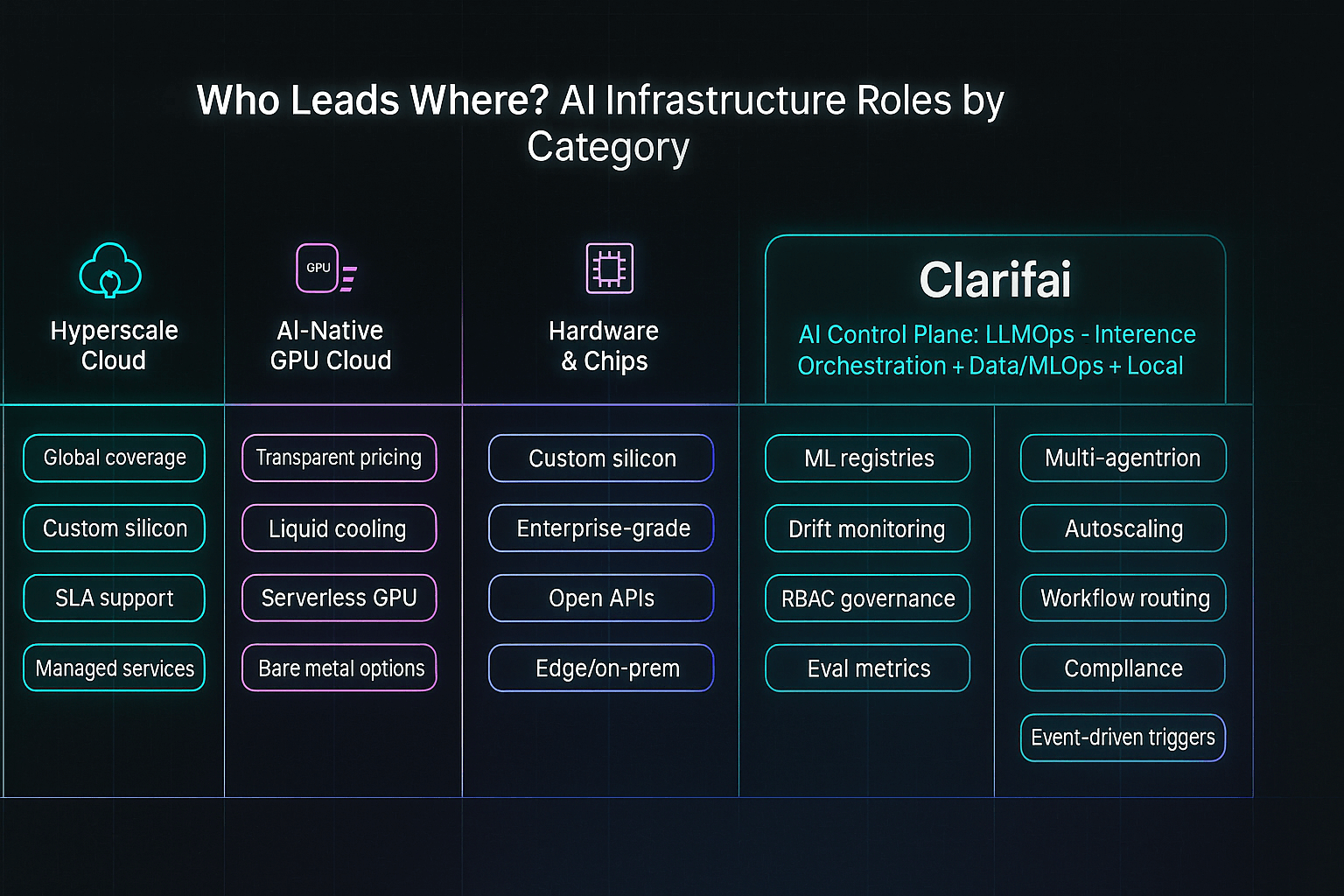
How Are AI Infrastructure Providers Classified?

Compute and accelerators

The compute layer supplies raw power for AI. It includes GPUs, TPUs, AI ASICs, and emerging photonic chips. Major hardware companies like NVIDIA, AMD, Intel, and Cerebras dominate, but specialized providers—AWS Trainium/Inferentia, Groq, Etched, Tenstorrent—deliver custom chips for specific tasks. Photonic chips promise almost zero energy use in convolution operations. Later sections cover each vendor in more detail.

Cloud & hyperscale platforms

Major hyperscalers provide all-in-one stacks that combine computing, storage, and AI services. AWS, Google Cloud, Microsoft Azure, IBM, and Oracle offer managed training, pre-built foundation models, and bespoke chips. Regional clouds like Alibaba and Tencent serve local markets. These platforms attract enterprises seeking security, global availability, and automated deployment.

AI‑native cloud start‑ups

New entrants such as CoreWeave, Lambda Labs, Together AI, and Voltage Park focus on GPU-rich clusters optimized for AI workloads. They offer on-demand pricing, transparent billing, and quick scaling without the overhead of general-purpose clouds. Some, like Groq and Tenstorrent, create dedicated chips for ultra-low-latency inference.

DataOps, observability & orchestration

DataOps 2.0 platforms handle data ingestion, classification, versioning, and governance. Tools like Databricks, MLflow, ClearML, and Hugging Face provide training pipelines and model registries. Observability services (e.g., Arize AI, WhyLabs, Credo AI) monitor performance, bias, and drift. Frameworks like LangChain, LlamaIndex, Modal, and Foundry enable developers to link models and agents for complex tasks. These layers are essential for deploying AI in real-world environments.

Expert Opinions

  • Modular stacks: Bessemer points out that the AI infrastructure stack is increasingly modular—different providers cover compute, deployment, data management, observability, and orchestration.
  • Hybrid deployments: Organizations leverage cloud, hybrid, and on-prem deployments to balance cost, performance, and data sovereignty.
  • Governance importance: Governance is now seen as central, covering security, compliance, and ethics.

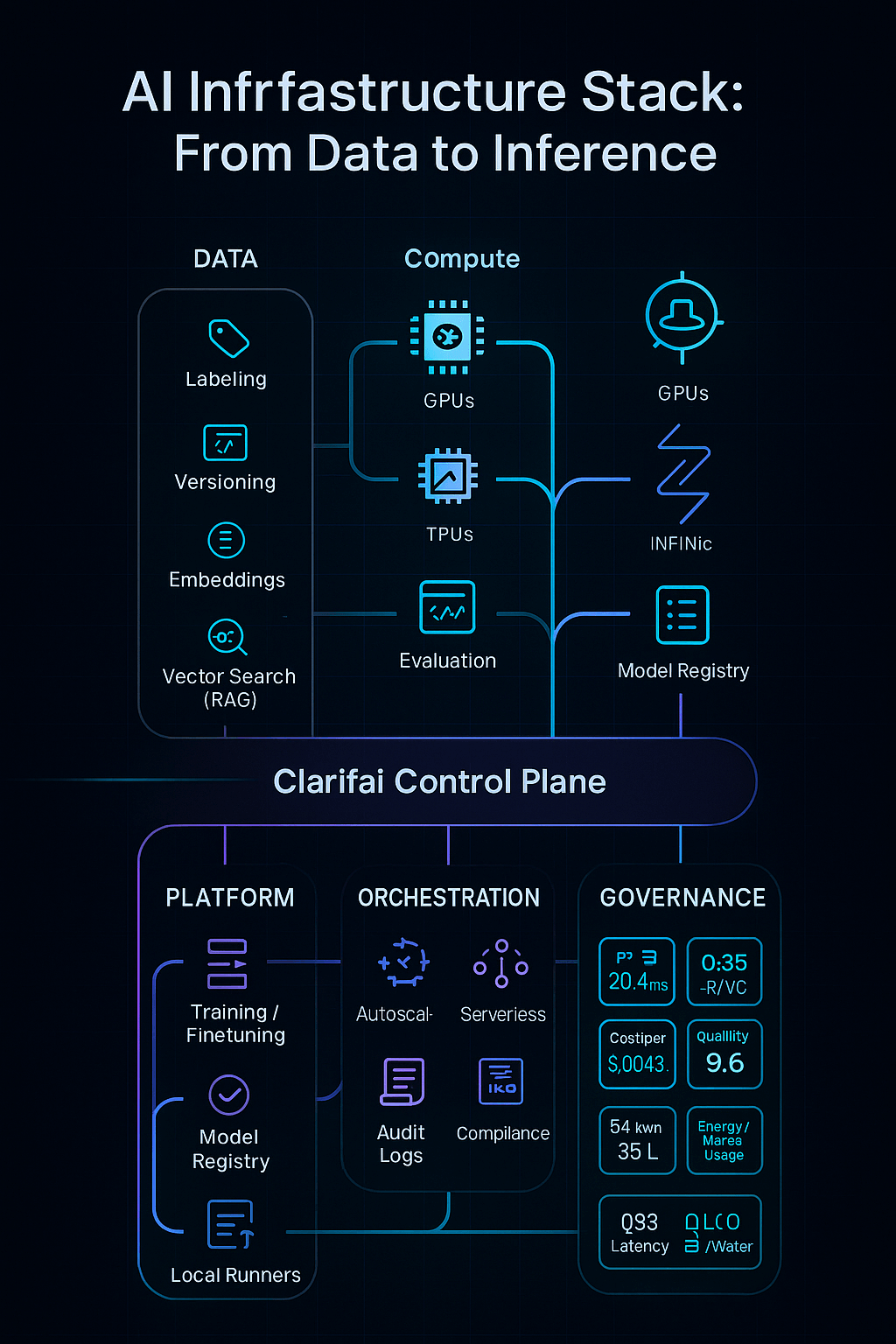
AI Infrastructure Stack


Who Are the Top AI Infrastructure Companies?

Clarifai:

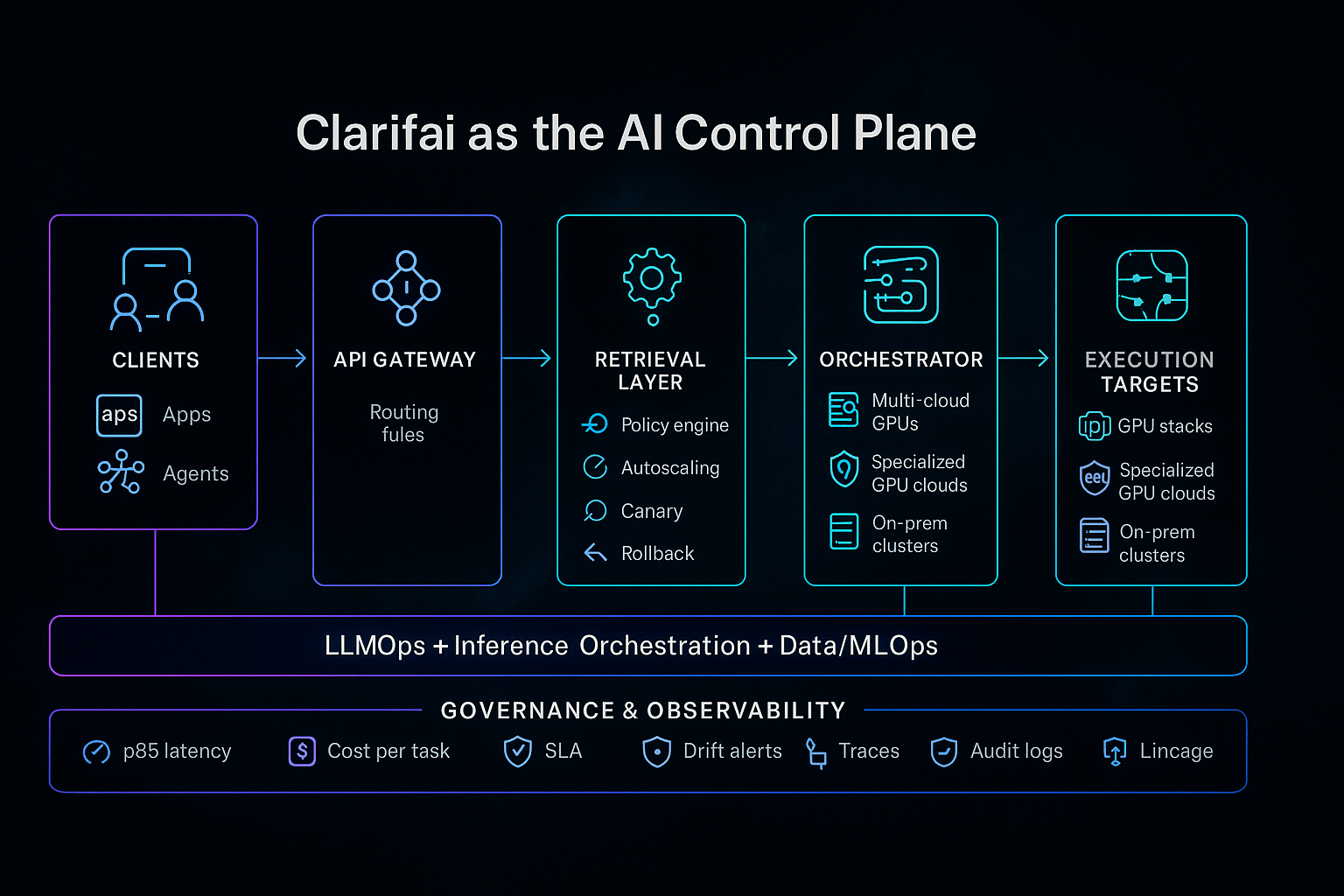
Clarifai stands out in the LLMOps + Inference Orchestration + Data/MLOps space, serving as an AI control plane. It links data, models, and compute across cloud, VPC, and edge environments—unlike hyperscale clouds that focus primarily on raw compute. Clarifai’s key strengths include:

  • Compute orchestration that routes workloads to the best-fit GPUs or specialized processors across clouds or on-premises.
  • Autoscaling inference endpoints and Local Runners for air-gapped or low-latency deployments, enabling rapid deployment with predictable costs.
  • Integration of data labeling, vector search, retrieval-augmented generation (RAG), finetuning, and evaluation into one governed workflow—eliminating brittle glue code.
  • Enterprise governance with approvals, audit logs, and role-based access control to ensure compliance and traceability.
  • A multi-cloud and on-prem strategy to reduce total cost and prevent vendor lock-in.

For organizations seeking both control and scale, Clarifai becomes the infrastructure backbone—reducing the total cost of ownership and ensuring consistency from lab to production.

Clarifai - Ai infrastructure

Amazon Web Services:

AWS excels at AI infrastructure. SageMaker simplifies model training, tuning, deployment, and monitoring. Bedrock provides APIs to both proprietary and open foundation models. Custom chips like Trainium (training) and Inferentia (inference) offer excellent price-performance. Nova, a family of generative models, and Graviton processors for general compute add versatility. The global network of AWS data centers ensures low-latency access and regulatory compliance.

Expert Opinions

  • Accelerators: AWS’s Trainium chips deliver up to 30 % better price-performance than comparable GPUs.
  • Bedrock’s flexibility: Integration with open-source frameworks lets developers fine-tune models without worrying about infrastructure.
  • Serverless inference: AWS supports serverless inference endpoints, reducing costs for applications with bursty traffic.

Google Cloud’s AI:

At Google Cloud, Vertex AI anchors the AI stack—managing training, tuning, and deployment. TPUs accelerate training for large models such as Gemini and PaLM. Vertex integrates with BigQuery, Dataproc, and Datastore for seamless data ingestion and management, and supports pre-built pipelines.

Insights from Experts

  • TPU advantage: TPUs handle matrix multiplication efficiently, ideal for transformer models.
  • Data fabric: Integration with Google’s data tools ensures seamless operations.
  • Open models: Google releases models like Gemini to encourage collaboration while leveraging its compute infrastructure.

Microsoft Azure AI

Microsoft Azure AI offers AI services through Azure Machine Learning, Azure OpenAI Service, and Foundry. Users can choose from NVIDIA GPUs, B200 GPUs, and NP-series instances. The Foundry marketplace introduces a real-time compute market and multi-agent orchestration. Responsible AI tools help developers evaluate fairness and interpretability.

Experts Highlight

  • Deep integration: Azure aligns closely with Microsoft productivity tools and offers robust identity and security.
  • Partner ecosystem: Collaboration with OpenAI and Databricks enhances its capabilities.
  • Innovation in Foundry: Real-time compute markets and multi-agent orchestration show Azure’s move beyond traditional cloud resources.

IBM Watsonx and Oracle Cloud Infrastructure

IBM Watsonx offers capabilities for building, governing, and deploying AI across hybrid clouds. It provides a model library, data storage, and governance layer to manage the lifecycle and compliance. Oracle Cloud Infrastructure delivers AI-enabled databases, high-performance computing, and transparent pricing.

Expert Opinions

  • Hybrid focus: IBM is strong in hybrid and on-prem solutions—suitable for regulated industries.
  • Governance: Watsonx emphasizes governance and responsible AI, appealing to compliance-driven sectors.
  • Integrated data: OCI ties AI services directly to its autonomous database, reducing latency and data movement.

What About Regional Cloud and Edge Providers?

Alibaba Cloud and Tencent Cloud offer AI chips such as Hanguang and NeuroPilot, tailored to local rules and languages in Asia-Pacific. Edge providers like Akamai and Fastly enable low-latency inference at network edges, essential for IoT and real-time analytics.


Which Companies Lead in Hardware and Chip Innovation?

How Does NVIDIA Maintain Its Performance Leadership?

NVIDIA leads the market with its H100, B100, and upcoming Blackwell GPUs. These chips power many generative AI models and data centers. DGX systems bundle GPUs, networking, and software for optimized performance. Features such as tensor cores, NVLink, and fine-grained compute partitioning support high-throughput parallelism and better utilization.

Expert Advice

  • Performance gains: The H100 significantly outperforms the previous generation, offering more performance per watt and higher memory bandwidth.
  • Ecosystem strength: NVIDIA’s CUDA and cuDNN are foundations for many deep-learning frameworks.
  • Plug-and-play clusters: DGX-SuperPODs allow enterprises to rapidly deploy supercomputing clusters.

What Are AMD and Intel Doing?

AMD competes with MI300X and MI400 GPUs, focusing on high-bandwidth memory and cost efficiency. Intel develops Gaudi accelerators and Habana Labs technology while integrating AI features into Xeon processors.

Expert Insights

  • Cost-effective performance: AMD’s GPUs often deliver excellent price-performance, especially for inference workloads.
  • Gaudi’s unique design: Intel uses specialized interconnects to speed tensor operations.
  • CPU-level AI: Integrating AI acceleration into CPUs benefits edge and mid-scale workloads.

Who Are the Specialized Chip Innovators?

  • AWS Trainium/Inferentia lowers cost per FLOP and energy use for training and inference.
  • Cerebras Systems produces the Wafer-Scale Engine (WSE), boasting 850 k AI cores.
  • Groq designs chips for ultra-low-latency inference, ideal for real-time applications like autonomous vehicles.
  • Etched builds the Sohu ASIC for transformer inference, dramatically improving energy efficiency.
  • Tenstorrent employs RISC-V cores and is building decentralized data centers.
  • Photonic chip makers like Lightmatter use light to conduct convolution with almost no energy.

Expert Perspectives

  • Diversifying hardware: The rise of specialized chips signals a move toward task-specific hardware.
  • Energy efficiency: Photonic and transformer-specific chips cut power consumption dramatically.
  • Emerging vendors: Companies like Groq, Tenstorrent, and Lightmatter show that tech giants are not the only ones who can innovate.

Which Startups and Data Center Providers Are Shaping AI Infrastructure?

What Is CoreWeave’s Value Proposition?

CoreWeave evolved from cryptocurrency mining to become a prominent GPU cloud provider. It provides on-demand access to NVIDIA’s latest Blackwell and RTX PRO GPUs, coupled with high-performance InfiniBand networking. Pricing can be up to 80 % lower than traditional clouds, making it popular with startups and labs.

Expert Advice

  • Scale advantage: CoreWeave manages hundreds of thousands of GPUs and is expanding data centers with $6 billion in funding.
  • Transparent pricing: Customers can clearly see costs and reserve capacity for guaranteed availability.
  • Enterprise partnerships: CoreWeave collaborates with AI labs to provide dedicated clusters for large models.

How Does Lambda Labs Stand Out?

Lambda Labs offers developer-friendly GPU clouds with 1-Click clusters and transparent pricing—A100 at $1.25/hr, H100 at $2.49/hr. It raised $480 million to build liquid-cooled data centers and earned SOC2 Type II certification.

Expert Advice

  • Transparency: Clear pricing reduces surprise fees.
  • Compliance: SOC2 and ISO certifications make Lambda appealing for regulated industries.
  • Innovation: Liquid-cooled data centers enhance energy efficiency and density.

What Do Together AI, Voltage Park, and Tenstorrent Offer?

  • Together AI is building an open-source cloud with pay-as-you-go compute.
  • Voltage Park offers clusters of H100 GPUs at competitive prices.
  • Tenstorrent integrates RISC-V cores and aims for decentralized data centers.

Expert Opinions

  • Demand drivers: The shortage of GPUs and high cloud costs drive the rise of AI data center startups.
  • Emerging names: Other players include Lightmatter, Iren, Rebellions.ai, and Rain AI.
  • Open ecosystems: Together AI fosters collaboration by releasing models and tools publicly.

AI Infrastructure Roles by Category


What About Data & MLOps Infrastructure: From DataOps 2.0 to Observability?

Why Is DataOps Critical for AI?

DataOps oversees data gathering, cleaning, transformation, labeling, and versioning. Without robust DataOps, models risk drift, bias, and reproducibility issues. In generative AI, managing millions of data points demands automated pipelines. Bessemer calls this DataOps 2.0, emphasizing that data pipelines must scale like the compute layer.

Why Is Observability Essential?

After deployment, models require continuous monitoring to catch performance degradation, bias, and security threats. Tools like Arize AI and WhyLabs track metrics and detect drift. Governance platforms like Credo AI and Aporia ensure compliance with fairness and privacy requirements. Observability grows critical as models interact with real-time data and adapt via reinforcement learning.

How Do Orchestration Frameworks Work?

LangChain, LlamaIndex, Modal, and Foundry allow developers to stitch together multiple models or services to build LLM agents, chatbots, and autonomous workflows. These frameworks manage state, context, and errors. Clarifai’s platform offers built-in workflows and compute orchestration for both local and cloud environments. With Clarifai’s Local Runners, you can train models where data resides and deploy inference on Clarifai’s managed platform for scalability and privacy.

Expert Insights

  • Production gap: Only 5–10 % of businesses have generative AI in production because DataOps and orchestration are too complex.
  • Workflow automation: Orchestration frameworks are essential as AI moves from static endpoints to agent-based applications.
  • Clarifai integration: Clarifai’s dataset management, annotations, and workflows make DataOps and MLOps accessible at scale.

What Criteria Matter When Comparing AI Infrastructure Providers?

How Important Are Compute Power and Scalability?

Having cutting-edge hardware is essential. Providers should offer latest GPUs or specialized chips (H100, B200, Trainium) and support large clusters. Compare network bandwidth (InfiniBand vs. Ethernet) and memory bandwidth because transformer models are memory-bound. Scalability depends on a provider’s ability to quickly expand capacity across regions.

Why Is Pricing Transparency Crucial?

Hidden expenses can derail projects. Many hyperscalers have complex pricing models based on compute hours, storage, and egress. AI-native clouds like CoreWeave and Lambda Labs stand out with simple pricing. Consider reserved capacity discounts, spot pricing, and serverless inference to minimize costs. Clarifai’s pay-as-you-go model auto-scales inference for cost optimization.

How Does Performance and Latency Affect Your Choice?

Performance varies across hardware generations, interconnects, and software stacks. MLPerf benchmarks offer standardized metrics. Latency matters for real-time applications (e.g., chatbots, self-driving cars). Specialized chips like Groq and Sohu achieve microsecond-level latencies. Evaluate how providers handle bursts and maintain consistent performance.

Why Focus on Sustainability and Energy Efficiency?

AI’s environmental impact is significant:

  • Data centers used 460 TWh of electricity in 2022; projected to exceed 1,050 TWh by 2026.
  • Training GPT-3 consumed 1,287 MWh and emitted 552 tons of CO₂.
  • Photonic chips offer near-zero energy convolution, and cooling accounts for considerable water use.

Choose providers committed to renewable energy, efficient cooling, and carbon offsets. Clarifai’s ability to orchestrate compute on local hardware reduces data transport and emissions.

How Does Security & Compliance Affect Decisions?

AI systems must protect sensitive data and follow regulations. Ask about SOC2, ISO 27001, and GDPR certifications. 55 % of businesses report increased cyber threats after adopting AI, and 46 % cite cybersecurity gaps. Look for providers with encryption, granular access controls, audit logging, and zero-trust architectures. Clarifai offers enterprise-grade security and on-prem deployment options.

What About Ecosystem & Integration?

Choose providers compatible with popular frameworks (PyTorch, TensorFlow, JAX), container tools (Docker, Kubernetes), and hybrid deployments. A broad partner ecosystem enhances integration. Clarifai’s API interoperates with external data sources and supports REST, gRPC, and Edge run times.

Expert Insights

  • Skills shortage: 61 % of firms lack specialists in computing; 53 % lack data scientists.
  • Capital intensity: Building full-stack AI infrastructure costs billions—only well-funded companies can compete.
  • Risk management: Investments should align with business goals and risk tolerance, as TrendForce advises.

What Is the Environmental Impact of AI Infrastructure?

How Big Are the Energy and Water Demands?

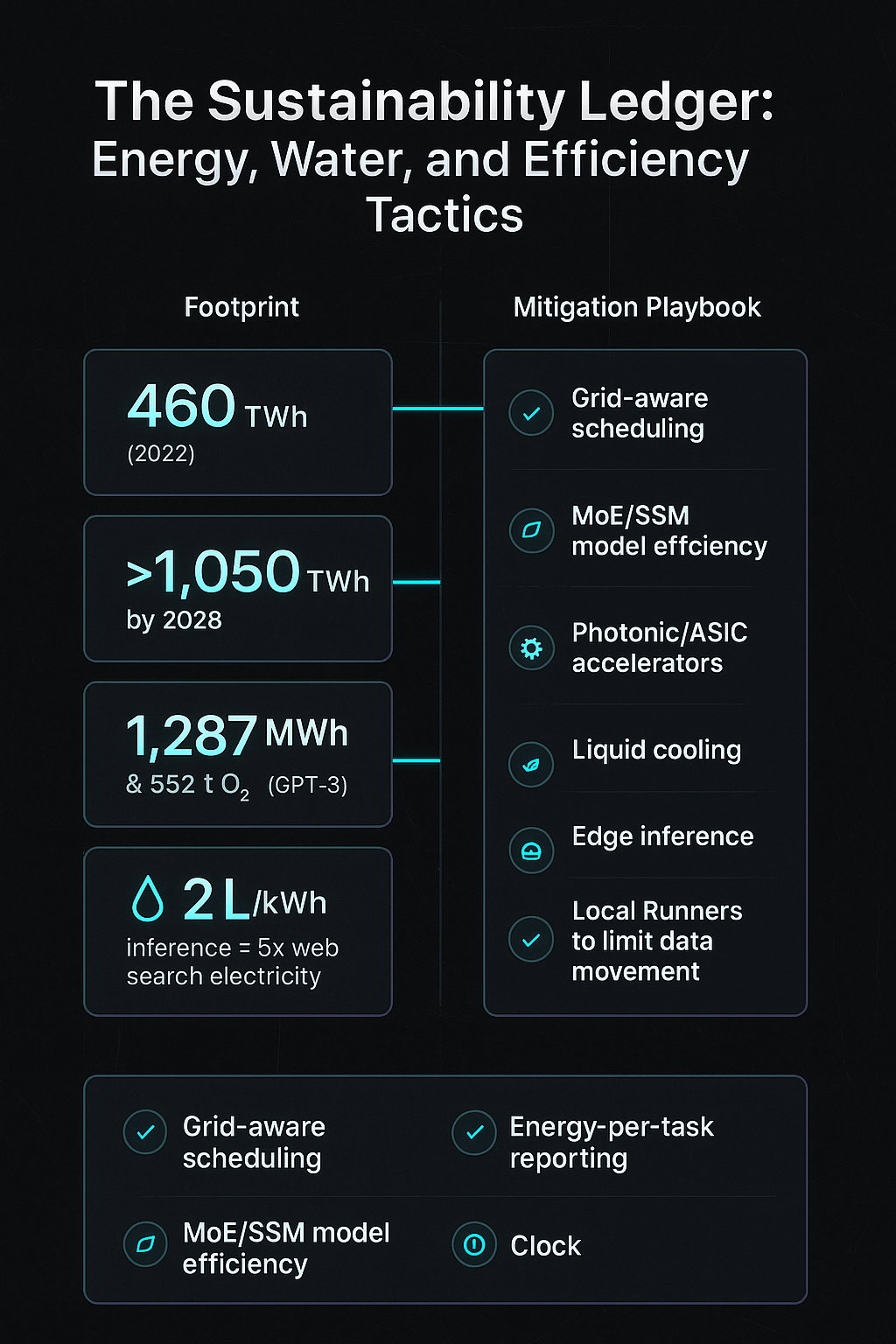
AI infrastructure consumes huge amounts of resources. Data centers used 460 TWh of electricity in 2022 and may surpass 1,050 TWh by 2026. Training GPT-3 used 1,287 MWh and emitted 552 tons of CO₂. Inference consumes five times more electricity than a typical web search. Cooling also demands around 2 liters of water per kilowatt-hour.

How Are Data Centers Adapting?

Data centers adopt energy-efficient chips, liquid cooling, and renewable power. HPE’s fanless liquid-cooled design reduces electricity and noise. Photonic chips eliminate resistance and heat. Companies like Iren and Lightmatter build data centers tied to renewable energy. The ACEEE warns that AI data centers could use 9 % of U.S. electricity by 2030, advocating for energy-per-AI-task metrics and grid-aware scheduling.

What Sustainable Practices Can Businesses Adopt?

  • Better scheduling: Run non-urgent training jobs during off-peak periods to utilize surplus renewable energy.
  • Model efficiency: Apply techniques like state-space models and Mixture-of-Experts to reduce compute needs.
  • Edge inference: Deploy models locally to reduce data center traffic and latency.
  • Monitoring & reporting: Track per-model energy use and work with providers who disclose carbon footprints.
  • Clarifai’s local runners: Train on-prem and scale inference via Clarifai’s orchestrator to cut data transfer.

Expert Opinions

  • Future grids: The ACEEE recommends aligning workloads with renewable availability.
  • Transparent metrics: Without clear metrics, companies risk overbuilding infrastructure.
  • Continuous innovation: Photonic computing, RISC-V, and dynamic scheduling are critical for sustainable AI.

Sustainability Ledger


What Are the Challenges and Future Trends in AI Infrastructure?

Why Are Compute Scalability and Memory Bottlenecks Critical?

As Moore’s Law slows, scaling compute becomes difficult. Memory bandwidth now limits transformer training. Techniques like Ring Attention and KV-cache optimization reduce compute load. Mixture-of-Experts distributes work across multiple experts, lowering memory needs. Future GPUs will feature larger caches and faster HBM.

What Drives Capital Intensity and Supply Chain Risks?

Building AI infrastructure is extremely capital-intensive. Only large tech firms and well-funded startups can build chip fabs and data centers. Geopolitical tensions and export restrictions create supply chain risks, delaying hardware and driving the need for diversified architecture and regional production.

Why Are Transparency and Explainability Important?

Stakeholders demand explainable AI, but many providers keep performance data proprietary. Openness is difficult to balance with competitive advantage. Vendors are increasingly providing white-box architectures, open benchmarks, and model cards.

How Are Specialized Hardware and Algorithms Evolving?

Emerging state-space models and transformer variants require different hardware. Startups like Etched and Groq build chips tailored for specific use cases. Photonic and quantum computing may become mainstream. Expect a diverse ecosystem with multiple specialized hardware types.

What’s the Impact of Agent-Based Models and Serverless Compute?

Agent-based architectures demand dynamic orchestration. Serverless GPU backends like Modal and Foundry allocate compute on-demand, working with multi-agent frameworks to power chatbots and autonomous workflows. This approach democratizes AI development by removing server management.

Expert Opinions

  • Goal-driven strategy: Align investments with clear business objectives and risk tolerance.
  • Infrastructure scaling: Plan for future architectures despite uncertain chip roadmaps.
  • Geopolitical awareness: Diversify suppliers and develop contingency plans to handle supply chain disruptions.

How Should Governance, Ethics, and Compliance Be Addressed?

What Does the Governance Layer Involve?

Governance covers security, privacy, ethics, and regulatory compliance. AI providers must implement encryption, access controls, and audit trails. Frameworks like SOC2, ISO 27001, FedRAMP, and the EU AI Act ensure legal adherence. Governance also demands ethical considerations—avoiding bias, ensuring transparency, and respecting user rights.

How Do You Manage Compliance and Risk?

Perform risk assessments considering data residency, cross-border transfers, and contractual obligations. 55 % of businesses experience increased cyber threats after adopting AI. Clarifai helps with compliance through granular roles, permissions, and on-premise options, enabling safe deployment while reducing legal risks.

Expert Opinions

  • Transparency challenge: Stakeholders demand greater transparency and clarity.
  • Fairness and bias: Evaluate fairness and bias within the model lifecycle, using tools like Clarifai’s Data Labeler.
  • Regulatory horizon: Stay updated on emerging laws (e.g., EU AI Act, US Executive Orders) and adapt infrastructure accordingly.

Final Thoughts and Suggestions

AI infrastructure is evolving rapidly as demand and technology progress. The market is shifting from generic cloud platforms to specialized providers, custom chips, and agent-based orchestration. Environmental concerns are pushing companies toward energy-efficient designs and renewable integration. When evaluating vendors, organizations must look beyond performance to consider cost transparency, security, governance, and environmental impact.

Actionable Recommendations

  • Choose hardware and cloud services tailored to your workload (training, inference, deployment). Use dedicated chips (like Trainium or Sohu) for high-volume inference; reserve GPUs for large training jobs.
  • Plan capacity ahead: The demand for GPUs often exceeds supply. Reserve resources or partner with providers who can guarantee availability.
  • Optimize sustainability: Use model-efficient techniques, schedule jobs during renewable peaks, and choose providers with transparent carbon reporting.
  • Prioritize governance: Ensure providers meet compliance standards and offer robust security. Include fairness and bias monitoring from the start.
  • Leverage Clarifai: Clarifai’s platform manages datasets, annotations, model deployment, and orchestration. Local runners allow on-prem training and seamless scaling to the cloud, balancing performance, cost, and data sovereignty.

FAQs

Q1: How do AI infrastructure and IT infrastructure differ?
A: AI infrastructure uses specialized accelerators, DataOps pipelines, observability tools, and orchestration frameworks for training and deploying ML models, whereas traditional IT infrastructure handles generic compute, storage, and networking.

Q2: Which cloud service is best for AI workloads?
A: It depends on the needs. AWS offers the most custom chips and managed services; Google Cloud excels with high-performance TPUs; Azure integrates seamlessly with business tools. For GPU-heavy workloads, specialized clouds like CoreWeave and Lambda Labs may provide better value. Compare compute options, pricing transparency, and ecosystem support.

Q3: How can I make my AI deployment more sustainable?
A: Use energy-efficient hardware, schedule jobs during periods of low demand, employ Mixture-of-Experts or state-space models, partner with providers investing in renewable energy, and report carbon metrics. Running inference at the edge or using Clarifai’s local runners reduces data center usage.

Q4: What should I look for in start-up AI clouds?
A: Seek transparent pricing, access to the latest GPUs, compliance certifications, and reliable customer support. Understand their approach to demand spikes, whether they offer reserved instances, and evaluate their financial stability and growth plans.

Q5: How does Clarifai integrate with AI infrastructure?
A: Clarifai provides a unified platform for dataset management, annotation, model training, and inference deployment. Its compute orchestrator connects to multiple cloud providers or on-prem servers, while local runners enable training and inference in controlled environments, balancing speed, cost, and compliance.


How Replit Made Its AI Agent 10X More Autonomous in a Single Leap


AI coding platform Replit just raised $250 million, tripling its valuation to $3 billion. But the real story isn’t just the money. It’s the launch of Agent 3, a next-generation AI developer that can build, test, and debug applications almost entirely on its own. Continue reading “How Replit Made Its AI Agent 10X More Autonomous in a Single Leap”

Model Quantization: Meaning, Benefits & Techniques


Introduction

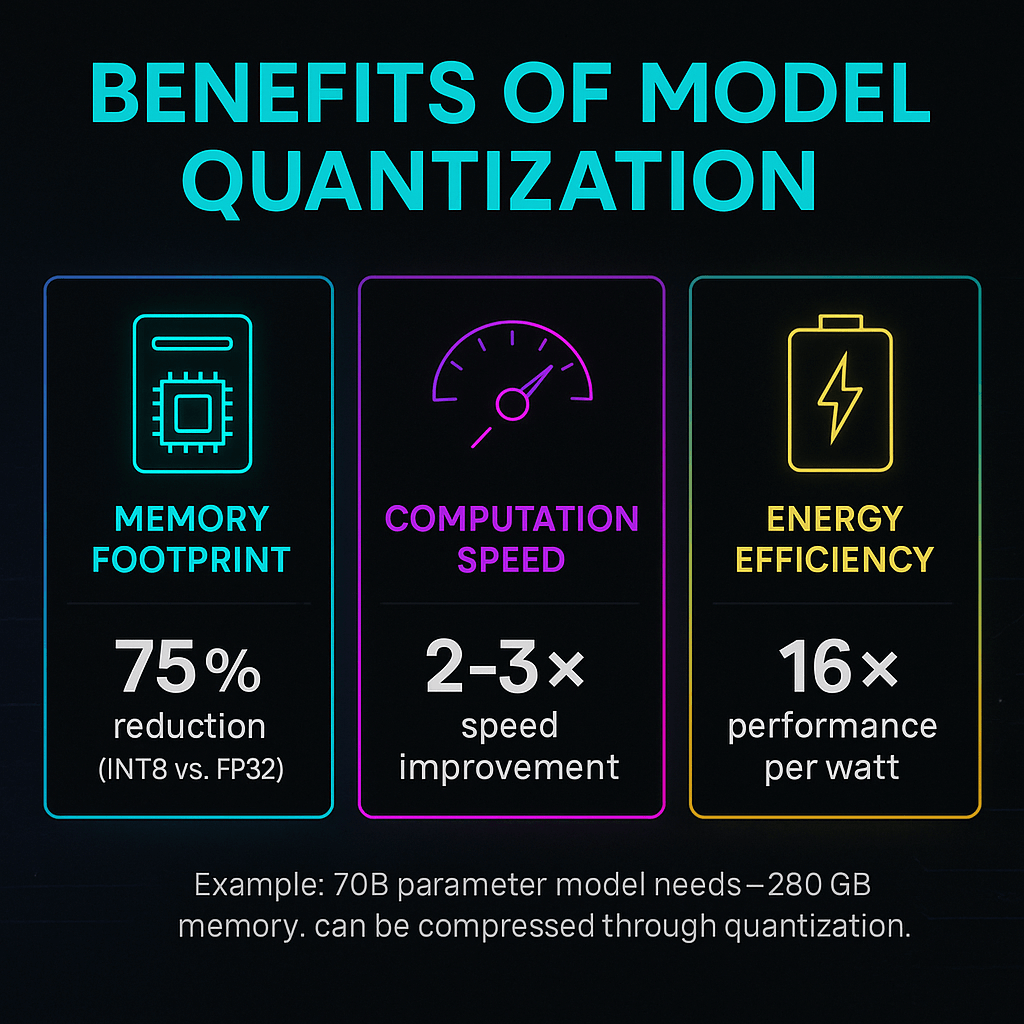
In the age of ever‑growing deep neural networks, models like large language models (LLMs) and vision–language models (VLMs) are scaling to billions of parameters, making them incredibly powerful but also resource‑hungry. A 70‑billion‑parameter model needs roughly 280 GB of memory, making deployment on standard hardware or edge devices impractical. Model quantization provides a solution by reducing the precision of weights and activations, compressing the model footprint and improving computational efficiency without a complete redesign. Research shows that reducing from 32‑bit to 8‑bit representation can offer a 4× reduction in model size and 2–3× speedup while delivering up to a 16× increase in performance per watt. This article demystifies quantization, explores different techniques, highlights emerging research, and explains how Clarifai’s platform can help you harness quantization for efficient AI deployment.

After reading this comprehensive guide, you’ll understand what quantization is, why it’s important, how to implement it, the latest trends and innovations, and common misconceptions. We also weave in real‑world case studies, insights from leading researchers, and subtle pointers on using Clarifai’s compute orchestration and inference platform to make your quantized models production‑ready.

Quick Digest

To give you a quick overview, here are the core points covered in this article:

  • Definition and intuition – what quantization means and how it reduces model complexity by mapping continuous values to a finite set of integers.
  • Benefits and motivations – why quantization delivers dramatic savings in memory, energy, and latency; for example, INT8 quantization can provide up to 16× performance per watt and 4× lower memory bandwidth consumption compared with FP32 models.
  • Types of quantization – post‑training vs. quantization‑aware training (QAT), dynamic vs. static quantization, weight‑only schemes, and more.
  • Key parameters and challenges – understanding bit widths, scales, zero‑points, symmetric vs. asymmetric quantization, calibration, and common pitfalls.
  • State‑of‑the‑art innovations – exploring new techniques like ZeroQAT, FlatQuant, Commutative Vector Quantization (CommVQ), and VLMQ, which reduce model size even further while preserving accuracy.
  • Practical implementation steps – a step‑by‑step guide to quantizing your model, plus tools and libraries that support quantization (PyTorch, TensorFlow, hardware‑specific optimizers, etc.).
  • Clarifai integration – how Clarifai’s compute orchestration, model inference engine, and local runners simplify deployment of quantized models in production.
  • Future trends and ethical considerations – where quantization is headed, how to address potential fairness issues, and how to evaluate quantized models responsibly.

Let’s dive deep into the world of quantization and unlock efficiency without sacrificing capability.

Understanding Model Quantization in Simple Terms

Quick Summary: What does model quantization mean?

Model quantization reduces the numerical precision of neural network weights and activations—from high‑precision floats like FP32 to low‑precision integers or fixed‑point formats—so that the model consumes less memory and runs faster. Instead of storing 32‑bit floating‑point numbers, we map them to a finite set of discrete values, such as 8‑bit or 4‑bit integers. This mapping is defined by a scale factor and a zero‑point, ensuring that continuous values are represented faithfully within a smaller range. By lowering precision, models can leverage hardware‑accelerated integer arithmetic and compress weights to save bandwidth.

Breaking it Down

Imagine you’re measuring temperatures with a highly precise digital thermometer that shows values like 23.456 °C. If you only need to know whether it’s approximately 23 °C or 24 °C, you could round to the nearest whole number. Quantization applies a similar concept to neural networks: we round or rescale continuous weights and activations to smaller integer representations. This reduces storage from 32 bits to 8 bits (or even less), shrinking the model size by around 4× and enabling 2–3× faster inference.

Quantization uses two main parameters:

  1. Scale (S) – a scaling factor that converts floating‑point values into integer ranges. For example, to map values into an 8‑bit range, you compute a scale based on the maximum absolute value in the tensor.
  2. Zero‑point (Z) – an offset that aligns zero in floating‑point space to zero in integer space. Symmetric quantization sets the zero‑point to zero, which is efficient but wastes range when distributions are skewed. Asymmetric quantization uses a non‑zero zero‑point to fully utilize the integer range, improving accuracy for skewed distributions.

Together, these parameters enable mapping between floating‑point tensors and low‑precision integers, maintaining as much information as possible within the reduced bit width. When quantized weights and activations are multiplied and accumulated, hardware can use efficient integer arithmetic, boosting throughput and reducing energy consumption.

Expert Insights

  • Compression and speed trade‑off – Studies show that moving from 32‑bit to 8‑bit integers gives a 4× model size reduction and 2–3× speedup on typical hardware. Moving further down to 4‑bit reduces size 8× but requires more careful calibration.
  • Energy efficiency – Qualcomm’s research highlights that INT8 quantization provides up to a 16× increase in performance per watt and 4× lower memory bandwidth usage compared with FP32 models. This is crucial for edge devices where power and memory are limited.
  • LLM resource savings – According to a resource‑efficient LLM study, a 70 B model normally demands about 280 GB of memory. Quantization can compress these models into forms that fit on a single GPU, enabling democratized access to large models.
  • Real data shows minimal accuracy loss – Research shows that carefully calibrated INT8 and 4‑bit quantization typically incurs less than 1 % accuracy drop on major tasks.

Creative Example

Think of high‑resolution digital photography. A RAW image captures huge amounts of detail but consumes gigabytes of storage. If you’re sharing photos on social media, you often compress the image to JPEG—it’s still crisp to the human eye but much smaller. Quantization is like compressing your AI model: you keep the important patterns while discarding unneeded precision. The result is a model that runs quickly on a smartphone without lugging around the “RAW file” weight.

Why Model Quantization Matters for AI Efficiency

Quick Summary: Why should we care about quantization?

Quantization is essential because it transforms bloated neural networks into leaner versions that are faster, energy‑efficient, and deployable on resource‑constrained hardware. By trading precision for efficiency, quantization enables AI to run on edge devices, reduces cloud inference costs, and even improves generalization by adding regularization noise during training.

The Case for Efficiency

Modern AI models are growing exponentially. Without compression, deploying them at scale becomes cost‑prohibitive and environmentally unsustainable. Quantization directly addresses three pain points:

  1. Memory footprint – High‑precision models occupy massive memory. Quantizing to 8‑bit cuts memory usage by 75 % and lowers memory bandwidth requirements. For LLMs that typically need hundreds of gigabytes, this makes the difference between using expensive multi‑GPU setups and running on a single GPU or even edge hardware.
  2. Computation speed – Lower‑precision operations are faster and more parallelizable. Quantization leverages specialized hardware (such as integer arithmetic units) to deliver 2–3× throughput improvements and up to 16× higher performance per watt.
  3. Energy consumption – AI inference can be energy‑intensive. A recent article from Qualcomm shows that moving from FP32 to INT8 reduces energy consumption significantly, leading to power savings and enabling longer battery life on mobile devices.

In addition to these tangible benefits, quantization also introduces noise that can act as a form of regularization, sometimes improving a model’s generalization and robustness. By compressing weights, the model might become less sensitive to small perturbations and thus better at handling outliers.

Impact on Edge and Cloud Deployment

Edge devices such as drones, wearables, and smart cameras have limited compute resources. Quantization makes it feasible to deploy complex models like object detectors or voice assistants locally, ensuring low‑latency responses and data privacy, since data doesn’t need to travel to the cloud. In the cloud, quantization reduces inference latency and energy costs, making AI services more sustainable and affordable.

Expert Insights

  • Energy savings translate into sustainability – USC Viterbi researchers note that quantization reduces training time and hardware resources, enabling more efficient learning and lowering energy consumption. Less energy usage means reduced carbon footprint, an increasingly important consideration for AI practitioners.
  • Improved generalization – Some studies show that noise introduced through quantization can act like a regularizer, improving model generalization on certain tasks. This counterintuitive benefit means you may get better performance on unseen data without additional training.
  • Edge AI adoption – Okoone explains that quantization is crucial for Edge AI, enabling models to run in real time on devices with constrained power budgets. By converting 32‑bit weights to 16‑bit or 8‑bit, you free up bandwidth and allow privacy‑preserving, on‑device inference.

Creative Example

Imagine you’re trying to fit several wardrobes worth of clothes into a single suitcase. By rolling your clothes tightly (analogous to quantization), you can pack more items without wrinkling them—saving space and making travel easier. Quantization similarly packs neural network parameters into a smaller space so your AI “suitcase” fits in a phone or IoT device.

Benefits of Model Quantization

Different Types of Quantization: PTQ, QAT, Dynamic, Static, and Weight‑Only

Quick Summary: What quantization approaches exist, and when should you use them?

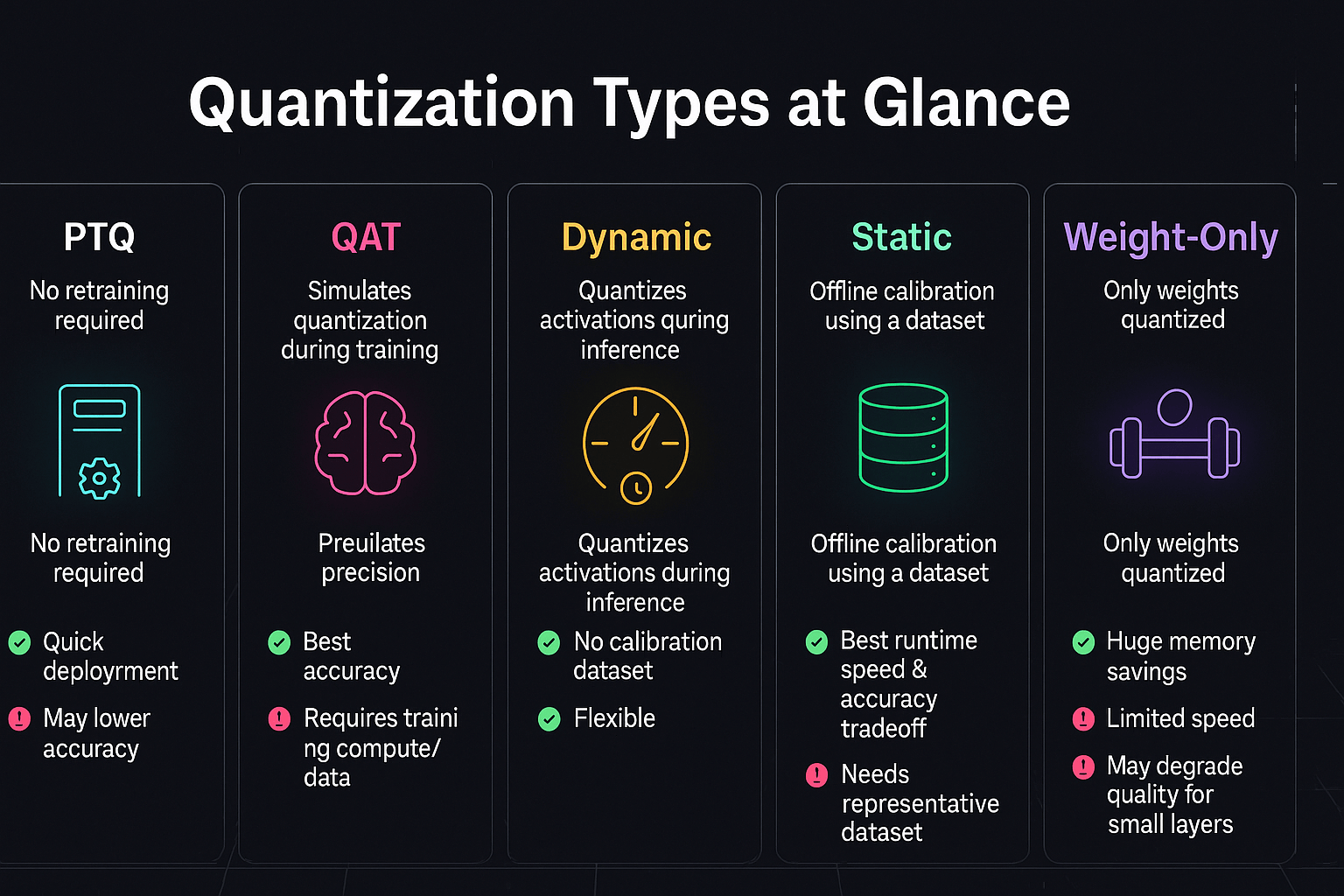
There are multiple quantization strategies, each balancing ease of use and accuracy. The main categories are post‑training quantization (PTQ), quantization‑aware training (QAT), dynamic quantization, static quantization, and weight‑only quantization. PTQ converts a pre‑trained model to low precision without retraining; QAT simulates quantization during training so the model can adapt to precision loss; dynamic quantization quantizes activations on the fly during inference; static quantization pre‑computes ranges using a calibration dataset; weight‑only quantization focuses exclusively on compressing weights and keeps activations in higher precision.

Post‑Training Quantization (PTQ)

PTQ is the simplest to implement. You take a trained model and quantize it after training. There are two flavors:

  1. Dynamic PTQ – Only weights are pre‑quantized; activations are quantized at inference time. It doesn’t require any calibration dataset and works well for models where activation distribution doesn’t vary significantly. Tools like PyTorch’s dynamic quantization API follow this approach.
  2. Static PTQ – Weights and activations are quantized offline using a calibration dataset to estimate activation ranges. Static PTQ achieves higher accuracy than dynamic PTQ because it accurately maps the activation distribution.

PTQ is ideal when you don’t have access to training data or when retraining is expensive. However, extremely low bit‑widths (e.g., 2‑bit) may cause significant accuracy drops with PTQ alone.

Quantization‑Aware Training (QAT)

QAT inserts fake quantization operations during training, allowing the model to adapt to low precision. It requires the original training data and additional compute but yields superior accuracy, especially at lower bit widths (e.g., 4‑bit). QAT can also mitigate the accuracy loss due to outliers in LLMs. Recently, researchers proposed ZeroQAT, which uses zeroth‑order optimization to perform QAT without backpropagation—reducing the computational and memory burden while retaining QAT’s benefits. By estimating gradients using only forward passes, ZeroQAT enables quantization‑aware learning for large models that previously couldn’t afford full backpropagation.

Dynamic vs. Static Quantization

The terms dynamic and static refer to how activation ranges are determined. Dynamic quantization computes quantization parameters on the fly during inference, making it flexible when activation ranges vary widely. Static quantization, by contrast, uses a pre‑computed calibration dataset to estimate the ranges and generally yields better accuracy because it approximates the distribution more closely. According to ’s overview, static quantization is typically applied to convolutional neural networks with a calibration dataset. Dynamic quantization is more common for LSTM and transformer models where activation distributions fluctuate.

Weight‑Only Quantization

Weight‑only quantization compresses only the model weights, leaving activations in higher precision (e.g., FP16 or FP8). This approach simplifies hardware design and still yields significant memory savings. Weight‑only schemes such as AWQ (Activation‑aware Weight Quantization) and GPTQ (Gradient Post‑Training Quantization) have been widely adopted for LLMs. Recent research also explores 2‑bit and 1‑bit weight quantization for transformer models, which can deliver dramatic compression when combined with techniques like outlier smoothing.

Expert Insights

  • Dataset requirements – ’s comparison chart shows that dynamic and weight‑only PTQ require no calibration dataset, making them attractive for use cases with limited data. Static PTQ and QAT require calibration or fine‑tuning datasets to compute activation ranges or backpropagate through quantization operations.
  • Performance vs. accuracy – Research indicates that PTQ typically sacrifices more accuracy when using very low bit‑widths, whereas QAT preserves accuracy but requires additional training time. Tools like ZeroQAT bridge this gap by enabling QAT without full backpropagation.
  • Use‑case suitability – Weight‑only quantization is best for hardware‑accelerated inference where activation precision is critical. Dynamic quantization is ideal for LSTMs and RNNs due to variable sequence lengths. Static PTQ with per‑channel quantization works well for CNNs.

Creative Example

Consider transporting water in different containers. Dynamic quantization is like using a flexible water bag that adjusts its shape based on the water volume—it’s adaptive but less precise. Static quantization is like pre‑filling rigid bottles of fixed sizes after measuring the water volume—more precise but requires planning. QAT is akin to training to pour water with those bottles from the start, ensuring there’s minimal spillage when the containers change size later.

Quantization Types

Key Parameters and Challenges in Quantization

Quick Summary: What controls quantization quality, and what are the challenges?

Quantization quality depends on bit width, scale, zero‑point selection, calibration strategy, and granularity. Challenges include distribution asymmetry, outlier handling, range clipping, computational overhead for calibration, and maintaining numerical stability. Ensuring fairness and avoiding catastrophic accuracy loss requires careful design.

Bit Width and Numerical Range

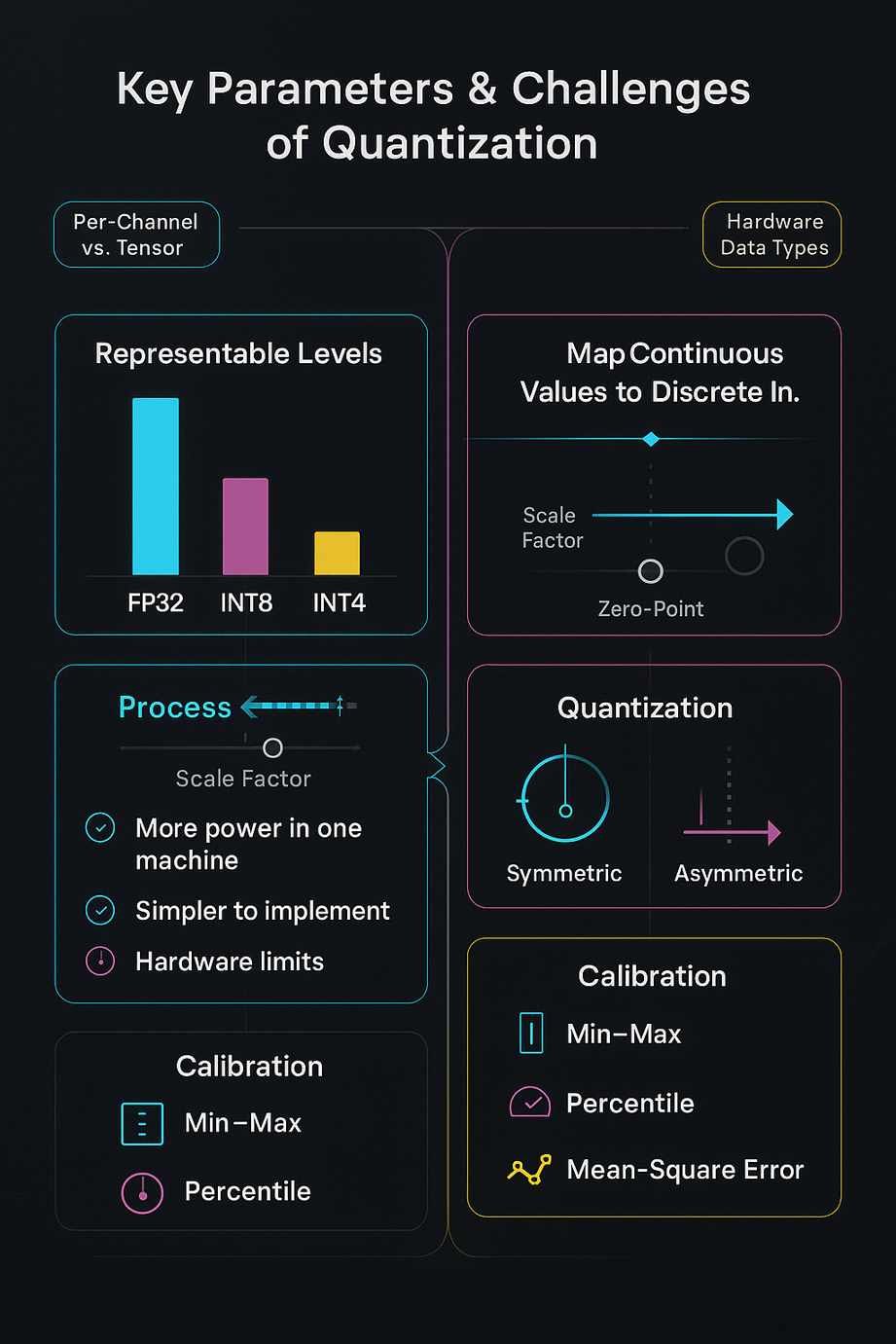
The bit width determines how many discrete levels are available. INT8 allows 256 levels, while INT4 offers only 16. Lower bit widths yield greater compression but increase quantization error. Per‑channel quantization, where each channel has its own scale and zero‑point, generally performs better than per‑tensor quantization, which uses a single scale across the entire tensor. Symmetric quantization simplifies implementation but wastes dynamic range when the distribution is skewed. Asymmetric quantization uses a non‑zero zero‑point to fully utilize the integer range and is preferred when weight distributions are asymmetric.

Calibration and Range Estimation

For static quantization, you need a calibration dataset to estimate the minimum and maximum of activations. Several calibration methods exist:

  • Min–max – uses the global minimum and maximum values. It’s simple but sensitive to outliers.
  • Percentile calibration – discards extreme outliers by using percentiles (e.g., 99th percentile). This method can improve robustness.
  • Mean‑square error (MSE) calibration – selects quantization parameters that minimize MSE between quantized and original activations. It often yields the best accuracy but is more computationally intensive.

Outliers and Distribution Mismatch

Large models like LLMs often have heavy‑tailed weight distributions and activation outliers. Standard quantization struggles with these outliers because they require large ranges that waste precision for common values. Techniques such as SmoothQuant, Outlier Channel Splitting, and Adaptive Quantization clip or smooth outliers, enabling more efficient use of the available range. ZeroQAT and FlatQuant also address outliers by jointly learning clipping thresholds and flattening distributions, reducing the gap between quantized and full‑precision models.

Challenges and Pitfalls

  1. Accuracy drop – The most obvious challenge is preserving accuracy when reducing precision. Poorly calibrated quantization can lead to significant performance degradation, especially at 4‑bit or 2‑bit precision.
  2. Hardware support – Some hardware supports specific data types (e.g., INT8, FP8). Quantization schemes must align with hardware capabilities to realize performance gains.
  3. Compounding errors – In sequential quantization, errors may accumulate across layers. Techniques like per‑channel quantization and QAT mitigate this.
  4. Fairness and bias – Quantization may introduce disparities in model outputs across different demographic groups if calibration data is unrepresentative. You must evaluate quantized models across various slices to ensure fairness.

Expert Insights

  • Scale and zero‑point matter – Properly choosing scale and zero‑point is crucial. Low‑bit quantization research notes that these parameters determine how floating‑point values map to integers. Using asymmetric quantization often improves accuracy when distributions aren’t centered around zero.
  • Advanced calibration methods – Percentile and MSE calibration better handle outliers. Calibration is not a one‑size‑fits‑all process; you may need to experiment with different strategies for each layer.
  • Outlier smoothing – Techniques like SmoothQuant and the FlatQuant method reduce the impact of extreme values by transforming weights and activations to a flatter distribution. This enables near‑lossless 4‑bit quantization for LLMs.

Creative Example

Think of trying to tune a radio. If your tuner (quantizer) has only a few preset channels (low bit width), you must position the dial carefully to avoid static. Similarly, setting the right scale and offset (zero‑point) ensures your “radio” picks up the right frequency without losing the signal amid noise.


Key Parameters and Challenges of QuantizationQuantization for LLMs and VLMs: State‑of‑the‑Art Innovations

Quick Summary: What breakthroughs have emerged in quantizing giant models?

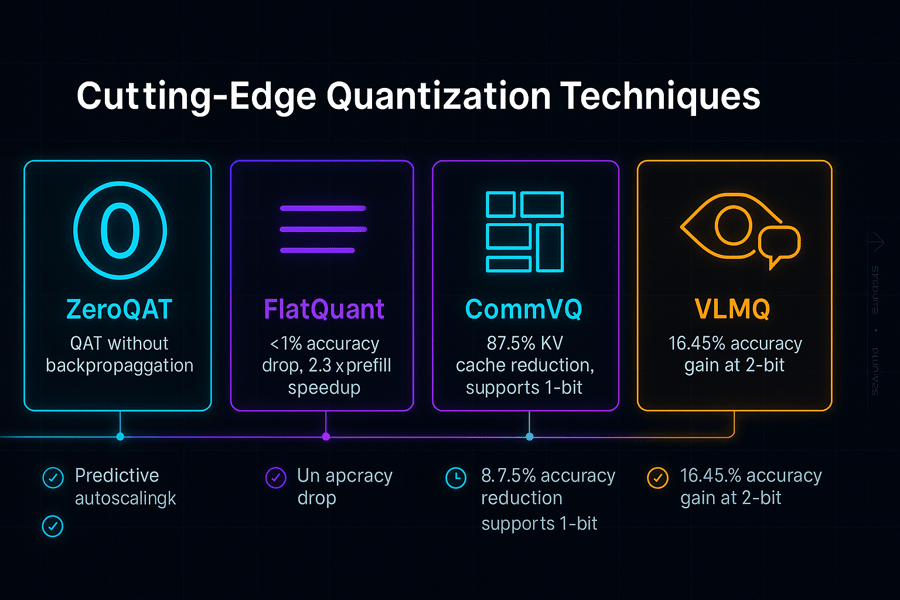
Recent research has introduced innovative techniques for quantizing large language and vision–language models, overcoming challenges like outliers, memory bottlenecks, and long context lengths. Innovations include ZeroQAT (zeroth‑order QAT), FlatQuant (affine transformations to flatten distributions), CommVQ (KV cache compression), and VLMQ (importance‑aware Hessian augmentation). These methods enable 4‑bit or even 1‑bit quantization with minimal accuracy loss, making deployment of 70B‑parameter models on single GPUs possible.

ZeroQAT and QAT Advances

Standard QAT uses backpropagation to learn quantized weights, which is computationally intensive. ZeroQAT proposes a zeroth‑order optimization‑based QAT framework, leveraging forward‑only gradient estimation. This eliminates backpropagation and dramatically reduces memory requirements while still learning optimal clipping thresholds and weight transformations. Experiments show that ZeroQAT delivers low‑bit quantization (e.g., 4‑bit) with accuracy comparable to full‑precision models but with significantly lower computational overhead.

FlatQuant: Flattening Distributions for 4‑bit Quantization

The FlatQuant technique addresses the problem of outliers in LLMs. Researchers observed that transformed weights and activations can still have steep, dispersed distributions, leading to quantization errors. FlatQuant applies learnable affine transformations to flatten these distributions before quantization. The method calibrates an optimal transformation for each linear layer in hours and fuses all operations into a single kernel. Results show less than 1 % accuracy drop for W4A4 quantization of large models like LLaMA‑3‑70B, 2.3× prefill speedups, and 1.7× decoding speedups compared with FP16 models.

Commutative Vector Quantization (CommVQ) for KV Cache Compression

When running LLMs with long context lengths, the key–value (KV) cache becomes a memory bottleneck. CommVQ introduces a codebook‑based additive quantization to compress the KV cache, using a lightweight encoder and codebook that can be decoded with a simple matrix multiplication. The codebook is designed to be commutative with rotary positional embeddings, enabling efficient integration into the self‑attention mechanism. Experiments show that CommVQ reduces the FP16 KV cache size by 87.5 % for 2‑bit quantization, and remarkably, it enables 1‑bit KV cache quantization with minimal accuracy loss. This allows a LLaMA‑3.1 8B model with 128K context length to run on a single RTX 4090 GPU.

VLMQ: Quantization for Vision–Language Models

Vision–language models combine text and image inputs, leading to modality imbalance, where vision tokens dominate. Traditional Hessian‑based PTQ methods treat all tokens equally, causing performance degradation when applied to VLMs. VLMQ introduces an importance‑aware objective that enhances the Hessian by assigning higher importance to salient tokens and lower importance to redundant vision tokens. It computes token‑level importance through a single lightweight block‑wise backward pass and supports parallel weight updates. Evaluations across eight benchmarks show a 16.45 % accuracy improvement under 2‑bit quantization.

Expert Insights

  • Convergence of weight‑only methods – Innovative weight‑only schemes like ZeroQAT and FlatQuant demonstrate that 4‑bit or 3‑bit quantization can match full‑precision accuracy by carefully flattening distributions and jointly learning clipping thresholds.
  • KV cache compression unlocks long context inference – CommVQ shows that compressing the KV cache is critical for scaling context lengths without scaling hardware. By reducing KV size by 87.5 %, CommVQ enables 128K context inference on commodity GPUs.
  • Vision tokens require special attention – VLMQ highlights that treating all tokens equally leads to poor quantization performance in VLMs. A token‑importance approach can deliver significant accuracy gains under low‑bit quantization.

Creative Example

Imagine compressing an entire library of books to fit in your pocket. Simple book compression might remove words at random, causing you to lose context. New innovations like CommVQ and VLMQ act like expert librarians: they identify key phrases (important tokens) and efficiently encode them in a pocket‑sized format while preserving the story. As a result, you still comprehend the narrative, even though the representation is extremely compact.

Cutting Edge Quantization Techniques

Practical Steps to Quantize Models: A Step‑by‑Step Guide

Quick Summary: How can you quantize your model effectively?

Quantizing a model involves selecting the appropriate scheme, preparing data, calibrating ranges, applying quantization, and validating the result. The process will vary depending on the framework you use, but the high‑level steps remain consistent.

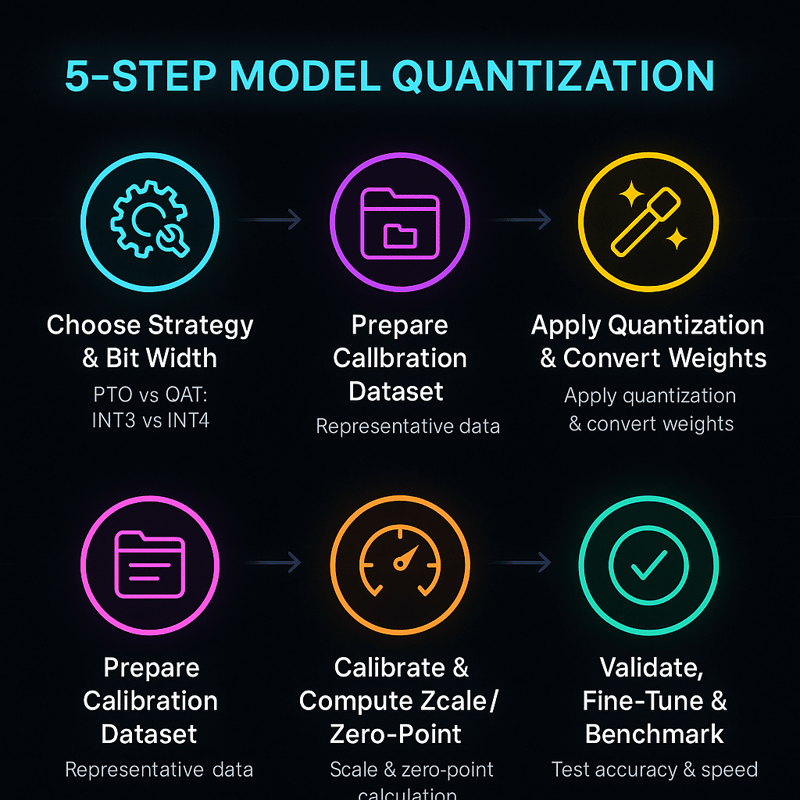
Step 1: Choose a Quantization Strategy and Bit Width

Decide whether you need PTQ, QAT, dynamic, static, or weight‑only quantization. For quick deployment, PTQ is the fastest; for maximum accuracy with low bit widths, opt for QAT. Determine the bit width (e.g., 8‑bit, 4‑bit) based on your accuracy targets and hardware constraints. If your target hardware supports INT8 or FP8, start there; more experimental formats like FP4 or 2‑bit may need advanced techniques like FlatQuant or ZeroQAT.

Step 2: Prepare a Calibration Dataset (for Static PTQ)

For static PTQ, compile a representative dataset that covers the range of inputs your model will see. This dataset should include outliers and typical examples to ensure the computed activation ranges are meaningful. Without a diverse calibration set, your quantization parameters may misrepresent rare but important values, degrading accuracy.

Step 3: Calibrate and Compute Scale/Zero‑Point

Run the model on the calibration dataset and record activation statistics (min, max, percentiles, etc.). Compute scale and zero‑point values using methods like min–max, percentile, or MSE calibration. Per‑channel calibration usually yields better accuracy than per‑tensor calibration. Some frameworks automatically optimize these parameters with accuracy‑aware tuning.

Step 4: Apply Quantization and Convert Weights

Use your chosen library to convert weights and activations according to the selected scheme. For PTQ, the conversion happens once after calibration. For QAT, quantization operators are inserted during training. Ensure the operations align with your hardware’s supported data types (INT8, INT4, FP8, etc.) and that you take advantage of specialized kernels (e.g., NVIDIA TensorRT or Intel AMX units) for maximum performance.

Step 5: Validate, Fine‑Tune, and Benchmark

After quantization, evaluate the model on a validation set to assess accuracy, latency, and energy consumption. If accuracy drops more than acceptable, try different calibration methods, adjust bit width, or switch to QAT. Benchmark the quantized model on your target hardware to measure speed and memory improvements. Iterate until you achieve the desired balance between compression and performance.

Expert Insights

  • Hardware‑aligned quantization – Use quantization formats supported by your hardware (e.g., INT8 for most CPUs and GPUs, FP8 for new AI accelerators). Aligning the bit width with hardware capabilities maximizes speed gains.
  • Layer‑wise tuning – Some layers are more sensitive to precision loss. For example, attention layers in transformers often require higher precision. Consider keeping these layers in higher precision while quantizing others.
  • Test across workloads – Evaluate quantized models on different tasks and data distributions. This ensures robustness and fairness across user groups.

Creative Example

Quantizing a model is like downscaling a high‑resolution video. First you choose the resolution (bit width); then you decide if you want to compress the entire movie or just certain scenes. You adjust brightness and contrast (calibration) to keep the important details visible. Finally, you play the video on different devices to make sure it looks good everywhere.


5 step quantizationTools and Libraries for Quantization: From Open‑Source to Clarifai’s Platform

Quick Summary: Which frameworks support quantization, and how does Clarifai fit in?

Multiple frameworks and toolkits offer quantization support, and Clarifai integrates these capabilities into its platform through compute orchestration, model inference services, and local runners. The right tool depends on your model architecture, deployment environment, and hardware.

Commonly Used Libraries

  1. Framework‑native tools – Popular libraries like PyTorch and TensorFlow provide built‑in modules for dynamic, static, and QAT quantization. These modules simplify conversion and allow you to define quantization configurations directly in your code.
  2. Intel Neural Compressor and Open‑Source Toolkits – Intel’s Neural Compressor offers a scikit‑learn‑like API to apply PTQ and QAT across frameworks, introducing features like accuracy‑aware tuning and smooth quantization. Other libraries such as AIMET, SparseML, and Model Compression Toolkit (MCT) add advanced features like synthetic data generation, per‑channel quantization, and visualization.
  3. Hardware‑optimized toolchains – Vendors like NVIDIA provide toolkits (e.g., NVFP4 support) for quantizing models specifically for their GPUs. NVFP4 is a 4‑bit floating‑point format optimized for Blackwell GPUs, and frameworks like TensorRT Model Optimizer support a range of formats including FP8, FP4, INT8, and dynamic KV cache quantization.

Clarifai’s Approach and Product Integration

Clarifai is a market leader in AI model deployment and inference. Its platform integrates quantization via multiple touchpoints:

  • Compute orchestration – Clarifai manages compute resources across GPUs and CPUs. When you deploy a quantized model, Clarifai’s orchestrator automatically selects hardware that supports low‑precision arithmetic and scales resources based on demand.
  • Model inference engine – The platform supports inference on quantized models through optimized runtimes. Models quantized using PTQ or QAT can be loaded into Clarifai’s inference pipelines, benefiting from lower latency and cost.
  • Local runners – For on‑device or edge deployments, Clarifai offers local runners that execute models offline. These runners support INT8 and INT4 quantization, enabling privacy‑preserving inference on mobile devices, smart cameras, or drones.
  • Auto‑deployment and monitoring – Clarifai’s monitoring tools track performance metrics (latency, throughput) and accuracy of quantized models in production. The system flags drift or performance regressions, allowing you to re‑calibrate or retrain models as needed.

Expert Insights

  • Integration ease – Selecting a tool is not just about quantization algorithms; it’s about workflow integration. Clarifai unifies model training, quantization, deployment, and monitoring within a single platform, reducing engineering overhead.
  • Hardware abstraction – Clarifai abstracts away the complexity of choosing hardware for quantized models. Whether your target is a GPU, CPU, or edge device, Clarifai maps the quantized model to the right environment automatically.
  • Future‑proofing – As new formats like NVFP4, FP8, and 1‑bit KV quantization emerge, Clarifai continues to integrate these technologies into its stack, ensuring your models remain at the cutting edge.

Creative Example

Using Clarifai is like plugging your appliances into a smart power strip. You can connect devices with different voltage requirements (quantized models with various bit widths), and the strip automatically adjusts the power delivery (hardware resources) so everything runs efficiently. It also monitors energy usage and alerts you if a device (model) draws too much power or stops working properly.

Addressing Misconceptions and Ethical Considerations

Quick Summary: What are common myths about quantization, and how can we mitigate ethical concerns?

Quantization is sometimes misunderstood. People worry that it destroys accuracy, that it’s only useful for tiny models, or that it’s just a compression trick. There are also ethical considerations: quantization can exacerbate bias if the calibration data is unrepresentative, and it may affect fairness across demographic groups. Addressing these concerns requires understanding the myths and implementing best practices.

Myth 1: Quantization Always Hurts Accuracy

While naive quantization can degrade performance, research demonstrates that carefully calibrated INT8 or 4‑bit quantization can achieve near‑FP32 accuracy. Innovations like SmoothQuant, FlatQuant, and ZeroQAT minimize accuracy loss even at 4‑bit precision. It’s important to choose the right bit width, calibration strategy, and, if necessary, QAT to achieve target accuracy.

Myth 2: Quantization Equals Compression Only

Quantization is about more than compression. It enables hardware‑accelerated integer arithmetic, improving inference speed and energy efficiency. While compression reduces model size, the real advantage is faster, more energy‑efficient computation. Moreover, quantization’s noise can improve generalization by acting like regularization.

Myth 3: Quantization Is Only for Edge Devices

Quantization is beneficial both on the edge and in the cloud. Cloud inference can become prohibitively expensive at scale due to compute costs and energy use. Quantized models consume fewer resources and can serve more requests per watt, lowering operating costs and environmental impact.

Ethical Considerations

  1. Bias and fairness – Calibration data must reflect the diversity of the deployment context. If certain groups are underrepresented, quantization might distort the model’s outputs for those groups. Always test quantized models across demographic slices and fine‑tune calibration parameters to avoid bias amplification.
  2. Transparency – Disclose when you’re using quantized models. Users may need to understand potential trade‑offs in accuracy or fairness.
  3. Responsibility – Quantization should be part of a broader model‑optimization strategy that includes pruning, distillation, and fairness checks. Don’t rely on quantization alone to address all performance or bias issues.

Expert Insights

  • Fairness requires data diversity – Use a diverse calibration dataset to ensure the quantization parameters generalize across user groups. This reduces the risk of introducing bias through uneven range mapping.
  • Regular auditing – Implement continuous monitoring to detect drift or bias. Clarifai’s monitoring tools can trigger re‑calibration or QAT when metrics deviate.
  • Education and consent – When deploying AI that uses quantized models, inform users about the technology and invite feedback. Transparency builds trust and allows users to report unexpected behavior.

Creative Example

Think of quantization like shrinking a detailed map to a smaller scale. If you cut off important neighborhoods (minority data) during the shrinking process, you risk misrepresenting the territory. With a comprehensive map (diverse calibration data) and careful scaling (calibration methods), you preserve essential details even in a miniature version.

Future Trends: Where Model Quantization Is Heading

Quick Summary: What innovations and directions will shape the next generation of quantization?

Future research is pushing quantization beyond INT8, exploring FP4, INT2, 1‑bit, and even vector quantization techniques. Innovations focus on combining quantization with other compression methods, automating bit‑width selection, and tailoring quantization for new architectures like multimodal and generative models.

Ultra‑Low Bit and Mixed‑Precision Quantization

The next frontier involves 2‑bit and 1‑bit quantization. While these extremely low precisions typically incur large accuracy losses, techniques like CommVQ demonstrate that 1‑bit KV cache quantization is feasible for long‑context LLMs. Researchers are exploring adaptive mixed‑precision schemes that assign different bit widths to different layers or even individual channels, balancing accuracy and efficiency.

Vector and Commutative Quantization

Vector quantization compresses groups of parameters using learned codebooks. CommVQ extends this idea to the KV cache and ensures that decoding integrates seamlessly into self‑attention. Future work may expand vector quantization to other components (e.g., feed‑forward layers) and explore non‑commutative codebooks for additional flexibility.

Quantization for Multimodal and Generative Models

As VLMs and multimodal generative models gain prominence, importance‑aware quantization like VLMQ will become essential. New research is developing token‑dependent scaling and attention‑aware quantization to handle the heterogeneity of multimodal inputs. Generative models, such as diffusion or video synthesis models, require unique quantization strategies to maintain quality.

Automated Quantization and AI‑Driven Design

Automated hyperparameter search for quantization—AutoQuantize, for example—chooses bit widths and calibration methods without manual tuning. Future tools may use AI to design quantization schemes that adapt to data distribution in real time. Meta‑learning approaches could generate personalized quantization strategies for each model, dataset, or hardware platform.

Integration with Hardware Innovation

Hardware vendors are introducing novel data types like NVFP4 for 4‑bit floating‑point arithmetic and support for FP8 and FP6. As these formats mature, quantization frameworks will incorporate them, enabling even better trade‑offs between accuracy and efficiency. Cross‑layer quantization and on‑the‑fly bit‑width adjustment will likely become standard features.

Expert Insights

  • Ultra‑low bit quantization needs innovation – Achieving acceptable accuracy at 1‑bit or 2‑bit precision is challenging, but methods like CommVQ and vector quantization show promise.
  • Importance‑aware and adaptive schemes – Approaches that assign different bit widths to tokens, layers, or channels are gaining traction, as seen with VLMQ’s token‑importance weighting.
  • Synergy with other techniques – Combining quantization with pruning, knowledge distillation, and sparsity will yield even more efficient models. These hybrid strategies will become mainstream as AI models scale further.

Creative Example

Imagine a future where your smartphone runs a billion‑parameter LLM offline. It automatically adjusts the precision of each part of the model based on your current task, delivering maximum efficiency when you’re writing an email and full accuracy when you’re using it for language translation. Quantization will be dynamic and personalized, controlled by AI systems that understand context and hardware capabilities.

Conclusion and Key Takeaways

Model quantization is no longer just an optional optimization—it’s a cornerstone of efficient and sustainable AI deployment. By mapping high‑precision weights and activations to lower‑precision representations, quantization slashes memory usage, boosts throughput, and enhances energy efficiency. There are multiple approaches (PTQ, QAT, dynamic, static, weight‑only), each with trade‑offs between simplicity and accuracy. Symmetric vs. asymmetric quantization, scale and zero‑point selection, and calibration methods are critical to preserving accuracy.

Recent innovations such as ZeroQAT, FlatQuant, CommVQ, and VLMQ push the boundaries, enabling 4‑bit and even 1‑bit quantization with minimal accuracy loss. These advances open the door to deploying giant models on standard hardware and edge devices, democratizing AI access. Clarifai’s platform integrates quantization throughout its compute orchestration, inference engine, and local runners, making it easy for practitioners to leverage quantized models without deep expertise.

As we look ahead, quantization will evolve in tandem with hardware improvements, multimodal models, and automated design tools. Harnessing quantization effectively requires understanding the technology, selecting the right scheme, and continuously monitoring performance and fairness. By doing so, you’ll deliver AI that’s not only powerful but also practical and responsible.

FAQs

1. What is model quantization?

Model quantization is the process of converting high‑precision weights and activations into lower‑precision formats like INT8 or INT4 to reduce memory usage and improve computational efficiency.

2. Does quantization always degrade accuracy?

No. When properly calibrated, quantization can maintain accuracy within 1 % of full‑precision models. Advanced techniques like SmoothQuant and ZeroQAT mitigate accuracy loss even at low bit widths.

3. When should I use post‑training quantization vs. quantization‑aware training?

Use post‑training quantization for fast deployment when you lack training data or compute resources. Choose quantization‑aware training when you need the highest accuracy at low bit widths or when dealing with models sensitive to precision loss. Techniques like ZeroQAT make QAT feasible for large models by removing backpropagation overhead.

4. Does quantization reduce energy consumption?

Yes. INT8 quantization can improve performance per watt by up to 16× and reduce memory bandwidth by 4×. This translates into lower energy consumption and longer battery life for edge devices.

5. How does Clarifai support quantized models?

Clarifai’s platform offers compute orchestration, an optimized inference engine, and local runners to deploy quantized models seamlessly. It automatically selects the right hardware, manages resources, and monitors performance, freeing you to focus on model design and calibration.


How to Harness AI for Video Creation with Joshua Xu [MAICON 2025 Speaker Series]


MAICON brings together top visionaries and experts in the field of AI during a three-day conference packed with actionable sessions and networking events—all to position you as the change agent your organization (and career) needs. In this ongoing speaker series, we’re featuring these extraordinary leaders, with forward-looking predictions, actionable tips you can use today, and a preview of their MAICON 2025 sessions. Continue reading “How to Harness AI for Video Creation with Joshua Xu [MAICON 2025 Speaker Series]”

Horizontal vs Vertical Scaling | Which Strategy Fits Your AI Workloads?


Introduction

Scaling AI workloads is no longer optional—it’s a necessity in a world where user expectations and data volumes are accelerating. Whether you are deploying a computer vision model at the edge or orchestrating large‑scale language models in the cloud, you must ensure your infrastructure can grow seamlessly. Vertical scaling (scale up) and horizontal scaling (scale out) are the two classic strategies for expansion, but many engineering teams struggle to decide which approach better suits their needs. As a market leader in AI, Clarifai often works with customers who ask, “How should we scale our AI models effectively without breaking the bank or sacrificing performance?”

This comprehensive guide explains the fundamental differences between vertical and horizontal scaling, highlights their advantages and limitations, and explores hybrid strategies to help you make an informed decision. We’ll integrate insights from academic research, industry best practices and real‑world case studies, and we’ll highlight how Clarifai’s compute orchestration, model inference, and local runners can support your scaling journey.

Quick Digest

  • Scalability is the ability of a system to handle increasing load while maintaining performance and availability. It’s vital for AI applications to support growth in data and users.
  • Vertical scaling increases the resources (CPU, RAM, storage) of a single server, offering simplicity and immediate performance improvements but limited by hardware ceilings and single points of failure.
  • Horizontal scaling adds more servers to distribute workload, improving fault tolerance and concurrency, though it introduces complexity and network overhead.
  • Decision factors include workload type, growth projections, cost, architectural complexity and regulatory requirements.
  • Hybrid (diagonal) scaling combines both approaches, scaling up until hardware limits are reached and then scaling out.
  • Emerging trends: AI‑driven predictive autoscaling using hybrid models, Kubernetes Horizontal and Vertical Pod Autoscalers, serverless scaling, and green computing all shape the future of scalability.

Introduction to Scalability and Scaling Strategies

Quick Summary: What is scalability, and why does it matter?

Scalability refers to a system’s capability to handle increasing load while maintaining performance, making it crucial for AI workloads that grow rapidly. Without scalability, your application may experience latency spikes or failures, eroding user trust and causing financial losses.

What Does Scalability Mean?

Scalability is the property of a system to adapt its resources in response to changing workload demands. In simple terms, if more users request predictions from your image classifier, the infrastructure should automatically handle the additional requests without slowing down. This is different from performance tuning, which optimises a system’s baseline efficiency but does not necessarily prepare it for surges in demand. Scalability is a continuous discipline, crucial for high‑availability AI services.

Key reasons for scaling include handling increased user load, maintaining performance and ensuring reliability. Research highlights that scaling helps support growing data and storage needs and ensures better user experiences. For instance, an AI model that processes millions of transactions per second demands infrastructure that can scale both in compute and storage to avoid bottlenecks and downtime.

Why Scaling Matters for AI Applications

AI applications often handle variable workloads—ranging from sporadic spikes in inference requests to continuous heavy training loads. Without proper scaling, these workloads may cause performance degradation or outages. According to a survey on hyperscale data centres, the combined use of vertical and horizontal scaling dramatically increases energy utilisation. This means organisations must consider not only performance but also sustainability.

For Clarifai’s customers, scaling is particularly important because model inference and training workloads can be unpredictable, especially when models are integrated into third‑party systems or consumer apps. Clarifai’s compute orchestration features help users manage resources efficiently by leveraging auto‑scaling groups and container orchestration, ensuring models remain responsive even as demand fluctuates.

Expert Insights

  • Infrastructure experts emphasise that scalability should be designed in from day one, not bolted on later. They warn that retrofitting scaling solutions often incurs significant technical debt.
  • Research on green computing notes that combining vertical and horizontal scaling dramatically increases power consumption, highlighting the need for sustainability practices.
  • Clarifai engineers recommend monitoring usage patterns and gradually introducing horizontal and vertical scaling based on application requirements, rather than choosing one approach by default.

Understanding Vertical Scaling (Scaling Up)

Quick Summary: What is vertical scaling?

Vertical scaling increases the resources (CPU, RAM, storage) of a single server or node, providing an immediate performance boost but eventually limited by hardware constraints and potential downtime.

What Is Vertical Scaling?

Vertical scaling, also known as scaling up, means augmenting the capacity of a single machine. You can add more CPU cores, increase memory, upgrade to faster storage, or move the workload to a more powerful server. For cloud workloads, this often involves resizing an instance to a larger instance type, such as upgrading from a medium GPU instance to a high‑performance GPU cluster.

Vertical scaling is straightforward because it doesn’t require rewriting the application architecture. Database administrators often scale up database servers for quick performance gains; AI teams may expand GPU memory when training large language models. Because you only upgrade one machine, vertical scaling preserves data locality and reduces network overhead, resulting in lower latency for certain workloads.

Advantages of Vertical Scaling

  • Simplicity and ease of implementation: You don’t need to add new nodes or handle distributed systems complexity. Upgrading memory on your local Clarifai model runner could yield immediate performance benefits.
  • No need to modify application architecture: Vertical scaling keeps your single‑node design intact, which suits legacy systems or monolithic AI services.
  • Faster interprocess communication: All components run on the same hardware, so there are no network hops; this can reduce latency for training and inference tasks.
  • Better data consistency: Single‑node architectures avoid replication lag, making vertical scaling ideal for stateful workloads that require strong consistency.

Limitations of Vertical Scaling

  • Hardware limitations: There’s a cap on the CPU, memory and storage you can add—known as the hardware ceiling. Once you reach the maximum supported resources, vertical scaling is no longer viable.
  • Single point of failure: A vertically scaled system still runs on one machine; if the server goes down, your application goes offline.
  • Downtime for upgrades: Hardware upgrades often require maintenance windows, leading to downtime or degraded performance during scaling operations.
  • Cost escalation: High‑end hardware becomes exponentially more expensive as you scale; purchasing top‑tier GPUs or NVMe storage can strain budgets.

Real‑World Example

Imagine you’re training a large language model on Clarifai’s local runner. As the dataset grows, the training job becomes I/O bound because of insufficient memory. Vertical scaling might involve adding more RAM or upgrading to a GPU with more VRAM, allowing the model to load more parameters in memory, resulting in faster training. However, once the hardware capacity is maxed out, you’ll need an alternative strategy, such as horizontal or hybrid scaling.

Clarifai Product Integration

Clarifai’s local runners let you deploy models on‑premises or on edge devices. If you need more processing power for inference, you can upgrade your local hardware (vertical scaling) without changing the Clarifai API calls. Clarifai also provides high‑performance inference workers in the cloud; you can start with vertical scaling by choosing larger compute plans and then transition to horizontal scaling when your models require more throughput.

Expert Insights

  • Engineers caution that vertical scaling provides diminishing returns: each successive hardware upgrade yields smaller performance improvements relative to cost. This is why vertical scaling is often a stepping stone rather than a long‑term solution.
  • Database specialists emphasise that vertical scaling is ideal for transactional workloads requiring strong consistency, such as bank transactions.
  • Clarifai recommends vertical scaling for low‑traffic or prototype models where simplicity and fast setup outweigh the need for redundancy.

How vertical scaling works

Understanding Horizontal Scaling (Scaling Out)

Quick Summary: What is horizontal scaling?

Horizontal scaling adds more servers or nodes to distribute workload, improving resilience and concurrency but increasing complexity.

What Is Horizontal Scaling?

Horizontal scaling, or scaling out, is the process of adding more machines to handle workload distribution. Instead of upgrading a single server, you replicate services across multiple nodes. For AI applications, this might mean deploying multiple inference servers behind a load balancer. Requests are distributed so that no single server becomes a bottleneck.

When you scale out, you must manage tasks such as load balancing, sharding, data replication and service discovery, because your application components run across different machines. Horizontal scaling is fundamental to microservices architectures, container orchestration systems like Kubernetes and modern serverless platforms.

Benefits of Horizontal Scaling

  • Near‑unlimited scalability: You can add more servers as needed, enabling your system to handle unpredictable spikes. Cloud providers make it easy to spin up instances and integrate them into auto‑scaling groups.
  • Improved fault tolerance and redundancy: If one node fails, traffic is rerouted to others; the system continues running. This is crucial for AI services that must maintain high availability.
  • Zero or minimal downtime: New nodes can be added without shutting down the system. This property allows continuous scaling during events like product launches or viral campaigns.
  • Flexible cost management: You can pay only for what you use, enabling better alignment of compute costs with real demand; but be mindful of network and management overhead.

Challenges of Horizontal Scaling

  • Distributed system complexity: You must handle data consistency, concurrency, eventual consistency and network latency. Orchestrating distributed components requires expertise.
  • Higher initial complexity: Setting up load balancers, Kubernetes clusters or service meshes takes time. Observability tools and automation are essential to maintain reliability.
  • Network overhead: Inter‑node communication introduces latency; you need to optimise data transfer and caching strategies.
  • Cost management: Although horizontal scaling spreads costs, adding more servers can still be expensive if not managed properly.

Real‑World Example

Suppose you’ve deployed a computer vision API using Clarifai to classify millions of images per day. When a marketing campaign drives a sudden traffic spike, a single server cannot handle the load. Horizontal scaling involves deploying multiple inference servers behind a load balancer, allowing requests to be distributed across nodes. Clarifai’s compute orchestration can automatically start new containers when CPU or memory metrics exceed thresholds. When the load diminishes, unused nodes are gracefully removed, saving costs.

Clarifai Product Integration

Clarifai’s multi‑node deployment capabilities integrate seamlessly with horizontal scaling strategies. You can run multiple inference workers across different availability zones, behind a managed load balancer. Clarifai’s orchestration monitors metrics and spins up or down containers automatically, enabling efficient scaling out. Developers can also integrate Clarifai inference into a Kubernetes cluster; using Clarifai’s APIs, the service can be distributed across nodes for higher throughput.

Expert Insights

  • System architects highlight that horizontal scaling brings high availability: when one machine fails, the system remains operational.
  • However, engineers warn that distributed data consistency is a major challenge; you may need to adopt eventual consistency models or consensus protocols to maintain data correctness.
  • Clarifai advocates for a microservices approach, where AI inference is decoupled from business logic, making horizontal scaling easier to implement.

How Horizontal Scaling works

Comparing Horizontal vs Vertical Scaling: Pros, Cons & Key Differences

Quick Summary: How do horizontal and vertical scaling differ?

Vertical scaling increases resources of a single machine, while horizontal scaling distributes the workload across multiple machines. Vertical scaling is simpler but limited, whereas horizontal scaling offers better resilience and scalability at the cost of complexity.

Side‑by‑Side Comparison

To decide which approach suits your needs, consider the following key differences:

  • Resource Addition: Vertical scaling upgrades an existing node (CPU, memory); horizontal scaling adds more nodes.
  • Scalability: Vertical scaling is limited by hardware constraints; horizontal scaling offers near‑unlimited scalability by adding nodes.
  • Complexity: Vertical scaling is straightforward; horizontal scaling introduces distributed system complexities.
  • Fault Tolerance: Vertical scaling has a single point of failure; horizontal scaling improves resilience because failure of one node doesn’t bring down the system.
  • Cost Dynamics: Vertical scaling might be cheaper initially but becomes expensive at high tiers; horizontal scaling spreads costs but requires orchestration tools and adds network overhead.
  • Downtime: Vertical scaling often requires downtime for hardware upgrades; horizontal scaling typically allows on‑the‑fly addition or removal of nodes.

Horizontal vs vertical scaling

Pros and Cons

Strategy

Pros

Cons

Vertical scaling

Simplicity, minimal architectural changes, strong consistency, lower latency

Hardware limits, single point of failure, downtime during upgrades, escalating costs

Horizontal scaling

High availability, elasticity, zero downtime, near‑unlimited scalability

Complexity, network latency, consistency challenges, management overhead


Diagonal/Hybrid Scaling

Diagonal scaling combines both strategies. It involves scaling up a machine until it reaches an economically efficient threshold, then scaling out by adding more nodes. This approach allows you to balance cost and performance. For instance, you might scale up your database server to maximise performance and maintain strong consistency, then deploy additional stateless inference servers horizontally to handle surges in traffic. Companies like ridesharing or hospitality startups have adopted diagonal scaling, starting with vertical upgrades and then rolling out microservices to handle growth.

Clarifai Product Integration

Clarifai supports both vertical and horizontal scaling strategies, enabling hybrid scaling. You can choose larger inference instances (vertical) or spin up multiple smaller instances (horizontal) depending on your workload. Clarifai’s compute orchestration offers flexible scaling policies, including mixing on‑premise local runners with cloud‑based inference workers, enabling diagonal scaling.

Expert Insights

  • Technical leads recommend starting with vertical scaling to simplify deployment, then gradually introducing horizontal scaling as demand grows and complexity becomes manageable.
  • Hybrid scaling is particularly effective for AI services: you can maintain strong consistency for stateful components (e.g., model metadata) while horizontally scaling stateless inference endpoints.
  • Clarifai’s experience shows that customers who adopt hybrid scaling enjoy improved reliability and cost efficiency, especially when using Clarifai’s orchestration to automatically manage horizontal and vertical resources.

Decision Factors—How to Choose the Right Scaling Strategy

Quick Summary: How should you choose between horizontal and vertical scaling?

Choosing a scaling strategy depends on workload characteristics, growth projections, cost constraints, architectural complexity, and reliability requirements.

Key Decision Criteria

  1. Workload Type:
    • CPU‑bound or memory‑bound workloads (e.g., large model training) may benefit from vertical scaling initially, because more resources on a single machine reduce communication overhead.
    • Stateless or embarrassingly parallel workloads (e.g., image classification across many images) are suitable for horizontal scaling because requests can be distributed easily.
  2. Stateful vs. Stateless Components:
    • Stateful services (databases, model metadata stores) often require strong consistency, making vertical or hybrid scaling preferable.
    • Stateless services (API gateways, inference microservices) are ideal for horizontal scaling.
  3. Growth Projections:
    • If you anticipate exponential growth or unpredictable spikes, horizontal or diagonal scaling is essential.
    • For limited or steady growth, vertical scaling may suffice.
  4. Cost Considerations:
    • Compare capital expenditure (capex) for hardware upgrades vs. operational expenditure (opex) for running multiple instances.
    • Use cost optimisation tools to estimate the total cost of ownership over time.
  5. Availability Requirements:
    • Mission‑critical systems may require high redundancy and failover; horizontal scaling provides better fault tolerance.
    • Non‑critical prototypes may tolerate short downtime and can use vertical scaling for simplicity.
  6. Regulatory & Security Requirements:
    • Some industries require data to remain within specific geographies; vertical scaling on local servers may be necessary.
    • Horizontal scaling across regions must adhere to compliance frameworks.

Developing a Decision Framework

Create a decision matrix evaluating these factors for your application. Assign weights based on priorities—e.g., reliability may be more important than cost for a healthcare AI system. Clarifai’s customer success team often guides organisations through these decision matrices, factoring in model characteristics, user growth rates and regulatory constraints.

Clarifai Product Integration

Clarifai’s management console provides insights into model usage, latency and throughput, enabling data‑driven scaling decisions. You can start with vertical scaling by selecting larger compute plans, then monitor metrics to decide when to scale horizontally using auto‑scaling groups. Clarifai also offers consulting services to help design scaling strategies tailored to your workloads.

Expert Insights

  • Architects emphasise that a one‑size‑fits‑all strategy doesn’t exist; you should evaluate each component of your system separately and choose the appropriate scaling approach.
  • Industry analysts recommend factoring in environmental impact—scaling strategies that reduce energy consumption while meeting performance goals can yield long‑term cost savings and align with corporate sustainability initiatives.
  • Clarifai advises starting with thorough monitoring and profiling to understand bottlenecks before investing in scaling.

When to choose Horizontal vs vertical scaling

Implementation Strategies and Best Practices

Quick Summary: How do you implement vertical and horizontal scaling?

Vertical scaling requires upgrading hardware or selecting larger instances, while horizontal scaling entails deploying multiple nodes with load balancing and orchestration. Best practices include automation, monitoring and testing.

Implementing Vertical Scaling

  • Hardware Upgrades: Add CPU cores, memory modules or faster storage. For cloud instances, resize to a larger tier. Plan upgrades during maintenance windows to avoid downtime.
  • Software Optimization: Adjust operating system parameters and allocate memory more efficiently. Fine‑tune frameworks (e.g., use larger GPU memory pools) to exploit new resources.
  • Virtualisation and Hypervisors: Ensure hypervisors allocate resources properly; consider using Clarifai’s local runner on an upgraded server to maintain performance locally.

Implementing Horizontal Scaling

  • Load Balancing: Use reverse proxies or load balancers (e.g., NGINX, HAProxy) to distribute requests across multiple instances.
  • Container Orchestration: Adopt Kubernetes or Docker Swarm to automate deployment and scaling. Use the Horizontal Pod Autoscaler (HPA) to adjust the number of pods based on CPU/memory metrics.
  • Service Discovery: Use a service registry (e.g., Consul, etcd) or Kubernetes DNS to enable instances to locate each other.
  • Data Sharding & Replication: For databases, shard or partition data across nodes; implement replication and consensus protocols to maintain data integrity.
  • Monitoring & Observability: Use tools like Prometheus, Grafana or Clarifai’s built‑in dashboards to monitor metrics and trigger scaling events.
  • Automation & Infrastructure as Code: Manage infrastructure with Terraform or CloudFormation to ensure reproducibility and consistency.

Using Hybrid Approaches

Hybrid scaling often requires both vertical and horizontal techniques. For example, upgrade the base server (vertical) while also configuring auto‑scaling groups (horizontal). Kubernetes Vertical Pod Autoscaler (VPA) can recommend optimal resource sizes for pods, complementing HPA.

Creative Example

Imagine you’re deploying a text summarisation API. Initially, you run one server with 32 GB of RAM (vertical scaling). As traffic increases, you set up a Kubernetes cluster with an HPA to manage multiple replica pods. The HPA scales pods up when CPU usage exceeds 70 % and scales down when usage drops, ensuring cost efficiency. Meanwhile, a VPA monitors resource usage and adjusts pod memory requests to optimise utilisation. A cluster autoscaler adds or removes worker nodes, providing additional capacity when new pods need to run.

Clarifai Product Integration

  • Compute Orchestration: Clarifai’s platform supports containerised deployments, making it straightforward to integrate with Kubernetes or serverless frameworks. You can define auto‑scaling policies that spin up additional inference workers when metrics exceed thresholds, then spin them down when demand drops.
  • Model Inference API: Clarifai’s API endpoints can be placed behind load balancers to distribute inference requests across multiple replicas. Because Clarifai uses stateless RESTful endpoints, horizontal scaling is seamless.
  • Local Runners: If you prefer running models on‑premises, Clarifai’s local runners benefit from vertical scaling. You can upgrade your server and run multiple processes to handle more inference requests.

Expert Insights

  • DevOps engineers caution that improper scaling policies can lead to thrashing, where instances are created and terminated too frequently; they recommend setting cool‑down periods and stable thresholds.
  • Researchers highlight hybrid autoscaling frameworks using machine‑learning models: one study designed a proactive autoscaling mechanism combining Facebook Prophet and LSTM to predict workload and adjust pod counts. This approach outperformed traditional reactive scaling in accuracy and resource efficiency.
  • Clarifai’s SRE team emphasises the importance of observability—without metrics and logs, it’s impossible to fine‑tune scaling policies.

Performance, Latency & Throughput Considerations

Quick Summary: How do scaling strategies affect performance and latency?

Vertical scaling reduces network overhead and latency but is limited by single‑machine concurrency. Horizontal scaling increases throughput through parallelism, though it introduces inter‑node latency and complexity.

Latency Effects

Vertical scaling keeps data and computation on a single machine, allowing processes to communicate via memory or shared bus. This leads to lower latency for tasks such as real‑time inference or high‑frequency trading. However, even large machines can handle only so many concurrent requests.

Horizontal scaling distributes workloads across multiple nodes, which means requests may traverse a network switch or even cross availability zones. Network hops introduce latency; you must design your system to keep latency within acceptable bounds. Techniques like locality‑aware load balancing, caching and edge computing mitigate latency impact.

Throughput Effects

Horizontal scaling shines when increasing throughput. By distributing requests across many nodes, you can process thousands of concurrent requests. This is critical for AI inference workloads with unpredictable demand. In contrast, vertical scaling increases throughput only up to the machine’s capacity; once maxed out, adding more threads or processes yields diminishing returns due to CPU contention.

CAP Theorem and Consistency Models

Distributed systems face the CAP theorem, which posits that you can’t simultaneously guarantee consistency, availability and partition tolerance. Horizontal scaling often sacrifices strong consistency for eventual consistency. For AI applications that don’t require transactional consistency (e.g., recommendation engines), eventual consistency may be acceptable. Vertical scaling avoids this trade‑off but lacks redundancy.

Creative Example

Consider a real‑time translation service built on Clarifai. For lower latency in high‑stakes meetings, you might run a powerful GPU instance with lots of memory (vertical scaling). This instance processes translation requests quickly but can only handle a limited number of users. For an online conference with thousands of attendees, you horizontally scale by adding more translation servers; throughput increases massively, but you must manage session consistency and handle network delays.

Clarifai Product Integration

  • Clarifai offers globally distributed inference endpoints to reduce latency by bringing compute closer to users. Using Clarifai’s compute orchestration, you can route requests to the nearest node, balancing latency and throughput.
  • Clarifai’s API supports batch processing for high‑throughput scenarios, enabling efficient handling of large datasets across horizontally scaled clusters.

Expert Insights

  • Performance engineers note that vertical scaling is beneficial for latency‑sensitive workloads, such as fraud detection or autonomous vehicle perception, because data stays local.
  • Distributed systems experts stress the need for caching and data locality when scaling horizontally; otherwise, network overhead can negate throughput gains.
  • Clarifai’s performance team recommends combining vertical and horizontal scaling: allocate enough resources to individual nodes for baseline performance, then add nodes to handle peaks.

Cost Analysis & Total Cost of Ownership

Quick Summary: What are the cost implications of scaling?

Vertical scaling may have lower upfront cost but escalates rapidly at higher tiers; horizontal scaling distributes costs over many instances but requires orchestration and management overhead.

Cost Models

  1. Capital Expenditure (Capex): Vertical scaling often involves purchasing or leasing high‑end hardware. The cost per unit of performance increases as you approach top‑tier resources. For on‑premise deployments, capex can be significant because you must invest in servers, GPUs and cooling.
  2. Operational Expenditure (Opex): Horizontal scaling entails paying for many instances, usually on a pay‑as‑you‑go model. Opex can be easier to budget and track, but it increases with the number of nodes and their usage.
  3. Hidden Costs: Consider downtime (maintenance for vertical scaling), energy consumption (data centres consume massive power), licensing fees for software and added complexity (DevOps and SRE staffing).

Cost Dynamics

Vertical scaling may appear cheaper initially, especially when starting with small workloads. However, as you upgrade to higher‑capacity hardware, cost rises steeply. For example, upgrading from a 16 GB GPU to a 32 GB GPU may double or triple the price. Horizontal scaling spreads cost across multiple lower‑cost machines, which can be turned off when not needed, making it more cost effective at scale. However, orchestration and network costs add overhead.

Creative Example

Assume you need to handle 100,000 image classifications per minute. You can choose a vertical strategy by purchasing a top‑of‑the‑line server for $50,000 capable of handling the load. Alternatively, horizontal scaling involves leasing twenty smaller servers at $500 per month each. The second option costs $10,000 per month but allows you to shut down servers during off‑peak hours, potentially saving money. Hybrid scaling might involve buying a mid‑tier server and leasing additional capacity when needed.

Clarifai Product Integration

  • Clarifai offers flexible pricing, allowing you to pay only for the compute you use. Starting with a smaller plan (vertical) and scaling horizontally with additional inference workers can balance cost and performance.
  • Clarifai’s compute orchestration helps optimise costs by automatically turning off unused containers and scaling down resources during low demand periods.

Expert Insights

  • Financial analysts suggest modelling costs over the expected lifetime of the service, including maintenance, energy and staffing. They warn against focusing only on hardware costs.
  • Sustainability experts emphasise that the environmental cost of scaling should be factored into TCO; investing in green data centres and energy‑efficient hardware can reduce long‑term expenses.
  • Clarifai’s customer success team encourages using cost monitoring tools to track usage and set budgets, preventing runaway expenses.

Hybrid/Diagonal Scaling Strategies

Quick Summary: What is hybrid or diagonal scaling?

Hybrid scaling combines vertical and horizontal strategies, scaling up until the machine is cost efficient, then scaling out with additional nodes.

What Is Hybrid Scaling?

Hybrid (diagonal) scaling acknowledges that neither vertical nor horizontal scaling alone can accommodate all workloads efficiently. It involves scaling up a machine to its cost‑effective limit and then scaling out when additional capacity is needed. For example, you might upgrade your GPU server until the cost of further upgrades outweighs benefits, then deploy additional servers to handle more requests.

Why Choose Hybrid Scaling?

  • Cost Optimisation: Hybrid scaling helps balance capex and opex. You use vertical scaling to get the most out of your hardware, then add nodes horizontally when demand exceeds that capacity.
  • Performance & Flexibility: You maintain low latency for key components through vertical scaling while scaling out stateless services to handle peaks.
  • Risk Mitigation: Hybrid scaling reduces the single point of failure by adding redundancy while still benefiting from strong consistency on scaled‑up nodes.

Real‑World Examples

Start‑ups often begin with a vertically scaled monolith; as traffic grows, they break services into microservices and scale out horizontally. Transportation and hospitality platforms used this approach, scaling up early on and gradually adopting microservices and auto‑scaling groups.

Clarifai Product Integration

  • Clarifai’s platform allows you to run models on‑premises or in the cloud, making hybrid scaling straightforward. You can vertically scale an on‑premise server for sensitive data and horizontally scale cloud inference for public traffic.
  • Clarifai’s compute orchestration can manage both types of scaling; policies can prioritise local resources and burst to the cloud when demand surges.

Expert Insights

  • Architects argue that hybrid scaling is the most practical option for many modern workloads, as it provides a balance of performance, cost and reliability.
  • Research on predictive autoscaling suggests integrating hybrid models (e.g., Prophet + LSTM) with vertical scaling to further optimise resource allocation.
  • Clarifai’s engineers highlight that hybrid scaling requires careful coordination between components; they recommend using orchestration tools to manage failover and ensure consistent routing of requests.

Use Cases & Industry Examples

Quick Summary: Where are scaling strategies applied in the real world?

Scaling strategies vary by industry and workload; AI‑powered services in e‑commerce, media, finance, IoT and start‑ups each adopt different scaling approaches based on their specific needs.

E‑Commerce & Retail

Online marketplaces often experience unpredictable spikes during sales events. They horizontally scale stateless web services (product catalogues, recommendation engines) to handle surges. Databases may be scaled vertically to maintain transaction integrity. Clarifai’s visual recognition models can be deployed using hybrid scaling—vertical scaling ensures stable product image classification while horizontal scaling handles increased search queries.

Media & Streaming

Video streaming platforms require massive throughput. They employ horizontal scaling across distributed servers for streaming and content delivery networks (CDNs). Metadata stores and user preference engines may scale vertically to maintain consistency. Clarifai’s video analysis models can run on distributed clusters, analysing frames in parallel while metadata is stored on scaled‑up servers.

Financial Services

Banks and trading platforms prioritise consistency and reliability. They often vertically scale core transaction systems to guarantee ACID properties. However, front‑end risk analytics and fraud detection systems scale horizontally to process large volumes of transactions concurrently. Clarifai’s anomaly detection models are used in horizontal clusters to scan for fraudulent patterns in real time.

IoT & Edge Computing

Edge devices collect data and perform preliminary processing vertically due to hardware constraints. Cloud back‑ends scale horizontally to aggregate and analyse data. Clarifai’s edge runners enable on‑device inference, while data is sent to cloud clusters for further analysis. Hybrid scaling ensures immediate response at the edge while leveraging cloud capacity for deeper insights.

Start‑Ups & SMBs

Small companies typically start with vertical scaling because it’s simple and cost effective. As they grow, they adopt horizontal scaling for better resilience. Clarifai’s flexible pricing and compute orchestration allow start‑ups to begin small and scale easily when needed.

Case Studies

  • An e‑commerce site adopted auto‑scaling groups to handle Black Friday traffic, using horizontal scaling for web servers and vertical scaling for the order management database.
  • A financial institution improved resilience by migrating its risk analysis engine to a horizontally scaled microservices architecture while retaining a vertically scaled core banking system.
  • A research lab used Clarifai’s models for wildlife monitoring, deploying local runners at remote sites (vertical scaling) and sending aggregated data to a central cloud cluster for analysis (horizontal scaling).

Expert Insights

  • Industry experts note that selecting the appropriate scaling strategy depends heavily on domain requirements; there is no universal solution.
  • Clarifai’s customer success team has witnessed improved user experiences and reduced latency when clients adopt hybrid scaling for AI inference workloads.

Emerging Trends & Future of Scaling

Quick Summary: What trends are shaping the future of scaling?

Kubernetes autoscaling, AI‑driven predictive autoscaling, serverless computing, edge computing and sustainability initiatives are reshaping how organisations scale their systems.

Kubernetes Auto‑Scaling

Kubernetes offers built‑in auto‑scaling mechanisms: the Horizontal Pod Autoscaler (HPA) adjusts the number of pods based on CPU or memory usage, while the Vertical Pod Autoscaler (VPA) dynamically resizes pod resources. A cluster autoscaler adds or removes worker nodes. These tools enable fine‑grained control over resource allocation, improving efficiency and reliability.

AI‑Driven Predictive Autoscaling

Research shows that combining statistical models like Prophet with neural networks like LSTM can predict workload patterns and proactively scale resources. Predictive autoscaling aims to allocate capacity before spikes occur, reducing latency and avoiding overprovisioning. Machine‑learning‑driven autoscaling will likely become more prevalent as AI systems grow in complexity.

Serverless & Function‑as‑a‑Service (FaaS)

Serverless platforms automatically scale functions based on demand, freeing developers from infrastructure management. They scale horizontally behind the scenes, enabling cost‑efficient handling of intermittent workloads. AWS introduced predictive scaling for container services, harnessing machine learning to anticipate demand and adjust scaling policies accordingly (as reported in industry news). Clarifai’s APIs can be integrated into serverless workflows to create event‑driven AI applications.

Edge Computing & Cloud‑Edge Hybrid

Edge computing brings computation closer to the user, reducing latency and bandwidth consumption. Vertical scaling on edge devices (e.g., upgrading memory or storage) can improve real‑time inference, while horizontal scaling in the cloud aggregates and analyses data streams. Clarifai’s edge solutions allow models to run on local hardware; combined with cloud resources, this hybrid approach ensures both fast response and deep analysis.

Sustainability and Green Computing

Hyperscale data centres consume enormous energy, with the combination of vertical and horizontal scaling increasing utilisation. Future scaling strategies must integrate energy‑efficient hardware, carbon‑aware scheduling and renewable energy sources to reduce environmental impact. AI‑powered resource management can optimise workloads to run on servers with lower carbon footprints.

Clarifai Product Integration

  • Clarifai is exploring AI‑driven predictive autoscaling, leveraging workload analytics to anticipate demand and adjust inference capacity in real time.
  • Clarifai’s support for Kubernetes makes it easy to adopt HPA and VPA; models can automatically scale based on CPU/GPU usage.
  • Clarifai is committed to sustainability, partnering with green cloud providers and offering efficient inference options to reduce power usage.

Expert Insights

  • Industry analysts believe that intelligent autoscaling will become the norm, where machine learning models predict demand, allocate resources and consider carbon footprint simultaneously.
  • Edge computing advocates argue that local processing will increase, necessitating vertical scaling on devices and horizontal scaling in the cloud.
  • Clarifai’s research team is working on dynamic model compression and architecture search, enabling models to scale down gracefully for edge deployment while maintaining accuracy.

Emerging Trends in Scaling

Step‑by‑Step Guide for Selecting and Implementing a Scaling Strategy

Quick Summary: How do you pick and implement a scaling strategy?

Follow a structured process: assess workloads, choose the right scaling pattern for each component, implement scaling mechanisms, monitor performance and adjust policies.

Step 1: Assess Workloads & Bottlenecks

  • Profile your application: Use monitoring tools to understand CPU, memory, I/O and network usage. Identify hot spots and bottlenecks.
  • Classify components: Determine which services are stateful or stateless, and whether they are CPU‑bound, memory‑bound or I/O‑bound.

Step 2: Choose Scaling Patterns for Each Component

  • Stateful services (e.g., databases, model registries) may benefit from vertical scaling or hybrid scaling.
  • Stateless services (e.g., inference APIs, feature extraction) are ideal for horizontal scaling.
  • Consider diagonal scaling—scale vertically until cost‑efficient, then scale horizontally.

Step 3: Implement Scaling Mechanisms

  • Vertical Scaling: Resize servers; upgrade hardware; adjust memory and CPU allocations.
  • Horizontal Scaling: Deploy load balancers, auto‑scaling groups, Kubernetes HPA/VPA; use service discovery.
  • Hybrid Scaling: Combine both; use VPA for resource optimisation; configure cluster autoscalers.

Step 4: Test & Validate

  • Perform load testing to simulate traffic spikes and measure latency, throughput and cost. Adjust scaling thresholds and rules.
  • Conduct chaos testing to ensure the system tolerates node failures and network partitions.

Step 5: Monitor & Optimise

  • Implement observability with metrics, logs and traces to monitor resource utilisation and costs.
  • Refine scaling policies based on real‑world usage; adjust thresholds, cool‑down periods and predictive models.
  • Review costs and optimise by turning off unused instances or resizing underutilised servers.

Step 6: Plan for Growth & Sustainability

  • Evaluate future workloads and plan capacity accordingly. Consider emerging trends like predictive autoscaling, serverless and edge computing.
  • Incorporate sustainability goals, selecting green data centres and energy‑efficient hardware.

Clarifai Product Integration

  • Clarifai offers detailed usage dashboards to monitor API calls, latency and throughput; these metrics feed into scaling decisions.
  • Clarifai’s orchestration tools allow you to configure auto‑scaling policies directly from the dashboard or via API; you can define thresholds, replic count and concurrency limits.
  • Clarifai’s support team can assist in designing and implementing custom scaling strategies tailored to your models.

Expert Insights

  • DevOps specialists emphasise automation: manual scaling doesn’t scale with the business; infrastructure as code and automated policies are essential.
  • Researchers stress the importance of continuous testing and monitoring; scaling strategies should evolve as workloads change.
  • Clarifai engineers remind users to consider data governance and compliance when scaling across regions and clouds.

Common Pitfalls and How to Avoid Them

Quick Summary: What common mistakes do teams make when scaling?

Common pitfalls include over‑provisioning or under‑provisioning resources, neglecting failure modes, ignoring data consistency, missing observability and disregarding energy consumption.

Over‑Scaling and Under‑Scaling

Over‑scaling leads to wasteful spending, especially if auto‑scaling policies are too aggressive. Under‑scaling causes performance degradation and potential outages. Avoid both by setting realistic thresholds, cool‑down periods and predictive rules.

Ignoring Single Points of Failure

Teams sometimes scale up a single server without redundancy. If that server fails, the entire service goes down, causing downtime. Always design for failover and redundancy.

Complexity Debt in Horizontal Scaling

Deploying multiple instances without proper automation leads to configuration drift, where different nodes run slightly different software versions or configurations. Use orchestration and infrastructure as code to maintain consistency.

Data Consistency Challenges

Distributed databases may suffer from replication lag and eventual consistency. Design your application to tolerate eventual consistency, or use hybrid scaling for stateful components.

Security & Compliance Risks

Scaling introduces new attack surfaces, such as poorly secured load balancers or misconfigured network policies. Apply zero‑trust principles and continuous compliance checks.

Neglecting Sustainability

Failing to consider the environmental impact of scaling increases energy consumption and carbon emissions. Choose energy‑efficient hardware and schedule non‑urgent tasks during low‑carbon periods.

Clarifai Product Integration

  • Clarifai’s platform provides best practices for securing AI endpoints, including API key management and encryption.
  • Clarifai’s monitoring tools help detect over‑scaling or under‑scaling, enabling you to adjust policies before costs spiral.

Expert Insights

  • Incident response teams emphasise the importance of chaos engineering—deliberately injecting failures to discover weaknesses in scaling architecture.
  • Security experts recommend continuous vulnerability scanning across all scaled resources.
  • Clarifai encourages a proactive culture of observability and sustainability, embedding monitoring and green initiatives into scaling plans.

Conclusion & Recommendations

Quick Summary: Which scaling strategy should you choose?

There is no one‑size‑fits‑all answer—evaluate your application’s requirements and design accordingly. Start small with vertical scaling, plan for horizontal scaling, embrace hybrid strategies and adopt predictive autoscaling. Sustainability should be a core consideration.

Key Takeaways

  • Vertical scaling is simple and effective for early‑stage or monolithic workloads, but it has hardware limits and introduces single points of failure.
  • Horizontal scaling delivers elasticity and resilience, though it requires distributed systems expertise and careful orchestration.
  • Hybrid (diagonal) scaling offers a balanced approach, leveraging the benefits of both strategies.
  • Emerging trends like predictive autoscaling, serverless computing and edge computing will shape the future of scalability, making automation and AI integral to infrastructure management.
  • Clarifai provides the tools and expertise to help you scale your AI workloads efficiently, whether on‑premise, in the cloud or across both.

Final Recommendations

  1. Start with vertical scaling for prototypes or small workloads, using Clarifai’s local runners or larger instance plans.
  2. Implement horizontal scaling when traffic increases, deploying multiple inference workers and load balancers; use Kubernetes HPA and Clarifai’s compute orchestration.
  3. Adopt hybrid scaling to balance cost, performance and reliability; use VPA to optimise pod sizes and cluster autoscaling to manage nodes.
  4. Monitor and optimise constantly, using Clarifai’s dashboards and third‑party observability tools. Adjust scaling policies as your workloads evolve.
  5. Plan for sustainability, selecting green cloud options and energy‑efficient hardware; incorporate carbon‑aware scheduling.

If you are unsure which approach to choose, reach out to Clarifai’s support team. We help you analyse workloads, design scaling architectures and implement auto‑scaling policies. With the right strategy, your AI applications will remain responsive, cost efficient and environmentally responsible.

Frequently Asked Questions (FAQ)

What is the main difference between vertical and horizontal scaling?

Vertical scaling adds resources (CPU, memory, storage) to a single machine, while horizontal scaling adds more machines to distribute workload, providing greater redundancy and scalability.

When should I choose vertical scaling?

Choose vertical scaling for small workloads, prototypes or legacy applications that require strong consistency and are easier to manage on a single server. It’s also suitable for stateful services and on‑premise deployments with compliance constraints.

When should I choose horizontal scaling?

Horizontal scaling is ideal for applications with unpredictable or rapidly growing demand. It offers elasticity and fault tolerance, making it perfect for stateless services, microservices architectures and AI inference workloads.

What is diagonal scaling?

Diagonal (hybrid) scaling combines vertical and horizontal strategies. You scale up a machine until it reaches a cost‑efficient threshold and then scale out by adding nodes. This approach balances performance, cost and reliability.

How does Kubernetes handle scaling?

Kubernetes provides the Horizontal Pod Autoscaler (HPA) for scaling the number of pods, the Vertical Pod Autoscaler (VPA) for adjusting resource requests, and a cluster autoscaler for adding or removing nodes. Together, these tools enable dynamic, fine‑grained scaling of containerised workloads.

What is predictive autoscaling?

Predictive autoscaling uses machine‑learning models to forecast workload demand and allocate resources proactively. This reduces latency, prevents over‑provisioning and improves cost efficiency.

How can Clarifai help with scaling?

Clarifai’s compute orchestration and model inference APIs support both vertical and horizontal scaling. Users can choose larger inference instances, run multiple inference workers across regions, or combine local runners with cloud services. Clarifai also offers consulting and support for designing scalable, sustainable AI deployments.

Why should I care about sustainability in scaling?

Hyperscale data centres consume substantial energy, and poor scaling strategies can exacerbate this. Choosing energy‑efficient hardware and leveraging predictive autoscaling reduces energy usage and carbon emissions, aligning with corporate sustainability goals.

What’s the best way to start implementing scaling?

Begin by monitoring your existing workloads to identify bottlenecks. Create a decision matrix based on workload characteristics, growth projections and cost constraints. Start with vertical scaling for immediate needs, then adopt horizontal or hybrid scaling as traffic increases. Use automation and observability tools, and consult experts like Clarifai’s engineering team for guidance.


How to Reframe Your AI Adoption for Real Results with Pam Boiros [MAICON 2025 Speaker Series]


MAICON brings together top visionaries and experts in the field of AI during a three-day conference packed with actionable sessions and networking events—all to position you as the change agent your organization (and career) needs. In this ongoing speaker series, we’re featuring these extraordinary leaders, with forward-looking predictions, actionable tips you can use today, and a preview of their MAICON 2025 sessions. Continue reading “How to Reframe Your AI Adoption for Real Results with Pam Boiros [MAICON 2025 Speaker Series]”

Top Data Orchestration Tools: Comprehensive Guide & Trends


Quick Summary: Why is data orchestration so important in 2025?

Data orchestration brings together different operations like data extraction, transformation, storage, and AI inference into one process. This makes sure that everything is consistent, scalable, and compliant. It’s not just about scheduling; it’s what holds cloud resources and services together across environments.

What Is Data Orchestration?

Data orchestration is the coordinated administration and automation of data pipelines and services across cloud and on-prem systems. Orchestration is different from simple automation since it puts together all the processes into end-to-end, policy-driven workflows. A data orchestrator makes ensuring that actions run in the right order, whether they be batch ETL jobs, streaming processes, or AI inference calls. It also manages dependencies and resolves failures. For instance, a pipeline might automatically get data from IoT sensors, change it, run a Clarifai model to recognize images, and put the findings onto a dashboard.

Data orchestration is different from ETL since it doesn’t care about the underlying computing or storage. It can coordinate numerous ETL activities, machine learning pipelines, real-time analytics, or container operations. This kind of adaptability is very important for modern AI tasks that use structured data, computer vision, and natural language processing.

Why It’s Important in 2025

Orchestrators are very important now since there is so much data and it needs to be analyzed in real time. By 2025, 75% of business data will be created and processed at edgemontecarlodata.com, which means that centralized batch processing won’t work anymore. Companies can find 60 to 75 percent of their underutilized data through orchestration and better pipelinesresearch.aimultiple.com, which shows how useful it is. Orchestration also cuts down on mistakes made by people and speeds up deployment cyclesdatacamp.com, making sure that operations are always the same and reliable in complicated settings.

Expert Advice

  • Marcin Najder says that “the future of data engineering is event-driven and orchestrated.” He stresses that pipelines must be able to adapt to events and grow as needed.
  • Andrew Ng is a big supporter of data-centric AI. He wants teams to spend more time refining data pipelines than changing models, which is what orchestration is all about.
  • Clarifai engineers say that combining compute orchestration and model inference cuts down on latency and makes MLOps operations easier, which lets AI models be deployed quickly and on a large scale.
  • According to industry experts, orchestration solutions not only make workflows easier, but they also ensure compliance by enforcing rules and keeping track of every step.

Example:

Think about a smart city concept with thousands of cameras. Data orchestrators gather video streams, utilize Clarifai’s image recognition API to find traffic accidents, and send out alerts right away. If there were no orchestration, developers would have to write scripts for each step by hand, which would take longer and give different outcomes.
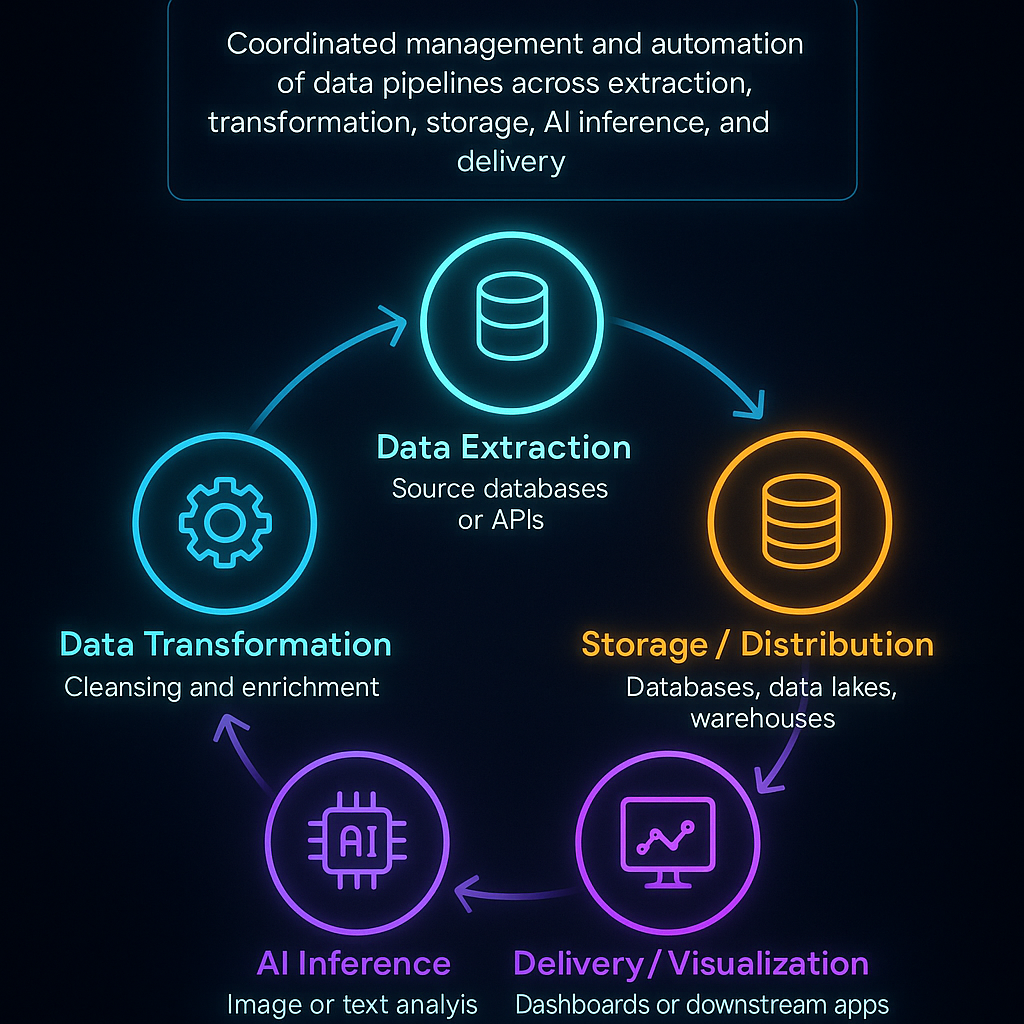
What is data orchestration


How Do You Pick a Data Orchestration Tool?

In short, what things should you think about while picking a tool?

When choosing the correct orchestrator, you need to think about how scalable, easy to use, easy to integrate, provide real-time support, cost, security, and vendor reliability, and make sure it fits with your team’s skills and workload.

Important Things to Look at

  • Performance and Scalability
    A good orchestrator must be able to handle more data and workloads at the same time without slowing down. Batch tasks, streaming pipelines, and ML workflows should be able to grow both horizontally and vertically. Clarifai’s compute orchestrator and other tools operate on Kubernetes and use autoscaling for workloads that require a lot of AI.
  • How Easy It Is to Use and How Developers Feel About It
    Some tools are code-first, like Python DAGs, while others provide low-code or no-code interfaces with workflow designers that let you drag and drop. Pick what works best for your team: data engineers could like coding better, while analysts might like visual builders more. Clarifai’s platform has an easy-to-use UI and API access, which lets users of all ability levels orchestrate models.
  • Connecting and Integrating
    Check out the supported connectors for databases, message queues, APIs, storage systems, and AI services. An orchestrator should be able to easily work with Clarifai for model inference and with Snowflake, BigQuery, Apache Kafka, and Kubernetes. For flexibilityestuary.dev, plugin ecosystems or support for bespoke operators are a must.
  • Real-Time and Event-Driven Features
    As edge computing and streaming datamontecarlodata.com become more popular, orchestrators need to be able to handle event-driven triggers, streaming ETL, and execution with low latency. Look for things like sensors or hooks that respond to file arrivals, Kafka messages, or API calls.
  • Price and Licensing
    You can use open-source technologies for free, but you have to host and maintain them yourself. Enterprise platforms offer help, but they usually charge based on how many people use them or how much they cost. Think about the overall cost of ownership, which includes training, infrastructure, and the possibility of being locked in with a vendor.
  • Safety and Compliance
    Data governance is a must—make sure your technologies support encryption, role-based access, audit logging, and following the rules set by GDPR and other laws. Clarifai’s platform offers RBAC, secure inference endpoints, and deployment on-premises for applications that need extra security.
  • Support from the Vendor and the Community
    Think about how easy it is to get help, read documentation, get training, and join a lively community. A strong open-source community shares plugins and best practices, while enterprise suppliers offer SLAs and specialized support.

Expert Advice

  • Ben Lorica says that you should test orchestrators by running a proof of concept that mirrors your real workload. Synthetic benchmarks sometimes don’t show how well something works in the real world.
  • Clarifai’s CTO said that AI model inference should be a top priority for orchestrators in the AI era. This will make it easier for data and ML teams to work together.
  • Analysts say that multi-cloud orchestration adds problems such different APIs and pricingdatacamp.com. To avoid these problems, platforms should be agnostic and have strong abstractions.

Example 

Imagine a marketing team that wants to set up a daily sentiment analysis pipeline. They need to get tweets, break them down, use Clarifai’s text analysis model to classify the sentiment, and then send the results to a dashboard. Choosing a platform that has built-in API connectors and a simple scheduling UI lets people who aren’t tech-savvy run this process.
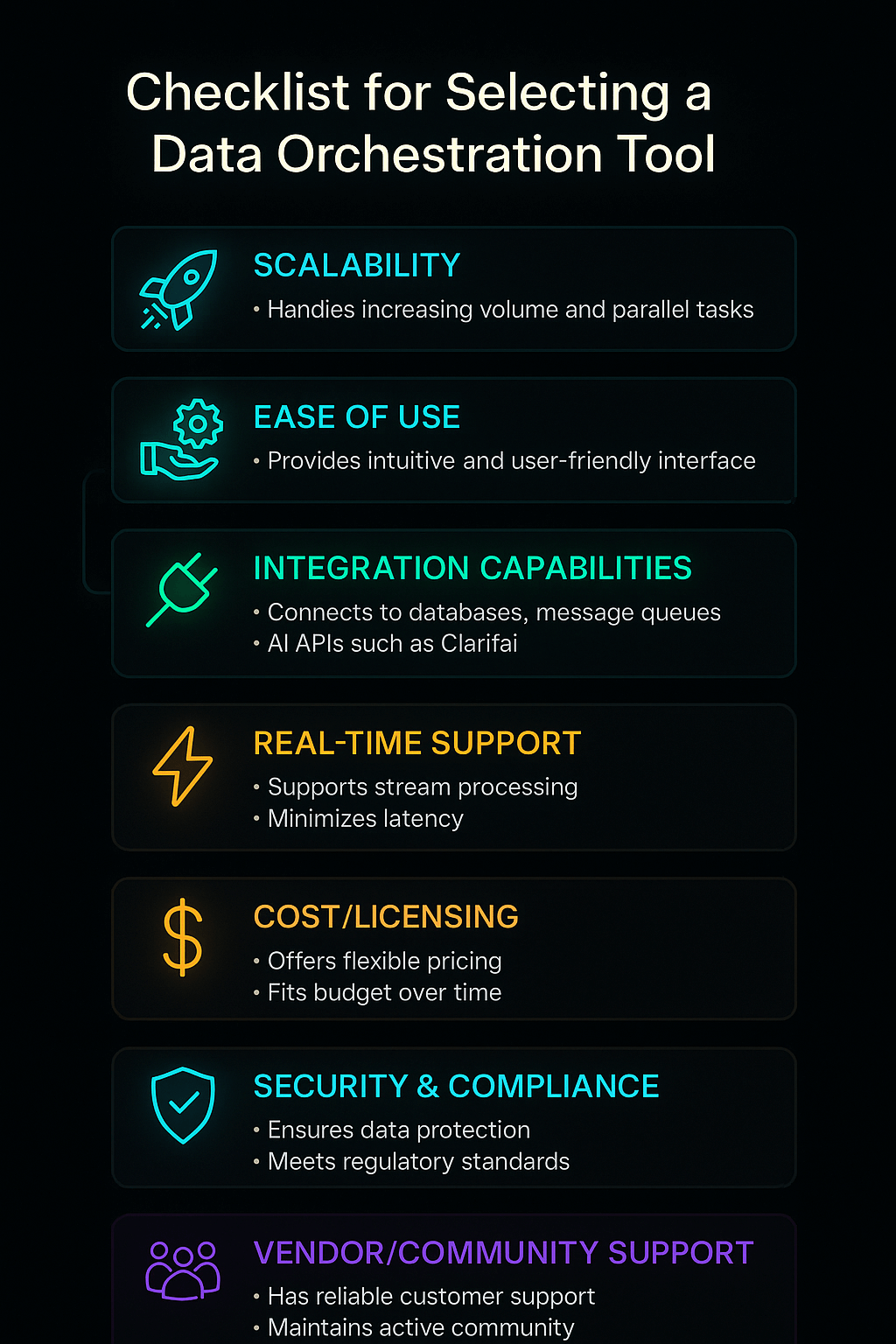
Checklist for selecting orchestration tool


What Are the Best Open-Source Data Orchestration Platforms in 2025?

In short, what open-source tools should you be aware of?

Apache Airflow is still the most popular open-source orchestrator, but new ones like Dagster, Prefect, Kestra, Flyte, and Mage have unique capabilities like type-checked pipelines and declarative workflows that provide teams more options.

The Standard That Has Been Around for a While: Apache Airflow

Airbnb built Apache Airflow, which rapidly became the open-source platform for creating, scheduling, and monitoring data workflowsestuary.dev. Airflow employs Python code to define DAGs, which gives engineers complete control over how tasks work. It has a built-in scheduling system, retry logic, a lot of plugins, and a web UI for watching and fixing pipelines at pipelinesestuary.dev. Airflow is flexible since its ecosystem is open to new operators for Snowflake, Databricks, Spark, and Clarifai’s API.

  • Pros: a big community, configurable Python DAGs, a lot of connectors, and good scheduling.
  • Disadvantages: Setting up and scaling might be hard; the web UI may seem old; there is no native type system.

Dagster: Aware of Types and Driven by Assets

Dagster adds asset-oriented orchestration and type-checked pipelines, which make sure that the data is valid at every step. It can handle a lot of metadata, split pipelines, and schedule events based on when they happen. Dagster’s “Software-Defined Assets” method treats data outputs like first-class citizens, which makes it possible to trace lineage and versions.

  • Pros: Good experience for developers, type safety, asset lineage, and built-in testing.
  • Disadvantages: The community is smaller than Airflow’s, the features are still being worked on, and you need to know Python.

Prefect: Hybrid Execution and Cloud Management

With hybrid execution, flows can operate locally, on Kubernetes, or through Prefect Cloud. The Prefect Cloud UI lets you monitor tasks, try them again, and set up schedules. The Python API is easy to use. The latest version of Prefect, 2.0, has low-code features and better concurrency.

  • Pros: Can be deployed in several ways, has a solid UI, is easy to use, and can handle errors.
  • Disadvantages: You need a license for Prefect Cloud, and the community is smaller than Airflow’s.

Kestra: Serverless and Declarative Orchestration

Kestra uses YAML to describe processes, which is a way of thinking about Everything as Code. It lets you use complicated branching, dynamic tasks, and event triggers. Kestra is great for streaming data because it is built on top of Pulsar and Kafka. It also scales like a serverless service.

Flyte: Managing ML Workflows

Flyte is all about machine learning and data science pipelines. It has great support for containers, Kubernetes, and versioning. It keeps track of lineage and artifacts, which makes it perfect for MLOps.

Mage and Argo: New Players on the Scene

Mage offers a no-code interface and Python notebooks for making pipelines, which helps analysts and data developers work together. Many ML platforms employ Argo Workflows, which runs on Kubernetes and works with Kubeflow.

Picking from Open-Source Choices

Choose Airflow since it is widely used and has many plugins. Pick Dagster or Prefect if you need superior type safety or hybrid execution. Choose Kestra for streaming compatibility and declarative processes. Mage and Argo are good for low-code or Kubernetes-native needs, whereas Flyte is good for ML pipelines.

Expert Advice

  • According to Ry Walker, the founder of Airflow, the company’s future depends on making advances in little steps and connecting with data lineage, not on coming up with new ideas.
  • Nick Schrock, the founder of Dagster, says that data should be treated like assets with lineage and versioning. This makes pipelines less likely to have issues.
  • Chris White, the CEO of Prefect, supports “negative engineering,” which means that orchestrators take care of faults and retries so that engineers may focus on the fundamental logic.
  • The data platform team at Clarifai recommends using Airflow operators to call Clarifai models, which will make sure that inference is the same across all pipelines.

Example 

Think of a research center that looks at satellite photographs. They use Apache Airflow to manage the workflow: they download the images, run Clarifai’s vision model to find deforestation, store the results in a geographic database, and send alerts to environmental agencies. Dagster could add type safety, which would make sure that the input photos have the right resolution before inference.


Which Enterprise Data Orchestration Platforms Should You Look Into?

Quick Summary: Which business tools are the best?

Enterprise systems like ActiveBatch, RunMyJobs, Stonebranch, and Clarifai’s compute orchestrator offer drag-and-drop interfaces, SLA guarantees, and advanced integrations. These features make them desirable to businesses that need help and the opportunity to grow.

ActiveBatch: A Workflow Designer with Few Lines of Code

ActiveBatch blends workload automation and data orchestration to assist ETL procedures in both on-premises and cloud environments. It comes with connectors that are already made for Informatica, SAP, IBM DataStage, Hadoop, and other programs. Its drag-and-drop interface lets people who aren’t developers construct complicated workflows, and sophisticated users can write scripts in PowerShell or Python.

  • Pros: UI with low code, a lot of connectors, SLA monitoring, and connectivity with old systems.
  • Cons: It might be hard to install and take a lot of resources; licensing fees can be costly.

Redwood’s RunMyJobs: SaaS Orchestration

RunMyJobs is a SaaS application that makes IT work easier by managing data transfers between several platforms. It has interfaces to SAP Datasphere, Databricks, Oracle Fusion, and OpenVMS, as well as load balancing and lightweight agents. It is a cloud service, therefore it doesn’t need as much installation and maintenance on site.

  • Pros: SaaS architecture, robust connectors, dependable uptime, and compliance with ITIL and ISO 20000.
  • Cons: Users say that adjusting for daylight saving time and keeping track of paperwork is hard.

Stonebranch UAC: Managed File Transfer and Centralized Control

The Universal Automation Center (UAC) from Stonebranch is a single console that lets you control data pipelines in hybrid systems. It has a workflow builder that lets you drag and drop files, built-in controlled file transfer with encryption, and ready-to-use integrations for Hadoop, Snowflake, and Kubernetesresearch.aimultiple.com. UAC is good for DataOps teams since it allows pipelines-as-code and version control.

Fortra’s JAMS and Other Platforms

Fortra’s JAMS Scheduler has scripted and parameter-driven workflows that are great for teams that are familiar with code. Rivery and Keboola offer cloud-native ETL and orchestration with easy-to-use interfaces and charging depending on usage. Azure Data Factory and Google Cloud Dataflow are both focused on integrating and processing data within their own ecosystems. They both enable visual pipeline architecture and the potential to grow.

Orchestration of Clarifai Compute

Clarifai has a compute orchestration layer that is made for AI workflows. This lets developers install, scale, and manage AI models and inference pipelines along with other data chores. It works with Clarifai’s API, local runners, and edge deployment options to make sure that models execute successfully in orchestrated workflows. Clarifai’s solution has built-in monitoring and auto-scaling, which lowers latency and makes MLOps easier.

Picking an Enterprise Platform

Businesses should think about how well the vendor supports them, how many features they offer, and how hard it is to integrate them. ActiveBatch is great for integrating businesses; RunMyJobs is good for businesses that want a managed service; Stonebranch is good for transferring files; and Clarifai is good for AI model orchestration.

Expert Advice

  • Gene Kim says to choose an orchestrator that is open to APIs so that it can work with your current DevOps toolchains and monitoring systems.
  • According to Clarifai’s solution architects, putting model inference inside workflows cuts down on context shifts and makes sure that outcomes are always the same throughout data pipelines.
  • Enterprise IT leaders stress the need of looking at vendor roadmaps and community comments to avoid being locked in and to keep innovation going.

Example 

A bank that operates in many countries does nightly batch jobs and detects fraud in real time. They employ ActiveBatch for the main ETL activities, RunMyJobs for cloud-based jobs, and Clarifai’s compute orchestration to deploy anti-fraud models that look at transaction streams as they happen.
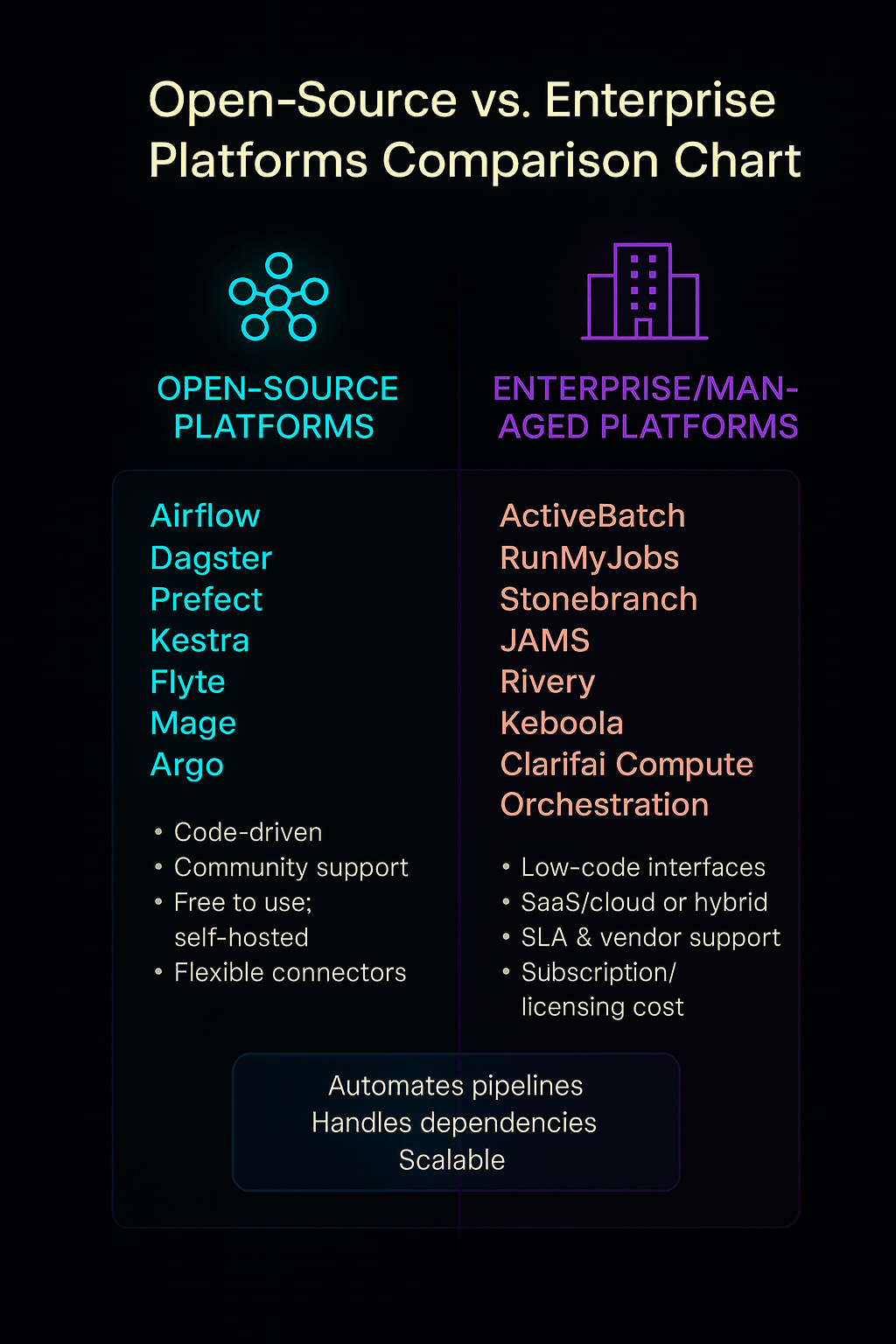
Open Source vs enterprise platforms - comparisons


How Do You Set Up Real-Time and Streaming Data Pipelines?

Why Do Streaming Workflows Need Orchestration? Here’s a Quick Summary.

Real-time analytics and streaming data need orchestration that can respond to events, handle continuous flows, and keep latency low. Streaming workloads get brittle and hard to scale if they aren’t properly orchestrated.

The Growth of Streaming Data

The desire for quick information has reached a breaking point; batch reporting can’t meet the needs of the market today. Real-time processing is needed for the constant streams that come from IoT devices, 5G networks, and event-driven business models. Edge computing brings analytics closer to the source of the data, which cuts down on latency and bandwidth use.

Orchestration and Streaming Technologies

Kafka from Apache

Apache Kafka is a distributed streaming platform that lets you develop real-time pipelines and apps. It has a scalable pub/sub paradigm, is fault-tolerant, and has persistent storage, which makes it the foundation for many streaming designs. Kafka Connect and Kafka Streams make it easier to connect and handle data by providing connectors and processing libraries, respectively.

Structured Streaming in Apache Flink and Spark

Flink and Spark Structured Streaming provide stateful computations and complicated event processing. This lets you use windowing, join operations, and exactly-once semantics. Operators or custom sensors connect these frameworks to orchestrators.

Clarifai’s Real-Time Model Inference

Clarifai’s platform has streaming inference endpoints that can be added to pipelines. This lets you classify, recognize objects, or analyze language in real time on data streams. These endpoints operate with orchestrators like Airflow or Dagster by starting model calls when new messages come in through Kafka or Pulsar.

Important Things to Think About When Designing

  • Event-Driven Triggers: Use sensors or watchers to start pipelines when files are dropped, API calls are made, or messages are sent to a queue.
  • Back-Pressure Management: Streaming frameworks need to be able to manage different input rates without crashing or losing data.
  • Idempotent Operations: Make sure that tasks can safely try again without doing the same work twice, especially while processing events.
  • State Management: Keep track of the status of tasks to support complicated aggregations. This needs long-lasting storage and snapshotting.
  • Latency Monitoring: Use metrics and alerts to find bottlenecks. Clarifai’s platform shows inference latency data for each model call.

Expert Advice

  • Jay Kreps says that “real-time isn’t just about speed; it’s about making decisions as things happen.“
  • Architects from Uber’s Michelangelo platform stress that orchestrators need to handle both stateless and stateful workloads for streaming to perform well.
  • Clarifai’s head ML engineer says that streaming inference needs to be able to absorb spikes without crashing, and that autoscaling and batching can help keep latency low.

Example 

Imagine a ride-hailing business that needs to be able to find fake travel requests right away. Every request that comes in sends a Kafka message. An orchestrator runs a pipeline that checks the user’s identity, their location, and their driver’s photographs for any strange things, and then either authorizes or rejects the ride, all in a matter of milliseconds.
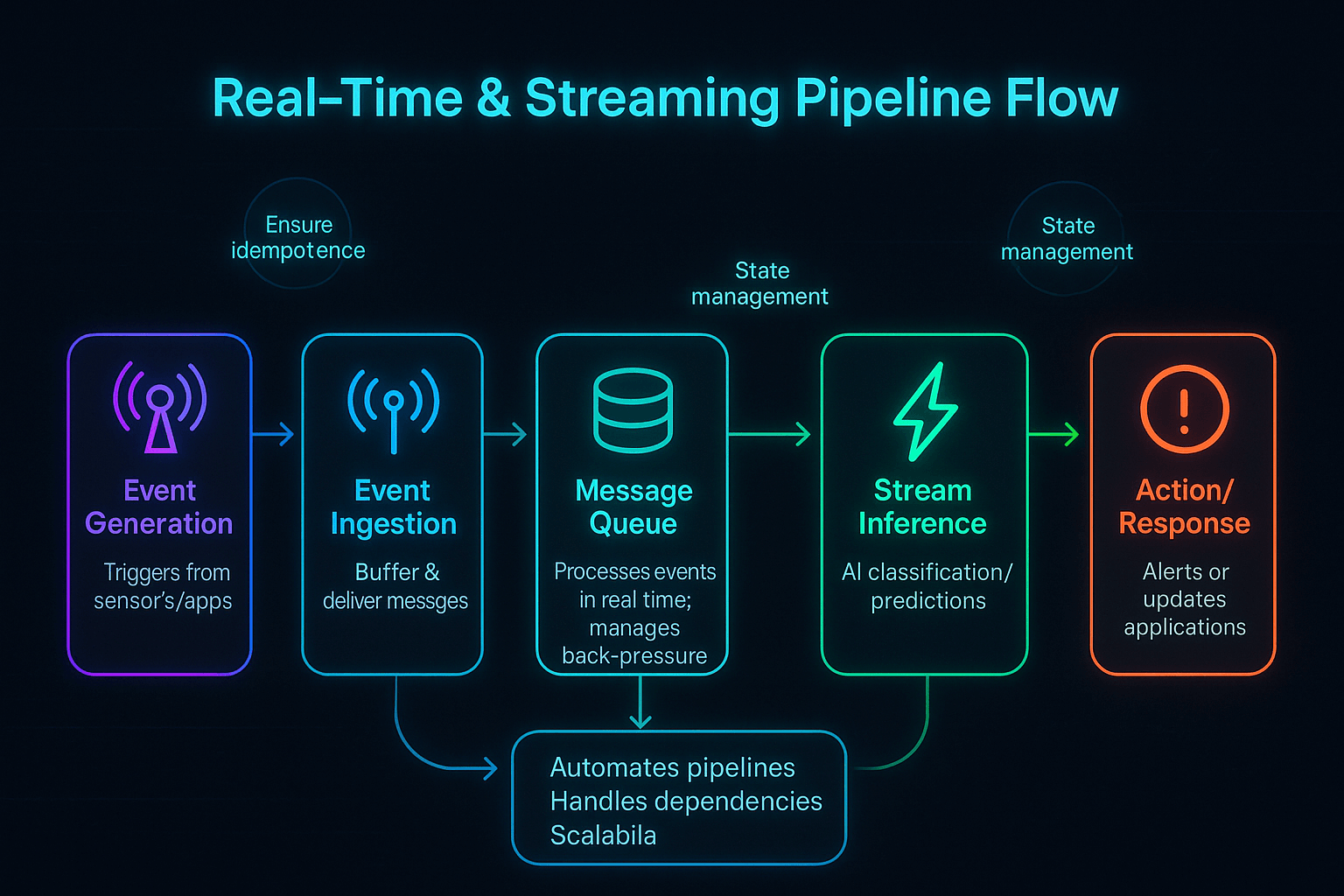
Real‑Time & Streaming Pipeline Flow


How Do You Manage Data Across Both Hybrid and Multi-Cloud Environments?

What Problems Come Up When You Try to Orchestrate Many Clouds?

Multi-cloud orchestration needs to hide the variations across providers, keep track of costs and data transfers, and make sure that security and governance are the same in all environments.

The Multi-Cloud Need

To get the best performance, pricing, and reliability, businesses are using AWS, Azure, Google Cloud, and their own data centers more and more. This technique avoids being locked into a vendor and makes use of specialized services, but it also creates problems such variances in APIs, identification models, and price structures.

Problems and Answers

Abstraction and Moving

Orchestrators need to provide a single control plane so that workflows may execute on any cloud or on-premises architecture without major changesdatacamp.com. Declarative deployments across providers are possible with tools like Terraform (for IaC) and Clarifai’s compute orchestration.

Managing Costs

The costs of moving data and egress can be high, thus orchestrators should try to keep data in one place and limit how much data is moved. Processing at the edge or in a specific location lowers egress costs.

Governance and Security

To keep policies the same across clouds, you need to connect to IAM systems, encrypt data, and keep audit logs. Data virtualization and catalogs help create unified perspectives while still preserving the sovereignty of data in each region.

Things to Think About When It Comes to Networks and Latency

Cross-cloud networking might cause delays; therefore, orchestrators need to make sure that services perform well in different regions and that important services are available in all zones.

Tools and Plans

  • Provider-Agnostic Orchestrators: Airflow, Dagster, and Clarifai’s compute orchestrator all work with several clouds and have plugins for each one.
  • Data Fabrics and Meshes: Use data fabric architectures to hide disparities in physical storage, and use data mesh principles for decentralized ownershipmontecarlodata.com.
  • Hybrid Deployment: Run orchestrators on Kubernetes clusters that span on-premises and cloud nodes. Clarifai’s on-premises runners make it possible to do local inference while connecting to cloud services.

Expert Opinions

  • Corey Quinn says that you should build for portability from the start to prevent having to spend a lot of money on re-architecting later.
  • The enterprise team at Clarifai says that hybrid deployment lets companies store sensitive data on their own servers while using cloud AI services for inference that needs a lot of computing power.
  • Analysts say that to be successful with multi-cloud, you need to carefully plan your architecture, manage your costs, and plan how to move your data.

Example 

A retail business with outlets all across India utilizes AWS to host a central data warehouse, Google BigQuery to analyze marketing data, and saves transaction data on its own servers because it has to. An orchestrator schedules nightly batch loads to AWS, starts real-time stock updates on GCP, and utilizes Clarifai’s local runner to look at CCTV footage for in-store security. All of this is done without any problems, even though the environments are different.
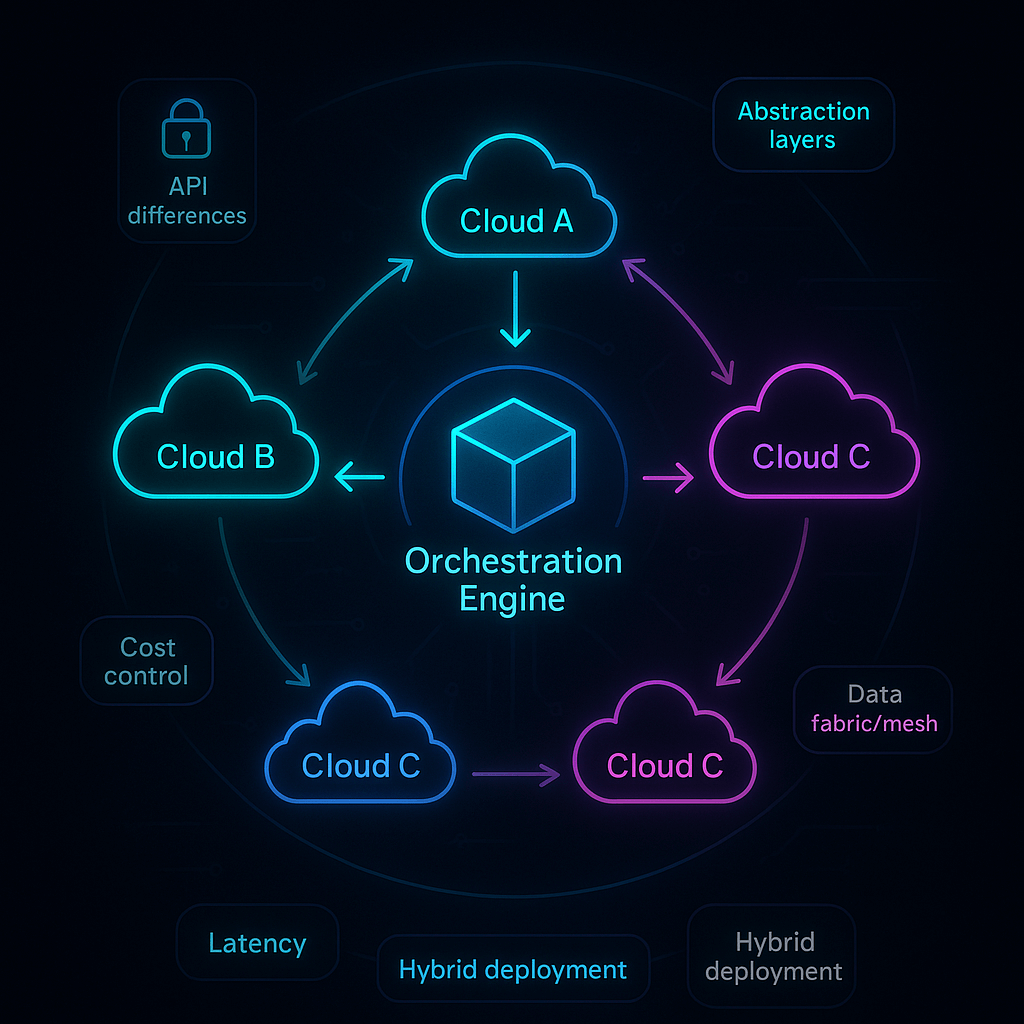
Hybrid & Multi‑Cloud Orchestration Architecture Diagram


How Can You Make Sure That Data Orchestration Is Safe, Compliant, and Easy to See?

Quick Summary: Why Are Governance and Observability So Important?

Security and compliance keep data safe and private, but observability lets you see pipelines, which makes it easier to fix problems and enforce policies.

Basic Rules for Security and Compliance

Data orchestrators deal with private data, thus it has to be encrypted both when it is stored and when it is sent. Use role-based access control (RBAC), keep secrets safe, and keep networks separate. Make sure that solutions can interact with compliance standards like GDPR, HIPAA, and PCI-DSS, and keep audit logs of everything that happens.

GDPR’s right to be forgotten means that orchestrators must be able to remove data and metadata when asked. In businesses that are regulated, make sure that orchestrators may run completely on-premise and support data residency. Clarifai’s platform lets you deploy on-premises and has secure inference endpoints for industries that are heavily regulated.

Data Quality and Observability

Observability is more than just keeping an eye on uptime; it also means knowing how healthy the pipeline is, where the data comes from, and how good the quality metrics are. AI-powered observability systems find problems on their own, group them into types of mistakes, and recommend ways to find the root cause. Snowflake and Databricks employ machine learning to fix mistakes and sort through new data, which cuts down on the amount of work that needs to be done by hand.

Data contracts and active metadata frameworks set clear expectations between producers and consumers, making sure the data is of good quality and stopping “schema drift.” Lineage tracking helps teams figure out where data comes from and how it moves through pipelines, which helps with compliance and debugging.

Rules and Ways of Doing Things

  • Take an “assume breach” approach: encrypt everything, limit access, and keep environments separate.
  • Establish alerts to monitor latency, errors, and unusual data patterns continuously.
  • Set up data stewardship responsibilities and make sure someone is responsible for the quality and compliance of the data.
  • Use test environments, with separate dev, staging, and prod pipelines, and set up automatic promotion rules.

Governance Features of Clarifai

Clarifai’s enterprise platform has built-in observability that logs every inference call, keeps track of model versions, and shows dashboards for latency and throughput. Its role-based permissions make sure that only people who are allowed to can deploy or query models. Clarifai helps businesses satisfy strict compliance requirements by offering on-premises alternatives and encrypted endpoints.

Expert Advice

  • Bruce Schneier says that “data is a toxic asset—it’s valuable but dangerous.” He urges businesses to protect their data by making sure it is not exposed too much.
  • Barr Moses says that visibility is the key to reliable analytics. Without visibility, mistakes go unreported.
  • Clarifai’s security lead says that AI models can be used as attack vectors, thus orchestrators need to keep an eye on how well the models work and look for inputs that are meant to hurt them.

Example 

An insurance firm manages consumer data across many systems. They employ an orchestrator with built-in checks for data quality to find records that don’t match, encrypt all API calls, and keep track of every access for audits. During a compliance audit, the organization may provide end-to-end lineage and establish that sensitive data never escapes regulated environments.


What Trends Will Affect How Data Orchestration Works in the Future?

In short, what trends should you keep an eye on?

In the next few years, AI-driven orchestration, real-time analytics, data mesh architectures, serverless workflows, and self-service technologies will change how pipelines are constructed and run.

Orchestration with AI

AI takes care of boring duties like cleaning up data, finding anomalies, and figuring out what caused them. It also helps with root cause analysis. Generative AI models like ChatGPT need high-quality datasets, which makes orchestration tools have to take data quality and context into account. We will have AI helpers that can write pipeline code, suggest improvements, and adjust to fit new workloads.

Analytics in Real Time and on the Edge

Edge computing is still growing; gadgets process data on their own and transmit summaries back to central systems. This change will make orchestrators have to handle micro-batches and event-driven triggers, which will make sure that latency is low and the edge is strong.

Data Mesh and Products for Data

Organizations use data mesh designs to spread out ownership and think of data as a product. Orchestrators will have to make sure that data contracts are followed, manage pipelines across domains, and keep track of where data came from in decentralized domains. Metadata will be very important for finding and managing digital assets.

Everything-as-Code and Serverless

Temporal and AWS Step Functions are examples of serverless orchestration services that let you pay as you go and don’t require you to worry about infrastructure. Declarative methods (Everything-as-Code) let teams version workflows in git, which makes it possible for data pipelines to be reviewed and CI/CD to happen at the same time. Kestra is a good example of this trend because it uses YAML to construct workflows.

Low-Code and Self-Service

Business users are asking for more and more self-service technologies that let them develop pipelines without having to write code. Analysts may control data flows with low-code systems like Rivery or Mage (and Clarifai’s visual pipeline builder), making data engineering more accessible to everyone.

Evolution of Observability and Compliance

Active metadata and AI-driven observability will find problems before they get worse, and data contracts will make sure everyone knows what to anticipate. Rules will get stricter, and orchestrators will have to do real-time compliance audits and delete data automatically.

Expert Advice

  • Fei-Fei Li says that “data will be the differentiator in AI systems; orchestrators must adapt to feed models with the right data at the right time.“
  • Zhamak Dehghani says that decentralized, domain-oriented pipelines will take the place of monolithic data platforms.
  • Clarifai’s CEO said that orchestration will eventually merge with model deployment platforms, making it easier for users to design, implement, and watch AI solutions.

Example 

Think about a healthcare startup that is making an app for individualized nutrition. They use a data mesh design, which means that nutritionists own food data, doctors own medical records, and AI researchers own models. A serverless orchestrator starts events as fresh lab results come in, uses Clarifai’s natural language model to read doctor notes, and sends recommendations to users, all while keeping domain boundaries and data contracts in place.
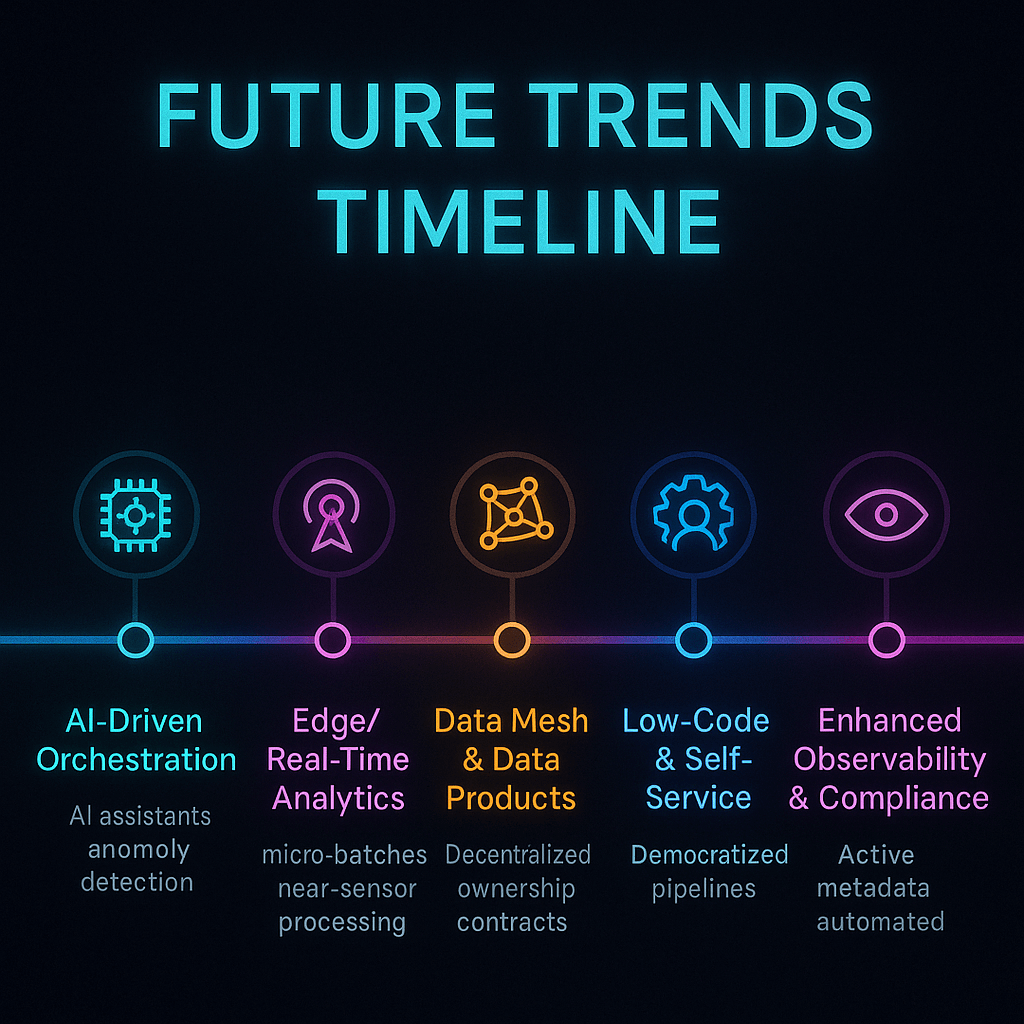
Future Trends Timeline - Data Orchestration


What Are Some Real-Life Examples and Success Stories?

Quick Summary: How do people use orchestration in real life?

Data orchestration makes everything from smart manufacturing and personalized healthcare to recommendation engines and fraud detection possible. Success examples show real benefits, such as better data quality, faster time to insight, and lower costs.

E-Commerce: Dynamic Pricing and Recommendations

A top e-commerce site organizes data from online logs, purchase history, and social media feeds. An orchestrator starts pipelines that figure out dynamic pricing, run Clarifai’s recommendation models, and update the store in almost real time. The result was higher conversion rates and happier customers.

Finance: Finding Fraud in Real Time

Every day, banks handle millions of transactions. An orchestrator takes in transaction streams, runs models to find unusual activity, verifies the rules set by the government, and stops suspect activity in just a few seconds. One bank said that its losses from fraud went down by 35% and it was able to disclose to regulators more quickly.

Healthcare: Personalized Treatment Plans

Hospitals manage streams of computerized health information, genetic data, and data from wearable devices. Pipelines use predictive algorithms to suggest treatment regimens, set up appointments, and keep an eye on patients’ vital signs in real time. Secure orchestration makes sure that HIPAA rules are followed, while Clarifai’s on-premises inference keeps private information safe.

Smart Factories in Manufacturing

Smart factories utilize sensors to keep an eye on machines, find problems, and plan maintenance. Orchestrators take sensor data, run Clarifai models to find problems in audio and images, and automatically send out repair requests. This cuts down on downtime and makes equipment last longer.

Entertainment and Media

Streaming services like Netflix employ organized pipelines to collect data on how many people are watching, train recommendation algorithms, and send personalized content suggestions to millions of customers. Automated orchestration makes it possible to handle petabytes of data every day.

The Indian Situation

Orchestration is being used by Indian startups, especially those in fintech and healthcare, to grow their businesses. An insurance aggregator in Mumbai uses orchestrated workflows to get quotes from several companies, run risk models with Clarifai’s AI, and show users bespoke plans.

Expert Advice

  • Kate Strachnyi says that data quality is really important for success stories. If pipelines aren’t set up correctly, the insights they give will be wrong.
  • Clients of Clarifai say that adding model inference directly into orchestrated pipelines cuts down on development time and operational problems by a large amount.
  • Vivek Muppa says that firms usually start with small orchestrated workflows and then grow them over time, learning best practices as they go.

Example 

Think about a power company that puts smart meters in remote areas. A coordinated pipeline gathers consumption data, estimates peak demand, and tells power plants to change how much power they make. Clarifai’s anomaly detection model identifies irregularities that could mean tampering, and field teams are then told about them. This all-encompassing method makes things more reliable and cuts down on losses.


Step-by-Step Guide to Putting a Data Orchestration Strategy into Action

Quick Summary: What Are the Steps to Set Up Orchestration?

To put an orchestration plan into action, you need to figure out your business goals, map out your processes, design your architecture, choose your tools, create your pipelines, add observability, and promote a DataOps culture.

Steps for Implementation

Step 1: Look at Your Goals and Needs

To begin, be clear about what you want: do you need real-time fraud detection, nightly ETL, or AI inference? Find out where the data comes from, how much it is, how fast it moves, and what rules need to be followed. Get people from the business, IT, and data departments involved to agree on what is most important.

Step 2: Make a Map of Your Current Workflows
Write down how data flows, what it depends on, and where it hurts. Make flowcharts to help you see how things work and find steps that need to be done by hand. Find out how long it takes for things to happen, how often they fail, and how good the data is.

Step 3: Plan the Architecture
You can choose between batch, streaming, or hybrid architectures. Define the parts of storage (data lakes vs. warehouses), computation (spark clusters, Kubernetes, serverless), and networks. Take into account both on-premises and multi-cloud needs.

Step 4: Choose and Evaluate Tools
Use the criteria we talked about before to make a short list of tools. Use your real workloads to run proof-of-concept testing. If AI inference is a big part of your operations, think about using Clarifai’s compute orchestrator.

Step 5: Make Pipelines
Use DAGs, YAML, or visual builders to make pipelines. Follow best practices include using modular tasks, idempotent operations, parameterization, and version control. Use official SDKs or connectors to connect to Clarifai’s API.

Step 6: Set Up Monitoring and Observability
Add logs, analytics, and tracing to instrument pipelines. Use things like Prometheus, Grafana, and the dashboards that come with Clarifai. Set up alerts for problems, increases in latency, and strange data. Use contracts and tests to make sure your data is good.

Step 7: Test and Make Changes
Do unit tests, integration tests, and load tests. Check that the error management and recovery systems work. Use feedback and performance metrics to make changes. Automate the deployment of pipeline definitions with CI/CD.

Step 8: Teach Teams and Promote a DataOps Culture
Train developers, analysts, and business users on the orchestrator you picked. Set up code standards, review processes, and documentation. Encourage data engineers, ML engineers, and domain specialists to work together across departments.

Expert Opinions

  • Lenny Liebmann says that for an orchestration plan to work, teams need to work together and use DevOps ideas as well as technology.
  • Clarifai’s solution engineers say that to show value and get people on board, you should start with a pilot project.
  • Kelsey Hightower says that to avoid mistakes by people, you should automate everything, even testing and deployment.

Example 

A logistics company needs to plan deliveries and find the best routes. After that, they plan how they would take in and deliver orders, chose Prefect to handle the orchestration, add Clarifai’s route optimization model, and set up real-time monitoring for driver delays. They notice shorter delivery times and happier customers within a few months.


Conclusion: How to Get Around the Data Orchestration Landscape in 2025

Data orchestration is no longer a choice; it’s a must for businesses that want to use AI, handle real-time analytics, and work in several clouds. When choose the right tool, you need to think about how easy it is to use, how scalable it is, how well it works with other tools, how well it works in real time, how much it costs, and how secure it is. Open-source platforms like Airflow and Dagster are flexible, while enterprise solutions like ActiveBatch, RunMyJobs, and Clarifai’s compute orchestrator offer support and more advanced functionality. For the future of montecarlo data, companies need to adapt by using new tools and methods. Real-time streaming, data mesh architectures, and AI-driven observability are all changing the way things work.

To put in place a strong orchestration strategy, you need to plan carefully, test it out, keep an eye on it all the time, and have a DataOps culture where everyone works together. Clarifai’s products, like compute orchestration, model inference APIs, and local runners, work well with a lot of different orchestrators. This makes it easy for teams to design smart pipelines with no trouble. By adopting data orchestration now, your company will be able to get insights faster, make better decisions, and gain a competitive edge in the age of AI.


FAQs

  • Q1: Is data orchestration the same thing as ETL?
    No, ETL is just concerned with getting data, changing it, and loading it into a destination. Data orchestration, on the other hand, coordinates many operations across many systems, such as ETL, ML inference, and streaming events, making sure that dependencies are handled correctlydatacamp.com.
  • Q2: Do I need to know how to code to use a data orchestrator?
    It depends on the instrument. Airflow and Dagster are open-source systems that need Python. ActiveBatch and Clarifai’s UI are examples of enterprise solutions that have low-code interfaces.
  • Q3: How does Clarifai work with tools for organizing data?
    You may call Clarifai’s APIs and SDKs from orchestrators like Airflow and Dagster, which lets you use model inference in your pipelines. Its compute orchestrator also takes care of deploying and scaling models.
  • Q4: Can I manage data across more than one cloud?
    Yes, a lot of orchestrators support multi-cloud deployment. For example, Clarifai’s local runner lets you conduct inference on-premises while managing workflows across clouds, hiding differences across providers.
  • Q5: What can I do to make sure I follow rules like GDPR?
    Pick orchestrators that already have security features like encryption, RBAC, and audit logs. Also, set up rules for where data is stored. Clarifai’s choice to deploy on-premises helps keep sensitive data safe.
  • Q6: What is the difference between data orchestration and process automation?
    Workflow automation takes care of single activities or business processes. Data orchestration, on the other hand, takes care of complicated, multi-step data pipelines that entail changing, analyzing, and transporting data between systems.
  • Q7: Are there ways to orchestrate data without servers?
    Yes, AWS Step Functions and Temporal are examples of serverless services that let you pay as you go for orchestration without having to manage infrastructure. Kestra and other declarative tools can let you scale without a server.
  • Q8: Why is observability crucial in data pipelines?
    Observability lets teams find mistakes, keep an eye on performance, and make sure data is good. AI-driven observability tools can find problems on their own and fix them.
  • Q9: What trends should I get ready for?
    Get ready for AI-driven orchestration, real-time edge analytics, data mesh architectures, low-code tools, and serverless workflows.
  • Q10: What is the first step in data orchestration?
    Start by figuring out what you need, sketching out how things are done now, choosing a tool that meets your needs, and running a test project. Use Clarifai’s tools to swiftly add AI inference.