Relocating from New Zealand to Australia requires careful preparation. Although the two countries are geographically close, the process still involves international shipping, documentation, and settlement planning. Sorting the most important tasks early can prevent delays and make the transition far smoother. By addressing key practical matters first, individuals and families can move forward with a clearer plan and fewer last-minute complications.
Confirm Your Moving Timeline and Logistics
The first priority when relocating internationally is organising how your belongings will travel. Shipping arrangements influence the entire moving schedule, including packing dates, departure timing, and arrival plans in Australia.
International moves typically involve freight forwarding, shared shipping containers, or dedicated container space, depending on the volume of household items. Transit times across the Tasman may vary, so confirming shipping logistics early helps establish realistic expectations.
Many households begin by researching options for moving to Australia from NZ with experienced relocation support to better understand the transport process and timeline. Clarifying these logistics early ensures belongings are packed properly and shipped within the required timeframe.
Review Visa and Residency Requirements
New Zealand citizens generally have straightforward access to Australia, but it is still important to understand the relevant immigration rules before moving.
Most New Zealanders enter under the Special Category Visa (Subclass 444), which allows them to live and work in Australia. However, residency conditions, healthcare eligibility, and long-term settlement options can vary depending on personal circumstances.
Reviewing these requirements early helps individuals understand their rights and responsibilities once they arrive. It also ensures that employment arrangements, schooling plans, or healthcare access can be organised with confidence.
Organise Essential Personal Documents
International relocation often requires multiple documents for identification, employment verification, and administrative registration.
Before leaving New Zealand, it is important to gather key records, including passports, birth certificates, marriage certificates, academic qualifications, and employment documents. These records are frequently required when opening bank accounts, applying for housing, or registering with services in Australia.
Many institutions rely on identity verification systems to confirm personal details. Having certified copies ready can make these processes significantly faster after arrival.
Creating digital backups of important documents also provides an extra layer of security while belongings are in transit.
Decide What to Ship and What to Replace
One of the most practical decisions when relocating internationally is determining which belongings should be shipped and which should be replaced after arrival.
Shipping costs depend on container space, item size, and transit handling. As a result, many households review furniture, appliances, and bulky items carefully before deciding whether they are worth transporting.
High-quality furniture, sentimental items, and irreplaceable belongings are often prioritised, while easily replaceable items may be left behind. This stage often involves assessing international removals logistics, where shipment volume directly affects overall costs.
Sorting belongings early reduces shipping expenses and allows packing teams to prepare items according to export requirements.
Prepare Financial and Banking Arrangements
Financial planning is another task that should be addressed early in the relocation process. Informing your New Zealand bank about the move from NZ to Australia can help avoid issues with international transactions, while also reviewing any existing entitlements, as payments like Working for Families tax credits may be affected or stopped once you move overseas.
Many people also open an Australian bank account before arriving so that funds are immediately accessible for everyday expenses. This can be particularly useful when paying rental deposits, utilities, or transport costs.
Understanding currency exchange systems and international transfer fees is also important when moving savings between countries. Organising finances early helps ensure that financial access is smooth during the first weeks in Australia.
Plan Housing and Short-Term Accommodation
Housing arrangements often need to be considered before leaving New Zealand. Some people secure long-term accommodation in advance, while others arrange temporary housing until they find a suitable property.
Australia’s rental market can vary between cities, and landlords typically require identification, references, and employment confirmation. Preparing these documents ahead of time can help speed up the application process.
Temporary accommodation may also be necessary while shipped belongings are still in transit, ensuring households remain comfortable during the transition period.
Starting With the Right Priorities
Relocating from New Zealand to Australia involves several moving parts, but focusing on the right tasks early makes the process much easier. Confirming transport logistics, reviewing visa requirements, preparing documents, and organising finances all help create a clear relocation plan.
When these priorities are handled early, the remaining steps of the move from NZ to Australia become far more manageable, allowing individuals and families to settle into their new environment with greater confidence.
Reddit is stepping up its fight against bots, and now your account could be asked to prove it is human if the platform detects fishy behaviour.
Reddit CEO Steve Huffman says these checks will be rare, but they are meant to protect what makes Reddit work in the first place – real people talking to real people.
As AI-generated content spreads, Reddit admits it is getting harder to tell who is behind a post. So instead of broad crackdowns, it is focusing on suspicious behavior and adding clearer signals across the platform.
How Reddit plans to separate humans from bots
Reddit
If Reddit detects signs of automation or unusual behavior, it may trigger a human verification check. This could involve simple actions like passkeys or FaceID that confirm a human is present.
In some cases, third-party biometric systems like Sam Altman’s World ID may be used. The platform may also use government-issued IDs in regions where laws require them. However, Reddit says that your identity will stay separate from your account.
The company is also standardizing labels for automated accounts. Approved bots will carry an [APP] tag, making it obvious you are interacting with software. Developers will need to register their tools to get this label, which adds a layer of transparency.
Since Reddit says this is not a sitewide verification system, most users might never be asked to prove anything. Even when such checks take place, the focus will be on confirming a human exists, not identifying who that person is.
At the same time, the platform will continue removing harmful bots at scale, already taking down around 100,000 accounts daily. It is also improving reporting tools so users can flag suspicious activity more easily.
Reddit is not banning AI-written posts outright, but it is drawing a firm line. For now, the platform cares less about how content is written and more about who is behind it.
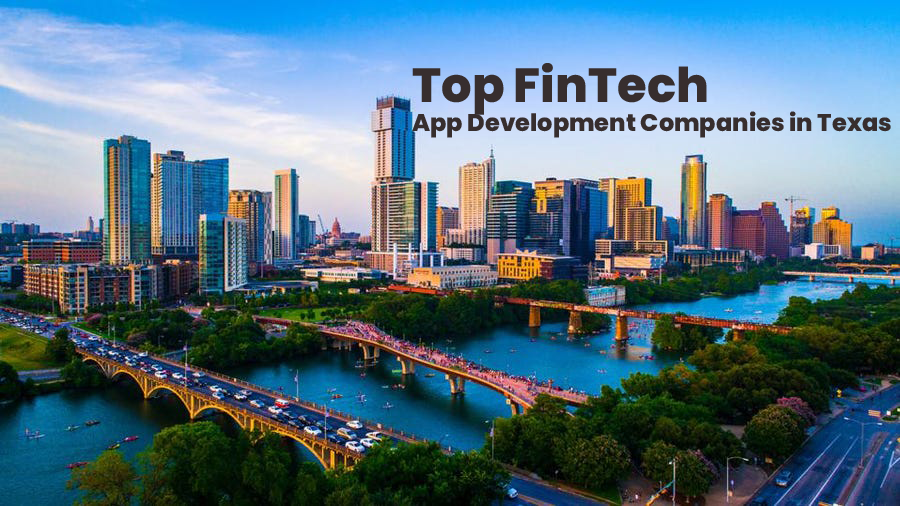
Top FinTech Mobile AI App Development Companies in Texas, USA
Mobile app development is a tidal wave in this digital era. Every business is focusing on AI app development to reach a wider audience base and the banking and financial sector is not an exception. The usage of banking apps, e-wallet apps, UPI payment apps, and insurance and investment, stocks trading apps has been increased.
Mobile banking AI app developers are assisting companies to provide convenient online banking services to their customers. On the other side, E-wallet app developers by creating mobile wallet apps like Google Pay, PhonePe, PayPal are making money transaction secure, faster, and easier.
Accordingly, FinTech AI app developers are playing a vital role in the development of the best insurance, investment, and remittance apps.
Be it any category, mobile application development companies in the USA, with deep knowledge on building bespoke mobile software applications are assisting banking and finance companies to hold the market opportunities for FinTech applications.
Are you searching for top Fintech mobile app development companies in Texas, USA?
You can end you’re here. In this article, we have given the list of the best mobile app development companies in Texas, USA. Our expert analysts with deep research on the mobile app development industry in the United States listed the most trusted software development companies in Texas, USA.
Here is the list of the best FinTech mobile AI app development companies in Texas, USA.
List Of The Top FinTech AI App Development Companies in Texas, USA
1. BoTree Technologies-Top FinTech App Development Company In USA
BoTree Technologies is one of the famous digital banking and Fintech services providers in the USA. With a vision to improve the business profitability of their clients, this popular financial software development company aims to deliver custom FinTech solutions that meet the rules and regulations of the financial industry.
The company’s FinTech App Development Services include:
The company is backed with 800+ successfully deployed mobile app development projects, 500+ web apps, and nearly 200+ enterprise-level software applications that have been delivered to leading brands across the US, India, UAE, and many more countries.
The company offers:
3. Cleveroad- Top Web & Mobile App Development Company in California and Texas
iOS App Development– Native swift apps for iPhone, iPad, and other Apple devices
Android App Development- Native mobile apps for Android using Kotlin
Flutter App Development- Hybrid app development using Dart client-optimized programming language
Progressive web app development services
UI/UX Design
4. Hyena Information Technologies- Famous Financial apps developer USA
Hyena is one of the best mobile app developers In Texas, USA. The company aims to deliver high-quality mobile applications that meet the industry and regulatory standards. It offers reliable app development services to clients across diversified industries, including the banking and financial sector, healthcare, retail/e-commerce, manufacturing, and many other industries.
5. OpenXcell- The Best Financial Application Development Services Company USA
OpenXcell is a leading mobile app development company in the USA. Since its incorporation in 2009, the company has submitted nearly 3000 Android and iOS apps, and these applications grabbed the attention of over 15 million users globally. The company has its footprint in India, the United States, Canada, the UK, and Australia.
6. UppLabs- Top Mobile Banking App Development Agency in USA
UppLabs is one of the best mobile app development services providers in USA. It offers top-notch software app development services to FinTech, Healthcare, and real estate sectors.
Driven by 8+ years of FinTech development experience, it is an expert in creating best-in-class digital FinTech solutions using the latest technologies. It has proven experience in developing Stock-trading apps, InsurTech apps, Robo-advising apps, RegTec apps, Blockchain apps, Crowdfunding platforms, and cryptocurrency exchange apps.
The company has been awarded #1 Fintech App Development Company by TopDevelopers. It also has been crowned with many awards such as Top 10 App Development Companies in Ukraine, Top Web Development Companies on Clutch, Top Software Development Companies in Ukraine, Top Mobile App Developers, Top React Native App Development Company, Top Software Development Companies, etc.
Here are the best app development services of UppLabs:
FinTech solutions and software development
Web and mobile app development
IT consulting services
7. Magneto IT Solutions- Top Mobile App Development Company in Texas, USA
It is one of the best mobile apps development companies in Texas, San Francisco, and New York. The company is also a popular app development firm in Australia, India, the Middle East, and the United Kingdom. With 12 years of experience, the company has delivered approximately 1,800 projects yet.
The company is engaged in providing mobile application development solutions for FinTech, Real Estate, and Utility industries. Its mobile apps development services include:
Swift apps development or iOS app consulting, development, and support services
Kotlin apps development or Android app consulting, development, and support services
AI development or AI-based chatbot consulting, development, and support services
Custom software apps or web apps development
ERP application development
E-commerce or marketplace application development
React Js, Node Js, and Angular Js Development
PHP development
8. Intellectsoft US- Custom Mobile apps developer in Texas, USA
With hundreds of apps delivered to a broad range of business domains, Intellectsoft stood on our list as the leading iOS Mobile App Development Services provider in the USA. The company is recognized as the best financial software development company that uses AI and ML technologies to build highly intelligent and interactive Fintech apps for android and iPhone.
Its app development services comprise:
Custom iOS apps development services
iPhone App Development
iPad App Development
Apple Watch App Development
Apple TV App Development
App Clips Development
Custom Android apps development services
Android Mobile App Development
Android TV App Development
Android Tablet App Development
Android Wear App Development
Cross-platform app development services
Hybrid Mobile App Development
Hybrid Tablet App Development
Hybrid TV App Development
UI/UX design services for iPhone, Android, Web, and Hybrid apps
Progressive web app development services
Mobile apps for IoT wearables
IT Consulting and app prototyping
Quality assurance (QA) testing
Custom Financial Software Development
Blockchain solutions and platforms
Custom online banking platforms
Digital wallet apps for P2P Payments and instant money transfer
AI-powered stock tracking applications
Robotic Process Automation (RPA) based enterprise-level solutions
App maintenance and post-delivery support
These are a few mobile app development companies that have all capabilities to build the best FinTech app solution that allows you to better engage customers, improve productivity, and ensure profits.
Chapter 232 of Chainsaw Man, which concluded the long-running manga by Tatsuki Fujimoto, is currently sitting at 1.1 million views on Manga Plus, Shueisha’s worldwide digital reading app and platform. It’s an incredible number that testifies to the huge following garnered by Chainsaw Man over the years. At the time of writing, One Piece, another massively popular manga available on Manga Plus, has only reached one million views with two chapters in the past four years (chapters 1053 and 1011).
This comparison isn’t a slight towards Eiichiro Oda’s masterpiece. One Piece is the best-selling manga of all time, has over 234 million views on Manga Plus alone, and has sold more than 600 million volumes. But it’s significant that so many fans flocked to read the conclusion of Fujimoto’s manga, despite the mixed criticism received by its Part 2. The sudden ending of Chainsaw Man shocked many readers, and also, to their dismay, left a lot of unanswered questions about the series and its world.
The impressive views can partially be explained by the hype surrounding the announcement that such a popular manga was ending. In fact, chapter 231 of Chainsaw Man, where the imminent conclusion was announced, also surpassed one million views quickly. The legacy of a series too often rests on how it ends, and Chainsaw Man will be no exception. Fans are already dissecting the final chapter online, looking for clues to explain some of the mysteries that Fujimoto left hanging in the air, such as the true nature of Chainsaw Man (the chapter confirmed that Pochita is not, in fact, the Chainsaw Devil).
Most of the discussion seems centered around the happy ending that Denji got in the finale. After Pochita ate himself, erasing his existence from history, a new reality was created where Denji never met the demon. In that world, Power and Nayuta are still alive, and everyone is apparently a lot happier. It’s a surprisingly upbeat conclusion for one of the darkest manga in recent history, and one that contrasts a lot with the ending of Part 1, which showed Denji cooking and eating Makima’s body. Some fans are not convinced by the sudden shift in tone and the “world reset” plot twist, but Chainsaw Man has always been a polarizing series, and I’m sure that the subtleties of Fujimoto’s storytelling will be discussed for a long time.
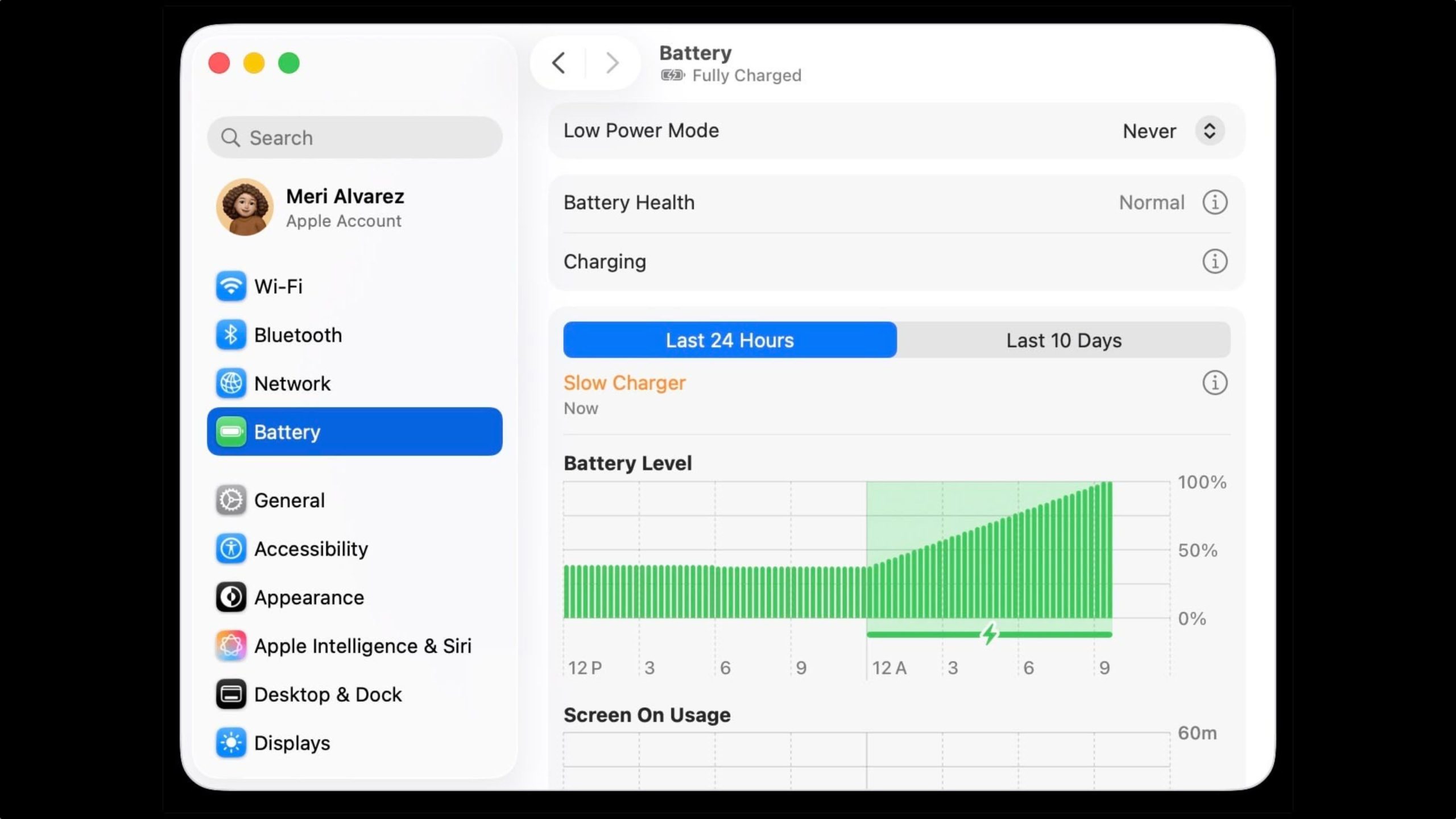
macOS Tahoe 26.4 includes a new slow charger indicator that tells MacBook users when their charging setup isn’t delivering full power.
As described in an updated Apple support document, a “Slow Charger” label now appears in orange text in the battery status menu and above the Battery Level graph in Battery settings. The indicator is accompanied by an info button for more details.
The feature is similar to one Apple added to iPhone with iOS 18, where periods of slow charging appear as an orange bar in the Battery section of the Settings app.
The slow charger indicator is one of two battery-related changes in macOS 26.4. The update also adds a Charge Limit feature that lets MacBook users set a maximum charge level anywhere from 80 to 100 percent, with the aim of preserving long-term battery health.
macOS Tahoe 26.4 is available now via System Settings ➝ General ➝ Software Update.
Apple has unveiled a whopping nine new products so far this March, including an iPhone 17e, iPad Air models with the M4 chip, MacBook Air models with the M5 chip, MacBook Pro models with M5 Pro and M5 Max chips, the all-new MacBook Neo, an updated Studio Display, a higher-end Studio Display XDR, AirPods Max 2, and now the Nike Powerbeats Pro 2.
iPhone 17e features the same overall design as…
Apple has unveiled nine new products this month, but the wait continues for the next-generation Apple TV 4K and HomePod mini models.
In his Power On newsletter today, Bloomberg’s Mark Gurman said new versions of the Apple TV and HomePod mini have been “ready” since last year, but he reiterated that Apple has held off on releasing them until the more personalized version of Siri and other…
iOS 26.4 was released today, and it includes a couple of new features for CarPlay: an Ambient Music widget and support for voice-based chatbot apps.
To update your iPhone 11 or newer to iOS 26.4, open the Settings app and tap on General → Software Update. CarPlay will automatically offer the new features so long as the iPhone connected to your vehicle is running iOS 26.4 or later….
Most people only think about computer maintenance after something goes wrong. A spinning cursor that won’t quit, a fan that sounds like a small helicopter, or a machine that takes three minutes to open a browser tab, these are the symptoms of a computer that has been quietly asking for attention for months. At PC Geeks, we’ve seen this story more times than we can count, and the good news is that it’s almost entirely preventable.
A 2023 report from Crucial found that nearly 60% of computer users have never performed any form of hardware maintenance on their machines. That means the majority of people are unknowingly shortening the lifespan of a device they depend on every single day. Whether you use your computer for work, school, streaming, or gaming, understanding a basic service schedule can save you hundreds of dollars in repairs and keep your productivity running at full speed.
What Does “Servicing Your Computer” Actually Mean?
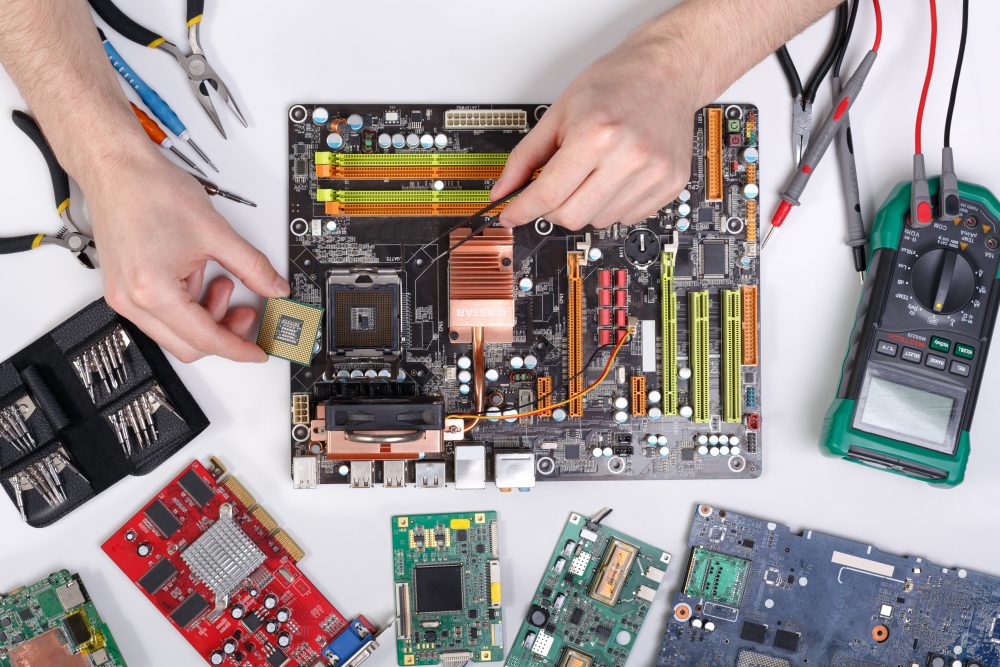
Computer servicing covers a range of tasks that address both the hardware and software sides of your machine. On the hardware side, this includes cleaning out dust buildup, checking internal components, inspecting cooling systems, and verifying that everything is physically functioning as it should. On the software side, it means checking for security vulnerabilities, clearing out unnecessary files, updating drivers, and scanning for malware. Together, these tasks form the foundation of a healthy, long-lasting machine.
How Often Should You Schedule Professional Maintenance?
The general recommendation from most IT professionals is a full computer service once every 12 months. This annual checkup gives a technician the chance to catch small problems before they escalate into expensive failures. Think of it the same way you think about an annual physical, not because something is wrong, but because staying ahead of issues is always smarter than reacting to them. That said, your ideal service frequency depends on how and where you use your machine.
Heavy Daily Use
If your computer is running eight or more hours a day, handling large files, video editing software, or demanding applications, a service every six months is a smarter approach. High-performance workloads generate more heat, consume more processing power, and accumulate dust faster, all of which accelerate wear on your internal components.
Standard Home Use
For the average home user who browses the web, streams content, and manages emails, an annual service is typically sufficient. Paired with some basic self-care habits like restarting your computer weekly and keeping your software updated, you can keep your machine running smoothly between professional visits.
Older Machines
Computers that are three years or older benefit significantly from more frequent attention. Aging hardware is more vulnerable to thermal issues and component fatigue, and older operating systems can accumulate security gaps faster than newer ones. If your machine is on the older side, consider scheduling a service every six months and having a technician assess whether an upgrade might be more cost-effective in the long run.
Signs You Shouldn’t Wait for Your Next Scheduled Visit
Even with a consistent maintenance schedule, certain warning signs warrant a prompt visit to a professional. Unexpected shutdowns, overheating, unusual grinding or clicking sounds from the hard drive, dramatically slower performance, or repeated error messages are all signals that something needs attention now. Ignoring these symptoms rarely makes them better, and almost always makes repairs more expensive.
A Simple Habit That Makes a Big Difference
Beyond professional servicing, there are a handful of things you can do at home to extend the health of your machine. Keeping your software and operating system updated closes security vulnerabilities. Avoiding eating or drinking near your keyboard reduces the risk of damage. Storing your laptop on a hard, flat surface rather than soft bedding ensures proper ventilation. None of these require technical knowledge, just consistency.
Your Computer Works Hard for You. Return the Favor.
A well-maintained computer is faster, more secure, and far less likely to fail at the worst possible moment. Whether you’re a casual user or someone who relies on their machine professionally, building a regular maintenance schedule is one of the smartest investments you can make. The team at PC Geeks is here to help you figure out exactly what your computer needs and when it needs it. Reach out today to schedule your next service appointment and keep your machine performing at its best.
Go inside the headquarters of a Silicon Valley tech startup, and you may find yourself greeted with bean bags, writable walls, sparse decor, and splashes of color. Go inside a high-end New York City law firm, and you’ll probably encounter leather couches, polished marble countertops, and glass offices hidden behind closed doors.
These environments aren’t merely a matter of style – they’re conscious expressions of personality. For contemporary companies, interior design services from premier firms at Cad Crowd have become an effective corporate branding language, communicating discrete yet powerful messages to customers, staff, and stakeholders alike.
Shaping perception is the essence of branding. Branding, however, is not just limited to sites, logos, and business cards. It extends to the tangible space in which a company operates. Whether your business is design-driven, bank-driven, or healthcare-driven, your office is a narrative that speaks volumes about you. And how that story is told – and how well that story aligns with your purpose, values, and culture – is either going to make your brand stronger or sicker.
Why interior design matters for branding
Here’s a truth bomb: people make judgments within seconds of entering a space. From the waiting area to the break room, each square foot says something about your company. Interior design gets to shape that message. It’s not aesthetic – it’s about identity.
Visual signals such as colors, textures, and composition can also serve to reinforce brand values. A firm with a sustainability bent may choose reclaimed wood, lush greenery, and natural light to convey an eco-friendly attitude. A cybersecurity company may turn to darker colors and tech-heavy finishes to imply control, security, and innovation.
And it’s not merely about how customers perceive you. Employees are internal stakeholders who come into contact with your brand every day. A well-thought-out office can create loyalty, increase morale, and enhance a sense of belonging. When individuals feel that their work environment resonates with the company’s mission, they will become more involved. 3D interior rendering services and other similar tasks are becoming paramount.
So, what can you adjust, create, or redo in your interior design to represent your brand? Let’s break it down:
Color palette and materials
Colors are not random – they trigger feelings and associations. Blue, for instance, is best for trust, serenity, and professionalism, which explains why it is the go-to color for finance and tech businesses. Red conveys energy and exigency, and it is best suited for creative agencies and startups. Earth tones enhance wellness and stability and are best suited for sustainability or lifestyle-oriented companies.
Materials have a story to tell as well, and glass conveys transparency. Steel and metal accents emit a sleek, no-frills feel. Wood can represent warmth, genuineness, or tradition. The key is to make decisions in harmony with your brand values, which architectural design firms can help you establish.
Layout and flow
A collaboration-focused company will have an entirely different design than one that is privacy- and concentration-focused. Open office spaces with shared tables, comfortable lounge spaces, and flexible workstations shout “agile and innovative.” Firms focused on confidentiality – like law firms or accounting firms – may use single offices, soundproof rooms, and controlled access zones.
How people flow through a space should reflect how your company operates.
Branding integration
From logo installations to wall murals, the possibilities for quietly or dramatically integrating your branding are endless. A reception area with good design could include a sculptural representation of your logo, your brand colors reflected in the furniture, or a digital display of your portfolio.
Branding isn’t about covering everything in your name – it’s about carefully designing touchpoints that support your story without overloading the space.
Furniture and fixtures
What type of chairs do your customers sit on? Are your conference tables industrial steel or solid walnut? Are your lighting fixtures sculptural or concealed? Each piece of furniture is a chance to reinforce the tone of your brand. You can rely on furniture design services to create bespoke pieces for your space.
Sleek, Scandinavian-style furniture could proclaim, “We’re efficient and design-savvy.” Bold, retro furniture could express creativity and willingness to take risks. Ergonomic arrangements convey to employees that you are invested in their health. These decisions are more than comfort – they’re communication tools.
Environmental graphics and art
Artwork, quotes, and custom murals can share your company’s story, values, and vision. Perhaps you wish to include images that tell your journey, highlight client success stories, or emphasize community impact.
Environmental graphics – such as directionals, typography, and info walls – can transform drab corridors into immersive brand experiences.
Collaborating with architects and designers: the strategic alliance
When branding in interior design, the alliance that you build with architects and designers becomes key. You’re not merely employing somebody to get an area to be aesthetically pleasing; you’re engaging an army to picture your company’s purpose.
And so, how do you bring on the appropriate partner?
Step 1: Know your why
Before you contact an architectural design expert or design firm, make it clear what your business is all about. What are your core values? What type of experience do you want to deliver to clients and employees? How are you unique compared to others?
Having a clear identity assists designers in moving from intangible concepts into tangible environments. It also conserves time and avoids expensive misalignments later.
Step 2: Look beyond portfolios
An elegant portfolio is fine – but don’t prioritize looks over substance. Question companies about their experience with integrating branding into previous projects. Do they have any idea how the physical space shapes culture? Are they able to articulate their design rationale?
Top firms ask smart questions and look at your brand as a whole. Find out who can close the gap between creative vision and business objectives.
Step 3: Ask about collaboration
Interior design is an iterative process. You need an expert interior designer who listens, iterates, and evolves. Seek out firms that keep you informed about the most critical decisions, ask for feedback, and offer visualization tools (such as 3D models or mood boards) to give you a sneak peek at how your brand will breathe life into the space.
A solid firm won’t only share beautiful pictures – they’ll tell you how the design enhances productivity, mood, and brand fit.
As strong as interior design can be, it’s simple to get it wrong. Here are some of the most common mistakes to avoid:
Designing for trends, not identity
Trends have a shelf life. What’s trendy today may look dated in three years. Focus on elements that are timeless and speak to who you are, not what’s trendy.
For example, biophilic design (taking nature inside) is popular, but it only works if your brand emphasizes wellness, sustainability, or being outdoors. If not for you, forcing it on your office may come across as insincere.
Overbranding the space
Too many firms overdo logos, slogans, and color explosions of all things branded. It’s more like a theme park than an office. Subtlety is the name of the game – your brand is experienced, not yelled.
Plan to create “branded moments” in high-impact zones – such as the reception area, meeting rooms, or common spaces – while still leaving breathing space elsewhere. You can do this through lighting design services and other similar design options.
Forgetting employee experience
A gorgeously branded office that’s painful to work in is missing the point. The well-being of employees needs to be at the forefront of any design plan. Good lighting, acoustic balance, ergonomic furniture, and spatial diversity (for concentration and collaboration) are all important.
An office might be Instagram-pretty but hell to live in. Function must be balanced with form.
As hybrid and remote work arrangements take hold, the office’s role is changing. Rather than being the go-to workspace, offices are becoming brand destinations – where culture is amplified, collaboration occurs, and identity is lived in the real world.
Each trip to the office now becomes a brand experience. That requires design to be more deliberate than ever. Consider lounge-like collaboration areas, branded event areas, and interactive media walls that embody your brand narrative in motion.
Some companies are even designing to be “Instagrammable” – spaces people and customers wish to photograph and share, broadening brand visibility naturally through social media. You can use 3D architectural visualization services to help you visualize and plan around the space without having to break the bank trying to remodel an actual physical space.
Branding in interior design is not merely about looks – its impact is quantifiable.
Better client impression: An office that conveys your values instills confidence and credibility.
Improved employee motivation: Individuals feel proud to come to work in an area that reflects their purpose.
Attracting talent: Prospective employees tend to assess your office space during the decision-making process.
Increased efficiency: Efficiently designed spaces minimize friction, facilitate collaboration, and aid in productivity.
In response, branded interiors aren’t merely for aesthetics. They’re a strategic asset.
Wrapping up
Interior design isn’t an afterthought anymore – it’s a branding tool, a culture-shaper, and a business strategy. When companies design on purpose, they don’t merely make. They make spaces that inspire, connect, and reflect who they are.
Whether you’re redesigning your headquarters, moving into a new space, or giving your office a refresh, remember this: every chair, color, light fixture, and corridor is an opportunity to reinforce your story. Don’t let it go to waste.
And when unsure, collaborate with the appropriate experts whom you can look up on the Cad Crowd platform – those who get it not just for what appears nice, but for what feels right for your brand. Because when identity and space get along, magic occurs. Get a quote today!
MacKenzie Brown is the founder and CEO of Cad Crowd. With over 18 years of experience in launching and scaling platforms specializing in CAD services, product design, manufacturing, hardware, and software development, MacKenzie is a recognized authority in the engineering industry. Under his leadership, Cad Crowd serves esteemed clients like NASA, JPL, the U.S. Navy, and Fortune 500 companies, empowering innovators with access to high-quality design and engineering talent.
I’ve heard Cornwall is quite lovely this time of year. Still cool enough for a fresh pastie, warm enough to have fish and chips by the beach. Shame about all the mutant fish people that are hungry for death! Ah, no, sorry, I think I’ve gotten myself too enveloped within BRINE, a fast and heavy footed boomer shooter where you play as an angry fisherman who must defend the strange country from “crustacean cultists and piscine horrors.”
I will say out the gate that BRINE isn’t pushing the boat out (pun obviously intended) when it comes to mechanical boldness. You point, you shoot, you kick down doors or exploding barrels into fish folk, it does everything you more or less expect a boomer shooter to do. The slight twist, which isn’t novel, is that your guns have two modes of shooting depending on whether you left or right click.
I’m not fussed about the simplicity, however, because it’s exactly as tight as it needs to be. The blend of 2D and 3D graphics allows for some fun spatial design that keeps you on your toes, but makes enemies particularly readable thanks to how different they feel from the environments. And the shooting is nice and responsive and crunchy, really putting the boom in boomer. I particularly like the underwater segments that allow you to fly up from underneath the sea for a surprise attack.
Beyond that, the vibe is just right, and the vibe always comes above all else in my book. Cornish pasties, scones, and fish and chips litter the streets as health packs, silly secrets hide beyond building windows, the music is dripping with the atmosphere of a YouTube comment section that can’t believe how funky a random song is from a late ’90s Mega Drive game about walking dogs, as positive as I can make that sound. Seriously, the OST is mostly the same thing over and over again, but I can’t get it out of my head, the tune (the tuna?) is a jam.
If you’d like to try BRINE out for yourself, you just need to head to the game’s itch.io page, but it will be coming to Steam in early access somewhere along the (fishing (sorry) line.
In an email, Aikido researcher Charlie Eriksen said the canister was taken down Sunday night and is no longer available.
“It wasn’t as reliable/untouchable as they expected,” Eriksen wrote. “But for a while, it would have wiped systems if infected.”
Like previous TeamPCP malware, CanisterWorm, as Aikido has named the malware, targets organizations’ CI/CD pipelines used for rapid development and deployment of software.
“Every developer or CI pipeline that installs this package and has an npm token accessible becomes an unwitting propagation vector, Eriksen wrote. “Their packages get infected, their downstream users install those, and if any of them have tokens, the cycle repeats.”
As the weekend progressed, CanisterWorm was updated to add an additional payload: a wiper that targets machines exclusively in Iran. When the updated worm infects machines, it checks if the machine is in the Iranian timezone or is configured for use in that country. When either condition was met, the malware no longer activated the credential stealer and instead triggered a novel wiper that TeamPCP developers named Kamikaze. Eriksen said in an email that there’s no indication yet that the worm caused actual damage to Iranian machines, but that there was “clear potential for large-scale impact if it achieves active spread.”
Eriksen said Kamikaze’s “decision tree is simple and brutal.”
Kubernetes + Iran: Deploy a DaemonSet that wipes every node in the cluster
Kubernetes + elsewhere: Deploy a DaemonSet that installs the CanisterWorm backdoor on every node
No Kubernetes + Iran: rm -rf / --no-preserve-root
No Kubernetes + elsewhere: Exit. Nothing happens.
TeamPCP’s targeting of a country that the US is currently at war with is a curious choice. Up to now the group’s motivation has been financial gain. With no clear connection to monetary profit, the wiper seems out of character for TeamPCP. Eriksen said Aikido still doesn’t know the motive. He wrote:
While there may be an ideological component, it could just as easily be a deliberate attempt to draw attention to the group. Historically, TeamPCP has appeared to be financially motivated, but there are signs that visibility is becoming a goal in itself. By going after security tools and open-source projects, including Checkmarx as of today, they are sending a clear and deliberate signal.
The hack that keeps on giving
Last week’s supply-chain compromise of Trivy was made possible by a previous compromise of Aqua Security in late February. Although the company’s incident response was intended to replace all compromised credentials, the rotation was incomplete, allowing TeamPCP to take control of the GitHub account for distributing the vulnerability scanner. Aqua Security said it was performing a more thorough credential purge in response.
Scritchy Scratchy is a super-satisfying scratch card incremental game. Buy stacks of scratch-offs, unlock auto-scratching, and chase massive jackpots. Will you play it safe or go all-in?
Lets start from scrotch…
Scritchy Scratchy is a super-satisfying scratch card incremental game where luck is your weapon, and glittering riches are just a scratch away.
Dive into a growing collection of scratchers, each with its own quirks, surprises, and sometimes downsides. Rip through tickets, uncover rare symbols, tweak your own luck, and chase absurd payouts. Unlock Scratch Bot, your tireless mechanical friend who scratches and reveals the rewards for you. Turn your run into a full-blown jackpot engine as your balance shoots through the roof while you sit back and relax. Pizza Slice
Scratch. Upgrade. Repeat.
As you prosper, you’ll unlock upgrades that twist luck in your favor:
• Boosted odds and payouts
• Faster and easier scratching
• New scratch card variants with unique rules
But power always comes with risk. Some cards tempt you with monstrous payouts at the cost of nasty penalties. Some offer steady income… others threaten your entire run. Will you play like a sensible adult or gamble like a degenerate in a neon casino?
To the moon!
When you’re ready for even more madness, Prestige to reset your run, gather Jack Points, and spend them on permanent upgrades that reshape your strategy. Build your own luck engine: Slow and steady, wildly explosive, or pure chaos. Scritchy Scratchy is a dangerously satisfying progression casino, where every scratch is a little dopamine hit, and every run is one lucky break away from the big jackpot!
Features and System Requirements:
Enter a strange world filled with creepy characters and unsettling environments.
Solve puzzles and progress while avoiding dangers lurking in the shadows.
Experience a unique art style that blends dark humor with horror elements.
Screenshots
SystemRequirements
Minimum
OS *: Windows 10 or Newer
Processor: Intel Core I3
Memory: 4 GB RAM
Graphics: NVIDIA GeForce GTX 1080
Storage: 1 GB available space
Support the game developers by purchasing the game on Steam
InstallationGuide
TurnOff Your Antivirus Before Installing Any Game
1 :: Download Game 2 :: Extract Game 3 :: Launch The Game 4 :: Have Fun 🙂