Worried that the ongoing embrace of artificial intelligence and the acceleration of late-stage capitalism will continue to leave people isolated from each other? Don’t worry, you can talk to ads now! According to a report from Search Engine Land, at this year’s Google Marketing Live event, the company announced a new generation of “conversational” advertisements that will soon start to populate search results.
Google will be rolling out several new ad experiences that will pair with the company’s re-imagined and AI-centric search. That includes “Conversational Discovery” ads, which Search Engine Land reports are sponsored results that are designed to look like an answer to a person’s query. It’ll appear in AI Mode within Google Search and will produce tailored responses with the company’s Gemini AI model. So if you’ve ever found yourself wanting to talk to an advertisement, congratulations, because your strange, specific desire is about to be fulfilled.
In addition to the chatty ads, Google will also introduce “Highlighted Answers,” which will offer highly relevant promotions that will be displayed in a recommendation list. That, too, will be powered by Gemini and will reportedly appear in Google’s standard Search experience. On the consumer side, it’s probably just going to feel like more ads. On the business side, Search Engine Land reports that it’ll make advertisements more dynamic and targeted instead of static and locked to specific keywords and pre-made copy.
While Google is actively trashing its flagship Search product in pursuit of pumping as much AI slop into it as possible, the Wall Street Journal reported that Gemini itself will remain ad-free for the time being. But you’d have to be pretty naive to think that’ll remain the case. We’re already seeing other companies trying to slip ads into their chatbot interfaces.
OpenAI did it, though the results of that experiment would generously be described as mixed and more accurately described as a failure. Turns out corporations are thrilled to pay high rates for ad placements that don’t actually seem to get any attention. Of course, Google has been in the ad game for much longer and has a lot of dark arts to tap into that an upstart like OpenAI can’t—like, say, a digital advertising monopoly.
Search Engine Land said that Conversational Discovery ads and Highlighted Answers are already being tested on users in the United States and will appear on both mobile and desktop. More AI-powered features for advertisers are expected to roll out later this year. So get ready for the web to get even worse.
Before we sing the praises of EPYC PC workstations, let’s take a quick step back. Oftentimes, the title of “workstation” is donned upon a computer for the programs it runs rather than the contents of its case. For some, it could be a beefed-up desktop processor, a professional-grade GPU, and some ECC memory. However, the explosion of artificial intelligence, complex computational fluid dynamics (CFD), and large-scale 3D rendering has pushed traditional hardware to its limits. To keep up with these massive data pipelines, professionals are increasingly turning to server-grade infrastructure packed into a workstation chassis.
At the forefront of this shift is the AMD EPYC processor. While Intel’s Xeon and AMD’s own Threadripper Pro have long been the go-to solutions for heavy enterprise workloads, EPYC PC workstations offer a distinct set of advantages in memory bandwidth, core density, and multi-GPU scalability that leave the competition in the dust.
Here is a closer look at the specific benefits an EPYC workstation can offer your pipeline.
AMD EPYC PCs: Dominating Core Density and Efficiency
When squaring off against Intel Xeon workstations (such as the Xeon W-3400 series), AMD EPYC dominates in raw scale and parallel processing capabilities.
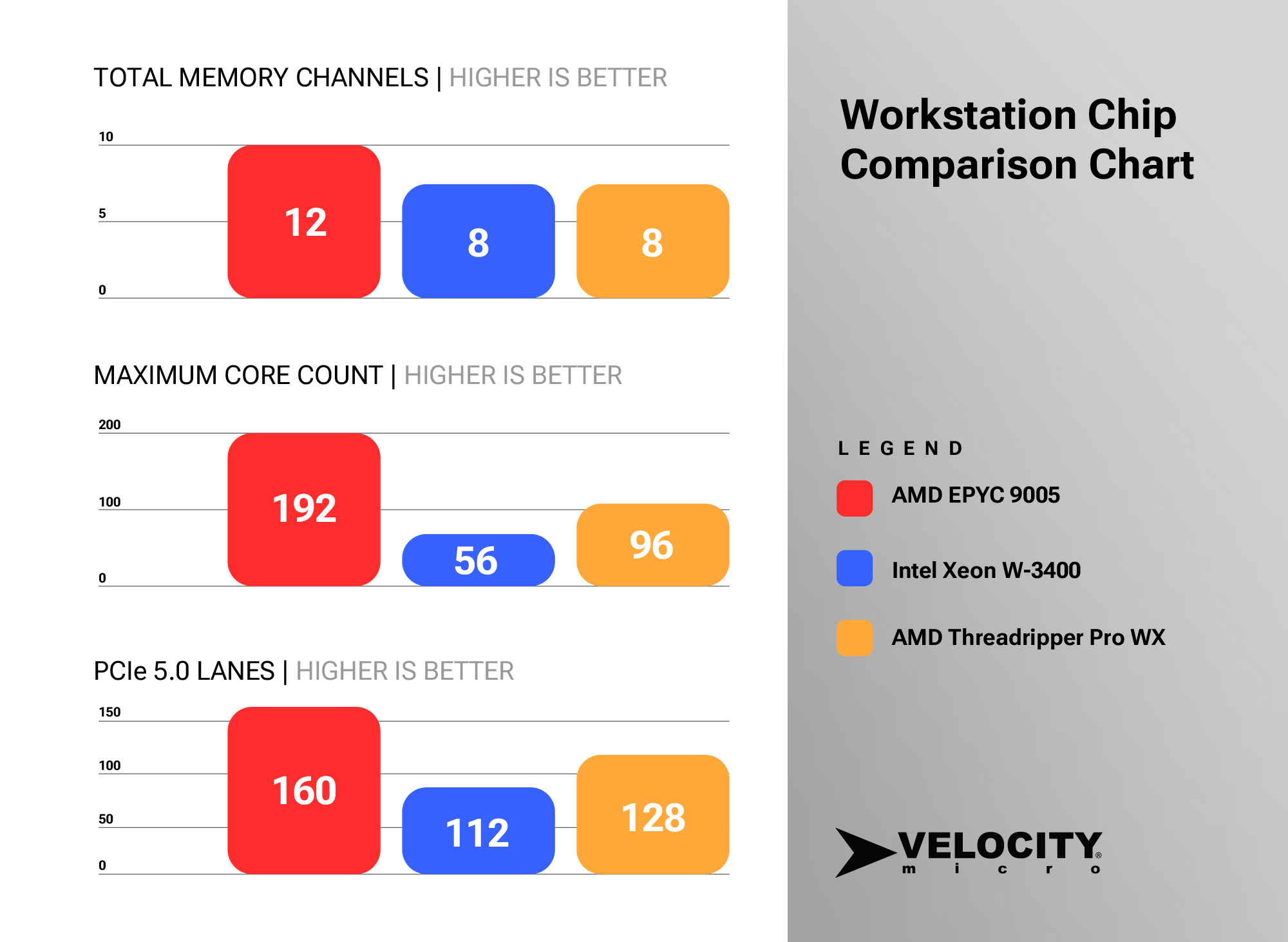
Unmatched Core Density: AMD’s latest EPYC processors (like the 9005 Turin series) boast up to a staggering 192 cores and 384 threads per socket. By comparison, Intel’s highest-end workstation and server offerings consistently trail behind in raw core count. For workloads that scale linearly with cores, such as CPU-based rendering or large-scale virtualization, EPYC handles massively parallel operations with significantly less bottlenecking.
Superior PCIe Lane Availability: Modern workloads often require massive I/O pipelines to feed NVMe storage arrays and multi-GPU setups.EPYC processors offer up to 160 PCIe 5.0 lanes (in single or dual-socket configurations).By contrast, Intel’s flagship W-3400 workstation CPUs cap out at 112 PCIe 5.0 lanes.This massive I/O advantage means EPYC users don’t have to compromise on bandwidth when running multiple high-end AI accelerators or network cards.
Power Efficiency: Built on advanced chiplet architecture (Zen 4/Zen 5) and smaller manufacturing nodes, EPYC processors provide incredibly high performance-per-watt. In sustained, compute-heavy server/workstation workloads, EPYC uses less energy for equivalent or superior performance, making it highly cost-effective over its lifecycle.
AMD EPYC vs. Threadripper Pro: Server-Grade Scale at the Desk
AMD’s Threadripper Pro is arguably the best traditional workstation processor on the market, offering incredible single-core boost clocks for interactive 3D modeling and engineering software. However, when the workload transitions from content creation to massive computation and data processing, EPYC clearly takes the lead.
Massive Memory Bandwidth and Capacity: The memory controller is where EPYC truly separates itself. Threadripper Pro (9000 WX-Series) features an impressive 8-channel DDR5 memory architecture supporting up to 2TB of RAM.EPYC, however, is a true server platform.It features a 12-channel DDR5 memory architecture, delivering 50% more bandwidth (up to 576 GB/s) and supporting up to a massive 6TB of RAM per socket.For memory-bound tasks like training large language models (LLMs) or genomics sequencing, EPYC keeps the GPU pipelines fed where Threadripper Pro might bottleneck.
Dual-Socket Scalability: Threadripper Pro is strictly a single-socket platform. EPYC motherboards are built to scale. You can configure a dual-socket EPYC PC workstation to wield massive core counts (up to 384 physical cores and 24 memory channels in a single system), offering computing density that Threadripper Pro physically cannot match.
4-to-8 GPU Configurations: While Threadripper Pro’s 128 PCIe 5.0 lanes can technically support four GPUs, the WRX90 motherboard ecosystem is heavily restrictive for full 4+ GPU setups. EPYC platforms are native to high-density accelerator layouts. If you are building a deep learning workstation with 4 to 8 GPUs, EPYC is the required platform to ensure that PCIe lane sharing does not cripple your bandwidth.
Is an EPYC PC the Right Choice for You?
If your daily workflow relies on high-frequency, single-threaded responsiveness (like active CAD design or interactive VFX workspaces), Threadripper Pro or a high-clocked Intel CPU remains a stellar choice.But if you are building an AI training node, processing massive datasets, or rendering complex fluid dynamics, you need the unrestricted memory bandwidth, high PCIe lane counts, and core density of AMD EPYC.
For organizations ready to bring data-center-level power directly into the office environment, deploying an enterprise-ready system is a must. The Velocity Micro ProMagix HD360A EPYC PC Workstation is a phenomenal option, expertly engineered to leverage EPYC’s incredible parallel performance, massive memory limits, and robust PCIe arrays inside a reliable, quiet, and premium chassis.
Kevin Roose is an award-winning technology columnist for The New York Times and the best-selling author of three books, “Futureproof,” “Young Money,” and “The Unlikely Disciple.” His column, The Shift, examines the intersection of tech, business, and culture.Continue reading “The AGI Chronicles [MAICON 2026]”
Turning off Forza Horizon 6 car damage can be done through the game’s settings menu and means your car won’t look or drive like you’ve just crashed through a bamboo forest. By default, crashing and damaging your cars in Forza Horizon 6 will only affect their appearance with dents, scrapes, and cracked windows. But you can turn this option off entirely to keep your cars pristine or switch it to Simulation if you want a slightly more realistic approach to crash damage. Here’s everything you need to know about car damage in Forza Horizon 6 and how to turn it off.
How to turn off Forza Horizon 6 car damage
(Image credit: Xbox Game Studios)
To turn off all car damage in Forza Horizon 6, you need to open the Settings menu, then open the Difficulty tab. You’ll then find the Damage & Tyre Wear option near the bottom of the list of Forza Horizon 6 assists and difficulty options and can switch it to ‘None’. This means crashes and scrapes will not affect the appearance or performance of your cars.
There are also no real downsides to having damage switch off either, as it doesn’t affect your difficulty bonus when it comes to Credits, so you can get Forza Horizon 6 money like normal.
For those sticking to the Cosmetic or Simulation options for car damage in FH6, there are a couple of ways you can reset damage to get your car looking and driving like it’s brand new. In free-roam mode, you can open Photo Mode, press LB to Reset Cosmetic Damage, the close Photo Mode. Despite the wording, this button fully repairs your cars, including any component damage that affects its driving capabilities. Additionally, entering any of your houses or the Horizon Festival site main garage will fully repair your car too.
However, there is no way to repair your car or reset any damage it has taken during a race. Your only option is to use the Rewind feature to go back to before you took damage and then take avoiding action. This works well in races against the AI Drivatars but not so much in online races as you end up losing a lot of time to other players. Turning off the Damage & Tyre Wear option entirely is by far the best option, realism be damned!
Google I/O is currently underway, and after sitting through a monotonous an exciting keynote address, I got the chance to demo some upcoming Android XR glasses and prototypes. Samsung and Xreal are seemingly two of the most dedicated players in the space, and I got to try both Xreal’s glasses and the latest Google prototype, which the Samsung glasses are no doubt based on, giving us a look at how Android XR will span different types of eyewear.
Samsung was set to launch Android XR hardware last year with the Galaxy XR, but it’s a large, bulky device you wouldn’t want to wear around. This time around, the focus is on more compact glasses for everyday wear. These are the ones I got to play with, and while I can’t wait for audio-only glasses to come around, I’m more excited about what Samsung and Xreal have in store when it comes to display glasses.
Xreal is unreal
(Image credit: Derrek Lee / Android Central)
The first demo I got to try was arguably the more interesting one. Xreal teased its Project Aura glasses last year, and I was able to give them a spin ahead of the launch later this year. These are display glasses sporting two OLED displays behind the lenses, one for each eye.
Latest Videos From
If you’re familiar with Xreal products, the design here shouldn’t surprise you. They’re thick glasses that sit a little further from your face than usual, in order to give you room for the displays. It’s a design I’m not a fan of from the outside looking in, but when they’re on your face, you don’t notice the difference.
(Image credit: Derrek Lee / Android Central)
The Project Aura glasses have two cameras on either side of the lenses for perception and tracking, while the middle is for taking photos and videos. One stem holds all the buttons: volume rocker, Home/Gemini, and a dimming button to control the electrochromic dimming of the lenses.
There’s also a separate puck that connects to the glasses, which houses the battery and compute (it’s powered by Snapdragon). I wasn’t able to get solid figures on battery life, but you can probably get through a full movie while wearing them.
The puck also has a touch panel to control the glasses, which I thought was pretty clever. And in true Xreal form, you can plug in other devices like laptops and phones to display your windows and apps.
Get the latest news from Android Central, your trusted companion in the world of Android
Image 1 of 4
(Image credit: Derrek Lee / Android Central)
(Image credit: Derrek Lee / Android Central)
(Image credit: Derrek Lee / Android Central)
(Image credit: Derrek Lee / Android Central)
So, what was it like to use the glasses? Pretty cool actually! The visuals are better than I expected; text is legible, colors feel plenty vibrant, and everything is super responsive. Aside from the puck, you can use gestures to control the glasses, similar to Galaxy XR. You pinch and drag to select, move, and resize objects.
Interacting with the Android XR UI feels intuitive and reminds me of the Quest 3, so I was able to pick it up quickly, swiping through and resizing apps.
Image 1 of 2
(Image credit: Derrek Lee / Android Central)
(Image credit: Derrek Lee / Android Central)
I first opened a trailer for the Spider-Man 2 video game, and at first, the video looked a bit washed out, which worried me. Then, I adjusted the electrochromic dimming, which supports five levels. Eventually, the video looked super crisp and vibrant, as if I was watching it on my laptop’s OLED display. I was thoroughly surprised at how good it was, and it even stayed in place against a wall as I moved around.
Second, I was able to play with an app created for the glasses using Antigravity. I basically used my hands to paint shapes in a 3D space by pinching my fingers together. I could change the colors of the “paint” and even alter the thickness by twisting my wrist. And again, it stayed in place as I moved around the space. I admit, this left me very impressed.
(Image credit: Derrek Lee / Android Central)
According to Xreal, Project Aura is a sort of in-between device, aiming to give us the power and utility of the Galaxy XR (hence, the external power puck), but in a more compact form factor like the Meta Ray-Ban Display Glasses. I never got to use Galaxy XR, but I was left more excited about display glasses than I ever was before.
Making a case for monocular display glasses
(Image credit: Derrek Lee / Android Central)
I also got to try Google’s prototype monocular display glasses, which are used as a reference model for Samsung’s upcoming glasses. This isn’t my first time using them, but there were some new tricks I was able to try this time around. For instance, there are new widgets you can access and scroll through by swiping on the touch panel.
One widget is the Translate widget, which I opened with a tap and used to translate what someone was saying to me in Korean. And even as the person paused before continuing to speak, the glasses kept translating, which felt like a small but really useful component.
Additionally, I was able to take advantage of Nano Banana on the glasses—which feels a little crazy to do on glasses—but given their visual nature, I guess it makes sense. I was able to take a photo of myself with the glasses, then tell Gemini to put me in space with Neptune in the background. It took some time to generate (everyone was on the Wi-Fi), but a preview appeared on the glasses and on the paired Pixel.
Image 1 of 4
(Image credit: Derrek Lee / Android Central)
(Image credit: Derrek Lee / Android Central)
(Image credit: Derrek Lee / Android Central)
(Image credit: Derrek Lee / Android Central)
But even previously announced features like Google Maps integration is still impressive on monocular displays like this. It’s cool to see a simple directions in your line of sight as you’re walking, but tilt your head downwards, and the glasses will display a section of map so you can actually visualize where you’re going as you go. I can see this being much more useful than glasses just barking directions at you.
Image 1 of 3
(Image credit: Derrek Lee / Android Central)
(Image credit: Derrek Lee / Android Central)
(Image credit: Derrek Lee / Android Central)
It may take some time to get used to the single display, which sits on the right lens, but your eyes adjust fairly quickly. And unlike dual-display glasses like Project Aura, information is displayed in a much simpler way so as not to overwhelm you.
The singular display option feels like a nice medium between audio glasses and full-on XR glasses, and I’m really excited to see how Samsung and others incorporate them into various designs. I still feel like audio glasses are more my speed, but my experience at Google I/O left me much more open to display glasses.
Both Xreal and Samsung are expected to launch their glasses later this year. Let’s just hope they’re not priced out of reach.
I never pay for my children’s clothes and I want to share with you how to get kids clothes free! It’s a cardinal sin in my home to pay for clothing. Kids clothes are SO expensive. A new shirt can run you $10. A new pair of jeans, $18. If I were to clothe my kids with brand new clothes, I’d be broke! Shoot, I’m be homeless again! Nope, that’s not for me.
Here’s why.
Kids grow so quickly. Infant clothes last only 3 months! As children get older, even then, we have to replace the clothes every year. If the child has a growth spurt, forget it! You’re looking at 6 months. That’s not even counting seasons. Winter clothes, the kids wear 3-6 months, summer 3-6 months, depending on where you live. So, for me to invest a ton of money into something like that, it’s just not in my vocabulary.
But, as you know, I’m a quality girl. I love kids clothing stores such as Children’s Place, Gymboree, GAP, Old Navy. I’m not talking Walmart brands here, no offense, okay a little. 😉 I want to make sure my kids clothes last them the 3-6 months they wear them, you know. So, they have to hold up to a rambunctious 5 year old boy and an equally rough girl.
There are three ways in knowing how to get kids clothes free…
How to Get Kids Clothes Free
1) Join free Facebook groups to get FREE STUFF!!!
You heard me right. There are free Facebook groups, most likely in your area, that give away TONS of free stuff (INCLUDING free kids and adult clothing). I actually do not EVER pay for my OWN clothing either. Why? Because I snag free clothing in my size ALL THE TIME and go through what fits me and what doesn’t fit me, I regift it back into the group to others. It’s a really cool system you HAVE to check out! 🎉
Here’s some tips of how to find these groups in your local area:
👉 Search these keywords to find them:
Buy Nothing
Gifting with Grace
Gifting
Neighbor to Neighbor
Your subdivision name (sometimes groups will be in just your subdivision)
Your city name (sometimes there will be free groups that are tagged with your city name. Some groups say “Free 208” for example that has your area code, some may say something like, “I love Boise” for your city, but do some searching with your city and surrounding cities
Next Door (check out apps like Next Door)
👉 If there’s NOT a group in your area, start one!!! You can start a group within just your church, or locally on Facebook. I have one on Facebook and here’s a post about how I run my Facebook group and all the details so you know exactly what to do! You will literally, never buy anything again, not just kids clothing, once you start one, because so many people are so generous and want to help and give!! 🥰 The more bigger items I’ve gotten are a free Google mesh system, DVD player, surround sound system, but tons of smaller things too like school supplies for my kids, toys, patio furniture, and so much more!
If you don’t have any groups in your area and don’t want to start one, here’s another solution for you…
2) I buy all the kids clothes at yard sales, garage sales, off Craigslist, Facebook groups, etc.
This means shoes too. The most I will pay for a pair of shoes, if they are super nice is $2. My max for each clothing item is $1, only if they are brand names and super fabulous. The reason is because I KNOW that after the kids are done wearing them, I can resell them in a large lot for the same price, thus getting them free! 🎁 You see people LOVE to buy at those prices and Craigslist is the perfect place. I take all their clothes of the whole year, 1 size, and sell all together and price them at the same price I purchased them. Many people use these for their own kids, but I’ve had several purchase to put in their yard sales to make money, or brand names they sell on eBay, etc.
Listen, I don’t have time to sell all these clothes on eBay. If I did, I’m sure I could make a small fortune. But, I’m just happy to buy them at the same price I sell them for, thus providing for my family and getting them FREE. 🙂 Occasionally, I’ll get an item that I have to throw out, it’ll get paint all over it or something. If the knees get blown out, I cut them off, roll up the bottoms, and the kids have shorts the following season!
2) Kids consignment stores
I want to add this to a whole new section because it’s that DARN good! There is a kid’s consignment shop in my area that sells only twice a year. I go to every one of the sales. I wait until the last day, a few hours before it’s closed, as they mark down a lot of the prices of good stuff to only $1, which is my price point. They have them all hung up, nice and neat, so I go through every single one of them, with my kids. They think it’s fun. My oldest daughter likes to pick out the clothes. I usually spend a good $100 for 100 pieces of clothes and shoes are usually $1 each pair as well. Most are brand names and this has become one of my favorite ways to shop for kids clothing.
THE SECRET TRICK:
You absolutely must save up for clothes a few years in advance! So, if your child is 8, you want to have up to size 10/12. If your child is 5, you want to have stored up until size 8. Just keep saving in advance each year, buy them when you come across them, and you’ll always have a nice stock of children’s clothes. We always have an abundance, and I keep a short list of what I’m looking for, so I don’t get TOO many duplicates for each season. I like to have at least 3 pairs of shoes for each size, each child, because they are in P.E. now and hard on shoes. I don’t want to be stuck paying $20 for a pair of shoes, when I can pay $1 if I plan ahead.
Jackets are the same, I like to have at least 2 of each size, for each child. I do NOT buy used unmentionables for my kids. I get those usually at Ross or on clearance. Socks I don’t usually buy used either, more because I can’t find them. They are fairly cheap at Old Navy, Children’s Place, and stores like Fred Meyer on sale. Even Amazon has them on sale. I don’t pay over $1 per pair of socks, so if it’s a package of 6 pairs of socks, my total should be $6. Since my son likes to tie his socks in knots and make ropes all the time (UGH!) I have to buy extras, in which case, when I come across the deals, I stock ahead as well.
These ideas may not work when the kids become teenagers, as I’m sure they will be more picky, but I will cross that bridge when I get there. I’ve got plenty of time. 🙂
My favorite score was a really nice brand name snow jacket (2 in 1) with cell phone holder, etc. like top of the line $120 jacket, at a yard sale for $2!!!!! For something like that, I would even pay up to $5-$10 depending on how good condition, brand, etc. It is my daughters’ favorite jacket and she’s worn it all year. It’s super cute. Wish it was my size. 😉
3) Children’s Place
Children’s Place has a wonderful, wonderful website to utilize for getting kids clothes online super cheap. They run a lot of kids clothing sales, where they offer huge discounts on already clearanced items, free shipping for any purchase amount, the whole 9 yards. I love to buy from them on such sales because I know that I can get that same amount for the items after the kids are done with them. Mostly for my daughter. I’ve scored mittens and headbands for $1, those were my favorite scores, but even pants and shoes for a couple bucks.
Tips:
Be responsible and generous with your finds. I usually like to help others if they need a certain item in a pinch from our church. It has become somewhat of a ‘store house’ for others and a blessing used by God in which I can give to others and bless their lives as God blesses ours.
Be a smart shopper. It’s amazing what you can do with ANY size budget. Our family lives WELL on $18k/year and you can too!
Update:Some people like to send me their physical mailing address, asking me to ship them free kids clothes. That’s not what this article is about. I do not ship clothing. It would be too expensive to do so.
Want to get everything else you buy free? Here’s how to do it!!!
The more you implement all these tricks and tips, the further your money will stretch and so much of what you already are buying, you CAN get absolutely FREE!! 🙂
Looking for the most recent regular Connections answers? Click here for today’s Connections hints, as well as our daily answers and hints for The New York Times Mini Crossword, Wordle and Strands puzzles.
Today’s Connections: Sports Edition has one of those crazy-fun purple categories, where you need to hunt inside words for other words. If you’re struggling with the puzzle but still want to solve it, read on for hints and the answers.
Connections: Sports Edition is published by The Athletic, the subscription-based sports journalism site owned by The Times. It doesn’t appear in the NYT Games app, but it does in The Athletic’s own app. Or you can play it for free online.
Hints for today’s Connections: Sports Edition groups
Here are four hints for the groupings in today’s Connections: Sports Edition puzzle, ranked from the easiest yellow group to the tough (and sometimes bizarre) purple group.
Yellow group hint: Three points.
Green group hint: Light the cauldron.
Blue group hint: Minor leagues.
Purple group hint: Find a player’s hidden name.
Answers for today’s Connections: Sports Edition groups
What are today’s Connections: Sports Edition answers?
The completed NYT Connections: Sports Edition puzzle for May 20, 2026.
NYT/Screenshot by CNET
The yellow words in today’s Connections
The theme is actions on a field goal attempt. The four answers are block, hold, kick and snap.
The green words in today’s Connections
The theme is U.S. Olympic host cities. The four answers are Atlanta, Los Angeles, Salt Lake City and St. Louis.
The blue words in today’s Connections
The theme is triple-A baseball teams. The four answers are Bats, Express, IronPigs and Jumbo Shrimp.
The purple words in today’s Connections
The theme is ends in an NFL QB. The four answers are clove (Jordan Love), fallen (Josh Allen), Phoenix (Bo Nix) and Squidward (Cam Ward).
Toughest Connections: Sports Edition categories
The Connections: Sports Edition puzzle can be tough, but it really depends on which sports you know the most about. My husband aces anything having to do with Formula 1, my best friend is a hockey buff, and I can answer any question about Minnesota teams.
That said, it’s hard to pick the toughest Connections categories, but here are some I found exceptionally mind-blowing.
#1: Serie A Clubs. Answers: Atalanta, Juventus, Lazio, Roma.
#2: WNBA MVPs. Answers: Catchings, Delle Donne, Fowles and Stewart.
3D rendering, as a breakthrough technological application in today’s architecture industry, empowers the development of photorealistic and visually appealing renderings of buildings, landscapes, and interior spaces – but it’s not just about the renders. Architects leverage 3D rendering techniques to embark on an interesting journey of exploring different scenarios of architectural visualization services so that they’re able to come up with a design that satisfies the expectations of many stakeholders. It also helps detect potential flaws in design before the design phase even begins.
3D rendering in architecture improves the effective communication and sharing of ideas to all stakeholders, clients, and the general public, most simply and easily. Using top-of-the-line CGI images allows architects to convince customers to buy their products and choose their services. Employing CGI in architecture is an enticing process that requires abundant creativity and technical expertise.
🚀 Table of contents
How does CGI work in the architecture industry?
Here are the steps involved in using 3D rendering in architecture:
3D CGI modeling
The first step of CGI rendering is to design the 3D model of the intended building or space. The use of specialized software for architectural rendering helps produce visually stunning design concepts. 3D rendering is critical for interior and exterior designers who want to test different design elements and correct flaws before construction starts. Such an approach saves time and improves cost-effectiveness while offering cheaper cost estimates by eliminating the need for physical prototypes.
Texture and mapping
The second step is to decide on the right materials and textures to apply to the surface of the model. Good examples of textures for CGI presentations include wood greens, brick patterns, frosted glass, rough concrete, and polished concrete, just to name a few. This process is important to create real-time, lifelike visualizations that will entice prospective clients to buy.
Scene setup
Using strategically placed virtual cameras and proper lighting to create top-of-the-line CGI interior and exterior designs would be a big help. Lighting design services are critical to generating visually enticing CGI.
It can create shadows, highlights, and reflections to enhance the dimension and visual depth of the architecture. Virtual cameras will offer a clearer view of the entire design from every angle.
The rendering process starts after the successful setup of the scene with models, textures, lighting, and architectural animation. This rendering process involves the high-performance computations of the software that simulate the interaction between light rays, virtual objects, and materials to achieve the final visual result of the scene.
It is highly recommended that you work with the best 3D rendering studio with a team of excellent 3D rendering artists to identify the appropriate parameters and guarantee the best final design product. To speed up the CGI process in the architecture industry, projects are often divided into smaller projects and spread across numerous architectural design software programs before the final post-processing stage.
This last step includes making the necessary adjustments or changes if there are flaws and applying enhancements, color adjustments, and compositing. The final CGI imagery is presented to the client for prospective buyers to see. Depending on the client’s preference, the output can be in various forms, including images, video files, films, video games, or architectural visualization.
Popular CGI rendering applications in architecture
3D rendering design services are important in the modern era of architecture. It allows architects and designers alike to come up with visually stunning renderings before construction begins. The construction marked a significant growth in the 3D industry as it enhanced and streamlined the process of conveying intricate design concepts to stakeholders and clients.
The following are the most popular applications of 3D rendering techniques in architecture:
Historic restoration and preservation
Designers in the architecture industry use CGI to come up with lifelike 3D models of historical buildings and monuments required to direct efforts in restoration and preservation.
Interior design
Qualified 3D rendering services are needed to create eye-catching interior spaces. These services can equip buildings with the best décor, lighting, and furniture. This benefits designers working on different commercial projects, such as hotels and resorts, by creating efficient and inviting environments for customers.
Landscape design
3D rendering is important to ensure the success of a landscape design. The use of CGI technology is exceptionally critical in the planning and development of urban spaces. It also empowers designers to come up with inviting outdoor areas.
Urban planning and development
Architectural design experts also use 3D rendering techniques to design buildings. CGI simulation is valuable for successful large-scale projects to develop a sustainable urban environment and appealing 3D homes.
Like other creative processes, the creator will always want to present their ideas and concepts in the best, most professional, and most appealing way possible. Unfortunately, architecture always comes with the challenge of explaining drawings to non-architectural construction teams or professionals.
The fastest way to address this problem is by using CGI to correctly convey the blueprint or sketch. The following are the top reasons why architectural companies should consider using CGI.
Visualize specific design ideas
Every time an architectural planning and design company presents a project, its designs may show the placement or how the space is arranged inside the house. However, these are illustrated using symbols that most people can’t understand.
Building concept models may also be great, but this may cost too much effort and time. Paradigms and drawings are also tricky to adjust or tweak to meet the client’s demands and make them look realistic.
Cost-effectiveness
Even though the CGI rendering process calls for an upfront investment in expertise and software, it is still more cost-effective down the line. It decreases the need for expensive prototyping and physical models and reduces the costs associated with numerous design revisions.
Efficient revisions of the design
Revisions are a critical aspect of the architectural process in terms of design. With the help of 3D rendering techniques, it becomes faster and easier to make the necessary revisions. Compared to traditional techniques, where even the slightest changes can consume too much time, CGI allows for faster modifications that help save resources and time.
Enhanced client communication
CGI rendering allows architectural design companies to convey complex concepts to their clients more efficiently. This transforms their ideas into visually appealing and understandable images that bridge the gap between clients’ perceptions and architects’ technical language. The clarity guarantees that all parties involved will be on the same page, making the design process more efficient than ever.
Contextual and environmental analysis
3D rendering can mimic various conditions and elements in the environment and place an architectural structure in its potential context in the future. Thanks to this feature, it becomes possible to analyze the interaction of the building with its surroundings, such as factors like neighboring structures, weather, and lighting.
Improved presentations and marketing efforts
CGI renders are extremely powerful marketing tools. Realistic, high-quality images are great for advertisements, presentations, and brochures, and they can attract more potential investors and buyers. The visual appeal of these renders can significantly improve architectural projects and their marketability as a whole.
Competition and innovation
CGI rendering can help foster innovation and help architectural companies stay competitive. Architects can stay on top of the game in the quickly changing industry if they use the most state-of-the-art technologies and constantly push the boundaries of architectural design and its possibilities.
BIM integration
CGI rendering experts can seamlessly integrate with BIM or building information modeling experts. Thanks to this integration, architects can create more detailed and accurate renders based on real data, improving the overall precision and quality of their visualizations.
Photorealistic visualizations
One of the biggest benefits of CGI rendering is that it allows architects to produce photorealistic images of the projects entrusted to them. The visualizations are so accurate and detailed that they usually look like actual photographs. This form of realism is important for stakeholders and clients to view the exact appearance of the finished space or building down to the tiniest detail.
Virtual representation of style and material
CGI rendering offers architects the much-needed flexibility to experiment with different finishes, styles, and materials. The material allows a more creative exploration of various design options, enabling architects to present their clients with different alternatives.
Augmented and virtual reality experiences
The progression of augmented and virtual reality technologies helped further expand the capabilities of 3D rendering. Thanks to these technologies, immersive 3D experiences can be produced that allow clients to walk through the project’s virtual model. This kind of interaction offers a deeper engagement and understanding of the design.
If you’re looking for the best 3D rendering services, don’t hesitate to contact us. We can connect you with the right professionals for the job! Request a quote today.
MacKenzie Brown is the founder and CEO of Cad Crowd. With over 18 years of experience in launching and scaling platforms specializing in CAD services, product design, manufacturing, hardware, and software development, MacKenzie is a recognized authority in the engineering industry. Under his leadership, Cad Crowd serves esteemed clients like NASA, JPL, the U.S. Navy, and Fortune 500 companies, empowering innovators with access to high-quality design and engineering talent.
Fortnite is back on the App Store globally… except for Australia. (Sorry, mates.) The battle royale game has been back in the US App Store since last year, following a nearly five-year ban that stemmed from Epic’s seemingly never-ending legal battle with Apple.
Epic suggested it was confident enough in the direction of political headwinds to make the game installable again on (most of) the world’s iOS devices. The company is banking on US federal courts to force Apple to disclose the operational costs behind its App Store fees. Epic believes that “once Apple is forced to show its costs, governments around the world will not allow Apple junk fees to stand.”
However, Fortnite could also use the boost. In March, Epic announced that it would lay off around a quarter of its workforce. The company also killed off several game modes, including Fortnite Ballistic and Festival Battle Stage. Meanwhile, the game’s Rocket Racing mode will disappear in October.
Citing dwindling numbers for its flagship game, CEO Tim Sweeney alluded to its mobile player base. “We’re only in the early stages of returning to mobile and optimizing Fortnite for the world’s billions of smartphones; and in being the industry’s vanguard we have taken a lot of bullets in a battle which is only in the early days of paying off for ourselves and all developers.”
As for Australia, Epic says it’s holding out there because Apple is still enforcing terms that the Fortnite publisher believes are illegal. Epic said the Australian courts “found many of Apple’s developer terms are unlawful, and yet Apple continues to enforce those terms. Epic is now asking the Court to bring Apple’s unlawful conduct to an end and to make orders that will benefit all app developers and iOS users.”
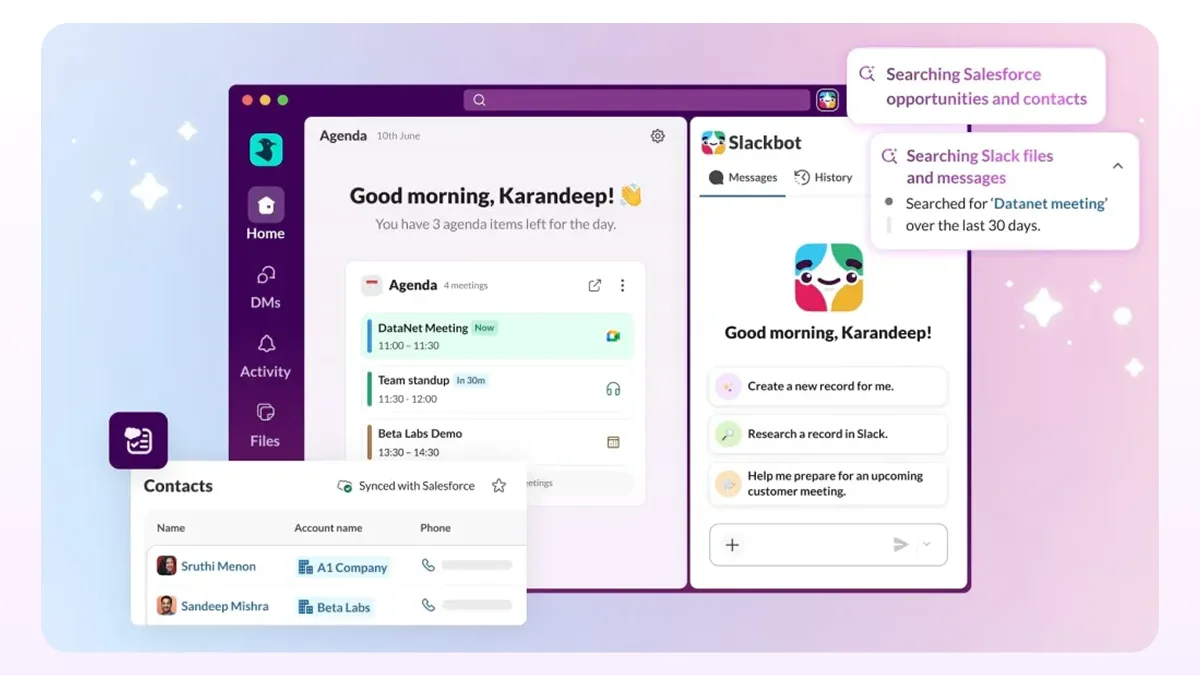
With Slack CRM, manage customers right where your team already works – no new tools, no switching between platforms. Your personal AI agent can capture contacts, track deal progress and prep what you need with a simple prompt – directly in Slack.
Here’s what Slack CRM can do for your business:
Capture leads instantly
Manage deals in conversations
Let AI do the busywork
Close deals faster
Start with your first CRM – simple, fast, and cost-effective
Start with your first CRM – simple, fast, and cost-effective



![The AGI Chronicles [MAICON 2026]](https://www.fazb.com.sa/wp-content/uploads/2026/05/The-AGI-Chronicles-MAICON-2026.png)