HPE AI Factory With NVIDIA Expands for the Era of Agents


Enterprises are moving agentic AI from proof of concept to production — and the next generation of AI factories are built for the era of agents.

At HPE Discover Las Vegas, running through Thursday, June 18, NVIDIA and HPE are expanding the HPE AI Factory with NVIDIA, including NVIDIA Vera CPU and NVIDIA Agent Toolkit for HPE Private Cloud AI. 

Plus, NVIDIA Confidential Computing extends across HPE AI Factory and enhanced full-stack NVIDIA integration — with NVIDIA accelerated computing, NVIDIA AI software and NVIDIA networking — is available throughout the entire portfolio.

NVIDIA Vera CPU Available With HPE Private Cloud AI

The HPE ProLiant Compute DL394 Gen12 with the NVIDIA Vera CPU will be available in 2027 with HPE Private Cloud AI, a turnkey AI factory co-engineered with NVIDIA. Vera is the first CPU built for agents — designed for the tool calls, orchestration and real-time data processing required across the agent loop — bringing deterministic, low-latency performance into HPE Private Cloud AI.

The New York Stock Exchange, in collaboration with Redpanda and HPE, is an early enterprise customer exploring Vera CPU with the HPE ProLiant Compute DL394 Gen12 server.

The Vera CPU is part of the NVIDIA Vera Rubin platform, which is ramping into full production with the NVIDIA Vera Rubin NVL72 rack-scale system available from HPE. Vera Rubin was built for frontier-scale models larger than 1 trillion parameters and will ship with full-stack NVIDIA Confidential Computing across every chip. 

HPE is also bringing the HPE Compute XD700 — built on NVIDIA HGX Rubin NVL8 — to the HPE AI Factory, supporting up to 128 Rubin GPUs per rack.

NVIDIA Agent Toolkit Now Available With HPE Private Cloud AI

NVIDIA Agent Toolkit — including NVIDIA Nemotron open models, the NVIDIA OpenShell secure runtime and NVIDIA NemoClaw blueprints — will be available with HPE Private Cloud AI. Together, they give enterprises an agentic AI operating system for monitoring agent behavior, enforcing governance policies, and safely building and running autonomous, long-running multi-agent systems.

HPE Private Cloud AI adds secure local agent registration, letting customers approve AI models, skills and tools against centralized governance and security policies before they run. New HPE Zerto Software capabilities detect rogue agent actions and use continuous data protection to rewind to a clean state.

On the data side, HPE Alletra Storage MP X10000 — which achieved the foundation level of NVIDIA-Certified Storage — automatically applies metadata and governance policies to prepare unstructured data for AI pipelines, improving token throughput.

NVIDIA Confidential Computing Across All HPE AI Factory Solutions

NVIDIA Confidential Computing is now available across the HPE AI Factory through HPE Services — including HPE AI Factory at Scale, HPE Sovereign AI Factory and HPE Private Cloud AI

AI applications access and use private and sensitive data that needs to be protected and secured. In addition, models trained with proprietary data or techniques need to be safeguarded from exfiltration. Confidential computing is essential for these modern AI workloads, as it protects models and private data during execution for on-premises and sovereign deployments, establishing a chain of trust through cryptographic attestation and encryption at every stage.  

In addition, HPE ProLiant Compute DL380a achieved certification as part of the NVIDIA-Certified Systems for NVIDIA Confidential Computing program, which validates robust application performance with confidential computing. These systems provide hardware-based protection for AI workloads and sensitive data assets while maintaining optimal NVIDIA acceleration.

Across the HPE AI Factory solutions, NVIDIA BlueField DPUs and NVIDIA DOCA provide in-silicon zero-trust policy enforcement, runtime threat detection and network encryption — protecting AI workloads, agents and data without performance tradeoffs.

Enhanced Full-Stack NVIDIA Integration Across the Portfolio

HPE AI Factory at Scale, HPE Sovereign AI Factory and HPE Private Cloud AI are now available with NVIDIA RTX PRO 6000 Blackwell Server Edition GPUs, NVIDIA Spectrum-X Ethernet networking, NVIDIA BlueField-3 DPUs and NVIDIA ConnectX-8 SuperNICs

For next-generation AI factories, every Vera Rubin NVL72 system will ship with NVIDIA networking built in — NVIDIA Vera BlueField-4 DPUs, NVIDIA ConnectX-9 SuperNICs and NVIDIA Spectrum-X Ethernet — with NVIDIA Spectrum-6 switching delivering 1.6x higher networking performance for AI communication versus off-the-shelf Ethernet. 

Spectrum-X Ethernet networking is the standard for HPE AI Factory with NVIDIA — including at-scale, sovereign and turnkey AI factory solutions available now. For large-scale and sovereign workloads, HPE announced at NVIDIA GTC in March that it’s also adding NVIDIA InfiniBand networking options — including NVIDIA Quantum-X800 InfiniBand with the HPE Cray Supercomputing GX5000.

These configurations are based on NVIDIA reference architectures and support use cases from AI development through production-scale deployment, with NVIDIA AI Enterprise software and the HPE Unleash AI ecosystem.

At HPE Discover this week, the Unleash AI partner program is expanding with nearly a dozen new AI software partners — including Aizen, BridgeTEK, deepset, Deliverance, Faclon Labs, Gallop, Rocket, Supervity, Thales, Trustwise and Vortiqx.

Attendees can explore these solutions all week at the show and learn more about the HPE AI Factory with NVIDIA, part of the NVIDIA AI Computing by HPE portfolio

5 Best Browser-Based Design Tools for Android Users in 2026


A woman holding an android phone.

Introduction 

Designers often use Android phones for different creative purposes like creating social media posts or designing basic marketing visuals. Browser-based design tools make this even easier because they work online and don’t require any software installation.

I decided to first test some popular browser-based design tools on Android. This review shares the experience, main features, pros, and perfect user scenarios of each tool. Let’s get started! 

Why Browser-Based Design Tools Are Perfect for Android Users

  • No need to download or install: These tools operate solely within your browser, so you don’t have to deal with the installation of large apps.
  • Save storage space: As everything is done in the cloud, the tools allow you to keep your Android device storage less used.h
  • AI and cloud processing: Aside from the help of AI, several tools make use of cloud computing for faster and better design performance.
  • Simple sharing and collaboration: Users can simply share links and work on designs simultaneously without the need to transfer files.
  • Same projects, different devices: Since files are always online, you can work on your designs anytime and anywhere.

Key Features to Look for in a Browser-Based Design Tool

  • User-friendly design: The tool should function smoothly on Android devices.
  • Cloud storage and syncing: There is no need to save projects manually because they should be saved automatically and remain synced between devices.
  • AI-powered features: Time-consuming tasks can be avoided using fantastic features such as background removal, image enhancement, and design suggestions.
  • Collaboration tools: Real-time editing and easy sharing, among other features, can facilitate teamwork greatly.
  • Multiple export formats: A good design tool will support formats such as PNG, JPG, PDF, and SVG.


5 Best Browser-Based Design Tools for Android Users

Zawa AI — Best for AI-Powered Branding and Image Enhancement

I tried out Zawa AI photo enhancer (previously X-Design) by loading several low-quality, blurry pictures from my phone. 

First, I used the image enhancer and 4K upscaler, and it was obvious right away how much better the images looked. They became sharper and more usable in only a few seconds. Even the tiniest details that were previously invisible became much clearer.

Besides that, I tried background removal and object removal on a product photo. It worked well and made the image quite clean without me needing to do any extra work. Another thing that I liked is the batch feature. It can take care of up to 20 images simultaneously. That is helpful when you have lots of photos. In general, it seems easy to use and good for quick image fixes and branding work.


Aside from photo enhancing, Zawa AI also has a complete AI design ecosystem with capabilities like free Logo Maker, banner creator, photo editing suite, and creative generators for social media and branding. What I liked the most is that it uses cloud-based processing and provides fast export of images (PNG, JPG, SVG), also has a stock of up-to-date templates, and enables Android users to create professional assets directly through their browser. 

Use case: Creating brand assets, enhancing product photos, designing marketing visuals, and generating professional logos directly from an Android browser.

Canva — Best for Social Media Graphics

Canva is a design platform that runs on browsers and it is a great tool for Android users to make beautiful graphics for social media, presentations, posters, logos, and other marketing materials. It has thousands of ready-to-use templates, drag and drop editor, and brand kits.  

I also explored features like Magic Resize, background remover, and text-to-image. Magic Resize was a life saver for me to easily transform the designs between various platforms. When I tried the background remover on a product image, the result was quite nice and clean. On the whole, Canva appeared to be a user friendly and quick tool for generating social media graphics and simple marketing designs.

Figma — Best for UI/UX Design

I experimented with Figma on an Android device via browser in order to find out its performance on UI/UX design. At first, I thought the interface was a bit complicated, but after getting used to it, it worked pretty smoothly.

I even experimented with real-time collaboration by sharing the file. All users were able to view and edit the design simultaneously. The app design-related features such as frames, components, and prototyping tools came in handy. To sum up, Figma is probably more geared up for UI/UX projects than making simple graphics.

Adobe Express — Best for Quick Professional Designs

Adobe Express is a web-based design tool through which Android users can easily and quickly create high-quality visuals, social media posts and flyers. 

Initially, I took advantage of ready-made templates and the drag-and-drop editor. Adjusting things was a breeze, even on a tiny screen.

Additionally, I tried with features such as auto-resize, stock images, and AI tools. Auto-resize allowed me to easily convert one design into different platform formats. The stock library helped me to look for suitable images elsewhere. Putting it all together, Adobe Express seemed efficient and handy for whipping up neat, professional-looking designs in a short frame of time.

Pixlr — Best for Browser-Based Photo Editing

I gave Pixlr a shot on Android via the browser to edit photos and create images. It’s a fully online service so there’s no need to download an app at all. I directly edited and enhanced a few photos from my phone. It felt like a feature-rich photo editor running inside the browser.

Besides that, I also explored its AI-powered features such as generating images, background removal, object removal, generative fill, face swapping. All of this was happening within one platform. Pixlr allowed me to upscale pictures, reduce noise, and quickly enhance with one click. Creating collages and advanced layer editing are also possible with Pixlr which makes it more than just a basic editor. In a nutshell, it reminds me of a compactly powered editing tool like those on desktop.

How to choose the right browser-based design tool for your needs

    • Love branding or making logos? Then, consider Zawa AI, which is full of AI-driven branding and logo-making features.
  • As a professional UI/UX designer, you may want to leave simpler platforms behind and follow more advanced ones such as Figma that offer prototyping features, as well as collaboration features.
  • If it is a teamwork environment that you are aiming at, then pick those that give you real-time editing, comments, and shared workspaces.

Tips for getting the best design experience on Android

  • Use a modern browser: Chrome or Edge ensures better performance and compatibility. 
  • Enable desktop mode when needed: Helps access full tool features on smaller screens. 
  • Maintain a stable internet connection: Ensures smooth cloud-based editing and saving. 
  • Use cloud storage for larger projects: Keeps files safe and easily accessible across devices. 

Conclusion

I have experimented with a few web-based design tools running on Android, and my overall experience was pleasant. These tools now offer an exceptional capability for top-tier visual creation without running heavy apps. Be it AI image editing, brand creation, social media post designing, UI designing, or even photo enhancing, all can be achieved using only a browser.

After experimenting with various solutions, I found Zawa AI to be the most impressive. This platform offers image enhancing, logo creation, background removal, as well as many other AI-powered design features.


Flat PopSockets Are Here (and I Like It Better Than OhSnap’s Flat Grip)


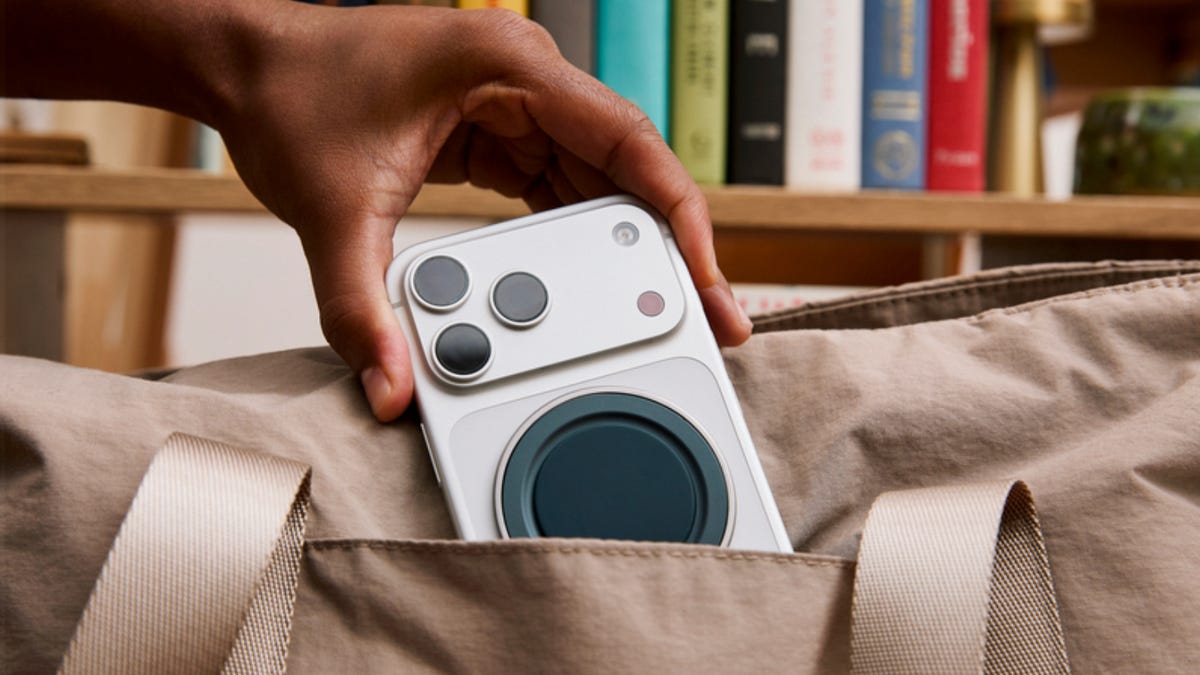
Since launching in 2014, PopSockets have always been a quirky (and slightly bulky) grip for phones. They’re adored by those who love to accessorize their phones with their swappable designs and people who love to fidget with their accordion-style pop-out piece. But the company is now hoping to attract a new clientele with the Low-Pro, a new grip design that’s so thin that when collapsed, it sits lower than the camera bump on my iPhone 17 Pro Max

The Low-Pro goes on sale Tuesday for $40, launching first at Apple Stores and at PopSockets.com, with additional retailers at the end of July. You can see more of how it works in the latest episode of One More Thing, embedded below:

Watch this: Flat PopSockets Might Lure More Men: Hands-On With Low-Pro Grips

I’ve been using the MagSafe Low-Pro for the past week, and I can see the appeal this will have for those folks who just want something that slips effortlessly into their pants pockets. Like other PopSockets, it still attaches with the MagSafe magnetic backing. The front has a soft matte finish, and although it doesn’t make a “pop,” a finger nudge in any direction will raise the disk to reveal a slitted, flexible single piece of polymer. A metal ring around the edge becomes an adjustable swing-out stand to prop up your phone in portrait and landscape mode. 

1.png

When opened, the Low-Pro grip is designed to handle fidgeters who want to twist, poke and pull at it (well, up to about 30 lbs of pulling). 

PopSockets

When the Low-Pro is expanded, it reminds me of a kid’s paper lantern craft project. Thinner materials give the impression that it will be weaker, but no matter how I twist, tug or try to poke at the holes, the material holds up. Good news for fidget-lovers: This seems to be able to handle all my stretching — and the PopSockets team tells me it was designed to withstand more than 30 pounds of pulling pressure in testing.

Apple Stores will carry the Low-Pro in four exclusive colors to start: Blue Aura, Electric Fuchsia, Black and Navy. 

PopSocket is not the first to come up with a flush magnetic phone grip. The company OhSnap gained popularity for its Snap Grip, priced at $30, which uses a metal hinge to fold flat. But since using both, I prefer the PopSocket design because it’s easier to open with one finger from any angle, and it has the extra kickstand. 

I sat down with PopSocket inventor and founder David Barnett to learn more about the pivot to the Low-Pro. Although the PopSockets company will continue making the existing design (the one that actually pops), Barnett said the big motivator here for a new model was to lure in men who told him over the years they never gave PopSockets a chance because of their size. 

PopSocket David Barnett

PopSocket inventor David Barnett didn’t start off with a goal making phone grips. Here, he holds the creation that inspired the PopSocket: giant buttons on the back of an iPhone 3GS to help wrap long headset cords.

Carly Marsh/CNET

“They’d say, ‘Oh, it would get caught on my pocket,’ and I’d think to myself, It’s never gotten caught on my pocket ever,” Barnett said. “Ultimately, I wanted a solution that would meet this challenge of not being perceived as thick and bulky.” 

There is an extra benefit to this thinner design — you don’t have to take off your Low-Pro if you want to connect it to a MagSafe stand to charge. Just don’t count on it getting a fast charge: the more stuff between your phone and the charger (like a case and a grip), the slower the trickle of energy will be to your device. 

But often I use MagSafe stands to prop up my phone at work. And for once, it meant I didn’t have to pop off my PopSocket to have it snap magnetically. 


33 Immortals Free Download (v1.0.0/ALL DLCs & Online)


33 Immortals PC Game


Download File


33 Immortals Direct Download:

33 Immortals is a co-op action-roguelike for 33 players. Play a damned soul, and rebel against God’s final judgment. Pick-up and raid, cooperate to survive hordes of monsters, defeat massive bosses, and face the wrath of God in a fight for your eternal life. Burden Street Station

Jump straight into 33-player co-op runs with instant matchmaking; no lobbies or planning required. Drop in solo or party up with up to 4 friends and fight through streamlined, replayable raids built for fast sessions, massive cooperative battles against hordes of monsters, and epic boss fights.Survive by fighting together. No voice chat required: coordinate through in-game emotes, pings, and cooperative abilities. Revive fallen allies, combine powerful effects, and adapt to chaotic encounters as dozens of players battle side by side.

God’s armies will strike you down again and again, but every run makes you stronger. Collect resources during raids, unlock permanent upgrades for your soul, and expand your arsenal with new weapons, relics, and powers. Experiment with different builds and prepare for even greater battles against God’s wrath. Face the Wrath of God, together. Fight as a renegade in the immortal rebellion against God’s final judgment, and battle for your eternal life in a unique blend of mythic fantasy, action roguelike progression, and large-scale cooperative play.

Features:

  • 33-player co-op action roguelike battles against massive hordes and bosses.
  • Jump straight into live runs with instant matchmaking. Drop in solo or with up to 4 friends.
  • Fast-paced, replayable raids designed for quick sessions and nonstop action.
  • Coordinate through emotes, pings, shared objectives, and powerful cooperative abilities.
  • Revive fallen allies and fight together to keep the rebellion alive.
  • Randomized enemies, encounters, rewards, and builds make every run different.
  • Unlock permanent upgrades, experiment with powerful builds, and customize your playstyle.
  • Wield weapons and relics inspired by sins and virtues, each with unique combat mechanics.
  • Customize your soul with a wide range of cosmetics.

Screenshots

System Requirements

Minimum
OS: Windows 10
Processor: Quad Core 2.4Ghz
Memory: 8 GB RAM
Graphics: GeForce GTX950, Radeon R7 360, or Intel HD Graphics 630, 2GB VRAM
DirectX: Version 11
Network: Broadband Internet connection
Storage: 5 GB available space
Support the game developers by purchasing the game on Steam

Installation Guide

Turn Off Your Antivirus Before Installing Any Game

1 :: Download Game
2 :: Extract Game
3 :: Launch The Game
4 :: Have Fun 🙂


Download File

Don’t Panic – it’s Not Too Late to Catch Graebert’s neXt 2026 Event!


“What’s neXt for 2D/3D CAD in DWG?” Graebert neXt is a free online event that explores this question every year, giving the CAD community insight into the technologies affecting the fast-changing software landscape. 

This year, Graebert hosted its neXt event on June 3, showcasing the newest developments in CAD through feature demonstrations, executive commentary, and analysis from industry experts. Attendees — including CAD managers and users, engineers and developers, CAD newbies and CAD veterans — learned about the digital transformation of CAD through AI-driven tools, BIM automation, and cloud collaboration. Users of Graebert’s own ARES software products and of other CAD platforms, such as AutoCAD, saw how these technology trends are reshaping day-to-day workflows for CAD in DWG. 

If you didn’t experience neXt 2026 on the event date, you missed out on a real-life customer story, detailed demonstrations of new product enhancements and workflows, and presentations by the founders of aec+tech and Architosh. But you’re in luck — you can still take advantage of the replay option to watch the entire two-hour event.

And if you’re short on time, you can pick and choose from our video gallery of individual feature demonstrations, keynote sessions, and more. You can even watch videos from last year’s event!

Access Graebert neXt 2026 content in the way that suits you best:

Use the links above to start watching now, or read on for an overview of what you can expect to see.

Graebert neXt 2026 Agenda

The event opens with a welcome from company founder and CEO Wilfried Graebert and CTO Robert Graebert. “Today, the CAD industry is evolving faster than ever,” said Robert Graebert. “AI, cloud, automation: the digital transformation is happening right now, and CAD is no exception. New technologies are creating major opportunities to improve productivity, collaboration, and creativity for CAD professionals around the world.”

Next, a customer success story introduces viewers to Takenaka Corporation, one of Japan’s largest construction companies, and its implementation of ARES software. Takenaka migrated nearly 10,000 users from AutoCAD to ARES.

A Top New Features session hosted by Chief Growth Officer Cedric Desbordes provides a look at exciting enhancements for: 

  • CAD on Windows, Mac, and Linux;
  • Online CAD; 
  • AI and Automation; 
  • BIM-specific features; and 
  • Cloud-based collaboration. 

With the overview format, viewers can quickly learn about the key new features in each area, and the value they have for streamlining workflows and improving collaboration. 

Following this overview are four Deep Dive sessions, which examine particular areas of advancement in greater detail. 

Deep Dive #1: ARES vs. AutoCAD. This session takes a closer look at CAD features in ARES software, including ARES Commander (CAD on Desktop) and ARES Kudo (Online CAD). This overview of capabilities, performance, and compatibility is designed to help viewers compare and evaluate modern alternatives. (For more about these new CAD features in ARES 2027, plus many more, visit the New Features page on the Graebert website.)

Deep Dive #2: AI for CAD in DWG & Online Automation. This session focuses on the ways that AI and automation are transforming design workflows and enabling new efficiencies in DWG-based environments. It features a five-minute expert review by architect Anthony Frausto-Robledo, the founder and editor-in-chief of Architosh. He outlines primary pain points in the CAD and BIM industries, then examines how Graebert is addressing each one with new functionalities. 

(For more insights from Frausto-Robledo, visit the Architosh site to read his in-depth product review article, “ARES 2027 Deep Dive: AI, Automation and BIM-to-DWG Workflows.”)

Deep Dive #3: BIM-to-DWG Drawings Automation. Niknaz Aftahi, architect and CEO of aec+tech, kicks off this session, which explains a faster way to produce DWG drawings from Revit or IFC data and streamline collaboration between BIM and CAD workflows, including integration with Autodesk Forma. 

Aftahi starts with a widespread problem with creating documentation from BIM models: it’s still very manual, making it very time-consuming. ARES software, however, can read the intelligence in BIM models, and as Aftahi explains, use it to create DWG plans, sections, and elevations, and add even the appropriate labels and dimensions — automatically. (Don’t miss Aftahi’s aec+tech article on this subject, “BIM Has the Intelligence. Why Is Revit Documentation Still Manual?”) She also touches on the exciting upcoming product ARES Neo, which automatically corrects documentation problems (such as missing labels) inside the Revit workflow. 

Deep Dive #4: Modern CAD in DWG with Cloud-based Collaboration. Last but not least, the fourth Deep Dive session explores Digital Transformation for DWG-based CAD workflows. The ARES Trinity of CAD software comprises three solutions — ARES Commander, ARES Kudo, and ARES Touch — that are interconnected with each other, enabling unique collaboration features. Viewers can explore how the convergence of desktop, cloud, and mobile solutions enables real-time collaboration and secure access to CAD data anywhere.

Try the New Features for Yourself

Visit the New Features page on the Graebert website to learn more about these features, plus many more. To try the new features showcased in neXt 2026 for yourself, simply create your free Graebert account and start your free 30-day trial today.

A lost Dragon Ball Z fan RPG has resurfaced after mystery user drops it in a seven-year-old forum thread


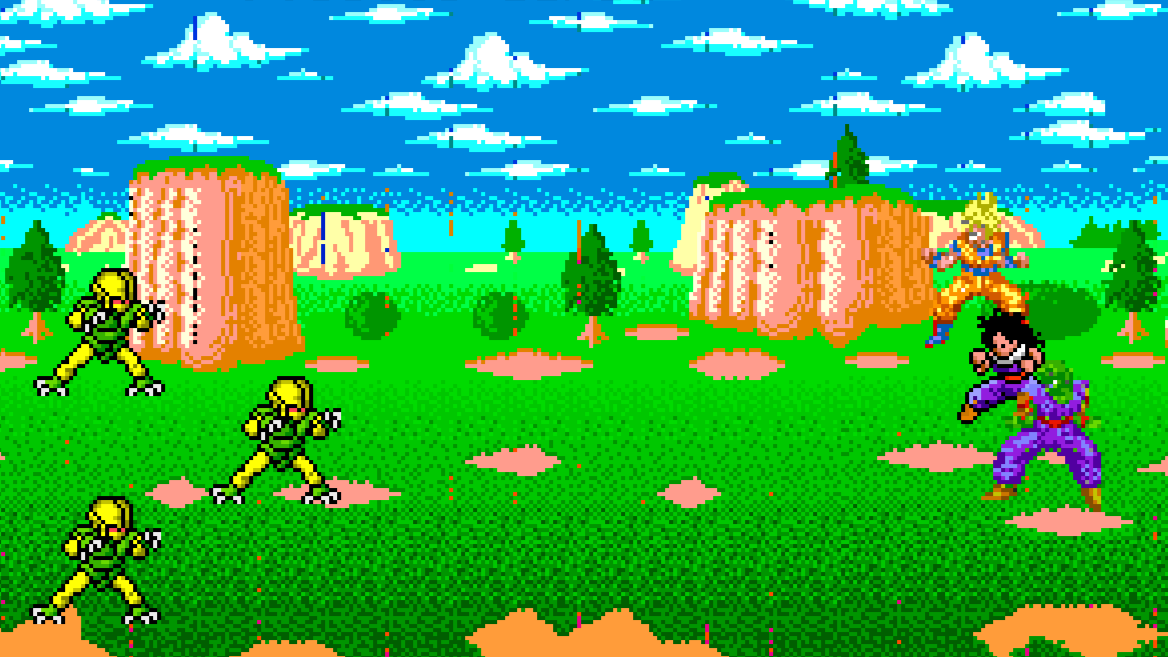
About seven years ago user pikablu of the Resetera forum started a thread about an old Dragon Ball Z fan RPG that had long fallen into obscurity. It was an MS-DOS game that “used a lot of sprites from the Super Butōden games”, which were Dragon Ball Z games released for SNES consoles in the ’90s. According to the user, this rugged fan RPG was available on a Dragon Ball Z site called Planet Namek.

The thread attracted 14 responses. No one could help.

Google Chrome’s next update could be bad news for ad blocker users


What you need to know

  • Google is finally removing Manifest V2 support, ending compatibility with many older Chrome extensions.
  • Popular ad blockers like uBlock Origin may stop working once Chrome fully completes the transition.
  • Newer Manifest V3-compatible blockers such as uBlock Origin Lite will continue to function in Chrome.
  • Chromium-based browsers like Edge and Opera could also be affected by the Manifest V2 shutdown.

A future update for Google Chrome could mark the end of some of the most popular ad blockers currently available.

Ever since 2019, Google has been working toward a new browser extension framework called Manifest V3. The transition hit several delays along the way, but the official deprecation of Manifest V2 extensions began in 2024. Now, it looks like Google is finally approaching the end of that transition, and it could have major consequences for popular ad-blocking extensions.

Xbox Is Reportedly Closing Ninja Theory, Double Fine And Compulsion Games


Xbox is preparing to shut down or sell at least three of its studios — Double Fine, Ninja Theory and Compulsion Games — according to reports from The Verge and Bloomberg on Monday. 

Ninja Theory employees were informed on Monday that the studio would be closing, according to The Verge, but the team is attempting to find a buyer that can keep them operational. Ninja Theory is the studio behind the Hellblade series and it was featured in the recent Xbox Summer Game Fest showcase, revealing a new entry due in 2027.

Double Fine is the legendary studio behind the Psychonauts games, Brütal Legend, Broken Age, Keeper and all manner of LucasArts adventures, founded by Tim Schafer and friends in 2000. Double Fine leaders are in active negotiations to buy themselves back from Xbox rather than be closed altogether, Bloomberg said. 

Compulsion Games is in a similar position, according to the report. Compulsion is the Montreal studio behind the uber-stylish games Contrast, We Happy Few and South of Midnight, the latter of which came out in April 2025.

Bloomberg reported that several other studios under the Xbox Game Studios banner are also negotiating for their futures and are at risk of being shut down. As it officially stands, the Xbox Game Studios umbrella covers dozens of studios, including Arkane, Bethesda, Halo Studios, id Software, Obsidian, Playground Games, ZeniMax and Activision Blizzard King. We have contacted Xbox for clarification on the reported closures and buyout talks.

Microsoft’s modern game-studio acquiring spree kicked off in 2018 with the purchase of Undead Labs, Playground Games, Ninja Theory and Compulsion Games, plus the formation of The Initiative. This momentum continued building at a concerning pace in 2020 and 2021, when Xbox acquired eight more studios under ZeniMax Media, including Arkane, Bethesda and id. Everything came to a head in 2022 with the announcement that Xbox planned to purchase Activision Blizzard for $69 billion, the largest acquisition in video game history. That deal finally went through at the end of 2023, after a lengthy battle with regulators.

Since the acquisitions, Microsoft has enacted multiple massive rounds of layoffs affecting thousands of employees in its gaming division, and also shuttered well-known studios, including The Initiative. Unfortunately, Double Fine, Ninja Theory, Compulsion and the other at-risk Xbox studios are in good company.

Longtime Xbox division head Phil Spencer stepped down this year and was replaced by new CEO Asha Sharma, alongside other executive-level changes. Also on Monday, Xbox Game Studios head Craig Duncan left the company; he first took the role in October 2024. Employees across Xbox are bracing for more layoffs in 2026 after an ominous public memo from Sharma dropped in mid-June, just as the glow of Summer Game Fest fully faded.

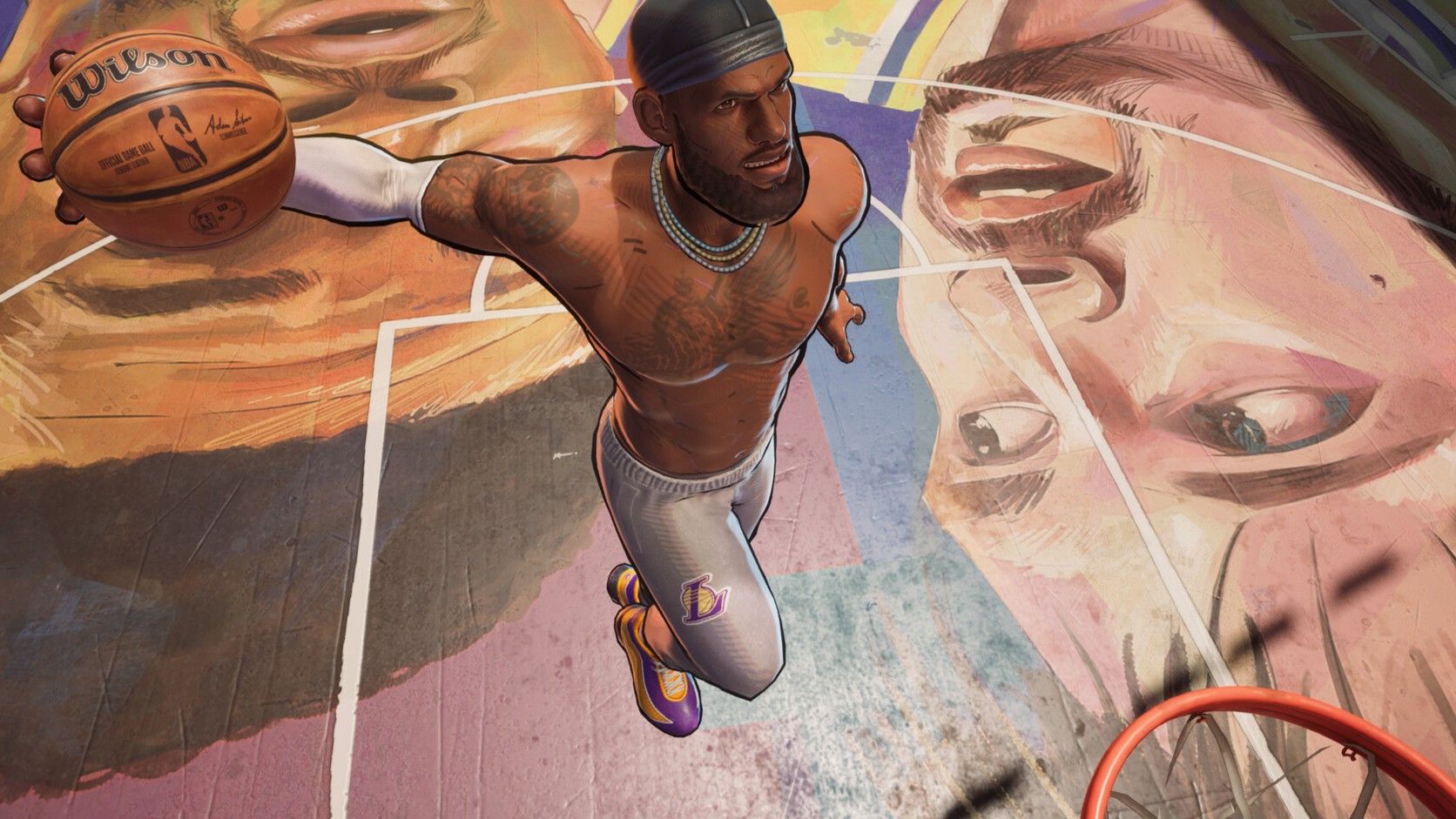
The new NBA game’s street balling is strong, but it’s way too sweaty for its own good


Basketball was one sport I loved playing as a kid—not only to compete or spectate, but just for fun. I was not good at it. So I stopped playing, partially because I hated feeling like my teammates were stuck with me. When I got benched, that bummed me out. But when I got put in, the responsibility to not let my friends down made my heart race, even if it supposedly didn’t matter if we won. Now I realize I shouldn’t have been so hard on myself.

NBA The Run saddled me with the same existential questions I had back in those days. It’s a 3-on-3 throwback to arcadey classics like NBA Jam, Street, and my personal favorite, the one where you can play as a horse. These games trade the simmy mechanical depth of more buttoned-up ball ’em ups for easily executed moon jump dunks, gaudy tricks, turbo buttons, and commentary from guys yelling stuff like “Boom shaka-laka!” It’s basketball as only videogames could envision it.

Your Brand Reputation Precedes You With AI, Whether You Like It or Not


Marketers, take note: New research using 2.7 million data points from the 2026 Winter Olympics revealed how AI systems form and preserve narratives about brands, athletes, and organizations.
Continue reading “Your Brand Reputation Precedes You With AI, Whether You Like It or Not”