Whether AI is already replacing jobs is the subject of fierce debate.
Tech layoffs hit their highest single month total in years in May, and AI was the most-cited reason, according to outplacement firm Challenger, Gray & Christmas.
Software engineering, in theory, is the professional field most vulnerable to automation, given the rapid adoption of AI-powered coding tools. However, researchers at venture firm SignalFire say the hiring data tells a different story.
“The rationale given for lots of layoffs is consistently AI, and specifically they’ll say AI with respect to code; they’ll say one engineer could do the job of however many engineers in the past,” said Asher Bantock, SignalFire’s head of research. “What we’re seeing on the ground is a little inconsistent with that.”
SignalFire’s analysis, which tracked the careers of millions of employees across more than 80 million companies, suggests that engineering was the most resilient job function in 2025. Instead of focusing on layoffs, which are difficult to track because people often delay updating their employment status after job cuts, SignalFire examined hiring data as a more accurate indicator of real-time workforce trends.
While total hiring across large tech companies dropped 25% compared to 2019 levels, engineering roles saw a much smaller decline of just 11%, according to SignalFire’s latest “State of Talent Report.”
In fact, engineers comprised 55% of all new hires in 2025 across the 12 companies SignalFire classifies as “Tech Majors” — Alphabet, Meta, Apple, Amazon, Microsoft, Netflix, Nvidia, Tesla, Uber, Airbnb, Block, and Stripe. This is a significant jump from 2019, when engineers represented only 46% of new recruits, according to the report.
The continued need for engineers was even more evident at early-stage startups, which collectively brought on 7% more engineers in 2025 than they did in 2019, SignalFire’s data shows.
If AI were truly substituting for engineering talent, Bantock argued, engineering hiring would be the first to fall amid the current tech hiring contraction. Instead, SignalFire’s data shows that engineering headcount is growing faster than most other job functions in tech.
While Anthropic CEO Dario Amodei warned last year that AI could wipe out half of all entry-level white-collar jobs and push unemployment as high as 20% within five years, the company’s own head of economics, Peter McCrory, told TechCrunch in March that he had not yet seen any significant AI-driven effects on the workforce.
Said McCrory at the time: “There’s at least no larger material difference in unemployment rates” between workers who use Claude for the “most central task of their job in automated ways” — like technical writers, data entry clerks, and software engineers — and workers in jobs less exposed to AI that require “physical interaction and dexterity with the real world.”
Nvidia CEO Jensen Huang went further still, outright rejecting the theory that AI will replace engineers. “Somebody said that AI is going to destroy all of the software engineering jobs,” Huang said in an interview at the Stanford Graduate School of Business in April. He then argued the opposite is true. Now that all engineers at Nvidia are using agentic AI, “software engineers are busier than ever,” he said.
Huang added that while agents are writing code near instantaneously, they are constantly pushing engineers to generate “the next idea.”
For now at least, it seems that armed with AI, engineering has become a classic example of the Jevons paradox — the idea that greater efficiency doesn’t reduce demand for a resource; it increases it, because the work expands to fill the new capacity. As Bantock said of engineering talent in this moment: “They’re suddenly a lot more productive, and there’s endless work for them to do.”
When you purchase through links in our articles, we may earn a small commission. This doesn’t affect our editorial independence.
The 30th anniversary of Quake recently passed by—June 22, 2026 was the day—and of course there were acknowledgements, salutes, and celebrations a-plenty, as you’d expect for such a groundbreaking, influential, and enduring game. But it also got a couple of the driving forces behind it reflecting on those days rather more deeply, and as sometimes happens when youthful memories come to the surface, they got pretty deep into their feelings.
Quake co-designer Sandy Petersen, who joined id Software in 1993, got the ball rolling, writing bluntly on X that “Quake ruined id Software.” He said Quake “is an amazing feat of art, programming, and design,” and credited everyone on the development team for doing “a brilliant job, fulfilling tasks just right.” But, he added, the workload was intense, “and I think it broke us spiritually.”
Petersen then ran through a list of everyone who left id “within a couple years of finishing Quake,” including John Romero, Shawn Green, Dave Taylor, Mike Abrash, American McGee, and of course Petersen himself. All of them went on to have long and fruitful careers in game development, “so plainly we didn’t depart because of some kind of talent issue,” Petersen wrote. “We were all highly competent, just a little burnt out after the labor of Quake.”
Latest Videos From
“Id Software was never the same after,” Petersen wrote. “In my opinion (only an opinion), the only other truly great game that id produced was Quake 3, and it was not at the level of the pre-Quake games.”
(Image credit: Sandy Peterson (Twitter))
Despite clearly being a bit melancholy about the whole thing, Petersen said Quake was “absolutely” worth the cost it extracted from id: “Games are more important than game companies, and Quake is an iconic titan of the gaming world.” But, he added, “man alive it seems like the company could have had its act together better and kept that dream team.”
Sandy Petersen is pretty famous for having his recollections repeatedly (but respectfully) knifed by John Romero, but in this instance his reminiscences were met with agreement, mostly, from the other John of the original id Software squad: Carmack.
In response to Petersen’s missive, Carmack said Quake was “overly ambitious technically,” and that the studio “could have done all the great multiplayer and modding work inside a Doom++ engine, allowing the designers to work with a more stable base instead of rug-pulling everything out from underneath them a couple times.”
Keep up to date with the most important stories and the best deals, as picked by the PC Gamer team.
“I pushed everyone too hard,” Carmack wrote. “I didn’t appreciate how maturing companies need more slack, and that running people at startup intensity constantly will wear them out. Quake was also where I really had to accept my personal limits. I was working pretty much as hard as humanly possible, and I was still slipping past my goal points.
“On all of the founders’ shoulders, our original corporate stock arrangement and buy/sell agreement was a mistake, and resulted in bad incentives. We wanted to ensure that all ownership rested in the hands of people working hard on current projects, but the Silicon Valley standard approach of vesting stock would have worked out better.”
Carmack said he doesn’t think having elevated expectations for Quake level designers was a mistake (and credited Romero with setting that bar high right from the studio’s early days), but acknowledged that “we should have figured out how to pair up artists and designers earlier.” But, he continued, “there was infighting among the designers, and the ones that could manage the visuals were happy to disparage the ones that couldn’t.”
And then, simply and directly, he apologized: “Sorry, Sandy.”
(Image credit: John Carmack (Twitter))
The dissolution of id Software under somewhat acrimonious circumstances has been well documented over the subsequent years: American McGee, for instance, was reportedly fired by Carmack for sub-par performance on Quake, although Petersen later suggested that McGee was actually done dirty by another employee. Petersen also pointed a finger at Carmack’s “intensity” in particular in a separate post, writing that Carmack “decided we all needed to be in the same big room together. He’d read about this way of “focusing” the team and it did. But we also had nowhere we could decompress or hide out.”
(Image credit: Sandy Peterson (Twitter))
It didn’t take long for the other other John—Romero—to enter the convo with his own thoughts on the matter, which aren’t too far removed from Carmack’s: He echoed the in-hindsight belief that they should have stuck with a Doom++ game while ironing out the fully-3D Quake engine, and that everyone at id was “pushing ourselves past what was reasonable because that was how id had always worked.” He also gave particular credit to McGee for being “really good” at building Quake levels, a notably pointed comment given how McGee’s time at id ended.
“There are a hundred things we could have done differently, but we did the best we could do at the time with what we knew. Having a media circus around us certainly didn’t help,” Romero wrote. “id still goes on, and so does Wolf, Doom, and Quake. Maybe that was what we came together to do. That is more than enough for any game dev, any team, any lifetime really.”
(Image credit: John Romero (Twitter))
Taken altogether, it’s a really interesting conversation about one of the most storied game studios in history. But I love a happy ending, and so what really lands for me is how it all wraps up: With an understanding that everyone was younger then, the world was a different place, and as Romero put it, we did the best we could. Following Carmack’s apology, Petersen said he didn’t blame him for how it all worked out and told Romero he “did an incredible job” on Quake, and Romero thanked Petersen for getting them talking: “It really was a hell of a game.”
Universa, the powerful Chosen of her people, and ancient warrior, The Immortal, join theInvincible VSroster on June 30, starting Season 1. Get a look ahead at Seasons 2 and 3.
Skybound’s in-house studio, Quarter Up, is headed to Evo Las Vegas from June 26-28 as an official tournament partner, where players will get the chance to play Universa and The Immortal ahead of their official launch.
Invincible VS is a new 3v3 tag fighting game based on the beloved comic book and TV series, and is available now on XBOX Series X|S, XBOX on PC, and XBOX Cloud as an XBOX Play Anywhere title.
It feels like just yesterday that Invincible VS launched, and the support from our community has been nothing short of amazing. Now, we’re excited to keep things going and welcome our first two DLC characters into the game – the unstoppable Universa and the looks-great-for-his-age superhuman, The Immortal, both launching on June 30!
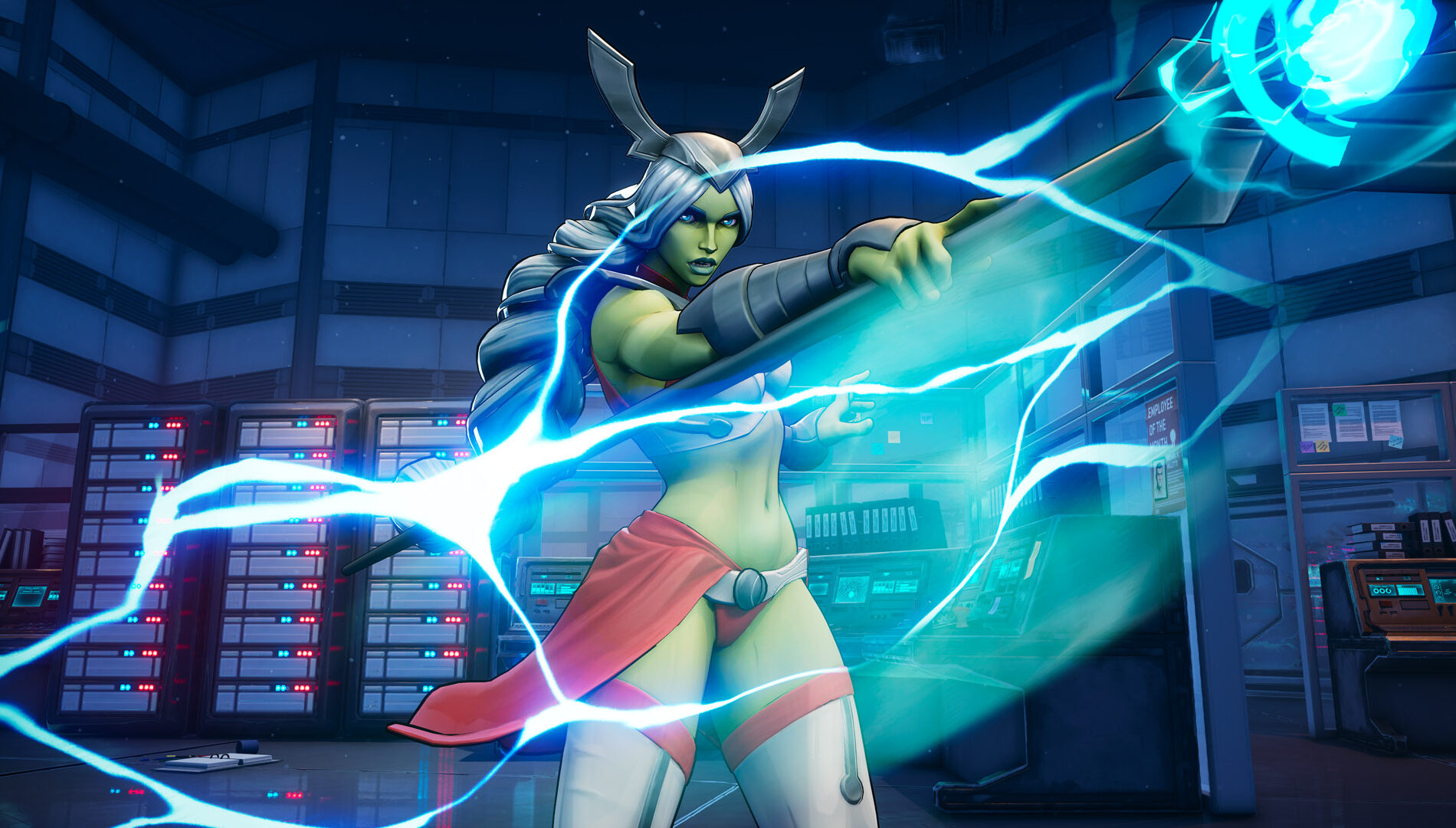
First up is Universa. The Chosen of her people, she is a lone cosmic warrior tasked with saving her dying world. With her mighty Staff of Leadership, she can absorb and unleash massive amounts of energy, but only while it is in her grasp. Driven by duty above all else, Universa will stop at nothing to drain planet Earth of its energy resources in order to bring salvation to her own world, no matter the cost.
In Invincible VS, Universa is a highly technical Fighter built around momentum and resource control. Her power grows immensely as her Boost Meter fills, and she can even siphon Boost energy from her opponents to weaken them as she gains strength, leaving them extremely vulnerable to her attacks. Universa is versatile and well balanced, and is at her best when players are able to master her Max Boost Specials to completely devastate her foes.
I’ll let you in on a tip for Universa: One of our team’s favorite moves is her “Entropy” super, which allows her to absorb incoming projectiles and convert them into Boost gauge. This works great for getting through some assists or dealing with characters like Ella Mental or Cecil who rely on heavy projectiles. If you can master Universa’s tit-for-tat energy absorption and release, she may just become your new main.
Next is The Immortal, and yes, his name is quite fitting. He is one of the oldest living characters within the Invincibleuniverse, and his origin is a true mystery. The Immortal has lived many lives as a warrior, king, knight, crusader and now, leader of the Guardians of the Globe. Relentless and hardened by battle, he carries an incredible amount of grief from centuries-spanning loss, especially after surviving Omni-Man’s massacre of the original Guardians of the Globe. Though not a Viltrumite himself, The Immortal possesses similar powers and will never back down from a fight, no matter who stands before him.
In Invincible VS, The Immortal is an aggressive Striker Fighter who excels at closing distance and overwhelming opponents with relentless pressure. His explosive moveset lets him attack from multiple angles, while his Install Super boosts his speed and combo potential even further. True to his name, he also has a unique Revive ability that can bring him back into the fight once per match, allowing him to return in a berserk state and continue beating up his opponents.
One super cool aspect of The Immortal that we think fans will love is his walk-off. For a character that’s had so many iconic entrances and exits throughout the years, we made sure to give him a proper animation to fit, and might I say, it’s one of the best animations in the game. You’ll want to pay attention to that once the round ends.
Better yet, you can check it early at Evo! We’re heading to Las Vegas from Friday, June 26 to Sunday, June 28, and attendees can swing by our Quarter Up booth to go hands-on with Universa and The Immortal before anyone else. Who knows, you might just find your new main!
We’re also honored to say that Invincible VS is an official Evo tournament partner, and we can’t wait to see the highest caliber players face off against each other throughout the whole weekend. As expected, the stakes are high. The first-place winner gets more than just bragging rights; they get to take home quite the spectacle – a life-sized Conquest Gauntlet trophy! May the best player win.
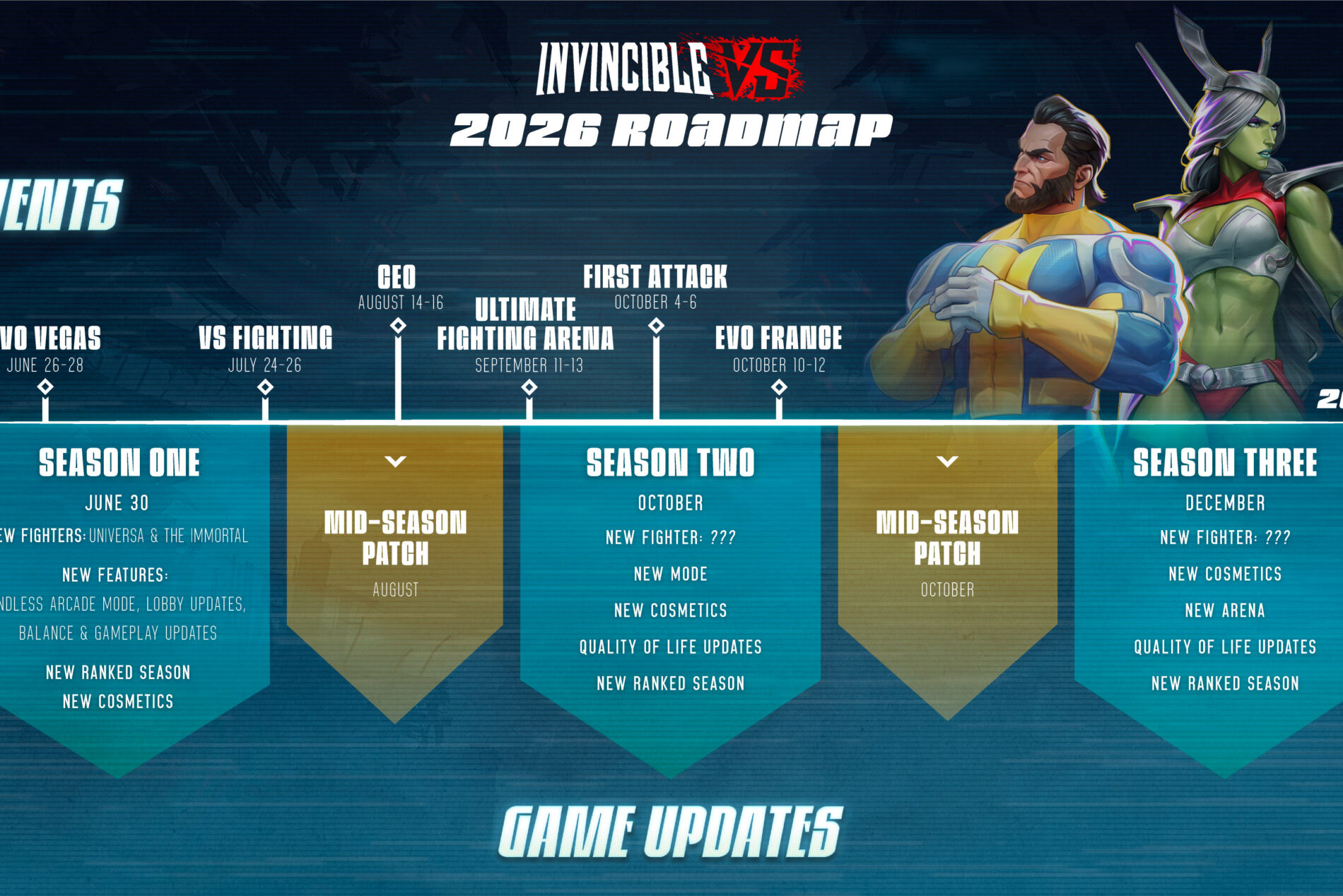
Looking to the future, we’re also excited to reveal our 2026 roadmap, giving you all a look at what’s coming for the rest of the year. To give you the highlights, we’ve got Season 1 launching on June 30, alongside Universa and The Immortal, plus an all-new Endless Arcade mode and fresh cosmetic releases. Then, Season 2 launches in October, where players can look forward to an all-new fighter, game mode and even more cosmetics. And to end the year with a bang, Season 3 launches in December with another brand-new fighter, a whole new arena and you guessed it, more awesome cosmetics.
There’s tons of amazing content coming but for now, we’re starting the summer off with a strong punch. We look forward to seeing some of you at Evo next week and checking out what you can all do with Universa and The Immortal. Show us what you’ve got!
Invincible VS is available on XBOX Series X|S, XBOX on PC, and XBOX Cloud as an XBOX Play Anywhere title, and can be purchased at invinciblevs.com.
Invincible VS is a brutal superhero 3v3 tag fighting game set in the Invincible universe, where you can battle to the death as a team of fan-favorite characters in iconic locations. Unleash bone-breaking combos through fast combat and smart defensive tactics to leave a trail of blood and destruction. Land vicious Super moves and Ultimates to leave your opponents in a mess of blood.
Invincible VS features a variety of game modes including a captivating cinematic story mode with an original narrative from a writer of the animated series. Jump into Arcade and battle with your team, hone your combos in Training mode, and test your skills against the world in competitive and casual multiplayer. Show, comic fans, and fighting game lovers will experience unparalleled heroic brutality, where every earth-shattering blow will leave you feeling… Invincible.
This is the debut title from the newly formed Quarter Up™—the first in-house studio at Skybound—led by former members of the core Killer Instinct (2013) dev team.
Over the years, considerable effort has gone into making the Android permission model more user-friendly, and most Android users today reflexively disregard requests for camera, microphone, contact, or location permissions. However, there is one category that users forget about — network activity.
Apps don’t need to request your location or contact information to create a profile on you. By monitoring your network activity, apps can learn your online hours, which services you use, and how much data you consume. Android tries to limit access to this information, but there are some permissions that provide insights into your network usage.
This article will examine some of the more concerning Android permissions and what data they allow applications to collect. It will also discuss how the use of a trusted Android VPN can limit this data collection.
Network Activity Permissions
The Android permission used most often in connection with network activity is ACCESS_NETWORK_STATE. This permission is used to determine if an Android device has an active Wi-Fi network connection, if data is being transmitted over a mobile connection, or if the Android device is not connected to the internet at all.
At first, this might not appear to be a problematic permission to grant; many applications require the knowledge of a user being online in order to fetch content. This information can, however, be used for analytics, advertisements, and even behavioral tracking.
Another commonly requested permission is INTERNET. Most Android apps request this permission because it allows apps to send and receive information from remote servers. While this permission doesn’t compromise your network statistics but combined with other permissions by itself, apps can send collected data to developers, advertisers, and analysts.
PACKAGE_USAGE_STATS is the most concerning permission. This privilege allows the app to collect detailed statistics about user behavior, including network statistics. This is made possible by the use of the Android NetworkStatsManager API. In certain cases, this could allow the app to analyze network data consumption along with device behavior.
Unlike standard permissions, the Usage Access permission is granted through Android’s Special App Access settings, meaning that many users are likely unaware of actually granting this permission.
Why Apps Require Access to Network Information
Developers often argue that requesting access to network data is vital for the app to function. In certain cases, this may actually be true.
For example, streaming apps may need to determine the quality of the connection. Cloud apps may need to know the availability of data. Messaging apps may need to check for a connection.
Unfortunately, there are many other cases where this data is requested for less user-friendly purposes.
Advertising SDKs need network statistics to refine user targeting. Analytics services need this data to analyze user engagement and in-app behavior. Some apps even combine this data with device identifiers to enrich data collection.
Studies show that the majority of Android users grant permissions without properly evaluating the consequences, which makes permission requests and privacy a persistent issue.
How to Check Your Android Permissions
If you are worried about privacy and data collection via networks, take a look at the permissions your apps are using from your device.
Go to:
Settings → Apps → Special App Access → Usage Access
Focus on apps that seem to have no reason for needing access to Usage Stats. Battery monitors, launchers, parental controls, and some security apps may need access. Casual games and random tools should not need this permission.
You should check the permissions of each app and ask the following: “Do apps need permission to use the internet and network in order to perform their primary function?”
If the answer is no, uninstall and find a more privacy-conscious app.
How VPNs Fit In
A VPN cannot stop an app from seeing permissions you already granted. If you give an app Usage Access, it will have access to the information that Android allows.
What VPNs can do is limit what network information can be seen.
When you use a VPN, your internet traffic is encrypted before it leaves your device. Because of this, internet service providers, Wi-Fi that you access in public, and a bunch of other third parties will not be able to see your browsing and what you are connected to.
A VPN also hides your IP address. This will make your network data less location-specific. For Android users who have to use public Wi-Fi, this will reduce the risk of their online activities being exposed.
Protecting Privacy With Permission Control
With Android, privacy is in your control like never before, but those controls only work if they are used.
Regularly check what permissions you’ve granted and remove access from applications that don’t need it. Be smart about special permissions. Each and every permission request should have a clear reason.
While a VPN alone won’t protect your privacy, combined with careful permission management, it can prevent most of your online activities from being exposed.
The more data is collected, the more that can be harvested.
alternative_right shares a report from ScienceAlert: If you consumed a wild mushroom and suddenly started seeing tiny people around you, you might reasonably assume it contained a familiar psychedelic. But that does not appear to be the case with Lanmaoa asiatica, known locally as jian shou qing, a mushroom species sold in markets in Yunnan, southwestern China. When eaten undercooked, the mushroom can produce vivid visions of miniature people — not unlike Gulliver on his travels to Lilliput. To try and find out the root cause, University of Utah mycologists Colin Domnauer and Bryn Dentinger sequenced the genomes of 53 mushroom samples from across the wider Lanmaoa genus. And despite the reported hallucinations, they found no close matches to genes associated with psilocybin or ibotenic acid, two well-known mushroom hallucinogens whose biosynthetic pathways were specifically examined in the study.
“Biosynthetic gene mining of the L. asiatica genome found no close hits with any genes known in the production of mushroom psychoactive compounds,” write the researchers in their published paper. “This supports our hypothesis of the presence of a novel unidentified metabolite responsible for the unique hallucinogenic properties of L. asiatica.” […] Whatever chemical pathways are causing these effects in the brain, the responsible compound appears to be something scientists have not yet identified. […] By identifying 1,515 corresponding genes across the selected specimens, the researchers obtained a clearer answer to the question of what defines a mushroom species as part of the genus Lanmaoa. There are now 17 recognized species in the genus, including four that haven’t been identified before, two of which the researchers specifically named here: Lanmaoa fallax and Lanmaoa carbonilivor. The researchers say the Lanmaoa family and evolutionary tree can now be more fully mapped out, and some existing specimens may need to be reclassified.
All images appearing on this website are copyright CyberPowerPC. Any unauthorized use of its logos and other graphics is forbidden. Prices and specifications are subject to change without notice. CYBERPOWERPC IS NOT RESPONSIBLE FOR ANY TYPO, PHOTOGRAPH, OR PROGRAM ERRORS, AND RESERVES THE RIGHT TO CANCEL ANY INCORRECT ORDERS.
Images shown and actual configured system may differ depending on selected components and accessories.
Your rate will be 0%-36% APR. For example, a $800 purchase might cost $72.21 over 12 months at 15% APR. Payment options through Affirm are subject to an eligibility check, may not be available everywhere, and are provided by these lending partners: affirm.com/lenders. Options depend on your purchase amount, and a down payment may be required. For licenses and disclosures, see affirm.com/licenses.
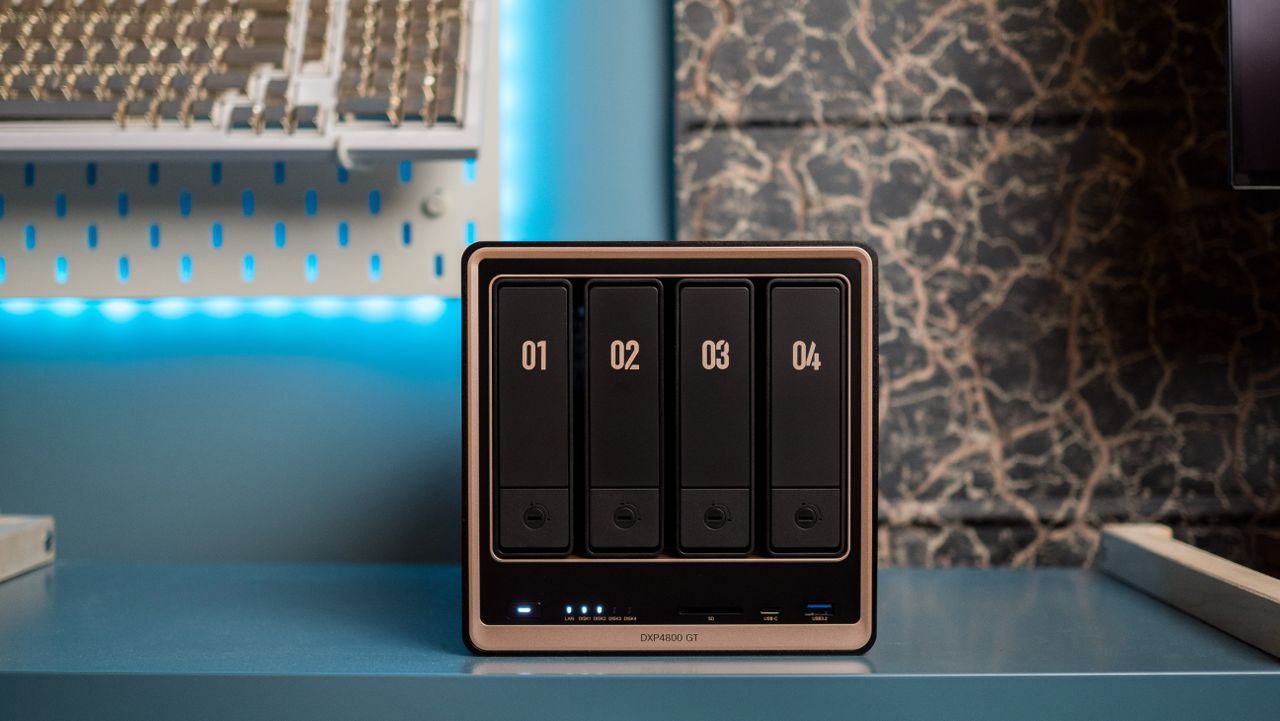
If you’re looking to buy a new NAS, there’s a good chance that you came across UGREEN. The brand is a relative newcomer, but a combination of great hardware and aggressive discounts made it swiftly rise up the ranks in this category.
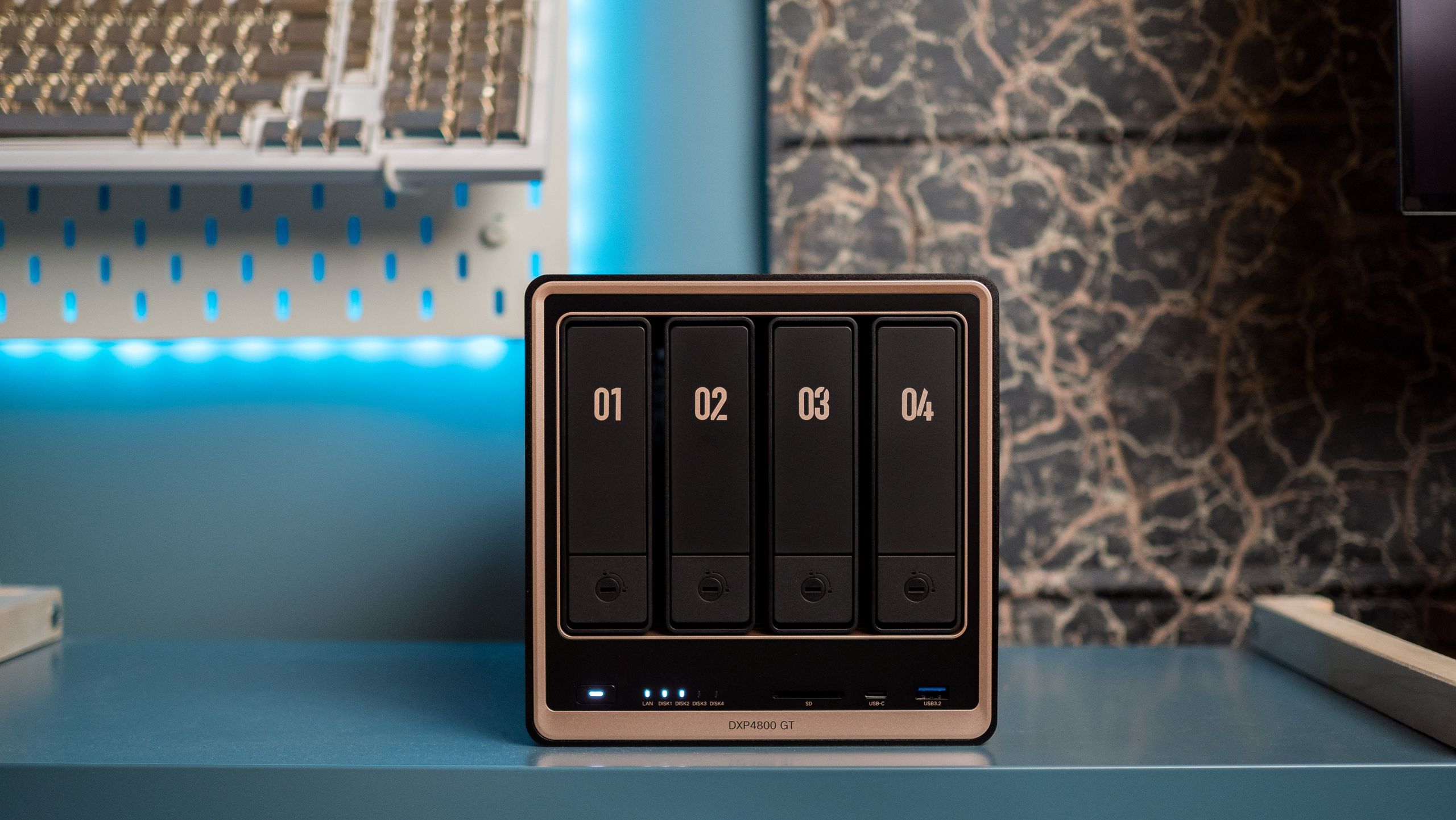
The DXP4800 GT is UGREEN’s latest NAS, and it just made its debut in June 2026. The NAS is aimed at enthusiast users and content creators, and it notably has two 10 Gigabit Ethernet ports. It launched at $659, but you can get it for $527 during Prime Day, which is a pretty good 20% discount on what is a brand-new model. While RAM and storage modules are still at an all-time high, UGREEN must not have gotten the memo, because this is a great price on an enthusiast-focused NAS.
✅Recommended if: You want ultra-fast connectivity. With powerful AMD internals, good software with container management, dual 10GbE connectivity, ECC memory, ability to slot in U.2 SSDs, and a high amount of extensibility, the DXP4800 GT is a true enthusiast NAS. The best part is that there’s hardware-assisted transcoding with the AMD Ryzen platform, and that’s just a welcome move.
❌Skip this deal if: You want Thunderbolt 4. Although the DXP4800 GT gets most right, it misses out on Thunderbolt 4 connectivity.
Now, the DXP4800 Pro is a solid NAS by itself, but the DXP4800 GT gets a few additional features. It gets ECC memory, 2.5-inch U.2 SSD integration, and two 10 Gigabit Ethernet connectors. It’s clear that the NAS is aimed at creators and enthusiasts, and even though there’s no Thunderbolt 4, it isn’t a big deal in and of itself.
Another difference is that the DXP4800 GT uses AMD hardware instead of Intel. While this has been an issue in the past, the Ryzen R2514 has hardware transcoding, so if you use Plex or Jellyfin, the DXP4800 GT is just as good as an Intel-based NAS. If anything, it’s faster; I got four 4K transcodes running in Plex at the same time without any issues, so the DXP4800 GT has power to spare.
The UGOS Pro software has plenty to like as well, and you can install just about anything you want using Docker; this is what I used to get Plex, Pi-hole, Jellyfin, Immich, and other utilities installed on the NAS.
The DXP4800 Pro is still a great NAS — particularly now that it is down to $639 — but if you need two 10GbE connectors or want to use U.2 SSDs, the DXP4800 GT is the obvious choice. And with the DXP4800 GT now selling for just $527, this may just be the best time to get it.
Two weeks following the release of Android 17 QPR1 Beta 4, today Beta 5 becomes available for testers.
While Beta 4 skipped Pixel 6 and 6 Pro support, they’re now once again included.
Google’s changelog largely consists of bugfixes.
Last week marked a major milestone for Android releases, with Android 17 finally hitting stable and starting to go out to Pixel devices everywhere. As much as we were looking forward to that release, testers are already onto the next big update beyond that one, with Google’s Android 17 QPR1 Betas giving them a taste of the changes set to land with the September Feature Drop. After QPR1 Beta 4 landed two weeks back, Google’s now ready to move on to QPR1 Beta 5.
Google’s Mishaal Rahman shares the good news over on X, confirming that build CP31.260608.007 is incoming for testers on Pixel 6 and later devices. That’s important because last time the Pixel 6 and 6 Pro were explicitly excluded — although Google promised we’d see support for those older models returning with this new release.
As you should probably expect from a Beta 5, at this point Google’s largely in cleanup mode — and that spells a whole lot of bugfixes. Here’s what Google shares to expect:
An issue in the Game Dashboard where users were unable to stop screen recordings or save video files. (Issue #296368569, Issue #328539170)
An issue where the camera app temporarily freezes or stutters shortly after being opened from an idle state. (Issue #330488811)
An issue that caused the screen to freeze with a pixelated bottom bar when waking the device from Always-On Display. (Issue #515393542, Issue #515497396)
A timeout issue where the Download Manager failed to complete downloads when excluded from an active VPN connection. (Issue #475985649)
An issue causing inconsistent charging completion time estimates to display on the lock screen versus the charging screensaver. (Issue #489503595)
An issue causing the Private Space UI to crash and locked private apps to improperly appear in launcher search results. (Issue #515631415)
A system crash and device hang that occurred when downloading games. (Issue #515364954)
An issue where a non-functional bubble option incorrectly appeared in the context menu of archived apps. (Issue #514585702)
A system-level WebView rendering regression that caused Monopoly Go to freeze and crash when attempting to open mini-games. (Issue #516576731)
One very nice change Rahman confirms is the addition of a new “don’t ask me again” toggle when turning on mobile data:
If you’re curious to try QPR1 for the first time, you can get started by registering your Pixel device in Google’s Android Beta Program.
On the flip side, if you’ve been testing the Android 17 Beta and would rather just make the move to stable without having to wipe all your device’s data, Google warns that you should not install QPR1 Beta 5, and instead proceed to opt out of the program.
Thank you for being part of our community. Read our Comment Policy before posting.
Our 2026 State of AI for Business Report surveyed more than 2,100 business professionals, including nearly a third who are marketers and 84% who work for B2B organizations.
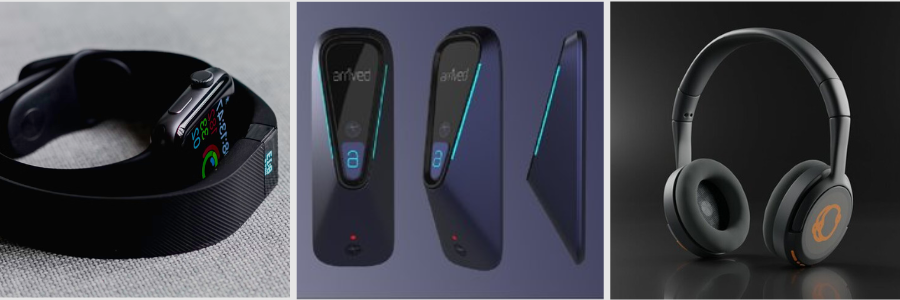
In today’s post, we provide helpful information on how to cut prototype design costs for product design and engineering firms. Developing a new product can get expensive rapidly. And a big portion of the budget goes to the prototyping phase, which happens in an iterative fashion where you have to make a model, discover some flaws, improve them, and repeat the process over and over again until you manage to build the most refined, manufacturing-ready version. The cost of prototyping design firms probably accounts for at least a third of the entire product development budget.
Of course, there can be various factors that affect how much money goes into the prototyping phase, but in general, the more complex the product is and the more expensive the materials are, the higher the budget should be. For example, if you discover a lot of design flaws in a prototype, you need to do a lot of refinements and make it better the next time, and this process costs time and a good amount of money.
Another problem is that there’s no guarantee the new prototype won’t have any issues either, so you have to give it another go and repeat. Prototyping stands as one of the most crucial phases in product development services. It’s not like you can cut corners and cheap out on every model. At least not when you want the product to work well and look good, as intended. The good thing is, there are many things you can do to reduce the cost and make the phase as efficient as possible while still maintaining accuracy and overall quality.
Let’s not forget that there’s always Cad Crowd, a freelancing platform mostly frequented by thousands of New Product Development (NPD) professionals based in the US, the UK, Canada, and Europe. Whether you’re looking for engineers, designers, fabricators, contract manufacturers, or project managers to reinforce your team, Cad Crowd connects you with qualified specialists through flexible hiring options.
We’ve mentioned earlier that prototyping is crucial and likely expensive, but it turns out there might be a few good measures to help you run it in a much more efficient manner and hopefully reduce the cost to hire product designers.
Build your own prototype, if you can
This might’ve been a hot take in the old days, but it shouldn’t be the case anymore now that 3D printers are getting more affordable. What if you want to prototype using metal materials? Yes, you can now 3D-print metals, too. Some entry-level metal 3D printers cost around $10,000 – $20,000 these days, which isn’t exactly a bargain, but not ridiculously expensive either. Also, the idea of prototyping is to build early versions of a product’s design. You’ll be doing it in an iterative fashion until you’re satisfied with the model.
Once the design is finalized, you can always partner with a third-party fabricator to make a high-fidelity “production version” prototype to send to a contract manufacturer as a sample. Because the outsourcing part doesn’t happen until the final build, you can save a lot of money by creating every other model in-house. Metal parts like aluminum, stainless steel, titanium, or alloys can be quite a hindrance. However, it only applies to designs that require you to build prototypes from those materials. For products that are mostly or entirely made of plastic, in-house rapid prototyping with 3D printers is a no-brainer.
There are plenty of small desktop 3D printers from reputable brands available for under $1000. But just to be safe and have more options, budget anywhere between $1500 and $2000 to get a larger and more capable 3D printer. But not every company, especially startups and small design firms, can afford to purchase a complete package of 3D printing equipment. When the budget is tight and you don’t have the funds to invest in the right tools, outsourced prototyping still makes good sense.
Now, whether you outsource prototyping or do it in-house, it’s important to determine exactly what you need from the model. The prototype design expert may have to build multiple models throughout the prototyping phase, and each model serves a different purpose. The earliest version is the most basic form of the product, with some rough edges and almost no functionality. A follow-up model is slightly more refined with better aesthetics and a little bit more useful. You keep going with the gradual improvement, sometimes by focusing on one aspect at a time.
For example, a basic concept only needs to show that the idea is technically feasible. It might be crude, but so long as it delivers a solution to a problem, you can say that the model serves its purpose well. Finishes and details are not the biggest concerns at this point. In many cases, building a PoC (Proof of Concept) needs no fancy tools. You can make it using cardboard, plywood, or maybe LEGO bricks. For the electronic parts (if the product is an electronic device at all), development kits such as Arduino, Raspberry Pi, and ESP32 are the usual options. A concept isn’t simple because it shouldn’t be. You make do with off-the-shelf materials.
The time will come when you have to blend good aesthetics and functionality into a single model. Before you get to that point, however, separate the “looks-like” prototypes from the “works-like” ones.
“Looks-like” prototype focuses on the aesthetics, or the outer shell of a product. With electronics device design services, for instance, the outer shell is the hardware enclosure, the sides that people see.
“Works-like” model cares only about the functional parts, such as the inner mechanisms, the electronic components, or both. This allows the engineers to rig all the features and functionalities correctly without having to worry too much about aesthetics. Of course, there are still concerns like dimension and user interface (button placement, screen, battery compartment, etc.) because the components have to fit inside the outer shell eventually anyway.
As you progress from PoC and move closer toward the more refined models, 3D printing companies are your true saviors for efficient prototyping. That being said, not all 3D printers are created equal. For instance, FDM (fused deposition modeling) printers come with affordability and simplicity for anyone looking to get started with additive manufacturing. The big trade-off is part quality.
Say you want to build a prototype for the visual presentation. Part surfaces must be smooth with good details without sacrificing structural integrity. While you can use an FDM method for it, SLA (Stereolithography) printing is the better choice thanks to its tighter tolerance and higher accuracy. Parts made using SLS (Selective Laser Sintering) services and a 3D printer might not look as refined, yet they have excellent mechanical characteristics.
Despite being separate streams in the early prototyping phase, start merging the “looks-like” and “works-like” as soon as possible. You don’t want to keep them in siloed development environments any longer than necessary. Better still, avoid siloed development and use a cross-functional team to handle the entire project instead. This way, the designers responsible for the aesthetics and the engineers working on the inner mechanisms can do their jobs in a more collaborative fashion. Integration at a later stage is risky. If the internal and external parts don’t fit, it’s best to discover the issue sooner rather than later.
Digital twin and simulations
Without a doubt, the biggest money-saving factor of them all is the digital twin, particularly the simulation part. A product development project is riddled with errors. You build a prototype, hoping everything will be perfect, only to discover so many flaws in the model. While it’s practically impossible to build the ideal and flawless production version model on the first try, you can at least minimize the chance of mistakes using a digital twin. It’s a hard pill to swallow, but physical prototyping has always been a major hurdle in a product development cycle.
The complex fabrication, lengthy testing, and the nature of a hit-and-miss approach to engineering day in and day out can get tiresome quickly. Thanks to CAD (computer-aided design) firms and virtual prototyping, thankfully, most of those issues are completely avoidable. Digital twins and simulation become the new standards in just about every NPD project out there. CAD has come a long way since its first day in the 1960s, if not earlier. In 2026, you’re spoiled with advanced tools to build both the traditional 2D imagery and a photorealistic 3D visualization of any object.
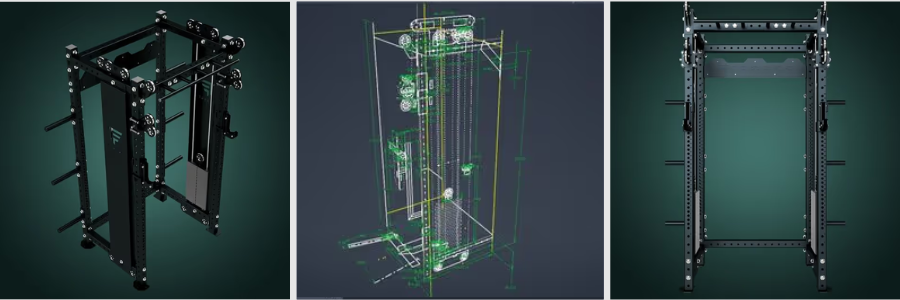
You can think of it as creating a blueprint of a product, but instead of drawing it as a static diagram on paper, CAD generates an interactive digital twin. It doesn’t completely eliminate the need for physical prototyping, because you still need a physical model for testing and evaluation, but virtual prototyping saves you a lot of headaches and prevents wasteful use of resources. The term “virtual prototyping” is pretty much self-explanatory. 3D CAD designers have all the tools you need to build a prototype as a digital visualization on a computer screen. The product exists first as a virtual object, so no matter what you do to the object, it only happens on a computer screen.
You can remove parts, add more components, change the shape, or modify it in any way without having a physical prototype made. And more than just an image, popular CAD software like Autodesk Inventor, SOLIDWORKS, and PTC Creo are loaded with options that allow you to test the virtual prototype with simulations. Even the open-source FreeCAD has robust simulation capabilities as well.
Among the most common (and useful) tools include FEA (Finite Element Analysis) services to simulate vibration, thermal response, and structural test; CFD (Computational Fluid Dynamics) for airflow analysis, fluid behavior, and thermal distribution; Mechanism Dynamics to analyze motion, interaction, and interference between components; and Behavioral Modeling that evaluates how a design reacts to an external factor like changes in temperature or pressure, to name a few. In general, virtual prototyping and simulation open the door to a detailed analysis of how a design, product, or system behaves under different use case scenarios.
Software like Altium and KiCad can do PCB simulation with such features as signal integrity analysis, error debugging, electromagnetic interference checking, and more. The only requirement is that your model, in this case the digital twin, has to be identical to the actual product. It can be rather problematic because you’ve only been building the prototype as a digital file, so there’s nothing physical to compare the model to. You don’t have clear points of reference, but that’s exactly what virtual prototyping is all about. Advanced 3D CAD software comes equipped with tools and options to help you build a virtual object, including a product design, from scratch.
You can experiment with various materials, form factors, colors, dimensions, PCB layout design, and every single specification imaginable. All without having a physical model in hand. It’s basically a CGI (computer-generated imagery) done under the constraints of actual physics. Being able to produce a prototype in a complete virtual environment is a major relief, both technically and financially. Since you don’t have to go through a lengthy process of trial-and-error with multiple physical models and consume a whole lot of development resources on them, the entire prototyping phase runs more efficiently at very low cost, objectively much lower than the alternative.
For example, running a simulation to see the thermal distribution of a product takes several hours. You have the data ready by the end of the simulation, as it is generated almost in an instant by the computer. The more powerful the computer, the faster it goes. The same analysis done on a physical model can take days to complete. On Day 1, you use the product extensively or expose it to a high temperature to see how it reacts to heat. You also need to know at what point the product begins to fail. On Day 2, you revisit everything to analyze the failure and compile evaluation reports. On Day 3, you may want to try to reproduce the first test just to see whether there’s any inaccuracy.
And at the end of the process, the tested models are damaged beyond repair, costing you hundreds of dollars, if not more. While simulation has a big impact on cutting down the prototyping cost, it’s not the only thing that matters in new product design services. Another major advantage of digital twins is improved collaboration. Because everybody works on a single model stored in the cloud, a cross-functional team can see all the changes made to the virtual prototype in real-time. Designers and engineers use the same model to make better, more educated, and informed decisions each time, based on the latest available data.
Digital twins and simulations are great and all, but they will never completely replace physical prototyping. You still need physical models to evaluate the product’s actual real-world performance in the hands of testers. For instance, the simulation might show that the product can withstand a drop from 10ft onto a pavement or submersion in water up to 15ft deep. Sometimes, you just have to see it happening in the real world to be 100% convinced.
Does this make the simulation less useful? No, because CAD and digital twins mainly function as a guide to help you build a product that’s at least as good as what the virtual model demonstrates. You put what you see on the screen to life, and hope that the result of the product delivers the expected performance, reliability, and durability. Only with physical prototype design engineering experts can you get a taste of that coveted hand-feel experience. Is it comfortable to hold, enjoyable to use, and practical to store? No amount of simulation can answer those questions. When the time comes to build a physical prototype, mind the following:
Be prepared to iterate. Just because you’ve done all the simulations, it doesn’t mean the next physical model is going to be exactly what it’s intended to be. Most of the time, the product still needs further refinement. Products that look good on screen aren’t always that good in real life.
Only build what you need. Have a clear plan for what you want to do with the prototype once it’s built. If the prototype is meant to be a “Beta” version, perhaps you don’t have to use the most expensive materials and the highest level of detail. Remember that CAD modeling, simulations, and physical prototyping don’t all have to happen in one go. They’re all part of an iterative process.
Use additive manufacturing. As mentioned earlier, 3D printing (and CNC machining, actually) are still the most affordable methods to build prototypes. You’re not making hundreds or thousands of units at this point. The cost per unit is more expensive compared to injection molding, but for a very low production volume, additive manufacturing is the way to go.
Also, build one prototype at a time. Do not build another prototype unless you’ve fully tested the current one. You need all the data from the tests to make sure that the next iteration addresses all the issues.
Additive manufacturing has been around for quite a while now, so there is no reason for design firms not to take advantage of it now in 2026. Some would say that 3D printing is basically an extension of CAD because the printable model must be created first on a computer. Together with virtual prototyping and simulations, they’re often regarded as the best things to have ever happened to product development at large.
How Cad Crowd can help
Having said that, all those great technologies are simply tools. And no matter how sophisticated the tools are, they make little to no difference to your NPD project if you put them in the wrong hands. You need professionals to create the printable model, build a 3D digital twin, and run the simulations so that you gain nothing but accurate, relevant, and usable data from the process. Cad Crowd is home to experienced CAD technicians, 3D printing specialists, and fabricators to help you build prototypes efficiently. Get a quote today!
MacKenzie Brown is the founder and CEO of Cad Crowd. With over 18 years of experience in launching and scaling platforms specializing in CAD services, product design, manufacturing, hardware, and software development, MacKenzie is a recognized authority in the engineering industry. Under his leadership, Cad Crowd serves esteemed clients like NASA, JPL, the U.S. Navy, and Fortune 500 companies, empowering innovators with access to high-quality design and engineering talent.