A routine security assessment found that cameras aboard Royal Navy Kraken unmanned surface vessels were sending “heartbeat” signals to an IP address in China. “A thorough investigation found no evidence of MoD data or systems being accessed, compromised or transmitted externally,” said a Ministry of Defense spokesperson. “Our assurance and testing processes are designed to identify and address potential vulnerabilities early, and we continue to undertake routine security activity across our systems and equipment.” The Register reports: According to reports, the talkative components were cameras sourced by Kraken from a third-party supplier. The incident raises questions about supply chains, audits, and cybersecurity in the British armed forces. The spokesperson said: “The first duty of government is national security, and we take the security of our equipment, networks, and data extremely seriously.”
A good real estate developer seeks to sell properties as quickly as possible, sometimes before they’re built. They would (and should) have a go at showing potential buyers an empty parcel of land and describing a gleaming story of future homes, offices, streetlights, retail centers, and all the rest of it to try and make an early sale. It’s been a pretty common practice everywhere, but then again, not every pitch ends with a deal. You can’t just expect clients to drop a hefty amount of money based on a mere “description” of what the property will look like in the future when it’s eventually built.
Some people excel at creating precise visualizations of real estate plans, while others lean more toward artistic touches. In times when you need both, look no further than Cad Crowd, an architectural freelancing platform loaded with the most talented and experienced CGI professionals from all around the world. It’s a massive online hub for real estate developers to collaborate only with the best 3D CAD modelers and render artists in the industry for projects big and small.
If you don’t always make a convincing sales pitch using a blueprint, imagine doing it with nothing but a story. While a blueprint is accurate and detailed, it’s also very technical, so the typical client won’t have the faintest idea about what it represents. Most of these typical clients aren’t the construction-savvy sort trained to read and understand architectural drawings. They’re also not mind-readers who effortlessly get a good grasp of abstract architectural ideas and concepts. These clients need brochures for a clear visualization rather than blueprints and shop drawings.
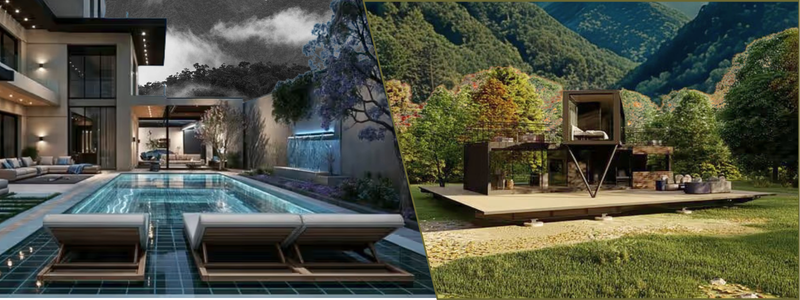
It is always difficult for a real estate developer to sell a house that hasn’t been constructed yet, but CGI (computer-generated imagery) can make the job a whole lot easier. CGI combines the art of digital modeling and 3D rendering to create a photorealistic depiction of what a house can be, including the exterior and interior, as well as the overall architectural style. And it’s not just a single house or a building. The imagery can cover an entire area, including roads, amenities, surrounding views, and the lot. You create demands by offering a glimpse of what they can have.
CGI transforms an otherwise empty plot of land into finished real estate, at least on paper. While the visualization is hypothetical, a real estate rendering (or any other architectural visualization for that matter) is supposed to be as accurate as possible. It must represent what’s technically feasible, sometimes with exaggerated elements here and there, without taking away much of the photorealism. An effective CGI needs a proper blend of technical skills and digital artistry. What you want is a balanced visualization that looks both professional and emotional. You’re trying to convince people to spend a fortune, and often you can’t do that by being entirely clinical.
Don’t take our words for it. Show the clients a complete blueprint layout and a hyper-realistic 3D rendering of the same house side by side, and see for yourself which image lights them up more. CGI has been the new standard in real estate marketing these days, thanks to the sheer number of refreshing advantages it offers developers and clients alike.
People buy a house so they have a place they can call their own. It’s going to be a shelter, a refuge, a home. But in many cases, they actually buy more than just the actual building with four walls and a roof. People also want a home in a safe, accommodating neighborhood. This is why the “neighborhood” is among the most important things buyers consider before making a purchase. How far away is the neighborhood from the main road? Is it close to their workplace or school? Is the house near a public park, coffee shop, beaches, a police station, a hospital, or other amenities? People don’t just buy a house; they decide where to live and how it affects their everyday lives.
A couple of photographs of the house’s facade and backyard simply won’t cut it. Your client wants to know if the house in question is conveniently located.
In the old days, the only way to create this overview was by using a physical scale model. Not only was it expensive, but also time-consuming. Now you can use 3D CAD modeling and high-resolution rendering to build (virtually, of course) a complete visualization that covers the entire area in crisp detail. It’s going to be like looking at Google Maps, but with 3D architectural overlays that mark the area’s boundaries, streets, landmarks, and just about every label you need in a single bird’s-eye perspective. This offers a clear spatial awareness of where the house is positioned in the area, allowing the (potential) buyers to picture themselves already having their day-to-day activities there.
Not every real estate listing has to be a brand-new building with all the latest fixtures and furniture already in place. Quite a lot of buyers are looking for older dwellings at bargain prices, so they can spend a good portion of their budget on renovations later. The problem is that many clients might not know exactly what they’re looking for or where to start with home improvement unless you make it crystal clear for them. And selling a fixer-upper, and actually making a profit from it, can be a real tough uphill battle.
Say you’re listing an outdated single-family detached home built in the 1960s. It remains structurally sound, but both the exterior and interior will need a major overhaul before it’s ready for occupancy. Your first big challenge is to convince clients to see past the house’s ugly aesthetics, because it looks hideous from every angle, but you know it has fixer-upper potential. So how do you elaborate on this potential without the client getting overwhelmed by thoughts of a chaotic renovation?
Well, you don’t. Renovation is for sure messy and often overwhelming. The best you can do is to visualize the finished product using a simple before-and-after comparison, which is where 3D rendering comes in. On the left, the image shows the house as it is today with its cracked walls, overgrown yard, broken windows, stained carpets, holes in the floors, leaky pipes, hanging wires, and the lot. You don’t even need 3D models for the images; some photographs will do. And on the right, you have a photorealistic visualization that shows what the house “could” look like after renovation. The walls have been repainted, the kitchen renewed, the bathrooms upgraded, the furniture replaced, and the broken things repaired.
It’s not like you have a choice, either. You have to use CGI rendering for this. The house is yet to be renovated, and everything you see in the visualization is, well, computer-generated based on the actual property. But depending on the scope of the renovation, the interior layout can also be modified, such as by removing or adding walls.
Now, be very clear with clients that you’re not selling the renovated house and that you use 3D rendering only to highlight its fixer-upper potential. Of course, the renovation doesn’t have to match what’s shown in the visualization. The main point is to use CGI to help the clients see more clearly the extent of possible transformation. It’s just a way to let them realize how big a makeover a proper renovation can give to the house. If a picture is indeed worth a thousand words, this is the right moment for that.
Bad weather no more
Real estate developers who rely solely on conventional photography for any listing are a dying breed. We won’t go so far as to say photos won’t work in today’s competitive market; it’s just that CGI design has become the mainstream choice for many good reasons. Chief among these is the fact that you’re no longer at the mercy of the weather. Imagine having to stage an exterior photoshoot, only for the day to suddenly turn overcast, or for the sun to be in the wrong position to catch those rays of light through the clouds for a dramatic shot.
Although post-processing might help, it can only do so much to minimize the effects of bad weather (and therefore poor natural lighting) in the final photograph. Sure, many photographers are skillful enough to get an excellent shot despite terrible weather, but what if you can just remove the weather from the equation entirely? Don’t you think your listings will look great no matter the weather or season? CGI is the answer. Not even the sky is the limit with CGI. Every single detail of the visualization, from the shortest strand of grass in the yard to the majestic view of the horizon in the backdrop, is created on a computer. And everything can be calibrated exactly to your liking. You determine where the sun is positioned in the sky, what season it is, how dark the shadows are, the camera angle and distance, everything.
It doesn’t really matter if the house in question is already built or still a mere concept; those CGI artists at Cad Crowd cater to your every need to make sure that the visualization is identical to the actual design. Thanks to their accurate modeling, meticulous lighting, and artistic touches in the visualization, real estate developers anywhere can produce a flawless listing every time. When it comes to architectural imagery, Cad Crowd knows a thing or two about making nature work perpetually in your favor.
Home staging on screen
Interior photographs are more easily done because you’re using artificial lighting for the most part. You don’t have to deal with the weather, the direction the sunlight comes from, rain, snow, clouds, and all that. Still, it doesn’t mean CGI offers no advantage to interior visualization. Quite the contrary, you get probably the biggest advantage of 3D rendering when you use it for the interior view of a real estate listing, more specifically, the staging process.
Physical home staging is among the most cumbersome, impractical, and expensive work in real estate listings. This is how it usually goes: you hire a staging company (which costs a fortune), watch them move absolute loads of equipment and furniture into the house, and finally “stage” the interior to give it a welcoming look. Even if the decorations and furniture (which are all rented from the staging company) are only there for a couple of days, as in a photoshoot, it’s still going to cost at least $1,000. Physical home staging is a money pit, and a massive one at that.
CGI eliminates the hassles and does it all on a computer screen. If the purpose of your “staging” is to make the house look “ready to buy” in a real estate listing, hiring a digital artist from Cad Crowd makes a whole lot more sense, in terms of both cost-efficiency and speed. A capable artist can create any object imaginable and make it as realistic as possible to complement the interior. Think of furniture pieces, kitchen utensils, appliances, light fixtures, sinks and faucets, bedding, carpets, and so forth. Each object has the right materials, colors, textures, and yes, shadows. If something doesn’t look right, you can have it removed or replaced right away. No need for physical objects and all that heavy lifting.
Endless customization
When both the exterior and the interior are CGI, you have complete freedom to frame every image however you (or the buyers) want. For instance, you’ve already made a listing of a house that features Scandinavian interior decoration, and it’s great from every angle. But as it turns out, an interested buyer prefers something a little bit more Farmhouse-style. You want the listing to look irresistible to the client, so what do you do? If this is physical staging, you might need to hire another company and go through the same headache yet again. With CGI, however, it’s just a matter of on-screen editing.
Granted, it’s going to be a little bit more complex than switching colors and swapping 3D assets to create the new image. But it’s not like recreating a new scene from an already finished rendering is an unusual task either. It’s a pretty typical job for professional 3D modelers and render artists at Cad Crowd, and you’d be surprised to see how they can come up with what appears to be a brand-new visualization out of an existing asset.
CGI can create any style you want. Whether it’s Scandinavian, Farmhouse, Japandi, Industrial, Midcentury, Americana, Minimalist, Maximalist, or anything else in between. Best of all, there’s no physical staging involved. You don’t even need a photographer. One talented CGI professional from Cad Crowd is all it takes to generate loads of images for the listing. The customization doesn’t stop at the interior staging. You can picture the exterior against the backdrop of a sunny summer day, a warm spring afternoon, the cold comfort of winter with snow, or even a moonlit starry sky.
Typical costs of CGI services for real estate listings
CGI Service
Estimated Cost (USD)
Best For
Exterior CGI rendering
$500–$2,000
Pre-construction marketing
Interior CGI rendering
$300–$1,500 per room
Virtual staging and interior visualization
Aerial community CGI rendering
$1,500–$5,000
Master-planned communities and developments
Virtual staging
$50–$300 per image
Vacant property listings
360° virtual tour
$2,000–$8,000
Interactive property presentations
CGI animation/flythrough
$3,000–$15,000+
Premium real estate marketing campaigns
Prioritizing clients’ preferences
Still on the subject of customization, CGI allows you to basically cater to even the most demanding clients, including those who never seem to find the right design for their taste. These clients prefer the “personalized” option only; a taste that no particular architectural design or interior style can satisfy. It just has to be a combination of many things, sometimes with custom-made elements.
They want the floor to have a specific wood pattern, the furniture to be neo-industrial, the bathroom to be rustic, the kitchen to be art deco, and basically whatever unusual mix they have in mind. With conventional staging and photography, it’s nightmarishly expensive to create a listing like this. And if the client ends up changing his mind along the way, you’re going to spend more money to keep up with their request. Again, CGI handles this totally plausible scenario like a champ.
If a potential buyer initiates contact for the original listing, a good portion of your work is already done. The images generate enough interest for the client to start talking, and it’s now a matter of keeping the conversation rolling. And there’s no better way to do that than keeping them engaged, of course, by giving them exactly what they want: your willingness to play along. If they want a specific style, no matter how unusual, photorealistic 3D rendering can bring it to life. It may take a few days or so to update the listing, but it is still quicker, cheaper, and easier than the alternative. This lets them know that they’re in control of the process and makes a smoother path to closing.
We tend to think that the very act of buying real estate, or a house, is nothing but a logical, analytical decision. Which makes perfect sense given that the average house price in the US is in the hundreds of thousands of dollars. The process of choosing which house to buy, on the other hand, is at least partially an emotional act. This is why people tend to take a closer look at listings that showcase actual living spaces rather than empty rooms.
Empty spaces are uninspiring because they appear lifeless in the image. CGI fixes this for you, and there are so many different ways to inject some personality into the house. Even if you’re in fact trying to sell a vacant home, it’s never a bad idea to have it fully furnished in the visualization for listing purposes. Hyper-realistic details can work wonders to give the impression of coziness, comfort, luxury, warmth, or fun. Think of showcasing a well-lit living room with some books on the plush armchair and a thick carpet underneath; imagine seeing a couple of half-empty wine glasses on a coffee table in front of the hearth; or a master bedroom with a big glass window to enjoy the view of a snowy afternoon.
Homebuyers will scroll past many properties in that online listing. You have a bigger chance of getting them to stop scrolling and take a closer look at your offer if the image sends the right emotional cues. A good listing triggers emotional responses from the buyers. A listing that somehow tells them how it feels to taste that wine by the fireplace or waking up in the bedroom just as the snow falls. You want a listing that takes buyers right into an imagined life, where they picture themselves as homeowners.
The thing is, not every real estate developer knows how to make the most of CAD modeling and 3D rendering, but that’s what Cad Crowd is for. Thanks to its ridiculously large database of CGI professionals, the freelancing platform can connect you with some of the most talented digital artists and architectural visualization experts from all around the world in no time. They’ll bring your ideas for interior staging and exterior shots to life with insane accuracy and give them just enough flair to hook every client coming your way.
Closing thoughts
CGI is no longer a gimmick in today’s real estate market. It’s not even an optional extra if you want the listing to stand out from the crowd. Every real estate developer needs to think and see a listing from the clients’ perspectives for a change. Try to think about what they want to see in a listing, which images attract them most, and how they will react to different visualization styles. We’re no longer living in the 90s, when photography was perhaps the best tool for building a real estate listing. CGI gives you a much more flexible way to do the same thing, and it will get you a much bigger competitive advantage if you play it right.
High-quality CGI property renderings can make a significant difference in attracting buyers and showcasing real estate developments before construction begins. Cad Crowd connects developers, architects, real estate professionals, and design firms with experienced architectural visualization specialists who create photorealistic 3D renderings tailored to your marketing goals. Whether you need exterior renderings, interior visualizations, virtual staging, aerial community views, or custom architectural presentations, our vetted experts can help you create compelling visuals that engage buyers and elevate your property listings. Contact Cad Crowd today for a free quote and let us connect you with the right CGI rendering professional for your next real estate project.
MacKenzie Brown is the founder and CEO of Cad Crowd. With over 18 years of experience in launching and scaling platforms specializing in CAD services, product design, manufacturing, hardware, and software development, MacKenzie is a recognized authority in the engineering industry. Under his leadership, Cad Crowd serves esteemed clients like NASA, JPL, the U.S. Navy, and Fortune 500 companies, empowering innovators with access to high-quality design and engineering talent.
It’s been close to three years since we saw the announcement teaser for Light No Fire, the next game from No Man’s Sky developer Hello Games. Studio founder Sean Murray spoke to PC Gamer last week in conjunction with No Man’s Sky’s 10th anniversary, and I naturally had to ask if we might see more of Light No Fire before the end of the year.
Turns out, we almost got to see more of Light No Fire a couple of years ago at Summer Game Fest 2024, but the circumstances surrounding that first brief teaser changed Murray’s mind.
“I did have a plan, and I thought, we’ll tease it with 90 seconds, and then we’ll show it again at [SGF], probably, and I had a much bigger thing that I wanted to show about the game to really explain what the game was,” Murray said. “Because I don’t think we necessarily have shown the vision or the ambition of the game, but I thought this will be a cool tease, and then we’ll show some more.”
Latest Videos FromPC Gamer
The reason we didn’t get more, somewhat ironically, is that everyone liked what they saw. Liked it a little too much, maybe.
“The reality is, it was incredibly popular,” Murray said. “We just shot up like the Steam wish list charts. There’s, like, 20 million views on that tease. We’re the number two game on the [Steam] wishlist.
“All of that, and given our past, made us feel like, okay, we don’t need to say anything more right now. And our attitude in general is to avoid saying anything to the press or outwardly unless we really, really need to, and sort of let the game do the talking.”
While he won’t show it to us yet, Murray told me he’d played Light No Fire earlier that day.
Keep up to date with the most important stories and the best deals, as picked by the PC Gamer team.
“What I’m looking at on screen is way, way beyond what any normal studio would have and not have shown more of it to the rest of the world,” he said. “We’re lucky from that point of view. We can kind of just keep [it] to ourselves, keep working on what we’re enjoying, and not have to spend our time marketing and hyping and showing the game to people.”
As for my original question, whether or not we might see some more of Light No Fire before the end of the year… well, the answer probably won’t surprise you.
“I’ve learned the very, very hard way to not talk about anything ahead of time,” Murray said. “And our attitude in general is to avoid saying anything to the press or outwardly unless we really, really need to.”
Ten tabs open, a saved password you can’t quite remember, and a video ad stalling the article you’re trying to read — a browser fills up with friction quickly if nothing is managing it. Installing a handful of Chrome extensions can handle most of that quietly, in the background, without turning your browser into a control panel. Before installing anything, it helps to know what each type of extension actually does, what permissions it needs, and where its usefulness stops. The six extensions below cover password management, writing, task capture, an ad blocker Chrome extension, screen recording, and tab control.
A Password Manager for Fewer Repeated Logins
Reusing the same password across multiple sites is one of the most common ways an account gets compromised. A password manager extension, such as Bitwarden, stores login details in an encrypted vault and fills them in automatically when you return to a site.
Most password managers also include a password generator, so creating a long, unique password for a new account takes a few seconds instead of guesswork. The free tier usually covers unlimited passwords on one device type, with paid plans adding features like secure file storage or family sharing.
The trade-off is trust: you’re storing sensitive data with a third party, so it’s worth checking how that data is encrypted and whether the company has published independent security audits before relying on it daily.
A Grammar and Writing Checker
Typos and awkward phrasing are easy to miss when you’re typing quickly in an email, a form, or a social media post. Grammarly is a widely used extension that checks spelling, grammar, and tone directly inside text fields across most websites, underlining issues as you type.
The free version covers basic corrections, while paid tiers add tone adjustments and more detailed rewriting suggestions. Because the extension reads text as it’s typed, it needs broad permissions to work on most pages, which is worth keeping in mind if you write anything sensitive or confidential in a browser.
A Task Capture Tool for Quick To-Dos
An idea or a task that comes up mid-browsing session is easy to forget by the time you close the tab. Todoist’s extension adds a quick-capture button that saves a task, along with the page link, without switching apps.
Tasks sync across devices, so a note added from a laptop shows up on a phone later the same day. Installing this kind of Chrome extension works best as a temporary inbox rather than a full project tracker — it’s meant to catch a thought quickly, with the more detailed organizing happening later inside the main app.
An Ad Blocker for Cleaner Pages
Banners, pop-ups, and autoplay video ads slow down pages and make reading or browsing more tiring than it needs to be. Ad blockers are available in two different forms, and which one applies depends on whether you’re on a computer or a phone.
How Desktop Extensions Work
On a computer, an ad blocker usually installs the same way as any other extension, then runs automatically inside that browser without further setup. It scans the pages you visit and filters out banners, pop-ups, and some autoplay video ads before they load fully.
Stands is one example, working as a browser extension for supported desktop browsers. On sites with heavy video advertising, a Youtube ad blocker extension can reduce some banner and pre-roll ads on the page, though results vary by site and change as platforms update how ads are delivered.
What Android Ad-Blocking Browsers Cover
On Android, the more common setup is a separate browser built with ad blocking already active, rather than a standard browser plus an add-on. Stands AdBlocker Browser works this way, filtering ads on websites opened directly inside it, similar to how a desktop extension filters ads inside a browser tab.
This is different from a system-wide blocker. It doesn’t remove ads from the YouTube app, from other native apps, or from mobile games — its effect is limited to websites opened inside that specific browser, not the entire phone.
A Screen Recorder for Quick Explanations
Explaining a bug, a design change, or a step-by-step process is often faster on video than in a long written message. Loom is a Chrome extension that records your screen, webcam, or both, then generates a shareable link once you stop recording.
It’s built specifically for Chrome and Chromium-based browsers, so it won’t run the same way inside Safari or Firefox. The free plan covers basic recording and sharing, with paid tiers adding longer recording limits and editing tools. For quick tutorials or async updates with a remote team, it usually replaces a scheduled call.
A Tab Manager for Browser Clutter
Dozens of open tabs make a browser slower and harder to navigate, even on a fast computer. OneTab converts every open tab into a single saved list with one click, closing the tabs and freeing up the memory they were using.
Tabs can be restored individually or all at once, so nothing is lost, just tucked out of the way. It’s a narrow tool by design: it doesn’t organize tabs into projects or sync them across devices the way some heavier tab-management extensions do, which makes it a good fit for a quick daily cleanup rather than long-term project organization.
Choosing the Right Extensions for Your Browser
None of these Chrome extensions need to be installed together, and none of them work identically for every site or every browser. A password manager and a writing checker help with day-to-day accuracy, a task capture tool and a tab manager keep browsing sessions organized, and an ad blocker such as Stands reduces some of the visual clutter on pages you visit often.
Before adding any extension, it’s worth checking what permissions it requests and whether it’s actively maintained, since browsers update frequently and unmaintained extensions can stop working or become a security risk. Starting with one or two, based on the friction you actually notice most, is a more practical approach than installing all six Chrome extensions at once.
Google reportedly replaced automatic code updates for Pixel hardware with a manual Google Forms request system.
Developers report waiting weeks for Google Drive links instead of receiving instant code downloads.
The upcoming GrapheneOS-powered Motorola phones are built specifically to avoid this exact problem.
Unlike some of the best Android phones on the market, Google Pixels have traditionally given developers a clean, transparent canvas to inspect software, test early builds, and run alternative operating systems like GrapheneOS. However, a quiet shift in how Google handles Pixel source code is reportedly threatening that open reputation, and it could soon impact anyone using custom software on their phone.
According to GrapheneOS on X, Google has apparently replaced public, instant code downloads for Pixel phone drivers with a manual request form. Instead of publishing code directly to open developer platforms where anyone can grab it, Google now requires developers to fill out a Google Form and wait for someone to send them a Google Drive link.
What used to take a couple of hours is now taking weeks.
What actually changed?
Custom software relies on two distinct components: custom ROMs (alternative operating systems like GrapheneOS) and the low-level kernel (the code that bridges your phone’s hardware to its software).
Google is legally required under open-source licenses like GPLv2 to share the low-level kernel code. Previously, it posted kernel code as automatic updates to a public developer platform. Now, GrapheneOS says Google requires developers to manually request Pixel kernel code through a Google Form and wait weeks for a Google Drive link, all while squashing the update history into a single, hard-to-read file.
Because custom ROMs cannot function reliably without a working kernel, this change creates a major double bottleneck. Kernel developers lose visibility without a step-by-step update history to trace bug fixes. Meanwhile, custom ROM projects face multi-week delays waiting for kernel files, grinding their security patches and new Android ports to a halt.
An operating system like GrapheneOS cannot release new Android updates or security patches for Pixels until it receives the kernel source code and tests the kernel. Waiting weeks for a Drive link brings their entire pipeline to a crawl.
How does this affect you as a Pixel owner?
If you use your Pixel out of the box with standard Android, you won’t notice a difference today. Your regular software updates and security patches will still arrive directly from Google as usual. However, if you buy Pixels specifically to run custom, privacy-centric operating systems like GrapheneOS, this change hits home:
Slower security updates for custom software: Alternative operating systems rely on early code drops to test and port new Android updates ahead of time. Multi-week delays mean your custom ROM could lag far behind standard Pixel updates.
Less transparency: Without a clear view of code history, independent security researchers have a harder time auditing what Google is changing under the hood.
Pixels are becoming less developer-friendly, while competing brands are stepping up: GrapheneOS noted that its upcoming hardware partnership with Motorola won’t suffer from these delays because they deal directly with the hardware maker.
The GrapheneOS team clarified that this doesn’t touch Android as a whole, and it won’t touch Motorola’s upcoming GrapheneOS phones either. It’s aimed squarely at Pixel. In fact, the team claims Motorola’s long-term partnership with GrapheneOS, which ends GrapheneOS’ years-long Pixel exclusivity, exists in large part because Google made building alternative Android versions for Pixel so difficult. Motorola will host its own code going forward, sidestepping Google’s approval process entirely.
Just a few years ago, Google used to go above and beyond, releasing not only the GPL-mandated kernel source code but also the full kernel commit history. In fact, Google used to go two steps beyond by also releasing device trees and driver binaries, which it was under no obligation to release at all.
The company’s reason for doing so was that the Pixel was treated as a reference platform for AOSP, so developers needed an easy way to build for it. With the release of Android 16, Google shifted the AOSP reference target from Pixel to a virtual device called “cuttlefish” and subsequently stopped supplying Pixel device trees and driver binaries. And now, as GrapheneOS highlights, Google is also making it very difficult to access the kernel source code for Pixels.
In that sense, the Pixel is no longer better than any other Android phone. The only developer-focused reason to buy a Pixel now is that they remain easy to unlock the bootloader on, and their factory images are easily available.
We’ve reached out to Google to ask why this manual process was introduced and whether they plan to speed up turnaround times for developers. We will update this story as soon as we hear back.
Thank you for being part of our community. Read our Comment Policy before posting.
But, by the sounds of things, showrunner Chris Mundy had the leeway to take Lanterns wherever he wanted to go, despite the wider universe being at play.
“We weren’t tasked with having any specific landing point, which was great for us because it gave us freedom to land the story where we wanted to land the story,” Mundy told SFX magazine. “But John will be part of the greater DC Universe. That was good for us to know. And where we land him is somewhere that they’re happy with us landing him and somewhere they can take him, if they want.”
Latest Videos FromGamesRadar+
So far, Lanterns looks more like a gritty detective drama than a superhero show, with the buddy cop dynamic between Stewart and Kyle Chandler’s Hal Jordan at its heart.
Man of Tomorrow, meanwhile, will see Superman forced to team up with Lex Luthor to take on Brainiac.
Along with Pierre and Chandler, the Lanterns cast also features Laura Linney, Nathan Fillion as Guy Gardner, and Ulrich Thomsen as Sinestro.
“Our show is in a lot of ways about replacement – when should someone step aside and when is it time for the next person to take the reins?” Mundy said back in 2025. “That push and pull between those two characters is really important. So much of the power that John has is by not taking the bait, understanding that you lose your power if you’re yelling and screaming.”
Bringing all the latest movie news, features, and reviews to your inbox
Lanterns arrives on August 16. In the meantime, keep up to date with everything else the DCU has in store with our guide to all the upcoming DC movies and TV shows.
Programming with Claude Code will soon require even less human oversight, as Anthropic says it’s making auto mode the default for Pro, Max, and Team accounts, starting on August 14.
The company first unveiled a test version of auto mode in March, pitching it as a way to balance speed and control. As Anthropic explained in its announcement on Friday, when Claude Code is in auto mode, instead of presenting prompts asking for human approval at each step, it will proceed unless an action is determined to be “irreversible, destructive, or aimed outside your environment.”
Anthropic also said that in testing, auto mode proved safer than manual review — in a study with 1,053 paid testers, auto mode caught 89% of harmful actions, while human review only caught 13.6%. (Perhaps that’s because “manual review can become habitual: users approve 97% of permission prompts in Claude Code.”)
In a post on X, Claude Code Head Boris Cherny said, “The team and I use Auto mode exclusively, and have been for many months. I couldn’t imagine going back to permission prompts!”
The company also said it’s been adding new safety features like prompt injection screening and customizable hard deny rules to prevent things like data exfiltration.
Situational Awareness may have had to sell off the majority of its public portfolio last month, but the AI-focused hedge fund is still making some big bets.
This week, the fund invested $400 million into Source Foundry, a startup founded by Stanford researchers aiming to make chip manufacturing faster and cheaper, according to The Wall Street Journal. That brings its total investment in Source Foundry to $500 million.
Situational Awareness was founded by Leopold Aschenbrenner, a former OpenAI researcher in his mid-twenties who had no trading experience when he launched the fund in 2024. Early returns were reportedly strong, but the fund faced steep losses in recent months amidst the decline in AI infrastructure stocks.
At the end of July, Situational Awareness sold off the majority of its public portfolio to Ken Griffin’s Citadel, although the fund held on to its Anthropic shares. Its assets under management reportedly fell from $20 billion to $10 billion.
You are a Living Spark surviving inside fragile wooden vessels that splinter, collapse, and catch fire. When your vessel breaks, the Spark escapes. Death is just a change of scenery. Approximately Up
Ride a cursed elevator into shifting underground ruins with your crew. Smash furniture for resources or feed them into the Grinder for gold. If everyone breaks, your loot is lost.Trolling can become your friend’s demise. Dropkick enemies or “accidentally” launch your ally’s Spark out of their vessel. Block them in a monster-infested corridor or get stuck in the crossfire. Will your group handle the chaos you created yourselves?The deeper you go, the worse the Rot becomes. Bodies warp. Voices distort. Emotes become…worse. Or possibly better? The Deep Layers are filled with Corrupted vessels, reacting to sound, movement, and each other in ways that are impossible to predict. Fight. Build. Run. Panic.
When your vessel breaks, you stay in the run as a Spark. Guide your team through the dark and search for another host with a new set of abilities. Force your way back in before you fade out completely.Everything you haul back rebuilds your Outpost. Unlock interactive furniture, stat upgrades, rescued survivors, and stranger ways to survive the next descent. The stronger the outpost becomes, the deeper you can afford to go. Go deeper. Extract more. Leave someone behind. Make it back and build together. Or don’t come back at all.
FEATURES
Possess and swap between fragile wooden vessels
Co-op extraction horror with physics-driven chaos
Tactical carpentry with interactive furniture
Procedurally shifting underground dungeons
Persistent Outpost rebuilding and progression
Rage-bait your friends with cursed emotes
Rescue survivors trapped in the Deep Layers
Body corruption and mutation systems
Questionable cosmetics
Screenshots
SystemRequirements
Minimum
OS: Windows 10 64Bit
Processor: Inter Core i5-4590 / AMD Ryzen 5 2600
Memory: 8 GB RAM
Graphics: NVIDIA GTX 970 / AMD Radeon R9 390
DirectX: Version 11
Network: Broadband Internet connection
Storage: 10 GB available space
Support the game developers by purchasing the game on Steam
InstallationGuide
TurnOff Your Antivirus Before Installing Any Game
1 :: Download Game 2 :: Extract Game 3 :: Launch The Game 4 :: Have Fun 🙂