From a technical standpoint, the answer depends on whether we’re talking about “mining directly on a phone” or “participating in mining via a phone.”
It is not a practical approach to have an Android phone perform the computational work required for Bitcoin mining on its own. The Bitcoin network uses a proof-of-work mechanism, and professional miners typically use specialized ASIC mining rigs to provide massive amounts of computing power. The processing power, power consumption, and heat dissipation capabilities of ordinary smartphones cannot compare to those of professional mining rigs.
However, this does not mean that Android phone users cannot participate in Bitcoin mining-related services.
With the development of cloud computing power models, users can access relevant platforms via their phones, select computing power plans, and monitor performance and returns, while the actual computing work is handled by specialized infrastructure.
This is precisely the area ASDeFi is focusing on.
Why Aren’t Android Phones Suitable for Direct Bitcoin Mining?
When many people first learn about Bitcoin mining, they think of running mining software on their phone’s CPU or GPU.
In theory, smartphones can perform certain computational tasks, but Bitcoin mining has reached a highly specialized stage.
Professional ASIC miners are specifically optimized for the SHA-256 algorithm and can provide computational power far exceeding that of ordinary smartphones. Therefore, mining BTC directly using smartphone hardware is not an efficient way to participate.
Cloud Mining Has Changed the Way People Participate
The concept behind cloud mining is entirely different. Users don’t need to turn their phones into actual Bitcoin mining rigs; instead, they purchase pre-deployed computing power through a platform.
Simply put: mining rigs handle the computing, data centers handle the operations, and smartphones handle management and monitoring.
This is also one of the biggest differences between cloud mining and traditional personal mining.
Users do not need to set up professional ASIC mining rigs at home, nor do they need to deal with issues such as noise, heat dissipation, power supply, and equipment maintenance on their own.
Using their smartphones, users can manage their accounts, check the operational status of their hashrate, and monitor changes in their earnings.
ASDeFi: Access AI Cloud Computing Power via Your Mobile Phone
ASDeFi positions itself as a platform for AI cloud computing power and cryptocurrency assets.
The model offered by the platform is primarily aimed at users who wish to earn returns on crypto assets through cloud computing power.
Compared to traditional individual mining, its key feature is the separation of specialized hardware, computing power operations, and user-side operations.
Users do not need to purchase ASIC miners themselves, nor do they need to set up complex mining equipment in their homes or offices. They can complete all relevant operations via their mobile phones and select computing power contracts based on their budget.
For Android phone users, this means:
The phone is not a machine used to mine Bitcoin, but rather a tool for users to manage their cryptocurrency assets and computing power services.
How to Mine Bitcoin on an Android Phone?
If you’d like to learn more about ASDeFi cloud mining, you can start by following these steps:
Enter your email and password to create an account. You’ll receive $15 upon registration, plus a daily $0.60 bonus for logging in.
Step 2: Deposit Cryptocurrency Assets
Go to the platform’s deposit page to deposit major cryptocurrencies such as BTC, XRP, USDT, ETH, LTC, USDC, and BCH.
Step 3: Select a Contract
Choose an asset yield contract based on your capital size, investment period, and budget.
Examples of available contracts:
Check-in Contract: $15 — 1-day cycle — Total profit: approximately $15.60
Starter Contract: $100 — 2-day cycle — Total profit: approximately $108.00
Basic Contract: $1,500 — 10-day cycle — Total profit: approximately $1,717.50
Stable Contract: $6,000 — 20-day cycle — Total profit approximately $8,040
Stable Contract: $30,000 — 30-day cycle — Total profit approximately $47,100
(For more contract details, please visit the official website)
Step 4: Monitor Your Returns
Use the platform to track hashrate performance and yield settlements, and adjust your asset allocation based on market changes.
From “Buying a Mining Rig” to “Managing Hashrate with a Smartphone”
The Bitcoin mining industry has become highly specialized. Rather than spending a large amount of money on equipment and shouldering electricity and maintenance costs, it’s better to first learn about this new model: cloud mining.
“No hardware required” eliminates the barriers posed by equipment and infrastructure. What’s truly worth paying attention to isn’t “how many BTC a smartphone can mine each day,” but rather:
Is it possible to steadily accumulate Bitcoin through a more convenient mobile platform, while fully understanding the risks and rules?
ASDeFi’s AI-powered cloud computing model offers users interested in this approach an opportunity to learn more.
For more details on cloud mining, visit: https://asdefi.com
Every comic book reboot has its poster child. And no one in their right mind would argue that Scott Snyder and Nick Dragotta‘s current run of Absolute Batman isn’t the most popular series in DC Comics’ down-and-out Absolute Universe. Like anything Batman, it has the lion’s share of variant covers, reprints, and a revamped rogues’ gallery that only gets wilder with every new issue. Hell, it even has an animated series in the works.
While Absolute Batman is the clear favorite, Absolute Martian Manhunter is the people’s princess. And rightfully so. Not only does it have a premise as intriguing as the Caped Crusader’s run, but its art direction feels positively out of this world.
Of all of the comics in DC’s Absolute Universe, Absolute Martian Manhunter, written by Deniz Camp and illustrated by Javier Rodriguez, reads like an acid trip. The story opens with John Jones, a federal agent rushing back to work way too soon after surviving an explosion at a coffee shop. Life starts looking really weird after Jones’ near-death experience. He starts seeing the repressed, impulsive, and intrusive thoughts of everyone around him. Jones is seeing a lot of “bad vibes” in the cultural melting pot of Middleton, Colorado.
These thoughts manifest as colorful plumes of smoke emanating from people’s heads like incense trails, which Rodriguez routinely outdoes with dazzling, lava-lamp-esque page layouts and color splashes. Turns out, Jones’ mind has been invaded by the aptly named Martian Mind****er, a green alien squatting in his mind palace and trying its damnedest to integrate with the way we speak. As Jones’ new partner in crime, the Martian Mind****er warns him of the danger coming from beyond the stars, threatening to upend his rocky marriage and humanity as we know it in one fell swoop.
What makes Absolute Martian Manhunter an easy recommendation for comic book fans is its levity. It’s not one of those long-running series where you have to double back to another issue in another series to grasp who anyone is or what’s going on. It tells a relatively self-contained story within 13 issues. If anything, the series acts as the perfect launching point for folks curious to see what the Absolute Universe’s stripped-bare version of the Justice League has to offer. Camp and Rodriguez’s slice of the Absolute Universe is a clandestine, psychedelic neo-noir tale with its finger on the pulse of social, political, and interpersonal dread.
Like Absolute Batman‘s unabashed look at today’s political strife, with all the subtlety of breaking a Nazi’s arm in a gnarly double spread, Absolute Martian Manhunter‘s particular bag of capital-T themes zero in on real‑world anxieties about borders, belonging, and state power. What the comic critiques about our own living hell, which only gets worse when the series’ big bad has denizens of Middleton running around, acting on their worst impulses like it’s The Purge, is rivaled by the pure visual synesthesia of Rodriguez’ trippy page layouts.
If I had to single out my favorite part of Absolute Martian Manhunter, it’s how interactive the entire run is. Every issue—usually right at the end—includes a “Martianvision” page. It’s the most Captain Underpants flip-o-rama gimmick I’ve ever seen in a mainstream comic, and honestly, that’s part of its magic trick. By holding a Martianvision page up to a light source, a double-exposure overlay of the corresponding page appears, creating a neat aberration effect to cap off an issue. It’s the same accidental discovery every comic reader has made at least once on a particularly sunny day, but here it’s deliberately designed to make readers ooh and ahh. It wowed me every time. And that nostalgic, tactile interactivity gets even wilder as Absolute Martian Manhunter nears its cataclysmic conclusion.
Common warning signs that your PC has malware include sudden slowdowns, frequent crashes, unexpected pop-ups, browser redirects, unfamiliar programs, disabled security tools, and unusual account activity. If you suspect malware, stop entering passwords or financial information, disconnect the PC from the internet when appropriate, run a trusted security scan, and seek professional malware removal if the problem persists.
At PC Geeks, we help Frisco-area computer users diagnose security problems and get their PCs running safely again. Malware can be difficult to identify because many symptoms resemble ordinary computer problems, such as aging hardware, software conflicts, or an overloaded operating system. Our approach focuses on finding the actual cause instead of assuming every slow computer has a virus. For families, professionals, remote workers, and small businesses in Frisco, protecting personal files and sensitive information is especially important. PC Geeks provides knowledgeable, customer-focused computer support designed to remove threats, address the damage they may have caused, and help reduce the risk of another infection.
PC Virus and Malware Symptoms You Should Not Ignore
Malware does not always announce itself with a dramatic warning. Some malicious software is specifically designed to operate quietly in the background, while other infections cause obvious performance and browser problems.
The Federal Trade Commission (FTC) lists slow performance, unexpected errors or crashes, excessive pop-ups, unwanted webpages, changed homepages, and new icons or toolbars among potential warning signs of malware.
What Are the Most Common Signs of Malware on a PC?
A sudden change in how your computer behaves is one of the strongest reasons to investigate for malware, particularly when you cannot connect the change to a Windows update, new application, or hardware issue.
Watch for symptoms such as:
Your PC suddenly becomes very slow. Malware can consume processing power, memory, network bandwidth, and other system resources.
Pop-ups appear frequently. Unexpected advertisements or security alerts, especially outside your normal browsing activity, deserve attention.
Your browser redirects you. You may click one website but end up somewhere completely different.
Your homepage or search engine changes without permission.
Programs appear that you do not remember installing.
Your PC freezes, crashes, or displays unusual errors.
Windows will not shut down or restart normally.
Security software becomes disabled or behaves strangely.
New browser extensions, icons, or toolbars suddenly appear.
One symptom alone does not prove that your computer is infected. A PC can slow down because of insufficient storage, failing hardware, too many startup applications, or software corruption. Several unexplained symptoms appearing together make a malware infection more concerning.
Can Malware Steal Passwords or Personal Information?
Yes. Some types of malware are designed to capture login credentials, financial information, and other sensitive data. Malware can potentially monitor activity, steal credentials, or give an attacker unauthorized access to a device.
That is why a suspected infection should be treated as more than a performance problem. The FTC recommends that people who suspect malware stop activities requiring passwords or personal information, including online banking and shopping, until the computer has been cleaned.
Cybercrime also continues to carry significant financial consequences. According to the FBI’s 2025 Internet Crime Report, IC3 received more than one million complaints involving suspected internet crime, with reported losses exceeding $20 billion.
For Frisco residents, computer security is particularly relevant because technology is deeply integrated into everyday life. U.S. Census Bureau data for 2020 through 2024 shows that 99 percent of Frisco households had a computer and 97.7 percent had a broadband internet subscription.
What Should I Do Immediately If I Think My PC Has Malware?
Stop using the affected PC for sensitive activities first. Continuing to log into email, banking, shopping, or work accounts could expose additional information if credential-stealing malware is present.
A practical response includes:
Stop entering passwords and financial information. Avoid banking, shopping, and signing into important accounts from the suspected computer.
Disconnect from the internet if you believe an attacker may have access. This can interrupt an active connection between the PC and a malicious party.
Run a scan using reputable, updated security software. Avoid downloading unfamiliar “PC cleaner” or antivirus programs advertised through alarming pop-ups.
Change important passwords from a clean device. Prioritize email, banking, financial, shopping, and work accounts. Enable multifactor authentication where available.
Get professional help if symptoms continue. Persistent malware can require deeper diagnosis and cleanup.
A current threat worth knowing about involves fake CAPTCHA prompts. In June 2026, the FTC warned about malicious CAPTCHA-style pages that tell users to press Windows + R, paste a command, and press Enter. Those instructions can actually cause the user to install malware. The FTC specifically warns that legitimate CAPTCHAs do not ask users to run commands on their computers.
Are Virus Warning Pop-Ups on My Computer Real?
A pop-up claiming your PC is infected is not reliable proof that you have malware. Fake virus warnings are commonly used in tech support scams to frighten people into calling a phone number, purchasing unnecessary software, or granting a stranger remote access.
The FTC warns that tech support scammers use bogus security warnings that may imitate familiar companies. Their objective can be to obtain money, financial information, or remote access to the victim’s computer.
If a webpage suddenly announces that your PC has “37 viruses” and demands an immediate phone call, do not call the number or click the warning. Close the browser when possible and have the computer checked through a trusted security tool or computer repair professional.
Why Professional Malware Removal Can Be Worth It
Professional diagnosis is useful when you cannot determine whether the problem is malware or another PC issue, or when an infection keeps returning after basic scans.
Removing a visible malicious program does not necessarily address every change an infection made. Depending on the threat, a technician may need to check startup processes, browsers, installed applications, system settings, security software, and Windows itself.
Professional assistance is especially worth considering when:
Malware returns after a security scan.
Antivirus or Windows security features will not work.
You cannot access important files.
Your browser remains hijacked after attempted cleanup.
The PC contains sensitive business, financial, or personal information.
You granted remote access to someone after receiving a suspicious warning.
You are unsure whether the computer is safe enough to use again.
PC Geeks can help Frisco customers determine what is actually happening with their computers and choose an appropriate path forward. The goal is not simply to make a warning disappear. It is to restore a PC to a trustworthy, usable condition while protecting important data whenever possible.
Frequently Asked Questions About PC Malware
Does a slow computer always mean it has a virus?
No. Malware can slow down a computer, but low storage space, too many startup programs, outdated software, overheating, or hardware problems can cause similar symptoms. A proper diagnosis can distinguish malware from other PC performance problems.
Can Windows Defender remove malware?
Microsoft’s built-in Windows security tools can detect and remove many threats when they are enabled and up to date. Persistent infections, disabled security tools, repeated detections, or continuing symptoms may require additional troubleshooting or professional malware removal.
Should I change my passwords after a malware infection?
Yes, particularly for important accounts that you accessed while the PC may have been infected. The FTC recommends changing important passwords after the computer is cleaned, and its recent malware guidance also recommends enabling two-factor authentication.
Should I call the phone number in a virus pop-up?
No. Do not trust an unsolicited pop-up telling you to call a number for technical support. The FTC warns that fake virus alerts are commonly used in tech support scams to obtain money, information, or access to your computer.
Ready to Make Sure Your PC Is Safe?
Malware symptoms are worth investigating quickly, especially if your PC suddenly behaves differently or you use it for banking, work, shopping, or other sensitive activities. The sooner a potential infection is identified, the sooner you can take steps to protect your files and accounts.
Think your PC may have malware? Let PC Geeks help diagnose the problem, remove security threats, and get your computer safely back in your hands. Contact PC Geeks today for professional PC malware help in Frisco, TX.
An implementation of 3D visualization technology, an interactive render is a real-time application (based on WebGL, Unreal Engine, Unity, and the like) that enables users to not only see lifelike digital visualization of an object but also modify it with just a few clicks of a button. At the back end of an interactive render platform, usually a webpage, there are all sorts of complex technologies linked to a collection of 2D and 3D assets inside a database. But for a typical user sitting at the front end, it looks like a simple website page with lots of options to customize an object. And one of the most common uses of this interactive render is, you’ve probably guessed it already, 3D product configurators seen on e-commerce sites.
A product configurator allows buyers to personalize or modify (to an extent) a product by selecting different parts or components, dimensions, colors, shapes, textures, patterns, materials, and so forth. Think of it as a bridge between the sophistication of photorealistic renderings and the everyday online shopping experience. In a B2B environment, it’s also often used by companies to tinker with product designs before manufacturing. The ability to visualize and customize an object in an interactive manner on a webpage is expected to streamline the product selection process without the lengthy back-and-forth of the sales cycle.
Cad Crowd connects companies with experienced 3D design artists, CAD designers, visualization specialists, and software developers who can create photorealistic product configurators tailored to specific business needs. From high-quality 3D assets to interactive rendering and e-commerce integration, our experts help businesses deliver engaging customization experiences that support higher conversions and stronger customer confidence.
It’s all about personalization. Instead of forcing buyers to choose a product variant from an assortment of pre-configured designs, a configurator offers greater freedom to build an entirely custom version. Sometimes, a company gives an option to add personalized texts or illustrations to make the product a true one of a kind. Mind you that in most B2C configurators, the customizations are limited to superficial details (like colors and graphic arts). They rarely, if ever, go into the more technical aspects of a product like materials or shapes. The only thing you’re allowed to customize is the appearance of parts or components; once you’re pleased with the customization and place an order, the seller will then assemble them to build the product you want.
There’s always an exception to the norm, however. Take, for example, a 3D product configurator designer for a car. Say the stock version of the car you want comes with vinyl seat covers, but you’d like to have leather upholstery. Perhaps you want a larger wheel diameter, a high-end audio system, carbon-ceramic brakes, and a spoiler too. Such options go beyond aesthetics and lean heavily towards the actual features, and in this case, product performance.
A configurator used in the context of product development is likely much more comprehensive. It has all the usual customization options seen on the B2C alternative, added with a few technical aspects such as manufacturing feasibility and time. It might even automatically generate a BOM (bill of materials), production cost per unit, suppliers’ details, and assembly information. It’s almost like virtual prototyping, or digital twins, where you create a 3D model identical to the manufactured product.
The most important elements of a product configurator (apart from the rendering application, such as WebGL, which is integrated with web standards including various e-commerce platforms) are, of course, the 3D assets. Details and photorealism matter. You can build a fully functional product configurator with low-resolution 3D assets, but it won’t be as pleasant to use. The idea behind a configurator is to display an accurate representation of the product as a rendered 3D model design services. It’s supposed to be a WYSIWYG (What You See Is What You Get) approach to product customization, which means everything the buyers see must be as identical to the actual product as possible. In short, a 3D product configurator has to display lifelike renderings of the product.
There’s an argument to be made about lower-resolution 3D assets allowing the webpage (and the rendering) to load faster, but that hasn’t been relevant for years. Content optimization has taken care of the issue really well; even low-end hardware can handle a 3D product configurator glitch-free. The 3D file format plays a huge role. Industry-standard formats like FBX, OBJ, GLB, and USDZ are the most widely used because they’re indeed built to maintain a good balance between performance and visual quality across different platforms (various web browsers on mobile and desktop devices).
The other crucial element is the product configuration logic itself. In this case, logic refers to a set of rules that govern what parts or components are customizable and how they interact with each other in the configurator. Proper logic is important to prevent users from customizing a product with incompatible components or choosing unavailable design options. These rules make sure the configurator can only offer accurate customization options with no errors.
All the 3D assets and the logic that control them are integrated into the e-commerce platforms (like Shopify, Magento, and WooCommerce, to name a few) for synchronization purposes. They’re linked to a database that points to inventory, pricing, product options, order data, and other information to ensure operational efficiency and a seamless transactional process.
Configurator features
Consistency is key. Like everything based on a web that’s constantly updated, a 3D product configurator needs a good back-end foundation to maintain consistency across every function and feature. It makes little sense to build a configurator that only intermittently works. Your customers expect to enhance their online shopping experience with a configurator, not get frustrated by something that’s supposed to help them to begin with.
The thing is, a 3D product configurator isn’t exactly easy to build and configure. It’s not one of those small-sized browser extensions you can just install and forget. Quite the contrary, it involves a lot of work to prepare and requires at least some reasonable engineering resources. Just the basic prerequisites alone, namely the 3D assets, are already pretty complex stuff.
Say your product is a retractable ballpoint pen. It’s nothing too fancy, but you give the option for buyers to mix and match parts to build their own variant. A ballpoint pen is simple enough, but still it’s made up of a number of parts including a pocket clip, barrel, removable barrel tip, ink chamber and ballpoint tip, plunger, rubber grip, and perhaps some purely decorative objects on the body.
Every single part comes in a variety of colors to let buyers explore different styles and aesthetics. Some of the more expensive variants have stainless steel barrels and pocket clips. As an option, the retractable pen can be made as either a click or a twist pen. And to make it easier for buyers to build a custom pen, you plan to use a 3D product configurator on your online store. This means you need to have all the parts 3D modeled and all their variations rendered.
Aren’t 3D modeling and rendering easy? Well, it entirely depends on skill level and understanding of interactive rendering. For professionals, creating 3D visualizations services and setting up a product configurator for a retractable pen should be pretty manageable, to say the least. For anybody else, perhaps not so much.
While we can’t speak for all digital artists out there, we can assure you that the professionals at Cad Crowd are the insightful bunch who know exactly what they’re doing when it comes to 3D renderings and product configurators. Cad Crowd has been a major freelancing hub where clients, from small businesses to established brands, collaborate with some of the most talented 3D modelers and render artists from all around the world. When you hire from Cad Crowd, you can expect to have your 3D product configurator loaded with “at least” the following key features:
Real-time rendering: starting with the obvious one, a 3D product configurator can’t afford to have real-time rendering capabilities. In fact, the hallmark of a configurator is near-instant visualization. As buyers adjust their selection of colors, patterns, graphic arts, materials, or parts, they should be able to see the final product immediately, without lag or (worse) page reload. What’s the point of providing a 3D product configurator if it only makes the shopping experience terrible? A slow and unresponsive configurator can in fact get in the way of the buyers’ selection process, leading to cart abandonment.
360-degree visualization: well, it isn’t really 3D without a 360-degree visualization design firms, is it? Buyers need to inspect the product they choose from every angle. They want to zoom in and out, and rotate the model without losing details. The transition should be smooth, and every side is displayed in high resolution to guarantee an immersive experience. In general, a 360-degree visualization allows buyers to understand their selection better and make an informed decision.
User-friendly interface: your product configurator might be sophisticated, the 3D assets crisp and detailed, and 360-rotation buttery-smooth, but they can only do so much to improve the shopping experience if buyers can’t seem to get a good grasp on how to use it. While a product configurator is arguably a complex tool (with all the technical elements running in the background), it doesn’t mean you can’t build a straightforward user interface in the foreground. You want the customers to enjoy a pleasant experience choosing and customizing a product to their personal preferences. And you can make that happen by providing an intuitive product configurator. Give the interface clear navigation, responsive buttons, zero loading time, and organized customization options wrapped in a comfortable layout. Keep the options plenty, but minimize the effort to access them.
Save and share functions: part of user-interface features, the ability to save an already customized product configuration is quite a big deal, especially for buyers who like to take their time making a selection. The next time they make another visit, they can just pick up where they left off instead of starting from scratch. A “share” option is also a popular function, allowing buyers to collaborate with friends and families on social websites.
Cross-platform compatibility: everybody is buying things online from their smartphones, right? Wrong. Many of them are “only” using phones to do their shopping indeed, but there are still a lot of people who prefer their computers and laptops, partly because of the bigger screen. The good thing is that you don’t have to choose which group you should favor more. You’re allowed to cater to both in one fell swoop, so long as the 3D product configurator is compatible with various screen sizes and platforms. The digital artists at Cad Crowd have been building responsive designs for years; they definitely know a thing or two about cross-platform compatibility and have the technical know-how to optimize a 3D product configurator for modern devices. Whether the buyers access your e-commerce site via mobile devices or computers, the configurator delivers a consistent experience.
Dynamic pricing: for the vast majority of buyers everywhere, price remains one of the most important considerations when purchasing any product. People expect to get the most out of what they spend, and are willing to go the extra mile to find a good balance between value and money. A lot of buyers start with either the most or the least expensive configurations, and work their way from there. When using a 3D product configurator, they should be able to see how any particular customization affects the price. Suppose a stock configuration of a retractable twist ballpoint pen costs $5. When a buyer replaces the stock plastic barrel with a brushed aluminum one, the price increases to $10 a piece. The price information has to update instantly with every customization for the best user experience.
Another important feature that the user will never see but is crucial for the seller is easy maintenance. It has everything to do with databases, API access, rule-based logic, and more jargon, but you might not want to deal with that technical stuff. What you need is an intuitive control panel where you can manage everything through an easy-to-use interface, maybe even with a simple drag-and-drop mode. It’s no coincidence that Cad Crowd has just the right people to handle not only the 3D rendering services, but also to build a user-friendly dashboard everybody can understand and master in no time.
Estimated cost of 3D product configurator development
Service
Typical Cost (USD)
Description
3D product modeling
$300–$2,000 per product
Creates accurate, optimized 3D models for use in interactive product configurators.
Photorealistic product rendering
$200–$1,000 per image
Produces high-quality product visuals for configurators, catalogs, and marketing materials.
Interactive 3D product configurator development
$3,000–$20,000+
Develops browser-based configurators with real-time product customization and visualization features.
WebGL or Three.js development
$2,000–$15,000
Builds real-time interactive 3D experiences using WebGL, Three.js, or similar web technologies.
Unity or unreal engine configurator
$5,000–$30,000+
Creates advanced interactive configurators with high-end graphics, animations, and immersive experiences.
E-commerce platform integration
$1,000–$8,000
Integrates configurators with Shopify, WooCommerce, Magento, pricing systems, inventory, and checkout workflows.
Enables customers to rotate, zoom, and inspect products from every angle in real time.
Augmented reality (AR) product visualization
$3,000–$15,000
Adds augmented reality features that allow customers to preview products in real-world environments.
Ongoing maintenance and updates
$100–$1,000 per month
Provides software updates, new product variants, bug fixes, performance improvements, and technical support.
Interactive renders in businesses
More than just a stunning visual on e-commerce sites, an interactive render in the form of a product configurator does offer a true practical benefit of increasing buyer engagement and boosting sales. An interactive online shopping experience through easy product customization turns out to be an effective tool to convert visitors into paying customers. 3D product configurators are famously used by the following industries.
Let’s start with probably the most common of them all: the home furnishing industry. Everybody likes and wants to have custom furniture design services. The thing is, a true bespoke carpentry isn’t cheap. That being said, there’s still room for buyers to have a taste of that tailor-made furniture without breaking the bank. A fine case in point: the IKEA Product Planner. Even when the (assembled) product is actually made up of mass-manufactured parts and components, at least some degree of customization can go a long way to liven up the room and personalize the atmosphere.
We’re pleased to report that the IKEA Product Planner has just about every feature buyers need from a 3D product configurator. It comes with an intuitive user interface, dynamic pricing, and save and share options. Take the desk configurator, for example; it has three component categories, including desktop, left support, and right support, with each category offering a multitude of styles, colors, and materials.
Every single change in a component gets displayed on the main product image with instant real-time rendering and updates the price information. The same thing applies to other products such as dining chairs, storage, and even entire rooms. IKEA isn’t the only home furnishing company using a product configurator. Herman Miller also famously offers an even more comprehensive version of it with AR capability to boot.
Major carmakers like BMW, Porsche, Mercedes-Benz, and Tesla, among others, have their own versions of product configurators with varying qualities and rendering speed. People seem to believe that the automotive industry is among the big leagues of 3D product configurators. It might be true in terms of scale, visual quality, and the range of options provided, but they rarely give buyers a smooth customizing experience.
Try any of them once on a computer, and don’t be surprised if you get the sense that the configurator isn’t likely optimized for all devices. If it’s slow on a computer, chances are it’s even worse on a smartphone. A likely reason is that people aren’t exactly into buying new cars online, meaning carmakers have no real incentives to make the online buying experience better. People want to see, touch, and experience the expensive thing they’re about to buy in person.
Be that as it may, the configurators allow people to at least “test build” a particular model they like. It gives them the opportunity to check the available colors, wheel sizes, interior trims, audio setup, and accessories (spoilers, roof rack, fuel caps, etc.) before visiting the dealership. Does it boost sales then? Not directly, but it certainly gives potential buyers, who aren’t typically inclined to visit dealerships to see the latest models, some sort of an open invitation to browse the cars from the comfort of their couch at home.
Personalization runs deep in the apparel and footwear industry. Your shoes and jackets are parts of your personal expression, but sometimes the off-the-shelf options don’t quite cut it. A trench coat probably has the right color, but you don’t like shoulder straps; it comes with a really nice high-quality waist belt, but the buttons are in the wrong shape; everything is perfect, but the hood seems too much; you get the idea. Wouldn’t it be nice if you could customize every part of clothing and make it exactly as you like? It definitely would, although we’re not quite there yet.
Most configurators in the apparel industry offer very few customization options, perhaps colors and graphic arts, and that’s about it. They’re simple, making it quick and easy to fulfill on the sellers’ part. The problem with complex clothing, such as a trench coat, is that it has a lot of different parts sewn together. If the seller allows the buyers to customize everything, it can take days, if not weeks, to produce the right style. And in the world of the apparel industry, anything slower than a near-instant checkout is too long.
For the footwear industry, however, 3D product configurators thrive. Just take a look at the “Nike By You” customization program. Pick any shoe or jersey from the listing, and you can personalize it to your liking. Again, the customization options for jerseys are pretty basic, as in you can add a name and a number. The options for shoes, on the other hand, are plentiful. Just about every part of the shoe is customizable from the base color/material, the overlay, the backtab, the lining, the cupsole stitch, the lace, and of course the swoosh itself. Depending on the model, you even get to add custom labels. Changes appear in an instant, and you can zoom in and rotate the 3D visualization at any point. Everything feels snappy, smooth, and pleasant to use. Nike By You sets the benchmark for 3D product configurators in the footwear industry. Few alternatives exist, such as Converse By You, Vans Custom Shoes, DiVERGE, and Shoe Zero. All work in more or less the same way.
Consumer electronic firms in general lack 3D product configurators. Even big companies like Apple and Samsung don’t offer a lot of flexible customization options for their products, except probably for the smartwatch lineup where you can play mix-and-match with the finishes and straps’ colors and materials. Some may argue that computers or laptops are customizable, but in reality it’s more like buying either the stock model or the upgraded one.
The gaming gear sector tells a better story, although not by much. For example, Microsoft has its Xbox Design Lab that actually looks like a proper 3D product configurator rather than those smartwatch buying options. It allows buyers to customize the “aesthetics” of the Xbox controller, including the body, grip, the trigger buttons, d-pad, thumbsticks, etc. You can’t use your own graphic arts, but at least it has a reasonable collection of illustrations to choose from. Popular alternatives include ColorWare and Custom Controllerzz, which also cater to PlayStation controllers, too.
Jewelry industry
There are jewelry companies that use 3D product configurators to help clients customize rings, necklaces, and maybe diamonds, but we’re especially focusing on the wristwatches category this time. Companies like Bamford and Undone are at the forefront of prioritizing wristwatch personalization, before you even make the purchase. As expected, you get to customize most (not all) parts like the dial, hands, straps, caseback, and so forth. Although they don’t allow you to choose the movement (the mechanism inside the watch), the personalization should be good enough for most buyers.
According to the Configurator Database, there were at least 1400 identifiable interactive renders used in e-commerce sites as of 2020. They’re used by some of the biggest companies in various industries from 38 different countries. The United States and Germany dominated the list with over 1,000 product configurators combined. Sounds like a big number, but it’s a mere fraction in the bigger scheme of things of e-commerce. At the same time, the data (trend) shows that a 3D product configurator is not a mere gimmick. It’s an increasingly popular tool to put more creative power into the buyers’ hands, giving them greater control over product design and ensuring memorable online shopping experiences.
And for sellers, a product configurator can only offer a competitive advantage, so long as it’s well-built and loaded with high-quality 3D visualizations. Cad Crowd has been around for more than 15 years, providing a wide range of 3D visualization services for companies of all sizes, from startups and small businesses to established brands. We have experienced professionals to help you build a robust 3D product configurator with photorealistic rendering services, responsive features, an intuitive user interface in the front end, and an easy-to-use management dashboard on the back end.
How Cad Crowd can help
Whether you’re launching a custom furniture configurator, an automotive product selector, or an interactive e-commerce experience, Cad Crowd provides access to vetted professionals with expertise in 3D modeling, CGI, CAD design, and interactive visualization. Our global network helps businesses build responsive product configurators with realistic renderings, intuitive user interfaces, and seamless integration, making it easier for customers to personalize products and purchase with confidence. Contact Cad Crowd today for a free quote and take the next step toward a successful product launch.
MacKenzie Brown is the founder and CEO of Cad Crowd. With over 18 years of experience in launching and scaling platforms specializing in CAD services, product design, manufacturing, hardware, and software development, MacKenzie is a recognized authority in the engineering industry. Under his leadership, Cad Crowd serves esteemed clients like NASA, JPL, the U.S. Navy, and Fortune 500 companies, empowering innovators with access to high-quality design and engineering talent.
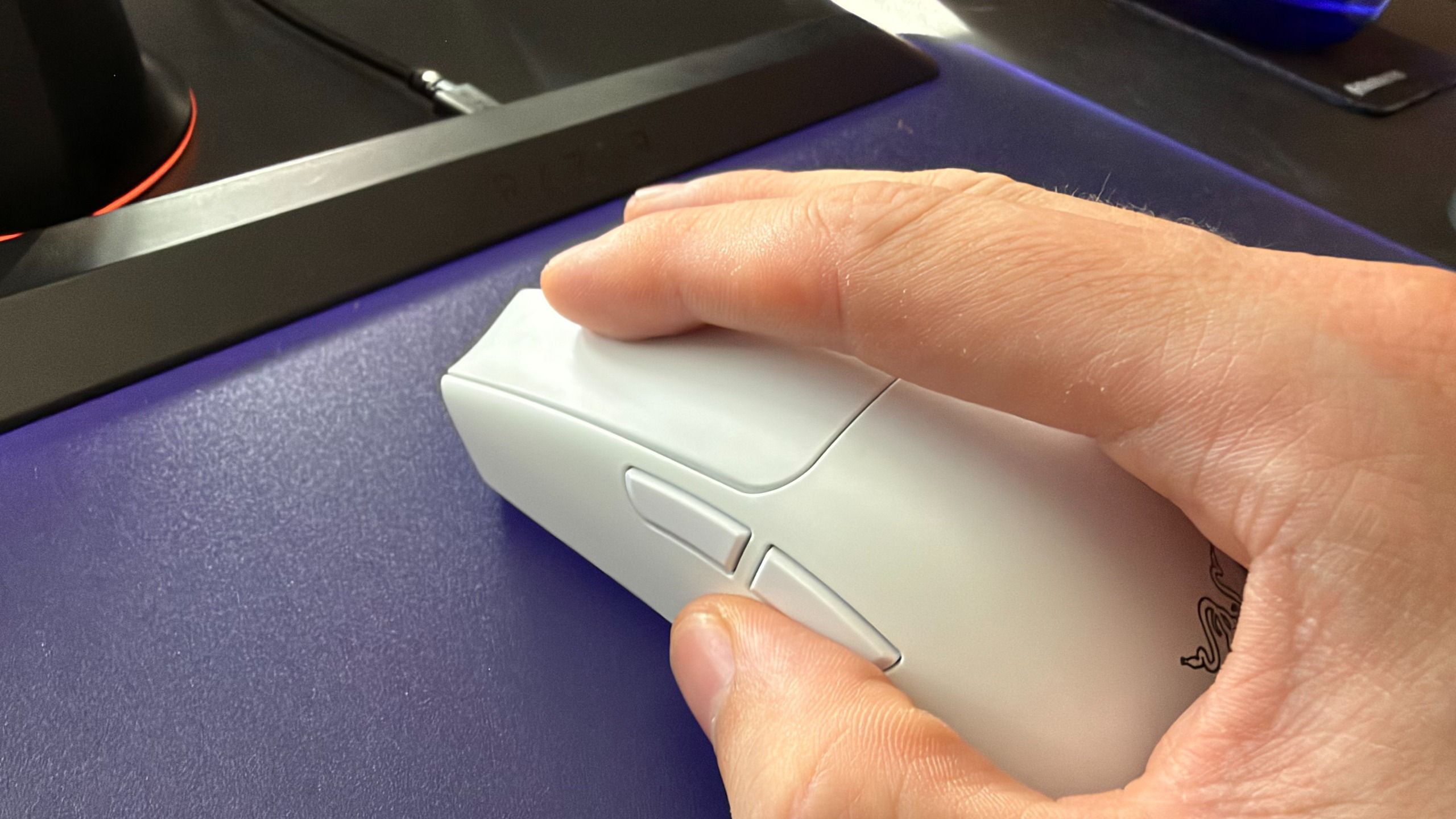
The PC Gamer hardware team got into a disagreement last week. We were sat around in the office chatting about Razer’s new MMO gaming mouse and how we wouldn’t know what to do with all its buttons (it has 12). That got us onto the topic of what we do with the two side buttons more commonly found across gaming mice.
Turns out, the team I’ve worked with for years, who I thought I could trust, who I’ve shared a laugh with, who I thought were my friends, are complete and utter fools. As are most of you—soz.
They reckon the best use of the two side buttons are forwards and back, ie. for browsing the web. That tends to be the default assignment for gaming mice out of the box, which goes to show the lack of ingenuity on their part.
Latest Videos FromPC Gamer
We asked you lot what you thought about this very important question in the form of a poll. It read:
“Jacob wants to know if there are people like him, so do you have your mouse side button set to forward/back or copy/paste?”
The results are pretty surprising. Not for the overwhelming majority of you that use these buttons for forward and back (1,343), but the near two hundred kindred spirits—fellow travellers—that are with me on the whole copy and paste thing.
Do you have your mouse side button set to forward/back or copy/paste?
Turns out that so so so many of you are just wrong
Votes (%)
Votes (%) Data
Product
Value
CTRL+C / CTRL+V
10
Forward/Back
67
Something else entirely
23
Hear me out: it makes it easy to copy from one place to another without ever reaching for your keyboard. I’d actually argue that’s more ergonomic. Not in a medical or legal sense, but a moral one. Whereas you can already go forward and back on a browser with just your mouse. Why are you in such a rush between webpages anyways? What are you hiding?
Over 400 of you responded with ‘something else entirely’, which I’d chalk up to various game- or genre-specific macros. I’m with you on that. I map these buttons to ‘C’ and ‘V’ while I’m playing an FPS—I haven’t completely lost the plot.
Anyways, is now a good time to say I also rest my middle on the scroll wheel at all times and use my ring finger for right click? Ah, probably not.
For our current week-long poll, we want to know about something far less contentious: How much RGB festoons your gaming PC?
If you’re looking to buy a charger in India, you can’t go wrong with Stuffcool. The brand regularly churns out reliable products, and with the Omni Pro, it’s making its debut with Qi 2.2 charging tech. The Omni Pro is now available for ₹4,999, and that is in line with other Qi 2.2 power banks I used from the likes of Baseus, Anker, and other global brands.
But the Omni Pro isn’t just a standard Qi 2.2 power bank. It also has a swivel arm that swings out, and you can easily charge your Apple Watch on it. This is a brilliant idea, and you don’t have to take any other devices if you’re heading out with an iPhone and Apple Watch. Oh, and there’s also a kickstand, giving you the freedom to plonk your phone on the Omni Pro and use it while charging.
The design is elegant too; Stuffcool went with a silver finish that looks good, and build quality is great — I didn’t see any issues in the month I used the power bank. It isn’t much bigger than other 10,000mAh power banks, and at 214g, you can slot it into a bag without any issues. There’s a tiny panel on the left that shows battery level, and while you don’t get charging metrics like the Nexode Pro, it is an easy way of seeing how much charge is left on the power bank.
Latest Videos FromAndroid Central
Qi 2.2 charging tech is interesting because it delivers 25W, and I use it constantly with my iPhone 17 Pro and Pixel 11 Pro XL. I’m switching to the iPhone 18 Pro Max this week, and it’s great to be able to reliably charge these devices without having to connect a cable. The versatility of being able to do so with the Apple Watch is just the icing on the cake.
There’s a USB-C cable as well that goes up to 35W, so if you need a faster charge, this is the way to go. The internal battery also charges at 35W, and you get a USB-C cable bundled in the box.
The Omni Pro has a 10,000mAh battery, and it can easily charge the Pixel 11 Pro XL or iPhone 18 Pro Max once over. Standard energy conversion means you don’t actually get up to 10,000mAh of usable power — it’s around 5,500mAh or so. This is the case with all power banks, and the Omni Pro did a good job delivering consistent power in the month I used it.
There aren’t many reliable Qi 2.2 power banks in India, and the Omni Pro is one of the best available in the country. It looks good, does a good job charging devices over the Qi 2.2 standard, and is easy to take anywhere.
Get the latest news from Android Central, your trusted companion in the world of Android
Eight Sleep, a sleep tech company, launched the Pod 6 bed-cooling system on Wednesday with meaningful hardware changes, including a hub that’s half the size of its predecessor, new solo-size configurations and a $1,999 starting price for the solo sizes — the lowest the company has offered. The entry price for standard sizes will be $2,699.
“We redesigned the hub, so it is 50% shorter than Pod 5, while increasing thermal power. That requires a more efficient approach to the system’s internal architecture, thermal management, fluid movement and overall packaging,” Matteo Franceschetti, CEO and co-founder of Eight Sleep, told CNET. The smaller hub can slide under most standard bed frames.
For the first time since the Pod launched in 2019, customers can choose solo-size options like twin XL and half sizes for queen, king and California king. Until now, the Pod has been built for couples with standard mattress sizes.
“For six generations, the Pod’s dual-zone design has been extremely valuable for couples, because each person can independently control their temperature and receive their own sleep data. But there are many people who want that same experience for just one side of the bed, or in a bedroom with a twin XL or split-mattress configuration,” Franceschetti said.
The Pod 6 has 80% more sensors per side and AI-powered tracking for more accurate sleep insights. The redesigned hub delivers 40% to 50% more thermal power for faster temperature response.
Eight Sleep
Franceschetti said that the main advantage of having more sensors is improved precision and consistent tracking across different sleep positions. “People move throughout the night, and a higher density of sensors gives the system more opportunities to maintain a reliable signal, whether someone is on their back, side or shifting position.”
With these updates, the Pod 6 aims to make advanced sleep technology more accessible and versatile for individual sleepers and couples alike.
Nasha Addarich Martínez
Managing Editor
Nasha is the Head of Editorial Initiatives for CNET. She leads the development and execution of proprietary data-based franchises like Labs Exclusives and People’s Picks. She is an active writer and contributor to CNET’s health and wellness, personal care and beauty tech verticals. Throughout her career, she’s covered various topics including financial services, technology, travel and wellness.
See full bio
Simon Ordell is called back to the island of St. Amelia to ‘put things right’, encountering a town lying quiet beneath a heavy fog, seemingly abandoned but not at rest. Anthro Heat Free Download (v1.9.0) Venturing deeper, and driven to understand his connection to the place and its inhabitants, Simon begins to discover fragments of a past rising to the surface.
Experienced entirely in first person, Simon must explore, evade, and survive using a limited set of weapons and tools, including the CRTV, a pocket television used to tune into unstable signals. Evasion is tense; combat is frenetic, while narrative driven puzzles reveal a truth that refuses to stay submerged. SILENT HILL: Townfall is a full-length, self-contained psychological horror set against the cold, isolated backdrop of Scotland, 1996.
Explore St. Amelia in 1996 Fog-soaked streets, abandoned communities, and forgotten corners tell their story through atmosphere and history. Reality and delusion subtly intertwine to lure players into the depths of the grounded, tangible world of St. Amelia.
A Brand-new, Memorable SILENT HILL SILENT HILL: Townfall exudes the beautiful and foggy streets of Scotland, offering a new setting to tell a unique and haunting story. More than just a horror game, this is a tale of introspection, loss, and consequence. Fear grows from small details, quiet moments, and the long shadow of Simon’s past.
Strategic Stealth and Combat Swing and block with melee weapons in freneticmelee combat, or keep your distance and use firearms to survive. Choose how to engage in each encounter, using both the tools at your disposal and the environment around you. Beyond fighting or fleeing, carefully sneak past danger through stealth, tracking enemy positions from cover or luring them away with distractions.
Screenshots
SystemRequirements
Minimum Requires a 64-bit processor and operating system
OS: Windows 11 x64
Processor: AMD Ryzen 5 3600 / Intel i7-8700K
Memory: 16 GB RAM
Graphics: NVIDIA GeForce RTX 2060 Super / AMD Radeon RX 6600
DirectX: Version 12
Storage: 75 GB available space
Sound Card: Windows Compatible Audio Device
Support the game developers by purchasing the game on Steam
InstallationGuide
TurnOff Your Antivirus Before Installing Any Game
1 :: Download Game 2 :: Extract Game 3 :: Launch The Game 4 :: Have Fun 🙂
GTA 6 is just two months away, and Rockstar is spinning up the marketing machine in a big way. The studio’s proposition for a big money takeover of Miami, the real-life inspiration for the fictional Vice City, recently passed muster with local officials despite protests from some police members in the area. Now, fans are looking on as a $1 million billboard gets the marketing stunts underway.
A massive “welcome to Vice City” sign has been going up on the Kaseya Center, home of the Miami Heat basketball team, throughout the day. Social media has been awash in images and videos as pieces of the sign slowly get airlifted on top of the building. It’s tough to tell if the sign is complete – it’s currently facing straight up, so it’s either built for air-view marketing or it’s eventually going to be stood up and be seen from the ground – but it’s already quite a spectacle.
Eager GTA fans have already been crowding around live city cam footage watching the sign go up all day, and it’s big enough to make quite an impression even from a distance.
Latest Videos FromGamesRadar+
🔴 Port Miami Cruise Ship Terminals | Biscayne Bay Weather | Downtown Miami Skyline | Vice City – YouTube
The Miami Herald reports that Miami-Dade county will collect $975,000 from this sign alone. The county is hosting the most “elaborate” displays for GTA 6, but other parts of the larger metropolitan area – including Miami Beach and the city of Miami itself – also have deals with Rockstar.