In a text message sent to customers today, AT&T acknowledged that some iPhone 18 Pro Max devices on its network are experiencing cellular issues.
AT&T said that customers should immediately update to iOS 27.0.1, despite the fact that many affected users have said that the update does not resolve the issues. There are now at least thousands of users that have experienced this problem, according to discussion topics across the Apple Support Community, Reddit, and MacRumors Forums.
Here is what the text message says:
Hi, it’s AT&T. Action needed: An important Apple software update for your iPhone 18 Pro Max is available. Some phones may be unable to complete calls/text/data, including to 911. Update to iOS 27.0.1 immediately — Settings > General > Software Update. Please contact AT&T or Apple if you have questions.
Apple’s release notes for iOS 27.0.1 did not mention a fix for AT&T cellular issues. Rather, the update fixed a Face ID issue on the iPhone 18 Pro models.
As we reported last week, affected iPhone 18 Pro Max users are unable to connect to the AT&T network for phone calls, text messages, or data either persistently or intermittently, and their devices typically enter SOS mode as a result. The underlying cause has not been confirmed, and Apple has yet to publicly comment on the matter.
Notably, the U.S. version of the iPhone 18 Pro Max is the only new iPhone unveiled last month that is equipped with a Qualcomm cellular modem. The smaller iPhone 18 Pro and the iPhone Duo are equipped with Apple’s C2 modem worldwide, as is the iPhone 18 Pro Max in all other countries. However, it is unclear if this is a contributing factor.
If a software issue is identified, then another update such as iOS 27.0.2 may be required. If there is a hardware issue, though, then this would obviously be a much bigger problem. We will provide further updates as new information becomes available.
(P.S. There is some irony in AT&T sending a text message to warn iPhone 18 Pro Max users that they might not be able to send or receive text messages.)
AV over IP Summit 2026: Exploring NDI, Dante, IPMX and SMPTE ST 2110
As video production continues to move from traditional SDI and HDMI connections to network-based workflows, understanding AV over IP technologies is becoming increasingly important for live production, broadcast, and professional AV.
As part of NDI November 2026, the AV over IP Summit brings together three live webinars exploring the technologies, infrastructure, and workflows shaping the future of networked video production.
Join us November 3–5, 2026, at 3 PM EST for three sessions covering NDI, Dante, Dante AV, IPMX, SMPTE ST 2110, H.265/HEVC, network design, and the transition from SDI to IP-based production workflows.
The AV over IP Summit is a three-day virtual event focused on the evolution of networked AV and video production. The sessions are designed to explore how technologies such as NDI, Dante, Dante AV, IPMX, and SMPTE ST 2110 are being used to build more flexible and scalable production environments.
The summit will also examine the practical considerations involved in moving from traditional point-to-point video connections toward IP-based workflows, including network infrastructure, interoperability, timing and synchronization, device discovery, control, and remote production.
November 3: From Pro AV to Live Production: Building Flexible, Reliable IP Workflows
The first session explores how IP technologies can connect professional AV and live production workflows.
Topics include:
NDI for network-based video production
Dante audio and Dante AV
H.265/HEVC video compression
Network design considerations
Building efficient and reliable IP production workflows
The session focuses on the practical technology and infrastructure considerations involved in creating a networked production environment.
IP-based production can change how video, audio, and control signals move throughout a production environment. Instead of relying entirely on dedicated point-to-point connections, networked workflows can provide new ways to route, distribute, manage, and extend production signals.
Technologies including NDI, Dante AV, IPMX, and SMPTE ST 2110 address different requirements across professional AV, live production, and broadcast environments.
Understanding the differences between these technologies—and how they fit into a larger network infrastructure—is an important part of planning a modern IP production workflow.
Register for AV over IP Summit 2026
Join us November 3–5 at 3 PM EST for the AV over IP Summit as part of NDI November 2026.
Explore the technologies behind modern networked video production and learn more about building flexible, reliable IP workflows.
Register now for AV over IP Summit and join us for three live webinars, plus more content throughout NDI November
Google Play is bundling its biggest sales, rewards, and promotions into a weeklong event.
Google Play Fest runs from October 13 to October 19, combining the store’s biggest discounts, point boosts, and contests into a single event.
Huge discounts across apps, games, books, devices, and select digital gift cards will be live throughout the week.
Google Play is bringing all its biggest sales and rewards in one big event, called Play Fest, that will run for a whole week. The tech giant calls this inaugural event the most rewarding week of the year, and it runs from October 13 to October 19.
Google Play Points launched all the way back in 2018 as a way to reward users for buying apps, games, movies, and books. Over time, it grew into a full-fledged loyalty program where regular spending is converted into store credit and digital perks.
The Play Fest Sweepstakes is the biggest draw here. Beginning October 13, Play Points members will be able to redeem their points for a chance to win thousands of prizes, including exclusive merchandise, premium tech gear, and tickets to major sporting events around the world.
Latest Videos FromAndroid Central
Gamers are also given something new to chase. Google is adding Play Fest leagues to Angry Birds 2, 8 Ball Pool, and Free Fire. You can register and compete on global leaderboards for a chance to win prizes.
There’s also a broad sale covering apps, games, books, and devices from October 13 through October 19. Select digital gift card brands will get exclusive promotions as well, although those offers are available only while supplies last.
Google is also increasing the pace at which users can earn Play Points. Members can earn points faster with daily purchase boosts, and book buyers get a 15x multiplier on books from October 16 through October 18. Starting October 8, Play Pass members will earn double points and 6x boosts.
If you have an app wishlist or points you’re saving, hold off until the event kicks off to get the most bang for your buck.
Get the latest news from Android Central, your trusted companion in the world of Android
Micron and Samsung executives this week said the memory shortage will continue for at least the next couple of years.
Micron CEO Sanjay Mehrotra expects demand for the firm’s memory to exceed its available supply over that period, he told investors last night.
Micron no longer sells consumer RAM, and Mehrotra’s statements refer to Micron’s business-to-business sales of high-bandwidth memory (HBM) for AI and DRAM for servers. However, his comments also have implications for consumer devices. Manufacturing capacity is prioritizing memory for AI and servers, limiting the supply of memory manufactured for consumer devices.
“Overall, supply-demand environment is only getting tighter,” Mehrotra said, per a transcript from Seeking Alpha.
Micron plans to open new clean rooms for memory manufacturing in 2028, but Mehrotra expects supply to remain limited.
“Even after they are built, even after first wafer output, production ramps up only gradually in the clean rooms,” he said. “That’s just the nature of what it takes to bring up production, and with HBM going from 3E to a greater mix of 4 and 4E, and with the trade ratio that exists, that … creates headwinds with respect to supply growth. Node transitions of the future give less productivity gain per wafer as well.”
Seventy-five percent of Micron’s memory output for 2027 is already accounted for, and most of the company’s current memory sales discussions are about 2028, the CEO said. Additionally, demand for HBM is surpassing demand for Micron’s DRAM.
The land of Glimmerwick is well known for its universityof magic – and as luck would have it, you’re already enrolled! In this woodland fantasy world playing music is the secret to casting spells. Ancient songs make garden work a breeze, and they’re also key to exploring every corner of the island. With your trusty flute and songbook at your side you’ll attend classes and join after school clubs, make friends with classmates and townsfolk, and uncover Glimmerwick’s many oddities and mysteries – all while enjoying a year of seasons, festivals, curses, and witchy hijinks in this peaceful, story-drivenRPG. DYNASTY WARRIORS 3: Complete Edition Remastered
Features:
RPG Style Quests Unfolding narrative quests with a focus on unique characters and story.
Tend the University Garden Plant the mundane! Grow the arcane! Summon up clouds to bring forth the rain!
Every Song a Spell Use the power of music to speak with the trees, enchant tools to work all by themselves, raise the earth to surmount natural impasses, and more!
A Lively World Classes to attend, mysterious rumors, local drama, and bustling festivals — The students, staff, townsfolk, and spritely creatures of Glimmerwick have rich stories and lives.
Fully Voiced Dialogue is brought to life with fantastic performances for every character major and minor.
Character Progression As you gain experience in your adventures, choose from skills which will help you garden, trade, or acquire special abilities, like speaking to frogs!
Screenshots
SystemRequirements
Minimum Requires a 64-bit processor and operating system
OS *: Windows 7 64bit
Processor: Dual-core processor (Intel Dual Core 2.0 GHz or AMD Athlon X2 5200+ 2.6 GHz)
Memory: 6 GB RAM
Graphics: Geforce 9600 GS, Radeon HD4000, Shader Model 3.0, 512 MB
DirectX: Version 9.0c
Storage: 5 GB available space
Support the game developers by purchasing the game on Steam
InstallationGuide
TurnOff Your Antivirus Before Installing Any Game
1 :: Download Game 2 :: Extract Game 3 :: Launch The Game 4 :: Have Fun 🙂
Spooky season is streaming in. Alongside falling leaves, pumpkin spice and everything nice, 25 new games are joining GeForce NOW throughout October, including six ready to play this week.
From a new CONTROL Resonant reward for Performance and Ultimate members to The Witcher 3: Wild Hunt – Remastered joining the cloud, this GFN Thursday is packed with fresh reasons to play.
Claim Rewards
A new reward from a world gone sideways.
CONTROL Resonant is streaming from the cloud for GeForce NOW Performance and Ultimate members. Explore a warped Manhattan on the brink of paranatural annihilation as Dylan Faden harnesses extraordinary powers to battle the Hiss, the Mold and other reality-bending threats while searching for his sister, Federal Bureau of CONTROL Director Jesse Faden.
Performance and Ultimate members can claim the Third Ice Baseball Cap reward for CONTROL Resonant. After claiming the reward code, launch the Steam or Epic Games Store version of CONTROL Resonant, select “Options” from the main menu, navigate to “Gameplay” and choose “Enter Redeem Code.” The reward can be equipped after completing Act 1.
Cap it off: Claim the reward from Thursday, Oct. 1, through Sunday, Nov. 1, at 11:59 p.m. PT, before it slips into another dimension.
The White Wolf Rides Again
The Witcher 3: Wild Hunt – Remastered launched Tuesday, Sept. 29, and is now streaming for Performance and Ultimate members. Follow the iconic tale of Geralt of Rivia, a monster slayer for hire, as he tracks down the Child of Prophecy in a war-torn, monster-infested open world.
The remastered adventure brings Geralt’s beloved world back at refreshed specs across nearly any device. GeForce NOW handles the rendering, downloads and storage in the cloud, so there’s no expensive hardware upgrade or lengthy install standing between the trail and the next contract.
Ultimate members can take the Continent further with GeForce RTX 5080-class performance in the cloud — high-end horsepower worthy of the White Wolf, with no local hardware upgrade required.
In addition, members can look for the following titles streaming this week:
Minecraft Dungeons II (New release on Xbox, Sept. 29), available on Game Pass
Dates listed above reflect when games are released on their respective stores. GeForce NOW availability may vary, as games are onboarded after they are released and added throughout the week. Keep an eye on GeForce NOW channels and GFN Thursdays for availability updates on announced titles.
Gamers who want to test out high-performance GeForce NOW cloud gaming can start with a day pass to try premium cloud gaming before committing to a membership. Better yet, the cost of the day pass can be applied toward a first monthly membership — making it easy to try GeForce RTX-powered cloud gaming with the latest releases, then level up for more.
What’s on the playlist this weekend? Let us know on X or in the comments below.
Completion-style ghost text, next edit suggestions near the cursor, and edits farther away were previously powered by separate models. We built one model for all three, and learned that the best results come from training, evaluation, and editor design evolving together.
Phase 2: The 3-in-1 model
In the first part of this blog post, we shared the first phase of the unified modeling effort: unifying the NES and long-distance edit behavior into a single 2-in-1 model.
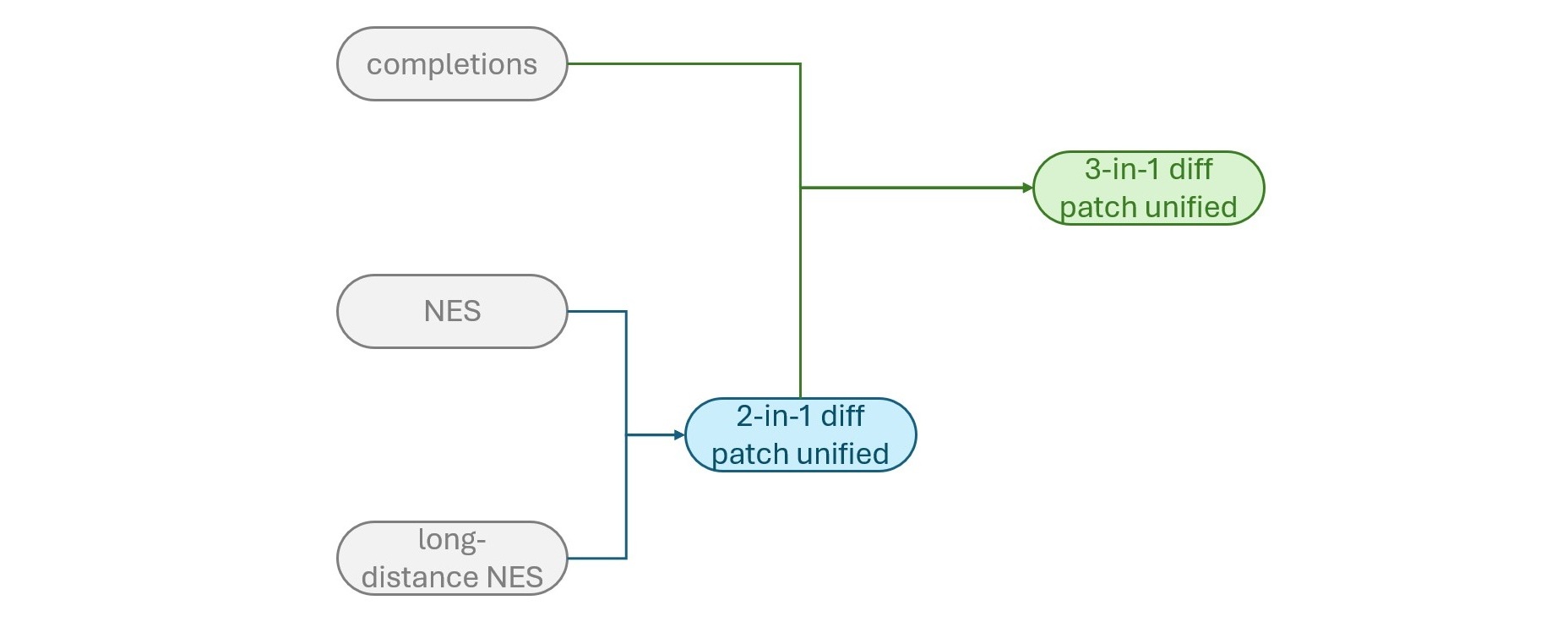
Figure 1. We first unified the NES and long-distance NES models to yield the 2-in-1 unified model, followed by unifying the 2-in-1 model with the completions model to yield the 3-in-1 model.
The next step was to bring completion behavior into the 2-in-1 model. Previously, an edit opportunity could involve a completion request followed by another request for a richer 2-in-1 model edit. With the fully unified 3-in-1 model, one request can consider the full range of code editing behaviors and decide the best response at any given moment, or chain many of them together in a single response.
This greatly reduces model calls and serving complexity, but the biggest benefit isn’t even the efficiency. A single model can optimize for the best edit that fits the moment instead of preserving the artificial boundaries that resulted from the system architecture.
Case in point, in our final 3-in-1 model candidate, we found that while the proportion of less-intrusive ghost text decreased in the 3-in-1 model compared to the 2-in-1 model setup, there were actually significant measurable improvements in user satisfaction. We will talk more about this later in this post.
Training the v4 models: adding in completions
To train the 3-in-1 model, we applied what we learned while developing the 2-in-1 model. As the goal was to add completion behavior to the 2-in-1 model, the distribution of the training data needed to change. We gathered ghost text completions data through a variety of techniques, including distilling ghost text from the original completions model and filtering them for quality using an LLM judge. We leveraged the original training recipes from the 2-in-1 model while adding this new ghost text data.
We also had to carefully rebalance the distribution of the multi-edit data inherited from the 2-in-1 model recipe. Models that showed too little ghost text or were too eager to jump away from the user’s cursor often resulted in more disruptions to the user flow and thus higher dismissal rates. This naturally gave rise to a dedicated subset of multi-edit data where the first patch was a ghost text completion at the user’s cursor. During RL, as mentioned earlier in part one, we also kept the grader design that encouraged the model’s edit sequences to begin with the most immediate continuation of the developer’s work, then move outward to related follow-up changes, which made edits least intrusive and kept more logical flow and continuity.
Early model candidates produced ghost text more often and more suggestions overall as a result. We measured these results offline with three benchmarks discussed in part one: STests, Output View Kind, and Pseudo-Online Evaluation. We also noticed that the HumanEval benchmark results improved because of having stronger completions capabilities.
When we flighted these v4 models against the now-production setup of the 2-in-1 model and the completions model, results were quite promising: no statistically significant changes in acceptance rate, dismissal rate, shown rate, and user engagement metrics. But we did find a marginally statistically significant regression in accumulated retained characters, or the number of characters that were not reverted by the user within a certain time interval after accepting a suggestion.
We considered several potential causes of this regression, including poorer suggestion quality, but because of the lack of movement in other metrics, we ultimately pulled the thread on one hypothesis in particular: suggestion length.
Training the v5 models: ghost text completeness
Our hypothesis was that because the model was producing slightly shorter ghost text suggestions compared to the production completions model, users might be accepting promising but incomplete suggestions. As a result, they might be more frequently reverting or editing the suggestions. For instance, writing the function signature and docstring is nice, but if we don’t follow through with the full implementation, then the user might remove the function, make edits, or rewrite it manually.
To test this hypothesis, we applied what we learned from the 2-in-1 model’s insertion challenges and gathered a subset of data that specifically targeted this type of longer-output scenario and performed a similar upweighting of the data. We further added another auxiliary grader dedicated to ghost text completeness and gated it to these specific curated samples. To measure the offline impact of this change, we also introduced a second version of the Output View Kind dataset that measured the character lengths and proportion of ghost text in model responses compared to the original distribution of the production model.
We flighted our most promising model candidate and were pleased to see that the regression in accumulated retained characters had decreased but was not eliminated, and the dismissal rates were trending higher. However, there were several observations made during the dogfooding experience that led us to look beyond the model itself. This reinforced an important lesson we had learned through iterating on our previous models: client behavior is just as important as the model.
The model is part of a larger end-to-end experience
The ultimate user experience is much more than just the model’s capabilities: a great inline suggestions experience is the fusion of a great model with a great end-to-end system. Careful client orchestration is also necessary to show edits to the user at the best time and in the best way.
For example, when dogfooding the most promising 3-in-1 flight candidate, we noticed an important past client behavior decision for NES that was worth revisiting. When ghost text was shown to the user but ignored, if the user moved their cursor to a different location, that cached ghost text suggestion would be re-shown as an NES edit. Upon deeper investigation, we estimated that this client behavior alone could potentially be responsible for inflating the 3-in-1 model’s dismissal rate by 7-8%. Once we ablated this issue in an A/B flight, we found the impact was even larger than we had estimated—the dismissal rate went from a 15.9% increase to a 10.1% decrease—a 26% difference—compared to the production 2-in-1 setup.
The reason for this behavior requires some historical context. Originally, the standalone NES model’s suggestions could arrive asynchronously as the user moved their cursor, whereas the standalone completions model’s ghost text disappeared when the cursor moved away. As a result, the ghost text from the standalone NES model was intentionally made persistent so it could be shown as the user moved their cursor. However, because the 3-in-1 model identified itself to the client as an NES model, it inherited this behavior despite its ability to also provide completion-style ghost text at the cursor. By ablating this NES ghost text persistence behavior through a client setting, nesMimicGhostTextBehavior, we were able to revisit and change this behavior to make a choice that best fit the new model behavior. This underscores the importance of experimenting with the feature end-to-end in the client—new models have new behavior, which might warrant different client settings.
Beyond this ablation study, we also did extensive testing to make the best client-side choices for the 3-in-1 model’s edits, including optimizations in edit caching, speculative decoding, how to render the edit to the user, and progressive reveal of longer edits. Through multiple rounds of internal dogfooding and A/B testing, we discovered that each of these client choices made a big impact on the user experience.
We evaluated five client-side optimizations as a joint configuration that resulted in the best end-to-end unified model experience:
Speculative decoding: The prior standalone NES model already used speculative decoding to reduce suggestion latency, but the new unified model output format required us to revisit what output should be speculated. We ablated several variants of the speculated text with progressively stronger guidance toward completion behavior: only the file path header (without specifying any line, the default used for the 2-in-1 models), replacing the current line (specifying the current line but not a particular view kind), and completing the current line (specifying both the current line and the ghost text view kind). After load testing, latency analysis, view kind distribution analysis, and online flights comparing these options, we chose to speculate completion at the current line, which yielded the lowest suggestion latency without negatively impacting the user experience.
Ghost-text progressive reveal: Progressive reveal shows the immediately relevant portion of a longer ghost text suggestion first, then progressively reveals the remainder. This prevents the user from navigating a long block of text while making incremental progress on their work. Progressive reveal of ghost text was a critical client feature that underwent several rounds of optimization for the original standalone completions models, and its functionality was extended later to the standalone NES models—we thus ported over this technique to the unified model client behavior.
Diff-based edit rendering: For the standalone NES models, the client would take parse the code in the rewritten window to determine the code diff and thus the corresponding view kinds to show the edits to the user. This was required because raw rewritten code had to be parsed to show a minimal edit to the user. However, for the unified models with diff patch output formats, we had a choice—should we display the view kinds implied by the raw patches themselves, or perform this diff-based rendering per-patch as well? Earlier, we found that the model may generate suboptimal-efficiency patches in exchange for better overall suggestion quality (see the discussion on patch validity in part one of this post). For instance, the model might produce the following patch:
If we used the raw patch, we would show a side-by-side “diff” view kind to the user, where cuttlefish is replaced by axolotol, blobfish, cuttlefish, and dolphin. However, if parsed, this could be optimized so that the user first sees this insertion ghost text:
Thus, we hypothesized rendering might serve as another safeguard in case there were an even stronger way to present the edit to the user than what was implied by the model output. Through online A/B experimentation, we found this was indeed a positive change for the user experience. Thus, we first interpret each change in the patch and then present it through the appropriate rendered interaction (for example, ghost text, a nearby rewrite, a farther rewrite, a cross-file suggestion, or no suggestion), rather than rendering edits based on the model’s raw patch structure.
Cache delay and debounce settings: Immediate presentation of suggestions can be disruptive when they arrive too quickly, which results in a worse user experience. A slight delay before presenting a cached suggestion better matches the developer’s typing rhythm to help them stay in-flow, especially with the decreased suggestion latency from optimizing the speculative decoding. This setting was already in use, and we ablated several configurations of cache delay durations to arrive at a configuration tailored to the unified models. We did the same for debounce settings—whether to delay calling the model for a suggestion while the user is still typing—and found that immediate model invocation while the user was still typing did not result in a worse experience.
Cross-mode ignored suggestion suppression: As discussed above, this prevents ignored ghost text from immediately resurfacing as a next edit suggestion after the cursor moves. To the system, these may be different views, but to the developer, they are the same unwanted suggestion.
This work underscored a point that applies across interactive AI systems: ultimately, a good model is just one component of a complex system—UX, client logic, networking, and server-side logic, to name a few—and all parts of that system must be designed with care and optimized intentionally to create a great experience for the user. The end-to-end experience is the product.
Takeaways and learnings
Folding completions into the unified model had a much higher development velocity because it built directly on the 2-in-1 foundation, showing how compounding learnings accelerate each strategic phase. A few lessons to call out:
Build on successes. The ghost-text length regression was resolved with the same playbook from Phase 1: Targeted longer-output data, upweighting, and a dedicated auxiliary grader gated to completeness. Identifying successful patterns and reusing them when appropriate was critical.
The model is only one part of an end-to-end experience. When changing the fundamental model behavior and the task formulation, some parts of the end-to-end system had to change as well. Some client behaviors were intentional choices optimized for the previous standalone NES model and needed to be revisited as the unified model took on completion behavior. Through careful experimentation, one such change—preventing ignored ghost text from resurfacing as NES suggestions—helped swing dismissal rate by 26%, from +15.9% to -10.1%.
The beauty of unification. The unified 3-in-1 model saw a 10.1% drop in dismissals during online experimentation with no key metric regressions, despite showing 13% less non-intrusive ghost text. One model deciding the end-to-end best edit beat orchestrating independent specialists, illustrating that the unified experience is greater than the sum of its parts.
Beyond the individual model results themselves, another broader lesson we learned is the value of reflection and learning across the end-to-end system.
From a science perspective, the 2-in-1 model took our team over 15 SFT training runs, 170 RL training runs, and several times as many checkpoint-selection runs, resulting in 14 A/B flight candidates before the final shipping candidate. In contrast, the 3-in-1 model was developed using only RL on top of the 2-in-1 model, and it took us only 35 RL training runs and 10 A/B flight candidates. Each modeling milestone has benefited from, built on, and been accelerated by our learnings in previous ones.
This iteration extended far beyond the model itself. Over the same period, the VS Code client team made 113 PRs improving and supporting the NES experience, including the changes described earlier in this post. These spanned experimentation and configurability, model integration, prompting and context construction, serving and request orchestration, caching and rebasing, rendering and interaction, telemetry and observability, correctness and robustness, and the extensive ongoing work of keeping the experience running smoothly as it shipped to millions of users each week.
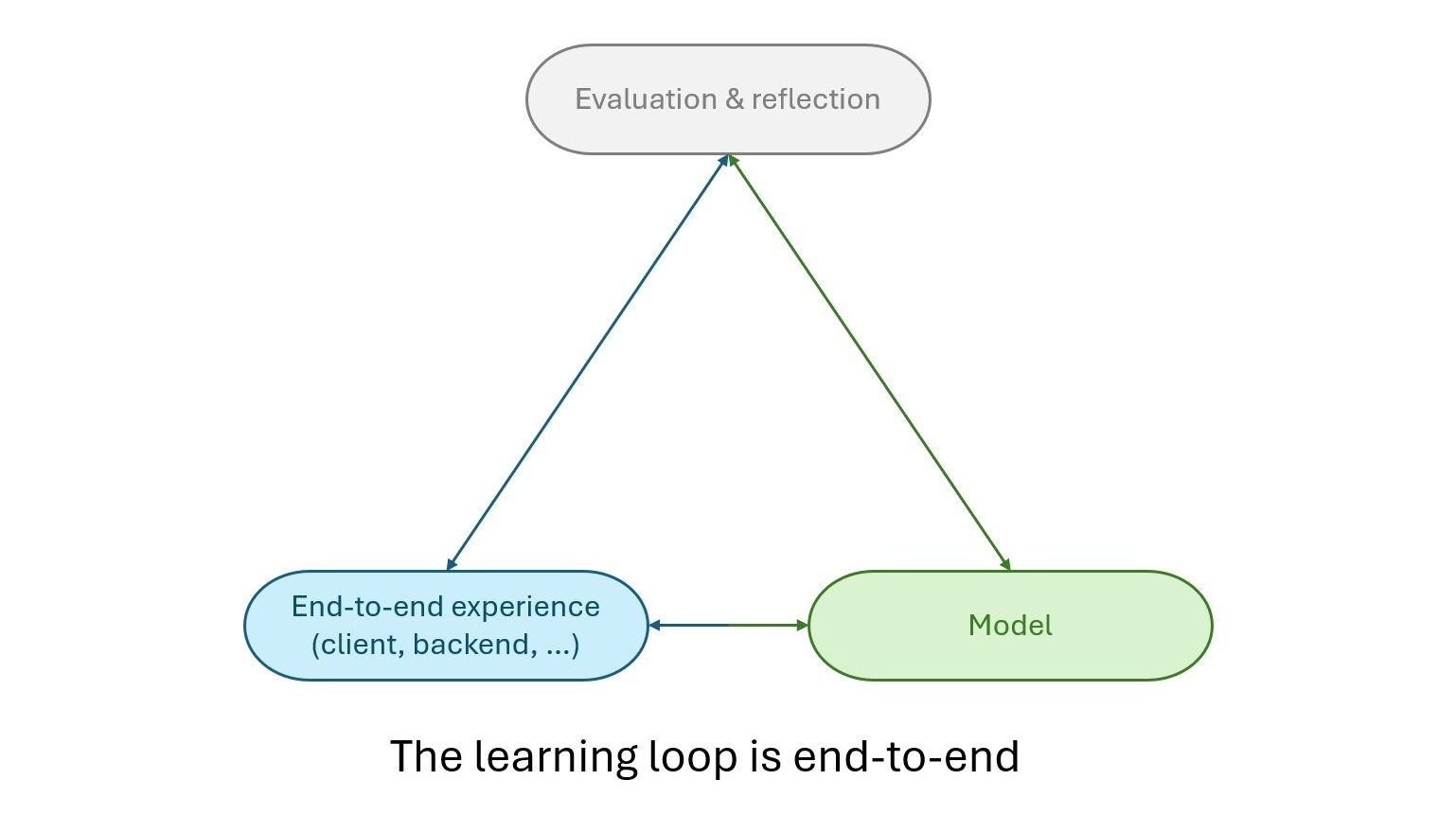
This is the reward of building the product as an end-to-end system: the model and the surrounding experience evolved together, with learnings from each continually shaping the other. The acceleration we see in the end-to-end system getting better at learning and improving is just as, if not more, exciting than any individual milestone itself.
Figure 2. The learning loop between the model and the full end-to-end experience is a two-way street, and evaluation and reflection at every step benefits all components of the experience.
Online results
We flighted the 3-in-1 model compared to the then-production baseline of the 2-in-1 model and completions model. We were excited to see a 10.1% decrease in dismissals with the new unified model without statistically significant regressions in any key metrics, including accumulated retained characters. This was especially notable given that the proportion of ghost text at the cursor decreased by 13% compared to the control, adding nuance to our prior learnings that increasing the proportion of less intrusive ghost text lowered dismissal rates.
This underscores the benefit of a unified model. The model can choose the best edit for the given context, often more effectively than complex client logic that orchestrates independent models. We consider this to be a promising data point to show that the unified experience can be greater than the sum of its parts.
We are excited for you to try this unified system that treats inline editing as one continuum, from finishing the current line to carrying a change through the rest of the file.
What’s next?
We hope you enjoyed this two-part deep dive into training the new unified inline suggestions models (and in case you missed it, you can find part one here: Building the new GitHub Copilot Inline Suggestions Model: Part One). Please also stay tuned for a more detailed technical report!
We are also working on expanding this model’s capabilities to make the code editing experience even more seamless and intuitive. This includes personalized model eagerness, which builds on our work in model quality by tailoring how proactively the model suggests edits to user preferences.
Try it out
The unified Inline Suggestions experience is available now for paid GitHub Copilot users in VS Code. Update to the latest version of VS Code, then make sure next edit suggestions are enabled.
Give it a try the next time you are in the editor, whether you’re working on a refactor or writing a new function. We hope you enjoy the tab-tab-tab experience, and we’d love to hear your feedback!
In the second part of this blog post, we’ll dive deeper into how we moved to the 3-in-1 model for inline suggestions. Stay tuned!
Happy coding! 💙
Acknowledgements
Special thanks to Luciana Abud, Alexandru Dima, Yu Hu, Simona Liao, Gaurav Mittal, Elsie Nallipogu, and Nick Trogh for their thoughtful feedback, insights, and contributions to this blog post.
We extend our deepest gratitude to our developer community for the ongoing feedback that pushes us to deliver the best possible experiences with VS Code and GitHub Copilot. Huge thanks to the researchers, engineers, product managers, and designers across GitHub and Microsoft who curated the training data, built the training pipeline, evaluation suites, and serving stack, and to the VS Code and GitHub Copilot teams for smooth model releases.
Multi Frame Generation (or MFG) smoothes out gameplay by using AI to create as many as five generated, or ‘fake’ frames for each one actually rendered by the GPU. Nvidia first introduced the original 2x Frame Generation feature with the RTX 40-series graphics cards back in 2022, but the highest rates of frame gen are reserved for the RTX 50-series.
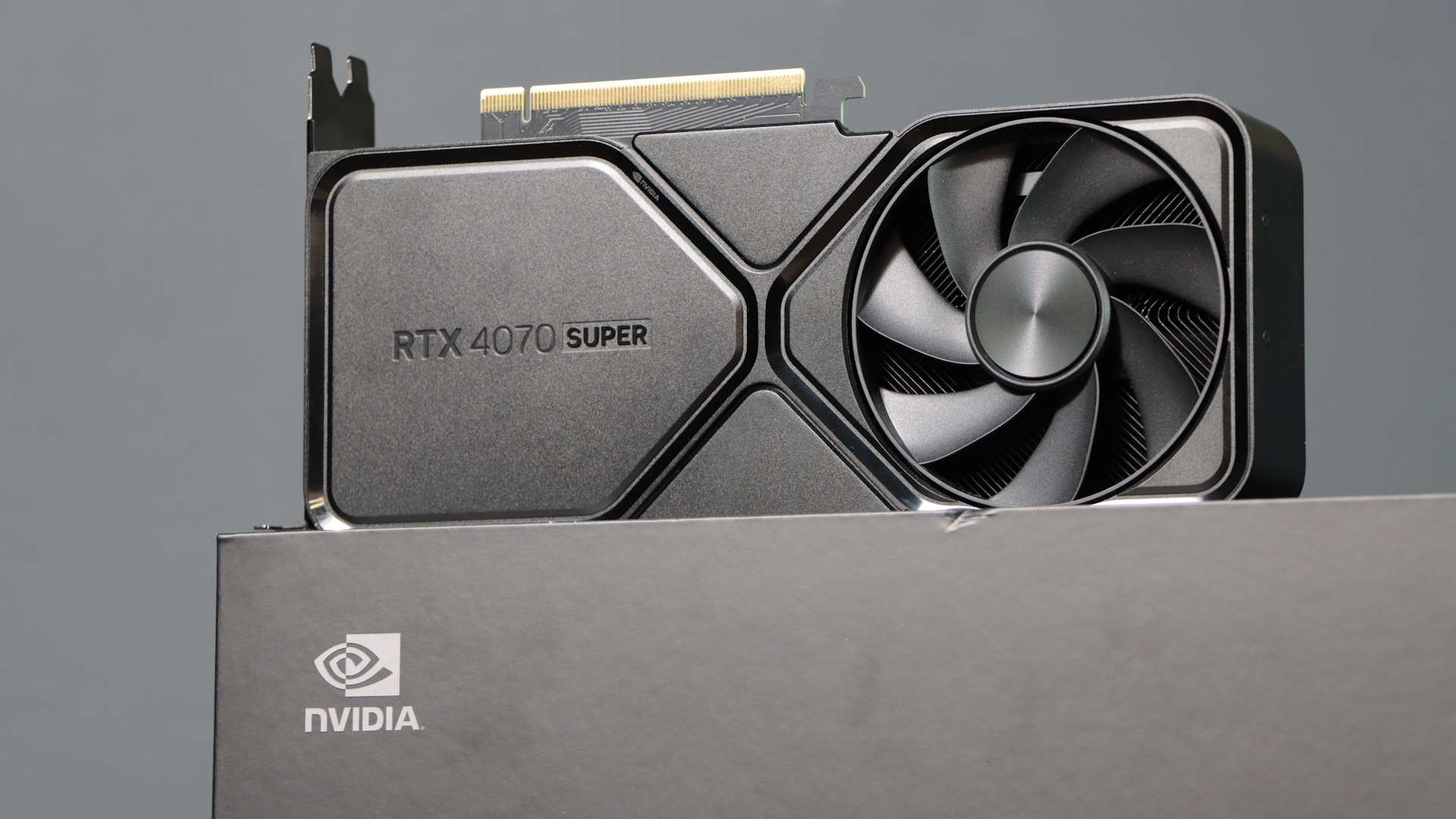
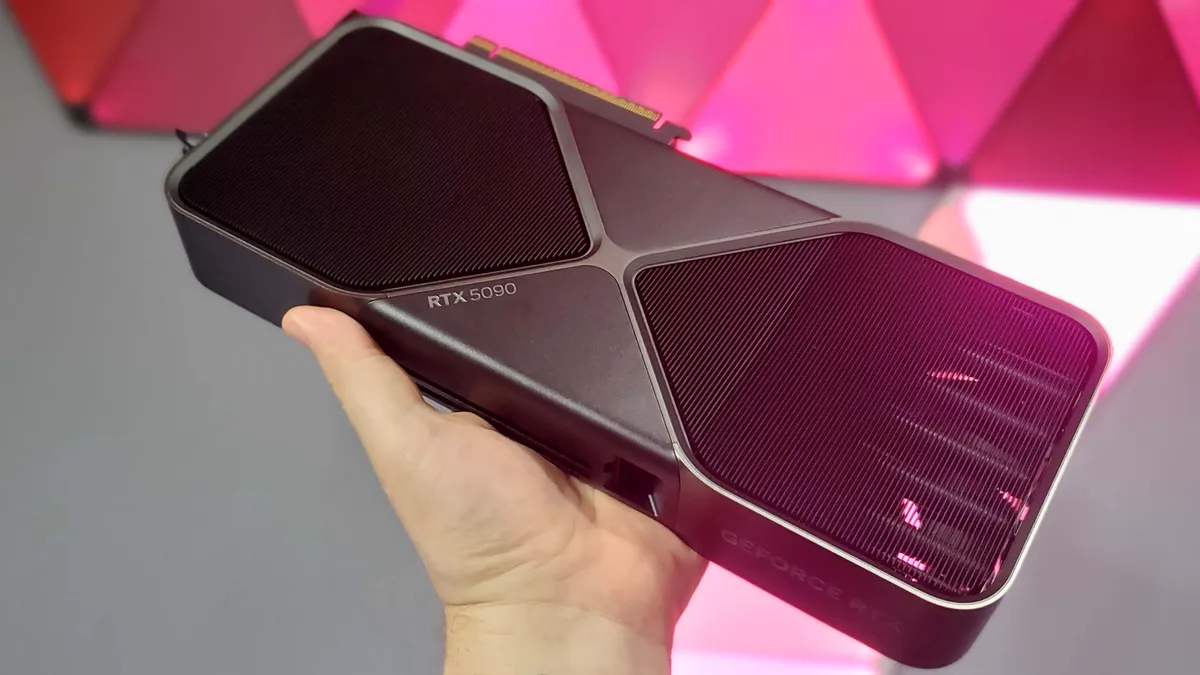
If you have an RTX 5090 (despite it being particularly tricky to find one, let alone for a price anywhere near MSRP), you can enjoy as much as 6x MFG in supported games. This is because the RTX 50-series GPUs contain more powerful Tensor cores, but also a dedicated AI Management Processor (AMP) which works alongside Flip Metering to deliver frames, both rendered and AI-generated, to your display as smoothly as possible. Older cards, like my RTX 4070 Super, lack this snazzy silicon—but us PC gamers won’t let something as silly as official limitations stop us.
I’ve already detailed how you can get 4x Multi Frame Generation working on an RTX 40-series GPU using some simple mods. I’ll tell you what I found across all of my testing shortly, but first let me speedrun through how I got this working in the first place. Very simply, I used the ReShade HDR Installer to download unofficial mods that unlock higher rates of Multi Frame Generation for RTX 40-series cards. My RTX 4070 Super officially supports up to 2x MFG, but the unofficial mods mean I can test up to 6x MFG with this same card.
As Nvidia does not officially support more than 2x MFG on RTX 40-series cards, I was fully expecting some quirkiness ahead.
Even on an RTX 50-series card, officially supported Multi Frame Generation can introduce blurry frames and latency issues, so I’m not really expecting my RTX 4070 Super to fare better on those fronts. My testing is more about getting as much as I possibly can out of the hardware I already own, and silencing the voice that says I need to drop silly money on an RTX 50-series card at least for a little while longer.
Now, not all games support even the standard 2x MFG. So, let me tell you I was surprised to discover that story-heavy games like Lost Records: Bloom & Rage and The Thaumaturge both support up to 6x MFG (you can check Nvidia’s full list of games that support MFG here). As such, the full roster of games I tested is a little non-traditional. It’s worth noting too that I am only testing single-player games as the MFG unlock mods I’m using are not officially supported and can trigger in-game anti-cheat detection systems. Sorry, Arc Raiders, I don’t want to get banned.
As for settings, I tested all games at 1440p resolution, and used High graphical settings. I also set the Nvidia DLSS quality mode to ‘Balanced’, and turned off ray tracing and similar tech where applicable. I set ReShade HDR Installer to tap out at 4x MFG as not all games support all the way up to 6x. My thinking was that more PC gamers might be interested in testing 4x MFG on an RTX 40-series card for that reason. I set no target frame rate beyond that, though, in the hopes that this experiment would give me the fullest picture of the highest highs and lowest lows in terms of frame rate.
The PC Gamer Circuit Breaker newsletter breaks down the latest PC gaming tech, and finds you the best deals on the best products
Now, without further ado, let’s take a look at some lovely bar charts.
1440p gaming performance
This chart shows average and 1% low frame rate results in various tested games at 1440p resolution
1440p gaming performance
This chart shows average and 1% low frame rate results in various tested games at 1440p resolution
Cyberpunk 2077
Unlocked MFG (Up to 4x) (Average FPS)
Unlocked MFG (Up to 4x) (1% Low FPS)
Cyberpunk 2077 Data
Product
Value
No MFG (Average FPS)
134
2x MFG Max (Average FPS)
197
Unlocked MFG (Up to 4x) (Average FPS)
219
No MFG (1% Low FPS)
66
2x MFG Max (1% Low FPS)
91
Unlocked MFG (Up to 4x) (1% Low FPS)
86
1440p gaming performance
This chart shows average and 1% low frame rate results in various tested games at 1440p resolution
Pragmata
Unlocked MFG (Up to 4x) (Average FPS)
Unlocked MFG (Up to 4x) (1% Low FPS)
Pragmata Data
Product
Value
No MFG (Average FPS)
111
2x MFG Max (Average FPS)
162
Unlocked MFG (Up to 4x) (Average FPS)
242
No MFG (1% Low FPS)
56
2x MFG Max (1% Low FPS)
83
Unlocked MFG (Up to 4x) (1% Low FPS)
97
1440p gaming performance
This chart shows average and 1% low frame rate results in various tested games at 1440p resolution
Lost Records: Bloom & Rage
Unlocked MFG (Up to 4x) (Average FPS)
Unlocked MFG (Up to 4x) (1% Low FPS)
Lost Records: Bloom & Rage Data
Product
Value
No MFG (Average FPS)
82
2x MFG Max (Average FPS)
128
Unlocked MFG (Up to 4x) (Average FPS)
201
No MFG (1% Low FPS)
30
2x MFG Max (1% Low FPS)
40
Unlocked MFG (Up to 4x) (1% Low FPS)
54
1440p gaming performance
This chart shows average and 1% low frame rate results in various tested games at 1440p resolution
Vampire: The Masquerade – Bloodlines 2
Unlocked MFG (Up to 4x) (Average FPS)
Unlocked MFG (Up to 4x) (1% Low FPS)
Vampire: The Masquerade – Bloodlines 2 Data
Product
Value
No MFG (Average FPS)
97
2x MFG Max (Average FPS)
99
Unlocked MFG (Up to 4x) (Average FPS)
234
No MFG (1% Low FPS)
33
2x MFG Max (1% Low FPS)
42
Unlocked MFG (Up to 4x) (1% Low FPS)
66
1440p gaming performance
This chart shows average and 1% low frame rate results in various tested games at 1440p resolution
The Thaumaturge
Unlocked MFG (Up to 4x) (Average FPS)
Unlocked MFG (Up to 4x) (1% Low FPS)
The Thaumaturge Data
Product
Value
No MFG (Average FPS)
130
2x MFG Max (Average FPS)
163
Unlocked MFG (Up to 4x) (Average FPS)
224
No MFG (1% Low FPS)
33
2x MFG Max (1% Low FPS)
27
Unlocked MFG (Up to 4x) (1% Low FPS)
52
I think it’s fair to say that not all MFG support is created equal—even before you start tinkering with unofficial mods like me. For instance, though Lost Records: Bloom and Rage isn’t an obvious stand out in terms of frames, it did feel consistently smooth to play with MFG active. The only visual difference I could detect is the softening of some shadows on a distant character model—otherwise, this remains a gorgeous game.
Comparatively, while Vampire: The Masquerade – Bloodlines 2 boasted more frames across my tests, it was not the most stable thing to play. I experienced noticeable frame hitching with MFG active. With 4x MFG specifically, I saw a bunch of artifacting while traversing snow-capped Seattle at speed. I didn’t encounter the issue while traipsing through the snow at a Masquerade-maintaining jog, instead seeing ghosting when I broke into a supernatural sprint or glided between rooftops.
I’ve already mentioned the latency issues with Multi Frame Generation, and it’s possible this ghosting arises from a similar source.
However, I also ran into artifacting in The Thaumaturge, though not chiefly while pelting around Warsaw. Instead, I saw ghosting in conversation-based cutscenes and during combat (you’d think the AI tech could keep up with a turn-based RPG). It’s more subtle than the ghosting I saw in Bloodlines 2, but definitely still there. The effect is most obvious in the clip below as ne’er-do-well Marian enters the cutscene, and every time either Wiktor or his friend from the other side performs a focus-reducing attack in the following turn-based combat.
To be fair to Bloodlines 2, it was more stable than the built-in benchmark tool for Cyberpunk 2077. While CD Projekt Red’s game turned in some of the best frame rate results, it was frequently a flickery mess with 4x MFG active on my RTX 4070 Super (to say nothing of how toasty it made my GPU during these tests).
Nvidia CEO Jensen Huang has said in the past that bringing “the latest generation AI technology to the previous generation GPUs” is a good idea but that it would “require a fair amount of engineering.” Having tested it out for myself, I do sort of see what he means.
Still, sans the cybernised elephant in the room, I was surprised at how viable playing with this unofficially supported 4x MFG felt on my RTX 4070 Super.
A lot of games require minimal tinkering beyond installing the ‘RTX 40 MFG’ and ‘OptiScaler’ mod in the ReShade HDR Installer (though Pragmata additionally requires the ‘RE Framework’ mod). Once you’ve done that, all you need to do is select the relevant MFG option from the in-game settings. Pragmata in particular was a doddle to set up and play, though I’d likely need a GPU with more VRAM than my current 12 GB card if I wanted to play with all of its visual flourishes active on top of MFG.
(Image credit: Capcom)
Granted, several hours of benchmarking is not quite the same as a full playthrough, and a lengthier play session of anything I tested may only serve to reveal further stability issues or visual quirkiness.
That said, my RTX 4070 Super is still turning in a very respectable amount of frames (even without MFG active). My 4x MFG testing just goes to show this RTX 40-series card has plenty of life left in it—and that I can definitely put off a potentially very expensive upgrade for a few more years at least.
The AI conversation is coming to Cleveland. And this year, you can listen to it in real time.
MAICON 2026 brings some of the biggest voices in AI, marketing, technology, and business together October 13–15. But the conversation doesn’t stop when a keynote ends.
For the second year, the MAICON Podcast Studio will give some of the industry’s leading podcast hosts a front-row seat to the action. Across two days, eight shows will record live from the conference, bringing fresh conversations and perspectives directly to their audiences.
Attending MAICON? Stop by the studio and catch a live recording.
Listening from home? Add these shows to your podcast queue and hear what comes out of Cleveland.
Hosted by Aby Varma, this is a must-listen show for AI-savvy marketers (or for those who simply want to adapt and innovate). These conversations will spark your curiosity and inspire you to infuse your marketing with AI. Tune in to explore how marketing leaders are applying AI in real-world ways.
Host Drew McLellan with the Agency Management Institute brings practical conversations and actionable takeaways to agency leaders. Each episode ends with actionable steps to apply something you’ve learned, all for the betterment of your agency.
In In-Ear Insights, Christopher Penn and Katie Robbert tackle real business questions in 30 minutes or less. And because everyone learns differently, episodes come with a full resource suite that can include video, audio, and transcripts.
AI moves fast. The Artificial Intelligence Show helps you keep up.
Hosted by Paul Roetzer and Mike Kaput, the show was created to make sense of everything happening in AI: what’s changing, what matters, and what businesses should be paying attention to next. Each week, the hosts break down the latest AI news, answer listener questions, and dive deeper into the stories shaping the future of business.
Join host Brian Piper every other Thursday for the go-to podcast for higher ed professionals looking to integrate AI into their daily work.
Through conversations with industry leaders, the show examines practical ways AI can streamline processes, improve student experiences, and support institutional success.
In The Agile Brand with Greg Kihlström® Podcast, you can expect interviews with CMOs, product leaders, and martech executives from platform companies like Adobe, Salesforce, and Optimizely, and brands like Marriott, Georgia-Pacific, Nestlé, and Zoom. Host Greg Kihlström drops an episode three times weekly, each one running 20-30 minutes—all focused on marketing technology, AI, and customer experience.
Hear from hosts Sydney Mulligan and Lauren Aquilino, the Founders of EMMIE Collective, a Marketing and Revenue Ops Agency(ish). Expect discussions about feminism, marketing, revenue operations, and the occasionally very un-funny realities of running a business.
Unpack AI, innovation, and future business strategies with globally recognized tech leader, author, and keynote speaker Sandy Carter. In every episode, she does a deep dive with top industry experts on trends shaping the future of business.
The Evergreen Podcaststeam will be returning to manage the episode recordings. Be sure to visit their booth on the show floor.
Tune In From Cleveland & Beyond
The MAICON Podcast Studio is more than a place to record. It’s another way the ideas, questions, and conversations happening at MAICON can reach beyond the show itself.
So whether you’re grabbing a seat at a live recording in Cleveland or listening from somewhere else, there’s plenty to add to your podcast queue.
Want to be part of the conversation?Join us at MAICON 2026, October 13–15 in Cleveland, Ohio, where marketing and business leaders will come together to explore what it takes to move AI from experimentation to real-world impact.
In 2026, AI has shifted how 3D rendering services and visualization are done. What was once long and weeks’ worth tasks can be completed in hours or days. The quality of the renders and visualization has improved, making it even more realistic. The access to advancements made high-quality 3D visuals become more affordable for all kinds of businesses. Cad Crowd is a reliable platform that connects businesses to skilled freelancers who specialize in AI-powered visualization. This gives companies the capability to deliver tasks faster with improved quality
Key AI rendering impact stats at a glance
Metric
Result
Context
AI denoising render time reduction
50–80% faster
V-Ray, Arnold, DLSS benchmarks
AI upscaling compute savings (1080p → 4K)
~75% less compute
vs. native 4K rendering
Virtual staging cost reduction vs. physical
60–80% lower cost
Real estate visualization
Automated product variant rendering
Days vs. weeks
E-commerce catalog production
Real-time ray tracing feedback loop
Seconds vs. hours
vs. offline render pipeline
Reduction in late-stage revision cost
Significant
Real-time client walkthroughs
AI post-production sky replacement
Seconds vs. 30 min
vs. manual masking
Animation delivery time reduction
Up to 60% faster
AI automation + denoising
Architectural rendering cost reduction
30–40% typical
AI-enabled freelancers vs. studio rates
Per-image cost at scale (product variants)
Dramatically lower
Programmatic material swapping
Why visualization costs are under pressure in 2026
The economics of managing internal teams for 3D visualizations in 2026 has shifted. Aside from the rising labor costs, software subscriptions are way more expensive than ever. Clients nowadays also expect faster delivery of high-quality results. These pressures are driving businesses to turn to AI-assisted tools and outsource solutions instead.
1. High labor costs in the United States
The true cost for a single architectural visualization project does not just rely on labor costs alone. It also includes overhead costs like employee benefits, workspace expenses, hardware and software fees and subscriptions. In the United States, a senior 3D visualization artist can earn from $70,000 and $110,000 per year, which is already expensive enough for a simple project. AI rendering tools do not replace skilled and professional artists. It acts as a support by handling the administrative and repetitive tasks, allowing designers to focus on more valuable and critical scopes. AI reduces and compresses the design timeline significantly, minimizing project costs without compromising the quality.
To deliver high-quality renders, professional software such as V-Ray, Arnold, and Chaos Cloud is used. These programs are expensive and paid yearly for every user. Not only that, but there’s also still the need to acquire GPU rendering farms, asset library subscriptions and any other packs. All these become a fixed overhead cost, which may be hard to bear for small businesses. This is why instead of fully committing to an in-house visualization department, businesses are outsourcing services. This allows them to just pay for the outcome or deliverables, no need to think of the software to be used. Platforms like Cad Crowd allows businesses to have access with high-quality projects, without long-term financial commitment.
3. Compressed client timelines
Now that advancements are accessible, clients expect shorter deadlines with higher quality. This could be a struggle for businesses who are not used to modern tools and software, they experience greater pressure in processing and completing the work. This could lead to employee burnout as they try to juggle multiple works in a tight timeframe. The challenge can be resolved through AI. It has streamlined workflows to assist in the design stage. Through real time ray tracing, AI denoising and automated setups, designers would not feel much burdened with tight deadlines. They can work on other tasks that need further attention. In 2026, speed is not an advantage anymore. It is required to survive in the market.
4. The cost of late-stage revisions
In traditional workflows, late-stage revisions are expensive. When there’s a need to change in output during the late stage, even a small change of color would require more time and effort. The requests may appear little and simple during discussions but would be tedious for designers since it may require reopening complex scenes. The effort and time needed to make a simple request could be impractical and incur unnecessarily high costs. AI-powered real-time visualization tools confront these issues by making the review process more interactive and efficient. With these, there’s no need to wait for the full render to complete to receive feedback and comments. Clients can see changes before final render. This way, there would be minimal late revisions, creating a smoother workflow.
Three categories of AI cost reduction
Category 1: direct cost savings
AI rendering tools directly reduce production costs by compressing setup hours and labor work required to complete the deliverables.
5. AI Denoising: faster renders at lower cost
AI denoising left a great impact on modern rendering cost reduction. Conventionally, 3D product rendering designers would need extensive high counts to remove visual noise and deliver photorealistic outputs. Doing this would take hours, especially if the model is detailed. Through AI denoising, it is possible to efficiently clean up renders faster. There are programs that have built-in denoising such as NVIDIA’s DLSS, Intel Open Image Denoise. These tools remarkably changed how rendering studios operate. The rendering process time will be reduced even with low sample counts, without the quality being compromised.
One of the major breakthroughs in visualization is real-time ray tracing. These technologies are powered by NVIDIA RTX graphics cards. This allows the designers to produce a more accurate lighting and shadows digitally. Previously, realistic lighting would require large render farms running overnight. They can only see the outcome the next morning. The long waiting time delays the project. Real-time ray tracing allows an interactive design process. This helps in viewing the renders in real time so the 3D designers can explore more and adjust when needed. They don’t have to wait for a day to check and review if the output is enough to meet their standards. This helps spot flaws early, saving time and money.
7. Text-to-image and AI scene generation
AI image generation tools like Midjourney, Stable Diffusion, and Adobe Firefly already shifted to early design. It allows the designers to have flexibility in generating visual concepts just by text prompts. Designers wouldn’t have to set up and build the whole drawings, the visual can be done in a matter of minutes. This is useful for early-design stages wherein the concepts are needed to be presented to clients or investors. AI generation would take less time than manual set-up and allow multiple outcomes. This is a practical approach to minimize the risk of investing time into wrong concepts.
8. Automated material and texture application
One of the most time-consuming processes in 3D visualization services is applying textures to every material or part of the model. It requires full attention and accuracy to manually edit so it won’t look off and awkward. The material textures selected and applied should fit and complement each other. AI-assisted tools can help in automating this process by predicting and suggesting textures that matches the materials, AI can analyze a scene and suggest fitted materials for it. This is especially useful for interior design projects that have lots of textures to apply. Instead of investing time in tweaking and selecting material textures manually, designers can focus on decision-making and improve overall productivity.
9. AI-powered lighting setup
Balancing light to make it appear natural requires a lot of time to adjust it. It needs to be carefully tweaked to control exposure and avoid harsh shadows and brightness. Doing this manually requires time and effort just to capture a picture-perfect scene. AI lighting tools can simplify this by automating realistic light applicable to the scene. This way, the designers wouldn’t have to start from scratch. They can just edit and tweak the generated light to make it appear more natural and realistic.
10. Cloud rendering cost optimization
AI-driven cloud rendering platforms optimize job distribution efficiently. It can automatically analyze a scene and predict render time needed for it depending on its complexity. It makes smarter decisions on how it will be processed and allocates GPU resources dynamically. It also can detect possible issues with the scene, preventing render failures. AI-powered cloud rendering systems help 3D rendering designers to predict and get a more cost-efficient outcome. It optimizes the visuals, produces favorable results and prevents further failed attempts. It minimizes render time, which lessens project costs.
AI rendering tools: what they do and where they save
Tool / Technology
Primary Function
Cost/Time Saving
NVIDIA DLSS / AI denoising
Noise removal at low sample counts
50–80% render time reduction
RTX real-time ray tracing
Interactive photorealistic preview
Eliminates overnight render farm runs
AI upscaling (DLSS / FSR)
1080p → 4K output
~75% compute cost reduction
Text-to-image (Midjourney / Firefly)
Concept visualization from prompts
Hours → minutes at concept stage
AI material assignment
Auto-apply PBR materials by context
Half-day → hours for scene setup
AI lighting setup
Generate plausible light rigs automatically
Several hours saved per scene
Cloud render AI job management
Optimize GPU allocation, prevent failures
Reduces wasted compute spend
AI sky / HDRI generation
Dynamic environment from text description
Eliminates HDRI library dependency
AI post-production (sky, entourage)
Automate compositing tasks
Minutes vs. 30+ min per image
AI scene analysis / QC
Pre-render error detection
Prevents failed render farm jobs
Speed: the hidden cost lever in visualization
Speed is directly linked with cost and timeline of the project. The faster the turnaround time is, the greater the savings are. It is the most underappreciated factor in the visualization work. AI changes this by automation, speeding up and streamlining workflows.
11. Render times cut by up to 80%
A noticeable improvement in modern rendering is how AI can reduce render times up to 80%. This is driven by AI denoising and upscaling technologies. Traditionally, clean and noise-free images would require as high as 2000 sample counts to make it look polished. With AI, the same level of quality can be achieved with as little as 400 samples. This is a dramatic reduction in time and directly impacts the profitability margins. This allows more iterations to be done without increasing the rates. It makes the visualization process faster and cheaper.
It is common for renderings to be done overnight since it used to be a slow process. It often causes delay especially when the rendering artist finds issues after the render, making the design process start over again, with all the tedious time and effort just to complete a single project. The once 8-12 hours of rendering can now be compressed to less than 2 hours of waiting time. This improvement is driven by AI optimization. It makes it possible to produce high-quality visuals faster than before. It makes the project more responsive to feedback and comments without delay.
13. Faster iteration cycles
What makes AI rendering remarkable is the capability to process faster iteration cycles. It improves the overall back and forth process of design and review between designers and clients. Once feedback is received, the once 8 hours of work can be compressed into 2 hours. This allows more iterations to be done within the project. Faster iterations impact cost, making the project save money from costly mistakes that may be caught during late stages. It allows the project to have better alignment to the design intent without delay and increasing costs.
14. Real-time client walkthroughs
One of the most remarkable changes in modern visualization is real-time client walkthroughs. The visuals are not limited anymore to 2D or animations. Through game engine platforms like Unreal Engine 5 and Unity, it is possible to enter a fully interactive environment where clients can freely move in the space. This gives them a unique experience and helps in easily identifying issues or concerns. It allows the clients to understand the model space more clearly, letting them raise issues early even before committing to construction. This has minimized reworks significantly and improved approval timelines.
15. Automated animation and flythrough generation
The conventional way of creating animated flythroughs of a product would be an intensive work that could take a full day. It requires manually setting camera keyframes, tweaking right camera movements to make it appear more natural. Not only that, but the final render would also take an overnight process to complete. This makes the delivery just for the animation quite longer. AI-assisted 3D animation services and tools address this problem by compressing timelines and quickly generating a base animation. This way, the designers wouldn’t have to build from scratch and just refine the base model. When combined with AI denoising, the production and delivery time can be reduced by 60%.
AI upscaling is a strategic approach in producing high-quality visualizations in a more efficient manner. Tools like NVIDIA DLSS, AMD FSR, and dedicated image upscalers let artists render visuals in a low base resolution like 1080p, then upscale it to 4k or 8k. The goal is to minimize GPU processing but still produce high-quality results. There could be a slight difference between this and rendering at high resolution but it’s often minimal and not visible to the human eye. This approach makes the rendering process faster and saves costs.
17. Parallel variant rendering
AI-powered render farm management allows new product designers to have access to multiple design variations at the same time. Traditional workflows are limited to producing one render at a time which takes longer and wouldn’t have the flexibility to produce another one simultaneously. This is why rendering traditionally costs more time and labor, and less exploration of ideas. To maximize product visualization, several design visualizations can be produced. With this, the clients would have a wider range of options to choose from. It makes their decision process more efficient.
18. Rapid prototyping of visual concepts
AI image generation tools allow a broader exploration of ideas during the early design stage. Instead of investing more time in researching and building just one design concept, it allows rapid prototyping designers to have access to multiple style preferences in less time. The quick visuals could be rough but helpful enough to set project direction. A fast delivery of visuals smooths communication with clients. It gives them an opportunity to give their feedback, so misunderstandings can be avoided. Rapid concept visualization makes a project more focused and efficient, minimizing possible reworks on site.
Visualization speed: before vs. after AI
Task
Conventional Timeline
AI-Assisted Timeline
Improvement
Hero architectural still (1 image)
8–12 hours render
1–2 hours render
Up to 80% faster
100-image product variant catalog
Weeks
Days
60–70% faster
60-second architectural flythrough
2–3 days (animate + render)
< 1 day
~60% faster
4K output from scene
Native 4K: full compute cost
1080p + AI upscale
~75% compute saved
Client feedback loop
Next-day re-render
Same-session real-time
Days → minutes
Concept visualization for brief
1–2 days (3D setup + render)
Hours (AI generation)
~80% faster
Scene lighting setup
Half day to full day
1–2 hours with AI assist
50–70% faster
Quality: Where AI visualization pays for itself
In 2026, AI can create cheaper deliverables, without sacrificing quality. It helped achieve efficiency and higher quality standards, making it a more reliable solution.
In the past, access to realistic visualizations was limited. It would require high-level expertise in physical-based photorealistic rendering. A careful simulating and tuning of lighting are needed as well as precise material calibration. The whole technical process of setting it up is a privilege only well-funded studious can consistently pull off. Now with AI, it is possible to gain access to modern tools to handle automation of lighting and shading to achieve photorealistic effect. This allows designers to not start from a blank canvas. This shift is significant because all businesses would have access to a high-end visuals at lower costs.
20. Consistent lighting across large projects
Manually editing lighting for large-scale projects could mean massive labor hours and costs. One of the greatest struggles is maintaining consistency all throughout the project. When done manually, there’s a tendency of inaccuracy and small differences and may create issues later. AI-assisted tools help maintain consistency by locking in a visual style and apply it across the whole model or visualization. This makes it look more cohesive and polished. This helps in delivering outputs that signifies professionalism.
21. AI-Assisted post-production
Post-production is not as easy as it sounds. It is a major part of finishing the work through color grading, sky replacement and tweaking any other atmospheric effects.AI can now automate these tasks and reduce time in completing it. For instance, in 3D architectural visualization services replacing the skies manually can take approximately 30 minutes, but AI can do it in seconds. The basic corrections can be done way faster, making the process more efficient. It removes the need to do all tasks manually so designers can focus more on refining it.
22. Accurate material representation
One useful advancement is AI-powered material libraries and scanning tools. Instead of relying on manually edited textures, it is now possible to make use of scanned materials through photogrammetry. This way, a more realistic and accurate material texture is captured and applied to the model. When the materials are accurately applied, it closes the gap between reality and visualization. This allows designers to communicate their design better. The visuals would be a reliable reference of the model.
23. Intelligent camera composition
AI-powered camera composition eases the visualization process by suggesting camera positions, focal lengths and framings. It is trained to quickly identify which angles would be best suited and make the model look balanced. AI tools can help the 3D modeling designer flag poor compositions before rendering, reducing the risk of reworks and iterations. It’s a more efficient approach than blindly testing camera angles only to revise it after rendering. AI can help the designers optimize the overall visual quality, producing better images in less time.
AI scene analysis tools help in scanning and catching issues in 3D projects before rendering. It can identify and flag issues that may cause a render to fail such as missing geometry, incorrect scaling, lighting issues or mismatched textures. Traditionally, most of the errors are only found after rendering, which makes it costly to fix. AI reduces wasted effort by not having to go back and forth rendering and fixing multiple times. It catches issues that can cause problems before processing, allowing designers to fix it right away instead of re-rendering all over again.
25. Automated quality checking
AI-powered quality checking assists 3D CAD rendering designers to maintain consistency in applying standards in their rendering projects. It automatically analyses and flags deviations and compares finished renders with predefined standards. Through this, it is faster to check inconsistent gradings, missing elements, or any unrealistic texture directions in the model. Automated checking reduces the amount of time a designer has to invest in manually reviewing the model. It lessens the risks of human oversight and improves the overall quality of the visualization. This gives more time for the designers to focus more on refinement.
26. Sharper detail with AI super-resolution
AI Super-Resolution helps in recovering rendered images and make them appear more detailed and sharper. This can be done without manually editing and adjusting rendering settings. It can automatically enhance the surface details such as fabric textures, wood grain and any other detailed textures. AI analyzes visuals and provides a more efficient way to enhance its clarity. It lessens the need of utilizing GPU power just to provide high resolution visuals. Its impact is to deliver more convincing and realistic visuals while keeping the rendering time and production costs at minimum.
27. Dynamic sky and environment generation
Traditionally, scenes are edited through a series of trial and error. AI tools can automatically generate photorealistic elements, background and environment settings that match the design mood or style. The goal is to reduce efforts in manually editing elements in the scene just to get the desired style. It minimizes depending on purchased HDRI libraries and time spent looking for the right sky or environment. 3D architectural rendering designers gain more time and businesses can cut costs. It’s a win-win situation, without compromising quality.
Generative design and product visualization
In 2026, AI has reshaped the role of visualization in the design process. With AI’s involvement in the industry, clients are expecting faster deliverables, in its highest quality. This means that visualization would need to catch up with the growing opportunities AI continues to introduce.
Generative design produces outputs that are sometimes too complex to produce in conventional CAD models. To adapt to this complexity, 3D modeling designers utilize AI rendering tools such as path-tracing to handle the challenging geometries and high-detailed patterns. As more industries utilize and adopt AI in their design development, the demand for advanced AI rendering tools also increases with it. This is why businesses are aligned to investing in AI-assisted services and tools so they can keep up with the growing trend.
29. Product visualization at scale
Consumer goods companies often work with large numbers of product visuals for online stores, advertising and catalogs. This means multiple visual variations of a certain product need to be created. It could take a lot of time and work if done manually. AI automation can help product rendering designers in streamlining the whole process by producing hundreds of varying visuals from a single master scene. It can swap colors and materials through conditions or rules. This is a more efficient approach instead of doing full renders every variation.
30. Architectural visualization for complex projects
Large architectural projects such as airports, hospitals, and mixed-use developments may require a tedious amount of visualization work. It could be hard to work on, managing quality and consistency all throughout. This project may even take weeks and months to finish, depending on how detailed and complex the model is. AI generation and scene management tools allow designers to handle this more efficiently by using Automated LOD management. This AI-assisted tool helps in speeding up organization and application of materials in large environments. It helps in ensuring consistency and removing repetitive tasks. This eliminates the struggle of finishing a large-scale project in tight deadlines.
Practical adoption paths
Not all businesses can commit to AI utilization. Here are some practical entry points worth exploring:
31. Start with AI denoising
One way to start without fully changing the entire workflow is using AI denoising. It is a practical tool that is integrated directly into existing render programs such as in V-Ray, Arnold, and Redshift. It helps in refining visualizations without the need to disrupt the current design process. It reduces render time while improving the overall design quality.
32 Adopt real-time visualization for client presentations
For architectural design studios that need regular work presentation to clients, real-time visualization tools are best suited to stay efficient. Instead of presenting fixed images and discussing feedback and comments, interactive 3D environments can be explored for real-time changes. Clients can request color or texture change, and they can see it real time. This reduces turnaround time in approval cycles and improves decision-making.
33. Partner with AI-enabled freelancers
The most practical way to have access to AI-assisted tools without internal change is to outsource freelancers who already use it. This is where Cad Crowd can help businesses in delivering AI-powered projects and bring efficiency to the team. There would be no need for experimentation and learning how to use AI tools. Businesses would just pay for the deliverables.
34. Pay for deliverables, not infrastructure
When a company decides to commit to a full AI-enabled visualization studio, it comes with a significant amount of upfront costs. From workstations, rendering subscriptions per person, software licenses, AI subscriptions and other asset libraries, the cost could be too expensive to justify especially when the projects are not long-term. Cad Crowd helps in confronting this issue by letting businesses eliminate fixed costs and just for the finished renders through outsourcing vetted 2D & 3D design freelancers. This a more economical and practical approach in adopting AI tools.
35. The hybrid approach: in-house plus outsourced
One of the most effective approaches is doing a hybrid set-up. In-house designers oversee maintaining brand consistency, quality checks and strategic imagery. Outsourced professionals handle the volume of work and repetitive tasks. This is where they can use AI to automate and simplify the design process. The combination of the two maximizes efficiency, keeping costs at minimum while delivering high quality visuals.
36. Real estate and architecture: the clearest ROI case
Real estate and architecture benefit the most from AI-powered visualization. There are projects that require high-end and premium quality of works in a tight deadline, AI can help in compressing the timelines without sacrificing the quality. It addresses both and gives the clearest ROI. Real estate can spend $15,000 on visualization for a residential development but can be reduced to $8,000–10,000 when AI is used. This is a significant cost reduction, allowing businesses to stay competitive in the market.
In-house vs. outsourced AI visualization: cost comparison
Factor
In-House Team (US)
Outsourced via Cad Crowd
Senior visualization artist salary
$70,000–$110,000/yr
Pay per project
Benefits and overhead
20–30% on top of salary
None
GPU workstation (RTX 4090-class)
$3,000–$6,000 upfront
Absorbed by freelancer
Rendering software licenses
$2,000–$5,000/yr per seat
Absorbed by freelancer
Cloud render farm access
Variable, often $500–$2,000+/mo
Absorbed by freelancer
AI tool subscriptions
$100–$500/mo additional
Absorbed by freelancer
Ramp-up time for new AI tools
Weeks of retraining
Hire freelancers already skilled
Capacity flexibility
Fixed to headcount
Scale per project volume
Typical per-image cost (complex arch.)
$500–$1,500 fully loaded
$200–$600 via freelancer
How Cad Crowd can help
In 2026, AI gives access to all businesses to a faster and affordable photorealistic 3D visualization. The companies are seeing how AI can truly optimize and improve design workflows in a more efficient way. It is an edge to work with professionals who already know how to integrate AI in the rendering process. Cad Crowd can help businesses connect with vetted freelancers who have AI expertise fitted for your projects. You don’t have to pay for unnecessary hours, pay for high quality deliverables. Explore Cad Crowd today and get cost-efficient solutions. Contact us for a free quote.
MacKenzie Brown is the founder and CEO of Cad Crowd. With over 18 years of experience in launching and scaling platforms specializing in CAD services, product design, manufacturing, hardware, and software development, MacKenzie is a recognized authority in the engineering industry. Under his leadership, Cad Crowd serves esteemed clients like NASA, JPL, the U.S. Navy, and Fortune 500 companies, empowering innovators with access to high-quality design and engineering talent.