An anonymous reader quotes a report from Wired: Nearly seven years after Apple debuted the Apple Card, Samsung is following the iPhone maker’s footsteps with the Galaxy Card, aiming for its own slice of the credit card market. The announcement comes two days before Samsung’s second Galaxy Unpacked event of the year, where it’s expected to showcase new smartwatches and folding smartphones. The Galaxy Card is issued by Barclays on the Visa network; the Apple Card, originally issued by Goldman Sachs but now transitioning to Chase, is on the MasterCard network. There is a physical card — it’s not made of titanium but recycled steel.
The virtual card will be provisioned to a user’s Samsung Wallet account. With no annual fee, Samsung says cardmembers can earn 5 percent cash rewards on all in-store or online purchases made directly from Samsung in the US, 3 percent cash rewards on purchases made with the Galaxy Card using Samsung Wallet, 2 percent cash rewards on streaming service subscriptions, and 1 percent cash rewards on everything else with the physical card. The cash rewards can be redeemed as a statement credit or transferred to a checking or savings account. The annual percentage rate (APR) varies by cardmember, but the card has no foreign transaction fees. Other perks include a 20 percent discount on Samsung’s VIP Advantage membership, which offers extended device protection, specialized support, and exclusive deals, and $200 in cash rewards after spending $2,000 in the first 90 days.
Applications open up on July 22. The Samsung Wallet app is only available on Samsung smartphones and watches, so what happens if a consumer switches to a different smartphone brand? The company says Galaxy Card is not limited to Samsung device owners and that anyone can use the physical card, but you lose the key perks; the card can be managed through a BarclaysUS.com online portal. (Similarly, if an iPhone owner switches to Android, their physical Apple Card will still work, but they lose access to the Apple Wallet app and the 3 percent daily cash perk on Apple purchases; there’s a web portal to manage the account.)
An new product development (NPD) project is a risky and likely expensive undertaking. Much of an NPD is about developing a concept and then engineering it through an iterative prototyping process into a functional product. But it also has everything to do with managing the project as a whole, which inevitably involves issues like IP protection, right-to-repair legislation, and NDAs. Cad Crowd helps you connect with experienced NPD professionals to help you run both the engineering and managerial sides of the project, making the otherwise challenging endeavor into a seamless undertaking from the get-go at affordable rates.
Development tips
Effective product concept development requires a good combination of detailed engineering work and a focus on running the project efficiently. There are many strategies to achieve both, the chief of which are listed below.
Take a look around
Only when you truly understand the problem can you devise an effective solution. New product design services must be driven by the need to provide a solution to an ongoing problem, the kind of problem that the existing products in the market cannot seem to solve. Somebody invented Bluetooth because people hated wire clutter; we have ATMs, so nobody has to stand in a queue for hours to withdraw money from their bank account; you buy a treadmill so you can jog inside an air-conditioned room when it’s raining outside; people use electronic calculators to save on scratch paper, and so forth. Necessity is the mother of invention.
To know exactly what necessity to address, you need to get out there, talk to people, and watch them do the things your product is supposed to help with. Do they misplace their keys far too often? Are their umbrellas good enough? Do they find their backpacks have too few compartments? Is there any feature they hate the most in a kitchen appliance? You get the idea. Ask as many questions as you can muster and take note of every answer. If you’re developing a new digital watch, for instance, don’t just ask if they want one. Try to get a little bit more details about their preferred functions, size, material, strap, display/legibility, water resistance, color, etc. The more people you encounter, the more data you get.
Market research like this offers a glimpse into what your target buyers want and need, which features they can do without, and how much they are willing to pay for the product when it’s available. Of course, it makes no sense to interview thousands of people in a direct face-to-face setting, and that is where social media comes in. The data acts as preliminary insight into what your next product should be. It’s a rough guideline, but a guideline nonetheless.
Never mind the ugly prototype
Ugliness, believe it or not, is the hallmark of the first prototype, also commonly referred to as Proof of Concept (PoC). If it looks good or even remotely pleasing, chances are you’ve spent way too much time, money, and effort on it. No matter what product you’re prototyping, the PoC is exactly what it says: a rather simple object to demonstrate that your idea can and will work. How simple should it be? We’re talking about cardboard, styrofoam, hot glue, plywood, paper, and scrap metal. LEGO is as fancy as a PoC can get. You also won’t be 3D printing or CNC machining anything. A local handyperson is likely more than capable of doing it. Think of PoC as a “Frankenstein” phase of the development, where you put together some random things and off-the-shelf components to showcase an idea.
Aesthetics isn’t a concern yet. The most important thing about a PoC is determining whether the dimension or shape makes sense. Will it be easy to use? Can a human hand comfortably hold the product? Does the lid or the folding mechanism work? Are the buttons and screen (if any) in good positions? Is the dimension too large or too small? And perhaps the most important question of them all: does it have the potential to be an effective solution to the problem it’s supposed to solve?
So long as you’re using affordable and readily available materials, you won’t be too hesitant to experiment with different designs and break things in the process. When one design doesn’t work, use it as a point of reference for the next build. Things might get messy, but that’s a more than reasonable price to pay if you want to learn something as quickly as possible. In any case, it makes more sense to create and discard a design made from a pile of cardboard rather than fail with 3D-printed parts worth hundreds of dollars. When it comes to PoC, be as budget-conscious as you can because you’ll be spending a lot more money right after this phase of development.
Try different materials
The next step is choosing the right materials for the product. Now you get to fully understand why spending too much time and money on proof of concept wouldn’t be so wise after all. At the end of the day, the PoC will mostly serve as a reference point for the next, “more serious” builds. Metals are generally stronger and look better. A metal spoon feels more premium than its plastic counterpart, even when both are food-grade and reusable. Although many products look, feel, and work better when they’re made of metal, it doesn’t mean that plastics (or alternatives like wood, glass, and bamboo) are always bad. For example, most light switches are plastic because it’s a non-conductive material, making it safer for electrical applications.
You can make one from metal, but it’s going to be more expensive, and people might avoid it out of fear of electric shock. You’ll soon realize that the best material isn’t necessarily the strongest or the most aesthetically pleasing of the bunch. Much of it depends on the type of product, its purpose and use cases, design for manufacturability, and, certainly, cost. From a more technical point of view, also consider weight, ease of cleaning and maintenance, heat and moisture resistance, durability, and often eco-friendliness. To help put things into perspective, most handheld GPS devices are made of industrial-grade plastic (rather than metal) for durability.
At the same time, kettles are made of metal, so they can boil water without melting. Don’t fall into the trap of thinking high-grade stainless steel is superior to ABS plastic. There are indeed plenty of cases where the statements are true, but not always. A spanner must be made of metal, given its typical use cases, while a garden hose is most likely made of plastic to keep it lightweight and flexible. The choice of material is always partly determined by how the product is supposed to be used.
Plenty of technical considerations can go into DFM services. Think of assembly tolerances, material density, decorative elements, PCB schematics (for electronic products), and standardization. But it all comes down to one key principle: simplification. In other words, make your design as simple as possible. A simple design is easier to fabricate (as a prototype) and mass-produce than a complex one. A component that consists of a few parts is easier to assemble than one with dozens of separate pieces. Not only does it concern manufacturability, but also manufacturing it cost-efficiently.
Here’s the issue: you can design the most complex product imaginable and then build a prototype using a 3D printer or CNC machining, but you might not be able to mass-produce it at a cost you can afford. While 3D printing and CNC machining (additive and subtractive manufacturing methods, respectively) are excellent for prototype fabrication, it would be ridiculously expensive to produce hundreds, if not thousands, of units of a product using such methods. Additive manufacturing is primarily intended for prototyping rather than mass manufacturing.
With the current technology we have, the most efficient mass-production methods are the “formative” injection molding and casting (for metal and plastic materials) and die casting (for metal). Each of these methods has limitations, such as accuracy, tolerance, volume, dimensions, and size. However, both are definitely more cost-efficient than the alternatives for large volume production runs. Every product is unique, so becoming familiar with this formative method is crucial to implementing the DFM approach in your design. No matter what you design, make sure it can be mass-produced at scale.
Fire up the CAD
At some points in the design process, you must step away from gluing cardboard and focus on creating a digital model on the screen. One thing that distinguishes modern from older product development is the heavy use of CAD (computer-aided design). As a matter of fact, you’ll probably spend a good chunk of your time drawing a digital model before you can get back to the real world and build a proper physical prototype again. Advanced CAD software offers a wide range of features and functions that allow you to draw or create digital images identical to real-world objects. While these images can be drawn as a traditional two-dimensional diagram, 3D visualization services is what you want. More than just a pretty image on a screen, every single aspect of the object can be configured to your liking.
You can, for instance, try various materials, textures, finishes, points of articulation, and all the rest of it, including shape and dimension. And if the product is supposed to have an internal mechanism composed of multiple components, 3D CAD allows you to draw each part separately and assemble them into a working system. Among the most popular software include Autodesk Fusion, SOLIDWORKS, Siemens NX, PTC Creo, Blender, and Rhinoceros 3D, to name a few. For electronic products, you’re spoiled with software options like Altum Designer, Proteus, CircuitMaker, and Ansys SIwave. Some of them are actually free and open-source, so generally, there’s no shortage of software tools to get your product development started.
If there’s one product development tip to rule them all, it would be about taking advantage of virtual simulation firms. Both digital modeling and simulation have become industry standards to test concepts, processes, systems, and, of course, physical products. Simulation works by introducing likely (and sometimes unlikely) use-case environments and scenarios into the digital models. Think of temperature variation, submersion in water, vibration, drops, power cutout, etc. Let the software run the simulation and gather the data accordingly. It wouldn’t be entirely inaccurate to liken product simulation to a video game. And if you have to make changes to the test variables or perhaps the design itself, you can do any of that almost immediately on the screen.
One thing to remember about simulation is that the result is only accurate if the digital model is identical to the physical object down to the smallest details, such as material thickness, assembly tolerances, internal mechanisms, and PCB specifications. The idea behind digital modeling and simulation is to avoid spending too many resources on physical prototypes. A digital model is also a prototype, a virtual one at least, to give a glimpse at what the physical product will look like and how it should perform.
More importantly, you can modify the virtual prototype and adjust everything without wasting raw materials. Even when the design fails in a simulation, for example, because of poor heat management or parasitic drain, nothing is really lost. All the data is still there inside the computer to help you prevent the same mistakes in the next attempt. If you want, you can just start over and build a new model.
Consider the ergonomics
If not for ergonomics, it might be possible for the prototype design expert to do the entire prototyping sequence on a computer screen and save a whole lot of money. But no, there will come a time when you have to step away from the computer and start making a physical prototype. The good thing is that there will be fewer mistakes now because much of the design work has been ironed out during the digital modeling and simulation phases. An NPD project always has to involve a physical prototype to confirm if the design works as intended in the real world.
Depending on the materials used, prototype fabrication is typically done using a 3D printer, CNC machining, or both. It’s no longer a PoC; the dimension, form factor, materials, and features are much closer to being the final production version. You need this prototype to be of relatively good quality for one important reason: ergonomic testing, which, unfortunately, is quite impossible to do using the virtual prototype. A perfectly functional product is great, but sometimes that’s not enough. It also has to be easy to use and comfortable. Your product needs to be ergonomic.
Suppose your new product is a piece of furniture, say a chair. What’s the point of making a durable and intricately decorative chair if it’s not comfortable to sit on? It may last forever, but if it wiggles about and has sharp edges everywhere, no one will buy it anyway. The same thing applies to other products as well. Handheld devices must be nice to hold, helmets must be comfortable to wear, a kettle needs a heat-resistant, grippy handle, and so forth, while staying perfectly functional. As mentioned earlier, the only way to test comfort and ease of use is with a physical prototype.
Build maybe half a dozen prototypes to start, run some real-world testing, and keep improving through an iterative process. Don’t hesitate to go back and forth between virtual and physical prototyping phases until you discover the ideal formula that offers a nice balance between functionality and ergonomics.
Breaking the product is part of the process
Every rapid prototyping phase always ends with a physical product. You may spend weeks if not months tinkering with the model and simulation on a computer, but all that hard work will always conclude with the fabrication of an actual object that you can touch, hold, use, and yes, break. It’s important to experience the design as a whole to be entirely convinced that it’s good enough for buyers to use.
Once you have a prototype (preferably a high-fidelity and functional one) in your hand, do a real-world test yourself but act as if you’re the most ignorant user. If the product is a chair, don’t just sit on it. Stand and jump on the chair many times. If it’s a handheld device for outdoor use, throw it into a pool or put it in the fridge for an hour or so. If it’s a water bottle, leave it outside under a scorching sun or slam it to the floor. No matter what the product is, just use it like crazy. The point is that when something breaks, as the product designer you’ll be able to determine the points of failure and then do something about it.
Every product must be stress-tested, meaning it must be put under extreme use case scenarios, or situations that most people won’t likely bump into in their typical day-to-day usage of the product. This is what NPD professionals call accelerated testing. It would be similar to pressing a button 100,000 times just to see if it gets stuck, cycling a hinge 200,000 times with an automated motor, or tapping a touchscreen thousands of times every day to replicate years of heavy use.
It won’t feel good to break a product that took you months to develop, but it’s better to see it get crushed during the testing than in the customer’s hands. You have to document everything. At what point does the product become unusable? What is the weakest part or component? Does the battery explode? Does it collect dirt easily? And the most important question: how do all of those happen? Based on the data, get back to the CAD, modify the model, run some more simulations, and finally build another prototype to test again. You will have to do this in a cycle while keeping DFM in mind.
Buyers today are more conscious about eco-friendliness and the whole sustainability problem than they used to. The use of recyclable or sustainable materials is good, but customers also want more: they want the product to be durable and repairable. The “right to repair” has recently gained renewed momentum. And as a concept product designer, you’re required by law to respect that. Let’s assume your new product is a toy car. Somebody ends up buying the toy and playing with it every day until one of the wheels comes off. Normally, this person can pop the wheel back on or, if something breaks, buy a replacement part and fix everything without issue, but unfortunately, that’s not the case here.
It turns out that the wheel is fitted with a special screw that is incompatible with a normal screwdriver. Even worse, there’s no replacement wheel available, so it must be sent to an authorized shop for repair, and that’s expensive. Now try to see things from this person’s perspective. It’s infuriating. The right to repair is a set of laws enforced to prevent companies from doing such things. When people buy a product, it becomes theirs solely to use, maintain, repair, and modify. Making the product repairable is part of the sustainability principle, and customers are actually fond of the idea. And if you really think about it, the right to repair goes hand in hand with DFMA (design for manufacturability and assembly) services, especially the simplification part.
As previously discussed, a simple product is easy to assemble, making it cost-efficient to manufacture at scale. And now it has come full circle, because a simple product is also easy to disassemble for self-repair. Just because one part of the product breaks, it doesn’t mean the product becomes completely unusable. The right to repair makes it easy for users to modify, replace components, and attempt repairs without going through the entire process of sending the product to authorized repair centers. One of the most practical ways to achieve this is to use standard parts (fasteners, wires, connectors, batteries, and so on) rather than proprietary ones. Design simplification also helps ensure that users can disassemble and reassemble the product using standard tools.
IP protection matters
If you think you’ve invented something new, whether a unique mechanism or method to solve a problem, you have to protect this intellectual property of yours. It’s a protection against someone else using the idea freely without your permission. Such protection usually means applying for patents. There are two main types: design patents (basically about how the design or idea looks) and utility patents (the mechanism or how the design works). Acquiring a patent, either design or utility, can take several years and is potentially expensive, but necessary to secure the IP, which has now become a business asset. In fact, it might be the only thing stopping anyone from copying your idea and selling it for half the price.
And IP protection goes both ways. Without detailed research into a patent database, you might unknowingly use a mechanism or implement an idea that’s already patented by someone else. You can use tools like Google Patents, WIPO Search, or the USPTO site to do the preliminary research. If your design or mechanism is already patented IP, contact the patent holder for permission (which usually involves a lot of money) or, more realistically, just move on to devise another design.
There might be situations where you finish the development and must send the design to a factory partner before you get a patent approved. A Non-Disclosure Agreement (NDA) is a good line of defense here. You can essentially fill it with legally binding clauses that prevent the factory from any unauthorized usage of your product design or idea. In fact, an NDA is important if you have to work with any external party, such as a prototype fabricator, a 3D artist for the CAD work, or freelance engineers and designers. Your concept is more than a physical object; it’s the ideas and thought processes behind it as well.
How Cad Crowd can help
Developing a concept for a physical product is a totally different game from coding software or creating an app. Once the concept is turned into a real-world object and launched to market, you can’t just release a patch to fix bugs or add new features. If the wheels come off, the hinges snap, the button gets stuck, the battery bulges, and the sealing gasket leaks, nothing you can send over the internet will fix the issue. The best you can do is to be fully prepared for it.
Develop a concept for a durable product that is easy to repair with standard tools while keeping production costs low. Easier said than done, of course, and that’s where Cad Crowd comes in. The US-based freelancing platform is home to thousands of product engineers, industrial designers, and NPD professionals of various specializations to help you create product concepts that work and can be prototyped and manufactured in a cost-efficient way. Contact us today for a free quote.
MacKenzie Brown is the founder and CEO of Cad Crowd. With over 18 years of experience in launching and scaling platforms specializing in CAD services, product design, manufacturing, hardware, and software development, MacKenzie is a recognized authority in the engineering industry. Under his leadership, Cad Crowd serves esteemed clients like NASA, JPL, the U.S. Navy, and Fortune 500 companies, empowering innovators with access to high-quality design and engineering talent.
Forza Horizon 5 creative director Mike Brown has weighed in with his thoughts on the situation at Xbox currently, and one of the things he commented on was Xbox Game Pass. He said in an interview that Xbox Game Pass, simply put, was not able to attract enough subscribers to make it viable as a business, and this contributed to the pain Xbox is going through today. After all, we recently found out that Microsoft was hoping to have 77 million subscribers by now, but the number is actually only around 30 million.
“That’s actually just really sad because we’re now going to see studios getting shut down or spun off,” he told MinnMax, as reported by Kotaku. “Loads of people are going to lose their jobs. And that is honestly just a result of a well-meaning player-focused concept of Xbox Game Pass not quite landing. And I think that’s just, it’s just a real shame.”
Brown, who worked at the Xbox-owned Playground for years before splitting off to start his own company, said Game Pass is a “good idea,” but Microsoft could not stick the landing.
“If more people had subscribed, that makes enough money, and it works and and all those studios go on and those games get made again and those teams will make other games. Unfortunately, it didn’t,” he said.
Microsoft invested a “fortune” in making Game Pass work through its various acquisitions and funding efforts, Brown added. This was done with the vision of having a steady release of new games to help keep people subscribed and amass more members, but it didn’t come to be.
Recently, reporter Jason Schreier said on the Triple Click podcast, “There are a lot of people out there in studio leadership within Xbox who absolutely detest Game Pass.” He said these people think Game Pass has “destroyed the value of their games” and has been an overall detriment to gaming across the board “because of how it devalues games.”
A former Xbox studio lead, meanwhile, told Windows Central that launching games into Game Pass “almost creates an assumption that these titles could not sell on their own. It felt like a race to zero.”
So what happens next?
Microsoft admitting that Xbox Game Pass is a bet that did not work out suggests the company may have some changes afoot for the service. Already, Sharma has cut the price of Game Pass and announced that new Call of Duty games will no longer be included in the service at launch, so some big changes have already been enacted. No one is expecting Microsoft to completely kill off Game Pass, but instead there could be other changes, like the kind of “windowing” of new releases that Microsoft has talked about.
This would involve keeping key titles out of Game Pass at launch and for a period of time, similar to how movies are only available in theaters at first before coming to digital and streaming. The idea here would be to help maximize revenue with people paying full price before they are included in the catalog. New Call of Duty games, for example, now won’t come to Game Pass until the following holiday season. So if you want to play Modern Warfare 4 on Xbox or PC at launch this year, you have to buy it outright, as it won’t come to Game Pass until Holiday 2027 at the soonest.
Android 17 QPR2 Beta 1 is officially here, kicking off testing for Google’s next Pixel Feature Drop arriving in December 2026.
This beta includes fixes for Bluetooth reconnection failures, lock screen media glitches, Gemini-related reboot crashes, and touch input bugs.
The update supports Pixel 6a through the Pixel 10 lineup, plus the Pixel Fold and Pixel Tablet, and is available via the Android Beta Program and Android Emulator.
Google’s not wasting any time after wrapping up Android 17 QPR1. The company has officially kicked off testing of Android 17 QPR2 Beta 1, offering Pixel users and developers a first look at the next quarterly update expected to arrive as the December 2026 Feature Drop.
This release doesn’t come with any new user-facing features, but it does fix some annoying bugs that have plagued Pixel owners. In its official release notes, Google says it has fixed an issue where Bluetooth devices could fail to reconnect after losing pairing, with no indication there was a problem. There’s also a fix that stops media controls from flashing briefly on the lock screen when waking a phone, even if notifications for that app had been turned off.
The most important fix is maybe for Gemini. Pixel devices may suddenly reboot when launching Google’s AI assistant due to a system crash. Google also addressed an issue with touch input where apps would stop receiving touch events after users performed a drag-and-drop gesture with multiple fingers.
Latest Videos From
The Android 17 QPR2 Beta 1 is now available with build number CP41.260701.005 and supports most of the supported Pixels, including the Pixel 6a, Pixel 7 series, Pixel Fold, Pixel Tablet, Pixel 8 series, Pixel 9 family, and the latest Pixel 10 devices. It’s also available through the Android Emulator, and users enrolled in the program can install it over the air via the Android Beta Program.
But the rollout brings a major change, too. If you still have a Pixel 6 or 6 Pro, your beta journey ends right here. These devices have reached their guaranteed update limits, so the previous QPR1 branch is their final beta track.
Android Central’s Take
I don’t mind if Google takes a break from dumping flashy new features on us if it means they’ll actually iron out the bugs that get in the way of using my phone. Not getting access to yet another AI gimmick is 100x more annoying than Gemini demanding a reboot or Bluetooth suddenly refusing to reconnect. That said, I’d still like to see Google spend less time playing catch-up with stability issues in the first place. Pixel owners signed up for a premium Android experience, not a free QA gig. If QPR2 delivers a smoother, more reliable phone by December, that’s a win. But it would be even better if these fixes didn’t have to wait for a quarterly update.
Get the latest news from Android Central, your trusted companion in the world of Android
Samsung’s Galaxy Tab S12 and S26 FE just showed up referencened in the Google app.
Google compiles a list of future devices set to arrive with a free premium Google AI trial for new owners.
The new models may launch sometime this September — if not sooner.
We are just days — hours, even — away from Samsung’s next Galaxy Unpacked event, when, this Wednesday, we expect to see it introduce the latest Galaxy Fold, Galaxy Flip, and Galaxy Watch models. But for as excited as we are about those launches, they aren’t the only new Samsung products currently on our radar. Looking a little further out, we’re also anticipating some new tablets with the Galaxy Tab S12 series, as well as the next addition to the Galaxy S26 family with the launch of the Galaxy S26 FE. While those will likely have to wait for another Samsung event, we’ve already got some early evidence showing that prep work for their arrival is well underway.
You’re reading an Authority Insights story. Authority Insights brings you all the latest exclusive reports, app teardowns, leaks, and in-depth tech coverage from the Android Authority team that you won’t find anywhere else.
There are lots of places we can expect a new device to pop up and make its presence felt ahead of a formal launch. FCC certification paperwork is a prime example there, or maybe any of the various agencies that certify batteries. But there’s another where we see a certain class of new hardware show up over and over again: an internal list in the Google app of devices set to offer their owners a free trial of a paid Google AI account.
As you’d only expect, the Flip 8 and Fold 8 models are already in there. But we’ve also just spotted a couple new additions:
AssembleDebug / Android Authority
Sure enough, the Tab S12 and S26 FE (both appearing sans Galaxy) now make an appearance. While this doesn’t give us anything approaching a firm ETA for either, it sure supports the idea that we’re very quickly starting to close in on both of them going official.
That said, we can make a few guesses, and if Samsung sticks with anything resembling its past schedule, we’re probably looking at an introduction sometime this September, following last year’s September launches for both the Galaxy S25 FE and Galaxy Tab S11 series.
At least, that feels like the most likely outcome here, but it’s entirely possible we could see them land even earlier — the Fold 8 and Flip 8 only showed up in this list about a week ago, which could conceivably hint at Samsung planning to slide things up to sometime in August. Right now, though, that’s largely just speculation, and we’re probably going to want to wait for something a little more concrete before we start getting ready to place our pre-orders.
⚠️ An APK teardown helps predict features that may arrive on a service in the future based on work-in-progress code. However, it is possible that such predicted features may not make it to a public release.
Thank you for being part of our community. Read our Comment Policy before posting.
Artificial Intelligence (AI) In Cybersecurity: Applications, Future, and Real Examples
AI In Cybersecurity
Cyberattacks are big threats to information systems, organizational infrastructure, and connecting networks. Since the processes and workflows have transformed into digital, Information Technology, banking and financial, healthcare and other industries are often susceptible to data thefts or cyberattacks. Identifying malicious viruses and protecting data assets is the primary task of companies in this virtual world.
Adoption and implementation of Artificial Intelligence in cybersecurity is the perfect solution to overcome the risks like data leaks and network security attacks.
How Is AI Used In Cybersecurity?
Artificial Intelligence in Cybersecurity is not a new topic, it has been used for many years. Cybersecurity is one of the most significant applications of AI. The role of AI in cybersecurity is to reduce data risks and refine the security levels of an organization.
In this digital age, AI-based cybersecurity solutions will help organizations and individuals stay ahead of malware attacks. AI solutions in cybersecurity will analyze enormous data sets, detect irregular patterns, and predict the possibility of data risks. Hence, leveraging the power of intelligent AI software solutions for cybersecurity, the companies can augment the security processes and blocks cyber activities.
The use of AI for cybersecurity, along with Machine Learning (ML), deep learning, and predictive analytics, will add value to your security processes as it determines the probability of attacks and prevents unauthorized access to information systems or networks.
One more interesting thing is that the entire bug detection and insights delivery will be done automatically without once interaction within fraction of minutes. It will drastically reduce response times and improve security levels across the processes.
Though AI technology can be used in many ways, here we have listed the best AI applications in cybersecurity.
5 Best Applications of AI In Cybersecurity
AI In Cybersecurity for Anomaly Detection
Using Artificial Intelligence in cybersecurity, organizations can automatically detect abnormalities, such as undefined network access, suspicious user behavior, multiple systems unlocking attempts, etc.
Leveraging ML and deep learning techniques, AI solutions in cybersecurity will assist organizations in automatically identifying vulnerabilities, analyzing user behaviors, and triggering alerts on malware attacks.
AI For Cybersecurity Network Security
It is one of the popular AI Applications in Cybersecurity. AI-powered cybersecurity solutions will continuously monitor the company’s network infrastructure and block access if they are considered suspicious.
This is why the popularity of AI-powered threat detection and response applications has increased in the IT, FinTech, Banking, and Healthcare industries. They help companies stay safe from sudden network breakdowns and productivity.
AI-based cybersecurity applications will detect spam mail and prevent its reach to your mail inbox. Learning from previous experiences, Artificial Intelligence tools will recognize fraudulent emails and protects users’ accounts from malicious malware.
AI In Cybersecurity For Defense
Here is another significant benefit of using AI for cyber defense. A blend of AI, ML, deep learning, predictive analytics, and data analytics capabilities will ensure incredible performance in forecasting terrorist threats.
AI-powered systems and self-configuring applications will find software bugs and execute an immediate response to vulnerable incidents automatically. This potential application of AI is gaining popularity in the Defense sector for safeguarding systems and applications from opponents.
AI In Cybersecurity For File Protection
Ransomware is risky software that blocks the user’s access to their systems or documents. AI technologies will play a key role in preventing illegal entry into your systems. Hence, AI decision intelligence tools track the patterns of users, predict frauds based on irregular behaviors of users, and protect personal systems from attacks.
These are the top five AI use cases in cybersecurity. AI-based tools, applications, and systems can identify threats, prioritize, and solve complex security issues automatically.
From small to mid-size companies to multinational organizations that serve across government and private must invest in AI technologies to secure their information assets from hackers and firewall their brand value in this virtual environment.
How Will AI Impact Cybersecurity In The Future?
Artificial Intelligence will transforms human lives. The impact of AI in cybersecurity will anticipated to grow with profitable results. AI solutions analyzes patterns and detects malicious hidden threats faster in seconds. Hence, the future of AI in cybersecurity will automate the time-consuming tasks and reduce the need of cybersecurity professionals.
The analysts from one of the global largest technology conglomerates like IBM are estimating that a single data breach will leads to million dollar business loss for companies in the coming years.
However, compared to 2021, the average cost of a data breach has reached to USD 4.35 million in 2022, up by 2.6% from the previous year. Hence, deployment of AI security tools is the best cost-mitigating approach for organizations to ensure security to their systems or assets.
On the other side, Statista-like world’s most popular database companies says that artificial intelligence (AI) will be widely used for protecting sensitive information systems against phishing attacks and ransomware attacks in the future. Such market trend will derive more value to the AI in cybersecurity and anticipated to generate USD 46.3 billion dollar business by 2027. Take a look at the market growth of AI in cybersecurity:
The above figure depicts the market growth of AI in cybersecurity. From USD 10 billion in 2020, the size of AI is forecasted to increase to nearly USD 46 billion by 2027.
Hire #AI app developers and build potential AI-enabled solutions that ensure high-level security and retain your business assets safe from cyber-attacks!
Conclusion
It has been proved that AI tools are the greatest assets for cybersecurity. Data breaches, malware attacks, system or file crashes, network leaks, password hacking bots, everything can be prevented by integrating AI technologies into your systems. Hence, invest in AI developmentand protect before hackers damage systems and triggers security alerts.
I’ve seen a lot of good chatter over on LinkedIn. The topic is about not just teaching students how to use AutoCAD software, but also how to be a professional drafter by adhering to ages-old drafting practices.
One of these practices is the alignment of annotation objects. In this post, I’ll cover three commands, two of which directly apply to my previous statement. The other is just a handy alignment tip (plus a trip down memory lane).
The image below is an example of terrible drafting and is not untypical of a rookie CAD user. Is the information conveyed? Yes. Is it drawn correctly? No. My high school drafting teacher (and first boss out of college) would have had a conniption over this. Please don’t ask me how I know this.
In this simple example, the annotation objects should all be aligned with themselves. Fortunately, AutoCAD provides some easy-to-use tools to quickly fix these problems.
MLEADERALIGN
The first problem we’re going to address are the part number callouts. Since they’re Multileaders, the solution is easy. The actual name of the command to use is MLEADERALIGN. While I’m a big fan of input into the command line, that’s way too much to type, and it’s easier, in this case, to use the Ribbon. In the image below, I’ve floated the Leaders panel of the Annotate tab to show you the icon’s location.
The workflow is easy, and it goes fast. You’ll first select the MLeaders to work with. When selected, press return. Then, you’ll select the Multileader that you want the others to align to. Here, I select part bubble 34. Make sure your Orthomode is turned on, and you’ll be able to define either a vertical or horizontal alignment. Below, I chose horizontal.
That’s just how easy it is. You can also collect multiple MLeaders into a single, grouped object, add a leader line, or remove a leader line. If you want to learn more about the powerful MLeader, I wrote about them many years back, and you can still find it here, and Lee Ambrosius wrote about them at this link.
TEXTALIGN
The next drawing issue was drilled into me from an early age, and, yes, by that same teacher/boss. It’s a typical mistake that a cub drafter might make. Notation, whether attached to a leader or not, should line up.
Again, it’s an easy fix. The tool you want can be found in the Text panel of the Annotate tab of the ribbon. You can also be like me and type it in, as I do in the animation.
Simply select the text you want to align, press enter, then specify the text that you want all to align to, and you’re done. This works for both DTEXT and MTEXT, and even ATTDEFS (if used within the Block Editor, of course.)
This went quickly, as I used the default setting, but there are plenty of options for you. Selecting the Alignment option lets you choose what we now call Justification (think Middle Right, etc.).
Choosing Options will let you set spacing between objects, distribute them along a path, or use the current Vertical or Horizontal values of the selected object.
ALIGNSPACE
This last example didn’t exist for my HS teacher to have a fit over. But it does fit in with the alignment theme of this post. It’s an Express Tool called Align Space, and it can be found in the Layout tab of the Express Tools tab of the ribbon.
Quite simply, it aligns two points in model space with two points in paper space. Let’s consider the images below. In the first, the layout viewport is activated, so you’re in model space. Using the quadrant Osnap, the top and bottom points of the circle are selected.
After the second point is selected, it will return to paper space and prompt for the next two points. In the middle image, the defpoint nodes of the dimension are selected. You’ll then be asked if you want to do the alignment. Since you’ve just spent the time selecting four points, we’ll assume you do and answer Y.
The points specified in model space are aligned with the points specified in paper space. Also, both the zoom factor and the UCS rotation are adjusted to accommodate the specified points. A note of full disclosure here. The images below are taken from the help file. Yes, I could have easily created my own, but I was drawn to the old-fashioned UCS icon shown in the model space views. I grew up with that thing, and I’m a bit fond of it.
Wrapping It Up
If you’re one of those cub drafters I spoke about and these drafting practices are new to you, I’d highly suggest you find a local tech school or community college that offers an introductory drafting class. Preferably on the board. You’ll thank me later in your career.
For the rest of us, don’t get into bad habits just because your software lets you. If you do find your annotations out of alignment, AutoCAD makes it easy to keep your drawing aligned with best drafting practices, thanks to these alignment tools.
More Tuesday Tips
Check out our whole Tuesday Tips series for ideas on how to make AutoCAD work for you.
DC announced a new fighting game on Monday and — nope, calm down. It’s not Injustice 3. I know you want Injustice 3. I too really want Injustice 3. This is not Injustice 3.
Instead, we’re getting Dicko, a mobile game that’s set to arrive in 2027. Wait, did I call it Dicko? Sorry, it’s called DCKO, but you and I both know people are going to call it Dicko because people are already calling it Dicko.
DCKO is a 2v2 tag fighter with both online multiplayer PvP and single-player modes from developer Drop Fake. “It was important to us that DCKO represented a significant leap forward for the fighting game genre on mobile,” creative director Gene Campbell said in a news release. “Live multiplayer games between players are core to the spirit of fighting games, and we are proud of the work we’ve done to bring this feature to mobile comic book fighters for the first time.”
DCKO features plenty of DC heroes you know and a handful of B- and C-listers. You got your Batman, Superman, and Wonder Woman, of course. Zatanna, Constantine, Blue Beetle, and Katana are also joining the roster, which has 19 confirmed fighters at this time. You can check out the full roster at the game’s website, and more characters will be revealed one at a time on a monthly basis.
DC K.O. was a similarly titled event that began in the pages of DC Comics last year. It put three dozen characters in a tournament with the universe on the line, and even featured crossover characters like The Boys’ Homelander and Mortal Kombat’s Sub-Zero. No one called DC K.O. Dicko while the event was going on, which means DCKO probably should have borrowed the comic’s space and periods to not look so much like “Dicko.” Despite essentially sharing a title, it doesn’t seem like DCKO and DC K.O. are related in any way at this time.
You can preregister now for DCKO‘s open beta. The full game will launch sometime in 2027 for iOS and Android.
As for if Injustice 3 will ever happen, well, your guess is as good as mine. NetherRealm Studios released Injustice 2 all the way back in (this can’t be right…) May 2017, or nine years ago. Since then, NetherRealm has put out two Mortal Kombat games. It hasn’t announced what’s next for the studio, but rumors have gotten fans hoping it’s another Injustice game.
A young(er) Randy Copeland proudly stands in front of a 2005 model Velocity PC.
It’s hard to believe that in just a few months, we’ll be celebrating 30 years of building ultra-performance custom PCs. How the time does fly. And in that time, we’ve seen the industry change in ways that we could never have predicted when the company was officially founded way back in 1997. Things like the rise of GPU computing and evolution of machine learning into a form of Artificial Intelligence that everyone has daily access to. Our gaming graphics card partner NVIDIA leading that charge and eventually becoming the most valuable company in the world. The proliferation of smart phones and tablets and the ways they have changed our lives. And so many more.
But along that way, Velocity Micro has lead innovation in the custom PC business as well, in ways that you may not even know. Here are five PC innovations that Velocity Micro helped pioneer.
1: CAD Specific Hardware
CAD 2000i, a program we built computers for, required a whopping 64MB of RAM to run.
When our founder Randy Copeland began building desktop PCs for friends and family back in 1992, hardware choices were pretty lean. But as a kitchen cabinet designer, Randy knew that there were large portions of the market in need of specialized hardware to run those power-hungry programs. He began designing his PCs with CPU speed and airflow in mind and would later begin to integrate NVIDIA Quadro graphics after they were introduced in 2000. The result was some of the earliest custom PCs built specifically for CAD software, effectively accelerating these workloads and making designers more productive.
2: Glass Side Panels
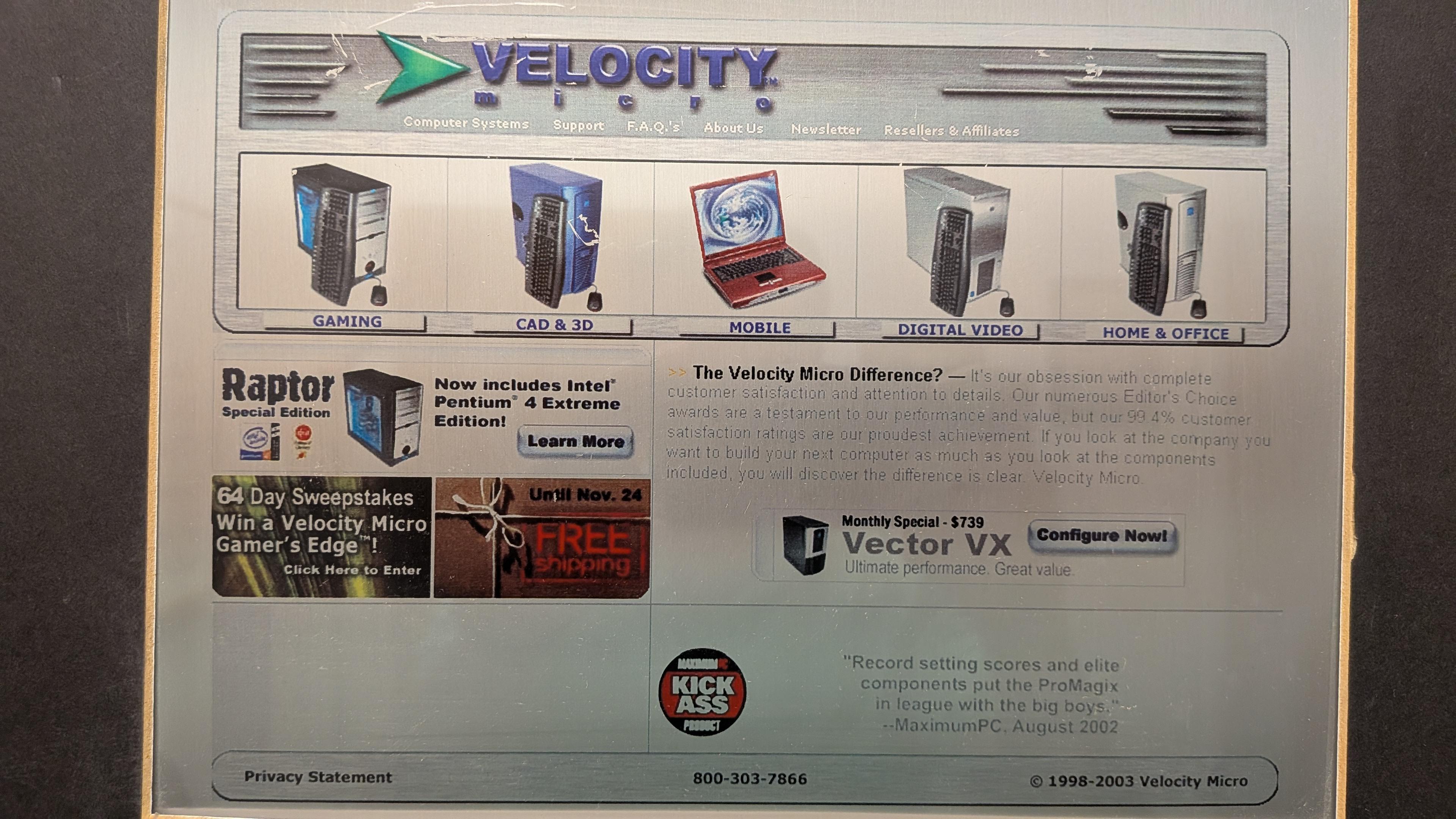
A 2003 version of our website proudly displaying one of the first clear panel PC builds available.
It’s hard to imagine a gaming PC without clear side panel, but they weren’t always as ubiquitous as they are today. In the late 90s, OEM PC builders like Dell and HP hid their components and wiring inside a solid steel box. But Velocity Micro (and yes, a few other OG builders of the time) knew that PC internals had visual appeal, especially when so much time and effort was dedicated to a meticulous hand wiring process. We worked directly with our case partners to begin including plexiglass and later tempered glass side panels as options in our gaming builds in the early 2000s in the effort to show off that craftsmanship. Competitors followed suit and soon the clear side panel was everywhere.
3: Liquid Cooling
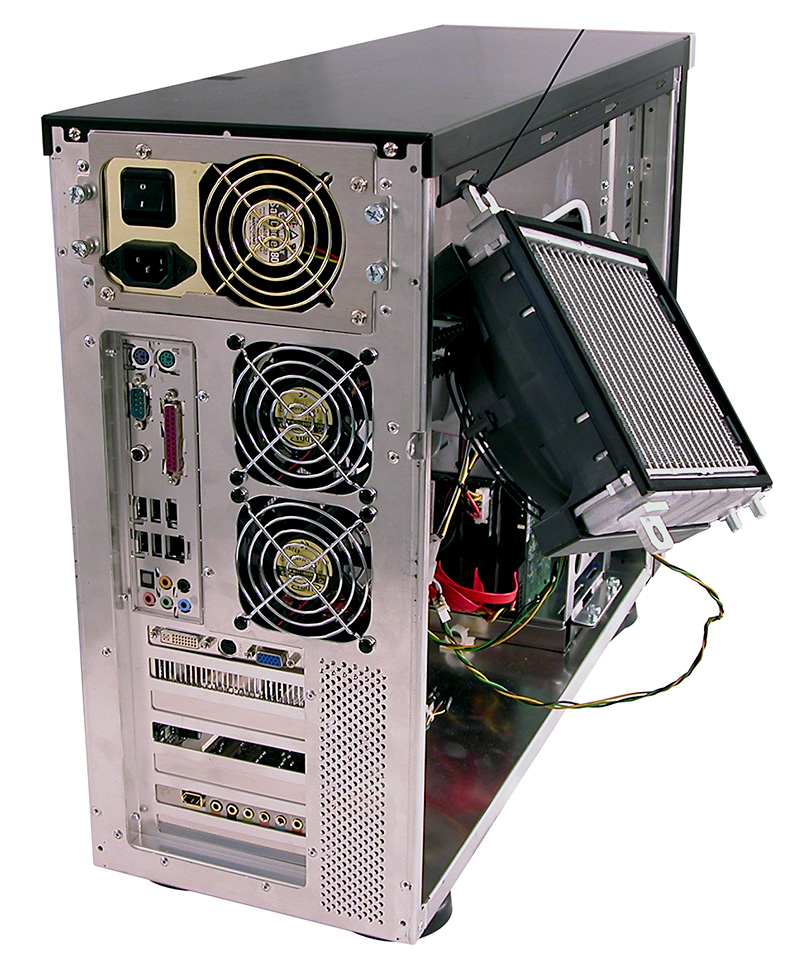
Early liquid AIO designs required creative radiator mounting to test. Circa 2005.
When we first started building PCs, it was air cooling or nothing. But as we began to develop more advanced CPU overclocking techniques, we quickly realized that dissipating heat from those processors was the key to long term stable operation at those speeds. We began experimenting with custom liquid cooling kits with soft tubing in open loops in our lab to manage those increasing thermals. We were able to achieve some incredible benchmarks for the time, but the challenge of shipping an extremely fragile cooling system to a customer across the country was not a small one. We worked independently on our own liquicool solution but then in mid 2000, Asetek brought the first closed loop AIO liquid cooler to market. We quickly tested, validated, and began shipping those coolers on our high-end CPU and overclocked systems that year, finally bringing safe liquid cooling to the masses.
4: Smaller form factors
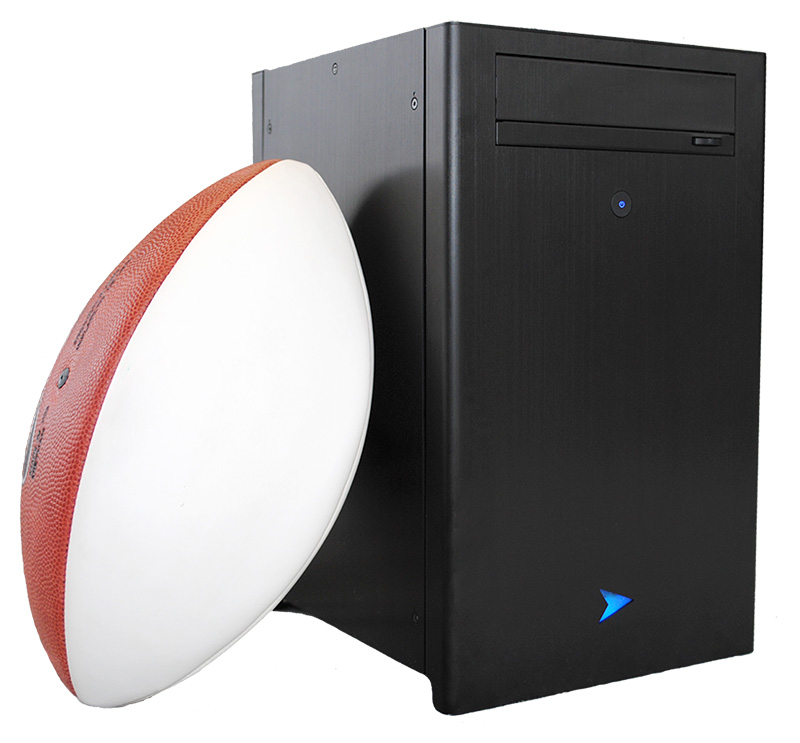
Our SmallBlock SFF chassis, introduced in 2015.
Does bigger mean better? We don’t always think so. But in our early days, those massive, heavy cases were the only way to fit full ATX boards, coolers, and all of the fans necessary to manage those thermals. Then as motherboards began to shrink in size, we too innovated with the market, developing smaller mATX cases like our MX line in 2008 and a true small form factor Smallblock chassis in 2015. But it wasn’t just reducing the size of our PCs that was so innovative, but rather our ability to maintain the extreme level of performance in those pocket sized builds without sacrifice. We continued to win Editors’ Choice awards, even as our PCs got smaller and smaller and haven’t looked back since. Today, our 6th Generation MX6 chassis continues to impress, helping us to bring home PC Magazine’s Best Gaming PC of the Year award for 2025.
5: Multicore processors
Where does the largest processor company in the world go to test one of their most groundbreaking architectures…maybe ever? To Velocity Micro. Back in 2006, Intel’s engineers were hard at work finalizing their first multicore consumer processor, code named Conroe, later renamed Core 2 Duo. But they needed to validate the new CPUs in real world situations and workloads, and that’s where we came in. Intel first sent those early samples to our engineering team for validation, then worked closely with our marketing team to place a launch day review of the new chips with CNET, a huge honor at the time. Since, Velocity Micro has been launch partners on every major new generation of Intel Core processors though Core 2 to the i series to Core Ultra, making new chips available to our customers on launch day.
So there you have it, five major innovations we’ve been in midst of over the course of our 30-year history. What will the next 30 years bring? I can’t wait to find out.
The following two tabs change content below.
Josh has been with Velocity Micro since 2007 in various Marketing, PR, and Sales related roles. As the Director of Sales & Marketing, he is responsible for all Direct and Retail sales as well as Marketing activities. He enjoys Seinfeld reruns, the Atlanta Braves, and Beatles songs written by John, Paul, or George. Sorry, Ringo.
As Oisin reported over the weekend, Steam Machine engineers Yazan Aldehayyat and Pierre-Loup Griffais gave a big Valve thumbs-down to the practice of platform exclusives – a hot topic in the context of Xbox owners Microsoft retreating back into whatever kind of shrivelled, joyless husk Xbox is nowadays. The same interview, with Bloomberg scoopsmith Jason Schreier, also touched on the acutely PC-spoiling subject of RAMnarök and its subsequent, en-masse embiggening of hardware prices. Good news? No! Obviously it’s all terrible!