Every day a rental property sits vacant costs its owner money. I learned that firsthand when a neighbor asked me to coordinate the turnover of a rental home after the previous tenant moved out. What started as a one-time favor quickly turned into a steady home-based business. Instead of doing every repair myself, I focused on organizing vendors, keeping projects on schedule, and making sure each property was ready for its next tenant.
If you’re organized, enjoy solving problems, and can manage multiple moving parts, rental turnover management can be a rewarding side hustle in Alpharetta. Alpharetta’s active rental market, fueled by corporate relocations and steady population growth, creates ongoing opportunities for dependable turnover coordinators.
Key Takeaways
Rental turnover management is a low-overhead business that prepares homes between tenants.
Success depends more on organization and reliable vendors than performing repairs yourself.
Flat project fees and coordination markups create a scalable income model.
Fast communication and consistent results lead to repeat clients and referrals.
What a Rental Turnover Manager Does
My job begins when one tenant moves out and ends when the next tenant receives the keys. I coordinate every step of the process to keep vacancies to a minimum.
Typical responsibilities include:
Conducting move-out inspections with photos
Scheduling cleaners, painters, and repair contractors
Coordinating appliance, plumbing, electrical, and HVAC inspections when needed
Tracking project progress and resolving scheduling conflicts
Completing a final walkthrough to confirm the property is move-in ready
The work isn’t about swinging a hammer. It’s about keeping every contractor moving toward the same deadline.
Why Alpharetta Is a Great Market
Alpharetta attracts professionals, families, and relocating employees throughout the year. Many local landlords own only a few rental properties and don’t need full-service property management. What they do need is someone who can quickly coordinate turnover work and eliminate unnecessary vacancy time.
That creates an excellent niche for independent coordinators working from home.
The System That Keeps Projects on Schedule
One of the biggest lessons I’ve learned is that every turnover should follow the same process. A simple checklist prevents expensive mistakes and keeps vendors accountable.
I start by inspecting the property, photographing every room, and creating a repair list. Next, I schedule cleaners and contractors in the order their work needs to be completed. Before the new tenant arrives, I perform a final walkthrough, testing appliances, plumbing fixtures, lighting, and HVAC systems to catch any last-minute issues.
Following the same workflow every time has helped me complete projects faster while giving landlords confidence that nothing has been overlooked.
As my workload increased, I also started using digital tools to organize schedules, draft client updates, and manage recurring tasks. It’s another example of how generative AI is changing home business operations by helping solo entrepreneurs spend less time on administrative work and more time serving clients.
Build a Vendor Network Before You Need One
Reliable vendors are the foundation of this business. One turnover nearly fell behind schedule when a refrigerator stopped cooling just days before move-in. Fortunately, I already had Appliance EMT on my vendor list for refrigerator repair in Alpharetta. They diagnosed the problem the same day and had the refrigerator running before the new tenant arrived. Experiences like that remind me why dependable vendor relationships are essential in this business.
Experiences like that taught me to build relationships with dependable cleaners, painters, handymen, and appliance technicians long before emergencies happen. Your reputation depends on how quickly you solve unexpected problems.
Most turnover coordinators charge a flat project fee based on the property’s size and condition. Repairs are typically billed separately, with a reasonable coordination markup to cover vendor management and scheduling.
As you develop relationships with landlords and investors, recurring work often replaces one-time projects. Some clients even prefer monthly agreements that cover every vacancy across multiple properties, creating a more predictable income stream.
Finding Your First Clients
My first projects came almost entirely through referrals. After completing one successful turnover, satisfied clients began recommending me to other property owners.
Good places to build relationships include:
Local real estate investors
Landlord associations
Property managers needing overflow assistance
Real estate agents
Existing clients who can provide referrals
Consistent communication and dependable results usually generate more business than paid advertising.
Alpharetta Market Insights
Alpharetta’s neighborhoods, including Avalon, Downtown Alpharetta, Windward, and North Point, experience steady tenant turnover throughout the year. Georgia’s hot summers also increase demand for appliance and HVAC services, making dependable contractors especially valuable during peak moving season.
Some communities also require HOA move-in and move-out procedures, so understanding those requirements helps avoid unnecessary delays.
Frequently Asked Questions
Do I Need a Real Estate License in Georgia?
No. Coordinating rental turnovers in Alpharetta generally doesn’t require a real estate license, although you should register your business and comply with any local licensing requirements for services you perform directly.
How Many Properties Can One Person Manage?
With dependable subcontractors and an organized workflow, many solo coordinators can comfortably manage five to ten active turnovers each month.
How Do I Find Landlord Clients?
Referrals, landlord groups, investor networks, and relationships with local real estate professionals typically produce the best long-term results.
What Happens if an Appliance Fails Before Move-In?
Contact a trusted repair company immediately, update the property owner, and keep the rest of the project moving while repairs are completed. Having reliable service providers already in place can prevent costly delays.
Is Rental Turnover Management Seasonal?
Activity usually peaks from late spring through summer, but Alpharetta’s strong rental market creates opportunities year-round.
Is Rental Turnover Management Right for You?
Rental turnover management in Alpharetta has become one of the most practical home-based businesses I’ve built because it combines organization, communication, and problem-solving without requiring a large upfront investment. Property owners value someone who can keep projects on schedule, coordinate dependable vendors, and prepare homes for new tenants as quickly as possible.
If you enjoy managing projects and building relationships with local service providers, rental turnover management offers a realistic opportunity to earn a consistent income from home. Start with one successful project, develop a reliable process, and let satisfied clients become your best source of future business.
Turns out the Iron Throne isn’t all it’s cracked up to be.
It’s only be a few episodes now since Rhaenyra (Emma D’Arcy) made her big return to King’s Landing, but things only seem to be getting worse and worse for her. In the trailer above for House of the DragonSeason 3, episode 6 the walls are closing in, with the Small Council floundering in the wake of all those Gold Cloaks being murdered and Lord Ormund Hightower (James Norton) saying ominous things like “The patient hunter gets the kill.”
Inside all of us is a child that just wants love and protection.
This is the premise of Blueberry, where you get to communicate with this child, walk in her shoes and help her to finally feel safe.
A Deeply Personal Game
I suppose you could say I had a very difficult childhood. I grew up in a big family, where every moment seemed chaotic and unpredictable. My parents were completely overwhelmed with the task of handling so many children. Who knows if there were preexisting mental health conditions for them or circumstantial difficulties or both that caused it, but it turned me into a person with a lot of mental health troubles – from depression and anxiety to suicidal thoughts and self-harm – I didn’t have a good time. After leaving my parent’s house and starting my own life, lots of self-searching and therapy, I think I managed to become reasonably “normal”, despite all of this. But there is still a lot of baggage to carry around, as you may imagine. It also made me think a lot about what caused all these problems, why my family’s dynamics were so difficult and why my parents were so helpless.
The Story of Blueberry
Blueberry is not about me, but it contains a lot of personal themes and anecdotes, as well as unpacking major questions about hope and dread.
The game starts out with the titular main character as an elderly lady, who is facing estrangement from her son Emilio. She asks herself how she got here and starts wandering down memory lane. This is where the actual game story starts out with Blueberry as a child in a wonderland full of talking toys and fun platforming levels. But it is soon clear that her parents are both having trouble and that little Blueberry is right in the middle of it. She tries to manage her parents’ emotions and while doing so, can get quite overwhelmed with managing her own, depending on your dialog choices.
Managing Emotions and the Everchanging Nature of Memory
One of the main things you deal with in the game is something I call the “blues bar”. It is a bit like an inverted health bar and your goal is to keep it as low as possible. The higher the blues bar gets, the more the colorful world around Blueberry turns blue, draining it of all other colors. At some points in the game, other characters will also have blues bars, resulting in word battles, which put you in front of difficult decisions of whether to sacrifice your own mental wellbeing in order to keep that of your parents at a healthy level.
Emotion management is only one of many evocative ways Blueberry shows this conundrum of growing up inside a dysfunctional family. At the heart of the game are the memory scenes, which are minigames showing impactful moments in Blueberry’s life. Putting together the pieces of Blueberry’s memory puzzle, you will receive a new piece for each played memory. But the puzzle will have a lot of gaps at first, which you can only fill by revisiting old memories. These will play out differently as Blueberry ages. When she revisits these parts of her past, she will be reminded of the lost pieces that can then be retrieved.
Using Real Psychology to Design a Deeply Psychological Game
To make this experience as accurate and nuanced as possible, I worked with three psychologists who teamed up as Behind The Screens. Together they do consulting for game developers and give them advice on all things psychology in their games. We worked on the content note, which lets you keep full control over and decide how much you want to learn upfront about triggers in the game. We also refined and improved the mechanics and depiction of depression, trauma and addiction. This was important to me since I have my fair share of experiences with these topics as well. I was also very interested in how memory itself works in the human brain and how especially traumatic memories do not function like others in our minds. I found out that memory is not static, like a file on a computer. Instead, memories actually change every time we think about them. Our imagination is what shapes our memories and in the brain, this has the same mechanics as if you were inventing a story. Meaning it might as well be completely fictional and therefore kind of unreliable.
For traumatic memories, this functionality could be seen as broken. When invoked, they can feel like they are happening right now and your body will respond to this with a strong fear reaction, such as elevated heartbeat, sweating and heavy breathing. This is what flashbacks are. I found this really interesting, which is why Blueberry usually turns into the version of herself from the respective life phase when she finds her missing memories. When she finds the memory of her parents having a big fight right before their divorce for example, Blueberry turns into a little child again, although we are already in the teenager chapter.
All of this nuance and accuracy served two goals. On the one hand, I wanted players to feel less alone with their problems and feel seen and understood. But Blueberry is also meant to show people who have no experience with these kinds of troubles the effects of depression and trauma. The reception of Blueberry so far makes me think that I was able to reach these goals and this alone makes the whole development journey, which itself was marked with lots of ups and downs, completely worth it for me.
If you manage to amend your relationships throughout the game, you will be able to help Blueberry reintegrate the shattered pieces of her mind and make peace with the past. But as it goes in life, she also may not be able to.
Change is very, very hard, but thanks to the neuroplasticity of the brain, healing is possible, even at a later stage in life. Blueberryis available now on XBOX.
Blueberry
Hidden Trap
☆☆☆☆☆ 4
★★★★★
$12.49
Blueberry is an evocative narrative platformer that invites you to climb the Tower of Life, experiencing the life of a woman as she navigates love, loss, and self-discovery.
PIECE TOGETHER MEMORIES
Play as Blueberry and live through key memories from childhood to old age, piecing together fragments of her past in a deeply emotional story about trauma, resilience, and forgiveness.
MAKE MEANINGFUL DECISIONS
Guide Blueberry’s journey by making choices that shape her emotional growth. Help her find peace by managing her “blues” and making decisions that support her healing. Each choice impacts her story, leading to different outcomes in her story.
KEY FEATURES
– Climb the Tower of Life: Journey through Blueberry’s life stages in an interactive platformer that combines exploration, mystery-solving, and memory reconstruction.
– Choices Matter: Face moments of choice that impact Blueberry’s emotional journey, leading to multiple endings based on how you choose to guide her through her past.
– Pivotal Life Moments: Steal cookies and cause kitchen chaos as a child, engage in spirited word battles with your mom as a teenager, and embrace the joys and challenges of motherhood as an adult.
– Emotional and Philosophical Depth: Experience a moving story that explores themes of trauma, motherhood, forgiveness, and the impact of memory on identity.
– Surreal Art and Atmosphere: A colorful yet introspective world that shifts with Blueberry’s emotions and memories, creating a visual journey that mirrors her mental landscape.
The streaming company announced the acquisition in March, with a statement from Affleck saying he wanted to “protect the power of human creativity.” According to Affleck, InterPublic’s AI tools help filmmakers improve their footage in post-production, particularly when it comes to making up for “real-world production challenges such as missing shots, background replacements or incorrect lighting.”
At the time, Netflix announced that the entire InterPositive team would be joining the company, with Affleck joining as a senior advisor, but it didn’t disclose the financial terms of the deal. A subsequent report in Bloomberg suggested that the deal could be worth up to $600 million.
Spotify, it’s fair to say, has made some weird user-experience choices.
There are a number of panels in the app, and the layout is confusing. The service constantly tracks your activity. The app also seems to have an odd hostility to playing actual albums. This all works to create a general feeling that Spotify’s designers are trying to push you into using the service in a particular way.
It’s understandable, then, that some people are annoyed with the way music videos have been added to the platform. For the most part, they would start to play by default, in the background, whenever an artist had uploaded a video for the song. Some music videos have very different audio from the original tracks, particularly if they include sketches or sound effects, which can prove distracting if you prefer the album version of the song. And even if you enjoy music videos (which I do), the decision to have videos play by default—using up bandwidth and battery power—upset a lot of people.
There are a few other quirks. On Spotify’s desktop app, the videos are barely visible; they stay contained in the tiny album art panel until you manage to find the hidden, extremely small Now playing button that enlarges them. Also, the selection of videos that are on the platform, and the ones that are mysteriously absent, seems totally random. Because of this, I check YouTube first when I really want to watch a music video.
The most annoying thing, though, had been a lack of any obvious way to disable all videos. That changed recently—there’s now a toggle in the settings to disable music videos in Spotify entirely, alongside controls that disable the Canvas feature (animated album art) and video podcasts.
On mobile you can do this by tapping your user profile icon in the top-left to bring up the side panel. Then tap Settings and privacy, followed by Content and display.
Photograph: Justin Pot
In the Videos and Canvas section you will see three toggles: one for music videos, one for Canvas, and one for all other videos. This last toggle disables video podcasts, meaning you’ll get the audio-only version of podcasts instead. Turn all these off, and Spotify will use a lot less bandwidth.
On the desktop app, it’s a little different. Click your user profile icon in the top-right corner, then click Settings. Scroll down to the Videos and Canvas section to find the options to disable music videos and Canvas.
I tested this and it worked. The music video icon in playlists and albums disappeared, as did the collection of music videos on Artist pages. The only remnant of the disabled feature is a Switch to video button in the Now Playing sidebar, which appears below the album art. Click it and you’ll be told the video can’t play unless you turn videos back on in the settings. Odd, for sure, but for the most part turning this off means you don’t have to think about music videos in Spotify anymore.
I sincerely wish that Spotify would roll out music videos with more care. Sometimes I really do want to see a video—just not every time I play a track. Playlists of music videos might be welcome if they ran separately from the audio-only playlists. I just don’t want to get a music video when I’m looking for the album version of a song, and I don’t think I’m alone in that. I can only hope that Spotify’s future interface design choices will keep things more clearly separated.
Experience an epic action-adventure story set in feudal Japan! Become a lethal shinobi assassin and powerful legendary samurai as you explore a beautiful open world in a time of chaos.
MASTER THE DEEPEST STEALTH MECHANISMS OF THE SERIES & FIGHT IN VISCERAL COMBAT
“Shadows is some of the most fun I’ve had with a stealth game in a decade” —PC Gamer
Play as Naoe, a quick-witted shinobi, and use light, sound, and shadows to evade detection. Infiltrate enemy strongholds with many parkour options including the new grappling hook, distract guards with shuriken or smoke bombs, and assassinate your targets with your Hidden Blade. As the samurai Yasuke, use silent bow takedowns or unleash devastating melee combos with your katana or naginata.
DEEP-DIVE INTO THE CAPTIVATING WORLD OF ASSASSIN’S CREED SHADOWS
“Assassin’s Creed Shadows creates one of the best versions of the open-world style.” —IGN Way of the Hunter 2
Step into feudal Japan like never before! From majestic castle towns to serene shrines and sweeping countryside, Assassin’s Creed Shadows offers a breathtaking open world where dynamic seasons, shifting weather, and environmental destruction affect your tactical approach.
DISCOVER THE MOST TECHNICALLY ADVANCED ASSASSIN’S CREED GAME YET
“It leads to one of the most dynamic, fun, and best-looking open-world games I’ve played this generation.” —Kotaku
Experience a true next-gen leap with Assassin’s Creed Shadows, powered by the updated Anvil engine. Explore a world brought to life with ray-traced Global Illumination, real-time reflections, virtualized geometry, and dynamic wind and environmental particles.
A GLOBAL HIT Whether you are a veteran Assassin’s Creed player or new to the franchise, feudal Japan awaits you! Join a community of millions of players and discover a title GameSpot describes as “an absolute blast to play,” Eurogamer.es as “the best Assassin’s Creed of the modern era” and GamingTrend as “the new benchmark for the series.”
Screenshots
SystemRequirements
Minimum Requires a 64-bit processor and operating system
OS: Windows 10/11
Processor: INTEL® Core TM i7 8700K AMD RYZEN 5 3600
Memory: 16 GB RAM
Graphics: NVIDIA® GEFORCE GTX 1650 4GB / AMD RX-5500 XT 8GB / INTEL® ARC TM A380 6GB (REBAR ON)”
DirectX: Version 12
Storage: 115 GB available space
Support the game developers by purchasing the game on Steam
InstallationGuide
TurnOff Your Antivirus Before Installing Any Game
1 :: Download Game 2 :: Extract Game 3 :: Launch The Game 4 :: Have Fun 🙂
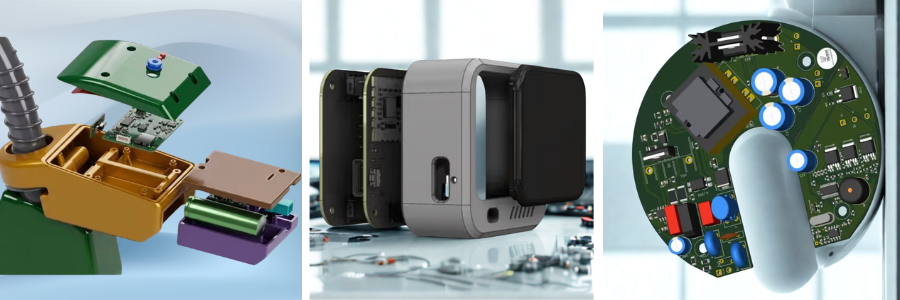
When people take apart devices like smartwatches, fitness trackers, or smart thermostats, they usually notice two main components inside. The first is the PCB, which controls the electronic functions and processing of the device. The second is the enclosure that holds and protects those internal parts. Companies help businesses develop custom electronics enclosures that are designed specifically for their PCB layouts, product requirements, and manufacturing goals.
A well-designed enclosure does much more than simply cover the electronics. It helps protect sensitive components from dust, moisture, impact, and overheating. It also improves usability and plays a major role in how the final product looks and feels to customers. Through its network of experienced CAD designers and engineers, supports startups, manufacturers, and technology companies with custom enclosure design services for a wide range of PCB-based products. Cad Crowd connects startups, manufacturers, inventors, and technology companies with specialized enclosure design experts who create custom housing solutions for a wide range of PCB-based products, from consumer electronics to industrial equipment.
For many electronics products, enclosure design becomes one of the most important stages of development. The housing needs to match the PCB layout accurately while also supporting airflow, durability, manufacturing requirements, and overall product design. Even small issues with spacing, materials, or thermal management can create problems later during testing or production.
Designing a PCB can take weeks or even months of development, testing, and refinement. Every component, circuit trace, and connection is carefully planned to support the performance of the final product. However, one important part of product development that is often overlooked is the enclosure that will house those electronics.
While off-the-shelf enclosures may seem convenient during the early stages of development, they are rarely designed to fit a specific PCB layout or product requirement. Companies often encounter issues such as misaligned ports, restricted airflow, poor cable management, weak durability, or limited internal space. In some cases, generic electronics enclosures can interfere with antennas, trap excess heat, or make the final product appear less polished.
This is where custom enclosure design becomes valuable. A custom electronics enclosure is designed specifically around the PCB and the intended function of the device. Whether the product is a wearable device, industrial sensor, medical instrument, or IoT system, the enclosure should support both performance and long-term reliability. A properly designed enclosure does more than protect electronics.
It can improve airflow and thermal management, simplify assembly and maintenance, support waterproofing requirements, and reduce stress on internal components. Custom enclosure design also allows products to be optimized for different manufacturing processes, including 3D printing, CNC machining, sheet metal fabrication, and injection molding process.
In addition to functionality, enclosure design also affects the appearance and usability of electronics product. The shape, materials, surface finish, and overall construction all influence how users interact with the device and how the product is perceived in the market. Investing in a custom enclosure helps companies create electronics products that are more reliable, easier to manufacture, and better suited for real-world use.
Cad Crowd: your custom enclosure design dream team
Custom enclosure design is one of those things people often think is simple until they actually need to do it. If you are not a mechanical engineer, or your team is already busy with other tasks, turning an idea into a proper manufacturable enclosure can get overwhelming pretty quickly.
That is where Cad Crowd comes in. It is not just a freelance platform. It works more like a curated network that connects you with experienced CAD professionals who actually focus on custom enclosure design instead of general 3D modeling. Whether you are a startup building your first prototype or a company refining a product for production, Cad Crowd helps you find designers who understand what a real enclosure needs. This includes PCB housing, electronics casing, and full industrial product design.
What makes it useful is that you are not just hiring someone to draw a basic shape. You are working with designers who think about real engineering details like heat management, durability, waterproofing, internal spacing, and how the product will be manufactured later on. If your enclosure needs injection molding, CNC machining, 3D printing, or materials like aluminum, plastic, or sheet metal, you can find someone who already has experience with that. If your product is customer facing, they also know how to balance functionality with a clean and professional look.
Another helpful part is how guided the process feels. You do not have to figure everything out alone. You get support in defining the project, choosing the right designer, and making sure the design is ready for manufacturing from the start. This helps reduce mistakes and saves time later on.
At the end of the day, custom enclosure design is not just about creating a shell for components. It is about making sure your product works properly, can be manufactured efficiently, and still looks good. With Cad Crowd, you are working with specialists who understand that balance and can help bring your idea from concept to production in a smoother way.
Custom enclosures: engineering meets storytelling
A product enclosure often gets treated like it is just a simple shell. Something that holds the electronics and keeps everything safe. But in reality, it plays a much bigger role than that. In a market where people form opinions in seconds, the enclosure can actually shape how a product is perceived before it is even turned on.
Think about the first time you hold something like an Apple device. You notice the smooth finish, the clean edges, the way everything feels intentional. Nothing feels random. That is not accidental at all. Those small details quietly signal quality and care, even before you use the device. That is what thoughtful enclosure design does. It communicates something without saying a word.
Not every company has that kind of design budget, but the idea still applies. A good enclosure can make a product feel more trustworthy, more refined, and more complete. It sets the tone for the entire experience.
This is why custom enclosure design is not just a technical step in development. It is more of a collaboration between engineering and design. Professional electrical engineers, industrial designers, and enclosure specialists working together to make sure the product does not just function properly, but also feels right in the hand and fits the brand it represents.
When it is done well, the enclosure stops being just a cover. It becomes part of the product’s identity. Something users notice even if they cannot always explain why. So instead of thinking of the enclosure as the final step, it helps to treat it as part of the first impression. Because for most users, it literally is the first real interaction they will have with your product.
The real-world benefits of custom enclosures
When people talk about bringing an electronics product to market, the focus usually goes to processors, sensors, or PCB design, while the enclosure is often treated as just the outer shell. In reality, custom enclosures do much more than “house” electronics. They directly affect how a product performs, how well it holds up in real-world conditions, and how professional it feels when someone actually uses it.
A well-designed enclosure protects sensitive components from dust, moisture, heat, and impact, while also helping everything fit and function properly inside the device. It can also make manufacturing smoother by simplifying assembly and reducing issues when scaling from prototype to production. This is why companies often work with specialists, and platforms like Cad Crowd are trusted to connect businesses with experienced enclosure design professionals who understand both engineering and real-world product development.
Keeping electronics safe in the harshest environments
Whether it is a rugged IoT device deployed in a dusty warehouse, a medical scanner handled daily by gloved technicians, or a sensor box mounted on a windy construction site, electronics go through a lot in real-world conditions. Printed circuit boards (PCBs) are sensitive by nature, and without a properly designed enclosure, they are exposed to moisture, dust, impact, and everyday wear.
This is where custom enclosures really prove their value. Designers can add features like shock-absorbing ribs, watertight gasket grooves, and reinforced mounting points, all based on how the product will actually be used. It is not a one-size-fits-all solution. It is targeted protection built for durability and long-term reliability.
Heat management that keeps products performing
High-performance electronics all have one thing in common, they generate heat. If that heat is not managed properly, it can lead to reduced performance, sudden shutdowns, or even permanent damage. In many cases, enclosure design becomes one of the most important factors in keeping things stable.
Engineers design enclosures that support airflow, integrate heat sinks, or use thermally conductive materials and pads. Some designs even help move heat away from sensitive components through the enclosure walls themselves. A well-designed enclosure can be the difference between a product that performs reliably and one that fails under pressure.
In a highly connected world, electromagnetic interference (EMI) is more than just a minor issue. It can disrupt performance or even cause devices to fail compliance testing. Poor shielding or grounding can turn a device into an unintended source of interference.
Smart enclosure designers account for this from the start. Shielding layers, conductive coatings, and properly designed grounding paths are built into the structure of the enclosure itself. The result is a product that behaves consistently and passes important regulatory tests without surprises.
Supporting certification and compliance goals
Custom enclosures are also essential when it comes to meeting certification requirements. Standards like FCC, CE, UL, and IP ratings are often mandatory before a product can be released commercially.
Material selection, wall thickness, sealing methods, and even finishing details can all affect whether a product passes these tests. Off-the-shelf enclosures usually fall short here. A purpose-built custom enclosure is what helps a product meet regulatory requirements with confidence.
Streamlining the manufacturing process
One thing people often overlook is that the enclosure is usually one of the most complex physical parts of a device to manufacture. Whether it is injection molding, 3D printing, or CNC machining, every method requires careful design decisions. Good enclosure design includes details like draft angles for clean mold release, internal ribs for strength without extra weight, and properly placed bosses for screws and PCB mounting. These details may seem small, but they make manufacturing smoother and more cost-effective at scale.
All of this requires more than basic CAD skills. It takes designers who understand thermal behavior, compliance standards, and real-world product use. That is where Cad Crowd comes in. Their global network includes experienced enclosure design professionals who are matched to your specific project, whether you are prototyping a wearable device or scaling an industrial controller for production. They focus not just on how a product looks, but on how it performs, passes certification, and succeeds in manufacturing.
In the end, a custom enclosure is more than just a protective shell. It acts as a thermal manager, a compliance enabler, and a manufacturing tool all in one. With Cad Crowd, you are not just enclosing electronics, you are setting them up for real-world success.
How the custom enclosure design process works
Designing a custom enclosure is not just about placing electronics inside a plastic case. There is a structured process behind every well-fitting, functional, and production-ready design. If you have never worked with a custom enclosure design company before, the process is actually more detailed and collaborative than most people expect.
Here is how it typically unfolds, and how a platform like Cad Crowd helps make it more efficient from start to finish.
Phase 1: diving deep into your electronics
Everything starts with the electronics themselves. Before any modeling begins, the designer studies your PCB layout, component placement, and overall system requirements. This includes ports, buttons, vents, mounting points, and display cutouts.
This stage is highly collaborative. The enclosure designer works closely with electrical engineers to make sure everything fits correctly and functions properly. Even small details like connector positions orLED placement matter. If this step is rushed, the final enclosure may not fit or could cause performance issues.
Once the technical details are clear, the enclosure starts to take shape in 3D CAD. This is where the idea becomes a real design.
At this stage, both function and form are considered. Designers think about internal spacing, ergonomics, branding, and overall product feel. They also decide on materials like ABS plastic or aluminum, along with wall thickness, fastening methods, and assembly approach. It is a mix of engineering logic and industrial design thinking, and it is a very important stage in the process.
Phase 3: bringing the design to life
After the CAD model is ready, it is time to test it in the real world. Prototypes are created using 3D printing orCNC machining.
This step is not just about appearance. It is about function. Does everything fit properly? Can it be assembled easily? Do buttons feel right? Are tolerances accurate enough for manufacturing? These tests often reveal improvements that are made before moving forward.
The CAD model is adjusted to match the chosen production method, whether that is injection molding, die casting, machining, or low-volume additive manufacturing. Features like draft angles, wall thickness, and structural supports are optimized to make production smooth and reliable.
Even after the design is finalized, many enclosure designers continue supporting the production phase. This can include helping with manufacturers, preparing technical drawings, or working with mold tool designers.
With Cad Crowd, you gain access to vetted enclosure design professionals who guide you through every stage. From early sketches to production-ready files, the process stays flexible and focused on getting your product to market without unnecessary delays or overhead. So when you are building your next electronic product, the enclosure is not just a final step. It is a critical part of the entire journey.
Startups and big players: who is actually using custom enclosure designers?
Custom enclosure design is not limited to large corporations. In fact, many startups get some of the most value out of it because they need to move fast and make every design decision count. At Cad Crowd, clients range from solo inventors working on early prototypes to large companies refining mass-market electronics. Startups often use custom enclosure design for rapid prototyping and fast iteration, especially when working with3D printingand early product testing.
Mid-sized companies usually rely on Cad Crowd as an extension of their engineering teams. When deadlines are tight or specialized expertise is needed, external designers help keep projects moving without slowing down internal workflows. Larger companies often bring in enclosure specialists for more advanced challenges, such as thermal optimization, waterproofing, or redesigning enclosures for new internal hardware. What connects all of these groups is flexibility. There are no long hiring processes or long-term commitments. Just access to experienced designers who can support projects from idea to production.
Not every enclosure is plastic, and the material chosen has big implications for durability, aesthetics, cost, and manufacturing.
Some of the most common choices include:
ABS/Polycarbonate Plastics – Great for consumer electronics, easy to mold, also impact-resistant.
Aluminum – Ideal for heat dissipation and rugged devices; often CNC machined or die cast.
Sheet Metal – Cost-effective for industrial enclosures, especially in low to mid volumes.
3D-Printed Resins or Nylons – Perfect for prototyping or low-volume runs.
Silicone or Rubber Overmolds – Used for grips, buttons, or waterproofing features.
A skilled enclosure designer doesn’t just make the part fit, they understand what materials are best suited to the form and function of your product. With Cad Crowd, you can specify your material needs upfront and be matched with someone experienced in that medium.
Custom enclosure design costs can vary quite a bit depending on the product, materials, and manufacturing requirements. A simple enclosure for an early prototype may only cost a few thousand dollars to design, while a production-ready enclosure often requires additional work such as CAD modeling, thermal analysis, prototyping, and manufacturing preparation. The table below provides a general idea of what companies can expect to invest when developing custom electronics enclosures for PCB-based products.
Mounting features, port alignment, internal clearances
Thermal analysis
$1,500 – $10,000
Airflow studies and heat management optimization
Waterproof design
$2,000 – $15,000
Gaskets, seals, and IP-rated enclosure development
Manufacturing documentation
$500 – $5,000
Technical drawings, assembly details, production files
Full enclosure development
$5,000 – $50,000+
Complete design process from concept to production
Rapid prototyping: when speed matters
Let’s be honest, time-to-market can make or break a product. Whether you are trying to stay ahead of competitors or preparing for a big demo at CES, moving fast without sacrificing quality really matters. Custom enclosure designers working through Cad Crowd are used to this kind of pace. They work with rapid prototyping workflows and can prepare files optimized for SLA, SLS, FDM, or CNC manufacturing. In some cases, you can get physical prototypes in just a few days.
These prototypes are not just for show. They let you hold the design, test it in real conditions, share it with investors, and make improvements early. Because many Cad Crowd designers come from real product development backgrounds, they also think ahead about manufacturability, not just how the model looks on screen.
The bonus: IP protection and confidentiality
One thing that often holds companies back from outsourcing design work is intellectual property protection. That concern is valid, especially when you are working on something new.
Cad Crowd addresses this by requiring freelancers to sign non-disclosure agreements and offering options for fully confidential projects. This means your ideas, product details, and branding stay protected throughout the process, just as they would with an in-house team.
Future-proofing your product with modularity
Another growing trend in custom enclosure design is modularity. Instead of building a fixed, one-time-use design, more products are being created with flexibility in mind.
Custom enclosure designers can integrate features such as swappable backplates for sensors or batteries, snap-fit systems for easier servicing, and modular compartments for future upgrades or accessories. This kind of design thinking helps extend the lifespan of a product and makes it easier to evolve over time.
It can be tempting to design an enclosure in-house using basic CAD tools or off-the-shelf templates, especially in the early stages. For simple mockups, that approach can work fine. But when you are building a real product that needs to perform well, look professional, and be ready for manufacturing, templates are usually not enough. You need someone who understands how to translate a PCB layout and product vision into a proper enclosure that works in the real world.
That is where Cad Crowd helps. It connects you with experienced enclosure design professionals who already understand the challenges of turning concepts into production-ready products, helping reduce guesswork and avoid costly redesigns later on.
Wrapping it all up: from circuit to shelf
At the end of the day, custom enclosure design is not just packaging. It is the part that quietly turns an idea into something real. You can have a great circuit board, great components, great everything, but until it has a proper enclosure, it does not really feel like a product yet. That final shell is what people actually touch, hold, and judge first.
And honestly, this is where things can either go really well or fall apart. When enclosure design is done right, everything just feels solid. The product fits together properly, it looks intentional, and it works in real conditions without constant issues. With Cad Crowd, you are working with designers who have done this kind of thing before, so you are not starting from scratch or guessing your way through it.
A good product should not feel like it was rushed into whatever box was available. It should feel like someone actually thought about how it would be used in real life. A proper custom enclosure helps with that in a big way. It protects the electronics, improves usability, and honestly just makes the whole thing feel finished. That is really the point of Cad Crowd. Helping turn early ideas into something that feels real, works properly, and is ready to go out into the world without feeling half done. Contact us now for a free quote!
MacKenzie Brown is the founder and CEO of Cad Crowd. With over 18 years of experience in launching and scaling platforms specializing in CAD services, product design, manufacturing, hardware, and software development, MacKenzie is a recognized authority in the engineering industry. Under his leadership, Cad Crowd serves esteemed clients like NASA, JPL, the U.S. Navy, and Fortune 500 companies, empowering innovators with access to high-quality design and engineering talent.
Google’s best Pixel is getting an upgrade in 2026. The Pixel 11 Pro XL is said to feature a faster, much more power-efficient processor, a cool LED ring around the back camera island, better gaming support, and plenty of surprises when it debuts on August 12.
Pros
New Pixel Glow feature
Updated Vulkan support should mean better gaming performance
Battery life should be notably improved
Pixelsnap MagSafe magnet support
Potential camera upgrades
Should have the same great accessory support
Cons
Likely still underperforms vs Qualcomm chipsets
Low PWM rate
Pixels have a history of being buggy
Last year’s best Pixel
The Pixel 10 Pro XL looks a whole lot like the Pixel 11 Pro XL, and that’s a particularly great thing in a year when smartphones are getting more expensive. Buying a year-old phone is always a great budget option, and this may be the best year yet for that tactic.
Pros
Pixelsnap Qi2 implementation is brilliant
A host of unique Google Pixel apps and services
Many AI features are processed on-device
Excellent accessory ecosystem (first and third party)
Notably improved gaming performance vs Pixel 6-9
Cons
eSIM-only in the U.S.
Forced battery throttling at 200 cycles
Doesn’t support the latest version of Vulkan
Performance is less than half of Qualcomm’s at times
PWM rate is still bad
The Google Pixel 11 family is right around the corner, and that means now is a great time to start considering whether you’re going to upgrade to this year’s phone, or save money and grab last year’s best with a solid deal (or a second-hand offer).
In a year with rapidly rising technology prices, 2026 might be the best year ever to consider buying last year’s phone, especially with the rumor that Google isn’t giving the Pixel 11 Pro XL a massive overhaul. If you’re choosing between the Pixel 11 Pro XL and Pixel 10 Pro XL, or are considering upgrading year-over-year, here’s everything you need to know!
Google Pixel 11 Pro XL vs. Pixel 10 Pro XL: Design and display
(Image credit: Google Store)
The Pixel 10 Pro XL and Pixel 11 Pro XL will likely look identical at a glance, but at least one key change will catch your eye and make you at least a tiny bit jealous. I’m talking about Pixel Glow, a new type of LED that appears on the Pixel 11’s camera bar, seemingly as part of the camera flash unit.
Latest Videos From
Google may be taking a page from Nothing with this new initiative, likely offering ways to light up the camera bar whenever you receive notifications, talk to Gemini, or interact with specific apps or features on your Pixel 11.
Image 1 of 4
(Image credit: Nicholas Sutrich / Android Central)
(Image credit: Nicholas Sutrich / Android Central)
(Image credit: Nicholas Sutrich / Android Central)
(Image credit: Nicholas Sutrich / Android Central)
I’ve already received Pixel 11 cases from Thinborne, one of Android Central’s favorite case manufacturers, and the changes seen here showcase what we can expect from Pixel Glow. That lip around the camera island is where the subtle LED glow should emit from, and it’s going to give Pixel 11 a unique look among all smartphones.
Elsewhere, we see subtle changes in microphone placement and a slight downward shift of the power and volume buttons on the Pixel 11.
Image 1 of 5
(Image credit: Nicholas Sutrich / Android Central)
(Image credit: Nicholas Sutrich / Android Central)
(Image credit: Nicholas Sutrich / Android Central)
(Image credit: Nicholas Sutrich / Android Central)
(Image credit: Nicholas Sutrich / Android Central)
We expect the Pixel 11 Pro XL to feature the same built-in MagSafe-compatible Pixelsnap magnets, so you won’t need a case to use the best MagSafe accessories for Android phones.
Get the latest news from Android Central, your trusted companion in the world of Android
Based on rumors, we’re not expecting any major changes to the Pixel 11 Pro XL’s display, although it may receive a slight peak brightness bump as Pixels have in the past. Google has been good about introducing new display accessibility features, like Comfort Filters and last year’s “sensitive eyes” feature, so I’m hoping to be pleasantly surprised by the PWM dimming rate at the August 12 event.
Google Pixel 11 Pro XL vs. Pixel 10 Pro XL: Battery life, performance, and specs
(Image credit: Nicholas Sutrich / Android Central)
All signs point to the Pixel 11 Pro XL being the most efficient phone in Pixel history. The more efficient Tensor G6 and the new MediaTek modem inside the Pixel 11 Pro XL are said to bring a 20-30% improvement in efficiency. This, plus a slight improvement in battery capacity, should be a great upgrade over any previous Pixel phone.
The Tensor G6 processor expected to power the Pixel 11 Pro XL should be manufactured on a 2nm process, resulting in performance gains of around 15% in daily use. Google is also said to be using a newer PowerVR GPU that’s compatible with Vulkan 1.4, so mobile games will look and run better than on the Pixel 10 Pro XL.
Swipe to scroll horizontally
Category
Google Pixel 11 Pro XL (rumored)
Google Pixel 10 Pro XL
Display
6.8-inch Super Actua QHD+ OLED, 120Hz
6.8-inch Super Actua QHD+ OLED, 120Hz
OS
Android 17
Android 16 (upgradable to Android 17)
Processor
Tensor G6
Tensor G5
RAM
12GB / 16GB
12GB / 16GB
Storage
256GB / 512GB / 1TB
256GB / 512GB / 1TB
Rear Camera 1
50 MP, f/1.7, 25mm (wide)
50 MP, f/1.7, 25mm (wide)
Rear Camera 2
48 MP, f/1.7 (ultrawide)
48 MP, f/1.7 (ultrawide)
Rear Camera 3
48 MP, f/2.8, 5x (periscope telephoto)
48 MP, f/2.8, 5x (periscope telephoto)
Front Camera
42 MP, f/2.2
42 MP, f/2.2
Ingress Protection
IP68
IP68
Connectivity
5G (sub-6GHz, mmWave), Wi-Fi 7, UWB, Bluetooth 6.0, eSIM only (in U.S.)
5G (sub-6GHz, mmWave), Wi-Fi 7, UWB, Bluetooth 6.0, eSIM only (in U.S.)
Battery
5,000mAh
4,870mAh
Charging
45W wired, 25W wireless Qi2
45W wired, 25W wireless Qi2
Dimensions
162.8 x 76.6 x 8.5 mm
162.8 x 76.6 x 8.5 mm
Weight
TBA
232 grams
Google Pixel 11 Pro XL vs. Pixel 10 Pro XL: Camera and software
(Image credit: Nicholas Sutrich / Android Central)
Despite some awesome new features, I was largely unimpressed with the Pixel 10 Pro XL’s camera last year. While it still did a great job of capturing objects in motion (like kids and pets), I found the telephoto camera strangely unreliable.
Hopefully, Google fixes these problems in the Pixel 11 Pro XL and gets back to that top-tier Pixel camera experience. Google still needs to work on its video recording quality, which was substantially improved with the Pixel 10 Pro XL, but continues to lag behind rivals like Apple and Samsung.
(Image credit: Nicholas Sutrich / Android Central)
I fully expect the Pixel 11 Pro XL to launch with some exclusive features, but Google is usually good about bringing those features to older Pixel phones after some time. So while Pixel 10 Pro XL users may have to wait to get any fancy new features announced in August, it’s almost certain they won’t miss out.
Google Pixel 11 Pro XL vs. Pixel 10 Pro XL: Which should you buy?
(Image credit: Nicholas Sutrich / Android Central)
I’m going to hedge my bets and say the Pixel 10 Pro XL will be a better buy given the price increases we’re seeing on this year’s new smartphones. Undoubtedly, the Pixel 11 Pro XL’s new processor, GPU, larger battery, and fancy new lights on the back will be great reasons to upgrade, but I’m not sure they’ll make the gulf in price worthwhile for most people.
The past few weeks have been nonstop leak after leak for Samsung’s next foldables. We’re expecting there to be three new models. The main upgrade across the foldables should be Samsung’s Flex Titanium technology, which both strengthens the durability of the screens and reduces the visibility of the crease on the inner screen.
The new Galaxy Z Flip 8 should be the successor to last year’s Z Flip 7. WinFuture has shared product images and what it claims are full details for the new flip-style foldable. While I was hoping for a thinner device, it looks like the Z Flip 8 will be marginally thicker, though it should be lighter at 180g versus the Z Flip 7’s 188g. Otherwise, we’re looking at more or less the same features, but with a newer Exynos 2600 chip. According to WinFuture, the Z Flip 8 will have a 6.9-inch Dynamic AMOLED 2X inner screen with 120Hz refresh rate, a 4.1-inch Super AMOLED cover screen, three cameras (a 50-megapixel main and a 12-megapixel ultrawide on the outside and a 10-megapixel selfie lens on the inside), the same 4,300mAh battery as before but now with faster 45W charging, and storage options of 256GB or 512GB paired with 12GB of RAM.
The middle foldable is expected to be the new shorter and wider Galaxy Z Fold 8. This is supposed to be Samsung’s answer to Apple’s upcoming foldable iPhone. We’ve been staring at leaked images of the Z Fold 8 for weeks, but now we have full specs, also hailing from WinFuture. When unfolded, the Z Fold 8 is said to measure 4.5mm thick, and the whole thing weighs 201g. The report says the Z Fold 8 has a 7.6-inch inner Dynamic AMOLED 2X screen with 120Hz, a 5.5-inch cover screen, dual rear cameras (both 50 megapixels), and two 10-megapixel hole-punch cameras (one on the cover display and one on the inner screen). It should be powered by a Qualcomm Snapdragon 8 Elite Gen 5 for Galaxy and have options for 256GB of storage (with 12GB of RAM) or 512GB and 1TB (with 16GB of RAM). Battery capacity is said to clock in at 4,800mAh, which would be pretty respectable.
On the high-end, we’re expecting to see the Galaxy Z Fold 8 Ultra. As its name suggests, it’s projected to have the better cameras (200-megapixel main camera, 50-megapixel ultrawide, and 10-megapixel 3x telephoto) and longer battery life (5,000mAh). WinFuture’s leak claims the foldable will slim down by 1mm (from 4.2mm to 4.1mm), but gain 3g (from 215g to 218g). The screen aspect ratios will match the Z Fold 7’s closely, with an 8-inch inner screen and 6.5-inch cover screen, both with 120Hz refresh rates. Chipset, storage, and RAM configurations appear to be the same as the Z Fold 8.
On the Samsung smartwatches front, we should be looking at two new models: the Galaxy Watch Ultra 2 and the Galaxy Watch 9. They’re both said to be thinner and lighter than before and use Qualcomm’s latest Snapdragon Wear Elite chip with 2GB of RAM, according to WinFuture.
The Galaxy Watch Ultra 2 will reportedly have an 800mAh battery, which would be a significant jump up from the 590mAh one in the first-gen Watch Ultra. Leaked specs include a titanium case with 10ATM water resistance, a 1.5-inch screen, Bluetooth 6.0, NFC, and LTE.
The Galaxy Watch 9 is expected to come in two sizes again: 40mm with a 1.3-inch screen and 44mm with a 1.5-inch display. Compared to the Galaxy Watch Ultra 2, the water resistance for the Galaxy Watch 9 could be lower at 5ATM. Battery life improvements could be more minimal year-over-year, too: the same 325mAh on the smaller model and a 445mAh for the larger version (a 100mAh bump up from the Galaxy Watch 8’s 435mAh).
It appears Samsung won’t have a new version of the Galaxy Watch 8 Classic, which returned last year with a physical rotating bezel. Maybe the bulkier smartwatch wasn’t popular at all.
More Galaxy AI
One thing that I am certain that Samsung will announce more of is additions to Galaxy AI, its own suite of artificial intelligence features. Whether it’s features from the Galaxy S26 Ultra being brought to the new foldable phones or smartwatches, Samsung has used every Unpacked in recent years to squeeze AI into its apps. It wouldn’t surprise me to see more predictive AI, automations using agentic AI, and generative AI for photo editing. Whether you’ll find them useful is a different question.
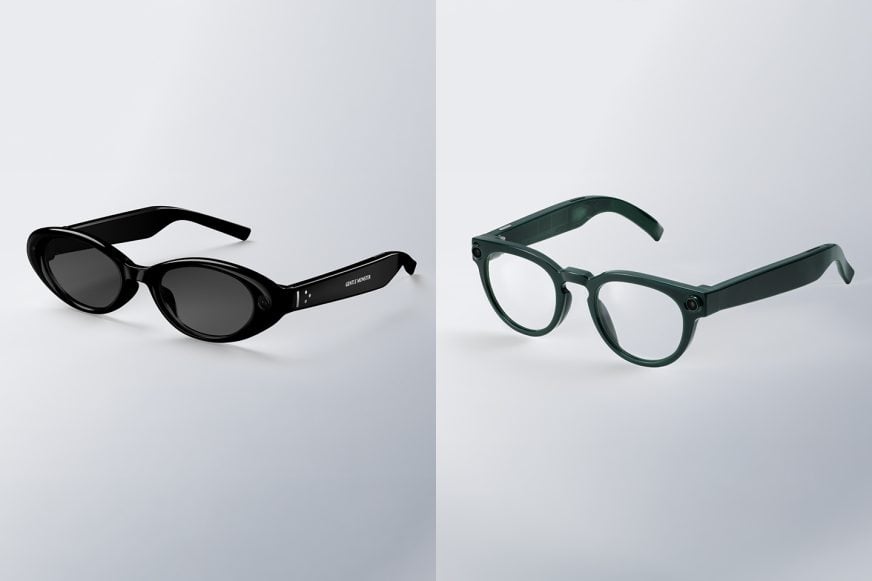
It’s a big year for smart glasses, and Samsung has been very tight-lipped about its plans. Other than a partnership with Google that announced “intelligent eyewear” created with Gentle Monster and Warby Parker at Google I/O this past May, there’s been little additional info. We know that both models have built-in cameras for photos and videos and speakers for music, calls, and audio notifications, which sounds exactly like Meta’s AI glasses. But how much will they cost and what kind of privacy policies will be in place? We have no clue. The latter is especially important considering how Meta keeps making it feel gross to wear any of its smart glasses.
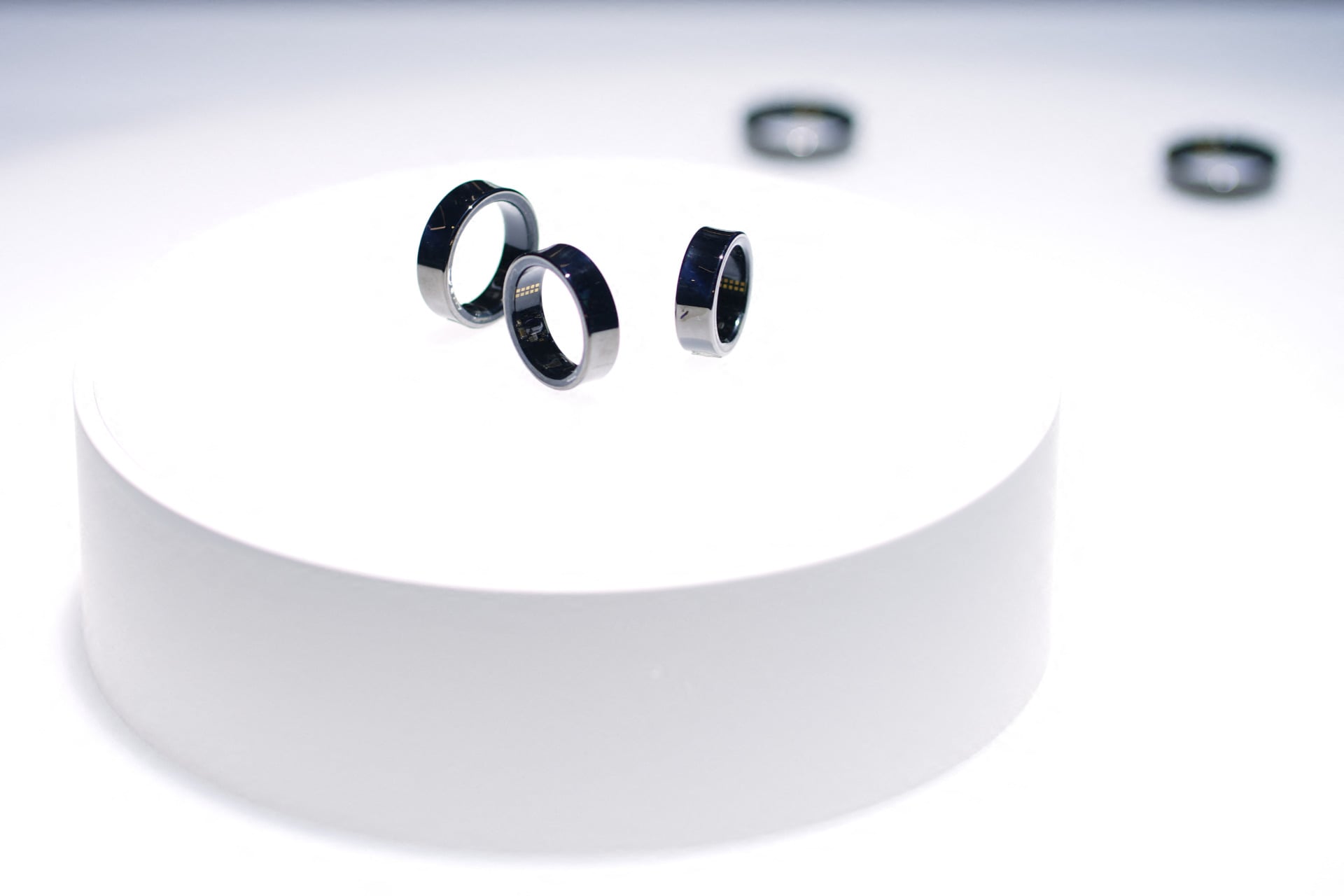
Then, there’s the smart ring. Might we get a tease for a Galaxy Ring 2? It’s been two years since the Galaxy Ring came out. Oura now has a slimmer and longer-lasting Oura Ring 5 and Vital Signals’ Signal Ring could be a game-changer, replacing traditional blood pressure cuffs. What’s next for Samsung’s smart ring?
The latter resulted in Bleszinski being hospitalised in March this year, in the aftermath of which he gave up drinking. It’s been during his sobriety that Bleszinski says he rediscovered his love for games—and the desire to make them:
“At the end of the day, I want to create characters and worlds,” Bleszinski explained to journalist Brian Crecente. “I want to make stuff that people will cosplay and get tattooed on their bodies.”
Bleszinski has already returned to game development in an advisory role—having consulted on a horror game called Soul Walker. This experience appears to have been positive for him, as he’s now pondering a full-time comeback. “So maybe I’ll eventually get my full foot back in the business and hopefully not get pushed into the pool.”
Bleszinski didn’t go into detail about what kind of game he wants to make during the interview. But he did discuss what he won’t be making, namely PvP multiplayer games like those created by Boss Key:
Keep up to date with the most important stories and the best deals, as picked by the PC Gamer team.
“Good luck to anyone in that space,” he said. “I’m more of a fan of PvE these days. Horde mode saved Gears 2, and I believe that space is evergreen because players just want to hop online with friends and shoot some stuff, no frills, no questions asked.”
Nonetheless, it seems like Bleszinski has an idea he wants to pursue, even if he didn’t vocalise it. “I’m nowhere near sharing anything specific (about a new game), beyond that, I can’t walk into a Home Depot without seeing a full arsenal at every turn,” he said, adding that “There’s so much more than just chainsaws.”
PvP or not, I’d certainly be up for playing a new Bleszinski-led game. While LawBreakers failed to find an audience, as a multiplayer shooter it was thoroughly entertaining. Radical Heights had promise too, though it never got a chance to develop into something substantial.
Of course, I’d be most interested in a spiritual successor to Gears. That space has been left fallow for a long time, and Pragmata recently showed there’s a big appetite for that style of game. But all of this is contingent on whether Bleszinski actually comes back, which isn’t guaranteed. In 2020, Bleszinski said he felt an urge to make “a little game”. But for whatever reason that didn’t transpire, at least not publicly.