I’ve got the perfect Valentine’s Day craft you can make at home with your family this year!!!
Keep reading to find out how to make this cute DIY Valentine’s Day craft with a free printable!
Cute DIY Valentine’s Day Craft Tutorial With Printable
I am so excited about this fun DIY project! This is such a fun opportunity to spend Valentine’s Day as a family with this super cute and crafty idea. 🙂
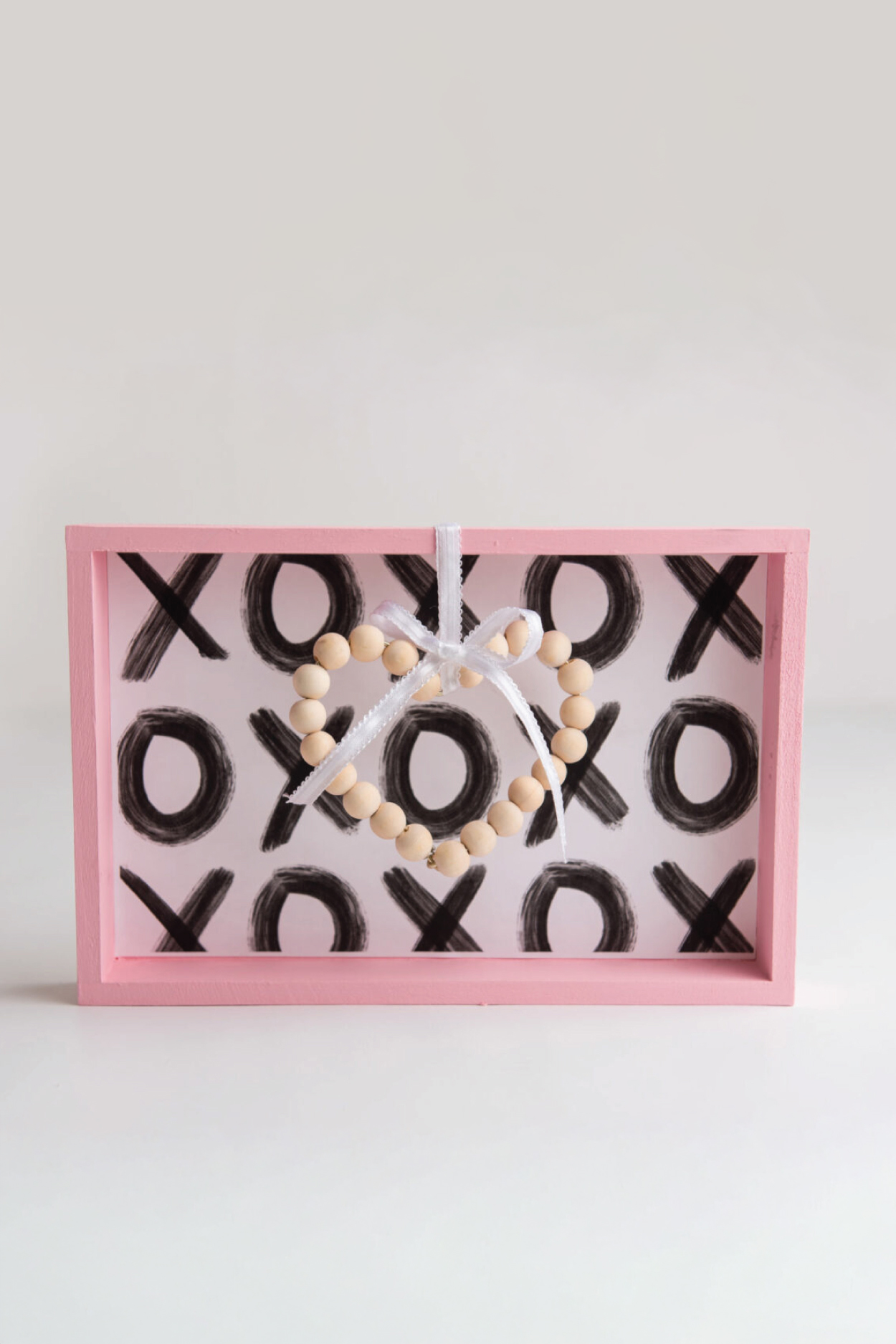
Valentine’s Day is all about love and what is more loving than making a beautiful homemade gift? The sweet colors and simple wooden hearts are such nice touches. I’ve even included a free hand painted printable (XO background) that can be used for tons of other things as well.
I also love how easy this was to make! Valentine’s Day crafts for kids (and for adults) doesn’t need to be difficult! I’ve got everything you need written below and don’t worry, I’m here to walk you through each and every step. 🙂
WHAT YOU WILL NEED FOR THIS DIY VALENTINE’S DAY CRAFT:
Unfinished wood shadow box (from Michaels about 12”x 7.5”)
Light pink chalk paint
Paint brush
Floral wire
Unfinished round 5/8 wood beads
Plain white card stock (with design download)
Mod podge
Glue gun
Ribbon of choice
Needle nose pliers
Step 1:
Begin to paint the edge, inner edges and inside of the wood box. Will most likely need 2-3 coats.
Step 2:
Once dry, print out the hand painted “XOXO” design on white card stock (this will go inside of the box).
In order for it to print properly, you’ll want to go to your printers custom settings. Choose print at 100% and choose custom paper dimension to 11.25” wide and 7.178” height. These will be the dimensions inside the box not counting the frame.
Step 3:
After the design is printed, trim off any excess and add a layer of mod podge to the inside backing of the shadow box.
Place the printed card stock design inside (should be a pretty perfect fit) and apply pressure while allowing it to dry.
Step 4:
With the floral wire, begin to create a heart shape. Use a cup or something round to help create and mold the top, rounded part of the heart.
Use needle nose pliers or wire pliers with a wire cutter and cut it from the spool. Be careful the wire may be sharp where cut.
Step 5:
Before closing the heart up, begin adding the beads to the wire heart on both sides (beads won’t make it around the dip in the top of the heart without ruining the shape.
Once enough beads are covering the wire, leave enough space at the bottom to be able to close off the heart by twisting and pinching the two ends together with the pliers
Step 6:
Attach a ribbon to the middle of the heart with hot glue and up and over the back of the box to give it that 3D hanging effect.
Fun Ways To Use This DIY Valentine’s Craft:
Here are a few great ideas on how to put these adorable Valentine’s Day craft ideas to good use ❤…
Use As Home Decor
I’m ALL for home decor (can’t you tell I LOVE designing 😉 ) and lately I’ve started decorating for each holiday! It is such a subtle and chic way to decorate your home, without being too much! Plus it’s super fun for the kids to see our home decorated for the holidays.
The fact that this is a shadow box means it can be placed on ANY surface in your home. Fireplace mantles, kitchen islands, office desks, just to name a few places!
If you are a big decorator like me, then I would suggest making your Valentine’s Day crafts before the month of February even starts. That way you can leave this up the whole month until you’re ready for your St. Patrick’s Day decor. 🙂
Give As Cute V-Day Homemade Gifts
These would make perfect gifts for your friends, family, or kids!! You can make a few of these to give to family and friends on Valentine’s Day or even give as Christmas gifts. Then they will be ready to bring these out a few weeks later to celebrate the holiday. 🙂
Your kids (especially young girls) will adore this beautiful gift and love the fact that you made it! You can also use this as a fun time to craft these WITH them and wrap them up to give to others.
I always appreciate receiving homemade gifts – you can tell SO much thought went into it and it’s something that can actually be used. No matter who you are gifting this cute decoration to, they will love and appreciate it so much!
This super chic and stylish craft will make the perfect accessory to yours (and others!) Valentine’s Day this year and many more to come! 🙂
What sets your printables apart?
• Other printables are either functional OR cute. I bridge the gap between the two. Since I’m a single mom and don’t have time to mess around and am a kid at heart, I love something that actually propels me forward and gets the job done quickly, while still having that super cute vibe I’m known for. • I’m a graphic designer FIRST. This means my printables, whether free or paid for, will always be of the highest quality and print crisp and clear on any printer. • I love what I do and I do the work myself. I’m not hiring these out. This is my life, my hobby, my passion, my heart. • My fans are obsessed with my work. To date, I’ve made over $23M on printables alone (organically) in the past 8 years.
Is this printable free to download?
Yes! Except for some large binders, all printables on the blog are 100% free for personal use. I make these because I genuinely want you to have something cute and helpful right now without having to spend a dime. You deserve a life that feels more peaceful, more organized, and more you, and if a simple printable can make your day feel lighter, I am so happy to give that to you.
All printables are for personal use only.
Printables, graphics, backgrounds, SVGs, fonts, and design elements on this site are for personal use only. You may not alter them or redistribute them for free or monetary gain without written consent from the author, Sarah Titus. If you want to share these resources with others, please share the link to the blog post. Teachers & Churches: You may share these with your classes, colleagues, and congregation as long as they are not edited in any way.
Can I use these printables for my classroom or church group?
Absolutely! You’re welcome to print as many copies as you need for your own students or church groups. I only ask that you do not edit them in any way (leaving the full copyright line in tact) or sell them or host the digital files on other websites. Please always link back to this post to share with others.
What’s the best way to print these high-quality printables?
• For best results, I recommend using standard 8.5″x11″ white paper. Since these are professionally designed as high-resolution PDFs, they’ll stay crisp and clear on any printer. To print, simply download the PDF to your device and open your printer settings. Select “Fit to Page” to ensure the printable looks perfect. • If you’re printing stickers, I have a tutorial here.
Google just announced that Gemini users can now connect the chatbot to their bank accounts via integration with Google Wallet. This is not a shopping platform in which chatbots buy stuff on command, like Meta Muse. Rather, it’s being pitched as a way for users to “get more tailored responses around personal finance.”
Once connected, folks can ask the chatbot questions about their accounts. This could, in theory, help save money by finding unnecessary subscriptions and the like. Google gives an example of the chatbot sussing out a price increase for a particular subscription. This information could already be gleaned by just looking at a bank statement or two, but where would be the fun in that?
Personal Intelligence in Gemini securely connects information from apps you already use to make your experience more personalized and helpful. Today, we’re adding Google Wallet to the list of connected apps so you can get more tailored responses in the @GeminiApp around personal…
The company does give a couple of examples that go above and beyond what one would find by staring at a banking app. Users can ask Gemini to come up with specific budgets for predetermined time periods, complete with “dynamic charts tracking cash flow, asset allocation” and more. It can also reportedly help set up a holiday budget, and it’s getting to be that time of the year.
Of course, security is a major concern here. AI chatbots are going to make mistakes every once in a while, and we would all very much like these mistakes to stay far away from our personal finances. This new toolset only lets Gemini read information from accounts and it cannot “move, manage or invest” any money. It’s also a completely opt-in experience and it looks like the feature can be turned on and off rather easily via settings.
This integration is rolling out right now across web and mobile. Google says it has also partnered with the fintech company Plaid to help users “unlock deeper insights.” The company didn’t give any specifics here. Engadget has reached out to Google to inquire about this partnership and will update the post when we hear back.
This is just the latest news involving AI chatbots having access to our money. OpenAI recently unveiled a feature that lets its Dots agents shop on a user’s behalf, joining Meta Muse. This kind of thing has already caused a headache in certain sectors of the internet. Companies like United Airlines, Delta and even Amazon have all banned AI agents from shopping on their respective platforms.
Though it might seem hard to believe given its inescapability, not everyone is going to be playing GTA 6 next week. Some might be waiting for its eventual PC release (whenever that ends up being). Others might simply be unwilling to spend over a thousand dollars on a console just to enjoy the privilege.
Most publishers and developers releasing a videogame this season, however, have opted to vacate the GTA 6 blast radius—but not all of them. If you’re looking for something new to play next week, you’ll be pleased to know there are some brave games still launching on Steam. Here are some options to consider if you aren’t dropping into Vice City:
Crusader Kings 3: Silk and Silver
(Image credit: Paradox)
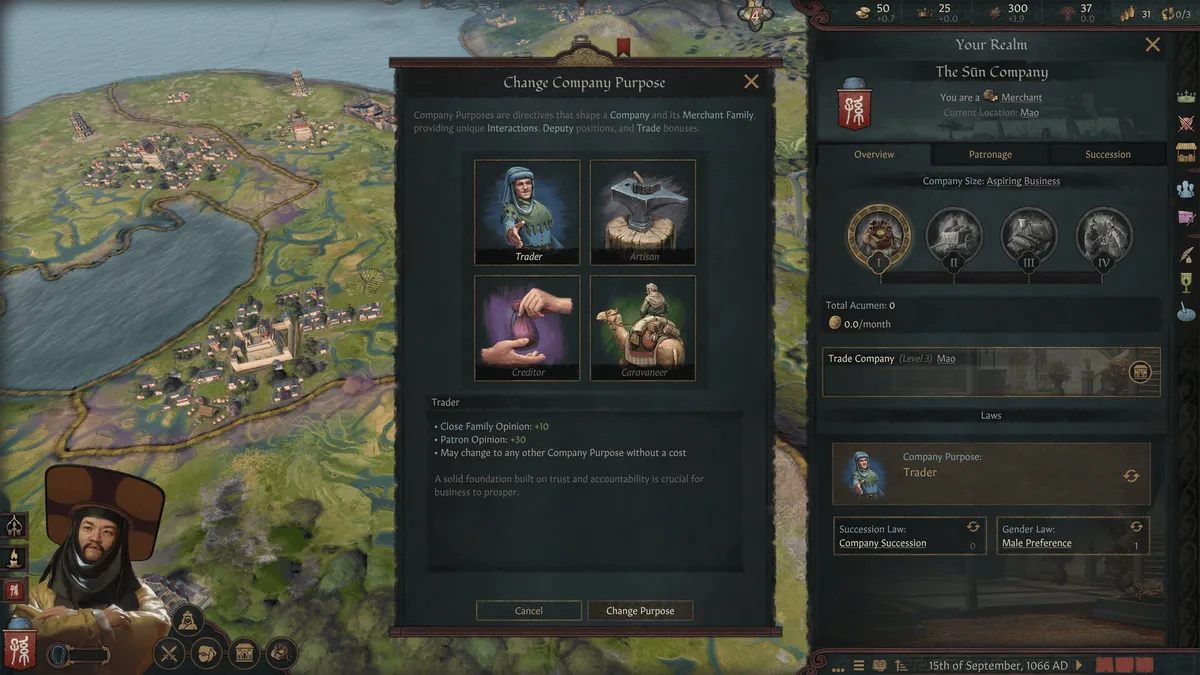
If you’re a CK3 player—and you should be; it’s number eight on our Top 100 list for a reason—then Paradox’s next expansion should be on your radar. While everyone else is focused on Grand Theft Auto, you could be engaging in the grandest theft of all: Commerce.
Latest Videos FromPC Gamer
Silk and Silver is all about mercantilism: Merchant families can jockey for trade route monopolies and use their wealth to lobby for influence, while new Republic governments offer patrician dynasties a venue to vie for dominance in the constitutional Assembly—potentially forming commercial or military pacts with other Republics. It’s also got a lot of Italian content in it. Everyone loves Italian content.
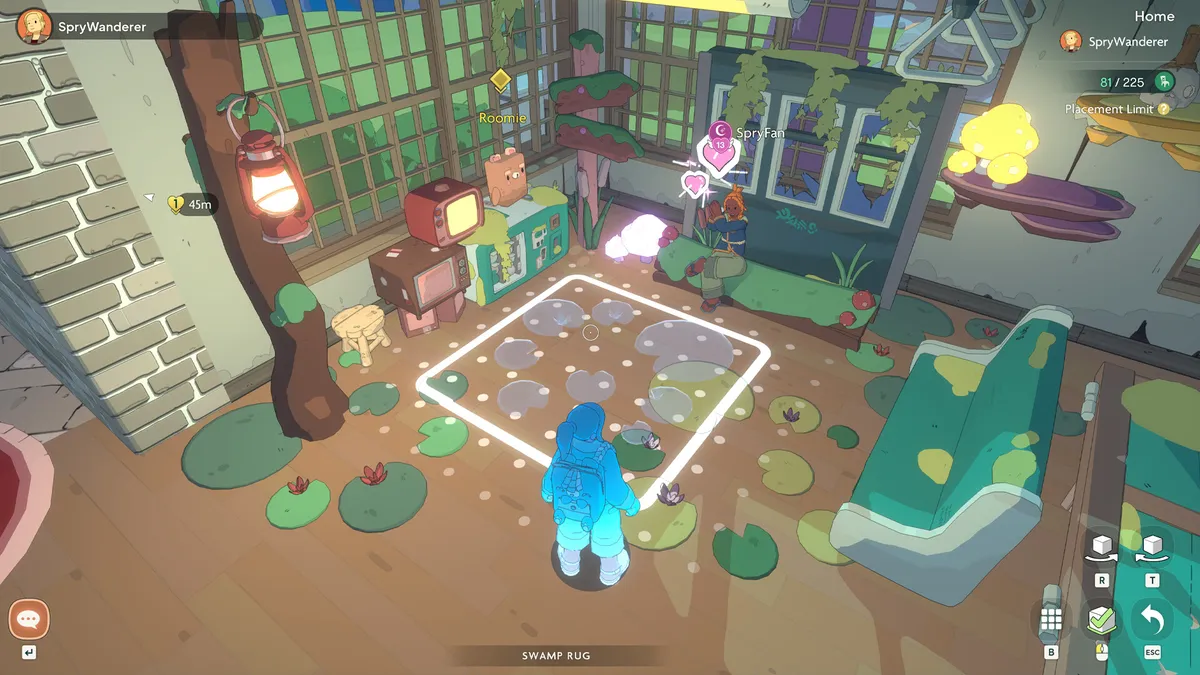
Among the cozier offerings arriving on Steam during GTA 6 week, Spirit Crossing is a building, crafting, and decorating MMO set in a world seemingly populated entirely by art students and befriendable spirits.
Borrowing a page from Sky: Children of the Light, it’s only as much of an MMO as you want it to be: other players are only fully visible in your world if you mutually choose to engage with one another. Otherwise, you’re free to roam its pastel soulscape and build out your own little corner of paradise solo for as long as you prefer.
Keep up to date with the most important stories and the best deals, as picked by the PC Gamer team.
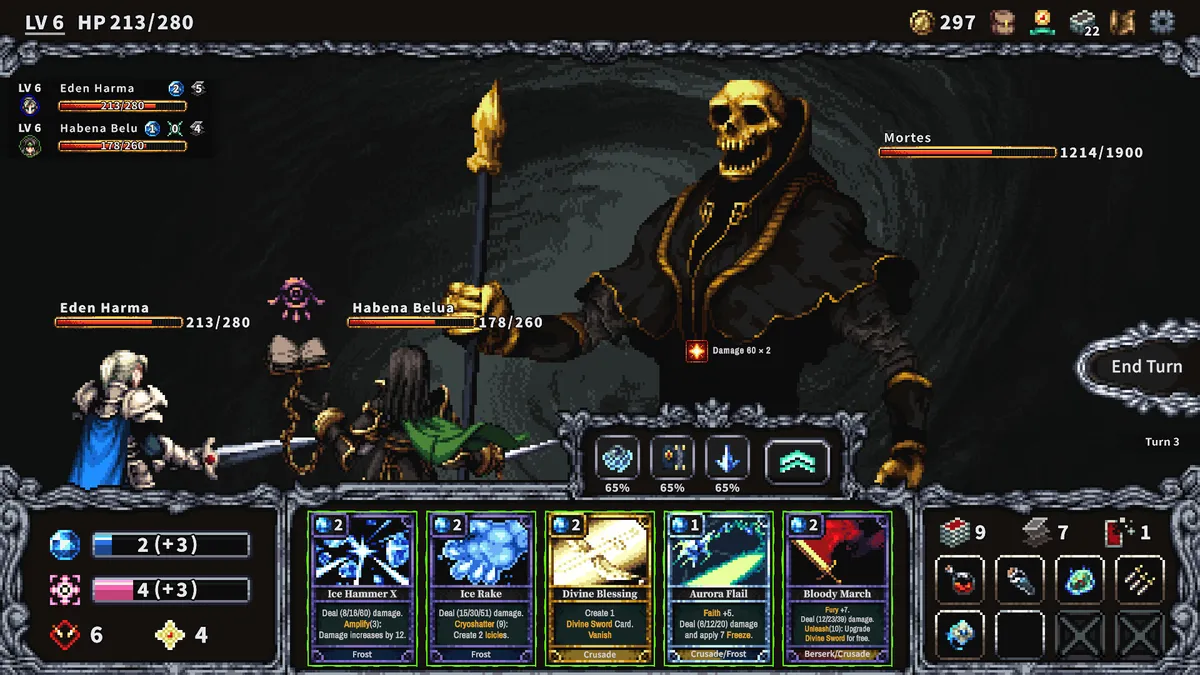
Listen. I know. It’s 2026. I feel the same suspicions that you do when you see a game with full-on pixel illustrations like this on Steam nowadays. But the developers of Harma insist that it’s “developed entirely by human creators and does not contain any contents or assets generated by AI tools.” Which is good, because it looks neat, and I want to believe.
It’s a roguelike deckbuilder that has both a story-driven campaign and a replayable “Dimensional Rift” mode, which should provide plenty of opportunity to continue admiring the work of its pixel artists. Assuming there were, in fact, pixel artists. They wouldn’t lie to me, right? Please?
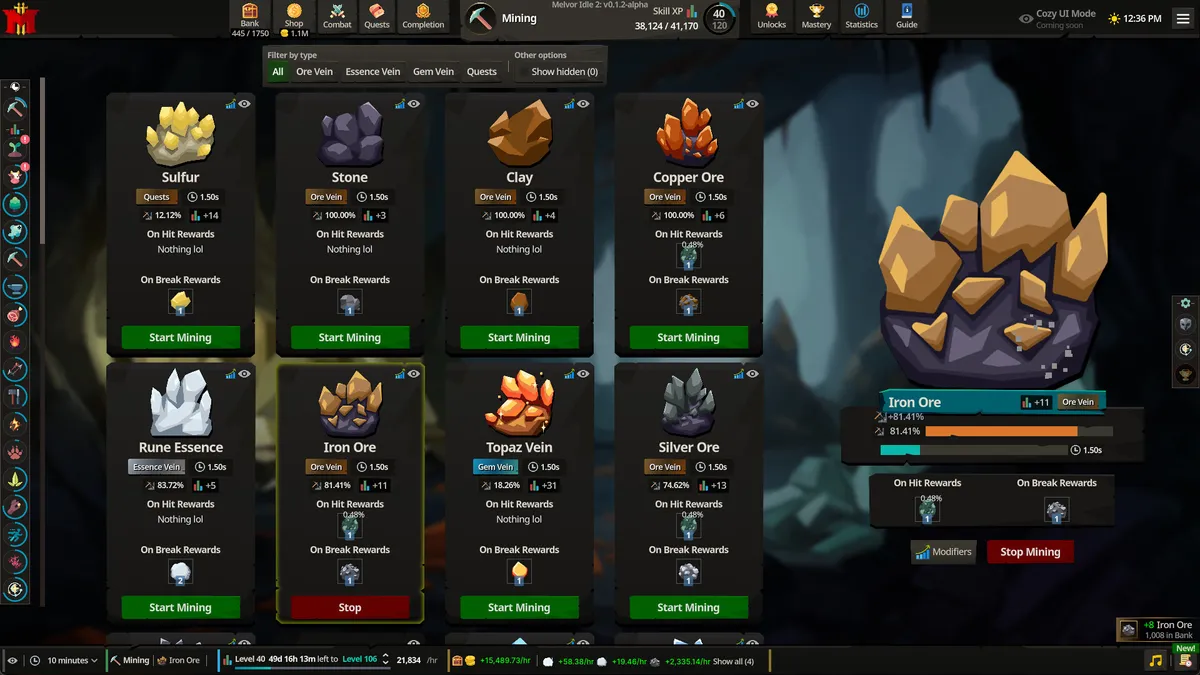
Melvor Idle is for one of the most particular types of guys, and whether or not you’re one of them should be clarified as soon as I say this sentence: Melvor Idle 2 is like Old School RuneScape with all the parts that aren’t a skill grind stripped away. It’s 100% gathering items so you can get better at gathering items so you can gather better items. It’s pure, uncut clicking and waiting as numbers go up.
It’s so thoroughly for RuneScape guys that, after the success of the first Melvor Idle, Jagex brought the operation under its publishing wing. If that’s for you, I’m not judging. In many ways, you’re living a more honest life than I am.
Melvor Idle 2 launches in early access on November 17.
Trafficity
(Image credit: Onramp Games)
If you do not yet acknowledge the awesome power of the roundabout, it is time to learn. Trafficity is a game about traffic. There are cars, and they must go places. But only so many cars can go to one place at once.
This is the crux on which our world is both built and broken.
And now it is yours to solve—using a toolkit of gridless road design tools, fully-customizable traffic lights, and dynamic interchange simulation. Somewhere, in another game, your uncouth lessers are disrupting this great task with the stealing and crashing of your vehicular charges. But now, you answer to a higher calling. The traffic must flow.
It takes a few key steps to create a realistic mockup of your products. You need to start with a dieline, which is basically the template that shows where you should cut and fold the package. The design will then become the basis for the 3D model. Artwork, finishes, materials, and colors are added to the model. The last step is creating a realistic image that you can use for presentations, retail marketing, and websites.
Since there’s no need for a physical product to see how the packaging will look, you can try various finishes, spot errors, and make the necessary changes before spending money on production. Cad Crowd can help you find 3D rendering freelancers who can create dielines and realistic mockups for your products.
The dieline is basically the product’s blueprint, as it shows where to fold, crease, cut, perforate, and glue the package. The designer may create a new packaging design based on the measurements of the product or use the packaging manufacturer’s existing dieline.
The dieline is crucial as the packaging serves as the product design and the product itself. The package shouldn’t hide important details once folded, like the barcode or logo. In other words, the package should look great and work as intended. Besides fold directions, cut lines, glue flaps, crease lines, and perforations, the dieline must also show the panel labels in order for the designer to know exactly where to put each detail or artwork. It also includes registration marks to help with production checks and material notes to specify the required materials for the package.
Why does structural design come first?
Structural packaging design services help ensure that the package can accommodate the product perfectly and that it can be assembled and transported properly. For example, your package may require a thicker board, larger flaps, or a different locking mechanism. Making these changes can make a significant difference once you finally start the production process for the package.
Designers can use tools that are specially designed for creating packaging designs such as Esko ArtiosCAD. They can also use general 3D software such as KeyShot and Blender. Packly, BoxShot, and Pacdora can also help you create realistic mockups and visuals.
Whatever software you use, make sure that your 3D model is based on the actual dieline. The virtual prototype makes it easier to identify problems with the design. It also reduces production errors and waste of materials. After creating the 3D model, artwork can be added to the panels. The product information should end up where it must be once the package is folded.
From there, choose the materials and finishes to make the packaging product feel more realistic and tangible. Different packaging materials can be chosen for the 3D model services. You can select glass bottles, metal containers, or paperboard boxes. There are several finishes to choose from. There’s gloss, matte, and embossing to help you make the product look and feel as realistic as possible.
You can use the image for different purposes. It can serve as the hero image of your social media page, online store, crowdfunding, or marketing campaign. A simple animation can also show how your product folds. The best part is that even before creating physical samples, you can start promoting your product since you already have the design.
Virtual mockups vs physical prototypes: which one do you need?
The answer depends on what you need and your purpose. If you want to avoid creating new samples every time you alter the design, go for a virtual mockup. In addition, if there is something that needs to be revised, you can make the necessary changes right away.
However, if you want to know what the product looks like in the real world, your best option is to make a physical prototype. It is also a good way to check the product’s assembly, color, fit, and durability. Both physical prototypes and virtual mockups can be used at different phases of production. To give you a clear idea about your options, take a look at the table below.
Changing the materials, colors, background, or artwork is easy.
A new sample is required when you revise the design.
Cost
Low after creating the 3D model
Increases as materials, labor, and set-up change
Structure
Strong for checking the appearance of the package and how it folds when it is based on a precise dieline
Strong for checking the package’s actual assembly, fit, and feel
Material
Imitates materials via lighting and shaders
Can be done by directly touching the package
Color
Can be used to determine whether the right colors are used. Virtual mockups shouldn’t always serve as a replacement for a physical prototype. This is particularly important when you have to see how the colors, artwork, and finish will look on the actual product.
Can be used for evaluating the ink and physical substrate
Product presentation
You can put the virtual mockup on the sales deck or shelf scene.
Customers can see and touch the actual product.
E-commerce use
Expect clean product images at all times.
Extra time and resources must be invested to create physical prototypes. It also requires styling, photography, and inventory.
Variant testing
Ideal for creating multiple labels, varieties, and sizes
Require a lot of samples and logistics
Handling and shipping
Virtual mockups cannot completely validate the durability of the package.
Physical prototypes can be used for practical testing.
Best uses
Virtual mockups can be used during variant review, concept, approval, and pre-sell marketing.
Physical prototypes are suitable during the product approval and final checks. It can also help ensure that the package has the right finish and fit.
What is the difference between retail-shelf and e-commerce packshots?
Packaging concept design serviceshas an effect on how people view and select products. A retail-shelf render shows how the packaging will be seen when it is displayed in an actual store. An e-commerce packshot, on the other hand, allows viewers to see the product clearly even when viewed on their mobile phones. The product will look attractive and clear, regardless of the device where it is viewed. Thus, the background, lighting, and camera angle for e-commerce packshots depend on the type of render that will be made.
Shelf renders usually use a three-quarter view because it is convenient for showing the front and one side of the product. It shows how customers actually see the product on a shelf. E-commerce packshots show the package in different angles, so it usually includes a lifestyle image and a product shot.
The good news is that you don’t have to make a render for every purpose that you have in mind. The same artwork and 3D model can be used to create e-commerce packshots and retail-shelf renders. You only need to change the background, camera, and lighting to create your desired look and effect for each purpose.
How can CGI simulate foil, embossing, soft-UV, and soft-touch finishes?
Adding textures will not be enough to create a realistic effect. That is because lighting can change how the finish looks when it hits the package. Special finishes must look and feel realistic in the 3D model. Here’s how CGI imitates special finishes.
Foil
CGI makes the surface reflective and shiny to imitate real foil. It uses light to achieve this effect. Slight differences in reflection and roughness prevent the CGI from looking too perfect. In addition, it is important for the designer to consider whether there’s foil on the logo or text or whether the curved surfaces or edges are also wrapped in foil. They also need to take into account whether the foil is brushed or bright. Alternate camera angles or moving animations can create a more realistic effect than a still image.
An embossed design sticks out from the surface, while a debossed design is pushed inward. The embossed or debossed design is lined up properly with the printed ink. Rounded edges are also added to improve the realistic effect of this finish. These effects, along with highlights and shadows, require actual depth in a 3D rendering servicesso that they look real instead of visuals plastered on the package.
Spot-UV
Packages with a Spot UV have both matte and shiny parts. Spot UV adds a glossy finish to a certain part of the package, which helps it stand out from the rest. Thus, it is a great option for logos, product names, illustrations, and patterns.
Soft-touch
This finish has a soft feel and looks slightly velvety and smooth. A soft-touch finish should not look like plastic or shiny. Rather, it should be subtle and matte. The 3D render must have softer highlights to reveal the actual package design.
Creating the right finish depends on the skill and experience of the designer. They should be knowledgeable about 3D tools such as Blender, Substance 3D, and KeyShot. These tools can make the materials, finishes, textures, and lighting just like the real thing. If you need a designer or artist who can create realistic finishes, visit Cad Crowd to find freelancers who specialize in product packaging design services and 3D rendering.
How does packaging CGI improve the approval process?
Packaging CGI can expedite the approval process because everyone on the team, including the retailers, legal teams, brand managers, and manufacturers, can assess the design at the same time. They can check it from different angles, and if they see an issue, they can fix it right away.
What is the ROI of rendering packaging before you print it?
Rendering packaging before printing it offers several benefits, including fewer product samples and earlier approval of the project. Printing new samples can be expensive and take about a week to complete. By rendering the product first, you can set expectations because you can see what the package will look like. Since you don’t have to print samples, you can save printing costs and time. You can reserve the physical sample to check the color and shape of the package in person.
In addition, photorealistic rendering services allow you to show what the final product will look like before production. You can also use the 3D images in your crowdfunding campaigns. This shortens the time between design approval and revenue because you can present your product to your team or investors as soon as you are done with the design.
Where can designers find packaging references?
Finding packaging references can help teams find structural ideas that they can use for their project. It also helps the team decide on a particular visual style. Packaging of the World and The Dieline are two of the most popular showcase resources where you can find a large pool of packaging references.
Other useful references include Boxshot, where you can access box visualization samples, and Mockup World, where you’ll find inspiration for general mockups. Pacdora and Packly are good references for online packaging mockups and designs. If you need a specific production structure, you can visit converter and printer libraries.
These references can be beneficial for research, but you should not use the templates as the final dieline. Always check with the manufacturer to verify that you are using the correct shape, size, and type of packaging before production.
What should be included in the packaging rendering brief?
Having a clear packaging rendering brief allows the designer to create accurate designs. The brief should include the product category and name as well as the existing dieline or structural design request. It should also mention the type of package and the measurements, the CAD model services, brand guidelines, required finish and image angles, substrate and materials, and final artwork file. The background and resolution requirements must be indicated as well.
Moreover, you should mention the target retail environment, converter, or printer, and platform specifications. If you want to show how the product works through animation, you need to ensure that the brief explains what the animation must show and how you want it to look. Do not forget to indicate the review deadline and approval stakeholders. The brief must also state whether the render will be production-referenced or conceptual.
Always verify that you know who owns the fonts, images, textures, or graphics included in the packaging and that you have permission to use them. Also, make sure that your designer can give you the source model or scene and a PDF of the design that you can review. Cad Crowd is a great place to connect with freelancers who are experienced in creating and cleaning up dielines, 3D packaging modeling, virtual mockups, artwork application, and animation.
Frequently asked questions
Is a dieline the same as a packaging mockup?
The dieline and packaging mockup are not the same. A dieline refers to the flat template used in making the package and shows where it will be cut, folded, and glued. A mockup refers to the finished, folded package. It can be a 3D visual or a physical sample. In a 3D mockup services, the digital model is based on the dieline.
Can a 3D render replace a physical prototype?
Although a 3D render can be used as a substitute for a visual sample of the packaging before production, it cannot completely replace an actual prototype. A prototype will still be required to assess and confirm the actual fit, strength, colors, assembly, and feel of the packaging.
There is no single best tool that works for all. The best software will depend on your needs and goals. For realistic product renders, use KeyShot. Boxshot, Pacdora, and Packly can be helpful when creating online packaging mockups.
If you want to make realistic materials and textures, Substance 3D can be a good option. Use Esko Studio for packaging visualization and production artwork. So, think of the final output that you want to create when choosing software for 3D packaging rendering.
Can CGI show foil, embossing, and spot-UV?
CGI uses different surface details, textures, lighting, and materials to create realistic foil, spot-UV, soft-touch, and embossing finishes. Accurate settings can help you achieve the most realistic final result.
Can brands create e-commerce images before the product is manufactured?
Brands can create e-commerce images before the actual production as long as they clearly define the design, size, artwork, and structure of the product. If anything changes during production, make sure that is reflected in the CGI image too.
Conclusion
It is possible to make an eye-catching 3D render even if you use the wrong dieline. However, there is also a possibility that the packaging will not work as intended once it’s assembled and folded. Using the right dieline from the start allows you to create photorealistic renders as well as test and revise various designs before you print anything. This means you don’t need to print many physical samples. If you need a photorealistic product packaging design, dieline, or 3D model, visit Cad Crowd to find qualified and vetted freelancers who can bring your flat templates to a highly detailed visual presentation.
How Cad Crowd can help
Cad Crowd connects brands and product teams with experienced CAD and 3D rendering professionals who can create accurate packaging dielines, 3D models, realistic mockups, and photorealistic product renders. Whether you need to visualize packaging finishes, test different designs, or prepare images for e-commerce and marketing, Cad Crowd can help you find the right freelancer for your project. Contact Cad Crowd today for a free quote and turn your packaging concepts into professional, realistic visuals.
MacKenzie Brown is the founder and CEO of Cad Crowd. With over 18 years of experience in launching and scaling platforms specializing in CAD services, product design, manufacturing, hardware, and software development, MacKenzie is a recognized authority in the engineering industry. Under his leadership, Cad Crowd serves esteemed clients like NASA, JPL, the U.S. Navy, and Fortune 500 companies, empowering innovators with access to high-quality design and engineering talent.
The box was already for decoration, and now maybe more so.
Rockstar Games
Less than a week before Grand Theft Auto VI is released into the wild, online reports have started to bubble up about a potentially serious issue with the retail version of the game. According to posts on ResetEra and X, the download code for the game may be visible from the outside without opening the box if you have a strong enough flashlight.
The code is visible because, rather than including a paper insert with the code or covering it with a scratch-off coating, it’s reportedly printed on the inside cover of the GTA VI box. Only a few photos are currently circulating of codes illuminated through the side of the game box, so it’s hard to say if this is truly a widespread issue. The ResetEra post says it may be limited to international copies of the game, because the US game box includes a backing that camouflages the code from the outside.
Fans have discovered the entire GTA 6 redeem code on the physical copy can be seen without opening the box by shining a powerful flashlight through the side at an angle. pic.twitter.com/YtN5QhC81R
Engadget has asked Take-Two to comment on the reports and whether it’s aware of any issues with GTA VI game boxes. We’ll update this article if we hear back.
If the issue is widespread, it could pose a serious problem for anyone trying to buy a physical version of the game. All you need is a code, your console and an internet connection to download GTA VI, and if you’re able to get those codes without buying or even opening the retail box, it could be possible to purchase a copy of the game that’s already been redeemed.
All of this hinges on Take-Two and Rockstar Games’ strained definition of what a “physical” version of a game is. Traditional physical releases include a disc or cartridge that, even if it doesn’t include all of the game or its final version, acts as a kind of key that you need to play. And importantly, those keys can be given to someone else if they want to play. Rockstar’s physical GTA VI release is just another way to purchase the digital version of the game, and because of the nature of digital game licenses, not really something you can own. If this issue does affect a large number of copies, it could also be a game you can’t play, too.
If you thought the foldable craze got crazy when only Android OEMs were involved, it got even crazier with the Apple iPhone Duo. A recent analytics report for Q3 2026 spells out how crazy things got and what 2027 could have in store.
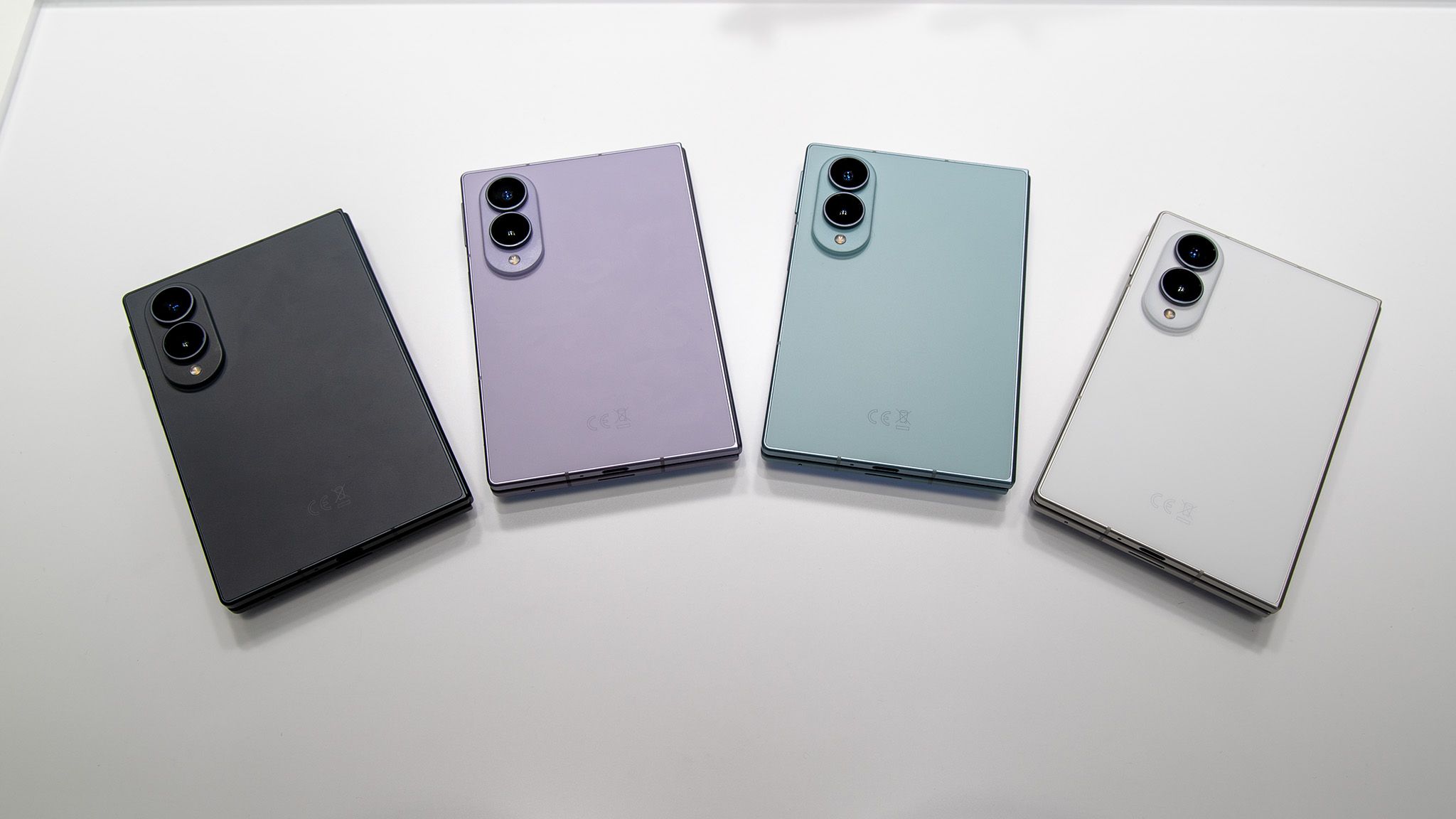
A report by Smart Analytics Global (SAG) on global foldable shipment performance in Q3 2026 highlights one Android OEM’s staggering lead. The report states that global foldable shipments declined 2% YoY, which translates to “over 7.5 million units shipped.” However, Samsung saw a 13% YoY increase this past quarter, thanks to the Galaxy Z Fold 8, accounting for 69% of the foldable market share.
This is important—the form factor, specifically. The Fold 8 is the company’s first wide-foldable. Many other OEMs, such as Chinese companies, have also adopted this wider, often shorter foldable design. SAG’s report states Samsung experienced “double-digit shipment growth in both South Korea and Europe,” as well. A notable competitor, Huawei, accounts for 14% of the foldable share in Q3.
Latest Videos FromAndroid Central
The Pura X View was a significant contributor, despite the report noting a small YoY decline in shipments.
SAG then flips the script. While the market has struggled, it forecasts “a new growth cycle” next year. Shipments might grow 55% YoY in 2027. Wide foldables might account for most phone shipments next year, driven by Samsung’s device, the Apple iPhone Duo, and others from Chinese makers.
The market is suffering
(Image credit: Nicholas Sutrich / Android Central)
Some of this data is a little interesting. This was a while ago, but in 2024, Huawei topped Samsung in foldable shipments. The Chinese OEM became the world’s leader in foldable shipments. This was a “turning point,” one could say, for Samsung. It came at a time when many believed Samsung had become complacent with its Galaxy Z series: the Flip and Fold.
Samsung’s shipments fell 42% year-over-year in Q1 2024, while Huawei increased by a massive 257% YoY. Currently, you have Huawei’s Pura X View, the industry’s first wide foldable, which didn’t perform as well for the company as the Fold 8 did for Samsung. SAG’s 2027 outlook is certainly intriguing, but it will take consumers buying new phones to make it happen.
Get the latest news from Android Central, your trusted companion in the world of Android
In the broader phone market, global shipments plummeted in Q3, marking the lowest level in 14 years. The market dropped 20% YoY. Still, Samsung claimed the top spot because of the Galaxy Z Fold 8 and Fold 8 Ultra.
Android Central’s Take
Everything is in flux right now. Some analysts foresee a turnaround, while others firmly believe we’re in for more trying times in 2027. The main thing is pricing. If phones are priced well and buyers can afford them, things will change. But we’ve seen how prices have gone. Moto’s Signature 27 is $1,599, and that’s not even a foldable—it’s a standard slab phone. Other foldables are $2,000; I know we were all paying attention to Apple’s iPhone Duo launch. Wide foldables are cool (I almost got one), but plenty of variables are getting in the way of a turnaround.
You do not need an agency or expensive software to find out how your business looks to people searching nearby. With a free afternoon, a phone and a notepad, you can spot the problems that cost most small businesses calls and customers. Here is how to spend those few hours.
Hour One: Search like a Customer
Pick three to five things a customer would actually type, such as “plumber near me” or “bookkeeper in [your town].” Search each one on your phone with location turned on, then again on a laptop. Write down where you appear in the map results and the regular results, and who shows up above you. Use a private browser window so your own search history does not flatter the results, and if you serve several towns, repeat a couple of searches with each town name.
Then search your exact business name. Note whether your Google Business Profile appears on the right or at the top, whether the photos look current, and whether anything is wrong: old hours, a former address, a phone number that rings somewhere else.
Hour Two: Check Your Google Business Profile
Your profile is often the first thing people see, before your website. Sign in and work through it with fresh eyes.
Is your primary category the most specific one that fits? “Bookkeeping service” beats “Consultant.”
Are all your services listed, with short descriptions?
Do your hours match reality, including holidays?
Have you added photos in the last few months?
Are there reviews with no reply? Answer them, good and bad, politely and briefly.
Google says local results are ranked on relevance, distance and prominence, and prominence includes your reviews and how well known your business is. A complete, active profile helps with the parts you can control. Reviewing these factors is an important step in a Local Search Audit.
Hour Three: Check Your Website and Listings
Open your website on your phone. Can someone find your phone number and the service they want within a few seconds? Does each main service have its own page, or is everything crammed onto one? Is your town or service area mentioned in plain words? Fill out your own contact form and tap your own phone number from the site. A surprising number of forms still send messages to an inbox nobody checks.
Next, check that your business name, address and phone number are written exactly the same way on your website, your Google profile, Yelp, Facebook, your chamber of commerce listing and any industry directories. Small differences, such as “Suite 3” in one place and “#3” in another, are worth cleaning up, and an old address is worth fixing right away. Consistent business information is an important part of a Local Search Audit.
Hour Four: Make a Short Fix List
Go back through your notes and sort everything into three groups.
Fix this month: weak or missing service pages, old photos, inconsistent listings.
Ask for help: technical issues, a slow site, or a competitor who outranks you everywhere and you cannot see why.
Most owners finish the afternoon with a list of easy fixes they can handle themselves, which is exactly the point.
Repeat It Every Few Months
Search results change, competitors improve, and listings drift out of date. Put this audit on your calendar every quarter and compare your notes each time. If you are climbing, keep going. If you are not, you will know exactly where to look first.
AUTHOR BIO
Casey Andrews
Casey Andrews owns Fairhaven Web Design, a web design and Bellingham SEO agency in Washington’s Fairhaven district.
Microsoft systems, including Outlook and Teams, experienced an outage starting Thursday.
The company doesn’t suspect a cyberattack or other malicious activity.
Service is improving, but not for everyone.
Microsoft is making progress on remedying the massive global outage that started Thursday morning and affected Microsoft 365, Copilot, and Outlook access.
On Friday morning, Microsoft shared an update on X that it was “seeing encouraging recovery progress” and that “a growing portion” of Microsoft 365 services was improving, noting in a follow-up post that it was seeing “broader improvements in North America, sustained improvements across much of Europe, and encouraging recovery signals in Asia Pacific.”
Downdetector reports have stayed low as of Friday midday at around 3,000. The issue doesn’t appear to be completely resolved, but most impacted users seem to be back online.
What caused the outage?
Microsoft has not publicly identified the cause of the outage, but is maintaining it’s not security-related.
Charles Lamanna, Microsoft’s executive vice president of Copilot, Agents, and Platform, said on X late Thursday night, “I can confirm that there is no indication this is the result of malicious or cyber activity.”
Microsoft reiterated that late Friday morning in an update to its X thread on the outage.
“We will continue to share more information as we have it, and for now we can confirm that there is no indication this is the result of malicious or cyber activity. Our teams are reviewing what happened and how we can prevent similar issues going forward,” Microsoft wrote.
According to CNN, Microsoft told Australia’s Home Affairs Minister Tony Burke that they “don’t believe they are dealing with a cyber attack.” During a press conference, Burke said Microsoft told him “they believe they are dealing in some ways similar to what we saw with respect to CrowdStrike where there is an update that has gone awry.”
That refers to the great CrowdStrike meltdown of July 2024, in which a software issue disrupted operations at hospitals, airlines, and other major information hubs.
When the outage started
On Thursday morning, multiple people began reporting issues with Outlook, Teams, and Copilot, according to Downdetector. By 1 p.m. ET, the number of reported Outlook outages was nearly 83,000 but had fallen to just under 75,000 by 2:38 p.m. ET. Teams and Copilot reports started dropping significantly by Thursday evening, but many individuals were still reporting issues accessing systems well into Friday morning on X and Reddit. Even Microsoft’s status page was down until around 3 p.m. ET Thursday.
It’s unclear how many people the outage affected, though Microsoft’s own numbers from January say Microsoft 365 “exceeds 450 million commercial paid seats,” illustrating the scale of the issue.
After “restarting affected servers” Thursday afternoon, Microsoft added said at 2:31 p.m. ET.
“We determined the elevated load isn’t driven by an increase in traffic, but by a number of servers being unexpectedly unavailable; straining the remaining infrastructure,” the post said.
Radhika Rajkumar
Senior Editor
Radhika Rajkumar is a senior editor at ZDNET based in New York City. She covers AI, specializing in safety, privacy and security, policy, education, and synthetic media. She also leads ZDNET’s newsletter strategy.
Radhika holds a Masters in Creative Publishing and Critical Journalism from The New School.
See full bio
Obayashi Corporation, a leading Japanese “super general contractor”, switched from AutoCAD to ARES. It needed DWG-compatible 2D CAD alongside its BIM-based design work, and ARES offered a cost-effective network license for light users. The company began with JDraft in 2016, the predecessor of ARES Commander, and today ARES is used across the entire Obayashi Group.
This case study shows why Obayashi moved away from AutoCAD, how it won over users who were reluctant to switch, and how Graebert’s guidebook and video tutorials helped.
Quick facts
Company: Obayashi Corporation, a super general contractor in Japan
Software: switched from AutoCAD to ARES Commander (ARES use began in 2016 with JDraft, its predecessor)
Licensing: ARES network license, a good fit for light users who work about 30 minutes a day
Support: intranet FAQ, a Graebert-based guide, video tutorials, ongoing help
Reach: used by Obayashi Corporation and the entire Obayashi Group
Who is Obayashi Corporation?
Obayashi Corporation plays an important role as a super general contractor and is a leader in the Japanese construction industry. In Japan it has worked on many landmarks, including the Tokyo Sky Tree, and it takes part in projects around the world with its high technological capabilities.
To help reduce emissions, Obayashi has also been working on large-scale wooden buildings. Its training facility Port Plus®, completed in 2022, is an 11-story building above ground made of pure wood. It is Japan’s first high-rise pure wooden fireproof building. Through such next-generation buildings, Obayashi aims to help create a sustainable society.
Why Obayashi switched from AutoCAD to ARES
Obayashi moved from AutoCAD to ARES because, while aiming for BIM-based design work, it still needed 2D. It focused on DWG-compatible CAD and chose ARES as a DWG-compatible tool suited to casual (light) users.
Many of these users do not need advanced drafting and use the software for only about 30 minutes a day. For them, the ARES network license offers excellent cost performance.
Obayashi started with JDraft in 2016. JDraft is the predecessor of ARES Commander.
How Obayashi helped users adopt ARES
When ARES was introduced, some users were reluctant to use it. Concerns about operation are common when a company brings in new software, so Obayashi set up support for the rollout:
Intranet FAQ. Obayashi posted questions from users on its intranet site, based on frequently asked questions about operating ARES.
Fast expert answers. Graebert quickly answered a sheet of inquiries from Obayashi users.
A shared guide. Obayashi turned those answers into a guide on its intranet, sharing Graebert’s expert knowledge with its users.
Video tutorials. Graebert also provided videos explaining how to operate ARES.
Support after launch. Obayashi still receives ARES support after implementation. When something is unclear, it also uses Graebert Japan’s YouTube channel and help center (FAQ) website.
Email alone limits what tech support can do. Thanks to the guidebook and video tutorials, Obayashi found that ARES use became more widespread within the company.
Group-wide use, ARES Kudo and “MAKE BEYOND”
ARES is now used by Obayashi Corporation and by the entire Obayashi Group. Obayashi has also heard about ARES Kudo, the browser-based 2D CAD version of ARES, and says it would like to follow that service in the future.
Obayashi’s brand vision is “MAKE BEYOND”, which means evolving existing technology and knowledge. By using an up-to-date knowledge base, the company uses ARES efficiently. Going forward, it will keep pushing next-generation manufacturing through new initiatives that are not bound by preconceived notions.
What other companies can learn from Obayashi
Keep 2D next to BIM. BIM-based design still needs 2D drawings, so choose a DWG-compatible CAD tool.
Match licensing to usage. For light users who work about 30 minutes a day, a network license gives excellent cost performance.
Expect reluctance and plan for it. Concerns about operation are normal when software changes.
Build a shared knowledge base. An intranet FAQ and guide let expert answers reach every user.
Use videos and ongoing support. Tutorials and a help center keep adoption growing after launch.
Frequently asked questions
Why did Obayashi switch from AutoCAD to ARES?
Obayashi still needed 2D alongside its BIM-based design work, so it focused on DWG-compatible CAD. ARES suits light users, and its network license offers excellent cost performance for people who use CAD about 30 minutes a day.
Which ARES product did Obayashi start with?
Obayashi started with JDraft in 2016. JDraft is the predecessor of ARES Commander.
Is ARES suitable for casual CAD users?
Yes. Obayashi chose it as DWG-compatible CAD for light users who do not need advanced drafting and use the software for about 30 minutes a day.
How did Obayashi support users who were reluctant to switch?
It posted an FAQ on its intranet, used Graebert’s expert answers to create a guide, and shared video tutorials. Obayashi still receives ARES support after implementation.
Who uses ARES at Obayashi?
ARES is used by Obayashi Corporation and the entire Obayashi Group.
What is ARES Kudo?
ARES Kudo is the browser-based 2D CAD version of ARES.
Is there a free trial of ARES?
Yes. ARES offers a 30-day free trial.
Try ARES yourself
See how ARES Commander, an AutoCAD alternative with full DWG compatibility and a network license, could work for your team. Download the free 30-day trial at graebert.com.
Watch the full customer story with Obayashi Corporation on the Graebert YouTube channel.
Try ARES Commander CAD Software yourself
See how ARES Commander, ARES Trinity and ARES Kudo could work for your team. Start the 30-day free trial at graebert.com and work with your DWG files in a CAD tool built around full DWG compatibility.
I don’t think there’s ever been a more iconic sound than the ‘!’ noise that triggers when you’re spotted in Metal Gear Solid. Even when I was a little kid, my first exposure to the franchise was through the Mesal Gear Solid: Snake Escape minigame in Ape Escape 3. That’s not really relevant, besides the fact that it shares a similar name with Metal Gear Solid Delta: Snake Eater, a remake and an absolute blast that’s now cheaper than ever, with all DLC included.
If you ask anyone who has played the series, there’s a good chance that Snake Eater might be their favorite. Personally, I’m a sucker for The Phantom Pain and, of course, Metal Gear Rising—but a majority of fans love this one, and I can’t blame them. A prequel to the rest of the series, meaning it’s a perfect jumping-on point for interested newcomers, you play as Naked Snake, sent to Tselinoyarsk, USSR, to complete Operation: Virtuous Mission. But, like any secret mission, things go awry.
Metal Gear Solid Delta: Snake Eater is, narratively, the same game as the original, so fans shouldn’t expect anything too different from the 2004 version. Instead, the gameplay is fine-tuned with some quality-of-life changes, while keeping the stealth combat at its core the same. Just with a fresh coat of paint slapped on, of course.
And I’m really underselling it with the fresh coat of paint line. Metal Gear Solid Delta: Snake Eater completely refreshes the original, bringing it up to modern standards, with every element across the board brought to the current generation. Naked Snake has never looked so beautiful, and even one look at different screenshots for a direct comparison will show you just how overhauled the experience is.
In our Metal Gear Solid Delta: Snake Eater review, Tamoor said, while playing the game, “I wasn’t an adult yearning for the lost feelings that made me love Metal Gear Solid 3; I was the teenager living them for the first time again.” And, as an added bonus, that Ape Escape mission is still part of the Snake Eater experience. That’s purchase-worthy alone.
If you’re looking to play the game for the first time ever, or you’re hoping to relive your life two decades ago, you can grab the Metal Gear Solid Delta: Snake Eater Deluxe Edition for just $27.29 / £22.74 at Fanatical, getting you a Steam key with all of the bonus content at a lower price than Steam has ever offered the standard edition for. Not a bad way to celebrate November.
Disclosure: GameSpot and Fanatical are both owned by Fandom. This story was created in collaboration with Fanatical’s deals team.