AI DJs Completely Kill My Groove


I usually can’t pinpoint the moment I stop using a software feature, with most tools drifting out of fashion without an expiration date. That’s not the case with YouTube Music’s “Beyond the Beat,” an AI-generated DJ that explains songs to you.

YouTube Music is my music-streaming service of choice. And since I’m a software reporter, I always enable the beta features available through YouTube Labs, which include Beyond the Beat. YouTube’s AI DJ randomly interjects for about 30 seconds between songs, teeing up the vibe shift and providing context about the next track.

More listeners are encountering synthetic commentary built into their music streaming apps. While YouTube launched this experimental AI DJ in 2025, Spotify first introduced a similar tool back in 2023. It doubled down on its AI DJ efforts in November, expanding the different personalities available to users and adding more controls over the commentary.

These AI DJs aren’t just annoying. Their attempts to provide helpful context and mimic human candor ultimately fall flat. Lucky for me, both features are optional and avoidable.

After months of leaving it enabled, a bad experience with Beyond the Beat this week pushed me to swear off AI DJs altogether. I was listening to a pop divas playlist as part of my morning workout and got slapped with 30 seconds of exposition after a Slayyyter track:

“Hey Boy delivers that high-energy surge perfectly, but we’re shifting our focus to a sharper, more visceral reality. In Rock Music, Charli XXC [sic] weaves in a biting, dark sense of humor regarding the physical toll of her relentless 2024 and 2025 touring. She turns the genuine nerve damage she sustained on the road into a strange sort of battle scar, reclaiming the exhaustion of a weary party girl as a badge of honor. It’s an unflinching look at the cost behind the spectacle, where the grind of the industry becomes the actual subject matter. Here is Rock Music by Charli XXC [sic].”

What a lengthy paragraph of platitudes with little substance. That’s not even mentioning how the AI DJ butchered the pronunciation of a little-known, indie act called Charli XCX. This flub reflected my overall experience with YouTube Music’s AI DJ. It took me out of the groove and didn’t feel additive.

In another example, it went in-depth on the meaning of Olivia Rodrigo’s Expectations remix featuring Chappell Roan, calling it a “structural interpretation” that unpacks the “nuances of queer dating.” Then YouTube Music played the original track, sans Roan; so much for the queer yearning.

Curious how Spotify’s AI DJ experience would compare, I upgraded my account to the premium tier for access to that beta software. One of the biggest recent changes to Spotify’s AI DJ was adding new voices to the lineup, so I went into my settings and played the introduction clips for each of the eight English-language voices.

Maybe I was already a bit miffed from my YouTube Music experience because these voices immediately started to frustrate me. Multiple voices leaned into filler words such as “you know” and “like,” as the AI described the next songs it would play. Knowing an AI voice is being trained to use filler words to sound more human gave me the uncanny-valley ick.

Spotify’s AI DJ was fairly different from YouTube Music’s version. On Spotify, the AI DJ is also an algorithmically guided experience that picks songs for you based on past listening habits and song requests. Overall, Spotify’s synthetic commentary felt tighter and more tolerable than YouTube’s blabbering DJ. That said, neither software experience was enjoyable enough for me to return.

Although Spotify claims it has “80 percent of listeners coming back to DJ week after week,” according to the company’s launch blog, I won’t be one of them. My rejection of AI DJs isn’t based on how they audibly sound. The voices, from both companies, are decent and sound convincingly human. The content of their commentary is what truly turns me off. Whether it’s empty platitudes or mimicking human mistakes, I’ve heard enough.

How AI Is Helping Care Teams Get Patients the Right Care, Sooner


From pediatric research to smart hospitals, AI is helping care teams spend less time on routine tasks and more time with patients. 

Health systems and startups are putting it to work across healthcare, from matching patients to clinical trials to supporting radiologists, hospital teams and patients at home. Clinicians stay at the center, reviewing AI outputs and guiding decisions, while NVIDIA technologies provide the compute behind the applications.

Read on to learn how healthcare teams are using AI to improve and speed patient care.


Friday, Nov. 13, 5:00 a.m. PT 🔗

Dyania Health Uses AI to Turn Decades of Patient Records Into Better Care 

Hospitals hold decades of patient history, most of it written in free text, as physicians’ notes, operative reports, imaging and pathology reads and discharge summaries. To understand one patient’s full story, a clinician would need to read through years of charts. 

Dyania Health, a New Jersey-based clinical AI company, built Synapsis AI to do just that. Synapsis AI is a clinical reasoning engine: It works across every note, report and lab result in a patient’s record, connecting findings that may be years apart to answer clinical questions the way a specialist reviewing the chart would. 

The output is a set of clinical signals, each traceable to its source in the record, that tells care teams which patients need attention and why. Clinicians review the evidence and make every decision. 

Keeping Patient Data Inside the Hospital Walls

Synapsis AI runs on NVIDIA-accelerated computing inside a health system’s own firewall.  The entire health system’s patient records can be processed onsite, so patient data is never shared and never leaves the hospital. 

Processing records this way takes chart review off the desks of clinical teams and lets them spend that time with patients. But Synapsis AI still requires clinician input — it’s an assistive tool that surfaces evidence from medical records that a clinician must still confirm and act on. 

Dyania builds and trains its clinical models with NVIDIA NeMo open libraries, then uses NVIDIA TensorRT and TensorRT-LLM to optimize them to run faster and more efficiently on the hospital’s own GPU servers. 

Synapsis AI in the Real World

Cleveland Clinic used Synapsis AI to support a study of more than 7,800 aortic valve replacement patients between 2005 and 2021. 

Synapsis AI reasoned across each patient’s record, including every echocardiogram added in the years after surgery, and used this information to build a predictive model of valve deterioration and reintervention risk at the three-, five- and ten-year mark after a patient undergoes an aortic valve replacement procedure. The AI platform completed chart review across the full cohort that would have taken clinicians years to complete by hand. 

“Using technology to bring together and analyze information that can help us predict the duration of implanted heart valves is a promising step towards enhanced outcomes and more personalized care for patients,” said Dr. Lars Svensson, chief of the Heart, Vascular & Thoracic Institute at Cleveland Clinic.

The same approach can be applied to any healthcare challenge where the answer sits inside the medical record, such as identifying patients eligible for clinical trials, closing care gaps in cardiology and oncology, and populating clinical registries.

Learn more about Dyania Health.

Musk Admits $299 Monthly Cybercab Fee Is Too High


Want to own a Tesla Cybercab? You can now preorder one if, somehow, you’re invited to do so, and Tesla claims in an X post that your estimated delivery date will be sometime next month. The sticker price would be $29,990.

Depending on your perspective, that could qualify as keeping a promise Tesla CEO Elon Musk made to release such a vehicle to customers by the end of 2026, and to do so at that price point.

It’s a state of affairs that could, in theory, force tech YouTuber Marques Brownlee to shave his head. Back in 2024, Brownlee rode in a Cybercab at the product’s unveiling event, but expressed extreme skepticism about Tesla’s ability to deliver on its promise to release that same vehicle to consumers for under $30,000 before 2027. “If they do—let’s say they do—I will shave my head on camera, because I’m that confident they won’t do it,” Brownlee said.

Despite Tesla’s announcement that the Cybercab will be released in some form, to some people, by the end of this year, Brownlee claims his “hair is safe.” The provisos and limitations under which the vehicle is being sold, he argues, don’t add up to a kept promise. And for what it’s worth, Grok seems to agree with Brownlee—and vehemently so, to the disappointment of Tesla stans.

Brownlee’s bet aside, here’s what it will take to buy and use this version of the Cybercab:

The terms and conditions say your Cybercab will be “operable only within Tesla-enabled Robotaxi geofences and other operating limits Tesla supports,” which are all in Texas currently. It also comes with a brutal monthly operating fee of $299. That’s like having to pay the monthly car payment on a second $30,000 car.

And as the Wall Street Journal points out, even if you’re someone invited to buy a Cybercab, and you’re within one of the geofenced areas in which the car can operate, and you’re in good standing on your $299 monthly fees, one key selling point—perhaps even the key selling point—of the Cybercab is not going to be available: at least for the time being, you’re not going to be able to put it to work as a robotaxi and make money. It’s for personal use only.

Musk argues that the car will be made available nationwide, “as we receive regulatory approval,” stated as if approval is a forgone conclusion.


But even he admits $299 is too much, writing that the “monthly fee is too high” and that it should be knocked down to about $115 per month. So even Musk agrees the economics don’t make sense, even if he also thinks Brownlee is “a chicken.”


Do you like mob tagging in oldschool MMOs, or are you done with fighting for quest credit?


Terminally Online

The Terminally Online logo.

(Image credit: Future)

This is Terminally Online: PC Gamer’s very own MMO column. Every other week, I’ll be sharing my thoughts on the genre, interviewing fellow MMO-heads like me, taking a deep-dive into mechanics we’ve all taken for granted, and, occasionally, bringing in guest writers to talk about their MMO of choice.

I’ve been having a pleasant time with WoW: Forever (and by that, I mean it has consumed nearly every waking moment of my life). One thing, however, has been made pretty clear: Mob tagging, that is, only giving kill credit to the first player (or group) to damage a mob, is divisive.

One side of the fence—my side, I’m afraid—does see mob tagging as a necessary evil in an MMO that’s trying to drive social interaction. Videogames, particularly ones that are incentivising you to group up, are kind of meant to be a pain in the butt sometimes; if you’ve got a “kill 20” quest and there another person there, the fact you might get in each other’s way if you don’t group up, and have a jollier time if you do, is a net good.

Asian governments react to Nvidia CEO Jensen Huang’s exit


Jensen Huang’s departure from Nvidia has drawn a range of responses across Asia, with some governments moving to confirm chip supply commitments, while others are monitoring the impact on local projects or addressing ongoing investigations.

On Sunday, November 8, Nvidia’s board launched an independent investigation after reports that Huang was targeted by a Chinese spy operation; Huang admitted to an affair with Alice Huang, a former executive at Singapore-based chip company Megaspeed.

Nvidia’s influence extends far beyond the United States. The chip giant has built close ties with companies worldwide, particularly in Asia, where many of its key partners play important roles in the global AI industry.

China

China’s foreign ministry rejected allegations on November 10 that a Chinese businesswoman linked to former Nvidia CEO Jensen Huang was a spy, calling them groundless and a smear against Beijing. On Friday, a spokesperson reiterated opposition to export controls that disrupt global supply chains and stated the ministry was not aware of reports linking restricted Nvidia chips to a Shanghai data center associated with Alice Huang.

Huang’s exit has also raised uncertainty over more than $3 billion in Chinese AI computing projects reliant on Nvidia’s restricted processors, according to Reuters’ review of procurement notices, investment plans and corporate disclosures. Many of these chips are subject to U.S. export controls, making them difficult for Chinese companies to obtain.

Singapore

In Singapore, authorities seized the passport of Alice Huang, former CEO of Singapore-based cloud computing company Megaspeed, in June 2025 as part of an investigation into possible false declarations regarding server purchases, according to the Ministry of Home Affairs.

The Singapore ministry said police took her passport to ensure she remained available for questioning, as she was not based in Singapore. The investigation examined whether servers shipped from Singapore to Malaysia were later sent to other countries without proper declaration.

In February 2026, police found insufficient evidence to establish that Alice Huang had committed offenses related to the suspected false declarations, according to the ministry. However, authorities said she had knowingly provided inaccurate information about her role at Megaspeed. She was issued a warning and barred from re-entering Singapore. Her passport was returned that month. Singapore also said it received limited assistance from U.S. authorities despite repeated requests for information about U.S. server maker Supermicro. Singapore’s Ministry of Home Affairs said its investigation into Megaspeed and six other individuals remains ongoing.  The ministry did not identify the six individuals or specify their alleged roles in the case.

South Korea

South Korea has close ties to Nvidia, with major chipmakers Samsung Electronics and SK Hynix playing important roles in supplying memory chips used in its AI processors. Following Huang’s exit, South Korea’s Science Ministry said Nvidia had reaffirmed its plan to supply 260,000 advanced GPUs to the country and to continue joint AI projects.  Apart from that, South Korea’s government AI strategy council held an emergency meeting on Friday to assess the potential impact of Huang’s departure on the country’s AI industry, per a local media report.

Taiwan

Taiwan’s Economy Minister Kung Ming-shin said Huang’s departure was unlikely to significantly change the growth of the global AI industry, according to local media. Meanwhile, Taipei’s city government said Nvidia’s planned overseas headquarters in the city remained on track despite the leadership change. The company has met its contractual obligations so far, and officials said they would continue to support the project.

Japan

In Japan, the Industry Ministry said the government would closely monitor Nvidia following Huang’s resignation, describing the chipmaker as an important player in Japan’s AI semiconductor industry, Reuters reported. Deputy chief cabinet secretary Masanao Ozaki said it was too early to assess the impact on the global AI industry, while stressing Japan’s commitment to ensuring a stable supply of semiconductors.

When you purchase through links in our articles, we may earn a small commission. This doesn’t affect our editorial independence.

Which Earbuds Are Best for Voice Calling? Check Out the Pair That Won My Latest Test


We Tested 2026’s Best Earbuds on a Noisy NYC Street and Share Our Holiday Picks

In the past, I’ve typically produced a couple of videos highlighting my top headphones and earbuds of the year. In 2026, we’re wrapping things up a bit differently with our Holiday Office Hours from the Labs video series.

Instead of just talking about my favorites, I recently tested the voice-calling performance of some of this year’s best earbuds alongside a set of budget buds. Plus, my colleagues Jada Jones from ZDNET and Eric Zeman from PCMag drop their own top holiday picks for headphones and earbuds.

Read more: Best Wireless Earbuds of 2026

Each premium pair of earbuds I selected for my test has earned a CNET Editors’ Choice award. They include Apple’s AirPods Pro 3, Sennheiser’s Momentum True Wireless 5 and Anker’s Soundcore Liberty 5 Pro. I also threw the $27 JLab Go Pods ANC into the mix to see how a pair of truly budget wireless earbuds would compare. (Spoiler: They weren’t great, but they performed better than I expected.)

I rated the Soundcore Liberty 5 Pro very highly in my review for voice-calling performance, so it’s not surprising that they managed to deliver the best noise reduction, as my voice came across as clear and natural. Check out the whole video above.

Drawquarium Free Download (Build 26644386)


Drawquarium PC Game


Drawquarium Direct Download:

Hi, I’m Kaleb! I work as a 3D artist in the film industry, but my heart kept pulling me toward a small, very personal game idea. One of the reasons I started developing this game was that I wanted to bring my children’s drawings to life 💖. Zombies Arent Real

Drawquarium is a relaxing aquarium sandbox where your drawings come to life! Draw your own fish and plants, feed them, raise them, and collect golden fish scales to unlock new decorations and tools. Create your own cozy little underwater world and bring it to your desktop as an animated wallpaper! And don’t worry, you don’t have to be an artist to create something beautiful! You can always choose from a variety of ready-made fish and simply enjoy watching your little aquarium come to life.

Draw Your Own Fish COMPANIONS
Draw anything you want and watch your creations come to life inside your aquarium. Start with simple shapes, use templates for a little inspiration, or get as creative as you like. There are no rules, just you and your imagination! When you place new creatures in your fish tank, they will interact with the others, forming friendships, rivalries and even relationships. They can become enemies and quibble or find their soulmate and have cute little babies 🥰.

Decorate With Your Own Plants
Any decent aquarium will need an abundance of thriving plants. Create the perfect habitat by drawing your own vegetation and placing it wherever you want. Of course, if you’d rather be drawing sea mines or skyscrapers… Who are we to stop you?

Wallpaper mode!
Miss your babies whenever you go and close the game? Simply turn on the Desktop Wallpaper Mode and all of your creations will stay right there with you. Whether you’re crunching numbers for the boss or browsing a forum, you can observe, feed and play with your fish right there on your desktop.

Unlock Limitless Customization
Change the way the sand looks, customize the lighting, and place decorative rocks, driftwood and more. Your aquarium is a tiny living world, filled with creatures made and cared for by you.

Screenshots

System Requirements

Minimum
Requires a 64-bit processor and operating system
OS: Windows 10 64bit
Processor: Quad-core Intel i5-8400 / AMD Ryzen 5 1600 (or equivalent)
Memory: 8 GB RAM
Graphics: NVIDIA GTX 1060 / AMD RX 580 (6 GB VRAM)
DirectX: Version 12
Storage: 700 MB available space
Support the game developers by purchasing the game on Steam

Installation Guide

Turn Off Your Antivirus Before Installing Any Game

1 :: Download Game
2 :: Extract Game
3 :: Launch The Game
4 :: Have Fun 🙂


How Much Does It Cost To Develop An AI Based LMS App?


How Much Does It Cost to Develop An AI based LMS App?

How To Develop An AI-Based Learning Management System?

Artificial Intelligence (AI) in the education sector is playing a vital role in streamlining the entire education system. Of course, the impact of AI and other modern technologies across various industries is positive. The potential of AI’s automation capabilities in the development of intelligent and innovative Learning Management systems (LMS) is high then we predicted.

Artificial intelligence-powered learning platforms are enabling virtual teaching or learning experiences and taking educational services to new heights. Besides, the demand for LMS software from corporate companies is also high. Organizations have been increasing the use of LMS software for better tracking and managing their admin and employee skill training and onboarding activities.

How Much Does It Cost to Develop An AI based LMS App? 2


These two trends are significantly contributing to the popularity of LMS applications. During the COVID season, the demand for AI-based digital learning management platforms has experienced a sharp hike compared to the months before the pandemic.

The market size of AI learning management system is reached $14 billion in 2021. According to the market research reports, the market size of the global learning management system will further span its significance across the education sector and is anticipated to reach approximately $41 billion by 2029. Mobile education apps, e-learning platforms, and other interactive online learning applications are the major drivers for such massive growth.

How AI Is Used In LMS?

 AI can be used to improve the entire functionalities and performance of LMS solutions. Virtual assistants, voice recognition bots, facial recognition-based attendance trackers, intelligent analytics and reporting tools, automated knowledge testing modules, and in many ways AI technology can be used to augments the functionalities of LMS. 

Benefits Of Artificial Intelligence In LMS Development 
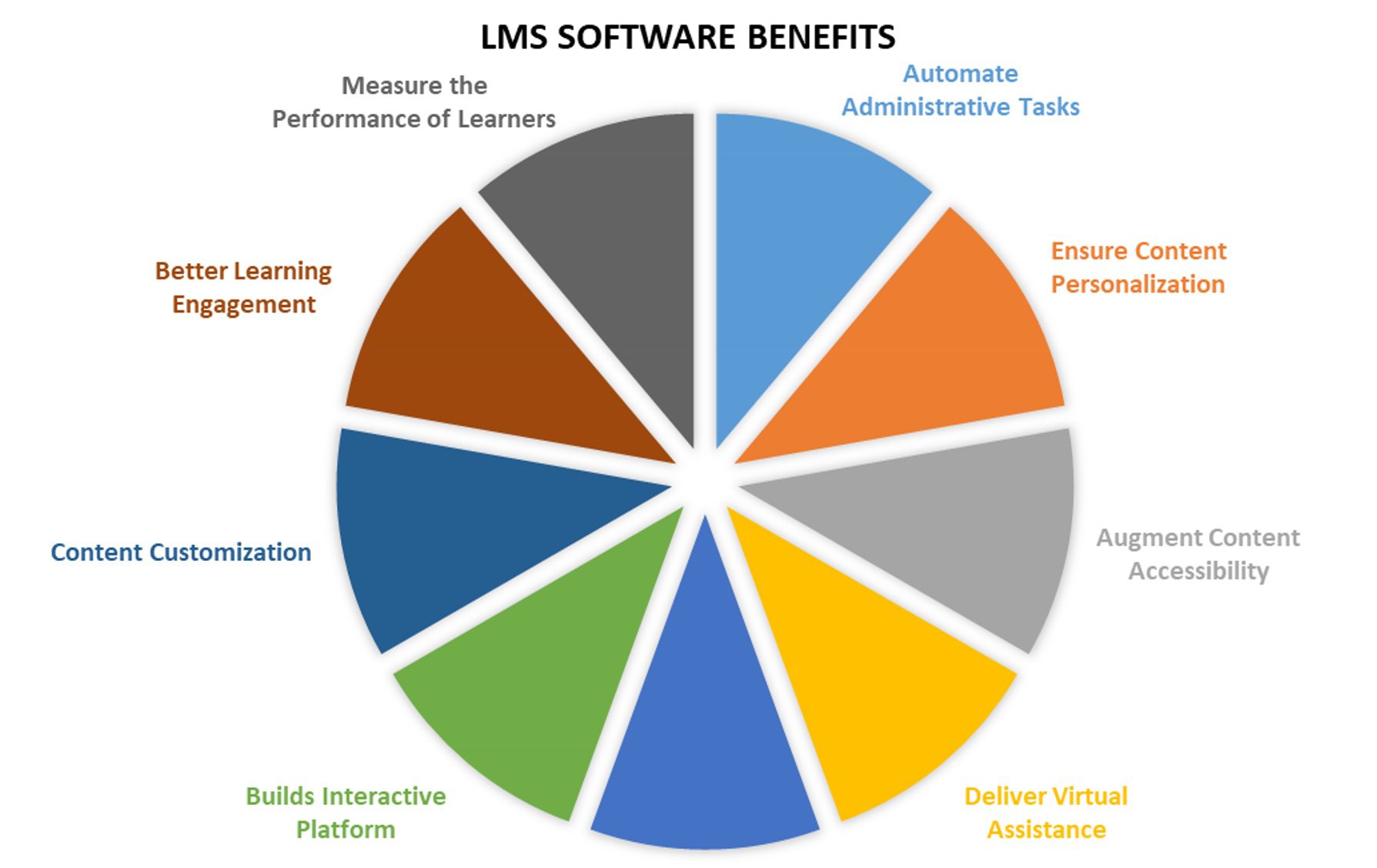
Benefits Of Artificial Intelligence In LMS DevelopmentAI-based LMS software development will provide numerous advantages to education service providers. In this session, we have curated a few of the top benefits of AI-powered learning management apps. Here we will learn the benefits of ai in LMS platforms or the benefits of artificial intelligence in LMS platforms or advantages of using AI in LMS or AI based learning management system.

  • AI-powered learning management platforms streamline the entire teaching and learning ways.
  • AI-based learning management applications for Android, iOS or web OS will assist educators or training institutes to deliver improved virtual learning experiences.
  • With the integration of audio and video-enabled open online classes, AI digital learning solutions enhance user personalization.
  • Content access and knowledge sharing will become seamless over secure cloud-enabled LMS platforms.
  • The use of AI in learning management apps development automated admin processes and augments documentation management functionalities
  • AI-based corporate LMS software will help companies to track and better manage their employee training and onboarding functionalities.
  • The use of Artificial intelligence in LMS solutions will monitor the user’s learning patterns and automatically customize the content for improving their abilities.
  • Using AI in LMS software development, users can view the content in their preferred languages and increase their learning experiences.
  • AI-enabled chatbot or virtual tutor module in LMS apps will interpret user voice commands or written text and automates the training process by giving accurate responses in seconds. As self-learning chatbots learn from previous experiences, they can provide instructor-like support to the trainees.

These are a few benefits of AI in LMS apps. AI-driven LMS applications automate and modernizes end-to-end training and learning procedures. Overall, AI-based LMS platforms will make learning ways more interactive and interesting.    

How Much Does It Cost to Develop An AI based LMS App? 4

How To Build An AI-Based Learning Management System?

If you are in plan to develop an advanced Artificial Intelligence powered LMS solution for organizations or training institutions, you must follow a few steps for the development of a robust software application. Being a top AI development company, we have curated our proven experience in the development of LMS software.

Key Steps To Follow For Developing AI-driven LMS Software: 

  • Step-1: Estimate the AI need for Your LMS Project

AI is a must-to integrate technology in e-learning mobile app development. Before commencing the software development process, you must evaluate the need for AI for your project.

Even though the technology is best at automating repetitive functionalities, one must also look into AI development and implementation costs.  Hence, according to the app requirements and business objectives of the end user, step forward to integrate AI features into LMS solutions.

  • Step-2: Gather and Be Ready With Data  

Data is key for training AI algorithms and meeting the app’s goal and vision. Until and unless you feed the AI algorithms with the appropriate datasets, never expect robust performance from the AI solutions.

Whether it is educational LMS software or corporate LMS software solution, data is a must. So, gather the required datasets from respective communities and customize the data as per your project needs. Rather than spending too much time collecting and categorizing the data, this process will save time and makes the development faster.

  • Step-3: Focus On Privacy and Security 

AI-powered LMS solution needs to store enormous user data and manage application content. Further, LMS apps offer content accessibility and sharing over digital platforms. Hence, enhancing the security levels and providing privacy to the user data is a key functionality of LMS software applications.

However, AI algorithms can identify irregular data patterns and prevent data threats seamlessly. Before starting the development process, be organized to ensure high-level encryption of the user data.

  • Step-4: Make a List Of Core Features

It is one of the significant phases of software development. Identifying and listing the features of applications is a core task for app developers.

As per the project requirements and client needs, pick the core features (like user profile, learning materials, knowledge testing, performance reports, notifications, audio/video online learning facility, download content for offline tracking, integrations, etc.) for learning management system development.

  • Step-5: Develop Module & Test Your Solution By Feeding Different Datasets   

Once a custom AI-powered LMS software module is developed, feed your AI solution with different datasets and monitor the outputs. Such thorough testing processes will assist you in measuring the performance and efficacy of your LMS applications.

Further, based on the type of LMS solution, mobile app developers also need to design the UX/UI to better engage users and increasing application quality. 

Hire the best LMS app development company!

  •  Step-6: Hire A Leading AI-based LMS Platform Development Company

Hiring a top custom mobile app development company for developing a flawless and interactive LMS solution is important. Hire USM, the best custom e-learning app development company in the USA and India. We have a team of full-stack app developers and creative designers who build best-in-class LMS platform with the most advanced AI features.

Get a free app quote for LMS development!

How Much Does It Cost To Develop An LMS?

The cost to develop an e-learning app or LMS software will be approximately $35,000-$70,000. But, the final cost is analyzed based on the factors like app design complexity, features list, app development platform, app type (native, hybrid, or cross-platform), technology stack, and third-party integrations. If you want to know How to build an ai based learning management system or How much does it cost to develop LMS system or How much will it cost to develop a custom lms or any other queries related to cost you can reach us.

USM Business Systems is the best mobile app development company, and a top-ranked e-learning app development company in the USA and India. We create collaborative digital learning platforms for education and corporate sectors.

Get In Touch!


Related Tags: How much does a learning management system cost, How much does it cost to develop an LMS, cost of Developing an ai based learning management system, How much does a learning management system platform cost, How much does it cost to develop LMS system  & custom LMS app development cost

Epic Games’ Tim Sweeney says Steam’s AI disclosure is “unfair to developers who use AI to make good games” because it associates AI “with bad games”


Epic Games CEO Tim Sweeney has been in a bit of a one-sided beef with Valve co-founder and CEO Gabe Newell for a while now, lately about Steam’s AI disclosure that requires developers to include a label informing Steam users of AI-generated content. Sweeney has had a number of complaints about Valve’s storefront over the years, which makes sense as he owns one of its main competitors, the Epic Games Store, but he’s been doubling and tripling down on the AI disclosure issue as of late. In a new interview, he not only sharply rebukes the AI label, but embraces AI in game development to degree rarely seen by him or other industry leaders.

Talking to GamesBeat, Sweeney gives one of the most bullish takes on AI generation in games I’ve seen in my many years covering this topic. Get on-board or die, is essentially his perspective.

How to Check YouTube Likes on Android With the YouTube Studio App


Illustration of a hand holding an Android smartphone displaying YouTube Studio analytics, including a bar chart and thumbs-up icon, with the title “How to Check YouTube Likes on Android.

To check YouTube likes on Android, open the YouTube Studio app, tap Content, choose a video, tap the Analytics card, then switch to the Engagement tab. YouTube Studio is Google’s app for running a channel from a phone, and the Engagement tab holds its Likes (vs. dislikes) report.

That takes about thirty seconds. Reading the number is harder. The figure in Studio does not always match the one under the video. And since August 24, 2026, the view count next to it means something different. If you manage a channel from your phone, both details change what a like count can tell you.

What the YouTube Studio App Shows About Likes

Google Play lists more than 100 million downloads for YouTube Studio, and it is the app Google points creators to for detailed analytics on mobile. The regular YouTube app only gives a brief channel summary.

According to YouTube’s Android help page on engagement, the Likes (vs. dislikes) report “summarizes how many viewers liked and disliked your videos.” You read it one video at a time, and the Likes (vs. dislikes) column in YouTube Studio shows the split for each upload. Shorts have their own key metrics card, which puts likes beside views and subscribers.

Studio shows how many people liked a video, not who they were.

How to Find the Likes Report on Android

Install YouTube Studio from Google Play and sign in with the Google account that has access to the channel. Then follow these steps:

  1. Open the YouTube Studio app.
  2. Tap Content in the bottom menu.
  3. Select the video you want to check.
  4. Tap the Analytics
  5. Tap Engagement in the top menu.
  6. Scroll to the Likes (vs. dislikes) report.

Google’s general analytics guide describes step 4 as tapping VIEW MORE in the Analytics section, so the label on your phone may differ slightly. If a label looks different, update YouTube Studio from Google Play first. Google also warns that some reports may not be available on mobile devices.

For a total across the whole channel, the regular YouTube app is quicker. Tap your profile picture, tap View channel, then tap Analytics in the middle menu. Google says that screen includes all-time likes along with subscribers, views, comments and shares.

To compare likes across videos in Studio, tap Analytics in the bottom menu, open the Content tab, and tap SEE MORE or ADVANCED MODE. Likes (vs. dislikes) can be added as a metric in that expanded report.

How to Read Likes Against Views After August 2026

YouTube’s page on how engagement metrics are counted says that “Beginning August 24, 2026, views are counted the moment a video starts to play across all formats, including Shorts, long-form videos (VOD), and live streams.” Under this rule for what counts as a YouTube view, a viewer who taps a video and leaves right away adds one. That means a like-to-view ratio on a recent upload is not comparable with one from early 2026.

Engaged views make a steadier comparison. YouTube’s Android help defines them this way: “How many times viewers stayed to watch past the initial seconds, not including any loops.”

Number Where to find it in Studio What it tells you
Likes (vs. dislikes) Video > Analytics > Engagement How many viewers reacted, and which way
Views Analytics > Overview Plays counted from the moment a video starts
Engaged views Analytics > Content Viewers who stayed past the initial seconds
Audience retention Video > Analytics > Engagement Which moments held attention

Here is a made-up example. A video with 400 likes and 20,000 views sits at 2 percent. If 12,000 of those views were engaged views, the same 400 likes come to about 3.3 percent of the people who stayed. YouTube’s help pages do not set a target for either ratio, so compare a video with your own recent uploads instead of with another channel’s numbers.

A new upload often starts with a low ratio simply because few people have seen it yet. Some creators use services such as Views4You to give a new video a starting like count, so it does not look empty while it finds its audience.

What Likes Do for Recommendations

Likes are one input among several. In a 2021 post on YouTube’s recommendation system, VP of Engineering Cristos Goodrow listed “clicks, watchtime, survey responses, sharing, likes, and dislikes” as signals, and added that “the importance of each signal depends on you.” He also wrote that people are more likely to be satisfied by videos they share or like. Guides to the YouTube algorithm’s ranking signals list likes, comments and shares among the viewer engagement signals the system reads.

So the useful habit is to read likes next to retention, on the same Engagement tab. Strong retention with few likes suggests people are watching without reacting, so a spoken request might help. Plenty of likes with a sharp early drop points to a weak opening. The people who stayed enjoyed it, and everyone else left. Fix that one first.

Asking viewers to hit the like button costs nothing. It works best right after the video delivers what the title promised, because a viewer who just got the answer has a reason to respond.

Why a Like Count Can Change After You Check It

A like count that moves by a few overnight is usually not a bug. Metrics can take a while to settle, especially in the first few hours after publishing.

Google documents two other oddities. Analytics and the watch page can disagree. Google calls this a known issue and says to go by the watch page for now. In rare cases a video can show more likes than views, since the two metrics go through different checks.

Frequently Asked Questions

Can I See Who Liked My YouTube Video on Android?

The Studio help pages describe the Likes report as a count of viewers and mention no list of individual accounts. A viewer’s Liked videos playlist is also private, so only that viewer can see it.

Which Like Count Should I Trust?

Use the watch page when it differs from Analytics. That is Google’s own recommendation while the mismatch remains a known issue.

How Long Do New Likes Take to Show Up?

YouTube says metrics may take time to appear during the first few hours after a video is published. After that, counts should update more often, though the timing varies with how popular the video or channel is.