Arc Raiders Worth Your Salt


The Worth Your Salt quest in Arc Raiders is all about finding a special salt battery in Spaceport, charging it up and delivering it. This is a quest that many people have reported as being glitched right now, so if you’re not the first person in the match to do it, it may not work for you. However, if you’re the first person to do this, it should work fine, and there’s probably a patch coming out for it soon anyway. Regardless, here’s a complete walkthrough for the quest and how you can complete Worth Your Salt in Arc Raiders. If it’s not broken, this is how you resolve it.

Worth Your Salt walkthrough and guide

(Image credit: Embark Studios)

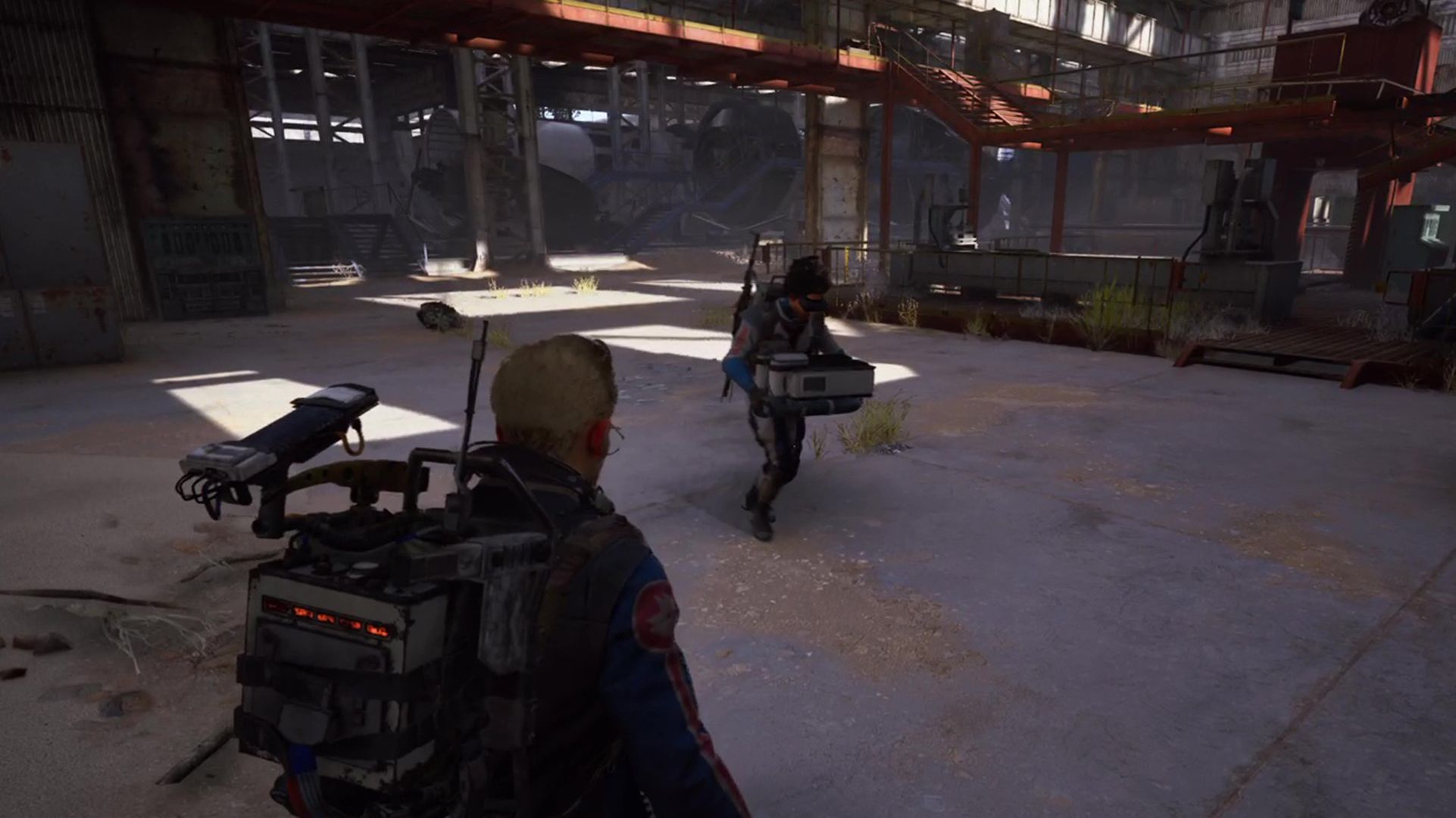
Worth Your Salt is a relatively simple mission in Arc Raiders, as you simply need to go to one warehouse and interact with several objects to tick it off.

  1. Go to the Spaceport Rocket Assembly building, specifically the Northmost section of the warehouse.

Worth Your Salt quest battery Arc Raiders

(Image credit: Embark Studios)
  1. In the corner of the room on the upper walkway, on the right side of the open doorway by the red lockers, is a small crate you can interact with to search for and pick up a battery.
  2. Pick up the battery and carry it one of the two red machines in the middle of the room. There’ll be a small grey console at the side to insert the battery into.

Worth Your Salt quest console Arc Raiders

(Image credit: Embark Studios)
  1. Interact with the machinery to charge the battery. This will take a moment, but when it’s done, it will spit out the charged battery for you to pick up again.
  2. Carry the battery to the delivery point. This is a small crate in the North corner of the room, on the left side of the doorway, where you’ll get an interaction prompt to insert the battery into the box. At this point, the mission will be complete and you can extract whenever you want.

Worth Your Salt quest delivery point Arc Raiders

(Image credit: Embark Studios)

The last step is where the mission has a high glitch rate: after anybody in the match has used the delivery crate, it can sometimes be stuck and unusable for everybody after that point. If that happens, there’s no solution but to extract and try again in a different match.

Arc Raiders blueprints – specifically, a blueprint for the Vita Spray, an Epic rarity healing item. If you have the blueprint unlocked already, you can sell it for 5000 coins.

These four features make the Redmagic 11 Air a beast of a gaming phone


With ASUS no longer making phones, Redmagic is the only gaming phone brand left, and to its credit, it is doing all the right things. I used the Redmagic 11 Pro when it debuted, and the addition of liquid cooling gave the device that little extra that gaming phones always need, and it was a gaming powerhouse.

There’s now the Redmagic 11 Air; I still think it’s hilarious that the brand chose an Air moniker for a phone that weighs 207g and has a 6.85-inch panel and a huge 7,000mAh battery, but hey, at least it is lighter than the 230g 11 Pro. As you’d imagine from Redmagic, the 11 Air has high-end internals and a whole load of extras designed to make the most out of mobile gaming. After using the phone for two weeks, I’m convinced that this is a great gaming phone, and if anything, I prefer it to the 11 Pro — I’m focusing on four areas where the Redmagic 11 Air stands out.

Lumion System Requirements & Empirical Benchmarks


Lumion System Requirements & Empirical Benchmarks

Looking for Lumion system requirements? Read on!

Unlike CPU-bound rendering engines, Lumion is a real-time visualization tool that functions as a high-performance rasterization and ray-tracing hybrid. As of the latest 2025 and 2026 releases, the computational load has shifted significantly toward hardware-accelerated Ray Tracing (RT). Performance is no longer a simple linear function of clock speed, but a complex interaction between VRAM throughput, RT core generations, and system I/O.

This report provides a data-driven breakdown of hardware requirements to achieve stable frame rates in the Lumion viewport and minimize export times for 4K ray-traced sequences using the latest 2026-tier hardware.

Graphics Processing Unit (GPU): The Primary Engine

The GPU is the single most critical component in a Lumion workstation. Our benchmarking utilizes the PassMark G3DMark index and real-world 4K render throughput to determine efficiency tiers.

The Ray Tracing “Performance Delta”

With the transition to next-generation architectures (NVIDIA Blackwell / RTX 50-series and AMD RDNA 4), we have observed a non-linear increase in rendering efficiency. The latest RT cores handle the “Denoising” and “Ray-Casting” calculations with significantly lower latency than previous generations.

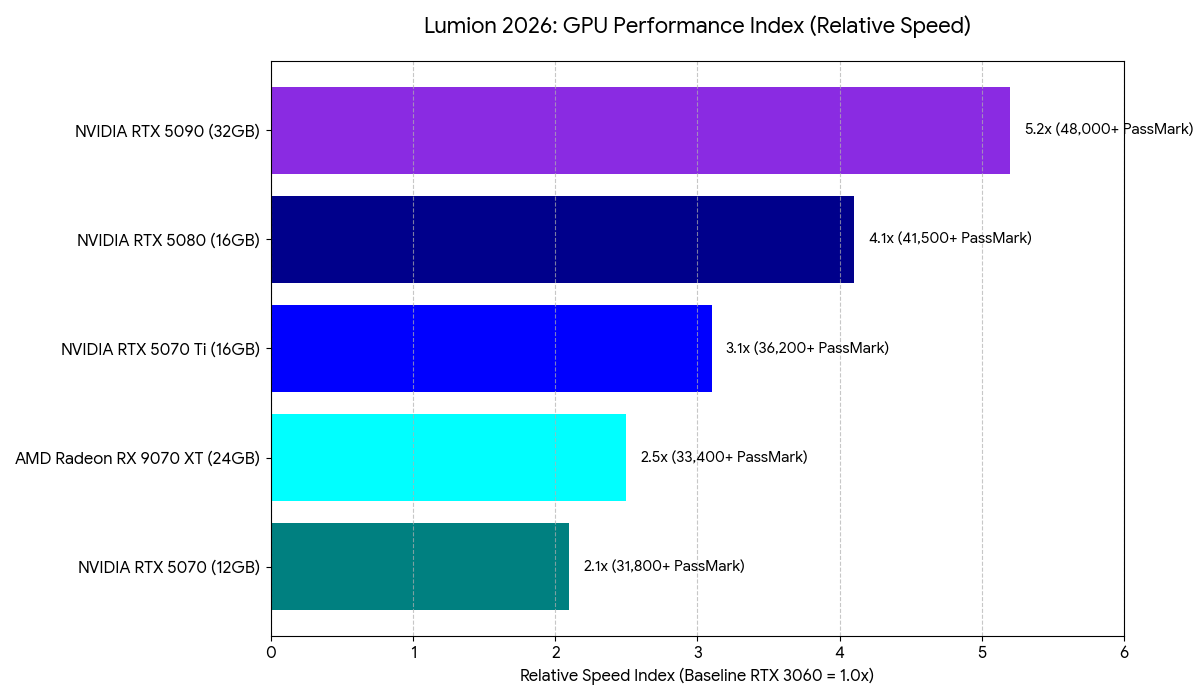
GPU Performance Index (2026 Benchmarks)

Relative Speed is indexed against a baseline RTX 3060 (1.0x).

Lumion GPU Performance Metrics

Our Insight: While the RX 9070 XT offers a massive 24GB VRAM buffer ideal for large textures, the RTX 5080 and 5070 Ti often maintain higher throughput in Lumion due to the specialized nature of NVIDIA’s OptiX integration within the Lumion engine.

Processor (CPU): Managing the Geometry Pipeline

The CPU’s primary role is to process the geometry from your CAD software (SketchUp, Revit, Rhino) and hand it off to the GPU. Lumion is heavily dependent on Single-Threaded performance for scene management and the LiveSync bridge.

  • Professional Recommendation: Intel Core Ultra 9 285k or AMD Ryzen 9 9950X.
  • Metric of Success: A Single-Thread CPUMark score of 3,600+ is recommended to ensure the GPU is never “starved” of data during real-time navigation.

Memory (RAM) and VRAM: Avoiding the Memory Swap

Lumion requires that the entire scene—including textures, geometry, and the asset library—reside in the GPU’s VRAM. When VRAM is exceeded, Lumion swaps data to system RAM, which is significantly slower.

  • Minimum VRAM: 12GB (Found in the RTX 5070).
  • Recommended VRAM: 16GB–24GB (Commercial and urban scale).
  • System RAM: 64GB DDR5 is now the professional standard to allow for multi-tasking between Lumion and high-poly modeling applications.

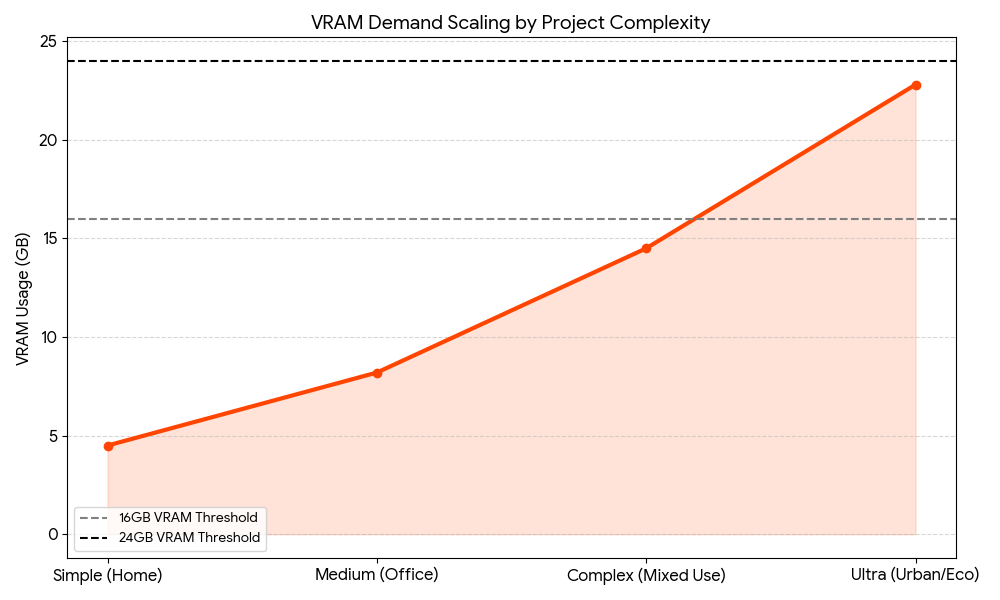
(See Figure: VRAM Demand Scaling by Project Complexity)

Lumion System Requirements Benchmark Visualizations

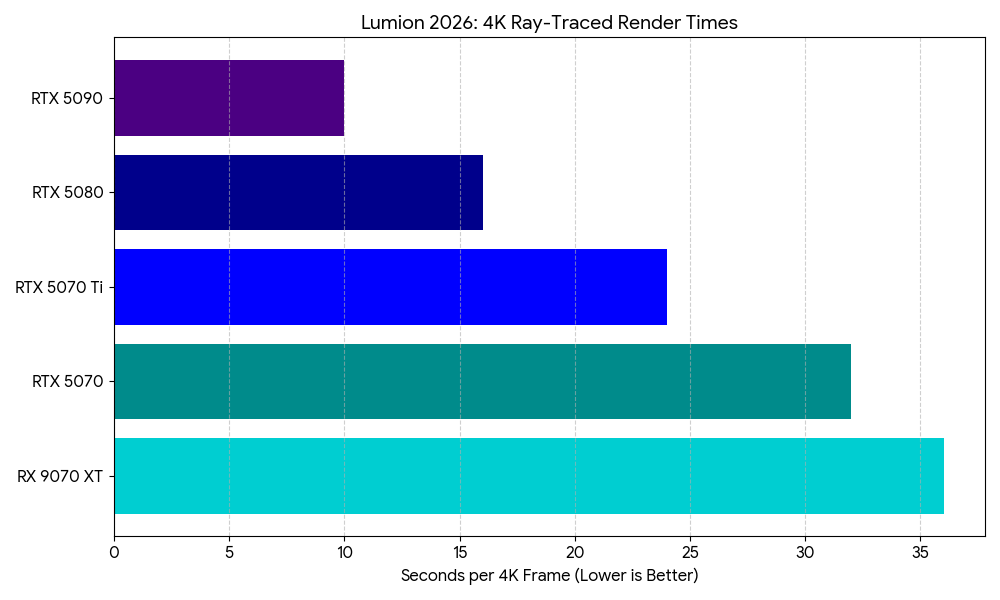
Fig 1. Rendering Throughput (4K Ray-Traced Still)

The following chart compares the time (in seconds) required to export a 4K photorealistic still with Ray Tracing (v2.0) enabled.

Lumion Render Times

Fig 2. VRAM Demand Scaling by Complexity

As models increase in polygon count and texture resolution, VRAM usage follows an exponential curve. Utilizing “Fine-Detail Nature” assets is the primary driver of VRAM exhaustion.

VRAM Demand

Recommended Configurations (2025–2026)

Tier 1: The “Design Associate” (Standard Projects)

Ideal for single-family residential and small commercial projects.

  • CPU: Intel Core 7 265k (5.6GHz Boost)
  • GPU: NVIDIA GeForce RTX 5070 (12GB VRAM)
  • RAM: 32GB DDR5-6000
  • Storage: 1TB NVMe PCIe Gen4 (OS) + 2TB NVMe (Assets)

Tier 2: The “Visualization Lead” (Enterprise Scale)

Designed for complex ray-traced animations and large-scale master plans.

  • CPU: AMD Ryzen 9 9950X or Intel Core 9 285k
  • GPU: NVIDIA GeForce RTX 5080 (16GB VRAM) or RTX 5070 Ti
  • RAM: 64GB DDR5-6000
  • Storage: 2TB NVMe PCIe Gen5 (Project Drive)

The “Cinema Suite” (2026 Ultra-High End)

Maximum performance for 8K panoramas and cinema-quality video sequences.

  • CPU: Intel Core Ultra 9 285k or AMD Ryzen 9 9950X3D
  • GPU: NVIDIA GeForce RTX 5090 (32GB VRAM)
  • RAM: 128GB DDR5
  • Storage: 4TB PCIe Gen5 NVMe

Conclusion: The VRAM “Hard Limit” for Lumion

When it comes to Lumion system requirements, the transition to 2026-tier hardware highlights a critical trend: the VRAM threshold. While the RTX 5070 handles most residential tasks, the 16GB buffer on the RTX 5080 or 5070 Ti is the true sweet spot for professional architectural visualization. For those working on massive city-scale environments, the 32GB found in the RTX 5090 remains the only way to avoid the catastrophic performance drop associated with system memory swapping.

Configure a ProMagix HD80 Lumion Workstation now.

The following two tabs change content below.

Josh has been with Velocity Micro since 2007 in various Marketing, PR, and Sales related roles. As the Director of Sales & Marketing, he is responsible for all Direct and Retail sales as well as Marketing activities. He enjoys Seinfeld reruns, the Atlanta Braves, and Beatles songs written by John, Paul, or George. Sorry, Ringo.


Vertical Vs Horizontal Growth: Which Strategy Scales Better?


Vertical vs Horizontal growth isn’t just a question of direction; it’s the fundamental decision that shapes your company’s future architecture.

In the boardroom, these terms don’t refer to lines on a graph. They refer to two distinct ways of seizing power in a market. Do you dig deeper to control your entire supply chain, or do you spread wider to capture more market share?

Most professionals understand the basic definitions. But knowing the definitions won’t save you from a bad strategic pivot. You need to understand the capital requirements, the risk profiles, and the operational drag associated with each.

Here is how a strategist looks at the choice between going deep or going wide.

The Core Distinction

Before analyzing the ROI, let’s strip away the jargon.

  • Vertical Growth is about control. It’s moving up or down your specific supply chain. It means buying your supplier to lower costs or buying your distributor to own the customer relationship.
  • Horizontal Growth is about reach. It’s expanding into new markets or launching adjacent products. It means a shoe company starting a clothing line, or a software firm acquiring a competitor to double its user base.

One maximizes margin; the other maximizes revenue.

Vertical Integration: The Power Play

Vertical integration is the strategy of the perfectionist. When a company decides to ‘go vertical,’ they are usually trying to eliminate dependencies. They are tired of suppliers hiking prices or distributors diluting their brand message.

By taking ownership of different stages of production, you secure your logistics and protect your trade secrets.

Why Go Vertical?

  1. Margin Protection: Middlemen eat profit. By bringing manufacturing or logistics in-house, you recapture that value.
  2. Supply Chain Security: If you own the factory, you rarely have to worry about your supplier prioritizing a competitor’s order over yours.
  3. Quality Dominance: You control the product from raw material to the checkout counter.

The Real-World Application

Look at Tesla. They didn’t just build cars; they built the battery factories (Gigafactories) and the charging network. This is aggressive vertical integration. By refusing to rely on third-party charging networks, they solved the biggest objection to EV ownership: range anxiety. And they did it themselves.

Strategist’s Note on Vertical Risks

Don’t dive into this lightly. Vertical integration is capital-intensive. It requires you to be good at everything. If you are a great retailer but a terrible manufacturer, buying a factory might sink you. Focus on core competencies first.

Horizontal Expansion: The Market Grab

Horizontal expansion is the strategy of the empire builder. This approach is less about squeezing efficiency out of a single product and more about dominating a category.

This usually happens via merger, acquisition, or internal R&D focused on new product lines. The goal is to sell more things to your existing customers or the same thing to new customers.

Why Go Horizontal?

  1. Risk Mitigation: If one product line fails, others can float the company. You aren’t putting all your eggs in one basket.
  2. Economies of Scope: You already have a marketing team and a distribution network. Sliding a new product into that existing infrastructure is cheaper than building it from scratch.
  3. Synergy: Cross-selling becomes a massive revenue driver.

The Real-World Application

Apple is a master of this. They started with computers. Then came the iPod, iPhone, iPad, and the Apple Watch. These are horizontal moves. They’re different products, but they work together within the same ecosystem. Because the brand trust was already established, customers were willing to try the new categories.

Strategist’s Note on Horizontal Risks

The danger here is brand dilution. If a luxury watchmaker suddenly starts selling cheap plastic wall clocks, they expand horizontally but destroy their brand equity. Expansion must make sense to the consumer.

Vertical vs Horizontal: Making the Strategic Choice

Choosing between these two isn’t about which is ‘better.’ It is about your current lifecycle stage and cash flow.

When to choose Vertical:

  • Your suppliers are unreliable or too expensive.
  • You have high transaction costs.
  • Your market is mature, and the only way to grow profit is to improve margins.
  • You need strict secrecy regarding your proprietary technology.

When to choose Horizontal:

  • You have a strong brand that can carry over to new categories.
  • Your current market is saturated, and you need new revenue streams.
  • You want to acquire a competitor to reduce market friction.
  • You have an efficient distribution channel that is currently underutilized.

The Bottom Line

Successful companies rarely stick to just one lane forever. They toggle between these strategies based on market conditions.

The best approach? Audit your bottlenecks.

If your growth is stalled because you can’t get materials fast enough, look at Vertical vs Horizontal solutions and choose the vertical path. If your growth is stalled because you’ve tapped out your current customer base, it’s time to move horizontally.

Don’t follow the trend. Follow the friction in your business, and solve for that.

LG’s massive 52-inch ultra-wide gaming monitor costs $2,000


LG kicked off the year by unveiling a new lineup of gaming monitors, and today the company has priced out the biggest of the bunch. The UltraGear evo G9 (52G930B) is now available for pre-order, and the massive screen will cost just $2,000.

Yes, you can buy a perfectly excellent gaming monitor for much less, but $2,000 is a surprisingly low price tag for this 52-inch ultrawide monitor with a 1000R curve, which LG is billing as “the world’s largest 5K2K gaming monitor.” In addition to its huge size, the G9 can run at a 240Hz refresh rate and offers a 1 millisecond gray-to-gray response rate. Visuals are supported by VESA DisplayHDR 600 and up to 95% DCI-P3 color gamut coverage.

LG has long done solid work on gaming monitors, and the G9 seems like a good choice for anyone who wants to be seriously immersed in their gameplay. Whether that’s for a high-fidelity experience like Microsoft Flight Simulator or for having the maximum coziness in Stardew Valley is up to you.

Image for the mini product module

Visual Studio February Update – Visual Studio Blog


This month’s Visual Studio update continues our focus on helping you move faster and stay in flow, with practical improvements across AI assistance, debugging, testing, and modernization. Building on the momentum from January’s editor updates, the February release brings smarter diagnostics and targeted support for real world development scenarios, from WinForms maintenance to C++ modernization.

All of the features highlighted are available in the Visual Studio 2026 Stable Channel as part of the February 2026 feature update (18.3). Please update to the latest version to try out these new features!

WinForms Expert Agent

The WinForms Expert agent provides a focused guide for handling key challenges in WinForms development. It covers several important areas:
Designer vs. regular code: Understand which C# features apply to designer-generated code and business logic.

  • Modern .NET patterns: Updated for .NET 8-10, including MVVM with Community Toolkit, async/await with proper InvokeAsync overloads, Dark mode with high-DPI support, and nullable reference types.
  • Layout: Advice on using TableLayoutPanel and FlowLayoutPanel for responsive, cross-device design.
  • CodeDOM serialization: Rules for property serialization and avoiding common issues with [DefaultValue] and ShouldSerialize*() methods.
  • Exception handling: Patterns for async event handlers and robust application-level error handling.

The agent serves as an expert reviewer for your WinForms code, providing comprehensive guidance on everything from naming controls to ensuring accessibility. The WinForms Agent is automatically implemented and included in the system prompt when necessary.

Smarter Test Generation with GitHub Copilot

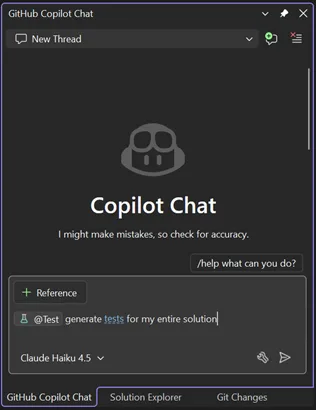
Visual Studio now includes intelligent test generation with GitHub Copilot, making it faster to create and refine unit tests for your C# code. This purpose-built workflow works seamlessly with xUnit, NUnit, and MSTest.

GitHub Copilot Chat pane in Visual Studio showing a new chat thread. The Copilot Chat welcome screen appears with a message about checking accuracy, a prompt asking ‘generate tests for my entire solution,’ and the selected model labeled Claude Haiku 4.5. The input box includes a reference button and test generation command.

Simply type @Test in GitHub Copilot Chat, describe what you want to test, and Copilot generates the test code for you. Whether you’re starting fresh or improving coverage on existing projects, this feature helps you write tests faster without leaving your workflow.

Slash Commands for Custom Prompts

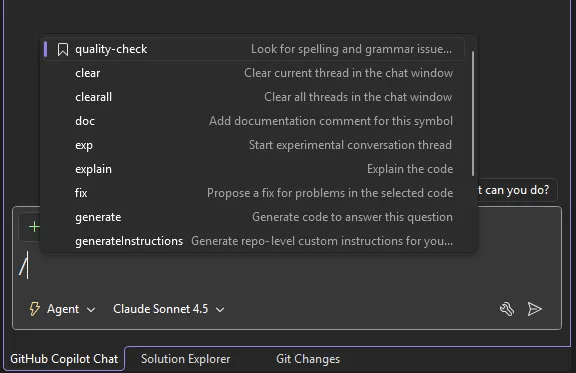
Invoke your favorite custom prompts faster using slash commands in Copilot Chat. Type / and your custom prompts appear at the top of the list, marked with a bookmark icon for easy identification.

Copilot Chat slash command menu in Visual Studio showing available commands such as quality check, clear, explain, fix, and generate, with Agent mode enabled and Claude Sonnet 4.5 selected in the chat input area.

We’ve also added two additional commands:

– /generateInstructions: Automatically generate a copilot-instructions.md file for your repository using project context like coding style and preferences

– /savePrompt: Extract a reusable prompt from your current chat thread and save it for later use via / commands

These shortcuts make it easier to build and reuse your workflow patterns.

C++ App Modernization

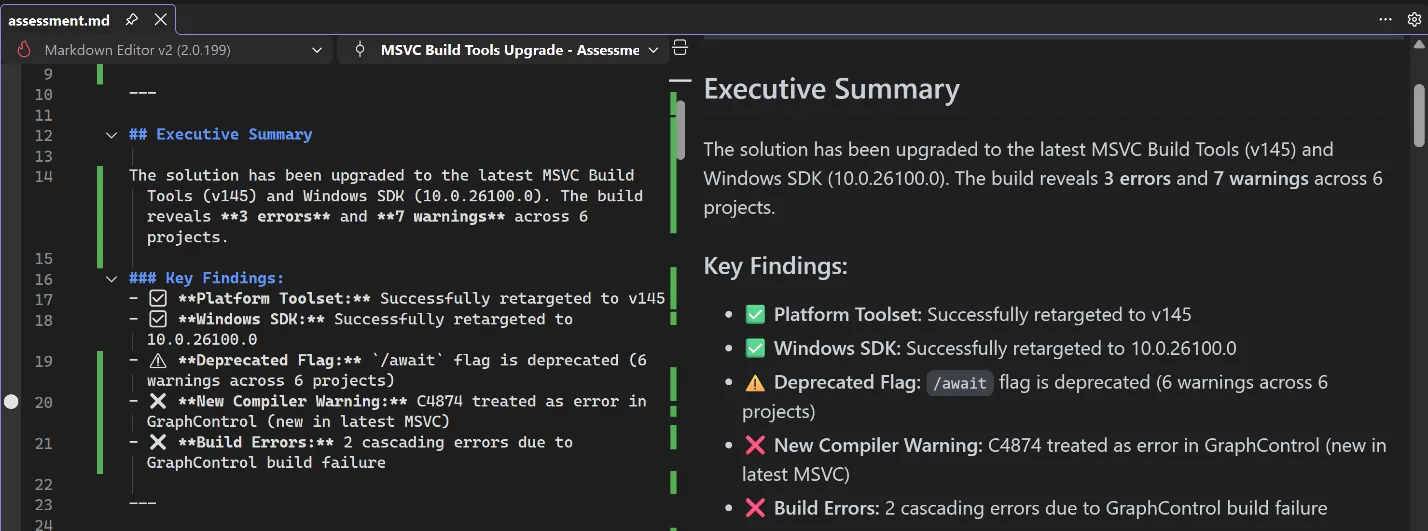
GitHub Copilot app modernization for C++ is now available in Public Preview. GitHub Copilot app modernization for C++ helps you update your C++ projects to use the latest versions of MSVC and to resolve upgrade-related issues. You can find our user documentation on Microsoft Learn.

Split view in Visual Studio showing a Markdown file on the left and a rendered preview on the right with an Executive Summary and Key Findings for an MSVC Build Tools upgrade including errors and warnings.

DataTips in IEnumerable Visualizer

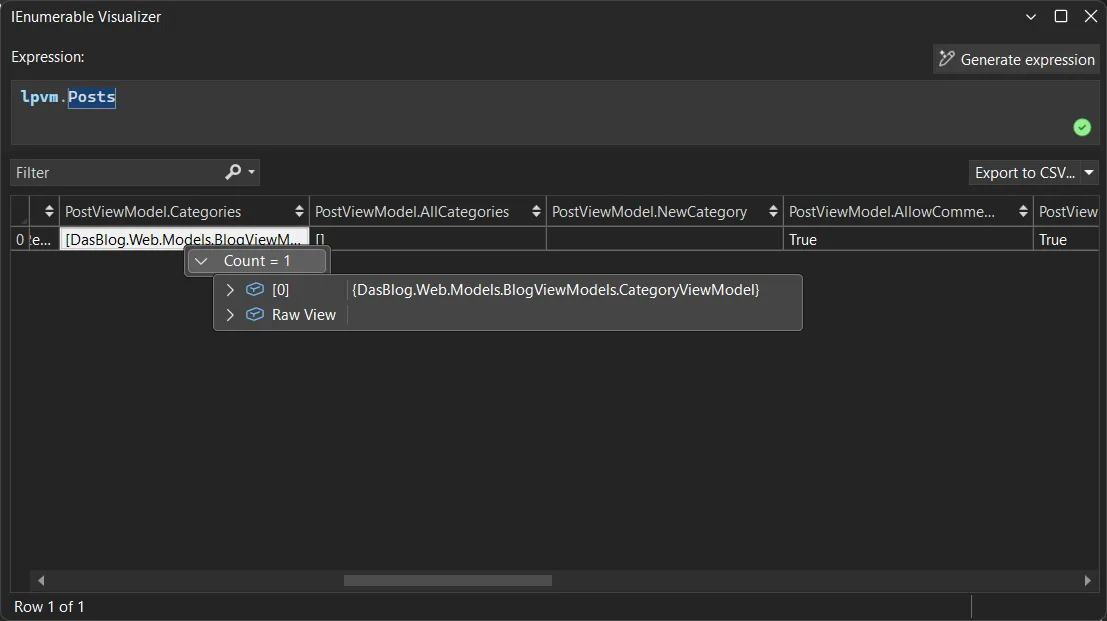
You can now use DataTips in the IEnumerable Visualizer while debugging. Just hover over any cell in the grid to see the full object behind that value, the same DataTip experience you’re used to in the editor or Watch window.

When you hover over a cell, a DataTip shows all the object’s properties in one place. This makes it much easier to debug collections with complex or nested data. Whether it’s a List<T> of objects or a dictionary with structured values, one hover lets you quickly inspect everything inside.

Visual Studio IEnumerable Visualizer showing the expression lpvm.Posts. A table displays one row with columns for PostViewModel properties, including Categories with a count of one, AllCategories, NewCategory, and AllowComments set to True. A tooltip shows a CategoryViewModel object with an option to view raw data.

Analyze Call Stack with Copilot

You can now Analyze Call Stack with Copilot to help you quickly understand what your app is doing when debugging stops. When you pause execution, you can select Analyze with Copilot in the Call Stack window. Copilot reviews the current stack and explains why the app isn’t progressing whether the thread is waiting on work, looping, or blocked by something.

This makes the call stack more than just a list of frames. It becomes a helpful guide that shows what’s happening in your app so you can move faster toward the real fix.

Profiler agent with Unit Test support

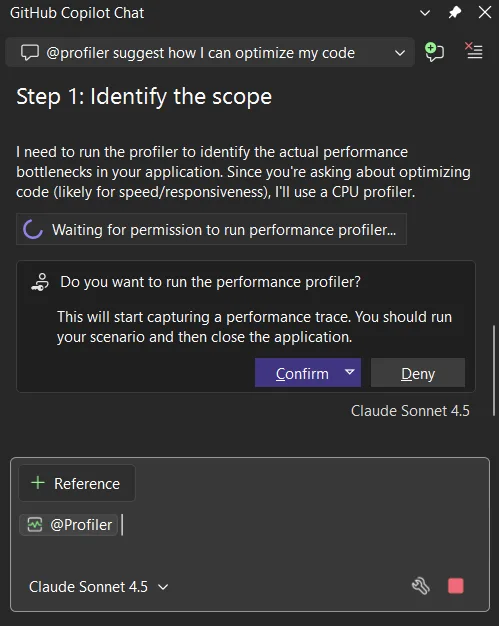
The Profiler Agent (@profiler) now works with unit tests. You can use your existing tests to check performance improvements, making it easier to measure and optimize your code in more situations. The agent can discovers relevant unit tests/BenchmarkDotNet benchmarks that exercise performance-critical code paths.

If no good tests or benchmarks are available, it automatically creates a small measurement setup so you can capture a baseline and compare results after changes. This unit-test-focused approach also makes the Profiler Agent useful for C++ projects, where benchmarks aren’t always practical, but unit tests often already exist.

GitHub Copilot Chat showing profiler suggestion to optimize code step identify scope message requesting permission to run CPU performance profiler with confirm and deny buttons and model selector visible

Faster and More Reliable Razor Hot Reload

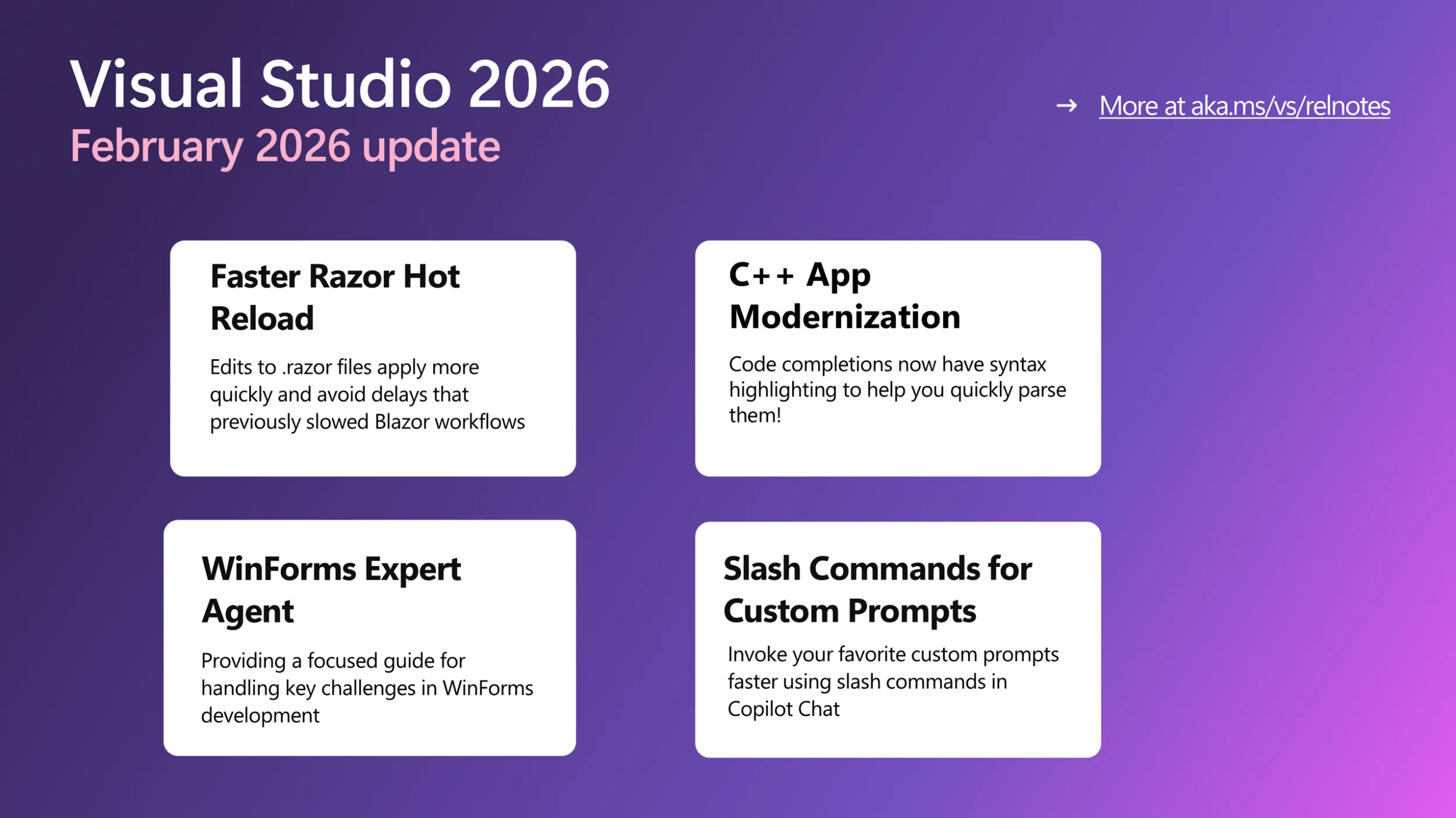
Hot Reload for Razor files are now faster and more reliable. By hosting the Razor compiler inside the Roslyn process, edits to .razor files apply more quickly and avoid delays that previously slowed Blazor workflows. We also reduced the number of blocked edits, with more changes now applying without requiring a rebuild, including file renames and several previously unsupported code edits. When a rebuild is still required, Hot Reload can now automatically restart the app instead of ending the debug session, helping you stay in flow.

We are continuing to invest in features that help you understand, test, and improve existing code, not just write new code. Try these updates in the Visual Studio 2026 Stable Channel and let us know what is working well and where we can improve. Your feedback directly shapes what we build next.

Humanizing Employee Relations with Agentic AI


Empower your people to speak up and get support when it matters most.

When sensitive workplace issues arise, walking into a Human Resources office can feel intimidating. Discover how forward-thinking people leaders are using intelligent digital colleagues to create a safe, empathetic first point of contact for their workforce.

In this concise, strategy-focused session, you will learn how to:

  • Create Psychological Safety: Give employees a pressure-free, conversational way to report concerns or conflicts.​​
  • Empower Your Team: Streamline the initial intake so your Employee Relations Specialists can focus on human connection and resolution.​​
  • Match Your Culture: Tailor the digital assistant’s personality to fit your company’s unique voice.​​
  • Integrate Seamlessly: Connect effortlessly with your core systems of record, like SAP SuccessFactors, without a massive technical overhaul.​​

First British Baby Born Using Transplanted Womb From Dead Donor


A 10-week-old boy named Hugo has become the first baby born in the UK from a womb transplanted from a deceased donor, after his mother Grace Bell — who was born without a viable womb due to a condition called MRKH syndrome, which affects one in every 5,000 women — underwent a 10-hour transplant operation at The Churchill Hospital in Oxford in June 2024.

Hugo was born just before Christmas 2025, weighing nearly 7lbs, at Queen Charlotte’s and Chelsea Hospital in west London, following IVF treatment and embryo transfer at The Lister Fertility Clinic. Bell’s transplant is one of three completed so far as part of a UK clinical research trial that plans to carry out 10 such procedures from deceased donors, and Hugo is the first baby born from any of them.
Earlier in 2025, a separate effort produced baby Amy, the first UK birth from a living womb donation — her mother had received her older sister’s womb in January 2023. Globally, more than 100 womb transplants have been performed, resulting in over 70 healthy births.

Top Causes of Data Loss and How to Prevent Them


Every day, people sit down at their computers, reach for a file they need, and find nothing. Whether it’s years of family photos, critical business documents, or important financial records, data loss hits hard and fast. At PC Geeks, we’ve seen it happen to good people hundreds of times, and we want to help you make sure it doesn’t happen to you.

PC Geeks has been helping individuals and businesses recover from digital disasters for years, building a reputation on honest advice, expert service, and genuine care for the people who walk through their doors. We don’t just fix computers. We protect the things on them that matter most to you.

The encouraging news is that most data loss is preventable once you understand what causes it. And when prevention isn’t enough, knowing when to call in a professional can be the difference between a full recovery and a permanent loss.

data loss

The Most Common Causes of Data Loss

Your hard drive is a mechanical device, and like all mechanical things, it will eventually wear out. Hard drive failure accounts for roughly 40% of all data loss incidents, making it the single biggest threat to your files. You might hear clicking sounds, notice your computer slowing down dramatically, or experience random crashes. All of these are warning signs that your drive is struggling.

Solid-state drives (SSDs) are more durable but not immune. They can fail without warning, often giving you no signs at all before your data disappears.

Accidental Deletion

It happens to everyone. You’re cleaning up your desktop, move too quickly, and suddenly that folder you needed is gone. Sometimes the recycle bin saves you, but other times, especially when files are deleted from external drives or after emptying the bin, recovery becomes significantly more complicated.

Malware and Ransomware Attacks

Cybercriminals have become increasingly sophisticated, and ransomware alone caused over $20 billion in damages globally in recent years. This type of malicious software can encrypt or destroy your files completely, holding your own data hostage until you pay, with no guarantee you’ll ever get it back even if you do.

Power Surges and Sudden Outages

Imagine you’re right in the middle of saving an important document and the power cuts out. Beyond losing unsaved work, sudden power interruptions can corrupt files already on your drive and even damage the drive itself. A single lightning storm without proper surge protection can wipe out years of data in an instant.

Software Corruption and Failed Updates

Buggy software updates, improper shutdowns, and corrupted operating system files can all leave your data inaccessible. This is particularly common after forced updates or when a computer loses power mid-installation.

How to Protect Yourself Before Disaster Strikes

The most powerful thing you can do is follow the 3-2-1 backup rule: keep three copies of your data, stored on two different types of media, with one copy stored offsite or in the cloud. This approach, widely recommended by cybersecurity experts, dramatically reduces your risk of permanent loss.

Keeping your software and antivirus programs updated closes security vulnerabilities before attackers can exploit them. Investing in a quality surge protector, or better yet an uninterruptible power supply (UPS), gives your computer a buffer against electrical damage.

When to Call the Professionals

Some situations go beyond DIY fixes. If your hard drive is making unusual sounds, your computer won’t boot, or you’ve experienced a ransomware attack, attempting to recover data yourself can actually make things worse. Physical drive damage especially requires a controlled environment and specialized tools to avoid permanently overwriting recoverable data.

That’s where PC Geeks comes in. Our technicians are trained to handle even complex recovery scenarios, and we’ll always give you an honest assessment of what’s possible before any work begins. Contact us today. Your data is worth protecting, and if the worst happens, it’s worth fighting to get back.

How to Deploy MCP Servers as an API Endpoint


TL;DR

MCP servers connect LLMs to external tools and data sources through a standardized protocol. Public MCP servers provide capabilities such as web search, GitHub access, database queries, and browser automation through structured tool definitions.

These servers typically run as long-lived stdio processes that respond to tool invocation requests. To use them reliably in applications or share them across teams, they need to be deployed as stable, accessible endpoints.

Clarifai allows MCP servers to be deployed as managed endpoints. The platform runs the configured MCP process, handles lifecycle management, discovers available tools, and exposes them through its API.

This tutorial walks you through how to deploy any public MCP server. We’d be using the DuckDuckGo browser server as a reference implementation. The same approach applies to other stdio-based MCP servers, including GitHub, Slack, and filesystem integrations.

DuckDuckGo Browser MCP Server

The DuckDuckGo browser MCP server is an open-source MCP implementation that exposes web search capabilities as callable tools. It allows language models to perform search queries and retrieve structured results through the MCP protocol.

The server runs as a stdio-based process and provides tools such as ddg_search for executing web searches. When invoked, the tool returns structured search results that LLMs can use to answer questions or complete tasks that require current web information.

We use this server as the reference implementation because it does not require additional secrets or external configuration. The only requirement is defining the MCP command in config.yaml, which makes it straightforward for us to deploy and test on Clarifai.

If you’d like to build a custom MCP server from scratch with your own tools and logic, this guide walks through that process using FastMCP.

Now that we have defined the reference server, let’s start.

Set Up the Environment

Install the Clarifai Python SDK:

Set your Clarifai Personal Access Token as an environment variable. Retrieve your PAT from the security settings in your Clarifai account.

Clone the runners-examples repository and navigate to the browser MCP server directory:

The directory contains the deployment files:

  • config.yaml: Deployment configuration and MCP server specification
  • 1/model.py: Model class implementation
  • requirements.txt: Python dependencies

Configure the Deployment

Before uploading, update config.yaml with your Clarifai model identifiers and compute settings. This file defines the model metadata, MCP server startup command, and resource requirements. Clarifai uses it to start the MCP server, allocate compute, and expose the server’s tools through the model endpoint.

The mcp_server section defines how the MCP server process is started. command specifies the executable, and args lists the arguments passed to that executable. In this example, uvx duckduckgo-mcp-server starts the DuckDuckGo MCP server as a stdio-based process.

The model implementation in 1/model.py inherits from StdioMCPModelClass:

StdioMCPModelClass starts the process defined in config.yaml, discovers the available tools through the MCP protocol, and exposes those tools through the deployed model endpoint. No additional implementation is required beyond inheriting from StdioMCPModelClass.

The DuckDuckGo MCP server runs on CPU and requires minimal resources.

Upload & Deploy MCP Server

Upload the MCP server using the Clarifai CLI:

The –skip_dockerfile flag is required when uploading MCP servers. This command packages the model directory and uploads it to your Clarifai account.

After uploading your MCP server, deploy it on compute so it can run and serve tool requests.

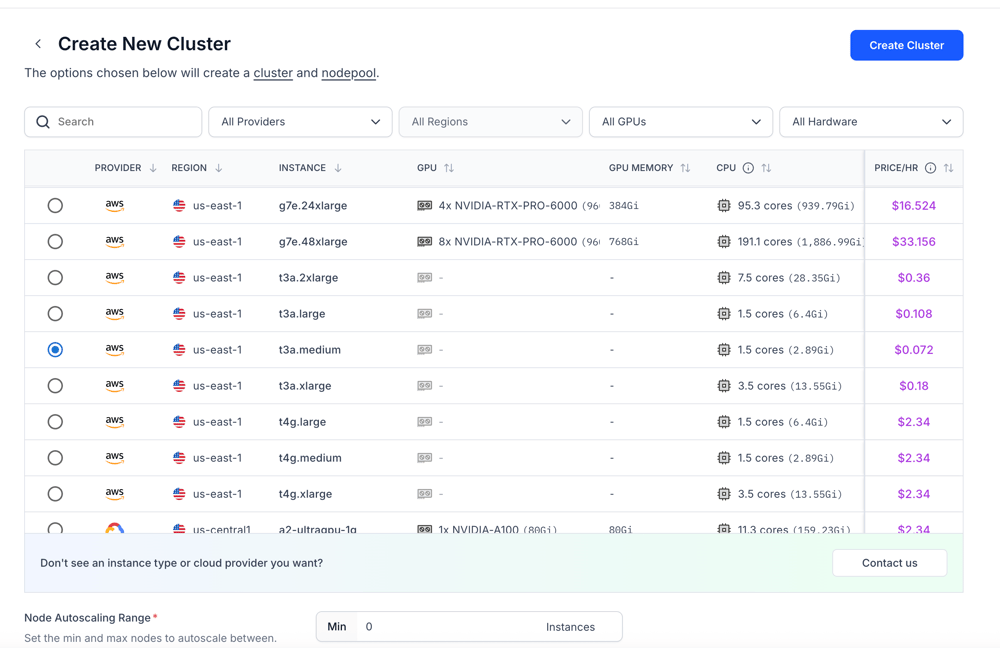
Go to the Compute section and create a new cluster. You will see a list of available instances across different providers and regions, along with their hardware specifications.

Each instance shows:

  • Provider
  • Region
  • Instance type
  • GPU and GPU memory
  • CPU and system memory
  • Hourly price

Screenshot 2026-02-24 at 10.47.09 PM

Select an instance based on the resource requirements you defined in your config.yaml file. For example, if you specified certain CPU and memory limits, choose an instance that satisfies or exceeds those values. Most MCP servers run as lightweight stdio processes, so GPU is typically not required unless your server explicitly depends on it.

After selecting the instance, configure the node pool. You can set autoscaling parameters such as minimum and maximum replicas based on your expected workload.

Finally, create the cluster and node pool, then deploy your MCP server to the selected compute. Clarifai will start the server using the command defined in your config.yaml and expose its tools through the deployed model endpoint.

You can follow the guide to learn how to create your dedicated compute environment and deploy your MCP server to the platform.

Using the Deployed MCP Server

Once deployed, we can interact with the MCP server using the FastMCP client. The client connects to the Clarifai endpoint and discovers the available tools.

Replace the URL with your deployed MCP server endpoint.

This client establishes an HTTP connection to the deployed MCP endpoint and retrieves the tool definitions exposed by the DuckDuckGo server. The list_tools() call confirms that the server is running and that its tools are available for invocation.

Integrate with LLMs

The tools exposed by your deployed MCP server can be used with any LLM that supports function calling. Configure your MCP client and OpenAI-compatible client to connect to your Clarifai MCP endpoint so the model can discover and invoke the available tools.


Your MCP server is now deployed as an API endpoint on Clarifai, and its tools can be accessed and invoked from any compatible LLM through the MCP client.

Frequently Asked Questions (FAQs)

  • Can I deploy any MCP server using this method?

    Yes. As long as the MCP server runs as a stdio-based process, it can be defined in the mcp_server section of config.yaml. Update the command and arguments, upload the model, and the server will be exposed through its own endpoint.

  • Do MCP servers require Docker to deploy?

    No. When uploading MCP servers using the Clarifai CLI, the –skip_dockerfile flag allows the deployment without requiring a custom Dockerfile.

  • Can I use deployed MCP servers with any LLM?

    Yes. Any LLM that supports function calling or tool calling can use the tools exposed by a deployed MCP server. The tools must be formatted according to the model’s function calling schema.

  • Do MCP servers require API keys?

    It depends on the server implementation. Some public MCP servers, such as the DuckDuckGo example used in this guide, do not require additional secrets. Others may require API credentials defined in environment variables or configuration.

Closing Thoughts

We converted a stdio based MCP server into a publicly accessible API endpoint on Clarifai. Its tools can now be discovered and invoked by any LLM that supports function calling.

This approach lets you move MCP servers from local development into stable, shareable infrastructure without changing their core implementation. If a server runs over stdio, it can be packaged, deployed, and exposed through Clarifai.

You can now deploy your own MCP servers, connect them to your models, and extend your LLM applications with custom tools or external integrations. For more examples, explore the runners-examples repository.