AI is changing what it means to be a marketer. Continue reading “Free AI Education for Marketers”
AI is changing what it means to be a marketer. Continue reading “Free AI Education for Marketers”
Two more news organizations are suing OpenAI and Microsoft over the supposed use of their journalism to train AI.
A lawsuit filed by The Seattle Times and Newsday argued that with the advent of AI, the journalism industry could become “broken beyond repair.” The lawsuit described generative AI as “a snake eating its own tail” that could “destroy the very organizations” that produce the content it’s trained on.
“AI products like ChatGPT and CoPilot are touted as producers of content, but in fact they are rapacious consumers, devouring human-authored content and delivering back to the world copies and derivative imitations of that same original content they consumed to achieve their commercial objectives,” the lawsuit said.
Back in 2023, The New York Times sued OpenAI and its partner/investor Microsoft over alleged copyright infringement; other publications have followed suit as the case continued. The Seattle Times’ lawsuit is particularly notable because Microsoft and OpenAI have funded some of the organization’s journalism projects and fellowships.
A Microsoft spokesperson told GeekWire that the company is “surprised by the lawsuit” but is “always happy to sit down and explore solutions to this type of dispute.”
Frontier intelligence is going local. At IFA 2026, NVIDIA, Microsoft and its partners are teaming up to provide faster inference and new tools that make agents easier to set up and run locally on NVIDIA hardware. New compact NVIDIA RTX Spark Windows PCs are also coming in October to give AI enthusiasts, developers and creators more ways to run capable agents locally and securely.
Today’s announcements include:
Also, August was a busy month for local AI:
Getting a local agent up and running with local models required some effort — choosing a model, finding a compatible inference server, dialing in quantization settings and keeping everything updated. That friction is disappearing on RTX and DGX systems.
Three of the most widely used agent apps will offer simplified local model setup on Windows, each built on llama.cpp and incorporating NVIDIA’s latest inference optimizations. The new setup experiences are designed to reduce manual configuration and make it easier to get local agents up and running.
Last month, Perplexity introduced its Portable Computer agent, giving users a simple way to run Perplexity locally on Linux systems like NVIDIA DGX Spark with the models, orchestration and tools packaged into a single app experience.
Perplexity Portable Computer is available on NVIDIA RTX GPUs with at least 24GB VRAM running on Linux, with support on Windows coming soon, bringing that same streamlined setup to a broader group of PC users. Users can run complete workflows locally without consuming credits, while selectively escalating parts of a task to one of 15+ frontier models in the cloud when additional research or reasoning is needed. Portable Computer asks for permission before sending content to the cloud, helping users keep sensitive information on their device. Here’s some example use-cases:
Try Portable Computer today.
Hermes Agent — developed by Nous Research — is a general-purpose agent used by millions that excels at reliability and self-improvement. Model- and provider-agnostic, Hermes is built to run all day on local systems, making RTX PCs, RTX PRO workstations and DGX Spark a natural fit.
Configuring a local model in Hermes will provide users with one-click setup across RTX and DGX systems on Windows. The agent will automatically detect the NVIDIA GPU, select an appropriate model and configuration, and run it through integrated llama.cpp with NVIDIA inference optimizations already in place, eliminating manual model downloads and tuning. Support for Linux is coming soon.
Once it is running, Hermes works the way it does anywhere else. It uses tools, maintains context across tasks, remembers information between sessions and creates reusable skills over time, allowing the agent to become more capable with continued use. Running the model locally on a GPU keeps performance fast while keeping data on the system.
One-click local model setup is available now on Windows, with support coming soon to Linux. Learn more about Hermes Agent.
OpenClaw has become one of the defining projects of the open-agent movement — the largest AI project on GitHub, with more than 380K stars and a fast-growing community that’s building tools and skills across research, engineering, project management and everyday productivity.
NVIDIA, Microsoft and OpenClaw have been working together to make that experience easier to set up on Windows PCs. To reduce onboarding friction, the OpenClaw Windows App simplifies the process of setting up an optimized local model on any RTX GPU with at least 24GB of VRAM.
Learn more in the OpenClaw blog.
Inference performance is critical to keeping local agents responsive. NVIDIA is continuing to collaborate with the open-source llama.cpp and vLLM communities to accelerate agentic workloads across local NVIDIA platforms.
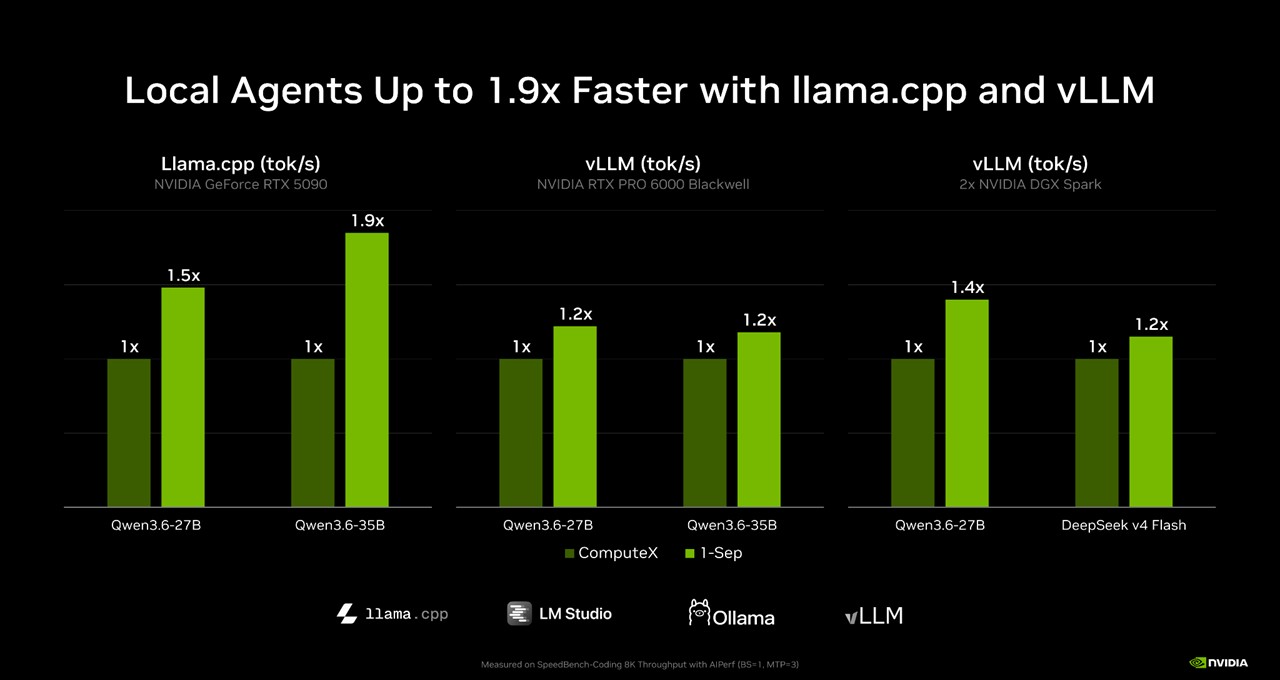
llama.cpp delivers up to 1.9x higher throughput through kernel optimizations on a GeForce RTX 5090, enhanced speculative decoding techniques and faster prefill.
vLLM delivers 1.2x on RTX PRO 6000 Blackwell Workstation Edition and up to 1.4x on two DGX Spark clusters. New XQA attention kernels in FlashInfer and backend optimizations help to accelerate inference across both platforms.
These gains are available on the llama.cpp and vLLM inferencing backends.
Users can also experience these via the LM Studio and Ollama applications.
More than half of U.S. households have two or more PCs, and much of that computing power sits idle throughout the day. NVIDIA Personal AI Router (PAIR) is a free, open source software tool that puts those systems to work together for local AI.
Agentic workflows often break complex tasks into smaller jobs that can run in parallel, but performance can slow when every request is competing for the same GPU. PAIR automatically discovers compatible PCs on a local network and routes independent inference requests to whichever system has capacity. It works with Ollama and LM Studio and can adapt as devices join or leave the network.
For example, a user could ask Hermes to create a “Sunday Reset” plan by sorting through a cluttered inbox and prioritizing what needs attention now, what can wait and what can be skipped. Hermes can split that work across multiple subagents, while PAIR distributes those jobs across available PCs instead of having them all wait on a single GPU.
The result is more compute for local agents, with more tasks running in parallel and the flexibility to move AI workloads to another PC while the main system is being used for gaming, creating or other work.
The NVIDIA PAIR beta is available for Windows, macOS and Linux through both graphical and terminal interfaces, supporting NVIDIA GeForce RTX 20 Series GPUs and newer, NVIDIA RTX PRO workstation GPUs (Turing architecture and newer), NVIDIA DGX Spark and Apple M4 or newer silicon.
Check out the NVIDIA tech blog to get started with NVIDIA PAIR.
Open image and video models enable artists to experiment with Creative AI models on PCs. This enables artists to iterate and explore concepts and ideas, without the dreaded token anxiety and keep more of their creative work private and on-device.
CyberLink’s new PhotoDirector AI PC Mode is one of the first applications to integrate these diffusion models directly into a creative software, and turn them into a creative tool at the finger tips of the artists. Coming to PhotoDirector 365 and optimized for NVIDIA RTX Spark when it launches, AI PC Mode users are getting AI-powered editing tools for generative editing, image enhancement, object and distraction removal, background removal and replacement, portrait refinement and the creation of entirely new visuals — with the flexibility to choose between local or cloud processing, depending on the task.
On NVIDIA GPUs, PhotoDirector uses TensorRT-RTX and FP8 to accelerate local AI.
Start using Cyberlink’s PhotoDirector 365 photo editing software and learn more about PhotoDirector AI PC Mode, launching with RTX Spark in October.
NVIDIA RTX Spark is coming this October— and at IFA 2026, partners are showing off their hardware. At IFA, newly announced designs join the existing six OEMs shipping in October. Acer showed its compact desktop RTX Spark concept, and Lenovo announced its Yoga Pro 9n and Yoga 9n 2-in-1.
RTX Spark is a new beginning for Windows PCs. One PC built for creators, gamers and AI agents. With a powerful 1 Petaflop RTX Blackwell GPU, up to 128GB of unified memory and a highly efficient 20-core Grace CPU, RTX Spark delivers incredible performance and efficiency. This superchip enables high performance thin laptops with all day battery life and compact desktops to power always-on agents. Paired with the new Windows Agent framework, it enables agents that run safely in the background under OS level control.
Last week at Gamescom, Electronic Arts, Embark and Ubisoft were among the latest game publishers and developers bringing their blockbuster titles to NVIDIA RTX Spark Windows PCs. They join the publishers that announced RTX Spark support at COMPUTEX in May, including KRAFTON, NetEase, Riot Games and XBOX. Read more.
Sign up to be notified when RTX Spark laptops and desktops are available.
🎮 NVIDIA Brings New RTX Tech and Games to Gamescom — NVIDIA released DLSS 4.5 Ray Reconstruction, featuring a new second-generation transformer model for improved image quality in ray-traced and path-traced games. Gamescom also brought new RTX announcements for titles including 007 First Light, CONTROL Resonant and Gears of War: E-Day, plus expanded game support for the upcoming NVIDIA RTX Spark.
🐋Introducing DeepSeek Harness — DeepSeek’s new open source harness pairs with DeepSeek-V4-Flash to power local agentic coding workflows on NVIDIA DGX Station and multi-DGX Spark setups.
📊MLPerf Client v2.0 Expands AI PC Benchmarking — MLCommons released MLPerf Client v2.0, developed in collaboration with NVIDIA and other industry leaders. The update adds new benchmarks for agentic AI and image generation, alongside expanded LLM testing for real-world local AI workloads.
Follow NVIDIA RTX Spark on X, Instagram, TikTok and Facebook — and stay informed by subscribing to the NVIDIA Local AI newsletter. Follow NVIDIA Workstation on LinkedIn and X.
See notice regarding software product information.
Less than three months after emerging from stealth, XDOF, a startup that collects real-world teleoperation data for training general-purpose robots, is in late-stage talks to raise a Series B at a valuation of about $1.2 billion valuation led by 8VC, several people with knowledge of the deal said.
XDOF was co-founded by UC Berkeley researchers Philipp Wu (CEO) and Fred Shentu (CTO) in 2024. TechCrunch reported on the startup’s $70 million Series A in June, with participation from Thrive Capital, Andreessen Horowitz, Lux, and Spark Capital. XDOF wasn’t planning to raise again so soon after that round. But the company’s rapid growth — with annualized revenue approaching $50 million — prompted VCs to approach it about a new round, the people said.
TechCrunch was unable to learn the total capital being raised or whether the valuation includes the new funding. The terms of the deal are not final and could still change.
XDOF and 8VC didn’t respond to our request for comment.
The startup aims to build the data pipelines, collection tools, and annotation systems that frontier AI labs and robotics companies can’t easily build themselves, essentially acting as an outsourced data-supply chain for the robotics industry.
As a PhD student, Wu was studying how robots learn from large datasets. One big impediment to his research was the lack of “large-scale data to work with,” he told TechCrunch in June.
So he teamed up with Shentu on a project called GELLO, a low-cost teleoperation system that allows a human operator to control a robotic arm remotely in order to generate training data. Their work led to an influential paper in robotics.
That research formed the foundation for XDOF, which investors now describe as the Scale AI or Mercor for physical robotics, a reference to the data-labeling giants that helped fuel the AI boom. Unlike LLMs, which initially trained on the entirety of the internet, physical robots don’t have an equivalent real-world dataset to draw from, making data collection a critical bottleneck to building general-purpose machines.
XDOF is partnering with UC Berkeley’s AI Research lab to release what it believes is the largest collection of high-quality robot training data ever assembled, dubbed ABC.
To capture this data, XDOF combines remote robot teleoperation with human collectors who wear sensors to record everyday tasks like folding clothes and flattening boxes.
The startup plans to hire and train teams of data collectors worldwide, including teleoperators who steer robots remotely and egocentric operators who wear body sensors to capture movement data.
XDOF previously told TechCrunch that it is already working with 20 customers, including several frontier AI labs.
Other startups attempting to collect real-world data for robot training include Mecka AI, as well as human-data platforms expanding beyond LLMs, such as Scale AI and Micro1.
When you purchase through links in our articles, we may earn a small commission. This doesn’t affect our editorial independence.
Google didn’t really bring the heat with most of the Pixel 11 lineup this year. The base Pixel model and the foldable Pixel 11 Pro Fold are both totally fine, but they don’t stand out among the competition thanks to minor and unremarkable changes.
That’s mostly true for the flagship Pixel 11 Pro as well, but what it lacks in incredible innovations, it makes up for in being a very good, very easy-to-use Android device with excellent cameras. Photography is fun on the Pixel 11 Pro, which is not something I feel about many handsets these days. A combination of hardware and software makes your images consistently look nice, even in challenging lighting conditions.
Between that and acceptable levels of performance and battery life, the new Pro is the smartphone I recommend getting in the Pixel 11 lineup. Just don’t buy it for HiLight.

Nice display.
Credit: René Ramos / Mashable
Despite filling the lede for review with a bunch of praise for the phone, I’m going to pivot right away into something I dislike about it: the starting price. At $1,099, it’s $100 more than the Pixel 10 Pro was at launch. There are some caveats to that, as I’ll cover momentarily, but the fact of the matter is that you can’t get a Pixel 11 Pro for (technically) less than $1,000 anymore. That stinks.
But at least the colors this year are nice: Canyon, Olive, Fog, and Obsidian. I reviewed the Canyon model and I found it pretty easy on the eyes. Here are the basic specs for the Pixel 11 Pro:
Display: 6.3 inches with 1280×2586 resolution, 1-120Hz refresh rate, and 3,600 nits peak brightness
Processor: Google Tensor G6
RAM: 12/16GB
Storage: 256/512GB/1TB
Battery: 4,850mAh
Rear cameras: 50MP main, 48MP ultra-wide, 48MP telephoto
Front camera: 42MP
Alright, so, there are a few things to clarify here. The display’s size and resolution haven’t changed at all since the Pixel 10 Pro, but the peak brightness has, with an extra 300 nits on this year’s device to boost daytime performance. In outdoor usage, I had no problem clearly seeing what was on the screen, so I’d say that little boost did its job. The base Pixel 11 didn’t get the same upgrade, so that’s one of the things you get for the extra money.

Camera bar is a little thick.
Credit: René Ramos / Mashable
One major drawback, though, is that Google has cut the RAM on the lowest-end model to 12GB. Last year, you could get a Pixel 10 Pro with 256GB of storage and 16GB of RAM. This year, the 256GB model is tied to 12GB of RAM, while the 512GB and 1TB models get those four extra gigs of memory. I totally get that we live in the world of RAMageddon, but it still blows to see a phone downgrade year-over-year like that. I guess I should get used to it.
HiLight is a little light module built into the camera bar on Pixel 11 Pro devices. This is supposed to be the one major hardware innovation this year, but I just don’t see it. It only lights up when Gemini is in use or when someone calls you on the phone, two use cases that almost never happen in my life (aside from spam calls). It’s theoretically a decent way to notify the user that something is up when the phone is turned over, but as it is right now, HiLight is a dud.
Lastly, I’ll mention that the camera bar on the Pixel 11 Pro is much bulkier than on the base model. That’s not a huge deal, especially if you put a case on the phone, but it is noticeable if you happen to have used both phones.

HiLight stinks.
Credit: René Ramos / Mashable
I would describe the Pixel 11 Pro as “performant.” Everything loads quickly and smoothly, and on-device AI tasks process in just a few seconds. It’s not outstanding among other flagship smartphones, but these days, it’s almost impossible for everyday performance to do that. Every phone is fast now. It’s great.
Weirdly, the Geekbench 7 benchmarking software didn’t agree with my IRL assessment. The Pixel 11 Pro got stunningly low scores on the test I ran: 1,448 for single-core CPU testing and 4,642 for multi-core testing. That’s multiple thousands of points worse than the base Pixel 11, but I swear there is not a meaningful difference in practical use. Google’s Tensor chips have always underperformed in Geekbench tests, so I’m guessing there’s just something odd happening here that isn’t really reflective of reality.
One nice thing Google does is provide AI feature parity across its entire device lineup each year, and the Pixel 11 series is no different. As with the base Pixel 11 and the Pro Fold, the Pixel 11 Pro will use contextual on-screen prompts, such as a text message someone sent about a restaurant reservation, to surface relevant information or create calendar entries for you. These aren’t exactly life-changing features, but they might save you a little bit of time.
The real AI juice this year is in Magic Capture and Rambler. Magic Capture is a new capture mode built into the Camera app that works the same as recording video, but once you’re done recording, the phone will slice up the video into several clear, pristine still images for you, complete with automatic cropping and unblurring. I have found this great for getting good photos of pigeons around New York City, as they’re fidgety and quick to scatter if you move too suddenly or get too close.

This guy really didn’t want to be my friend.
Credit: Alex Perry / Mashable
I’m as big an AI skeptic as there is, but Magic Capture works for me because it’s genuinely useful and isn’t really trying to replace any of your cognitive functions. It’s not creating new information; it’s just giving you usable still images from videos.
Rambler, meanwhile, is a new function built into Gboard that’s able to clean up your speech-to-text recordings. If you’re prone to “umms” and changing direction mid-sentence, Rambler does a nice job of turning whatever nonsense you give it into a readable sentence. I imagine this will be a godsend for people who like to dictate their text messages.

Who among us doesn’t like lying flat on our faces?
Credit: René Ramos / Mashable
Google rates each Pixel 11 device for 30 hours of battery life, and in my testing, that’s about what I got out of them. The Pixel 11 Pro is no different.
Our testing method involves playing an HD video in full-screen on the device until it dies. Using that rubric, I got about 29.5 hours of juice out of the Pixel 11 Pro. As always, there are plenty of ways to squeeze even more life out of a phone, such as turning off 120Hz support and using battery-saving modes. I am confident you can go more than a full day without charging this phone.
The real reason to get a Pixel 11 Pro (and this is true most years of the Pixel Pro phones) is the camera array. The rear cameras may not wow you with giant megapixel counts, but between the hardware and Google’s patented software magic, it’s so easy for even someone like me who knows nothing about photography to get great photos on a Pixel 11 Pro.
Every photo I took came out looking roughly like this, with clarity, vividness, and great color accuracy.

These won’t be in bloom for long.
Credit: Alex Perry / Mashable

Fall is almost here.
Credit: Alex Perry / Mashable
Night Sight is excellent, too. These plants are nigh-invisible at night, but with Night Sight, it looks like I photographed them during the day.

Left:
No Night Sight.
Credit: Alex Perry / Mashable
Right:
Night Sight.
Credit: Alex Perry / Mashable
I’m always a fan of macro photography, and the Pixel 11 Pro takes pristine shots of things like plants up close and personal.

Macro rocks.
Credit: Alex Perry / Mashable
I’d also like to shout out the digital zoom, which Google upped to 120x this year after it topped out at 100x on Pixel 10 Pro. This has been my favorite parlor trick on Pixel phones for a few years now. It’s really amazing how good photos taken from super far away can look on this device. In the image on the left, you can’t even see the church steeple that’s the subject of the image on the right, but I was standing in the same place, looking in the same direction for both shots.

Nothing to see here, right?
Credit: Alex Perry / Mashable

It’s not perfect, but for 120x zoom, that’s really good.
Credit: Alex Perry / Mashable
Between all of that and the addition of Magic Capture, this is a great phone for photography.
In case it wasn’t clear, if you absolutely must have a phone from the Pixel 11 series and the extra money is not a hurdle for you, I’d recommend the Pixel 11 Pro. It’s just a rock-solid Android phone with a really great photography suite. Sure, HiLight is a bust, and the camera bar is a little bulky relative to the base Pixel 11, but those are compromises that are worth living with if you want the best Pixel 11 phone.

$1,042.31
at Amazon
$1,099
Save $56.69
After a quiet few months, September finally hits the gas, and our list of monthly PC game happenings is filled with brand new adventures, series continuations, 1.0 updates, and events galore. I’m still playing catch-up after Gamescom, and now we’ve got Tokyo Game Show queued up soon. It’s the same schedule every year, but somehow I’m always caught off guard.
The Blood of Dawnwalker kicked off the month with a delightfully dismal vampire RPG from the Witcher veterans at Rebel Wolves. Then you’ve got all month to suck blood as Coen (or be a good two-shoes and abstain, I guess) before Silent Hill: Townfall and Control Resonant launch on the same damn day. It seems everything I’ve been waiting all year to play has crammed into this 4-week window, and that’s not even counting all the big updates.
The Witcher 3 Remastered is easily among the most notable updates, and everyone who owns the original gets the RPG’s makeover for free (along with its DLC). It’ll be my first time playing, so between that and Valheim 1.0, I’ll be plenty busy until 2027.
Latest Videos FromPC Gamer

Andrea Shearon
I’m using this little box to express how September’s crammed calendar has victimized me, specifically. I like broody protagonists, RPGs with kissing, vampires that look like proper monsters, and, well, monsters in general. You would think one of these things could move into October when it’s proper spooky season, but no, I’m gonna have to sit with my FOMO as my colleagues play whatever games from this month’s highlights I have to skip. I’m spoiled by choice here.

Steam | I’ve been loving The Blood of Dawnwalker, but you don’t have to take my broody, vampire-obsessed word for it. Shaun called it “one of best action RPGs [he’s] played in years,” in his Blood of Dawnwalker review.

Steam | I have to say it every time: I still can’t believe we’re in a Silent Hill renaissance. I’m hoping Townfall continues this trend of one banger release after another, and from how Fraser explains his time as Simon in a hellish version of Scotland, it has a chance.

Steam | After years of insisting I would not like Control’s gameplay, I finally beat it last month and ate crow. As it turns out, I’m full of it, and I love everything about Control. While I am a little worried about Dylan’s melee brawling, I’ve learned my lesson and will give little brother Faden a fair shot later this month.

The Witcher 3: Wild Hunt – Remastered
Steam | The Witcher 3 is another RPG I’m late to the party for, but in my defense, it has a very good and very distracting card game. I don’t know how many times I’ve booted up Geralt’s adventure only to play Gwent for ten hours before stopping, but this seems like a good opportunity to break the cycle.


7.56 Update
Final Fantasy 14
Site | Final Fantasy 14 takes another step toward its Evercold expansion with a new job and story quests.

Steam | Valheim declares its survival-crafting vikings are 1.0-ready and adds its long-awaited frozen biome, Deep North, in a big version update.

1.0 Update
RuneScape Dragonwilds
Steam | RuneScape: Dragonwilds also makes the jump to 1.0, but it won’t stop there as Jagex promises to keep the post-launch updates coming.

1.0 Update
Endless Legend 2
Steam | Endless Legend 2 launches version 1.0 with new major, minor, and rogue factions, and it’s all on the heels of a recent mod support update.

Singleplayer Update
Dune: Awakening
Steam | The MMO-lite servers didn’t fare well, but Dune: Awakening has a singleplayer mode on the way that lets you go at the adventure solo from start to finish.
I’ve hit the highlights, but there’s still other new games, updates, and industry events planned for September. Here’s what all of that looks like in a handy, consolidated reference:
|
Date |
Game |
Header Cell – Column 2 |
|---|---|---|
|
September 1 |
WheelMates (Steam) |
🆕 NEW RELEASE |
|
September 2 |
⭐ HIGHLIGHT |
|
|
September 3 |
NBA 2K27 (Steam) |
🆕 NEW RELEASE |
|
September 3 |
BioEden (Steam) |
🆕 NEW RELEASE |
|
September 4 |
PAX West begins |
📌 EVENT |
|
September 4 |
Onimusha: Way of the Sword (Steam) |
🆕 NEW RELEASE |
|
September 8 |
Final Fantasy 14 Patch 7.56 (Site) |
💫 UPDATE |
|
September 8 |
Halloween: The Game (Steam) |
🆕 NEW RELEASE |
|
September 8 |
Sprawl Zero (Steam) |
🆕 NEW RELEASE |
|
September 8 |
Wanderburg (early access) (Steam) |
🆕 NEW RELEASE |
|
September 9 |
BrokenLore: DON’T LIE (Steam) |
🆕 NEW RELEASE |
|
September 9 |
Valheim 1.0 (Steam) |
💫 UPDATE |
|
September 10 |
Dumb Ways to Build (Steam) |
🆕 NEW RELEASE |
|
September 10 |
Shroom and Gloom (Steam) |
🆕 NEW RELEASE |
|
September 10 |
Wardogs (early access) (Steam) |
🆕 NEW RELEASE |
|
September 12 |
Blizzcon begins |
📌 EVENT |
|
September 15 |
Aniimo (Steam) |
🆕 NEW RELEASE |
|
September 15 |
RuneScape: Dragonwilds 1.0 (Steam) |
💫 UPDATE |
|
September 15 |
Fright Train (Steam) |
🆕 NEW RELEASE |
|
September 16 |
Woodo (Steam) |
🆕 NEW RELEASE |
|
September 17 |
Concrete Burial (Steam) |
🆕 NEW RELEASE |
|
September 17 |
Endless Legend 2 1.0 (Steam) |
💫 UPDATE |
|
September 17 |
The Guild – Europa 1410 (early access) (Steam) |
🆕 NEW RELEASE |
|
September 17 |
Trails in the Sky 2nd Chapter (Steam) |
🆕 NEW RELEASE |
|
September 17 |
Trine 6: Together in Time (Steam) |
🆕 NEW RELEASE |
|
September 17 |
Tokyo Game Show begins |
📌 EVENT |
|
September 20 |
PC Gaming Show |
📌 EVENT |
|
September 21 |
Dressmaker (Steam) |
🆕 NEW RELEASE |
|
September 21 |
Echoes of Mora (Steam) |
🆕 NEW RELEASE |
|
September 22 |
Dune: Awakening Singleplayer mode (Steam) |
💫 UPDATE |
|
September 22 |
Graveyard Keeper 2 (Steam) |
🆕 NEW RELEASE |
|
September 22 |
Rivage (Steam) |
🆕 NEW RELEASE |
|
September 22 |
Game Devs of Color Expo begins |
📌 EVENT |
|
September 23 |
Stick it to the Stickman 1.0 (Steam) |
🆕 NEW RELEASE |
|
September 23 |
Wind Runners (Steam) |
🆕 NEW RELEASE |
|
September 24 |
⭐ HIGHLIGHT |
|
|
September 24 |
Dragon Shelter (Steam) |
🆕 NEW RELEASE |
|
September 24 |
⭐ HIGHLIGHT |
|
|
September 29 |
Toem 2 (Steam) |
🆕 NEW RELEASE |
|
September 29 |
Minecraft Dungeons 2 (Steam) |
🆕 NEW RELEASE |
|
September 29 |
Nivalis Nights (Steam) |
🆕 NEW RELEASE |
|
September 29 |
The Witcher 3: Wild Hunt Remastered (Trailer) |
⭐ HIGHLIGHT |
|
September TBD |
Deadlock patch (Steam) |
💫 UPDATE |

Most founders spend their first few weeks on business registration, branding, and getting a website up. Security doesn’t cross their minds until something breaks. But one compromised email or leaked customer file can undo months of progress. The five things covered here don’t need technical know-how and you can knock them all out in a single afternoon.
You’ve heard it before: don’t reuse passwords. But when you’re creating a dozen accounts in your first week, it’s easy to fall back on the same one you’ve had since uni.
A password manager fixes this. Tools like Bitwarden or 1Password will generate long, random passwords for every account and keep them behind one master passphrase. Set it up on day one and add each new account as you go. That one habit alone will block the most common way attackers get in.
Passwords on their own aren’t enough. Two-factor authentication (2FA) adds a second check at login, typically a short code from an app on your phone. So even if someone gets your password, they still can’t access your account without that code.
Start with your email, then your bank, payment processor, and anywhere you store customer data. The Cybersecurity and Infrastructure Security Agency (CISA) lists multi-factor authentication as one of the top actions a small business can take. Most services support it now, and it’ll take about two minutes per account to switch on.
Your business email is the key to pretty much everything else. Password resets, invoices, contracts, customer conversations. If someone gets into your inbox, they can reset passwords on your other accounts, intercept payments, or pretend to be you when emailing clients.
On top of 2FA (which you should already have turned on by now), be careful with links and attachments, even from people you know. Set up email filtering if your provider offers it. And if you’re still running things through a free personal email address, consider switching to a provider with custom domains and better spam protection. You’ll look more professional and have better control over security.
This is where a lot of new founders trip up. They’ll save contracts, financial records, and customer details in whatever cloud folder came with their email, without thinking about how that data is actually protected. Most consumer cloud storage providers can technically access your files because they hold the encryption keys. That’s fine for photos, but not when you’re storing business documents.
End-to-end encrypted online storage keeps your files locked so only you can decrypt them. The provider can’t read what you’ve uploaded. Several privacy-focused providers offer free tiers with enough space for the early months.
If your laptop gets nicked from a coffee shop or your phone falls out of your pocket on the bus, encryption is what stops someone from reading your files. Without it, anyone with physical access to your device can pull data straight off the hard drive.
Windows has BitLocker and Mac has FileVault, both built in and both can be turned on in your settings in under five minutes. Do the same for your phone. Modern iPhones and Android devices encrypt by default when you set a passcode, but double-check that it’s active. It costs nothing and could save you if things go wrong.
These five steps won’t make your business bulletproof, but they’ll put you ahead of most early-stage founders. The FBI’s Internet Crime Complaint Center reported over $16 billion in total cybercrime losses in 2024, with small businesses disproportionately targeted because attackers know their defences tend to be weaker.
Once you’ve covered passwords, 2FA, email security, device encryption, and secure file storage, you’ll have a solid baseline to build on as your business grows. Block out a couple of hours this week and get it done.
Being your own boss is great until you have to deal with a bank. The moment your income stops looking like a steady paycheck, a lot of financial institutions start treating you like a risk instead of a customer. If you’ve ever tried to get a loan approved with a year of uneven 1099 income, you know the feeling: the numbers are fine, but the system doesn’t know what to do with you. For self-employed people, a credit union often handles that situation far better than a big bank does.
The reason comes down to how each type of institution is built, and who it was built to serve.
The large national banks run on scale, and scale means automation. Their systems are optimized for the most common customer, someone with a W-2, a predictable paycheck, and a tidy financial profile that an algorithm can approve in seconds. That’s efficient, and if you fit the mold, it works fine.
The trouble is that self-employment doesn’t fit the mold. Your income arrives in irregular chunks. Some months are strong, some are thin, and a good year can still look messy on paper. When an automated system hits a file like that, it often does the safe thing and says no, or buries you in documentation requests a salaried applicant never has to deal with. It isn’t personal. It’s just that nobody at the bank is actually looking at your situation.
This is where a credit union earns its keep for the self-employed. Because they’re smaller and member-focused, credit unions are more likely to put a human being on a file that doesn’t fit the standard template. A person can understand that two years of solid self-employment income, even if it’s uneven, is not the same as instability. An algorithm usually can’t.
A local California credit union like Wescom Financial, which serves members across the state, is the kind of institution where that human review is more likely to happen. For a self-employed borrower applying for a mortgage, an auto loan, or a personal line of credit, that difference can be what gets you approved on terms that actually reflect your situation. You’re a member with a relationship, not an application in a queue.
None of this means you skip the paperwork. You’ll still need to document your income properly. But there’s a real difference between an institution looking for a reason to say yes and one looking for a reason to say no.
Early in self-employment, every dollar counts, and the small fees a big bank charges without thinking add up faster when your income is lumpy. This is the other place a credit union tends to help. As member-owned, not-for-profit institutions, they generally run leaner on fees:
For someone drawing an unpredictable income, keeping those costs low isn’t trivial. It’s the difference between an account that works with your cash flow and one that punishes it.
I’ll be straight about the limits, because a credit union isn’t a cure-all. If you need genuine business banking, business loans, merchant services, or commercial accounts, a consumer-focused credit union won’t cover all of it, and you may still need a separate provider for the business side. There’s also the membership requirement, though for most people it’s a quick step, and a smaller branch footprint if you travel constantly.
So keep the distinction clear. For the personal side of a self-employed life, the checking, the savings, the personal loans, the mortgage, a credit union is often the better home. For a complex business operation, you may need more. The smart move for a lot of solopreneurs is to use each for what it does well, rather than expecting one institution to do everything.
The through-line is simple enough. Self-employment makes you harder for an automated system to read, and a credit union is more willing to read you as a person. If you’ve been fighting your bank every time your income doesn’t look like everyone else’s, it’s worth seeing how a member-owned institution treats the same numbers. The paperwork won’t disappear, but the reception on the other end tends to be a lot warmer.
Find a Home-Based Business to Start-Up >>> Hundreds of Business Listings.
Other deals among WIRED-recommended grills include $50 off a couple of Weber’s durable, last-you-forever standbys—the Weber Kettle and the Weber Spirit E-210. I and fellow WIRED reviewer Scott Gilbertson tend to love these two models precisely because they are basic, durable, reliable, and low-cost. The Weber Kettle, especially, can be upgraded with smart features into a temp-controlled, smart-charcoal beast.
This $50 off deal tends to be the standard Weber deal. But the price already starts out affordable, and so the sale price amounts to an excellent value on a grill that’s likely to be with you a while. If you’d like your kettle in green, you can get it for half off, a mere $100.

Photograph: Scott Gilbertson
Milwaukee
Buying power tools is all about picking an ecosystem (and a battery pack). WIRED reviewer Scott Gilbertson favors Milwaukee for its intersection between reliability and value, and for tentpole sales Home Depot usually offers free battery packs or buy-one-get one deals.
One of the best and most versatile tools Gilbertson recommends is Milwaukee’s excellent impact driver ($179). Lucky you: During the Labor Day sale, this comes free with the purchase of the portable M18 battery you’ll need to operate it wirelessly. If you’ve already got a Milwaukee battery, the BOGO still holds for an assortment of tools including an oscillating multi-tool that’s also one of the more underrated tools in the DIYer home kit.
Ryobi is the brand that former WIRED reviewer Parker Hall has consistently recommended for yard and landscaping tools, in large part because of their service philosophy. In many regions including mine (the Pacific Northwest), Ryobi keeps a local repair technician on retainer to come and fix your mower or blower, instead of making you ship your machine to a repair center somewhere. This is clutch, even if you won’t have to use the service often.
Home Depot is offering its usual BOGO battery deals on Ryobi’s landscaping tools, including the heavy-duty leaf blower ($159) you’re going to need sooner than you expect.
For entry-level tool kits, my colleague Kat Merck also recommends this shockingly low-cost starter power tool kit from Ryobi—which is not going to make you the envy of any job site, but offers great value and torque for the money. This set offers a ½-inch drill/driver, an impact driver, a circular saw, and an LED light. There’s also another discount kit with a sander, drill/driver, and circular saw.

Ryobi
My editor, Kat Merck, is a DeWalt devotee. But the DeWalt Deals are a bit more specialized this season. There’s still a few good BOGO offers, though, especially if you’re in the market for a circular saw or angle grinder, or a hammer drill kit to carve holes into masonry.
Power up with unlimited access to WIRED. Get best-in-class reporting and exclusive subscriber content that’s too important to ignore. Subscribe Today.

Look forward to the most comprehensive and advanced bus fleet in the history of the series so far. More than 45 officially licensed buses from 13 world-famous manufacturers, such as Solaris™, Mercedes-Benz, MAN, IVECO BUS, Scania, and Volvo, are waiting for you to drive. Whether you are interested in classic rigid, articulated, and double-decker buses or in new electric buses Bus Simulator 27 has got you covered. And for the first time ever in the series, you can get behind the wheel of impressive coach buses and enjoy long-distance journeys! SpeedRunners 2: King of Speed
Felicia Bay is the perfect place to work where others go on vacation – a sunny fictive region in Southern Europe inspired by Spain and Portugal. Explore the vibrant twin cities of Alcaztelar and Mequina, featuring 20 unique districts packed with exciting landmarks all brought to life by dynamic weather, a full day and night cycle, and bustling, crowded streets powered by Unreal® Engine 5. Create and serve routes, manage timetables, hire bus drivers, assign lines, customize buses with wraps and advertisements, and restore faith in public transportation in the local residents and visiting tourists.
Features:
BIGGEST BUS FLEET YET: 45+ buses from 13 renowned manufacturers
NEW BUS TYPE: Drive licensed coach buses
ONLY YOU: Enjoy the game at your pace
WITH FRIENDS: cooperatively with up to 4 players
FULL CROSSPLAY: No one is left behind
ONLINE COOP: No one is left behind
3 GAME MODES: Story, Career, & Sandbox
1 :: Download Game
2 :: Extract Game
3 :: Launch The Game
4 :: Have Fun 🙂